To avoid damage to the machine, do not block the air intake or outlet while the machine is running.
!
Warning
User Manual
PACKAGE LIST
/////
PRODUCT SPECIFICATIONS
/////
INSTALL THE AIR NOZZLE
/////
CHARGING INSTRUCTIONS
/////
1. Connect the USB-A end of the cable to a 5V/2A power adapter.
2. Plug the Type-C end into the device’s charging port.
3. Charging takes approximately 3 hours.
4. A light indicator will signal when fully charged
Noise Level: ≤80 dB(A)
Battery Type: Lithium Battery (2x3000mAh)
Charging Voltage/Current: DC 5V / 2A
Rated Power: Max 150W
Charging Time: Approx. 3 hours
Usage Time:
-Low: Up to 60 minutes
-Medium: Up to 25 minutes
-High: Up to 15 minutes
INDICATOR LIGHTS
/////
TROUBLESHOOTING
/////
Issue
Possible Cause Solution
Not turning on Battery not charged Charge the unit fully
Weak airflow
Low battery or nozzle blockage Recharge or clean nozzle
Short operation time
Running on high speed Use lower speed for
extended use
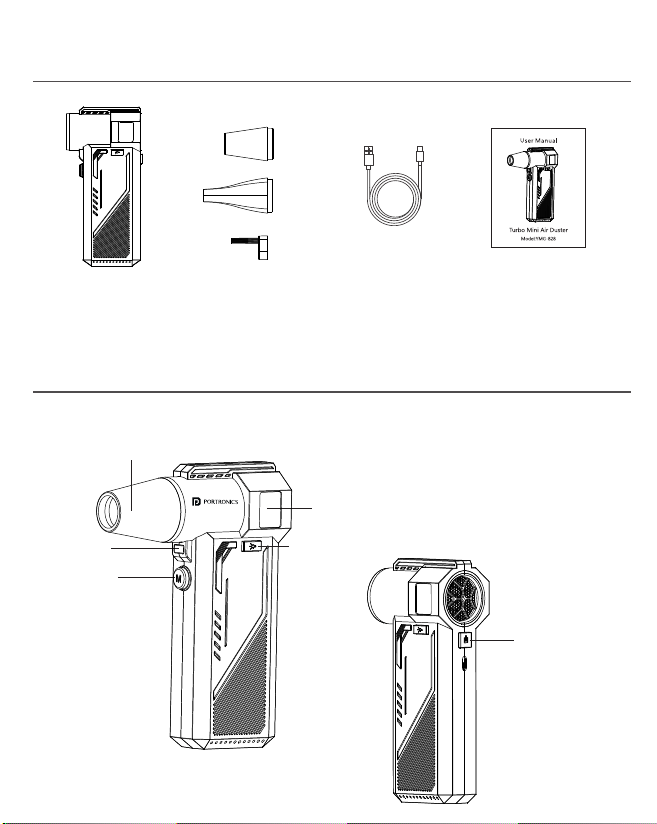
Nozzle
LED Light
Mode Button
Display Screen
LED Light Button
Power Button
Tornado Pro 3x Nozzles User Manual
Charging Cable
TORNADO PRO
Handheld High-Speed Air Duster
SAFETY PRECAUTIONS
/////
To avoid the risk of fire, property damage, or personal injury, please
observe the following safety precautions when using this product:
-Do not use this product with wet hands.
-Do not place this product in environments with splashing water or
immerse it in water.
-Do not block the air outlet or air inlet while the product is in use.
-Do not insert foreign objects into the air outlet or air inlet.
-Do not place this product near heat sources such as stoves.
-Do not use this product near gas stations, petroleum gas, or other
flammable products such as paint thinner, volatile agents, or sprays,
as it may cause an explosion or fire.
-Do not drop or collide with the product, as this may cause damage
and abnormal operation.
-Do not forcefully pull, twist, squeeze, or modify the charging cable. If
the charging cable is abnormally heated or damaged, stop using it
immediately.
-If the product makes abnormal noise, produces an odor, becomes
too hot, or if the fan blades do not rotate normally, stop using it
immediately.
-Do not disassemble the product. Accidental disassembly may
cause abnormal operation.
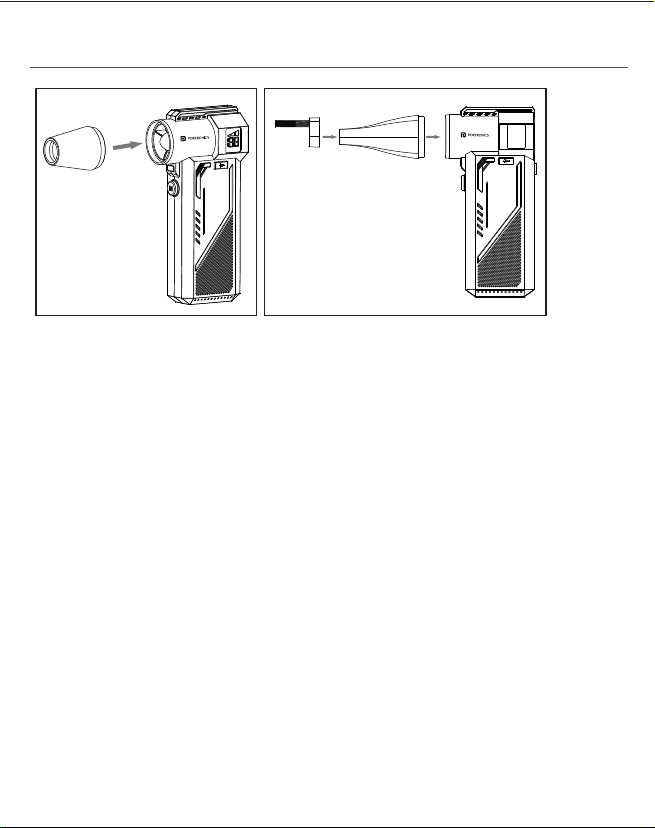
1. Install the Air Nozzle
Align the air nozzle (or brush attachment) with the slot on the device.
Insert it firmly in the direction shown in the illustration.
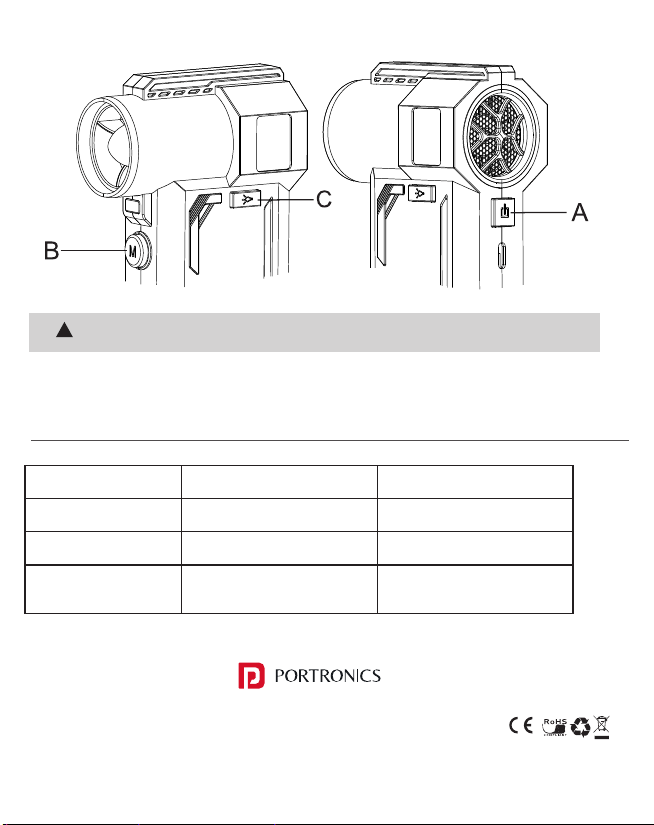
2. Power On/Off
Press the Power Button (A) to turn on the display.
Press the Power Button (A) again to shut down.
3. Adjust the Air Speed
After pressing Button (A), press the Mode Button (B) to turn it on
& switch between different speed levels (gears).
4. Turn On the LED Light
Press the LED Light Button (C) to switch the light on or off.
Solid (constant):Device is working / Charging complete
Flashing: Low battery / About to shut down
Slow blinking: Device is charging
E-Waste Management
For E-Waste & ROHS compliance
refer to www.portronics.com/ewaste
www.portronics.com
For Support
Visit : www.portronics.com
Contact No. : +91 9555245245
(Working Hrs. : Monday - Saturday 10:00am - 6:00pm)

To avoid damage to the machine, do not block the air intake or outlet while the machine is running.
!
Warning
User Manual
PACKAGE LIST
/////
PRODUCT SPECIFICATIONS
/////
INSTALL THE AIR NOZZLE
/////
CHARGING INSTRUCTIONS
/////
1. Connect the USB-A end of the cable to a 5V/2A power adapter.
2. Plug the Type-C end into the device’s charging port.
3. Charging takes approximately 3 hours.
4. A light indicator will signal when fully charged
Noise Level: ≤80 dB(A)
Battery Type: Lithium Battery (2x3000mAh)
Charging Voltage/Current: DC 5V / 2A
Rated Power: Max 150W
Charging Time: Approx. 3 hours
Usage Time:
-Low: Up to 60 minutes
-Medium: Up to 25 minutes
-High: Up to 15 minutes
INDICATOR LIGHTS
/////
TROUBLESHOOTING
/////
Issue
Possible Cause Solution
Not turning on Battery not charged Charge the unit fully
Weak airflow
Low battery or nozzle blockage Recharge or clean nozzle
Short operation time
Running on high speed Use lower speed for
extended use
Nozzle
LED Light
Mode Button
Display Screen
LED Light Button
Power Button
Tornado Pro 3x Nozzles User Manual
Charging Cable
TORNADO PRO
Handheld High-Speed Air Duster
SAFETY PRECAUTIONS
/////
To avoid the risk of fire, property damage, or personal injury, please
observe the following safety precautions when using this product:
-Do not use this product with wet hands.
-Do not place this product in environments with splashing water or
immerse it in water.
-Do not block the air outlet or air inlet while the product is in use.
-Do not insert foreign objects into the air outlet or air inlet.
-Do not place this product near heat sources such as stoves.
-Do not use this product near gas stations, petroleum gas, or other
flammable products such as paint thinner, volatile agents, or sprays,
as it may cause an explosion or fire.
-Do not drop or collide with the product, as this may cause damage
and abnormal operation.
-Do not forcefully pull, twist, squeeze, or modify the charging cable. If
the charging cable is abnormally heated or damaged, stop using it
immediately.
-If the product makes abnormal noise, produces an odor, becomes
too hot, or if the fan blades do not rotate normally, stop using it
immediately.
-Do not disassemble the product. Accidental disassembly may
cause abnormal operation.
1. Install the Air Nozzle
Align the air nozzle (or brush attachment) with the slot on the device.
Insert it firmly in the direction shown in the illustration.
2. Power On/Off
Press the Power Button (A) to turn on the display.
Press the Power Button (A) again to shut down.
3. Adjust the Air Speed
After pressing Button (A), press the Mode Button (B) to turn it on
& switch between different speed levels (gears).
4. Turn On the LED Light
Press the LED Light Button (C) to switch the light on or off.
Solid (constant):Device is working / Charging complete
Flashing: Low battery / About to shut down
Slow blinking: Device is charging
E-Waste Management
For E-Waste & ROHS compliance
refer to www.portronics.com/ewaste
www.portronics.com
For Support
Visit : www.portronics.com
Contact No. : +91 9555245245
(Working Hrs. : Monday - Saturday 10:00am - 6:00pm)
To avoid damage to the machine, do not block the air intake or outlet while the machine is running.
!
Warning
User Manual
PACKAGE LIST
/////
PRODUCT SPECIFICATIONS
/////
INSTALL THE AIR NOZZLE
/////
CHARGING INSTRUCTIONS
/////
1. Connect the USB-A end of the cable to a 5V/2A power adapter.
2. Plug the Type-C end into the device’s charging port.
3. Charging takes approximately 3 hours.
4. A light indicator will signal when fully charged
Noise Level: ≤80 dB(A)
Battery Type: Lithium Battery (2x3000mAh)
Charging Voltage/Current: DC 5V / 2A
Rated Power: Max 150W
Charging Time: Approx. 3 hours
Usage Time:
-Low: Up to 60 minutes
-Medium: Up to 25 minutes
-High: Up to 15 minutes
INDICATOR LIGHTS
/////
TROUBLESHOOTING
/////
Issue
Possible Cause Solution
Not turning on Battery not charged Charge the unit fully
Weak airflow
Low battery or nozzle blockage Recharge or clean nozzle
Short operation time
Running on high speed Use lower speed for
extended use
Nozzle
LED Light
Mode Button
Display Screen
LED Light Button
Power Button
Tornado Pro 3x Nozzles User Manual
Charging Cable
TORNADO PRO
Handheld High-Speed Air Duster
SAFETY PRECAUTIONS
/////
To avoid the risk of fire, property damage, or personal injury, please
observe the following safety precautions when using this product:
-Do not use this product with wet hands.
-Do not place this product in environments with splashing water or
immerse it in water.
-Do not block the air outlet or air inlet while the product is in use.
-Do not insert foreign objects into the air outlet or air inlet.
-Do not place this product near heat sources such as stoves.
-Do not use this product near gas stations, petroleum gas, or other
flammable products such as paint thinner, volatile agents, or sprays,
as it may cause an explosion or fire.
-Do not drop or collide with the product, as this may cause damage
and abnormal operation.
-Do not forcefully pull, twist, squeeze, or modify the charging cable. If
the charging cable is abnormally heated or damaged, stop using it
immediately.
-If the product makes abnormal noise, produces an odor, becomes
too hot, or if the fan blades do not rotate normally, stop using it
immediately.
-Do not disassemble the product. Accidental disassembly may
cause abnormal operation.
1. Install the Air Nozzle
Align the air nozzle (or brush attachment) with the slot on the device.
Insert it firmly in the direction shown in the illustration.
2. Power On/Off
Press the Power Button (A) to turn on the display.
Press the Power Button (A) again to shut down.
3. Adjust the Air Speed
After pressing Button (A), press the Mode Button (B) to turn it on
& switch between different speed levels (gears).
4. Turn On the LED Light
Press the LED Light Button (C) to switch the light on or off.
Solid (constant):Device is working / Charging complete
Flashing: Low battery / About to shut down
Slow blinking: Device is charging
E-Waste Management
For E-Waste & ROHS compliance
refer to www.portronics.com/ewaste
www.portronics.com
For Support
Visit : www.portronics.com
Contact No. : +91 9555245245
(Working Hrs. : Monday - Saturday 10:00am - 6:00pm)

To avoid damage to the machine, do not block the air intake or outlet while the machine is running.
!
Warning
User Manual
PACKAGE LIST
/////
PRODUCT SPECIFICATIONS
/////
INSTALL THE AIR NOZZLE
/////
CHARGING INSTRUCTIONS
/////
1. Connect the USB-A end of the cable to a 5V/2A power adapter.
2. Plug the Type-C end into the device’s charging port.
3. Charging takes approximately 3 hours.
4. A light indicator will signal when fully charged
Noise Level: ≤80 dB(A)
Battery Type: Lithium Battery (2x3000mAh)
Charging Voltage/Current: DC 5V / 2A
Rated Power: Max 150W
Charging Time: Approx. 3 hours
Usage Time:
-Low: Up to 60 minutes
-Medium: Up to 25 minutes
-High: Up to 15 minutes
INDICATOR LIGHTS
/////
TROUBLESHOOTING
/////
Issue
Possible Cause Solution
Not turning on Battery not charged Charge the unit fully
Weak airflow
Low battery or nozzle blockage Recharge or clean nozzle
Short operation time
Running on high speed Use lower speed for
extended use
Nozzle
LED Light
Mode Button
Display Screen
LED Light Button
Power Button
Tornado Pro 3x Nozzles User Manual
Charging Cable
TORNADO PRO
Handheld High-Speed Air Duster
SAFETY PRECAUTIONS
/////
To avoid the risk of fire, property damage, or personal injury, please
observe the following safety precautions when using this product:
-Do not use this product with wet hands.
-Do not place this product in environments with splashing water or
immerse it in water.
-Do not block the air outlet or air inlet while the product is in use.
-Do not insert foreign objects into the air outlet or air inlet.
-Do not place this product near heat sources such as stoves.
-Do not use this product near gas stations, petroleum gas, or other
flammable products such as paint thinner, volatile agents, or sprays,
as it may cause an explosion or fire.
-Do not drop or collide with the product, as this may cause damage
and abnormal operation.
-Do not forcefully pull, twist, squeeze, or modify the charging cable. If
the charging cable is abnormally heated or damaged, stop using it
immediately.
-If the product makes abnormal noise, produces an odor, becomes
too hot, or if the fan blades do not rotate normally, stop using it
immediately.
-Do not disassemble the product. Accidental disassembly may
cause abnormal operation.
1. Install the Air Nozzle
Align the air nozzle (or brush attachment) with the slot on the device.
Insert it firmly in the direction shown in the illustration.
2. Power On/Off
Press the Power Button (A) to turn on the display.
Press the Power Button (A) again to shut down.
3. Adjust the Air Speed
After pressing Button (A), press the Mode Button (B) to turn it on
& switch between different speed levels (gears).
4. Turn On the LED Light
Press the LED Light Button (C) to switch the light on or off.
Solid (constant):Device is working / Charging complete
Flashing: Low battery / About to shut down
Slow blinking: Device is charging
E-Waste Management
For E-Waste & ROHS compliance
refer to www.portronics.com/ewaste
www.portronics.com
For Support
Visit : www.portronics.com
Contact No. : +91 9555245245
(Working Hrs. : Monday - Saturday 10:00am - 6:00pm)
To avoid damage to the machine, do not block the air intake or outlet while the machine is running.
!
Warning
User Manual
PACKAGE LIST
/////
PRODUCT SPECIFICATIONS
/////
INSTALL THE AIR NOZZLE
/////
CHARGING INSTRUCTIONS
/////
1. Connect the USB-A end of the cable to a 5V/2A power adapter.
2. Plug the Type-C end into the device’s charging port.
3. Charging takes approximately 3 hours.
4. A light indicator will signal when fully charged
Noise Level: ≤80 dB(A)
Battery Type: Lithium Battery (2x3000mAh)
Charging Voltage/Current: DC 5V / 2A
Rated Power: Max 150W
Charging Time: Approx. 3 hours
Usage Time:
-Low: Up to 60 minutes
-Medium: Up to 25 minutes
-High: Up to 15 minutes
INDICATOR LIGHTS
/////
TROUBLESHOOTING
/////
Issue
Possible Cause Solution
Not turning on Battery not charged Charge the unit fully
Weak airflow
Low battery or nozzle blockage Recharge or clean nozzle
Short operation time
Running on high speed Use lower speed for
extended use
Nozzle
LED Light
Mode Button
Display Screen
LED Light Button
Power Button
Tornado Pro 3x Nozzles User Manual
Charging Cable
TORNADO PRO
Handheld High-Speed Air Duster
SAFETY PRECAUTIONS
/////
To avoid the risk of fire, property damage, or personal injury, please
observe the following safety precautions when using this product:
-Do not use this product with wet hands.
-Do not place this product in environments with splashing water or
immerse it in water.
-Do not block the air outlet or air inlet while the product is in use.
-Do not insert foreign objects into the air outlet or air inlet.
-Do not place this product near heat sources such as stoves.
-Do not use this product near gas stations, petroleum gas, or other
flammable products such as paint thinner, volatile agents, or sprays,
as it may cause an explosion or fire.
-Do not drop or collide with the product, as this may cause damage
and abnormal operation.
-Do not forcefully pull, twist, squeeze, or modify the charging cable. If
the charging cable is abnormally heated or damaged, stop using it
immediately.
-If the product makes abnormal noise, produces an odor, becomes
too hot, or if the fan blades do not rotate normally, stop using it
immediately.
-Do not disassemble the product. Accidental disassembly may
cause abnormal operation.
1. Install the Air Nozzle
Align the air nozzle (or brush attachment) with the slot on the device.
Insert it firmly in the direction shown in the illustration.
2. Power On/Off
Press the Power Button (A) to turn on the display.
Press the Power Button (A) again to shut down.
3. Adjust the Air Speed
After pressing Button (A), press the Mode Button (B) to turn it on
& switch between different speed levels (gears).
4. Turn On the LED Light
Press the LED Light Button (C) to switch the light on or off.
Solid (constant):Device is working / Charging complete
Flashing: Low battery / About to shut down
Slow blinking: Device is charging
E-Waste Management
For E-Waste & ROHS compliance
refer to www.portronics.com/ewaste
www.portronics.com
For Support
Visit : www.portronics.com
Contact No. : +91 9555245245
(Working Hrs. : Monday - Saturday 10:00am - 6:00pm)
To avoid damage to the machine, do not block the air intake or outlet while the machine is running.
!
Warning
User Manual
PACKAGE LIST
/////
PRODUCT SPECIFICATIONS
/////
INSTALL THE AIR NOZZLE
/////
CHARGING INSTRUCTIONS
/////
1. Connect the USB-A end of the cable to a 5V/2A power adapter.
2. Plug the Type-C end into the device’s charging port.
3. Charging takes approximately 3 hours.
4. A light indicator will signal when fully charged
Noise Level: ≤80 dB(A)
Battery Type: Lithium Battery (2x3000mAh)
Charging Voltage/Current: DC 5V / 2A
Rated Power: Max 150W
Charging Time: Approx. 3 hours
Usage Time:
-Low: Up to 60 minutes
-Medium: Up to 25 minutes
-High: Up to 15 minutes
INDICATOR LIGHTS
/////
TROUBLESHOOTING
/////
Issue
Possible Cause Solution
Not turning on Battery not charged Charge the unit fully
Weak airflow
Low battery or nozzle blockage Recharge or clean nozzle
Short operation time
Running on high speed Use lower speed for
extended use
Nozzle
LED Light
Mode Button
Display Screen
LED Light Button
Power Button
Tornado Pro 3x Nozzles User Manual
Charging Cable
TORNADO PRO
Handheld High-Speed Air Duster
SAFETY PRECAUTIONS
/////
To avoid the risk of fire, property damage, or personal injury, please
observe the following safety precautions when using this product:
-Do not use this product with wet hands.
-Do not place this product in environments with splashing water or
immerse it in water.
-Do not block the air outlet or air inlet while the product is in use.
-Do not insert foreign objects into the air outlet or air inlet.
-Do not place this product near heat sources such as stoves.
-Do not use this product near gas stations, petroleum gas, or other
flammable products such as paint thinner, volatile agents, or sprays,
as it may cause an explosion or fire.
-Do not drop or collide with the product, as this may cause damage
and abnormal operation.
-Do not forcefully pull, twist, squeeze, or modify the charging cable. If
the charging cable is abnormally heated or damaged, stop using it
immediately.
-If the product makes abnormal noise, produces an odor, becomes
too hot, or if the fan blades do not rotate normally, stop using it
immediately.
-Do not disassemble the product. Accidental disassembly may
cause abnormal operation.
1. Install the Air Nozzle
Align the air nozzle (or brush attachment) with the slot on the device.
Insert it firmly in the direction shown in the illustration.
2. Power On/Off
Press the Power Button (A) to turn on the display.
Press the Power Button (A) again to shut down.
3. Adjust the Air Speed
After pressing Button (A), press the Mode Button (B) to turn it on
& switch between different speed levels (gears).
4. Turn On the LED Light
Press the LED Light Button (C) to switch the light on or off.
Solid (constant):Device is working / Charging complete
Flashing: Low battery / About to shut down
Slow blinking: Device is charging
E-Waste Management
For E-Waste & ROHS compliance
refer to www.portronics.com/ewaste
www.portronics.com
For Support
Visit : www.portronics.com
E mail : [email protected]
Contact No. : +91 9555245245
(Working Hrs. : Monday - Saturday 10:00am - 6:00pm)