
KSTB4134
The information presented in this document is subject to change. We reserve the right, without prior notice, to
make changes in the design of the product or performance due to advances in technology and/or reasons of force
majeure, market conditions or contractual aspects.
Safety Precaustions
This decoder was manufactured in accordance with international safety standards. Please read the following
recommended safety precautions carefully.
POWER SUPPLY: Alternating Current (AC) 100~240V 50/60Hz
LOCATION: Place the decoder indoors. Keep the receiver away from potential hazards such as household
plants, lighting, rain and direct exposure to sunlight.
OVERLOAD: Do not overload wall outlets, extension cords or adaptors, as they can cause fires or electric
shocks.
LIQUIDS: Do not expose the unit to drips or splashes of water and make sure no objects containing liquid, such
as glasses, are placed on the unit.
CLEANING: Before cleaning the decoder, disconnect it from the wall outlet. Use a soft cloth lightly dampened
with water (no solvents) to clean the exterior.
VENTILATION: Do not cover the ventilation openings of the decoder. Make sure there is free ventilation around
the decoder. Never place the decoder on soft accessories or carpets. Do not use or store the receiver in places
exposed to sunlight or near heaters. Do not place other electronic equipment on top of the decoder. Place the
receiver at least 30mm from the wall.
DEVICES: Do not use any other device that is not recommended by the manufacturer, as it may be dangerous or
could cause damage to the equipment.
MAINTENANCE: Do not attempt to repair the product. Any attempt to repair it will invalidate the warranty. All
repairs must be carried out by our qualified customer service staff.
INSTALLATION
1. Connect the coaxial cable
Connect the coaxial cable to the COAX-IN port located on the rear of your decoder (see rear panel 1).
2. Connect the HDMI cable
Connect one end of the HDMI cable to the HDMI port (see rear panel 2).
INITIAL CONFIGURATION
The equipment has an installation menu which is visible at the time of installation of the decoder or after each use
of "Restore factory settings” through the menu. This installation menu allows you to configure the following
options:
1. Language: Select the language to be used in the user interface.
2. Select your country: The network parameters are automatically configured according to the selected country
3. Channel Scan: The channel scan starts.
4. “Update channel list”: The channel list will be updated with the scanned channels
Menu
To view the main menu 1. Press the Home button or 2. Press the left button while watching live channels
Basic Functions
1. Program Information: Press the Info button or the Down button to see the information of the channel you are
watching
2. Channel List: Press the OK button to see the list of channels, while watching live channels
3. Audio/Subtitle: Press the Audio/Subtitle button or Right button to configure Audio/Subtitle of the channel you
are watching.
Program Guide
1. Press the Guide button or Select the menu Settings Guide to access the program guide
2. Press the OK button on the program to tune the channel
Favorites
1. Press the FAV button to access the favorite channels
2. If there is no favorite channel, you will be redirected to the page to add favorite channels.
Parent Control
1. All adult channels are blocked by default
2. Events that are in the adult content category are also blocked by default
3. The default PIN to unblock a channel or an adult event is: 4321
To make changes in the configuration, Select the menu Settings System Parental Control
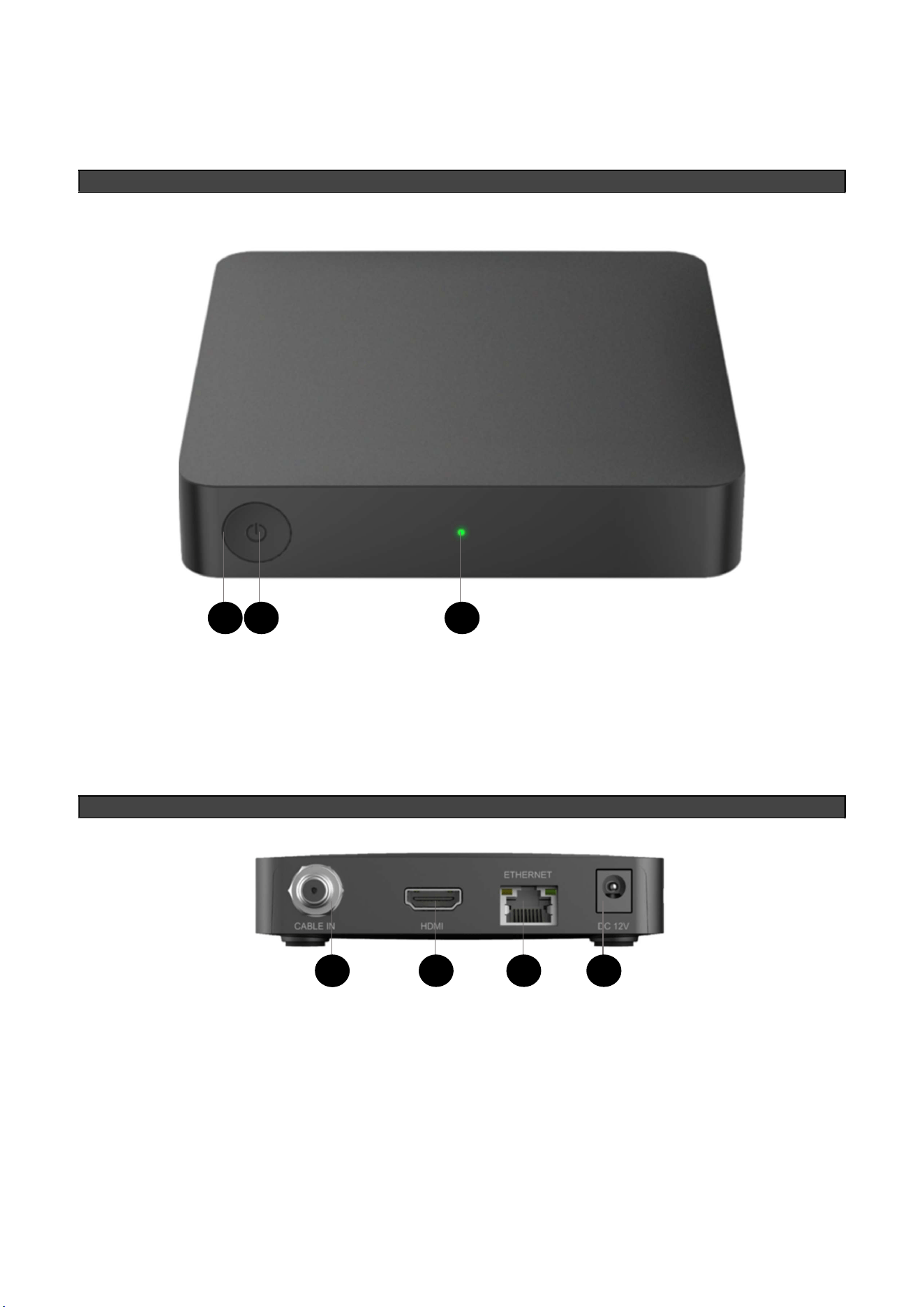
Front Panel
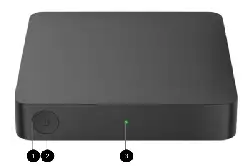
1. INFRARED SENSOR: This element is to receive commands from the Remote Control, do not block it to allow
proper interaction with the decoder.
2. POWER: This key is used to turn on and off the decoder (put it in Active or Passive stand by mode).
3. INDICATOR LIGHT: Green light color indicates equipment is on, Red light color indicates Active Stand By,
LED off indicates Passive Stand By or disconnected.
Rear Panel
1. CABLE IN: RF signal input, here connects the coaxial cable that the television operator provides.
2. HDMI: High definition output to connect to the TV on the HDMI input.
3. Ethernet: Port to connect Ethernet cables
4. POWER SUPPLY: Port to connect the decoder power adapter.
1
2
3
1
2
3
4
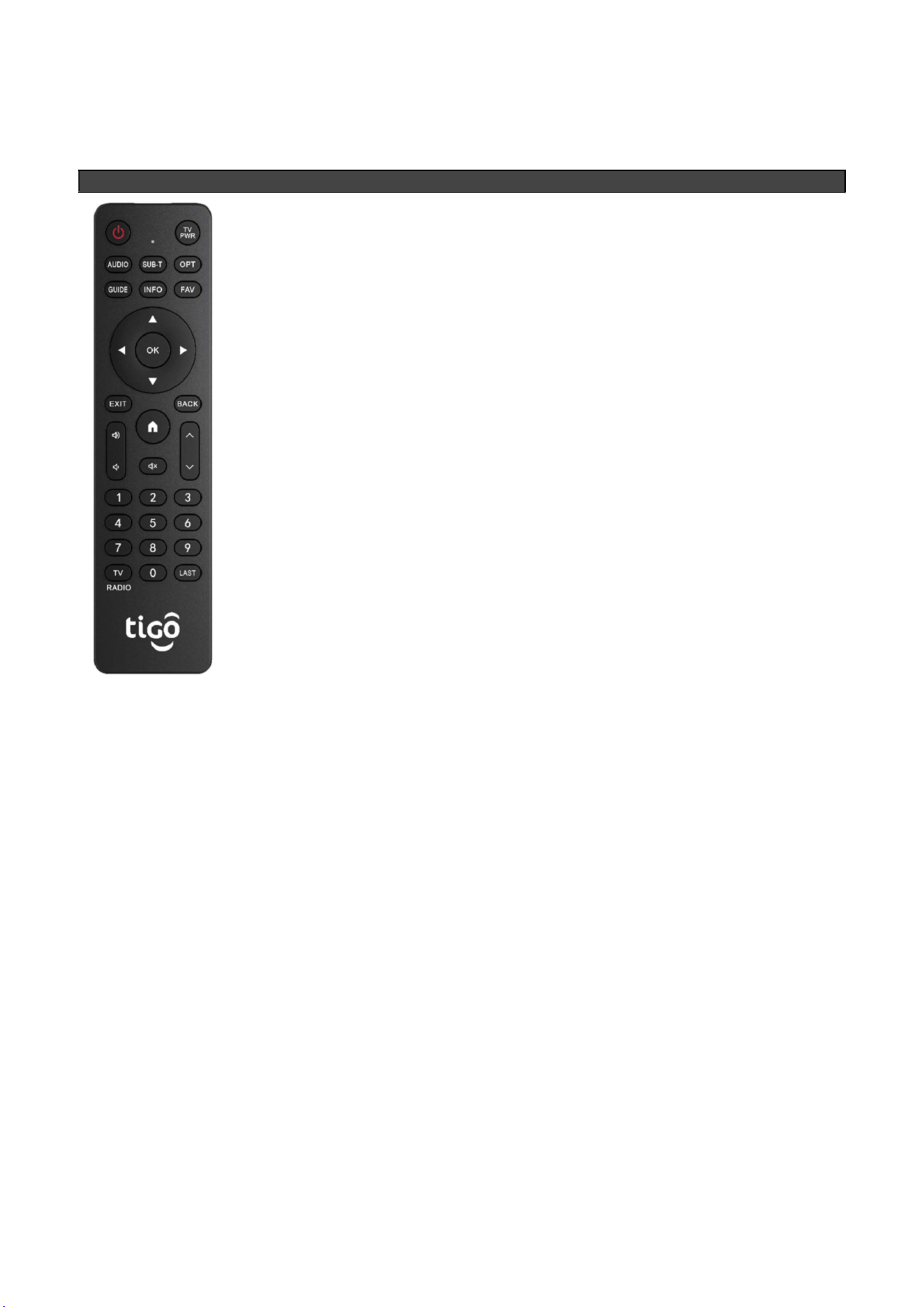
REMOTE CONTROL
1. PWR: On/Off of the Decoder.
2. TV PWR: On/Off of the Television.
3. AUDIO: Audio management
4. SUB-T: Subtitle management
5. OPT: Shows additional options.
6. GUIDE: Shows the TV channel programming guide.
7. INFO: Shows information about the current channel and program to follow,
date and time, when pressed again shows detailed information and,
8. FAV: favorites list
9. Navigation Keys ◄ / ► / ▲ / ▼
10. OK: Confirms the selected option, in TV mode shows a mini channel list.
11. Exit: Close the menus and go to the watched channel.
12. BACK: Go back to the previous section
13. Home: Go to the home screen
14. VOL + /VOL -: Increase Volume / Reduce Volume
15. CH ▲ / CH ▼: go up channel / go down channel
16. MUTE: silence channel
17. Numeric keys (0 - 9)
18. TV/RADIO: Go to the last tuned TV/Radio channel
19. LAST: return to previous channel

FCC Statement
This equipment has been tested and found to comply with the limits for a Class B digital device, pursuant to part
15 of the FCC rules. These limits are designed to provide reasonable protection against harmful interference in a
residential installation. This equipment generates, uses and can radiate radio frequency energy and, if not
installed and used in accordance with the instructions, may cause harmful interference to radio communications.
However, there is no guarantee that interference will not occur in a particular installation. If this equipment does
cause harmful interference to radio or television reception, which can be determined by turning the equipment off
and on, the user is encouraged to try to correct the interference by one or more of the following measures:
-Reorient or relocate the receiving antenna.
-Increase the separation between the equipment and receiver.
-Connect the equipment into an outlet on a circuit different from that to which the receiver is connected.
-Consult the dealer or an experienced radio/TV technician for help.
To assure continued compliance, any changes or modifications not expressly approved by the party.
Responsible for compliance could void the user’s authority to operate this equipment. (Example- use only
shielded interface cables when connecting to computer or peripheral devices).
This equipment complies with Part 15 of the FCC Rules. Operation is subject to the following two conditions:
(1) This device may not cause harmful interference, and
(2) This device must accept any interference received, including interference that may cause undesired operation.
FCC Radiation Exposure Statement:
The equipment complies with FCC Radiation exposure limits set forth for uncontrolled enviroment. This
equipment should be installed and operated with minimum distance 20cm between the radiator and your body.