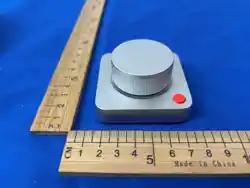

Ulanzi Dial Mini
Product Manual & Packaging Information
1. Packaging Information
1.1 Basic Product Information
Product Name (Chinese): 桌搭小旋扭
Product Name (English): Dial Mini
Model: D100N
SKU: 1003 / 1019
Supplier Code: U367
EAN/UPC (69 Code): 6974774338062
Execution Standard: Q/ULZ0004-2024 (Audio & Video)
Accessories
Dial Mini Main Unit ×1
Type-A to Type-C Charging Cable (5V/1A, 1.5m) ×1
User Manual ×1
Quality Certicate ×1
Certication & Compatibility
Certications: CE, RoHS, FCC, Telec
Supported Systems: Windows & macOS (Desktops & Laptops), iPadOS
Software: Ulanzi Studio (PC/Mac software), Ulanzi Connect (Lighting control software)
•
•
•
•
•
•
•
•
•
•
•
•
•
•

1.2 Product Selling Points
Software Edge: Save multiple presets without needing to keep the software open. Seamlessly switch
presets via the dedicated POP button for rapid response.
Custom Macros: Highly ecient creation process. Customize knob operations to perfectly adapt to
video editing, volume/brightness control, color grading, and other scenarios.
Desktop Aesthetic: Features a minimalist, Apple-inspired design with a premium, nely textured
aluminum alloy nish.
2. Manual Information
2.1 Software Download & System Support
Download Links:
Ulanzi Studio Download: www.ulanzi.cn/download/UlanziDeck
Ulanzi Studio UGC Site: www.ulanzistudio.com
2.2 Product Overview & Operations
Button & Knob Operations:
Knob: Supports 4 functions (Press, Rotate CW, Rotate CCW, Press & Rotate).
Button: Function 1: POP function allows switching between presets/shortcuts. Function 2: Supports
independent custom keybinding.
Oine Default Functions & Factory Reset:
You can change the oine functions via Ulanzi Studio (Oine means using the device without the software
actively running). The factory default oine layout is as follows:
Knob Press: Mute / Unmute
Knob Clockwise (CW): Volume +
Knob Counter-Clockwise (CCW): Volume -
POP Button Actions: Copy, Paste, Cut, Undo, Redo, Screenshot, Open Task Switcher.
Factory Reset: Press and hold the Knob + Mode Switch Button + Power on simultaneously for 3 seconds.
The indicator light will ash 3 times (1 second on, 1 second o) to indicate a successful reset.
•
•
•
•
•
•
•
•
•
•
•
2.3 Charging Instructions
Red Light On: Currently Charging
Green Light On: Charging Complete
2.4 Usage Instructions
Download Software: Visit www.ulanzi.cn/download/UlanziDeck to download Ulanzi Studio.
Connect Device: Turn on the device. It supports both Bluetooth and wired (USB-C) connections.
Setup Operations: Launch the application to customize the Dial Mini. Drag and drop actions from the
right-side plugin panel onto the left-side visual interface to assign single or multiple actions to the knob
and buttons.
Customize Keys: Congure specic hotkeys and personalize the knob/button behaviors through the
software interface.
3. Specications
Category Parameters
Product Name Dial Mini Desktop Knob
Model D100N
Primary Materials ABS+PC Bottom Shell, Aluminum Alloy Top Cover &
Knob, Acrylic Frosted Base, Silicone Anti-Slip Pad
Execution Standard Q/ULZ0004-2024
Battery Specications 3.7V ~ 300mAh Polymer Lithium Battery
Product Power 0.05 W (Max)
Power Supply Type-C, 5V-2A
Charging Time 2 hours 30 minutes (0-100%)
Battery Life 20 hours (Continuous working time)
Standby Power 0.15mW
Weight 270g (Bare metal)
•
•
1.
2.
3.
4.

Usage Environment Use in a dry, ventilated indoor environment. Avoid
contact with corrosive substances and keep away
from re/heat sources. Charge at least once a month
during storage.
Working Temp: 15°C ~ 45°C
Storage Temp: -20°C ~ 65°C
Bluetooth Parameters BLE 5.1, Transmission Distance ≥ 10M
Bluetooth Name Ulanzi Dial Mini
Manufacturer: Shenzhen Weiji Technology Co., Ltd.
Address: A17-5, Xinghe WORLD, No.1 Yabao Road, Nankeng Community, Bantian Street, Longgang District,
Shenzhen
Service Phone: 400-829-3882
4. Disclaimer
1. The operating temperature of this product must be strictly controlled between 15°C and 45°C. Do not
use in high temperature, humid, dusty, or strong magnetic environments to avoid performance issues or
damage.
2. The product has a built-in magnetic module. Keep it away from bank cards, magnetic cards, watches,
and other items susceptible to magnetic elds to prevent data loss or equipment failure.
3. Do not disassemble, strike, or modify the product yourself. Doing so may damage internal components
and will void the warranty.
4. Do not use non-original chargers or chargers that do not meet the specied requirements (5V/2A) to
prevent safety hazards.
5. Failures caused by articial damage (such as dropping or water ingress) or abnormal usage are not
covered under warranty.
6. Do not forcefully bend or over-extend the luminous board beyond its maximum opening angle to avoid
damaging the hinge structure.
•
•
•
•
•
•
FCC Statement
1. This device complies with Part 15 of the FCC Rules. Operation is subject to the following two
conditions:
(1) This device may not cause harmful interference.
(2) This device must accept any interference received, including interference that may cause
undesired operation.
2. Changes or modications not expressly approved by the party responsible for compliance could void
the user's authority to operate the equipment.
Note: This equipment has been tested and found to comply with the limits for a class B digital device,
pursuant to Part 15 of the FCC Rules. These limits are designed to provide reasonable protection
against harmful interference in a residential installation.
This equipment generates uses and can radiate radio frequency energy and, if not installed and used
in accordance with the instructions, may cause harmful interference to radio communications.
However, there is no guarantee that interference will not occur in a particular installation. If this
equipment does cause harmful interference to radio or television reception, which can be determined
by turning the equipment o and on, the user is encouraged to try to correct the interference by one or
more of the following measures:
Reorient or relocate the receiving antenna.
Increase the separation between the equipment and receiver.
Connect the equipment into an outlet on a circuit dierent from that to which the receiver is
connected.
Consult the dealer or an experienced radio/TV technician for help.
The device has been evaluated to meet general RF exposure requirement.
The device can be used in portable exposure condition without restriction.
•
•
•
•
•
•