
Welcome to use our speaker product. To help you use this product better, please read
the instruction manual carefully.
*Due to the iterative upgrade of the product, some descriptions and packaging may
change. Please refer to the actual product!
Product User Manual
Ver 1.0
B12
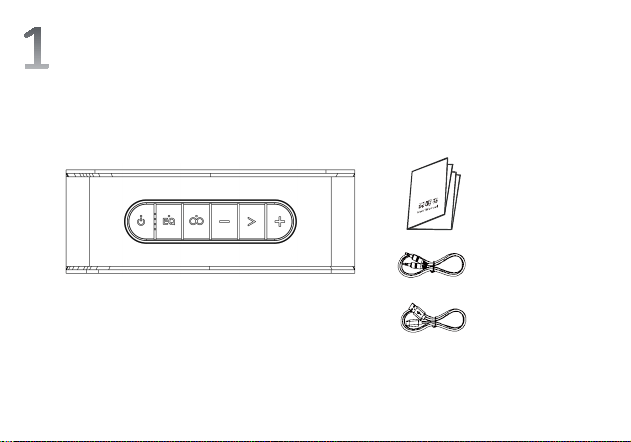
Get to know the product
Product
Instruction
manual
Type-C charging
cable
3.5 audio cable
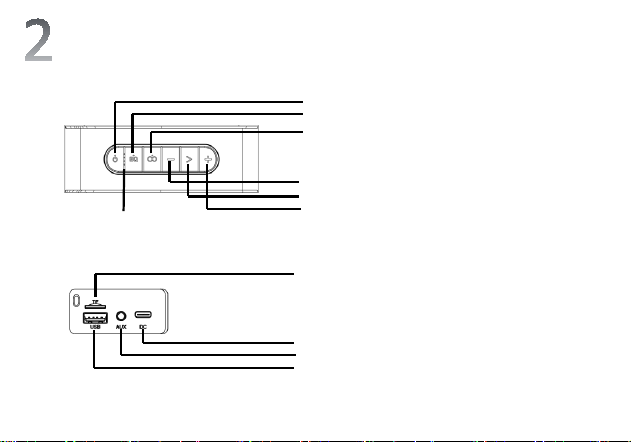
① Power On/Off / Mode Switch /
Indicator Light
② EQ Switch
③ TWS / Light Effect Switch
④ Volume Down / Previous song
⑤ Play / Pause / Disconnect
Bluetooth / Call
⑥ Volume Up /Next song
⑦ Power indicator light
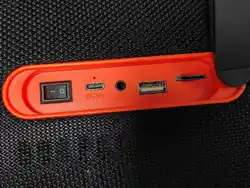
⑧ TF card interface
⑨ Charging interface
⑩ AUX interface / pinhole reset
hole
⑪ USB flash drive interface
Introduction to Buttons/Interfaces
①
②
③
④
⑤
⑥
⑦
⑧
⑨
⑩
⑪
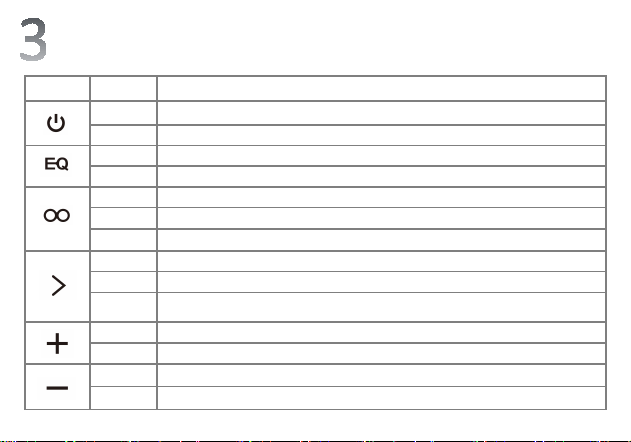
Instructions for Speaker Button Functions
key Operation Function Description
short press Mode switching: Bluetooth/AUX/TF/USB drive
Long press Press and hold for 3 seconds to power on/off
short press Switch EQ sound effect mode
Long press Voice assistant wake-up
Click Voice assistant wake-up
Double-click Switch light effects 1-2-3
Long press Turn off/on the light effect
short press Play/Pause
Long press Press and hold for seconds to disconnect the Bluetooth connection
Bluetooth
status
Double-click: Redial the last number; During an incoming call: Single-click to answer, long-press
for 3 seconds to reject the call; During a call: Single-click to hang up the call
short press Volume up
Long press Next song
short press Volume down
Long press Previous song

Function usage
BT Connection
Long press the power button for 3 seconds to turn on the device. The device enters
Bluetooth mode, and the blue light of the power button icon flashes quickly to enter pairing
mode.
Search for the Bluetooth "B12" on your phone and click to connect.
AUX Mode
Connect any audio device with a 3.5mm jack and play by plugging in an AUX audio cable.
TF Card/USB Flash Drive Mode
Insert a TF card/USB flash drive after turning on the device, and the device will
automatically recognize the files and play the tracks (maximum support 32G).

Function usage
TWS Function
1. Turn on both speakers (if there is a Bluetooth device connected, you must disconnect
the Bluetooth connection first)
2. Press the " " button on one of the speakers to enter TWS pairing, and there will
be a prompt tone. After successful pairing, the orange light of the " " button on
the main unit will stay on.
3. At this time, turn on the Bluetooth device, search for the Bluetooth name "B12", click
to connect, and then you can enjoy wireless stereo sound effect when playing music.
4. Press the " " button once in the TWS connection state to disconnect the TWS
pairing.
5. For devices that have successfully connected via TWS, they will automatically enter
TWS interconnection every time they are turned on (when TWS is not actively
disconnected).
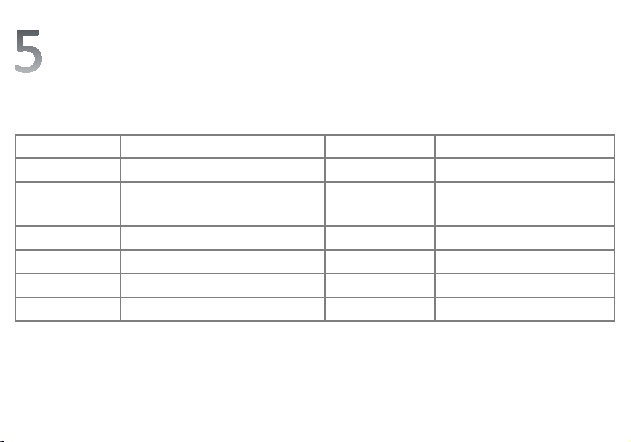
Specification Parameters
Project
Specification Parameters
Project
Specification Parameters
ver
sion V5.3 Input voltage 5V2A
Transmission
distance
≤15m (open and unobstructed)
F
requency
response
60hz-20Khz
Power
40W
Char
ging duration
4-5H
Battery capacity
2600mAh*2
Product size
200*92.3*71.2mm
L
ocal decoding Support MP3/FLAC/APE/WMA/WAV Waterproof rating IPX6
speaker 4580+24 Net weight 820g

Warm reminder
Please check the charger specifications before charging. Do not use fast chargers or high-voltage chargers to
charge the device.
For hearing health, do not use the maximum volume for a long time.
Do not use the product near fire sources or in high-temperature environments to avoid permanent damage
to the product.
Please use the product strictly in accordance with the instruction manual. Do not modify or disassemble the
product without authorization.
Do not drop, impact, knock, squeeze or perform other actions that seriously affect the product structure, so
as to avoid damaging the strength and reliability of the product.
If abnormalities such as high temperature, deformation, or corrosion occur during use, please stop using it
immediately and contact the merchant for proper handling.

This device complies with part 15 of the FCC Rules. Operation is subject to the
following two conditions: (1) This device may not cause harmful interference, and (2)
this device must accept any interference received, including interference that may cause
undesired operation.
Any Changes or modifications not expressly approved by the party responsible for
compliance could void the user's authority to operate the equipment.
Note: This equipment has been tested and found to comply with the limits for a Class B
digital device, pursuant to part 15 of the FCC Rules. These limits are designed to
provide reasonable protection against harmful interference in a residential installation.
This equipment generates uses and can radiate radio frequency energy and, if not
installed and used in accordance with the instructions, may cause harmful interference
to radio communications. However, there is no guarantee that interference will not
occur in a particular installation. If this equipment does cause harmful interference to
radio or television reception, which can be determined by turning the equipment off and
on, the user is encouraged to try to correct the interference by one or more of the
following measures:
-Reorient or relocate the receiving antenna.
-Increase the separation between the equipment and receiver.
-Connect the equipment into an outlet on a circuit different from that to which the
receiver is connected.
-Consult the dealer or an experienced radio/TV technician for help.
FCC Radiation Exposure statement
The device has been evaluatec to meel general RF exposure requirement. The device
can be used in portable exposure condition without restriction.