Quick Start Guide
Designed and Engineered By
TheOontZ.com
Portable Bluetooth Speaker
Lastest version of
Quick Start Guide available
online at www.theoontz.com/support
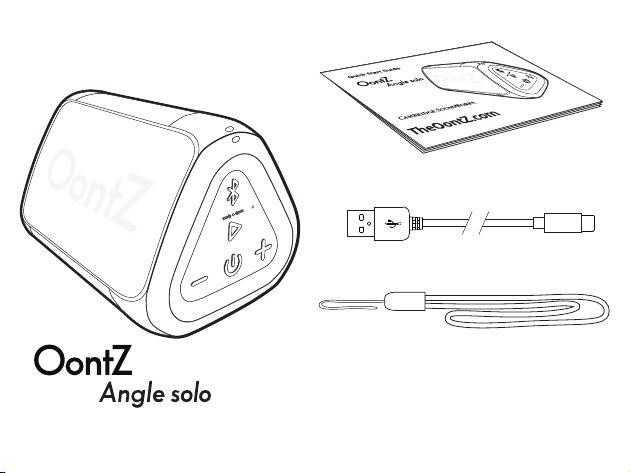
In the Package
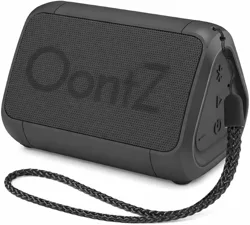
Lanyard
Note: The cable and lanyard are packed below
the plastic insert in the box. Slide out the
insert to locate them.
Quick-Start Guide
Portable Bluetooth Speaker
OontZ Wireless Dual Stereo Model
Designed and Engineered By
Type-C Charging Cable
Table of Contents
Buttons, Lights and Connectors
Attaching the Lanyard
Battery Features and Charging the Battery
Turning On and O
Pair & Connect with Your Device
Bluetooth Dual Connection
To Play with Non-Bluetooth Devices use a 3.5mm Stereo Audio Cable
IPX7 Water Resistance
Wireless Hands Free Personal Speakerphone
OontZ Dual Speaker - Connect Two OontZ Angle solo Speakers
Together
Reset Function
Contacting Customer Support
Safety and Precautions
Pages
1 - 3
4
5 - 7
8
9 - 12
13
14
15
16
17 - 20
21
22
23 - 24
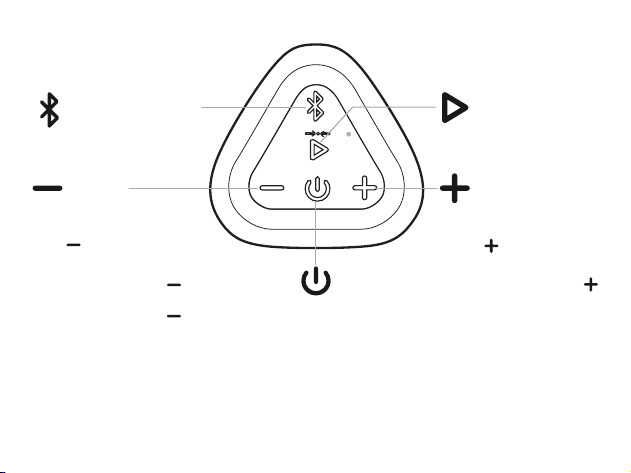
Volume Up
Press to increase volume
Track Forward
Press and Hold Down
to go to the next track
Volume Down
Press to decrease volume
Track Back
Press and Hold Down to go to the
beginning of the track
Press and Hold Down to go to previous
track
Buttons
Power
Play/Pause Button
Page 1
Bluetooth Button
(Dual Function)
Press and Release
to Pause/Play
Button
(Dual Function)
Note : Some apps may not support track back, track forward, or play/pause
Important : The volume control on your device and the speaker work independently of each other.
To play the speaker at the loudest volume, set the volume on your device to maximum and raise
the volume on the speaker to maximum.
Button
(Dual Function)
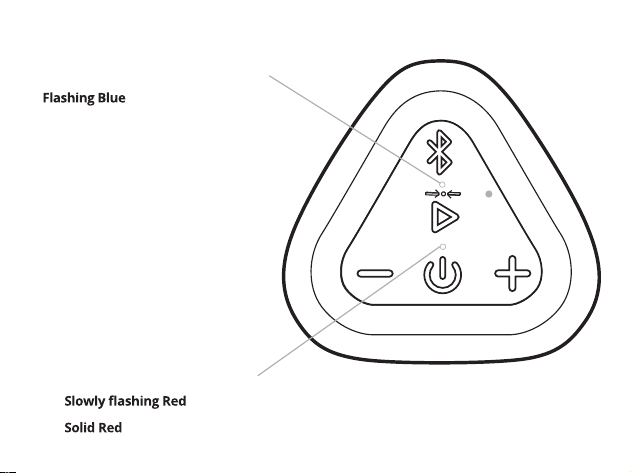
Lights
Page 2
Red Light lit when charging:
- battery is charging
- battery is fully charged
Blue Light lit when speaker is on:
-
speaker is in pairing mode
- Solid Blue speaker is connected
Lit White/When the speaker is the
second speaker connected in
OontZ Dual Speaker
- With a second OontZ Angle solo speaker
(sold separately) you can wirelessly
connect both speakers together to play
with OontZ Dual Speaker.
- For OontZ Dual Speaker instructions
please see page 17.
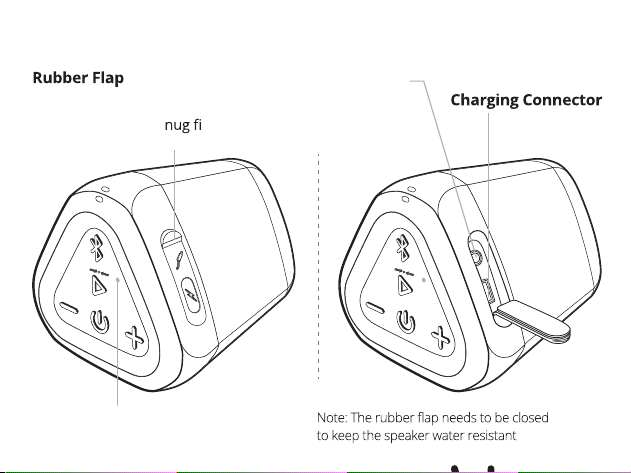
Connectors
Page 3
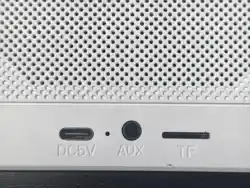
AUX IN Jack
Type-C
- covers connectors
- pull gently from the top to access
connectors, it is a s t to
provide water resistance
Built-in Mic for Speakerphone
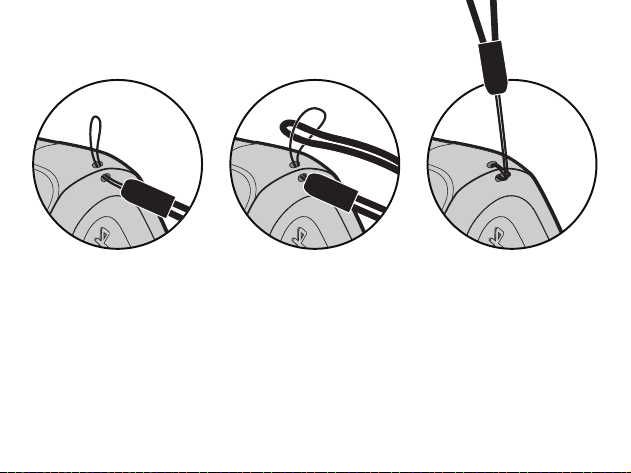
Attaching the Lanyard
Page 4
- Slide the smaller
lanyard loop through
one of the lanyard
attachment holes at
the top of the speaker
- Slide the larger lanyard
loop through the
smaller lanyard loop
that has passed
though the other
attachment hole
- The lanyard is not for use by children under 6 years of age.
Small parts can present a choking hazard.
- Pull the larger lanyard
loop completely
through the smaller
lanyard loop to fasten
the lanyard to the
speaker
Battery Features
Page 5
Music Play Time
Up to 12 hours on a full charge, at 2/3
volume. Louder volumes will reduce
the battery play time.
- The rechargeable battery comes
with a partial charge and the
speaker is ready to play.
- For maximum playtime, fully
charge the battery.
- You can play while charging.
- When the battery charge has less than
15% remaining the Red Light will begin
ashing rapidly.
- The volume will decrease to preserve
the remaining battery charge.
*Exception: when connected to
certain devices, including the
Amazon Echo Dot or Amazon Echo,
the Power Saving Feature is disabled
and the speaker will remain on until
you turn the power o
.
- When playing from battery power the
OontZ Angle solo will turn o after 15
minutes of not playing audio to
conserve the battery charge. *
- When plugged into a charging source
the OontZ Angle solo will remain on
until you turn the power o .
- You can continue to keep the speaker
plugged into a charging source even
when it is fully charged, keeping the
speaker turned on and available
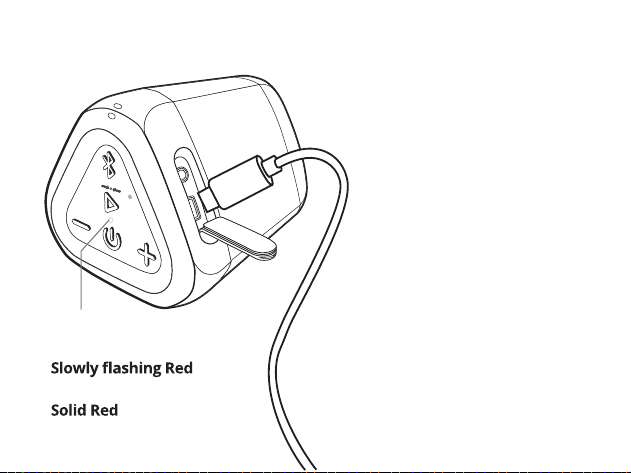
Charging the Battery
Page 6
- Insert the small end of the
Type-C Charging Cable into the
Type-C Charging Connector as
shown.
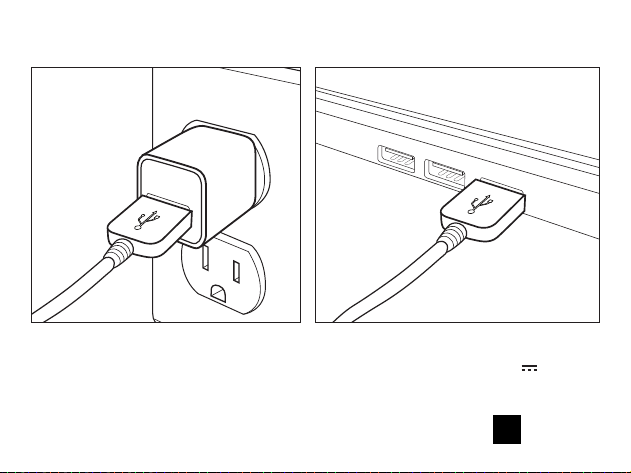
- Insert the large end of the
Type-C Charging cable into
either a USB wall charger for a
Smartphone or iPhone, or a USB
port on your laptop/computer
to charge the battery (see
illustrations on page 7).
Charging Time:
- Up to 4 hours to fully
charge a low battery.
Red Light lit
when charging:
-
battery is charging
-
battery is fully charged
Charging the Battery (continued)
Page 7
Insert the large end of the Type-C Charging Cable into either a USB wall
charger for a Smartphone or iPhone (a USB wall charger* that is 5V 1.0A
maximum) or a USB port on your laptop/computer to charge the OontZ Angle
solo rechargeable battery.
*
Only use a USB wall charger that is UL listed. A USB wall charger will have the logo printed on it.
Turning On and O
Page 8
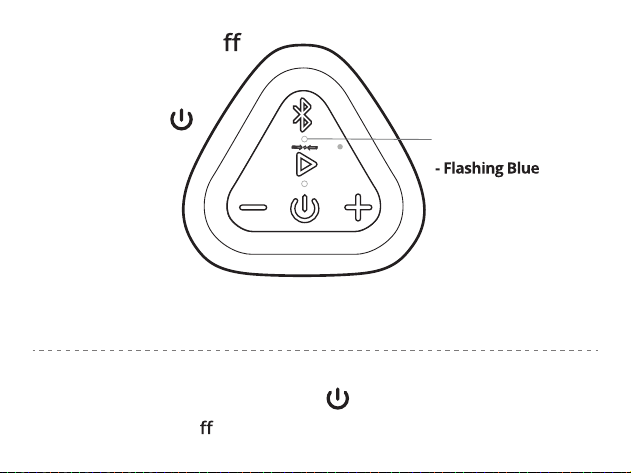
Blue Light will turn on
Blue Light will turn o
The speaker is in
pairing mode
- Solid Blue
Your device has
connected with the
OontZ Angle solo and
is ready to play
Press and Release
the Power Button
Press and Hold Down the Power Button for 2 Seconds
Turn ON
Turn OFF
Pair & Connect with Your Device -- Step 1
Page 9
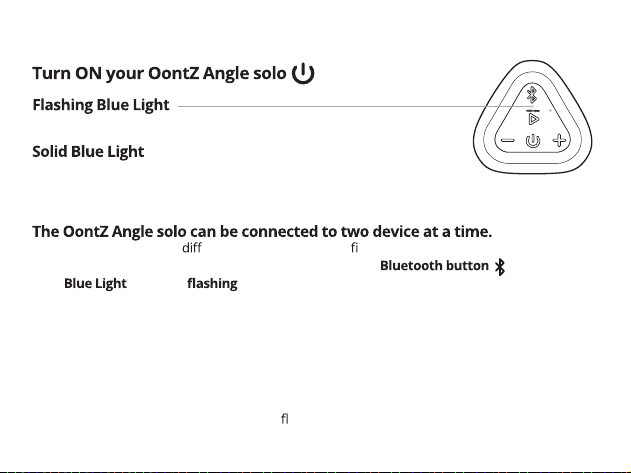
- The OontZ Angle solo is ready to pair and connect.
- Your device has connected to the OontZ Angle solo and is ready to play.
- The OontZ Angle solo allows the last device it was connected with to automatically reconnect with
the speaker, each time you turn the speaker on and that device is within range.*
- To pair and connect to a erent device, you need to rst disconnect the currently paired device.
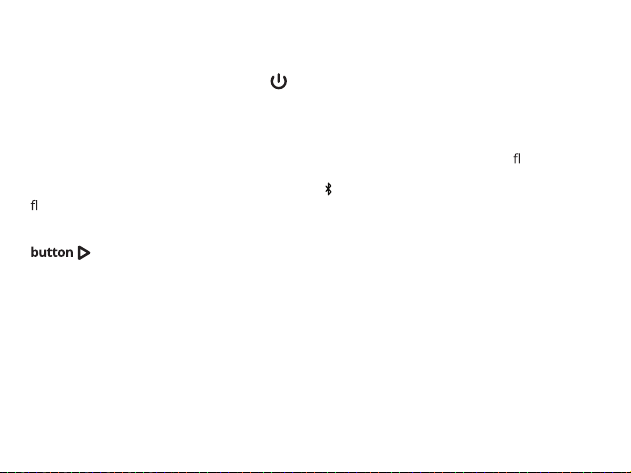
- To disconnect the current device, press and hold down the for 3 seconds.
- The
will begin and the OontZ Angle solo is ready for the next device to pair
and connect.
*Exception: certain devices may not automatically reconnect. Amazon Echo devices will not
automatically reconnect. You will need to say "Alexa, connect my speaker"
- Your device needs to be within 80 unobstructed feet of the OontZ Angle solo to pair and connect.
If there is an issue when connecting please move your device closer to the speaker, then pair
and connec
t.
- When the charge is too low indicated by a ashing red light on the speaker, your device will
not be able to connect with the speaker.

Pair & Connect with Your Device -- Step 2 --
Page 10
- Go to Settings > Bluetooth, check Bluetooth is on
- Select 'OontZ Angle solo DS xxx' when it appears under DEVICES (xxx: 3
characters which are unique to your speaker)
- Your device will connect in a few seconds
- The will turn solid blue and there will be a quiet chime
- You can now play your audio wirelessly to your OontZ Angle solo
Note: Your Smartphone or Tablet instructions may vary.
Important - The volume control on your device and the speaker work independently
of each other. To play the speaker at the loudest volume, set the volume on your
device to maximum and raise the volume on the speaker to maximum.
-- With Your iPhone, iPad, iPod, Smartphone, Tablet & Mobile Devices
-- With Your Apple Mac or Windows Laptop/Computer
For the pairing and connecting guide for your Apple Mac or Windows laptop/computer,
please visit:

Pair & Connect with Your Device -- Step 2 --
Page 11
-- With Your Amazon Echo or Amazon Echo Dot
- Open the Alexa app
- Press 'Devices' by pressing the 'Devices' button in the bottom right corner
- Press 'Echo & Alexa'
- Select your Amazon Echo device under list of devices displayed by pressing it
- Press 'Bluetooth Devices'
- Press 'Pair A New Device'
- Select the 'OontZ Angle solo DS xxx' (xxx: 3 characters unique to your speaker)
when it appears
- The OontZ Angle solo will make a 'ding' sound when connec
ted
To connect the next time, turn on the OontZ Angle solo and say "Alexa, connect my
speaker" or "Alexa, pair"
To pair and connect the
rst time with an Amazon Echo device use the Alexa app on
your device.
Pair & Connect with Your Device -- Step 2 --
Page 12
-- With Your Amazon Echo or Amazon Echo Dot (continued)
Important Note: When the OontZ Angle solo is playing from battery power and
connected to the Amazon Echo device, the speaker will remain on and it will not
automatically turn o
after 15 minutes of not playing audio.
This will use up the battery charge.
We recommend to:
1) Keep the OontZ Angle solo plugged into a USB wall charger and it will remain on
and available to play from the Amazon Echo device until you manually turn the
speaker power o
.
- Or -
2) Tur
the OontZ Angle solo when you are done listening.
- Either turn o
the speaker by pressing and holding down the
for 2 seconds,
- or say "Alexa, disconnect my speaker" and the OontZ Angle solo will automatically
turn o
after 15 minutes.
- When you want to connect and play to the speaker again turn on the OontZ Angle
solo and say "Alexa, connect my speaker" or "Alexa, pair".
For assistance with the Alexa app, contact Amazon's Customer Service.
Open the Alexa app and select Help & Feedback > Email Customer Service
Page 13
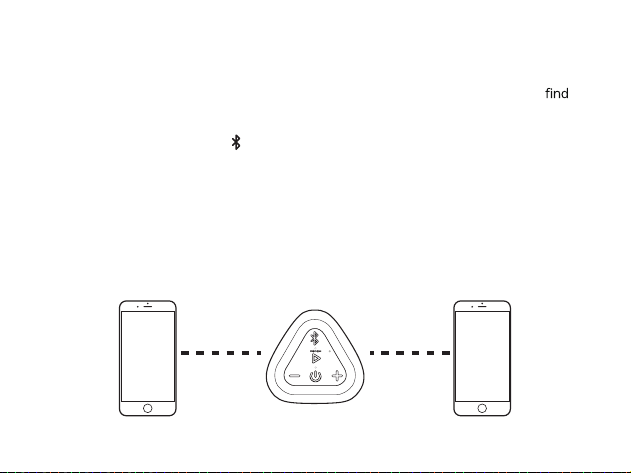
– When the speaker is turned on, it goes into BT pairing automatically.
– Device A plays music after the Bluetooth connection is successful ,but device B cannot
the
Bluetooth name of the speaker.
– Double-click "Bluetooth Button " to enter the Bluetooth pairing again. Device B searches for
the Bluetooth name of the speaker and connects to Bluetooth. If it is not connected, it will exit
after 60 seconds (Music playback will not pause when device A connects to Bluetooth).
– After the speaker Bluetooth dual connection is successful, switch the audio source on the device,
click to play music on device B , the audi
o will automatically switch from A to B, and click to play
music on device A, the audio will automatically switch from B to A .
– Wireless Bluetooth connect up to 2 smartphones or tablets to the speaker.
Bluetooth Dual Connection
Page 14
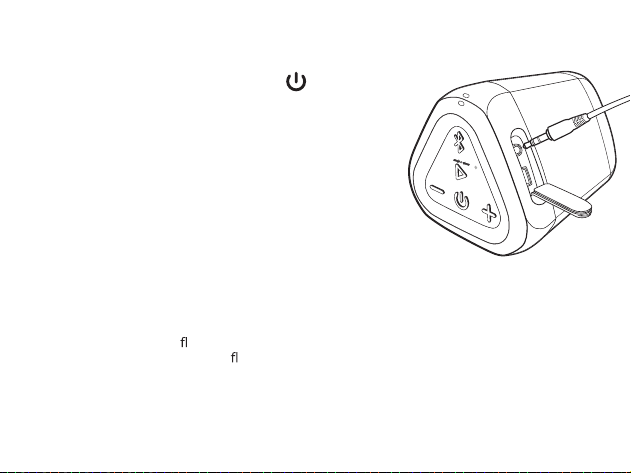
To Play with Non-Bluetooth Devices use a 3.5mm Stereo Audio Cable
- Plug one end of a 3.5mm stereo audio cable into
the AUX IN Jack on the speaker.
- The Blue Light will turn solid Blue.
- Plug the other end of the cable into the
headphone jack on your device.
- Make sure both ends of the cable are fully inserted
- You are now ready to play.
Important: The Bluetooth on the OontZ Angle solo is disabled when the 3.5mm audio
cable is connected to the speaker. You need to remove the 3.5mm audio cable from
the speaker in order to connect to a Bluetooth device.
- Note: When the rubber ap is open to allow the 3.5mm audio cable to be connected, the speaker
is not water resistant. The rubber
ap needs to be closed to keep the speaker water resistant.
Turn ON your OontZ Angle solo
- Note: The volume control on your device and the speaker work independently of each other.
To play the speaker at the loudest volume, set the volume on your device to maximum and raise
the volume on the speaker to maximum.
Page 15
IPX7 Water Resistant
-
The OontZ Angle solo is Waterproof and it is IPX7 cert ed
-
The perfect speaker for listening to your favorite music in any environment
-
Perfect for taking tothe lake,the beach, listening by the pool, listening in the shower
- IPX7 means the OontZ Angle solo is WaterProof and can handle water spray
or being splashed and can handle being partially or fully submerged in
water up to a maximum of 3 feet deep, for up to a maximum of 30 minutes
-
The rubber ap needs to be closed for the speaker to be waterproof and dustproof.
Page 16
Wireless Hands Free Personal Speakerphone
- Press and Hold Down the Bluetooth Button for 2 Seconds
- Please keep the speaker close in front of you so you may be heard
clearly by the listener.
- You can use your Smartphone or iPhone to switch between using
Hands Free Speakerphone and your phone.
The Wireless Hands Free Personal Speakerphone feature works over Bluetooth
with Smartphones and iPhones only; this feature is not supported when
connected to other types of devices.
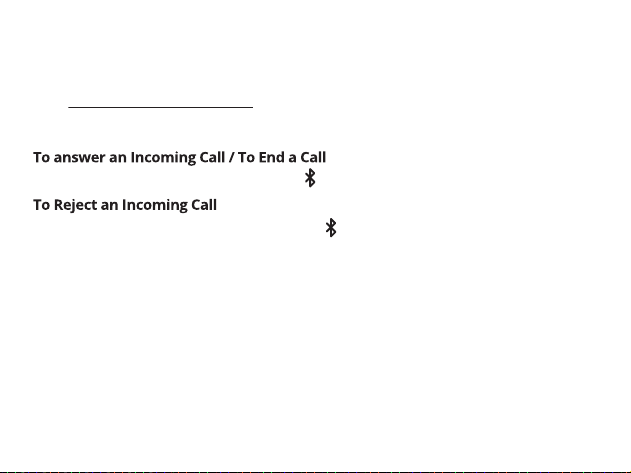
- Press and Release the Bluetooth Button
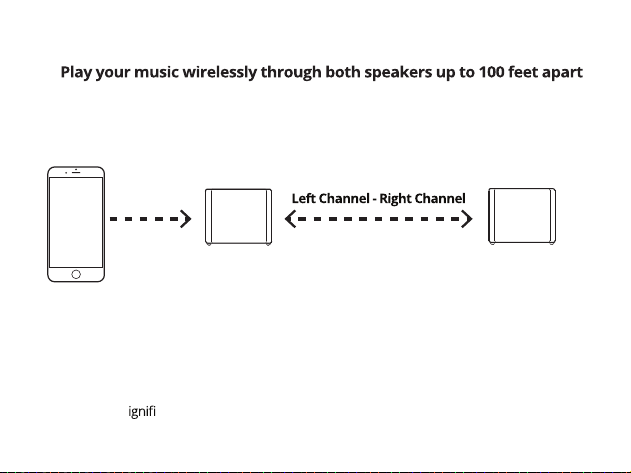
Page 17
*
*Placing the speakers on the ground or having walls or obstructions between the
speakers will s
cantly reduce the distance apart the two speakers can play together
OontZ Dual Speaker
Connect two OontZ Angle solo Speakers Together
for stereo separation
Left Channel
Bluetooth
for playing music
Right Channel
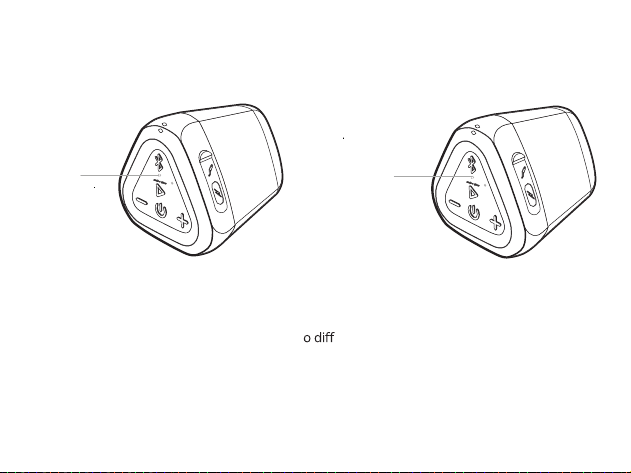
Page 18
– Turn on both OontZ Angle solo speakers.
– Pair and Connect one of the speakers with your device. When connected the Blue Light will be lit
Solid Blue. This speaker will serve as the Play Control Speaker.
– The second speaker must not be connected to any device, its Blue Light needs to be
ashing. If the
second speaker has a solid Blue Light it is connected to a device and you need to disconnect it by
pressing and holding down the Bluetooth Button for 3 seconds until the Blue Light begins
ashing.
- On the Play Control Speaker (speaker with solid Blue Light) press and hold down the Play/Pause
for 3 seconds until the Play Control Speaker says “Dual Pairing”.
- After a few seconds the Play Control Speaker will say “Left Channel” and the second speaker will
say “Right Channel”. The Play Control Speaker speaker light will remain solid Blue and the second
speaker light will be solid White. The OontZ Angle solo speakers will be connected together for Left
Channel - Right Channel and you are ready to play.
Connecting two OontZ Angle solo speakers together for
Left Channel - Right Channel
Page 19
– Use the buttons on the Play Control Speaker for play/pause, track back, track forward, answer
and end phone calls. These controls are also available on the second speaker when paired
together.
– Use the Play Control Speaker for connecting t
erent audio devices via Bluetooth. The
Bluetooth and AUX IN are disabled on the second speaker when paired together.
– When a 3.5mm audio cable is connected to the speaker, the dual speaker mode will be disabled.
Dual speaker mode is only supported when using Bluetooth.
– Speakerphone call audio can be played with two Speakers.
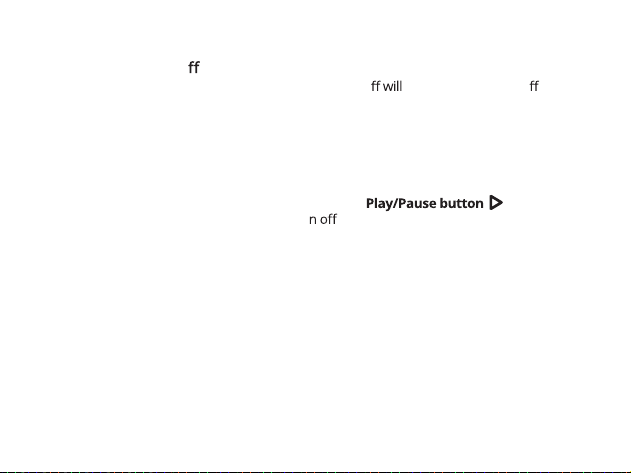
Play Control Speaker
Second Speaker
Two OontZ Angle solo Speakers connected for
Left Channel - Right Channel
Lit White
Lit Blue
Page 20
Turning the speakers o
– Turning the Play Control Speaker or second Speaker o turn both speakers o .
Turning the speakers back on
– Turn both speakers on and they will automatically try to connect to each other again.
– Turn one of the speakers on and a device can connect with it, and play as a single speaker.
Disconnecting the two speakers from each other
– Both speakers need to be turned on.
– On the Play Control Speaker press and hold down the
for 3 seconds.
The White Light on the second speaker will tur
and the speakers will be disconnected from
each other.
Not Recommended to play the audio from a video in OontZ Dual Speaker
– It is not recommended to play the audio from a video with two OontZ Angle solo speakers
connected in OontZ Dual Speaker. Playing the audio from a video or TV in OontZ Dual Speaker
will have a delay in the audio playback from a video and will cause the audio and video to play
out of sync with each other.
OontZ Dual Speaker - Important Notes
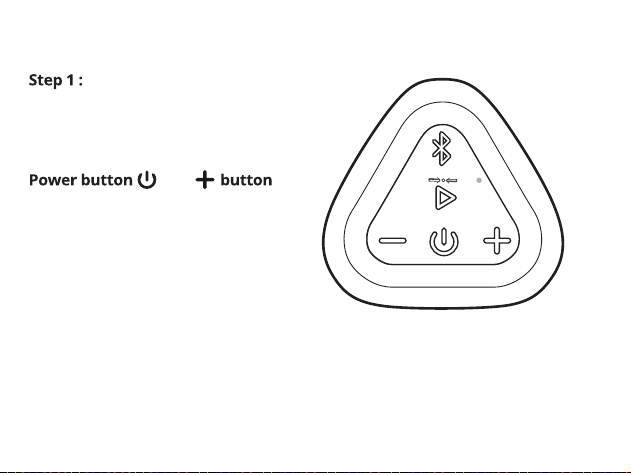
Remove the Type-C
charging cable and 3.5mm Audio
cable, if connected
Step 2 : Press and hold down the
and
together for one second and then
release both buttons
Step 3 : The speaker has now been
reset and you can turn it on
Reset Function
Page 21
Customer Support
Page 22
For online troubleshooting tips please visit:
and select the OontZ Angle solo
Contact us at:
TheOontZ.com/support
a
our customer support form
If you have a question about your OontZ Angle solo or experience an
issue with the speaker, our Customer Support Team wants to assist you.
Safety and Precautions
Page 23
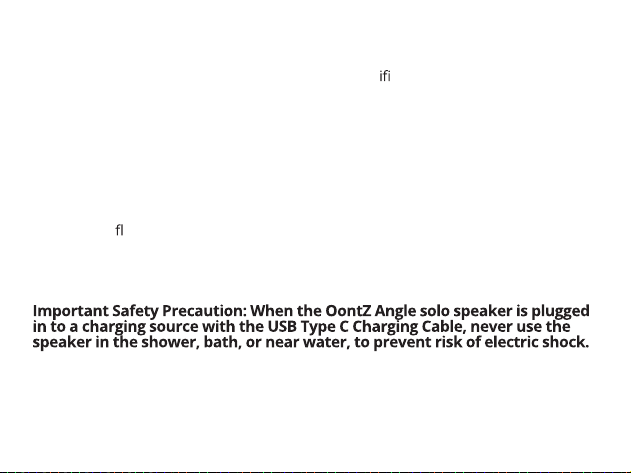
risk of electric shock.
Read and follow all instructions – All operating and use instructions should be followed.
Protect the Type-C Charging Cable from being pinched, particularly at the connectors.
Unplug the Type-C Charging Cable during lightning storms or when unused for long
periods of time.
Do not place speaker near any heat sources such as radiators, heat registers, stoves, or
other apparatus (including am ers) that produce heat.
Refer all servicing to qua ed personnel. Servicing is required when the speaker has been
damaged in any way.
Do not make alterations to this speaker.
The battery in the speaker is not replaceable. Do not attempt to change it.
Use this speaker only with an agency approved power supply which meets local regulatory
requirements (e.g., UL, CSA, VDE, CCC) in accordance with the manufacturer’s
spec cations.
Do not place near nake ame sources, such as lighted candles, on or near the speaker.
Do not expose this speaker to excessive heat
(e.g. from storage in direct sunlight, re or the like)
If the battery leaks, do not allow the liquid to come in contact with the skin or eyes.
If contact is made, seek medical advice.
2.
3.
4.
5.
6.
7.
8.
9.
Safety and Precautions (continued)
Page 24
This device complies with Part 15 of the FCC Rules. Operation is subject to the following two
conditions:
(1) This device may not cause harmful interference, and (2) this device must accept any
interference received, including interference that may cause undesired operation.
NOTE 1: This equipment has been tested and found to comply with the limits for a Class B
digital device, pursuant to part 15 of the FCC Rules. These limits are designed to provide
reasonable protection against harmful interference in a residential installation. This equipment
generates, uses and can radiate radio frequency energy and, if not installed and used in
accordance with the instructions, may cause harmful interference to radio communications.
However, there is no guarantee that interference will not occur in a particular installation. If this
equipment does cause harmful interference to radio or television reception, which can be
determined by turning the equipment and on, the user is encouraged to try to correct the
interference by one or more of the following measures:
- Reorient or relocate the receiving antenna.
- Increase the separation between the equipment and receiver.
- Connect the equipment into an outlet on a circuit erent from that to which the receiver is
connected.
- Consult the dealer or an experienced radio/TV technician for help.
NOTE 2: Any changes or m cations to this unit not expressly approved by the party
responsible for compliance could void the user's authority to operate the equipment.
User Manual V3.0
Check Out Our Other Best Selling Bluetooth Speakers
OontZ Clip
Bluetooth Speaker
Sold Separately
• Perfect for Travel & the Outdoors
• IPX7 Waterproof, with Integrated Carabiner
• Lightweight & Portable
OontZ Cylinder
Bluetooth Speaker
Sold Separately
• Indoor or Outdoor Use
• IPX7 Waterproof
• Lightweight & Portable
Available at Amazon.com and TheOontZ.com