Note: All images in this manual are schematic diagrams; the actual product shall prevail.
The company reserves the right to interpret this manual.
US-H8-2.0
Product Manual
Double-Lower-Limb Hip Joint Motion
Assistance Device
Youlong Exoskeleton Robot

Welcome
Thank you for choosing our exoskeleton robot.
This manual contains important information necessary for the safe and correct use
of this product. As an integral part of the product, the manual must be kept with the
device throughout its service life and shall not be discarded for easy reference.
All users must read this manual carefully before using the product.
This product is safe and reliable for use, but hazards may arise from special factors
such as improper operation not in accordance with the manual or use for other
purposes. Therefore, please follow the provisions of the manual during use to
avoid accidents.
Equipment maintenance must be performed by our company technical service
personnel or authorized parties.
If you have any operational questions not mentioned in this manual, please
contact our company in a timely manner.Without the prior consent of our
company, any reproduction, photomechanical reproduction, digital post-process-
ing, or copying of this manual is prohibited.
The content of this manual is subject to change without prior notice. The final
interpretation right belongs to our company.

11 Installation, Disassembly, and Disposal
12 Product Hazardous Substance Statement
15 After-Sales and Reqair Service
Table of Contents
03 Accessory List
Welcome
01 Product Overview
2
2
2
3
5
6
7
8
13
15
17
02 Product Features
04 Safety Precautions
05 Product Structure
06 Specific Parameters
07 Notes
08 Product Usage
09 Battery Maintenance
10 Product Maintenance
18
19
13 Simple Troubleshooting
20
14 Repairs and Warranty
21

01 Product Overview
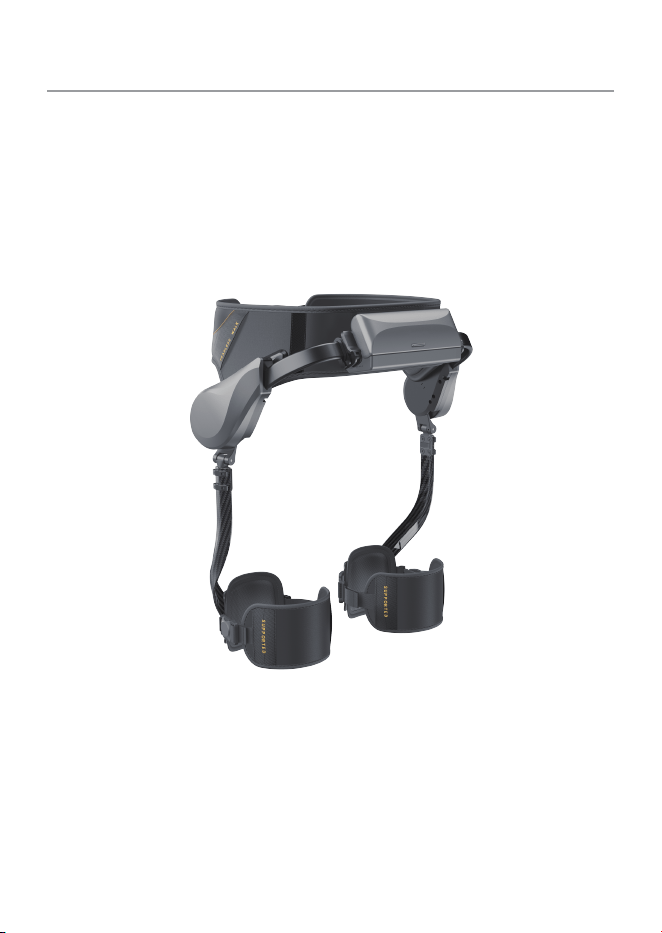
The Bilateral Lower Limb Hip Joint Movement Assistance Device - "Youlong" is a
bilateral hip-lifting assistance exoskeleton designed to improve the movement
efficiency of wearers in daily activities such as walking, climbing stairs, outdoor sports,
and hiking.
Through an intelligent power system, advanced sensing system, and intelligent control
algorithms, it can real-time perceive the wearer's movement intentions, provide
precise and efficient assistance support, significantly reduce lower limb burden, and
make every step more effortless and smooth.
02 Product Features
Intelligent Assistance: Bilateral motor drive (maximum 32Nm), intelligent algorithms
real-time perceive movement intentions to provide precise power support.
Efficient Burden Reduction: Reduces knee joint pressure by 3-5 times, decreases
climbing energy consumption by 35%, increases walking distance by 2-3 times, and
improves cardiopulmonary endurance by 15%.
Lightweight and Flexible:The main unit weighs only 2.25kg (excluding battery) with a
foldable design, suitable for environments from -10℃ to 45℃.
Assistance Effect:Personalized adjustment, automatically provides different
assistance schemes according to the user's needs.
03 Accessory List
Main Unit (Bilateral Lower Limb Hip
Joint Movement Assistance Device)
US-H8-2.0
1
NameNo Model Quantity
QC Card
1
Battery 1
Instruction Book 1
Type-C Charging Cable
1
5
2
4
3
1
2

04 Safety Precautions
Before using this product, please read this user manual carefully and keep it properly
for future reference. Any operation inconsistent with this manual may cause damage to
the product and may result in accidental injuries such as electric shock, fire, or
personal injury/death.
Contraindicated Groups: The following groups are strictly prohibited from using this
product. If you are unsure about your physical condition, please consult a doctor.
1. Bone and Joint-Related Contraindications
a. Fracture/crack recovery period (not meeting clinical healing standards)
b. Severe osteoporosis (bone mineral density T-score < -2.5 with a history of fragility
fractures)
c. Active phase of bone-destructive diseases such as bone tumors and bone tuberculosis
d. Within 3-6 months after joint replacement surgery (not passing the rehabilitation
stability period)
e. Scoliosis/kyphosis deformity > 40°
f. History of acute or habitual dislocation of the hip or knee joint
2. Muscle and Nerve-Related Contraindications
a. Populations with severe myasthenia such as progressive myasthenia gravis and
muscular dystrophy
b. Acute lower limb neuritis, spinal cord injury within 3 months of onset
c. Severe spastic paralysis caused by stroke, cerebral palsy
d. Peripheral nerve injury with complete loss of lower limb sensation
3. Soft Tissue and Skin-Related Contraindications
a. Stage Ⅲ-Ⅳ pressure ulcers, severe ulcers, or infections (such as cellulitis) on the lower
limb skin
b. Severe varicose veins of the lower limbs with thrombosis
c. Extensive skin scar contracture affecting joint movement
4. Systemic and Other Contraindications
1.Patients with severe cardiopulmonary insufficiency such as grade Ⅲ-Ⅳ heart failure
and severe chronic obstructive pulmonary disease
2.Uncontrolled severe hypertension (blood pressure > 180/110mmHg) or orthostatic
hypotension
3.Patients with severe cognitive impairments such as severe Alzheimer's disease and
confusion
4.Patients with severe heart disease, hypertension, mental illness, psychological
disorders, pregnant women, physically weak individuals, and those who are not suitable
for standing or walking as deemed by doctors are prohibited from using this product.
If the above contraindicated groups use this product forcibly, they may face
risks such as physical injury and worsening of conditions. Please be advised. If
discomfort such as pain, numbness, or dizziness occurs during use, stop using
the product immediately and seek medical attention.
Violation of contraindications may result in serious personal injury or death.
Contraindications
3

Violation of caution items may cause personal injury or property damage.
Cautions
1.The device has no waterproof devices; do not splash any liquid on the machine or
allow it to flow into the machine.
2.To better adapt to the device, use it under supervision for the first time.
3.Always observe the device for any abnormalities during use.
4.Remember to turn off the device before unfastening the straps.
5.Do not use the device while it is charging.
6.Do not use any third-party batteries.
7.Do not disassemble, repair, or modify the device without permission. Do not open the
device's casing.
8.If the power cord is damaged or broken, stop using it immediately and contact
customer service for handling.
9.For transporting the product, ensure the device is turned off and it is recommended to
use the original packaging box.
10.Before use, remove all packaging materials and any promotional stickers.
1.This device is not suitable for people with reduced physical, sensory, or mental
capabilities, or lack of experience and knowledge (including children), unless they have
received supervision or guidance on the use of the device.
2.Do not use this device if you cannot stand alone, cannot control balance, or cannot
walk independently.
3.Users who need to use knee-ankle-foot orthoses, ankle-foot orthoses, single crutches,
hand crutches, etc. to maintain balance and ensure safety are prohibited from using this
product.
4.Do not use this device if your height or waist circumference exceeds the limited range.
5.This device is not a toy; children are prohibited from playing with it. This device shall
not be used by children under 16 years old (unless they are effectively supervised or
guided to use the device safely and understand the associated risks).
6.Keep the device and its power cord out of the reach of children under 16 years old.
7.Before charging, check whether the voltage on the device matches the charging
voltage.
8.If the power cord is damaged, to avoid hazards, it must be replaced by the manufactur-
er or its authorized professionals.
9.Using accessories not sold or approved by the manufacturer may cause accidents
such as fire and electric leakage.
10.Do not place the device near gas stoves, electric stoves, or places where it may come
into contact with heating appliances.
11.Do not immerse the electrical appliance, power cord, or plug in water or other liquids.
12.Keep the power cord away from sharp edges, hot components, or other heat sources.
13.In extreme cases, the battery may leak. If the liquid in the battery comes into contact
with the skin, immediately wash with water and soap, or neutralize with a mild acid
(such as lemon juice or vinegar). If the liquid comes into contact with the eyes, rinse the
eyes with clean water for at least 15 minutes and contact a doctor.
Violation of warning items may result in serious personal injury or death.
Warnings
4
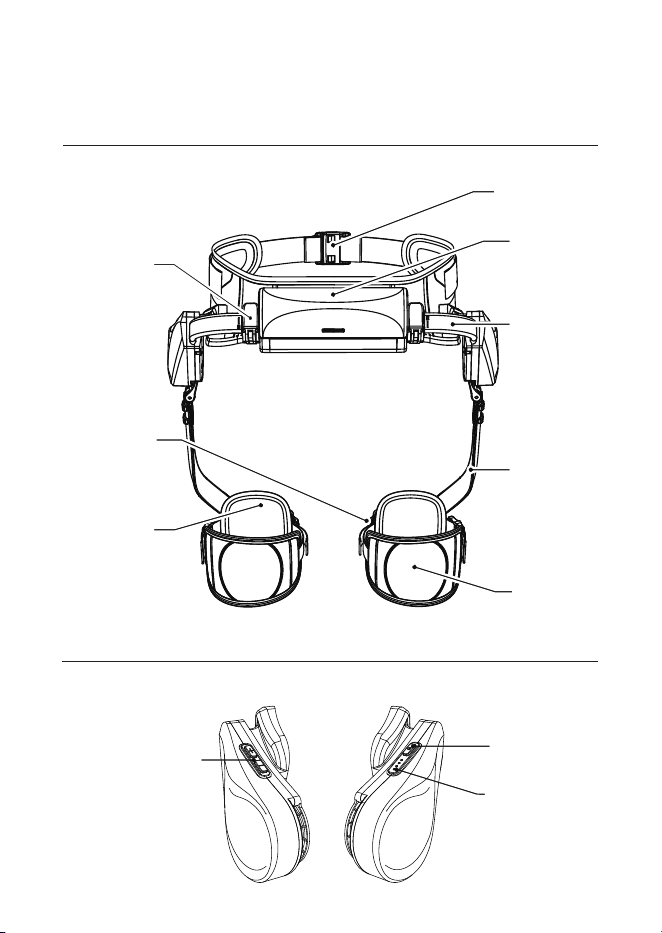
05 Product Structure
Main Structure
Buttons on Both Sides
Assistance Adjustment
+/- Buttons
Power Switch
Battery Level
Indicator Light
5
Back Adjustment
Wrench
Magnetic Buckle
Leg Binding Strap
Leg Binding Shell
Waist Magnetic
Buckle
Battery
Waist Width
Adjustment
Pull Rod
Leg Arm
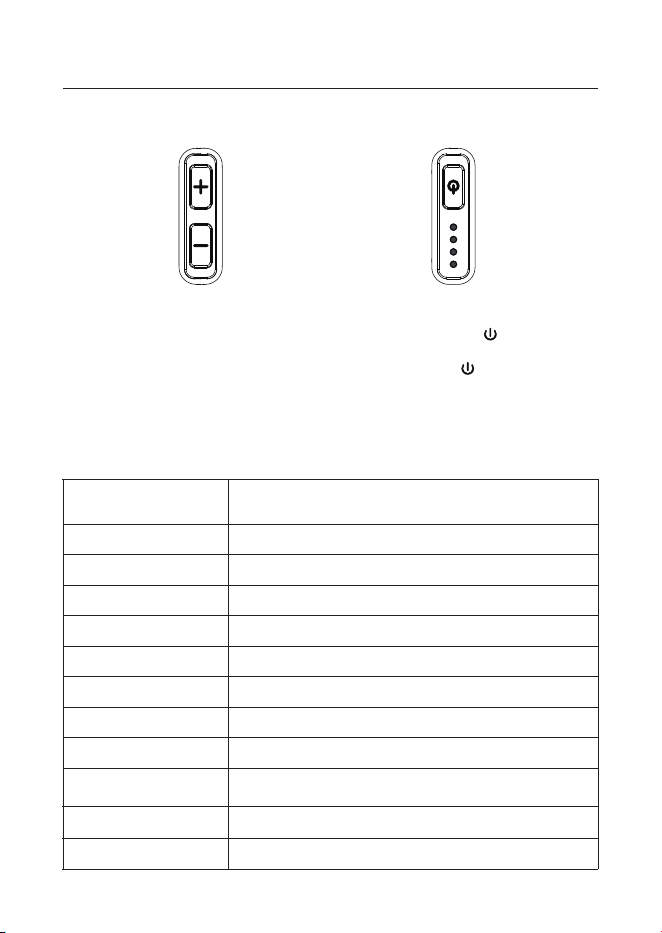
06 Specific Parameters
Device Name
Double-Lower-Limb Hip Joint Motion Assistance Device
Device Model US-H8-2.0
Maximum Overall Weight Approximately 2.25kg (excluding battery)
Operating Voltage 14.4V
Battery Capacity 5000mAh
Charging Time within 2 hours
Battery Life More than 2 hours
Output Power
960W
Max Torque 32Nm
Waterproof and
Dustproof Rating
IP54
Assistance Level Adjustable 6 level
Ambient Temperature -10~45°C
Function Button Details
Press the right "+/-" buttons to
adjust the assistance level, with a
total of 6 levels available.
Long-press the left " " power
button for 3 seconds to turn on;
short-press the " " power button
for 1 second to turn off.
6
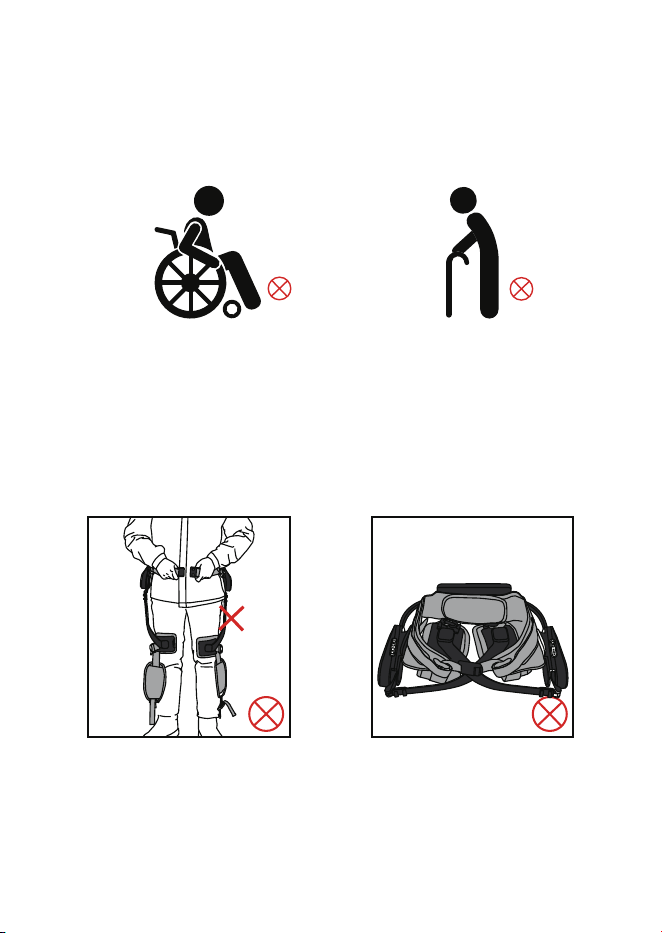
07 Notes
This model does not have medical functions. If you need to purchase a product with
medical functions, please contact us through the contact information in the manual for
more relevant information.
(To avoid falls, people who cannot stand or need assistance to stand are prohibited
from using this product.)
Do not turn on the device before
wearing it properly.
Do not turn on the device when
placing it on a table.
Applicable height range: 160cm - 190cm
Applicable waist circumference range: 70cm - 135cm
7
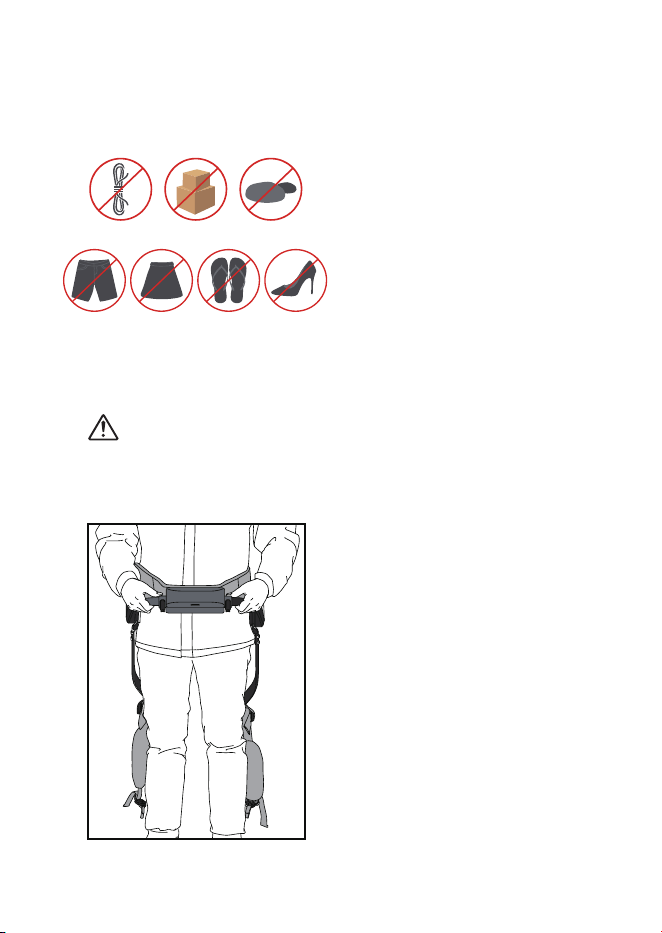
1. Wear the device backwards in front
of your body, align the waist center,
and keep it fitted. Push the pull rods
on both sides inward to the appropri-
ate width, ensuring the scales on both
pull rods are consistent.
8.2 Wearing Guide
Before wearing the product, confirm that the power switch is in the
off state.
If the power button is accidentally pressed before wearing the device
properly, turn it off immediately.
Find a flat surface, either indoors or
outdoors. Clean up obstacles on the
ground in advance, including wires,
debris, stones, etc., to avoid tripping.
Wear loose long pants and sports shoes
when using this product; do not use the
product with high heels, flip-flops,
shorts, or skirts.
08 Product Usage
8.1 Pre-Use Preparation
8
If the binding strap becomes loose or falls off during use, turn off the
device immediately and adjust.
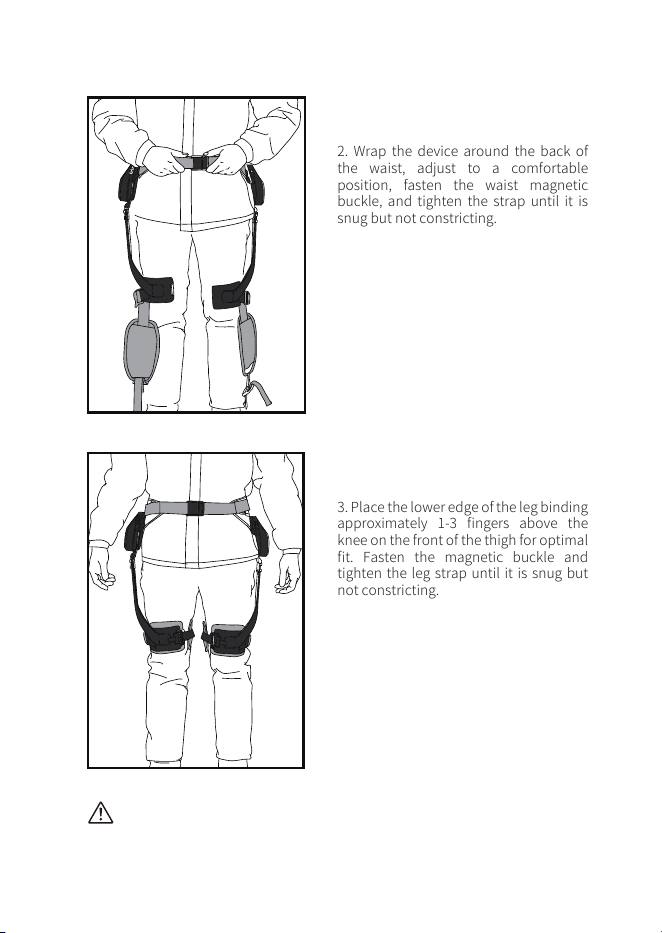
2. Wrap the device around the back of
the waist, adjust to a comfortable
position, fasten the waist magnetic
buckle, and tighten the strap until it is
snug but not constricting.
3. Place the lower edge of the leg binding
approximately 1-3 fingers above the
knee on the front of the thigh for optimal
fit. Fasten the magnetic buckle and
tighten the leg strap until it is snug but
not constricting.
9
Note: The device must be turned on when wearing, fastened, and in a
standing position. Do not turn on the product during downward
movements such as going down stairs, mountains, or slopes.
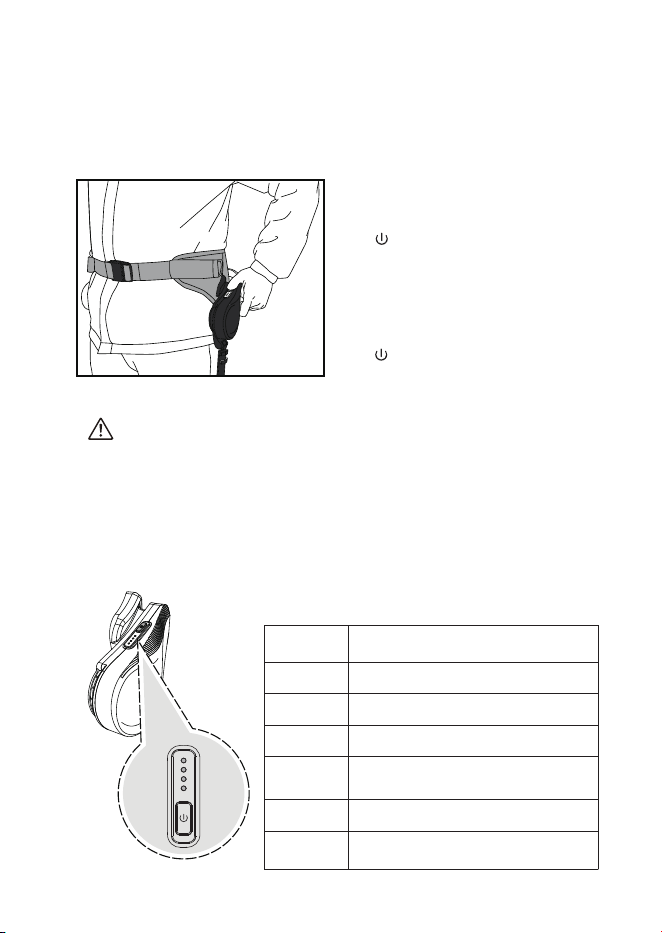
Turn on
the device
≤25%
≤50%
≤100%
≤75%
The device will sound a low battery
warning.
1 red light on steadily
≤15%
The device will emit a prompt
sound and stop working
≤10%
The device will emit a prompt sound,
and 1 blue light will be on steadily
4 blue lights on steadily
2 blue lights on steadily
3 blue lights on steadily
Power-on: Confirm the device is worn
and fastened properly, maintain a
standing posture, long-press the left
" " power button for 3 seconds to
turn on, and you will hear a relevant
prompt sound and battery level
announcement; after preparation, it
will enter the walking assistance
mode.
In case of problems, short-press the
" " power button for 1 second to
turn off.
8.3 Starting Use
Device Battery Level and Indicator Light
Device Power-On
10
Assistant Level Adjustment
Note: Assistant Level adjustment should be performed in a standing
position to avoid imbalance and falls caused by changes in assistance
during walking.
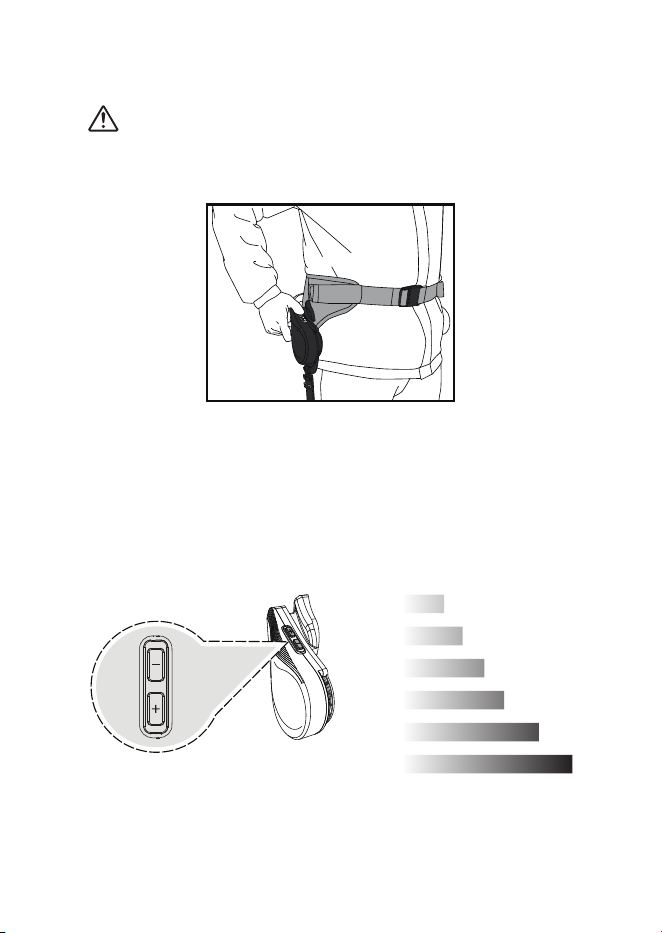
The switching button is on the right side; use the "+/-" buttons to adjust the assistance
level, with a voice prompt upon successful switching. Users can adjust the assistance to
one of 6 levels according to their own needs.
1
2
3
4
5
6
11
8.4 Ending Use
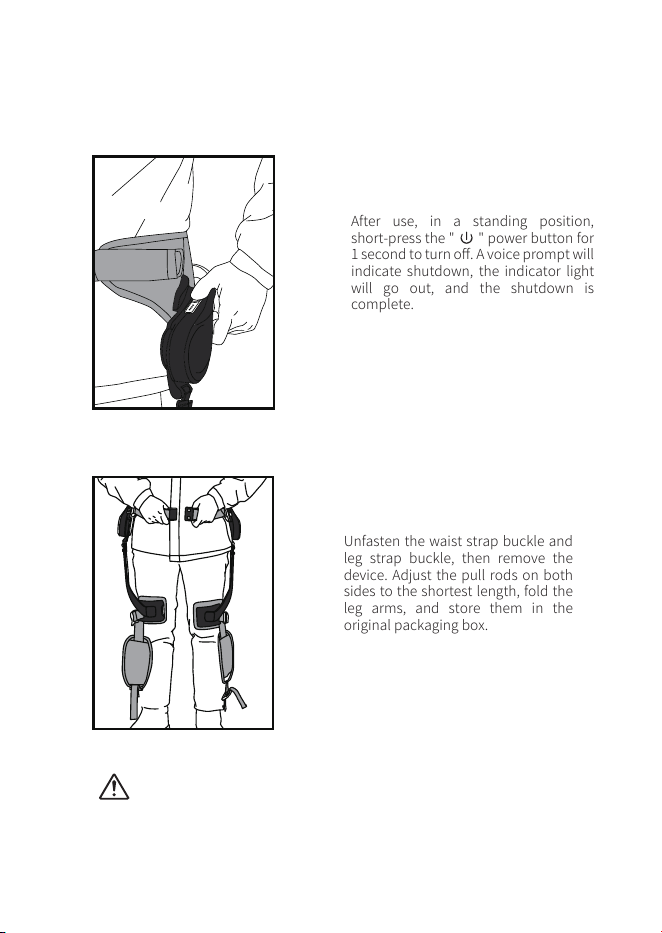
After use, in a standing position,
short-press the " " power button for
1 second to turn off. A voice prompt will
indicate shutdown, the indicator light
will go out, and the shutdown is
complete.
Unfasten the waist strap buckle and
leg strap buckle, then remove the
device. Adjust the pull rods on both
sides to the shortest length, fold the
leg arms, and store them in the
original packaging box.
Note: When needing to remove the device, turn off the power first
before removing it.
During removal, be careful to prevent the device from falling and
causing injury to the user.
12
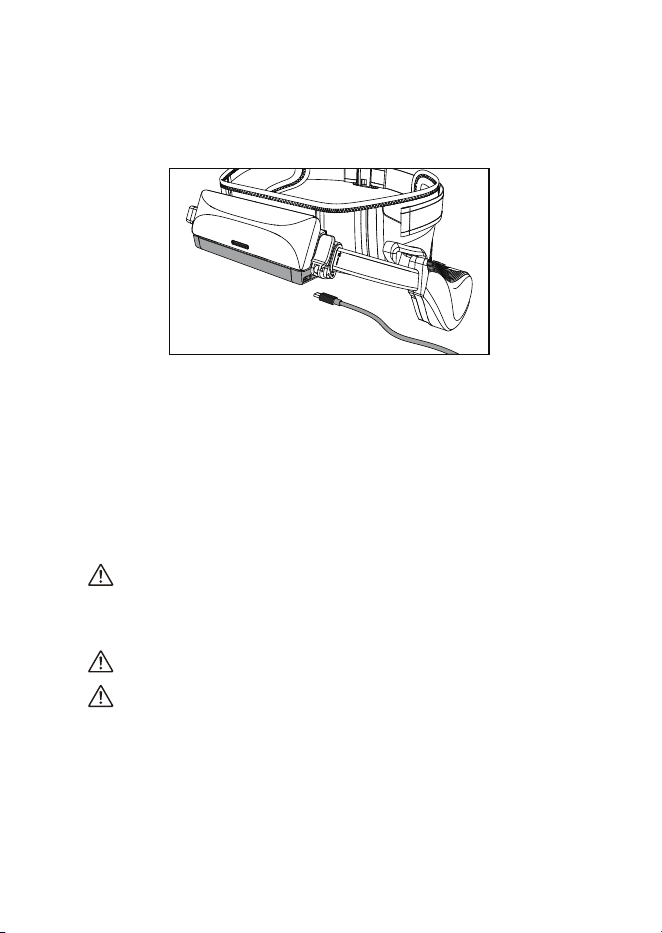
Insert the Type-C charging cable into the device's charging port, and connect
the other end to a daily mobile phone charger adapter. The battery level
indicator light will gradually brighten (breathing effect) indicating normal
charging; when fully charged, the indicator light will remain blue.
Precautions:
Charging should be performed in a well-ventilated and fire-free safe
environment. Only use chargers that meet national standards. Do not use
other chargers arbitrarily if the original one is damaged, as this will reduce
the safety of the device. Please confirm that the charger meets the
requirements of IEC60601-1 first.
During charging, place the device out of the reach of children and people
with mobility impairments to avoid hazards.
The ambient temperature during charging must be between 0℃ and 45℃.
If the device is still charging beyond the normal charging time, stop
charging immediately; otherwise, there may be risks such as battery
overheating, deformation, or extreme thermal effects.
09 Battery Maintenance
9.1 Battery Charging
13
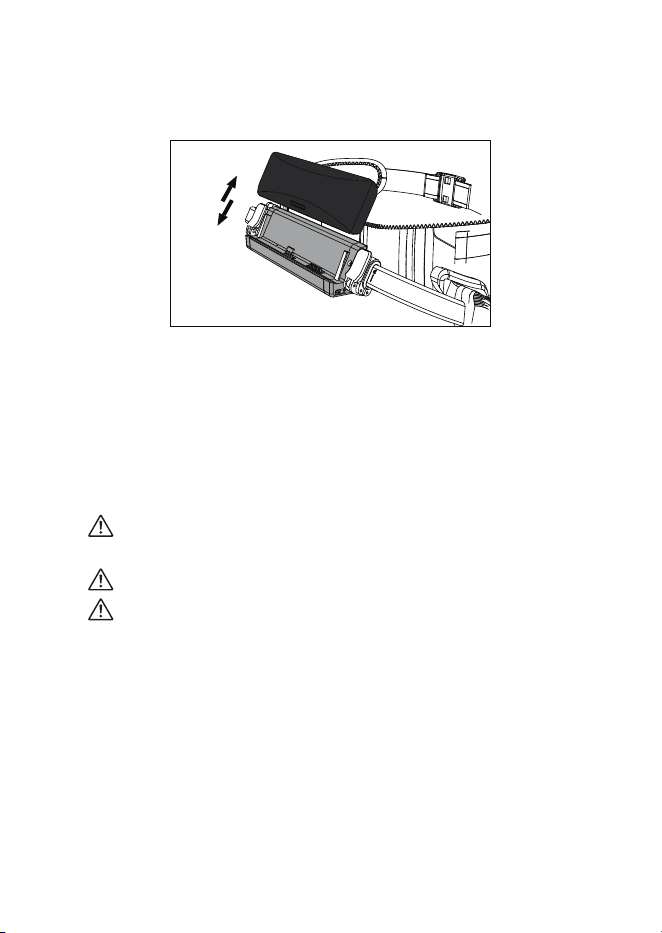
Press the button on the battery case and push outward to remove the battery.
When installing the battery, align it with the buckle position and push inward
until you hear a "click" sound, indicating correct installation.
9.4 Waste Battery Disposal Method
The battery installed in the device contains substances harmful to the
environment. Before discarding the device, the battery pack must be
removed from the device.
Dispose of the waste battery pack safely and properly; do not throw it
into fire, water, or soil.
If the waste battery pack leaks and comes into contact with the skin or
clothing, rinse immediately with clean water and seek medical attention
promptly.
9.2 Battery Replacement
14
15
10.1 Storage Method
Store the product at room temperature in a dry place, avoiding direct sunlight.
10.2 Product Transportation
During transportation, the product should be protected from heavy pressure, direct
sunlight, and rain.
10.3 Main Unit Cleaning
To avoid affecting the performance of the machine, it is recommended to maintain its
components regularly.
10 Product Maintenance
Storage Temperature Range
Relative Humidity Range
Atmospheric Pressure Range
-10℃ ~ 45℃
10%~75%
700hPa ~ 1060hPa
Recommended Storage Conditions
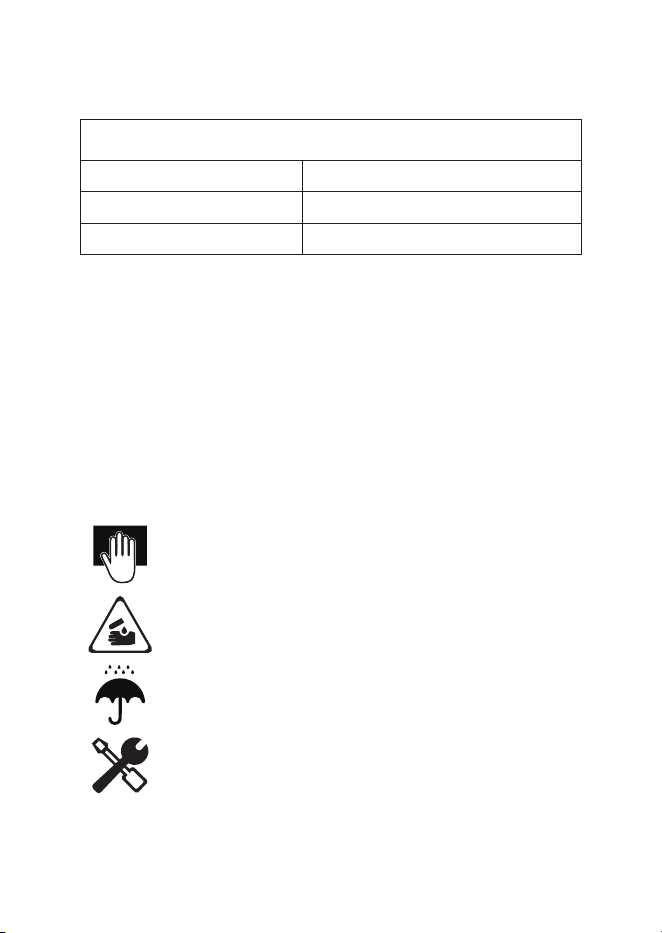
It is recommended to wipe the product surface with a clean,
soft, dry cloth.
Do not use corrosive cleaning agents to clean the product.
Do not allow water or water vapor to enter the main unit.
Do not remove any components for cleaning.
16
10.4 Battery
10.5 Removable Straps and Cushions
If not in use, turn off the device and remove the battery
for storage to avoid battery depletion.
Use chargers that meet the requirements of IEC60601-1.
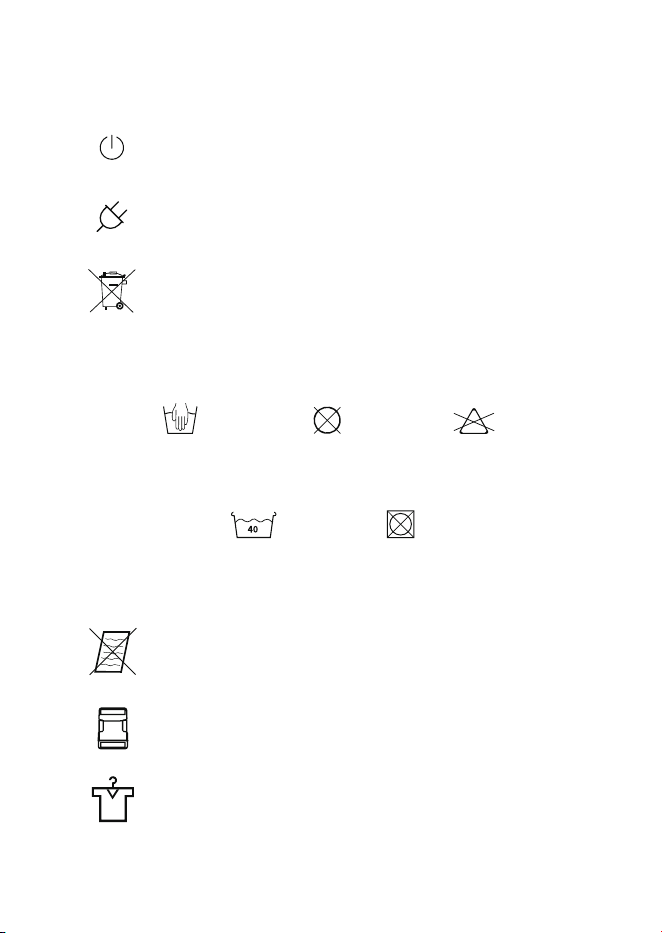
This product contains a battery; do not discard it
directly into the trash after use.
Do not tumble dry
Do not bleach
Wash at 40°C
Hand wash only Do not dry clean
Do not scrub to avoid magic tape failure
Remove the waist strap buckle completely before
cleaning
After cleaning, dry completely before assembling
and using
17
11 Installation, Disassembly, and Disposal
11.2 Precautions for Device Disposal
1. Electronic components, printed circuit boards, plastic parts,
metals, wires, etc., should be placed in "recyclable" trash bins or
handed over to specialized recycling departments for profession-
al disposal.
2. When the battery reaches the end of its service life, the waste
battery should be disposed of centrally or handed over to
recycling departments. Do not discard it randomly to avoid
pollution.
3. Products marked with this symbol are electronic and electrical
products that require separate recycling. Please dispose of them
in accordance with local laws and regulations. If you have any
other questions, please contact our company.
11.1 Assembly Instructions
The product is delivered fully assembled in the packaging box and can be worn and
used directly. The wireless communication encryption protocol of this product has
been set at the factory; no user configuration is required. If any problems occur
during use, please contact the after-sales service department of the company.
Note: Keep the original product packaging for use in case of return for
repair.
Warning: Modification of this device is prohibited.
Warning: Ensure all equipment operating nearby complies with relevant
electromagnetic compatibility (EMC) requirements.
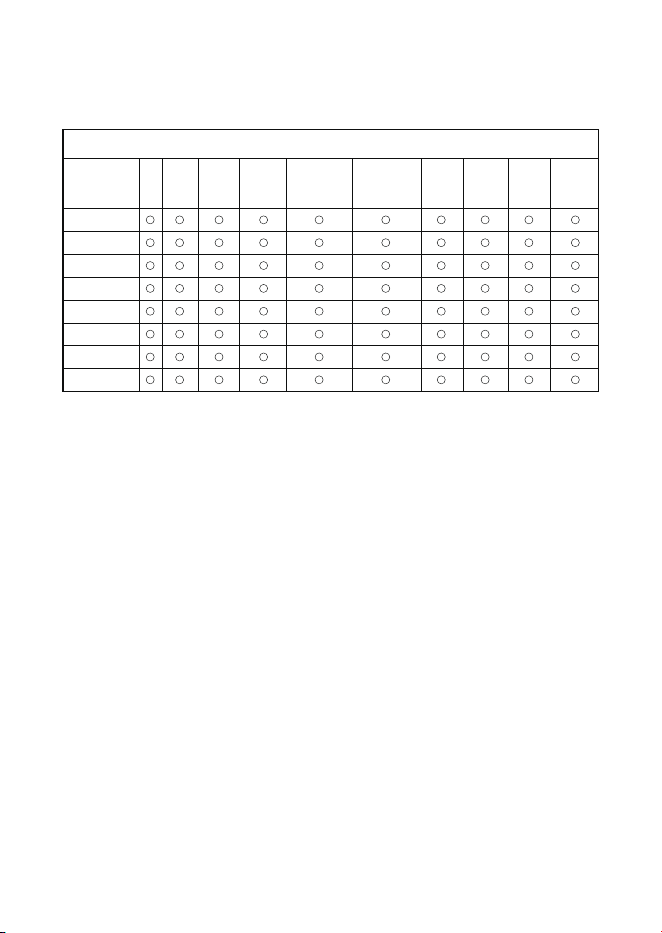
12 Product Hazardous Substance Statement
Note 1:
○:Indicates that the content of the hazardous substance in all
homogeneous
materials
of the component does not exceed the limits specified in the national
standard for the restriction of hazardous substances in electrical and electronic
products.
×: Indicates that the content of the hazardous substance in at least one homoge-
neous material of the component exceeds the limits specified in the national standard
for the restriction of hazardous substances in electrical and electronic products.
Note 2:
For components not listed above, their hazardous substance content does not exceed
the limits specified in the national standard for the restriction of hazardous substances
in electrical and electronic products.
18
Hazardous Substances (RoHS)
Substance
Name
Lead
(Pb )
Mercury
(Hg )
Cadmium
(Cd)
Polybrominated
Diphenyl Ethers
( PBDEs )
Polybrominated
Biphenyls
( PBBs )
Hexavalent
Chromium
( Cr(Ⅵ))
Benzyl
Butyl
Phthalate
(BBP)
Dibutyl
Phthalate
(DBP)
Bis(2-
ethylhexyl)
Phthalate
(DEHP)
Diisobutyl
Phthalate
(DIBP)
Housing
Plastic Parts
Binding Straps
and Cushions
Carbon Fiber
Arms
Battery
Electrical
Modules
Metal Parts
Adapter

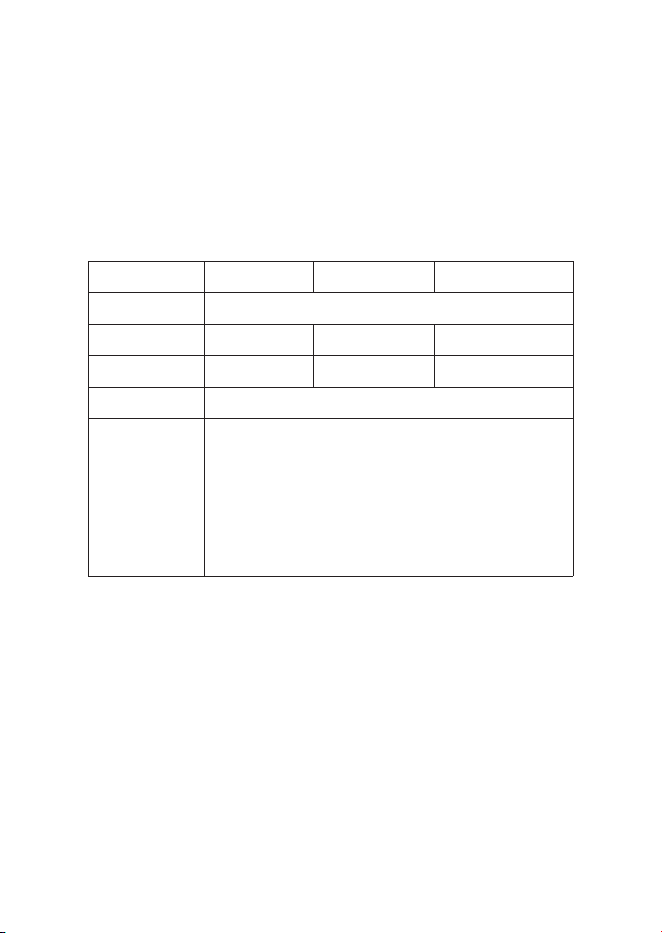
Assistance Disappears
When Climbing Uphill
When the leg lift reaches
the limit position at an
excessive speed, the
machine stops power
assistance because the
protection function is
triggered
Fault
Unable to Start
Possible Causes Solutions
Dead battery; Battery
not installed
Install the battery correctly
or charge it
No Assistance
After Power-On
Incorrect power-on
operation
Power on while standing
upright, and start walking
only after hearing the
"Start Walking"
announcement
Wearing Detection
Failure
Device not worn;
Improper wearing
Stand upright and wear the
device in accordance with
the specifications
Device Malfunction
Voice broadcast of fault
information
Restart the device or contact
after-sales service if the
problem persists
Shutdown Due to Fall
Voice broadcast "Fall
Detected"; The device
stops assistance when
tilted
Other Faults
Resume normal walking
posture to use
Resume normal walking
posture to use
Contact after-sales service
13 Simple Troubleshooting
Troubleshooting and Solutions
19

1. The manufacturer provides a 12-month warranty for the product's functionality. This
warranty applies only to claims submitted in written form within the warranty period,
starting from the invoice date, and is valid based on the invoice number. Legal
warranty rights are not restricted by this warranty.
2. This warranty does not cover failures due to normal wear and tear, improper use,
incorrect operation, poor maintenance, or natural causes.
3. The warranty becomes void if the product is repaired by the user or any non-autho-
rized service center. The same applies if the device requires maintenance.
4. Claims cannot be made for issues caused by incorrect operation or problems arising
from use with other devices or accessories.
14 Repairs and Warranty
If your product needs repair, please contact the manufacturer or an authorized service
center. You can get the contact information for authorized service centers from the
manufacturer.
To help us handle your repair request more quickly, please provide the following
product details:
Warranty
a. Product Model
b. Product Serial Number
c. A detailed description of the problem
20
15 After-Sales and Repair Service
Thank you for purchasing the "Youlong" series of intelligent products! To protect your
legitimate rights and interests, our company Customer Center makes the following
standard service commitments and is dedicated to providing you with relevant
services when needed.
After-Sales and Repair Card
Name:
Mailing Address:
Purchase Date: Purchase Address:
Product Model:
Order Number:
Fault Description:
Product SN:
Tel:
Should you require additional after-sales service, feel free to contact us.
21
Manufacturer: YidexinnaoIntelligentTechnology(Shandong)Co.,Ltd.
Address: Room 220, Area A5, Xianjia Lake Scenic Area Creative Culture Street (Xihu Science
and Technology Innovation Park), No. 720, Fenglin 1st Road, Yuelu District, Changsha City,
Hunan Province, P.R.China.

FCC Statement
厮s device complies with part 15 of the FCC rules. Operation is subject to the following l\vo cond
itions: (1) this device may not cause hannfi1l interference, and (2) this device must accept any inte
rrence received, including interference that may cause undesired operation
Caution: Changes or modications not expressly approved by the party responsible for
compliance could void the user's authority to operate the equipment
NOTE: This equipment has been tested and fow1d to comply with the limits for a Class B digital d
evice, pnrsuant to part 15 of the FCC Rules. These limits are designed to provide reasonable prote
ction against hann扣1 interference in a residential installation. This equipment generates uses and c
an radiate radio equency energy and, if not installed and used in accordance with the instructions,
may cause ha1 interference to radio conununications. However, there is no织iarantee that inte
rference will not occnr in a particular installation. If this equipment does cause ham血1 interferenc
e to radio or television reception, which can be detennined by tnming the equipment off and on, th
e user is encouraged to try to correct the interference by one or more of the llowing measnres
- Reorient or relocate the receiving antenna
- Increase the separation between the equipment and receiver
- Cmmect the equipment into an outlet on a c订cuit different from that to which the receiver 1s
connected.
- Consult the dealer or an experienced radio/TV teclmician for help unportant annow1cement
Radiation Exposure Statement
The device has been evaluated to meet general RF exposure requirement. The device can be used
111 portable exposure condition without restrict10n