Digital Voice Metronome (EN)
settings: Beat = 4/4, Tempo = 120, Rhythm Pattern = , Count-in = 0, Sound = Voice.
until the display lights up. This will clear all saved parameters and restore factory
In power-off state, press and hold the " " and " " buttons simultaneously
4. Adjust to a comfortable volume using the volume knob.
3. Short press " " to start the metronome.
2. Set the parameters according to Section IV.
lights up.
1. When powered off, press and hold " " until the display
• Charging Cable ×1
• User Manual ×1
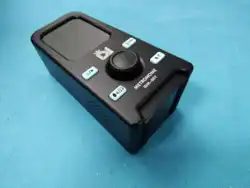
• iDM-007 Metronome ×1
7. Package Includes
6. Specifications
Tempo Range: 30–252 bpm
Beats: 0/4, 1/4, 2/4, 3/4, 4/4, 3/8, 6/8
Count-in: 0–6
Sounds: Voice, Mechanical Metronome,
Electronic Metronome, Cowbell, Woodblock
Rhythm:
Speaker: 1.5W * 2
Bluetooth Version: 5.2
Operating Frequency: 2402MHz–2480MHz
Bluetooth Max. RF Power: 0dBm
LE
Max. RF Power: -1dBm
Battery: Rechargeable Lithium Battery (3.7V, 1100mAh)
Weight: 260g
Dimensions: 80 (L) × 70 (W) × 163 (H) mm
5. How to Use the Metronome
4. Button Functions and Operations
3. Factory Reset
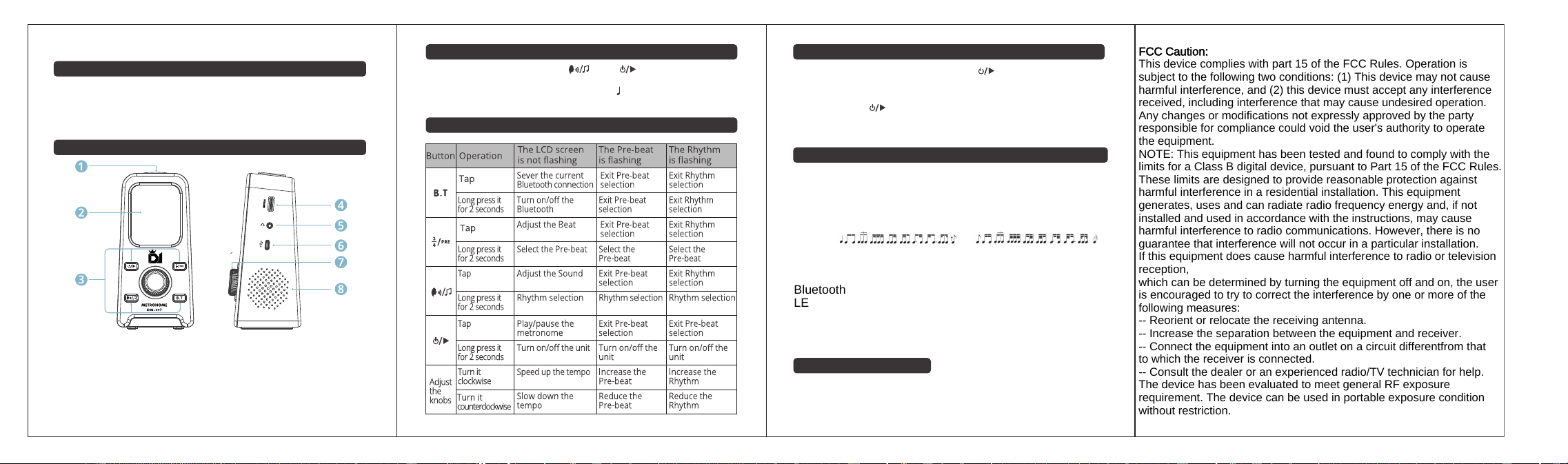
8. Speaker Hole: Emits sound
rhythm patterns, and pre-count beats
tempo, Adjust Knob: Adjustment 7.
metronome
6. Charging Port: For charging the
headphones
5. Headphone Jack: For connecting
4. Volume Knob: Adjust volume level
Operation Methods)
(see Section 4: Button Functions and
3. Buttons: Adjust various functions
metronome operations
2. LCD Display: Displays all
1. Tap Tempo Button: Tap to set tempo
2. Parts Names and Functions
• 4. Do not clean the metronome surface with alcohol or other diluted liquids to avoid damage.
• 3. Do not drop the metronome or let it fall on hard surfaces to prevent malfunction.
environments.
• 2. Do not use the metronome in high temperature, humid, dirty, or strongly vibrating
• 1. Do not disassemble, modify, or repair the metronome by yourself to avoid short circuits.
1. Precautions
FCC Caution:
This device complies with part 15 of the FCC Rules. Operation is
subject to the following two conditions: (1) This device may not cause
harmful interference, and (2) this device must accept any interference
received, including interference that may cause undesired operation.
Any changes or modifications not expressly approved by the party
responsible for compliance could void the user's authority to operate
the equipment.
NOTE: This equipment has been tested and found to comply with the
limits for a Class B digital device, pursuant to Part 15 of the FCC Rules.
These limits are designed to provide reasonable protection against
harmful interference in a residential installation. This equipment
generates, uses and can radiate radio frequency energy and, if not
installed and used in accordance with the instructions, may cause
harmful interference to radio communications. However, there is no
guarantee that interference will not occur in a particular installation.
If this equipment does cause harmful interference to radio or television
reception,
which can be determined by turning the equipment off and on, the user
is encouraged to try to correct the interference by one or more of the
following measures:
-- Reorient or relocate the receiving antenna.
-- Increase the separation between the equipment and receiver.
-- Connect the equipment into an outlet on a circuit differentfrom that
to which the receiver is connected.
-- Consult the dealer or an experienced radio/TV technician for help.
The device has been evaluated to meet general RF exposure
requirement. The device can be used in portable exposure condition
without restriction.