+
AAA
AAA
+
Quick Setup Guide
Scan for an Easy Setup.
Important!
vizio.com/qr/k/MQ6-series
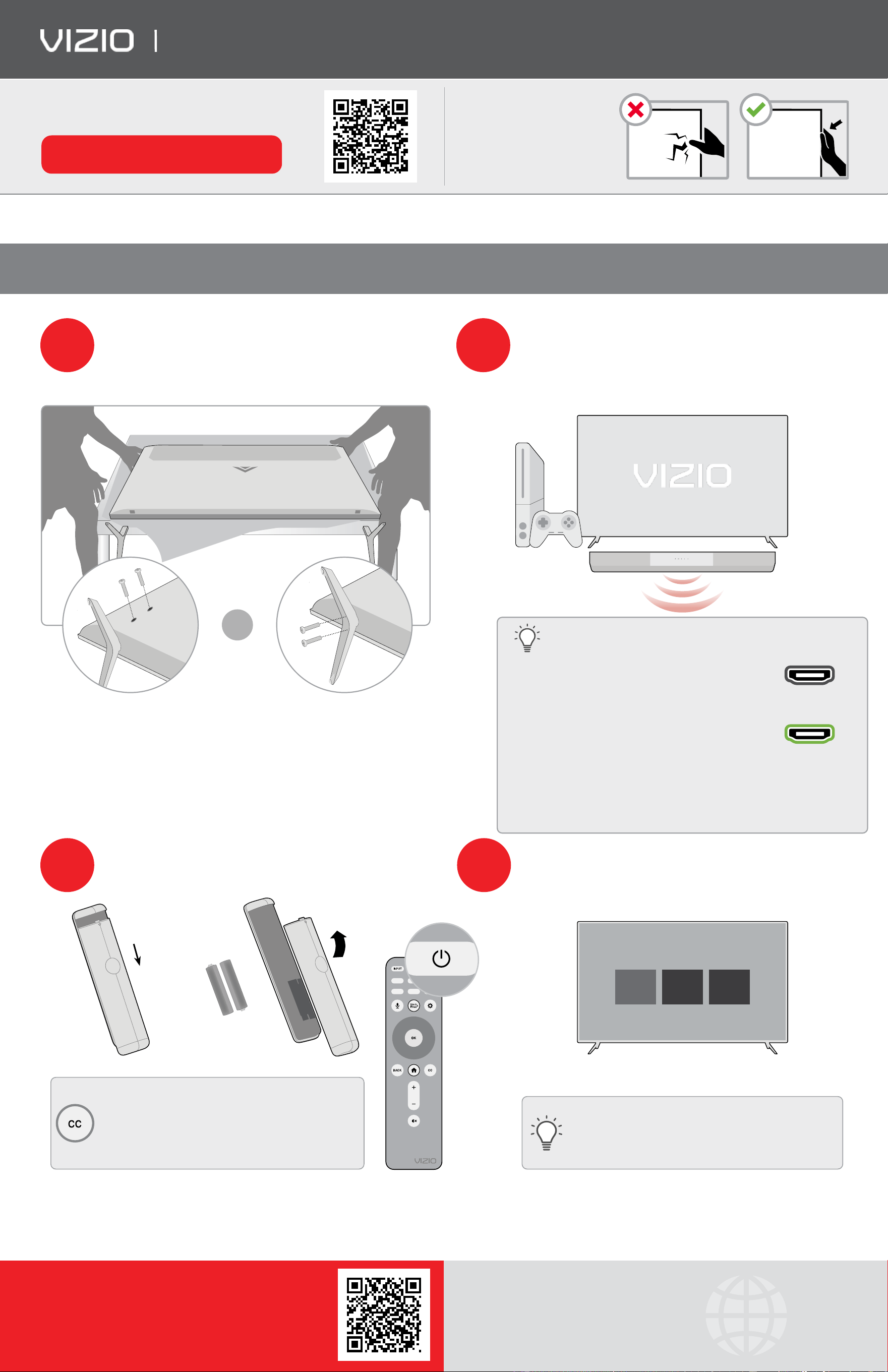
Do not touch screen.
Please read the full User Manual at support.vizio.com/s/user-manuals before operating your VIZIO product and keep it for future reference. Purchase subject to full VIZIO Terms and
Conditions, including Binding Arbitration Agreement, which may be viewed at vizio.com/en/terms/terms-of-service. By using this device, you accept those Terms and Conditions.
What’s Inside the Box
Smart TV | Power Cable | Voice Remote with Batteries | TV Feet with Screws (4)
Place TV on a padded, fat surface that is larger
Plug the TV power cord into a wall outlet. Connect
1
than the TV, before installing feet
*
or wallmount
2
your other devices to the TV, such as game console
(not included). When the stand legs are properly
(not included). HDMI cable is recommended.
connected, the legs will not shift or move.
Adapters may be required and are not included.
OR
Why HDMI?
Highest Quality Connection:
Connect your devices with HDMI for the best
possible picture and sound. HDMI
*
Stand type may vary depending on model.
Dedicated Sound Bar Connection: Connect a
sound bar to the HDMI 1 (eARC) port on the TV
(marked in green).
HDMI 1 (eARC)
Integrated Sound Bar Control:
When connected to select VIZIO sound bars using HDMI, audio
settings may be adjusted easily via an onscreen menu.
3
Insert two AAA batteries into the remote control.
Aim directly at the TV and press the power button.
4
Follow the easy on-screen instructions to complete
your setup and enjoy!
Push
Lift
Choose a Language for your display
English
Español
Français
Batteries included.
Accessibility Features
Press the CC button to enable/disable closed captions.
Hold down for 5 seconds to access the Accessibility
Want the best viewing experience?
Menu with features like Talk Back and Zoom Mode.
Select a Picture Mode setting that best fts your
Email: accessibility@vizio.com
room & lighting. See User Manual for more details.
Call: 1-877-698-4746 for additional support
This unit is equipped with Automated Content Recognition (“ACR”) Technology which (when enabled) is able to use video data to recognize what is playing on the TV and send information back to VIZIO about what is showing
(“Viewing Data”). Declining Viewing Data collection will not change the functionality of your device. To learn more, please see VIZIO’s Privacy Policy at www.vizio.com/privacy.
1
Source: The NPD Group, Inc., U.S. Weekly Retail Tracking Service, Based on Units, Dec. 24, 2017 – Feb. 15, 2020 Combined.
Complete your home theater experience with a sound
More questions?
bar from VIZIO, America’s #1 Sound Bar Company
1
.
Get customer support help
support.vizio.com
and view the User Manual here:
Scan here to shop our M-Series
™
Sound Bars.