OWNER'S MANUAL
MASSAGE CHAIR
Read this owner's manual thoroughly before operating the
appliance and keep it handy for reference at all times.
ENGLISH
MH21**
MFL71900503
Rev.00_102825
www.lg.com
Copyright © 2025 LG Electronics. All Rights Reserved
Scan to see the online manual.

TABLE OF CONTENTS
2
3 IMPORTANT SAFETY
INSTRUCTIONS
3 READ ALL INSTRUCTIONS BEFORE USE
3 DANGER STATEMENT
4 WARNING STATEMENTS
6 CAUTION STATEMENTS
8 PRODUCT OVERVIEW
8 Product Features
9 INSTALLATION
9 Choosing the Proper Location
9 Turning on the Power
9 Moving the Appliance for Storage and
Relocation
11 OPERATION
11 Before Use
12 Remote Controller
15 Operating the Appliance
17 Options
18 Settings
20 SMART FUNCTIONS
20 TERMS AND CONDITIONS
21 MAINTENANCE
21 Regular Cleaning
22 TROUBLESHOOTING
22 Before Calling for Service
23 LIMITED WARRANTY
23 CANADA
3IMPORTANT SAFETY INSTRUCTIONS
ENGLISH
IMPORTANT SAFETY INSTRUCTIONS
READ ALL INSTRUCTIONS BEFORE USE
Safety Messages
Your safety and the safety of others are very important.
We have provided many important safety messages in this manual and on your appliance. Always read and
follow all safety messages.
All safety messages will tell you what the potential hazard is, tell you how to reduce the chance of injury,
and tell you what may happen if the instructions are not followed.
DANGER STATEMENT
BDANGER
• To reduce the risk of electric shock when using this product, follow basic precautions, including the
following:
Electrical Danger
• Always unplug the appliance from the electrical outlet immediately after using and before cleaning.
• Never use pins or other metallic fasteners with the appliance.
• Carefully examine the covering before each use. Discard the appliance if the covering shows any sign of
deterioration, such as checking, blistering, or cracking.
• Do not operate the appliance in a wet or moist condition.
Grounding Instructions
• The appliance must be grounded. In the event of a malfunction or breakdown, grounding will reduce the
risk of electric shock by providing a path of least resistance for electric current. The appliance is
equipped with a cord having an equipment-grounding conductor and a grounding plug. The plug must
be plugged into an appropriate outlet that is installed and grounded in accordance with all local codes
and ordinances.
• Improper connection of the equipment-grounding conductor can result in a risk of electric shock. Check
with a qualified electrician or service personnel if you are in doubt whether the appliance is properly
This is the safety alert symbol.
This symbol alerts you to potential hazards that can kill or injure you and others. All safety messages
will follow the safety alert symbol and either the word DANGER, WARNING or CAUTION.
These words mean:
DANGER
You will be killed or seriously injured if you do not follow instructions.
WARNING
You may be killed or seriously injured if you do not follow instructions.
CAUTION
You may be injured or cause damage to the product if you do not follow instructions.
4 IMPORTANT SAFETY INSTRUCTIONS
grounded. Do not modify the plug provided with the appliance; if it will not fit the outlet, have a proper
outlet installed by a qualified electrician.
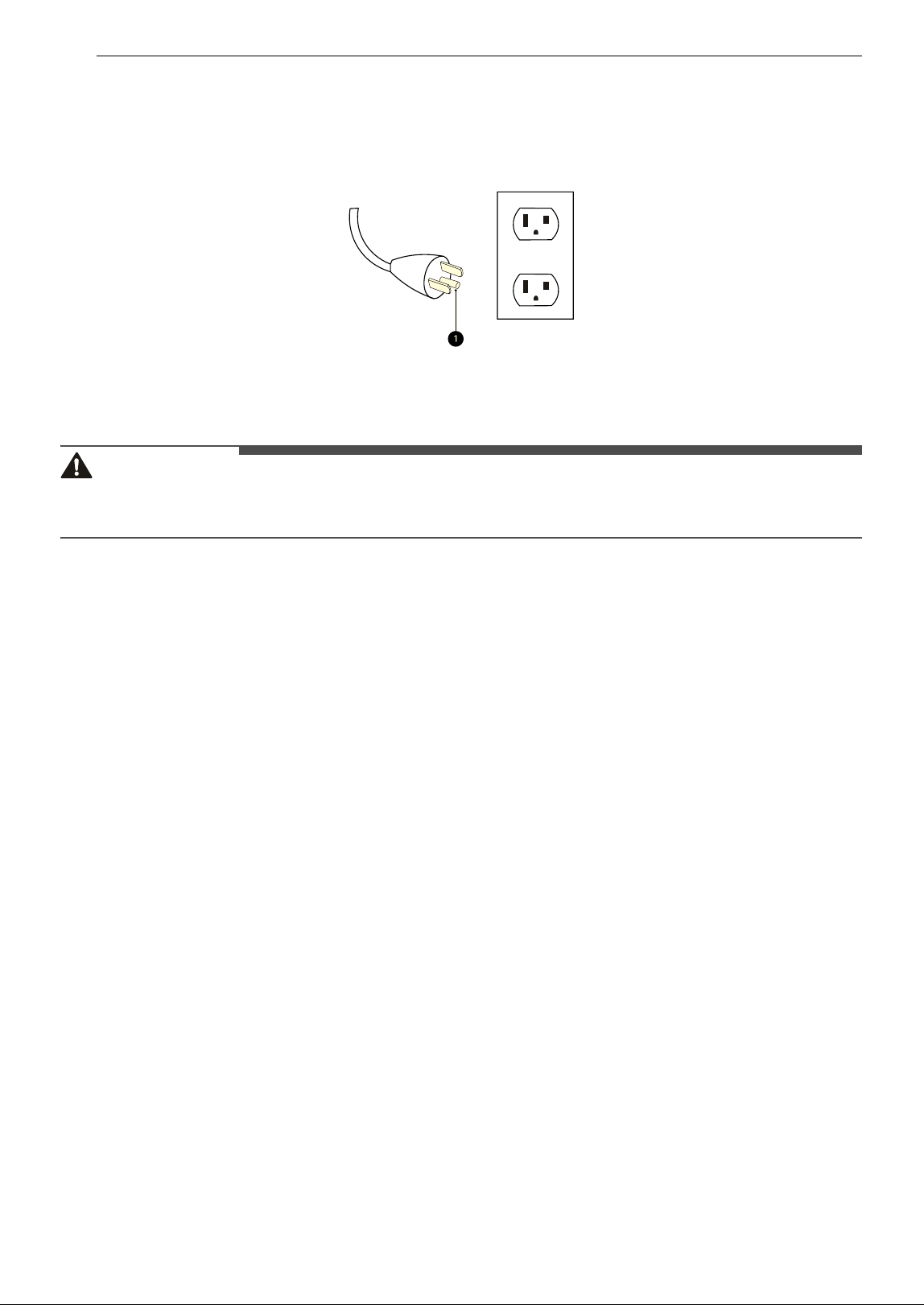
- This product is for use on a nominal 120-V circuit and has a grounding plug that looks like the plug
illustrated in below Figure. Make sure that the product is connected to an outlet having the same
configuration as the plug. No adapter should be used with this appliance.
a Grounding pin
WARNING STATEMENTS
WARNING
• To reduce the risk of explosion, fire, death, electric shock, scalding or injury to persons when using this
product, follow basic precautions, including the following:
Installation
• Adhere to all industry recommended safety procedures including the use of long-sleeved gloves and
safety glasses.
• Never attempt to operate this appliance if it is damaged, malfunctioning, partially disassembled, or has
missing or broken parts, including a damaged cord or plug.
• Before use, the appliance must be properly installed as described in this manual.
• To reduce the risk of severe injury or death, follow all installation instructions.
• The power cord of this appliance is equipped with a 3-prong (grounding) plug which mates with a
standard 3-prong (grounding) wall outlet to minimize the possibility of electric shock from this appliance.
• Insert the plug within 1 m of the product.
• Refer to the INSTALLATION INSTRUCTIONS for detailed grounding procedures. Installation instructions
are packed with the appliance for the installer’s reference. If the appliance is moved to a new location,
have it checked and reinstalled by qualified service personnel.
• Moving or installation of the appliance requires two or more people.
• Keep packing materials out of the reach of children. Packaging material can be dangerous for children.
There is a risk of suffocation.
• Destroy the carton, plastic bag, and other packing materials after the appliance is unpacked. Children
might use them for play. Cartons covered with rugs, bedspreads, or plastic sheets can become airtight
chambers.
• The appliance must be installed and electrically grounded by qualified service personnel in accordance
with local codes.
• Connect to a properly rated, protected, and sized power circuit to avoid electrical overload.
• Disconnect the power cord, house fuse or circuit breaker before installing or servicing the appliance.
• Install and operate the massage chair on a flat or level surface.
• Do not install the appliance in humid spaces.
• Store and install the appliance where it will not be exposed to temperatures below freezing or exposed
to outdoor weather conditions.

5IMPORTANT SAFETY INSTRUCTIONS
ENGLISH
• This appliance must be positioned near to an electrical power supply.
• Do not, under any circumstances, cut or remove the third (ground) prong from the power cord.
• When installing or moving the appliance, be careful not to pinch, crush, or damage the power cord.
• Do not bend or pinch the power cord excessively or place heavy objects on it.
Operation
• Read all instructions before using the appliance and save these instructions.
• Use this appliance only for its intended purpose. The appliance is intended for household indoor use.
• If the product has been submerged in water, sitting in standing water, or waterlogged, do not come in
contact with the product and immediately contact an LG Electronics Customer Information Center for
instructions before resuming use.
• If you detect a strange sound, a chemical or burning smell, or smoke coming from the appliance, unplug
it immediately and contact an LG Electronics Customer Information Center.
• Never operate the appliance if it has a damaged cord or plug, if it is not working properly, if it has been
dropped or damaged, or dropped into water. Return the appliance to a service center for examination
and repair.
• This appliance is not intended for use by persons (including children) with reduced physical, sensory or
mental capabilities, or lack of experience and knowledge, unless they have been given supervision or
instruction concerning the use of the appliance by a person responsible for their safety.
• Keep children away from the appliance and foot stool (or other similar parts).
• When using the appliance be sure to check that there are no people, pets or objects around the
appliance. Do not allow children or pets to play on, or with the appliance. Close supervision is necessary
when the appliance is used near children or pets.
• Be sure that there are no foreign objects in pockets and between the parts of appliance.
• Repair or immediately replace all power cords that have become frayed or otherwise damaged. Do not
use a cord that shows cracks or abrasion damage along its length or at either end. If the electrical supply
cord is damaged, it must only be replaced by the manufacturer or its service agent or a similar qualified
person in order to avoid a hazard.
• An appliance should never be left unattended when plugged in. Unplug from outlet when not in use, and
before putting on or taking off parts.
• To disconnect, turn all controls to the off position, then remove plug from outlet.
• Make sure the power cord does not get tangled around the shaft of the product due to the rotation of
the product.
• Keep the cord away from heated surfaces.
• Never unplug the appliance by pulling on the power cord. Always grip the plug firmly and pull straight
out from the outlet.
• Do not carry this appliance by supply cord or use cord as a handle.
• Do not use an extension cord or adapter with this appliance.
• Do not grasp the power cord or touch the appliance controls with wet hands.
• Do not modify or extend the power cord.
• Do not use an uncertified power outlet. Do not plug the appliance into a damaged wall outlet.
• Do not use any fuse (such as copper, steel wire, etc.) other than a standard fuse.
• Do not operate under blanket or pillow. Excessive heating can occur and cause fire, electric shock, or
injury to persons.
• Never operate the appliance with the air openings blocked. Keep the air openings free of lint, hair, and
the like.
• Do not operate where aerosol (spray) products are being used or where oxygen is being administered.
• Do not stand on or in appliance. Use only while seated.

6 IMPORTANT SAFETY INSTRUCTIONS
• Do not use massager in close proximity to loose clothing or jewelry.
• Keep long hair away from massager while in use.
• Do Not Crush - Avoid sharp folds.
• Never drop or insert any object into any opening.
• If connected to a circuit protected by fuses, use time delay fuse.
• Do not massage the abdomen with this appliance.
• Avoid excessive head and neck massage.
• Do not use it with other instruments.
• Do not fall asleep on this appliance.
• Temperatures sufficiently high to cause burns may occur regardless of the control setting. Do not use on
an infant or invalid or on a sleeping or unconscious person.
• Do not use on insensitive skin or on a person with poor blood circulation. Check the skin in contact with
the heated area of the appliance frequently to reduce the risk of blistering.
• In the event of a physical abnormality or abnormality in use, stop using it immediately and seek for
doctor’s advice.
People with the following conditions should not use the appliance or use the appliance
under doctor’s advice:
• People with heart problems or are using electronic medical equipment such as peacemaker.
• People with sensory impairment or perceptual disorders due to peripheral circulatory disturbances such
as diabetes.
• Pregnant women and women who have just delivered baby, and people with poor health.
• People with phlebitis, thrombosis, aneurysm, acute varicose veins, or other circulatory disorders.
• People with impaired consciousness, mentally handicapped, and incapable to operate massage chair.
• Cancer patients
• People with osteoporosis, prolapsed (herniated) disc, abnormal spinal condition (including scoliosis),
spinal fractures, joint dysfunction and acute painful diseases such as sprains or muscle strains.
• People with skin diseases.
• People with high fever, burnout, chills, blood pressure changes or physical weakness.
• People with heat sensitive, allergy to heat, loss of heat sensation or illnesses related to heat.
Maintenance
• Do not repair or replace any part of the appliance. All repairs and servicing must be performed by
qualified service personnel unless specifically recommended in this owner’s manual. Use only authorized
factory parts.
• Disconnect this appliance from the power supply before cleaning and attempting any user maintenance.
Turning the controls to the OFF position does not disconnect this appliance from the power supply.
• Remove any dust or foreign matter from the power plug pins.
• Do not disassemble or repair the appliance by yourself.
CAUTION STATEMENTS
CAUTION
• To reduce the risk of minor or moderate injury to persons, malfunction, or damage to the product or
property when using this product, follow basic precautions, including the following:

7IMPORTANT SAFETY INSTRUCTIONS
ENGLISH
SAVE THESE INSTRUCTIONS
Operation
• Do not step on or place heavy objects on top of the appliance.
• Stop using the remote controller if there is fluid leaking from the battery. If your clothes or skin are
exposed to the leaking battery fluid, wash it off with clean water.
• If the leaking battery fluid has been swallowed, rinse the inside of the mouth thoroughly and consult a
doctor.
• Do not recharge or disassemble the batteries.
Maintenance
• Never use harsh chemicals, abrasive cleaners, or solvents to clean the appliance. They will damage the
finish.
• Clean with a soft cloth.
8 PRODUCT OVERVIEW
PRODUCT OVERVIEW
Product Features
The images in this guide may be different from the
actual components and accessories, which are
subject to change by the manufacturer without
prior notice for product improvement purposes.
NOTE
• For your safety and for extended product life,
use only authorized components. The
manufacturer is not responsible for product
malfunction, property damage or bodily injury
caused by the use of separately purchased
unauthorized components, parts, or non-LG
products.
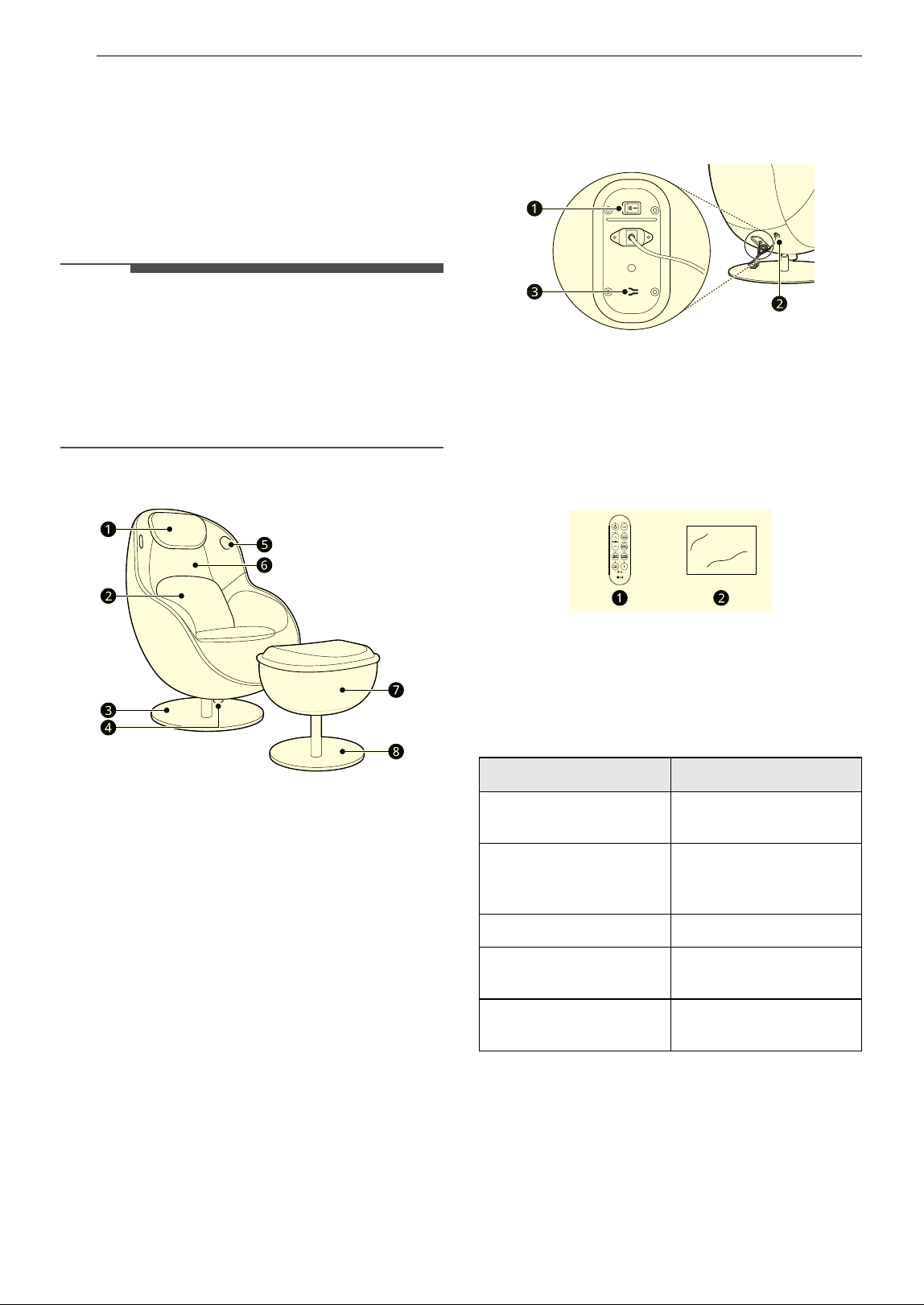
Front View
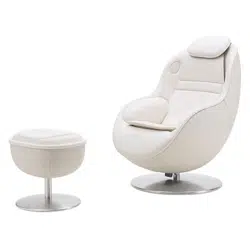
a Head pillow
b Back cushion
c Chair base
d Recline tension control knob
e Bluetooth speaker
f Back massage pad
g Foot stool
h Foot stool base
Rear View
a Power switch
b Power plug
c Remote control pairing button
Accessories
a Remote controller
b Rug
Product Specifications
Model MH21**
Electrical
Requirements
120 V~, 60 Hz
Dimensions (Width X
Height X Depth)
29 5/8'' X 44 3/8'' X 39 5/
8" (75.3 cm X 112.7 cm X
100.7 cm)
Recline Angle about 120˚ - 135˚
Net Weight for
massage chair
108 lb (49 kg)
Net weight for foot
stool
24.3 lb (11 kg)
9INSTALLATION
ENGLISH
INSTALLATION
Choosing the Proper
Location
Installation Location
• Place the product on a flat, level floor to reduce
risk of tipping or overturning.
• To avoid damaging the floor and minimize noise,
place a piece of the rug underneath it.
• Do not install the appliance in an area where it
will be exposed to water and/or weather. Failure
to follow this warning could result in risk of
electric shock, injury, or product damage or
malfunction.
• Leave at least 30 cm of space behind the
appliance to allow it to recline.
NOTE
• Installing on carpeting, soft tile surfaces, a
platform or weakly supported structure is not
recommended.
Power Outlet
• The power outlet must be within 40 inches (1 m)
of either side of the appliance.
• Position the appliance so that the outlet and
plug are easily accessible.
• Do not overload the outlet with more than one
appliance.
• The outlet must be grounded in accordance with
current electrical wiring codes and regulations.
• Use a time-delay fuse or circuit breaker.
• It is the personal responsibility and obligation of
the appliance owner to have a proper outlet
installed by a qualified electrician.
Turning on the Power
WARNING
• Connect to a rated power outlet.
• Have a certified electrician check the wall outlet
and wiring for proper grounding.
• Do not damage or cut off the ground terminal of
the power plug.
Connect the Power
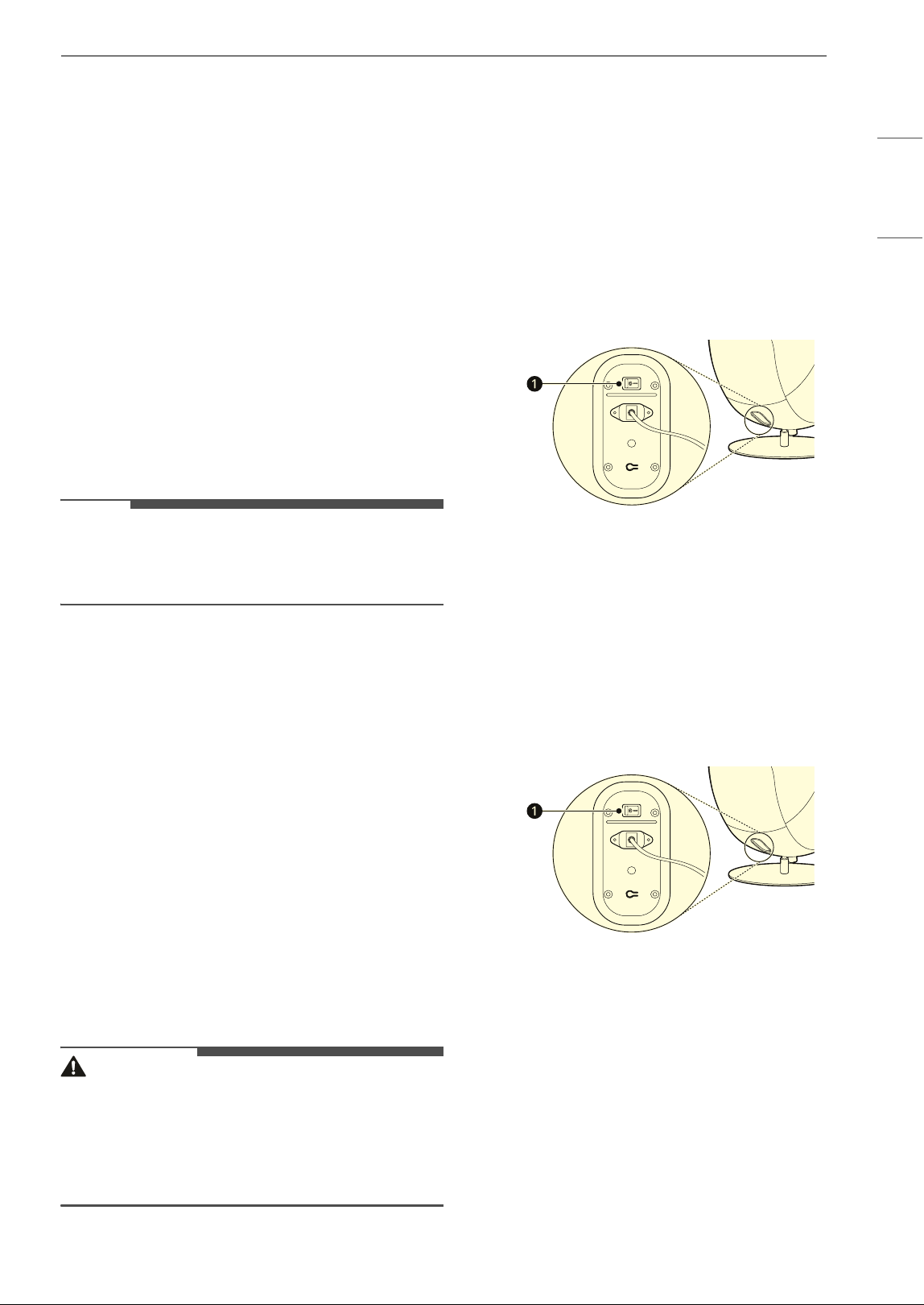
1 Position the appliance in its final location.
2 Insert the power plug into the power outlet.
3 Turn on the power switch a.
• After that, nothing happens to the remote
controller.
Moving the Appliance for
Storage and Relocation
Moving the Appliance
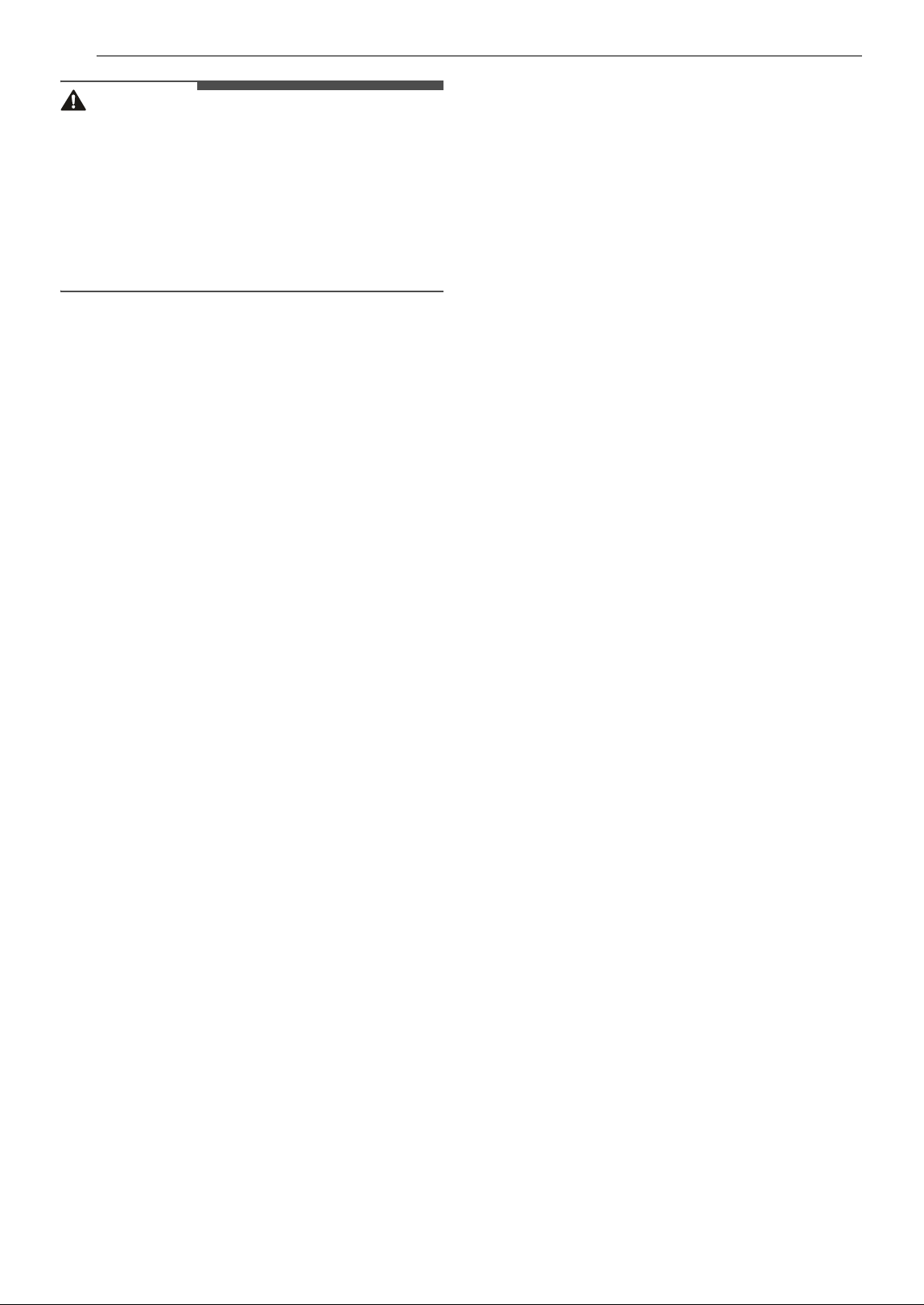
• Press OFF the power switch a located at the
bottom of the back of the massage chair.
• Moving or installation of the appliance requires
two or more people.
• Lift the product or foot stool completely and
move it.
- If the product is moved while in contact with
the floor, damage such as floor scratches may
occur.
• When storing the appliance, cover it with a cover
to prevent dust.
10 INSTALLATION
CAUTION
• Do not store in places exposed to sunlight for
long periods of time or places with high
temperatures, such as near heating appliances.
It may cause fire or discoloration or
deterioration of the product.
• Do not place people or objects on the product or
foot stool and move it. Doing so may fall from
the product and cause a safety accident.
11OPERATION
ENGLISH
OPERATION
Before Use
WARNING
• To reduce the risk of fire, electric shock, or injury
to persons, read the SAFETY INSTRUCTIONS
before operating this appliance.
Operation Overview
1 Sit on the massage chair.
• Check all pockets to make sure that they are
empty. Items such as pens, coins,
smartphone and keys can damage your
appliance and cause injury.
2 Turn on the massage chair.
• Press the Power button for 2 seconds to
turn on the massage chair.
3 Set up the massage.
• When the massage and option are selected,
the massage begins.
4 Adjust options.
5 Attach the remote controller to the side of the
product or the armrest.
6 End of massage.
• To stop the massage during operation,
press the Power button. To resume the
massage, press Power button again.
• To turn off the massage chair during
operation, press the Power button for 2
seconds.
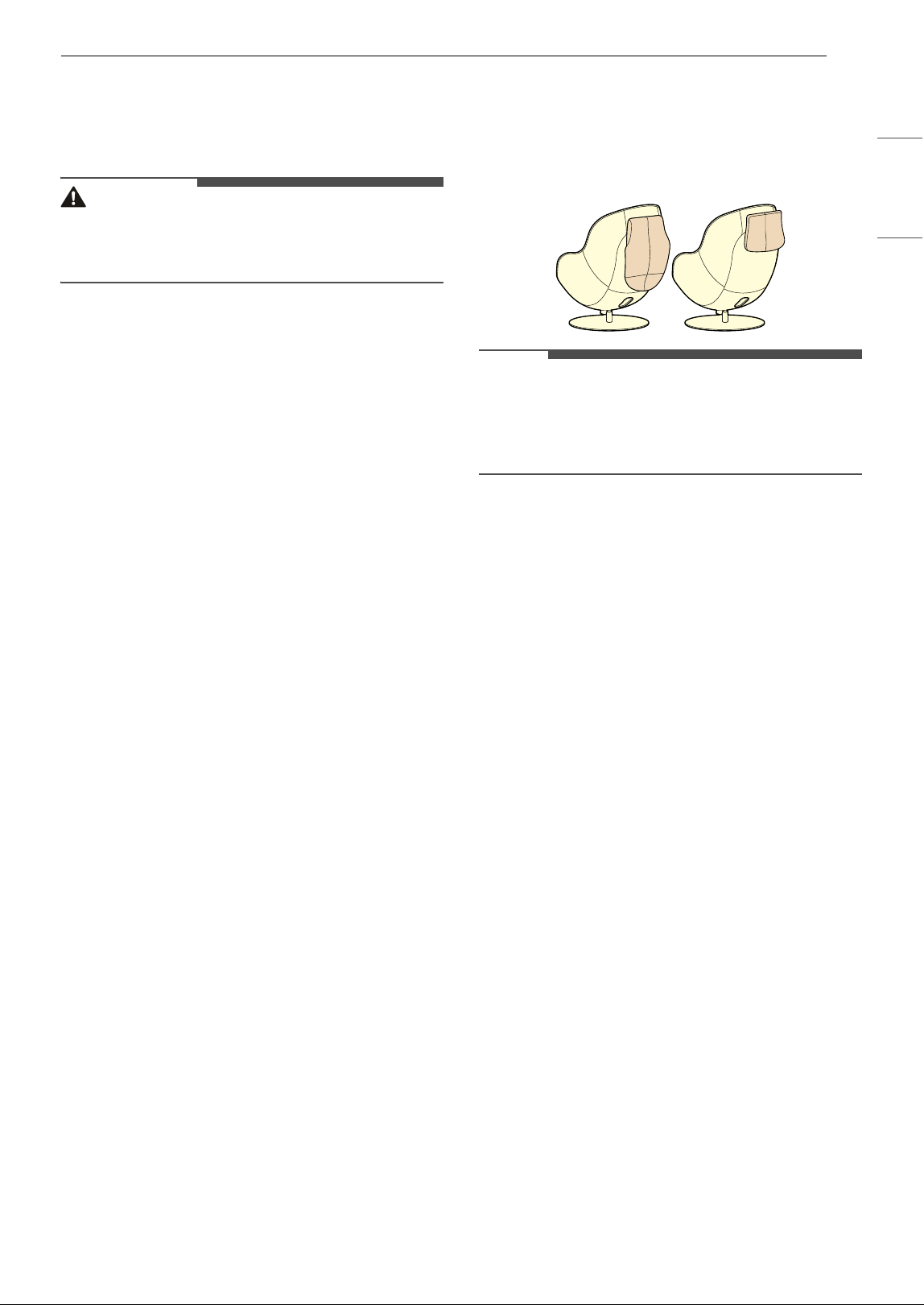
Using Pillow and Cushions
Use pillow and cushions as needed or store them
behind the appliance.
• Pillow can be flipped over the head, while back
and seat cushions can be detached and attached
to the back of the appliance with velcro.
NOTE
• The pillow and cushions weaken the intensity of
the massage. For a stronger massage, detach
the pillows and cushions from the massage chair
and store them at the back of the appliance.
12 OPERATION
Remote Controller
Connecting the Remote Controller
The remote controller and massage chair are
connected by default. If the red LED above Power
button is on when you turn on the remote
controller, the connection between the massage
chair and the remote controller has been lost.
• Make sure the power cord is properly connected
to the power outlet and power inlet on the back
of the bottom of the appliance.
• Make sure the massage chair power switch is
turned on.
• If the massage chair and the remote controller
are too far apart, the signal may be weak and the
connection may not be configured correctly.
Move the remote controller closer to the
massage chair.
How to manually connect a massage
chair and remote controller
If the red LED above Power button continues to
light even after all of the above instructions have
been followed, manually connect the remote
controller to the massage chair following the steps
below.
NOTE
• If you replaced a remote controller, follow the
steps below to manually connect the remote
controller to the massage chair.
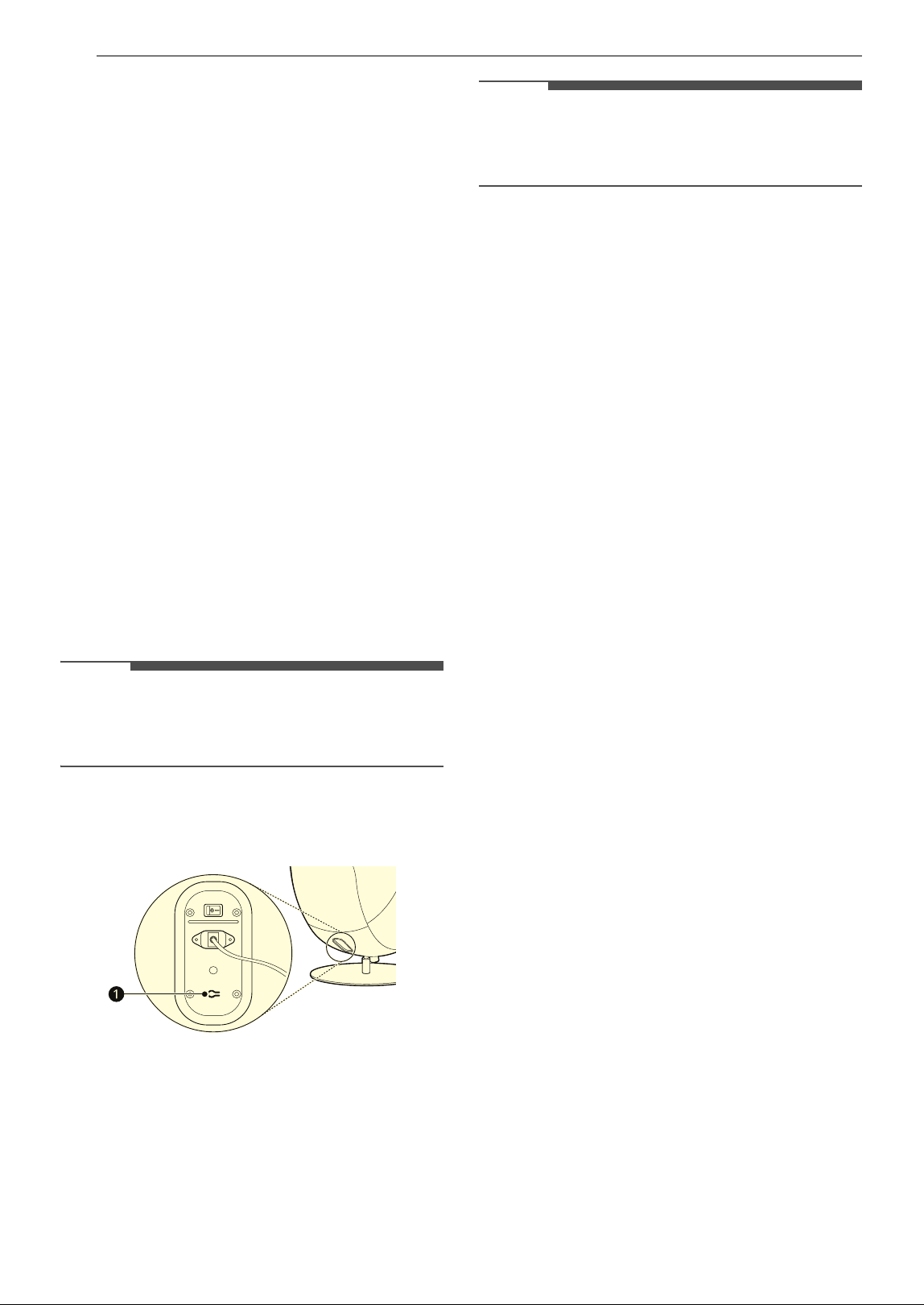
1 Press the remote control pairing button on
the back of the massage chair for 3 seconds to
connect to the remote controller.
2 Press and hold Bluetooth button and Power
button on the remote controller for 2 seconds
to connect to the massage chair.
NOTE
• The LED above Power button blinks. When this
LED light goes out, the massage chair and
remote controller are connected.
13OPERATION
ENGLISH
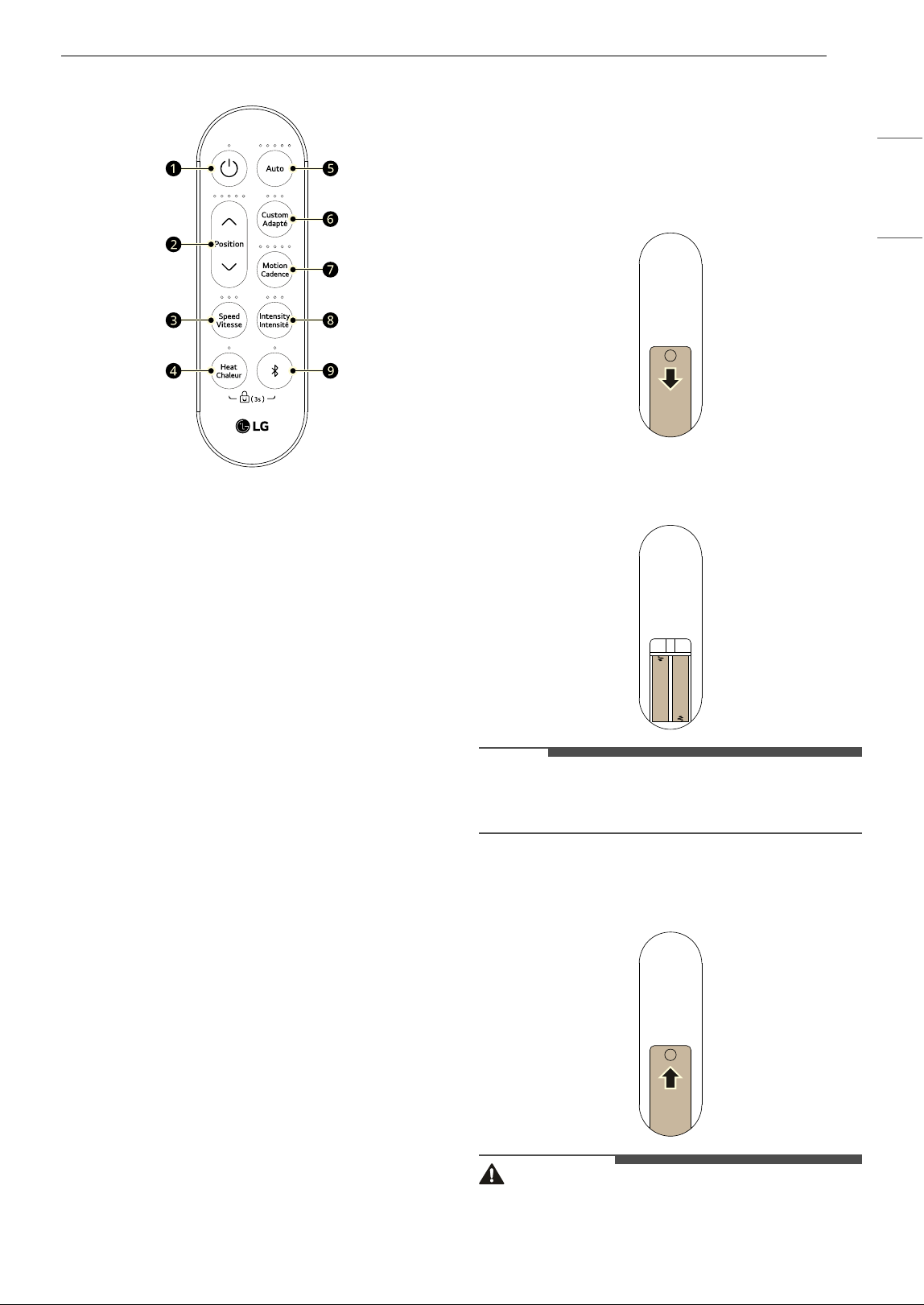
Using the Remote Controller
a Power Button
• To turn the massage chair on or off, press
this button for 2 seconds .
• To stop the massage during operation, press
the this button. To resume the massage,
press this button again.
b Position Button
• Press this button to adjust the shoulder
position where the massage starts.
c Speed Button
• Press this button to adjust the massage
speed in 3 levels when using the Custom
function.
d Heat Button
• Press this button to heat the backrest during
massage.
e Auto Button
• Press this button to select automatic
massage.
f Custom Button
• Press this button to select the area for
manual massage.
g Motion Button
• Press this button to select the mode of
manual massage.
h Intensity Button
• Press this button to select the intensity of the
massage.
i Bluetooth Button
• Press this button for 2 seconds to turn the
Bluetooth speaker function on or off.
Inserting the Battery
1 Slide down the battery cover on the back of
the remote control to open it.
2 Insert the battery in the tray with the + and -
polarity.
NOTE
• Check the polarity (positive and negative) signs
inside the remote control. (e.g. 1.5V, AAA type)
3 Slide up the battery cover on the back of the
remote control to close it.
WARNING
• If the battery tray cannot be securely fixed, stop
using it immediately and keep it out of the reach
of children.
14 OPERATION
WARNING
• Swallowing the battery may cause serious injury
or death. If it is swallowed, seek immediate
medical treatment.
• Do not dispose of batteries near a place with fire
or heat. Doing so may cause an explosion.
CAUTION
• Do not store the remote controller near a heater,
candle or lit cigarette. Doing so may cause a fire
or product deformation.
• Do not store the remote controller in a damp
area, and keep it away from splashing water.
Exposure to such moisture may lead to fire or
electric shock.
• Do not kick or step on the remote controller.
Doing so may damage the remote controller.
• Remove and store the battery if you don’t intend
to use the remote controller for a long time.
Failure to do so may allow battery fluid to leak,
leading to product failure.
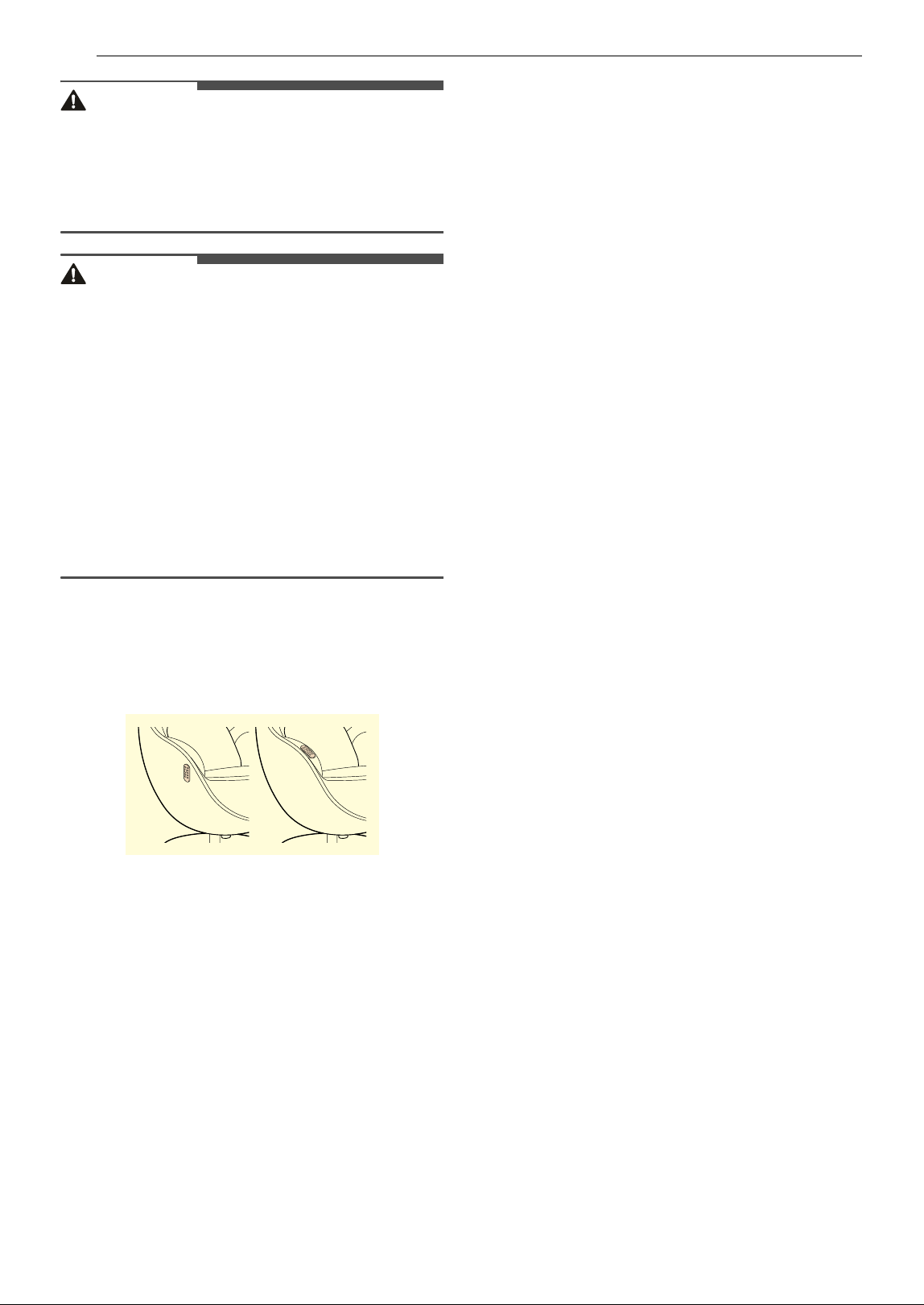
How to Store the Remote Controller
Store the remote controller on the right armrest or
attach it to the right side of the appliance.
15OPERATION
ENGLISH
Operating the Appliance
Using Automatic Massage
1 Press Power button for 2 seconds to turn on
the massage chair.
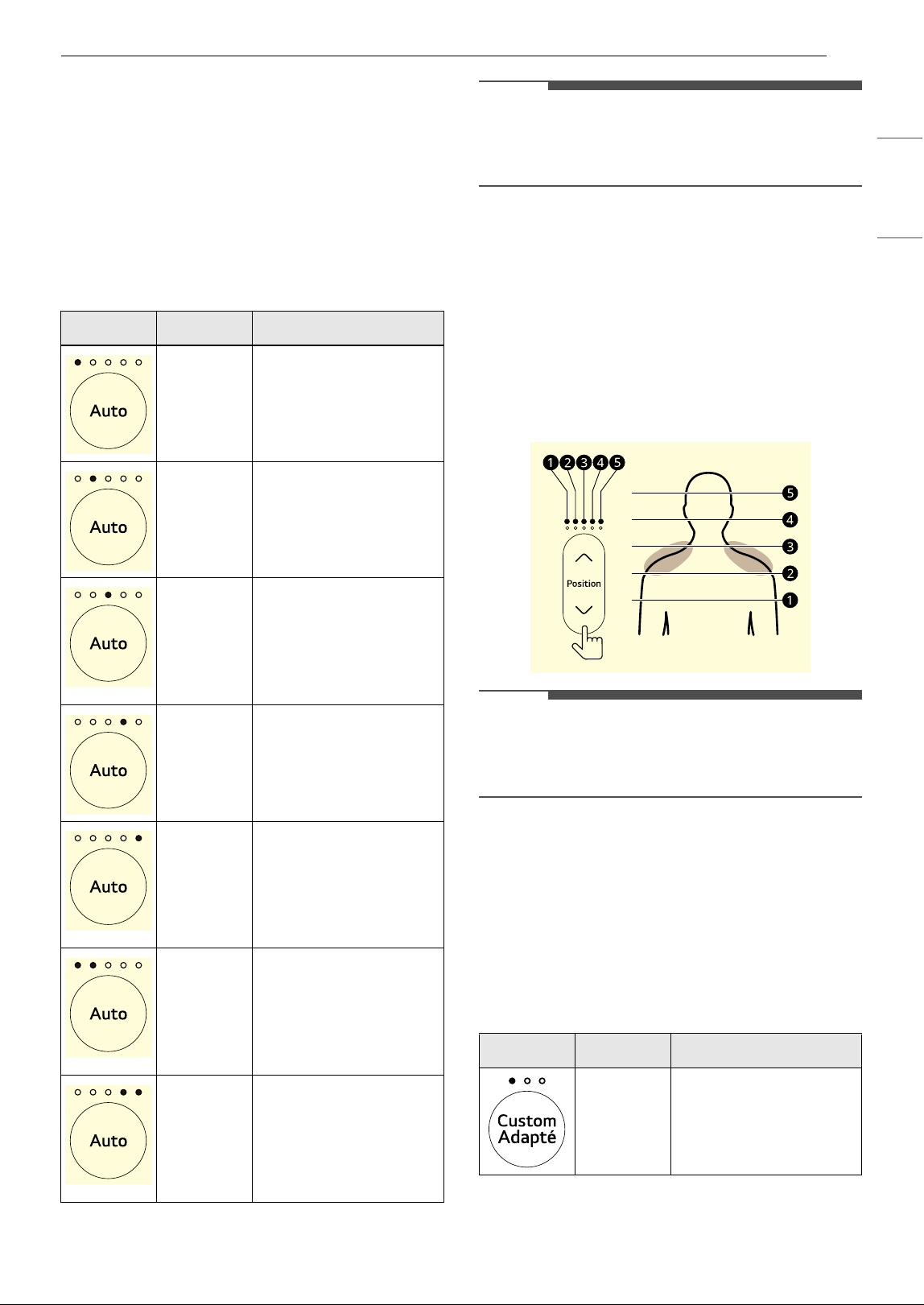
2 Press Auto button repeatedly to the desired
select automatic massage program.
NOTE
• The massage program lasts 20 minutes. If you
change to a different massage program during
the massage, the program lasts 20 minutes.
3 Press Position button repeatedly to adjust
the shoulder position where the massage
starts.
• After the massage program is set, the
appliance scans the appropriate shoulder
height for massage.
• After scanning, shoulder height appears on
the LED above the Position button and the
massage begins.
NOTE
• If you press the Position button while scanning,
the scan will stop and the shoulder position will
be moved to the default position c.
Using Manual Massage
1 Press Power button for 2 seconds to turn on
the massage chair.
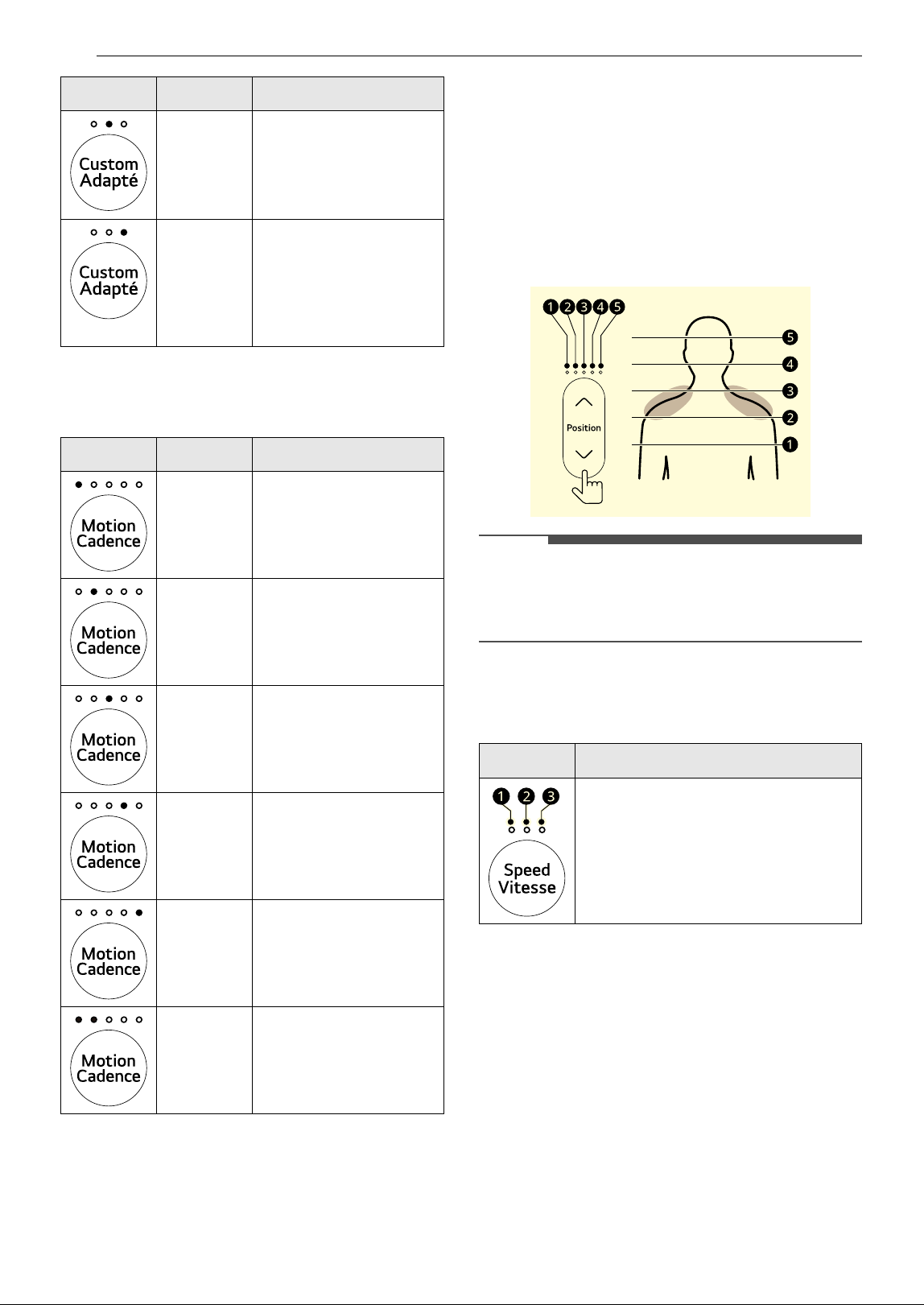
2 Press Custom button repeatedly to the
desired select manual massage program.
Program Name Description
Full Body
Massage
A fundamental massage
providing uniform
relaxation across the
entire body.
Upper
Back
Massage
Concentrating on the
neck and shoulders, a
massage designed to
alleviate tense muscles
in the upper body.
Lower
Back
Massage
Targeting primarily the
lower back and waist
area, a massage aimed
at relieving tight
muscles following
physical activity.
Work
Fatigue
Massage
A massage focused on
the back and buttox,
specifically targeting
fatigue accumulated
during work for relief.
Therapeut
ic
Massage
A massage focused on
the waist and gluteal
region, offering tranquil
reprieve through gentle
kneading and rhythmic
tapping techniques.
Vitality
Massage
A rejuvenating massage
technique designed to
invigorate the entire
body, promoting vitality
and enhancing daily
energy levels.
Swedish
Massage
This is a therapeutic
technique that involves
gentle manipulation of
the body's muscles to
enhance circulation and
promote relaxation.
Program Name Description
Full body
The massage heads
slowly move and
massage the entire
body.
16 OPERATION
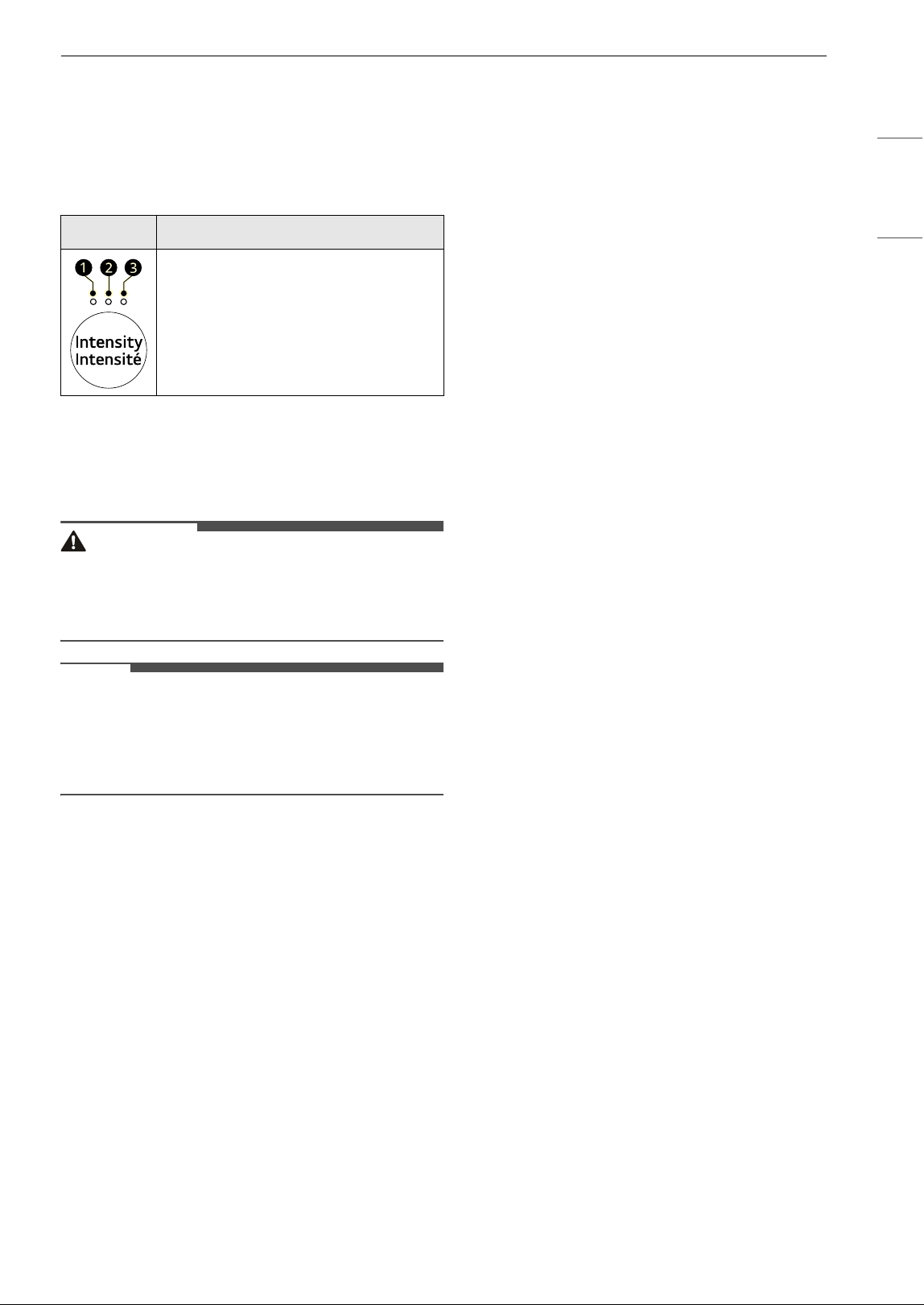
3 Press Motion button repeatedly to the
desired select automatic massage program.
4 Press Position button repeatedly to adjust
the shoulder position where the massage
starts.
• After the massage program is set, the
appliance scans the appropriate shoulder
height for massage.
• After scanning, shoulder height appears on
the LED above the Position button and the
massage begins.
NOTE
• If you press the Position button while scanning,
the scan will stop and the shoulder position will
be moved to the default position c.
5 Press Speed button repeatedly to adjust
massage speed.
Part
Concentrating on the
neck and shoulders, a
massage designed to
alleviate tense muscles
in the upper body.
Concentra
tion
Targeting primarily the
lower back and waist
area, a massage aimed
at relieving tight
muscles following
physical activity.
Motion Name Description
Kneading
Massage the muscles by
kneading them.
Tapping
Massage the muscles by
tapping them.
Acupressu
re
Massage the muscles by
pressing them
intensively, as if
pressing with fingers.
Kneading
and
Tapping
(Mix 1)
Massage the muscles by
tapping and kneading
them.
Tapping
and
Acupressu
re (Mix 2)
Massage the muscles by
tapping and pressing
them.
Rolling
The massage heads
move up and down to
massage the muscles.
Program Name Description
Speed Description
a Speed 1
b Speed 2 (Default)
c Speed 3
17OPERATION
ENGLISH
Options
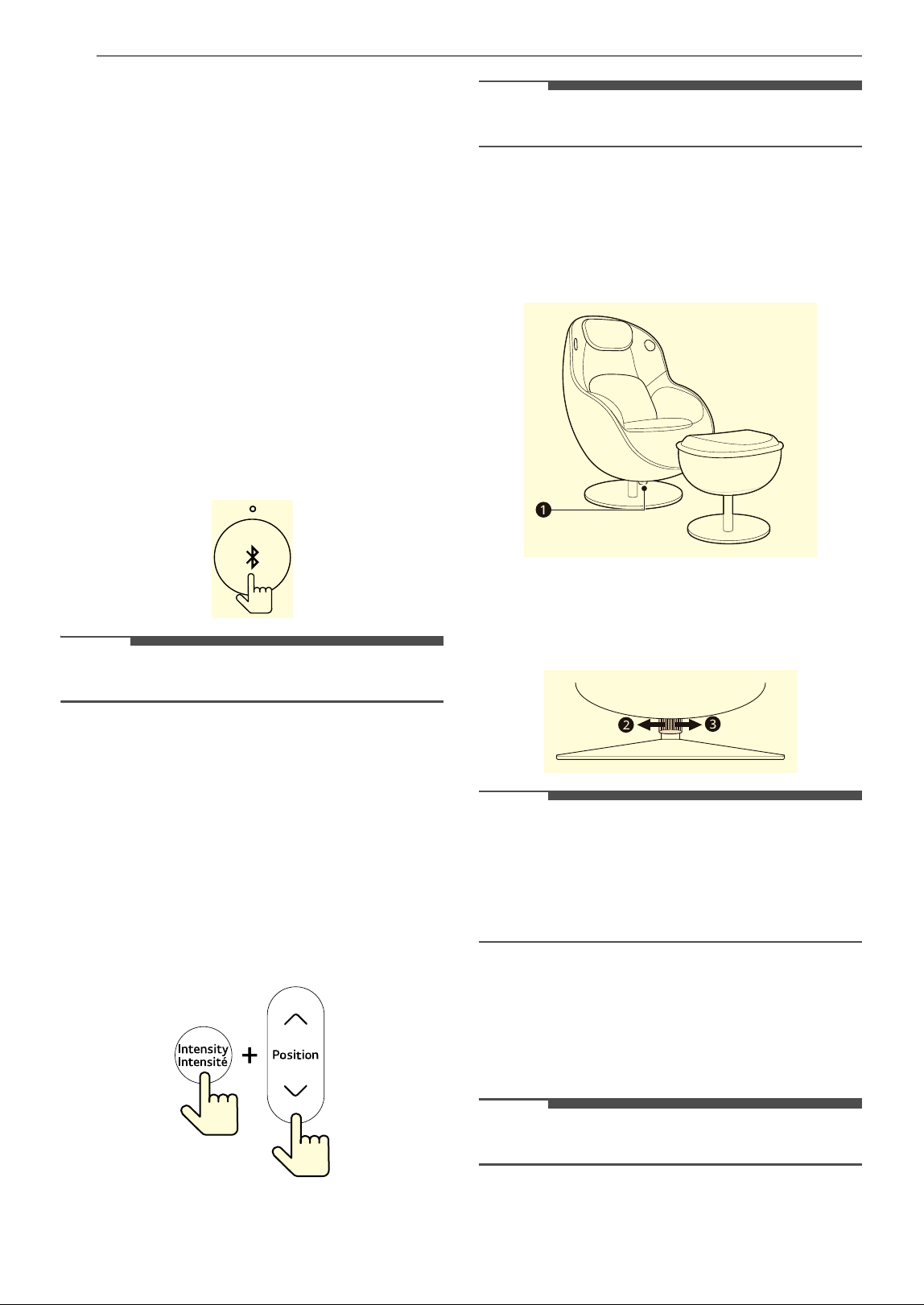
Adjusting Massage Intensity
Press Intensity button repeatedly to adjust
massage intensity.
Heating
Press Heat button to turn on heat function for
waist area.
WARNING
• Burns will result from improper use.
• Do not wet the appliance and do not use pins.
• Never remove cover.
NOTE
• When the function is turned on, the LED light
above the button lights up.
• The heating function takes effect a few minutes
after it is turned on.
Intensity Description
a Intensity 1
b Intensity 2 (Default)
c Intensity 3
18 OPERATION
Settings
Bluetooth Pairing
Use this function to connect the speaker via
Bluetooth.
• This appliance supports Bluetooth devices such
as smartphones and laptops. How to connect the
devices to the speaker may differ depending on
device types and models. For information on
how to connect the device, refer to the owner's
manual of the device to be connected.
• Adjust the speaker volume from the device.
• The speaker only can connect to one device at a
time.
Turn on/off the Bluetooth function
Press and hold Bluetooth button for 2 seconds to
activate/deactivate this function.
NOTE
• This function is turned on by default.
Adjusting LED brightness of
Remote Controller
Use this function to adjust the LED brightness of
the remote controller.
1 Turn off the power.
2 Press Position button while pressing
Intensity button.
NOTE
• LED brightness can be adjusted in 3 levels.
Adjusting the Reclining Tension
Turn the recline tension control knob on the
bottom of the massage chair to adjust the recline
tension.
• Turn the recline tension control knob to the left
b to lower the recline tension.
• Turn the recline tension control knob to the right
c to increase the recline tension.
NOTE
• If the tension is too strong, reclining may be
difficult.
• If the tension is too weak, it may be too easy to
recline or the chair may be difficult to return to
its original position.
Control Lock
Use this function to disable the controls. This
function can prevent children from operating this
massage chair.
NOTE
• Once this function is set, all buttons are locked.

19OPERATION
ENGLISH
Locking/Unlocking the remote controller
1 Turn off the power.
2 Press and hold Heat button and Bluetooth
button for 3 seconds to activate/deactivate
this function.
20 SMART FUNCTIONS
SMART FUNCTIONS
TERMS AND CONDITIONS
Radio Equipment Specifications
† This feature is only available on some models.
Industry Canada Statement
This device contains licence-exempt transmitter(s)/
receiver(s) that comply with Innovation, Science
and Economic Development Canada’s licence-
exempt RSS(s). Operation is subject to the
following two conditions:
(1) This device may not cause interference.
(2) This device must accept any interference,
including interference that may cause undesired
operation of the device.
IC Radiation Exposure Statement
This equipment complies with IC radiation
exposure limits set forth for an uncontrolled
environment.
This equipment should be installed and operated
with a minimum distance of 20 cm (7.8 inches)
between the antenna and your body.
NOTE
• THE MANUFACTURER IS NOT RESPONSIBLE FOR
ANY RADIO OR TV INTERFERENCE CAUSED BY
UNAUTHORIZED MODIFICATIONS TO THIS
EQUIPMENT. SUCH MODIFICATIONS COULD
VOID THE USER’S AUTHORITY TO OPERATE THE
EQUIPMENT.
Open Source Software Notice
Information
To obtain the source code that is contained in this
product, under GPL, LGPL, MPL, and other open
source licenses that have the obligation to disclose
source code, and to access all referred license
terms, copyright notices and other relevant
documents, please visit https://
opensource.lge.com.
LG Electronics will also provide open source code
to you on CD-ROM for a charge covering the cost
of performing such distribution (such as the cost of
media, shipping, and handling) upon email
request to opensource@lge.com.
This offer is valid to anyone in receipt of this
information for a period of three years after our
last shipment of this product.
Type
Operating Frequency
Range
Output
Power
(Max.)
Wireless
LAN
2400 MHz - 2472 MHz
< 1 W
Bluetooth
†
2400 MHz - 2483.5 MHz
21MAINTENANCE
ENGLISH
MAINTENANCE
WARNING
• To reduce the risk of fire, electric shock, or injury
to persons, read this entire owner’s manual,
including the SAFETY INSTRUCTIONS, before
operating this appliance.
• Unplug the appliance before cleaning to avoid
the risk of electric shock. Failure to follow this
warning can cause serious injury, fire, electric
shock, or death.
• Do not use volatile substances (benzene, paint
thinner, alcohol, acetone, etc.), abrasive
cleaners, or detergents with strong chemical
components when cleaning the appliance. Doing
so may cause discoloration or damage to the
appliance, or may cause a fire.
Regular Cleaning
Cleaning the Appliance
Proper care of your appliance can extend its life.
Exterior:
• On the outside of the product, excluding covers
such as pad, etc., wipe with a towel soaked in
neutral detergent and then wipe with a dry
towel.
- Wipe so that no neutral detergent remains on
the product.
• Wipe the painted area with a dry towel.
Pillow, cushion, pad, etc:
• Wipe it with a towel soaked in neutral detergent
and then wipe it with a wet towel. Wipe once
more with a dry towel and let dry naturally.
Remote controller:
• Wipe with a dry towel.
CAUTION
• Do not wipe the remote controller with a wet
towel. It may cause a malfunction.
22 TROUBLESHOOTING
TROUBLESHOOTING
Before Calling for Service
For detailed information or videos, visit
www.lg.com for the troubleshooting page.
Operation
Problem Possible Cause & Solution
Massage strength is
weak.
Body do not fit perfectly into the appliance.
• Sit deeply into the appliance and press body against the backrest.
Pillows are being used.
• Use the appliance without pillow.
The massage strength is set to weak.
• Adjust the massage strength before use.
The left and right
massage strength or
massage heads
position feels
different.
The massage heads operate left and right alternately, and there may be cases where
the left and right massage strengths work differently.
• If the massage is only performed on one side or feels strong, unplug the power cord and
call for service.
Noise is heard while
in use.
While the appliance is operating, the sounds below are heard:
• noise produced by the massage heads moving
• rubbing sound between body or sheet and massage heads
• noise of discharging air and applying air pressure
• operational noise of valves and pumps
• sound of a motor running
• noise of belt rotating
• noise of kneading or tapping actions
• This is normal. If abnormal noise continues, call for service.
Trouble connecting
to a Bluetooth
speaker.
The Bluetooth function of the appliance or the device you want to connect to is turned
off.
• Turn on the Bluetooth function of the device you want to connect to and the appliance.
The appliance and the device you want to connect to are too far apart.
• If the device is too far from the appliance, the signal may be weak and the connection may
not be configured correctly. Move the device closer to the appliance.
The appliance is already connected to another device.
• The appliance can be connected to up to one Bluetooth device. Turn off the Bluetooth
function on the connected device and reconnect with the device you want to connect to.
The remote
controller does not
work and the red
light is blinks.
The remote controller battery is low.
• Replace a battery.
The remote
controller does not
work and the red
light is on.
Trouble connecting appliance and remote controller.
• If the appliance is powered off, turn it back on.
• If the remote controller is too far from the appliance, the signal may be weak and the
connection may not be configured correctly. Move the remote controller closer to the
appliance.
23LIMITED WARRANTY
ENGLISH
LIMITED WARRANTY
CANADA
TERMS AND CONDITIONS
ARBITRATION NOTICE: THIS LIMITED WARRANTY CONTAINS AN ARBITRATION PROVISION THAT
REQUIRES YOU AND LG TO RESOLVE DISPUTES BY BINDING ARBITRATION INSTEAD OF IN COURT,
UNLESS THE LAWS OF YOUR PROVINCE OR TERRITORY DO NOT PERMIT THAT, OR, IN OTHER
JURISDICTIONS, IF YOU CHOOSE TO OPT OUT. FOR FURTHER CLARITY, THIS ARBITRATION PROVISION
IS NOT APPLICABLE TO CONSUMERS RESIDING IN ONTARIO AND QUÉBEC. IN ARBITRATION, CLASS
ACTIONS AND JURY TRIALS ARE NOT PERMITTED. PLEASE SEE THE SECTION TITLED “PROCEDURE FOR
RESOLVING DISPUTES” BELOW.
Should your LG Massage Chair ("Product") fail due to a defect in materials or workmanship under normal
and proper use, during the warranty period set forth below, LG Electronics Canada, Inc. ("LGECI") will, at its
option, repair, replace or pro rate the Product upon receipt of proof of the original retail purchase. This
limited warranty is valid only to the original retail purchaser of the Product and applies only to a Product
distributed, purchased from an authorized retailer and used within Canada, as determined at the sole
discretion of LGECI.
• Replacement products and parts are warranted for the remaining portion of the original warranty period
or ninety (90) days, whichever is greater.
• Replacement products and parts may be new, reconditioned, refurbished, or otherwise factory
remanufactured, all at the sole discretion of LGECI.
• Proof of original retail purchase specifying the Product model and date of purchase is required to obtain
warranty service under this Limited Warranty.
DISCLAIMER:
IF YOU ARE A CONSUMER SUBJECT TO QUÉBEC AND ONTARIO’S CONSUMER PROTECTION ACT, THE
EXCLUSION OF WARRANTIES CONTAINED IN THIS SECTION DO NOT EXCLUDE OR LIMIT THE RIGHTS AND
REMEDIES THAT YOU MAY HAVE UNDER SUCH ACT, INCLUDING THE RIGHT TO MAKE A CLAIM UNDER ANY
OF THE STATUTORY WARRANTIES PROVIDED THEREUNDER.
LGECI’S SOLE LIABILITY IS LIMITED TO THE LIMITED WARRANTY SET OUT ABOVE, UNLESS SUCH
LIMITATION IS PROHIBITED BY THE LAWS OF THE PROVINCE IN WHICH YOU RESIDE. EXCEPT AS
EXPRESSLY PROVIDED ABOVE, OR IF OTHERWISE PROHIBITED BY THE LAW OF THE PROVINCE IN
WHICH YOU RESIDE, LGECI DOES NOT MAKE ANY OTHER WARRANTIES OR CONDITIONS RESPECTING
THE PRODUCT, AND HEREBY DISCLAIMS ALL OTHER WARRANTIES AND CONDITIONS RESPECTING THE
PRODUCT, WHETHER EXPRESS OR IMPLIED, INCLUDING BUT NOT LIMITED TO, ANY IMPLIED
WARRANTY OR CONDITION OF MERCHANTABILITY OR FITNESS FOR A PARTICULAR PURPOSE, AND
NO REPRESENTATIONS SHALL BE BINDING ON LGECI. LGECI DOES NOT AUTHORIZE ANY PERSON TO
CREATE OR ASSUME FOR IT ANY OTHER WARRANTY OBLIGATION OR LIABILITY IN CONNECTION
WITH THE PRODUCT. TO THE EXTENT THAT ANY WARRANTY OR CONDITION IS IMPLIED BY LAW, IT IS
LIMITED TO THE WARRANTY PERIOD SET OUT ABOVE. UNDER NO CIRCUMSTANCES SHALL LGECI, THE
MANUFACTURER OR DISTRIBUTOR OF THE PRODUCT, BE LIABLE FOR ANY INCIDENTAL,
CONSEQUENTIAL, SPECIAL, DIRECT, INDIRECT, PUNITIVE OR EXEMPLARY DAMAGES, INCLUDING,
WITHOUT LIMITATION, LOSS OF GOODWILL, LOST PROFITS, LOSS OF ANTICIPATED PROFITS, LOST
REVENUE, LOSS OF USE, OR ANY OTHER DAMAGE, WHETHER ARISING DIRECTLY OR INDIRECTLY FROM
ANY CONTRACTUAL BREACH, FUNDAMENTAL BREACH, TORT OR OTHERWISE, OR FROM ANY ACTS OR
WARRANTY PERIOD (Note: If the original date of purchase cannot be verified, the warranty will
begin sixty (60) days from the date of manufacture)
Massage Chair
One (1) year from the date of original retail purchase
Parts and Labor (internal/ functional parts only)

24 LIMITED WARRANTY
OMISSIONS. LGECI’S TOTAL LIABILITY, IF ANY, SHALL NOT EXCEED THE PURCHASE PRICE PAID BY YOU
FOR THE PRODUCT.
This Limited Warranty gives you specific legal rights. You may also have other rights that vary from
province to province depending on applicable provincial laws. Any term of this Limited Warranty that
negates or varies any implied condition or warranty under provincial law is severable where it conflicts
with such provincial law without affecting the remainder of this warranty’s terms.
THIS LIMITED WARRANTY DOES NOT COVER:
• Service trips to i) deliver, pick up, or install or; educate on how to operate the Product; ii) correct wiring;
or iii) correct unauthorized repairs or installations of the Product;
• Damage or failure of the Product to perform during power failures and interrupted or inadequate
electrical service;
• Damage or failure resulting from operating the Product in a corrosive atmosphere or contrary to the
instructions outlined in the Product’s owner’s manual;
• Damage or failure to the Product caused by accidents, pests and vermin, lightning, wind, fire, floods, acts
of God, or any other causes beyond the control of LGECI or the manufacturer;
• Damage or failure resulting from misuse, abuse, improper installation, repair, or maintenance of the
Product. Improper repair includes use of parts not authorized or specified by LGECI. Improper
installation or maintenance includes installation or maintenance contrary to the Product’s owner’s
manual;
• Damage or failure caused by unauthorized modification or alteration of the Product, or if used for other
than the intended household purpose/use of the Product;
• Damage or failure caused by incorrect electrical current, voltage;
• Damage or failure caused by use that is other than normal household use, including, without limitation,
commercial or industrial use, including use in commercial offices or recreational facilities, or as
otherwise outlined in the Product’s owner’s manual;
• Damage or failure caused by the use of any accessories, components or cleaning products, including,
without limitation, that are not approved/authorized by LGECI;
• Damage or failure caused by transportation and handling, including scratches, dents, chips and/or other
damage to the finish of the Product, unless such damage results from defects in materials or
workmanship and is reported to LGECI within one (1) week of delivery of the Products;
• Damage or missing items to any display, open box, refurbished or discounted Product;
• Refurbished Product or any Product sold “As Is”, “Where Is”, “With all Faults”, or any similar disclaimer;
• Products with original serial numbers that have been removed, altered or cannot be readily determined
at the discretion of LGECI;
• Increases in utility costs and additional utility expenses in any way associated with the Product;
• Replacement of batteries or any other consumable parts;
• Costs associated with removal and/or reinstallation of the Product for repairs;
• Noises associated with normal operation and failure to follow instructions found in the use and care and
installation guides or operating the unit in an unsuitable environment will not be covered under this
warranty.
• Coverage for "in Home" repairs, for products in-warranty, will be provided if the Product is within a 150
km radius from the nearest authorized service center (ASC), as determined by LG Canada. If your Product
is located outside a 150 km radius from a ASC, as determined by LG Canada, it will be your responsibility
to bring the Product, at your sole expense, to the ASC for in-warranty repair.
All costs and expenses associated with the above excluded circumstances, listed under the heading,
This Limited Warranty Does Not Cover, shall be borne by the consumer.
TO OBTAIN WARRANTY SERVICE AND ADDITIONAL INFORMATION, PLEASE CALL OR VISIT OUR WEBSITE:
Call 1-888-542-2623
(7 A.M. to 12 A.M., 365 days a year) and select the appropriate option from the menu,
or visit our website at http://www.lg.com

25LIMITED WARRANTY
ENGLISH
PROCEDURE FOR RESOLVING DISPUTES:
EXCEPT WHERE PROHIBITED AT LAW (INCLUDING WITH RESPECT TO QUÉBEC AND ONTARIO
CONSUMERS), ALL DISPUTES BETWEEN YOU AND LG ARISING OUT OF OR RELATING IN ANY WAY TO THIS
LIMITED WARRANTY OR THE PRODUCT SHALL BE RESOLVED EXCLUSIVELY THROUGH BINDING
ARBITRATION, AND NOT IN A COURT OF GENERAL JURISDICTION. EXCEPT WHERE PROHIBITED AT LAW
(INCLUDING WITH RESPECT TO QUÉBEC AND ONTARIO CONSUMERS), YOU AND LG BOTH IRREVOCABLY
AGREE TO WAIVE THE RIGHT TO A JURY TRIAL AND TO BRING OR PARTICIPATE IN A CLASS ACTION.
Definitions. For the purposes of this section, references to “LG” mean LG Electronics Canada, Inc., its
parents, subsidiaries and affiliates, and each of their officers, directors, employees, agents, beneficiaries,
predecessors in interest, successors, assigns and suppliers; references to “dispute” or “claim” shall include
any dispute, claim or controversy of any kind whatsoever (whether based in contract, tort, statute,
regulation, ordinance, fraud, misrepresentation or any other legal or equitable theory) arising out of or
relating in any way to the sale, condition or performance of the product or this Limited Warranty.
Notice of Dispute. In the event you intend to commence an arbitration proceeding, you must first notify
LG in writing at least 30 days in advance of initiating the arbitration by sending a letter to LGECI Legal
Team at 20 Norelco Drive, North York, Ontario, Canada M9L 2X6 (the “Notice of Dispute”). You and LG
agree to engage in good faith discussions in an attempt to amicably resolve your claim. The notice must
provide your name, address, and telephone number; identify the product that is the subject of the claim;
and describe the nature of the claim and the relief being sought. If you and LG are unable to resolve the
dispute within 30 days of LG’s receipt of the Notice of Dispute, the dispute shall be resolved by binding
arbitration in accordance with the procedure set out herein. You and LG both agree that, during the
arbitration proceeding, the terms (including any amount) of any settlement offer made by either you or LG
will not be disclosed to the arbitrator until the arbitrator determines the dispute.
Agreement to Binding Arbitration and Class Action Waiver. Upon failure to resolve the dispute during
the 30 day period after LG’s receipt of the Notice of Dispute, you and LG agree to resolve any claims
between you and LG only by binding arbitration on an individual basis, unless you opt out as provided
below, or you reside in a jurisdiction that prevents full application of this clause in the circumstances of the
claims at issue (in which case if you are a consumer, this clause will only apply if you expressly agree to the
arbitration). To the extent permitted by applicable law, any dispute between you and LG shall not be
combined or consolidated with a dispute involving any other person’s or entity’s product or claim. More
specifically, without limitation of the foregoing, except to the extent such a prohibition is not permitted at
law, any dispute between you and LG shall not under any circumstances proceed as part of a class or
representative action. Instead of arbitration, either party may bring an individual action in small claims
court, but that small claims court action may not be brought on a class or representative basis except to
the extent this prohibition is not permitted at law in your province or territory of jurisdiction as it relates to
the claims at issue between you and LG. This does not apply to consumers in Ontario and Québec. In
accordance with provincial legislation, the consumer and LG may agree to resolve the dispute using any
procedure available, including commencing the action before the competent courts of those provinces.
Arbitration Rules and Procedures. To begin arbitration of a claim, either you or LG must make a written
demand for arbitration. The arbitration will be private and confidential, and conducted on a simplified and
expedited basis before a single arbitrator chosen by the parties under the provincial or territorial
commercial arbitration law and rules of the province or territory of your residence. You must also send a
copy of your written demand to LG at LG Electronics, Canada, Inc., Attn: Legal Department- Arbitration, 20
Norelco Drive, North York, Ontario M9L 2X6. This arbitration provision is governed by your applicable
provincial or territorial commercial arbitration legislation. For consumers in Ontario and Québec, the
applicable arbitration legislation only applies if consumers agree to submit the dispute to arbitration.
Judgment may be entered on the arbitrator’s award in any court of competent jurisdiction. All issues are
for the arbitrator to decide, except that, issues relating to the scope and enforceability of the arbitration
provision and to the arbitrability of the dispute are for the court to decide. The arbitrator is bound by the
terms of this provision.
Governing Law. The law of the province or territory of your purchase shall govern this Limited Warranty
and any disputes between you and LG except to the extent that such law is preempted by or inconsistent
with applicable federal or provincial/territorial law. Should arbitration not be permitted for any claim,
action, dispute or controversy between you and LG, you and LG attorn to the exclusive jurisdiction of the
courts of the province or territory of your purchase for the resolution of the claim, action, dispute or
controversy between you and LG.

26 LIMITED WARRANTY
Fees/Costs. You do not need to pay any fee to begin an arbitration. Upon receipt of your written demand
for arbitration, LG will promptly pay all arbitration filing fees unless you seek more than $25,000 in
damages, in which case the payment of these fees will be governed by the applicable arbitration rules.
Except as otherwise provided for herein, LG will pay all filing, administration and arbitrator fees for any
arbitration initiated in accordance with the applicable arbitration rules and this arbitration provision. If you
prevail in the arbitration, LG will pay your attorneys’ fees and expenses as long as they are reasonable, by
considering factors including, but not limited to, the purchase amount and claim amount. Notwithstanding
the foregoing, if applicable law allows for an award of reasonable attorneys’ fees and expenses, an
arbitrator can award them to the same extent that a court would. If the arbitrator finds either the
substance of your claim or the relief sought in the demand is frivolous or brought for an improper purpose
(as measured by the applicable laws), then the payment of all arbitration fees will be governed by the
applicable arbitration rules. In such a situation, you agree to reimburse LG for all monies previously
disbursed by it that are otherwise your obligation to pay under the applicable arbitration rules. Except as
otherwise provided for, LG waives any rights it may have to seek attorneys’ fees and expenses from you if
LG prevails in the arbitration.
Hearings and Location. If your claim is for $25,000 or less, you may choose to have the arbitration
conducted solely (1) on the basis of documents submitted to the arbitrator, (2) through a telephonic
hearing, or (3) by an in-person hearing as established by the applicable arbitration rules. If your claim
exceeds $25,000, the right to a hearing will be determined by the applicable arbitration rules. Any in-
person arbitration hearings will be held at the nearest, most mutually-convenient arbitration location
available within the province or territory in which you reside unless you and LG both agree to another
location or agree to a telephonic arbitration.
Severability and Waiver. If any portion of this Limited Warranty (including these arbitration procedures)
is unenforceable, the remaining provisions will continue in full force and effect to the maximum extent
permitted by applicable law. Should LG fail to enforce strict performance of any provision of this Limited
Warranty (including these arbitration procedures), it does not mean that LG intends to waive or has waived
any provision or part of this Limited Warranty.
Opt Out. The arbitration provision requires you and LG to resolve disputes by binding arbitration instead
of court, unless the laws of your province or territory do not permit that, or, in other jurisdictions, if you
choose to opt out. The arbitration provision does not apply to consumers in Ontario and Québec.
For individuals that fall within the binding arbitration provisions, you may opt out of this dispute resolution
procedure. If you opt out, neither you nor LG can require the other to participate in an arbitration
proceeding. To opt out, you must send notice to LG no later than 30 calendar days from the date of the
first consumer purchaser’s purchase of the product by either (i) sending an e-mail to [email protected]
, with
the subject line: “Arbitration Opt Out;” or (ii) calling 1-800-980-2973
. You must include in the opt out e-mail
or provide by telephone: (a) your name and address; (b) the date on which the product was purchased; (c)
the product model name or model number; and (d) the serial number (the serial number can be found (i)
on the product; or (ii) online by accessing https://www.lg.com/ca_en/findmodel_serial/
).
In the event that you “Opt Out”, the law of the province or territory of your residence shall govern this
Limited Warranty and any disputes between you and LG except to the extent that such law is preempted
by or inconsistent with applicable federal or provincial/territorial law. Should arbitration not be permitted
for any claim, action, dispute or controversy between you and LG, you and LG agree to attorn to the
exclusive jurisdiction of the courts of the province or territory of your residence for the resolution of the
claim, action, dispute or controversy between you and LG.
You may only opt out of the dispute resolution procedure in the manner described above (that is, by e-mail
or telephone); no other form of notice will be effective to opt out of this dispute resolution procedure.
Opting out of this dispute resolution procedure will not affect the coverage of the Limited Warranty in any
way, and you will continue to enjoy the full benefits of the Limited Warranty. If you keep this product and
do not opt out, then you accept all terms and conditions of the arbitration provision described above.
Conflict of Terms. In the event of a conflict or inconsistency between the terms of this Limited Warranty
and the End User License Agreement (“EULA”) in regards to dispute resolution, the terms of this Limited
Warranty shall control and govern the rights and obligations of the parties and shall take precedence over
the EULA.
Memo