User manual
To ensure safe operation, please read this user manual thoroughly before use.
© 2024 Husky. Husky reserve the right to change specifications at any time without notice.
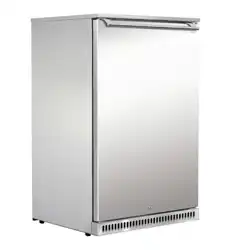
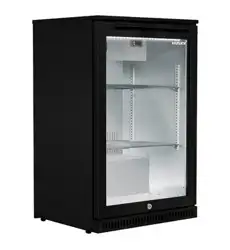
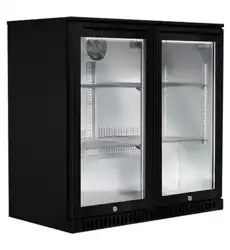
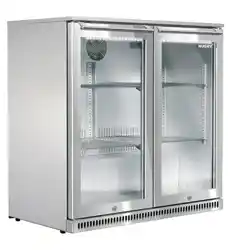
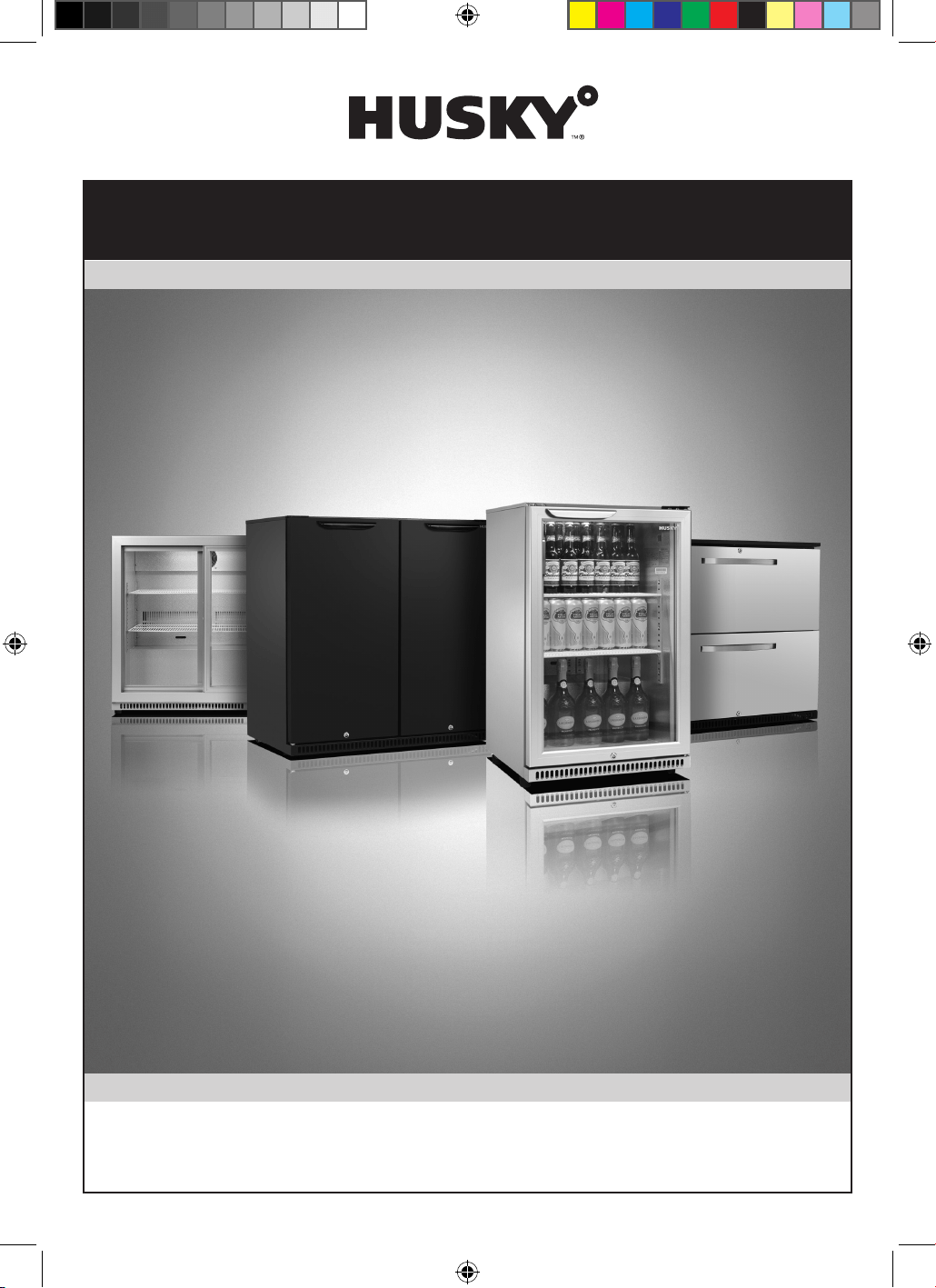
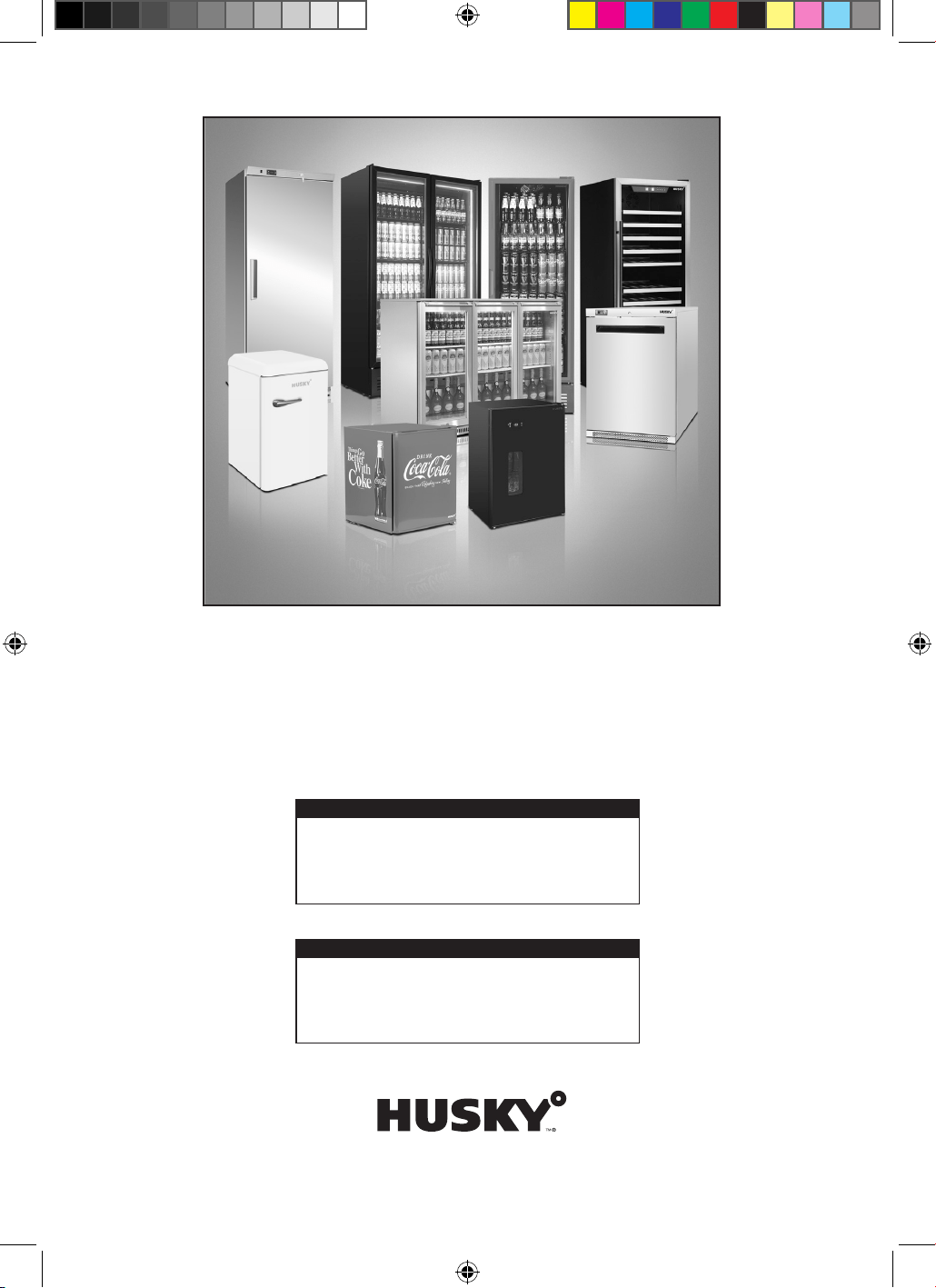
Images used are for illustration only. Stock not included.
Welcome to your new Husky
2
Thank you for buying this Husky chiller. It has been designed and manufactured for many
years of trouble-free service.
Operation is very simple, but please take a few minutes to read this user manual. It
contains important safety information, and tips to ensure you receive the best possible
service from your Husky unit.
CONTENTS
Important Notes ............................................................................................................................... 3
Warning! Risk of electrical shock hazard .................................................................................3
Disposal of old refrigerators ......................................................................................................3
Safety instructions and warnings ...............................................................................................3
Before using for the first time ....................................................................................................4
Troubleshooting ...............................................................................................................................5
General operating instructions, maintenance guides, exploded
diagrams, installing shelves, circuit diagrams, controller wiring
diagrams and how to get service assistance for ALL models .............................................6
Additional model-specific instructions and diagrams for:
• Standard Range and Solid Door Range C1, C2, & C3 ....................................................... 8
• PRO Range C1PRO, C2PRO, & C3PRO ..............................................................................10
• AlFresco Range C1ALF, C2ALF, & C3ALF ..........................................................................12
• ECO Range C1H ECO, C2H ECO & C3H ECO .................................................................14
• BelowZero Range C1ZZ, C2ZZ, & C3ZZ .............................................................................16
• Combi model C2CMH..........................................................................................................18
• Drawer model C2DWR .........................................................................................................20
IMPORTANT SAFETY INSTRUCTIONS FOR MODEL C2DWR ONLY .........................21
• Warranty card and service conditions ................................................................................23
All models
Important Notes
WARNING: RISK OF ELECTRICAL SHOCK HAZARD
USERS IN EUROPE: This refrigeration unit must be earthed.
If the power cable is damaged, it must be replaced by a qualified engineer to avoid shock
hazard. DO NOT ATTEMPT TO SERVICE THE ITEM YOURSELF. Ensure that the unit is properly
earthed. Stop using the chiller immediately if electric shock is felt when touching the cabinet.
DISPOSAL OF OLD REFRIGERATORS
BE SURE TO MAKE ANY LOCKS UNUSABLE. IF POSSIBLE, REMOVE THE
DOOR(S) AND DISCARD SEPARATELY.
WARNING – CHEMICAL HAZARD: DO NOT ALLOW CHILDREN TO PLAY WITH
OLD REFRIGERATORS. CONTACT YOUR LOCAL AUTHORITY FOR PROPER
DISPOSAL PROCEDURES.
Before disposing of an old refrigerator, please make sure it is switched off and safe.
Unplug the refrigerator and break any locks in order to avoid children becoming trapped.
Please note: the refrigeration system contains gases and refrigerants which require
specialist waste disposal. The valuable materials contained in a refrigerator can be
recycled.
Contact your local waste disposal depot for proper disposal of an old refrigerator and
contact your local authority or dealer if you have any questions.
Ensure the pipework of your refrigerator is not damaged prior to disposal. You can
contribute to the environmental awareness by insisting on an appropriate non-polluting
method of disposal.
USERS IN EUROPE – WEEE COMPLIANCE
These chillers are authorised to carry the CE (Conformité
Européene) and WEEE (Waste Electrical and Electronic
Equipment Directive) symbols.
The WEEE symbol on this chiller indicates that the product
must not be disposed of with household waste. To help
prevent possible harm to health and the environment, the product must be disposed of
by recycling methods authorised as environmentally safe. For more information on how
to dispose of this product appropriately, contact your dealer or the recycling department
at your local authority.
These chillers and their components undergo strict product testing by independent
companies to comply or exceed all applicable local and international regulatory
standards.
SAFETY INSTRUCTIONS & WARNINGS
Before switching on your chiller, read the information in this user manual carefully. The
user manual contains important observa tions relating to the assembly, operation and
maintenance of the unit.
Please keep this user manual in a safe place for future reference. If you ever sell this unit,
hand this user manual to the new owner.
3
4
The manufacturer does not accept responsibility for any damages that may arise due to
non-observation of these instructions.
• Do not use the unit if it is damaged. If you are in any doubt, consult an engineer.
• Connection and installation of your unit are to be carried out in strict compliance
with the relative instructions in this user manual.
• Make sure there is a suitable power outlet with proper grounding to power the
chiller.
• For safety, the unit must be properly earthed in accordance with specifications.
• Always remember to unplug the unit before cleaning. Never unplug this unit by
pulling on the power cable. Always grip plug firmly and pull straight out from the
socket.
• All electrical repairs must be carried out by a qualified engineer. Inadequate
repairs may be dangerous.
• Do not damage any parts of the chiller which carry refrigerant by piercing,
perforating, crushing, twisting or scraping. If refrigerant comes into contact with
the eyes it may cause serious eye injury.
• Do not obstruct or cover the ventilation grille.
• Do not allow children to play with the unit, or to sit on it or hang onto the door.
• This unit is not intended for use by persons (including children) with reduced
physical, sensory or mental capabil ities, or lack of experience and knowledge,
unless they have been given supervision or instruction concerning use of the unit
by a person responsible for their safety.
BEFORE USING FOR THE FIRST TIME
IMPORTANT: Before switching the unit on, we recommend you allow it to stand
upright for 8 hours. Failure to do this may result in damage to the unit.
• Remove the wooden pallet and the packing.
• To ensure correct operation, it is important that the unit is level. The cabinet may
be levelled by turning either or both of the adjustable feet in the front corners.
Use a spirit level to check.
• Before operation, we recommend that the cabinet is cleaned for reasons of
hygiene and to remove any residue left from manufacture.
• For good circulation, vents must not be blocked. Keep a minimum of 100mm of
clear space around the chiller. Your unit should be placed on flat and firm surface
for quieter operation. Failure to do so may cause loss of performance.
• Do not expose the unit to direct sunlight or a heat source such as ovens,
radiators, heaters, etc. Failure to do so may cause loss of performance.
• Do not under any circumstances place heated food or beverages in your chiller.
• Do not open the door more often than necessary to lessen the escape of cold air.
• For better air circulation, do not overfill the unit.
• Adjust the thermostat according to the amount of product and the ambient
temperature.
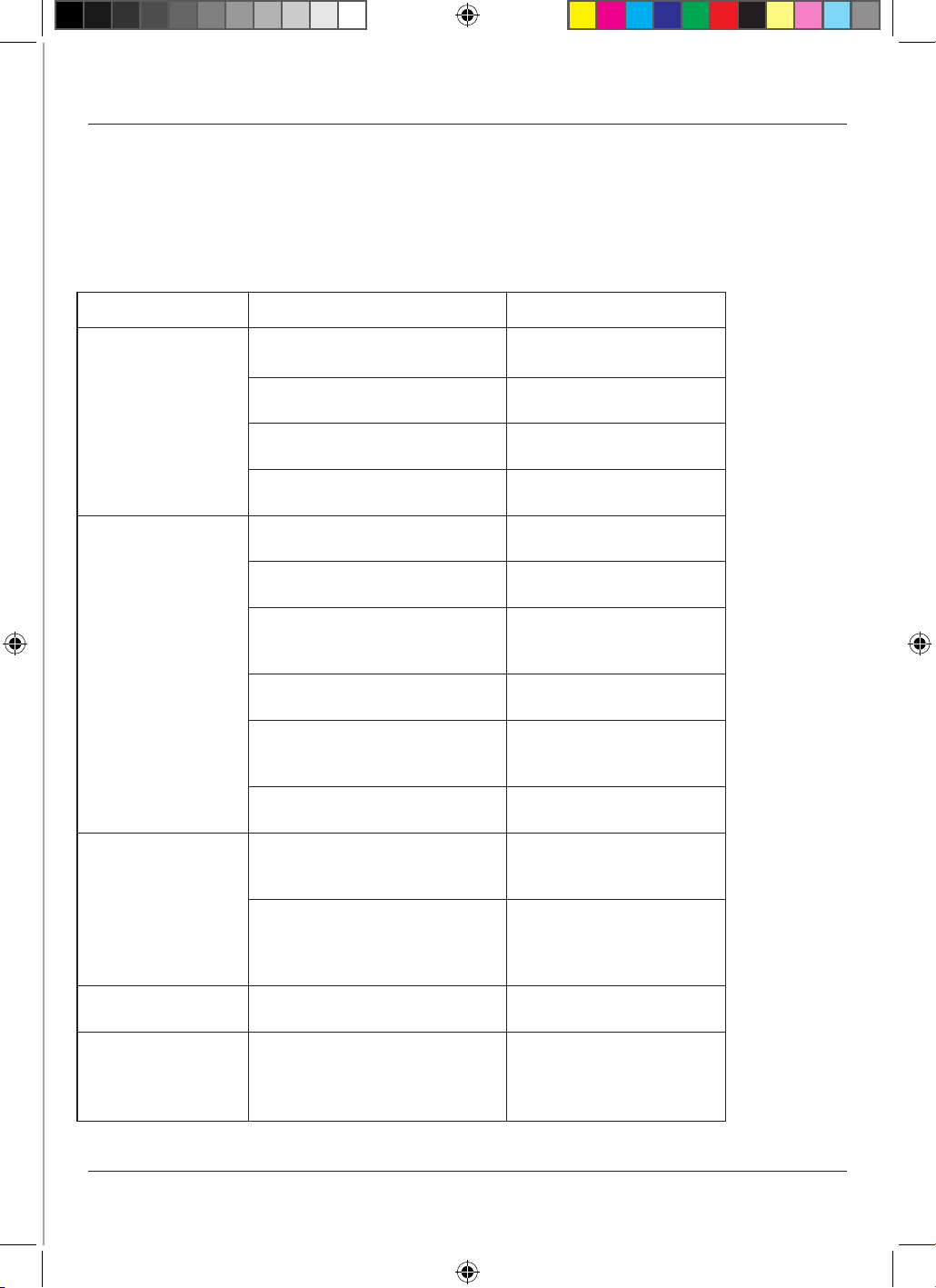
Troubleshooting
Before calling Technical Support, please check the following points; you may be
able to solve any problem yourself.
Problem
The chiller does not
work properly.
The chiller’s internal
temperature is too
high or too low.
The chiller is noisy in
operation or makes
unusual noises.
• Note: It is normal to
hear some noises as
refrigerant flows
through the
compressor.
Outer surfaces are
wet
Inner surfaces are
wet
Possible Cause
The chiller is not plugged in.
The plug and/or the power cable
are faulty.
The fuse has blown.
The chiller is faulty.
The wrong temperature is
selected.
The factory default settings for
the controller are incorrect.
The condenser is blocked by an
accumulation of dust.
The doors are not fully closed.
The chiller is close to a heat
source or the ambient
temperature is too high.
The ventilation grille is blocked.
The chiller is not on a level, firm
surface, or the unit may be
touching other items.
The chiller is vibrating against a
neighbouring object.
Chiller may be close to a water
source or leak.
The door may be opened too
often or kept open too long.
Action
Connect the plug to the
power supply
Call your supplier or a
qualified engineer.
Replace the fuse with one
of the same rating.
Call your supplier or a
qualified engineer.
Check the controller and
adjust the set temperature.
Call your supplier or a
qualified engineer.
Clean using a vacuum
cleaner and soft brush
attachment (see p8)
Check the unit is level and
the seals are not damaged.
Move the chiller to a better
location and check it is out
of direct sunlight.
Move the chiller to improve
free movement of air.
Check location and
position using a spirit level.
Relocate the chiller or the
object.
Dry surfaces thoroughly
and move the chiller.
Try to minimise opening of
the doors for better
cooling performance.
5
6
General operating instructions for all models
Operating Instructions
INTERIOR LIGHT
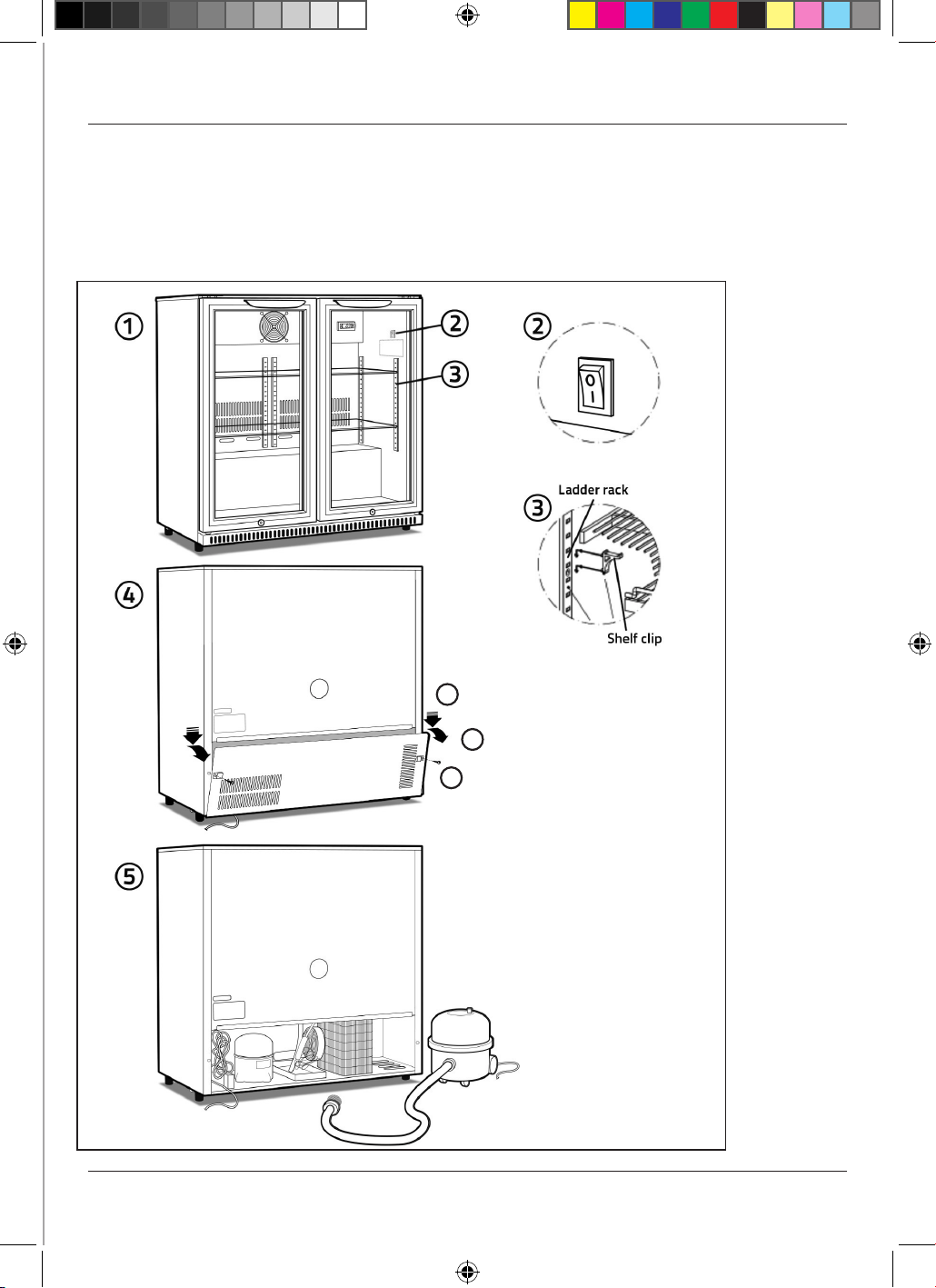
The interior light may be switched on or off using the rocker switch on the inside right-
hand wall of the cabinet (see Fig. 2 on page 7).
REPLACING LED LIGHTS
1. Disconnect the chiller from the power supply.
2. Remove the light cover, pull out the wires and remove the LED lights.
3. Install the new LED lights, connect the wires, and replace the light cover.
4. Reconnect the chiller to the power supply.
INSTALLING SHELVES
Fit the shelf clips to the ladder racks (see Fig. 3 on page 7) and install the shelves
horizontally. Ensure the clips are located firmly and the shelves are secure before loading
the chiller.
EASY MAINTENANCE ACCESS
Switch the unit off and disconnect from the mains supply. To access the compressor
compartment, simply remove the screws securing the rear access panel – see Fig 4 on
page 7. Any repairs or maintenance, other than CLEANING (see below) must be carried
out by QUALIFIED ENGINEERS ONLY.
CLEANING
The condenser and the compressor compartment MUST be cleaned quarterly. Switch
the unit off and disconnect from the mains supply. See ‘Easy Maintenance Access’ how
to access the compressor compartment. Use a vacuum cleaner fitted with a soft brush
attachment to remove dust carefully from the condenser, the components and grilles –
see Fig 5 on page 7.
The external and internal surfaces of the unit should be cleaned regularly. Switch the unit
off and disconnect from the mains supply. Clean the external and internal surfaces of the
unit with a mild soap solution, then wipe dry. Do NOT use cleansers containing chlorine
or other harsh cleansing agents, as these can damage the stainless steel surfaces and
components. Use mild soapy water to clean the gasket and seals.
GETTING SERVICE ASSISTANCE
The cooling system is a hermetically sealed circuit and does not require any maintenance
other than regular cleaning (see ‘Cleaning’).
If the unit fails to work, first check the power supply. If you cannot locate the reason for
the failure, please contact your supplier, stating the model and serial number of the
cabinet. You may find this information on the rating plate, which is affixed inside the unit
on the top right-hand interior wall.
7
To access the compressor
compartment:
i. Remove the two screws.
ii. Push the removable
panel down slightly to
free it from the securing
flange.
iii. Angle the removable
panel forwards and down
to remove it.
i
ii
iii
Exploded Diagrams
8
Additional model-specific instructions for
Standard Range and Solid Door Range C1, C2, & C3
• These instructions should be read in conjunction with the general operating instructions
on pp6&7.
Operating Instructions
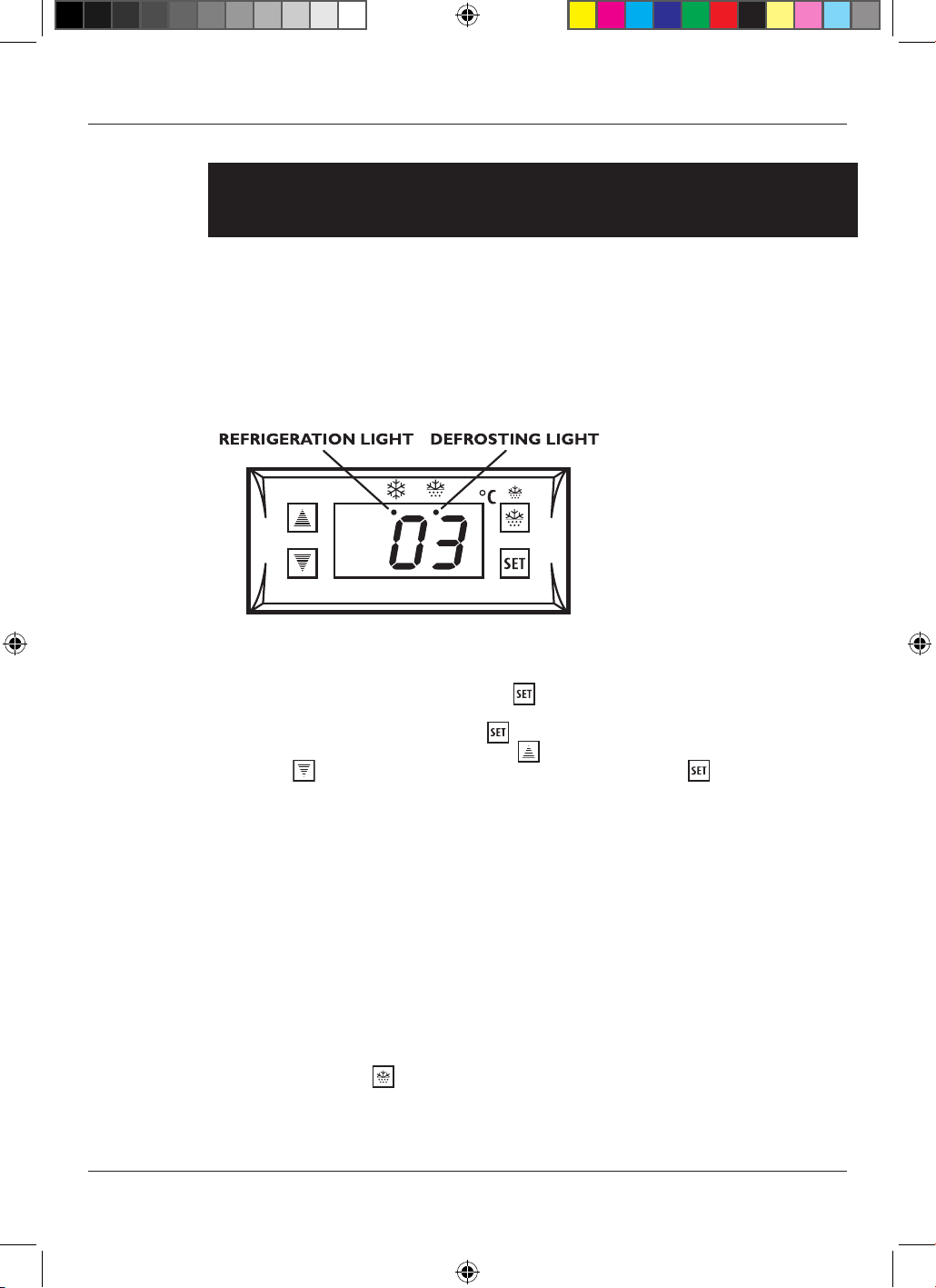
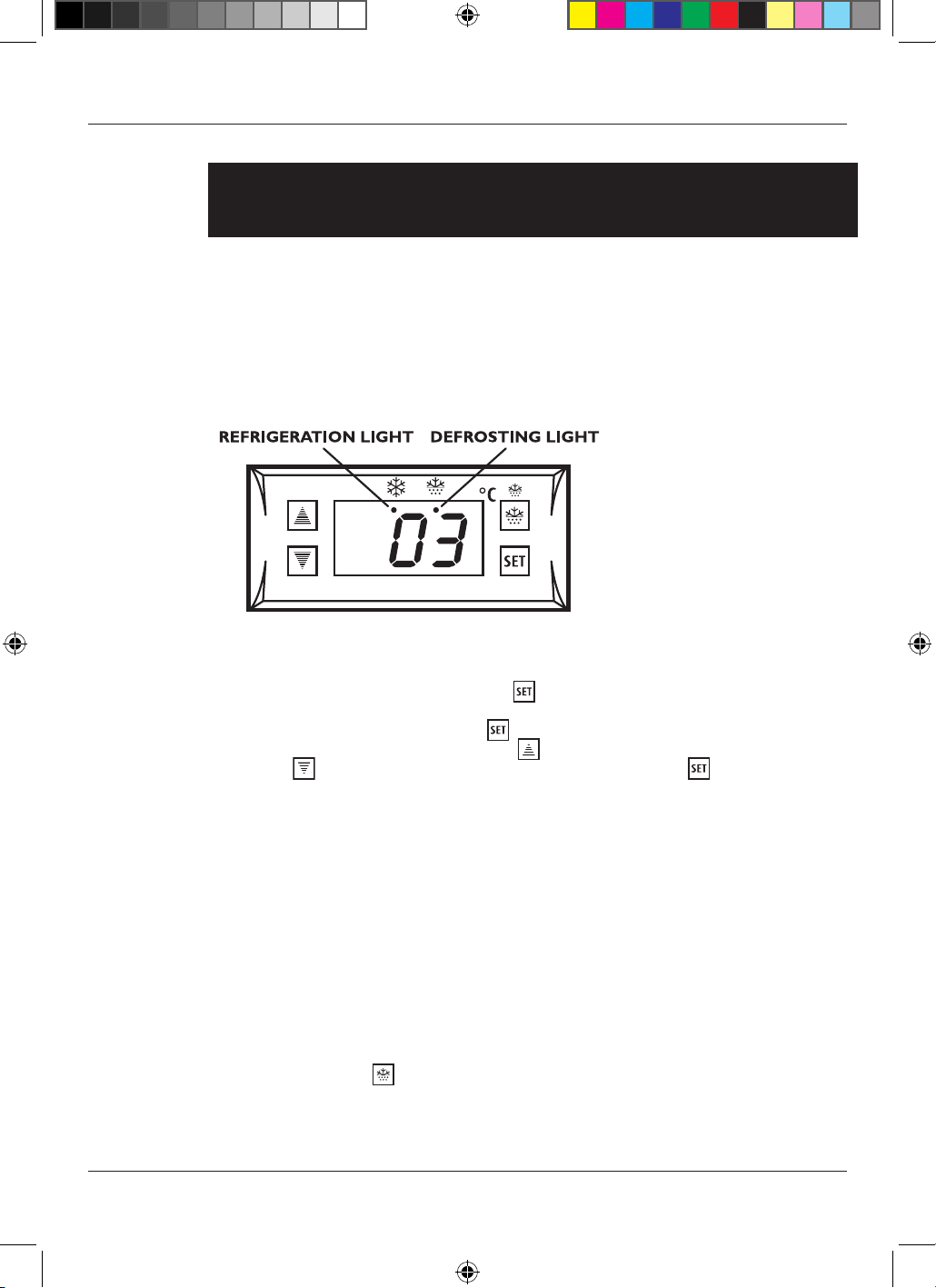
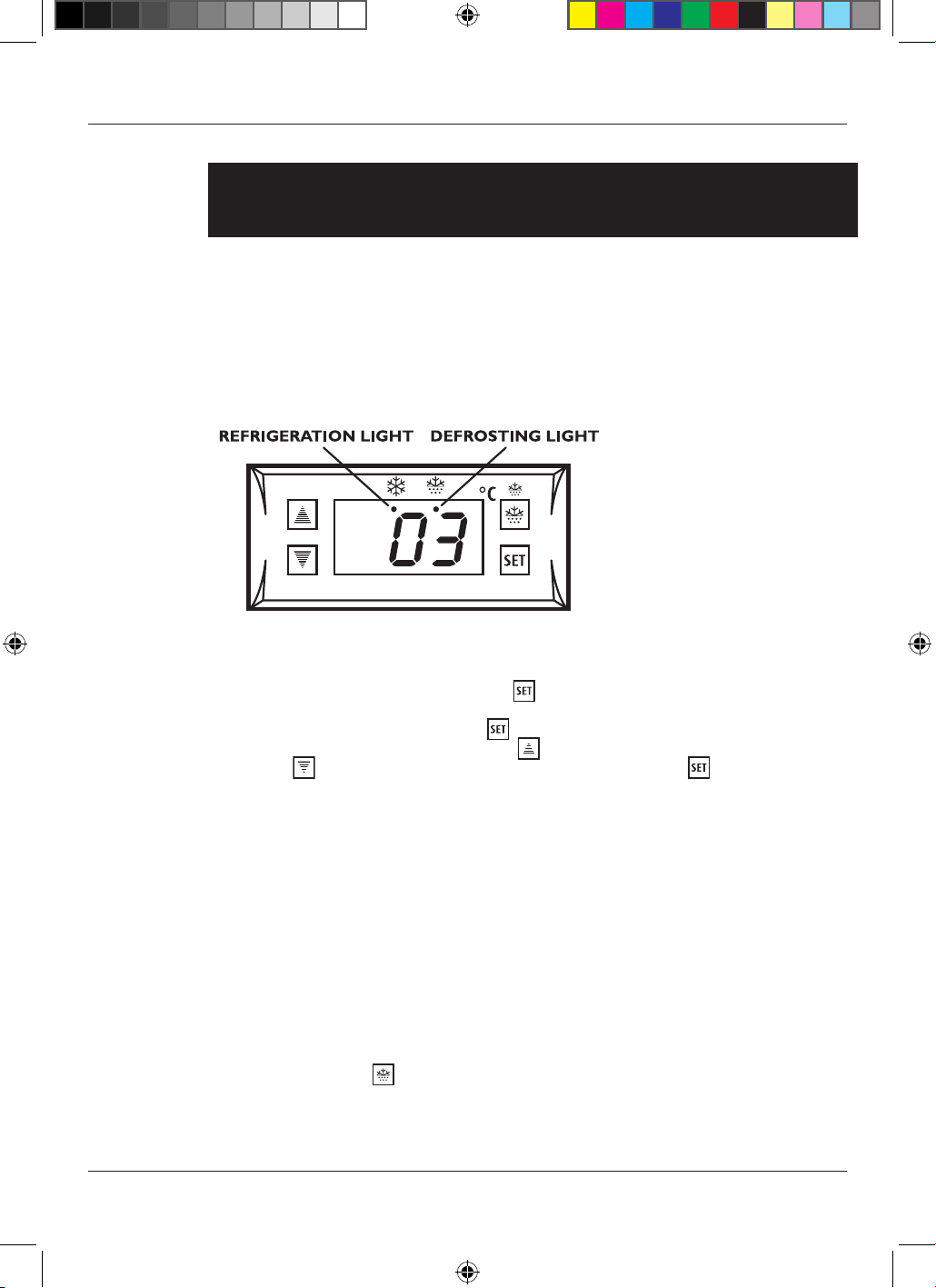
TO OPERATE THE ELECTRONIC THERMOSTAT
The thermostat has been pre-set, and in most cases it is not necessary to adjust the
settings. When the unit is operating normally, the display will show the current
temperature.
To display the set temperature press the button. Press the button again to return to
normal operation.
To set a new temperature, press . The display will flash and the current set
temperature will be displayed. Press the button to increase the set temperature, or
press the
button to decrease the set temperature. Press the button to save the
new setting. The display will flash with the new value and then revert to display the
cabinet temperature.
Please note:
1. When the chiller is connected to the mains for the first time there will be a short
delay before cooling starts. During this time the Refrigeration Light will flash.
After the short delay, cooling will begin and the Refrigeration Light will be
illuminated. When the chiller reaches the set temperature, the Refrigeration
Light will be off.
2. If you do not press any button, after six seconds the controller will return to its
normal display.
DEFROSTING
The unit defrosts automatically at preset intervals. If however the door is opened too
often, or if the unit if in a location with high humidity, or if the contents are changed more
frequently, it may be necessary to defrost the unit manually. To start or stop manual
defrosting, press the
button for six seconds. The Defrosting Light will be illuminated.
Melt water runs to a container placed in the compressor compartment and evaporates.
After defrosting is complete, the unit will return to normal operation.
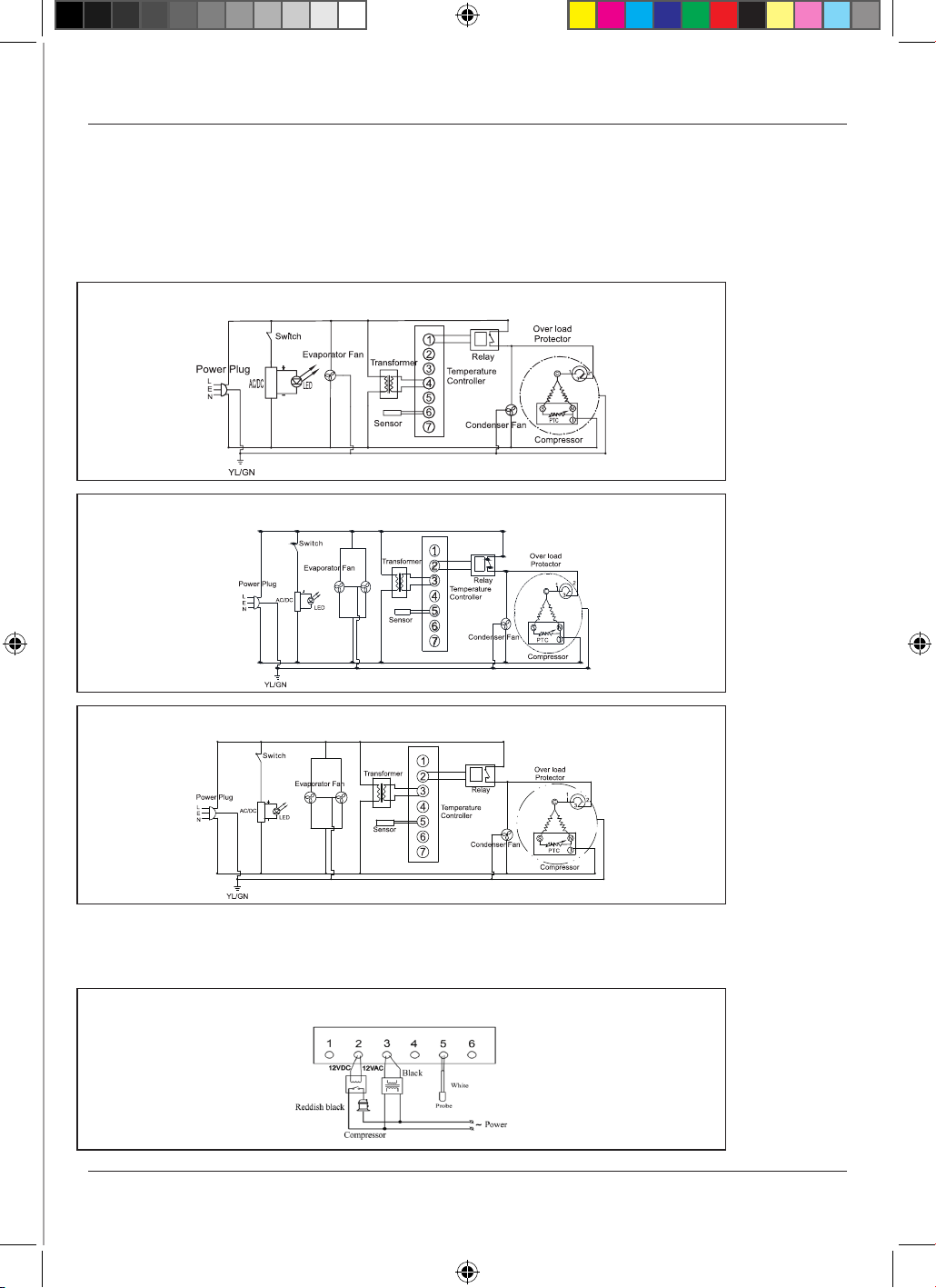
Circuit Diagrams
C1H-840/865/900 & C2H/S-840/865/900
C2H-865 (Sweden)
C3H/S-840/865/900
Wiring Diagram
ELECTRONIC THERMOSTAT SF-102SBQ
9
10
Additional model-specific instructions for
PRO Range C1PRO, C2PRO, & C3PRO
• These instructions should be read in conjunction with the general operating instructions
on pp6&7.
Operating Instructions
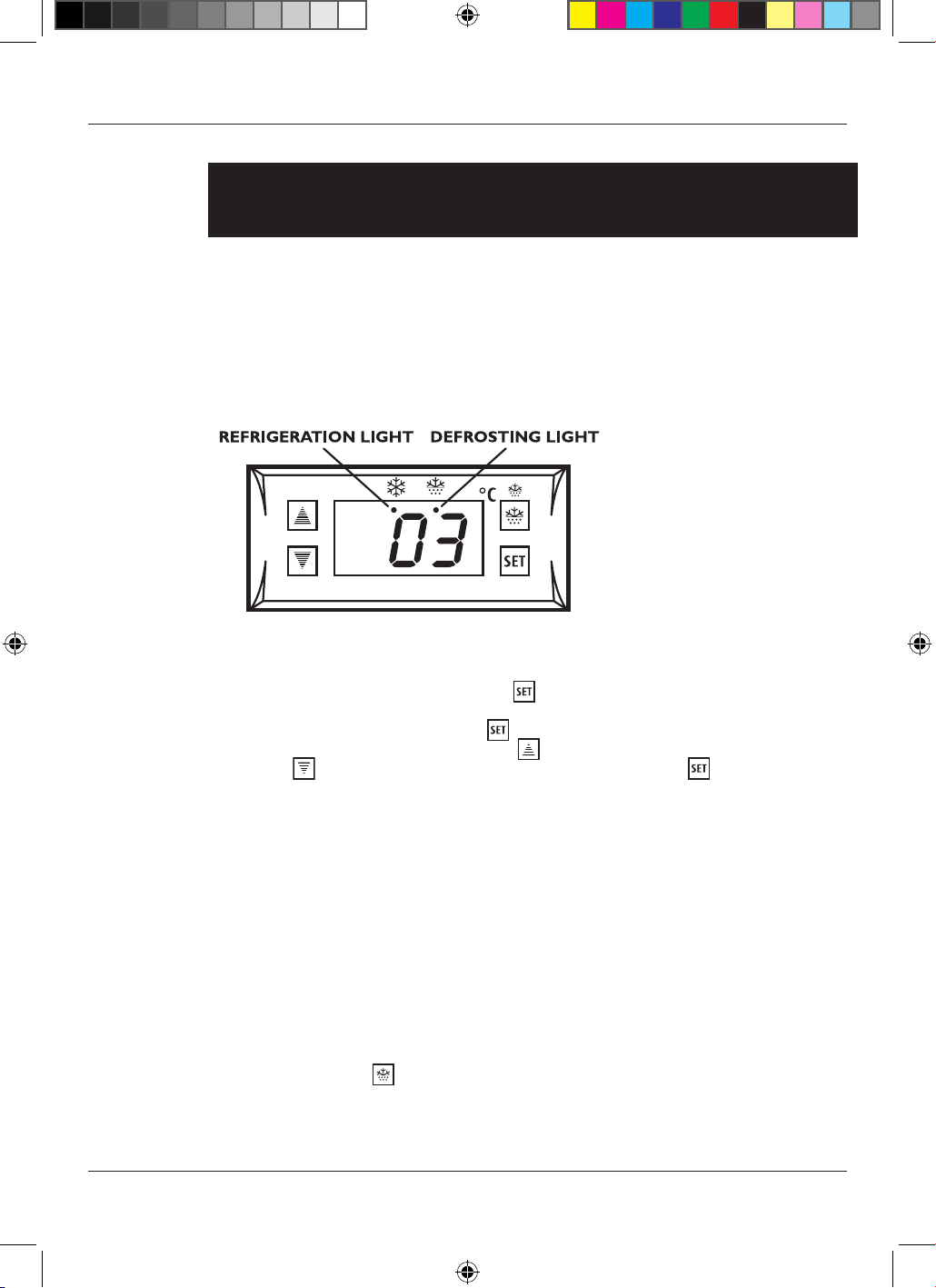
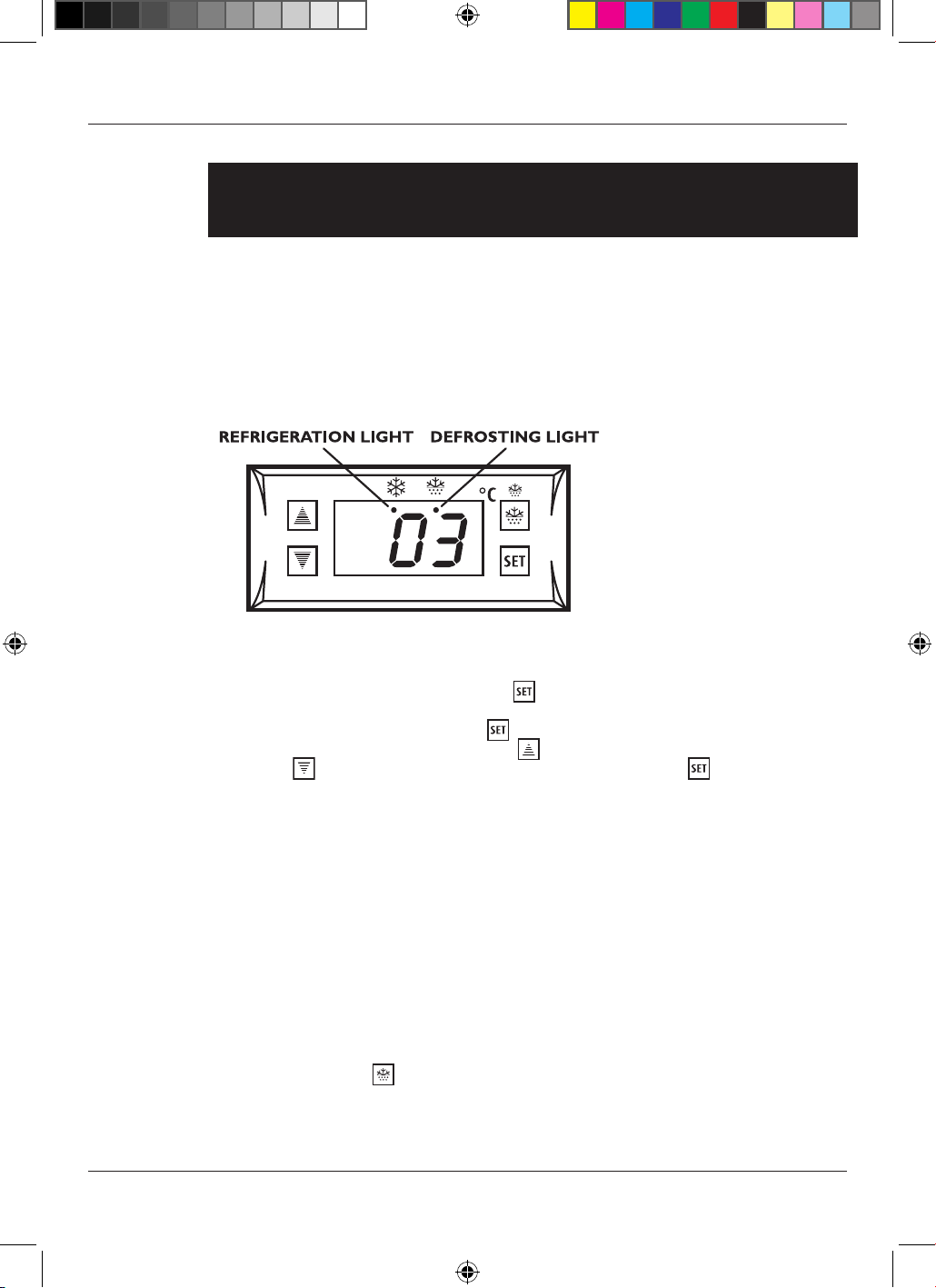
TO OPERATE THE ELECTRONIC THERMOSTAT
The thermostat has been pre-set, and in most cases it is not necessary to adjust the
settings. When the unit is operating normally, the display will show the current
temperature.
To display the set temperature press the button. Press the button again to return to
normal operation.
To set a new temperature, press . The display will flash and the current set
temperature will be displayed. Press the button to increase the set temperature, or
press the
button to decrease the set temperature. Press the button to save the
new setting. The display will flash with the new value and then revert to display the
cabinet temperature.
Please note:
1. When the chiller is connected to the mains for the first time there will be a short
delay before cooling starts. During this time the Refrigeration Light will flash.
After the short delay, cooling will begin and the Refrigeration Light will be
illuminated. When the chiller reaches the set temperature, the Refrigeration
Light will be off.
2. If you do not press any button, after six seconds the controller will return to its
normal display.
DEFROSTING
The unit defrosts automatically at preset intervals. If however the door is opened too
often, or if the unit if in a location with high humidity, or if the contents are changed more
frequently, it may be necessary to defrost the unit manually. To start or stop manual
defrosting, press the
button for six seconds. The Defrosting Light will be illuminated.
Melt water runs to a container placed in the compressor compartment and evaporates.
After defrosting is complete, the unit will return to normal operation.
11
Circuit Diagrams
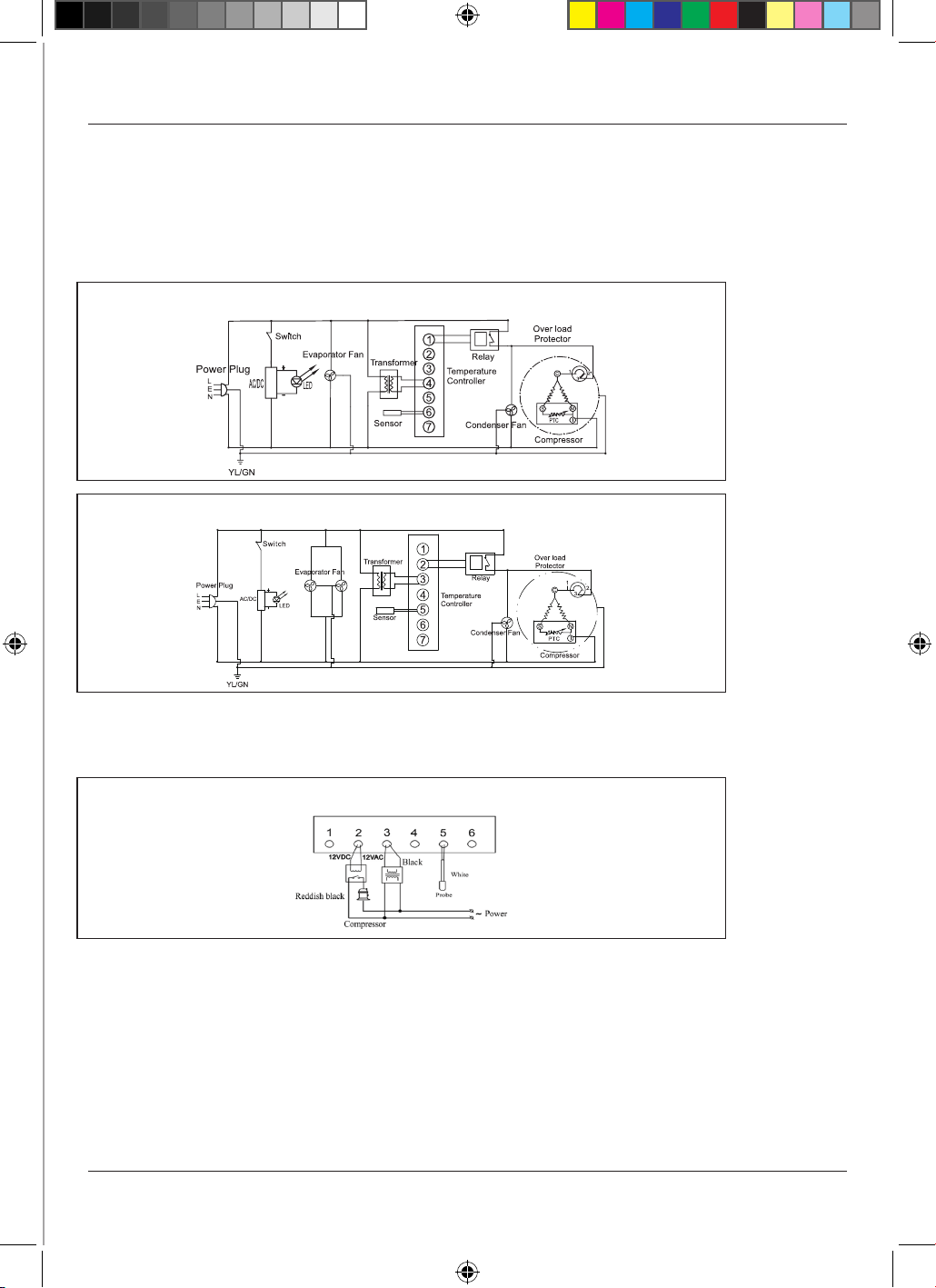
C1PROH-840/865/900 & C2PROH/S-840/865/900
C3PROH/S-840/865/900
Wiring Diagram
ELECTRONIC THERMOSTAT SF-102SBQ
12
A
dditional model-specific instructions for
AlFresco Range ALFC1, ALFC2, & ALFC3
• These instructions should be read in conjunction with the general operating instructions
on pp6&7.
Operating Instructions
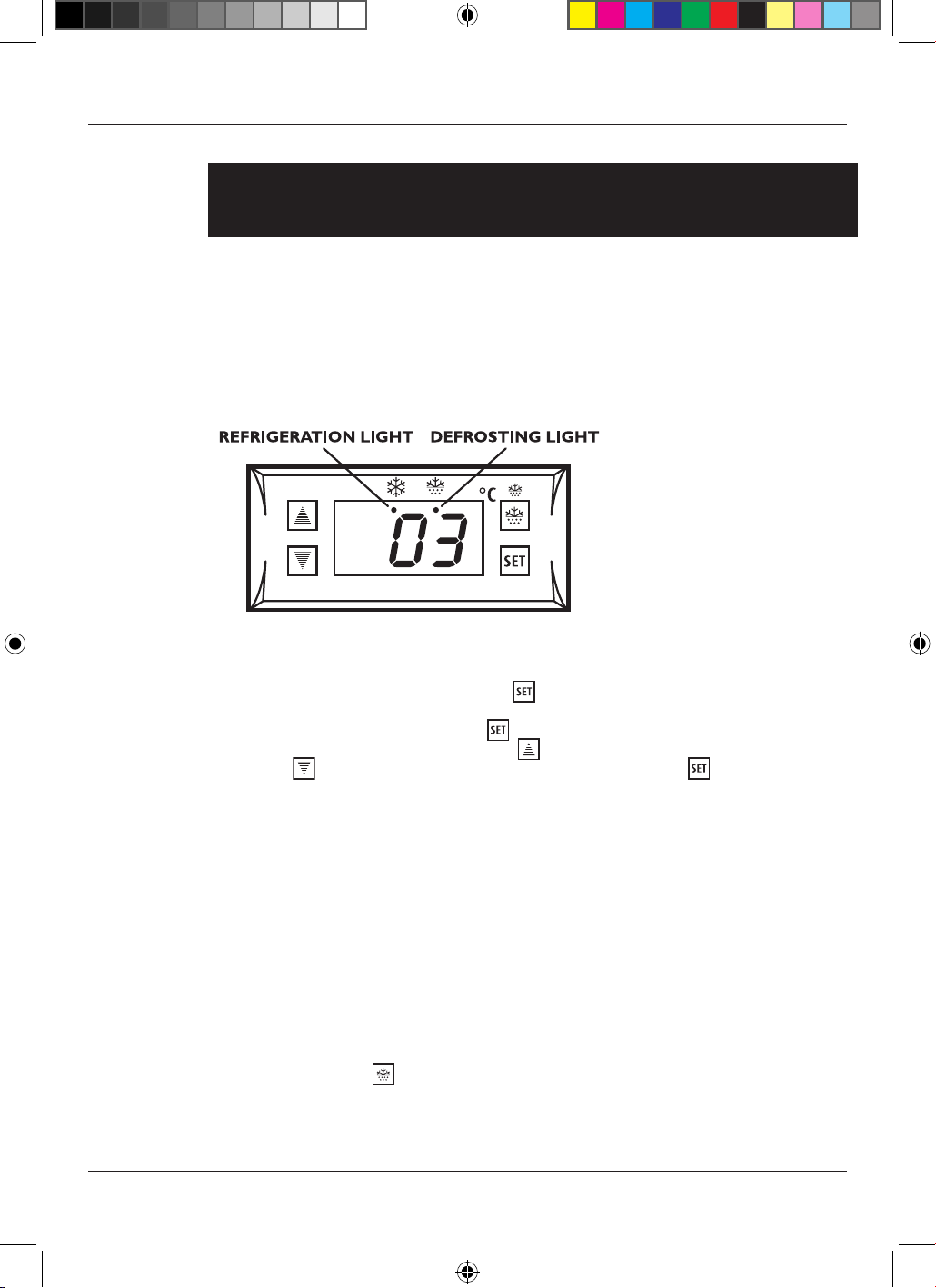
TO OPERATE THE ELECTRONIC THERMOSTAT
The thermostat has been pre-set, and in most cases it is not necessary to adjust the
settings. When the unit is operating normally, the display will show the current
temperature.
To display the set temperature press the
button. Press the button again to return to
normal operation.
To set a new temperature, press
. The display will flash and the current set
temperature will be displayed. Press the button to increase the set temperature, or
press the
button to decrease the set temperature. Press the button to save the
new setting. The display will flash with the new value and then revert to display the
cabinet temperature.
Please note:
1. When the chiller is connected to the mains for the first time there will be a short
delay before cooling starts. During this time the Refrigeration Light will flash.
After the short delay, cooling will begin and the Refrigeration Light will be
illuminated. When the chiller reaches the set temperature, the Refrigeration
Light will be off.
2. If you do not press any button, after six seconds the controller will return to its
normal display.
DEFROSTING
The unit defrosts automatically at preset intervals. If however the door is opened too
often, or if the unit if in a location with high humidity, or if the contents are changed more
frequently, it may be necessary to defrost the unit manually. To start or stop manual
defrosting, press the
button for six seconds. The Defrosting Light will be illuminated.
Melt water runs to a container placed in the compressor compartment and evaporates.
After defrosting is complete, the unit will return to normal operation.
13
Circuit Diagrams
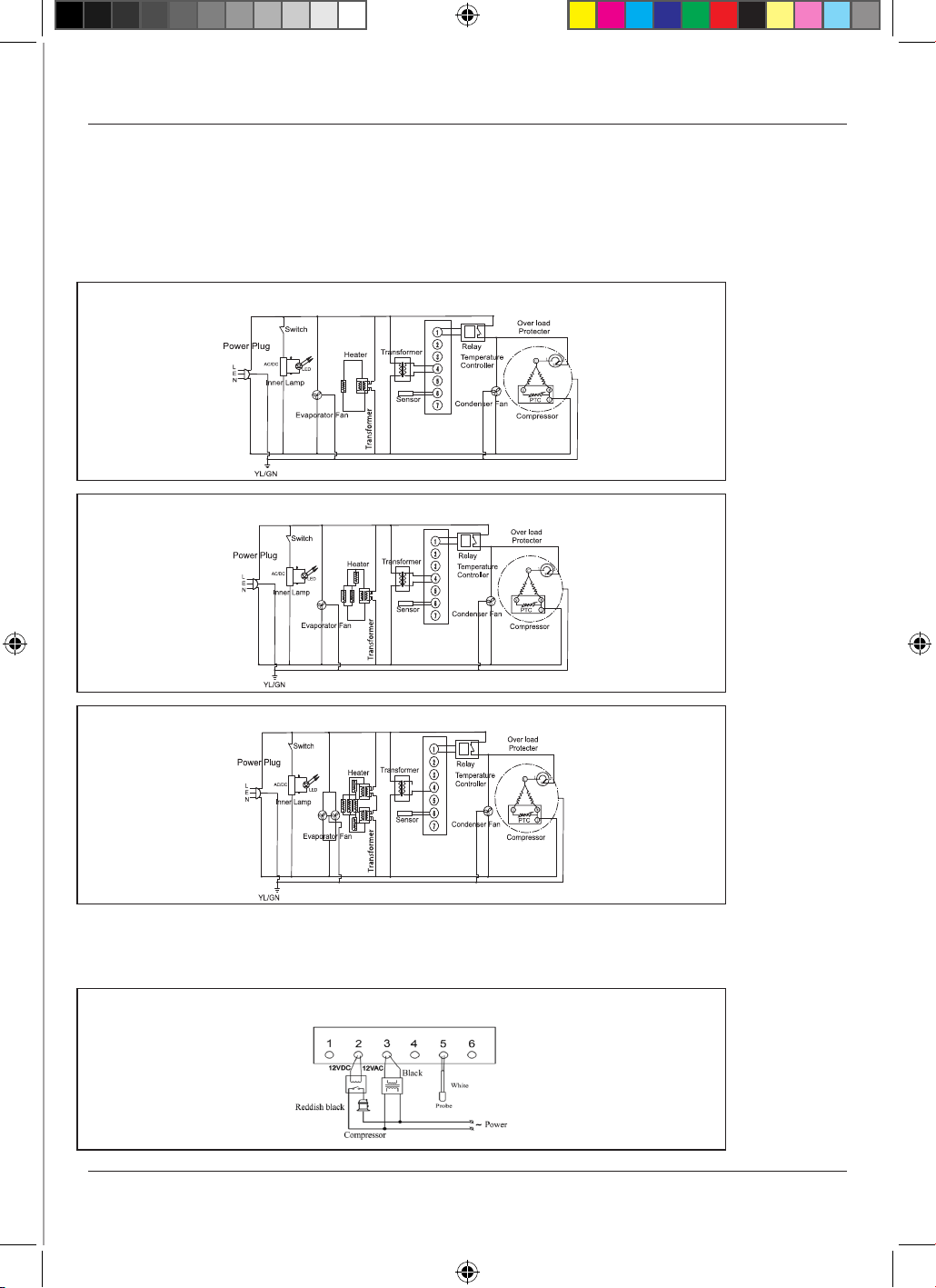
ALFC1
AL
FC2
A
LFC3
Wiring Diagram
ELECTRONIC THERMOSTAT SF-102SBQ
14
Additional model-specific instructions for
ECO Range C1HECO C2HECO C3HECO
• These instructions should be read in conjunction with the general operating instructions
on pp6&7.
Operating Instructions
TO OPERATE THE ELECTRONIC THERMOSTAT
The thermostat has been pre-set, and in most cases it is not necessary to adjust the
settings. When the unit is operating normally, the display will show the current
temperature.
To display the set temperature press the button. Press the button again to return to
normal operation.
To set a new temperature, press . The display will flash and the current set
temperature will be displayed. Press the button to increase the set temperature, or
press the
button to decrease the set temperature. Press the button to save the
new setting. The display will flash with the new value and then revert to display the
cabinet temperature.
Please note:
1. When the chiller is connected to the mains for the first time there will be a short
delay before cooling starts. During this time the Refrigeration Light will flash.
After the short delay, cooling will begin and the Refrigeration Light will be
illuminated. When the chiller reaches the set temperature, the Refrigeration
Light will be off.
2. If you do not press any button, after six seconds the controller will return to its
normal display.
DEFROSTING
The unit defrosts automatically at preset intervals. If however the door is opened too
often, or if the unit if in a location with high humidity, or if the contents are changed more
frequently, it may be necessary to defrost the unit manually. To start or stop manual
defrosting, press the
button for six seconds. The Defrosting Light will be illuminated.
Melt water runs to a container placed in the compressor compartment and evaporates.
After defrosting is complete, the unit will return to normal operation.
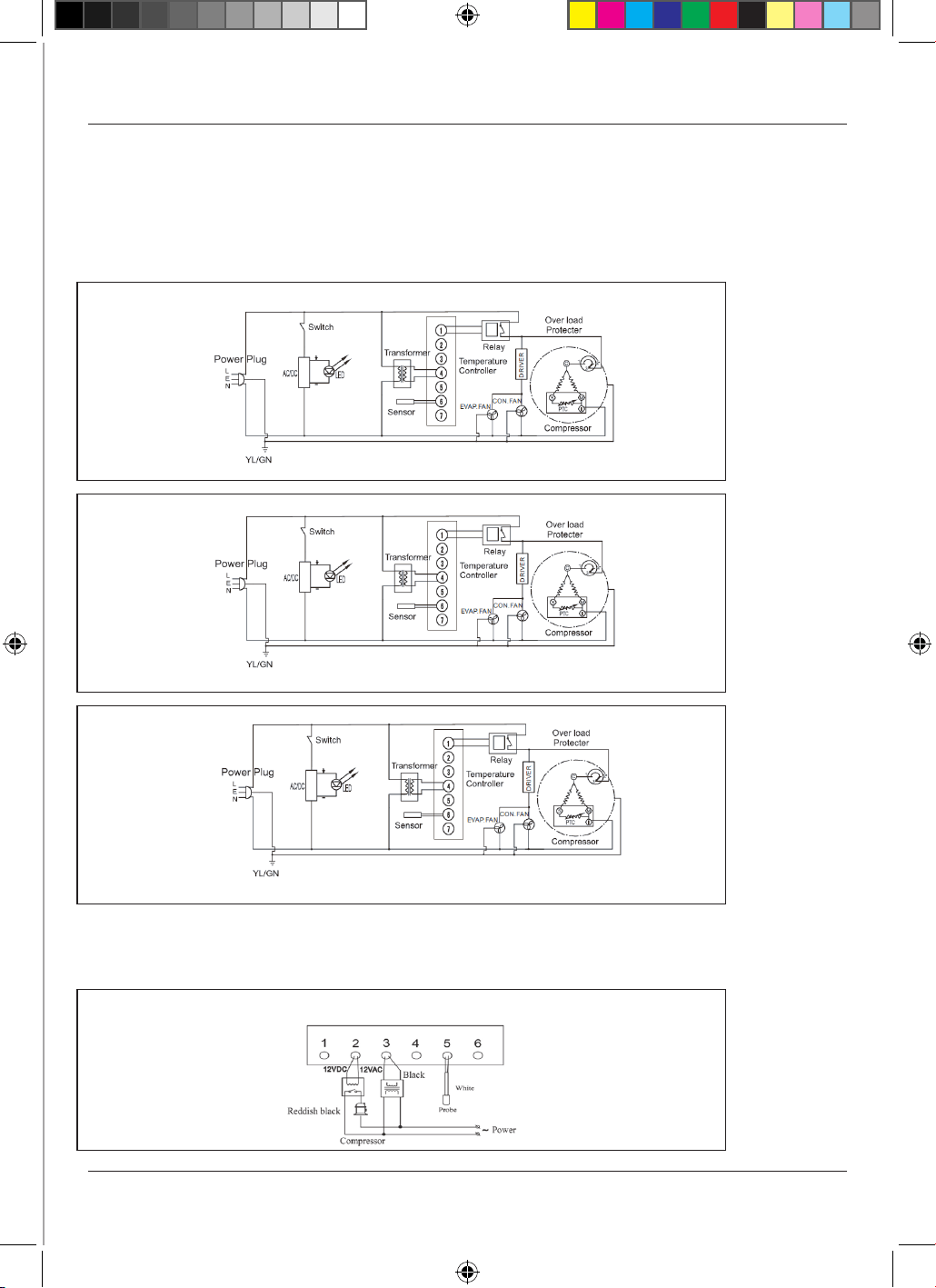
15
Circuit Diagrams
C1H-ECO
C2H-ECO
C3H-ECO
ELECTRONIC THERMOSTAT SF-102SBQ
Wiring Diagram
16
Additional model-specific instructions for
Below Zero Range C1ZZ, C2ZZ, & C3ZZ
• These instructions should be read in conjunction with the general operating instructions
on pp6&7.
Operating Instructions
TO OPERATE THE ELECTRONIC THERMOSTAT
The thermostat has been pre-set, and in most cases it is not necessary to adjust the
settings. When the unit is operating normally, the display will show the current
temperature.
To display the set temperature press the button. Press the button again to return to
normal operation.
To set a new temperature, press . The display will flash and the current set
temperature will be displayed. Press the button to increase the set temperature, or
press the
button to decrease the set temperature. Press the button to save the
new setting. The display will flash with the new value and then revert to display the
cabinet temperature.
Please note:
1. When the chiller is connected to the mains for the first time there will be a short
delay before cooling starts. During this time the Refrigeration Light will flash.
After the short delay, cooling will begin and the Refrigeration Light will be
illuminated. When the chiller reaches the set temperature, the Refrigeration
Light will be off.
2. If you do not press any button, after six seconds the controller will return to its
normal display.
DEFROSTING
The unit defrosts automatically at preset intervals. If however the door is opened too
often, or if the unit if in a location with high humidity, or if the contents are changed more
frequently, it may be necessary to defrost the unit manually. To start or stop manual
defrosting, press the
button for six seconds. The Defrosting Light will be illuminated.
Melt water runs to a container placed in the compressor compartment and evaporates.
After defrosting is complete, the unit will return to normal operation.
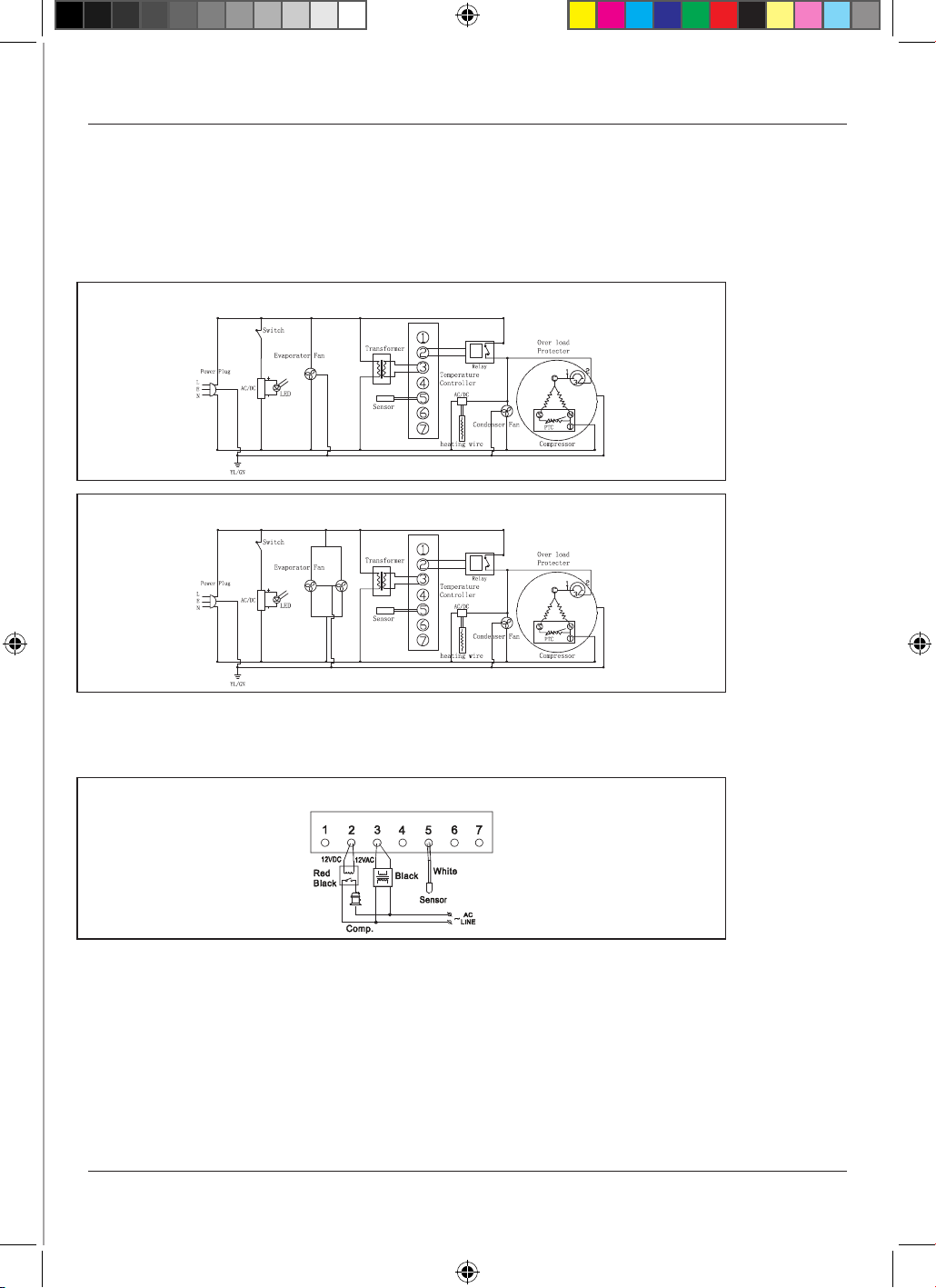
17
Circuit Diagrams
C1ZZH-840/865/900 & C2ZZH/S-840/865/900
C3ZZH/S-840/865/900
Wiring Diagram
ELECTRONIC THERMOSTAT SF-102SBQ
18
Additional model-specific instructions for
Combi model C2COMBI
• These instructions should be read in conjunction with the general operating instructions
on pp6&7.
Operating Instructions
TO OPERATE THE ELECTRONIC THERMOSTATS
The thermostats have been pre-set, and in most cases it is not necessary to adjust the
settings. When the unit is operating normally, the displays will show the current
temperature.
To display the set temperature press the button. Press the button again to return to
normal operation.
To set a new temperature, press . The display will flash and the current set
temperature will be displayed. Press the button to increase the set temperature, or
press the
button to decrease the set temperature. Press the button to save the
new setting. The display will flash with the new value and then revert to display the
cabinet temperature.
Please note:
1. When the chiller is connected to the mains for the first time there will be a short
delay before cooling starts. During this time the Refrigeration Light will flash.
After the short delay, cooling will begin and the Refrigeration Light will be
illuminated. When the chiller reaches the set temperature, the Refrigeration
Light will be off.
2. If you do not press any button, after six seconds the controller will return to its
normal display.
DEFROSTING
The unit defrosts automatically at preset intervals. If however the door is opened too
often, or if the unit if in a location with high humidity, or if the contents are changed more
frequently, it may be necessary to defrost the unit manually. To start or stop manual
defrosting, press the
button for six seconds. The Defrosting Light will be illuminated.
Melt water runs to a container placed in the compressor compartment and evaporates.
After defrosting is complete, the unit will return to normal operation.
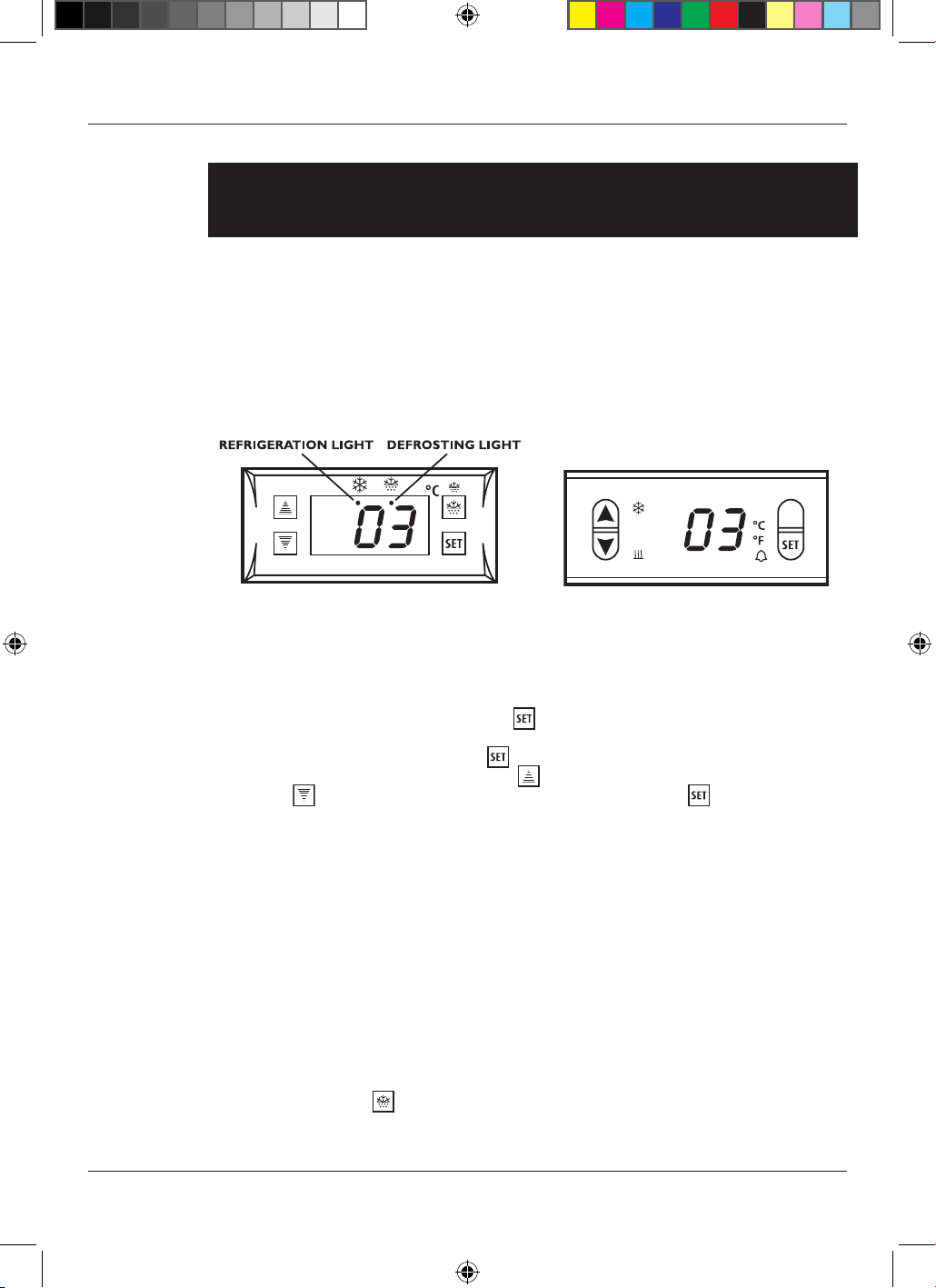
‘Beer side’ controller ‘Wine side’ controller
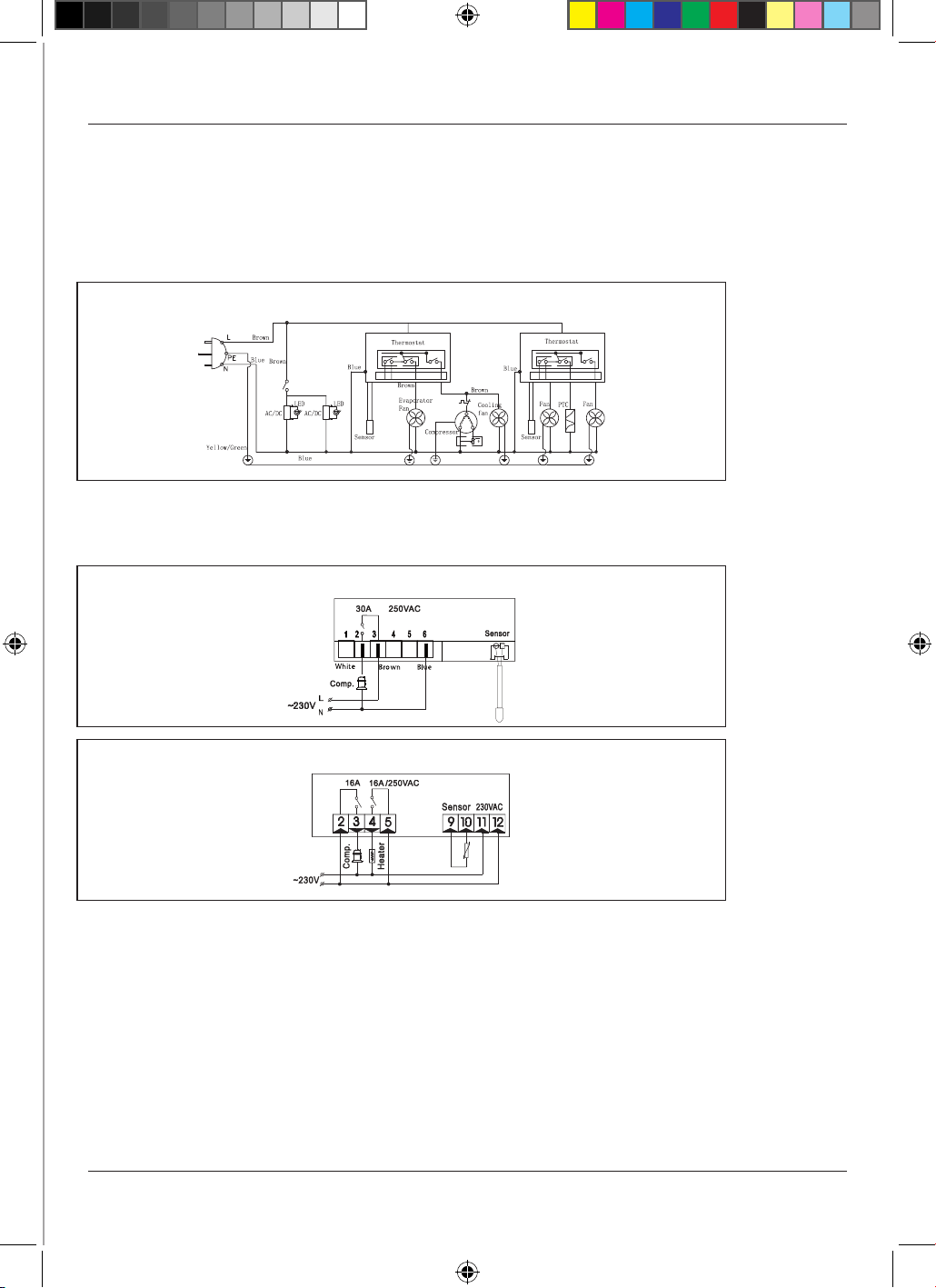
Wiring Diagram
‘BEER SIDE’ ELECTRONIC THERMOSTAT SF-102B
‘WINE SIDE’ ELECTRONIC THERMOSTAT ED235
19
Circuit Diagram
C2CMH-840/865/900
20
Additional model-specific instructions for
Drawer model C2DWR
• These instructions should be read in conjunction with the general operating instructions
on pp6&7, Please see page 21 for an important safety note applicable to this model only.
Operating Instructions
TO OPERATE THE ELECTRONIC THERMOSTAT
The thermostat has been pre-set, and in most cases it is not necessary to adjust the
settings. When the unit is operating normally, the display will show the current
temperature.
To display the set temperature press the button. Press the button again to return to
normal operation.
To set a new temperature, press . The display will flash and the current set
temperature will be displayed. Press the button to increase the set temperature, or
press the
button to decrease the set temperature. Press the button to save the
new setting. The display will flash with the new value and then revert to display the
cabinet temperature.
Please note:
1. When the chiller is connected to the mains for the first time there will be a short
delay before cooling starts. During this time the Refrigeration Light will flash.
After the short delay, cooling will begin and the Refrigeration Light will be
illuminated. When the chiller reaches the set temperature, the Refrigeration
Light will be off.
2. If you do not press any button, after six seconds the controller will return to its
normal display.
DEFROSTING
The unit defrosts automatically at preset intervals. If however the door is opened too
often, or if the unit if in a location with high humidity, or if the contents are changed more
frequently, it may be necessary to defrost the unit manually. To start or stop manual
defrosting, press the
button for six seconds. The Defrosting Light will be illuminated.
Melt water runs to a container placed in the compressor compartment and evaporates.
After defrosting is complete, the unit will return to normal operation.
21
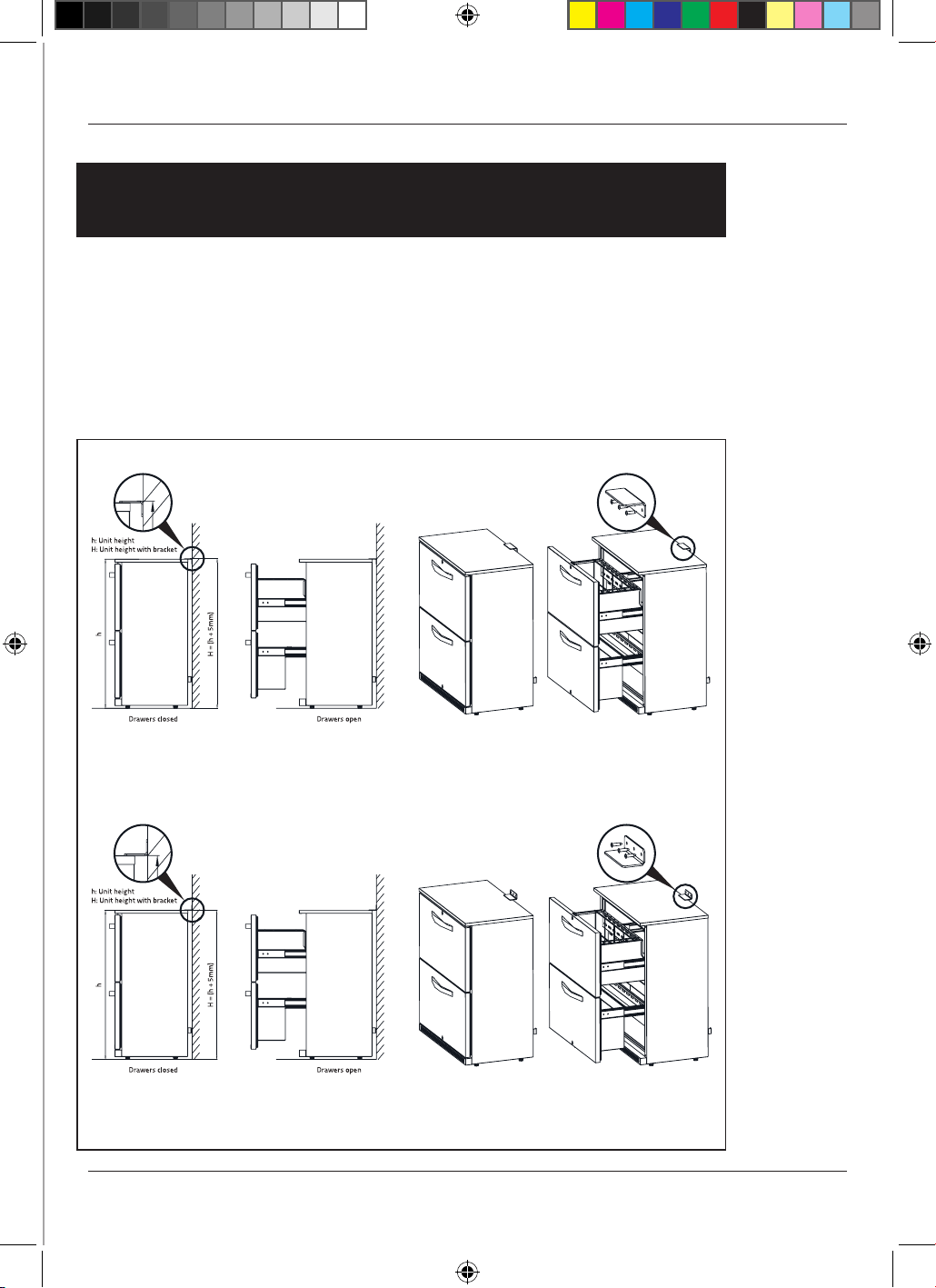
• IMPORTANT SAFETY INSTRUCTIONS
FOR DRAWER MODEL C2DWR ONLY
To reduce the risk of injury, this model requires the fitting of a
retaining bracket to the wall to prevent accidental tipping
when the drawers are opened. The bracket is supplied with
your unit.
How to fit the retaining bracket
BRACKET INSTALLATION OPTION 1
BRACKET INSTALLATION OPTION 2
22
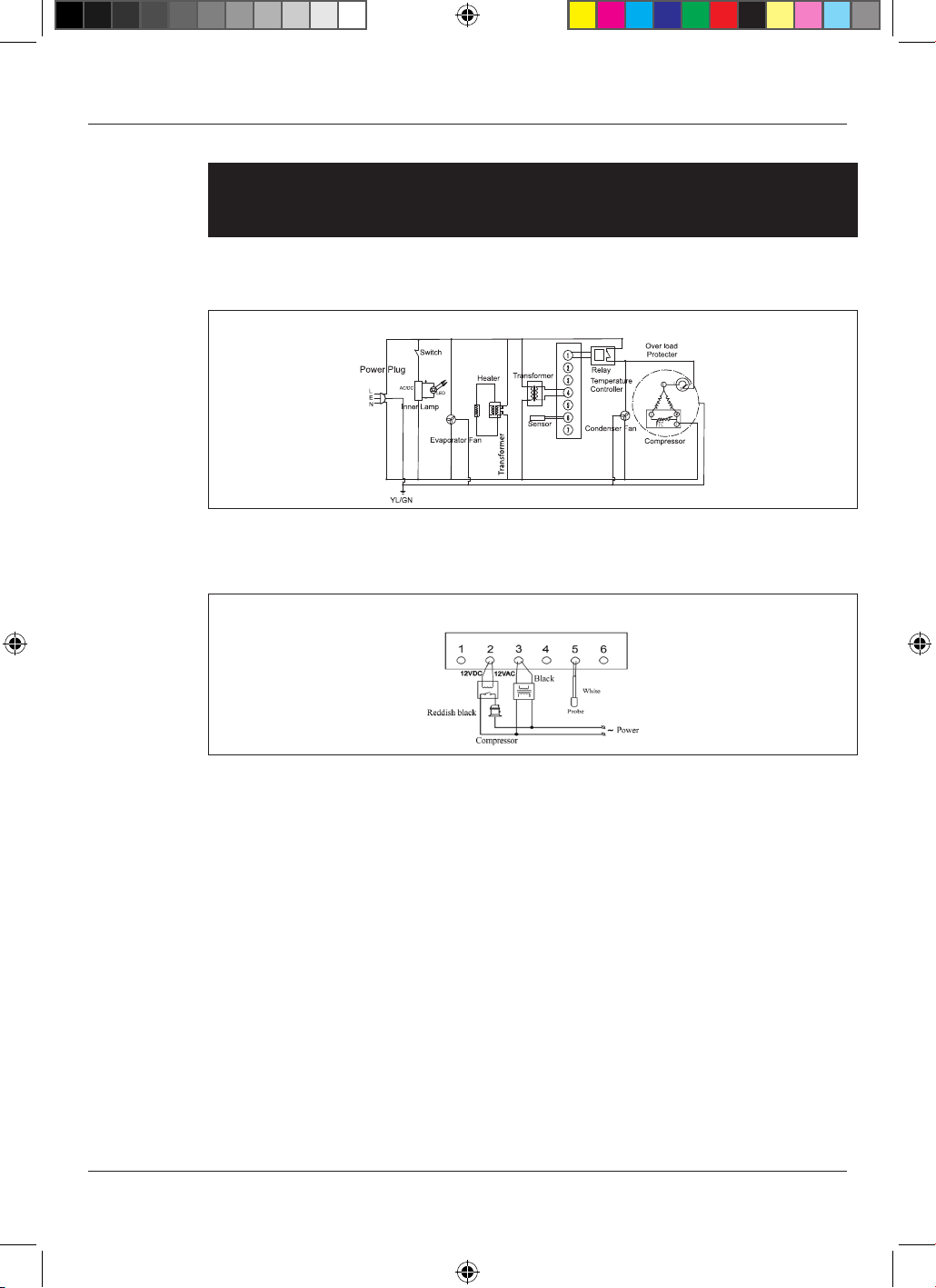
Wiring Diagram
ELECTRONIC THERMOSTAT SF-102SBQ
Circuit Diagram
C2DWR
Additional model-specific instructions for
Drawer model C2DWR
23
WARRANTY CARD & SERVICE CONDITIONS
Distributed by
Thank-you for choosing Husky Refrigeration, and we hope you enjoy your new appliance for many
years to come.
Please read your user manual carefully to ensure proper installation, working operation and
maintenance of your new product.
REGISTRATION
To ensure we provide you with the highest grade of support we strongly recommend you register your
product. Please use one of the following methods to register and have your purchase receipt, model
number and serial number details ready:
a) Please visit https://huskybrand.com.au/ and click on the Service & Support tab to register your
product whilst also gaining access to other Husky services/support documents.
b) Please contact us on the appropriate Arisit Service Hotline outlined on the bottom of this page to
register over the phone with one of our friendly customer service staff.
NOTICE TO AUSTRALIAN CONSUMERS
Our goods come with guarantees that cannot be excluded under the Australian Consumer Law. You
are entitled to a replacement or refund for a major failure and compensation for any other reasonably
foreseeable loss or damage. You are also entitled to have the goods repaired or replaced if the goods fail
to be of acceptable quality and the failure does not amount to a major failure.
NOTICE TO NEW ZEALAND CONSUMERS
Our goods come with guarantees that cannot be excluded under the Consumer Guarantees Act 1993.
This warranty should not be construed as any attempt to contract out of or exclude any or the guarantees
available to any consumers under this Act provided that you agree that the provisions of the Consumer
Guarantees Act 1993 will not apply if you are acquiring the goods for the purpose of a business.
HOW TO MAKE A CLAIM
In the unfortunate event you do need to make a claim please follow the process below to ensure service is
initiated to you as quickly as possible for a resolution:
Step 1: Please ensure you have checked that all product settings are set according to the user manual to
ensure the product is operating as intended
Step 2: Please have your purchase receipt, model number and serial number ready. If you have already
pre-registered your serial number details will only be required.
Should you need to make a claim the responsibility of proof of ownership of the equipment is on
you. If a service/claim is initiated and the fault is found to be an exclusion of the warranty terms
and conditions you will be subject to a No Fault Found charge plus Administration Fee as advised
by the Customer Service Staff upon making a claim.
Step 3: Please contact the appropriate Arisit Service Hotline outlined below based on your place of
residence:
Arisit Service Hotline (AUSTRALIA) PH: 1300 762 219
Arisit Service Hotline (NEW ZEALAND) PH: 9306 1020
https://huskybrand.com.au/
AUSTRALIA
Arisit Pty Ltd (AUS)
40-44 Mark Anthony Drive
Dandenong South, Victoria 3175
Email: arisit.warr[email protected]m
NEW ZEALAND
Arisit Pty Ltd (NZ)
1A Howe Street
Newton, Auckland 1145
Email: [email protected]
Warranty card for Arisit 260718 PRINT.indd 1 02/08/2018 08:39
12.09.24
Welcome to Husky, the home of smart refrigeration. We are a
leading global refrigeration specialist with over 25 years experience
in quality refrigeration for convenience and hospitality professionals,
and we have a great range of chillers for the home too. You’ll find
Husky products all over the world, so whatever your requirements
we’re sure to have a good looking energy-efficient model that’s
perfect for you.
AUSTRALIA
Arisit Pty Ltd (AUS)
40-44 Mark Anthony Drive
Dandenong South, Victoria 3175
Email: [email protected]
NEW ZEALAND
Arisit Pty Ltd (NZ)
1A Howe Street
Newton, Auckland 1145
Email: [email protected]