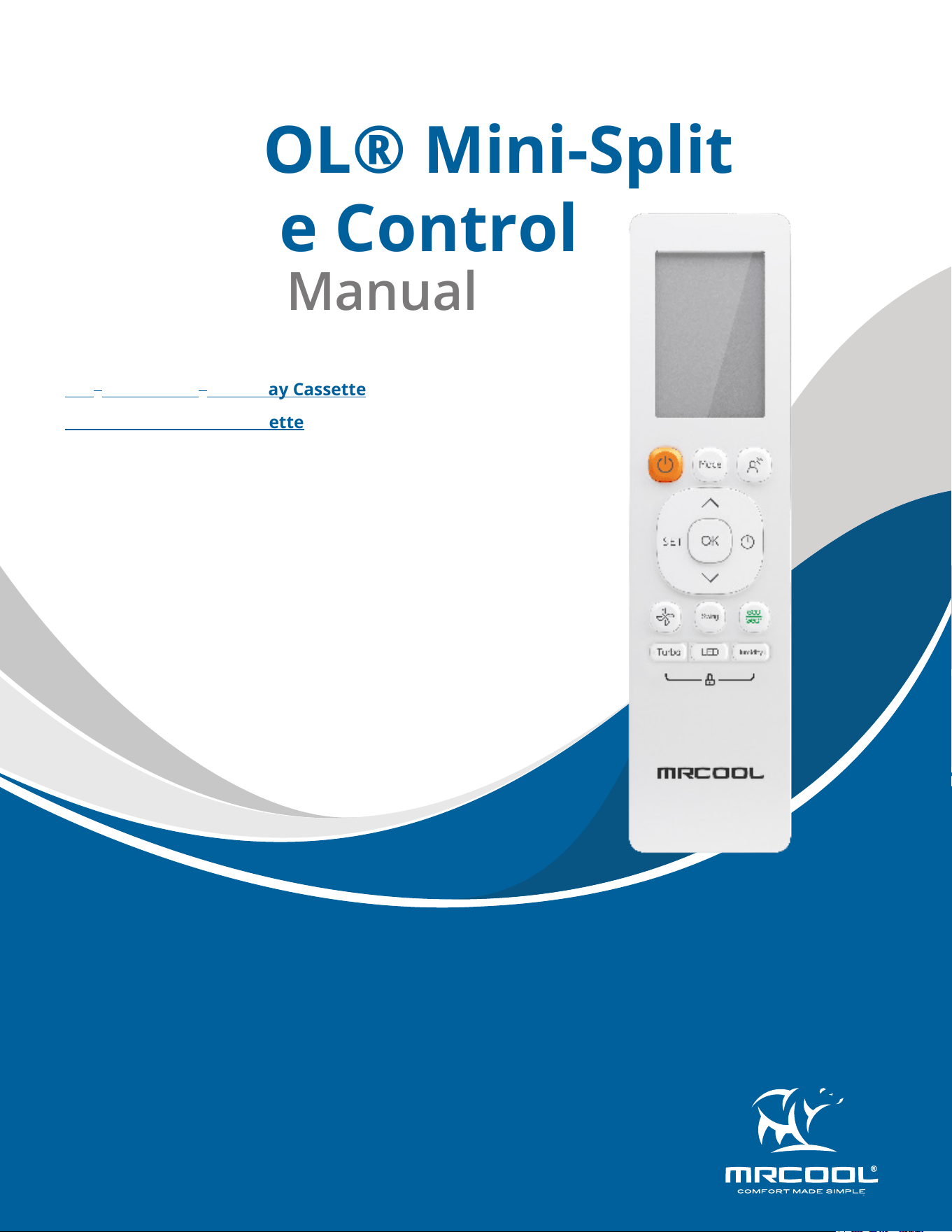
MRCOOL® Mini-Split
Remote Control
Owner’s Manual
MODELS:
Read this manual carefully before installation and keep it where
the operator can easily nd it for future reference.
Due to updates and constantly improving performance, the
information and instructions within this manual are subject to
change without notice.
Version Date: 5/20/2025
Please visit www.mrcool.com/documentation
to ensure you have the latest version of this manual.
DIY
®
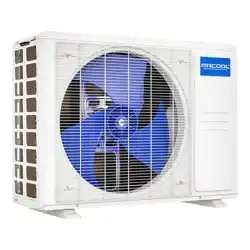
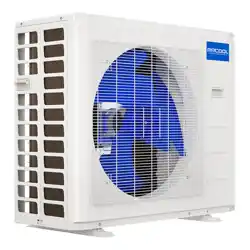
Outtasight
®
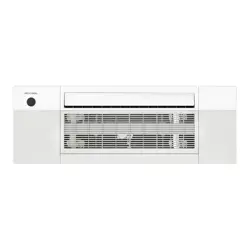
One-Way Cassette
Olympus Four-Way Cassette
mrcool.com1
CONTENTS
SPECIFICATIONS & COMPATIBILITY .......................................................... 2
QUICK-START GUIDE .................................................................................. 2
HANDLING .................................................................................................. 3
3.1 Inserting & Replacing Batteries .................................................... 3
3.2 Remote Interference ..................................................................... 3
BUTTONS & FUNCTIONS ........................................................................... 4
REMOTE SCREEN INDICATORS .................................................................. 5
BASIC FUNCTIONS ...................................................................................... 6
6.1 Auto Mode ...................................................................................... 6
6.2 Cool Mode........................................................................................ 6
6.3 Dry Mode ......................................................................................... 6
6.4 Fan Mode ......................................................................................... 6
6.5 Heat Mode ....................................................................................... 7
6.6 Setting the Timer ............................................................................ 7
ADVANCED FUNCTIONS ............................................................................ 8
7.1 Swing Function ................................................................................ 8
7.2 Airow Direction ............................................................................. 8
7.3 LED Display ...................................................................................... 8
7.4 Lifting Panel Function .................................................................... 8
7.5 Breeze Away Function.................................................................... 8
7.6 Silence Function .............................................................................. 8
7.7 ECO/GEAR Function ........................................................................ 9
7.8 FP Function ...................................................................................... 9
7.9 Lock Function .................................................................................. 9
7.10 Turbo Function .............................................................................. 9
7.11 Super Heat Function ..................................................................... 9
7.12 Set Function ................................................................................. 10
1
2
3
4
5
Contents
6
7
mrcool.com 2 2
SPECIFICATIONS
1
1 - Specications & Compatibility
Rated Voltage 3.0V (Dry Batteries R03/LR03x2)
Signal Receiving Range 26 ft (8m)
Environment 23°F~140°F (-5°C~60°C)
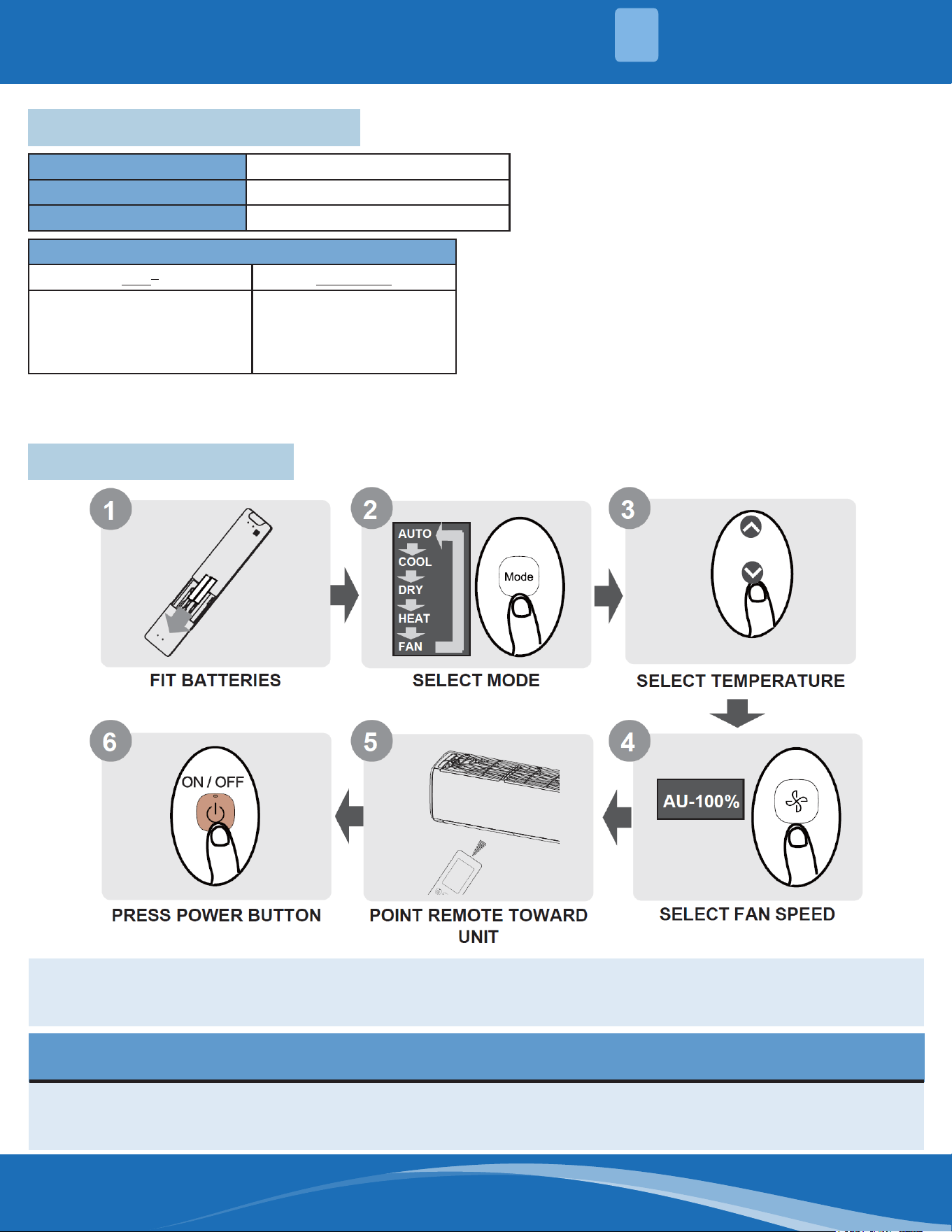
2 - Quick Start Guide
NOT SURE WHAT A FUNCTION DOES?
Refer to the "How to use Basic Functions" and "How to Use Advanced Functions" sections of this manual
for a detailed description of how to use the unit.
SPECIAL NOTE
• Button designs on your unit may dier slightly from the example shown.
• If the indoor unit does not have a particular function, pressing that function's button on the remote control
will have no eect.
Compatible Models:
DIY
®
Olympus
DIYCASSETTE06HP-230D25
DIYCASSETTE09HP-230D25
DIYCASSETTE12HP-230D25
DIYCASSETTE18HP-230D25
CASSETTE09HP-230C-O
CASSETTE12HP-230C-O
CASSETTE18HP-230C-O
CASSETTE24HP-230C-O
mrcool.com3
HANDLING
3
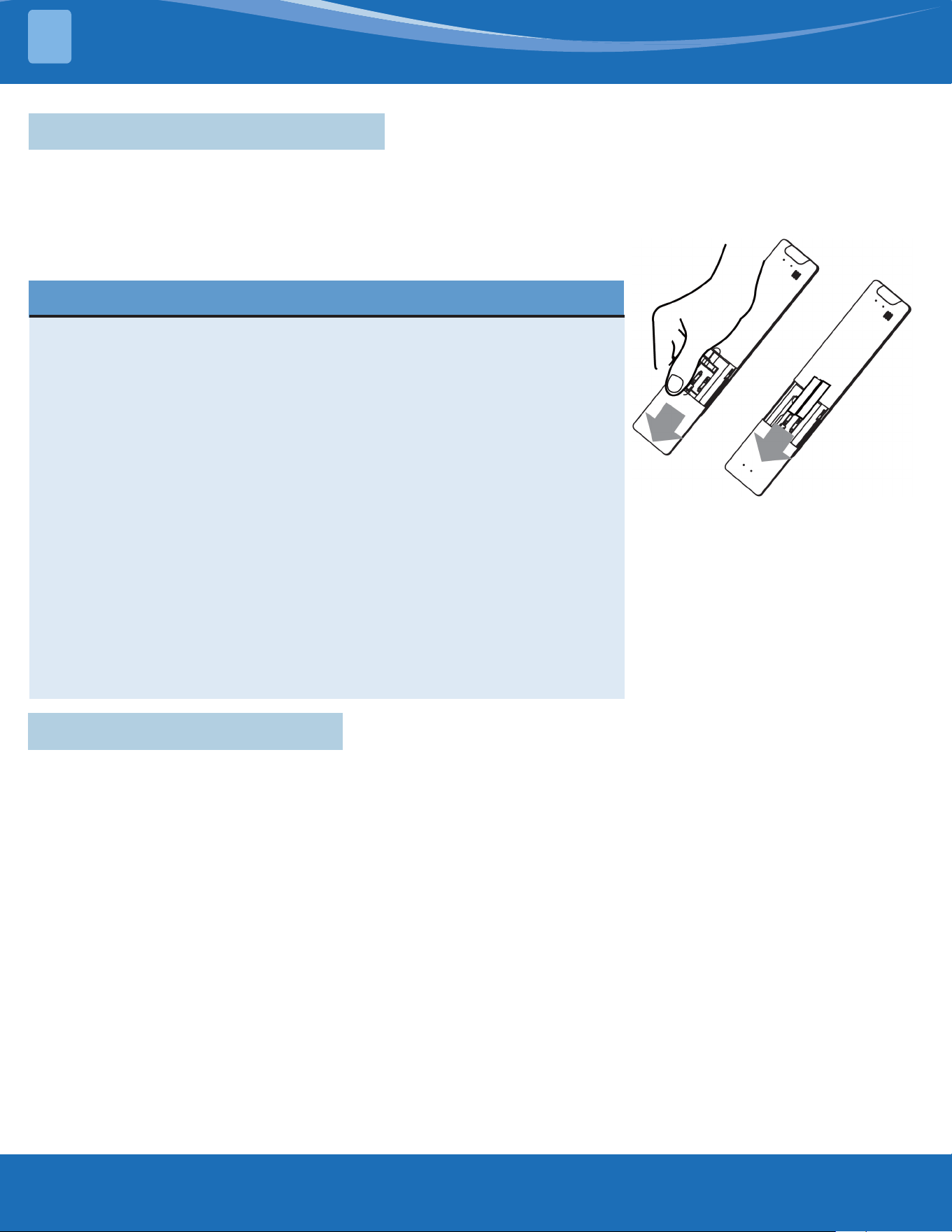
3.1 Inserting & Replacing Batteries
The unit includes two batteries. Put the batteries in the remote control before use.
1. Slide the back cover from the remote control downward, exposing the battery compartment.
2. Insert the batteries, paying attention to match up the (+) and (-) ends of the batteries with the symbols inside
the battery compartment.
3. Slide the battery cover back into place.
REMOTE NOTES & TIPS
For optimum product performance:
• Do not mix old and new batteries, or batteries of dierent types.
• Do not leave batteries in the remote control if you don't plan on
using the device for more than 2 months.
• Do not dispose of batteries as unsorted municipal waste. Refer to
local laws for proper disposal requirements of batteries.
• Direct sunlight can interfere with the infrared signal receiver.
• There must be a clear line of sight between the remote and the
appliance.
• If the signals from the remote control happen to control another
appliance, move the appliance to another location or contact
customer service.
• Batteries may have a chemical symbol at the bottom of the disposal
icon. This chemical symbol means that the battery contains a heavy
metal that exceeds a certain concentration. An example is Pb: Lead
(>0.004%).
• Appliances and used batteries must be treated in a specialized facility
for reuse, recycling, and recovery. By ensuring correct disposal, you
will help avoid possible negative consequences for human health &
the environment.
3.2 Remote Interference
The remote should comply with the local national regulations.
• In Canada, it should comply with CAN ICES-3(B)/NMB-3(B).
• In USA, this device complies with part 15 of the FCC Rules. Operation is subject to the following two conditions:
1. This device may not cause harmful interference and
2. This device must accept any interference received, including those that may cause undesired operation.
This equipment has been tested and found to comply with the limits for a Class B digital device, pursuant to part
15 of the FCC Rules. These limits are designed to provide reasonable protection against harmful interference
in a residential installation. This equipment generates, uses, and can radiate radio frequency energy and, if not
installed and used in accordance with the instructions, may cause harmful interference to radio communications.
However, there is no guarantee that interference will not occur in a particular installation. If this equipment does
cause harmful interference to radio or television reception, which can be determined by turning the equipment
o and on, the user is encouraged to try to correct the interference by one or more of the following measures:
• Reorient or relocate the receiving antenna
• Increase the separation between the equipment and receiver
• Connect the equipment into an outlet on a circuit dierent from that to which the receiver is connected.
• Consult your dealer or an experienced radio/TV technician for help.
• Changes or modications not approved by the party responsible for compliance could void the user's authority
to operate the equipment.
mrcool.com 4
4
BUTTONS & FUNCTIONS
4
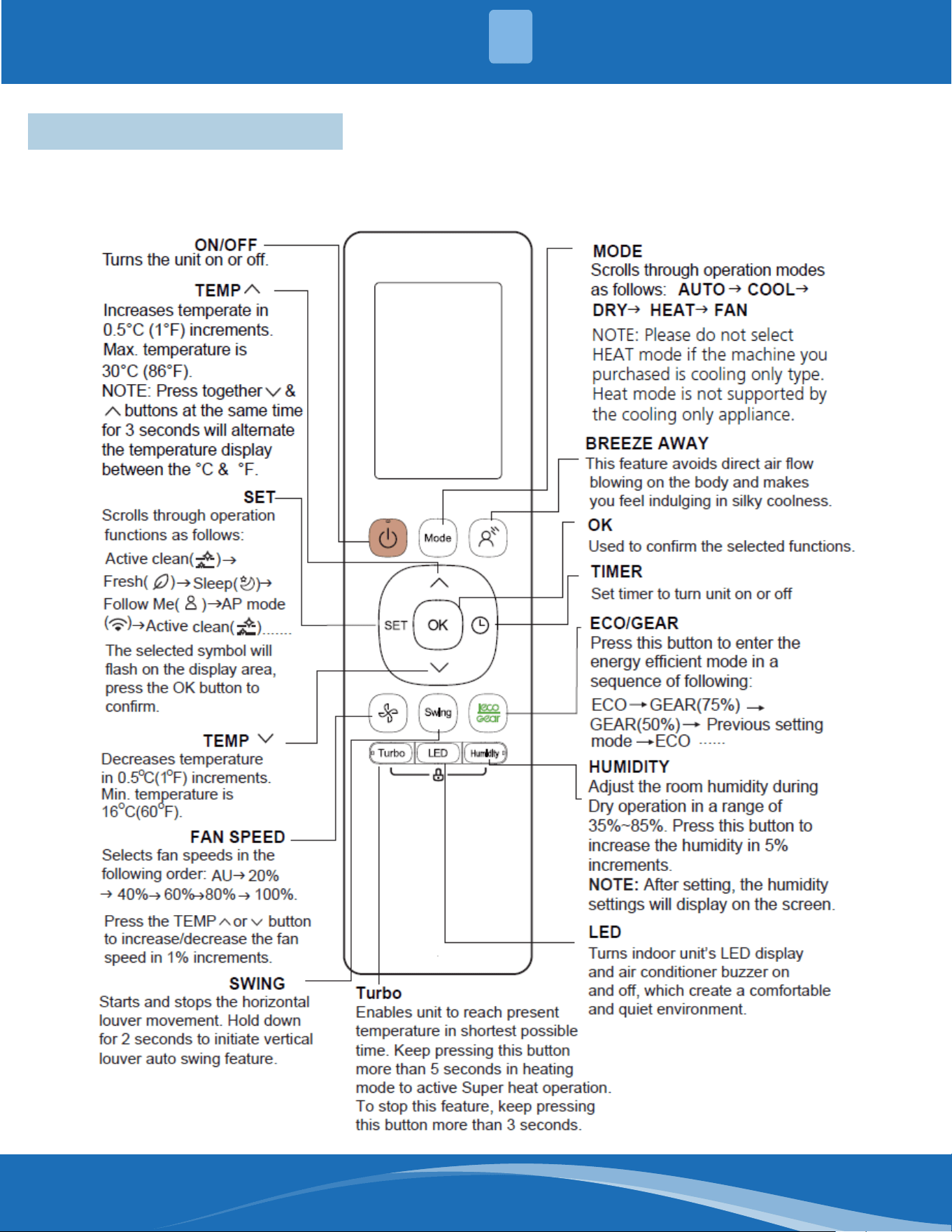
4 - Buttons & Functions
Before you begin using your new air conditioner, make sure to familiarize yourself with the remote control. The
following is a brief introduction to the remote control itself. For instructions on how to operate your air conditioner,
refer to the "How to Use Basic Functions" section of this manual.
mrcool.com5
REMOTE SCREEN INDICATORS
5
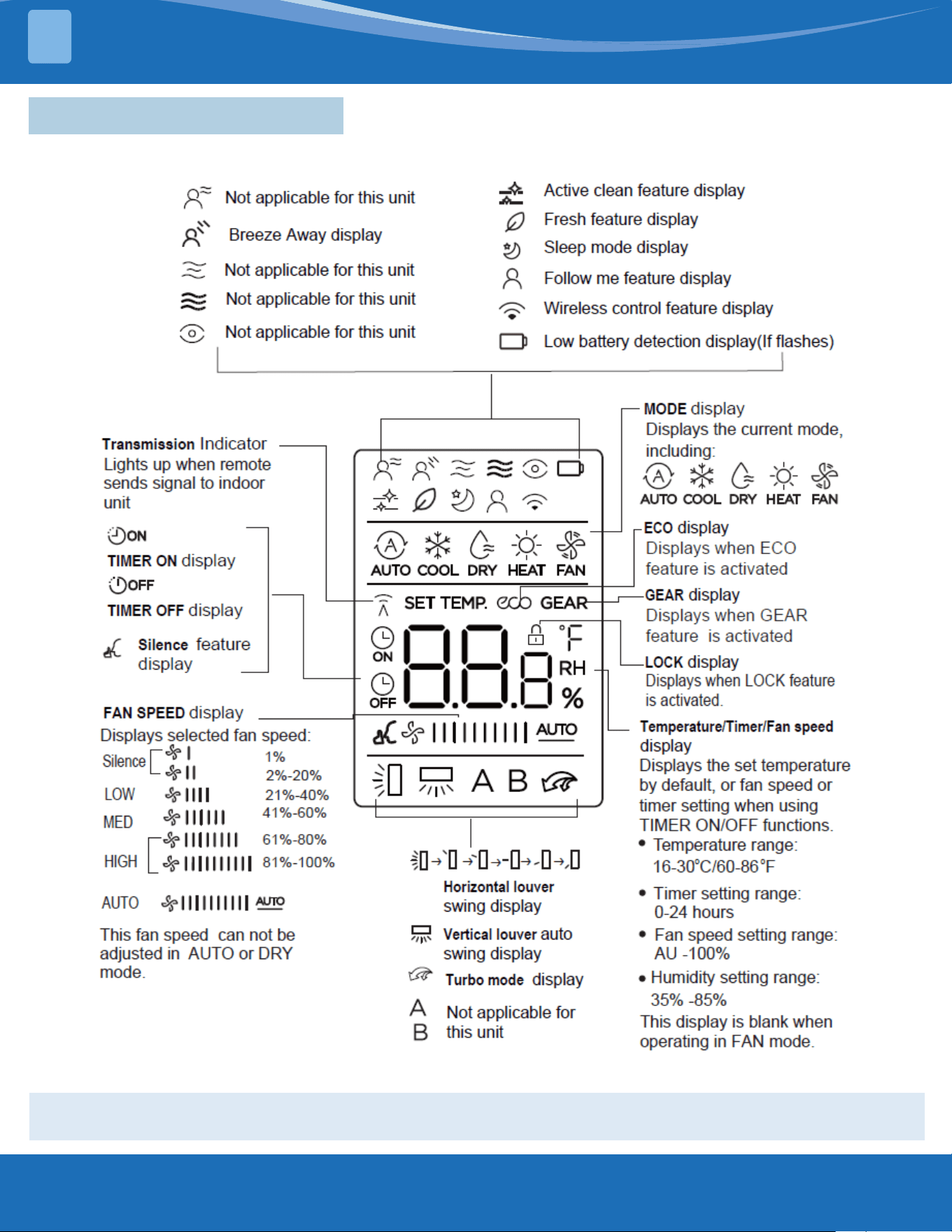
5 - Remote Screen Indicators
Information is displayed when the remote is powered on.
All indicators shown in the gure are for the purpose of clear presentation. But during the actual
operation, only the relative function signs are shown on the display window.
mrcool.com 6
6
BASIC FUNCTIONS
6
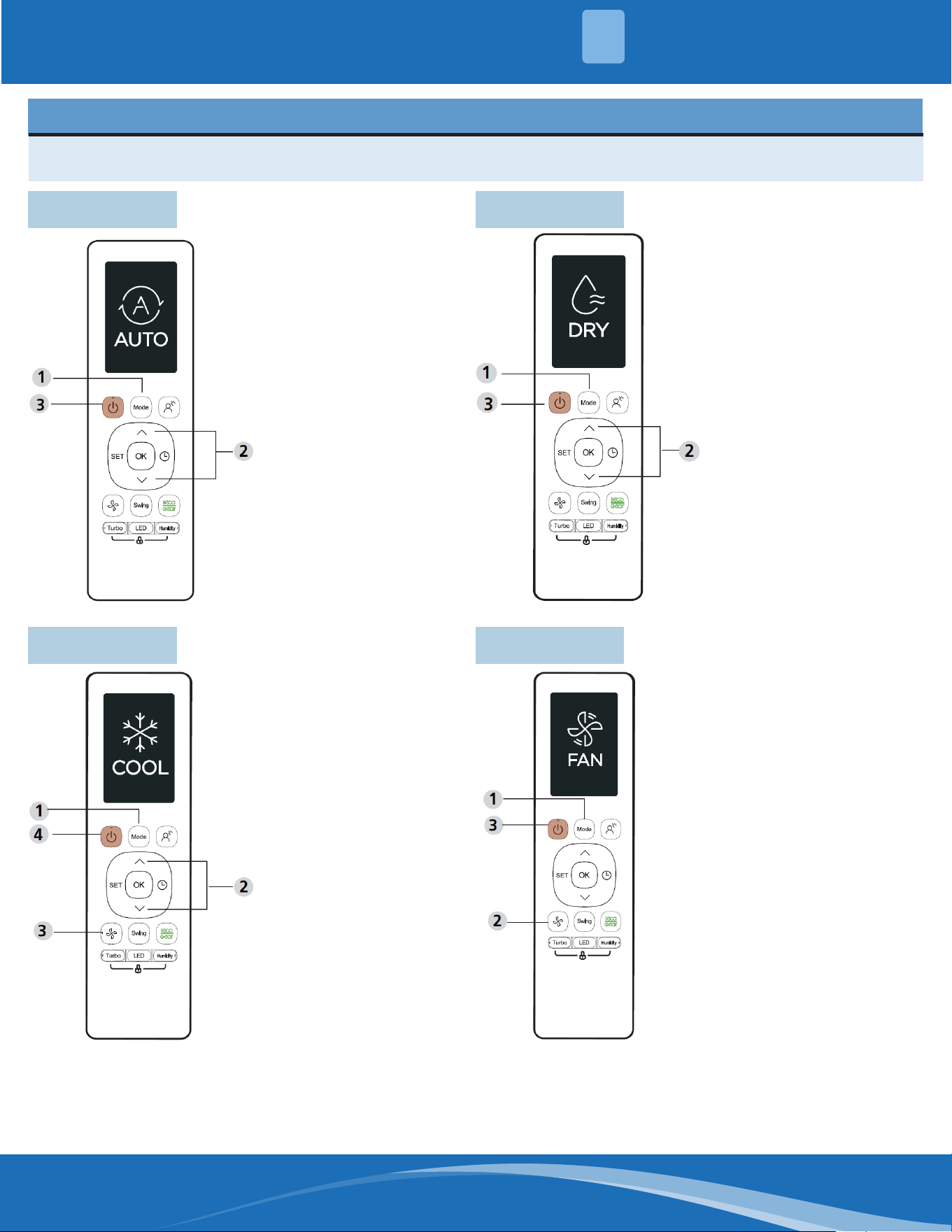
6.1 Auto Mode
SETTING TEMPERATURE
The operating temperature range for units is 60-86°F (16-30°C). You can increase or decrease the set
temperature in 1°F (0.5°C) or 1°F (1°C) increments.
1. Press the Mode
button to select Auto.
2. Set your temperature
using the Temp up or
Temp down button.
3. Press the ON/OFF
button to start the
unit.
6.2 Cool Mode
1. Press the Mode
button to select
Cool mode.
2. Set your
temperature using
the Temp up or
Temp down button.
3. Press the Fan
button to select the
fan speed in a range
of AU-100%.
4. Press the On/O
button to start the
unit.
NOTE: In auto mode, the unit
will automatically select the cool,
fan, or heat function based on
the set temperature. The fan
speed cannot be set in auto
mode.
6.3 Dry Mode
1. Press the Mode
button to select Dry.
2. Set your temperature
using the Temp up or
Temp down button.
3. Press the ON/OFF
button to start the
unit.
NOTE: Fan speed cannot be
changed in Dry mode.
6.4 Fan Mode
1. Press the Mode
button to select Fan
mode.
2. Press the Fan button
to select the fan
speed in a range of
AU-100%.
3. Press the ON/OFF
button to start the
unit.
NOTE: You can't set the
temperature in Fan mode. As
a result, your remote control's
LCD screen will not display the
temperature.
mrcool.com7
BASIC FUNCTIONS
6
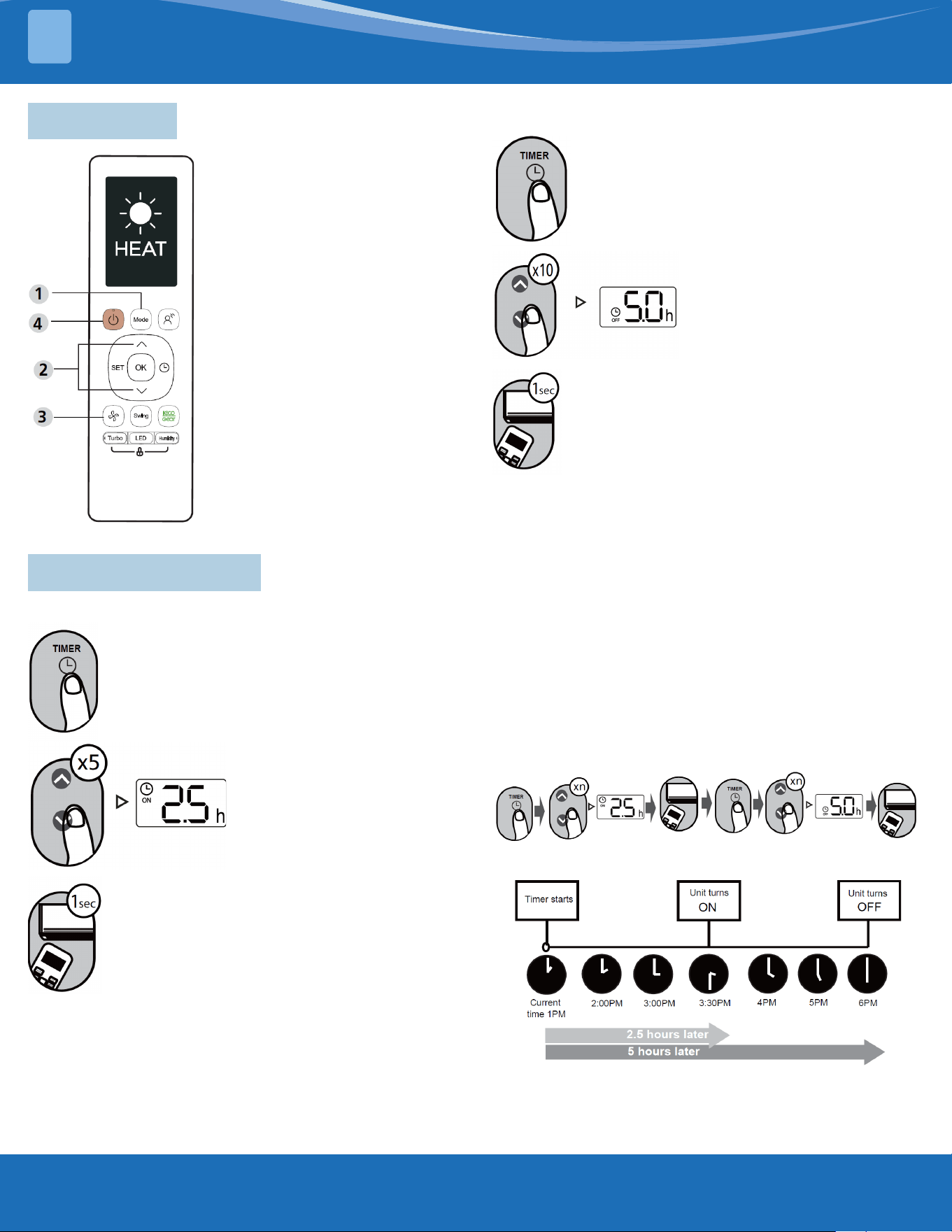
6.5 Heat Mode
1. Press the Mode button to
select Heat mode.
2. Set your temperature using
the Temp up or Temp down
button.
3. Press the Fan button to
select the fan speed in a
range of AU-100%.
4. Press the ON/OFF button to
start the unit.
NOTE: As outdoor temperatures
drop, the performance of your
unit's heat function may be
aected. In such instances, we
recommend using this unit in
conjunction with other heating
appliances.
6.6 Setting the Timer
TIMER ON Setting:
Press the TIMER button to initiate the ON
time sequence.
Point the remote at the unit and wait 1
second. The TIMER ON will be activated.
TIMER OFF Setting:
Press the TIMER button to initiate the OFF
time sequence.
Press the Temperature up or
down button ten times to set
the desired time to turn on
the unit.
Point the remote at the unit and wait 1
second. The TIMER OFF will be activated.
NOTE:
1. When setting the TIMER ON or TIMER OFF, the
time will increase by 30 minute increments with
each press, up to 10 hours. After 10 hours and up
to 24, it will increase in 1 hour increments. (For
example, press 5 times to get to 2.5h, and press
10 times to get to 5h.) The timer will revert to 0.0
after 24.
2. Cancel either function by setting its timer to 0.0h.
TIMER ON & OFF Setting Example:
Keep in mind that the time periods you set for both
functions refer to hours after the current time.
Example: If current time is 1:00pm, the unit will turn
on 2.5 hours later (3:30pm) and turn o at 6:00pm.
Press the Temperature up
or down button ve times
to set the desired time to
turn on the unit.
mrcool.com 8
8
ADVANCED FUNCTIONS
7
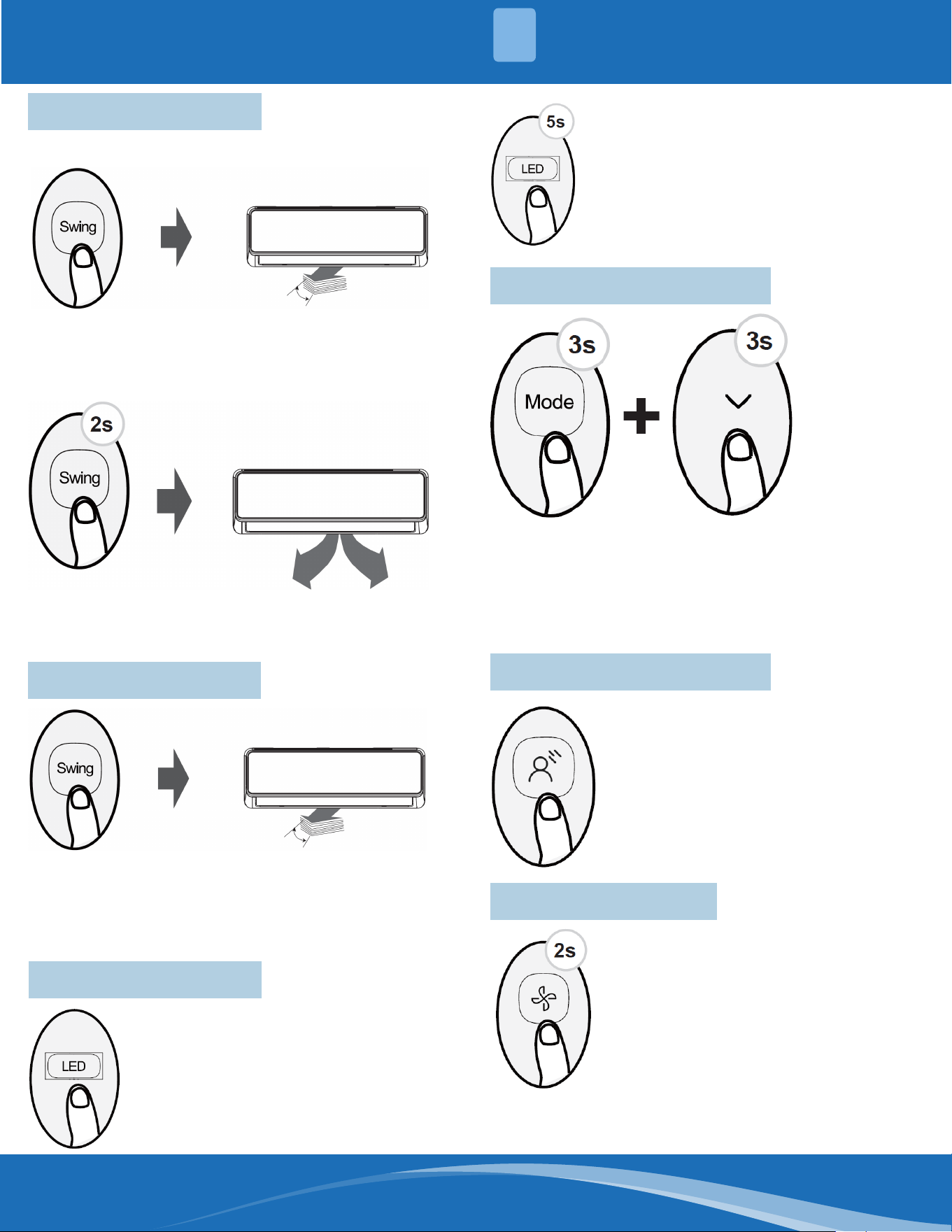
7.1 Swing Function
Press Swing button.
The horizontal louver will swing
up and down automatically when
pressing the Swing button. Press
again to make it stop.
When this button is pressed for
more than 2 seconds, the vertical
louver swing function is activated.
7.2 Airow Direction
When the Swing button is continuously pressed, ve
dierent airow directions can be set. The louver will
move to a dierent range each time the button is
pressed. Press the button until the preferred direction
is reached.
7.3 LED Display
Press the LED button to turn on and turn
o the display of the indoor unit.
When this button is pressed for more than
5 seconds, the indoor unit will display the
actual room temperature. Pressing for
more than 5 seconds again will revert back
to displaying the setting temperature.
7.4 Lifting Panel Function
Press the Mode button and arrow down button
simultaneously for more than 3 seconds to activate
this function. The remote will display "F2". When
setting the panel status, press the up or down arrow
buttons of the remote control to control the rise or fall
of the grille. Press any other button to exit the setting.
7.6 Silence Function
When the fan button is pressed for
more than 2 seconds, the Silence
function will activate/deactivate.
Due to the compressor's low frequency
of operation, it may result in insucient
cooling or heating capacity. Press ON/
OFF, Mode, Turbo, or Clean buttons
while operating to cancel the silence
function.
7.5 Breeze Away Function
This feature prevents airow from
blowing directly on the body.
NOTE: This feature is available under
Cool, Fan, and Dry modes only.
mrcool.com9
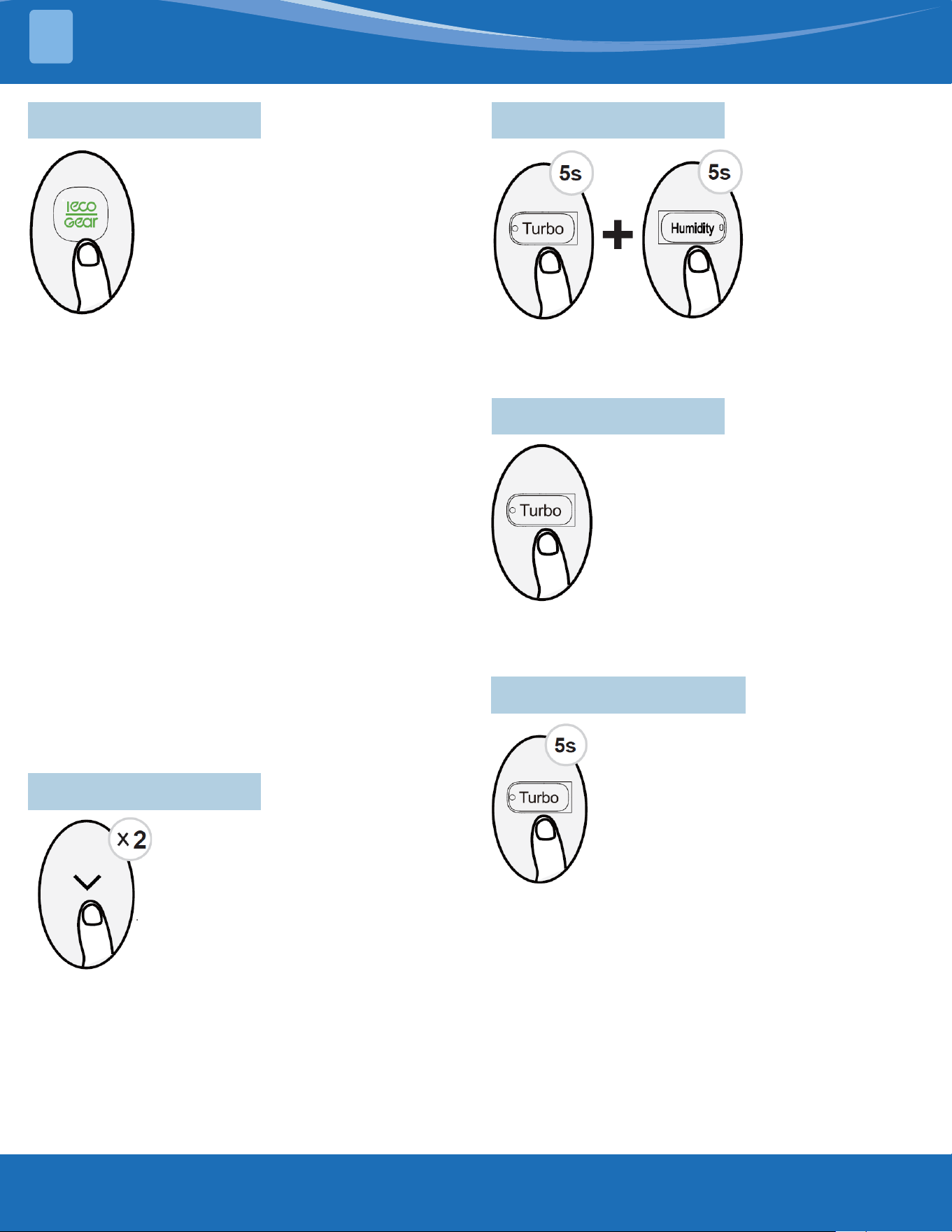
7.7 ECO/GEAR Function
Press the ECO/GEAR button to enter the
energy-ecient mode in the following
sequence:
ECO > GEAR (75%) > Previous Setting
Mode > ECO...
(Note: Only available in COOL mode.)
ECO Operation:
Under cooling mode, press this button,
and the remote controller will adjust the temperature
automatically to 75°F/24°C, set fan speed to Auto
(when the set temperature is less than 75°F/24°C).
If the set temperature is above 75°F/24°C, press the
ECO button, the fan speed will change to Auto, and
the set temperature will remain unchanged.
Note: Pressing the ECO button, or modifying the
mode or adjusting the set temperature to less than
75°F/24°C will stop ECO operation. Under ECO
operation, the set temperature should be 75°F/24°C
or above, or it may result in insucient cooling. If
uncomfortable, press the ECO button again to stop it.
GEAR Operation:
Press the ECO/GEAR button to enter the GEAR
operation as following:
75% (up to 75% electrical energy consumption) > 50%
(up to 50% electrical energy consumption) > Previous
setting mode
Under GEAR operation, the setting temperature will
revert back in the display screen after 3 seconds after
the desired setting is selected.
7.8 FP Function
The unit will operate at high fan
speed (while compressor is on) with
temperature set automatically to
46°F/8°C.
Press this button two times in one
section under HEAT mode and a set
temperature of 60°F/16°C to activate
FP function.
Press On/O, Sleep, Mode, Fan, or
Temperature button while operating
to cancel this function.
Note: This function is for heat pump
only.
7.9 Lock Function
Press the Humidity
button and Turbo
button at the same
time for more than 5
seconds to activate
the Lock function.
7.10 Turbo Function
When the Turbo feature is activated in
COOL mode, the unit will blow cool air
with the strongest wind setting to jump-
start the cooling process.
When the Turbo feature is activated in
HEAT mode, the unit will blow warm air
with the strongest wind setting to jump-
start the heating process (some units).
All buttons will become non-responsive. Press these
two buttons again for 2 seconds to disable the Lock
function.
For units with electrical heating elements, the
electrical heater will activate and jump-start the
heating process.
7.11 Super Heat Function
Press the Turbo button for 5 seconds
while in Heating/Auto mode to initiate
super heat function. To stop this feature,
press the button for 3 seconds. This
function is mainly used to improve
the heating speed of the unit at low
temperatures.
Under Super Heat mode, the louver will open to the
maximum angle to enable unit to reach the preset
temperature in the shortest possible time.
Note: The anti-cold air feature is disabled 5 minutes
after the compressor starts. This may result in low air
outlet temperature.
• If the Super Heat function is activated, "On" displays
for 3 seconds on the indoor unit display window.
• If the Super Heat function is stopped, "OFF" displays
for 3 seconds on the indoor unit display window.
• Change the mode or turn the unit o to stop the
super heating operation.
ADVANCED FUNCTIONS
7
mrcool.com 10
10
ADVANCED FUNCTIONS
7
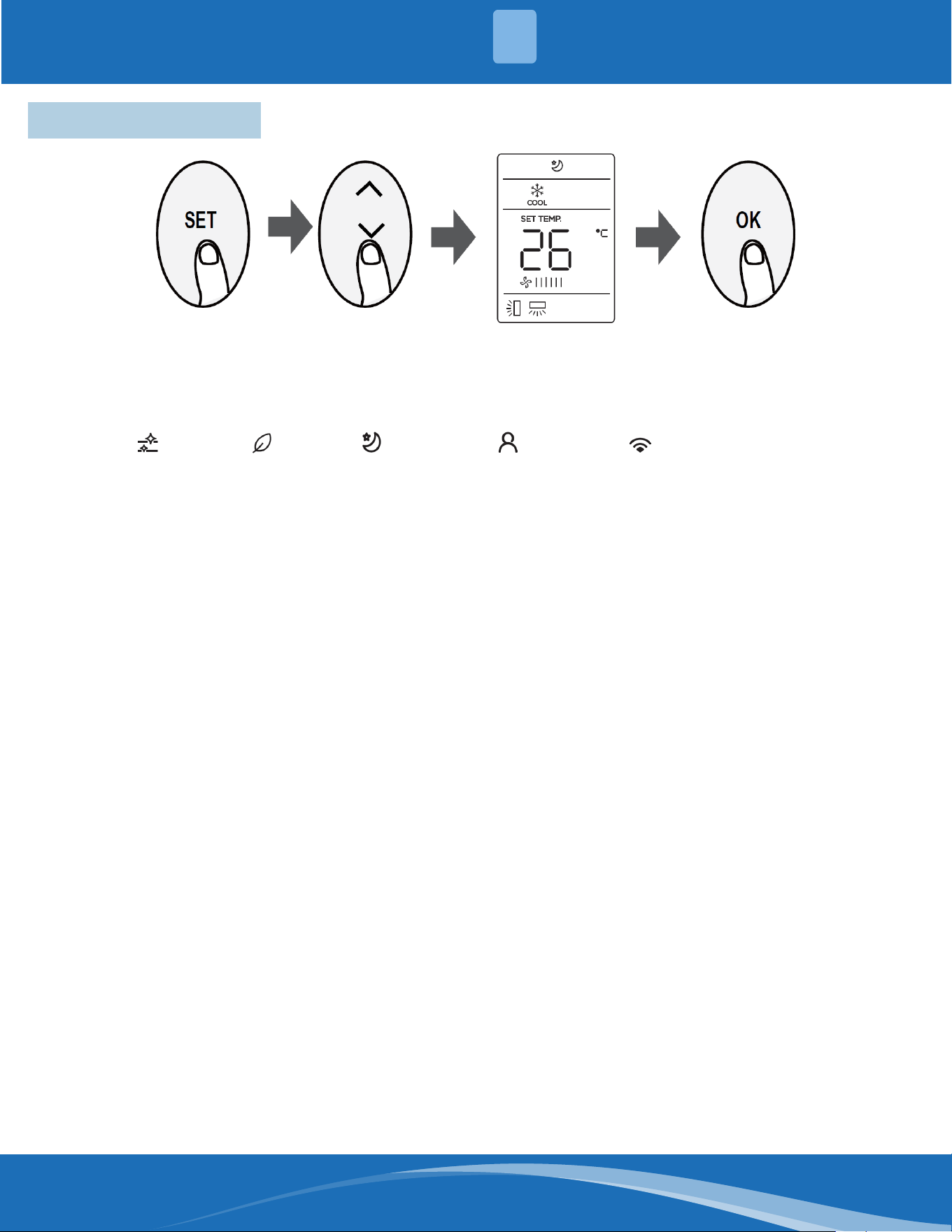
7.12 Set Function
• Press the SET button to enter the function setting, then press the SET button or Temp Up or Temp Down
button to select the desired function. The selected symbol will ash on the display area. Press the OK button
to conrm.
• To cancel the selected function, perform the same procedures as above.
• Press the SET button to scroll through operation functions as follows:
Active Clean ( ) > Fresh* ( ) > Sleep* ( ) > Follow Me ( ) -> AP Mode ( )
[*]: Only available for the units with this feature.
Sleep Function:
The sleep function is used to decrease energy use
while you sleep (and don't need the same temperature
settings to stay comfortable). This function can only be
activated via remote control.
Note: The sleep function is not available in FAN or DRY
mode.
AP Function:
Choose AP mode to complete wireless network
conguration. For some units, it doesn't work
by pressing the SET button. To enter AP mode,
continuously press the LED button seven times within
ten seconds.
Follow Me Function:
The Follow Me function enables the remote control
to measure the temperature at its current location
and send this signal to the unit at an interval of every
3 minutes. When using AUTO, COOL, or HEAT modes,
measuring ambient temperature from the remote
control (instead of from the indoor unit itself) will
enable the unit to optimize the temperature around
you and ensure maximum comfort.
Note: Press the Set button to select the Follow Me
function, then press the OK button to conrm.
Pressing the OK button for 3 seconds will start/stop
the memory feature of the Follow Me function.
• If the memory feature is activated, "On" displays
for 3 seconds on the screen.
• If the memory feature is stopped, "OFF" displays
for 3 seconds on the screen.
• While the memory feature is activated, pressing
the ON/OFF button, switching the mode, or power
failure will not cancel the Follow Me function.
Active Clean Function:
The Active Clean Technology washes away dust, mold,
and grease that may cause odors when it adheres to
the heat exchanger by automatically freezing and then
rapidly thawing the frost. When this function is turned
on, the indoor unit display window shows "CL". After
20 to 45 minutes, the unit will turn o automatically
and cancel the Clean function.
Fresh Function:
When the Fresh function is initiated, the Ionizer/
Plasma Dust collector is energized and will help to
remove pollen and impurities from the air.
Contents
mrcool.com 11
MRCOOL
®
Mini-Split
Remote Control
The design and specications of this product and/or manual are subject to change without prior notice.
Consult with the sales agency or manufacturer for details.