Contents
About This Watch
General Guide
Indicators
Navigating Between Modes
Cycling Between Timekeeping Mode Digital
Display Contents
Shifting Hands to Read the Digital Display
Viewing the Face in the Dark
Time Adjustment
Adjusting the Current Time Setting
Dual Time
Configuring Dual Time Settings
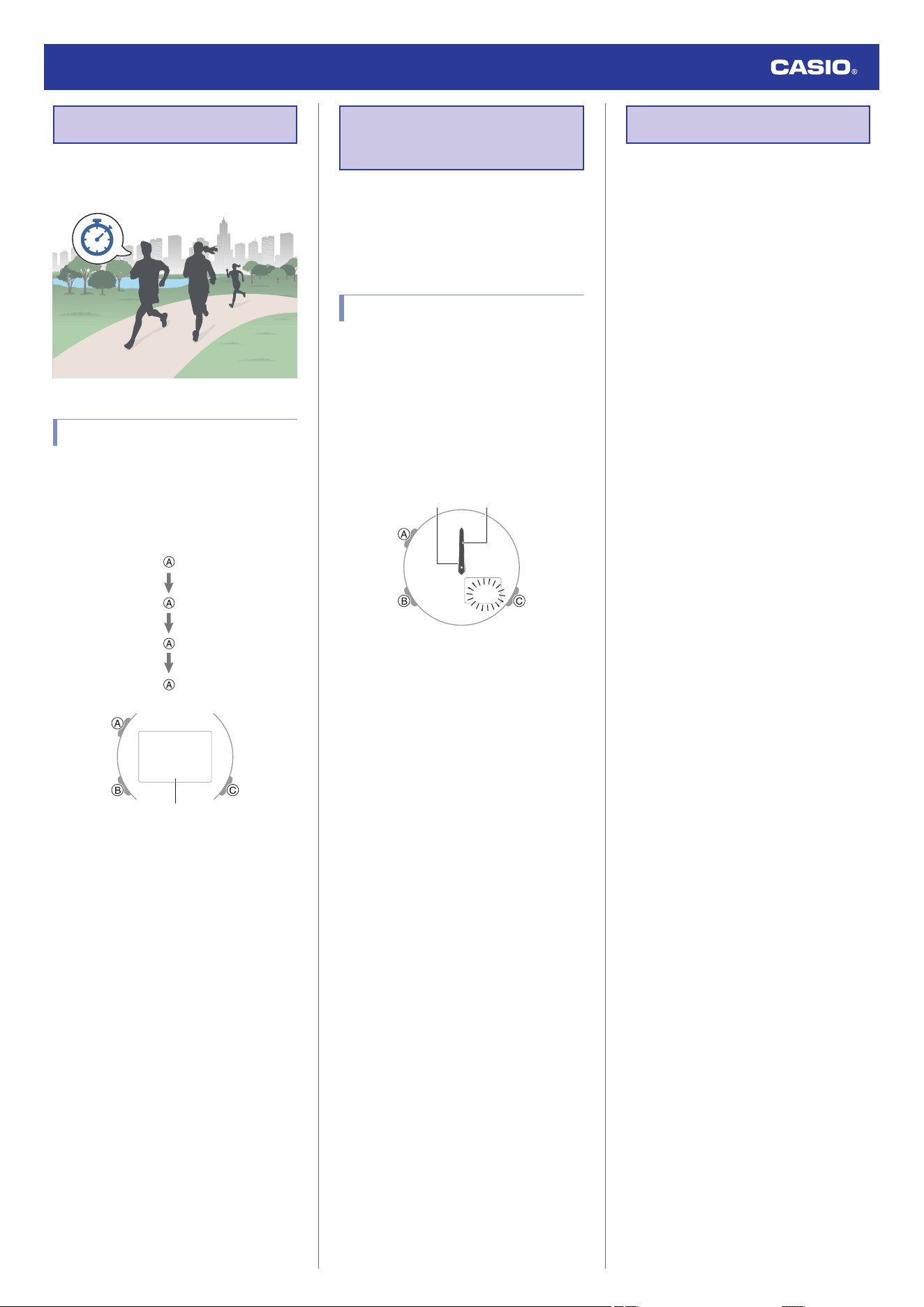
Stopwatch
Measuring Elapsed Time
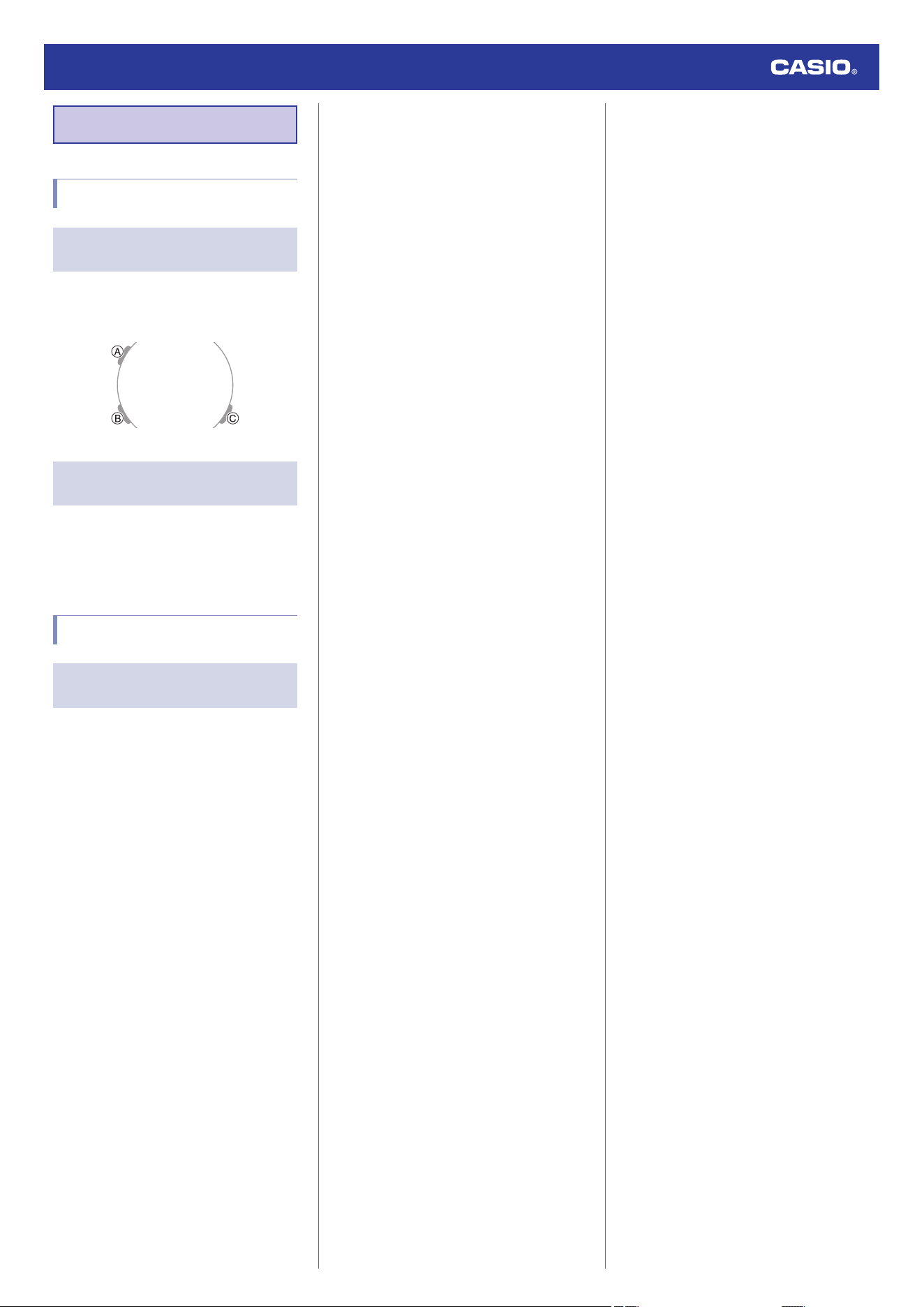
Hand Alignment Adjustment
Adjusting Hand Alignment
Specifications
Troubleshooting
Precautions
Operating Precautions
User Maintenance
Battery Replacement
Watch Operation Guide 5759
1
MA2608-EA
OPUM-J
© 2026 CASIO COMPUTER CO., LTD.
Published: 8/2026
About This Watch
This section provides an overview of the watch
and introduces convenient ways it can be
used.
Watch Features
●
Dual Time
Dual Time lets you keep track of a second
time, such as the current time in another
time zone, etc.
●
Stopwatch
Measure up to 60 minutes of elapsed time
in one-second units.
General Guide
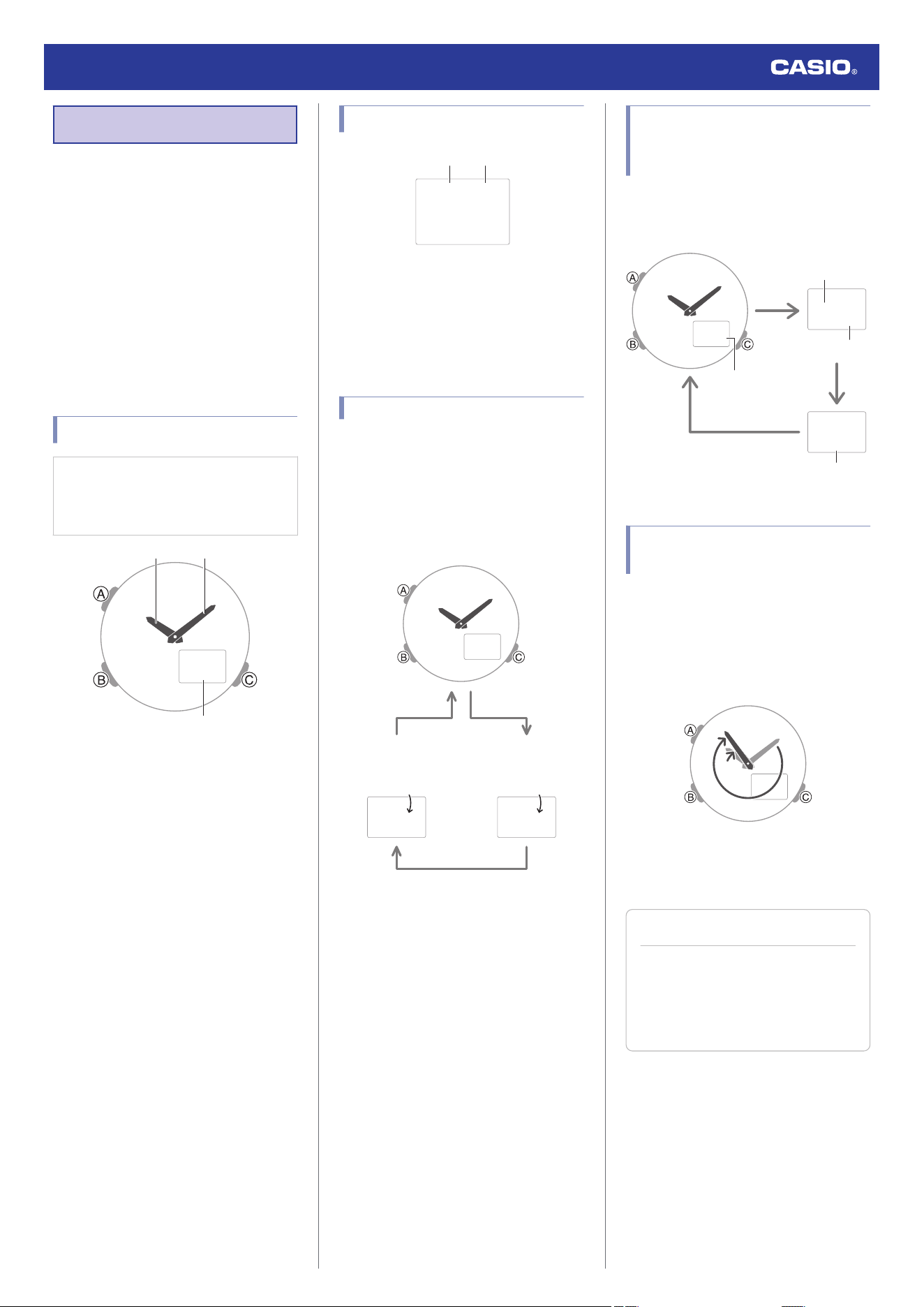
Illustrations in this manual are simplified.
The appearance of shapes and
characters may differ from those of the
actual product.
ඥජඟ
① ②
③
A Hour hand
B Minute hand
C LCD
A button
Pressing this button in the Timekeeping Mode
changes the contents of the digital display.
Holding down this button for at least two
seconds in the Timekeeping Mode displays
the setting screen.
Pressing this button while any setting screen
is displayed exits the setting screen.
B button
Each press cycles between watch modes.
In any mode, hold down this button for at least
two seconds to return to the Timekeeping
Mode.
C button
Press to turn on illumination.
Pressing this button while any setting screen
is displayed changes the setting.
Indicators
z =a
① ②
A Displayed during p.m. times while 12-hour
timekeeping is being used.
B Flashes while the watch’s hands are
shifted for easier reading.
Navigating Between Modes
Each press of (B) cycles between watch
modes.
●
In any mode, hold down (B) for at least two
seconds to return to the Timekeeping
Mode.
ඥජඟ
ජඟට
ඟඟ༚ඟඟ
BB
B
Timekeeping Mode
Dual Time Mode
Stopwatch Mode
Cycling Between
Timekeeping Mode Digital
Display Contents
Each press of (A) in the Timekeeping Mode
cycles the display information as shown
below.
z
ඥජඟ
ཁජඥ
චඟඟට
Seconds
Hours, minutes
Month, day
Day of week
Shifting Hands to Read the
Digital Display
Hand shift moves the hands out of the way for
easy viewing of display information.
1. While holding down (C), press (B).
●
This shifts the analog hands to allow
easy viewing of display information.
ඥජඟ
2. To return the hands to their normal
positions, hold down (C) and press (B)
again.
Note
●
If you leave the watch with its hands
shifted and do not perform any
operation for about one hour, the
hands resume normal timekeeping
automatically.
Watch Operation Guide 5759
2
Viewing the Face in the Dark
You can use the LED light to illuminate the
display for easy reading in the dark.
●
Turning On Illumination
Press (C) to turn on illumination.
●
Illumination is disabled while the hands are
moving at high speed.
●
The light may flicker when it turns on or off.
●
Specifying the Illumination Duration
You can select either 1.5 seconds or three
seconds as the illumination duration.
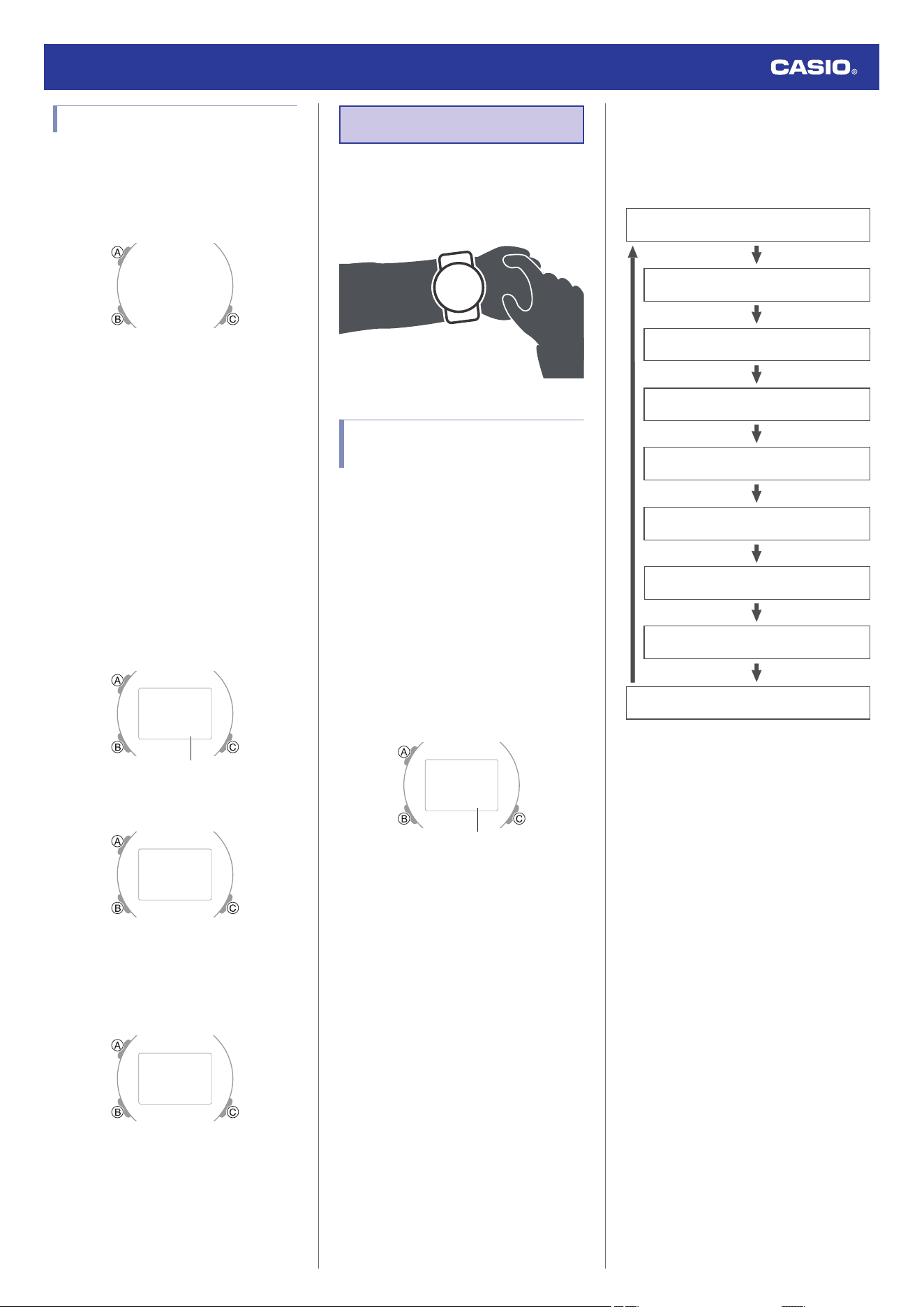
1. Enter the Timekeeping Mode.
l
Navigating Between Modes
2. Hold down (A) for at least two seconds.
Release the button when the seconds
appear on the display.
●
This is the setting mode. The hands
automatically shift out of the way for
easy viewing of the display and other
indicators.
ජඥ
Seconds
3. Press (B) 8 times to display [LT].
ཁཁTཁཁཁཁච
4. Press (C) to select an illumination
duration.
[LT1]: 1.5-second light
[LT3]: 3-second light
ཁཁTཁཁཁཁජ
5. Press (A) to exit the setting screen.
Time Adjustment
Use the procedures in this section to adjust the
date and time settings.
Adjusting the Current Time
Setting
Use the procedures in this section to adjust the
date and time settings.
●
Setting the Time/Date
1. Hold down (B) for at least two seconds to
enter the Timekeeping Mode.
2. Hold down (A) for at least two seconds.
Release the button when the seconds
appear on the display.
●
This is the setting mode. The hands
automatically shift out of the way for
easy viewing of the display and other
indicators.
ජඥ
Seconds
3. Use (B) to display the setting you want to
change.
●
Each press of (B) cycles through
settings in the sequence shown below.
Minutes
Hours
Seconds
Day
Month
Year (10’s digit)
Year (one’s digit)
12/24-hour timekeeping
Illumination duration
4. Configure the date and time settings.
●
While the seconds are flashing,
pressing (C) resets them to 00. 1 is
added to the minutes when the current
seconds count is between 30 and 59
seconds.
●
For all the other values, use (C) to
change the flashing setting.
Holding down (C) scrolls through
settings at high speed.
5.
Repeat steps 3 and 4 to select time and
date settings.
6. Press (A) to complete the setting
operation.
Watch Operation Guide 5759
3
●
Switching between 12-hour and 24-
hour Timekeeping
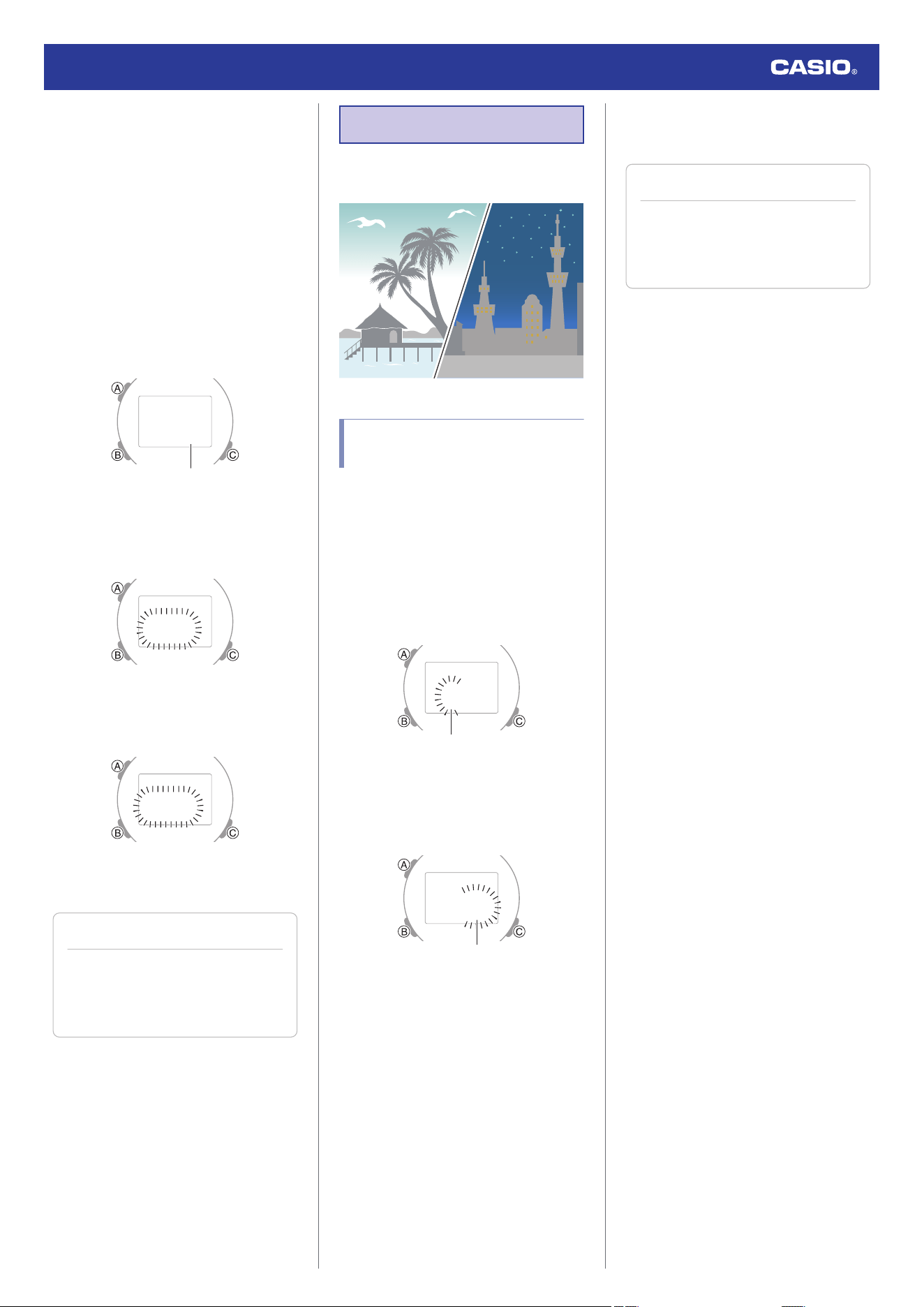
You can specify either 12-hour format or 24-
hour format for the time display.
1. Hold down (B) for at least two seconds to
enter the Timekeeping Mode.
2. Hold down (A) for at least two seconds.
Release the button when the seconds
appear on the display.
●
This is the setting mode. The hands
automatically shift out of the way for
easy viewing of the display and other
indicators.
ජඥ
Seconds
3. Press (B) seven times.
This causes [12H] or [24H] to flash on the
display.
චඡཁ=
4. Press (C) to select [12H] (12-hour
timekeeping) or [24H] (24-hour
timekeeping).
ඡඣཁ=
5. Press (A) to complete the setting
operation.
Note
●
While the setting is being configured,
the watch will exit the setting operation
automatically after about two or three
minutes of non-operation.
Dual Time
Dual Time lets you look up the current time in
various time zones around the globe.
Configuring Dual Time
Settings
Dual Time lets you set the current time in
another time zone in addition to your current
location time.
1. Enter the Dual Time Mode.
l
Navigating Between Modes
2. Hold down (A) for at least two seconds.
This causes the hours digits to flash.
ජඟට
Hours
3. Use (C) to change the hour setting.
4. Press (B).
This causes the minutes digits to flash.
ජඟට
Minutes
5. Use (C) to change the minute setting.
●
You can change the setting in 15-
minute increments.
6. Press (A) to complete the setting
operation.
Note
●
While the setting is being configured,
the watch will exit the setting operation
automatically after about two or three
minutes of non-operation.
Watch Operation Guide 5759
4
Stopwatch
Measures up to 60 minutes of elapsed time in
one-second increments.
Measuring Elapsed Time
1. Enter the Stopwatch Mode.
l
Navigating Between Modes
2. Use the operations below to measure
elapsed time.
Stop
Resume
Stop
Start
ජඣ༚ඤඥ
Minutes, seconds
3. To reset the elapsed time to all zeros, hold
down (A) for at least two seconds.
Hand Alignment
Adjustment
Strong magnetism or impact can cause the
time indicated by the analog hands to become
different from the time on the digital display. If
this happens, adjust hand alignment.
Adjusting Hand Alignment
1. Enter the Timekeeping Mode.
l
Navigating Between Modes
2. Hold down (A) for at least four seconds.
Release the button when [HS] stops
flashing and [0:00] starts to flash.
This enables adjustment of the hour and
minute hands.
ඟඟඟ
Minute handHour hand
3. If the hour and minute hands are not at 12
o’clock, use (C) to align them.
4. Press (A) to complete the setting
operation.
Specifications
Accuracy at normal temperature :
±15 seconds per month
Timekeeping :
Analog
Hour, minute (moves every 20 seconds)
Digital
Hour, minute, second, month, day, day of
the week
a.m./p.m.(P)/24-hour timekeeping
Full Auto Calendar (2000 to 2099)
Dual Time :
Hours, minutes
Stopwatch :
Measuring unit: 1 second
Measuring range: 60 minutes
Measuring functions: Elapsed time
Other :
LED light (afterglow, 1.5 or 3-second
selectable illumination duration), Hand Shift
Power Supply :
CR1025 x 1
Battery nominal voltage: 3V
Battery life: Approximately 3 years
Conditions:
Illumination: Once (1.5 seconds)/day
Specifications are subject to change without
notice.
Watch Operation Guide 5759
5
Troubleshooting
Indicators and Current Time
Q1
I don’t know what mode the watch is
in.
To return to the Timekeeping Mode, hold
down (B) for at least two seconds.
l
Navigating Between Modes
Q2
The time indicated by the hands is
different from the digital time.
Strong magnetism or impact can cause the
hands to go out of alignment. Adjust hand
alignment.
l
Hand Alignment Adjustment
Other
Q1
I can’t find the information I need
here.
Visit the website below.
https://world.casio.com/support/
Watch Operation Guide 5759
6
Precautions
Operating Precautions
●
Water Resistance
●
The information below applies to watches
with WATER RESIST or WATER
RESISTANT marked on the back cover.
Water Resistance Under Daily Use
Marking on watch front or on
back cover
No BAR
mark
Example of Daily Use
Hand washing, rain Yes
Water-related work, swimming No
Windsurfing No
Skin diving No
Enhanced Water Resistance Under Daily
Use
5 Atmospheres
Marking on watch front or on
back cover
5BAR
Example of Daily Use
Hand washing, rain Yes
Water-related work, swimming Yes
Windsurfing No
Skin diving No
10 Atmospheres
Marking on watch front or on
back cover
10BAR
Example of Daily Use
Hand washing, rain Yes
Water-related work, swimming Yes
Windsurfing Yes
Skin diving Yes
20 Atmospheres
Marking on watch front or on
back cover
20BAR
Example of Daily Use
Hand washing, rain Yes
Water-related work, swimming Yes
Windsurfing Yes
Skin diving Yes
●
Do not use your watch for scuba diving or
other types of diving that requires air tanks.
●
Watches that do not have WATER RESIST
or WATER RESISTANT marked on the
back cover are not protected against the
effects of sweat. Avoid using such a watch
under conditions where it will be exposed to
large amounts of sweat or moisture, or to
direct splashing with water.
●
Even if a watch is water resistant, note the
usage precautions described below. Such
types of use reduce water resistance
performance and can cause fogging of the
glass.
ー
Do not operate the crown or buttons while
your watch is submersed in water or wet.
ー
Avoid wearing your watch while in the
bath.
ー
Do not wear your watch while in a heated
swimming pool, sauna, or any other high
temperature/high humidity environment.
ー
Do not wear your watch while washing
your hands or face, while doing
housework, or while performing any other
task that involves soaps or detergents.
●
After submersion in seawater, use plain
water to rinse all salt and dirt from your
watch.
●
To maintain water resistance, have the
gaskets of your watch replaced periodically
(about once every two or three years).
●
A trained technician will inspect your watch
for proper water resistance whenever you
have its battery replaced. Battery
replacement requires the use of special
tools. Always request battery replacement
from your original retailer or from an
authorized CASIO service center.
●
Some water-resistant watches come with
fashionable leather bands. Avoid
swimming, washing, or any other activity
that causes direct exposure of a leather
band to water.
●
The inside surface of the watch glass may
fog when the watch is exposed to a sudden
drop in temperature. No problem is
indicated if the fogging clears up relatively
quickly. Sudden and extreme temperature
changes (such as coming into an air
conditioned room in the summer and
standing close to an air conditioner outlet,
or leaving a heated room in the winter and
allowing your watch to come into contact
with snow) can cause it to take longer for
glass fogging to clear up. If glass fogging
does not clear up or if you notice moisture
inside of the glass, immediately stop using
your watch and take it to your original
retailer or to an authorized CASIO service
center.
●
Your water-resistant watch has been tested
in accordance with International
Organization for Standardization
regulations.
●
Band
●
Tightening the band too tightly can cause
you to sweat and make it difficult for air to
pass under the band, which can lead to skin
irritation. Do not fasten the band too tightly.
There should be enough room between the
band and your wrist so you can insert your
finger.
●
Deterioration, rust, and other conditions can
cause the band to break or come off of your
watch, which in turn can cause band pins to
fly out of position or to fall out. This creates
the risk of your watch falling from your wrist
and becoming lost, and also creates the risk
of personal injury. Always take good care of
your band and keep it clean.
●
Immediately stop using a band if you even
notice any of the following: loss of band
flexibility, band cracks, band discoloration,
band looseness, band connecting pin flying
or falling out, or any other abnormality. Take
your watch to your original retailer or to a
CASIO service center for inspection and
repair (for which you will be charged) or to
have the band replaced (for which you will
be charged).
Watch Operation Guide 5759
7
●
Temperature
●
Never leave your watch on the dashboard
of a car, near a heater, or in any other
location that is subject to very high
temperatures. Do not leave your watch
where it will be exposed to very low
temperatures. Temperature extremes can
cause your watch to lose or gain time, to
stop, or otherwise malfunction.
●
Leaving your watch in an area hotter than
+60 °C (140 °F) for long periods can lead to
problems with its LCD. The LCD may
become difficult to read at temperatures
lower than 0 °C (32 °F) and greater than
+40 °C (104 °F).
●
Impact
●
Your watch is designed to withstand impact
incurred during normal daily use and during
light activity such as playing catch, tennis,
etc. Dropping your watch or otherwise
subjecting it to strong impact, however, can
lead to malfunction. Note that watches with
shock-resistant designs (G‑SHOCK,
BABY‑G, G‑MS) can be worn while
operating a chain saw or engaging in other
activities that generate strong vibration, or
while engaging in strenuous sports
activities (motocross, etc.)
●
Magnetism
●
The hands of analog and combination
(analog-digital) watches are moved by a
motor that uses magnetic force. When such
a watch is close to a device (audio
speakers, magnetic necklace, cell phone,
etc.) that emits strong magnetism, the
magnetism can cause timekeeping to slow
down, speed up, or stop, resulting in the
incorrect time being displayed.
●
Very strong magnetism (from medical
equipment, etc.) should be avoided
because it can cause malfunction of your
watch and damage to electronic
components.
●
Electrostatic Charge
●
Exposure to very strong electrostatic
charge can cause your watch to display the
wrong time. Very strong electrostatic
charge even can damage electronic
components.
●
Electrostatic charge may cause temporary
blotching in blank areas of the LCD.
●
Chemicals
●
Do not allow your watch to come into
contact with thinner, gasoline, solvents,
oils, or fats, or with any cleaners, adhesives,
paints, medicines, or cosmetics that contain
such ingredients. Doing so can cause
discoloration of or damage to the resin
case, resin band, leather, and other parts.
●
Storage
●
If you do not plan to use your watch for a
long time, thoroughly wipe it free of all dirt,
sweat, and moisture, and store it in a cool,
dry place.
●
Resin Components
●
Allowing your watch to remain in contact
with other items or storing it together with
other items for long periods while it is wet
can cause color on resin components to
transfer to the other items, or the color of the
other items to transfer to the resin
components of your watch. Be sure to dry
off your watch thoroughly before storing it
and make sure it is not in contact with other
items.
●
Leaving your watch where it is exposed to
direct sunlight (ultraviolet rays) for long
periods or failure to clean dirt from your
watch for long periods can cause it to
become discolored.
●
Friction caused by certain conditions
(strong external force, sustained rubbing,
impact, etc.) can cause discoloration of
painted components.
●
If there are printed figures on the band,
strong rubbing of the printed area can cause
discoloration.
●
Leaving your watch wet for long periods can
cause fluorescent color to fade. Wipe the
watch dry as soon as possible after it
becomes wet.
●
Semi-transparent resin parts can become
discolored due to sweat and dirt, and if
exposed to high temperatures and humidity
for long periods.
●
Daily use and long-term storage of your
watch can lead to deterioration, breaking, or
bending of resin components. The extent of
such damage depends on usage conditions
and storage conditions.
●
Leather Band
●
Allowing your watch to remain in contact
with other items or storing it together with
other items for long periods while it is wet
can cause the color of the leather band to
transfer to the other items or the color of the
other items to transfer to the leather band.
Be sure to dry off your watch thoroughly with
a soft cloth before storing it and make sure
it is not in contact with other items.
●
Leaving a leather band where it is exposed
to direct sunlight (ultraviolet rays) for long
periods or failure to clean dirt from a leather
band for long periods can cause it to
become discolored.
CAUTION:
Exposing a leather band to rubbing or dirt
can cause color transfer and discoloration.
●
Metal Components
●
Failure to clean dirt from metal components
can lead to formation of rust, even if
components are stainless steel or plated. If
metal components exposed to sweat or
water, wipe thoroughly with a soft,
absorbent cloth and then place the watch in
a well-ventilated location to dry.
●
Use a soft toothbrush or similar tool to scrub
the metal with a weak solution of water and
a mild neutral detergent, or with soapy
water. Next, rinse with water to remove all
remaining detergent and then wipe dry with
a soft absorbent cloth. When washing metal
components, wrap the watch case with
kitchen plastic wrap so it does not come into
contact with the detergent or soap.
Watch Operation Guide 5759
8
●
Bacteria and Odor Resistant Band
●
The bacteria and odor resistant band
protects against odor generated by the
formation of bacteria from sweat, which
ensures comfort and hygiene. In order to
ensure maximum bacteria and odor
resistance, keep the band clean. Use an
absorbent soft cloth to thoroughly wipe the
band clean of dirt, sweat, and moisture. A
bacteria and odor resistant band
suppresses the formation of organisms and
bacteria. It does not protect against rash
due to allergic reaction, etc.
●
Liquid Crystal Display
●
Display figures may be difficult to read when
viewed from an angle.
Note that CASIO Computer Co., Ltd.
assumes no responsibility for any
damage or loss suffered by you or any
third party arising through the use of your
watch or its malfunction.
User Maintenance
●
Caring for Your Watch
Remember that you wear your watch next to
your skin, just like a piece of clothing. To
ensure your watch performs at the level for
which it is designed, keep it clean by
frequently wiping with a soft cloth to keep your
watch and band free of dirt, sweat, water and
other foreign matter.
●
Whenever your watch is exposed to sea
water or mud, rinse it off with clean fresh
water.
●
For a metal band or a resin band with metal
parts, use a soft toothbrush or similar tool to
scrub the band with a weak solution of water
and a mild neutral detergent, or with soapy
water. Next, rinse with water to remove all
remaining detergent and then wipe dry with
a soft absorbent cloth. When washing the
band, wrap the watch case with kitchen
plastic wrap so it does not come into contact
with the detergent or soap.
●
For a resin band, wash with water and then
wipe dry with a soft cloth. Note that
sometimes a smudge like pattern may
appear on the surface of a resin band. This
will not have any effect on your skin or
clothing. Wipe with a cloth to remove the
smudge pattern.
●
Clean water and sweat from a leather band
by wiping with a soft cloth.
●
Not operating a watch crown, buttons, or
rotary bezel could lead to later problems
with their operation. Periodically rotate the
crown and rotary bezel, and press buttons
to maintain proper operation.
●
Dangers of Poor Watch Care
Rust
●
Though the metal steel used for your watch
is highly rust-resistant, rust can form if your
watch is not cleaned after it becomes dirty.
ー
Dirt on your watch can make it impossible
for oxygen to come into contact with the
metal, which can lead to breakdown of
the oxidization layer on the metal surface
and the formation of rust.
●
Rust can cause sharp areas on metal
components and can cause band pins to fly
out of position or to fall out. If you ever notice
any abnormality immediately stop using
your watch and take it to your original
retailer or to an authorized CASIO service
center.
●
Even if the surface of the metal appears
clean, sweat and rust in crevasses can soil
the sleeves of clothing, cause skin irritation,
and even interfere with watch performance.
Premature Wear
●
Leaving sweat or water on a resin band or
bezel, or storing your watch an area subject
to high moisture can lead to premature
wear, cuts, and breaks.
Skin Irritation
●
Individuals with sensitive skin or in poor
physical condition may experience skin
irritation when wearing a watch. Such
individuals should keep their leather band
or resin band particularly clean. Should you
ever experience a rash or other skin
irritation, immediately remove your watch
and contact a skin care professional.
Watch Operation Guide 5759
9
Battery Replacement
●
Leave battery replacement up to your
original retailer or authorized CASIO
service center.
●
Have the batteries replaced only with the
type specified in the “Specifications”. Use of
a different battery type can cause
malfunction.
●
When replacing the batteries, also request
a check for proper water resistance.
●
Ornamental resin components may
become worn, cracked, or bent over time
when subjected to normal daily use. Note
that if cracking or any other abnormality
indicating possible damage is noticed in a
watch submitted for battery replacement,
your watch will be returned with an
explanation of the abnormality, without the
requested servicing being performed.
●
Initial Batteries
●
The batteries that come loaded in your
watch when you purchase it are used for
function and performance testing at the
factory.
●
Test batteries may go dead quicker than the
normally rated battery life noted in the
“Specifications”. Note that you will be
charged for replacement of these batteries,
even if replacement is required within your
watch’s warranty period.
●
Low Battery Power
●
Low battery power is indicated by large
timekeeping error, by dim display contents,
or by a blank display.
●
Operation while battery power is low can
result in malfunction. Replace the batteries
as soon as possible.
Watch Operation Guide 5759
10

