INSTALLATION MANUAL
BL118SS • BL218SS Subwoofers
1. Introduction and Overview
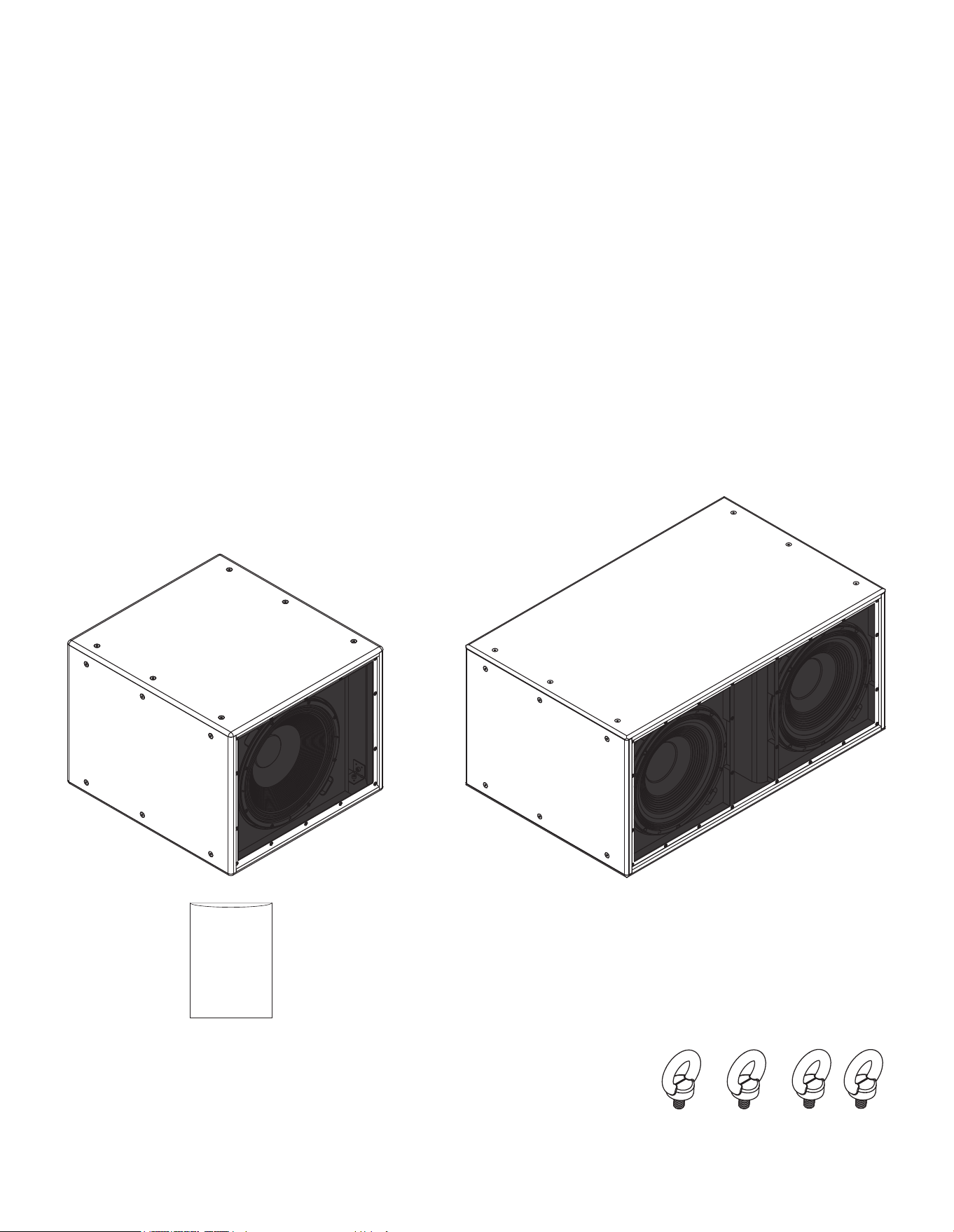
1.2 Subwoofer Pack Contents
Each package contains a single subwoofer and its document pack.
1.3 Subwoofer Flying accessories
BL118SS and BL218SS subwoofers can be own via M10 Eye-
bolt attachment points. Appropriate eye-bolts are available as
accessories. A minimum of four and six attachment points must be
employed for each BL118SS and BL218SS subwoofer respectively.
BL118SS subwoofer
BL218SS subwoofer
1.1 Introduction
Thank you for purchasing the Blaze Audio BL118SS or BL218SS subwoofer. BLx18SS series high power passive
subwoofers are designed for use in medium to large-sized venues that require versatile and scalable low frequency
solutions. BLx18SS series subwoofers can be installed free-standing or own via accessory hardware.
BLx18SS series subwoofers are intended to be driven only by Blaze Audio PowerZone™ Connect ampliers (3004
or higher) with the appropriate speaker presets enabled. When installed in multiple arrays, the subwoofers can be
congured via amplier speaker presets to provide either omnidirectional or cardioid directivity characteristics.
BL118SS and BL218SS subwoofers respectively incorporate one or two 18 inch bass drivers in a reex loaded
enclosure. They provide low frequency bandwidth to 18 Hz at -10 dB and maximum sound pressure levels of 136 dB
and 143 dB at 1 m respectively.
Document Pack
Accessory M10 Eye-bolts

2. Applications and Deployment
• Read these instructions.
• Keep these instructions.
• Heed all warnings.
• Follow all instructions.
• Before installing or suspending any BL118SSi-B or BL218SSi-B
subwoofer, inspect all hardware, the enclosure, and associated
equipment for damage. Missing, corroded, or deformed
components, or components without correct load ratings, could
signicantly reduce the strength of the installation or placement
and should immediately be repaired or replaced.
• Always make sure that the structure the loudspeaker is to be
suspended from has been approved by the building or structural
engineer and will support the weight of all the components of the
speaker system including speakers, speaker cable, wire rope, etc.
• Consult a licensed professional structural engineer regarding
physical equipment installation.
• Do not suspend loudspeakers directly over people.
• Use only hardware that is rated for the load conditions of the
installation and that allows for a possible short-term, unexpected
overload. Never exceed the rating of the hardware or equipment.
• Blaze Audio strongly recommends that the system be inspected
at least once a year and logged. If any sign of weakness or damage
is detected, remedial action should be taken immediately.
• All installation crew members must be trained for loudspeaker
rigging and mounting.
• Make sure that all relevant health and safety regulations
are known, are followed by the installation crew, and follow
applicable local laws. Local government ofces can help with this
information.
• Suspended installations must be completed or supervised by a
certied rigger.
• The system should be designed so that it is a static suspension.
There should be no dynamic or shock loading.
• Personal protective equipment (hard hats, steel-toed footwear,
safety glasses, etc.) should be always worn by the installation
crew.
• If called for in the design, make sure all installation personnel are
trained to work at height and have certications for scissor lifts,
theatrical hoists, etc.
• Make sure all lifting equipment (slings, span-sets, deck chain,
scaffolding, etc.) is in good working order. Thoroughly inspect all
components prior to use.
• Inspect all the components associated with the project
for damage before assembly. Any parts with damage or
suspected damage should not be used. Contact the component
manufacturer for replacement parts if necessary.
• Keep a tidy workplace. Do not leave tools, rigging items, etc., on
top of loudspeakers during installation. Loose items can fall and
cause injury.
• Never leave the system unattended during the installation
process. Make sure that the workspace is isolated from
public access. No one should be allowed to pass beneath the
loudspeakers during installation.
• Do not suspend any other components or loudspeakers other
than the supported congurations described in this manual.
• If secondary steel safeties are required, they should be installed
once the entire system is at operating height and before public
access is allowed.
2.1 Important Safety Instructions
WARNING: Failure to observe the following safety precautions may result in severe injury or death.
Installations such as described in this guide should only be attempted by a trained professional.
2. Applications and Deployment
2.2 Installation Options
BLx18SS series subwoofers can be installed free-standing, or own using accessory hardware. Additionally, pairs of
BLx18SS series subwoofers can be arranged to provide cardioid directivity. The installation options are illustrated and
described in the following sections.
2.2.1 Free-standing Installation
BLx18SS series subwoofers can be installed free-standing on oors
or other structures able to support their weight.
Note: It is important to ensure that any structure on which a BLx18SS
series subwoofer is supported is able to bear its weight with an
appropriate factor of safety. If there is any doubt in this respect, a
specialist structural engineer must be consulted.
2.2.2 Flown Installation
BLx18SS series subwoofers can be own through the installation of
M10 eye-bolts at the attachment points provided. Six attachment
points are provided on the top, bottom and side panels of each
BLx18SS series subwoofer.
A minimum of four attachment points for the BL118SS
subwoofer, and six attachment points for the BL218SS subwoofer,
must be used. The installation of eye-bolts at the attachment
points is illustrated and described in the following paragraphs and
diagrams.
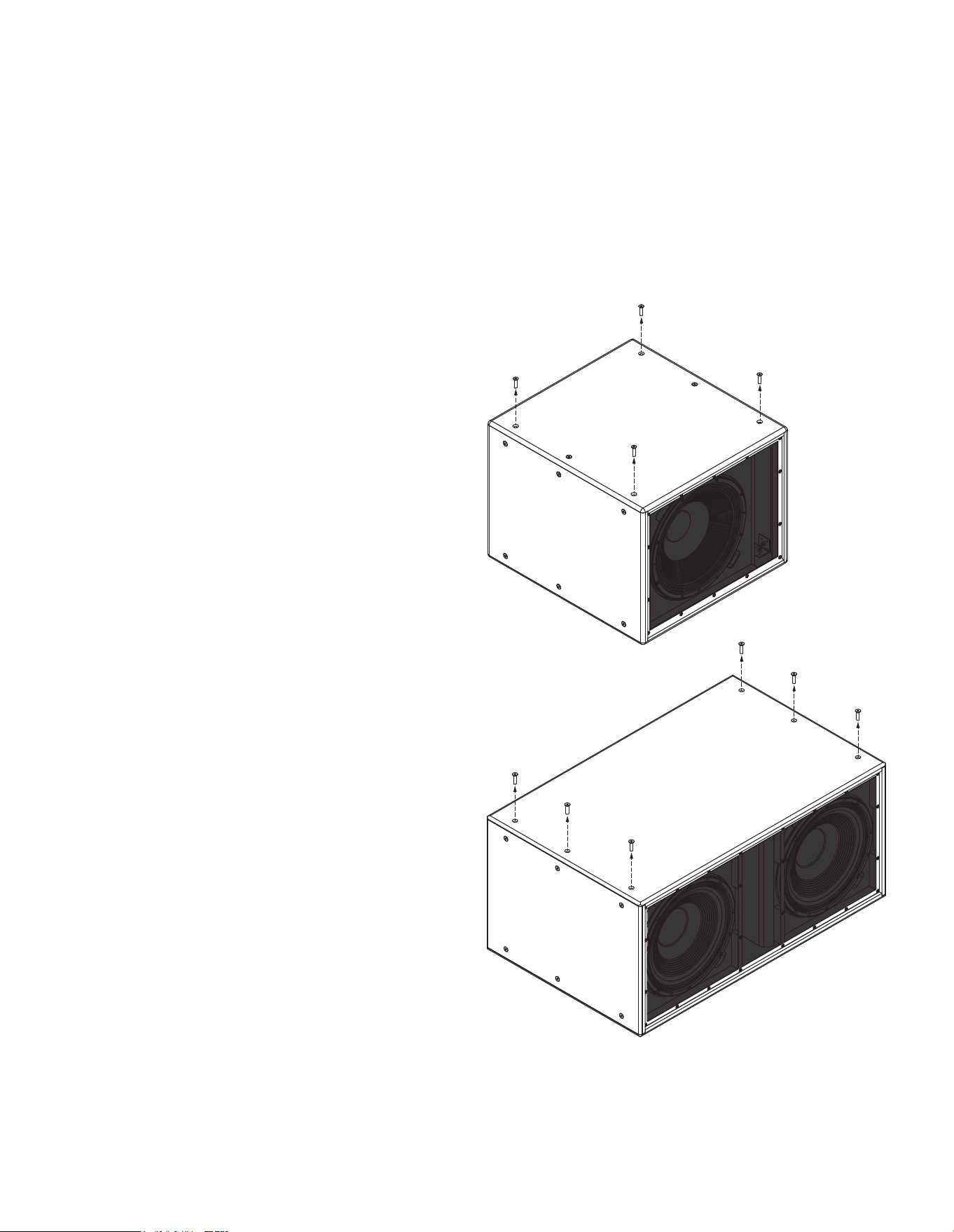
Step 1. Using an M10 Allen key remove four of the attachment
point screws from the required panel on a BL118SS subwoofer and
all six attachment point screws on a BL218SS subwoofer.
1. BL118SS: Remove four
screws in required panel.
1. BL218SS: Remove all
six screws in required
panel.
2. Applications and Deployment
WARNING: Consult a professional mechanical or structural engineer, licensed in the jurisdiction of the
sound system installation, to review, verify, and approve all attachments to the building or structure.
Employ the services of a certied, professional rigger for hoisting, positioning and rigging the equipment
to the supporting structure. Improper suspension can lead to serious damage, injury, or death.
NEVER SUSPEND LOUDSPEAKERS DIRECTLY ABOVE THE AUDIENCE
2.2.2 Flown Installation
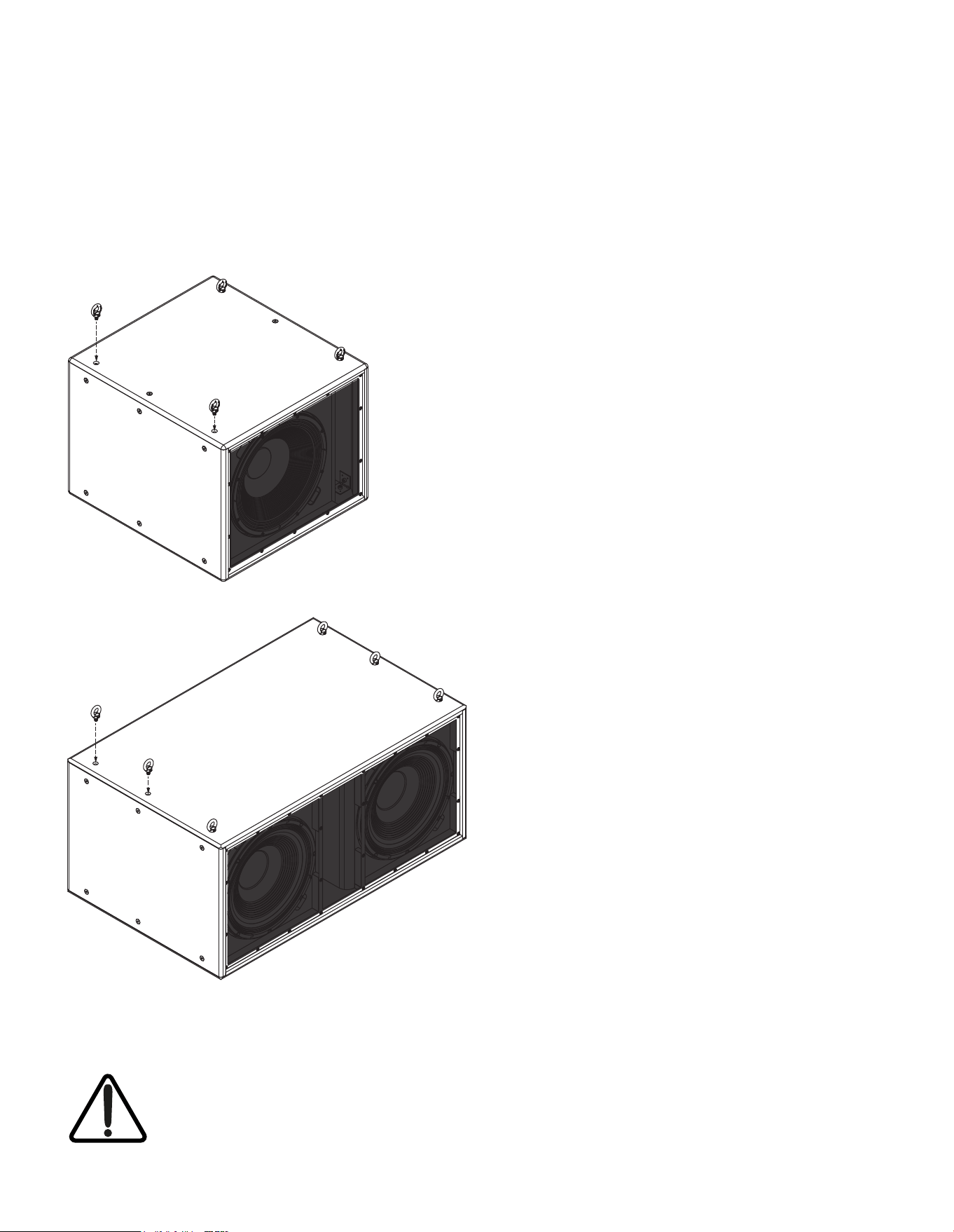
Step 2. Screw an M10 eye-bolt fully into each of the available
attachment point screw holes. The eye-bolts are then available for
attachment to ying hardware.
2. Replace removed
screws with M10 eye-
bolts.
2. Applications and Deployment
2.2.3 Subwoofer Directivity Options
In combination with use of the appropriate Blaze PowerZone™
Connect amplier Speaker Presets, pairs of BLx18SS series
subwoofers can be congured to offer omnidirectional or
cardioid directivity.
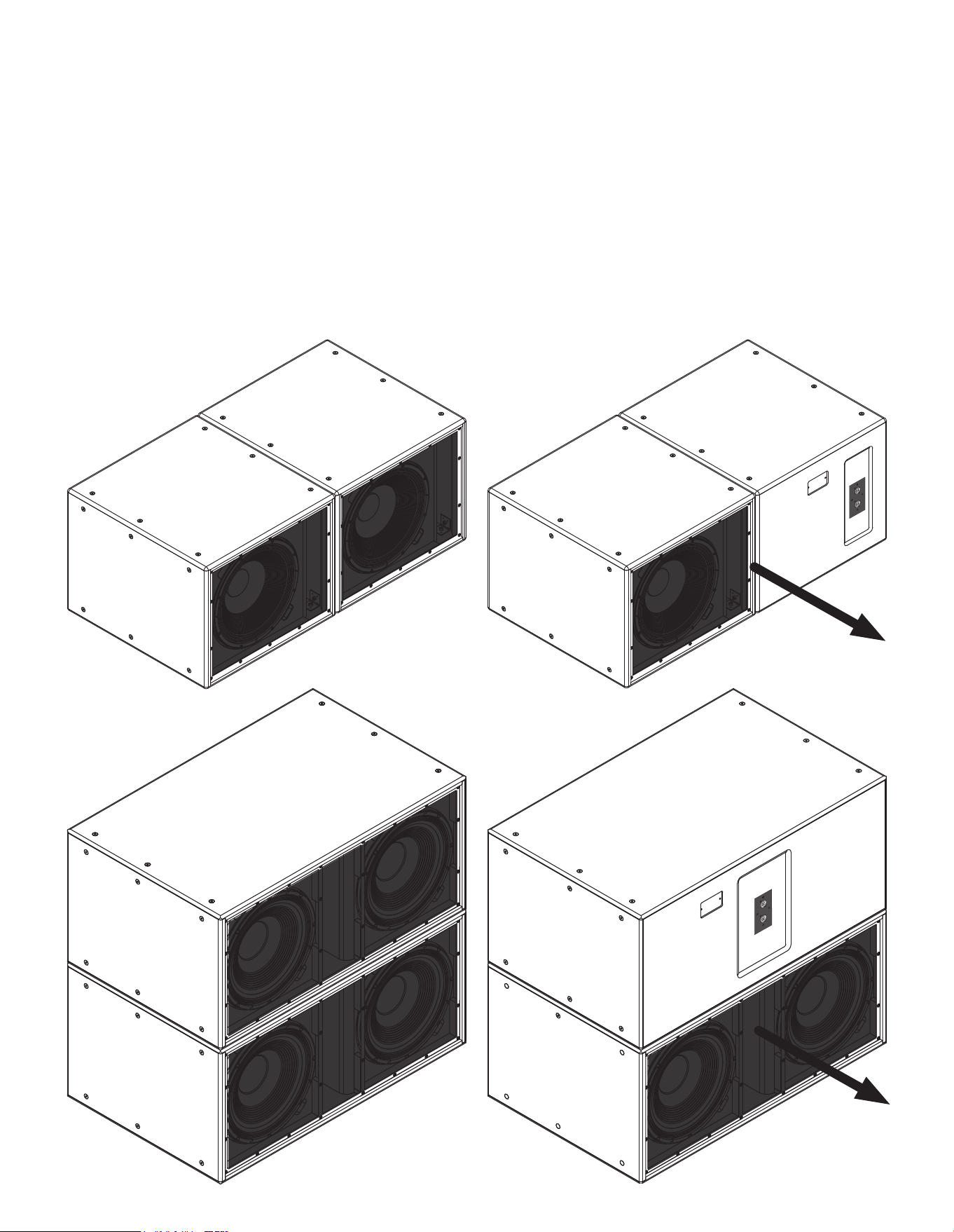
For omnidirectional directivity, the two subwoofers should be
positioned either adjacent to each other or one above the other
with both facing in the same direction as illustrated in the following
diagrams. The amplier outputs driving each subwoofer should
have the same standard speaker preset enabled (BL118SS.zcp or
BL218SS.zcp).
BL118SS subwoofer
pair in omnidirectional
arrangement.
BL218SS subwoofer
pair in omnidirectional
arrangement.
BL118SS subwoofer pair
in cardioid arrangement.
BL218SS subwoofer pair
in cardioid arrangement.
Cardioid
radiation axis
Cardioid
radiation axis
Cardioid
primary
radiation axis
For cardioid directivity, the two subwoofers should be positioned
either adjacent to each other, or one above the other, with one
facing forwards and one facing backwards as illustrated in the
following diagrams. The cardioid forward radiation lobe will
coincide with the forward facing subwoofer. The amplier output
driving the forward facing subwoofer should have the standard
speaker preset enabled (BL118SS.zcp or BL218SS.zcp) and the
amplier output driving the backwards facing subwoofer should
have the cardioid speaker preset enabled (BL118SS-Cardioid.zcp
or BL218SS-Cardioid.zcp).
3. Connection and Amplication
3.1 BLx18SS Connections
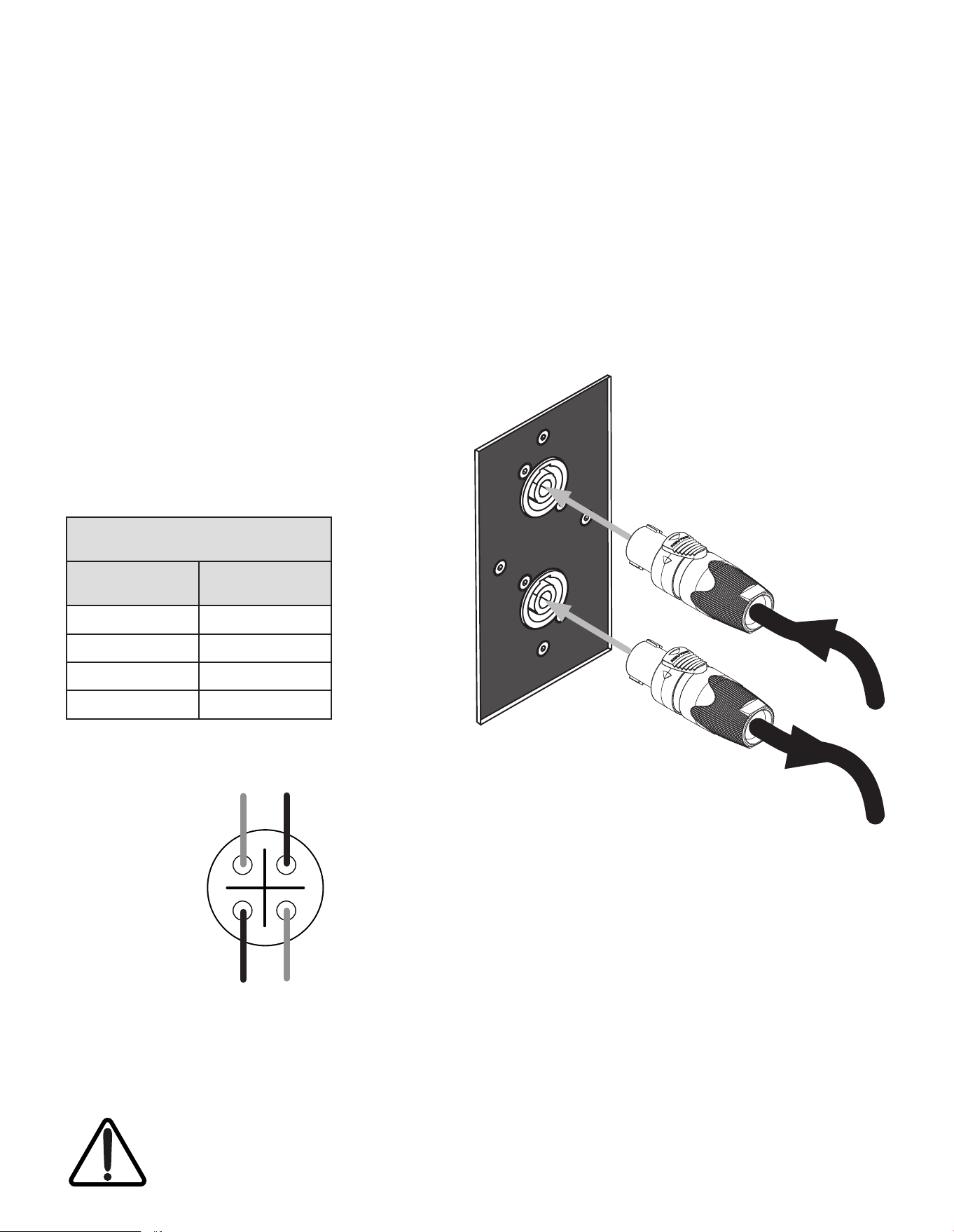
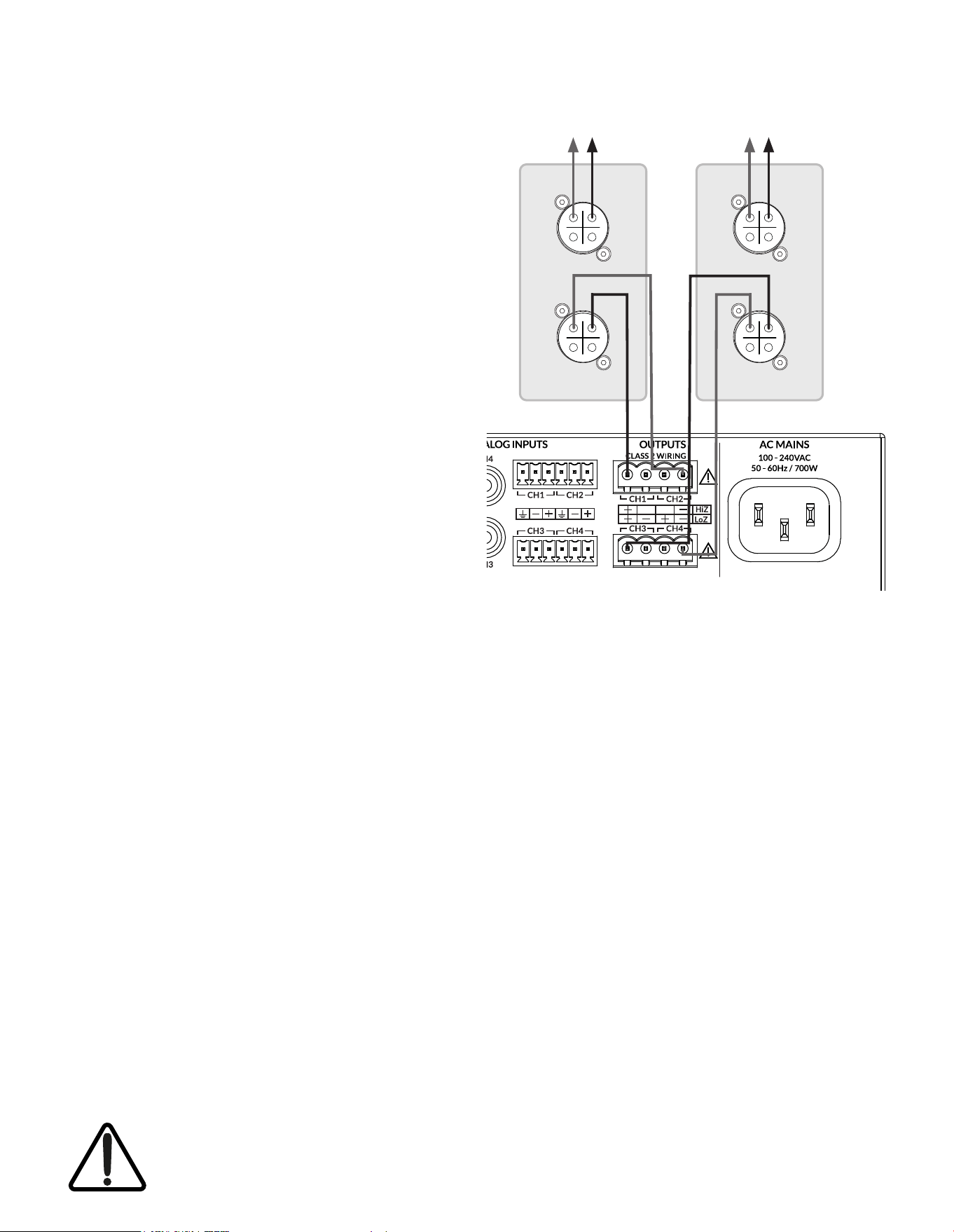
Each BLx18SS series subwoofer is tted with two Neutrik NL4 speakON sockets on its rear panel. One socket is
intended for connection to one or two bridged channels of a Blaze Audio PowerZone™ Connect amplier (3004 or
higher) and one socket provides an optional parallel output connection for a second subwoofer. The driving amplier
must be congured in Bridged Output (BTL) mode, as described in Section 3.2.2 of this manual, before it is connected to
BLx18SS series subwoofers.
Subwoofer input and output connections are described and illustrated below. Amplier connections to BLx18SS series
subwoofers are described and illustrated on the following pages.
BLx18SS Socket Connections
Signal Routing Connection Pin
Amp Ch 1 (+) 1 (+)
Amp Ch 2 (–) 1 (–)
Amp Ch 3 (+) 2 (+)
Amp Ch 4 (–) 2 (–)
3.1.1 BLx18SS Connection Sockets
BLx18SS connection sockets are congured as indicated in
the following table and diagrams. The two sockets are wired in
parallel to enable the connection of a second subwoofer when
increased output is required.
Note: A pair of parallel connected subwoofers must be the same
model.
Optionally connect to
second subwoofer
1-
2+
1+
2-
Neutrik NL4 speakON Pins
Amplier channel 1
positive (+)
Amplier channel 2
negative (–)
Amplier channel 4
negative (–)
Amplier channel 3
positive (+)
When used to drive BLx18SS series subwoofers, Blaze Audio PowerZone™ Connect ampliers (3004 or
higher) must be congured in Bridged Output mode. Do not connect an amplier to a BLx18SS series
subwoofer before it is congured appropriately.
Connect to Blaze
PowerZone™ Connect
ampliers (3004 or
higher) outputs
3. Connection and Amplication
3.1.2 BL118SS Amplier Connections
The BL118SS subwoofer is designed to work with the Blaze Audio
PowerZone™ Connect ampliers (3004 or higher) only. This
amplier incorporate the DSP equalisation facilities required to
optimise the subwoofer acoustic performance, while also providing
appropriate output power capabilities.
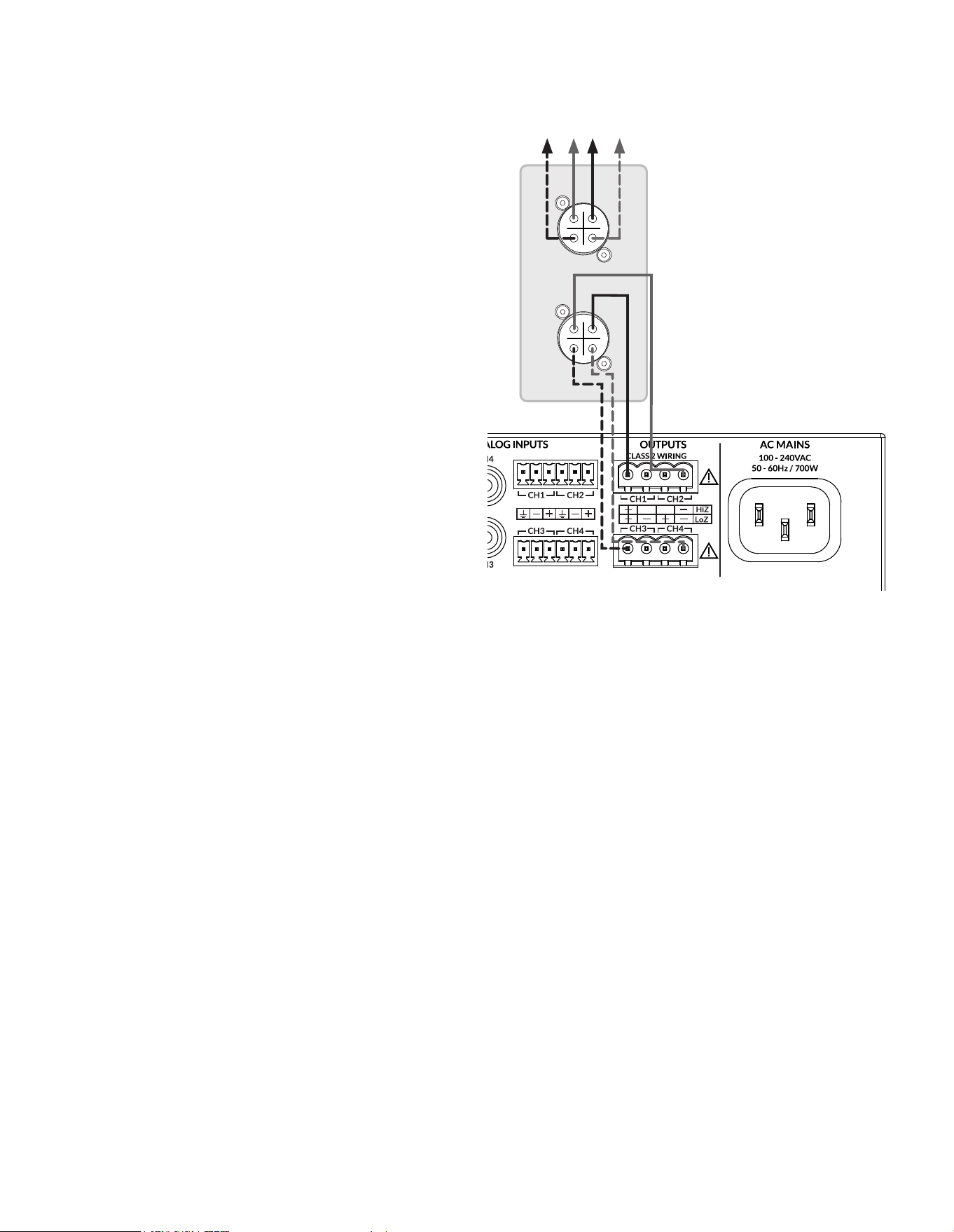
One PowerZone™ Connect amplier (3004 or higher) is able to
drive up to two BL118SS subwoofers per bridged output channel.
The subwoofers can be congured in standard, omnidirectional
directivity mode or as cardioid pairs.
BL118SS series subwoofer and PowerZone™ Connect amplier
connections are illustrated in the diagram alongside.
Note: Blaze Audio PowerZone™ Connect ampliers (3004 or higher)
must be congured in Bridged (BTL) mode for optimal operation.
Note: No more than two BL118SS subwoofers per bridged output
channel connected to a single amplier.
Note: The Blaze PowerZone™ Connect Installation Manual, available
for download from the Blaze website (blaze-audio.com), contains
comprehensive amplier installation and operational information.
1-
2+
1+
2-
1-
2+
1+
2-
1-
2+
1+
2-
1-
2+
1+
2-
Optionally connect
BL118SS-3 & BL118SS-4
BL118SS-1
BL118SS-2
Two or four BL118SS subwoofers connected to each
PowerZone™ Connect 3004 bridged (BTL) output channel, four
units maximum on total amplier power platform.
• For omnidirectional directivity, both amplier outputs
require speaker preset BL118SS.zcp enabled.
• For cardioid directivity, amplier Output 1 (CH1 & CH2)
requires speaker preset BL118SS.zcp enabled, and amplier
output 2 (CH3 & CH4) requires speaker preset BL118SS-
Cardioid.zcp enabled. The BL118SS physical arrangement
then requires cardioid pairs comprising BL118SS-1 (forward
facing) with BL118SS-2 (backwards facing) and optionally
BL118SS-3 (forward facing) with BL118SS-4
(backwards facing)
When used to drive BLx18SS series subwoofers, Blaze Audio PowerZone™ Connect ampliers (3004 or
higher) must be congured in Bridged Output mode. Do not connect an amplier to a BLx18SS series
subwoofer before it is congured appropriately.
3. Connection and Amplication
3.1.3 BL218SS Amplier Connections
The BL218SS subwoofer is designed to work with the Blaze Audio
PowerZone™ Connect ampliers (3004 or higher) only. These
ampliers incorporate the DSP equalisation facilities required to
optimise the subwoofer acoustic performance, while also providing
appropriate output power capabilities.
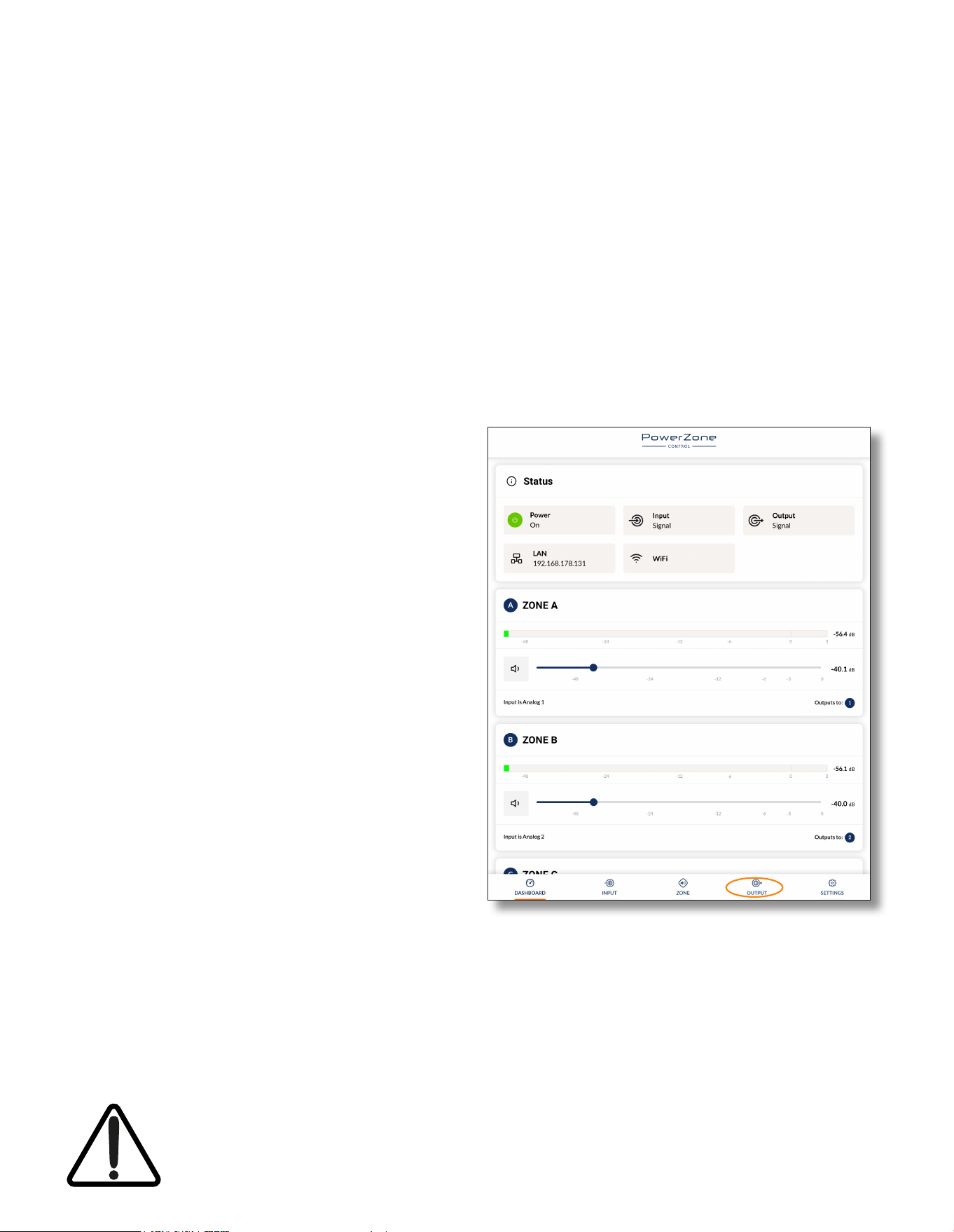
A single PowerZone™ Connect amplier (3004 or higher) is
able to drive a maximum of two BL218SS subwoofers per pair
of bridged output channels (4 total output channels required).
The subwoofers can be congured in standard, omnidirectional
directivity mode, or to play the backward facing role in cardioid
subwoofer pairs. Cardioid directivity with BL218SS subwoofers
requires multiple power ampliers.
BL218SS series subwoofer and PowerZone™ Connect amplier
connections are illustrated in the diagram alongside.
Note: Blaze Audio PowerZone™ Connect ampliers (3004 or higher)
must be congured in Bridged (BTL) mode for optimal operation.
Note: No more than two BL218SS subwoofers per pair of bridged
output channels (4 channels total) connected to a single amplier.
Note: The Blaze PowerZone™ Connect Installation Manual, available
for download from the Blaze website (blaze-audio.com), contains
comprehensive amplier installation and operational information.
1-
2+
1+
2-
1-
2+
1+
2-
Optionally connect
BL218SS-2
BL218SS-1
One or two BL218SS subwoofers connected to a pair of
PowerZone™ Connect 3004 bridged (BTL) output channels,
two units maximum on total amplier power platform.
• For omnidirectional directivity, both amplier outputs
require speaker preset BL218SS.zcp enabled.
• For cardioid directivity, a second PowerZone™ Connect
amplier (3004 or higher) and BL218SS subwoofer system
must be congured with speaker preset BL218SS-Cardioid.
zcp enabled on both amplier outputs. The one or two
subwoofers of the second system should then play the
backwards facing cardioid role paired with the primary
system subwoofers (with BL218SS.zcp enabled).
3. Connection and Amplication
3.2 PowerZone™ Connect Amplier Output Conguration and Speaker Presets
The Blaze PowerZone™ Connect amplier incorporates mode conguration and loudspeaker management functions,
accessed via a web page interface. Amplier functional options can to be congured, and precongured lter and
equalization speaker presets can be enabled.
When used to drive BLx18SS series subwoofers, PowerZone™ Connect ampliers (3004 or higher) must have the
appropriate speaker presets enabled. Speaker presets for BLx18SS series subwoofers are available for download from
the Blaze website and must be used for correct subwoofer performance. Standard and Cardioid speaker presets are
available. The procedure for downloading and enabling PowerZone™ Connect ampliers (3004 or higher) speaker
presets is described in the following sections.
NOTE: The exact appearance and layout of the amplier web
interface may vary slightly depending on the device and browser in
use.
3.2.1 PowerZone™ Control Network Connection
In order to install the BLx18SS speaker preset les, the
PowerZone™ Connect amplier requires either a wired or wireless
connection via a TCP/IP network, or to connect via its own wireless
access point, to a computer or mobile device from which speaker
preset les can be uploaded. Internet access for speaker preset le
download is also required.
Note: The PowerZone™ Connect amplier Quick Start Guide and
Installation Manual documents cover network connection and can
be downloaded from: https://blaze-audio.com/support/
3.2.2 Speaker Preset Download and Application
Follow the steps below to download and enable the BLx18SS
speaker preset to the amplier outputs.
Step 1. Using a computer or mobile device, visit:
https://blaze-audio.com/support/
- and select the speaker preset les for download.
It is important that the correct speaker preset les are
downloaded:
BL118SS Standard - File name: BL118SS.zcp
BL118SS Cardioid - File name: BL118SS-Cardioid.zcp
BL218SS Standard - File name: BL218SS.zcp
BL218SS Cardioid - File name: BL218SS-Cardioid.zcp
NOTE: The speaker preset les will download in a compressed .zip
archive format. Expand the .zip archive and store the les in an
appropriate location on the download device.
When used to drive BLx18SS series subwoofers, Blaze Audio PowerZone™ Connect ampliers (3004 or
higher) must be congured in Bridged (BTL) mode for optimal operation. Do not connect an amplier to
a BLx18SS series subwoofer before the speaker preset is enabled, and do not connect any alternative
speaker to the amplier before the BLx18SS series subwoofer speaker preset is disabled.
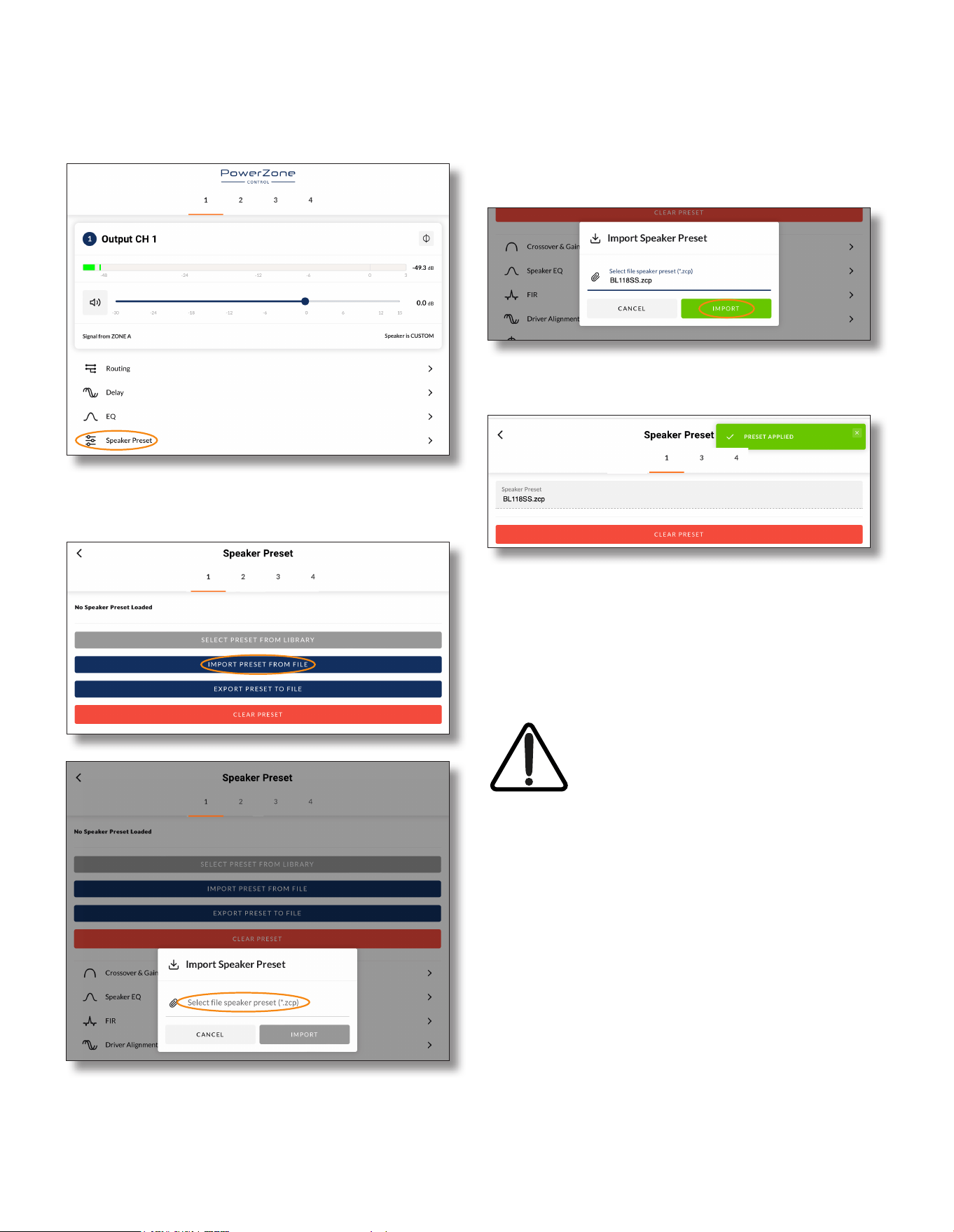
Step 2. On the computer or mobile device, navigate to the
PowerZone™ Connect amplier web interface and select
the Output tab.
3. Connection and Amplication
Step 6. The speaker preset le will now be applied to amplier
Output 1.
Step 7. With the appropriate speaker preset le applied to
amplier Output 1, repeat Step 2 to Step 6 for Output 3 if
required.
NOTE: BLx18SS speaker presets congure PowerZone Connect
3004 ampliers in bridged output mode, so enabling the presets will
reduce the number of available output channels.
IMPORTANT: It is vital for the correct
operation of BLx18SS series subwoofers
that the correct speaker preset le is
enabled.
Step 3. From the Output page select the required Output tab at the
top of the display and then select the Speaker Preset menu
option.
Step 4. Selecting IMPORT PRESET FROM FILE will open the
Speaker Preset Import pop-up box that provides the option
to choose a preset le.
Step 5. Browse the download device for the les downloaded in
Step 1 and select the appropriate le. It will be named :
BL118SS.zcp, BL118SS-Cardioid.zcp, BL218SS.zcp or
BL218SS-Cardioid.zcp
Select IMPORT.

4. Technical Information
4. BLx18SS Specications
4.1.1 Technical Specications
Subwoofer Model BL118SS BL218SS
Frequency Response (-3 dB)*
26 Hz - 150 Hz 25 Hz - 150 Hz
Frequency Range (-10 dB)
18 Hz - 150k Hz 18 Hz - 150 Hz
Recommended High-PassFilter 20 Hz (Butterworth, minimum 24 dB/Octave (4th order)
Nominal Directivity (-6 dB) Omnidirectional or cardioid
Recommended Crossover Frequency 90 Hz (acoustic, active, external DSP)
RMS Power Handling Capacity** LF: 2500 Watts LF: 5000 Watts
Maximum SPL @ 1m***
136 dB (Blaze Audio preset) 143 dB (Blaze Audio preset)
Transducer Components
LF: 18 inch (457.2 mm) x 1 LF: 18 inch (457.2 mm) x 2
Transducer Nominal Impedance LF = 4 Ohms LF = 4 Ohms
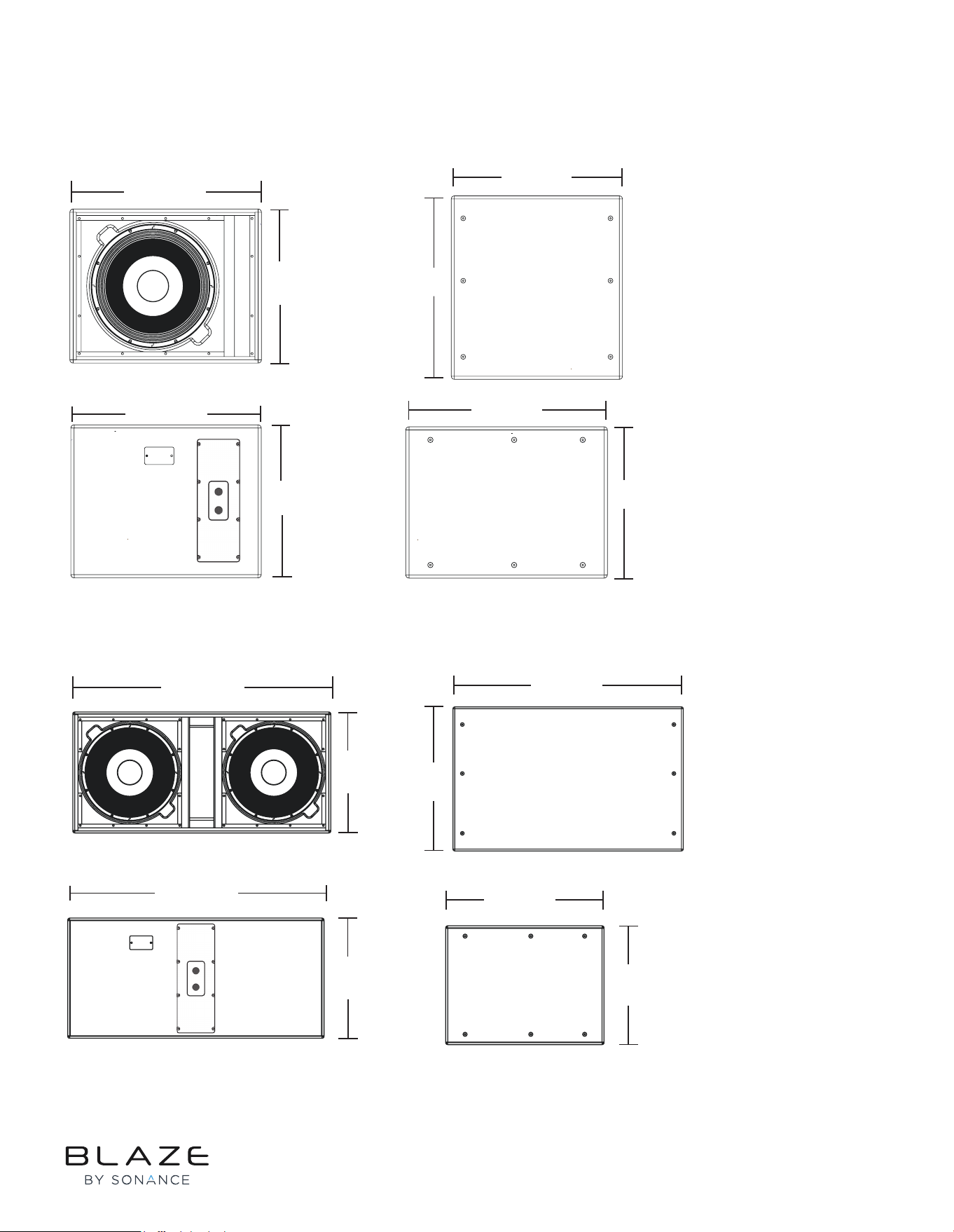
Dimensions (HxWxD)
22.5” x 28” x 30”
571.5 mm x 711.2 mm x 762 mm
22.5” x 48.0” x 30.0”
(571.5 mm x 1,219.2 mm x 762.0 mm)
Net Weight 135 lb. (61.23 kg) 285 lb. (129.27 kg)
Shipping Weight
150 lb. (68.03 kg) - approximate
with carton
295 lb. (133.8 kg) - approximate with
carton
4.1.2 Physical Characteristics
Enclosure Material
Baltic birch plywood, engineered plastics and
aluminium frame.
Finish
Two-part spray catalyzed Polyurea coating on
plywood.
Grille Material
14-gauge (1.0) perforated steel, powder-coated
nish, black.
Environmental Indoor use only.
Connectors/Bi-Amp
Two (2) parallel-wired Neutrik NL4 speakON
connectors.
Suspension/Mounting
Internal bracket w/ threaded 0.375” ying points
(x18)
*Frequency response and range measured on-axis with anechoic environment.
** Power handling tested using pink noise ltered to meet IEC 268-5, 6 dB crest factor, 100 hours, with recommended EQ.
*** Peak level measured at 1m under free eld conditions using 10 dB crest factor pink noise with specied ([Blaze Audio] preset) and corresponding EQ settings.
©2025 Sonance. All rights reserved. Sonance is a registered trademarks of Dana Innovations.
Due to continuous product improvement, all features and specifications are subject to change without notice.
For the latest Sonance product specification information visit our website at www.sonance.com.
SONANCE • 991 Calle Amanecer • San Clemente, CA 92673 USA • Phone: (949) 492-7777 • Technical Support: (949) 492-7777 • www.sonance.com • 07.01.25
4.2 BLx18SS Series Mechanical Drawings
4. Technical Information
4.2.1 BL118SS Dimensions
4.2.1 BL218SS Dimensions
30.0”
762 mm
22.5”
571,5 mm
28.0”
711,2 mm
22.5”
571,5 mm
22.5”
571,5 mm
28.0”
711,2 mm
28.0”
711,2 mm
30.0”
762 mm
30.0”
762 mm
22.5”
571,5 mm
48.0”
1219,2 mm
22.5”
571,5 mm
22.5”
571,5 mm
48.0”
1219,2 mm
48.0”
1219,2 mm
30.0”
762 mm
Rev G 23/06/2025