MANUAL 1409003 REV 1 (09/25)
FULL SIZE PLATINUM SERIES
GAS CONVECTION OVENS
MANUAL
IMPORTANT FOR FUTURE REFERENCE
Please complete this information and retain this
manual for the life of the equipment:
Model #:
___________________________
Serial #:
___________________________
Date Purchased:
_____________________
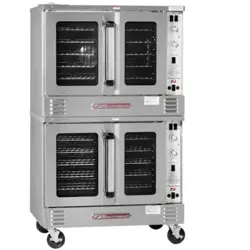
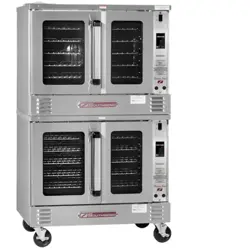
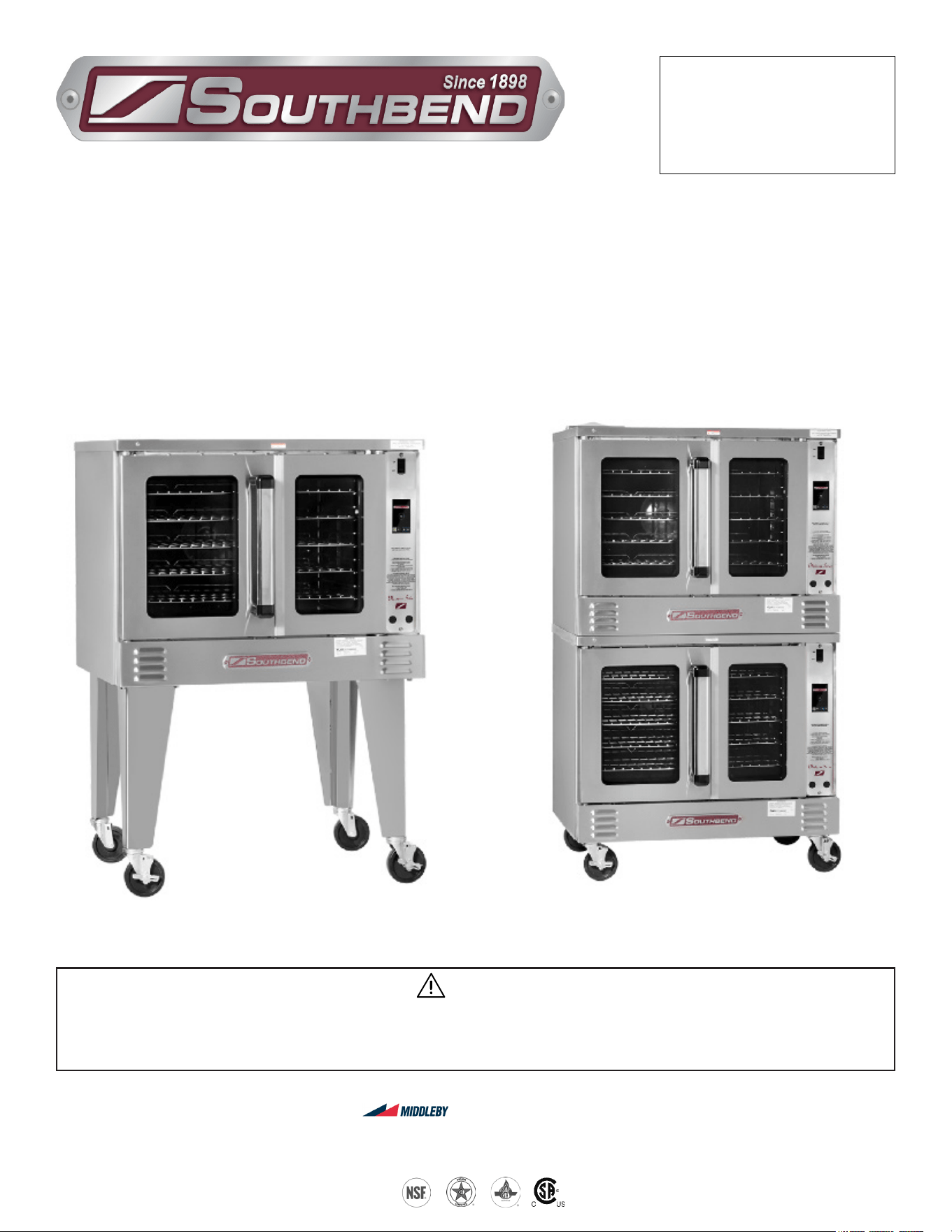
Model PCG50S/T Model PCG100S/T
PLATINUM SERIES
GAS CONVECTION OVENS
Installation & Operation Manual
WARNING
Improper installation, adjustment, alteration, service or maintenance can cause property damage, injury
or death. Read the installation, operating and maintenance instructions thoroughly before installing or
servicing this equipment.
SOUTHBEND
A Middleby Company
1100 Old Honeycutt Road Fuquay-Varina, North Carolina 27526 USA
www.southbendnc.com
PLATINUM SERIES GAS CONVECTION OVEN
INSTALLATION AND OPERATION MANUAL 1409003 REV 1 (09/25)
PAGE
2
OF 54
SAFETY PRECAUTIONS
Before installing and operating this equipment, be sure everyone involved in its operation is fully trained and aware of
precautions. Accidents and problems can be caused by failure to follow fundamental rules and precautions.
The following symbols, found throughout this manual, alert you to potentially dangerous conditions for the operator,
service personnel, or the equipment.
CAUTION
WARNING
NOTICE
This symbol warns of immediate hazards that will result in severe injury or death.
This symbol refers to a potential hazard or unsafe practice that could result in injury or death.
This symbol refers to a potential hazard or unsafe practice that could result in injury, product
damage, or property damage.
This symbol refers to information that needs special attention or must be fully
understood, even though not dangerous.
DANGER
WARNING
FIRE HAZARD
FOR YOUR SAFETY
Do not store or use gasoline or other ammable vapors and liquids in the vicinity of this or any other appliance.
Keep the area around cooking appliances free and clear of combustibles.
Purchaser of equipment must post in a prominent location detailed instructions to be followed in the event the
operator smells gas. Obtain the instructions from the local gas supplier.
WARNING
Asphyxiation can result from improper ventilation. Do not obstruct the ow of combustion and ventilation air to and
from your cooking equipment.
NOTICE
Be sure this Operator’s Manual and important papers are given to the proper authority to retain for future reference.
NOTICE
This product is intended for commercial use only. NOT FOR HOUSEHOLD USE.
SAFETY PRECAUTIONS
IMPORTANT NOTES FOR INSTALLATION AND OPERATION
WARNING
EXPLOSION HAZARD
FOR YOUR SAFETY
If a gas odor is detected, shut down equipment at the main shut-o valve.
Immediately call the emergency phone number of your gas supplier.
Copyright © 2024 by Southbend. All rights reserved. Published in the United States of America.
PLATINUM SERIES GAS CONVECTION OVEN
INSTALLATION AND OPERATION MANUAL 1409003 REV 1 (09/25)
PAGE
3
OF 54
Congratulations! You have purchased one of the nest pieces of heavy-duty commercial cooking equipment on the
market.
You will nd that your new equipment, like all Southbend equipment, has been designed and manufactured to meet
the toughest standards in the industry. Each piece of Southbend equipment is carefully engineered and designs are
veried through laboratory tests and eld installations. With proper care and eld maintenance, you will experience
years of reliable, trouble-free operation. For best results, read this manual carefully.
RETAIN THIS MANUAL FOR FUTURE REFERENCE.
Table of Contents
Specications ............................................................................................................................................... 4
Installation .................................................................................................................................................... 9
Operation ................................................................................................................................................... 22
Operation for Touchscreen Models Only .................................................................................................... 26
Cooking Hints.............................................................................................................................................. 36
Cleaning ..................................................................................................................................................... 39
Adjustments ............................................................................................................................................... 41
Troubleshooting .......................................................................................................................................... 44
Read these instructions carefully before attempting installation. Installation and initial startup should be performed by
a qualied installer. Unless the installation instructions for this product are followed by a qualied service technician
(a person experienced in and knowledgeable with the installation of commercial gas and/or electric cooking
equipment) then the terms and conditions on the Manufacturer’s Limited Warranty will be rendered void and no
warranty of any kind shall apply.
In the event you have questions concerning the installation, use, care, or service of the product, write to:
Southbend
1100 Old Honeycutt Road
Fuquay-Varina, North Carolina 27526 USA
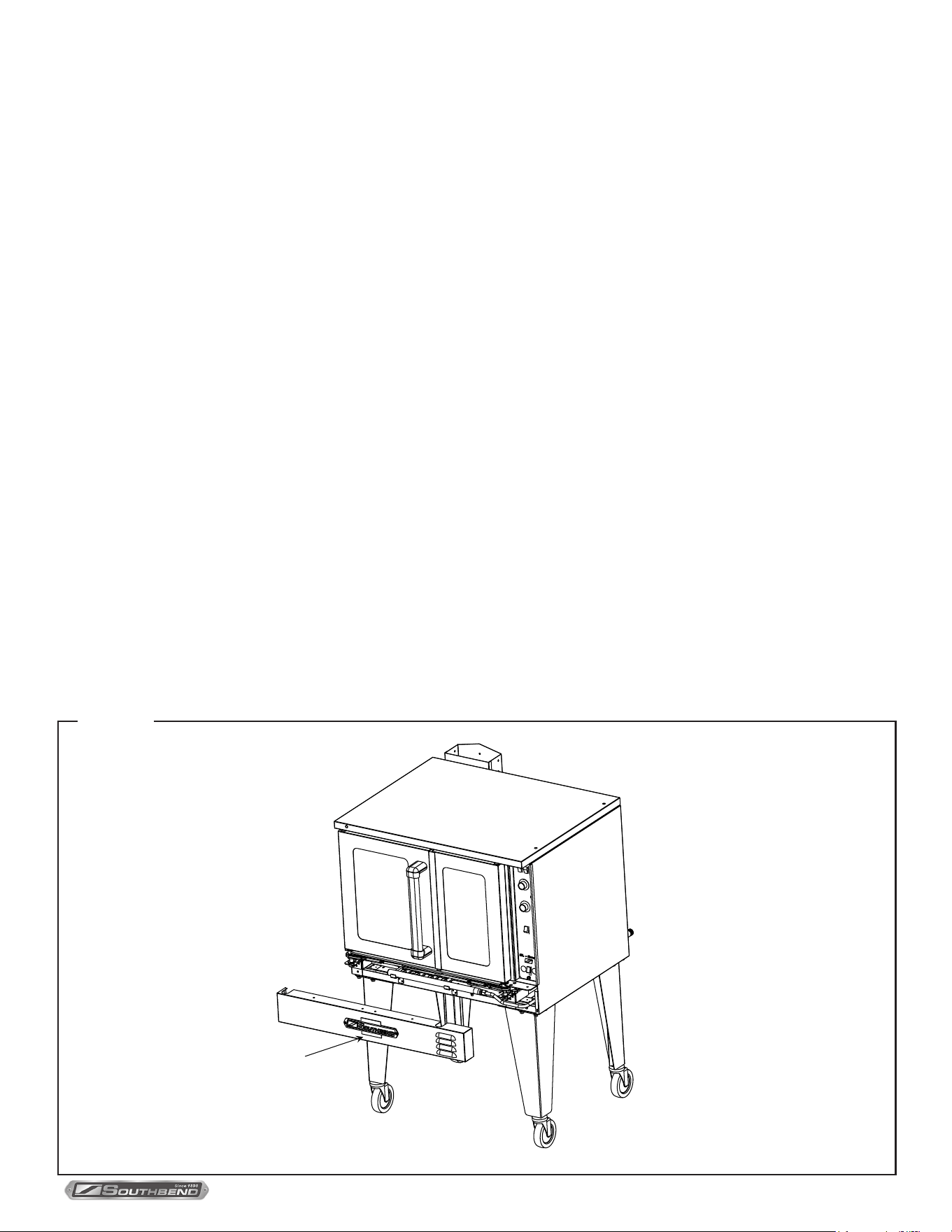
The serial plate is located on the interior side of the lower front panel, as shown below.
INTRODUCTION
Figure 1
Serial plate
(inside cover)

PLATINUM SERIES GAS CONVECTION OVEN
INSTALLATION AND OPERATION MANUAL 1409003 REV 1 (09/25)
PAGE
4
OF 54
SPECIFICATIONS
NOTICE
Local codes regarding installation vary greatly from one area to another. The National Fire Protection Association, Inc.
states in its NFPA 96 latest edition that local codes are the “authority having jurisdiction” when it comes to installation
requirements for equipment. Therefore, installations should comply with all local codes.
Southbend reserves the right to change specications and product design without notice. Such revisions do not entitle
the buyer to corresponding changes, additions, or replacements for previously purchased equipment.
This product is intended for commercial use only, not for household use.
The installation must conform with local codes, or in the absence of local codes, with the National Fuel Gas Code,
ANSI Z223.1, Natural Gas Installation Code, CAN/CGA-B149.1, or the Propane Installation Code CAN/CGA-B149.2,
as applicable, including:
1. The appliance and its individual shuto valve must be disconnected from the gas supply piping system during any
pressure testing of that system at test pressures in excess of 1/2 psi (3.45 kPa).
2. The appliance must be isolated from the gas supply piping system by closing its individual manual shuto valve `
during any pressure testing of the gas supply piping system at test pressures equal to or less than 1/2 psi (3.45
kPa).
SPECIFICATIONS
WARNING
There must be adequate clearance between the left side of the ovens and the combustible construction..
Adequate clearance must be provided in the aisle to allow the doors to open suciently to permit the removal of the
racks and for serviceability.
Although no clearance is required behind the motor on the rear of the oven, care must be taken to provide adequate
air circulation to prevent the motor from overheating.
Do not locate the oven adjacent to any high heat or grease-producing piece of equipment, such as a range top,
griddle, fryer, etc., that could allow radiant heat to raise the exterior temperature of the oven above 130°F (54°C).
DO NOT MOUNT ABOVE OTHER COOKING EQUIPMENT.
MINIMUM CLEARANCES
Minimum Clearance from
Combustible Construction
Minimum Clearance from
Non-Combustible Construction
Minimum Clearance from
heat-producing appliance
Back 0” 0” 6”
Right Side 0” 0” 6”
Left Side 2” 0” 6”
Floor 0” 0” 6”
PLATINUM SERIES GAS CONVECTION OVEN
INSTALLATION AND OPERATION MANUAL 1409003 REV 1 (09/25)
PAGE
5
OF 54
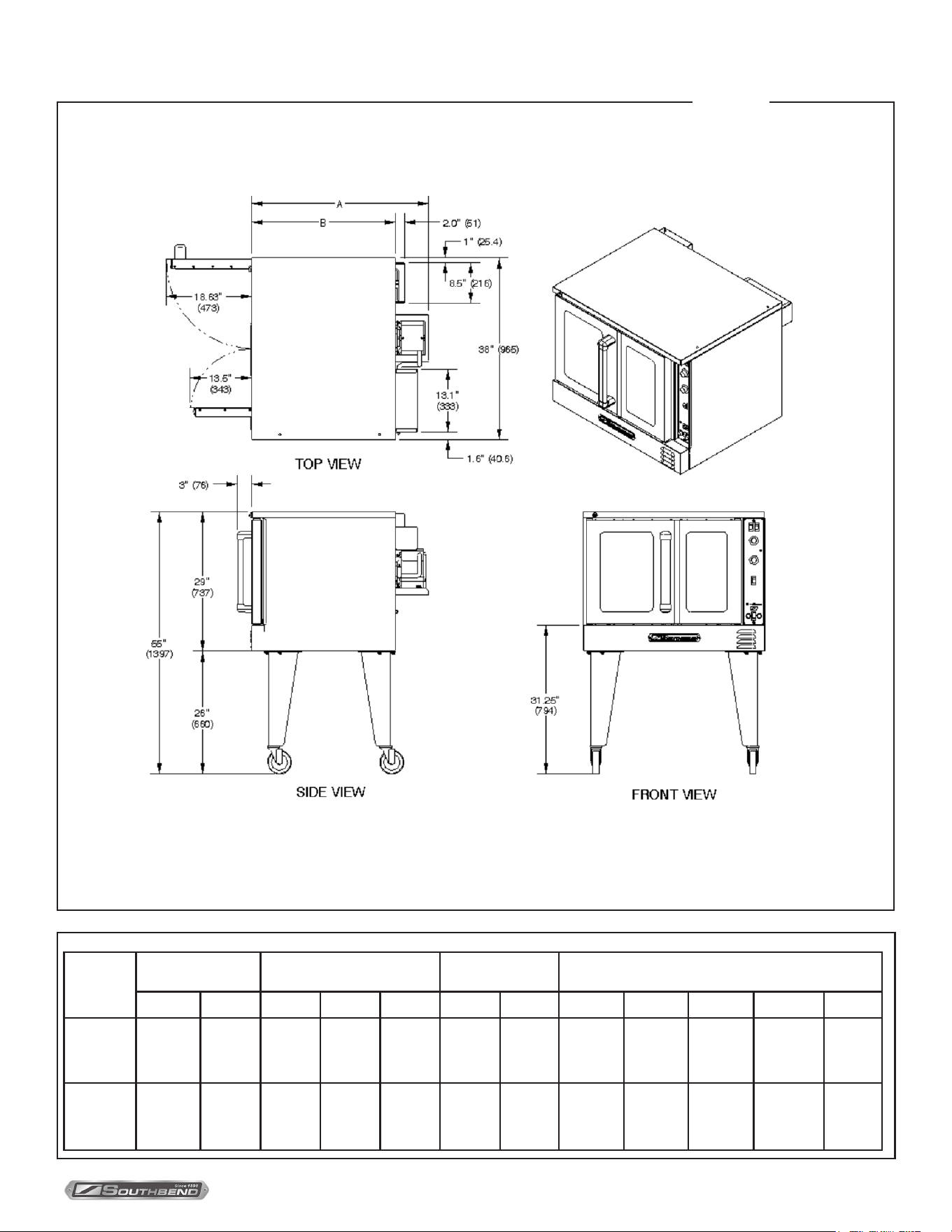
Single-Deck Ovens
Figure 2
SPECIFICATIONS
EXTERIOR DIMENSIONS
Model
Number
Depth Dimen-
sions
Oven Interior Rack Clearance Shipping Crate
A B
width depth height width depth width depth height volume weight
PCG50S/..
PCG70S/..
PCG90S/..
37.25”
(947mm)
30.25”
(769mm)
29”
(737mm)
21.5”
(546mm)
20”
(508mm)
28.25”
(718mm)
21”
(533mm)
57.50”
(1461mm)
45.5”
(1156)mm
45”
(1143mm)
68.1 cu. ft.
1.93 cu. m
620 lbs.
(281.2kg
PCG50B/...
PCE70B/...
PCG90B/...
43.50”
(1105mm)
36.50”
(928mm)
29”
(737mm)
27.5”
(699mm)
20”
(508mm)
28.25”
(718mm)
27.25”
(692mm)
57.50”
(1461mm)
45.5”
(1156mm)
45”
(1143mm)
68.1 cu. ft.
1.93 cu. m
680 lbs.
313.0kg
PLATINUM SERIES GAS CONVECTION OVEN
INSTALLATION AND OPERATION MANUAL 1409003 REV 1 (09/25)
PAGE
6
OF 54
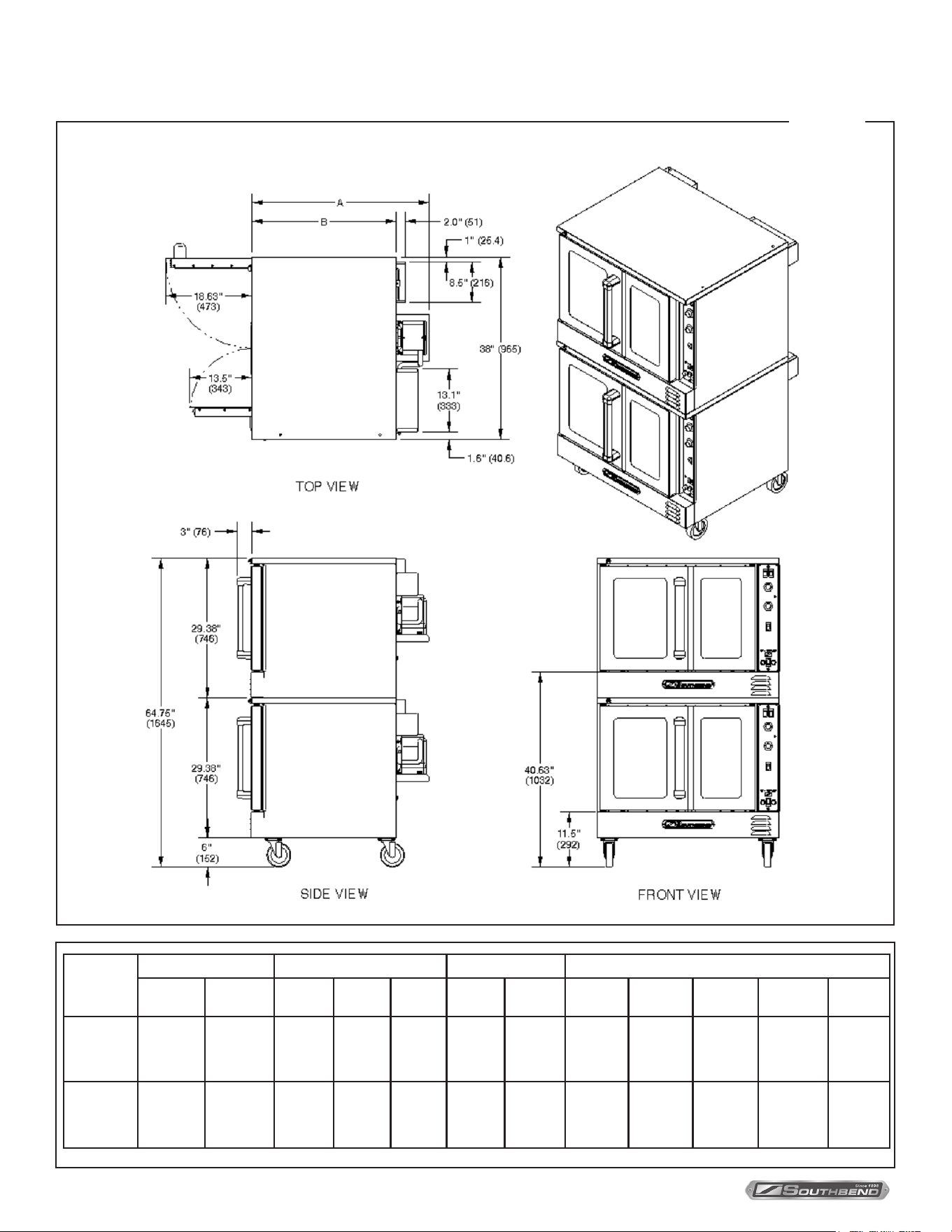
Double-Deck Ovens
Figure 3
SPECIFICATIONS
EXTERIOR DIMENSIONS
Model
Number
Depth Dimensions Oven Interior Rack Clearance Shipping Crate
A B
width depth height width depth width depth height volume
PCG100S/..
PCG140S/..
PCG180S/..
37.25”
(947mm)
30.25”
(769mm)
29”
(737mm)
21.50”
(546mm)
20”
(508mm)
28.25”
(718mm)
21”
(533mm)
57.5”
(1461mm)
45.5”
(1156mm)
81.5”
(2070mm)
123.4 cu. ft.
3.49 cu. m
1040 lbs
(471.7kg)
PCG100B/..
PCG140B/..
PCG180B/..
43.50”
(1105mm)
36.50”
(928mm)
29”
(737mm)
27.50”
(699mm)
20”
(508mm)
28.25”
(718mm)
27.25”
(692mm)
57.50”
(1461mm)
45.5”
(1156mm)
81.5”
(2070mm)
123.4 cu. ft.
3.49 cu. m
1180 lbs
(535.2 kg)
PLATINUM SERIES GAS CONVECTION OVEN
INSTALLATION AND OPERATION MANUAL 1409003 REV 1 (09/25)
PAGE
7
OF 54
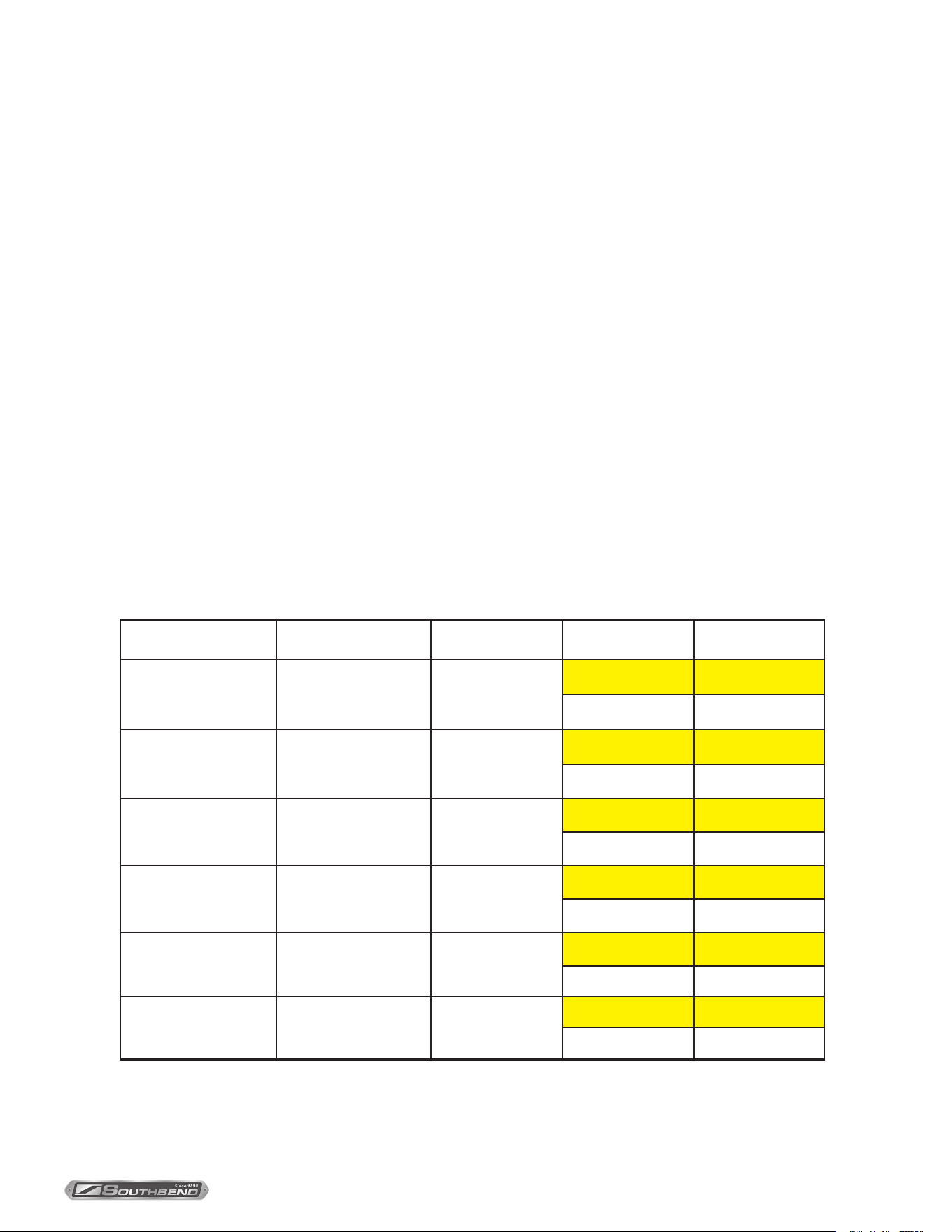
GAS SUPPLY
The serial plate is located inside the lower front panel. It indicates the type of gas the unit is equipped to burn. All
Southbend equipment is adjusted at the factory. Check type of gas on serial plate.
These models are design-certied for operation on natural or propane gases. For natural gas, the regulator is set to
deliver a 4.0” W.C. pressure to the manifold. For propane gas, it is set to deliver 10” W.C. (The regulator is built into the
gas valve )
If applicable, the vent line from the gas appliance pressure regulator in the valve shall be installed to the outdoors in
accordance with local codes, or in the absence of local codes, with the National Fuel Gas Code, ANSI Z223.1, Natural
Gas Installation Code, CAN/CGA-B149.1, or the Propane Installation Code CAN/CGA-B149.2, as applicable.
This appliance should be connected ONLY to the type of gas for which it is equipped.
A 3/4” NPT line is provided at the rear for the gas connection. An adequate gas supply is imperative. Undersized or low
pressure lines will restrict the volume of gas required for satisfactory performance. Fluctuations of more than 25% on
natural gas or 10% on propane gas will create problems and aect burner operating characteristics.
An adequate gas supply line to the unit should be no smaller than the inside diameter of the pipe from the unit to which it
is connected.
Purge the supply line to clean out dust, dirt, or other foreign matter before connecting the line to the unit.
All pipe joints and connections must be tested thoroughly for gas leaks. Use only soapy water for testing on all gases.
NEVER use an open ame to check for gas leaks. All connections must be checked for leaks after the unit has been put
into operation. Test pressure should not exceed 14” W.C.
Model Number # of Ovens Total BTU Type of Gas Orice Size
PCG50S/...
PCG50B/...
Single-Deck 53,000
Propane 59
Natural Gas 52
PCG100S/...
PCG100B/...
Double-Deck 106,000
Propane 59
Natural Gas 52
PCG70S/...
PCG70B/...
Single-Deck 72,000
Propane 56
Natural Gas 47
PCG140S/...
PCG140B/...
Double-Deck 144,000
Propane 56
Natural Gas 47
PCG90S/...
PCG90B/...
Single-Deck 90,000
Propane 56
Natural Gas 47
PCG180S/...
PCG180B/...
Double-Deck 180,000
Propane 56
Natural Gas 47
SPECIFICATIONS
PLATINUM SERIES GAS CONVECTION OVEN
INSTALLATION AND OPERATION MANUAL 1409003 REV 1 (09/25)
PAGE
8
OF 54
WARNING
Improper ventilation can result in personal injury or death. Ventilation which fails to properly remove ue products can
cause headaches, drowsiness, nausea, or could result in death.
All units must be installed in such a manner that the ow of combustion and ventilation air are not obstructed.
Provisions for adequate air supply must be provided. Do not obstruct the front or rear of the unit as combustion air
enters through these areas.
Be sure to inspect and clean the ventilation system according to the ventilation equipment manufacturer’s instructions.
VENTILATION
NOTICE
Proper ventilation is the owner’s responsibility. Any problem due to improper ventilation will not be covered by the
warranty.
If a ventilation canopy is used, it is recommended that a canopy extend 6” past the appliance and that the bottom edge be
located 6’6” from the oor. Filters should be installed at an angle of 45° or more from the horizontal. This position prevents
dripping grease and facilitates collecting the run-o grease in a drip pan, unusually installed with a lter.
If an exhaust fan is used, it should be installed at least 2” above the ue opening at the top of the unit. A strong exhaust
fan tends to create a vacuum in the room and may interfere with burner performance. Fresh air openings approximately
equal to the fan area will relieve such a vacuum. In case of unsatisfactory performance on any appliance, check the
appliance with the exhaust fan in the “OFF” position. Do this only long enough to check equipment performance. Then
turn the exhaust fan back on and let it run to remove any exhaust that may have accumulated during the test.
If the oven ue is connected directly to an outside ue, a CSA International design certied down draft diverter must be
installed at the ue outlet of the oven and connected to the outside ue.
ELECTRICAL SUPPLY
Convection ovens require connection to a supply of electricity. The appliance, when installed, must be electrically ground-
ed in accordance with local codes, or in the absence of local codes, with the National Electrical Code, ANSI/NFPA 70, or
the Canadian Electrical Code, CSA C22.2, as applicable. An electrical diagram is located on the side of the control panel
assembly (see drawing on page 47). Electrical diagrams can also be found in this manual beginning on page 49.
Ovens ordered with the 120V power option are equipped with one or two power cords with a standard 120V single-phase
plug with a ground prong. Single-deck ovens will have one power cord; double-deck ovens will have two.
Ovens with other power options have a terminal block on the rear of the oven that must be wired to the power supply.
Depending on how the power supply is connected to the terminal block, the oven can operate on either single-phase of
three-phase power.
Power Option Power Type # of Ovens Maximum Amps
120/60/1 120 Volts, 60 Hz, Single Phase
Single-Deck
Double-Deck
7.9
15.8
208/60/1or3 190-219 Volts, 60 Hz, Single or ree Phase
Single-Deck
Double-Deck
4.8
9.6
240/60/1or3 220-240 Volts, 60 Hz, Single or ree Phase
Single-Deck
Double-Deck
4.3
8.6
240/50/1or3 208-240 Volts, 50 Hz, Single or ree Phase
Single-Deck
Double-Deck
6.0
12.0
SPECIFICATIONS

PLATINUM SERIES GAS CONVECTION OVEN
INSTALLATION AND OPERATION MANUAL 1409003 REV 1 (09/25)
PAGE
9
OF 54
NOTICE
These installation procedures must be followed by qualied personnel or warranty will be void.
Local codes regarding installation vary greatly from one area to another. The National Fire Protection Association, Inc.
states in its NFPA 96 latest edition that local codes are the “authority having jurisdiction” when it comes to installation
requirements for equipment. Therefore, installations should comply with all local codes.
The installation must conform with local codes, or in the absence of local codes, with the National Fuel Gas Code,
ANSI Z223.1, Natural Gas Installation Code, CAN/CGA-B149.1, or the Propane Installation Code CAN/CGA-B149.2,
as applicable, including:
1. The appliance and its individual shuto valve must be disconnected from the gas supply piping system during any
pressure testing of that system at test pressures in excess of 1/2 psi (3.45 kPa).
2. The appliance must be isolated from the gas supply piping system by closing its individual manual shuto valve
during any pressure testing of the gas supply piping system at test pressures equal to or less than 1/2 psi (3.45
kPa).
IMMEDIATELY INSPECT FOR SHIPPING DAMAGE
All containers should be examined for damage before and during unloading. The freight carrier has assumed
responsibility for its safe transit and delivery. If damaged equipment is received, either apparent or concealed, a claim
must be made with the delivering carrier.
Apparent damage or loss must be noted on the freight bill at the time of delivery. The freight bill must then be signed
by the carrier representative (Driver). If the bill is not signed, the carrier may refuse the claim. The carrier can supply
the necessary forms.
A request for inspection must be made to the carrier within 15 days if there is concealed damage or loss that is not
apparent until after the equipment is uncrated. The carrier should arrange an inspection. Be certain to hold all contents
plus all packing material.
1. Cut the banding straps and remove packing material.
2. Remove the lag bolts that secure the oven to wooden skid.
3. If you are installing a single-deck oven, go to Step 2a.
If you are installing a double-deck oven, go to Step 2b.
INSTALLATION
INSTALLATION
STEP 1: UNPACKING
PLATINUM SERIES GAS CONVECTION OVEN
INSTALLATION AND OPERATION MANUAL 1409003 REV 1 (09/25)
PAGE
10
OF 54
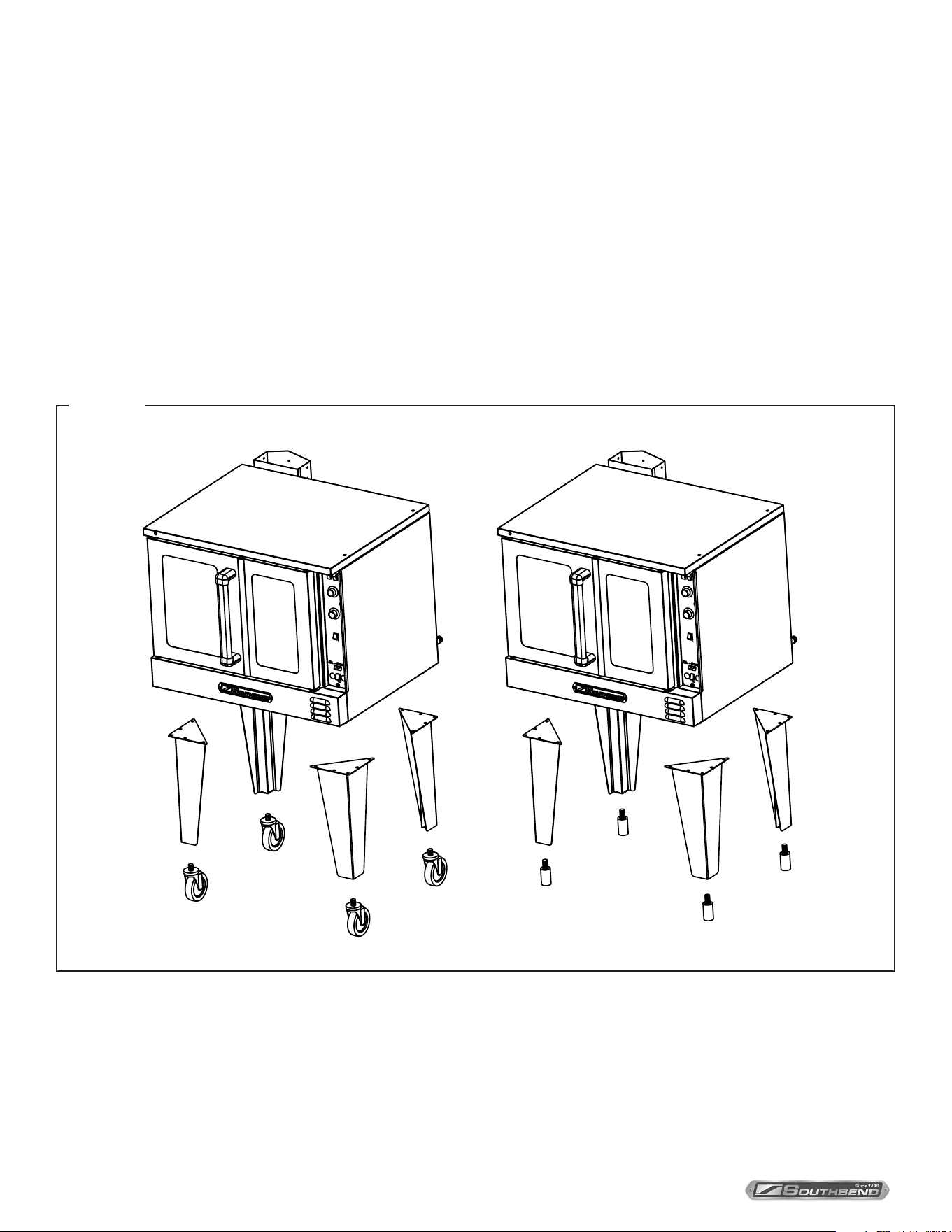
1. Raise the oven suciently to allow clearance for the legs to be attached. Use of a lift truck or other mechanical lifting
means is recommended. For safety, “shore up” and support the oven with an adequate blocking arrangement strong
enough to support the load. (If it is necessary to rest the oven on its side, rest it on its left side or back
side. Take care to protect the nish on the left side, and to prevent the weight from resting on the motor on the back.)
2. Attach the legs to the bottom corners of the oven using the provided machine screws, at washers, and lock washers.
Each leg is secured by ve screws. The mounting holes are pre-drilled and threaded.
3. Screw into the bottom of each leg either an adjustable foot or a caster (depending on which option was ordered). If
attaching casters, the two casters with brakes should be attached to the front legs.
4. Lower the oven gently onto a level surface. Never drop or allow the oven to fall.
5. Use a level to make sure that the oven is level. The adjustable feet can be screwed in or out to lower or raise each
corner of the oven.
6. If casters were installed, go to Installation Step 3, otherwise go to Step 4
INSTALLATION
Figure 4
STEP 2A: INSTALLATION OF LEGS ON SINGLE-DECK-OVENS
PLATINUM SERIES GAS CONVECTION OVEN
INSTALLATION AND OPERATION MANUAL 1409003 REV 1 (09/25)
PAGE
11
OF 54
Double-deck ovens can be shipped either already bolted together, or as two separate ovens to be bolted together after
delivery. In either case, the oven that is (or will be) the lower oven will have leg pads already bolted to the bottom corners
of the oven. Do the following:
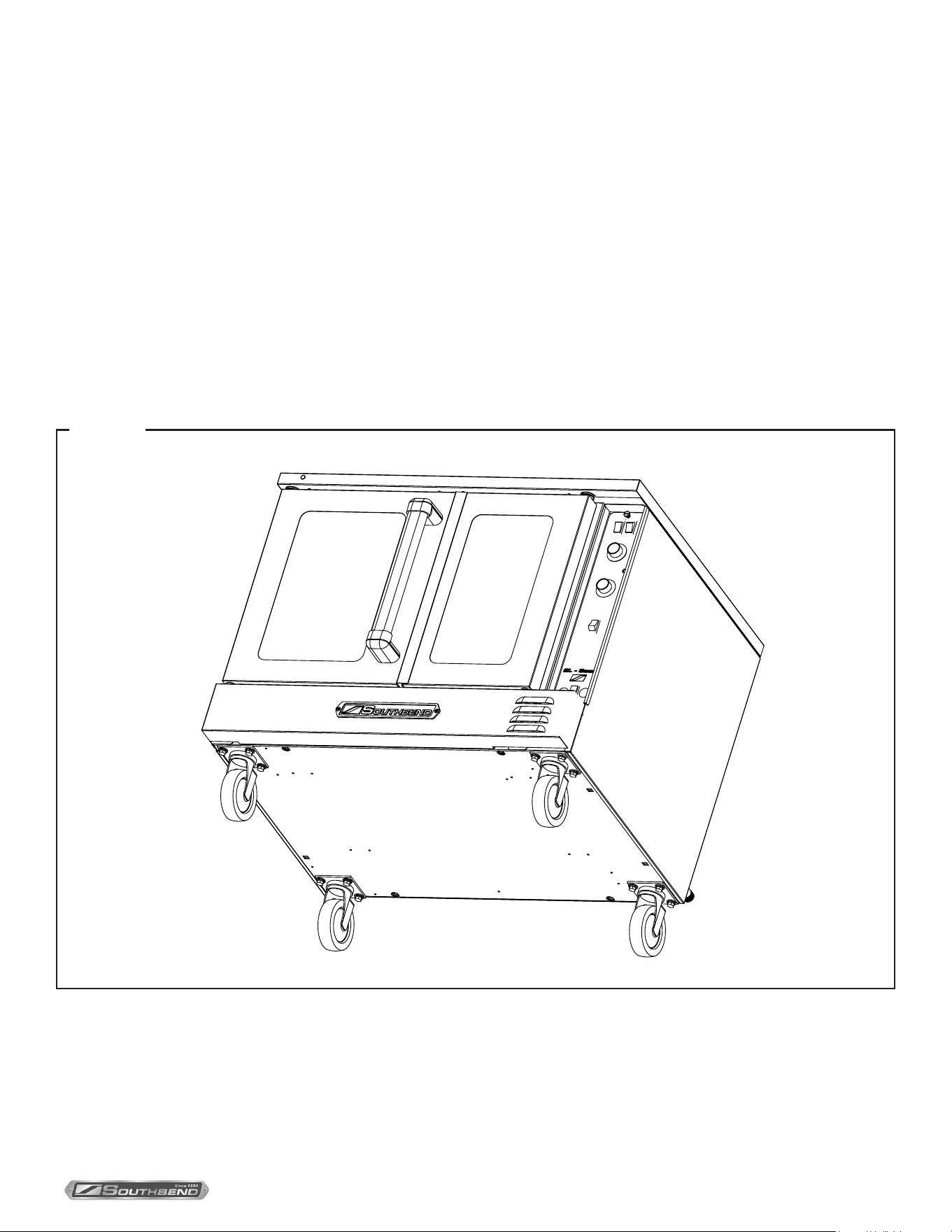
1. Raise the oven suciently to allow clearance for the legs to be attached. Use of a lift truck or other mechanical lifting
means is recommended. For safety, “shore up” and support the oven with an adequate blocking arrangement strong
enough to support the load. (If it is necessary to rest the oven on its side, rest it on its left side or back side.
Take care to protect the nish on the left side, and to prevent the weight from resting on the motor on the back.)
2. Screw into the center of each leg pad either an adjustable leg or a caster (depending on which option was ordered). If
attaching casters, the two casters with brakes should be attached to the front leg pads.
3. Lower the oven gently onto a level surface. Never drop or allow the oven to fall.
4. Use a level to make sure that the oven is level. The adjustable legs can be screwed in or out to lower or raise each
corner of the oven.
5. If casters were installed, go to Installation Step 3, otherwise go to Step 4.
SCALE 3/8
INSTALLATION
Figure 5
STEP 2B: INSTALLATION OF LEGS ON DOUBLE-DECK-OVENS
PLATINUM SERIES GAS CONVECTION OVEN
INSTALLATION AND OPERATION MANUAL 1409003 REV 1 (09/25)
PAGE
12
OF 54
NOTICE
For an appliance equipped with casters, (1) the installation shall be made with a connector that complies with the
Standard for Connectors for Movable Gas Appliances, ANSI Z21.69 or Connectors for Moveable Gas Appliances,
CAN/CGA-6.16, and a quick-disconnect device that complies with the Standard for Quick-Disconnect Devices for
Use With Gas Fuel, ANSI Z21.41, or Quick Disconnect Devices for Use with Gas Fuel, CAN1-6.9, (2) adequate
means must be provided to limit the movement of the appliance without depending on the connector and the quick-
disconnect device or its associated piping to limit the appliance movement and (3) the restraining means should be
attached to a frame member on the back of the unit.
WARNING
To avoid accidental gas disconnection and potential explosion:
If disconnection of this restraint is necessary to move the appliance for cleaning, etc., reconnect it when the
appliance is moved to its originally installed position.
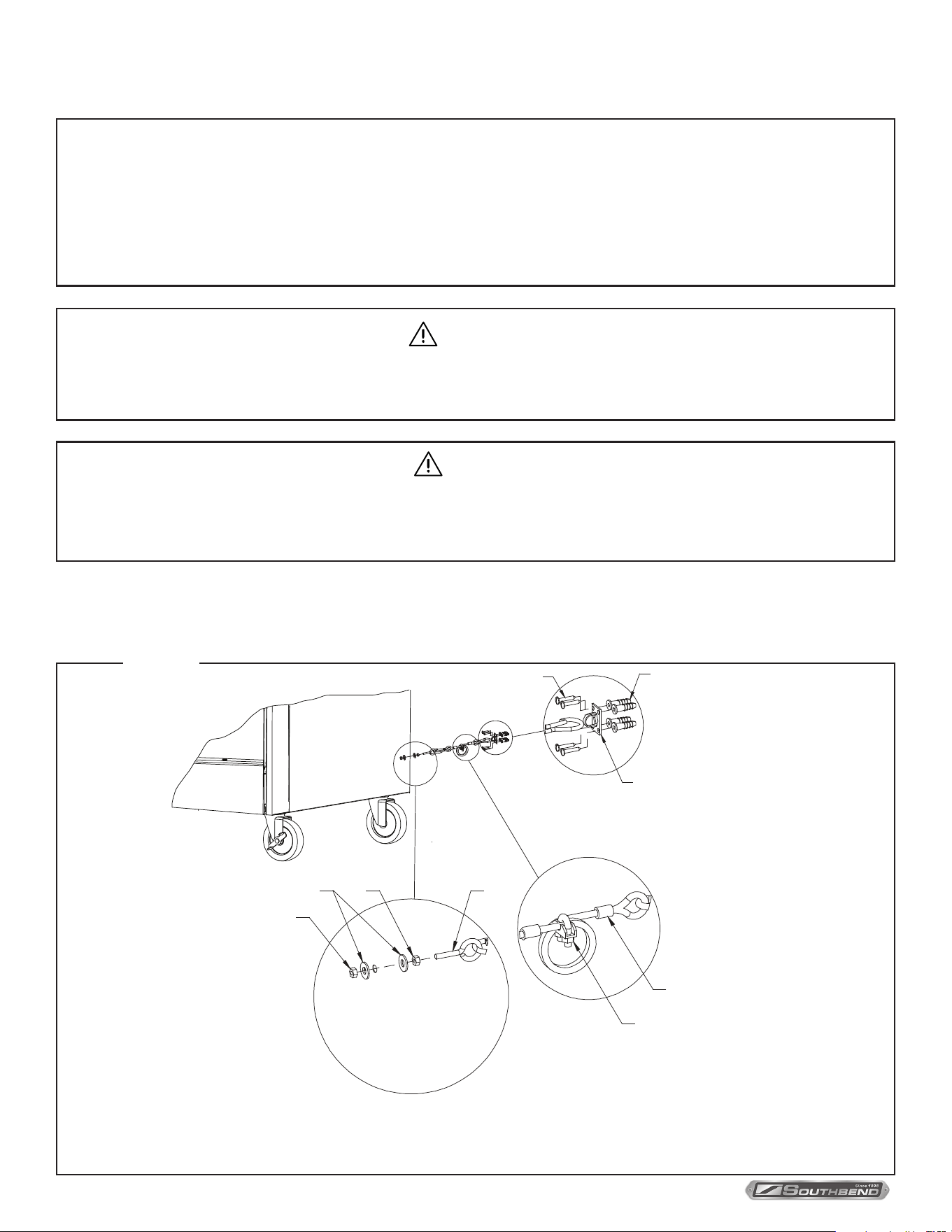
1. Secure the restraining device bracket (item “B” in the following illustration) to a wall stud located as close as possible
to the appliance connector inlet and outlet connections. Use four #12 screws (items “C”) and plastic anchors (items
“A”) if necessary.
F
G
H
I
B
C
E
D
A
Note: Kit can be purchased from Southbend
INSTALLATION
Figure 6
STEP 3: INSTALLATION OF RESTRAINT (ONLY FOR OVENS WITH CASTERS)
WARNING
To avoid the risk of accidental electric shock, disconnect the unit from the power supply before moving the unit.

PLATINUM SERIES GAS CONVECTION OVEN
INSTALLATION AND OPERATION MANUAL 1409003 REV 1 (09/25)
PAGE
13
OF 54
2. Install an eye-bolt (item “F”) to a frame member on the rear of the equipment. After checking carefully behind the
frame member for adequate clearance, drill a 1/4” hole through the frame member.
3. Thread the hex nut (item “G”) and slide the washer (item “H”) onto the eye-bolt. Insert the eye-bolt through the 1/4”
drilled hole and secure with a washer (item “H”) and nylon lock nut (item “I”).
4. Using the spring-loaded snap hooks, attach the restraining device to the bracket and the eye-bolt.
5. Using the cable clamp (item “D”), adjust the restraining device extended length to prevent over-bending or kinking of
the appliance connector.
For units not equipped with ame safety devices, be sure all valves are turned o before disconnecting. After
reconnecting, be sure that the oven is switched OFF.
INSTALLATION
PLATINUM SERIES GAS CONVECTION OVEN
INSTALLATION AND OPERATION MANUAL 1409003 REV 1 (09/25)
PAGE
14
OF 54
STEP 4: STACK DOUBLE-DECK OVEN (IF NECESSARY)
Ovens that were originally ordered as single ovens can be stacked in the eld (additional parts are required). This
installation step describes the procedure for stacking two single-deck ovens to form a double-deck oven.
1. Uncrate the two ovens. Identify the oven that will be the lower oven (it will be the oven with leg pads attached to the
bottom corners). Attach the legs (or casters) to the lower oven as described in Step 2b page 11.
2. If the oven that will be the top oven was NOT ordered as part of a double-deck oven, remove the four leg pads from
the bottom of the top oven.
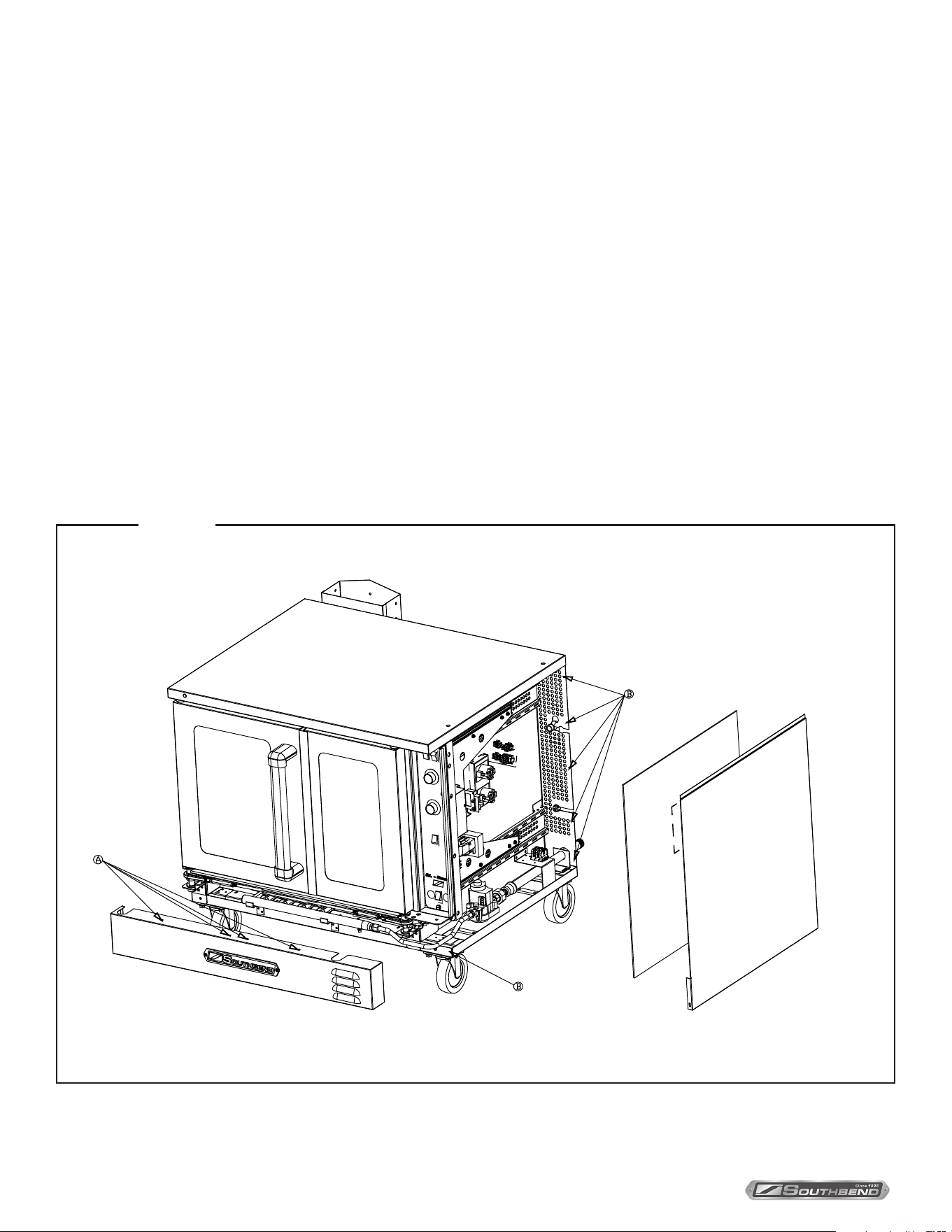
3. Locate and remove the four screws that secure the lower front panel (items “A” in the drawing below). Lift the
panel and pull it forward to remove it, then set it aside.
4. Locate and remove the ve screws that secure the right side panel to the oven (items “B” in the drawing below).
Remove the right side panel and insulation and set them aside.
Figure 7
INSTALLATION
PLATINUM SERIES GAS CONVECTION OVEN
INSTALLATION AND OPERATION MANUAL 1409003 REV 1 (09/25)
PAGE
15
OF 54
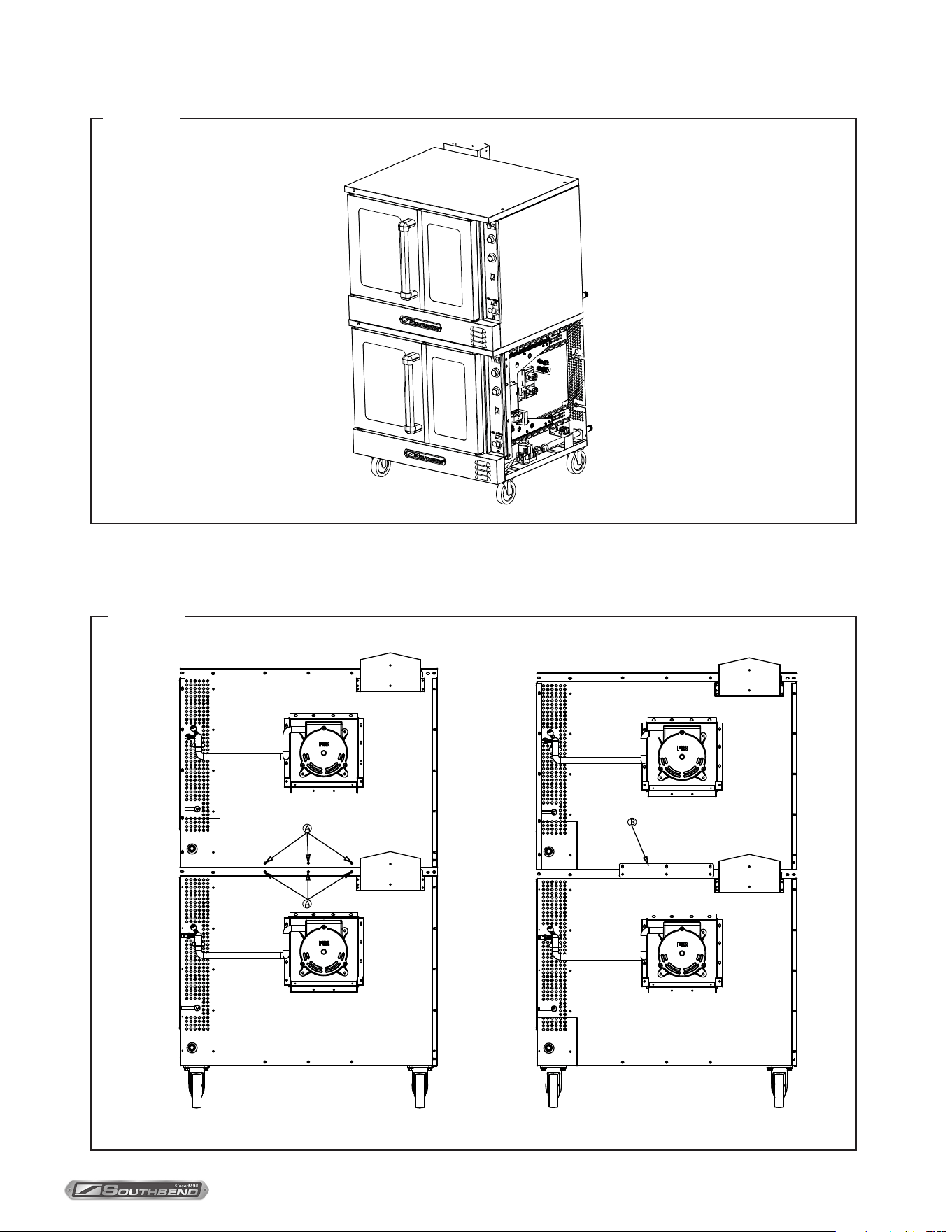
5. Lift the top oven and position it on top of the lower oven, as shown in the drawing below.
6. Move to the rear of the ovens and remove the six screws shown as items “A” in the left-hand drawing below.
Position the tie bracket (item “B”) as shown in the right-hand drawing below. Re-insert the screws that
you just removed through the holes in the tie bracket, but do not tighten them yet.
Figure 8
Figure 9
INSTALLATION
PLATINUM SERIES GAS CONVECTION OVEN
INSTALLATION AND OPERATION MANUAL 1409003 REV 1 (09/25)
PAGE
16
OF 54
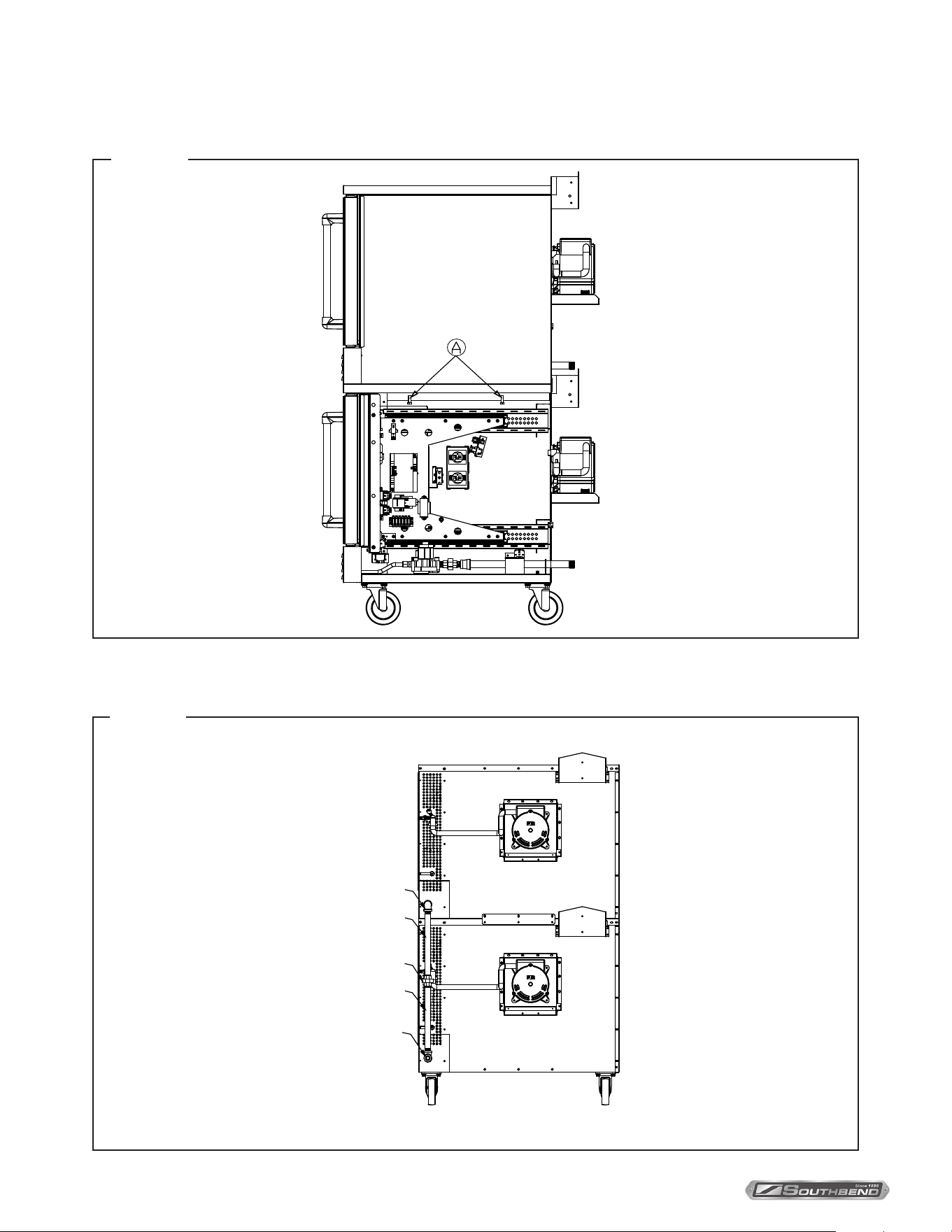
7. Insert two bolts (items “A” in the following diagram) up through the top of the lower oven and screw them into the
threaded holes in the bottom of the top oven. Tighten these bolts and the screws that you did not tighten in
the previous step.
8. Assemble the gas piping shown in the following drawing. Be sure to check all connections for leaks once the oven
has been installed.
3/4" ELBOW
3/4" TEE
3/4" UNION
3/4" PIPE
3/4" PIPE
A
INSTALLATION
Figure 10
Figure 11
PLATINUM SERIES GAS CONVECTION OVEN
INSTALLATION AND OPERATION MANUAL 1409003 REV 1 (09/25)
PAGE
17
OF 54
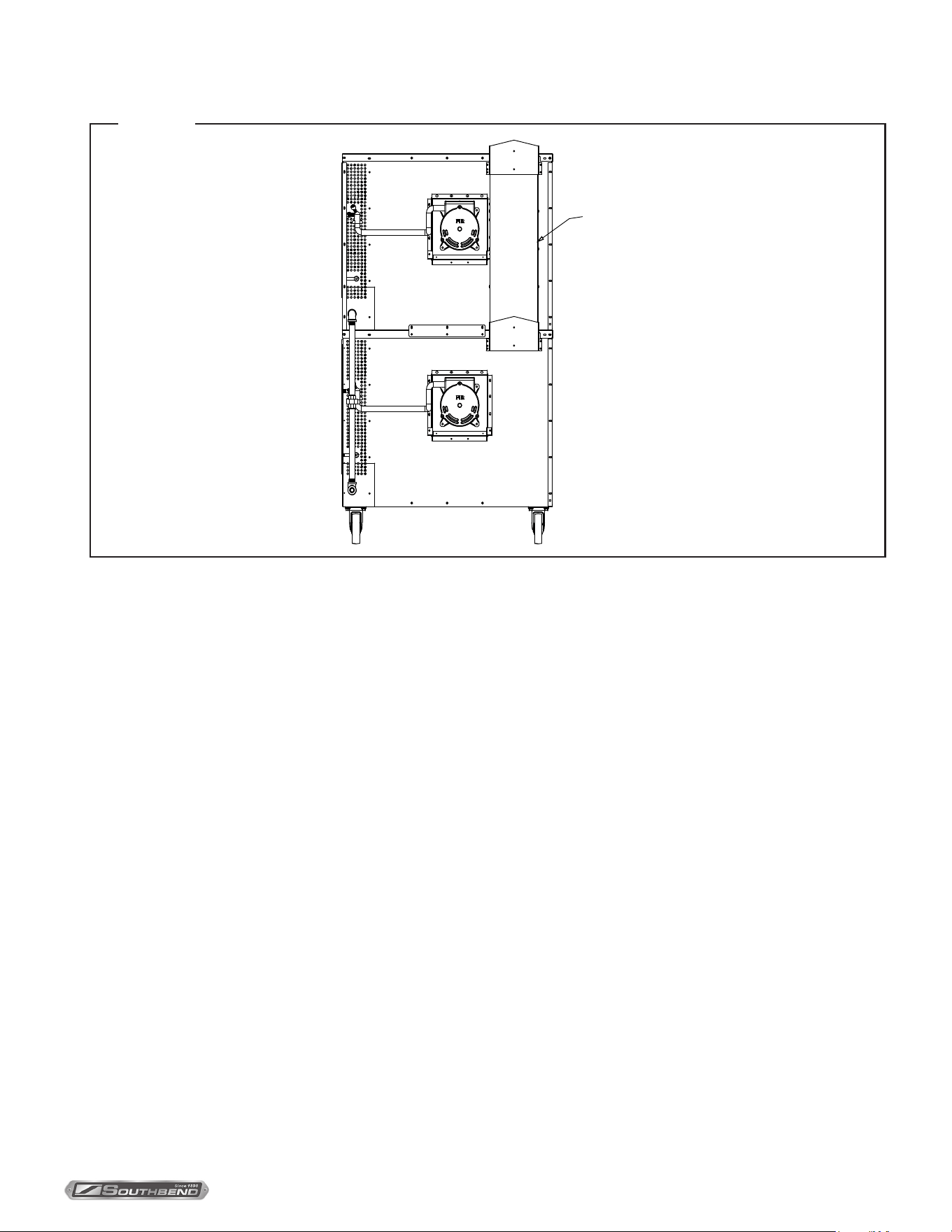
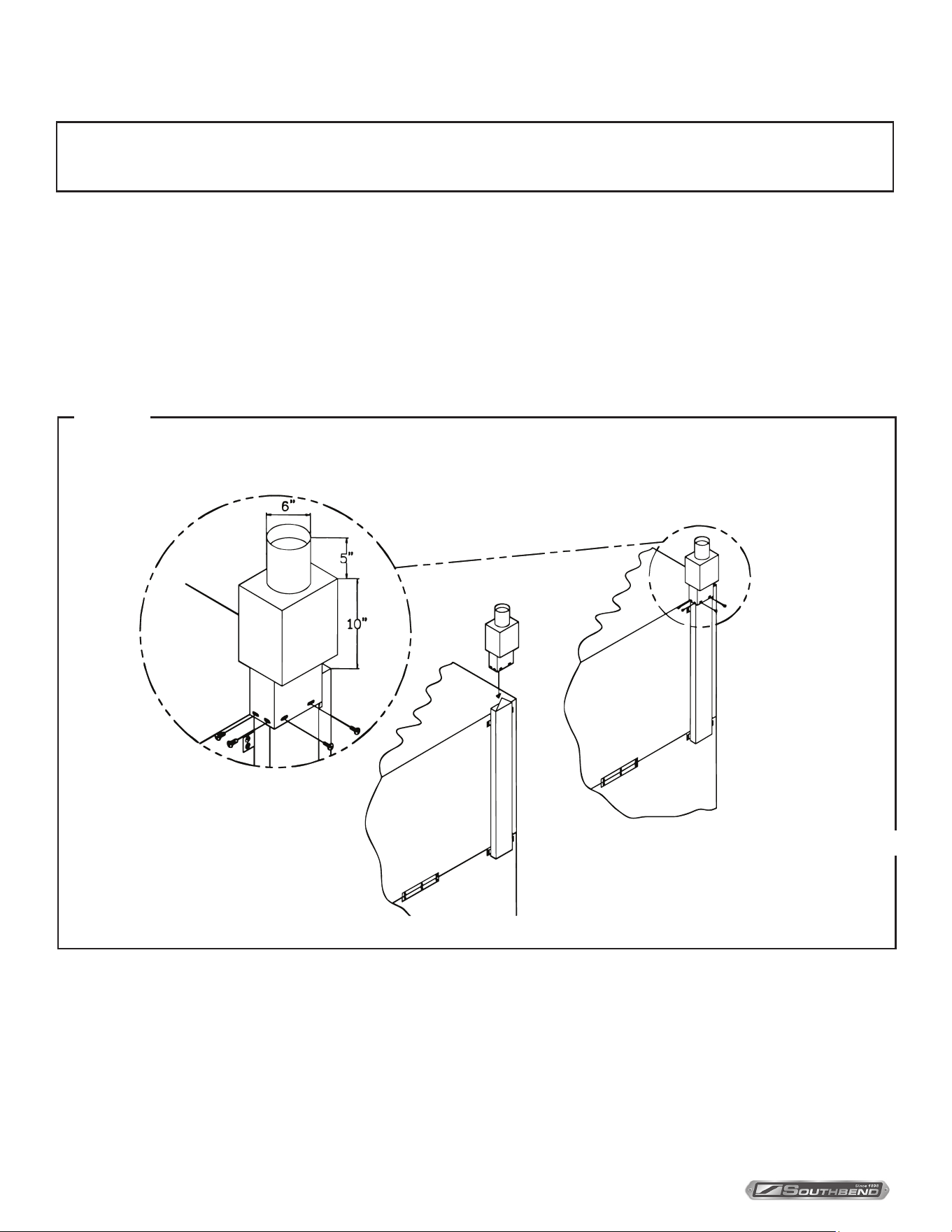
9. Install the ue stack as shown in the following diagram:
10. Replace the right side insulation, exterior panel, and lower front panel that you removed in step 4 of this procedure.
FLUE STACK
INSTALLATION
Figure 12
PLATINUM SERIES GAS CONVECTION OVEN
INSTALLATION AND OPERATION MANUAL 1409003 REV 1 (09/25)
PAGE
18
OF 54
NOTICE
Installation must use approved CSA International down draft diverter supplied by Southbend.
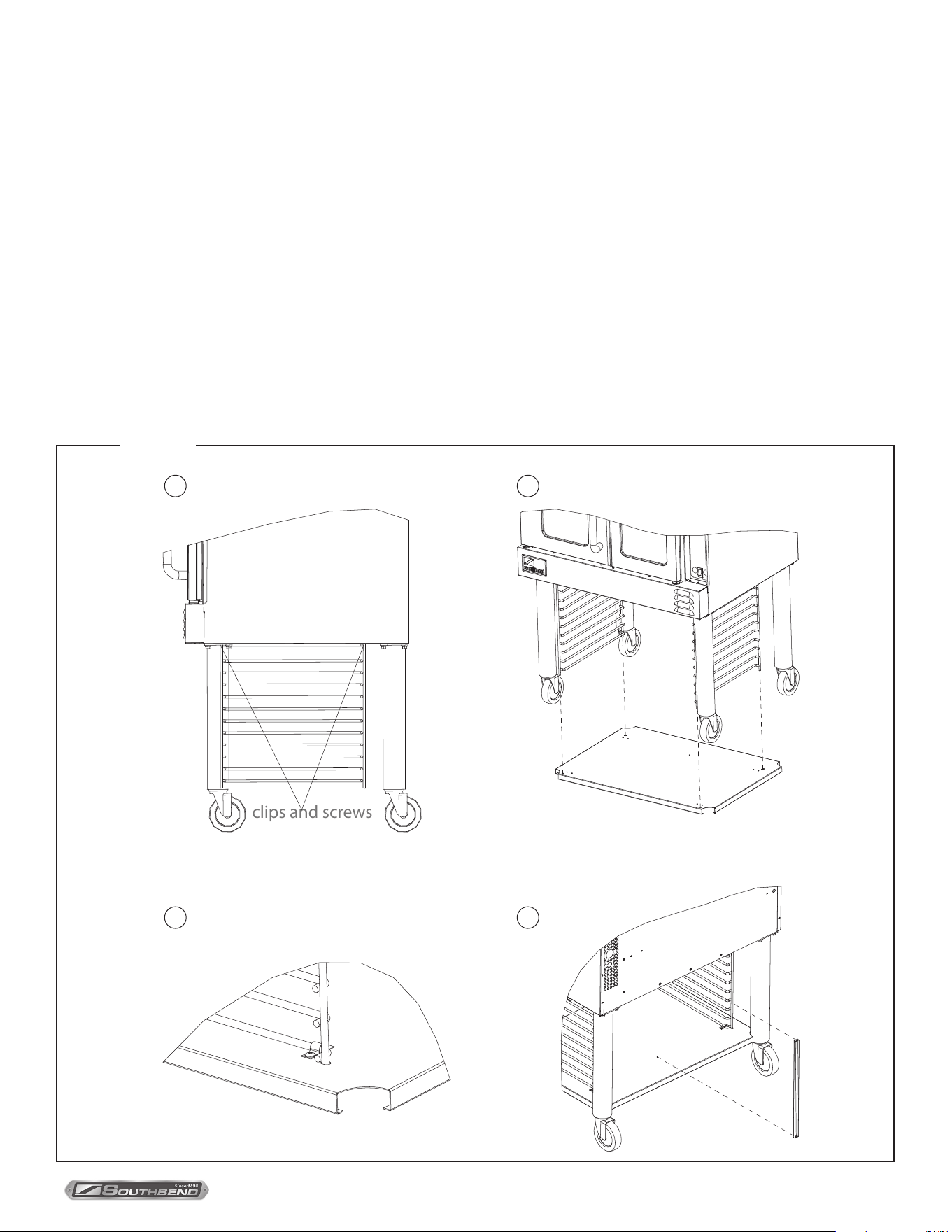
If the oven ue is to be connected directly to an external vent, a down draft diverter must be installed. The installation
of ventilation pipes through walls and roofs must conform to all local codes. To install the down draft diverter, do the
following:
1. Slip the down draft diverter over the top of the ue located at the top left rear corner of the oven (see drawing below).
Allow the diverter to slide down as far as it will go.
2. Using a 9/64” or 5/32” drill bit, drill eight holes through the ue box using the pre-drilled holes in the diverter as a
guide.
3. Secure the diverter to the ue box using the #10 x 1/2 sheet metal screws shipped with the diverter.
Installation of Down Draft Diverter
INSTALLATION
Figure 13
STEP 5: INSTALL DOWN DRAFT DIVERTER (IF APPLICABLE)
Figure 17
PLATINUM SERIES GAS CONVECTION OVEN
INSTALLATION AND OPERATION MANUAL 1409003 REV 1 (09/25)
PAGE
19
OF 54
INSTALLATION
STEP 6: INSTALLATION OF OPEN PAN STORAGE ON PLATINUM SERIES
OVENS (OPTIONAL)
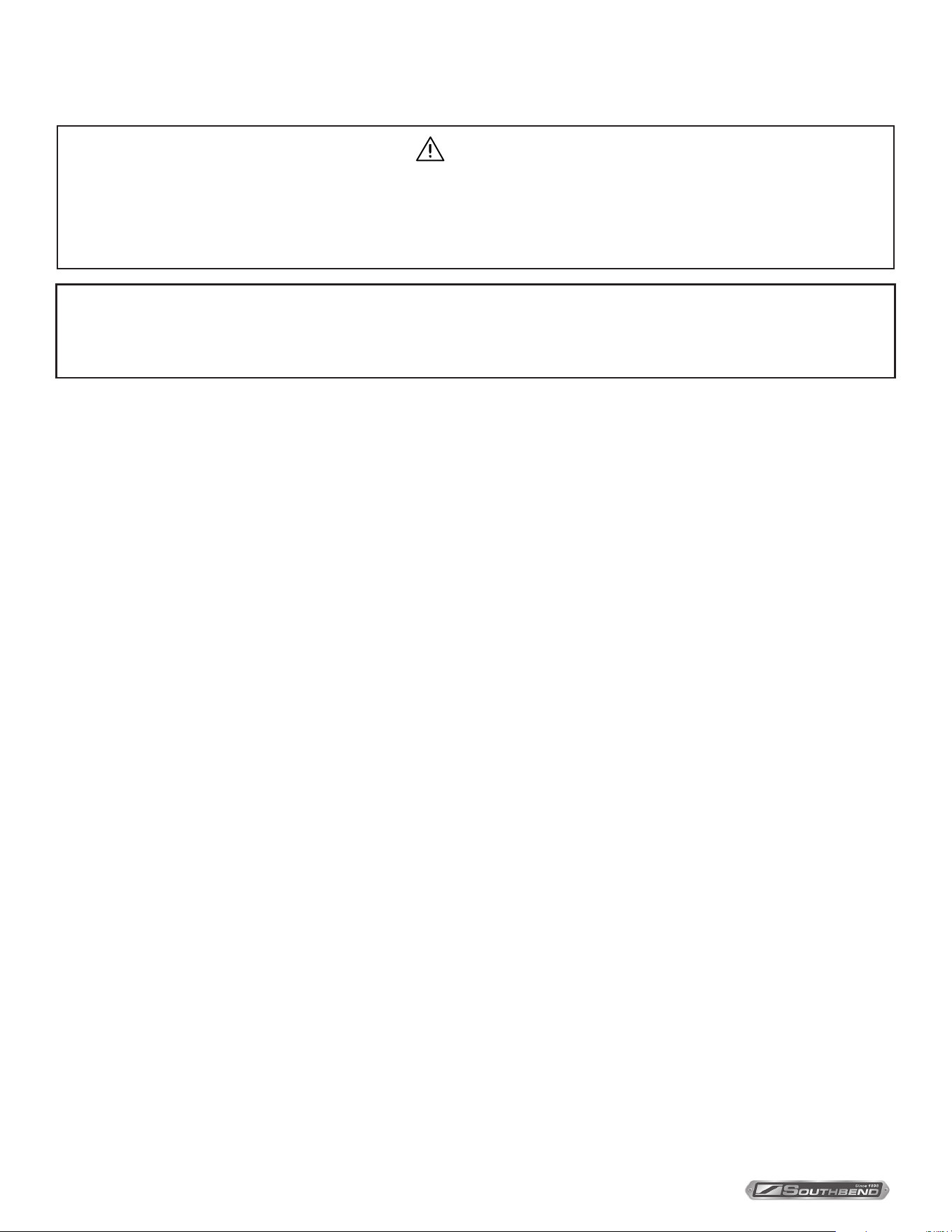
The following describes how to assemble the optional open storage. All holes are pre-drilled for the provided screws.
1. Attach the legs to the oven as described in installation Step 2a on page 10.
2. Attach the two rack guides to the bottom of the oven using two clips and four screws for each rack (see gure “A”
below).
3. Position the shelf below the rack guides and lift it so that the bottom ends of the rack guides pass through the holes in
the shelf (see gure “B” below)
4. Secure the shelf to the rack guides with four clips, each secured by two screws that thread into the threaded holes on
the shelf (see gure “C” below).
5. Attach the rack-stop using two screws. Attach the top of the rack stop to the bottom of the oven, and the bottom of the
rack stop to the shelf (see gure “D” below).
A B
C D
clips and screws
Figure 14
PLATINUM SERIES GAS CONVECTION OVEN
INSTALLATION AND OPERATION MANUAL 1409003 REV 1 (09/25)
PAGE
20
OF 54
WARNING
ELECTRIC GROUNDING INSTRUCTIONS
This appliance (120V ovens only) is equipped with a three-prong (grounding) plug for your protection against shock
hazard and should be plugged directly into a properly grounded three-prong receptacle. Do not cut or remove the
grounding prong from this plug..
NOTICE
This appliance, when installed, must be electrically grounded per local codes, or in the absence of local codes, with the
National Electrical Code, ANSI/NFPA 70 or the Canadian Electrical Code, CSA C22.2, as applicable.
Wiring diagrams are located on the side of the control panel assembly, as well as in this manual (beginning on page 49).
Be sure that the input voltage and phase match the requirements shown on the serial plate, which is located inside the
lower front panel.
Ovens ordered to operate on 120V power have a three-wire cord. (Double-deck ovens have two power cords, one for
each oven.) Each cord has a three-prong plug that ts any standard three-prong grounded receptacle. Single-oven units
require a 15 ampere supply, while double-oven units require a 20 ampere supply. (120V ovens shipped to Canada do
NOT have factory installed power cords, and must be wired as described below.)
Ovens without a power cord have a terminal block. The electric supply must be brought through the service panel in the
rear of the oven and connected to the terminal block. See the wiring diagrams in this manual beginning page 49. The unit
must be adequately grounded. Use 167°F (75°C) wire for all supply lines.
Ovens are factory-equipped with a two-pole terminal block, located behind a cover plate located on the rear of the oven.
To connect the supply wires, remove the cover plate, then route the supply wires and the grounding wire through the
strain relief tting to the terminal block. Insert the supply wires, one each, into the two poles of the terminal block and
tighten the screws. Insert the ground wire into the grounding lug and tighten the screw. Re-attach the cover plate.
Three phase units are wired as above, using only two supply wires. The third wire is not used and must be properly
terminated.
All units are shipped wired as specied by factory order. Conversion between single-phase and three-phase can
be accomplished by referring to phase loading and line amperes chart on wiring diagram for wire size and ampere
requirements.
INSTALLATION
STEP 7: CONNECT ELECTRICITY SUPPLY
PLATINUM SERIES GAS CONVECTION OVEN
INSTALLATION AND OPERATION MANUAL 1409003 REV 1 (09/25)
PAGE
21
OF 54
NOTICE
The installation must conform with local codes, or in the absence of local codes, with the National Fuel Gas
Code, ANSI Z223.1, Natural Gas Installation Code, CAN/CGA-B149.1, or the Propane Installation Code
CAN/CGA-B149.2, as applicable, including:
1. The appliance and its individual shuto valve must be disconnected from the gas supply piping system
during any pressure testing of that system at test pressures in excess of 1/2 psi (3.45 kPa).
2. The appliance must be isolated from the gas supply piping system by closing its individual manual shuto
valve during any pressure testing of the gas supply piping system at test pressures equal to or less than
1/2 psi (3.45 kPa).
A 3/4” NPT line is provided at the rear for the gas connection.
If this equipment is being installed at over 2,000 feet altitude and that information was not specied when ordered, contact
the appropriate authorized Southbend Service Representative or the Southbend Service Department. Failure to install
with proper orice sizing will result in poor performance and may void the warranty.
The serial plate is located inside the front lower panel. It indicates the type of gas the unit is equipped to burn. All
Southbend equipment is adjusted at the factory. Check type of gas on serial plate.
These models are design-certied for operation on natural or propane gases. For natural gas, the regulator is set to
deliver a 4.0” W.C. pressure to the manifold. For propane gas, it is set to deliver 10” W.C. (Regulator is built into the gas
valve)
This appliance should be connected ONLY to the type of gas for which it is equipped. The inlet pressure before the
regulator should be 7-10” W.C. for natural gas or 11-14” W.C. for LP gas. (Regulator is built into the gas valve)
An adequate gas supply is imperative. Undersized or low pressure lines will restrict the volume of gas required for
satisfactory performance. Fluctuations of more than 25% on natural gas or 10% on propane gas will create problems and
aect burner operating characteristics.
An adequate gas supply line to the unit should be no smaller than the I.D. of the pipe from the unit to which it is
connected.
Purge the supply line to clean out dust, dirt, or other foreign matter before connecting the line to the unit.
CAUTION
ALL PIPE JOINTS AND CONNECTIONS MUST BE TESTED THOROUGHLY FOR GAS LEAKS. USE ONLY
SOAPY WATER FOR TESTING ON ALL GASES. NEVER USE AN OPEN FLAME TO CHECK FOR GAS LEAKS.
ALL CONNECTIONS MUST BE CHECKED FOR LEAKS AFTER THE UNIT HAS BEEN PUT INTO OPERATION.
TEST PRESSURE SHOULD NOT EXCEED 1/4” W.C.
1. Check that all screws and bolts are tightened.
2. Move the oven into the position at which it will be operated.
3. Check that the oven is level. If not, adjust the legs.
4. Check that the appropriate clearances are satised (see page 4).
STEP 8: CONNECT GAS SUPPLY
STEP 9: CHECK INSTALLATION
INSTALLATION
PLATINUM SERIES GAS CONVECTION OVEN
INSTALLATION AND OPERATION MANUAL 1409003 REV 1 (09/25)
PAGE
22
OF 54
OPERATION
DANGER
EXPLOSION HAZARD
In the event a gas odor is detected, shut down equipment at the main shut o valve. Immediately call the
emergency phone number of your gas supplier.
CAUTION
To eliminate gas build up which could result in an explosion, in the even of main burner ignition failure a ve
minute purge period must be observed prior to re-establishing ignition source.
NOTICE
For an appliance equipped with a convection oven, no attempt should be made to operate oven during a power
failure.
LIGHTING, RELIGHTING, AND SHUTDOWN INSTRUCTIONS
To light the oven, just switch the power switch at the top left corner of the control panel to the “ON” position. (The oven is
equipped with a direct hot surface ignition system. There is no pilot to light.) For TC models only, the power switch must
be set to the “ON” position, the touchscreen must be active, and a mode selected, such as pressing Manual, selecting a
recipe, or choosing a rack group, in order to light the oven.
If the burners fail to ignite within four seconds, the oven will automatically shut o the gas and wait a few seconds to allow
the gas that was released to dissipate, and try to light the burners again. If the burners still fail to ignite after three such
attempts, the oven will stop trying, even though the power switch is in the “ON” position. To continue to attempt to light the
burners, turn the power switch “OFF” and then “ON” again.
To shutdown the oven, switch the power switch to the “OFF” position. For a complete shutdown, also open the control
panel and turn the manual shut-o valve to the “OFF” position.
OPERATING THE CONTROLS
A convection oven is a dierent type of oven that oers many features and advantages to the food service operation. The
additional capabilities and features of the oven require some learning. However, the operation of the oven is not dicult to
understand or control once you have some practice.
The oven will have one of the two types of control panels:
• Models with Standard Controls are the most similar to a standard (non-convection) oven. Instructions for operating
this type of oven begin on page 23.
• Models with Touch Controls are the most versatile option allowing for manual cooking with cook and hold, as well as
programming recipes and cooking groups. Instructions for operating this type of oven begin on page 25.
OPERATION
PLATINUM SERIES GAS CONVECTION OVEN
INSTALLATION AND OPERATION MANUAL 1409003 REV 1 (09/25)
PAGE
23
OF 54
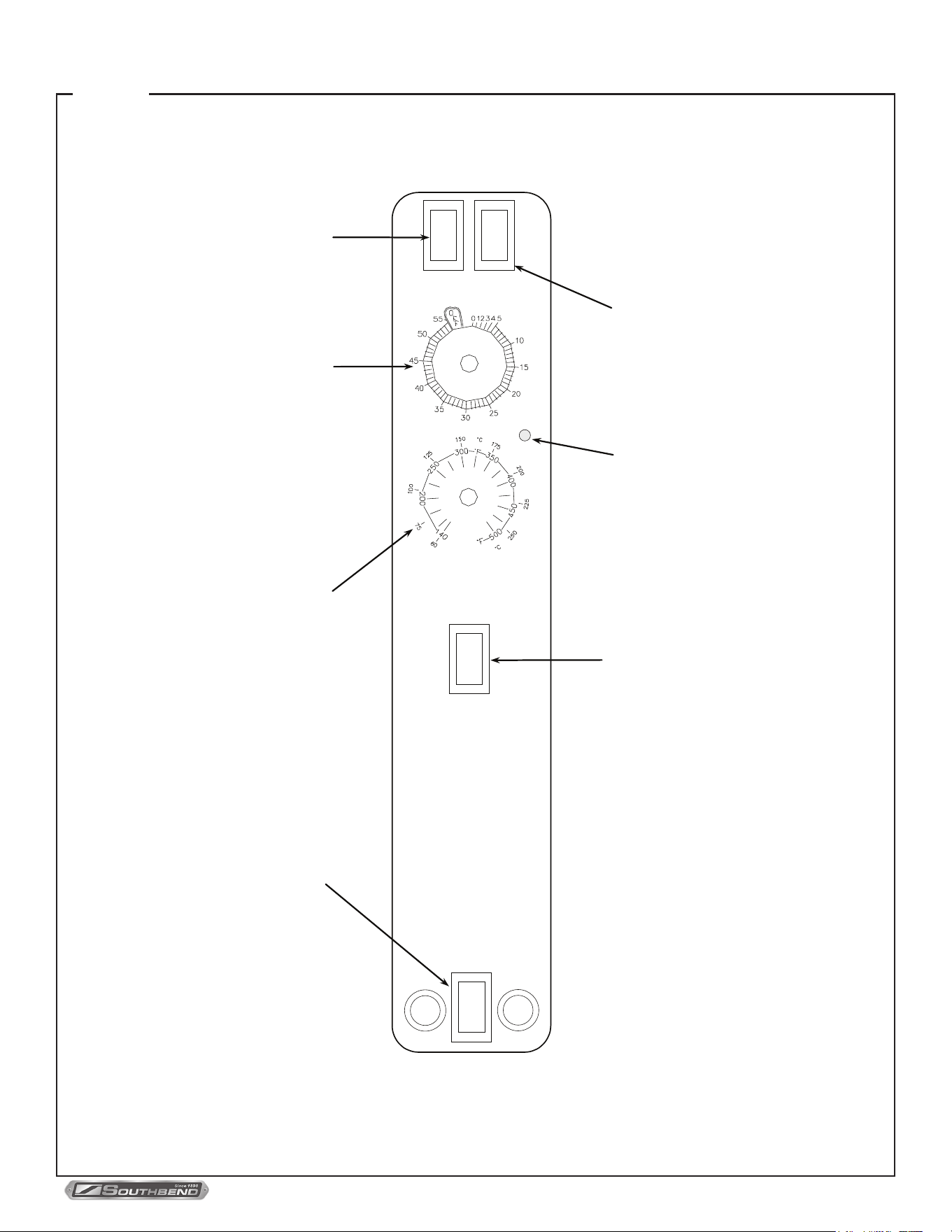
Control Panel of STANDARD Models
OPERATION
Figure 15
POWER
ON
OFF
FAN MODE
COOK
COOL
Power Switch
S
witch ON to use the oven, switch
OFF when done using the oven.
Fan Mode
I
n COOK mode, the fan runs
c
ontinuously except when the doors
a
re open. The fan does NOT cycle
w
ith the operation of the burners. In
C
OOL mode, the fan runs
c
ontinuously even if the doors are
o
pen. Since the burners will not
o
perate if the oven doors are open,
t
o rapidly cool the oven after
c
ooking is completed, open the
d
oors and switch the fan mode to
COOL.
Cook Timer
T
urn knob to set a time duration. An
a
larm will sound when the timer
r
uns out. The timer is a reminder to
t
he user; the timer does not
c
ontrol the oven.
COOK TIMER (MIN.)
Cook Temperature Control
T
urn knob to select desired cooking
t
emperature. The Heat On indicator
w
ill go out when the oven reaches
t
he set temperature, and will cycle
o
n and off as the burners operate to
m
aintain the set cooking
t
emperature.
Heat-On Indicator
I
ndicator is lit when the burners are
operating.
Fan Speed
U
se to select fan speed (HI or
L
OW). The appropriate speed is
d
etermined by the type of food
b
eing cooked.
COOK TEMPERATURE
HI
LOW
FAN SPEED
LIGHTS
Oven Interior Light Switch
O
n ovens equipped with an oven
i
nterior light, press to turn on the
l
ight. The light remains on for as
l
ong as the switch is held.
HEAT ON

PLATINUM SERIES GAS CONVECTION OVEN
INSTALLATION AND OPERATION MANUAL 1409003 REV 1 (09/25)
PAGE
24
OF 54
OPERATION OF STANDARD MODELS
Models with Standard Controls operate much like a standard oven: you turn the oven ON and select a cooking
temperature. Two additional controls are used to control the fan (as described below).
The timer is a reminder to you of when to remove food from the oven.
The timer does NOT control the temperature of the oven.
To cook, do the following:
1. Turn the oven ON using the Power Switch at the top of the control panel.
2. Select the desired fan speed using the Fan Speed switch. The appropriate fan speed (HI or LOW) depends on the type
of food being cooked.
3. Switch the Fan Mode switch to COOK. The fan will run continuously when the oven doors are closed (the fan does not
cycle on and o with the burners). (If this switch is set to COOL the only dierence is that the fan will continue to run
when the oven doors are open.)
4. Set the cooking temperature by turning the Cook Temperature Control until the indicator mark on the knob is pointed
to the desired cooking temperature. The Heat On indicator will light when the burners are on and will remain on while
the oven preheats.
5. Wait until the Heat On indicator has come on and gone out three times. At that time the oven will have reached the set
cooking temperature.
6. Open the oven doors, load the product into the oven, and close the doors.
7. You can use the Cook Timer as a reminder of when the remove the load from the oven. If so desired, turn the Cook
Timer knob until the indicator mark points to the desired cooking time (up to 55 minutes). The timer knob will rotate
counterclockwise as the timer runs down, indicating how much time remains. You can turn the knob while cooking to
increase or decrease the remaining time. When the timer runs out, a buzzer will sound for a short time, then turn itself
o. (To immediately silence the buzzer, turn the Cook Timer knob to the OFF position.) The timer is a reminder to you;
the timer does not control the oven.
If you open the oven doors, the burners in cool mode will shut o until the doors are closed. However, the timer will
continue running even if the doors are open.
For ovens that are equipped with an oven interior light, to turn on the light press and hold the switch located at the
bottom of the control panel.
8. When the load has nished cooking, you can rapidly cool the load by opening the oven doors (which will shut o the
burners) and switching the Fan Mode to COOL (which will cause the fan to run even though the doors are open). For
the most rapid cooling, also switch the Fan Speed switch to HI.
9. When you are done cooking, turn the Cook Temperature control to the lowest setting (fully counterclockwise) and
switch the Power Switch to OFF.
OPERATION
PLATINUM SERIES GAS CONVECTION OVEN
INSTALLATION AND OPERATION MANUAL 1409003 REV 1 (09/25)
PAGE
25
OF 54
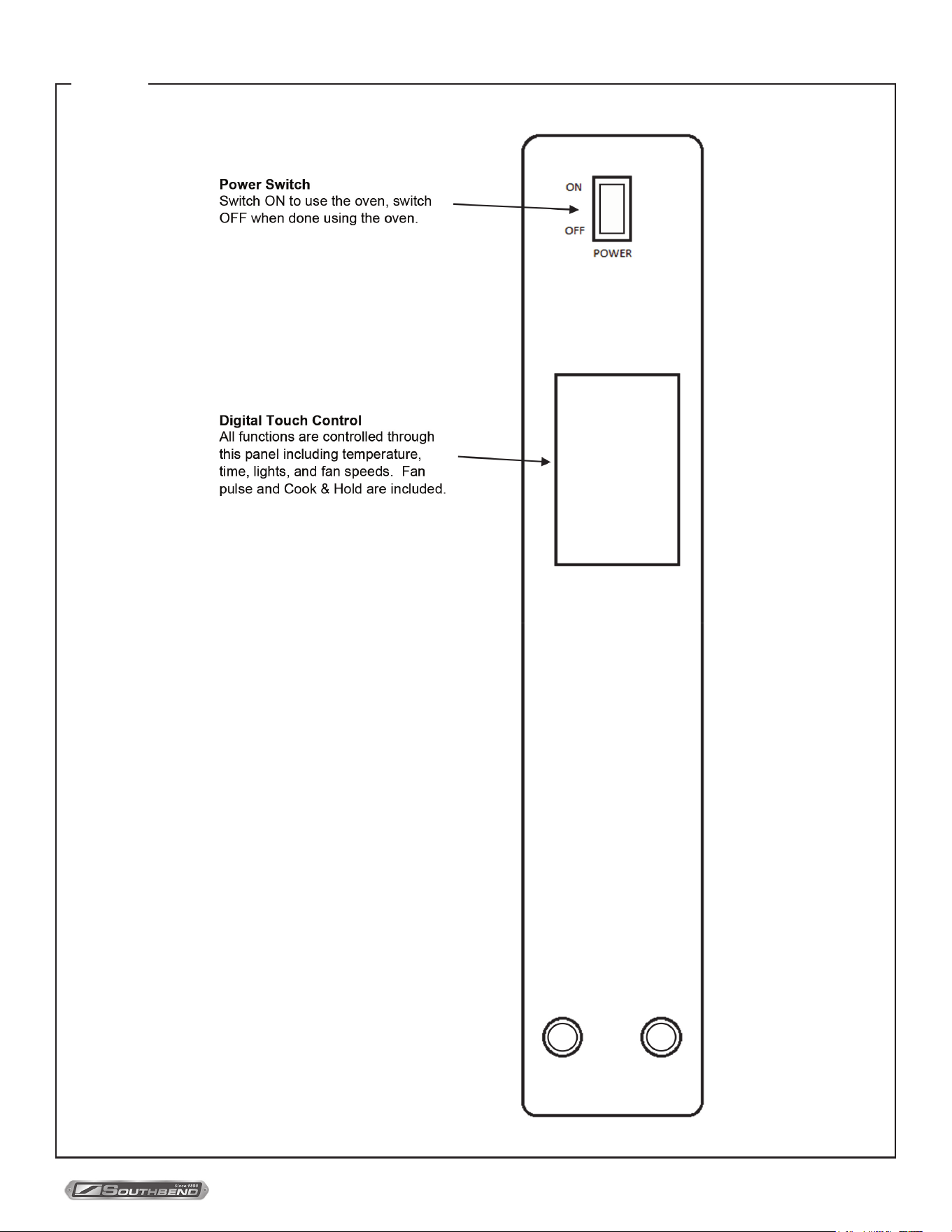
Figure 16
Control Panel of Standard Touchscreen Models
OPERATION
PLATINUM SERIES GAS CONVECTION OVEN
INSTALLATION AND OPERATION MANUAL 1409003 REV 1 (09/25)
PAGE
26
OF 54
Operation for Touchscreen Models Only
Main Screen
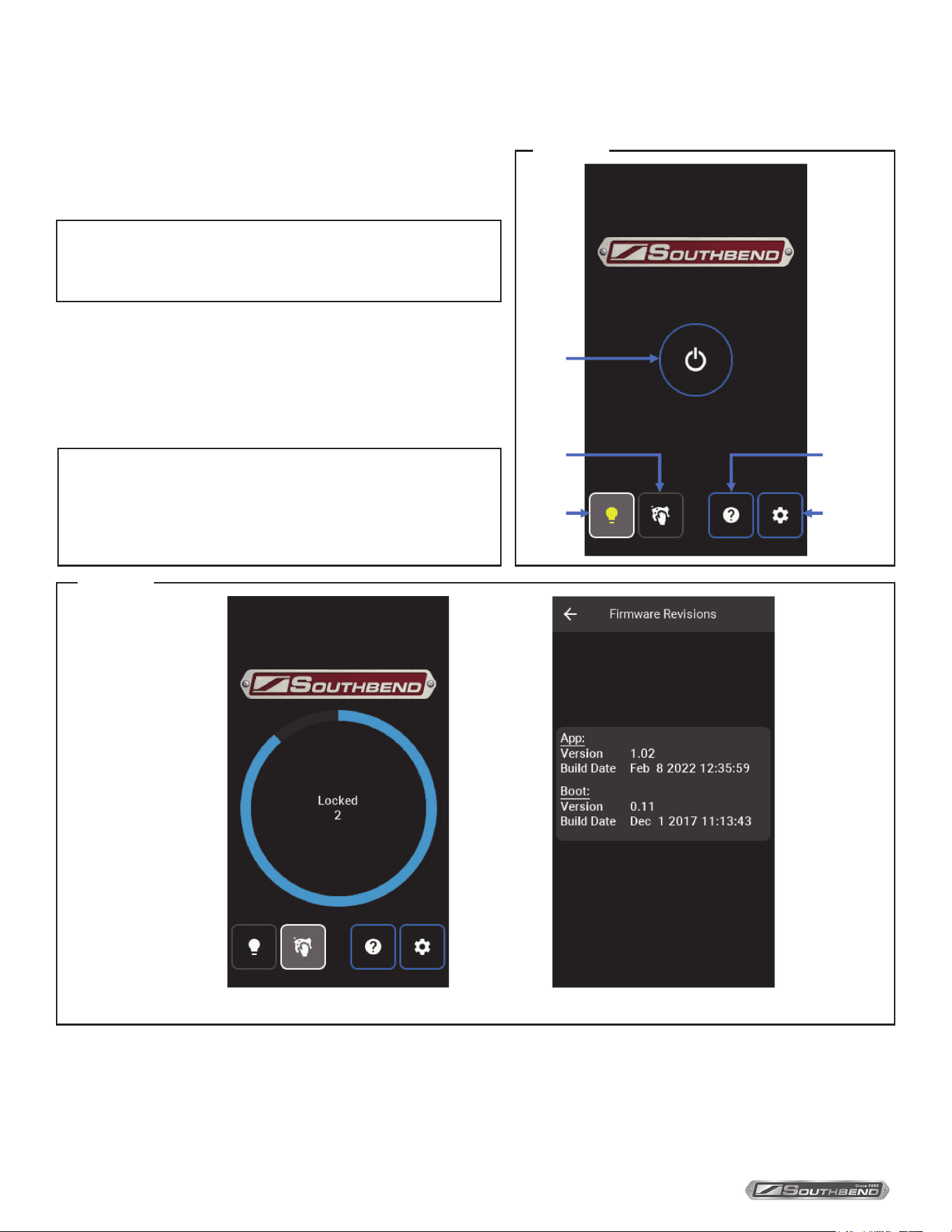
1. Turn the Power Switch ON.
2. Power Button – Located in the center of the screen below
the Southbend logo, pressing this button leads to the
Cooking Mode Page.
3. Lights – Turns oven light ON/OFF. The button will illuminate
and the bulb will glow yellow when ON and can be turned
OFF on any other page.
NOTICE
All button pushes will cause the buzzer to make a chirp
(see Settings in Conguration section to adjust volume).
4. Clean Screen – Press and hold until the countdown wheel appears with countdown timer in the center of the screen.
The screen will be locked for cleaning for 20 seconds. After blue wheel has completed circuit and countdown has
reached 0, the screen will be accessible again.
5. Information – Firmware information displays the App version with the build date and the Boot version with build date.
6. Settings – Opens Settings Page (see Settings in Conguration section).
NOTICE
Not all units have lights installed. The button will still be
present.
Turning the light ON with one page will continue to keep the
light on through the dierent pages.
Power
Button
Clean
Screen
Information
Settings
Lights
Figure 17
Clean Screen Information
Figure 18
OPERATION
PLATINUM SERIES GAS CONVECTION OVEN
INSTALLATION AND OPERATION MANUAL 1409003 REV 1 (09/25)
PAGE
27
OF 54
2. Manual – Operate cooking controls manually.
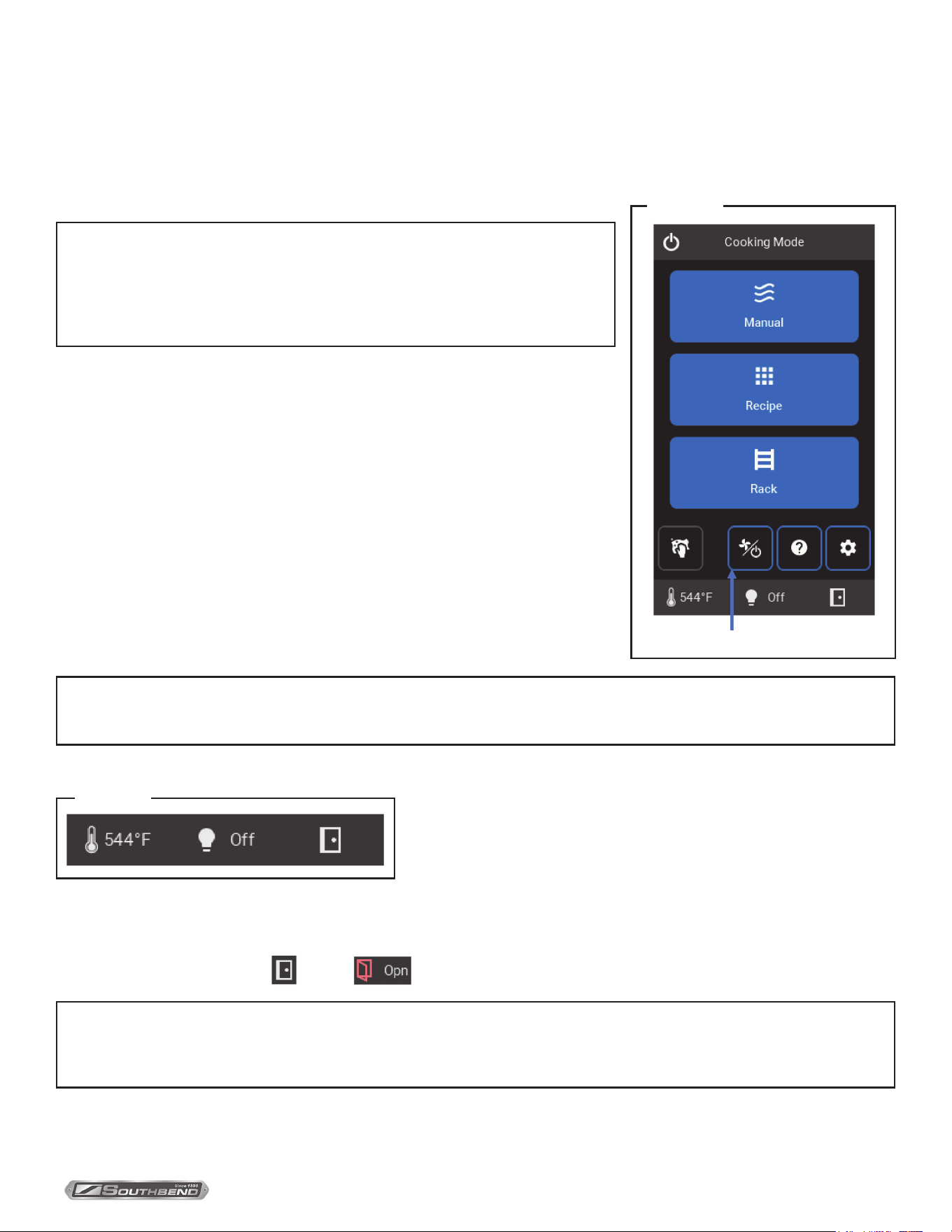
3. Recipe – User-created recipes, either manually entered or imported by
service USB, to cook with the press of a button.
4. Rack – Recipe groupings cooking together based on a number of congured
racks, cook time, and cooking temperature.
5. Clean Panel – See Main Screen.
6. Cool Down – Turns on Fast blower speed, pauses heat sources, and returns
to Main Screen. Cool Down mode terminates when internal temperature falls
below 130°F/55°C, the Power Button on Cooking Mode page is selected, or
when a cooking mode is activated.
7. Information – See Main Screen.
8. Settings – See Settings in the Conguration section.
Cooking Mode
Disclaimer: All recipes provided in this manual are for reference only and do not reect real cook times and temperatures.
For suggested times and temperatures for recipes, see Cooking Hints section.
1. Power Button – Sends user back to Main Screen. Resets all cooking modes by ending current cooking options and
terminates blower and heat source.
NOTICE
Once a cooking mode/selection has been previewed, the blower will turn on
automatically and the Cooking ribbon will relay its status. With the door closed,
the heat source will remain on indenitely while the internal temperature is
below cook temperature until the oven preheats or the Power Button is pressed.
NOTICE
At the end of a cooking cycle, the buzzer will chime on and o until the mode is canceled or reset.
Bottom Ribbon (seen at the bottom of each cooking mode page, but not on the cooking mode selection page)
9. Internal Temperature
10. Lights – See Main Screen.
11. Door Indicator – Closed Open
Cool Down
Figure 19
Figure 20
NOTICE
The door must be closed to run fans, and subsequently heat source. The blower will still run with the door open only in
Cool Down mode. Any cook timer that is active when the door opens will pause and resume when the door is closed.
OPERATION
PLATINUM SERIES GAS CONVECTION OVEN
INSTALLATION AND OPERATION MANUAL 1409003 REV 1 (09/25)
PAGE
28
OF 54
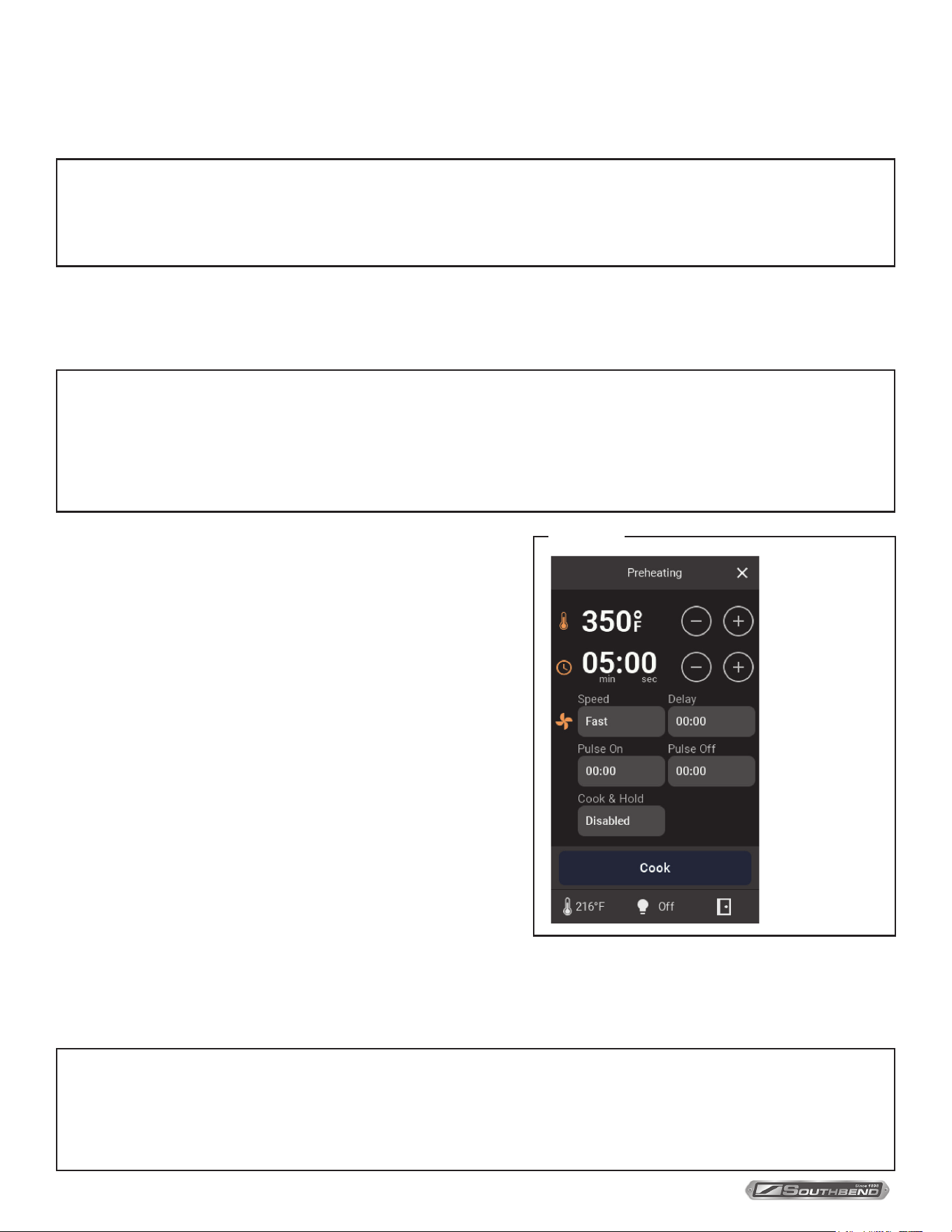
MANUAL COOKING
Manual Cooking Setup
NOTICE
All selections are remembered after a cooking cycle has begun and will be recalled upon return to the page until
power is cycled. If selections were made but Cook was not pressed or the power was cycled, the selections will
return to the previous default settings.
1. Set the cooking temperature (140 °F – 550 °F/60 °C – 288 °C) either by using the add/subtract buttons or by selecting
the temperature itself. Using the add/subtract buttons changes the temperature by ±10 °F/5 °C. Selecting the
temperature will lead to a number pad (see Number Pad in the Conguration section for how to use it). Temperatures
keyed above or below the range will not be accepted and will output the closest min or max.
NOTICE
If the internal temperature is below the set temperature minus Ready Oset Temperature, the top ribbon will appear
with a preheating message and Cook will not be accessible. When the cooking temperature is achieved, the ribbon
will read Ready and cooking may begin. If the temperature of the oven starts above the cooking temperature the
ribbon will read Too Hot until it cools to the desired temperature. The top ribbon will read Cooling when Cool Down
is active (see Cooking Mode).
2. Set Time either by using the add/subtract buttons or by
selecting the time itself. Using the add/subtract buttons steps
the time by ±10 seconds. Upon reaching an hour the format
will change from MM:SS to HH:MM. Selecting the time will lead
to a number pad. MM:SS or HH:MM can be selected before
keying in time. Keying in a time above 59:59 in MM:SS will
change the format to HH:MM. Max time is 24 hours.
3. Press the Blower Speed button (Blower Logo) to the toggle
blower speed between Fast and Slow.
4. A delay time can be set to temporarily shut o the blower and
heat source before the cook starts. Delay time is included in
the total cook time. Max delay time is one hour.
5. Pulse ON/OFF is used to cycle the blower. The maximum
set time is 1 hour for each, and the minimum set time is 10
seconds. If Pulse ON is set to 0 seconds and Pulse OFF has a
value, the time for both will be set to 0 seconds when the cook
cycle begins.
6. Enable Cook & Hold to keep the cabinet warm once cook time
is nished. Enabling this mode will require a hold temperature
within cook temperature limits (generally low to hold food
before serving without overcooking). A timer shows how long Cook & Hold has been active. Hold temperature is not
immediately reached and should be factored in. During Cook & Hold, temperature, blower speed, delay, and pulse
times can all be changed.
NOTICE
All cooking parameters can be altered during the cycle by pressing the desired value or icon. Pressing and
holding on the screen will highlight the parameter logo in yellow that will be selected after release. Each
parameter, besides Blower Speed, will open the associated number pad to make numerical changes. Any
changes made on the Cycle page will not be saved upon return to the Setup page.
Cook Temperature
Cook Time
Blower Speed
Delay Time
Pulse On/O Time
Cook & Hold
Figure 21
OPERATION
PLATINUM SERIES GAS CONVECTION OVEN
INSTALLATION AND OPERATION MANUAL 1409003 REV 1 (09/25)
PAGE
29
OF 54
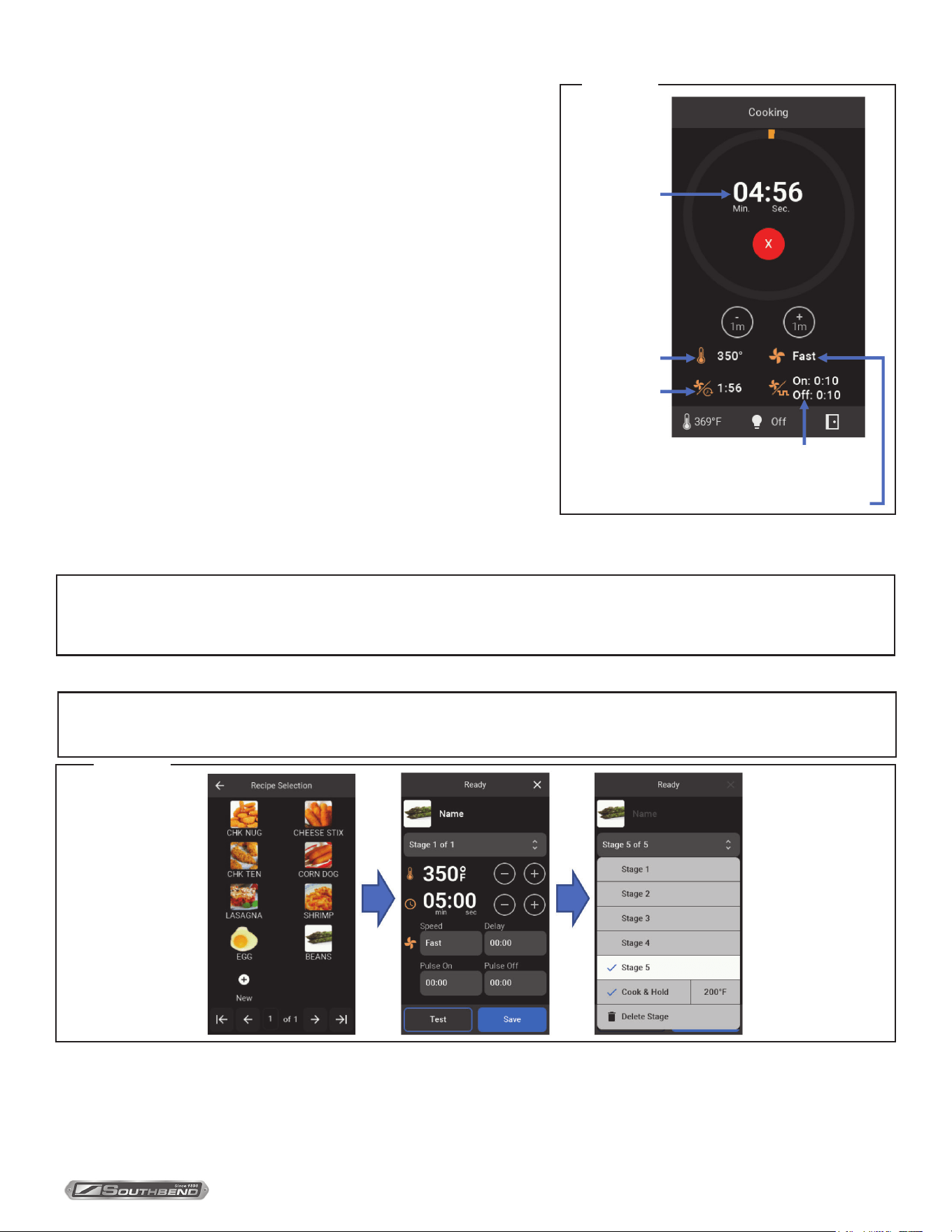
Manual Cooking Cycle
1. Cook Time – Displays cook time in either MM:SS or HH:MM with
a circular bar that grows as time progresses. Time can be altered
at any point by either using the add/subtract 1m buttons to add or
subtract 1 minute from the time, or else clicking on the time itself.
The red X will cancel the cooking operation and send the user back
to the Manual Cooking Setup page. At the end of the timer and
alarm will sound.
2. Cook Temperature (°F/°C setup in conguration)
3. Blower Speed (Fast/Slow)
4. Delay time before cook
5. Blower Pulse (intermittent fan and heat source ON/OFF)
Recipe Cooking
Recipes can be imported ahead of time using the service USB
input (see Recipes in Conguration section) or can be manually
created by pressing the New button. Recipes allow users to perform
complex cooking operations with up to 5 dierent stages of cooking
temperatures, blower speeds, delays, and/or pulses. This section will
cover how to create a new recipe from the page and how to operate the
recipe.
Figure 22
Cook Temp
Cook Time
Delay Time
Pulse On/O
Blower Speed
NOTICE
If editing has been locked, recipe creation and recipe manipulation is not possible from this screen. Manual
Cooking is not aected by editing lockout.
New Recipe Setup
NOTICE
While in Setup the unit blower and heat source will turn o.
1. Click on New icon to create a new recipe. If New icon is not present, select the next page until it appears.
2. Click on the picture icon in the top left and choose from the list of icons to represent the new recipe item. Click the
back button and write the name of the recipe in Name. Hit enter when done.
3. Choose the parameters for Stage 1 just as in Manual Cooking Setup.
Figure 23
OPERATION
PLATINUM SERIES GAS CONVECTION OVEN
INSTALLATION AND OPERATION MANUAL 1409003 REV 1 (09/25)
PAGE
30
OF 54
4. Press Test to run the recipe to ensure the recipe is accurate if necessary.
5. If nished, press the Save button. Otherwise, press the Stage drop-down menu to add more stages. If the Save button
is not pressed a prompt will pop up asking to save changes when exiting the setup page.
6. Press Add Stage to add another stage for setup.
7. Repeat steps 2-5 for up to 5 stages. A cook and hold can be added at the end of the recipe without it counting as one
NOTICE
After the recipe has been created, returning to the recipe from the selection menu allows the user to edit the recipe
unless this option has been locked. Clicking on the Stage drop-down menu while editing will reveal the Delete
Recipe button.
of the stages.
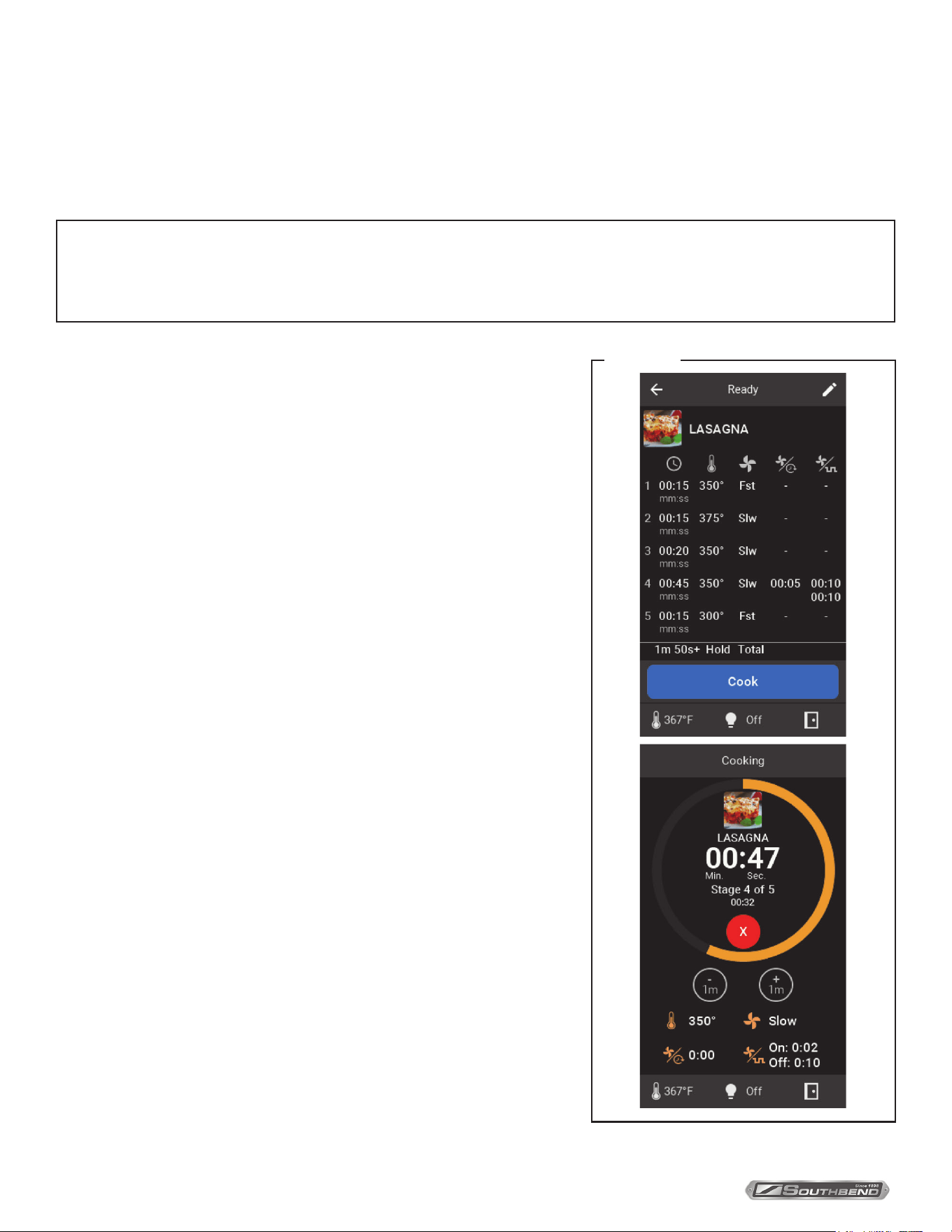
Recipe Run
1. Select Recipe from the Cooking Mode page.
2. Select the desired recipe from the list in the selection menu.
3. All stages will be previewed showing the time of each stage,
temperature, blower speed, any delays, any pulse times, and the total
cook time.
4. If the temperature is too low the top ribbon will read Preheating
and Cook button will not be available until reaching the cooking
temperature. If the temperature is too hot the top ribbon will read
Too Hot and the Cook button will not be available until the internal
temperature cools to the cook temperature.
5. After pressing Cook, the run page appears like Manual Cooking Cycle
and can be altered in the same way unless locked. The cook time will
show the total time while the stage number and time remaining for
that stage will appear below.
Figure 24
OPERATION
PLATINUM SERIES GAS CONVECTION OVEN
INSTALLATION AND OPERATION MANUAL 1409003 REV 1 (09/25)
PAGE
31
OF 54
Rack Cooking
Rack Cooking is used to cook recipes of similar cooking temperature and fan speed (Rack Group) simultaneously.
Recipes need to be created ahead of time to make Rack Groups. Similar recipe cooking temperature is dened within
the limits of the Group Temp Allowance temperature added to the cook temperature of the rst item in the group (see
example). Recipes that have multiple stages cannot be included in Rack Groups. See Settings in Conguration to
change the Group Temp Allowance.
Example: With a Group Temp Allowance of 10 °F, a recipe that cooks at 350 °F can be grouped with a recipe that
cooks at 340 °F and/or a recipe that cooks at 360 °F. If the rst recipe chosen though is 340 °F cook temperature,
then the 360 °F recipe will not appear during group creation.
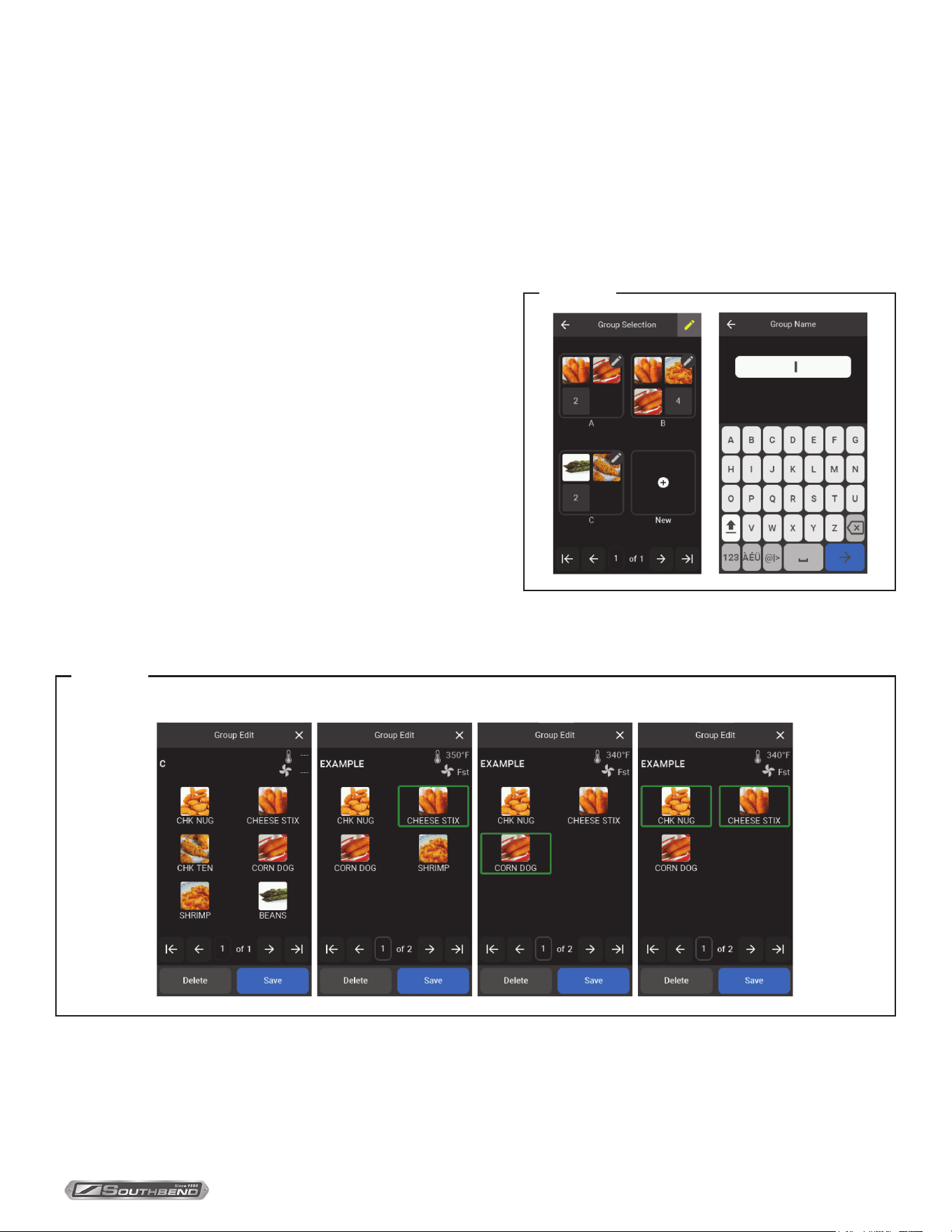
Rack Setup
1. Choose the edit button in the top right corner.
2. A New square will appear on the screen in the next available
space on the nal Group Selection page. Once identied
press the square.
3. Enter desired group name and press the blue arrow button to
accept.
4. Selecting a recipe from the next page will show the cook
temperature and fan speed as well as all other similar
recipes(Figure A). Pressing each dierent recipe will highlight
them with a green box. If only one recipe is selected, pressing
the highlighted box will return all available recipes. If two
items are selected, deselecting the rst recipe chosen will
change the group parameters to the new “rst” selection and may reveal more similar recipes (see written example
above and Figure B). When more than two selections are made, deselecting the rst recipe selection does not change
the group similarity parameters (Figure C).
Figure 25
Figure 26
Group Selection A B C
5. Once all desired recipes are chosen, press the save button.
6. The rack can be deleted at any time during creation or editing.
7. The group image will show the rst three recipe icons with the total number of group recipes available numerically
represented in the last space.
OPERATION
PLATINUM SERIES GAS CONVECTION OVEN
INSTALLATION AND OPERATION MANUAL 1409003 REV 1 (09/25)
PAGE
32
OF 54
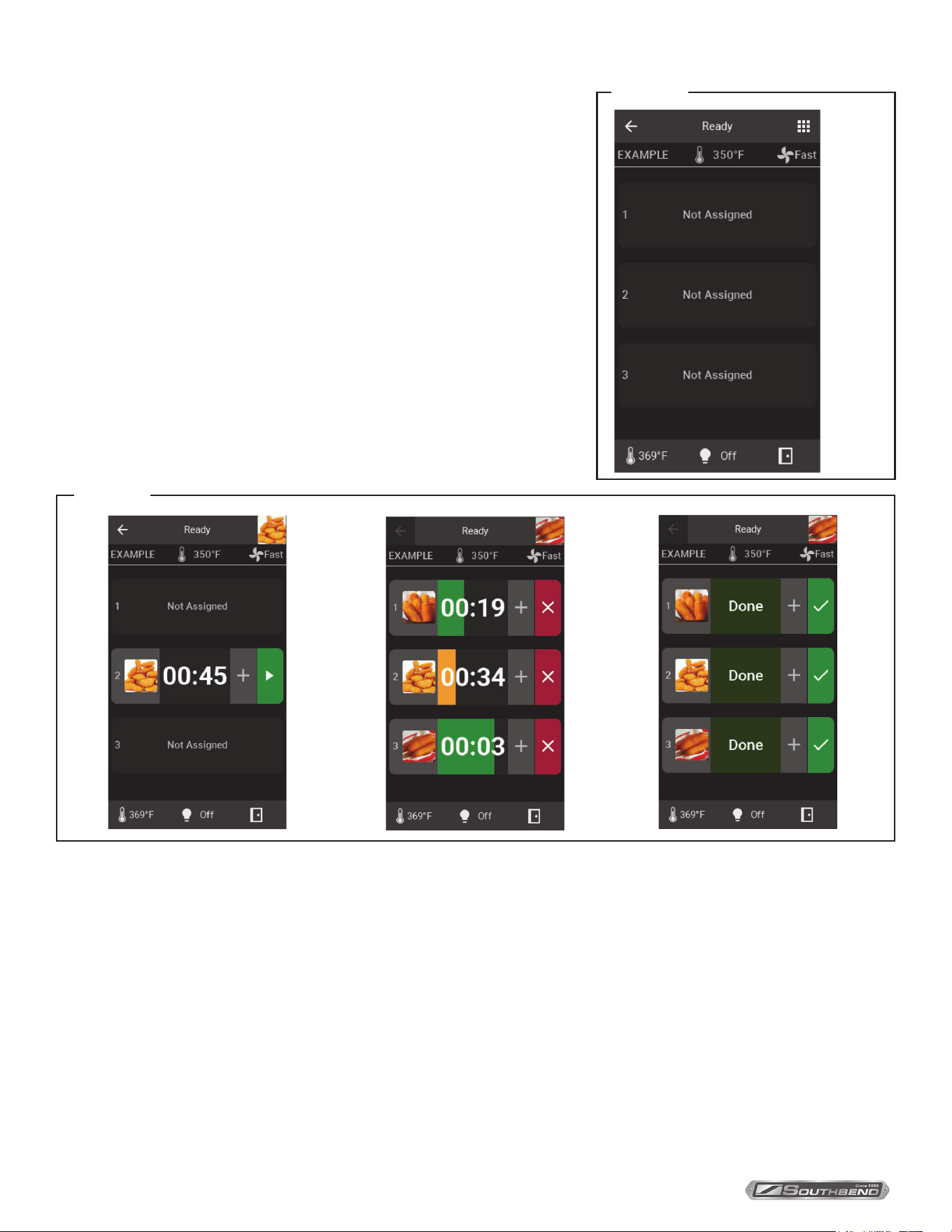
Rack Run
1. Select Rack from the Cooking Mode page.
2. Select the recipe group from the Group Selection page.
3. If internal temperature is lower than the group temperature the top
ribbon will read Preheating and if above, it will read Too Hot.
4. After reaching the correct internal temperature, the blower speed will be
adjusted to the group speed.
5. The group will show Not Assigned spaces initially. To add recipes,
choose the top right 9 square button. This will show all available recipes
for this group as dened during creation in the selection menu or
imported prior.
6. Choose a recipe and it will return to the previous page.
7. By pressing on a rack space, the icon will be attached to that space and
show a timer, additional time button, and start button. Empty racks will
remain empty until a recipe is placed in that space.
Figure 27
9 Square
Figure 28
8. Choosing the start button will start the recipe and time can be added in one-minute increments. A progress bar depicts
the time left. The bar starts as an amber indicator and changes to green at 20 seconds.
9. When nished, the progress bar will blink alternatively a lighter and darker green and say DONE. Press the green
check mark to stop and reset the recipe. Pressing the check mark will also allow access to exit Rack Group which is
not accessible with running and/or completed recipes.
10. Pressing the red X during the run will also stop the recipe and reset the time back to the programmed cook time.
11. Repeat steps 5-7 to ll racks with dierent recipes. The recipe icon in the top right shows which recipe is in the queue
to add to racks. Pressing it allows the selection of the other recipes. Recipes are overwritten when the rack is chosen
with a dierent recipe. Racks that are currently cooking or completed cannot be overwritten until reset.
12. Returning to the Rack Group Selection page will clear all racks.
OPERATION
PLATINUM SERIES GAS CONVECTION OVEN
INSTALLATION AND OPERATION MANUAL 1409003 REV 1 (09/25)
PAGE
33
OF 54
Number Pad
• Entering a new value will start from the right and move left.
• Continuing to enter new numbers will shift the furthest left characters out.
• Press the bottom right arrow button to enter the value
• Clear all values back to 0000 with the bottom left clear button
CONFIGURATION
Service Only USB Access
The access to the USB port to import/export recipes, update the software versions and add Icons is located on the back of
the control panel. Remove the two screws securing the control panel and pull out. Underneath the digital display you will
nd the USB port. If importing les, make sure that the unit is o before inserting the USB drive, and then turn on. There
will be a slight delay compared to normal operation and the le(s) will automatically load. Created Icons must be bitmap
le type. Recipes will need to be created on the touchscreen before export.
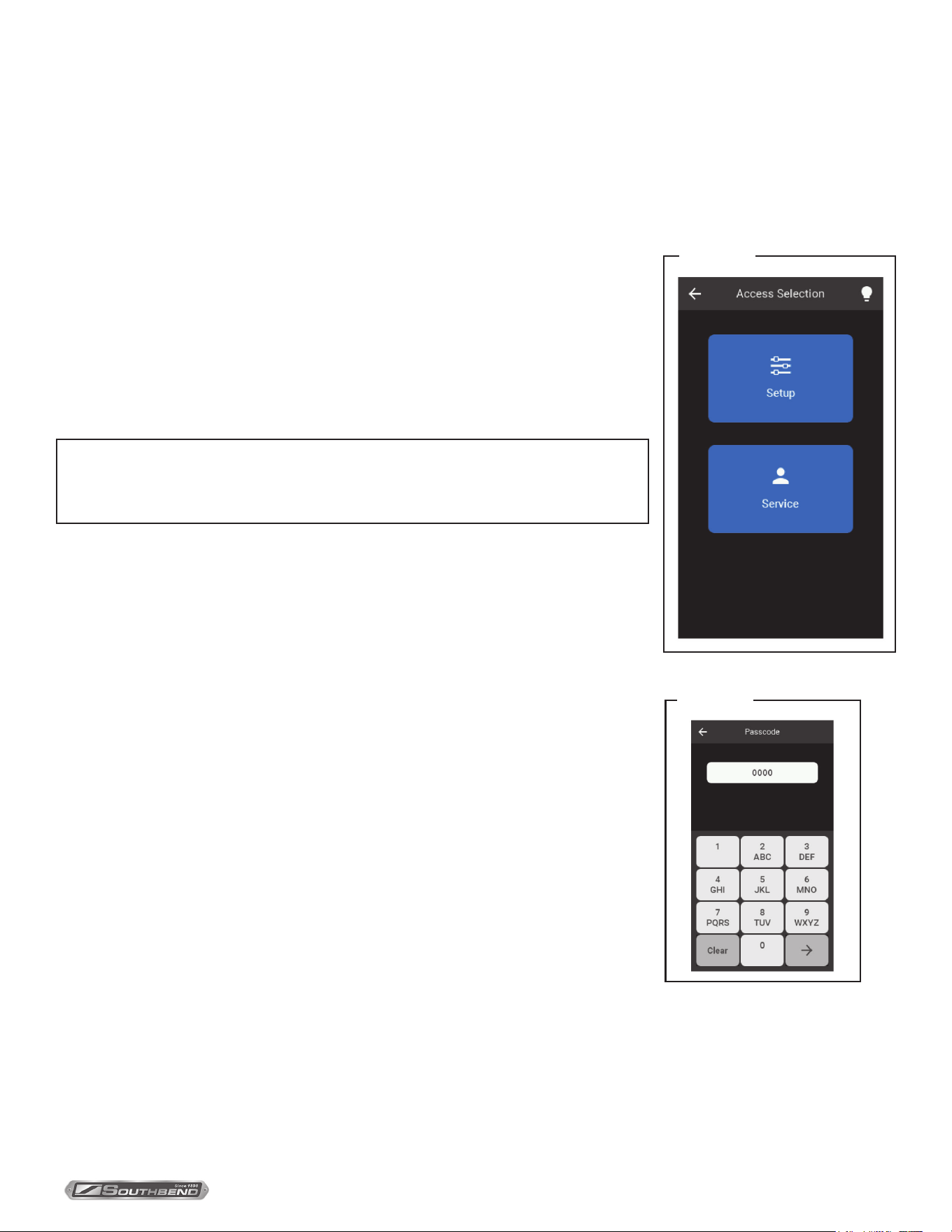
Settings
1. Back Button – Returns to the previous screen.
2. Setup – Passcode-protected parameter congurator. Manager passcode allows
owners to change limited unit variables.
3. Service – Passcode protected unit health and I/O test panel with current input
readings.
Figure 29
NOTICE
As in normal operation, the blower speed must be activated before turning on
the heat. The door may be open or closed to function.
Figure 30
OPERATION
PLATINUM SERIES GAS CONVECTION OVEN
INSTALLATION AND OPERATION MANUAL 1409003 REV 1 (09/25)
PAGE
34
OF 54
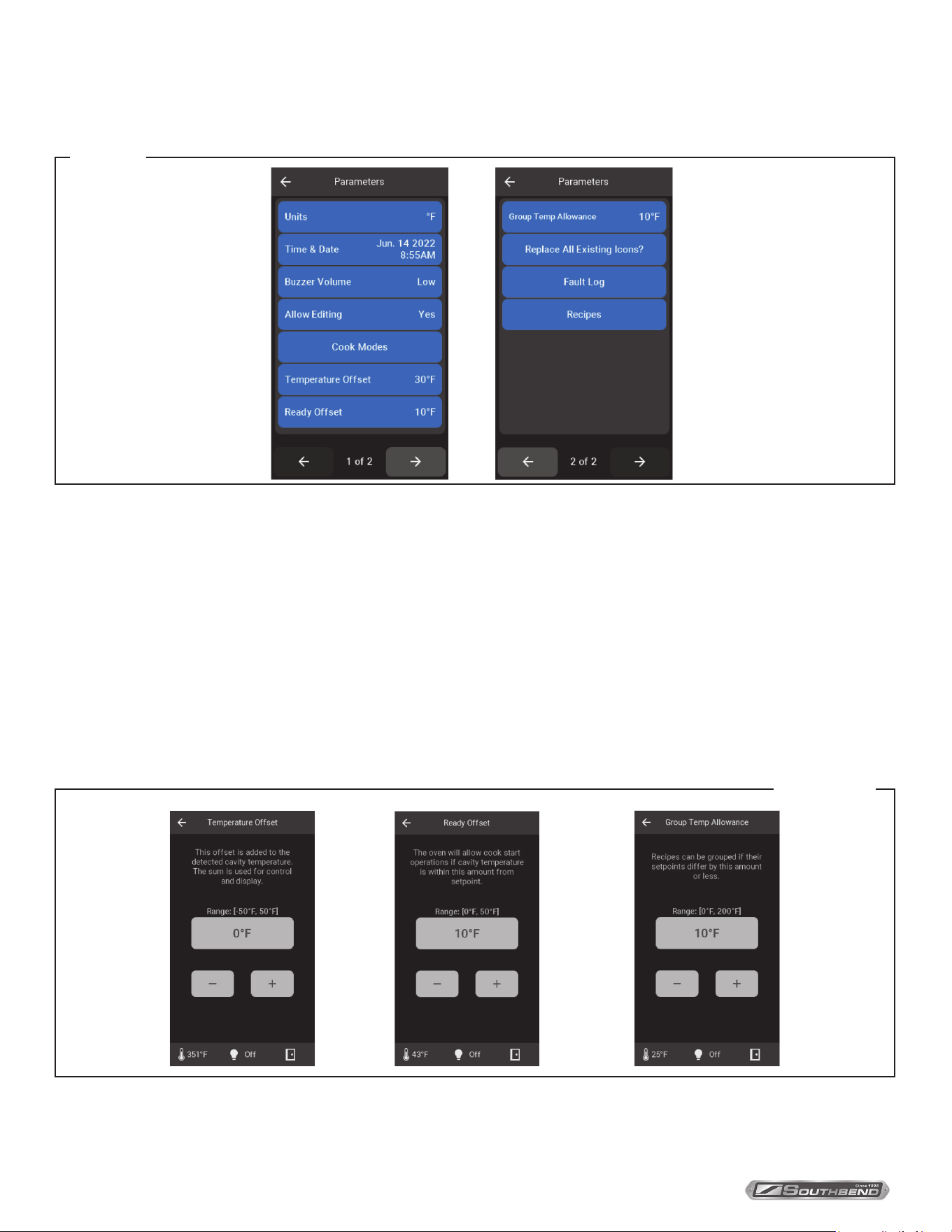
Setup
Enter manager provided code to enter the Setup Parameters page.
1. Units – Toggles between °F and °C
2. Time & Date – Used to record faults
3. Buzzer Volume – Toggle between High, Medium, and Low
4. Allow Editing – Toggle between Yes, Passcode, and No. This setting is in reference to editing recipes and groups.
Selecting Passcode will require manager code to edit while selecting No will remove the edit button from pages.
5. Cook Modes – Choose which cooking modes will be active on the Cooking Mode page.
6. Ready Oset – The oven will allow cook start operations if the cavity temperature is within the oset value from
the cook setpoint.
7. Group Temp Allowance – Recipes can be grouped if their setpoints dier by allowance value or less.
8. Replace All Existing Icons? – Deletes current icons for recipes and uploads new ones if USB is inserted into USB
Figure 31
Figure 32
slot.
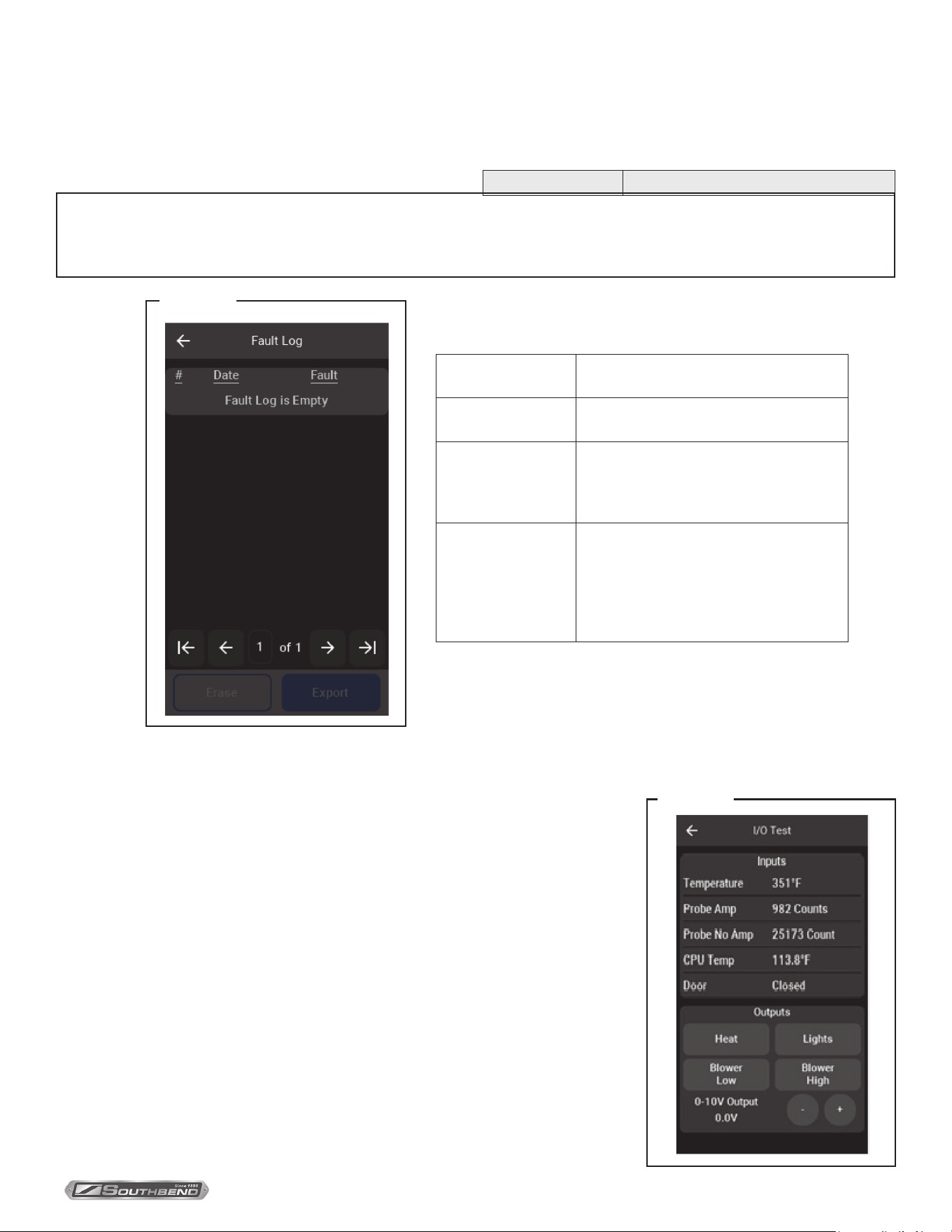
9. Fault Log – Displays all faults that have occurred along with the date and time they occurred until cleared. When a
OPERATION
PLATINUM SERIES GAS CONVECTION OVEN
INSTALLATION AND OPERATION MANUAL 1409003 REV 1 (09/25)
PAGE
35
OF 54
temperature warning is active the only options are to Turn O the unit or go into Cool Down mode. The warning is only
available if the blower or heat source is already on, otherwise, a ribbon with Cavity/Controls Too Hot is visible and
does not allow activation of any cooking modes. The message will go away when the temperature falls below 630°F.
Probe warnings activate related message ribbon and do not allow cooking modes until the problem is xed.
Message Description
NOTICE
If the Turn O option from pop up is selected but the main power switch is still engaged the unit will simply reset
and return to main the screen.
Open Probe Averaged ADC readings indicate that
the RTD is open
Shorted Probe Averaged ADC readings indicate that
the RTD is shorted
Cavity Too Hot Averaged cavity temperature reading
is 650 °F or higher. Temperature
must fall below 630 °F to clear the
fault.
Controls Too Hot Averaged control cavity temperature
reading is 176 °F or higher. The
Temperature must fall below 166 °F
to clear the fault. This measurement
is measured internally on the
microcontroller.
10. Recipes – Allows Import and Export from USB to keep
Figure 33
and manage recipes. Another option is to delete all recipes from unit. Deleting all recipes will also delete them from
Rack Groups.
Service
Service Screen supplies current input values and allows service agents to test
outputs.
1. Temperature – RTD measured cavity temperature
2. Probe Amp – Used to determine open or shorted temperature probes
3. Probe No Amp – Used to determine open or shorted temperature probes
4. CPU Temp – Temperature of the display circuit board
5. Door – Open or closed
6. Heat source, blower and lights can all be toggled (the fan must be on for the
heat to be active).
7. 0-10V Output – Not in use.
Figure 34
OPERATION

PLATINUM SERIES GAS CONVECTION OVEN
INSTALLATION AND OPERATION MANUAL 1409003 REV 1 (09/25)
PAGE
36
OF 54
COOKING HINTS
In a standard (non-convection) oven, the air is relatively still and an insulating layer of moisture surrounds the cooking
food product. In a convection oven, the fan-blown circulating air strips away this insulating layer allowing the heat to
penetrate faster for quicker baking and roasting. Hence, in a convection oven cooking procedures and techniques may
require some modication for successful results. As a general rule, the cooking time will be shorter and the cooking
temperature will be 25 °F to 75 °F lower than those called for in recipes for a standard oven.
TIME & TEMPERATURE
Time and temperature are important. The “Guide to Times and Temperatures” later in this section is a starting point. The
actual best cooking time and temperature will depend on such factors as the size of the load and mixture of the recipe
(particularly moisture). Once an appropriate time and temperature has been established for a particular product and load,
you will nd the result of succeeding loads to be similar.
OVERLOADING
Do NOT overload the oven. The size of the load that can be cooked satisfactorily depends largely on the particular
product. As a rule, ve racks can be successfully used for shallow cakes, cookies, pies, etc. For deeper cakes (such as
angel food), use only three racks because of the size of the pan and the space required for rising. For hamburger patties,
sh sticks, cheese sandwiches, etc., a full complement of racks and pans is usually satisfactory.
HELPFUL SUGGESTIONS
Here are some suggestions that will assist in getting the best possible performance from a convection oven:
• Pre-heat the oven thoroughly before use.
• When re-thermalizing frozen products, pre-heat the oven to 50 °F higher than the planned cooking temperature. After
loading, reduce the temperature setting to the appropriate cooking temperature.
• Space the racks and pans as evenly as possible to allow air circulation.
• Center the load on the racks to allow for proper air circulation around the sides. Do not cover the racks
completely with pans.
• Do not use a deep pan for shallow cakes or cookies, etc. Air circulation across the surface of the product is essential.
WARNING
THE USE OF ALUMINUM FOIL CAN CAUSE HEAT DISTRIBUTION PROBLEMS IN OVENS. EXTREME CARE
MUST BE USED WHEN PLACING ALUMINUM FOIL IN THE OVEN TO ENSURE THAT IT DOES NOT BLOCK OR
CHANGE THE AIR FLOW. THE USE OF ALUMINUM FOIL MAY VOID THE PRODUCT WARRANTY IF ITS USE IS
ASCERTAINED TO BE A PROBLEM.
HOLDING FOOD BEFORE SERVING
Any food item prepared in steam table pans can be held until being served by setting the Hold thermostat to 160°F.
Examples include stued pork chops, oysters Rockefeller, and any vegetable entree.
COOKING HINTS

PLATINUM SERIES GAS CONVECTION OVEN
INSTALLATION AND OPERATION MANUAL 1409003 REV 1 (09/25)
PAGE
37
OF 54
If... then...
Cakes are dark on the sides and not done in the center… lower oven temperature
Cake edges are too brown… reduce number of pans or lower oven temperature.
Cakes have a light outer color… raise temperature.
Cakes settle slightly in the center… bake longer or raise oven temperature slightly. Do not open doors except
to load or unload product..
Cakes ripple… do not overload pans or use batter that is too thin.
Cakes are too coarse… lower oven temperature.
Pies have uneven color… reduce number of pies per rack or eliminate use of baking pans
Brown sugar topping or meringue blows off… after oven is preheated, turn off oven and put product in oven until
topping sets, then turn oven back on..
Rolls have uneven color… reduce number or size of pans.
Meats are browned and not done in center… lower oven temperature and roast longer..
Meats are well done and not browned… raise temperature. Limit amount of moisture.
Meats develop hard crust… reduce temperature or place pan of water in oven.
Excessive meat shrinkage occurs… lower oven temperature..
GUIDE TO TIMES AND TEMPERATURES
As a guide, set oven temperatures 25 °F to 75 °F lower than called for in recipes for non-convection ovens, (i.e., range or
deck ovens).
Time and temperature will vary depending on load, mix, size, portion, initial temperature of food, and other factors. Use
the following chart as a starting point to develop your cooking techniques. Rack loading and position may aect results.
Experimentation may be necessary to suit individual requirements.
Cooking Time Temperature Number of Racks
Meat and Fish
Top Round, 18-20 lbs. (medium) 5 hours 275 °F 1
Prime Ribs (rare) 4 hours 225 °F 1
Burger Patties, 4 oz. 10 hours 350 °F 5
Fish Cakes 10-12 min. 375 °F 5
Turkey, 10-12 lbs. 3 hr. 20 min. 225 °F 1
COOKING PROBLEMS AND SOLUTIONS
COOKING HINTS

PLATINUM SERIES GAS CONVECTION OVEN
INSTALLATION AND OPERATION MANUAL 1409003 REV 1 (09/25)
PAGE
38
OF 54
Cooking Time Temperature Number of Racks
Baked Goods
Bread, 2 lb. loaf 35 min. 375 °F 3
Biscuits 5-10 min. 400 °F 5
Cornbread. 18 min. 400 °F 5
French Bread 10 min. 375 °F 5
Sheet Cake 18-20 min. 300 °F 5
Cream Puffs 20 min. 375 °F 5
Brown & Serve Rolls 6 min. 400 °F 5
Ginger Bread 18 min. 300 °F 5
Yeast Rolls, sheet pan 16-18 min. 325 °F 5
Pineapple Upside Down Cake 25-30 min. 325 °F 5
Apple Turnovers 15-18 min. 350 °F 5
Fruit Cobbler 22-25 min. 375 °F 5
Brownies 15 min. 350 °F 5
Danish Pastry 12 min. 325 °F 5
Pie Shells 12 min. 350 °F 5
Fresh Fruit Pies 25-30 min. 350 °F 5
Pumpkin Pies 25-30 min. 275 °F 5
Fresh Apple Pies 35 min. 375 °F 5
Frozen Berry Pies 40 min. 375 °F 5
Frozen Fruit Pies 45 min. 375 °F 5
Potatos
5
Baked Potatoes, 10 oz. 50-55 min. 450 °F 5
Baked Potatoes, 6-8 oz. 40-45 min. 450 °F 5
Scalloped Potatoes 35 min. 325 °F 5
Miscellaneous
Macaroni and Cheese 30 min. 350 °F 5
Stuffed Peppers 18 min. 350 °F 5
Toasted Cheese Sandwiches 8 min. 375 °F 5
COOKING HINTS
PLATINUM SERIES GAS CONVECTION OVEN
INSTALLATION AND OPERATION MANUAL 1409003 REV 1 (09/25)
PAGE
39
OF 54
CLEANING
Southbend equipment is sturdily constructed of the best materials and is designed to provide durable service when
treated with ordinary care. To expect the best performance, your equipment must be maintained in good condition and
cleaned daily. Naturally, the periods for this care and cleaning depend on the amount and degree of usage.
Following daily and periodic maintenance procedures will enhance the long life of your equipment. Climatic conditions
(such as salt air) may require more thorough and frequent cleaning or the life of the equipment could be adversely
aected.
The oven interior is nished with a porcelain enamel coating unless stainless steel option is selected . “Spillovers” should
be cleaned from the interior bottom surface as soon as possible to prevent carbonizing and a burnt-on condition. Grease
or any residue should be cleaned from interior surfaces as soon as it accumulates.
WARNING
FOR YOUR SAFETY, DISCONNECT THE POWER SUPPLY TO THE APPLIANCE BEFORE CLEANING.
WHEN CLEANING THE BLOWER WHEEL, BE SURE TO HAVE THE POWER SWITCH IN THE “OFF” POSITION.
DAILY CLEANING AND MAINTENANCE
1. Turn the power switch to OFF and allow the oven to cool.
2. Remove the oven-interior racks and rack guide frames. (The rack guide frames are readily removable by merely
raising to disengage them from their sockets.) Wash the racks and rack guides in a sink with mild detergent and
warm water. Dry them thoroughly with a clean cloth.
3. Look to see if any foreign matter has accumulated on the blades of the blower wheel (which will reduce air
circulation). If necessary, remove the right-side lining of the oven, which is secured by thumbscrews near each corner.
Use a sti brush to remove accumulations from the blower blades, then wash with soap and water.
4. Wash the interior surfaces with mild detergent and warm water. Rinse with clean water, and dry thoroughly with a
clean cloth. For stubborn accumulations of grease and carbon buildup, use a commercial Non-Caustic Oven and Grill
Cleaner. Use of cleaners not specied as Non-Caustic may damage the unit.
5. Clean the control panel with warm water and mild soap. Never use cleaning solvents with a hydrocarbon base.
6. Wipe the other exterior surfaces with a clean damp cloth. If the exterior surfaces require more thorough cleaning, see
“Cleaning Stainless Steel Surfaces” on the next page.
7. Return the rack guides and racks to their appropriate locations inside the oven.
8. LEAVE THE DOOR OPEN AT NIGHT AFTER CLEANING. This allows the oven to dry thoroughly after cleaning and
also prolongs the life of the door gasket.
MONTHLY CLEANING
Clean around the rear of motor (where the vent screen is located), louvered panels, and primary air holes in the rear of
the oven where grease or lint may have accumulated.
CLEANING
SEMI-ANNUAL CLEANING
At least twice a year have your Southbend Authorized Service Agency or another qualied service technician clean and
adjust the unit for maximum performance.
At least twice a year the oven’s venting system should be examined and cleaned.
CAUTION
ONLY USE A COMMERCIAL NON CAUSTIC CLEANER ON THE INTERIOR TO PREVENT POTENTIAL DAMAGE
PLATINUM SERIES GAS CONVECTION OVEN
INSTALLATION AND OPERATION MANUAL 1409003 REV 1 (09/25)
PAGE
40
OF 54
CLEANING STAINLESS STEEL SURFACES
To remove normal dirt, grease and the product residue from stainless steel that operates at LOW temperature, use
ordinary soap and water (with or without detergent) applied with a sponge or cloth. Dry thoroughly with a clean cloth.
To remove grease and food splatter, or condensed vapors, that have BAKED on the equipment, apply cleanser to a
damp cloth or sponge and rub cleanser on the metal in the direction of the polishing lines. Rubbing cleanser, as gently
as possible, in the direction of the polished lines will not mar the nish of the stainless steel. NEVER RUB WITH A
CIRCULAR MOTION. Soil and burnt deposits that do not respond to the above procedure can usually be removed by
rubbing the surface with SCOTCH-BRITE scouring pads or STAINLESS scouring pads. DO NOT USE ORDINARY
STEEL WOOL, as any particles left on the surface will rust and further spoil the appearance of the nish. NEVER USE
A WIRE BRUSH, STEEL SCOURING PADS (EXCEPT STAINLESS), SCRAPER, FILE OR OTHER STEEL TOOLS.
Surfaces that are marred collect dirt more rapidly and become more dicult to clean. Marring also increases the
possibility of a corrosive attack. Renishing may then be required.
To remove heat tint – Darkened areas sometimes appear on stainless steel surfaces where the area has been subjected
to excessive heat. These darkened areas are caused by the thickening of the protective surface of the stainless steel and
are not harmful. Heat tint can normally be removed by the foregoing, but tint that does not respond to this procedure calls
for a vigorous scouring in the direction of the polish lines, using SCOTCH-BRITE scouring pads or a STAINLESS scouring
pad in combination with a powered cleanser. Heat tint action may be lessened by not applying, or by reducing heat to
equipment during slack periods.
CLEANING
WARNING
For an appliance equipped with casters, (1) the installation shall be made with a connector that complies with the
Standard for Connectors for Movable Gas Appliances, ANSI Z21.69 or Connectors for Moveable Gas Appliances,
CAN/CGA-6.16, and a quick-disconnect device that complies with the Standard for Quick-Disconnect Devices for
Use With Gas Fuel, ANSI Z21.41, or Quick Disconnect Devices for Use with Gas Fuel, CAN1-6.9, (2) adequate
means must be provided to limit the movement of the appliance without depending on the connector and the quick-
disconnect device or its associated piping to limit the appliance movement and (3) the restraining means should be
attached to a frame member on the back of the unit.
WARNING
If disconnection of the restraint (page 12) is necessary to move the appliance for cleaning, etc., reconnect it when the
appliance is moved to its originally installed position.
CAUTION
DO NOT USE ordinary steel wool as any particles left on the surface will rust.
NEVER USE a wire brush, steel or abrasive scouring pad (except stainless), scraper, le or other steel tools. Surfaces
which are marred collect dirt more rapidly and become more dicult to clean. Marring also increases the possibility of
corrosive attack.
DO NOT clean door gasket with a high chlorine solution or bleach.
NEVER use any corrosive cleaner. Use only cleaners approved for stainless steel.
WARNING
Improper cleaning can result in expensive repairs or electrical shock. Do not get water on electrical controls or motors.
WARNING
To avoid the risk of accidental electric shock, disconnect the unit from the power supply before moving the unit.
PLATINUM SERIES GAS CONVECTION OVEN
INSTALLATION AND OPERATION MANUAL 1409003 REV 1 (09/25)
PAGE
41
OF 54
ADJUSTMENTS
WARNING
ADJUSTMENTS AND SERVICE WORK MAY BE PERFORMED ONLY BY A QUALIFIED TECHNICIAN WHO IS
EXPERIENCED IN, AND KNOWLEDGEABLE WITH, THE OPERATION OF COMMERCIAL COOKING EQUIPMENT.
HOWEVER, TO ASSURE YOUR CONFIDENCE, CONTACT YOUR AUTHORIZED SERVICE AGENCY FOR RELIABLE
SERVICE, DEPENDABLE ADVICE, GENUINE FACTORY PARTS AND ANY OTHER ASSISTANCE.
NOTICE
Warranty will be void and the manufacturer is relieved of all liability if service work is performed by other than a qualied
technician, or if other than genuine Southbend replacement parts are installed.
LUBRICATION
The door chains and sprockets have been lubricated at the factory with high temperature “Never Seeze” lubricant. After
each six months of usage, lubricate the door chains and sprockets with the same type of lubricant.
Motor lubrication information can be found on permanent label located on motor.
ADJUSTING GAS PRESSURE REGULATOR
The pressure regulator built into the gas valve is factory set at 4.5” W.C. for natural gas and 10” W.C. for propane gas. To
check the manifold pressure:
1. Turn the unit “OFF”.
2. Turn main gas valve to entire unit o.
3. Remove front lower panels and locate 1/8” plug in manifold.
4. Remove plug and install a tting appropriate to connect a manometer.
5. Turn on main gas to unit.
6. Turn ovens “ON” and wait for burners to light up.
7. If manometer does not read 4.5” W.C. for natural gas, or 10” W.C. for propane gas, adjust regulator on gas valve (if
gas pressure is O.K. go to Step 10.
8. Remove cap from top of regulator on gas valve.
9. With a screwdriver rotate regulator adjustment screw clockwise to increase, or counterclockwise to decrease,
pressure until manometer shows correct reading.
10. Repeat steps 1 and 2. ( turn the gas and unit o)
11. Remove manometer tting and replace plug in manifold.
12. Repeat step 5 and 6 and check the manifold plug for leaks.
13. Replace lower front panels.
ADJUSTMENTS

PLATINUM SERIES GAS CONVECTION OVEN
INSTALLATION AND OPERATION MANUAL 1409003 REV 1 (09/25)
PAGE
42
OF 54
Temperature Controller (Standard-Control Models Only)
The calibration of the temperature controller should not be changed until sucient experience with cooking results has
denitely proved that the temperature controller is not maintaining proper oven temperatures. Before any recalibration is
attempted, the oven temperature should be checked by the following procedure:
1. Remove all trays and pans from the oven.
2. Place a thermocouple or a reliable mercury oven-type thermometer at the center of the middle rack.
3. Turn the oven ON and set the temperature control knob to 400 °F.
4. The amber “heat on” light will go out when the oven temperature is reached.
5. Allow three cycles for the temperature to stabilize.
6. Read the thermocouple or thermometer immediately after the light goes out for the third time, and again immediately
after it comes on the next time.
7. If the average of these readings varies by more than 10 °F from the dial setting, recalibrate by the following
procedure. Recalibration should be attempted only by a competent service technician.
Use the following procedure to recalibrate the oven:
1. Loosen the two set screws that secure the temperature-control knob to the temperature-control shaft.
2. Remove the knob from the shaft, being careful not to rotate the knob or shaft.
3. Replace the knob on the shaft so that the indicator mark on the knob points directly at the temperature that was
measured at the center of the oven.
4. Re-check the oven calibration.
ADJUSTMENTS
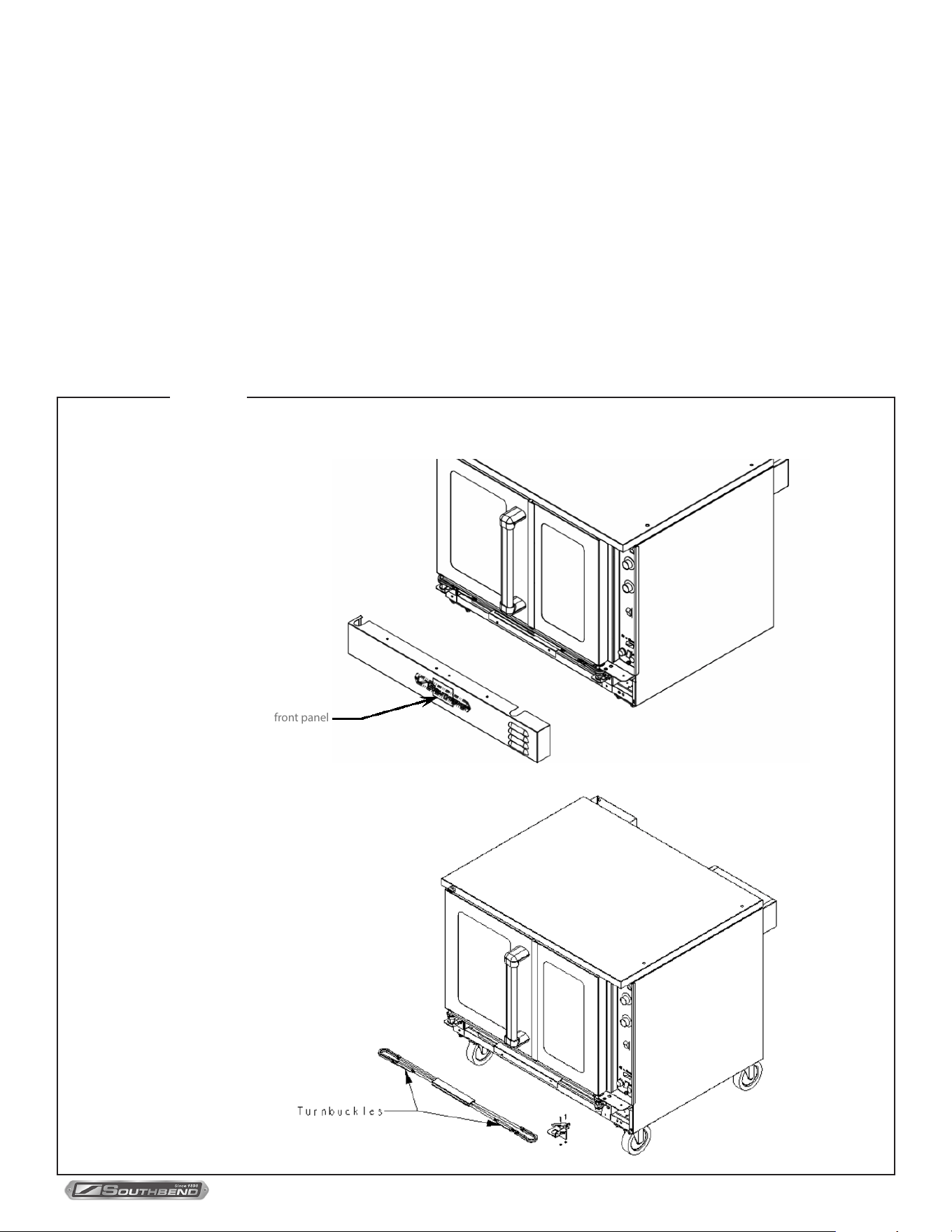
PLATINUM SERIES GAS CONVECTION OVEN
INSTALLATION AND OPERATION MANUAL 1409003 REV 1 (09/25)
PAGE
43
OF 54
ADJUSTING DOOR CHAIN MECHANISM
The door chain mechanism causes the left and right doors to open and close together. To adjust the door chain
mechanism, do the following:
1. Remove lower front panel that covers the door chain mechanism (shown below on A).
2. Close both doors.
3. Check the positioning of the chain on the sprockets. There should be ve regular links and one master link visible on
the front side of each chain. If not, open the turnbuckles and reposition the chain over the sprockets.
4. Adjust the turnbuckles so that the right door closes about 1/4” to 1/2” inch ahead of the left door. The left door should be
pushed tight over the friction catch so both doors are completely closed against the frame.
5. Secure the turnbuckles by tightening their locknuts.
Door Chain Adjustment
ADJUSTMENTS
Figure 35
front panel
A
B
PLATINUM SERIES GAS CONVECTION OVEN
INSTALLATION AND OPERATION MANUAL 1409003 REV 1 (09/25)
PAGE
44
OF 54
TROUBLESHOOTING
WARNING
ADJUSTMENTS AND SERVICE WORK MAY BE PERFORMED ONLY BY A QUALIFIED TECHNICIAN WHO IS
EXPERIENCED IN, AND KNOWLEDGEABLE WITH, THE OPERATION OF COMMERCIAL COOKING EQUIPMENT.
HOWEVER, TO ASSURE YOUR CONFIDENCE, CONTACT YOUR AUTHORIZED SERVICE AGENCY FOR RELIABLE
SERVICE, DEPENDABLE ADVICE, GENUINE FACTORY PARTS AND ANY OTHER ASSISTANCE.
NOTICE
The warranty will be void and the manufacturer is relieved of all liability if service work is performed by other than a
qualied technician, or if other than genuine Southbend replacement parts are installed.
In case of problems in operation at initial installation, check type of gas and manifold pressure and compare with
information listed on the serial plate. The serial plate is located inside the lower front panel.
PERFORMANCE STANDARD
The typical time for the oven to heat from 75 °F to 350 °F is 5 to 6 minutes for ovens using natural gas, and 7 to 8 minutes
for ovens using propane depending with the model.
The burners should come on when the actual oven temperature drops to 10 °F below the temperature setting.
TROUBLESHOOTING

PLATINUM SERIES GAS CONVECTION OVEN
INSTALLATION AND OPERATION MANUAL 1409003 REV 1 (09/25)
PAGE
45
OF 54
Symptom Possible Cause Check or Replace
Oven will not hold cor-
rect temperature.
Temperature probe not working. Resistance across temperature probe leads at room temperature (70°F)
should be approximately 1096 ohms.
Temperature control not calling for
heat.
When heat is required, there should be continuity between terminals 6 and 7
on temperature control. (standard control only)
Undersized gas supply line Oven requires 3/4” ID gas line.
Low gas pressure. Oven requires 6” manifold water column pressure for natural gas, 10” for
propane.
Inadequate or improper ventilation. Check ventilation hood. Verify draw and make up air adjustment.
Out of calibration. Recalibrate tempreture
Hot surface ignitor
glows red but burners
do not come on when
thermostat calls for heat
(cooking light is on).
No power to gas valve. Check for 24V from ignition box to gas valve.
Faulty main gas solenoid. Replace gas valve.
Faulty ignition module. Replace ignition module.
Manual shutoff valve closed Open all shut-off valve.
Manual valve on gas valve turned off. Open manual valve on gas valve.
Hot surface ignitor not in front of rear
end of burner.
Re-position hot surface ignitor to be in front of rear end of burner.
Hot surface ignitor does
not glow red.
No power to ignitor. Check that voltage from ignitor module to ignitor is 24V. Ignitor draws approx-
imately 3.35 amps at start as it heats up resistance goes down. Gas valve
opens approximately 1.8 amps.
Ignitor broken or cracked. Should read continuity between leads on ignitor.
No power on ignition module. Should be 24V from transformer to ignition module.
Check power to transformer. Should be voltage stamped on serial plate. Check between 3 and 6 on termi-
nal strip.
Check blower motor. Motor should turn
when power switch is turned on and
temperature control calls for heat.
Motor has centrifugal switch. Motor must be turning before ignition circuit is
energized. Power for motor comes through fan speed switch. Check switch
Temperature control does not call for
heat
Must read continuity between 6 and 7 on temperature control when calling for
heat. (standard control only)
No power out of power switch.. Check that unit power cord is plugged into power supply. Check switch for
continuity when switch is closed.
First burner next to
ignitor lights, but ame
will not carry across to
other burners
Burners not aligned. Check burner carry over wings for proper mating.
Burner and orice out of alignment. Orice must inject gas down center of burner.
Gas pressure to low. Oven requires 6” manifold water column pressure for natural gas, 10” for
propane.
Burner orices clogged. Make sure burner orices are clear.
Table continues on next page.
TROUBLESHOOTING GUIDE
The left column of the following table lists symptoms that indicate a problem, while the center and right columns list the
possible causes and appropriate corrective action. Note that the recommendations of this table assume that the wiring
connections are good. When checking a component, always check the wiring attached to the component as well.
TROUBLESHOOTING

PLATINUM SERIES GAS CONVECTION OVEN
INSTALLATION AND OPERATION MANUAL 1409003 REV 1 (09/25)
PAGE
46
OF 54
Symptom Possible Cause Check or Replace
Burners light but go out
within a few seconds.
(Ignitor will glow approx-
imately 4 seconds. If
burner does not ignite,
ignition module will try 3
times and then lock out.)
Bad ame switch. Check in series on micro amps. Minimum is 0.75 amps, no maximum.
Faulty ignition module Replace ignition module.
Blower motor will not
come on.
No incoming electric power. Check incoming power.
Loose wire connections. Check wire connections.
Bad fan speed switch Check switch.
Motor bad. If power is being supplied but motor will not turn, replace motor.
Shut down switch.
All power to the unit that comes through shut down switch. Check for continuity.
TROUBLESHOOTING
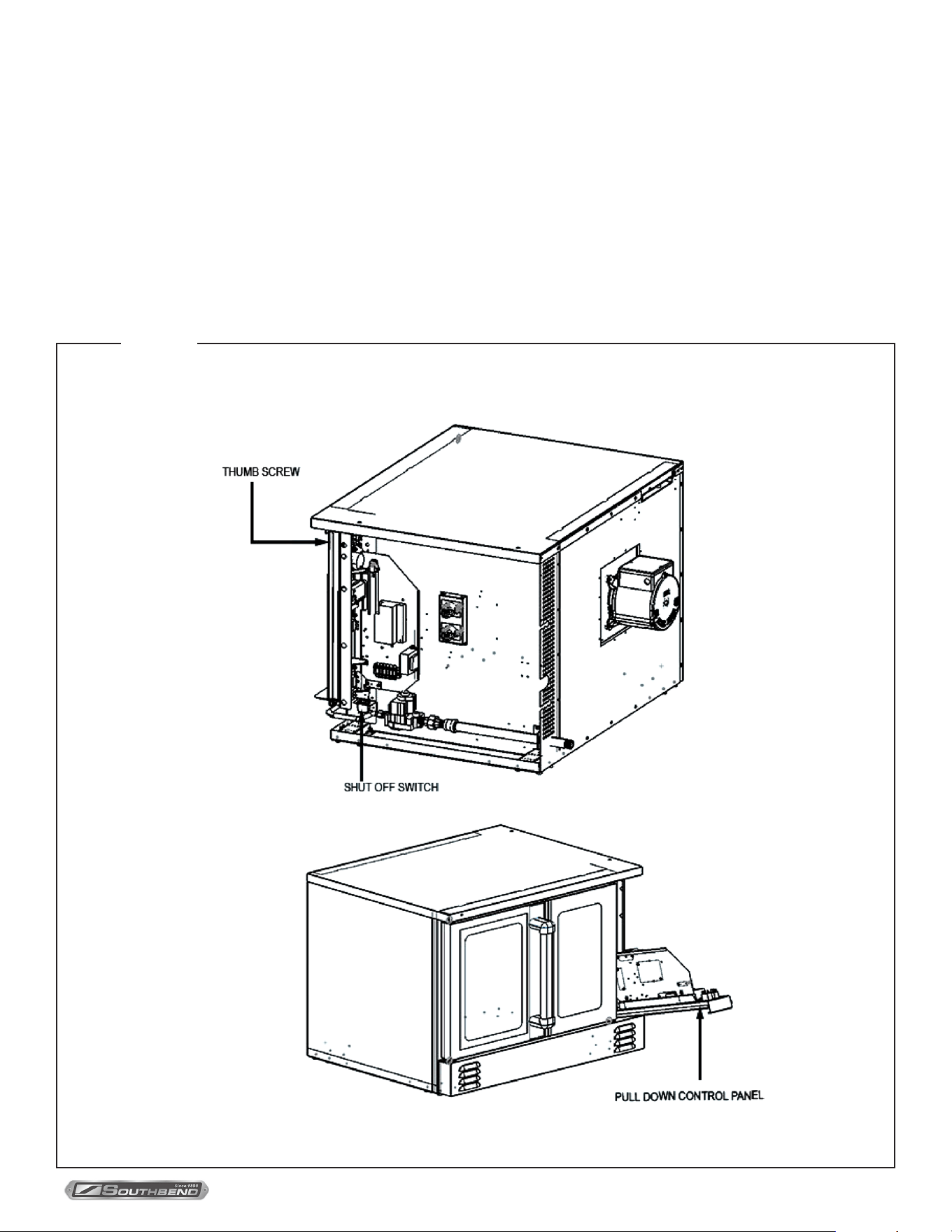
PLATINUM SERIES GAS CONVECTION OVEN
INSTALLATION AND OPERATION MANUAL 1409003 REV 1 (09/25)
PAGE
47
OF 54
Accessing Control Panel
Components
TROUBLESHOOTING
Figure 36
CONTROL PANEL ACCESS AND SHUT-OFF SWITCH
To access the control panel components, remove the thumbscrew located at the top of the control panel. Once
removed, pull the control panel downward. A wiring diagram for the oven can be found on the side of the control panel
assembly.
When the control panel is lowered, power to the panel is automatically shut o by a safety switch located just inside the
opening, beneath the control panel. To re-energize the controls for troubleshooting purposes, lift the white plunger on
the shut-o switch.
To fully remove the control panel, disconnect the temperature probe wires and harness connectors before sliding the
panel out sideways.
PLATINUM SERIES GAS CONVECTION OVEN
INSTALLATION AND OPERATION MANUAL 1409003 REV 1 (09/25)
PAGE
48
OF 54
WIRING DIAGRAMS
A wiring diagram is located on the side of the control panel assembly. Wiring diagrams also appear on the following pages
of this manual. Which wiring diagram is appropriate depends on the voltage and type of controls.
Index of Wiring Diagrams
Page Number Voltage and Type of Controls
Page 49 120 Volt Models with Standard Controls
Page 50 208-240 Volt Models with Standard Controls
Page 51 120 Volt Models with Touchscreen Controls
Page 52 208-240 Volt Models with Touchscreen Controls
BLOWER WHEEL REPLACEMENT
To replace the blower wheel, do the following:
1. Remove racks and rack guides.
2. Remove the rear air bae in front of the blower wheel.
3. Loosen the two square heads on the blower wheel hub.
4. Pull the blower wheel from motor shaft. If the blower wheel is dicult to pull o, use the puller disk (available from
Southbend Technical Service Department as part number 1179100).
5. Install the blower wheel and torque it at 140inch/lbs.
6. Install the rear air bael in the font of the blower wheel
7. Replace the rack and rack guides.
TROUBLESHOOTING
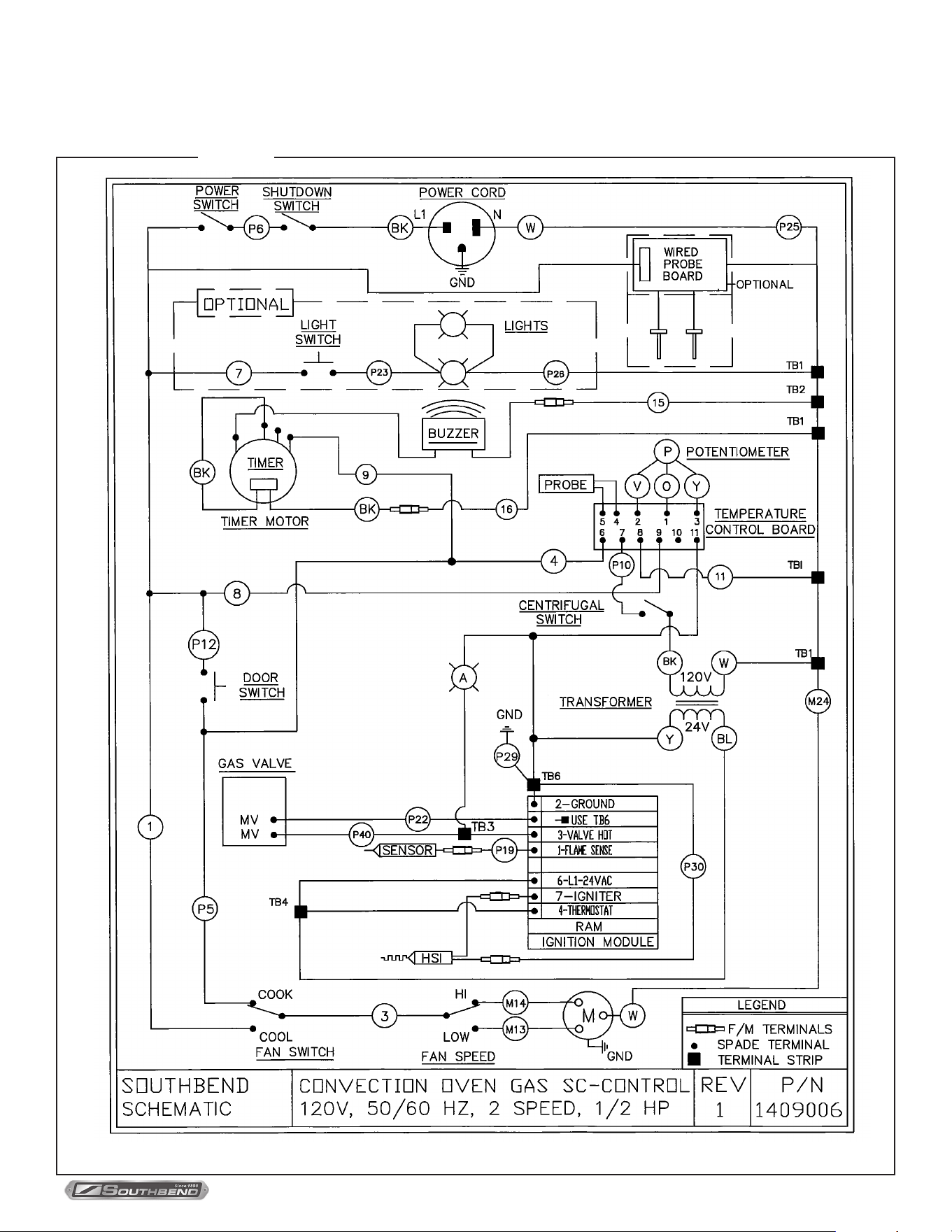
PLATINUM SERIES GAS CONVECTION OVEN
INSTALLATION AND OPERATION MANUAL 1409003 REV 1 (09/25)
PAGE
49
OF 54
TROUBLESHOOTING
Wiring Diagram for 120 Volt Models with Standard Controls
Figure 37
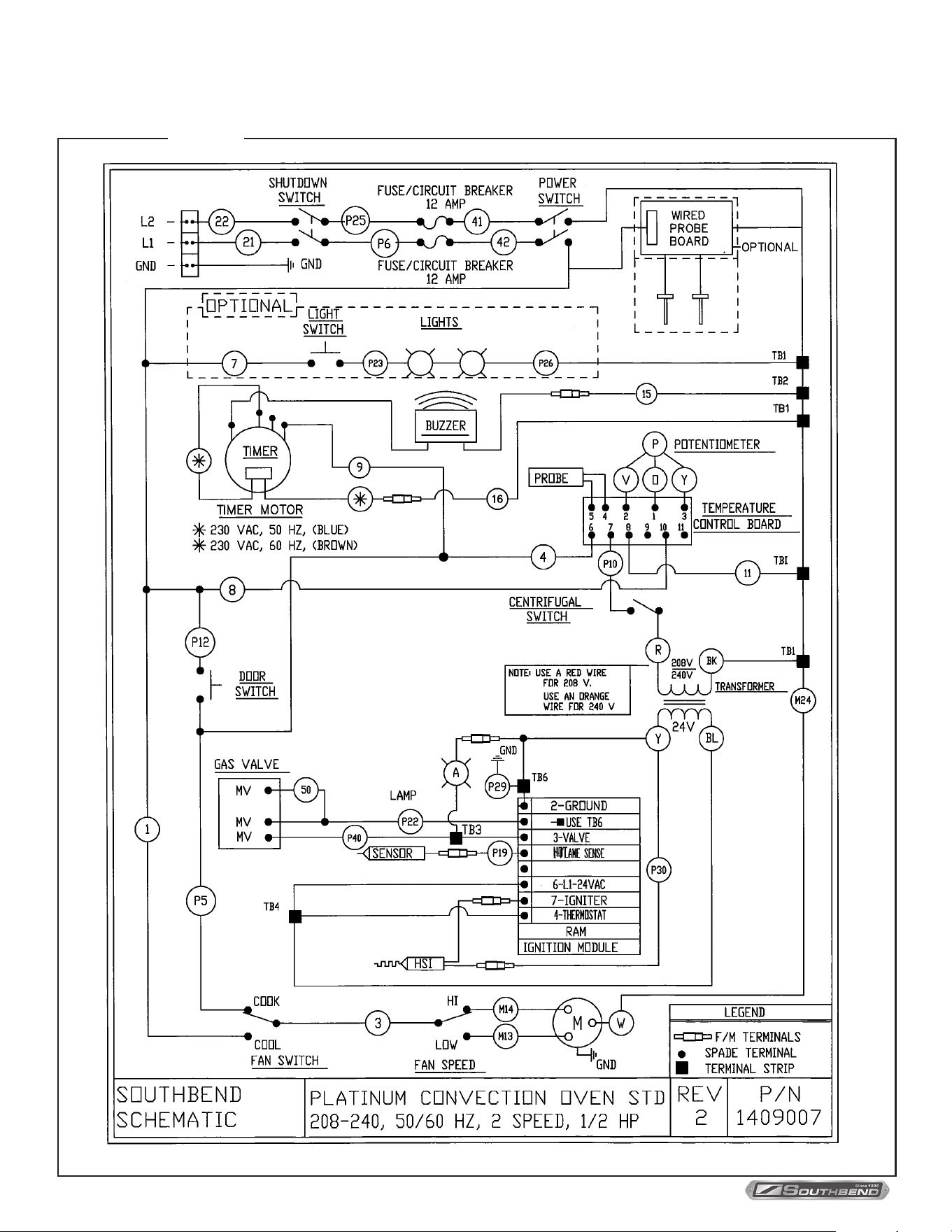
PLATINUM SERIES GAS CONVECTION OVEN
INSTALLATION AND OPERATION MANUAL 1409003 REV 1 (09/25)
PAGE
50
OF 54
TROUBLESHOOTING
Figure 38
Wiring Diagram for 208-240 Volt Models with Standard Controls
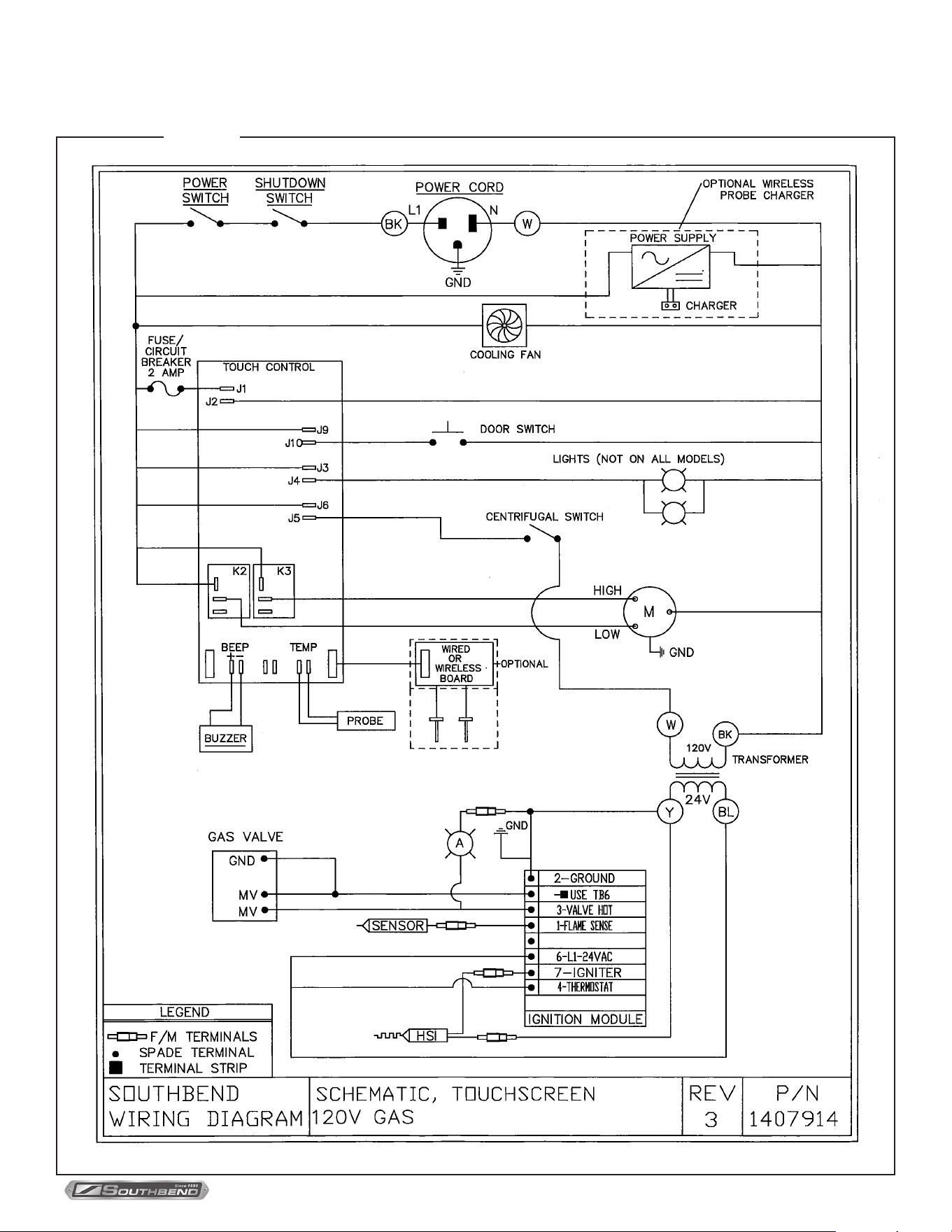
PLATINUM SERIES GAS CONVECTION OVEN
INSTALLATION AND OPERATION MANUAL 1409003 REV 1 (09/25)
PAGE
51
OF 54
Figure 39
TROUBLESHOOTING
Wiring Diagram for 120 Volt Models with Touchscreen Controls
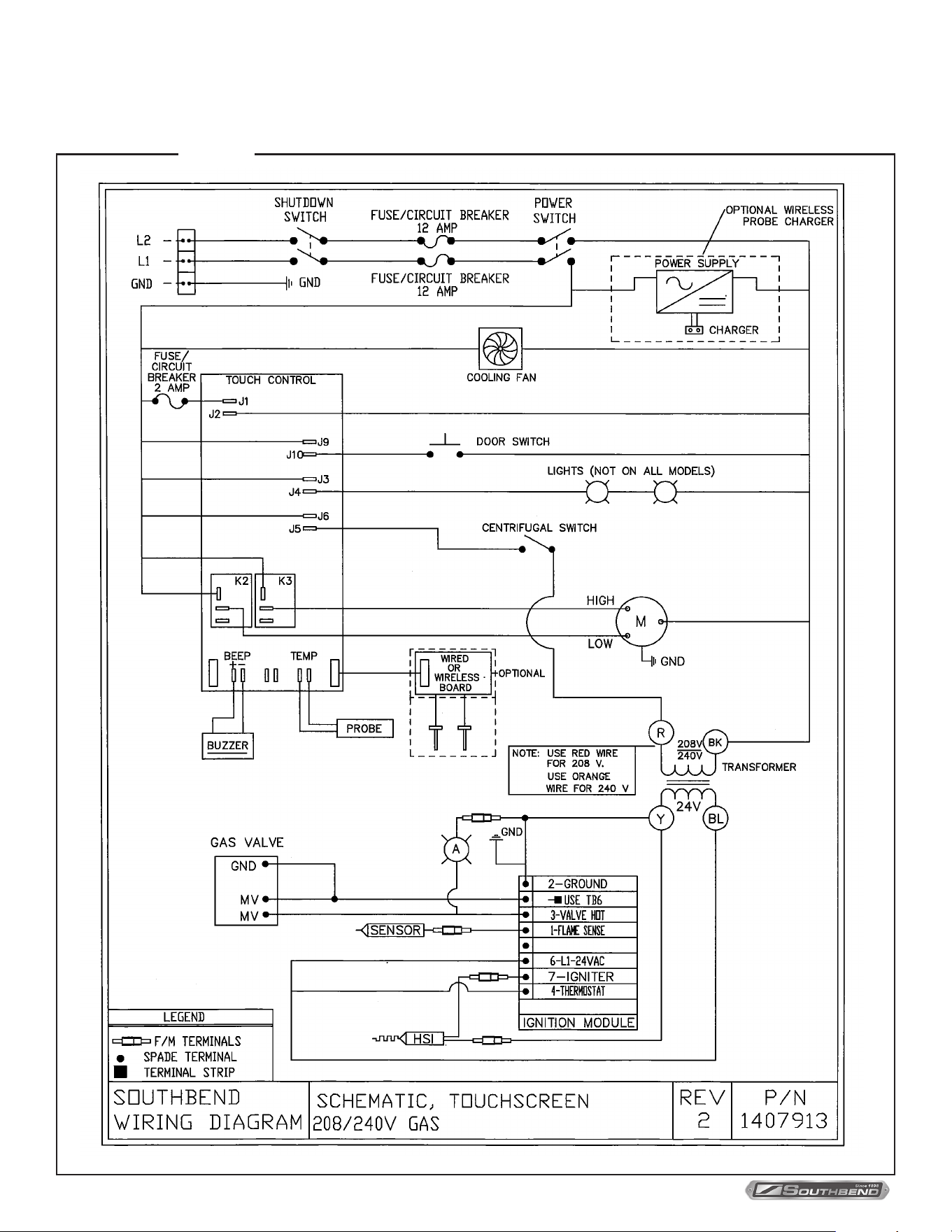
PLATINUM SERIES GAS CONVECTION OVEN
INSTALLATION AND OPERATION MANUAL 1409003 REV 1 (09/25)
PAGE
52
OF 54
Wiring Diagram for 208-240 Volt Models with Touchscreen Controls
TROUBLESHOOTING
Figure 40

PLATINUM SERIES GAS CONVECTION OVEN
INSTALLATION AND OPERATION MANUAL 1409003 REV 1 (09/25)
PAGE
53
OF 54
Notes:
PLATINUM SERIES GAS CONVECTION OVEN
INSTALLATION AND OPERATION MANUAL 1409003 REV 1 (09/25)
PAGE
54
OF 54
PLATINUM SERIES
GAS CONVECTION OVENS
A product with the Southbend name incorporates the best in durability and low maintenance. We all recognize, however,
that replacement parts and occasional professional service may be necessary to extend the useful life of this appliance.
When service is needed, contact a Southbend Authorized Service Agency, or your dealer. To avoid confusion, always
refer to the model number, serial number, and type of your appliance.
SOUTHBEND
A Middleby Company
1100 Old Honeycutt Road Fuquay-Varina, North Carolina 27526 USA
www.southbendnc.com