Download and install the APP
Smart
V-C
W
atch
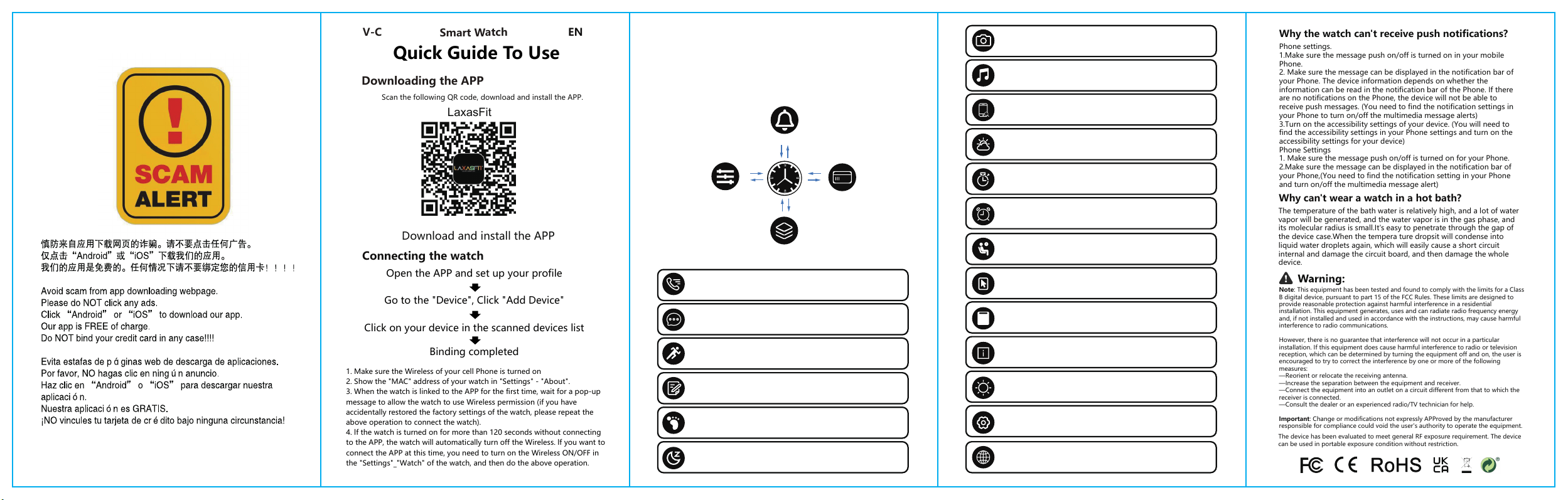
Downloading the APP
Scan the following QR code, download and install the APP.
Open the APP and set up your profile
Go to the "Device", Click "Add Device"
Click on your device in the scanned devices list
Binding completed
Connecting the watch
Quick Guide To Use
1. Make sure the Wireless of your cell Phone is turned on
2. Show the "MAC" address of your watch in "Settings" - "About".
3. When the watch is linked to the APP for the first time, wait for a pop-up
message to allow the watch to use Wireless permission (if you have
accidentally restored the factory settings of the watch, please repeat the
above operation to connect the watch).
4. lf the watch is turned on for more than 120 seconds without connecting
to the APP, the watch will automatically turn off the Wireless. lf you want to
connect the APP at this time, you need to turn on the Wireless ON/OFF in
the "Settings"_"Watch" of the watch, and then do the above operation.
EN
LaxasFit
Watch charging and activation
"(Please use 5V 1A and below charger to charge the device)"
Before first use, the watch needs to be charged and activated;the
Wireless charging with the connected wireless chargingelectro-mag-
netic suction cup on the back of the watch.
Wireless Call
Open the APP to link the Wireless of the watch, and after synchronizing
the phone, you can make, answer or reject calls on the watch.
Sports Mode
Enter the exercise mode (running, jumping rope, cycling, climbing)
selection interface and start data monitoring.
Exercise Record
Record all exercise data.
Pedometer
Counts your pedometer data of the day, clears the data at 00:00am and
can be viewed in the APP.
Sleep Monitor
Enable Sleep Monitor to monitor the quality of your sleep while you are
sleeping
Watch operating instructions
Your dial
Message notification
Swipe down Swipe up
Swipe Left
Swipe right
Swipe downSwipe up
Swipe Left
Swipe right
Shortcuts
Smart Stack
Card Functions
Watch Features
Message Reminder
To push all messages and social media notifications, you must turn on the
notification authorization on your phone.
Always on Display
After setting, the watch screen will display the time afer it turns off
Watch Face Style
Ul style can be set to change
About
Display the MAC address, Wireless name,and version number of
the device.
Brightness
You can set the brightness level and backlight off time
Settings
You can set the vibration on or off and adjust the volume.
Language
After connecting to the APP, you can set the language on the APP or the
watch side, and the language will be synchronised.
Music Players
After connecting the device, you can remote contral the music player on
your phone.
Remote Shutter
After the watch is connected to the phone, open the shutter mode of
the"APP" interface, click or shake the watch to take pictures, and the
pictures will be automatically stored in the phone.
Find Mobile Phone
When the watch and mobile phone are connected, tap the watch to find
the mobilephone, long press the magnifying glass icon,the mobilephone
will ring.
Weather
It could show the weather info of current and tomorrow on the weather
page. Weather info is synced after con-necting with the APP it will not
beupdated after a long disconneted.
Stop Watch
Tap the start button on stopwatch page to start timing, and tap the stop
button to stop timing
Alarm
Alarms can be set in the APP or the watch, up to 8 alarms can beset. The
watch will display an alarm icon and vibrate at the set time
Sedentary Reminder
Set the sedentary time, when the time comes, the bracelet will vibrate to
remind you, and the inter face has a reminder label display
Why the watch can't receive push notifications?
Phone settings.
1.Make sure the message push on/off is turned on in your mobile
Phone.
2. Make sure the message can be displayed in the notification bar of
your Phone. The device information depends on whether the
information can be read in the notification bar of the Phone. If there
are no notifications on the Phone, the device will not be able to
receive push messages. (You need to find the notification settings in
your Phone to turn on/off the multimedia message alerts)
3.Turn on the accessibility settings of your device. (You will need to
find the accessibility settings in your Phone settings and turn on the
accessibility settings for your device)
Phone Settings
1. Make sure the message push on/off is turned on for your Phone.
2.Make sure the message can be displayed in the notification bar of
your Phone,(You need to find the notification setting in your Phone
and turn on/off the multimedia message alert)
Why can't wear a watch in a hot bath?
The temperature of the bath water is relatively high, and a lot of water
vapor will be generated, and the water vapor is in the gas phase, and
its molecular radius is small.It's easy to penetrate through the gap of
the device case.When the tempera ture dropsit will condense into
liquid water droplets again, which will easily cause a short circuit
internal and damage the circuit board, and then damage the whole
device.
Note: This equipment has been tested and found to comply with the limits for a Class
B digital device, pursuant to part 15 of the FCC Rules. These limits are designed to
provide reasonable protection against harmful interference in a residential
installation. This equipment generates, uses and can radiate radio frequency energy
and, if not installed and used in accordance with the instructions, may cause harmful
interference to radio communications.
However, there is no guarantee that interference will not occur in a particular
installation. If this equipment does cause harmful interference to radio or television
reception, which can be determined by turning the equipment off and on, the user is
encouraged to try to correct the interference by one or more of the following
measures:
—Reorient or relocate the receiving antenna.
—Increase the separation between the equipment and receiver.
—Connect the equipment into an outlet on a circuit different from that to which the
receiver is connected.
—Consult the dealer or an experienced radio/TV technician for help.
Important: Change or modifications not expressly APProved by the manufacturer
responsible for compliance could void the user's authority to operate the equipment.
The device has been evaluated to meet general RF exposure requirement. The device
can be used in portable exposure condition without restriction.
V-C
Reloj inteligente
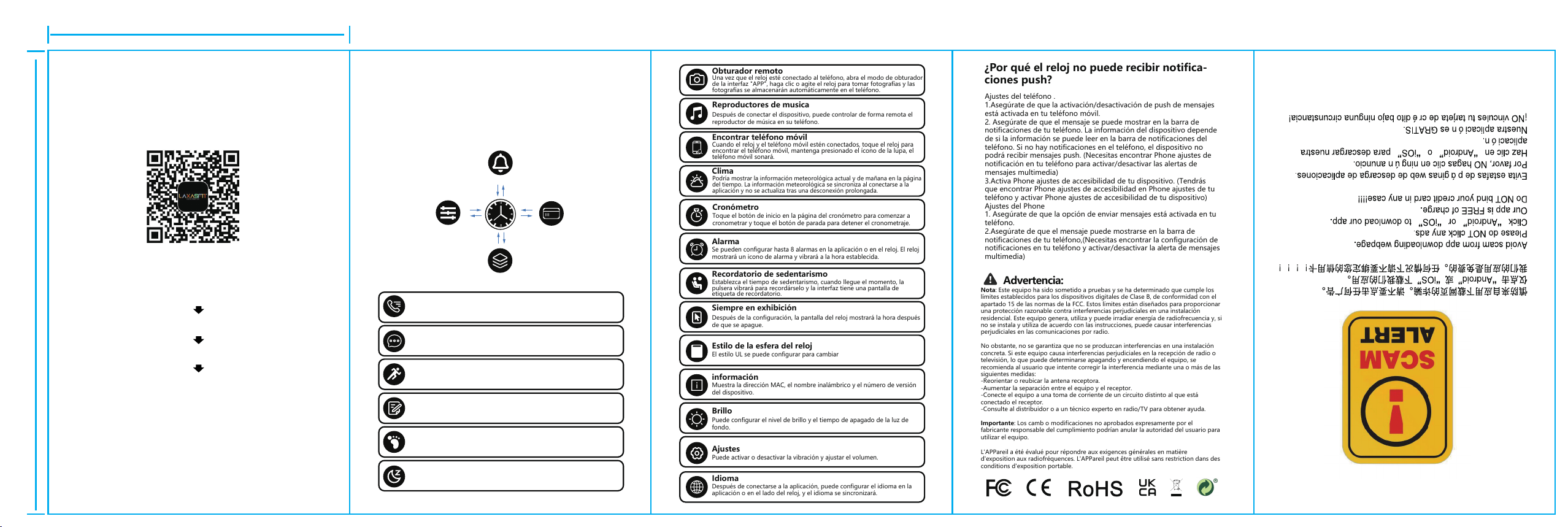
Descargar la APP
Escanee el siguiente código QR, descargue e instale la APP.
Descargar e instalar la APP
Abre la APP y configura tu perfil
Vaya a "Dispositivo" y haga clic en "Añadir dispositivo".
Haga clic en su dispositivo en la lista de dispositivos escaneados
Conexión completa
Conectar el reloj
Guía rápida de uso
1. Asegúrate de que el Wireless de tu móvil está activado
2. Muestra la dirección "MAC" de tu reloj en "Ajustes" - "Acerca de".
3. Cuando el reloj se vincule a la APP por primera vez, espere a que aparezca un
mensaje emergente para permitir que el reloj utilice el permiso Wireless
(si ha restaurado accidentalmente Phone ajustes de fábrica del reloj, repita la
operación anterior para conectar el reloj)".
4. Si el reloj se enciende durante más de 120 segundos sin conectarse a la APP, el
reloj apagará automáticamente la conexión inalámbrica. Si desea conectar la APP
en este momento, deberá activar la conexión inalámbrica ON/OFF en
«Ajustes»_«Reloj» del reloj y, a continuación, realizar la operación anterior.
ES
LaxasFit
Carga y activación del reloj
"(Utilice un cargador de 5V 1A o inferior para cargar el dispositivo)"
Antes de utilizarlo por primera vez, el reloj debe cargarse y activarse;Utilice
el cargador magnético equipado para fijarlo a Phone contactos metálicos
de la parte posterior del reloj, y el otro extremo del cargador puede ench-
ufarse a un cabezal de carga USB o al puerto USB del ordenador.
Llamada inalámbrica
Abre la aplicación para vincular la conexión inalámbrica del reloj y,
después de sincronizar el teléfono, podrás realizar, responder o rechazar
llamadas en el reloj.
Recordatorio de mensaje
Para recibir todos los mensajes y notificaciones de redes sociales, debes
activar la autorización de notificaciones en tu teléfono.
Modo deportivo
Ingrese a la interfaz de selección del modo de ejercicio (correr, saltar la
cuerda, andar en bicicleta, escalar) y comience el monitoreo de datos.
Registro de ejercicios
Registre todos los datos del ejercicio.
Podómetro
Cuenta los datos de tu podómetro del día, borra los datos a las 00:00 a. m.
y se pueden ver en la aplicación.
Monitor de sueño
Habilite el Monitor de sueño para monitorear la calidad de su sueño
mientras duerme
Ver instrucciones de funcionamiento
Your dial
Notificación de mensajes
Desliza hacia abajo Desliza hacia arriba
Deslizar hacia la izquierda
Desliza hacia la derecha
Desliza hacia abajo
Desliza hacia arriba
Deslizar hacia la izquierda
Desliza hacia la derecha
Atajos
Pila inteligente
Funciones de la tarjeta
Características del reloj
Siempre en exhibición
Después de la configuración, la pantalla del reloj mostrará la hora después
de que se apague.
Estilo de la esfera del reloj
El estilo UL se puede configurar para cambiar
información
Muestra la dirección MAC, el nombre inalámbrico y el número de versión
del dispositivo.
Brillo
Puede configurar el nivel de brillo y el tiempo de apagado de la luz de
fondo.
Ajustes
Puede activar o desactivar la vibración y ajustar el volumen.
Idioma
Después de conectarse a la aplicación, puede configurar el idioma en la
aplicación o en el lado del reloj, y el idioma se sincronizará.
Clima
Podría mostrar la información meteorológica actual y de mañana en la página
del tiempo. La información meteorológica se sincroniza al conectarse a la
aplicación y no se actualiza tras una desconexión prolongada.
Cronómetro
Toque el botón de inicio en la página del cronómetro para comenzar a
cronometrar y toque el botón de parada para detener el cronometraje.
Alarma
Se pueden configurar hasta 8 alarmas en la aplicación o en el reloj. El reloj
mostrará un icono de alarma y vibrará a la hora establecida.
Recordatorio de sedentarismo
Establezca el tiempo de sedentarismo, cuando llegue el momento, la
pulsera vibrará para recordárselo y la interfaz tiene una pantalla de
etiqueta de recordatorio.
Reproductores de musica
Después de conectar el dispositivo, puede controlar de forma remota el
reproductor de música en su teléfono.
Obturador remoto
Una vez que el reloj esté conectado al teléfono, abra el modo de obturador
de la interfaz "APP", haga clic o agite el reloj para tomar fotografías y las
fotografías se almacenarán automáticamente en el teléfono.
Encontrar teléfono móvil
Cuando el reloj y el teléfono móvil estén conectados, toque el reloj para
encontrar el teléfono móvil, mantenga presionado el ícono de la lupa, el
teléfono móvil sonará.
¿Por qué el reloj no puede recibir notifica-
ciones push?
Ajustes del teléfono .
1.Asegúrate de que la activación/desactivación de push de mensajes
está activada en tu teléfono móvil.
2. Asegúrate de que el mensaje se puede mostrar en la barra de
notificaciones de tu teléfono. La información del dispositivo depende
de si la información se puede leer en la barra de notificaciones del
teléfono. Si no hay notificaciones en el teléfono, el dispositivo no
podrá recibir mensajes push. (Necesitas encontrar Phone ajustes de
notificación en tu teléfono para activar/desactivar las alertas de
mensajes multimedia)
3.Activa Phone ajustes de accesibilidad de tu dispositivo. (Tendrás
que encontrar Phone ajustes de accesibilidad en Phone ajustes de tu
teléfono y activar Phone ajustes de accesibilidad de tu dispositivo)
Ajustes del Phone
1. Asegúrate de que la opción de enviar mensajes está activada en tu
teléfono.
2.Asegúrate de que el mensaje puede mostrarse en la barra de
notificaciones de tu teléfono,(Necesitas encontrar la configuración de
notificaciones en tu teléfono y activar/desactivar la alerta de mensajes
multimedia)
Advertencia:
Nota: Este equipo ha sido sometido a pruebas y se ha determinado que cumple los
límites establecidos para los dispositivos digitales de Clase B, de conformidad con el
apartado 15 de las normas de la FCC. Estos límites están diseñados para proporcionar
una protección razonable contra interferencias perjudiciales en una instalación
residencial. Este equipo genera, utiliza y puede irradiar energía de radiofrecuencia y, si
no se instala y utiliza de acuerdo con las instrucciones, puede causar interferencias
perjudiciales en las comunicaciones por radio.
No obstante, no se garantiza que no se produzcan interferencias en una instalación
concreta. Si este equipo causa interferencias perjudiciales en la recepción de radio o
televisión, lo que puede determinarse apagando y encendiendo el equipo, se
recomienda al usuario que intente corregir la interferencia mediante una o más de las
siguientes medidas:
-Reorientar o reubicar la antena receptora.
-Aumentar la separación entre el equipo y el receptor.
-Conecte el equipo a una toma de corriente de un circuito distinto al que está
conectado el receptor.
-Consulte al distribuidor o a un técnico experto en radio/TV para obtener ayuda.
Importante: Los camb o modificaciones no aprobados expresamente por el
fabricante responsable del cumplimiento podrían anular la autoridad del usuario para
utilizar el equipo.
L'APPareil a été évalué pour répondre aux exigences générales en matière
d'exposition aux radiofréquences. L'APPareil peut être utilisé sans restriction dans des
conditions d'exposition portable.
78
120

FCC Warnning:
This equipment has been tested and found to comply with the limits for a Class B digital device,
pursuant to part 15 of the FCC Rules. These limits are designed to provide
reasonable
protection against harmful interference in a residential installation. This equipment generates,
uses and can radiate radio
frequency
energy
and,
if
not
installed
and
used
in
accordance
with
the
instructions,
may cause
harmful
interference
to
radio
communications.
However,
there
is
no
guarantee
that interference
will
not
occur
in
a
particular
installation.
If
this
equipment
does
cause
harmful interference to radio or television reception, which can be
determined by turning the equipment off
and
on,
the
user
is
encouraged
to
try
to
correct
the interference
by
one
or
more
of
the following measures:
•
Reorient or relocate the receiving antenna.
•
Increase the separation between the equipment and receiver.
•
Connect the equipment into an outlet on a circuit different from that to which the receiver is
connected.
• Consult the dealer or an experienced radio/TV technician for help.
Caution:
Any
changes
or
modifications
to
this
device
not
explicitly
approved
by
manufacturer
could void your authority to operate this equipment.
This
device
complies
with
part
15
of
the
FCC
Rules.
Operation
is
subject
to
the
following
two
conditions:
(1)This
device
may
not
cause
harmful
interference,
and
(2)
this
device
must
accept
any
interference received, including interference that may cause undesired operation.
This
equipment
complies
with
FCC
radiation
exposure
limits
set
forth
for
an
uncontrolled
environment.
This
equipment
should
be
installed
and
operated
with
minimum
distance
0cm
between the radiator and your body.