2026.03
V2.2


阅读提示...............................................................................1
符号说明..............................................................................1
安全须知...............................................................................1
使用环境..............................................................................1
使用操作..............................................................................2
产品概述...............................................................................2
产品参数...............................................................................3
机型外观说明 ......................................................................4
地面端 .................................................................................4
天空端 .................................................................................6
使用教程...............................................................................7
地面端使用..........................................................................7
APP操控..............................................................................13
桨叶保护罩安装教程............................................................19
产品维护...............................................................................20
装箱清单...............................................................................20
CZ10噪音测试结果 ............................................................20
产品保修卡
目录
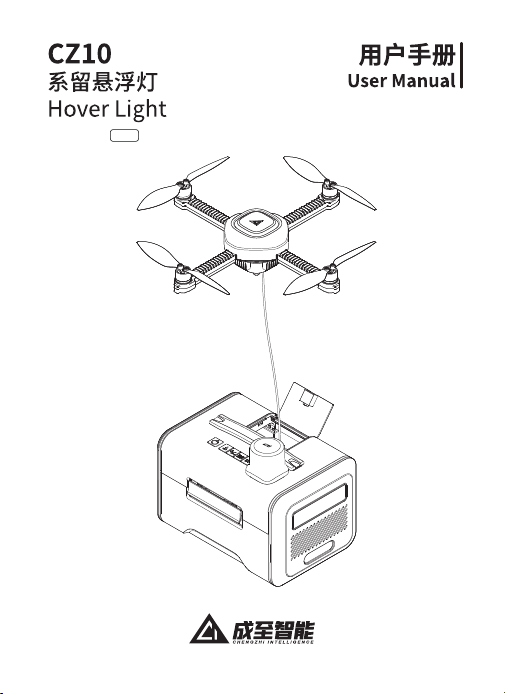
CZ10系留悬浮灯用户手册

Important Notes...............................................................23
Symbol Legend..................................................................23
Safety Precautions..........................................................23
Operating Environment.....................................................23
Operating Guidelines.........................................................24
Product Overview............................................................24
Product Specifications ..................................................25
Appearance Description................................................26
Ground Station ..................................................................26
Airborne .............................................................................28
Operating Instructions...................................................29
Ground Station Control.....................................................29
APP Control........................................................................35
Propeller Guard Installation Tutorial................................41
Product Maintenance.....................................................42
Packing List........................................................................42
CZ10 Noise Test Results.................................................42
Product Warranty Card
Contents
CZ10 Hover Light User Manual
CZ10系留悬浮灯用户手册
1
阅读提示
本手册版权和所有权属广州成至智能机器科技有限公司及其关联方
(统称“成至”)所有,任何人(及单位)未经成至授权,不得以复制、扫描存
储、传播、转印、出售转让、更改内容等任何方式自行或提供他人使用本手
册全部或部分内容。本手册及其内容仅用于操作和使用本产品,不得用作
其他用途。
符号说明
安全须知
在使用本产品之前,请您务必仔细阅读本手册的全部内容,并严格遵守
其中所包含的各项操作指南和安全规定,以确保您能安全、有效地操作本
产品,避免因不当使用而导致的潜在风险或损害。使用本产品即视为您已
阅读且接受与本产品相关的所有条款;本产品不适宜十六周岁及以下人
士使用。
使用环境
1.请勿在大风(风速8米/秒及以上)、雨雪、雷电、浓雾等恶劣天气条件下
操作。
2.请勿在海拔3000米及以上区域操作。
3.请勿在低于-10℃或高于40℃的环境条件下使用。
4.请勿在移动的物体上使用。
5.请勿在室内等封闭空间内使用。
6.请勿在强电磁干扰源邻近区域使用。
重要注意事项 操作、使用提示
CZ10系留悬浮灯用户手册
使用操作
产品概述
1、操作时须确保区域上方无障碍物,且周边三米范围内无人员或障
碍物。
2、禁止以肢体或物体接触运转状态下的桨叶,以防人员伤害及桨叶
损伤。
3、在人群周围使用时请使用附赠桨叶保护罩。
4、本产品不具备避障功能,使用时务必与其他航空器、障碍物或人员
保持安全距离,避免发生碰撞事故。
5、本产品未开机时请勿用力拉动系留线,以防设备损坏。
6、请勿踩踏或放置重物于本产品上,以防结构损坏。
注意:
使用前,请确保固件及APP版本已经更新至最新。
如遇突发恶劣天气,请立即将设备降落至地面,以防引发产品损坏或
人员伤害。
当您收到本产品时,请按照以下步骤进行检查,以保证本产品能够正
常使用。
1、检查是否存在因运输造成的损坏。
2、核查本产品随附配件是否齐全。
若您通过上述检查发现问题,请及时与成至联系,我们将第一时间为
您解决问题。
CZ10系留悬浮灯是一种轻便型系留无人机照明装置,配合外部电源可
提供持续照明。该设备整体小巧轻盈,含电源适配器总重仅3.5公斤,单人
单手就能轻松携带,并附赠双肩背包以解放用户双手,适用于多样场景。
操作极为简便,从取出背包到完成部署仅需三分钟。作为高度简化的照明
方案,它不同于其他同类产品,无需专门培训,用户阅读手册即可掌握使
用,无需专业操作员,同时支持地面端和APP双模式操作,确保无忧控制
和快速控制。
2

产品参数
产品型号
系统总重量
天空端重量
地面端重量
天空端展开尺寸
CZ10
3300g
≤249g
273×273×61mm
≤2600g
117×117×127mm
天空端折叠尺寸
地面端尺寸
250×173×165mm
最大使用海拔
使用温度
最高飞行高度
最大抗风速度
8米/秒
10m
-10℃-40℃
3000m
卫星导航系统
BDS+GPS+Galileo+GLONASS+QZSS+IRNSS
卫星导航定位技术
RTK定位技术
悬停精度
天空端照明额定功率
≤100w
垂直:±0.2米(RTK模式下)
水平:±0.1米(RTK模式下)
垂直:±0.5米(GNSS模式下)
水平:±1.0米(GNSS模式下)
天空端照明最大亮度
≤15000lm
地面端照明额定功率
≤20w
天空端照明面积
≤1300m²(以3lx为照明边界)
飞行状态指示灯
红绿LED灯
灯光模式
日光灯模式、氛围灯模式、红蓝爆闪模式、SOS模式
产品名称 系留悬浮灯
3
CZ10系留悬浮灯用户手册
4
CZ10系留悬浮灯用户手册
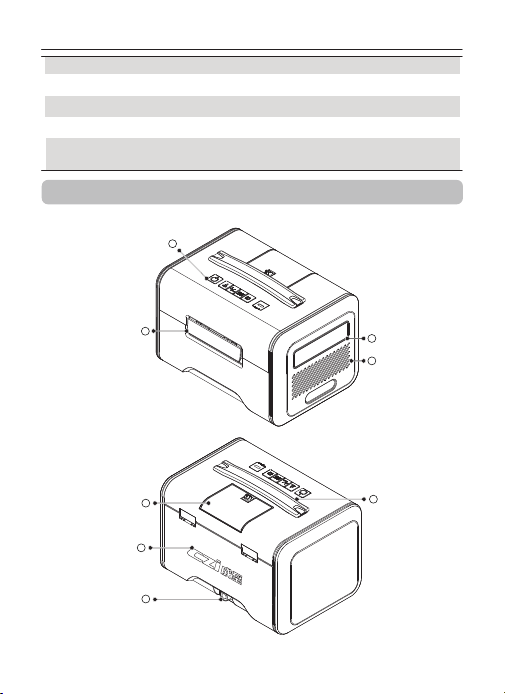
1
机型外观说明
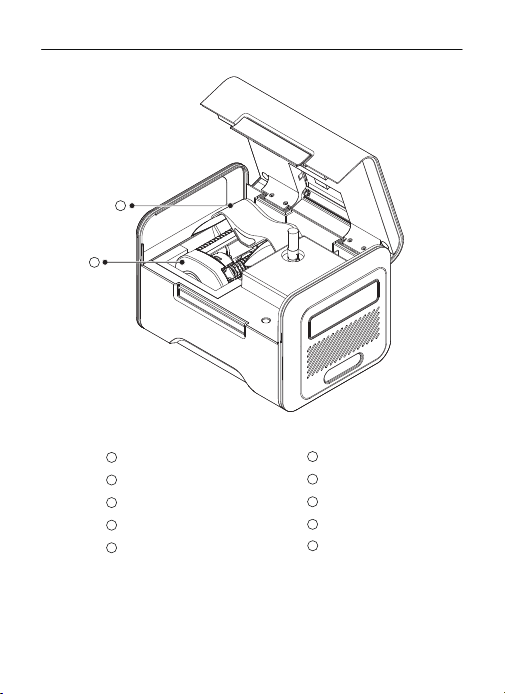
地面端
2
5
7
8
6
3
4
电池容量
2500mAh
电池类型
Li-ion 4S
控制模式
APP\地面端双模控制
电源适配器
输入:100-240V~50/60Hz 5.0A Max
输出:48.0V/5.0A 240w
电池重量
195g
CZ10系留悬浮灯用户手册
控制面板
系留线保护翻盖
1
2
3
4
5
6
卡扣
7
灯板
8
散热口
9
10
提手
CZI成至LOGO
电源接口
束桨套
天空端
5
9
10
成至LOGO
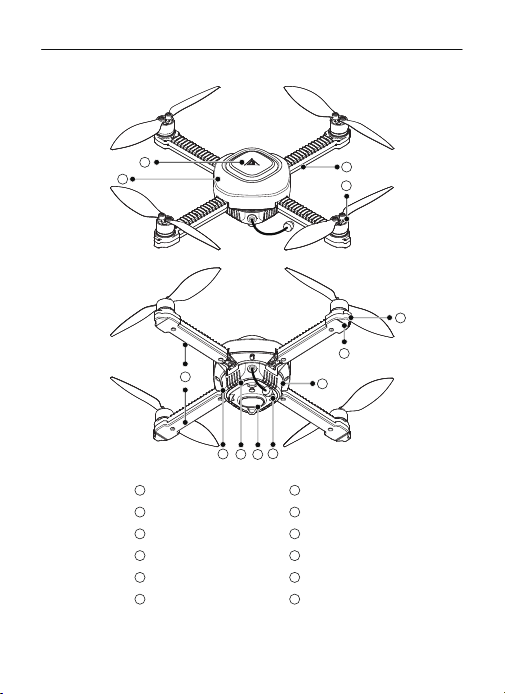
1
机架
2
机臂
3
桨叶
4
电机
5
机臂灯
6
机架散热口
7
激光光流模块
8
Type-C接口
9
系留线接口
10
重置孔
11
状态指示
12
6
CZ10系留悬浮灯用户手册
1
2
3
4
5
6
8
7
9
10
11
12
天空端
CZ10系留悬浮灯用户手册
7
使用教程
地面端使用
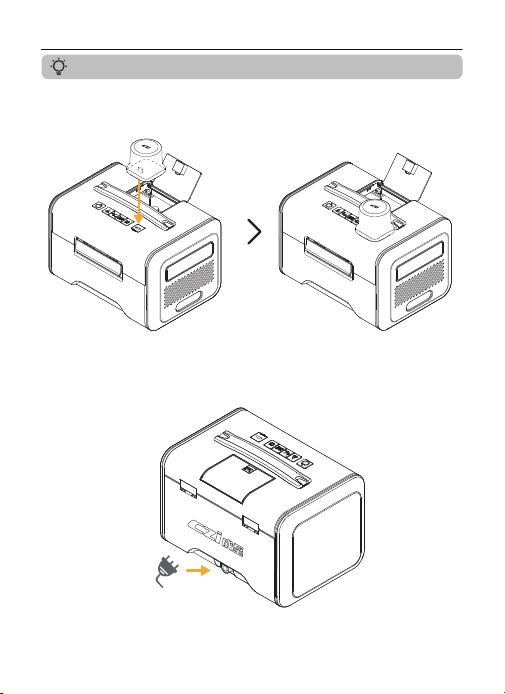
1.将RTK模块连接至地面端。
2.连接电源。(当电池电量低于70%时会自动开机)
8
CZ10系留悬浮灯用户手册
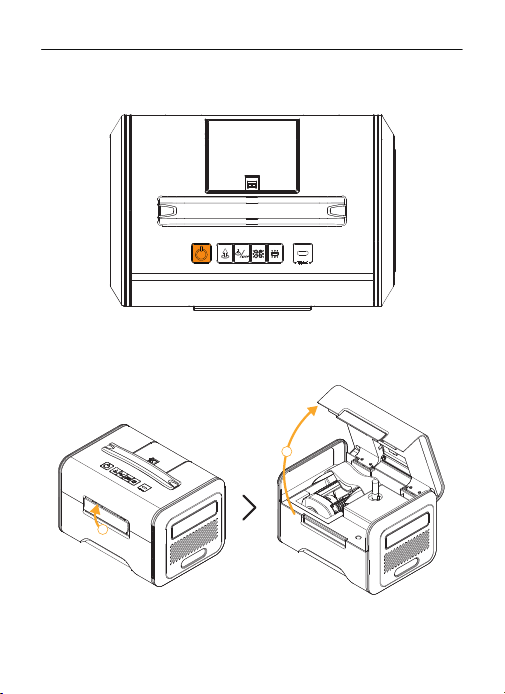
3.(若未自动开机)长按开机按键3秒,设备开机。
4.打开地面端。
2
1
CZ10系留悬浮灯用户手册
9
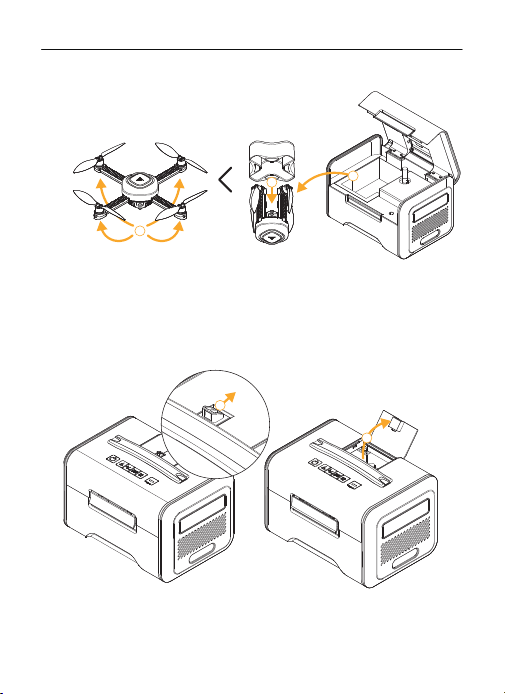
5.将天空端拿出,并将机臂展开。
6.按住卡扣打开系留线保护翻盖。
1
2
3
2
1
10
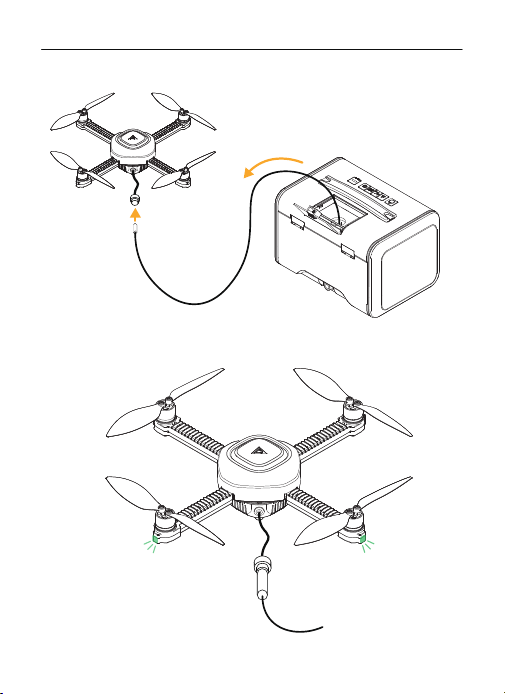
7.拉出系留线至3米标记处。
8.将系留线与天空端连接,确保接口拧紧,等待天空端飞行状态指示灯变绿即可
起飞。
CZ10系留悬浮灯用户手册
11
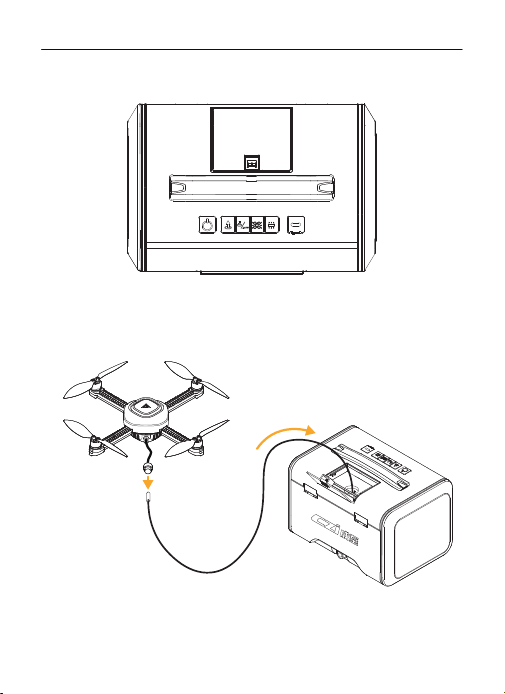
9.通过地面端按键或czi Sky进行控制。
10.拔掉天空端系留线,自动收线。
CZ10系留悬浮灯用户手册
12
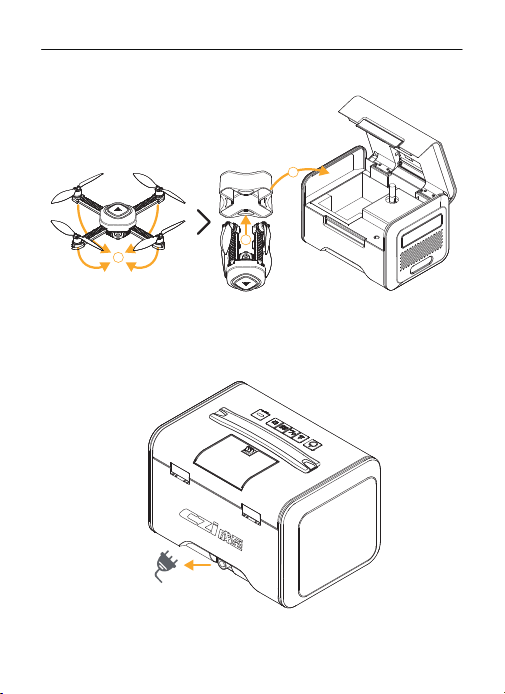
11.将天空端放入保护套筒,放入地面端,关闭上盖。
3
2
1
CZ10系留悬浮灯用户手册
12.长按关机,断开电源连接。
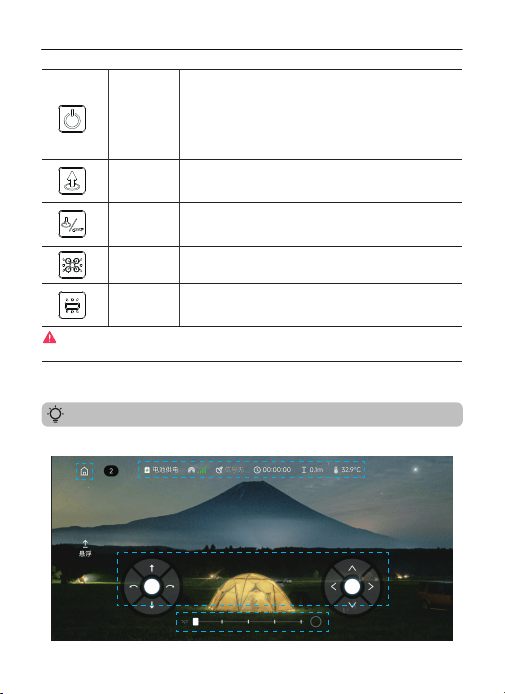
操作界面区域①返回首页②状态信息栏③操作控制区④灯光控制区
地面端控制
APP操控
13
CZ10系留悬浮灯用户手册
开关机按键
长按开关机按键,设备开关机
开机后长按天空端灯光控制按键与地面端灯光控制按键4s进入配网
模式
按键指示灯:
绿色:70%≤电池电量≤100%
蓝色:40%≤电池电量<70%
红色:0≤电池电量<40%
充电时按键指示灯闪烁
长按3秒,天空端一键起飞,按键指示灯闪烁
天空端起飞后,短按天空端上升2米
一键起飞\降落过程中可通过短按按键打断并上升2米
长按3秒,天空端一键降落并回收系留线,按键指示灯闪烁
天空端降落后,长按3秒,回收系留线,按键指示灯闪烁
一键起飞\降落过程中可通过短按按键打断并下降2米
长按3秒,实现天空端开关灯
短按进行亮度调节
长按3秒,实现地面端开关灯
短按进行亮度调节
当天空端出现异常运行时,可通过长按开关机按键与一键起飞按键实现紧急停桨。此功能仅适用于异常
应急场景,使用后可能造成天空端结构损坏。
一键起飞按键
一键降落\
收线按键
天空端灯光
控制按键
地面端灯光
控制按键
① ②
③
④
14
CZ10系留悬浮灯用户手册
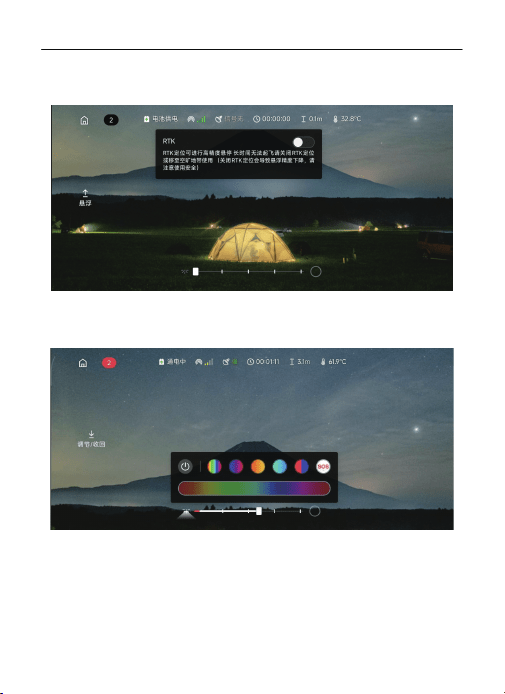
RTK开关:默认为打开状态,此时需要天空端与地面端的GPS数据进入固定解方可起
飞,可以实现高精度悬浮。如果GPS信号差或长时间无法起飞请关闭RTK后再次尝试
(关闭RTK定位会导致悬浮精度下降,请注意使用安全,必要时请使用桨叶保护罩)
灯光控制:操作界面下方为灯光控制区域,下方滑动条可以控制日光灯亮度,点击右侧
圆圈按键可以呼出氛围灯控制菜单,可以调节氛围灯颜色,也可以使用三种默认氛围
呼吸灯,还可以一键开启红蓝爆闪与SOS模式。
15
CZ10系留悬浮灯用户手册
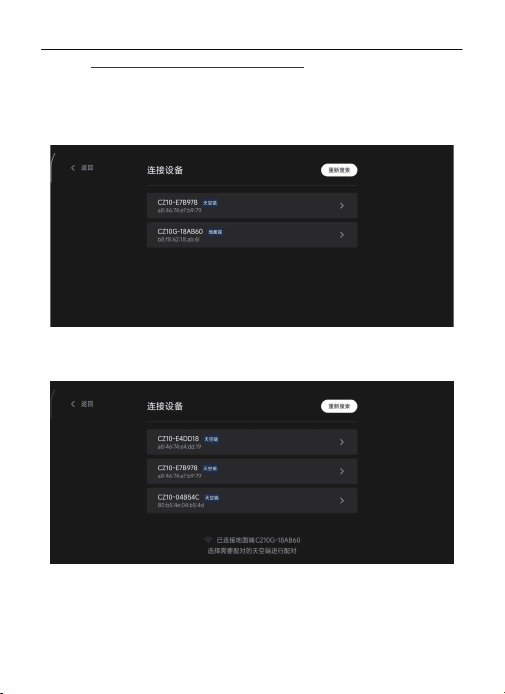
配网操作(产品出货时天空端与地面端已经完成配网):
Android:
地面端开机后,连接所需配对天空端,长按“天空端灯光控制按键”与“地面端灯光控制
按键”4秒,语音播报“进入配网模式”。
打开czi Sky APP,选择“CZ10”,点击“去连接”进入“连接设备”界面。
先点击地面端进行连接,连接成功后选择所需配对天空端进行连接,APP显示配对成
功,语音播报WiFi连接成功。
CZ10系留悬浮灯用户手册
16
CZ10系留悬浮灯用户手册
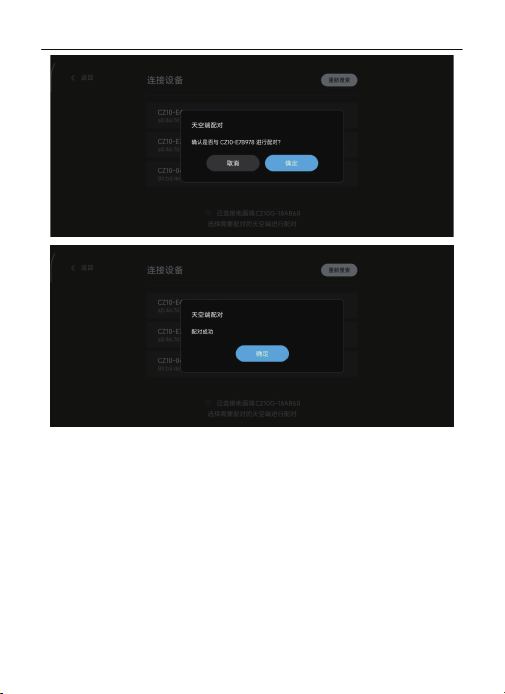
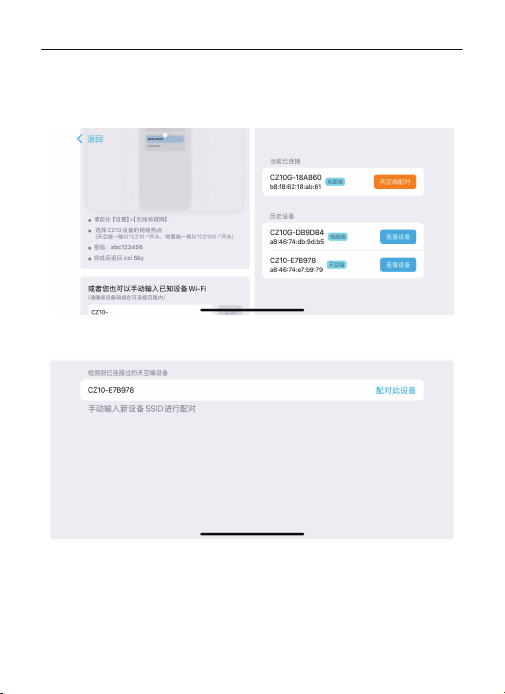
IOS:
地面端开机后,连接所需配对天空端,长按“天空端灯光控制按键”与“地面端灯光控制
按键”4秒,语音播报“进入配网模式”。
打开czi Sky APP,选择“CZ10”,点击“去连接”进入“连接设备”界面。
按照左侧教程连接地面端,连接成功后返回czi Sky。
点击“天空端配对”,进入配对界面,查看设置中当前存在的天空端WiFi,将新设备SSID
输入进行配对。
17
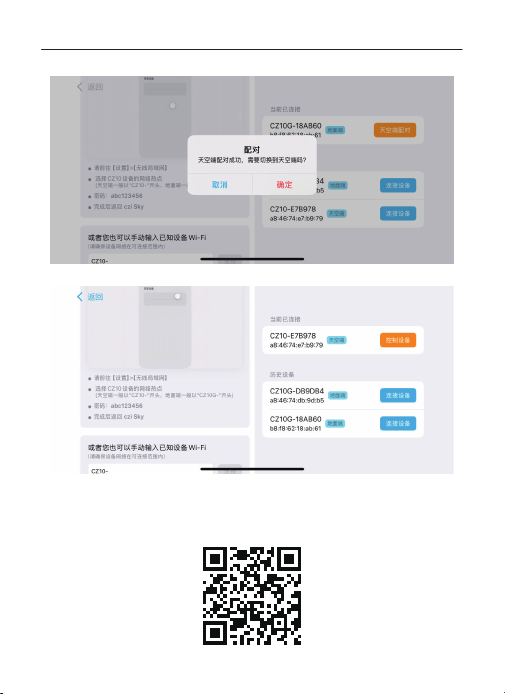
配对成功后点击“确定”切换到天空端。
点击“控制设备”进入操作界面。
CZ10系留悬浮灯用户手册
18
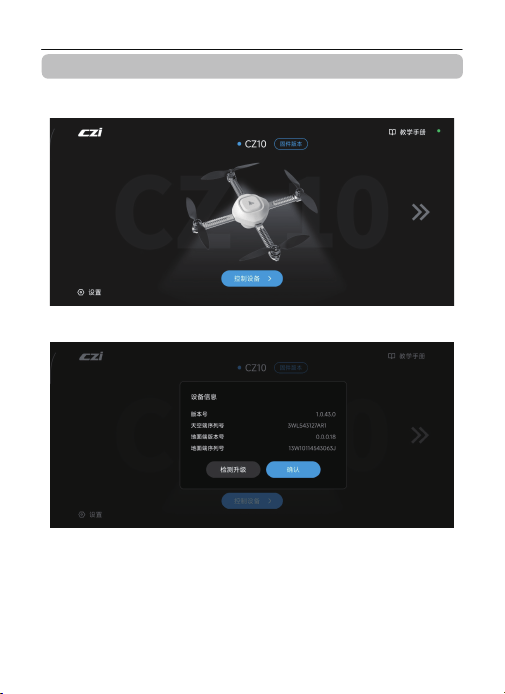
产品资料下载
扫描下方二维码,下载czi Sky APP、说明书及固件。
19
CZ10系留悬浮灯用户手册
固件升级
天空端固件升级教程:
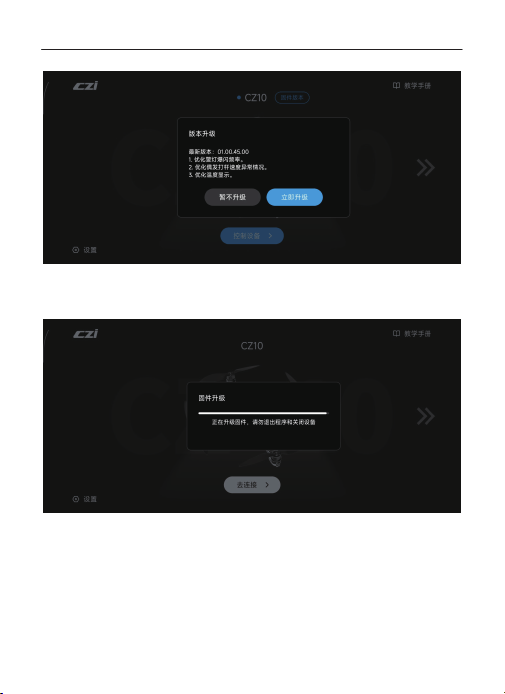
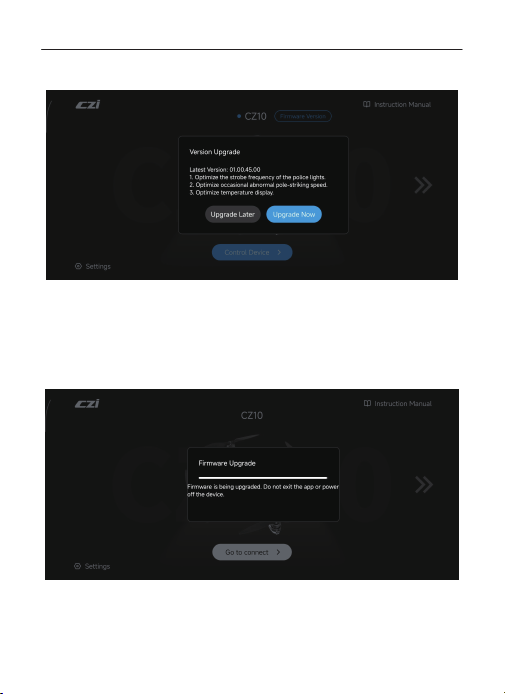
选择所需要连接的设备,进行连接,设备连接后在操作界面点击返回首页,点击固件版本。
点击检测升级,自动检测当前固件版本,若固件版本低于最新版本,会提示版本升级提醒。
20
CZ10系留悬浮灯用户手册
升级提醒会显示最新版本号,并且展示固件升级内容,点击立即升级,会进入固件升级程序。
固件升级分为下载固件与升级固件两阶段,在此过程请勿退出APP及关闭设备,避免固件升
级失败导致产品无法使用。待升级固件进度条读满后,提示固件升级成功,设备会自动重启
并进行连接,页面跳转首页后点击控制设备即可使用。
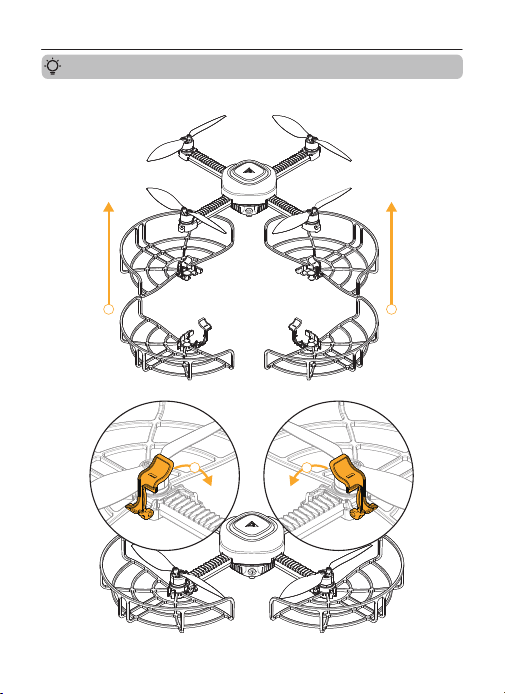
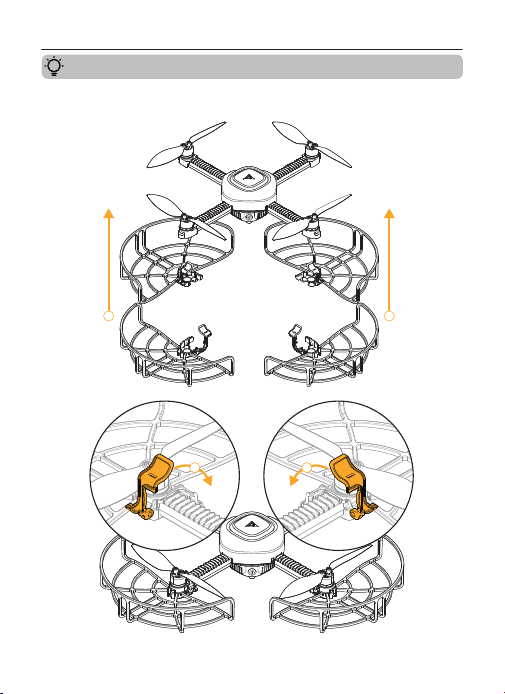
桨叶保护罩安装教程
将桨叶保护罩如图放置,并锁紧卡扣。
11
22
CZ10系留悬浮灯用户手册
21
产品维护
装箱清单
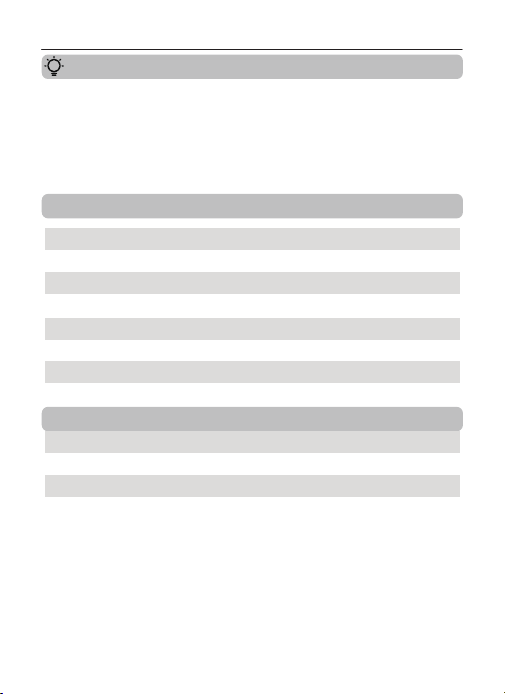
1、设备不使用时,请及时断开电源;
2、清洁设备前需把电源插头拔除;
3、请用干燥擦拭布擦拭表面,并且置于干燥阴凉处存放;
4、请及时清洁地面端、天空端散热孔,避免堵塞散热孔影响设备散热。
CZ10系留悬浮灯整机
电源适配器
产品说明书(内含保修卡)
桨叶替换装(正反各2pcs)
桨叶保护罩
RTK模块
1台
1套
1份
1套
1套
1套
背包
1套
CZ10系留悬浮灯用户手册
22
观测点 悬停
71dB(A)
66dB(A)
地面观测点
侧面观测点
注:测试环境为室外水泥地。
飞行1m/s
71dB(A)
66dB(A)
CZ10噪音测试结果

This device complies with part 15 of the FCC Rules. Operation is subject to the
following two conditions: (1) This device may not cause harmful interference,
and (2) this device must accept any interference received, including interfer-
ence that may cause undesired operation.
Any Changes or modifications not expressly approved by the party responsible
for compliance could void the user's authority to operate the equipment.
Note: This equipment has been tested and found to comply with the limits for
a Class B digital device, pursuant to part 15 of the FCC Rules. These limits are
designed to provide reasonable protection against harmful interference in a
residential installation.
This equipment generates uses and can radiate radio frequency energy and, if
not installed and used in accordance with the instructions, may cause harmful
interference to radio communications. However, there is no guarantee that
interference will not occur in a particular installation. If this equipment does
cause harmful interference to radio or television reception, which can be
determined by turning the equipment off and on, the user is encouraged to try
to correct the interference by one or more of the following measures:
-Reorient or relocate the receiving antenna.
-Increase the separation between the equipment and receiver.
-Connect the equipment into an outlet on a circuit different from that to which
the receiver is connected.
-Consult the dealer or an experienced radio/TV technician for help.
-This equipment complies with FCC radiation exposure limits set forth for an
uncontrolled environment. This equipment should be installed and operated
with minimum distance 20cm between the radiator & your body.
23

The entire CZ10 tethered lighting drone is to be applied in the condition of 0m
to 3,000 meters ground elevation. In the use cases of highland, plateau and
mountainous areas above the stated range it might cause certain faulty issues
to the rotors, propellers and the ground station unit, you might face the
following situation, eg. Lack of acsending strength, LED panel overheating,
jammed winding mechanism and GPS reading error, etc.
This specific tethered lighting drone product CZ10 does not require a profes-
sional pilot with a license. However, as the Hover Light product operator
please go through the training tutorial video and read the instruction manual
carefully before your actual on-site operation.
This product supports 110v-240v power source, thus, you may access the
regular power via your wall socket, a EV battery V2L supplying method or an
outdoor portable power bank. Please make sure your power supply has at
least 1,000 watts power output itself or above.
This Tethered Power Aircraft is designed and well developed for ascending,
descending, landing movement vertically (Up and Down transport only). All
the relevant stated movement can be b oth conducted in the mobile App CZI
SKY and via the physical panel of CZ10.
24
Important Notes
The copyright and intellectual property rights of this manual are owned by
Guangzhou ChengZhi Intelligent Machinery Technology Co., Ltd. and its affiliates
(collectively referred to as “CZI”). No individual or organization is permitted to
reproduce, scan, store, distribute, reprint, sell, transfer, modify, or utilize any
portion of this manual—either in whole or in part—without prior written
authorization from CZI. This manual is intended solely for the operation and
maintenance of this product and must not be used for any other purpose.
Before using this product, please carefully read this entire manual and strictly
follow all operating instructions and safety guidelines to ensure safe and
effective use. Improper operation may result in injury or product damage. By
using this product, you are deemed to have read and accepted all related
terms and conditions. This product is not suitable for individuals under the
age of 16.
Symbol Legend
Safety Precautions
Important Precautions Operating & Usage Guidelines
1.Do not operate in extreme weather (e.g., strong winds >8m/s, rain, snow,
lightning, or dense fog).
2.Do not operate at altitudes above 3,000 meters.
3.Do not operate in environments below ‒10°C or above 40°C.
4.Do not use on moving platforms or vehicles.
5.Do not use indoors or in confined spaces.
6.Avoid using near strong electromagnetic interference sources.
Operating Environment
CZ10 Hover Light User Manual
25
Operating Guidelines
Product Overview
1.Ensure no obstacles are above the area and no personnel or obstructions
are within a 3-meter radius.
2.Do not touch the propellers while they are rotating to prevent injury or
damage.
3.When operating near people, always install the included propeller guards.
4.This product does not have obstacle avoidance capability. Keep a safe
distance from other aircraft or obstacles to prevent collisions.
5. Do not pull the tether cable when the system is powered off to prevent
damage.
6.Do not step on or place heavy objects on the equipment to avoid
structural damage.
Note:
Ensure that both firmware and mobile app are updated to the latest versions
before use.
In the event of sudden severe weather, immediately land the equipment on
the ground to prevent product damage or personal injury.
Upon receiving the product, please perform the following checks:
1.Inspect for any damage caused during transportation.
2.Verify all accessories are included.
If any issues are discovered, please contact CZI support immediately.
The CZ10 Hover Light is a lightweight aerial lighting system that provides continu-
ous illumination when connected to an external power source. Compact and
lightweight, the entire system weighs just 3.5 kg including the power adapter,
allowing for easy single-handed carrying. A dedicated backpack is included for
convenient transport, making the system suitable for various scenarios.The
system can be deployed in under 3 minutes, requiring no professional training.
Users can easily operate it after reading the manual, using either Ground Station
controls or the czi Sky App for worry-free and fast control.
CZ10 Hover Light User Manual
26

Product Specifications
Product Model
Total System Weight
Airborne Unit Weight
Ground Station Weight
Airborne Unit Deployment
CZ10
3300g
≤249g
273×273×61mm
≤2600g
117×117×127mm
Airborne Unit Folding
Ground Station
250×173×165mm
Maximum Operating Altitude
Operating Temperature
Maximum Flight Altitude
Maximum Wind Resistance
8m/s
10m
-10℃-40℃
3000m
Satellite Navigation
BDS+GPS+Galileo+GLONASS+QZSS+IRNSS
Positioning Technology
RTK
Hovering Accuracy
Airborne Unit Light Rated Power
≤100w
Vertical:±0.2m(RTK)
Horizontal:±0.1m(RTK)
Vertical:±0.5m(GNSS)
Horizontal:±1.0m(GNSS)
Airborne Unit Light Maximum Brightness
≤15000lm
Ground Station Light Rated Power
≤20w
Illumination Coverage
≤1300m²(at 3lx boundary)
Flight Status Indicator
Red/Green LED
Lighting Modes
Daylight, Ambient, Red/Blue Strobe, SOS
Product Name Hover Light
CZ10 Hover Light User Manual
27
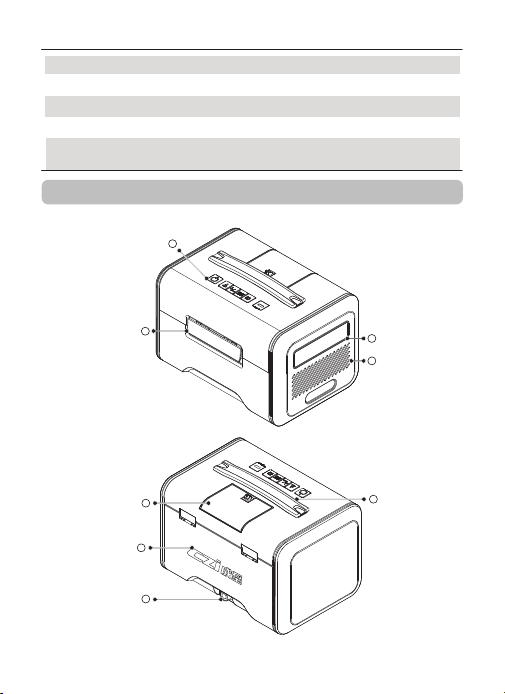
1
Appearance Description
Ground Station
2
5
7
8
6
3
4
Battery Capacity
2500mAh
Battery Type
Li-ion 4S
Control Modes
Dual-mode Control (APP/Ground Station)
Power Adapter
Input: 100-240V~50/60Hz 5.0A Max
Output: 48.0V/5.0A 240w
Battery Weight
195g
CZ10 Hover Light User Manual
28
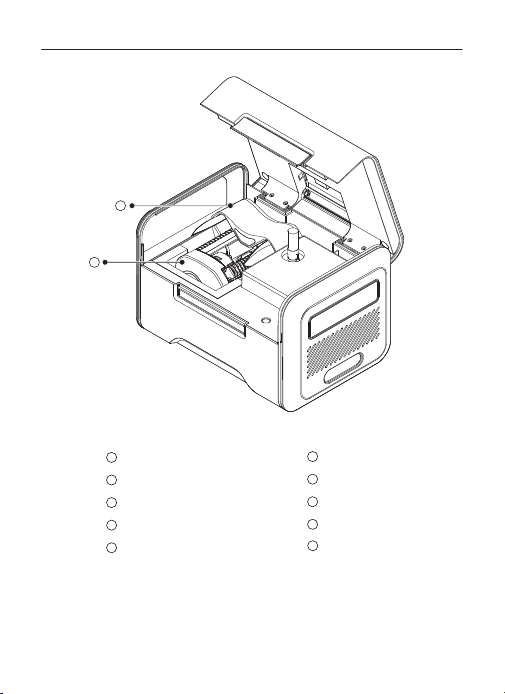
control panel
Cooling Vents
1
2
3
4
5
6
Tether Cable Protective Flap
7
Carry Handle
8
Lamp Panel
9
10
Latch
CZI LOGO
Power Port
Storage Sleeve
Airborne
9
10
CZ10 Hover Light User Manual
29
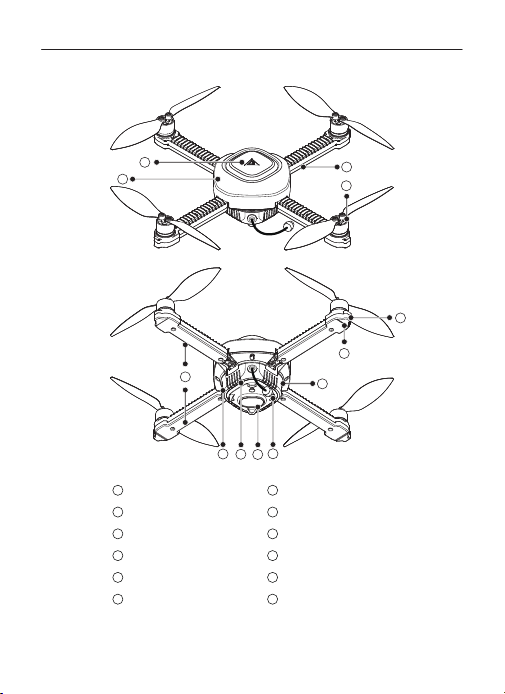
CZI LOGO
1
Frame
2
Arm
3
Propeller
4
Motor
5
Arm Light
6
Frame Cooling Vents
7
Laser Optical Flow Module
8
Type-C Port
9
Tether Cable Port
10
Reset Pinhole
11
Status Indicator
12
Airborne
1
2
3
4
5
6
8
7
9
10
11
12
CZ10 Hover Light User Manual
30
CZ10 Hover Light User Manual
Usage Tutorial
Operating Instructions
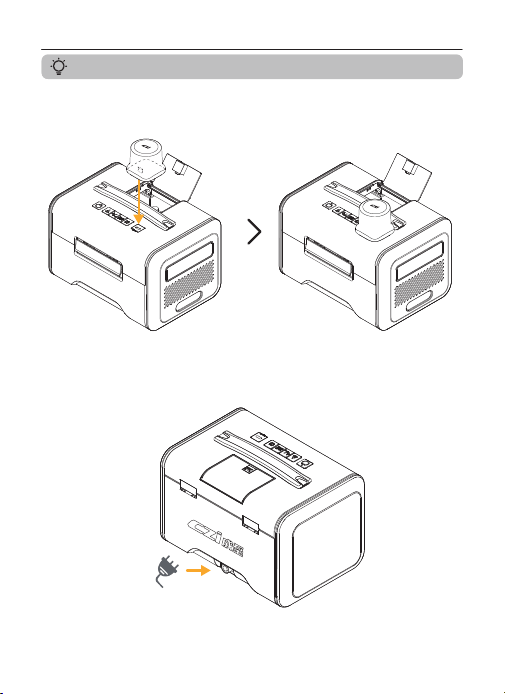
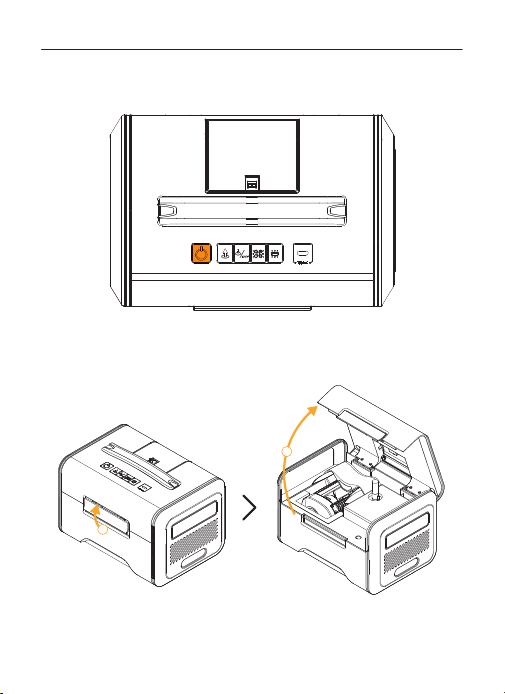
1.Connect the RTK module to the Ground Station.
2.Connect the power supply (system auto-starts when battery <70%).
31
CZ10 Hover Light User Manual
3.If not powered automatically, press and hold the Power Button for 3
seconds to power on the device.
4.Open Ground Station cover.
2
1
32
CZ10 Hover Light User Manual
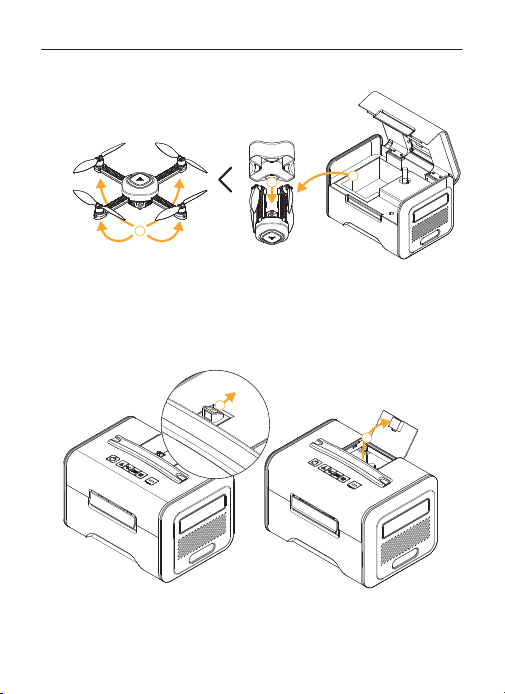
5.Remove and unfold the Airborne Unit.
6.Press the Locking Clip to open Tether Cable Protective Cover.
1
2
3
2
1
33
CZ10 Hover Light User Manual
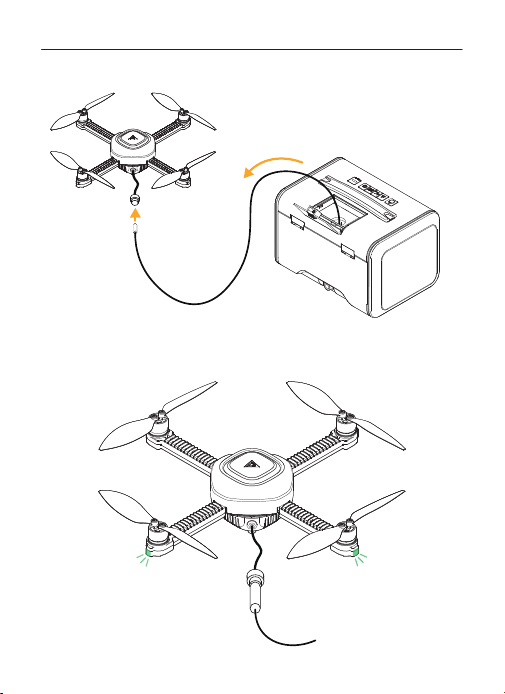
7.Pull the tether out to the 3 m mark.
8.Connect the tether to the Airborne Unit, ensuring the connector is
tightened. Wait until the Airborne Unit indicator turns green before
takeoff.
34
CZ10 Hover Light User Manual
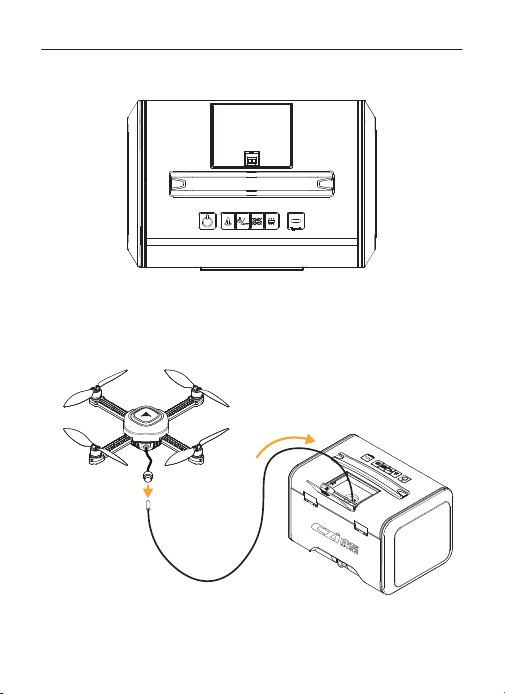
9.Control the system via the Ground Station buttons or czi Sky App.
10.After use, disconnect the tether cable from the Airborne Unit.(For
auto-landing, the cable retracts automatically. For manual landing,
press and hold the landing/tether recovery button for 3 seconds to
retract the cable.)
35
CZ10 Hover Light User Manual
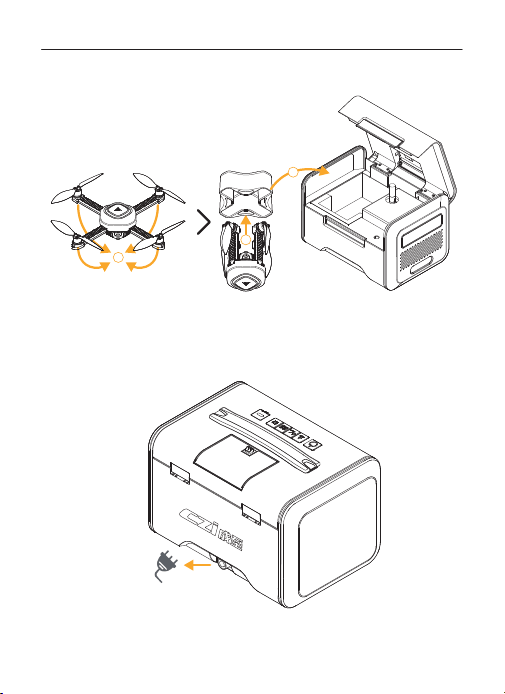
11.Place the Airborne Unit into its propeller strap and return it to the
Ground Station. Close the cover.
3
2
1
12.Press and hold the Power Button for 3 seconds to shut down and
unplug the power.
36
CZ10 Hover Light User Manual
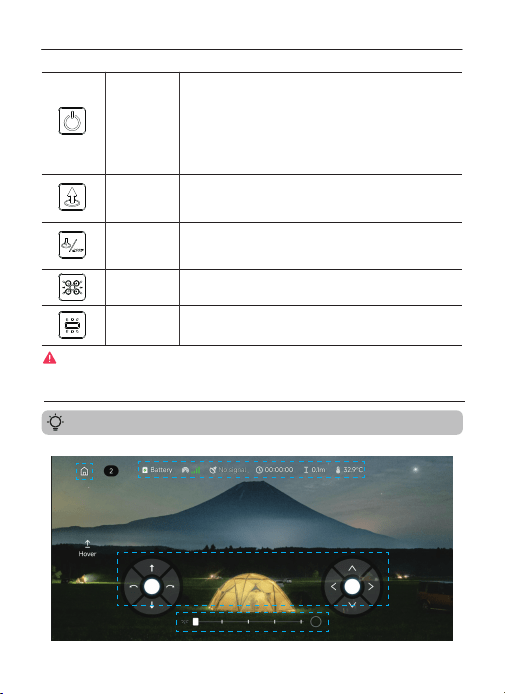
Interface areas:①Home②Status Bar③Control Area④Lighting Control Area
Ground Station Control
APP Control
Power Button
Hold 3s to power ON/OFF.
After powering on, press and hold the Airborne Unit Light
Control button and the Ground Station Light Control button
simultaneously for 4 seconds to enter pairing mode.
Power indicator status:
Green: 70%≤battery≤100%
Blue: 40%≤battery<70%
Red: 0≤battery<40%
The power indicator flashes while charging.
Hold 3s to take off. The button indicator light will flash.
After Airborne Unit takes off, short press to ascend 2 m.
During automatic takeoff, a short press of the button will
interrupt the process and ascend 2 meters.
Hold 3s to land and retract tether.The button indicator light
will flash.
During takeoff/landing, short press the takeoff button to
interrupt the process and descend 2 meters.
Hold 3s to turn light ON/OFF.
Short press to adjust brightness.
Hold 3s to turn light ON/OFF.
Short press to adjust brightness.
Take off
Button
Landing / Tether
Recovery Button
Airborne Unit
Firmware
Upgrade Guide
Ground Station
Light Control
37
If the airborne unit experiences abnormal operation, press and hold the Power Button and the
Takeoff Button simultaneously to activate an emergency motor stop. This function is intended
only for emergency situations involving abnormal conditions. Activation may result in
structural damage to the airborne unit.
① ②
③
④
CZ10 Hover Light User Manual
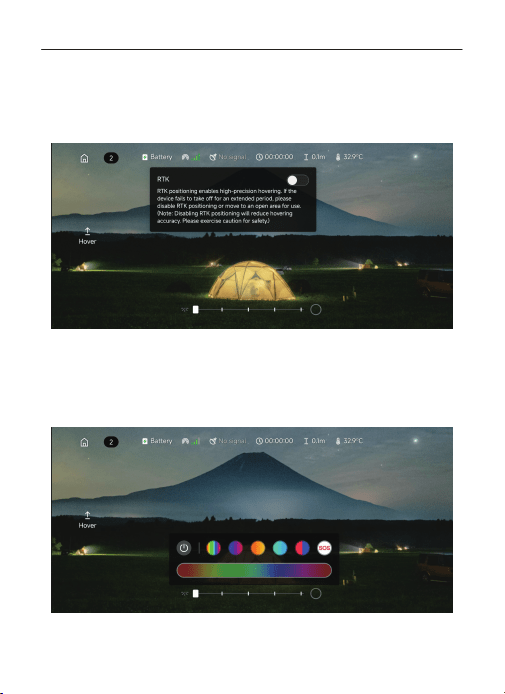
RTK Switch: ON by default, this feature requires a fixed GPS solution from both the
airborne unit and ground station before takeoff to achieve high-precision hovering.
If the GPS signal is poor or takeoff is not possible after an extended period, disable
RTK and retry. (Disabling RTK positioning will reduce hovering accuracy. Please
operate with caution and install propeller guards when necessary.)
Lighting Control: The light control section is located at the bottom of the interface.
The slider is used to adjust the brightness of the daylight lamp. The circular button
on the right is used to open the ambient light control menu, which provides options
for color adjustment, selection of three default breathing patterns, and one-touch
activation of red-and-blue strobe or SOS modes.
38
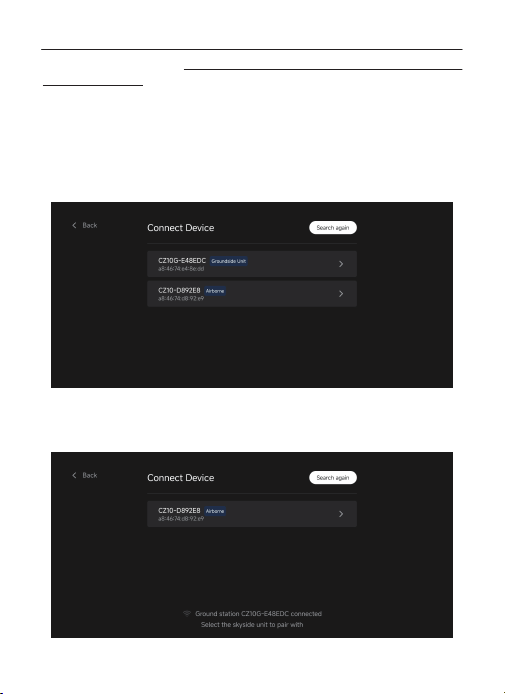
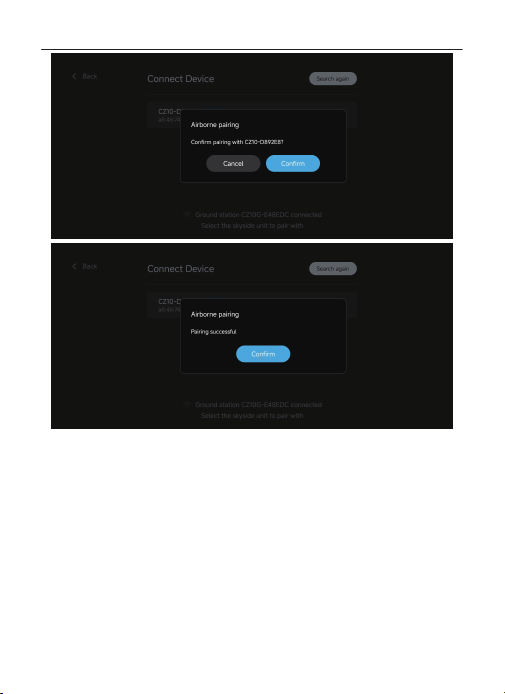
Network Pairing Procedure (The airborne unit and ground station are pre-paired
before shipment.):
Android:
Power on the ground station and connect the airborne unit to be paired. Press and
hold the “Airborne Unit Light Control Button” and the “Ground Station Light
Control Button” simultaneously for 4 seconds, until a voice prompt announces
“Entering pairing mode.”
Open the czi Sky App, select “CZ10”, then tap “Go to connect” to enter the Connect
Device interface.
Tap the Ground Station to connect first. After the connection is successful, select the
airborne unit to be paired. The app will display “Paired successfully”, and a voice
prompt will announce “Wi-Fi connected successfully.”
CZ10 Hover Light User Manual
39
CZ10 Hover Light User Manual
40
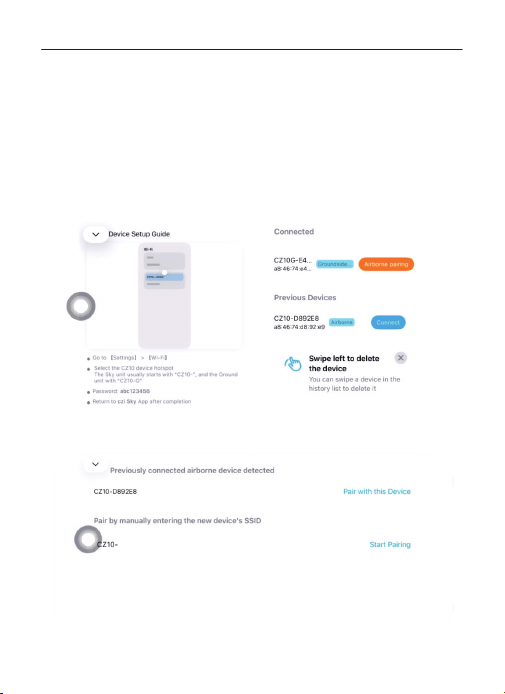
IOS:
Power on the ground station and connect the airborne unit to be paired. Press and
hold the “Airborne Unit Light Control Button” and the “Ground Station Light
Control Button” simultaneously for 4 seconds, until a voice prompt announces
“Entering pairing mode.”
Open the czi Sky App, select “CZ10”, then tap “Go to connect” to enter the Connect
Device interface.
Follow the instructions on the left to connect the ground station. After the
connection is successful, return to czi Sky.
Tap “Airborne Unit Pairing” to enter the pairing interface. In the settings, locate the
available airborne unit Wi-Fi and enter the new device SSID to complete pairing.
CZ10 Hover Light User Manual
41
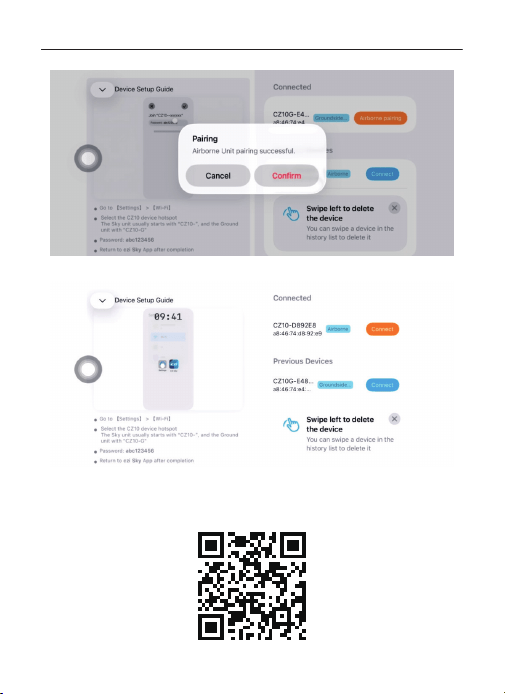
After pairing is successful, tap “Confirm” to switch to the airborne unit.
Tap “Control Device” to enter the operation interface.
Product Information Download
Scan the QR code below to download the czi Sky App, user manual, and firmware
updates.
CZ10 Hover Light User Manual
42
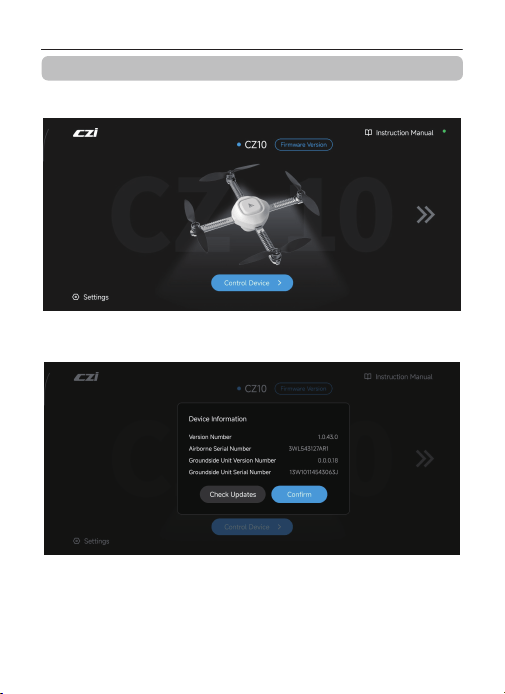
Select the device you want to connect to and establish the connection. After
connecting, return to the home interface and tap Firmware Version.
Tap Check Updates. The system will automatically detect the current firmware
version. If the current version is outdated, an upgrade prompt will appear.
43
CZ10 Hover Light User Manual
Firmware upgrade
44
CZ10 Hover Light User Manual
The prompt will display the latest version number and update details. Tap Upgrade
Now to proceed.
The upgrade process includes two stages: firmware download and firmware
installation. Do not exit the APP or power off the device during the upgrade process
to avoid failure or device malfunction. Once the progress bar reaches 100%, a
successful upgrade notification will appear. The device will automatically restart
and reconnect. After returning to the home screen, tap Control Device to resume
operation.
CZ10 Hover Light User Manual
Propeller Guard Installation Tutorial
Attach the propeller guard as illustrated, then fasten it with the locking clip.
1
22
1
45
CZ10 Hover Light User Manual
Product Maintenance
Packing List
1. Disconnect the power source when the system is not in use.
2. Unplug all power connectors before cleaning.
3. Use a dry cloth to wipe surfaces. Store the device in a cool, dry place.
4.
Regularly clean the cooling vents on both the Airborne and ground units to
ensure proper ventilation and avoid overheating.
CZ10 Full System
Power Adapter
User Manual (with Warranty Card)
Replacement Propeller Set (2 CW + 2 CCW)
Propeller Guard Set
RTK Module
1
1
1
1
1
1
Backpack
1
46
Observation Point Hovering
71 dB(A)
66 dB(A)
Ground Observation Point
Side Observation Point
Note: Testing environment: Outdoor concrete ground surface.
Flight (1 m/s)
71 dB(A)
66 dB(A)
CZ10 Noise Test Results
CZ10 Hover Light User Manual
产品合格证
本产品经检验符合技术标准
Product Certificate of Conformity
This product has passed inspection
and meets all technical standards.
系留悬浮灯
Hover Light
CZ10


广州成至智能机器科技有限公司,致力于为用户提供优质的产品服务!
自购买产品之日起7日内,发生性能故障的,可退货、换货或维修;
自购买产品之日15日内,发生产品性能故障的,可换货或维修;
产品三包有效期内发生性能故障的,可享受免费维修服务。
当您需要我们提供技术支持及了解更多产品讯息时,请联系我们!
联系电话:400-008-8306
地址:广州市天河区广汕一路银湖创意园龙林中街5号广州成至智能机器科技有限公司
产品保修卡
CZI is committed to providing users with quality product services!
Within 15 days from the date of purchase of the product,
performance failures occur, can be returned, exchanged or repaired;
product warranty validity period of performance failures occur,
you can enjoy free repair services.
When you need us to provide technical support and learn more
product information, please contact us!
TEL : +86-400-008-8306
Web Site:https://czi.com.cn/en
Product Warranty Card
CZ10 Hover Light User Manual