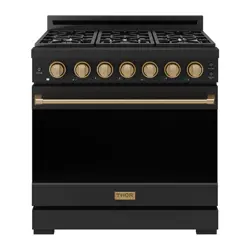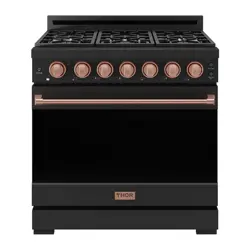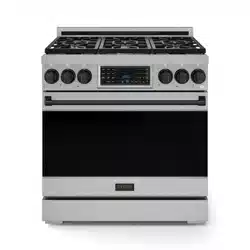

USE & CARE
MANUAL
RSE30 | RSE30B | RSG30/LP | RSG30B/LP
RSE36 | RSE36B | RSG36/LP | RSG36B/LP

GORDON RAMSAY COLLECTION
BY THOR KITCHEN
RSG MODELS
GAS/LP RANGE
RSE MODELS
ELECTRIC RANGE
USE & CARE MANUAL
RSG30/LP | RSG36/LP | RSG30B/LP | RSG36B/LP
RSE30 | RSE36 | RSE30B | RSE36B

Thank you for choosing THOR KITCHEN. This product has been manufactured by Thor International, 4651
E Airport Drive, Ontario, CA 91761. This manual contains all the information you will need to install / use
the product correctly and safely. Please read all the instructions prior using the product, and keep this
manual in a secure place for future reference. Do not remove the attached adhesive identification label
containing code, model number, manufacturer and other information from the product. This label will
be used by the THOR KITCHEN authorized service representative in the event that your product needs
servicing.
Nous vous remercions d’avoir choisi THOR KITCHEN. Cet appareil a été fabriqué par Thor International,
4651 E Airport Drive, Ontario, CA 91761. Le présent manuel contient l’intégralité des consignes dont vous
aurez besoin pour installer l’appareil correctement et en toute sécurité. Veuillez lire l’intégralité des
consignes avant installation de l’appareil, puis conservez le présent manuel en lieu sûr afin de pouvoir
vous y référer ultérieurement. Ne pas retirer de l’appareil l’étiquette d’identification adhésive qui contient
le code, le numéro de modèle, le nom du fabricant et toutes autres informations. Ladite étiquette sera
utilisée par le représentant du service après-vente agréé de THOR KITCHEN au cas où votre appareil
nécessiterait réparation ou entretien.
Gracias por elegir a THOR KITCHEN. Este electrodoméstico fue fabricado por Thor International, 4651 E
Airport Drive, Ontario, CA 91761. Este manual contiene toda la información que necesitará para instalar
y usar el electrodoméstico de manera adecuada y segura. Lea todas las instrucciones antes de instalar
el electrodoméstico, y mantenga este manual en un lugar seguro para usarlo como referencia a futuro.
No quite la etiqueta de identificación adhesiva que contiene el código, número de modelo, fabricante y
otros datos del electrodoméstico. El representante de servicio autorizado por THOR KITCHEN usará esta
etiqueta en caso de que su electrodoméstico requiera reparaciones.

1
TABLE OF CONTENTS
IMPORTANT INSTRUCTION. . . . . . . . . . . . . . . . . . . . . . . . . . . . . . . . . . . . . . . . . . . . . . . . . . . . . . . 3
1.1 Critical safety information . . . . . . . . . . . . . . . . . . . . . . . . . . . . . . . . . . . . . . . . . . . . . . . . . . . . . . . 3
1.2 Signal words explanation . . . . . . . . . . . . . . . . . . . . . . . . . . . . . . . . . . . . . . . . . . . . . . . . . . . . . . . . . . . . . . . . . . . . . 4
1.3 Intended use 4
1.4 IMPORTANT INSTRUCTION . . . . . . . . . . . . . . . . . . . . . . . . . . . . . . . . . . . . . . . . . . . . . . . . . . . . . . . 5
DELIVERY 8
1.5 Appliance description 8
COOKTOP FUNCTIONS 16
2.1 Safety guidelines (RSG30/LP, RSG36/LP, RSG30B/LP, RSG36B/LP only). . . . . . . . . . . . . . . . . . . . . . . . . 16
2.2 Safety guidelines (RSE30, RSE36, RSE30B, RSE36B only) 17
2.3 Usage Tips 18
2.4 Matching knob to the burners. . . . . . . . . . . . . . . . . . . . . . . . . . . . . . . . . . . . . . . . . . . . . . . . . . . . . . . . . . . . . . . . 18
2.5 Igniting a burner. . . . . . . . . . . . . . . . . . . . . . . . . . . . . . . . . . . . . . . . . . . . . . . . . . . . . . . 19
OVEN FUNCTIONS 19
3.1 Safety guidelines 19
3.2 Using the accessories. . . . . . . . . . . . . . . . . . . . . . . . . . . . 21
3.3 Control panel. . . . . . . . . . . . . . . . . . . . . . . . . . . . . . . . . . . . . . . . . . . . . . . . . . . . . . . . . . . . . . . . . . . . . . . . . . . . . . . 24
3.4 Setting the clock. . . . . . . . . . . . . . . . . . . . . . . . . . . . 26
3.5 General oven operation tips. . . . . . . . . . . . . . . . . . . . . . . . . . . . . . . . . . . . . . . . . . . . . . . . . . . . . . . . . . . . . . . . . . 27
3.6 Cooking temperatures 27
3.7 Timer function. . . . . . . . . . . . . . . . . . . . . . . . . . . . 28
3.8 Cooking with timer function 28
3.9 Delay start function . . . . . . . . . . . . . . . . . . . . . . . . . . . 29
3.10 Broiling function. . . . . . . . . . . . . . . . . . . . . . . . . . . . 30
3.11 Keep warm function 31
3.12 Sabbath mode . . . . . . . . . . . . . . . . . . . . . . . . . . . 31
3.13 Fast preheating function (RSG36/LP, RSE30, RSE36, RSG36B/LP, RSE30B, RSE36B only). . . . . . . . . 32
3.14 Probe function (RSG36/LP, RSE30, RSE36, RSG36B/LP, RSE30B, RSE36B only). . . . . . . . . . . . . . . . . . 32
SETTINGS 33
4.1 Activate/deactivate energy saving mode (RSG36/LP, RSE30, RSE36, RSG36B/LP, RSE30B, RSE36B
only) 33
4.2 Change 12 hour or 24 hour time system 33
4.3 Mute/unmute the sound. . . . . . . . . . . . . . . . . . . . . . . . . . . . . . . . . . . . . . . . . . . . . . . . . . . . . . . . . . . . . . . . . . . . . 34
4.4 Change temperature unit. . . . . . . . . . . . . . . . . . . . . . . . . . . . . . . . . . . . . . . . . . . . . . . . . . . . . . . . . . . . . . . . . . . . 34
4.5 Temperature recalibration. . . . . . . . . . . . . . . . . . . . . . . . . . . . . . . . . . . . . . . . . . . . . . . . . . . . . . . 35
4.6 Activate/deactivate demo mode . . . . . . . . . . . . . . . . . . . . . . . . . . . . . . . . . . . . . . . . . . . . . . . . . . . . . . . . . . . . . . 35
4.7 Factory rest 36
4.8 Other settings 36

2
CLEANING
. . . . . . . . . . . . . . . . . . . . . . . . . . . . 36
5.1 General cleaning 36
5.2 Cooktop. . . . . . . . . . . . . . . . . . . . . . . . . . . . 37
5.3 Oven . . . . . . . . . . . . . . . . . . . . . . . . . . . . 38
5.4 Baking accessories 41
MAINTENANCE . . . . . . . . . . . . . . . . . . . . . . . . . . . . . . . . . . . . . . . . . . . . . . . . . . . . . . . 42
6.1 Maintenance guidelines 42
6.2 Purchase replacement parts. . . . . . . . . . . . . . . . . . . . . . . . . . . . . . . . . . . . . . . . . . . . . . . . . . . . . . . . . . . . . . . . . 42
6.3 Change the light bulb 43
TROUBLESHOOTING 43
7.1 Cooktop. . . . . . . . . . . . . . . . . . . . . . . . . . . . 43
7.2 Oven . . . . . . . . . . . . . . . . . . . . . . . . . . . . 46
ERROR CODES. . . . . . . . . . . . . . . . . . . . . . . . . . . . . . . . . . . . . . . . . . . . . . . . . . . . . . . 49
3
IMPORTANT INSTRUCTION
1.1 Critical safety information
WARNING: If the information in these instructions is not followed exactly,
a fire or explosion can result causing property damage, personal injury,
or death.
- Do not store or use gasoline or other flammable vapors and liquids in the
vicinity of this or any other appliance.
- WHAT TO DO IF YOU SMELL GAS:
•
Do not try to light any appliance.
•
Do not touch any electrical switch.
•
Do not use any phone in your building.
•
Immediately call your gas supplier from a neighbor's phone. Follow the
gas supplier's instructions.
•
If you cannot reach your gas supplier, call the fire department.
- Installation and service must be performed by a qualified installer,
service agency, or the gas supplier.
WARNING
Never Operate the Top Surface Cooking Section of this Appliance
Unattended.
•
Failure to follow this warning statement could result in fire,
explosion, or burn hazard that could cause property damage,
personal injury, or death.
•
If a fire should occur, keep away from the appliance and immediately
call your fire department.
DO NOT ATTEMPT TO EXTINGUISH AN OIL/GREASE FIRE WITH WATER.
WARNING
NEVER use this appliance as a space heater to heat or warm the room.
Doing so can result in carbon monoxide poisoning and overheating of
the oven.
4
IMPORTANT INSTRUCTION
WARNING
•
A child or adult can tip the appliance and be killed.
•
Install the anti-tip device to the wall/floor (see Installation instructions). Verify the anti-tip device has
been properly installed and engaged with the back of the appliance.
•
Engage the appliance to the anti-tip device by pushing that appliance all the way into the installation
location. Ensure the anti-tip device is re-engaged when the appliance is moved.
•
Re-engage the anti-tip device if the appliance is moved. Do not operate the appliance without the anti-
tip device in place and engaged.
•
See installation instructions for details.
•
Failure to do so can result in death or serious burns to children or adults.
To check the installation of the anti-tip device:
1. Remove any items on the cooktop (31).
2. Grasp the top rear edge of the appliance and carefully attempt to tilt it forward.
3. Verify that the anti-tip device is engaged.
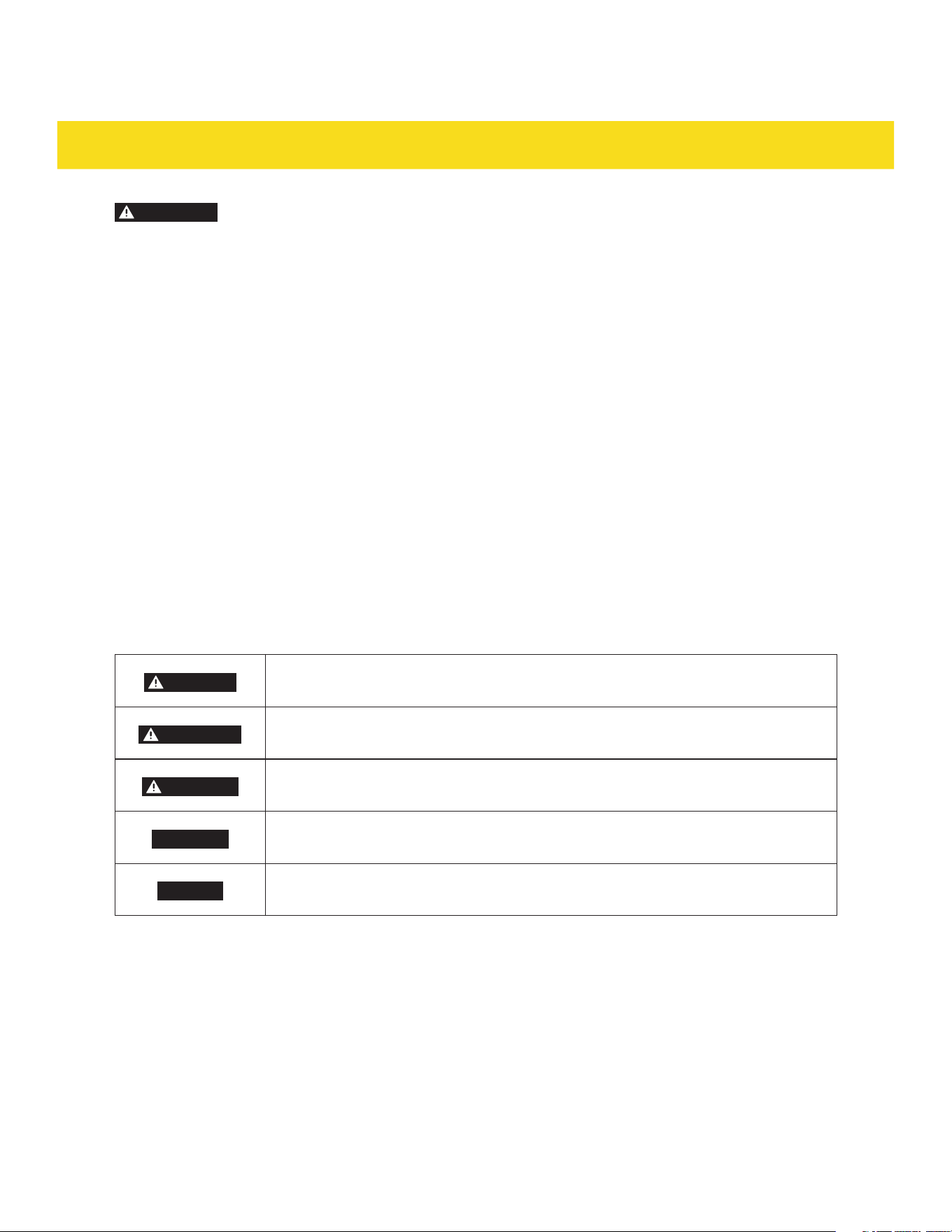
1.2 Signal words explanation
The following signal words are used in this manual
DANGER
This signal word indicates a hazardous situation which, if not avoided, will result
in death or serious injury.
WARNING
This signal word indicates a hazardous situation which, if not avoided, could
result in death or serious injury.
CAUTION
This signal word indicates a hazardous situation which, if not avoided, could
result in minor or moderate injury.
CAUTION
This signal word indicates a hazardous situation which, if not avoided, could
result in property damage.
NOTICE
This signal word is a preferred signal word to address tips and practices not
related to personal injury.
1.3 Intended use
•
This appliance is intended for cooking and preparing food.
•
This appliance is intended for household use only.
•
This appliance is intended to be used in dry indoor areas only.
•
Only use the appliance as mentioned in this manual. Any other use is considered improper and may
result in damage to property or injury to persons.
•
Potential injury from improper use.
•
The manufacturer or vendor cannot be held liable for damages or injury incurred through improper or
incorrect use.

5
IMPORTANT INSTRUCTION
1.4 IMPORTANT INSTRUCTION
For all models
This user manual is part of this appliance, and contains important information on setup and use. Read
this manual carefully, especially the IMPORTANT INSTRUCTION chapter, before using the appliance.
Failure to do so may result in personal injury and/or damage to the appliance.
•
Keep this manual for future use and reference. Make sure to include this manual when passing the
appliance on to third parties. If you require a digital copy of this manual, please contact customer
service.
•
The appliance must be installed in accordance with local codes. In the absence of local codes, follow
ANSI Z223.1/NFPA 54 standards in the U.S. or CSA B149.1 in Canada.
•
It is recommended to electrically ground the appliance during installation in accordance with local
codes. If local codes are not available, follow NFPA 70 or CSA C22.1 standards in Canada.
•
The ventilation area is located at the back of the appliance. The back of the appliance should not be in
direct contact with a wall/surface. Install the back spacers to the back of the appliance to maintain a
proper area for ventilation.
•
In the event of a power failure, do not attempt to use the appliance. If the power fails, always turn the
oven off. If the oven is not turned off and the power returns, the oven my begin to operate again. Food
left unattended could catch fire or spoil.
•
The maximum depth of cabinets installed above the cooktop (31) is 13" (33 cm).
•
Seal any openings in the wall behind the appliance and in the floor under the appliance.
•
If there is a cabinet above the appliance, install a noncombustible material on the bottom if that
cabinet in accordance with local codes. If local codes are not available, follow ANSI Z223.1/NFPA 54 or,
CSA B149.1. in Canada
•
Proper Installation - Be sure your appliance is properly installed and grounded by a qualified
technician.
•
Never Use Your Appliance for Warming or Heating the Room.
•
Do Not Leave Children Alone - Children should not be left alone or unattended in area where
appliance is in use. They should never be allowed to sit or stand on any part of the appliance.
•
Wear Proper Apparel - Loose-fitting or hanging garments should never be worn while using the
appliance.
•
User Servicing - Do not repair or replace any part of the appliance unless specifically recommended in
the manual. All other servicing should be referred to a qualified technician.
•
Storage in or on Appliance - Flammable materials should not be stored in an oven or near surface
units.
•
Do Not Use Water on Grease Fires - Smother fire or flame or use dry chemical or foam-type
extinguisher.
•
Use Only Dry Potholders - Moist or damp potholders on hot surfaces may result in burns from steam.
Do not let potholder touch hot heating elements. Do not use a towel or other bulk cloth.
•
Use Proper Pan Size - The appliance is equipped with one or more surface units of different size.
Select utensils having flat bottoms large enough to cover the surface unit heating element. The use
of undersized utensils will expose a portion of the heating element to direct contact and my result in
ignition of clothing. Proper relationship of utensil to burner will also improve efficiency.

6
IMPORTANT INSTRUCTION
•
Never Leave Surface Units Unattended at High Heat Settings - Boilover can cause smoke and greasy
spillovers that may ignite.
•
Protective Liners - Do not use aluminum foil to line the surface of cooktop drip pan or oven bottoms.
Improper installation of these liners may result in a risk of electric shock, fire or damage to the
porcelain surface.
•
Glazed Cooking Utensils - Only specific types of glass, glass-ceramic, ceramic, earthenware, or other
glazed utensils are suitable for use on the cooktop, as they may break from sudden temperature
changes.
•
Utensil Handles Should Be Turned Inward and Not Extend Over Adjacent Surface units - To reduce
the risk of burns, ignition of flammable materials, and spillage due to unintentional contact with the
utensil, the handle of a utensil should be positioned so that it is turned inward, and does not extend
over adjacent surface units.
•
Use Caution When Opening Door - Let hot air or steam escape before removing or replacing food.
•
Do Not Heat Unopened Food Containers - Build-up of pressure may cause container to burst and
result in injury.
•
Keep Oven Exhaust Vent Unobstructed.
•
Placement of Oven Racks - Always place oven racks in the desired position while the oven is cool. If
moving a rack while the oven is hot, ensure potholders do not touch the heating elements.
•
Do Not Clean Door Gasket - The door gasket is essentials for a good seal. Care should be taken not to
rub, damage, or move the gasket.
•
Do not use a protective coating to line the oven and do not use commercial oven cleaner unless
Certified for use in a self cleaning oven.
•
Clean only the parts as suggested in the manual.
•
Before Using the Self-Clean Function: Remove the broiler pan, oven racks, and any other utensils.
•
DO NOT TOUCH SURFACE UNITS OR AREAS NEAR SURFACES UNITS - Surface units may be hot
even though they are dark in color. Areas near surface units may become hot enough to cause burns.
During and after use, do not touch, or let clothing or other flammable materials contact surface units
or areas near units until they have had sufficient time to cool. Among these areas are the surrounding
areas of cook-top, drip-pan, burners and cooking grates.
•
DO NOT TOUCH INTERIOR SURFACES OF OVEN - Interior surfaces of an oven become hot enough to
cause burns. During and after use, do not touch, or let clothing or other flammable materials contact
the interior surfaces of oven until they have had sufficient time to cool. Other surface of the appliance
may become hot enough to cause burns - among these surface are oven vent openings and surfaces
near these openings, oven doors, and windows of oven doors.
•
If the self-cleaning mode malfunctions, the display will show the error code "E10", accompanied by a
repeated beep tone. This indicates a malfunction in the self-cleaning mode. Turn off the appliance or
disconnect it from the power supply and have it serviced by a qualified technician.
CAUTION
Risk of fire and damage! Do not leave food or cooking utensils, etc., in oven during the
pyrolytic self cleaning mode of operation. Remove all items from the oven prior to initiating
the cleaning cycle. Before initiating the cleaning cycle, wipe off all excessive spillage, food
residue or debris that could potentially ignite. Maintain a safe distance from the appliance
during the cleaning cycle and avoid placing any flammable items or materials near the
appliance.
CAUTION
Risk of injury! Do not store items of interest to children in cabinets above a appliance or
on the backguard of a appliance - children climbing on the appliance to reach items could
be seriously injured.
7
IMPORTANT INSTRUCTION
WARNING
This appliance contains chemicals known to the State of California to cause cancer and/or
reproductive harm, and birth defects or other reproductive harm. For more information go to
www.P65Warnings.ca.gov.
For gas appliances only (RSG30/LP, RSG36/LP, RSG30B/LP, RSG36B/LP)
•
Line Pressure Testing Above 1/2 psi (3.5kPa): The range and its individual shutoff valve must be
disconnected from the gas supply piping system during any pressure testing of that system at test
pressures in excess of 1/2 psi (3.5 kPa).
•
Line pressure testing equal or less than 1/2 psi (3.5 kPa): The range must be isolated from the gas
supply piping system by closing its individual manual shutoff valve during any pressure testing of the
gas supply piping system at test pressures equal to or less than 1/2 psi (3.5 kPa).
•
The appliance should not be installed with a ventilation system that blows air downward toward the
appliance. This type of ventilation system may cause ignition and combustion problems with the gas
cooking appliance resulting in personal injury or unintended operation.
•
Do not use an air curtain or other overhead appliance hood (equipment that operates by blowing a
downward airflow onto a appliance) in conjunction with a gas appliance unless the hood and appliance
have been designed and tested in accordance with ANSI Z21.1 or CSA 1.1, and designed and tested for
combination use.
•
The maximum gas supply pressure, test pressure and the supplied pressure regulator setting of the
gas appliance supplied are as follows:
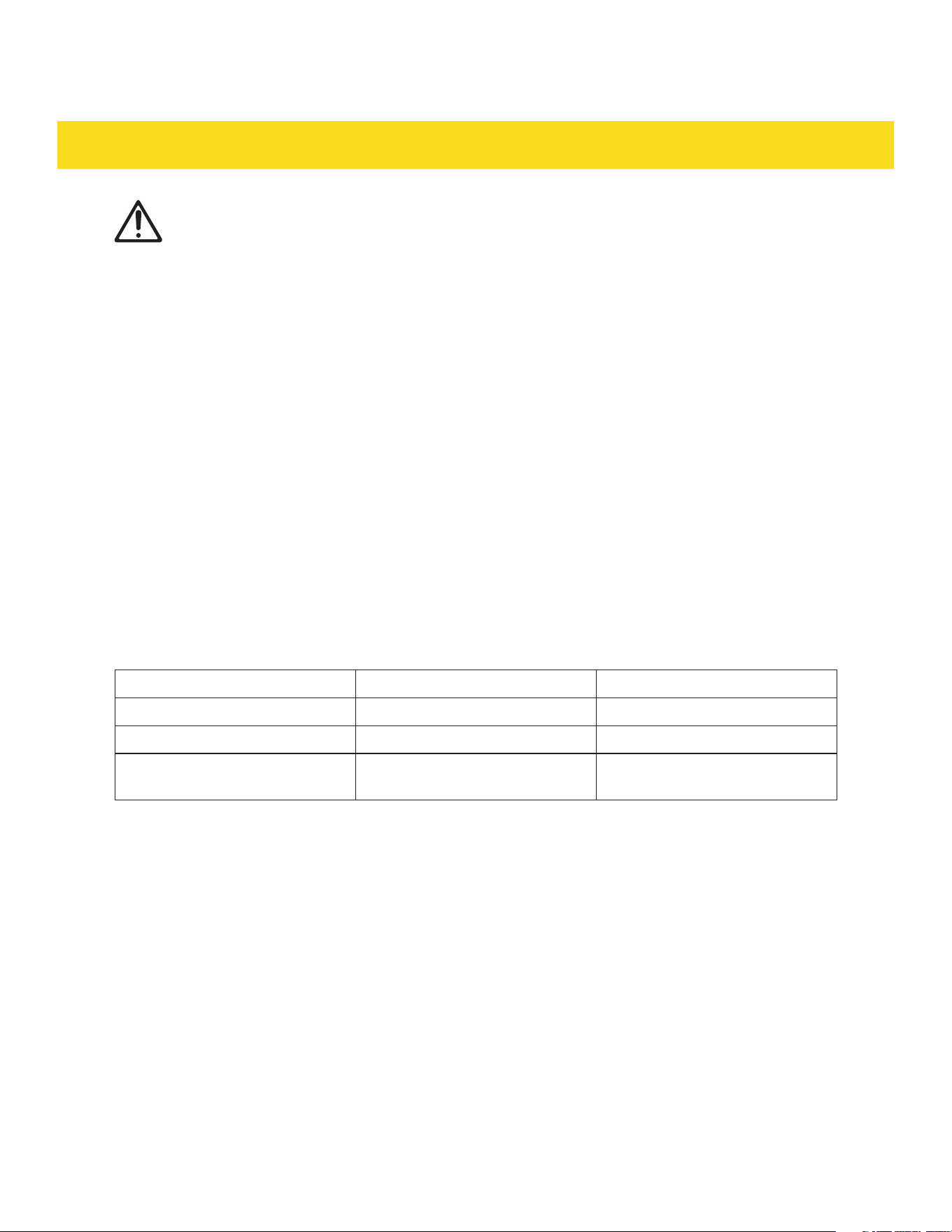
LP (Liquid Propane) in wc NG (Natural gas) in wc
Maximum gas supply pressure
13.0 10.0
Test pressure
≥11.0 ≥6.0
Appliance pressure regulator
setting for outlet pressure
10.0 5.0
•
Leak testing of the appliance shall be conducted in accordance with these instructions (see
Installation instructions).
•
A manual shut-off valve has to be installed in an accessible location in the gas piping external to the
appliance for the purpose of turning on or shutting off the gas supply to the appliance.
COMMONWEALTH OF MASSACHUSETTS
•
Installations and repairs must be performed by a qualified or licensed contractor, plumber, or gas
fitter, qualified or licensed by the state, province, or region where this appliance is being installed.
•
Use only gas shut-off valves approved for use within the state, province, or region where this
appliance is being installed.
•
A flexible gas connector, when used, must not exceed 3' (0.9 m).
For electrical appliances only (RSE30, RSE36, RSE30B, RSE36B)
•
Do Not Cook on a Broken Cooktop - If the cooktop is broken, cleaning solutions and spillovers may
seep through the cracks, posing a risk of electric shock. Contact a qualified technician immediately.
8
IMPORTANT INSTRUCTION
•
Clean Cook-Top With Caution Do Not clean cooktop when it's hot. Do Not clean cooktop when it's hot. - If a wet sponge or cloth is used to
wipe spills on a hot cooking area, be careful to avoid steam burn. Some cleaners can produce noxious
fumes if applied to a hot surface.
DELIVERY
1.5 Appliance description
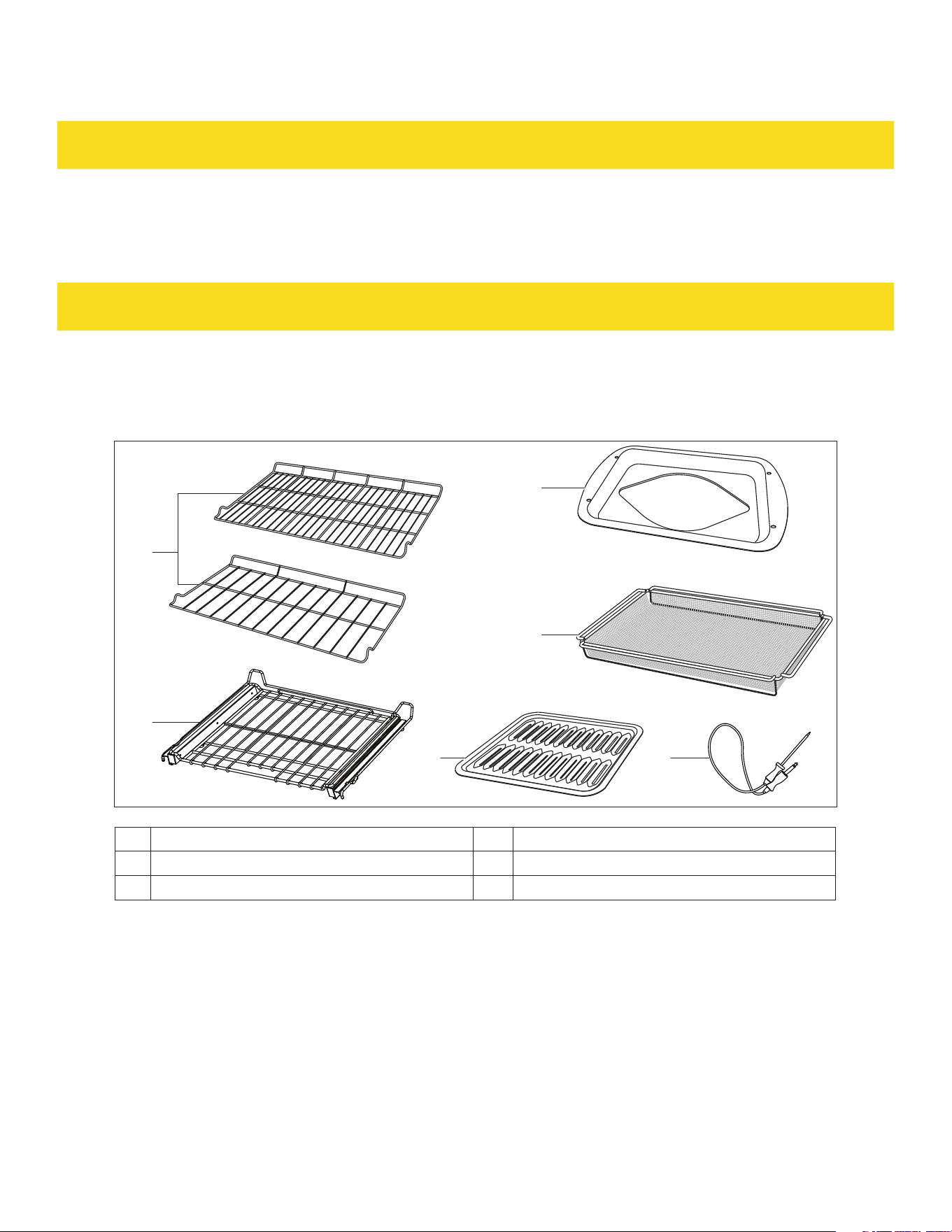
Baking accessories
10
11
129
8a
8b
For RSG36/LP, RSG36B/LP, RSE36, RSE36B
For RSG30/LP, RSG30B/LP, RSE30, RSE30B
8a Oven rack x 1 10 Broiler pan x 1
8b Telescopic oven rack x 1 11
1
Air fry basket x 1
9 Grid x 1 12
1
Probe x 1
1
Not included for RSG30/LP and RSG30B/LP
9
DELIVERY
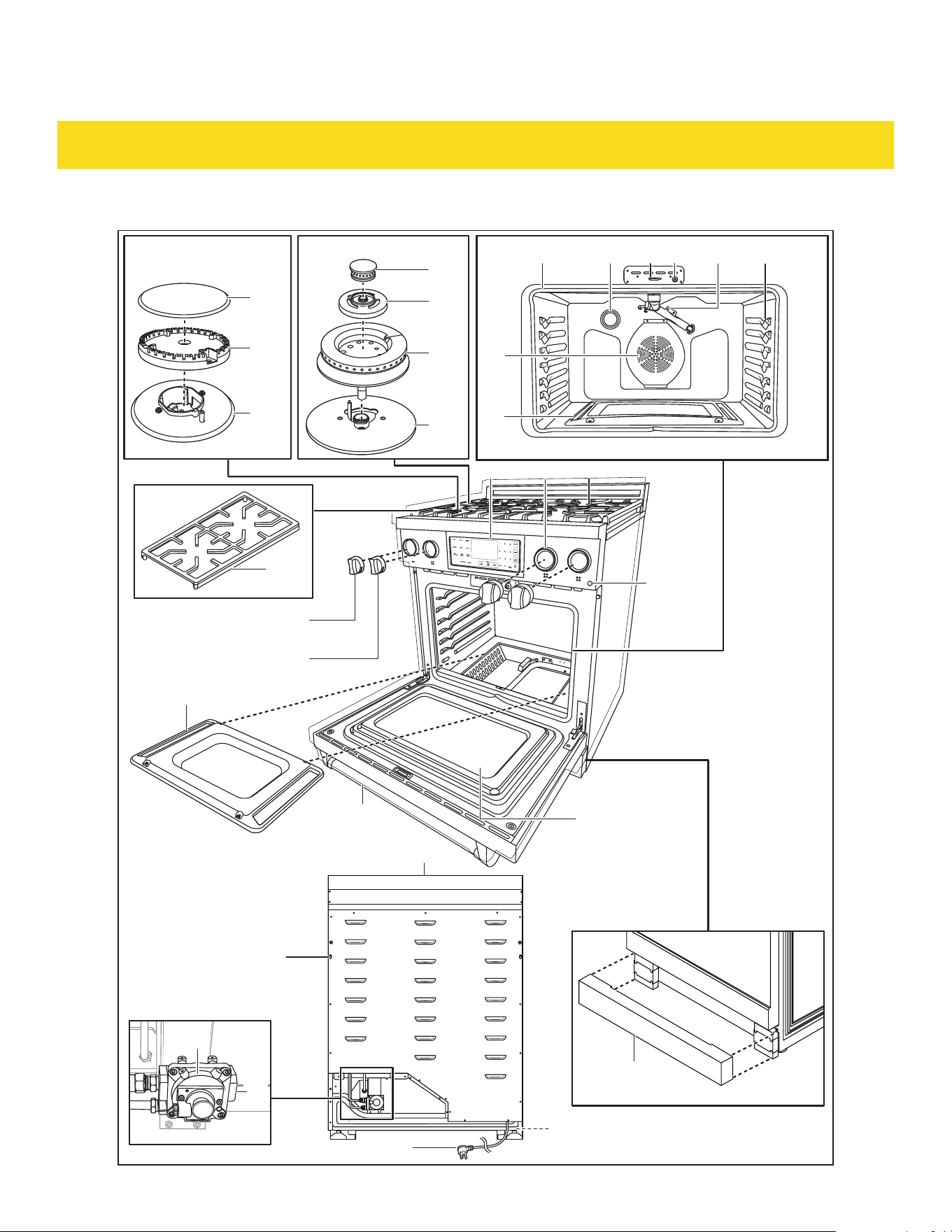
RSG30/LP and RSG30B/LP overview
Light
13
14
15
16
17
28
18
19
27
26
2120
34
33
37
22 23 25
40
35
29 30 31
43
41
38
42
39
24
32
36
53

10
DELIVERY
13 Burner cap x 2 29 Control panel
14 Burner head x 2 30 Knob bezel x 4
15 Burner base 31 Cooktop
16 Dual burner cap with flame spreader x 2 32 Viewing window
17 Dual burner simmer ring x 2 33 Oven door
18 Dual burner lower flame spreader x 2 34 Oven bottom cover
19 Dual burner base 35 Dual burner knob x 2
20 Oven cavity 36 Burner knob x 2
21 Light 37 Kickplate
22 Oven door lock 38 Exhaust vent
23 Oven door sensor 39 Foot x 4
24 Broiler burner 40 Power cord with plug
25 Rack positions 41 Spacer holes
26 Bake burner 42 Pressure regulator
27 Convection fan 43 Gas inlet
28 Cast iron cooking grate x 2 53 Oven light button
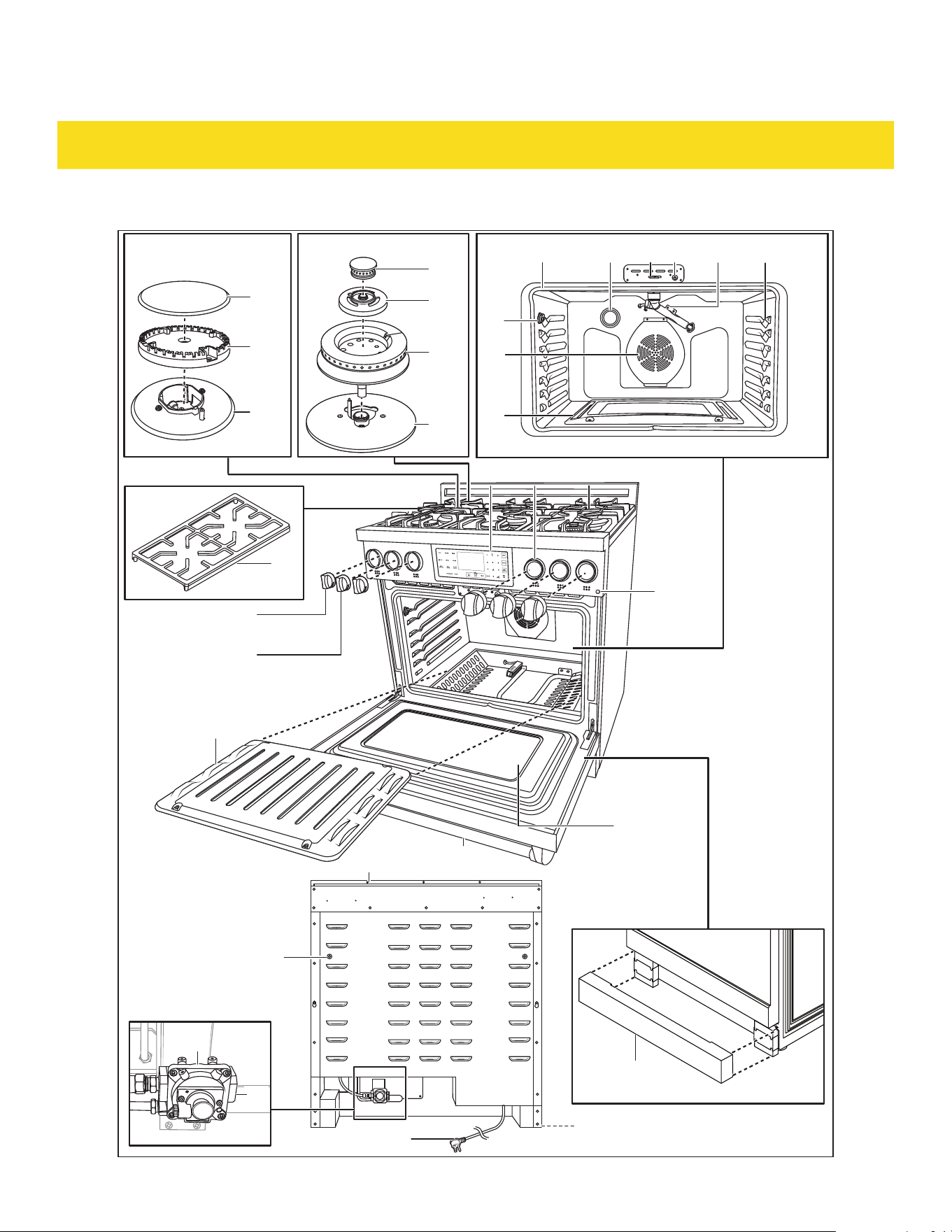
11
DELIVERY
RSG36/LP and RSG36B/LP overview
Light
13
14
15
16
17
28
18
19
27
26
44
2120
34
33
37
22 23 25
40
36
29 30 31
43
41
38
42
39
24
32
53
35

12
DELIVERY
13 Burner cap x 4 30 Knob bezel x 6
14 Burner head x 4 31 Cooktop
15 Burner base 32 Viewing window
16 Dual burner cap with flame spreader x 2 33 Oven door
17 Dual burner simmer ring x 2 34 Oven bottom cover
18 Dual burner lower flame spreader x 2 35 Dual burner knob x 2
19 Dual burner base 36 Burner knob x 4
20 Oven cavity 37 Kickplate
21 Light 38 Exhaust vent
22 Oven door lock 39 Foot x 4
23 Oven door sensor 40 Power cord with plug
24 Broiler burner 41 Spacer holes
25 Rack positions 42 Pressure regulator
26 Bake burner 43 Gas inlet
27 Convection fan 44 Probe port
28 Cast iron cooking grate x 3 53 Oven light button
29 Control panel 54 Hot surface indicator
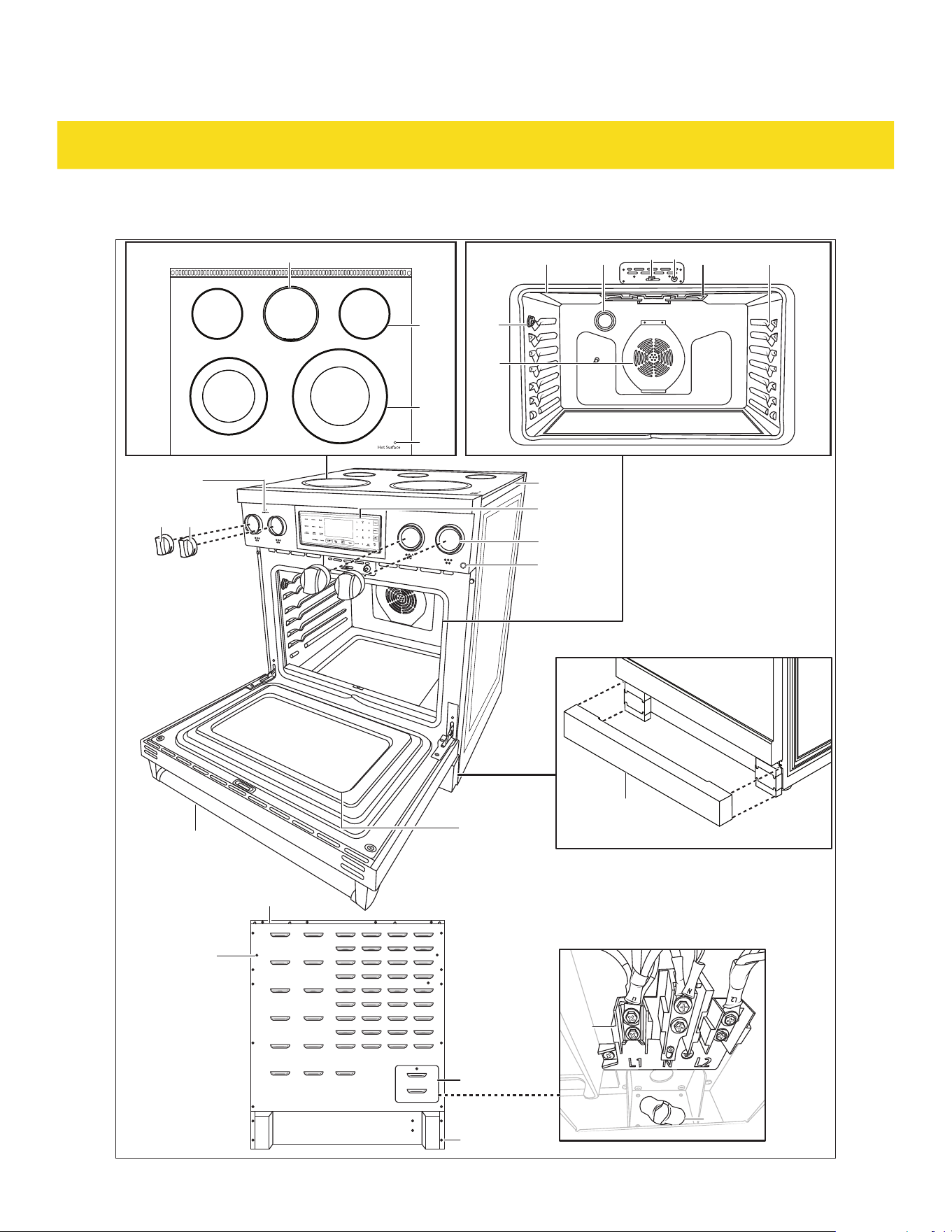
13
DELIVERY
RSE30 and RSE30B overview
Light
51
52
39
31
30
46
47
50
41
27
44
37
33
45
222120
3635
48 2523
32
29
38
49
53
54

14
DELIVERY
20 Oven cavity 38 Exhaust vent
21 Light 39 Foot x 4
22 Oven door lock 41 Spacer holes
23 Oven door sensor 44 Probe port
25 Rack positions 45 Warning zone
27 Convection fan 46 Single cooking zone
29 Control panel 47 Dual cooking zone
30 Knob bezel x 4 48 Broil element
31 Cooktop 49 Burner On indicator
32 Viewing window 50 Terminal block
33 Oven door 51 Strain relief
35 Dual cooking zone knob x 2 52 Terminal block cover
36 Single cooking zone knob x 2 53 Oven light button
37 Kickplate 54 Hot surface indicator
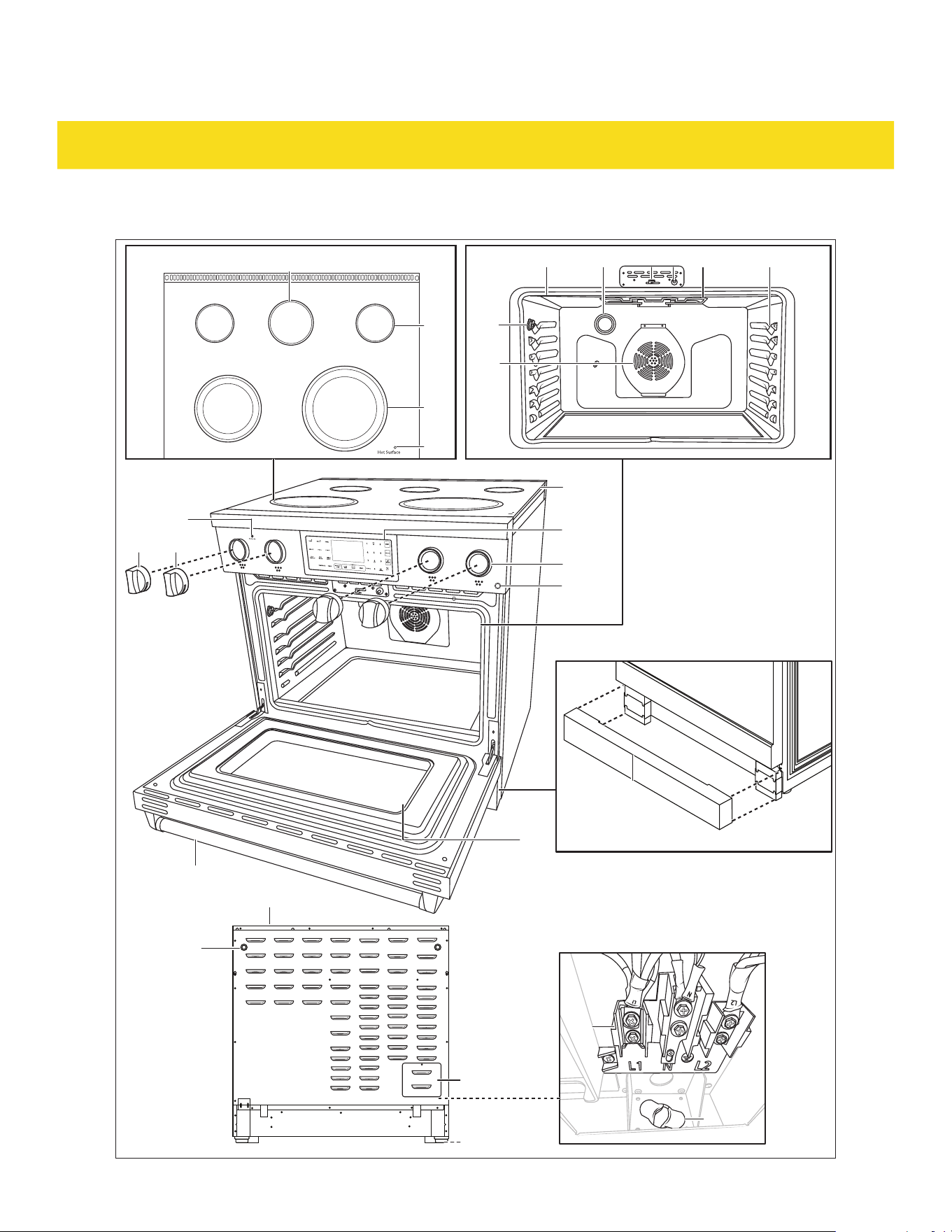
15
DELIVERY
RSE36 and RSE36B overview
Light
51
52
39
31
30
46
47
50
41
27
44
37
33
45
222120
3635
48 2523
32
29
38
49
53
54
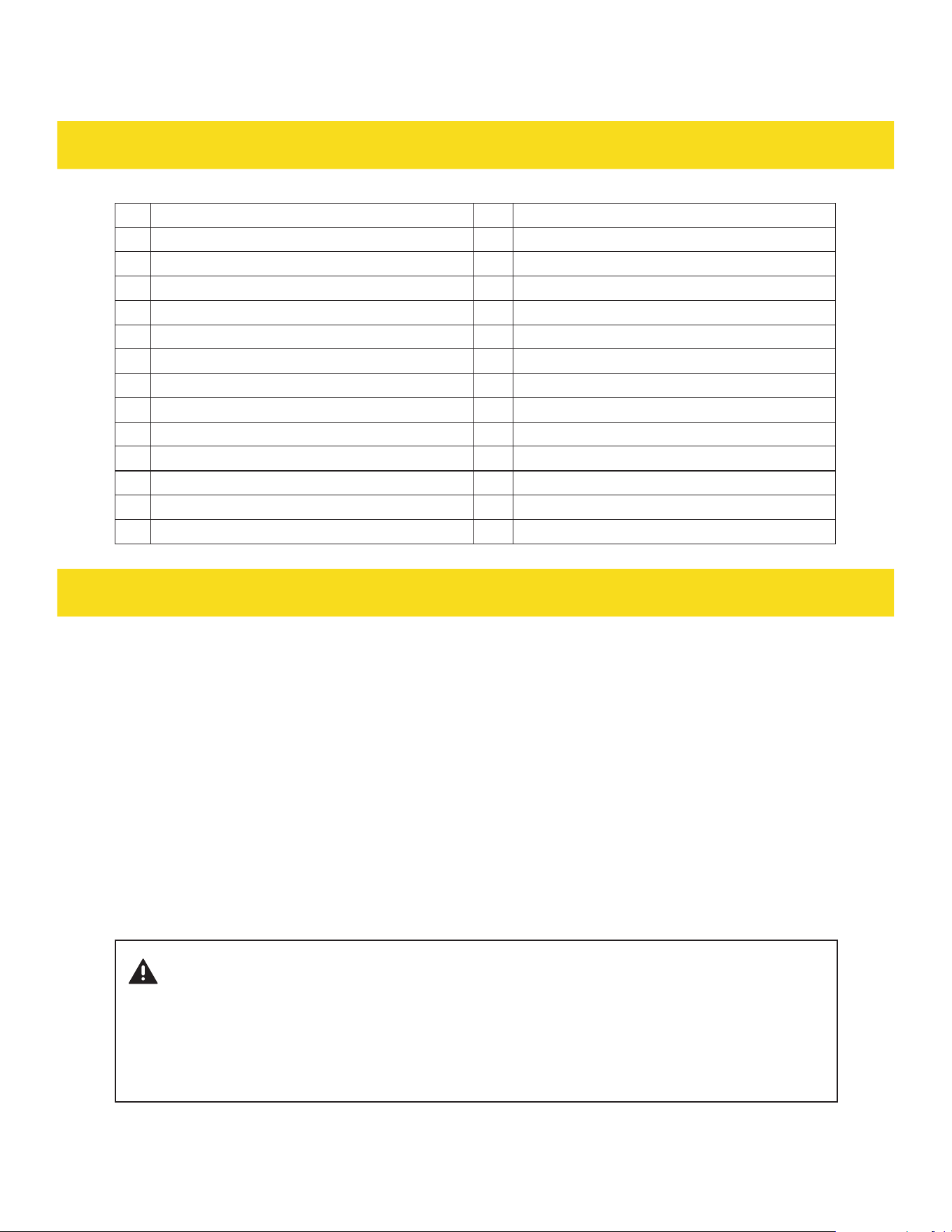
16
DELIVERY
20 Oven cavity 38 Exhaust vent
21 Light 39 Foot x 4
22 Oven door lock 41 Spacer holes
23 Oven door sensor 44 Probe port
25 Rack positions 45 Warning zone
27 Convection fan 46 Single cooking zone
29 Control panel 47 Dual cooking zone
30 Knob bezel x 6 48 Broil element
31 Cooktop 49 Burner On indicator
32 Viewing window 50 Terminal block
33 Oven door 51 Strain relief
35 Dual cooking zone knob x 2 52 Terminal block cover
36 Single cooking zone knob x 2 53 Oven light button
37 Kickplate 54 Hot surface indicator
COOKTOP FUNCTIONS
2.1 Safety guidelines (RSG30/LP, RSG36/LP, RSG30B/LP, RSG36B/LP only)
Before cooking
•
Ensure all burner parts are properly assembled to avoid dangerous flames.
•
The burner flame size should be adjusted so it does not extend beyond the edge of the cooking utensil.
This instruction is based on safety considerations.
•
Keep flammable items away from the cooktop (31).
•
If the burner fails to ignite within 4 seconds, turn the knob (35/36) to Off and wait for 5 minutes to
allow gas to dissipate before attempting to relight.
•
Do not operate the appliance during a power outage.
During cooking
WARNING
NEVER cover any slots, holes, or passages in the oven bottom or cover
an entire rack with materials such as aluminum foil. Doing so blocks
airflow through the oven and can cause carbon monoxide poisoning.
Aluminum foil linings can also trap heat, causing a fire hazard.

17
COOKTOP FUNCTIONS
•
Never leave the cooktop (31) unattended when in use to prevent smoking and igniting greasy spills.
•
Do not disassemble or clean around a burner while another burner is on. Avoid touching burner caps
or bases when igniters are sparking.
•
Ensure flames do not extend beyond cookware or curl up on the sides to prevent damage,
discoloration, and burns.
•
Use the low setting (620 BTU/hr) on dual burners for gentle simmering, melting chocolate and butter,
cooking rice and delicate sauces, simmering soups and stews, and keeping food hot.
•
Keep handles away from the edge of the appliance or on a burner that is on.
•
Be cautious when deep-frying as oil or fat can quickly overheat, especially on a high setting.
After cooking
•
The burners can be easily removed and are not sealed to the cooktop (31).
•
Clean the burners after each use and especially after spills or boil overs.
•
Promptly wipe up acidic or sugary spills to prevent discoloration or staining.
•
Clean affected burners before using them again to prevent clogging of the igniter and flame spreader,
which can affect burner functionality.
2.2 Safety guidelines (RSE30, RSE36, RSE30B, RSE36B only)
Before cooking
•
Do not use the glass cooktop (31) surface as a cutting board.
•
Do not place or store items that can melt or catch fire on the glass cooktop, even when it is not in use.
•
Only turn on the surface units after placing cookware on them.
•
Avoid storing heavy items above the cooktop (31) surface to prevent damage from falls.
During cooking
WARNING
Risk of electric shock! Do not cook on broken cooktop (31) - if the cooktop (31) breaks,
cleaning solutions and spillovers can penetrate the broken cooktop (31) and create a risk
of electric shock. Contact a qualified technician immediately.
•
Avoid placing aluminum foil or plastic items on the appliance when it is in use, as the hot air from the
vent could cause melting or ignite flammable materials.
•
Ensure the correct surface unit of the appliance is turned on.
•
Never cook directly on the glass surface of the appliance; always use cookware.
•
Always place the pan in the center of the surface unit being used for cooking on the appliance.
•
Do not leave surface units of the appliance unattended while using high heat settings, as boilovers can
cause smoking and greasy spillovers that may catch fire.
•
Remember to turn off the surface units of the appliance before removing cookware.
•
Avoid using plastic wrap to cover food on the appliance, as it may melt onto the surface and be difficult
to remove.

18
COOKTOP FUNCTIONS
After cooking
CAUTION
Risk of steam burns and noxious fumes! Clean cooktop (31) with caution - if a wet sponge
or cloth is used to wipe spills on a hot cooking area, be careful to avoid steam burns. Some
cleaners can produce noxious fumes if applied to a hot surface.
•
Clean the burners after each use and especially after spills or boil overs.
2.3 Usage Tips
For RSG30/LP, RSG36/LP, RSG30B/LP, RSG36B/LP only
•
For the best simmer results, use a smaller flame. Small flames are ideal for precise cooking of
delicate foods, keeping food warm, melting chocolate or butter, and slow cooking over low heat. The
highest flame setting on the appliance provides maximum heat and should be used for heavy cooking
loads like boiling water or cooking pasta.
•
When selecting the flame size, observe the flame as the knob is turned. Any flame larger than the
bottom of the cookware is unnecessary. The flame should be steady and blue. Note that foreign
material in the gas line may cause an appliance flame during initial operation.
For RSE30, RSE36, RSE30B, RSE36B only
•
Cooking areas on the glass cooktop (31) are identified by permanent rings on the surface. Match the
pan size to the cooking area for optimal efficiency. Pans should not extend more than 0.5 to 1" (1.3 to
2.5 cm) beyond the cooking area.
•
When a burner is turned on, a glow is visible through the glass surface. The cooking area cycles on
and off to maintain the preset heat setting, even at high settings. The temperature in the cooking area
gradually and evenly increases. As the temperature rises, the broil element (48) glows red and cycles
on and off to maintain the selected setting.
•
The broil element (48) retains enough heat to provide uniform and consistent heat during the off
cycle. For efficient cooking, turn off the element several minutes before cooking is complete to allow
residual heat to finish the process.
•
The cooking area has a limiter that cycles it on and off, even at the highest setting, to prevent damage
to the glass cooktop (31). This cycling is normal and occurs if the cookware is too small or if the
bottom of the cookware is not flat.
2.4 Matching knob to the burners
There are markings located on the control panel (29) to show which knob (35/36) corresponds to which
burner on the cooktop (31).

19
COOKTOP FUNCTIONS
2.5 Igniting a burner
For RSG30/LP, RSG36/L, RSG30B/LP, RSG36B/LP only
1. Simultaneously push in and turn a knob (35/36) to the Ignite position. A clicking sound is heard, the
burner ignites.
2. After the burner ignites, rotate the knob (35/36) to the desired heat setting.
3. After use, return the knob (35/36) to the Off position.
For RSE30, RSE36, RSE30B, RSE36B only
1. Push the knob (35/36) in.
2. For the back burners, rotate the knob (35/36) to the desired heat setting.
3. For the front burners, rotate the knob (35/36) to the left side for single burner setting or the right side
for dual burner setting.
4. After use, return the knob (35/36) to the OFF position.
NOTICE
After the burners are switched on, the Burner On indicator (49) lights up to show that the
burners are hot.
NOTICE
The warming zone (45) is controlled by the control panel (29). Press WARMING ZONE button
then press 1, 2 or 3 (3 being the highest setting) to select the desired warming setting.
OVEN FUNCTIONS
3.1 Safety guidelines
Oven door
WARNING
Risk of injury and damage! Do not step, lean or sit on the oven door (33).
•
Excessive weight or force applied to the oven door (33) can damage the hinges, or other components,
leading to malfunction or potential instability.
•
Regular misuse of the oven door (33) can cause misalignment, operational issues, or malfunctions,
compromising the functionality of the appliance.

20
OVEN FUNCTIONS
Oven
WARNING
Risk of fire, gas leaks, food contamination and damage! Do not use the oven as storage
space.
•
Placing flammable items like paper, plastic, or cloth inside the oven can increase the risk of fire if the
oven is accidentally turned on.
•
Items stored inside the oven can be damaged or melted if the oven is turned on by mistake or if
residual heat is present.
•
Storing items in a gas oven can obstruct the ventilation and increase the risk of a gas leak, leading to
potential explosions or carbon monoxide poisoning.
•
Using the oven for storage can lead to the accumulation of dust, dirt, or pests, which can contaminate
food when the oven is used for cooking.
•
Placing items in the oven can increase the likelihood of accidentally turning on the oven while
forgetting about the stored items.
•
Do not hang any articles (e.g. dish towels) on the oven handle. Some fabrics may ignite or melt from
the heat.
CAUTION
Risk of burns! When opening the oven door (33), do not stand directly at its opening. Hot
air or steam can escape when opening the oven door (33).
•
Do not block the rear ducts of the appliance during oven use.
•
Avoid touching the vent opening or nearby surfaces during operation as they are hot.
•
Do not place plastics, paper, or other items that can melt or burn near the oven vent.
•
Use all oven functions with the door closed.
•
Do not use aluminum foil to cover oven shelves or line the oven floor to prevent heat damage and
potential fire.
•
Do not use plastic wrap or wax paper in the oven.
•
For food safety, do not leave food in the oven for longer than 2 hours before and after cooking or
defrosting, especially in warmer weather. Do not hold foods at temperatures between 40°F to 140°F
for more than 2 hours.
21
OVEN FUNCTIONS
3.2 Using the accessories
Oven racks
CAUTION
Risk of burns! The oven racks (8a/8b) can be hot after use. Wait for the oven racks (8a/8b)
to cool down or use kitchen mitts when inserting/removing them from the oven cavity (20).
•
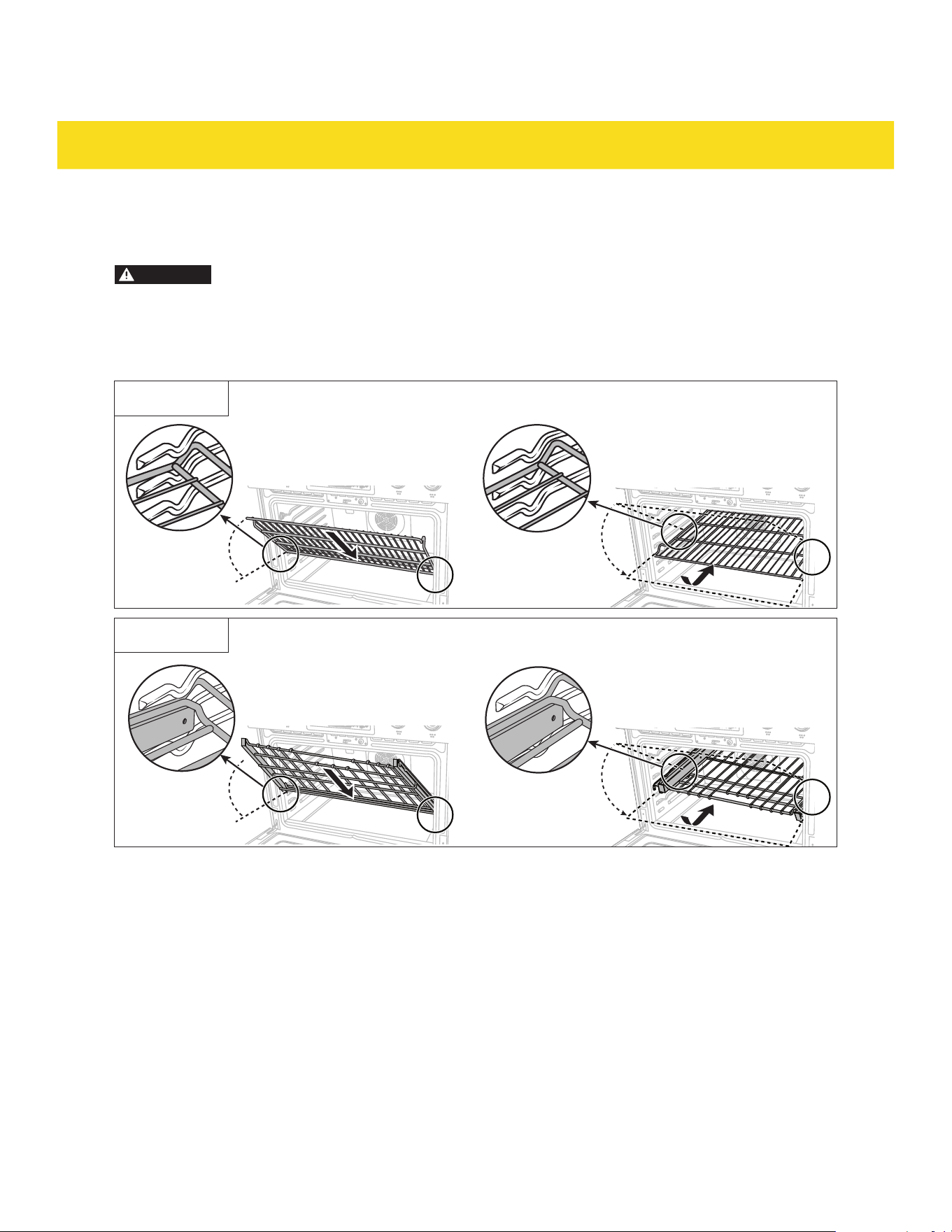
To insert an oven rack (8a/8b), place the end of it on the desired rack position (25). Tilt the oven
rack (8a/8b) forwards then push inwards (Fig. 1a/1b).
Fig. 1a
Fig. 1b
22
OVEN FUNCTIONS
•
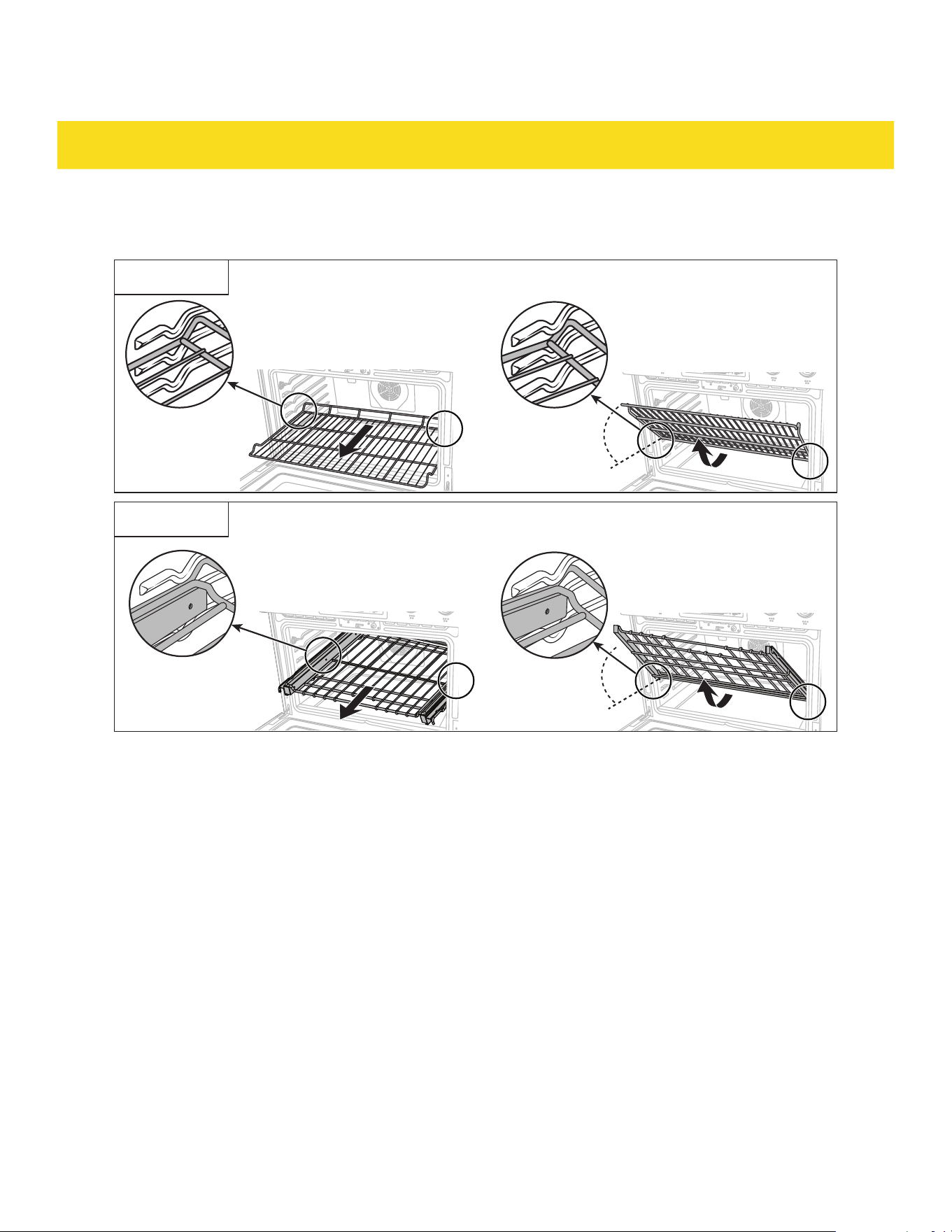
To remove an oven rack (8a/8b), pull it out until it stops. Lift the oven rack (8a/8b) upwards and pull it
out (Fig. 2a/2b).
Fig. 2a
Fig. 2b
•
There are 6 rack positions (25). 6 is the highest rack position (25). Follow the tips below for the best
results:
- Place items in the center for even cooking.
- The top rack position is for broiling only.
- When baking multiple items, leave 1" to 1.5" (2.5 to 3.8 cm) space in between them.
- When baking or convection baking on a single rack, place the oven rack (8a/8b) in positions 3 or 4.
- When baking or convection baking on multiple racks, place the oven racks (8a/8b) in positions 3
and 5. Place items in the rear of the top rack and the other items in the front of the bottom rack.
This arrangement helps to evenly distribute heat.
- Do not cover an oven rack (8a/8b) with aluminum foil. This disrupts the heat circulation and results
in poor heat distribution.
23
OVEN FUNCTIONS
- Recommended rack positions (25) for cooking various food:
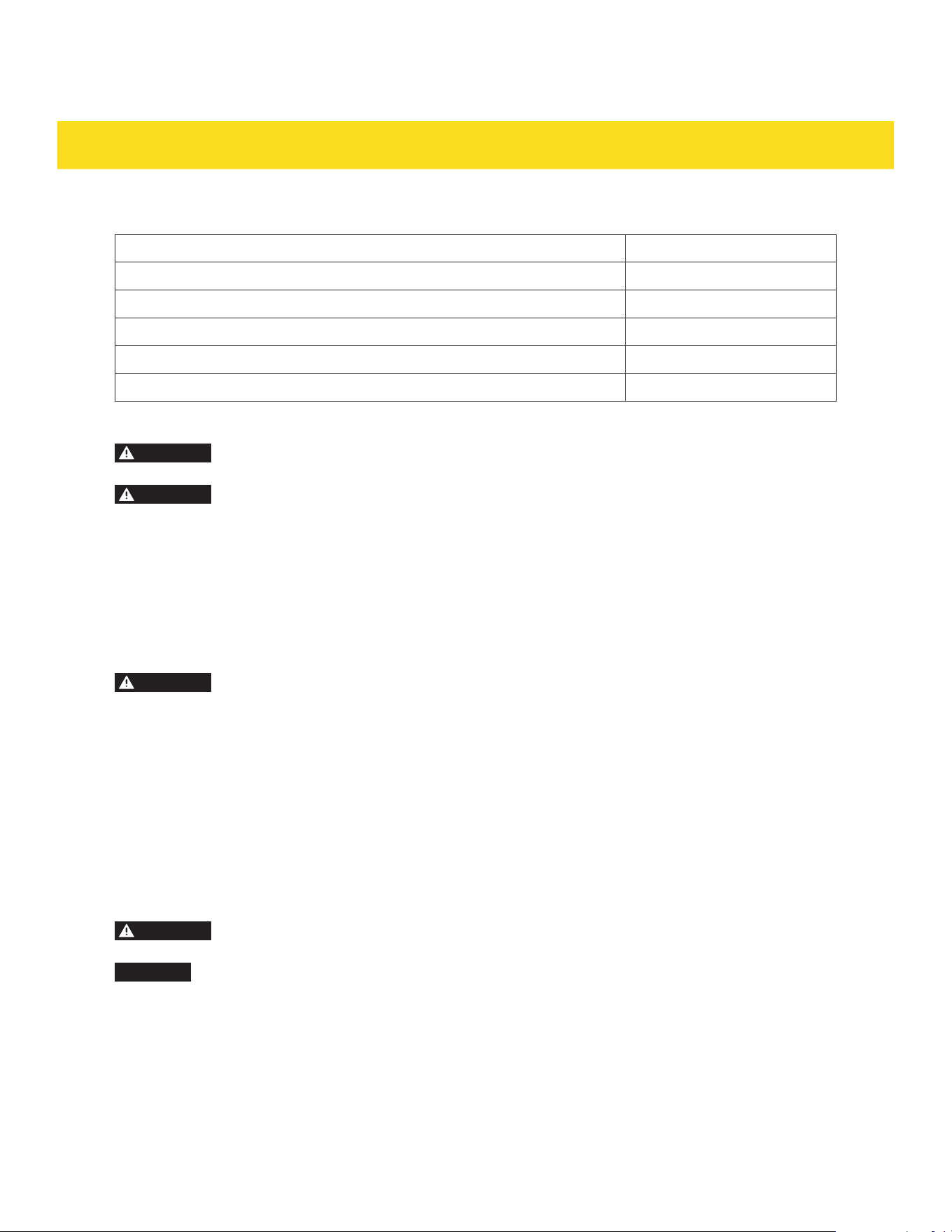
Type of food Rack position (25)
Broiling hamburgers
6
Broiling meats, small cuts of poultry, fish
3 to 5
Bundt cakes, pound cakes, frozen pies, casseroles
4 or 3
Angel food cakes, small roasts
2
Turkey, large roast, ham, fresh pizza
1
Grid and broiler pan
CAUTION
Risk of fire! Do not cover the grid (9) with aluminum foil to prevent grease buildup and
potential fire.
CAUTION
Risk of burns! The broiler pan (10) and the grid (9) gets hot during cooking. Use kitchen
mitts when removing them from the oven cavity (20).
•
To use the broiler pan (10), place it on the center of an oven rack (8a/8b), in positions 3 or 4.
•
The broiler pan (10) can be used on its own for broiling/roasting food.
•
The grid (9) can be placed on top of the broiler pan (10). The grid (9) allows fat and juices to drip into
the broiler pan (10) below. It ensures even cooking by allowing air circulation around the food.
Air fry basket (RSG36/LP, RSE30, RSE36, RSG36B/LP, RSE30B, RSE36B only)
CAUTION
Risk of burns! The air fry basket (11) gets hot during cooking. Use kitchen mitts when
removing it from the oven cavity (20).
•
To use the air fry basket (11), place it on an oven rack (8a/8b), in positions 3 or 4. Then place a large
baking tray on the oven rack (8a/8b) under the air fry basket (11) to catch the grease from the food.
•
The air fry basket (11) allows hot air to circulate around the food for even cooking. It promotes
crispiness without the need for excessive oil. It has faster cooking times compare to traditional
baking.
•
Arrange the food in a single layer in the air fryer basket (11) for even cooking.
•
According to the recipe, shake or turn the air fryer basket (11) halfway through for even cooking.
Probe (RSG36/LP, RSE30, RSE36, RSG36B/LP, RSE30B, RSE36B only)
CAUTION
Risk of burns! The probe (12) gets hot during cooking. Use kitchen mitts when removing it
from the oven cavity (20).
CAUTION
Risk of damage! Do not close the oven door (33) on the probe (12) wire. It may cause damage
to the appliance or the probe (12).
•
The probe (12) provides internal temperature readings of the food. It prevents food from undercooking
or overcooking. It is ideal for cooking large slices of meat.
•
To use the probe (12), insert it into the thickest part of the food, avoiding bones and fat. To use the
probe function, see chapter 3.14 Probe function (RSG36/LP, RSE30, RSE36, RSG36B/LP, RSE30B,
RSE36B only).
24
OVEN FUNCTIONS
3.3 Control panel
For RSG30/LP, RSG30B/LP only
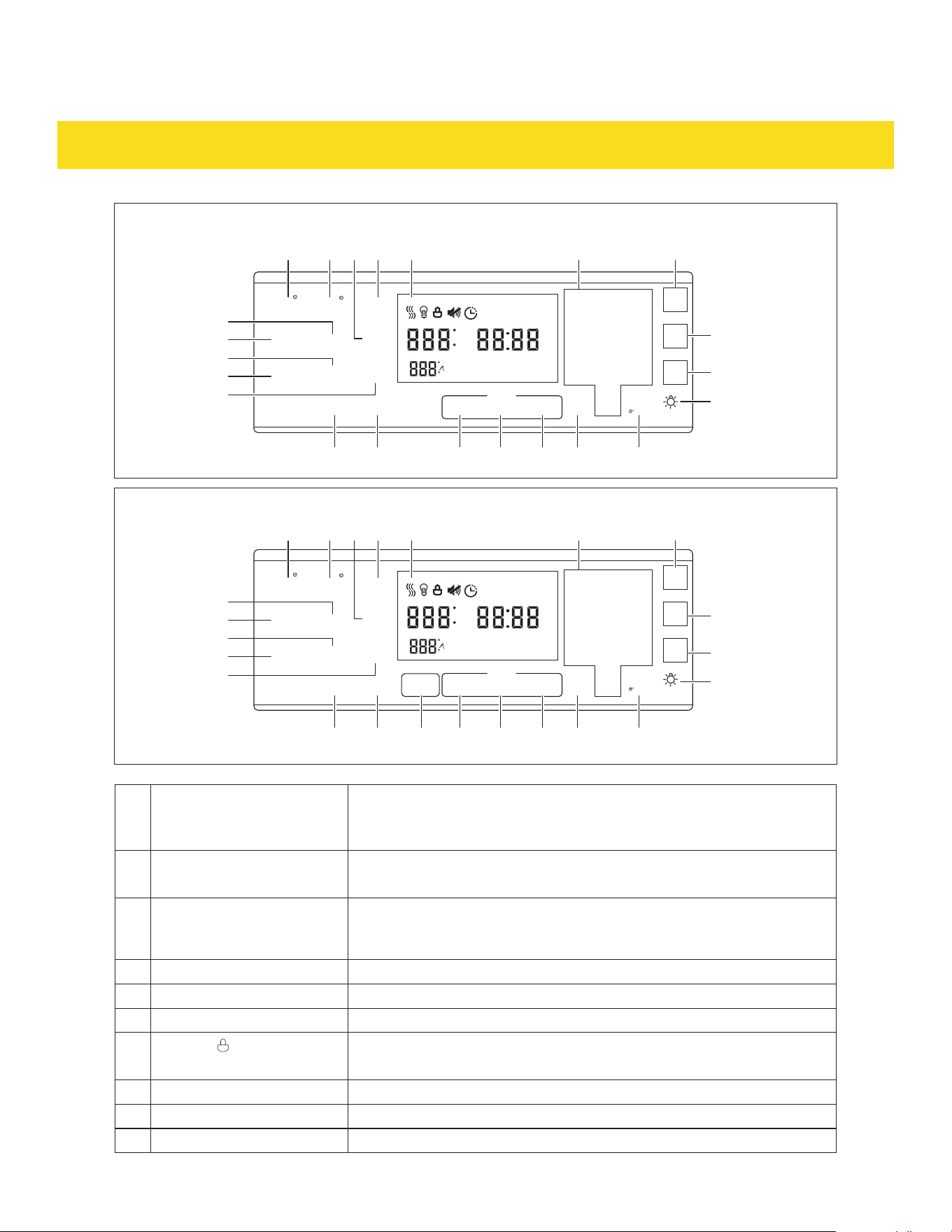
A B C D E
P
O
Q
N
M
L K J I GH
F
A Bake button Press for baking function.
B Broil button
•
Press for HI broiling function.
•
Press twice for LO broiling function.
C Warm button Press for keep warm function. Keeps the oven warm after cooking.
Lowers the oven temperature and maintains it at 175175 °F (8080 °C) for up
to 3 hours.
D Display Shows the operation status.
E Number pad Press to input time, temperature and other functions.
F Cancel button Press to cancel current operation.
G
SETTING and button
•
Press to cycle around settings menu.
•
Press and hold for 3 seconds to lock/unlock the control panel (29).
H Clock button Press to reset current time.
I TIMER on/off button Press to set timer (separate from other functions).
J START button Press to start operation
K DELAY Start button Press to set start delay duration.
L TIME Cooking button Press to set cooking duration.
M Light button Press to switch the light (21) on/off.
N Lift Panel button Press to lift the control panel (29) up/down.
O
2
Self Clean button Press to set self clean function.
P Conv Bake button Press to set convection baking function. Fan (27) operates for even heat
distribution.
Q Conv Roast button Press to set convection baking function. Fan (27) operates for even heat
distribution.
2
see chapter 5 Cleaning for detailed instructions on self clean function.
25
OVEN FUNCTIONS
AM
PM
F
N
M
GHIKLTU
X
Y
C
W
V
A R BS D E J
RSG30/LP, RSG36/LP, RSG30B/LP and RSG36B/LP
X
Y
C
W
V
S
AM
PM
F
N
M
GHIKLZTU
A R B D E J
RSE30, RSE36, RSE30B and RSE36B
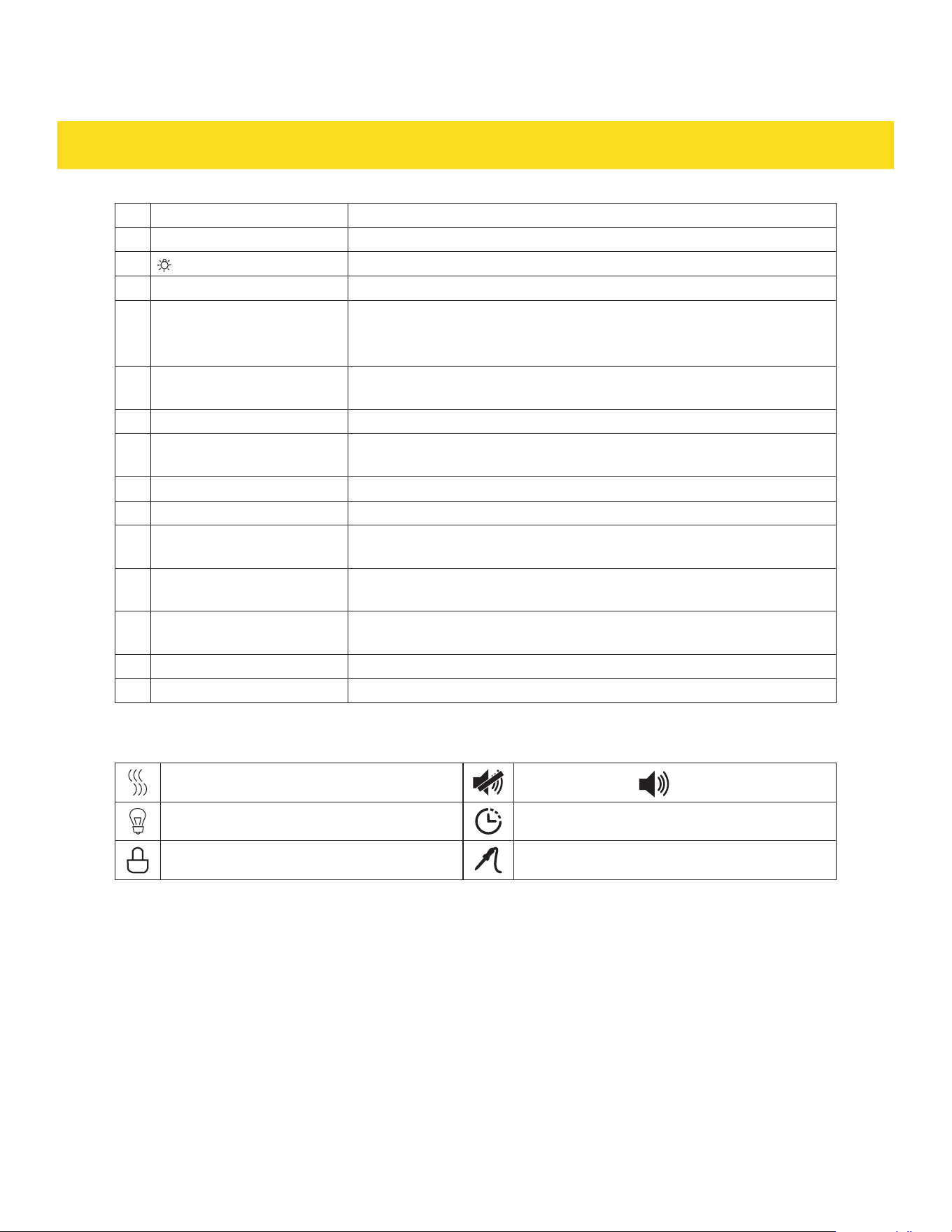
A BAKE button
•
Press for baking function.
•
Press twice for convection baking function. Convection fan (27)
operates for even heat distribution.
B BROIL button
•
Press for HI broiling function.
•
Press twice for LO broiling function.
C KEEP WARM button Press for keep warm function. Keeps the oven warm after cooking.
Lowers the oven temperature and maintains it at 175175 °F (8080 °C) for
up to 3 hours.
D Display Shows the operation status.
E Number pad Press to input time, temperature and other functions.
F CANCEL button Press to cancel current operation.
G
SET and button
•
Press in combo with the number pad (E) to access the settings.
•
Press and hold for 3 seconds to lock/unlock the control panel (29).
H CLOCK button Press to reset current time.
I TIMER button Press to set timer (separate from other functions).
J START button Press to start operation
26
OVEN FUNCTIONS
K DELAY START button Press to set start delay duration.
L COOK TIME button Press to set cooking duration.
M button Press to switch the backlight on the control panel on/off.
N LIFT PANEL button Press to lift the control panel (29) up/down.
R ROAST button
•
Press for roasting function.
•
Press twice for convection roasting function. Convection fan (27)
operates for even heat distribution.
S PROOF button Press to set proofing function. Provides a steady low-temperature
environment to assist dough rising.
T PROBE button Press to set probe function.
U DEHYDRATE button Press to set dehydrate function. Gently removes moisture from the
food. Ideal for creating dried fruits and jerky.
V
3
SELF CLEAN button Press repeatedly for self clean function (3 hours/5 hours/2 hours).
W FAST PREHEAT button Press to set fast preheat function.
X AIR FRY button Press to set air fry function. Achieves crispy and golden fried foods
with less oil.
Y PIZZA button Press to set pizza function. Higher heat from the bottom of the oven
to create a crispy crust and evenly melted toppings.
Z
4
WARMING ZONE button Press then press 1, 2 or 3 (3 being the highest setting) on the number
pad (E) to select the desired warming setting.
53 Oven light button Press to switch the light (21) on/off.
54 Hot surface indicator Lights up when the cooking surface is hot.
3
see chapter 5 Cleaning for detailed instructions on SELF CLEAN mode.
4
WARMING ZONE button is only available for RSE30, RSE36 RSE30B, RSE36B.
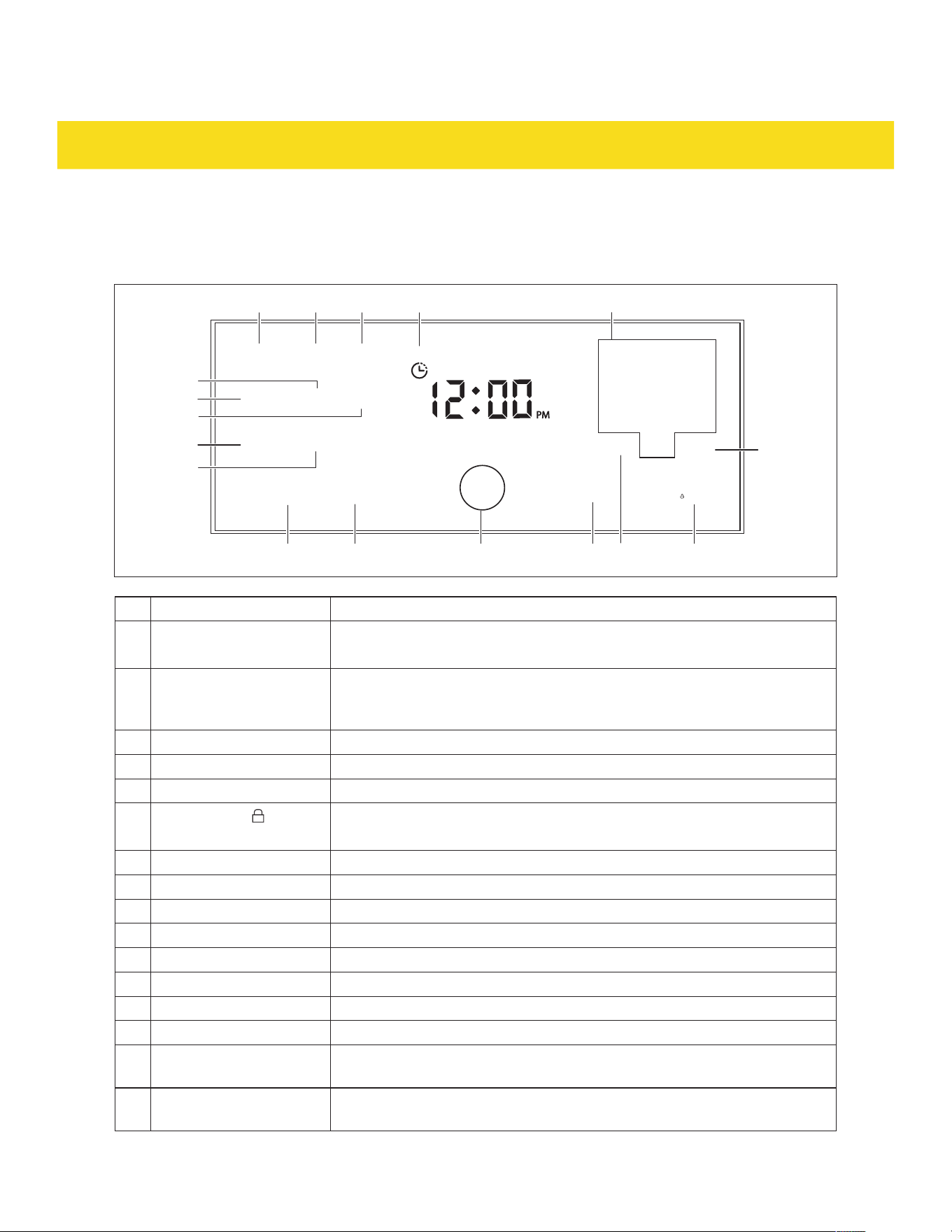
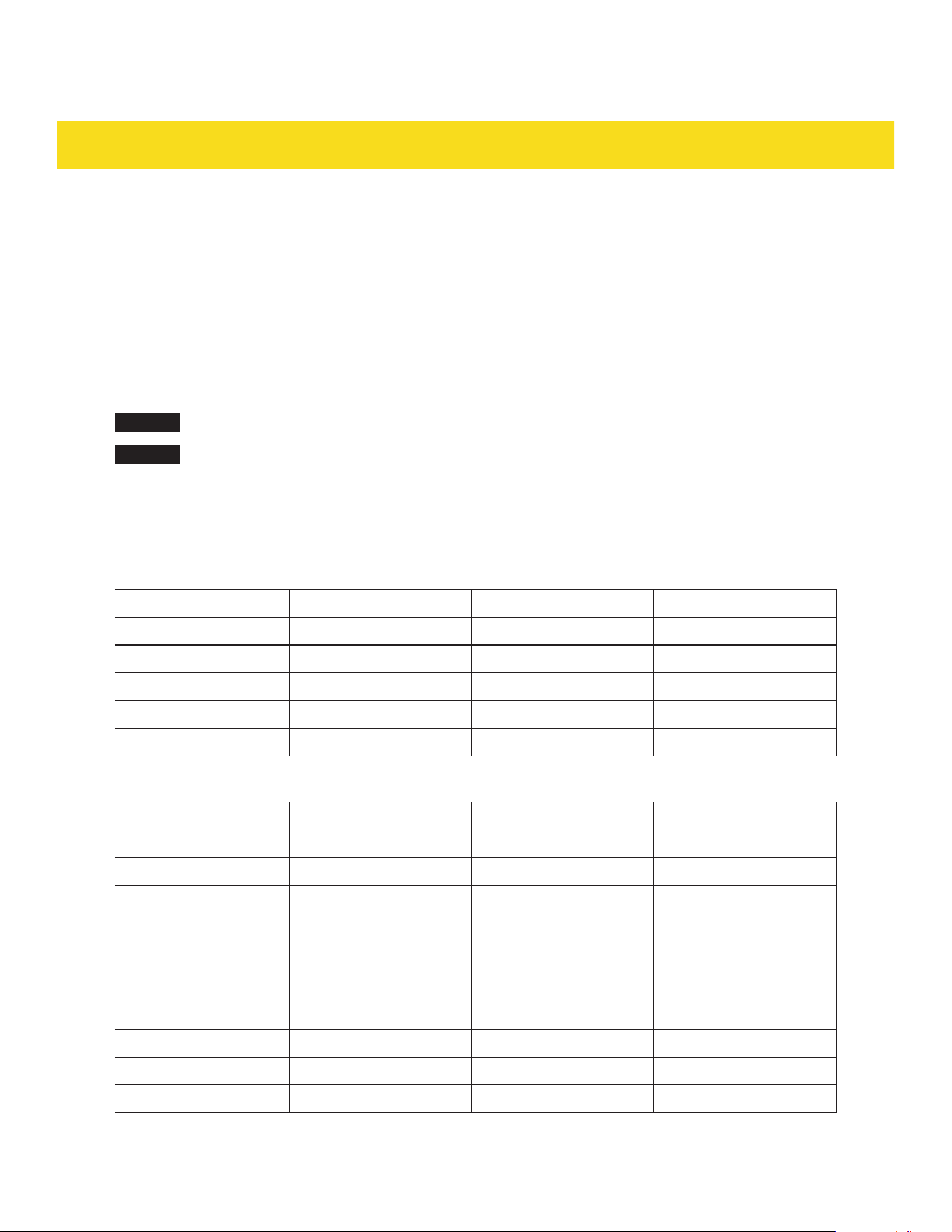
Oven is heating up
Sound is muted (
sound is unmuted)
Oven light is on Remaining time
Oven door is locked Probe temperature
3.4 Setting the clock
For RSG30/LP, RSG30B/LP only
1. Press the Clock button (H).
2. Press the Clock button (H) repeatedly to select between "AM" or "PM" (not applicable to appliances
that are set to 24 hour time system).
3. Use the number pad (E) to input current time (e.g. 8:57, press "8", "5", "7").
4. Press the START button (J). The clock is set.
27
OVEN FUNCTIONS
For RSG36/LP, RSE30, RSE36, RSG36B/LP, RSE30B, RSE36B only
1. Press the CLOCK button (H).
2. Press the CLOCK button (H) repeatedly to select between "AM" or "PM" (not applicable to appliances
using 24 hour time system).
3. Use the number pad (E) to input current time (e.g. 8:57, press "8", "5", "7").
4. Press the START button (J). The clock is set.
3.5 General oven operation tips
NOTICE
Press the Cancel/CANCEL button (F) anytime to cancel or end any current operations/settings.
NOTICE
If the oven door (33) is left open during operation, the appliance plays a beep tone and the
display (D) shows "DOOR".
3.6 Cooking temperatures
For RSG30/LP, RSG30B/LP only
Function Default Minimum Maximum
Baking
350 °F (176 °C) 175 °F (79 °C) 550 °F (287 °C)
Broiling
HI LO HI
Warming
175 °F (79 °C) - -
Convection baking
325 °F (162 °C) 175 °F (79 °C) 550 °F (287 °C)
Convection roasting
325 °F (162 °C) 175 °F (79 °C) 550 °F (287 °C)
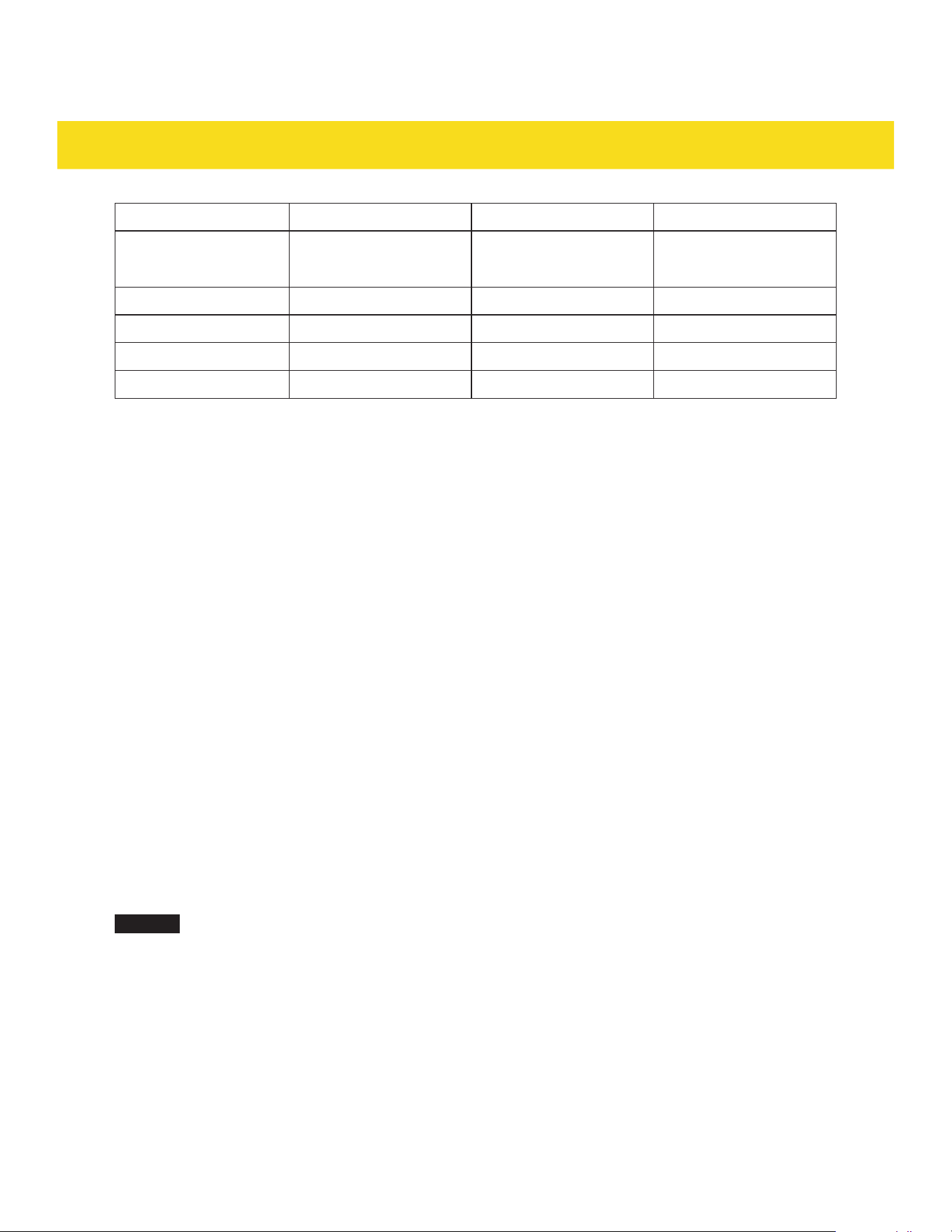
For RSG36/LP, RSE30, RSE36, RSG36B/LP, RSE30B, RSE36B only
Function Default Minimum Maximum
Baking
350 °F (176 °C) 175 °F (79 °C) 550 °F (287 °C)
Convection baking
325 °F (162 °C) 175 °F (79 °C) 550 °F (287 °C)
Broiling HI
RSG36/LP, RSG36B/LP:
500 °F (260 °C)
RSE30, RSE36, RSE30B,
RSE36B:
550 °F (287 °C)
LO
400 °F (204 °C)
HI
RSG36/LP, RSG36B/LP:
500 °F (260 °C)
RSE30, RSE36, RSE30B,
RSE36B:
550 °F (287 °C)
Keep warm
175 °F (79 °C) - -
Roasting
350 °F (176 °C) 175 °F (79 °C) 550 °F (287 °C)
Convection roasting
325 °F (162 °C) 175 °F (79 °C) 550 °F (287 °C)
28
OVEN FUNCTIONS
Function Default Minimum Maximum
Proofing LO
95 °F (35 °C)
LO
95 °F (35 °C)
HI
105 °F (40 °C)
Dehydrating
150 °F (65 °C) 100 °F (37 °C) 225 °F (107 °C)
Fast preheating
350 °F (176 °C) 175 °F (79 °C) 550 °F (287 °C)
Air frying
425 °F (218 °C) 350 °F (176 °C) 500 °F (260 °C)
Cooking pizza
425 °F (218 °C) 175 °F (79 °C) 550 °F (287 °C)
3.7 Timer function
The timer is a stand-alone function. The timer works separate from all other operations of the appliance.
For RSG30/LP, RSG30B/LP only
1. Press the TIMER on/off button (I).
2. Use the number pad (E) to input the timer duration.
3. Press the START button (J). The timer starts counting down.
4. When the timer duration has elapsed, the appliance plays a beep tone. The timer operation is
complete.
For RSG36/LP, RSE30, RSE36, RSG36B/LP, RSE30B, RSE36B only
1. Press the TIMER button (I).
2. Use the number pad (E) to input the timer duration.
3. Press the START button (J). The timer starts counting down.
4. When the timer duration has elapsed, the appliance plays a beep tone. The timer operation is
complete.
3.8 Cooking with timer function
For RSG30/LP, RSG30B/LP only
NOTICE
The cooking with timer function cannot not be used with broiling and warming functions.
1. Position the oven rack(s) (8a/8b) on the suitable rack position(s) (25).
2. Press the button for the desired function.
3. Use the number pad (E) to input the desired temperature.
4. Press TIME Cooking button (L).
5. Use the number pad (E) to input the cooking duration.
6. Press the START button (J). The oven starts preheating.
7. The appliance plays a beep tone 6 times. The oven is preheated.
8. Place the food on the oven rack(s) (8a/8b).
9. When the cooking duration has elapsed, the appliance plays a beep tone. The cooking operation is
complete.

29
OVEN FUNCTIONS
For RSG36/LP, RSE30, RSE36, RSG36B/LP, RSE30B and RSE36B only
NOTICE
The cooking with timer function cannot not be used with broiling, keep warm and fast
preheating functions.
1. Position the oven rack(s) (8a/8b) on the suitable rack position(s) (25).
2. Press the button for the desired function.
3. Use the number pad (E) to input the desired temperature.
4. Press COOK TIME button (L).
5. Use the number pad (E) to input the cooking duration.
6. Press the START button (J). The oven starts preheating.
NOTICE
Proofing function does not have preheating steps, cooking duration starts immediately.
7. The appliance plays a beep tone 6 times. The oven is preheated.
8. Place the food on the oven rack(s) (8a/8b).
9. When the cooking duration has elapsed, the appliance plays a beep tone. The cooking operation is
complete.
3.9 Delay start function
The delay start function allows the appliance to begin cooking at a later time.
For RSG30/LP, RSG30B/LP only
NOTICE
The delay start function cannot not be used with broiling and warming functions.
1. Position the oven rack(s) (8a/8b) on the suitable rack position(s) (25).
2. Place the food on the oven rack(s) (8a/8b).
3. Press the button for the desired function.
4. Use the number pad (E) to input the desired temperature.
5. Press TIME Cooking button (L).
6. Use the number pad (E) to input the cooking duration.
7. Press DELAY Start button (K).
8. Use the number pad (E) to input the time delay duration.
9. Press the START button (J). The oven starts counting down the delayed time.
10. When the delayed time has elapsed, the oven starts cooking.
11. When the cooking duration has elapsed, the appliance plays a beep tone. The cooking operation is
complete.

30
OVEN FUNCTIONS
For RSG36/LP, RSE30, RSE36, RSG36B/LP, RSE30B, RSE36B only
NOTICE
The delay start function cannot not be used with broiling and keep warm functions.
1. Position the oven rack(s) (8a/8b) on the suitable rack position(s) (25).
2. Place the food on the oven rack(s) (8a/8b).
3. Press the button for the desired function.
4. Use the number pad (E) to input the desired temperature.
5. Press COOK TIME button (L).
6. Use the number pad (E) to input the cooking duration.
7. Press DELAY START button (K).
8. Use the number pad (E) to input the time delay duration.
9. Press the START button (J). The oven starts counting down the delayed time.
10. When the delayed time has elapsed, the oven starts cooking.
11. When the cooking duration has elapsed, the appliance plays a beep tone. The cooking operation is
complete.
3.10 Broiling function
The broiling function utilizes intense heat from the top of the oven to quickly cook and brown the top
surface of food.
NOTICE
For tips on using the gird (9) and broiler pan (10), see chapter 3.2 Using the accessories.
For RSG30/LP, RSG30B/LP only
1. Position the oven rack (8a/8b) on the suitable rack position (25).
2. Press the Broil button (B) repeatedly to select between "HI" or "LO".
3. Press the START button (J). The oven starts heating up.
4. Place the food on the grid (9) of the broiler pan (10) and then on the oven rack (8a/8b).
5. Broil one side of the food, then rotate to broil the other side.
6. After broiling, press the Cancel button (F). The broiling operation is complete.
For RSG36/LP, RSE30, RSE36, RSG36B/LP, RSE30B and RSE36B only
1. Position the oven rack (8a/8b) on the suitable rack position (25).
2. Press the BROIL button (B) repeatedly to select between "HI" or "LO".
3. Press the START button (J). The oven starts heating up.
4. Place the food on the grid (9) of the broiler pan (10) and then on the oven rack (8a/8b).
5. Broil one side of the food, then rotate to broil the other side.
6. After broiling, press the CANCEL button (F). The broiling operation is complete.

31
OVEN FUNCTIONS
3.11 Keep warm function
NOTICE
The keep warm function cannot be used with cooking with timer and delay start functions.
For RSG30/LP, RSG30B/LP only
1. Press the Warm button (C).
2. Press the START button (J). The oven starts the keep warm function for max. 3 hours.
For RSG36/LP, RSE30, RSE36, RSG36B/LP, RSE30B, RSE36B only
1. Press the KEEP WARM button (C).
2. Press the START button (J). The oven starts the keep warm function for max. 4 hours.
3.12 Sabbath mode
The Sabbath mode is designed to meet the requirements of Sabbath observance. It keeps food warm
without activating any changes in the appliance's settings.
NOTICE
The display (D), buttons, beep tones and the control panel lock/unlock functions are inactive
during Sabbath mode, but the oven will continue to operate for 74 hours unless it is canceled.
NOTICE
Switch the light (21) on or off and lift the control panel (29) up/down as desired before
activating Sabbath mode. The state of the light (21) and the position of the control panel (29)
will remain the same (on or off/ up or down) for the whole duration of Sabbath mode.
For RSG30/LP, RSG30B/LP only
1. Press the Bake button (A).
2. Use the number pad (E) to input the desired temperature.
3. Press the START button (J).
4. Press and hold Bake button (A) and Broil button (B) for 3 seconds. The display (D) shows the text "Set
Sab".
5. Press the START button (J). The display (D) shows the text "SAb". The oven is in Sabbath mode.
6. To switch off the baking function during Sabbath mode, press the Cancel button (F). The appliance
stays in Sabbath mode.
7. To deactivate Sabbath mode, press and hold the Cancel button (F) for 3 seconds.
For RSG36/LP, RSE30, RSE36, RSG36B/LP, RSE30B, RSE36B only
1. Press the BAKE button (A).
2. Use the number pad (E) to input the desired temperature.
3. Press the START button (J).
4. Press and hold BAKE button (A) and BROIL button (B) for 3 seconds. The display (D) shows the text
"Set Sab".
5. Press the START button (J). The display (D) shows the text "SAB". The oven is in Sabbath mode.
6. To switch off the baking function during Sabbath mode, press the CANCEL button (F). The appliance
stays in Sabbath mode.
7. To deactivate Sabbath mode, press and hold the CANCEL button (F) for 3 seconds.
32
OVEN FUNCTIONS
3.13 Fast preheating function (RSG36/LP, RSE30, RSE36, RSG36B/LP, RSE30B,
RSE36B only)
The fast preheat function rapidly heats the oven to the desired temperature, reducing the waiting time
before starting the cooking process.
NOTICE
The fast preheating function can be used with delay start function.
1. Position the oven rack(s) (8a/8b) on the suitable rack position(s) (25).
2. Press the FAST PREHEAT button (W).
3. Use the number pad (E) to input the desired temperature.
4. If delay start function is desired, press DELAY START button (K). Then use the number pad (E) to input
the time delay duration.
5. Press the START button (J). The oven starts preheating rapidly. If time delay function is set, the oven
starts preheating rapidly after the countdown.
6. The appliance plays a beep tone. The oven is preheated.
3.14 Probe function (RSG36/LP, RSE30, RSE36, RSG36B/LP, RSE30B, RSE36B only)
The probe function provides internal temperature readings of the food. It prevents food from
undercooking or overcooking. It is ideal for cooking large slices of meat.
NOTICE
The probe function can only be used in baking, convection baking, roasting and convection
roasting functions.
NOTICE
For tips on using the probe (12), see chapter 3.2 Using the accessories.
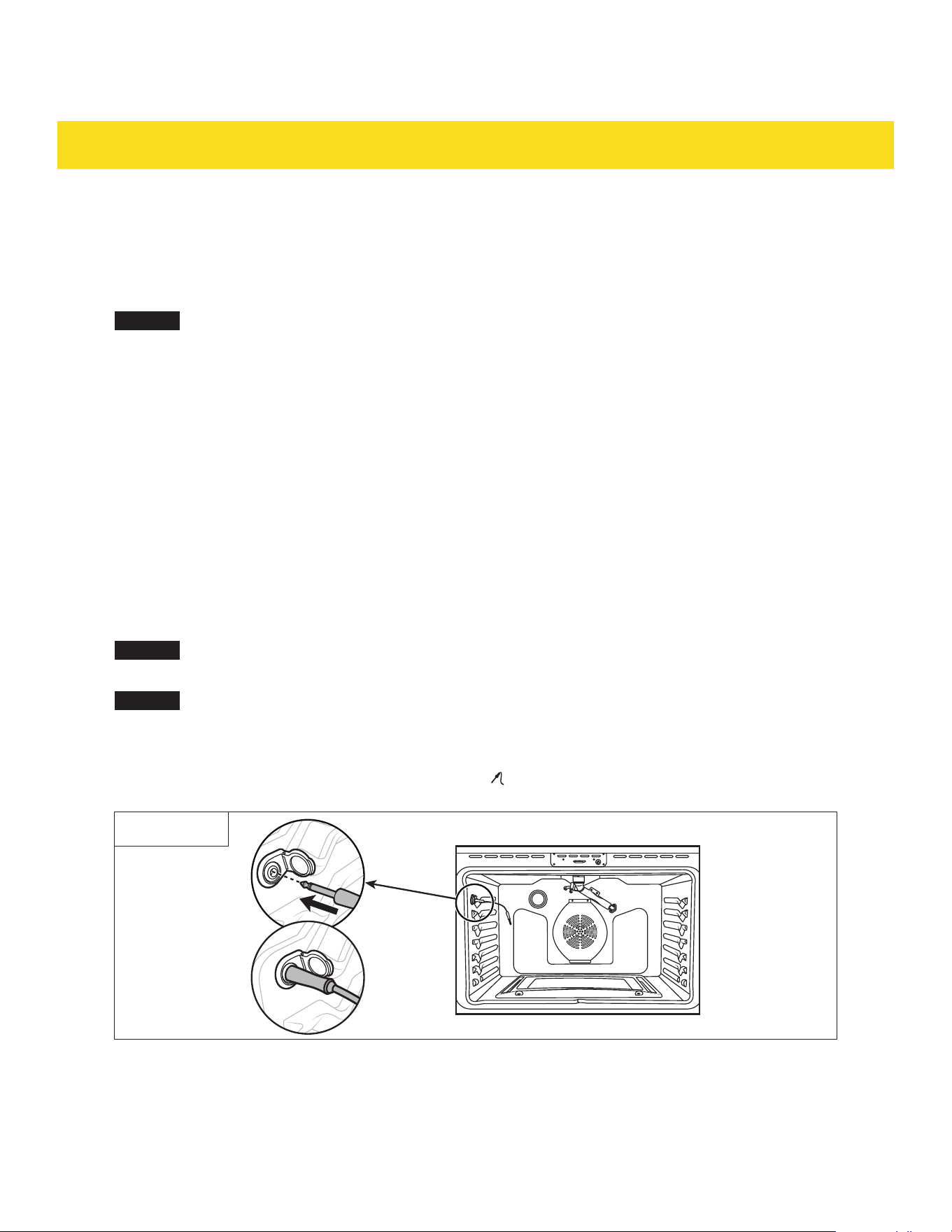
1. Insert the long end of the probe (12) into the food (Fig. 3).
2. Open the cap of the probe port (44) to insert the other end of the probe (12). Make sure the probe (12)
is fully inserted into the probe port (44) (Fig. 3). The icon lights up on the display (D).
Fig. 3
3. Place the food on the oven rack (8a/8b) on the suitable rack position (25).
4. Press the button for the desired function.
5. Use the number pad (E) to input the desired temperature.

33
OVEN FUNCTIONS
6. Press the START button (J). The oven starts cooking.
7. Press the PROBE button (T).
8. Use the number pad (E) to input the desired internal temperature.
9. Press the START button (J). The probe function is activated. When the food reaches the desired
internal temperature, the appliance plays a beep tone. The cooking operation is complete.
SETTINGS
4.1 Activate/deactivate energy saving mode (RSG36/LP, RSE30, RSE36, RSG36B/LP,
RSE30B, RSE36B only)
This mode automatically switches off the oven after it has been running for max. 12 hour, ensuring the
oven stops heating if forgotten.
With no other operating functions, press and hold the SET button (G) and the "1" on the number pad (E)
for 3 seconds. The display (D) shows the text:
- "On EnEr": The energy saving mode is activated.
- "OFF EnEr": The energy saving mode is deactivated.
NOTICE
After activating energy saving mode, the oven will enter standby screen-off mode (with the
backlight off) after heating is completed. Pressing any button in screen-off standby mode
reactivates the display (D).
4.2 Change 12 hour or 24 hour time system
For RSG30/LP, RSG30B/LP only
1. Press the SETTING button (G) repeatedly until the text "SET 24 H" is shown on the display (D).
2. Press the START button (J).
3. Press the SETTING button (G) repeatedly to select between "12 Hr" or "24 Hr".
4. Press the START button (J). The new setting is complete.
For RSG36/LP, RSE30, RSE36, RSG36B/LP, RSE30B, RSE36B only
With no other operating functions, press and hold the SET button (G) and the "2" on the number pad (E)
for 3 seconds. The display (D) shows the text:
- "12 Hr": The appliance is in 12 hour time system.
- "24 Hr": The appliance is in 24 hour time system.

34
SETTINGS
4.3 Mute/unmute the sound
For RSG30/LP, RSG30B/LP only
1. Press the SETTING button (G) repeatedly until the text "SET bEEP" is shown on the display (D).
2. Press the START button (J).
3. Press the SETTING button (G) repeatedly to select between "ON bEEP" or "OFF bEEP".
4. Press the START button (J). The new setting is complete.
For RSG36/LP, RSE30, RSE36, RSG36B/LP, RSE30B, RSE36B only
NOTICE
When the appliance is muted, the symbol is shown in the display (D).
With no other operating functions, press and hold the SET button (G) and the "3" on the number pad (E)
for 3 seconds. The display (D) shows the text:
- "On Snd": The appliance sound is on.
- "OFF Snd": The appliance sound is off.
4.4 Change temperature unit
For RSG30/LP, RSG30B/LP only
1. Press the SETTING button (G) repeatedly until the text "SET °F/ °C" is shown on the display (D).
2. Press the START button (J).
3. Press the SETTING button (G) repeatedly to select between "°F" or "°C".
4. Press the START button (J). The new setting is complete.
For RSG36/LP, RSE30, RSE36, RSG36B/LP, RSE30B, RSE36B only
With no other operating functions, press and hold the SET button (G) and the "4" on the number pad (E)
for 3 seconds. The display (D) shows the text:
- "C": The appliance temperature unit is °C.
- "F": The appliance temperature unit is °F.

35
SETTINGS
4.5 Temperature recalibration
This function adjusts the oven's temperature settings to ensure accurate cooking temperatures.
NOTICE
To check the oven's temperature accuracy, place an oven thermometer on rack position (25) 3
or 4. Preheat the oven to a specific temperature. Allow the oven to preheat fully and maintain
the set temperature for about 15 - 20 minutes. Record the temperature reading. Perform the
test multiple times to ensure consistent results. Compare the thermometer readings with the
oven’s set temperatures. For example, if the oven is set to 350 °F (175 °C) but the thermometer
reads 370 °F (185 °C), the oven is running hotter by 20 °F (10 °C).
For RSG30/LP, RSG30B/LP only
1. Press the SETTING button (G) repeatedly until the text "SET CALI" is shown on the display (D).
2. Press the START button (J).
3. Use the number pad (E) to input the desired temperature (±35 °F/ ±19 °C). For a negative number,
press the SETTING button (G) again.
4. Press the START button (J). The new setting is complete.
For RSG36/LP, RSE30, RSE36, RSG36B/LP, RSE30B, RSE36B only
1. With no other operating functions, press and hold the SET button (G) and the "5" on the number
pad (E) for 3 seconds. The display (D) shows the text:
2. "tEP Add": Use the number pad (E) to input the desired temperature increase. To decrease the desired
temperature, press the SET button (G) for the negative sign (-).
3. Press the START button (J). The new setting is complete.
4.6 Activate/deactivate demo mode
This mode is for retail display purposes only. When demo mode is activated, all functions can be set up
and operated, but the oven's broil elements remain inactive.
For RSG30/LP, RSG30B/LP only
1. Press the SETTING button (G) repeatedly until the text "SET dISP" is shown on the display (D).
2. Press the START button (J).
3. Press the SETTING button (G) repeatedly to select between "ON dISP" or "OFF dISP".
4. Press the START button (J). The new setting is complete.
For RSG36/LP, RSE30, RSE36, RSG36B/LP, RSE30B, RSE36B only
With no other operating functions, press and hold the SET button (G) and the "6" on the number pad (E)
for 3 seconds. The display (D) shows the text:
- "ON AnAl": The appliance is in demo mode.
- "OFF AnAl": The appliance is not in demo mode.

36
SETTINGS
4.7 Factory rest
1. With no other operating functions, press and hold the SET button (G) and the "0" on the number
pad (E) for 3 seconds. The display (D) shows some data.
2. Press any button to return to the normal display (D).
4.8 Other settings
The appliance has settings for "7" and "8" on the number pad (E) but they are not designed to be used by
the customer. If any of these settings are accidentally accessed, press the CANCEL button (F) to return to
the normal display (D).
CLEANING
5.1 General cleaning
CAUTION
Risk of steam burns and noxious fumes! Clean cooktop (31) with caution - if a wet sponge
or cloth us used to wipe spills on a hot cooking area, be careful to avoid steam burns.
Some cleaners can produce noxious fumes if applied to a hot surface.
•
Do not let cooking grease or other flammable materials accumulate on the surfaces or near the
appliance.
•
Never use corrosive detergents, wire brushes, abrasive scourers, metal or sharp utensils to clean the
appliance
•
Check that all controls are off and all surfaces are cool before cleaning any part of the appliance.
•
If the appliance is moved for servicing, check that the anti-tip device (4) is re-engaged properly when
the appliance is replaced.
For gas appliances only (RSG30/LP, RSG36/LP, RSG30B/LP, RSG36B/LP), never spray aerosol cleaner on
or around the appliance while the burners are lit. Be sure all functions are switched off and the appliance
is cool. The aerosol gas and chemicals in these cleaners could, in the presence of heat, ignite or cause
metal parts to corrode.
Painted parts and decorative trim
•
For general cleaning, use a cloth with hot, soapy water. Wipe dry.
•
For more difficult residue and built-up grease, apply a liquid detergent directly onto the area and
leave for 30 to 60 minutes. Wipe with a damp cloth and dry. Do not use abrasive cleaners on any oven
surface to prevent scratching.
Stainless steel surfaces
CAUTION
Risk of damage! Do not use a steel-wool pad to clean the surfaces. It may scratch the
surfaces.

37
CLEANING
NOTICE
If a mineral oil-base stainless steel appliance cleaner has been used before to clean the
appliance, wash the surface with liquid detergent and water prior to using the stainless steel
appliance cleaner/polish.
1. Use stainless steel appliance cleaner/polish.
2. Place a small amount of cleaner/polish on a damp cloth or paper towel.
3. Clean in small areas, rubbing with the grain of the stainless steel.
4. Dry and buff with a clean, dry paper towel or soft cloth.
5. Repeat as necessary.
5.2 Cooktop
Burner cap, burner head, dual burner cap with flame spreader, dual burner simmer
ring, dual burner lower flame spreader (RSG36/LP, RSG30/LP, RSG36B/LP, RSG30B/LP
only)
1. Ensure the burners are turned off and cooled.
2. Take off all the removable burner parts (13, 14, 16, 17, 18).
3. Wash them in hot soapy water, rinse, and dry.
4. Clear the notches of the burner heads (14), dual burner cap with flame spreader (16), dual burner
simmer ring (17) and dual burner lower flame spreader (18) with a stiff nylon brush or straight-ended
paper clip.
5. Dry all removable burner parts (13, 14, 16, 17, 18) completely.
6. Replace all the removable burner parts (13, 14, 16, 17, 18) before using the cooktop (31).
Electrical cooktop (RSE36, RSE30, RSE36B, RSE30B only)
The cooktop (31) surface is porcelain-enamel. Acidic foods (tomatoes, sauerkraut, fruit juices) and high-
sugar foods can cause dull spots if left to set.
Surface care
•
Wipe spills immediately to prevent dulling.
•
Avoid steel wool or abrasive cleaners on stainless steel.
•
Check pan bottoms for roughness to avoid scratches.
Normal daily use cleaning
Use only a ceramic cooktop cleaner for effective maintenance. Clean the cooktop (31) with a ceramic
cleaner before first use to protect and ease future cleanups.
1. Shake ceramic cooktop cleaner.
2. Apply cleaner directly on the cooktop (31).
3. Clean with a paper towel or ceramic cleaning pad.
4. Wipe with a dry cloth or paper towel to remove residue.
Cleaning sugary spills and melted plastics

38
CLEANING
Sugary spillovers (jellies, fudge, candy, syrups) or melted plastics can cause pitting on the cooktop (31)
surface, which is not covered under warranty. A new, sharp razor blade scraper is essential to avoid
further damage.
1. Switch off surface burners and remove hot pans.
2. Wearing an oven mitt, use a sharp single-edge razor scraper to move the spill to a cool area. Remove
with paper towels.
3. Wait for the cooktop (31) to cool, then remove remaining spillover. Do not use burners until all residue
is removed.
Removing burned-on residue
1. Ensure burners are off and cooktop is cool.
2. Apply ceramic cooktop cleaner on the residue area.
3. Rub with a ceramic cooktop cleaning pad, applying pressure as needed.
4. Repeat if residue remains.
5. Polish with ceramic cooktop cleaner and a paper towel.
Removing heavy burned-on residue
1. Ensure burners are off and cooktop is cool.
2. Use a single-edge razor scraper at a 45° angle to scrape the residue.
3. Apply ceramic cooktop cleaner on the residue area and clean with a pad.
4. Polish with ceramic cooktop cleaner and a paper towel.
Cleaning the cooktop seal
Lay a wet cloth on the seal, then wipe clean with a nonabrasive cleaner.
Control panel and door handle
•
Clean with a solution of mild detergent and warm water.
•
Do not use abrasive cleaners or scrubbers to avoid permanent damage to the finish.
•
Dry parts with a soft, lint-free cloth.
5.3 Oven
Pyrolytic self cleaning function
The self cleaning function uses high temperatures to burn off grease and residue. Residue is reduced to
a fine ash that can be wiped away with a damp cloth.
CAUTION
Risk of fire and damage! Do not leave food or cooking utensils, etc. in during the pyrolytic
self cleaning mode. Remove all items from the oven prior to initiating the cleaning
cycle. Ensure that the oven is completely free from any food residue or debris that could
potentially ignite. Maintain a safe distance from the appliance during the cleaning cycle
and avoid placing any flammable items or materials near the appliance.
CAUTION
Risk of burns! The appliance exterior can get very hot during and after self cleaning.

39
CLEANING
•
Do not leave small children unattended near the appliance.
•
Do not line the oven walls, oven racks (8a/8b), bottom, or any other part of the oven with aluminum
foil. Aluminum foil can melt and adhere to the oven interior.
•
The oven door (33) locks during self cleaning and unlocks afterwards when it is done. Do not force the
oven door (33) open as this can damage the automatic door locking system.
•
Use caution when opening the oven door (33) after the self cleaning cycle. Stand to the side to allow
hot air or steam to escape. The oven may still be very hot.
For RSG30/LP, RSG30B/LP only
1. Vent the kitchen with an open window or use a ventilation fan or hood.
2. Remove all baking accessories, all cookware, and any aluminum foil from the oven cavity (20).
NOTICE
The oven racks (8a/8b) and other sliver-colored racks can be placed in the oven cavity (20)
during self clean but they may darken, lose their luster, and become hard to slide onto the
oven.
3. Wipe up debris from the bottom of the oven.
4. Check that the light (21) cover is in place and switch off the light (21).
5. Press the Self Clean button (O) repeatedly to select between "3 H", "5 H", and "2 H".
6. To use the function with delay start function, press DELAY Start button (K). Use the number pad (E) to
input the time delay duration.
7. Press the START button (J). The oven door lock (22) engages, the oven starts heating up. If delay start
function is set, the self clean function starts after the delay start countdown.
8. When the self clean duration has elapsed, the appliance plays a beep tone. The self clean operation
is complete. The oven door (33) remains locked until the appliance has cooled down to a safe
temperature.
9. After the self cleaning, there might be some white ash inside the oven cavity (20). Let the oven fully
cool before taking a damp cloth to wipe away the white ash. If the white spots remain, remove them
with a soap-filled steel wool pad and rinse thoroughly with a vinegar and water mixture.
NOTICE
Press the Cancel button (F) anytime to end self cleaning function. The oven door (33) remains
locked until the appliance has cooled down to a safe temperature.
For RSG36/LP, RSE30, RSE36, RSG36B/LP, RSE30B, RSE36B only
1. Vent the kitchen with an open window or use a ventilation fan or hood.
2. Remove all baking accessories, all cookware, and any aluminum foil from the oven cavity (20).
3. Wipe up debris from the bottom of the oven.
4. Check that the light (21) cover is in place and switch off the light (21).
5. Press the SELF CLEAN button (V) repeatedly to select between "3 H", "5 H", and "2 H".
6. To use the function with delay start function, press DELAY START button (K). Use the number pad (E)
to input the time delay duration.
7. Press the START button (J). The oven door lock (22) engages, the oven starts heating up. If delay start
function is set, the self clean function starts after the delay start countdown.
8. When the self clean duration has elapsed, the appliance plays a beep tone. The self clean operation
is complete. The oven door (33) remains locked until the appliance has cooled down to a safe
temperature.

40
CLEANING
NOTICE
For RSE30, RSE36, RSE30B, RSE36B, during the self-cleaning cycle, do not switch on the
cooktop, as this can immediately stop the cleaning process.
Press the CANCEL button (F) anytime to end self cleaning function. The oven door (33) remains
locked until the appliance has cooled down to a safe temperature.
Oven door
•
Clean the top, sides, and front of the oven door (33) with soap and water. Rinse well.
•
Use a oven window cleaner on the outside glass of the oven door (33).
•
Use mild detergent and warm water on the inside glass of the oven door (33). Dry with a soft, lint-free
cloth.
•
Do not immerse the oven door (33) in water.
•
Do not spray or allow water or glass cleaner to enter the door vents. Door vents are located at the
small gap above the oven cavity (20), close to the oven door lock (22) and the oven door sensor (23).
•
Do not use oven cleaners, cleaning powders, or harsh abrasives on the outside of the oven door (33).
•
Do not clean or damage the oven door gasket around the oven cavity (20), as it is essential for a good
seal.
Oven shelves
1. Scrub stubborn or baked-on soiling with a dampened, soap-filled, nonmetal, non-abrasive pad. Then
wipe dry.
2. Apply a food grade chrome cleaner with a damp sponge or cloth. Then wipe dry.
Porcelain surfaces
1. Clean the oven interior and inner door liners with a solution of mild detergent and warm water.
2. Rinse and dry with a soft, lint-free cloth.

41
CLEANING
Oven door gasket
The oven door gasket is located around the oven cavity (20). Do not clean this part. Handle the gasket with
care to avoid rubbing, damaging or displacing it. If large food particles need to be removed, proceed as
follows:
1. Dampen a sponge with hot water.
2. Gently wipe off the soiling without rubbing.
3. Press a dry towel gently on the oven door gasket to dry.
Oven and broiler burners
Do not clean these parts. They self clean during normal use.
5.4 Baking accessories
Oven racks
CAUTION
Risk of damage! Do not clean the oven racks (8a/8b) with a dishwasher.
•
Leaving oven racks (8a/8b) in the oven during a self cleaning cycle may turn them slightly blue and
dull the finish. After the self cleaning cycle and once the oven has cooled, rub the sides of the oven
racks (8a/8b) with wax paper or a cloth with a small amount of oil to help them glide more easily.
•
Clean oven racks (8a/8b) by hand with an abrasive cleaner or steel wool.
•
If oven racks (8a/8b) become hard to remove or replace, lightly wipe the oven rack guides with cooking
oil, but do not apply oil to the sides.
•
If oven racks (8a/8b) are difficult to slide, lubricate them with a graphite lubricant.
Grid, broiling pan, air fry basket, and probe
•
Pre-soak stubborn soiling in a solution of mild detergent, and hot water.
•
Wash by hand or in a dishwasher.
42
MAINTENANCE
6.1 Maintenance guidelines
•
Keep the appliance area clear and free from combustible materials (e.g. wall coverings, curtains,
drapes), gasoline, and other flammable vapors and liquids.
•
Switch off the power to the appliance at the main fuse or circuit breaker. If in doubt, contact an
electrician.
•
Do not obstruct the flow of combustion and ventilation air.
•
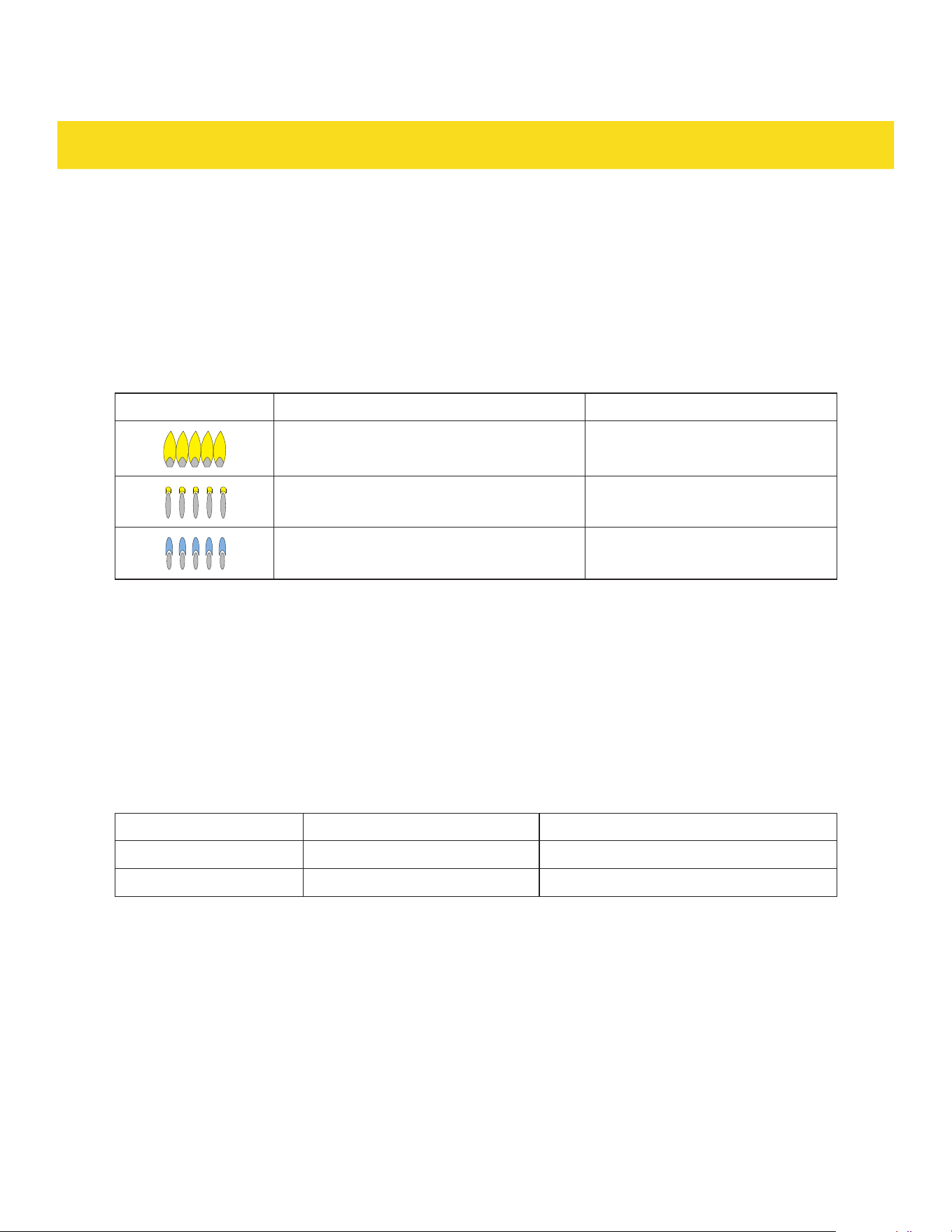
For gas models (RSG30/LP, RSG36/LP, RSG30B/LP, RSG36B/LP only) visually check the burner
flames for any abnormalities:
Flame appearance Description Verdict
Yellow flames Call for service to adjust the flame
Yellow tips on the outer cones Normal for LP
Soft blue flames Normal for NG
•
If the appliance is moved for servicing, check that the anti-tip device (4) is re-engaged properly when
the appliance is replaced.
•
Always unplug/disconnect the appliance from the electrical supply before servicing.
•
Any other servicing than mentioned in this manual should be performed by a professional repair
center.
6.2 Purchase replacement parts
For purchasing replacement parts, ensure compatibility by referencing the appliance model number and
serial number contact Thor by:
Contact Phone number Email
Thor's parts department
877-288-8099 (option 5) [email protected]
Customer service
877-288-8099 (option 3) [email protected]om
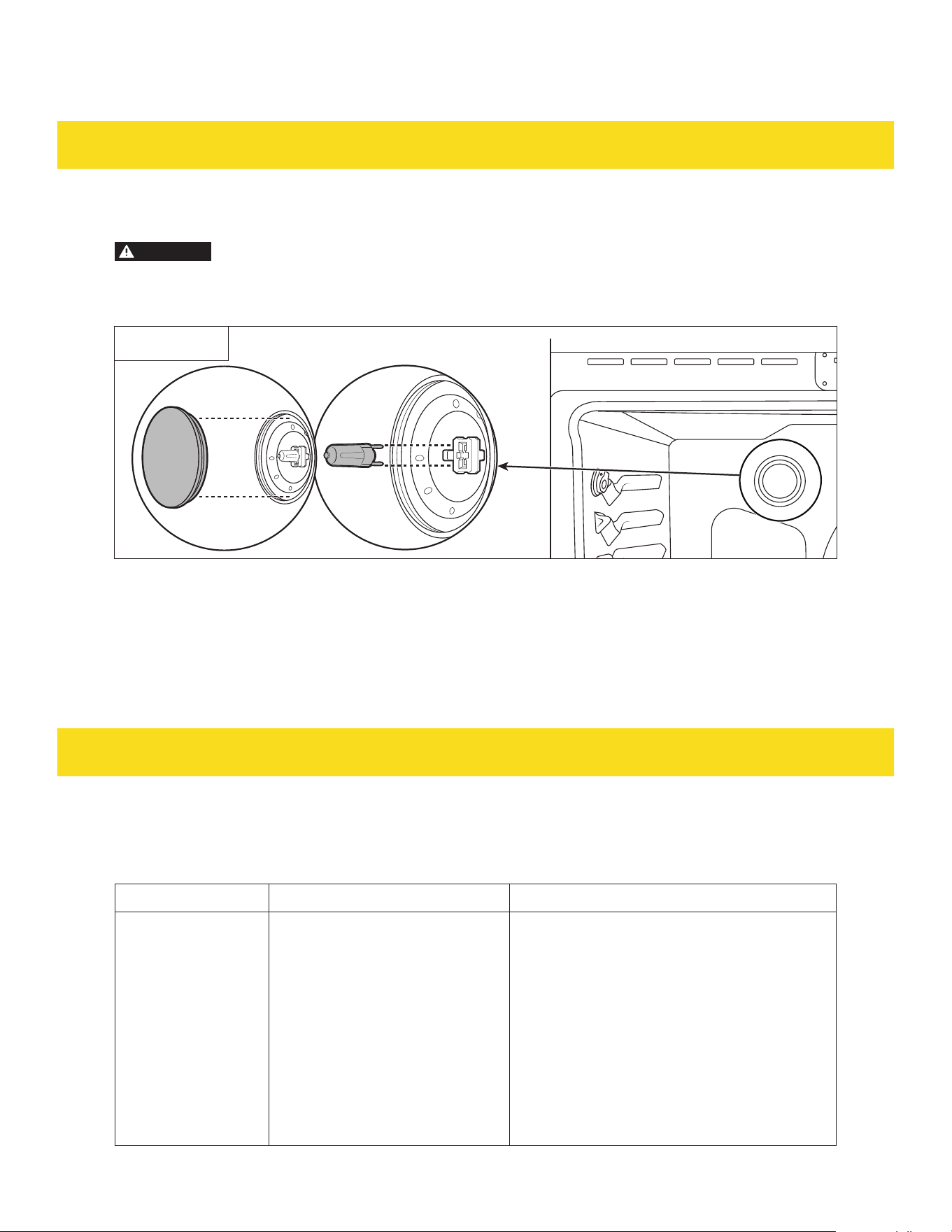
43
MAINTENANCE
6.3 Change the light bulb
CAUTION
Risk of burns! The oven and the light can be hot from use. Let the oven and the light fully
cool down before proceeding.
The light bulb is a G9 120 V~ 40 W appliance bulb.
Fig. 4
1. Unplug the appliance or disconnect power.
2. Rotate the light cover in the back of the oven counterclockwise to remove (Fig. 4).
3. Pull out the light bulb to remove it from its socket (Fig. 4).
4. Insert the new light bulb (Fig. 4).
5. Insert the light cover and rotate it clockwise (Fig. 4).
6. Plug in the appliance or reconnect the power.
TROUBLESHOOTING
7.1 Cooktop
For RSG30/LP, RSG36/LP, RSG30B/LP, RSG36B/LP only
Problem Possible cause Solution
•
Some burners do
not light.
•
Flames do
not burn all
around the
burner cap (13)/
dual burner
cap with flame
spreader (16)/
dual burner
lower flame
spreader (18).
Burner parts or igniters may be
wet, dirty, or misaligned.
Check that the burner parts are clean, dry,
and correctly assembled. Check that the
igniters are clean and dry.

44
TROUBLESHOOTING
Problem Possible cause Solution
Burner flames very
large and yellow.
The notches of the burner
heads (14), dual burner cap with
flame spreader (16), dual burner
simmer ring (17) and dual
burner lower flame spreader (18)
are clogged.
Clean notches of the burner heads (14), dual
burner cap with flame spreader (16), dual
burner simmer ring (17) and dual burner
lower flame spreader (18) with straightened
paper clip, needle, or wire.
Burner parts are not positioned
properly.
Remove and carefully re-install burner parts.
Cooktop (31) is being operated
with the wrong type of gas.
Ensure that the type of cooktop (31) matches
the natural gas supply.
Burner flames very
large and yellow.
Pressure regulator (42) is not
installed properly, is faulty, or is
set for the wrong type of gas.
Check installation, replace the pressure
regulator (42), or set the pressure
regulator (42) for proper gas.
Sparking but no
flame ignition.
Gas shut-off valve is in the 'OFF'
position.
Turn shut-off valve to the 'ON' position.
Igniters spark
continuously after
flame ignition.
Power supply polarity is
reversed.
Have polarity corrected.
Igniters are wet or dirty. Dry or clean igniters.
Burner flame goes
out at low setting.
Low gas supply pressure. Contact gas company.
Air intake holes around knobs
are obstructed.
Remove obstruction.
The flames have
suddenly gone out.
A draft or a spill has
extinguished the flame.
No action required. The burner will detect
this and automatically relight. However,
if there has been a large spill, it is
recommended switching the burners off and
cleaning the burners and the spill area.
There is a power
failure can I still
use the cook top
burners?
Power outage in your area. The cooktop (31) burners can still be used. To
light them:
Holding a lighted match to the burner
head (14)/dual burner lame spreader (18).
Ignite the burner with the knob (35/36}. The
flame lights up all the way around the burner.
Important!
If the flame is blown out during a power
failure, set the knob (35/36) immediately
to OFF. The burner does not automatically
relight and gas may escape.

45
TROUBLESHOOTING
For RSE30, RSE36, RSE30B, RSE36B only
Problem Possible cause Solution
The burners do not
maintain a rolling
boil or do not cook
fast enough.
Inappropriate cookware. Use pans which are flat and match the
diameter of the burner selected.
In some areas, the power
(voltage) may be low.
Cover the pan with a lid until the desired heat
is obtained.
The burners do not
turn on.
A fuse may be blown or the
circuit breaker tripped.
Replace the fuse or reset the circuit breaker.
The cooktop (31) controls are set
improperly.
Check if the correct control is set for the
surface unit you are using.
Areas of
discoloration on the
cooktop (31).
Food spillover was not cleaned. Clean the glass cooktop (31).
The burners
frequently cycles on
and off. The burners
stops glowing when
changed to a lower
setting.
The burners cycle on and off to
maintain the power setting.
This is normal operation and not a system
failure. Use the cooktop (31) as usual.
Scratches or
abrasions on
the cooktop (31)
surface.
The cooktop (31) is being cleaned
improperly.
•
Scratches are not removable. Tiny
scratches become less visible in time as a
result of cleaning.
•
Use ceramic glass top cleaning cream.
•
Do not use chemical or corrosive
agents. These agents may damage the
cooktop (31).
•
To avoid scratches, use the recommended
cleaning procedures to clean the
cooktop (31).
•
Make sure cookware bottoms are clean
before use.
•
Use cookware with smooth bottoms.
Cookware with rough bottoms
was used on the cooktop (31)
or there were coarse particles
(eg. salt or sand) present
between the cookware and the
surface of the cooktop (31).
Cookware has been slid across
the cooktop (31) surface.
Brown streaks or
specks.
Boilovers have dried on to the
cooktop (31).
Wait until the cooktop (31) cools down. Then,
use a scraper to remove those impurities.
Use the blade scraper to remove soil.
Areas of
discoloration with
metallic sheen.
Mineral deposits from water
and food have been left on the
surface of the cooktop (31).
•
Remove using a ceramic-glass cooktop
cleaning cream.
•
Use cookware with clean, dry bottoms.
•
Clean the cooktop (31) with a ceramic
cleaning agent regularly every week.
"Cracking" or
"popping" sound.
This is the sound of the metal
heating and cooling during both
the cooking and self cleaning
functions.
This is normal operation, and not a system
failure. Use the oven as usual.

46
TROUBLESHOOTING
7.2 Oven
For RSG30/LP, RSG36/LP, RSG30B/LP, RSG36B/LP only
Problem Possible cause Solution
The oven does not
turn on.
The appliance is not completely
plugged into the electrical outlet.
Make sure the electrical plug is inserted into
a live, properly grounded outlet.
A fuse may be blown or the
circuit breaker tripped.
Replace the fuse or reset the circuit breaker.
The oven controls have been set
improperly.
See the chapter 3 Oven functions.
The oven is too hot. Allow the oven to cool.
Incomplete service wiring. Call for service.
Power outage. Check to see if the house lights switches on.
If required, call the local electric company for
service.
The oven light does
not turn on.
The light bulb is loose or
defective.
Tighten or replace the light bulb.
The switch operating the light is
broken.
Call for service.
The oven smokes
excessively during
broiling.
The oven controls have not been
set properly.
See the chapter 3 Oven functions.
The meat has been placed too
close to the broil element (48).
Reposition the oven rack (8a/8b) to provide
proper clearance between the meat and
the broil element (48). Preheat the broil
element (48) for searing.
The meat has not been properly
prepared.
Remove the excess fat from the meat. Cut
away fatty edges that may curl, leaving the
lean intact.
Grease has built up on oven
surfaces.
Regular cleaning is necessary when broiling
frequently.
Food does not bake
or roast properly.
The oven controls have not been
set correctly.
See the chapter 3 Oven functions.
The oven rack (8a/8b) has been
positioned incorrectly.
Reposition the oven rack (8a/8b) to provide
proper clearance between the meat and the
broil element (48).
Food does not broil
properly.
The oven rack (8a/8b) has not
been properly positioned.
Pull out the oven rack (8a/8b) and re-insert it
again.
The cookware is not suited for
broiling.
Use suitable cookware.
In some areas, the power
(voltage may be low.
Preheat the broil element (48) for 10 minutes
before use.
The oven
temperature is too
hot or too cold.
The oven sensor needs to be
adjusted.
See chapter 4.5 Temperature recalibration.

47
TROUBLESHOOTING
Problem Possible cause Solution
The oven does not
self clean.
The oven temperature is too high
to start a self clean operation.
Allow the appliance to cool and then reset the
controls.
The oven controls have been
set incorrectly for self clean
operation.
See chapter 5 Cleaning.
A self cleaning cycle cannot
be started if the oven lockout
feature has been activated or if a
burner is on.
Unlock the oven. Make sure all burners are
switched off.
Excessive smoking
during a self
cleaning cycle.
There is excessive soiling in the
oven.
Press the Cancel/CANCEL button (F). Open
the windows to rid the room of smoke. Wait
until the self cleaning cycle is cancelled. Wipe
up the excessive soil and then start the self
cleaning cycle again.
The oven door does
not open after a self
cleaning cycle.
The oven is too hot. Allow the oven to cool.
The oven is not
clean after a self
cleaning cycle.
The oven controls were not set
correctly.
See chapter 5 Cleaning.
The oven was heavily soiled. Wipe up heavy spillovers before starting the
self cleaning cycle. Heavily soiled ovens may
need to be self cleaned again or for a longer
period of time.
Steam is coming out
of the vent.
When using the convection
feature, it is normal to see steam
coming out of the oven vent.
This is normal operation, and not a system
failure. Use the appliance as usual.
As the number of oven
racks (8a/8b) or amount of
food being cooked increases,
the amount of visible steam
increases.
A burning or oily
odor is coming from
the vent.
This is normal in a new oven and
disappears with time.
To speed up the process, set a self cleaning
cycle for a minimum of 3 hours (see chapter
5 Cleaning).
Strong odor. An odor coming from the
insulation around the inside of
the oven is normal for the first
few times the oven is used.
Operate the oven empty on the bake setting
at 400 °F (200 °C) for 1 hour.
Convection fan
noise.
The convection fan (27) may
automatically switch on and off.
This is normal operation.
Oven racks (8a/8b)
are difficult to slide.
The shiny, silver-colored oven
racks (8a/8b) were cleaned in a
self cleaning cycle.
Apply a small amount of vegetable oil to a
paper towel and wipe the edges of the oven
racks (8a/8b) with the paper towel.
48
TROUBLESHOOTING
Problem Possible cause Solution
The oven door (33) is
locked.
The circuit breaker has been
tripped or there was a power
failure while the oven door (33)
was locked.
Unlock the oven door (33).
For RSE30, RSE36, RSE30B, RSE36B only
Problem Possible cause Solution
The oven does not
turn on.
No power supply. Check that the circuit breaker has not been
tripped and there is no power outage in the
area. If there is a power outage, do not use
the oven until power has been restored.
The oven light does
not tum on.
The light bulb is loose or
defective.
Tighten or replace the light bulb.
The switch operating the light is
broken.
Call for service.
Condensation
around oven (e.g. on
control panel (29)
or top of oven
door (33)).
Food has high moisture content
or local climate (temperature,
humidity) is contributing to
condensation.
Condensation is normal. Wipe the drops off
the control panel (29). If there is frequent
or excessive condensation, make sure that
kitchen cabinets around the appliance is
moisture-proofed.
Steam coming from
the vent (38).
Moisture from food evaporating
during cooking.
This is normal, especially when large
quantities of food are cooking in the oven
using a convection mode.
The convection
fan (27) does
not come on in a
convection mode.
Technical fault. Call for service.
Oven does not heat. Oven settings are not correct. See chapter 5 Cleaning.
Foods over-cooked
or under- cooked
Incorrect cooking time or
temperature.
Adjust time, temperature, or rack
position (25).
"Cracking" or
"popping" sound.
This is the sound of the metal
heating and cooling during both
the cooking and self cleaning
functions.
This is normal operation, and not a system
failure. Use the oven as usual.
There is a power
failure - can I still
use the oven?
Power outage at home or
neighborhood.
The oven cannot be used until power is
restored.

49
TROUBLESHOOTING
Problem Possible cause Solution
The oven is not
cooking evenly
Large item like a turkey being
cooked.
•
When cooking a large item, be prepared to
tum it round during cooking.
•
If 2 oven racks (8a/8b) are used, check
that there is space left for the heat to
circulate. When a baking tray is put into
the oven, make sure that it is placed
centrally on the shelf.
•
Check that the door gasket around the
oven cavity (20) is not damaged.
ERROR CODES
Error code Possible cause
E0
Thermocouple detection circuit fault, i.e., open thermocouple circuit.
E1 The temperature rises too slowly.
E2 Oven door switch circuit is faulty.
E3 No heating after starting.
E5 Normal cooking function temperature over temperature (343C). The oven automatically
locks the door.
E8 The communication between the display board and the main control board is faulty.
E9 240 AC power frequency detection fault.
E10 The oven door lock motor is working out of time.
E13 The operating environment temperature of the main control board (relay board) is over-
temperature.
E14 NTC resistance detection circuit of the main control board is faulty.
E15 The software information of the main control board and the display board do not match.
E16 Failure to open the door or unlock after the door has been successfully locked.
E17 The speed detection circuit of the cooling fan motor is faulty.
E18 The touch chip of the display board communicates with the CPU faulty.
#ChefInspired
WELCOME TO THE
GORDON RAMSAY COLLECTION
THOR Kitchen x Gordon Ramsay Collection is backed by a solid two-year warranty
on both parts and labor. It’s our commitment to quality and your peace of mind.
Registering your appliance ensures top-notch service and personalized support.
Your registration helps us stay informed about your appliance, enabling us
to provide timely maintenance reminders, updates, and exclusive offers. This
ensures your appliance maintains peak performance for years to come.
01
02
03
Scan the QR Code or visit thorkitchen.
com/register-your-product.
Input your purchase and product
information and select register.
That’s it. You’re all set.
Start cookin’!
ThorKitchen.com/Gordon-Ramsay-Collection