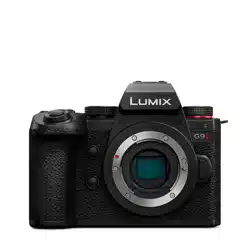
Please read these instructions carefully before using this product, and save this
manual for future use.
Dear Customer,
Thank you for choosing Panasonic!
You have purchased one of the most sophisticated and reliable products on the market today.
Used properly, we’re sure it will bring you and your family years of enjoyment. Please take time
to fill in the information below. The serial number is on the tag located on the underside of your
camera. Be sure to retain this manual as your convenient camera information source.
Please note that the actual controls and components, menu items, etc. of your Digital Camera
may look somewhat different from those shown in the illustrations in this Owner’s Manual.
Information for Your Safety
∫ Product identification marking
∫ THE FOLLOWING APPLIES ONLY IN CANADA.
∫ About the battery pack
0
Do not heat or expose to flame.
0 Do not leave the battery(ies) in a car exposed to direct sunlight for a long period of time with
doors and windows closed.
0 Do not expose to low air pressure at high altitudes.
0 Do not expose to extremely low air pressure, as this may result in explosions or leakage of
flammable liquids and gases.
0 Always use a supplied BNC conversion cable (for TC IN/OUT).
0 Always use a genuine Panasonic Shutter Remote Control (DMW-RS2: optional).
0 Always use a genuine Panasonic Tripod Grip (DMW-SHGR2/DMW-SHGR1: optional).
0 Use an Ultra High Speed HDMI cable (Type A–Type A plug) with the length less than 3 m
(9.8 feet).
0 Use a BNC cable with the length less than 2.8 m (9.2 feet).
0 Use a synchro cable with the length less than 3 m (9.8 feet).
0 Use a headphone cable with the length less than 3 m (9.8 feet).
0 Use a stereo microphone cable with the length less than 3 m (9.8 feet).
0 Keep the hot shoe cover out of reach of children to prevent swallowing.
0 Keep the eye cup out of reach of children to prevent swallowing.
0 Keep the flash synchro socket cap out of reach of children to prevent swallowing.
0 Keep the memory card out of reach of children to prevent swallowing.
0 Excessive sound pressure from earphones and headphones can cause hearing loss.
Standard Accessories
Product numbers correct as of May 2024.
Digital camera body
*1 This is attached to the camera at the time of purchase.
*2 This is supplied with Lens Kit DC-GH7L.
*3 This is attached to the lens at the time of purchase.
0 If any accessories are lost, customers in Canada should visit our support page at
www.panasonic.ca/english/support
for further information about obtaining replacement parts.
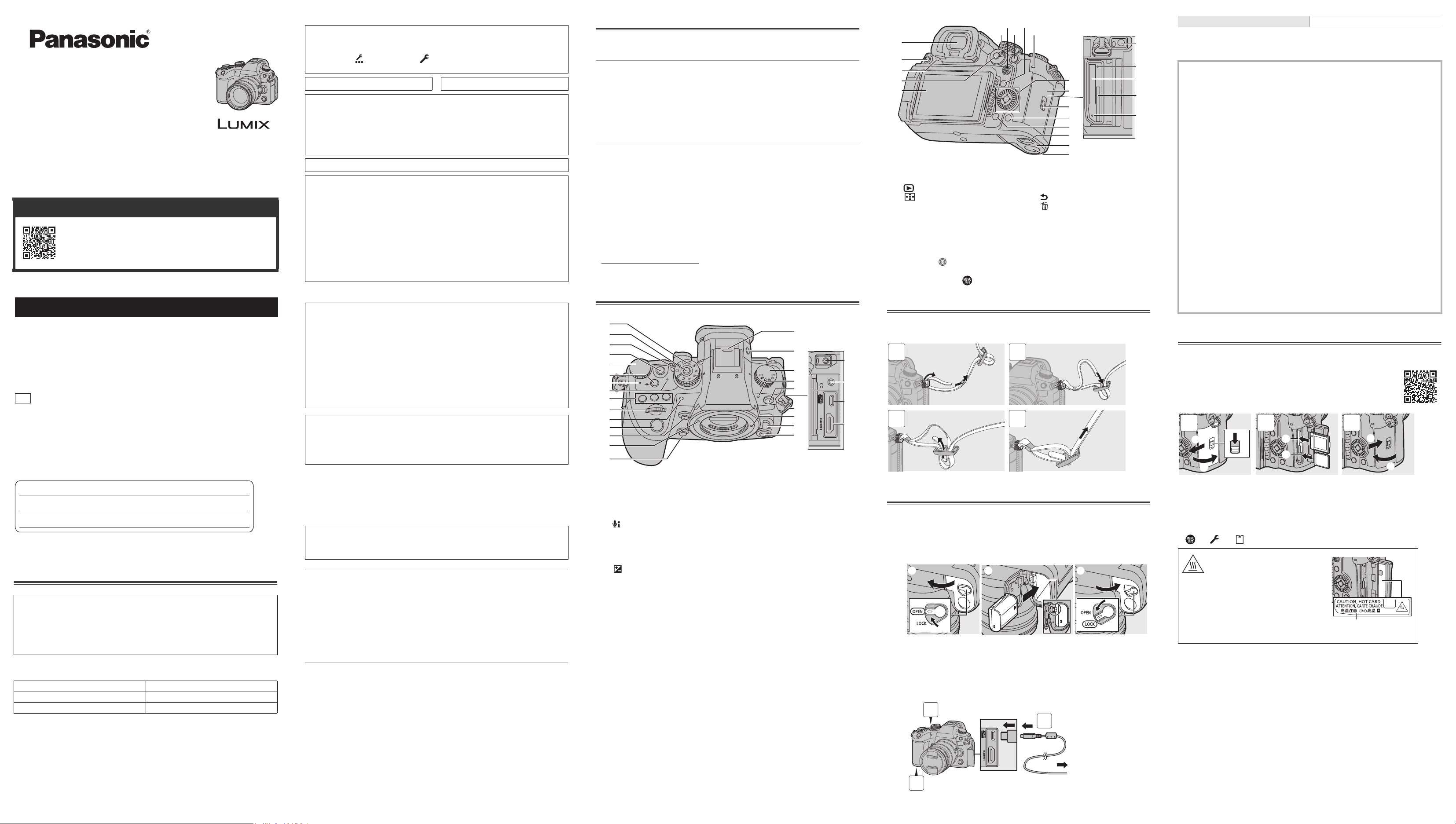
Names of Important Parts
Attaching a Shoulder Strap
Attach a shoulder strap to the camera with the following procedure to prevent it
from dropping.
Charging the Battery
Charge using an AC adaptor (optional/commercially available) and a USB
connection cable (commercially available).
1
Set the camera on/off switch to [OFF].
2
Insert the battery into the camera.
3
Connect the camera USB port and the AC adaptor using the
USB connection cable.
4
Connect the AC adaptor to an electrical outlet.
0 The charging light turns red and charging begins.
The charging light turns off when charging is complete.
(A) To the AC adaptor
0 Using either the camera body and the optional AC Adaptor (DMW-AC11) or the camera body
and the supplied accessories of the optional Battery Charger (DMW-BTC15).
0 The supplied charger can also be used to charge instead of the camera body.
Inserting Cards (Optional)
You can use CFexpress cards and SD memory cards with this camera.
(A) Card slot 1: CFexpress card
(B) Card slot 2: SD card
0
Match the orientation of the cards as shown in the figure and then insert them firmly until they click.
0 To remove a card, confirm that the corresponding card access light has turned off, push the
card until it clicks, then pull the card out straight.
0 Format the cards with the camera before use.
[] [] Select [Card Format]
Owner’s Manual <Complete Guide>
Refer to “Owner’s Manual <Complete Guide>” (HTML format/
PDF format) for details about how to use the camera and
notes on use.
https://panasonic.jp/support/dsc/oi/GH7/index.html
WARNING:
To reduce the risk of fire, electric shock or product damage,
0
Do not expose this unit to rain, moisture, dripping or splashing.
0 Use the recommended accessories.
0 Do not remove covers.
0 Do not repair this unit by yourself. Refer servicing to qualified service personnel.
Product Location
Digital camera Bottom
Battery charger Bottom
If you have any questions, visit:
Canada : www.panasonic.ca/english/support
© Panasonic Entertainment & Communication Co., Ltd. 2024
Printed in China
PP
Panasonic Canada Inc.
5770 Ambler Drive, Mississauga, Ontario L4W 2T3
www.panasonic.com
Date of Purchase
Dealer Purchased From
Dealer Address
Dealer Phone No.
Model No.
Serial No.
How to Display Certification and Compliance Information
Certification and compliance information for this camera can be viewed on the menu
screen.
1 Select the [Others] tab of the [Setup] menu.
2 Select [Approved Regulations] and confirm your selection.
CAN ICES-003(B) / NMB-003(B) Contains IC : 772C-LBEE5ZZ1PJ
This device contains licence-exempt transmitter(s)/receiver(s) that comply with Innovation,
Science and Economic Development Canada’s licence-exempt RSS(s). Operation is
subject to the following two conditions:
(1) This device may not cause interference.
(2) This device must accept any interference, including interference that may cause
undesired operation of the device.
5150-5350 MHz band is restricted to indoor operations only.
The available scientific evidence does not show that any health problems are associated
with using low power wireless devices. There is no proof, however, that these low power
wireless devices are absolutely safe. Low power Wireless devices emit low levels of radio
frequency energy (RF) in the microwave range while being used. Whereas high levels of
RF can produce health effects (by heating tissue), exposure of low-level RF that does not
produce heating effects causes no known adverse health effects. Many studies of
low-level RF exposures have not found any biological effects. Some studies have
suggested that some biological effects might occur, but such findings have not been
confirmed by additional research. DC-GH7 (HMN is 1PJ2302) has been tested and found
to comply with ISED radiation exposure limits set forth for an uncontrolled environment
and meets RSS-102 of the ISED radio frequency (RF) Exposure rules.
CAUTION
Battery pack (Lithium ion battery pack)
0 Use the specified unit to recharge the battery pack.
0 Do not use the battery pack with equipment other than the specified unit.
0 Do not get dirt, sand, liquids, or other foreign matter on the terminals.
0 Do not touch the plug terminals (i and j) with metal objects.
0 Do not disassemble, remodel, heat or throw into fire.
If any electrolyte should come into contact with your hands or clothes, wash it off
thoroughly with water.
If any electrolyte should come into contact with your eyes, never rub the eyes. Rinse eyes
thoroughly with water, and then consult a doctor.
CAUTION
0
Danger of explosion if battery is incorrectly replaced. Replace only with the type
recommended by the manufacturer.
0 When disposing of the batteries, please contact your local authorities or dealer and ask
for the correct method of disposal.
Warning
Risk of fire, explosion and burns. Do not disassemble, heat above 60 oC
(140 oF) or incinerate.
Battery pack
DMW-BLK22
Body cap
*1
VKF4971
Battery charger
DVLC1005Z
Eye cup
*1
1YE1MC501Z
BNC conversion cable (for TC IN/OUT)
K1TYYYY00286
Hot shoe cover
*1
4HR1MC5229Z
Shoulder strap
DVPW1030Z
Flash synchro socket cap
*1
VKF5108
Interchangeable lens “LEICA DG VARIO-ELMARIT 12-60mm/F2.8-4.0 ASPH./POWER
O.I.S.”
*2
H-ES12060
Lens hood
1ZE4Z260Z
Lens rear cap
*3
1GE1Z136Z
Lens cap
*3
SYF0083
(1) Mode dial
(2) Mode dial lock button
(3) Camera on/off switch
(4) Video rec. button
(5) Rear dial
(6) [ ] (Audio information) button
(7) Charging light/Network connection light
(8) Power indicator
(9) [WB] (White balance) button
[ISO] (ISO sensitivity) button
[ ] (Exposure compensation) button
(10) Front dial
(11) Self-timer light/AF assist light
(12) Shutter button
(13) Enlarged live display (video) button
(14) Lens fitting mark
(15) Preview button
(16) Hot shoe (hot shoe cover)
(17) [LVF] button
(18) Drive mode dial
(19) Front tally lamp
(20) Flash synchro socket (flash synchro
socket cap)
(21) Shoulder strap eyelet
(22) Lens lock pin
(23) Lens release button
(24) Sub video rec. button
(25) [MIC] socket
(26) Headphone socket
(27) USB port
(28) HDMI socket
(1)
(2)
(3)
(4)
(5)
(6)
(7)
(8)
(9)
(10)
(11)
(12)
(13)
(14)
(15)
(16)
(17)
(18)
(19)
(20)
(21)
(22)
(23)
(24)
(25)
(26)
(27)
(28)
(29) Viewfinder
(30) Operation lock lever
(31) [ ] (Playback) button
(32) [ ] (AF mode) button
(33) Monitor/Touch screen
(34) Focus mode lever
(35) Joystick
(36) [AF ON] button
(37) [Q] (Quick menu) button
(38) Rear tally lamp
(39) Control dial ( )
Cursor buttons (3421)
[MENU/SET] button ( )
(40) Card door
(41) Card door lock lever
(42) [DISP.] button
(43) [ ] (Cancel) button/
[ ] (Delete) button
(44) Battery door release lever
(45) Battery door
(46) DC coupler cover
(47) [REMOTE] socket
(48) Card access light 1
(49) Card slot 1
(50) Card slot 2
(51) Card access light 2
(29)
(30)
(31)
(32)
(33)
(34) (36) (38)
(39)
(40)
(41)
(42)
(43)
(44)
(45)
(46)
(47)
(48)
(49)
(50)
(51)
(35) (37)
1
2
3
4
(A)
3
1
2
Charging time Approx. 170 min
Cautions
0
The battery that can be used with the camera is DMW-BLK22. (As of May 2024)
The Panasonic Battery Pack DMW-BLF19PP (optional) can also be used, but due to the
restrictions on functionality, it is recommended to use DMW-BLK22 (supplied/optional).
0 Always use genuine Panasonic batteries (DMW-BLK22).
0 If you use other batteries, we cannot guarantee the quality of this product.
0 It is recommended to use the Panasonic AC Adaptor (DMW-AC11: optional) or the
supplied accessories of the Panasonic Battery Charger (DMW-BTC15: optional) for
charging.
0 You can charge with the camera body or the supplied charger using a commercially
available AC adaptor and a USB connection cable.
*Recommended specifications for the commercially available AC adaptor
– Supports PD (Power Delivery)
– Supports 9 V/3 A (27 W) DC output
– USB Type-C terminal
*Use a USB connection cable with 27 W output or better for charging.
0 You can also use an AC adaptor with 5 V/500 mA or better for charging. However,
charging time may be longer than with the recommended AC adaptor.
0 Operation is not guaranteed with all commercially available devices.
0 Using charging methods other than those specified may result in fluid leakage,
overheating, combustion, rupturing, etc., and these may cause injury.
0 This battery may present a risk of fire or chemical burn if mistreated.
0 Place the removed battery in a plastic bag, and store or keep away from metallic objects
(clips, etc.).
0 When disposing of the batteries, please contact your local authorities or dealer and ask
for the correct method of disposal.
0 For information on memory cards with confirmed operation, check the
following support site:
https://panasonic.jp/support/global/cs/dsc/connect/index.html
(English only)
CAUTION, HOT CARD
0
As indicated on the inside of the card door,
the card may be hot just after the camera
has been used. Be careful when removing.
When a high temperature caution
message is displayed on the screen,
do not remove the card immediately,
but rather wait for it to cool down and
the message to disappear.
(C) CAUTION, HOT CARD
(A)
(B)
1
2
3
(C)
until
2024/7/1
Owner’s Manual
<Quick Start Guide>
Digital Camera
Model No.
DC-GH7
DVQX2488ZB
F0424KN1054
DVQX2488-Body_eng.fm 1 ページ 2024年5月13日 月曜日 午前10時7分
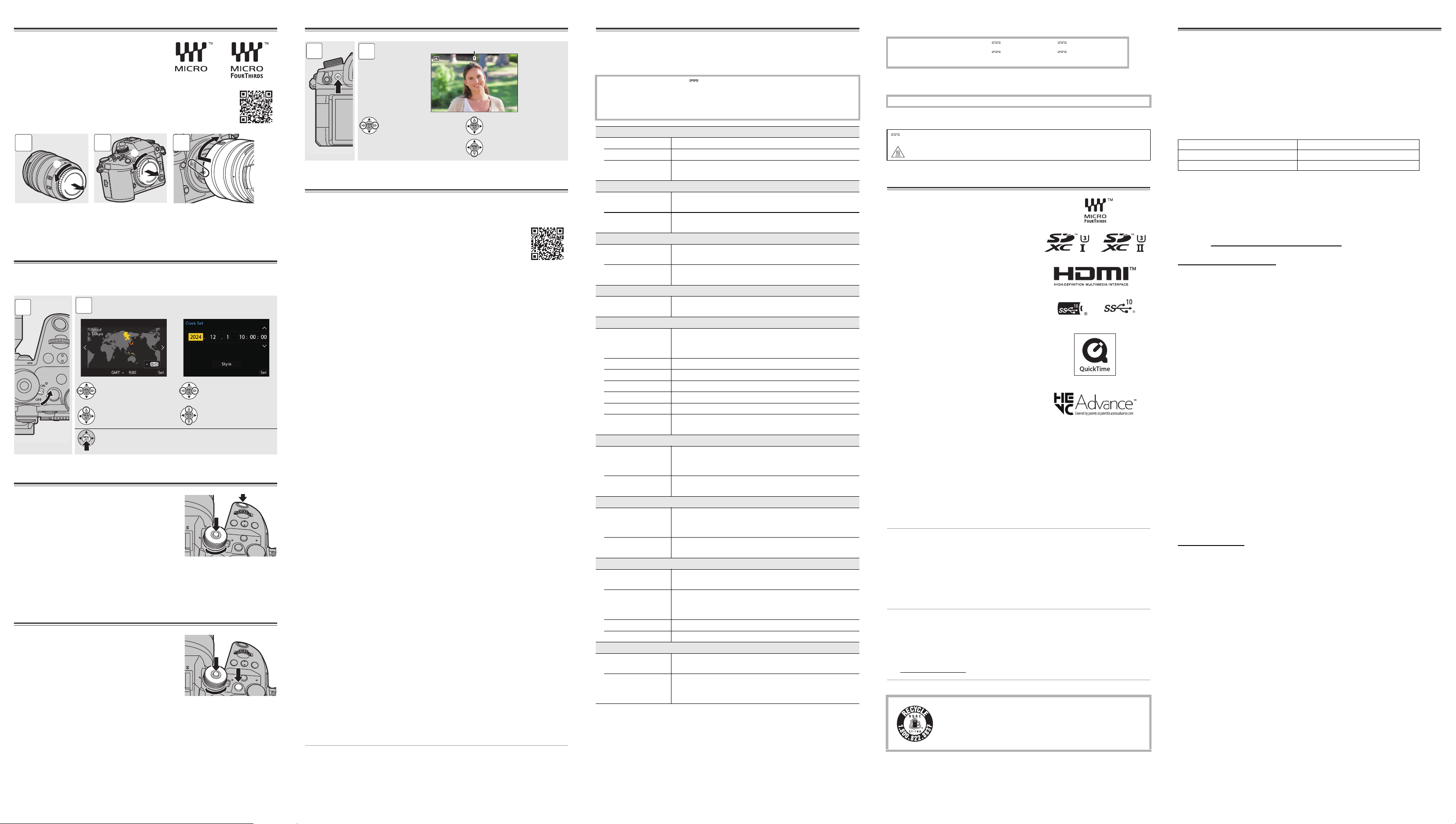
Attaching a Lens
The camera can use the dedicated lenses
that comply with the Micro Four Thirds™
system lens mount specification (Micro Four
Thirds mount).
0
When removing the lens, rotate while pressing the lens release button.
Setting the Clock (When Turning On for the
First Time)
When you turn the camera on for the first time, a screen to set the time zone and
clock appears. Follow the message to make the settings.
Taking Pictures
1
Press the mode dial lock button to
release the lock.
2
Rotate the mode dial to select the
recording mode ([iA]/[P]/[A]/[S]/[M]).
3
Press the shutter button halfway
(press it gently) to focus.
4
Press the shutter button fully (press it further) to take
pictures.
Recording Videos
1
Press the mode dial lock button to
release the lock.
2
Rotate the mode dial to select the
recording mode.
3
Press the video rec. button to start
recording.
4
Press the video rec. button again to end recording.
Playing Back Images
Cautions for Use
Firmware of Your Camera/Lens
Firmware updates may be provided in order to improve camera capabilities or to add functionality.
Splash Resistant
Splash Resistant is a term used to describe an extra level of protection this camera
offers against exposure to a minimal amount of moisture, water or dust. Splash
Resistant does not guarantee that damage will not occur if this camera is subjected to
direct contact with water.
In order to minimize the possibility of damage please be sure the following precautions
are taken:
– Splash Resistant works in conjunction with the lenses that were specifically designed to
support this feature.
– Securely close the doors, socket caps, etc.
– When the lens or cap is removed or a door is open, do not allow sand, dust, and moisture
to enter inside.
– If liquid gets on the camera, wipe it off with a dry soft cloth.
Be Sure to Perform Trial Recording in Advance
Be sure to perform trial recording in advance to check that recording can be performed
normally.
Please note that compensation cannot be provided in the event that recording could not be
performed due to a problem with the camera or a card.
Be Careful with Regard to Copyrights
Under copyright law, you may not use the images and audio you have recorded without the
permission of the copyright holder.
Caution with Strong Light Beams Such as Laser Light
Do not allow strong light beams, such as laser light, to be directly exposed to this camera
(lens). These can destroy the image sensor and cause the camera to malfunction.
The camera
Keep this unit as far away as possible from electromagnetic equipment
(such as microwave ovens, TVs, video games etc.).
0
If you use this unit on top of or near a TV, the pictures and/or sound on this unit may be
disrupted by electromagnetic wave radiation.
0 Do not use this unit near cell phones because doing so may result in noise adversely
affecting the pictures and/or sound.
0 Recorded data may be damaged, or pictures may be distorted, by strong magnetic fields
created by speakers or large motors.
0 Electromagnetic wave radiation may adversely affect this unit, disturbing the pictures and/or
sound.
0 If this unit is adversely affected by electromagnetic equipment and stops functioning
properly, turn this unit off and remove the battery or disconnect AC adaptor. Then reinsert
the battery or reconnect AC adaptor and turn this unit on.
Do not use this unit near radio transmitters or high-voltage lines.
0
If you record near radio transmitters or high-voltage lines, the recorded pictures and/or
sound may be adversely affected.
Wi-Fi
®
Function
Use of the Wi-Fi function of the camera is presumed to be in countries
where it is sold.
There is the risk that the camera violates the radio wave regulations if used in countries other
than those where it is sold, and Panasonic takes no responsibility for any violations.
0 Please be advised that Panasonic is not liable for any damage directly or indirectly caused
by use (including use in combination with the products of other companies) or malfunction of
this product.
0 Please be advised that Panasonic is not liable for any damage to data caused by this product.
0 The external design and specifications of this product, as described in this document, may
differ from the actual product due to improvements made.
Main Specifications
The specifications are subject to change for performance enhancement.
Digital camera body (DC-GH7):
Information for your safety
Battery charger (Panasonic DVLC1005Z):
Information for your safety
Battery pack (lithium-ion) (Panasonic DMW-BLK22):
Information for your safety
The symbols on this product (including the accessories) represent the following:
Trademarks and Licenses
0 Micro Four Thirds™ and Micro Four Thirds Logo
marks are trademarks or registered trademarks of
OM Digital Solutions Corporation, in Japan, the
United States, the European Union and other
countries.
0 SDXC Logo is a trademark of SD-3C, LLC.
0 The terms HDMI, HDMI High-Definition
Multimedia Interface, HDMI Trade dress and the
HDMI Logos are trademarks or registered
trademarks of HDMI Licensing Administrator, Inc.
0 USB Type-C
®
and USB-C
®
are registered
trademarks of USB Implementers Forum.
0 The USB Type-C
®
Charging Trident Logos are
trademarks of USB Implementers Forum, Inc.
0 The SuperSpeed USB 10Gbps Trident Logo is a
registered trademark of USB Implementers
Forum, Inc.
0 QuickTime and the QuickTime logo are
trademarks or registered trademarks of Apple Inc.,
used under license therefrom.
0 The Bluetooth
®
word mark and logos are
registered trademarks owned by Bluetooth SIG,
Inc. and any use of such marks by Panasonic
Holdings Corporation is under license. Other
trademarks and trade names are those of their
respective owners.
0 “Wi-Fi
®
” is a registered trademark of Wi-Fi Alliance
®
.
0 “WPA™”, “WPA2™”, and “WPA3™” are trademarks of Wi-Fi Alliance
®
.
0 QR Code is a registered trademark of DENSO WAVE INCORPORATED.
0 LEICA is a registered trademark of Leica Microsystems IR GmbH. ELMARIT is a registered
trademark of Leica Camera AG. The LEICA DG lenses are manufactured using
measurement instruments and quality assurance systems that have been certified by Leica
Camera AG based on the company’s quality standards.
0 Other names, company names, product names mentioned in this document are trademarks
or registered trademarks of the companies concerned.
At least three (3) years from delivery of this product, Panasonic will give to any third party who
contacts us at the contact information provided below, for a charge no more than our cost of
physically performing source code distribution, a complete machine-readable copy of the
corresponding source code covered under GPL V2.0 or LGPL V2.1, as well as the respective
copyright notice thereof.
Contact Information: [email protected]
The source code and the copyright notice are also available for free in our website below.
https://panasonic.net/cns/oss/index.html
This product is licensed under the AVC Patent Portfolio License for the personal use of a
consumer or other uses in which it does not receive remuneration to (i) encode video in
compliance with the AVC Standard (“AVC Video”) and/or (ii) decode AVC Video that was
encoded by a consumer engaged in a personal activity and/or was obtained from a video
provider licensed to provide AVC Video. No license is granted or shall be implied for any other
use. Additional information may be obtained from MPEG LA, L.L.C.
See http://www.mpegla.com
For the U.S.A. and Canada only
Limited Warranty (ONLY FOR CANADA)
Panasonic Canada Inc.
5770 Ambler Drive, Mississauga, Ontario L4W 2T3
PANASONIC PRODUCT – LIMITED WARRANTY
Panasonic Canada Inc. warrants this product to be free from defects in material and
workmanship under normal use and for a period as stated below from the date of original
purchase agrees to, at its option either (a) repair your product with new or refurbished parts,
(b) replace it with a new or a refurbished equivalent value product, or (c) refund your purchase
price. The decision to repair, replace or refund will be made by Panasonic Canada Inc.
This warranty is given only to the original purchaser, or the person for whom it was purchased
as a gift, of a Panasonic brand product mentioned above sold by an authorized Panasonic
dealer in Canada and purchased and used in Canada, which product was not sold “as is”, and
which product was delivered to you in new condition in the original packaging.
IN ORDER TO BE ELIGIBLE TO RECEIVE WARRANTY SERVICE HEREUNDER, A
PURCHASE RECEIPT OR OTHER PROOF OF DATE OF ORIGINAL PURCHASE,
SHOWING AMOUNT PAID AND PLACE OF PURCHASE
IS REQUIRED
LIMITATIONS AND EXCLUSIONS
This warranty ONLY COVERS failures due to defects in materials or workmanship, and DOES
NOT COVER normal wear and tear or cosmetic damage. The warranty ALSO DOES NOT
COVER damages which occurred in shipment, or failures which are caused by products not
supplied by Panasonic Canada Inc., or failures which result from accidents, misuse, abuse,
neglect, mishandling, misapplication, alteration, faulty installation, set-up adjustments,
misadjustment of consumer controls, improper maintenance, improper batteries, power line
surge, lightning damage, modification, introduction of sand, humidity or liquids, or rental use of
the product, or service by anyone other than a Authorized Servicer, or damage that is
attributable to acts of God.
Dry cell batteries, printer ink cartridge and paper are also excluded from coverage under this
warranty.
Rechargeable batteries are warranted for ninety (90) days from date of original purchase.
THIS EXPRESS, LIMITED WARRANTY IS IN LIEU OF ALL OTHER WARRANTIES,
EXPRESS OR IMPLIED, INCLUDING ANY IMPLIED WARRANTIES OF MERCHANTABILITY
AND FITNESS FOR A PARTICULAR PURPOSE. IN NO EVENT WILL PANASONIC CANADA
INC. BE LIABLE FOR ANY SPECIAL, INDIRECT OR CONSEQUENTIAL DAMAGES
RESULTING FROM THE USE OF THIS PRODUCT OR ARISING OUT OF ANY BREACH OF
ANY EXPRESS OR IMPLIED WARRANTY. (As examples, this warranty excludes damages
for lost time, travel to and from the Authorized Servicer, loss of or damage to media or images,
data or other memory or recorded content. This list of items is not exhaustive, but for
illustration only.)
In certain instances, some jurisdictions do not allow the exclusion or limitation of incidental or
consequential damages, or the exclusion of implied warranties, so the above limitations and
exclusions may not be applicable. This warranty gives you specific legal rights and you may
have other rights which vary depending on your province or territory.
WARRANTY SERVICE
For product operation, repairs and information assistance, please visit our Support page:
www.panasonic.ca/english/support
0 Refer to catalogs/websites for information regarding supported lenses.
https://panasonic.jp/support/global/cs/dsc/connect/index.html
(English only)
0 Press 34 to select the language if a language selection
screen is displayed.
Time zone selection
Year, month, day, hour,
minute, and second
selection
Daylight Savings setting Value selection
Check or confirm and move to the next screen
1 2 3
1
2
Card slot
Image selection Plays back/pauses video
Stop video
0 For the latest information on the firmware or to download/update the
firmware, visit the following support site:
https://panasonic.jp/support/global/cs/dsc/download/index.html
(English only)
1
2
1/999
1/999
1/999
Power source:
Power consumption:
9.0 V
4.8 W (when recording with the monitor), 3.8 W (when playing
back with the monitor)
[When using the interchangeable lens (H-ES12060)]
Type
Type Digital Single Lens Mirrorless camera
Lens mount Micro Four Thirds Mount
Recording media CFexpress Type B card / SD memory card / SDHC memory card /
SDXC memory card
Image sensor
Image sensor 4/3″ BSI CMOS image sensor, a total of approx.
26,500,000 pixels, primary color filter
Effective number of
pixels of the camera
Approx. 25,200,000 pixels
Viewfinder
Type Aspect ratio 4:3, 0.5 inches, approx. 3,680,000 dots,
organic EL (OLED) live view viewfinder
Magnification Approx. 1.6×, Approx. 0.8× (35 mm film camera equivalent),
−1.0 m
−1
50 mm at infinity, with aspect ratio set to [4:3]
Monitor
Type Aspect ratio 3:2, 3.0 inches,
approx. 1,840,000 dots monitor, capacitive touch screen
Interface
USB USB Type-C
®
, SuperSpeed USB 10Gbps (USB 3.2 Gen 2)
Supports USB Power Delivery (9.0 V/3.0 A)
Output: DC 5 V, 900 mA
HDMI HDMI Type A
[REMOTE] ‰2.5 mm jack
[MIC] ‰3.5 mm stereo mini jack
Headphones ‰3.5 mm stereo mini jack
Flash Synchro Yes
TC IN/OUT Yes (connect the BNC conversion cable (supplied) to the flash
synchro socket)
External dimensions / Mass (Weight)
External dimensions Approx. 138.4 mm (W)×100.3 mm (H)×99.6 mm (D)
(5.45″ (W)×3.95″ (H)×3.92″ (D))
(excluding the projecting parts)
Mass (Weight) Approx. 805
g/1.77 lb (camera body, with battery and one card)
Approx. 721
g/1.59 lb (only camera body)
Operating environment
Recommended
operating
temperature
−10 oC to 40 oC (14 oF to 104 oF)
Permissible relative
humidity
10 %RH to 80 %RH
Wi-Fi
Compliance
standard
IEEE 802.11a/b/g/n/ac (standard wireless LAN protocol)
Frequency range
used (central
frequency)
2412 MHz to 2462 MHz (1 to 11ch)
5180 MHz to 5320 MHz (36/40/44/48/52/56/60/64ch)
5745 MHz to 5825 MHz (149/153/157/161/165ch)
Encryption method Wi-Fi compliant WPA™ / WPA2™ / WPA3™
Access method Infrastructure mode
Bluetooth
®
Compliance
standard
Bluetooth v5.0, Bluetooth Low Energy (BLE)
Frequency range
used (central
frequency)
2402 MHz to 2480 MHz
Input:
Output:
Operating temperature:
9.0V 3.0A 5.0V 1.8A
8.4 V 1.2 A 8.4 V 0.85 A
0 oC to 40 oC (32 oF to 104 oF)
Voltage/capacity: 7.2 V / 2200 mAh
DC
Hot surfaces
A lithium ion battery that is recyclable powers the product you have
purchased. Please call 1-800-8-BATTERY for information on how to
recycle this battery.
Digital Camera One (1) year, parts and labour
Digital Camera Peripherals One (1) year, parts and labour
Digital Camera Accessories Ninety (90) days, parts and labour
DVQX2488-Body_eng.fm 2 ページ 2024年5月13日 月曜日 午前10時7分