
Contents
User Manual...........................................................English 1-9
Benutzerhandbuch.............................................Deutsch 10-21
Manuale d'uso.....................................................Italiano 22-32
Manual de usuario..............................................Español 33-43
Manuel de l'utilisateur.......................................Français 44-54

User Manual
Contents
1 Instructions for Safe Sleep...................................................1
2 Warnings and Cautions........................................................1
3 Overview............................................................................. 2
3.1 Station........................................................................2
3.2 Charging.................................................................... 2
4 Pairing the Station with the Main Unit................................3
5 Monitoring with the Station.................................................4
6 Stop Measuring....................................................................5
7 Cleaning...............................................................................6
8 Troubleshooting...................................................................6
9 Specifications.......................................................................7
10 Symbols............................................................................. 7
11 FCC Statement...................................................................8

1
1 Instructions for Safe Sleep
Room-share instead of co-sleeping.
Place your baby alone and on their back to sleep.
Use a firm sleep surface. Keep soft objects out of crib.
Use a crib that meets safety standards. Do not use cradle
for sleep.
Don’t use Baby Sleep Monitor as an excuse for unsafe
sleep.
2 Warnings and Cautions
Do not use this device during MRI examination.
Do not store the device in the following locations:
locations in which the device is exposed to direct
sunlight, high temperatures or levels of moisture, or
heavy contamination; locations near to sources of water
or fire; or locations that are subject to strong
electromagnetic influences.
Do not use the device in a combustible environment.
Never submerge the device in water or other liquids.
Do not clean the device with acetone or other volatile
solutions.
Do not drop this device or subject it to strong impact.
The device is provided non-sterile.
Do not place this device in pressure vessels or gas
sterilization device.
Do not dismantle the device, as this could cause damage
or malfunctions or impede the operation of the device.
Do not open the device cover without authorization. The
cover should only be opened by a qualified service
personnel.
2
3 Overview
3.1
Station
The station, coupled with the Babytone Sleep Sock (Baby
Sleep Monitor), is used by parents to track the baby’s real-
time oxygen level and pulse rate. It provides reminders when
they are out of the target range.
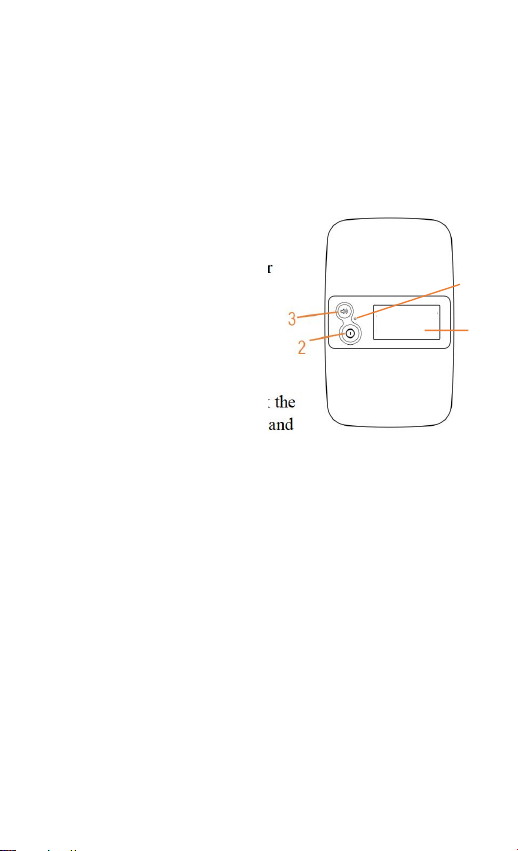
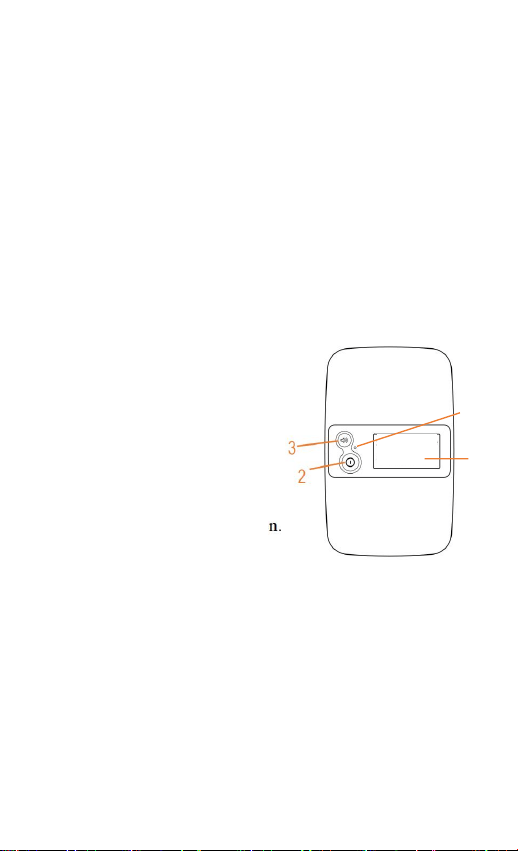
1. Display screen
2. Power button
Press for 2 seconds to power
on/off.
Press to turn off the screen.
3. Volume button
Press to adjust the volume.
Press for 2 seconds to check the
serial number of the station and
the paired device.
Note:
Press either button to wake up the screen or turn off the
reminder.
4. Indicator
Green Slow Blinking: Battery ≥ 5%
Orange Slow Blinking: Battery < 5%
Orange On: Charging
Green On: Fully charged
3.2
Charging
Charge the battery before use.
Connect the station to computer or USB charging adapter
using the provided cable.
4
1
3
4 Pairing the Station with the Main Unit
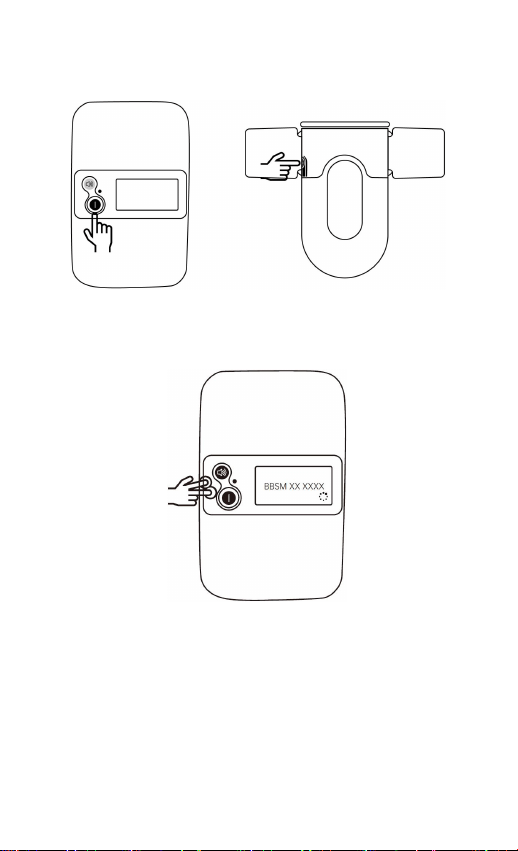
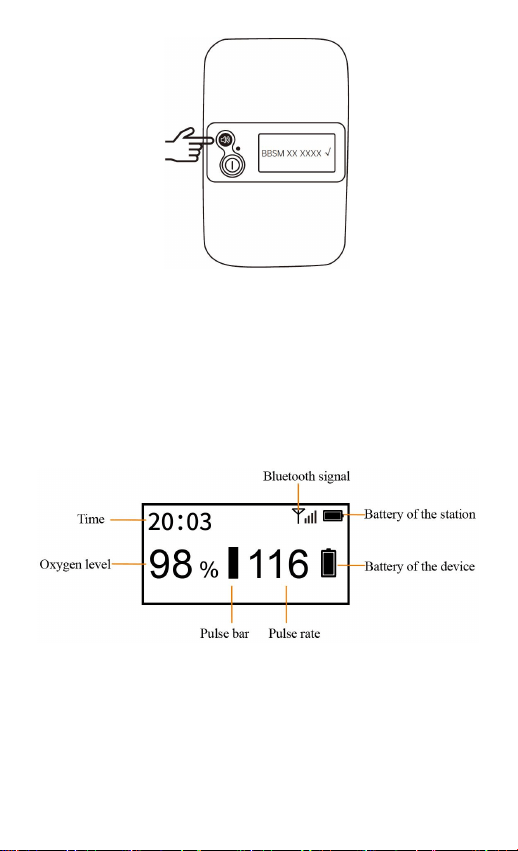
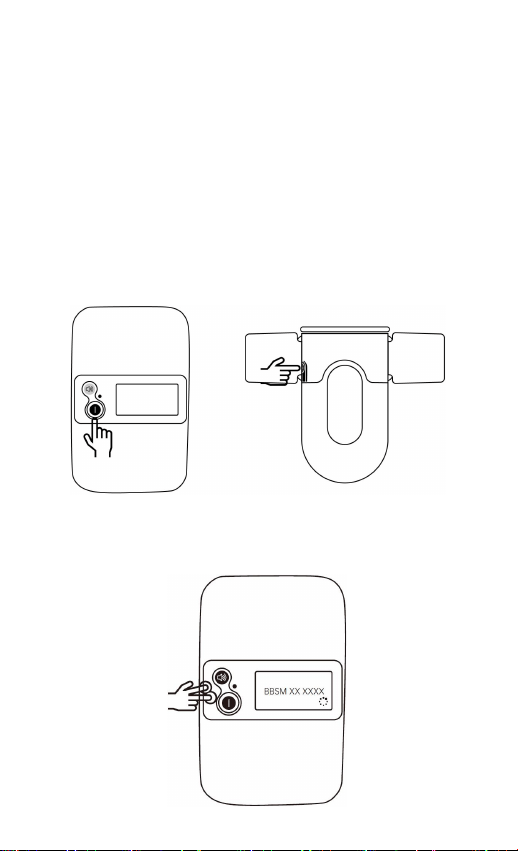
a) Turn on both the station and the main unit.
b) Hold the power button and the volume button of the
station simultaneously to enable Bluetooth and search for
the main unit.
c) Press the volume button of the station to pair it with the
main unit.
d) When “√”pops up on the screen, the station and main
unit are successfully paired.
4
Note: You can check the serial number on the back of the
main unit.
5 Monitoring with the Station
Press the power button for 2 seconds to turn on the station.
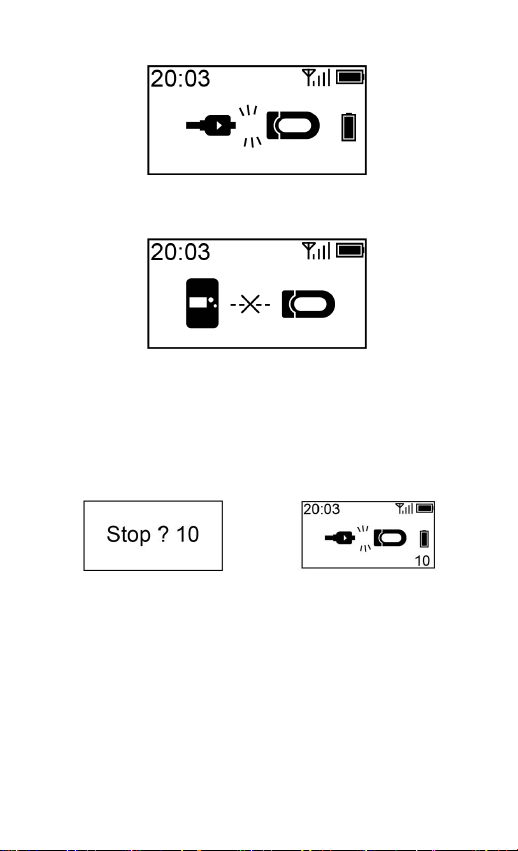
When the device is normally used for measurement, the
screen of the station will display as follows:
When the following situations occur, please check the device
and station as soon as possible.
5
The sensor cable of the device falls off.
The station is disconnected from the device.
6 Stop Measuring
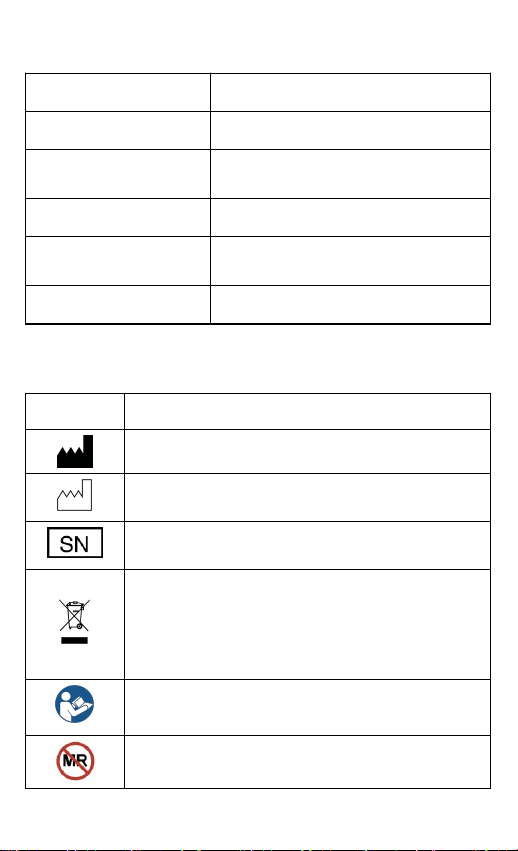
Unplug the sensor cable, the countdown on the screen will
begin.
Screen of the device
Screen of the station
During the countdown, if you plug the sensor cable again,
the record will be resumed.
After the countdown, the data will be ready for sync.

6
7 Cleaning
Use a soft cloth moistened with water or alcohol to clean the
device surface.
8 Troubleshooting
Problem
Possible Cause
Possible Solution
No readings
on screen of
the station.
The sensor is not
positioned and
secured properly
Ensure that the device
is worn correctly.
Baby is moving
frequently.
It will recover when
baby stays still.
Foot is too cold.
Make the foot warmer.
The station
does not turn
on or no
response.
Battery may be
low.
Charge battery and try
again.
Device might be
damaged.
Please contact the
seller or the after-
service email.
The Station
is
disconnected
from the
device.
The device is off.
Turn on the device.
The device is too
far away.
Move the device
closer.
The Bluetooth
connector failed
to pair with the
device.
Hold the power button
and the volume button
of the station at the
same time to search for
the device. Then, Press
the volume button to
pair it with the device.
7
9 Specifications
Weight
103g
Size
90mm×56mm×15 mm
Battery
3.8Vd.c., Li-ion rechargeable
Charge time
About 4 hours
Battery life
720 hours for typical use
Wireless
Bluetooth 4.0 BLE
10 Symbols
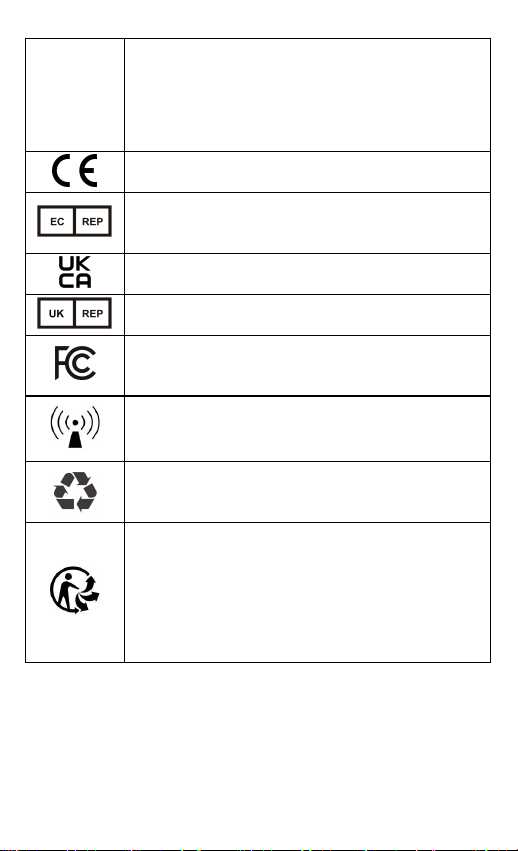
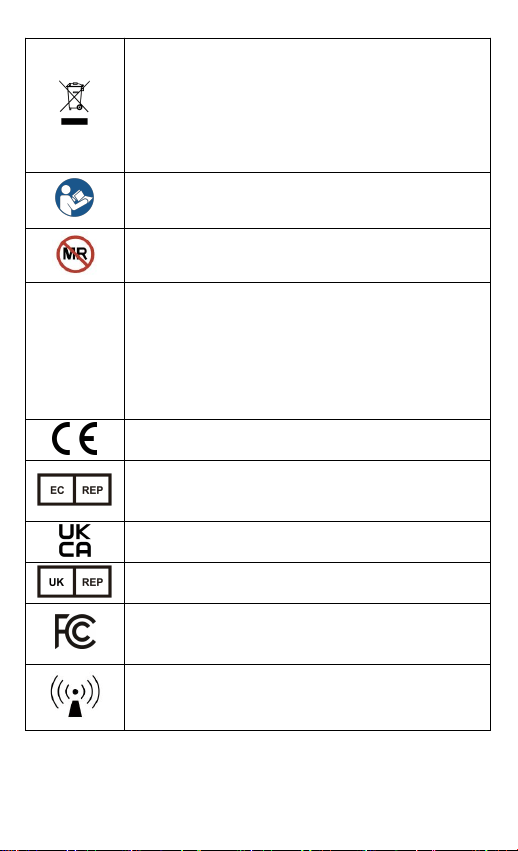
Symbol
Description
Manufacturer
Date of manufacture
Serial number
Indicates that the product should not be
discarded as unsorted waste but must be sent to
separate collection facilities for recovery and
recycling.
Refer to instruction manual
MR unsafe.
8
IP22
Indicates that the product is protected against
solid foreign objects of 12,5 mm Ø and greater;
and protected against vertically falling water
drops when enclosure tilted up to 15°.
CE marking
Authorized representative in the European
community
UKCA marking
UK Responsible Person
Indicates that the product complies with the
applicable FCC requirements
Non-ionizing radiation
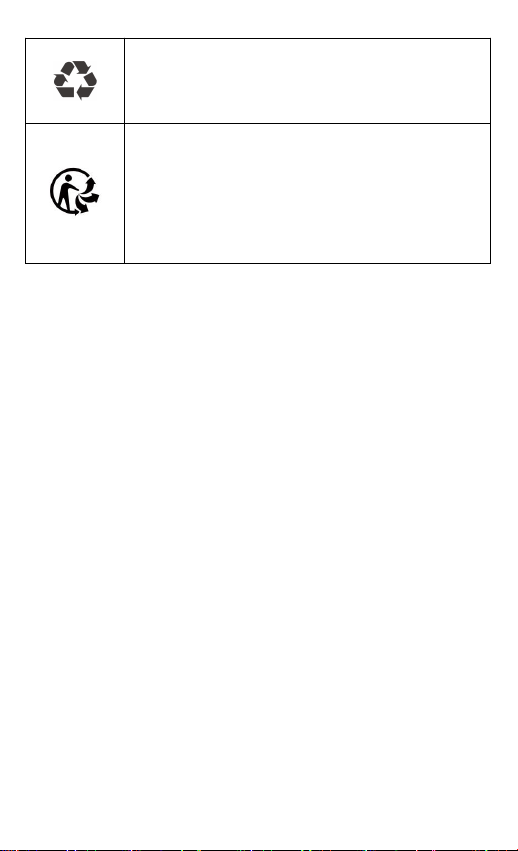
Indicates that the marked item or its material is
part of a recovery or recycling process.
Our products and packaging can be recycled,
don't throw them away!
Find where to drop them off on the
www.quefairedemesdechets.fr site (Only
applicable for French market).
11 FCC Statement
FCC Warning:
FCC ID: 2ADXK-1660
Any Changes or modifications not expressly approved by the

9
party responsible for compliance could void the user's
authority to operate the equipment.
This device complies with part 15 of the FCC Rules.
Operation is subject to the following two conditions:
(1) This device may not cause harmful interference, and
(2) this device must accept any interference received,
including interference that may cause undesired operation.
Note: This equipment has been tested and found to comply
with the limits for a Class B digital device, pursuant to part
15 of the FCC Rules. These limits are designed to provide
reasonable protection against harmful interference in a
residential installation. This equipment generates uses and
can radiate radio frequency energy and, if not installed and
used in accordance with the instructions, may cause harmful
interference to radio communications. However, there is no
guarantee that interference will not occur in a particular
installation. If this equipment does cause harmful interference
to radio or television reception, which can be determined by
turning the equipment off and on, the user is encouraged to
try to correct the interference by one or more of the following
measures:
- Reorient or relocate the receiving antenna.
- Increase the separation between the equipment and receiver.
- Connect the equipment into an outlet on a circuit different
from that to which the receiver is connected.
- Consult the dealer or an experienced radio/TV technician
for help.
The device has been evaluated to meet general RF exposure
requirement. The device can be used in portable exposure
condition without restriction.

10
Benutzerhandbuchm
Inhalt
1 Anleitung für den sicheren Schlaf ......................................11
2 Warnungen und Vorsichtshinweise.................................... 11
3 Übersicht............................................................................12
3.1 Station......................................................................12
3.2 Wird aufgeladen.......................................................13
4 Koppeln der Station mit dem Hauptgerät..........................13
5 Überwachung mit der Station............................................15
6 Messung unterbrechen.......................................................16
7 Reinigung...........................................................................16
8 Fehlerbehebung................................................................. 16
9 Spezifikationen.................................................................. 18
10 Symbole...........................................................................18
11 FCC-Erklärung.................................................................20

11
1 Anleitung für den sicheren Schlaf
Zimmer teilen statt Co-Sleeping.
Legen Sie Ihr Baby allein und auf dem Rücken zum
Schlafen.
Verwenden Sie eine feste Schlafunterlage. Halten Sie
weiche Gegenstände aus dem Kinderbett fern.
Verwenden Sie ein Kinderbett, das den
Sicherheitsstandards entspricht. Verwenden Sie keine
Wiege zum Schlafen.
Benutzen Sie den Baby-Schlafmonitor nicht als
Entschuldigung für einen unsicheren Schlaf.
2 Warnungen und Vorsichtshinweise
Verwenden Sie dieses Gerät nicht während einer MRT-
Untersuchung.
Bewahren Sie das Gerät nicht an folgenden Orten auf: an
Orten, an denen das Gerät direktem Sonnenlicht, hohen
Temperaturen oder Feuchtigkeit oder starker
Verschmutzung ausgesetzt ist; an Orten in der Nähe von
Wasser- oder Feuerquellen; oder an Orten, die starken
elektromagnetischen Einflüssen ausgesetzt sind.
Verwenden Sie das Gerät nicht in einer brennbaren
Umgebung.
Tauchen Sie das Gerät niemals in Wasser oder andere
Flüssigkeiten ein.
Reinigen Sie das Gerät nicht mit Aceton oder anderen
flüchtigen Lösungen.
Lassen Sie das Gerät nicht fallen und setzen Sie es
keinen starken Stößen aus.
Das Gerät wird nicht steril geliefert.
12
Stellen Sie das Gerät nicht in Druckbehälter oder
Gassterilisierungsgeräte.
Zerlegen Sie das Gerät nicht, da dies zu Schäden oder
Fehlfunktionen führen oder die Funktion des Geräts
beeinträchtigen könnte.
Öffnen Sie die Geräteabdeckung nicht unbefugt. Die
Abdeckung sollte nur von qualifiziertem Servicepersonal
geöffnet werden.
3 Übersicht
3.1 Station
Die Station wird von den Eltern in Verbindung mit dem
Babytone Schlafsocke (Baby-Schlafmonitor) verwendet, um
die Sauerstoffsättigung und die Herzfrequenz des Babys zu
überwachen. Es gibt Warnungen aus, wenn die Werte
außerhalb des Zielbereichs liegen.
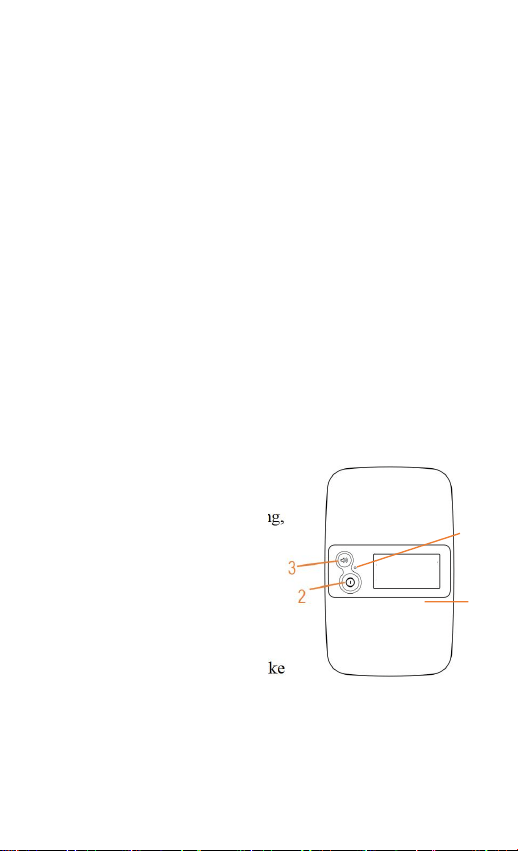
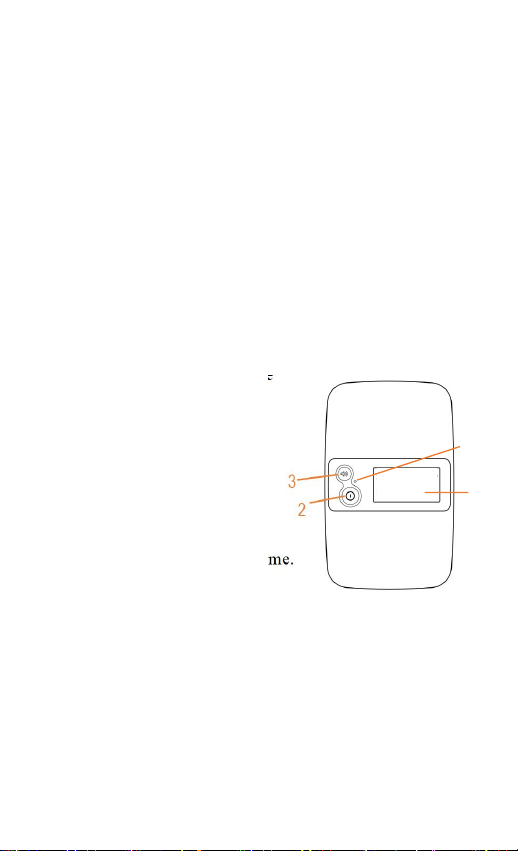
1. Bildschirm anzeigen
2. Ein/-Ausschalt-Taste
Drücken Sie 2 Sekunden lang,
um das Gerät ein- oder
auszuschalten.
Drücken Sie, um den
Bildschirm auszuschalten.
3. Lautstärken-Taste
Zum Einstellen der Lautstärke
drücken.
2 Sekunden lang drücken, um die Seriennummer der
Station und des gekoppelten Geräts zu überprüfen.
4
1
13
Anmerkung:
Drücken Sie eine der beiden Tasten, um den Bildschirm
einzuschalten oder die Signale auszuschalten.
4. Anzeige
Grün-langsam blinkend: Batterie ≥ 5%
Orange-langsam blinkend: Batterie < 5%
Orange An: Wird aufgeladen
Grün An: Vollständig geladen
3.2
Wird aufgeladen
Laden Sie den Akku vor dem Gebrauch auf.
Schließen Sie die Station mit dem mitgelieferten Kabel
an einen Computer oder einen USB-Ladeadapter an.
4 Koppeln der Station mit dem
Hauptgerät
a) Schalten Sie sowohl die Station als auch das Hauptgerät
ein.
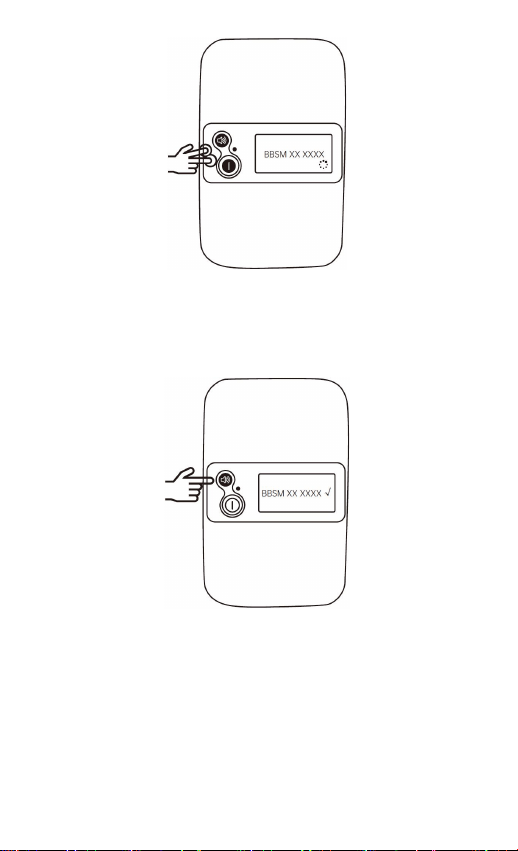
b) Halten Sie die Ein-/Aus-Taste und die Lautstärketaste der
Station gleichzeitig gedrückt, um Bluetooth zu aktivieren
und nach dem Hauptgerät zu suchen.
14
c) Drücken Sie die Lautstärketaste der Station, um sie mit
dem Hauptgerät zu koppeln.
d) Wenn „√“ auf dem Bildschirm erscheint, sind die Station
und das Hauptgerät erfolgreich gekoppelt.
Anmerkung: Sie können die Seriennummer auf der Rückseite
des Hauptgeräts prüfen.
15
5 Überwachung mit der Station
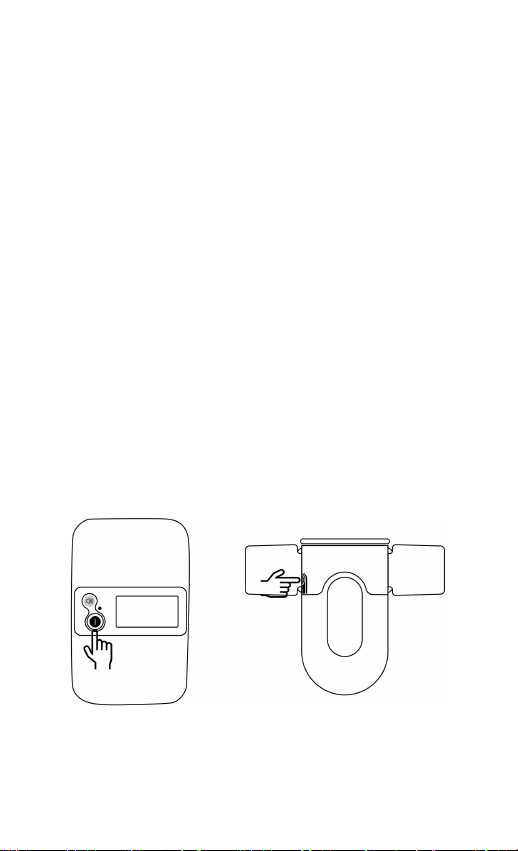
Drücken Sie die Einschalttaste für 2 Sekunden, um die
Station einzuschalten.
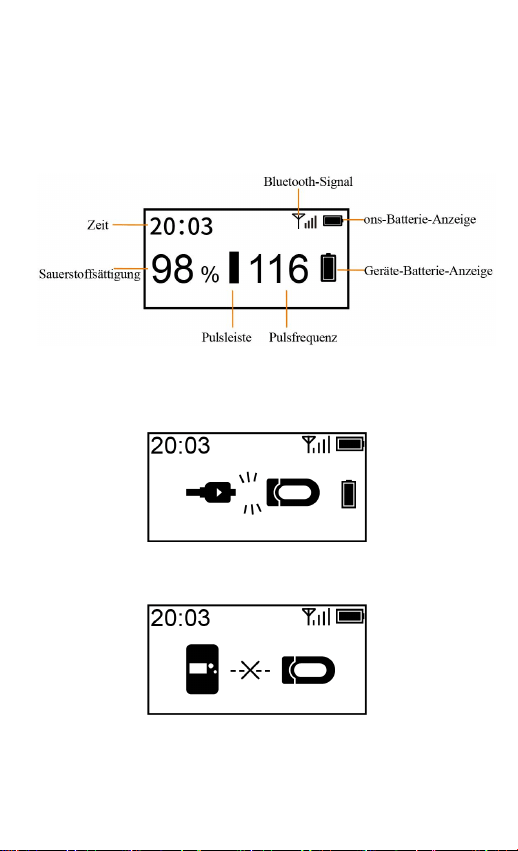
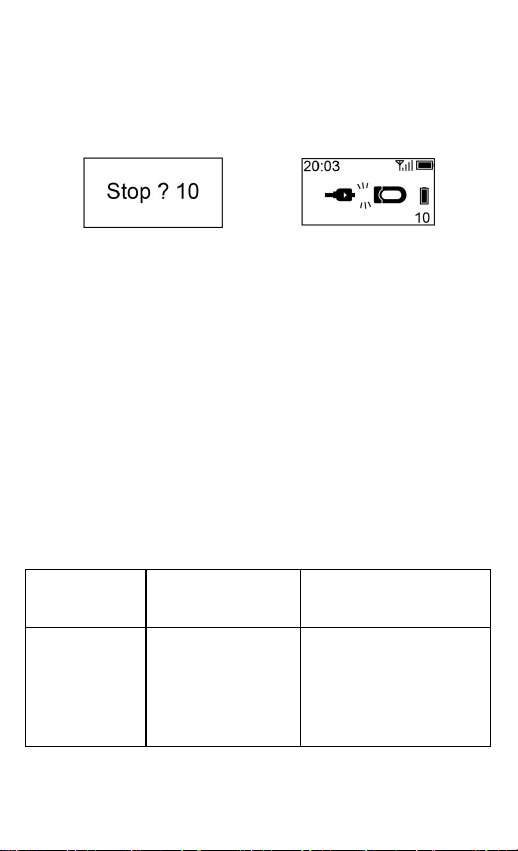
Wenn das Gerät normal zur Messung verwendet wird, wird
auf dem Bildschirm der Station das Folgende angezeigt:
Wenn die folgenden Situationen auftreten, prüfen Sie bitte so
schnell wie möglich das Gerät und die Station.
Das Sensorkabel des Geräts fällt ab.
Die Station ist vom Gerät getrennt.
16
6 Messung unterbrechen
Trennen Sie das Sensorkabel ab, der Countdown beginnt auf
dem Bildschirm
Bildschirm des Geräts
Bildschirm der Station
Wenn Sie während des Countdowns das Sensorkabel
erneut einstecken, wird die Aufzeichnung fortgesetzt.
Nach dem Countdown sind die Daten für die
Synchronisation bereit.
7 Reinigung
Verwenden Sie ein weiches, mit Wasser oder Alkohol
angefeuchtetes Tuch, um die Geräteoberfläche zu reinigen.
8 Fehlerbehebung
Problem
Mögliche
Ursache
Mögliche Lösung
Keine
Messwerte
auf dem
Bildschirm
der Station.
Der Sensor ist
nicht
ordnungsgemäß
positioniert und
befestigt.
Stellen Sie sicher, dass
das Gerät korrekt
getragen wird.

17
Das Baby bewegt
sich häufig.
Es wird sich erholen,
wenn das Baby sich
beruhigt.
Der Fuß ist zu
kalt.
Erwärmen Sie den
Fuß.
Die Station
lässt sich
nicht
einschalten
oder reagiert
nicht.
Die Batterie ist
möglicherweise
schwach.
Laden Sie die Batterie
auf und versuchen Sie
es erneut.
Das Gerät könnte
beschädigt sein.
Wenden Sie sich an
den Verkäufer oder den
Kundendienst.
Die Station
ist vom
Gerät
getrennt.
Das Gerät ist
ausgeschaltet.
Schalten Sie das Gerät
ein.
Das Gerät ist zu
weit entfernt.
Bewegen Sie das Gerät
näher heran.
Die Bluetooth-
Verbindung
konnte nicht mit
dem Gerät
gekoppelt
werden.
Halten Sie die
Ein/Aus-Taste und die
Lautstärketaste der
Station gleichzeitig
gedrückt, um nach
dem Gerät zu suchen.
Drücken Sie dann die
Lautstärketaste, um sie
mit dem Gerät zu
koppeln.
18
9 Spezifikationen
Gewicht
103 g
Größe
90 mm * 56 mm * 15 mm
Batterie
3,8 V DC, Li-Ionen-Akku
Aufladezeit
Ungefähr 4 Stunden
Lebenszyklus der
Batterie
720 Stunden bei typischer
Verwendung
Kabellos
Bluetooth 4.0 BLE
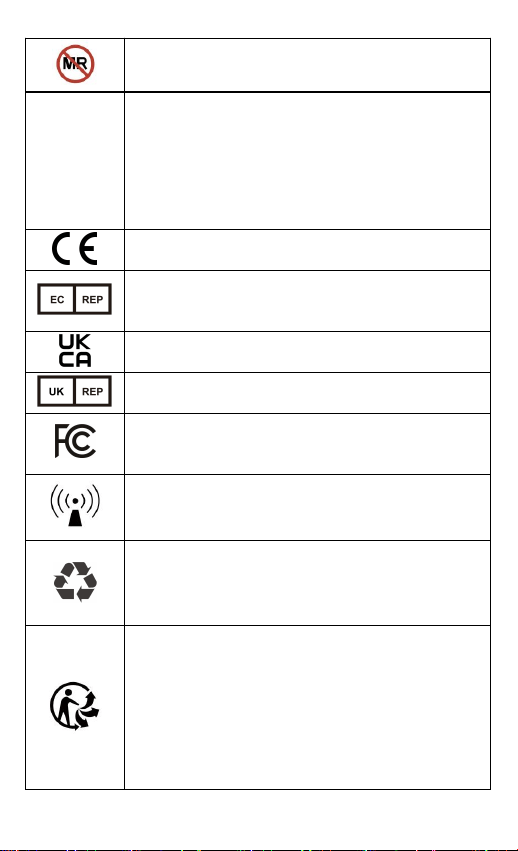
10 Symbole
Symbol
Beschreibung
Hersteller
Herstellungsdatum
Seriennummer
Weist darauf hin, dass das Produkt nicht als
unsortierter Abfall entsorgt werden darf,
sondern zur Wiederverwertung und zum
Recycling einer getrennten Sammelstelle
zugeführt werden muss.
Siehe Bedienungsanleitung
19
Nicht MR-sicher
IP22
Weist darauf hin, dass das Gerät gegen feste
Fremdkörper von 12,5 mm Ø und größer sowie
gegen senkrecht fallende Wassertropfen
geschützt ist, wenn das Gehäuse um bis zu
15°geneigt ist.
CE-Kennzeichnung
Zugelassener Vertreter in der Europäischen
Gemeinschaft
UKCA-Kennzeichnung
UK Verantwortliche Person
Weist darauf hin, dass das Produkt den
geltenden FCC-Anforderungen entspricht
Nicht-ionisierende Strahlung
Weist darauf hin, dass das gekennzeichnete
Element oder sein Material Teil eines
Rückgewinnungs- oder Recyclingprozesses ist.
Unsere Produkte und Verpackungen können
recycelt werden, werfen Sie sie nicht weg!
Finden Sie auf der
www.quefairedemesdechets.fr Site heraus, wo
Sie sie abgeben können (nur für den
französischen Markt zutreffend).

20
11 FCC-Erklärung
FCC Warnung:
FCC ID: 2ADXK-1660
Nicht ausdrücklich von der für die Einhaltung
verantwortlichen Partei zugelassene Änderungen oder
Modifikationen könnten die Berechtigung des Benutzers zum
Betrieb des Gerätes erlöschen lassen.
Dieses Gerät entspricht Teil 15 der FCC-Richtlinien. Der
Betrieb ist an folgende zwei Bedingungen geknüpft:
(1) Das Gerät darf keine schädlichen Störungen verursachen,
und
(2) es muss jede empfangene Störung hinnehmen,
einschließlich solcher, die zu einem ungewollten Betrieb
führen könnten.
Hinweis: Dieses Gerät wurde getestet und entspricht den
Ansprüchen für ein digitales Klasse-B-Gerät gemäß Teil 15
der FCC-Vorschriften. Diese Ansprüche sind so ausgelegt,
dass sie einen angemessenen Schutz gegen schädliche
Störungen in einer Wohnanlage bieten. Dieses Gerät erzeugt,
verwendet und strahlt Hochfrequenzenergie ab und kann –
falls nicht in Übereinstimmung mit den Anweisungen
installiert und verwendet – Störungen der
Funkkommunikation verursachen. Allerdings ist nicht
gewährleistet, dass es in bestimmten Installationen nicht zu
Störungen kommt. Falls dieses Gerät Störungen des Radio-
oder Fernsehempfangs verursachen sollte, was leicht durch
Aus- und Einschalten des Gerätes herausgefunden werden
kann, wird dem Anwender empfohlen, die Störung durch eine
oder mehrere der folgenden Maßnahmen zu beseitigen:
-Richten Sie die Empfangsantenne neu aus oder verlegen Sie
diese.
-Vergrößern Sie den Abstand zwischen dem Gerät und dem
Empfänger.
-Schließen Sie das Gerät an eine Steckdose an, die nicht mit

21
dem Stromkreis verbunden ist, an den der Empfänger
angeschlossen ist.
-Wenden Sie sich an den Händler oder einen erfahrenen
Radio-/Fernsehtechniker, um Hilfe zu erhalten.
Das Gerät wurde hinsichtlich der allgemeinen Anforderungen
an die RF-Exposition bewertet und kann ohne
Einschränkungen mobil verwendet werden. Das Gerät ist für
die mobile Nutzung ohne jegliche Einschränkungen im
Hinblick auf die RF-Exposition geeignet.

22
Manuale d'uso
Contenuti
1 Istruzioni per un sonno sicuro........................................... 23
2 Avvertenze e precauzioni...................................................23
3 Panoramica........................................................................ 24
3.1 Postazione di controllo............................................ 24
3.2 Ricarica....................................................................25
4 Abbinamento della Postazione con l'Unità Principale.......25
5 Monitoraggio con la Postazione........................................ 26
6 Interrompere la misurazione..............................................27
7 Pulizia................................................................................ 28
8 Risoluzione dei problemi...................................................28
9 Specifiche.......................................................................... 29
10 Simboli.............................................................................29
11 Dichiarazione FCC.......................................................... 31

23
1 Istruzioni per un sonno sicuro
Condividere la stanza invece di dormire nello stesso letto.
Lascia il tuo bambino dormire da solo e a pancia in su.
Collocalo su una superficie solida. Mantieni i giocattoli
morbidi fuori dalla culla.
Utilizza una culla che soddisfi gli standard di sicurezza.
Non farlo dormire nella carrozzina.
Non Utilizzare l’Monitoraggio del sonno del bambino
come scusa per un sonno non sicuro.
2 Avvertenze e precauzioni
Non utilizzare questo dispositivo durante un esame di
risonanza magnetica.
Non conservare il dispositivo nei seguenti luoghi: luoghi
in cui il dispositivo è esposto alla luce diretta del sole, a
temperature o a livelli di umidità elevati o a una forte
contaminazione; luoghi vicini a fonti d'acqua o fiamme;
o luoghi soggetti a forti influenze elettromagnetiche.
Non utilizzare il dispositivo in ambienti infiammabili.
Non immergere mai l'apparecchio in acqua o in altri
liquidi.
Non pulire il dispositivo con acetone o altre soluzioni
volatili.
Non lasciar cadere questo dispositivo e non sottoporlo a
forti impatti.
Il dispositivo viene fornito non sterile.
Non collocare questo apparecchio in recipienti a
pressione o dispositivi di sterilizzazione a gas.
Non smontare il dispositivo perché questo potrebbe
24
causare danni o malfunzionamenti o impedirne il
funzionamento.
Non aprire il coperchio del dispositivo senza
autorizzazione. Il coperchio deve essere aperto solo da
personale di servizio qualificato.
3 Panoramica
3.1 Postazione di controllo
La stazione, abbinata alla calza del sonno Babytone
(Monitoraggio del sonno del bambino), viene utilizzata dai
genitori per monitorare il livello di ossigeno e il suo battito
cardiaco. Fornisce un promemoria quando il livello di
ossigeno non rientra nei valori previsti.
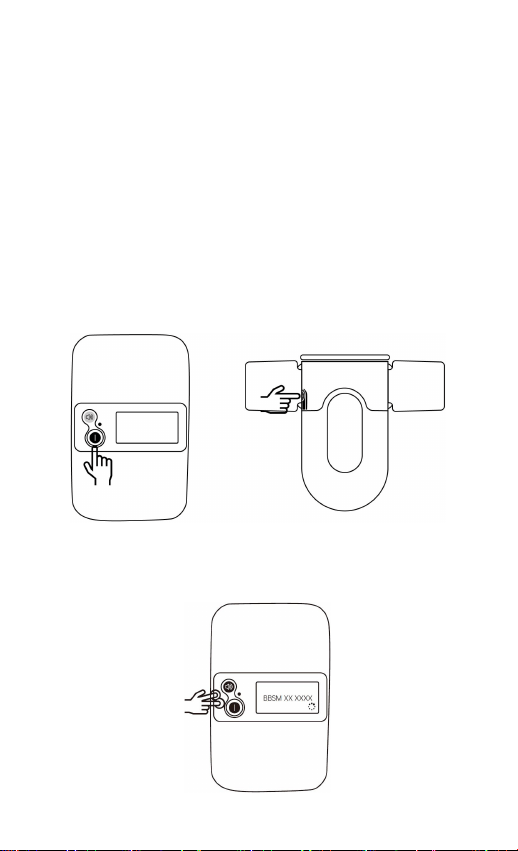
1. Schermo di visualizzazione
2. Pulsante di accensione
Premere per 2 secondi per
accendere/spegnere.
Premere per spegnere lo
schermo.
3. Tasto del Volume
Premere per regolare il volume.
Premere per 2 secondi per
controllare il numero di serie della postazione di
controllo e del dispositivo associato.
Nota:
Premere uno dei due pulsanti per riattivare lo schermo o
spegnere gli avvisi.
4. Indicatore
Lampeggiamento lento in verde: Batteria ≥ 5%
Lampeggiamento lento in arancione: Batteria < 5%
4
1
25
Arancione fisso: Ricarica
Verde fisso: Completamente carica
3.2 Ricarica
Caricare la batteria prima dell'uso.
Collegare la postazione di controllo al computer o
all'adattatore di ricarica USB usando il cavo in dotazione.
4 Abbinamento della Postazione con
l'Unità Principale
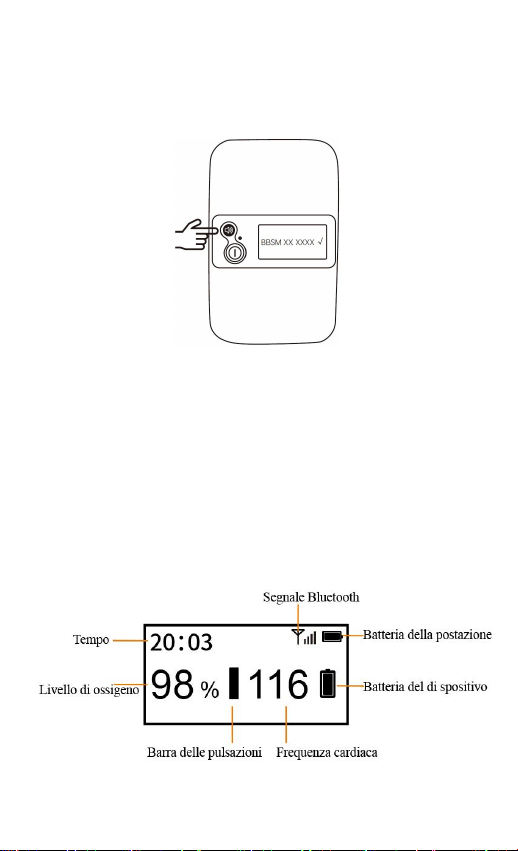
a) Accendere sia la stazione che l'unità principale.
b) Tenere premuti contemporaneamente il tasto di
accensione e quello del volume della postazione per
attivare il Bluetooth e cercare l'unità principale.
26
c) Premere il tasto del volume della postazione per
associarla all'unità principale.
d) Quando sullo schermo appare la scritta "√", la postazione
e l'unità principale sono state abbinate con successo.
Nota: È possibile controllare il numero di serie sul retro
dell'unità principale.
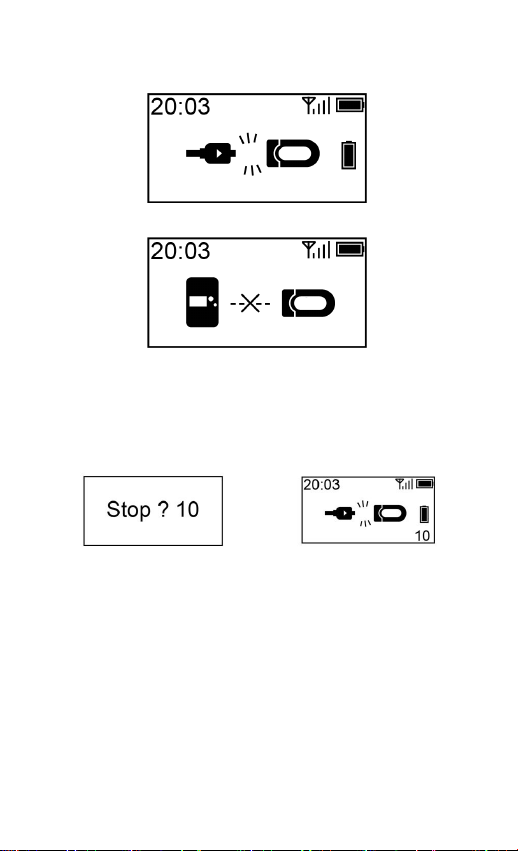
5 Monitoraggio con la Postazione
Premere il pulsante di accensione per 2 secondi per accendere
la postazione di controllo.
Quando il dispositivo viene usato normalmente per la
misurazione, la schermata della postazione di controllo
visualizzerà quanto segue:
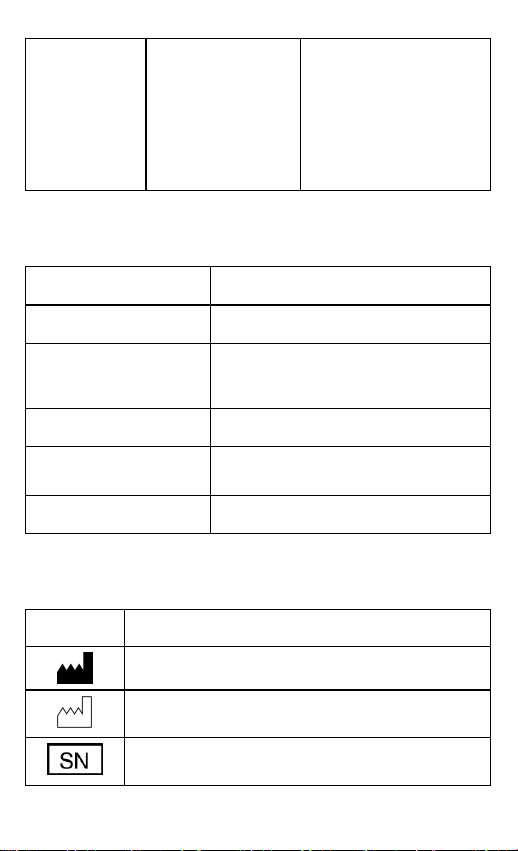
Qualora si verifichino le seguenti situazioni, controllare il
27
dispositivo e la postazione il prima possibile.
Il cavo del sensore del dispositivo si stacca.
La postazione di controllo è scollegata dal dispositivo.
6 Interrompere la misurazione
Scollegare il cavo del sensore; inizierà il conto alla rovescia
sullo schermo.
Schermo del dispositivo
Schermo della postazione di
controllo
Durante il conto alla rovescia, se si ricollega il cavo del
sensore, la registrazione verrà ripresa.
Al termine del conto alla rovescia, i dati saranno pronti
per la sincronizzazione.

28
7 Pulizia
Utilizzare un panno morbido inumidito con acqua o alcol per
pulire la superficie del dispositivo.
8 Risoluzione dei problemi
Problema
Possibile causa
Possibile soluzione
Nessuna
misurazione
sullo
schermo
della
postazione.
Il sensore non è
posizionato e
fissato
correttamente
Assicurarsi che il
dispositivo sia stato
indossato
correttamente.
Il bambino si
muove spesso.
Riprenderà quando il
bambino starà fermo.
Piede troppo
freddo.
Scaldare il piede.
La
postazione
non si
accende o
non
risponde.
La batteria
potrebbe essere
scarica.
Caricare la batteria e
riprovare.
Il dispositivo
potrebbe essere
danneggiato.
Si prega di contattare il
venditore o inviare una
e-mail all’assistenza
dopo vendita.
La
postazione di
controllo è
scollegata
dal
dispositivo.
Il dispositivo è
spento.
Accendere il
dispositivo.
Il dispositivo è
troppo lontano.
Avvicinare il
dispositivo.
Il connettore
Bluetooth non è
Tenere premuti allo
stesso tempo il tasto di
29
riuscito ad
abbinarsi al
dispositivo.
accensione e quello del
volume della
postazione per cercare
il dispositivo. Premere
quindi il tasto del
volume per abbinarlo
al dispositivo.
9 Specifiche
Peso
103 g
Dimensione
90 mm x 56 mm x 15 mm
Batteria
Ricaricabile agli ioni di litio, da 3,8
Vc.c.
Tempo di ricarica
Circa 4 ore
Durata della batteria
720 ore per uso tipico
Senza fili
Bluetooth 4.0 BLE
10 Simboli
Simbolo
Descrizione
Produttore
Data di fabbricazione
Numero di serie
30
Weist darauf hin, dass das Produkt nicht als
unsortierter Abfall entsorgt werden darf,
sondern zur Wiederverwertung und zum
Recycling einer getrennten Sammelstelle
zugeführt werden muss.
Siehe Bedienungsanleitung
Nicht MR-sicher
IP22
Weist darauf hin, dass das Gerät gegen feste
Fremdkörper von 12,5 mm Ø und größer sowie
gegen senkrecht fallende Wassertropfen
geschützt ist, wenn das Gehäuse um bis zu
15°geneigt ist.
Simbolo CE
Rappresentante autorizzato nella comunità
europea
Simbolo UKCA
UK Verantwortliche Person
Weist darauf hin, dass das Produkt den
geltenden FCC-Anforderungen entspricht
Radiazioni non ionizzanti
31
Weist darauf hin, dass das gekennzeichnete
Element oder sein Material Teil eines
Rückgewinnungs- oder Recyclingprozesses ist.
I nostri prodotti e imballaggi possono essere
riciclati, non gettarli!
Cercare un rivenditore sul
www.quefairedemesdechets.fr sito (applicabile
solo per il mercato francese).
11 Dichiarazione FCC
Avvertenza FCC:
ID FCC: 2ADXK-1660
Eventuali variazioni o modifiche non espressamente
approvate dalla parte responsabile della conformità
potrebbero annullare l'autorizzazione dell'utente a utilizzare
l'apparecchiatura.
Questo dispositivo è conforme alla parte 15 delle Norme FCC.
L'utilizzo è soggetto alle seguenti due condizioni:
(1) questo dispositivo non deve causare interferenze dannose
e
(2) questo dispositivo deve accettare qualsiasi interferenza
ricevuta, comprese le interferenze che potrebbero causare un
funzionamento indesiderato.
N.B.: questa apparecchiatura è stata testata e riscontrata
conforme ai limiti per i dispositivi digitali di Classe B, ai
sensi della parte 15 delle Norme FCC. Questi limiti sono
concepiti per fornire una protezione ragionevole contro le
interferenze dannose in un'installazione residenziale. Questa
apparecchiatura genera, usa e può irradiare energia in
radiofrequenza e, se non installata e utilizzata secondo le
istruzioni, può causare interferenze dannose alle
comunicazioni radio. Tuttavia non vi è alcuna garanzia che
non si verifichino interferenze in una particolare installazione.

32
Se questa apparecchiatura causa interferenze dannose alla
ricezione radiofonica o televisiva, che possono essere
determinate spegnendo e riaccendendo l'apparecchiatura,
l'utente è invitato a correggere l'interferenza adottando una o
più delle seguenti misure:
- riorientare o riposizionare l'antenna ricevente;
- aumentare la distanza fra l'apparecchiatura e il ricevitore;
- collegare l'apparecchiatura a una presa di un circuito
diverso da quello a cui è collegato il ricevitore;
- consultare il rivenditore o un tecnico radio/TV esperto per
assistenza.
Il dispositivo è stato valutato come soddisfacente i requisiti
generali di esposizione alle radiofrequenze. Il dispositivo può
essere utilizzato in condizioni di esposizione portatili senza
restrizioni.

33
Manual de Usuario
Tabla de Contenidos
1 Instrucciones para un sueño seguro...................................34
2 Advertencias y precauciones............................................. 34
3 Información general...........................................................35
3.1 Estación................................................................... 35
3.2 Cargando..................................................................36
4 Emparejar la estación con la unidad principal...................36
5 Monitoreo con la estación..................................................37
6 Detener Medición.............................................................. 38
7 Limpieza............................................................................38
8 Solución de problemas.......................................................39
9 Especificaciones................................................................ 40
10 Símbolos.......................................................................... 40
11 Declaración de la FCC.....................................................42

34
1 Instrucciones para un sueño seguro
Comparte la habitación en lugar de practicar el colecho.
Coloque al bebé solo y boca arriba para dormir.
Utilice una superficie firme. Mantenga objetos blandos
fuera de la cuna.
Utilice una cuna que cumpla con los estándares de
seguridad. No utilice el moisés para dormir.
No uses el Monitor de sueño para bebés como excusa
para un sueño inseguro.
2 Advertencias y precauciones
No utilice este dispositivo durante una examen de MRI.
No almacene este dispositivo en los siguientes lugares:
lugares en los que quede expuesto a la luz solar directa,
temperaturas altas, o niveles de humedad, o
contaminación excesiva; lugares que estén cerca de agua
o fuego; o lugares en los que pueda haber interferencias
electromagnéticas.
No utilice este dispositivo en un ambiente combustible.
Nunca sumerja el dispositivo en agua u otro líquido.
No limpie el dispositivo con acetona o alguna otra
solución volátil.
No deje caer este dispositivo ni lo exponga a impactos
Fuertes.
El dispositivo no viene esterilizado.
No coloque este dispositivo en recipientes de presión o
en dispositivos de esterilización a gas.
No desarme este dispositivo ya que podría dañarlo, hacer
que no funcione correctamente o que impida su
35
funcionamiento.
No abra la tapa del dispositivo sin autorización. Solo el
personal cualificado puede abrir la tapa.
3 Información general
3.1 Estación
La estación, acoplado con el Calcetín para dormir Babytone
(Monitor de sueño para bebés), es usada por los padres para
seguir en tiempo real el nivel de oxígeno y la frecuencia
cardíaca del bebé. Proporciona recordatorios cuando estén
fuera del rango deseado.
1. Pantalla de Visualización
2. Botón de encendido
Pulsa por 2 segundos para
encender/apagar.
Pulsa para apagar la
pantalla.
3. Botón del volumen
Pulsa para ajustar el volumen.
Pulsa por 2 segundos para
verificar el número de serie de la estación y del
dispositivo emparejado.
Nota:
Presione el botón para encender la pantalla o para apagar el
recordatorio.
4. Indicador
Parpadeo verde lento: Batería ≥ 5%
Parpadeo naranja lento: Batería < 5%
Naranja Encendido: Cargando
4
1
36
Verde Encendido: Carga completa
3.2 Cargando
Carga la batería antes del uso.
Conecta la estación a la computadora o al adaptador de
carga USB con el cable incluido.
4 Emparejar la estación con la unidad
principal
a) Enciende la estación y la unidad principal.
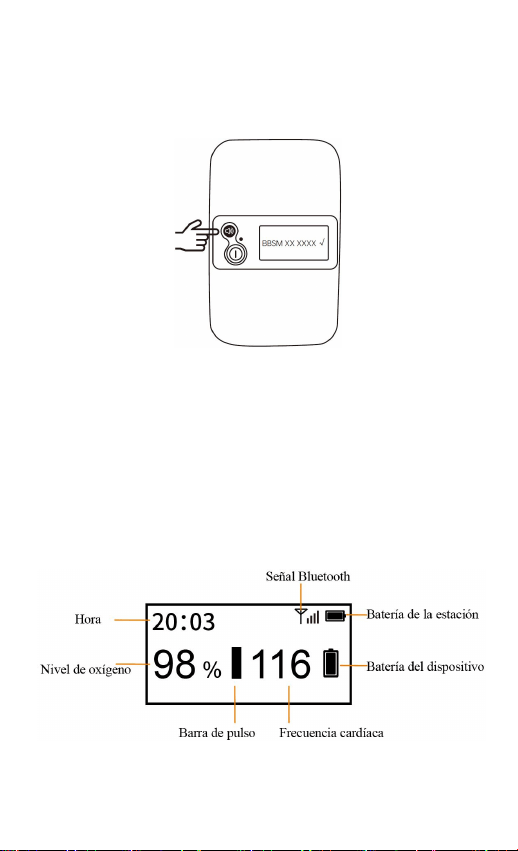
b) Sostén el botón encendido y el botón de volumen de la
estación simultáneamente para activar Bluetooth y
buscar la unidad principal.
37
c) Pulsa el botón de volumen de la estación para
emparejarla con la unidad principal.
d) Cuando aparezca “√” en la pantalla, significará que se
emparejaron la estación y unidad principal.
Nota: Puedes verificar el número de serie en la parte trasera
de la unidad principal.
5 Monitoreo con la estación
Presione el botón de encendido durante 2 segundos en la
estación.
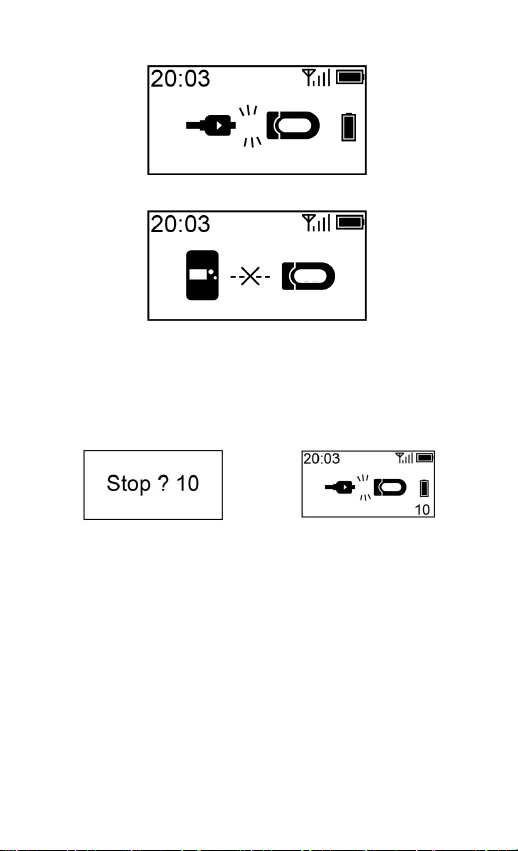
Cuando el dispositivo se utiliza para mediciones con
normalidad, la pantalla de la estación mostrará lo siguiente:
Cuando se produzcan las siguientes situaciones, verifica el
dispositivo y la estación lo más rápido posible.
38
El cable del sensor del dispositivo se cae.
La estación se desconecta del dispositivo.
6 Detener Medición
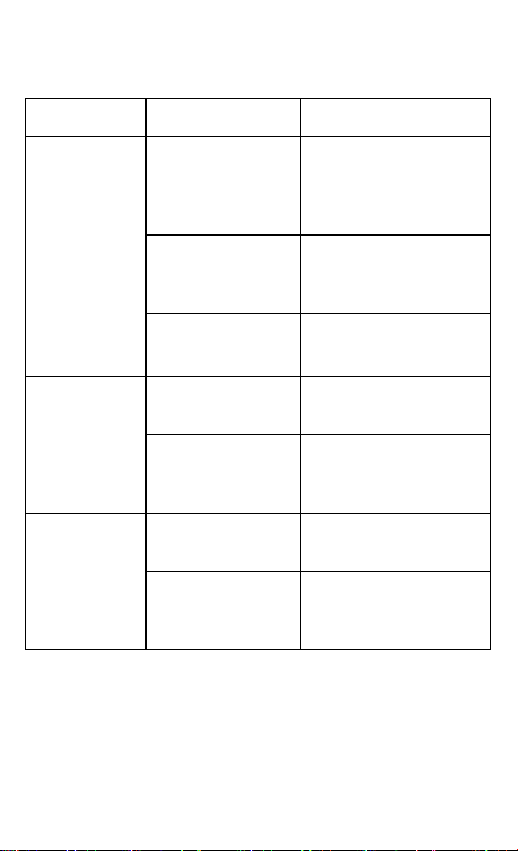
Desenchufe el cable del sensor, el conteo comenzará en la
pantalla.
Pantalla del dispositivo
Pantalla de la estación
Durante el conteo, si enchufa el cable del sensor
nuevamente, se reanudará el registro.
Luego del conteo, estarán listos los datos para la
sincronización.
7 Limpieza
Utilice un paño suave humedecido con agua o alcohol para
limpiar la superficie del dispositivo.
39
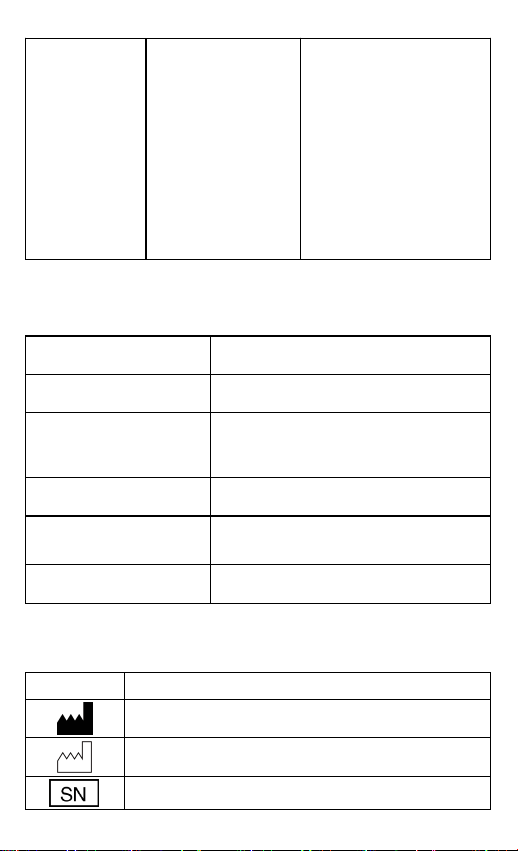
8 Solución de problemas
Problema
Causa Posible
Soluciones posibles
No hay
lecturas en la
pantalla de la
estación.
El sensor no está
posicionado ni
asegurado
correctamente.
Asegúrese de que el
dispositivo esté
colocado
correctamente.
El bebé se mueve
con frecuencia.
Se recuperará cuando
el bebé se quede
quieto.
El pie está
demasiado frio.
Caliente los pies del
bebé.
La estación
no se
enciende o
no responde.
La batería puede
estar baja.
Cargue la batería y
pruebe nuevamente.
El dispositivo
puede estar
dañado.
Contáctate con el
vendedor o al correo
del servicio posventa.
La estación
se
desconecta
del
dispositivo.
El dispositivo
está apagado.
Encienda el
dispositivo.
El dispositivo
está demasiado
lejos.
Acerque el dispositivo.
40
El conector de
Bluetooth no se
pudo emparejar
con el dispositivo.
Sostén el botón
encendido y el botón
de volumen de la
estación al mismo
tiempo para buscar el
dispositivo. Luego,
pulsa el botón de
volumen para
emparejarlo con el
dispositivo.
9 Especificaciones
Peso
103 g
Tamaño
90 mm*56 mm*15 mm
Batería
Recargable de iones de litio de 3,8
Vc.c.
Tiempo de carga
Aprox. 4 horas
Vida de la batería
720 horas para uso típico
Inalámbrico
Bluetooth 4.0 BLE
10 Símbolos
Símbolo
Descripción
Fabricante
Fecha de fabricación
Número de Serie
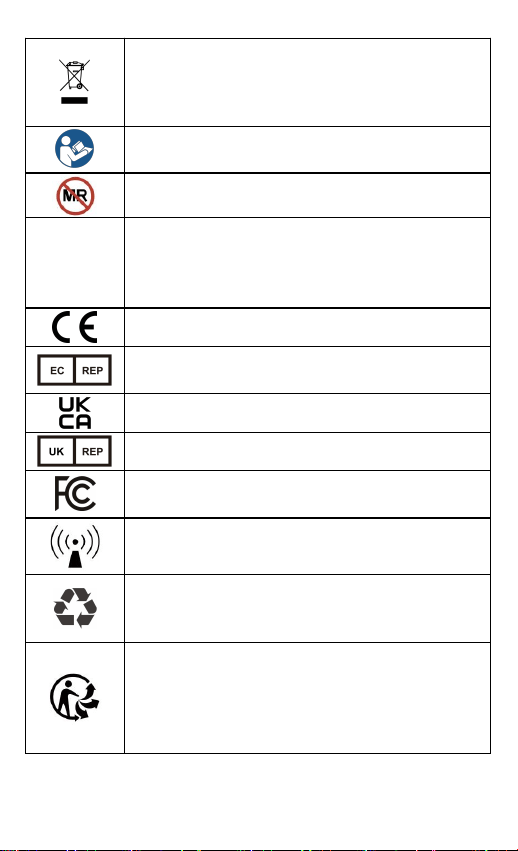
41
Indica que el producto no debe desecharse
como basura común y, en su lugar, debe
llevarse a instalaciones designadas para su
reciclaje y recuperación.
Consultar el manual de instrucciones
MR inseguro
IP22
Indica que el producto está protegido contra
objetos sólidos de más de 12,5 mm Ø y contra
la caída vertical de gotas de agua cuando está
inclinado hasta 15°.
Marcado CE
Representante autorizado en la comunidad
europea
Marcado UKCA
Persona responsable del Reino Unido
Indica que cumple con las normas aplicables de
la FCC.
Radiación no ionizante
Señala que el artículo marcado o su material
está involucrado en un proceso de recuperación
o reciclaje.
¡Nuestros productos y empaquetado se pueden
reciclar, no los tire!
Busque el lugar indicado para su descarte en el
sitio www.quefairedemesdechets.fr (sólo aplica
al mercado francés).

42
11 Declaración de la FCC
Advertencia de la FCC:
Identificación FCC: 2ADXK-1660
Cualquier cambio o modificación que no haya sido aprobado
expresamente por la parte responsable del cumplimiento
podría anular la autoridad del usuario para operar el
equipamiento.
Este dispositivo cumple con la parte 15 de las Normas de la
FCC. El funcionamiento está sujeto a las dos condiciones
siguientes:
(1) Este dispositivo no puede causar interferencias
perjudiciales, y
(2) este dispositivo debe aceptar cualquier interferencia
recibida, incluida la interferencia que pueda causar un
funcionamiento no deseado.
Nota: Este equipamiento ha sido probado y se ha determinado
que cumple con los límites para un dispositivo digital de
Clase B, de conformidad con la parte 15 de las Normas de la
FCC. Estos límites están diseñados para proporcionar una
protección razonable contra interferencias perjudiciales en
una instalación residencial. Este equipo genera usos y puede
irradiar energía de radiofrecuencia y, si no se instala y utiliza
de acuerdo con las instrucciones, puede causar interferencias
perjudiciales en las comunicaciones por radio. Sin embargo,
no hay garantía de que no se produzcan interferencias en una
instalación en particular. Si este equipo causa interferencias
perjudiciales en la recepción de radio o televisión, lo que se
puede determinar apagando y encendiendo el equipo, se
recomienda al usuario que intente corregir la interferencia
mediante una o más de las siguientes medidas:
- Reoriente o reubique la antena receptora.

43
- Aumente la separación entre el equipo y el receptor.
- Conecte el equipo a una salida de corriente en un circuito
diferente al que está conectado el receptor.
- Consulte al distribuidor o a un técnico experimentado de
radio/TV para obtener ayuda.
El dispositivo ha sido evaluado para cumplir con los
requisitos generales de exposición a RF. El dispositivo se
puede utilizar en condiciones de exposición portátil sin
restricciones.

44
Manuel de l'utilisateur
Contenu
1 Instructions pour un sommeil sûr...................................... 45
2 Avertissements et mises en garde ...................................... 45
3 Vue d'ensemble..................................................................46
3.1 Station......................................................................46
3.2 Charge......................................................................47
4 Appariement de la station avec l’unité principale..............47
5 Contrôle avec la station..................................................... 49
6 Arrêtez de mesurer.............................................................50
7 Nettoyage...........................................................................50
8 Dépannage......................................................................... 50
9 Spécifications.....................................................................51
10 Symboles......................................................................... 52
11 Déclaration de la FCC......................................................53

45
1 Instructions pour un sommeil sûr
Partage de chambre au lieu de co-dodo.
Placez votre bébé seul et sur le dos pour dormir.
Utilisez une surface de sommeil ferme. Ne laissez pas
d'objets mous dans le lit d'enfant.
Utilisez un lit d'enfant qui répond aux normes de sécurité.
N'utilisez pas le berceau pour dormir.
N’utilisez pas le moniteur de sommeil pour bébé comme
excuse pour un sommeil dangereux.
2 Avertissements et mises en garde
N'utilisez pas cet appareil pendant un examen IRM.
Ne stockez pas l'appareil dans les endroits suivants :
endroits où l'appareil est exposé à la lumière directe du
soleil, à des températures ou à des niveaux d'humidité
élevés, ou à une forte contamination ; endroits proches
de sources d'eau ou de feu ; ou endroits soumis à de
fortes influences électromagnétiques.
N'utilisez pas l'appareil dans un environnement
combustible.
N'immergez jamais l'appareil dans l'eau ou dans d'autres
liquides.
Ne nettoyez pas l'appareil avec de l'acétone ou d'autres
solutions volatiles.
Ne laissez pas tomber cet appareil et ne le soumettez pas
à un choc violent.
Le dispositif est fourni non stérile.
Ne placez pas cet appareil dans des récipients sous
pression ou dans un dispositif de stérilisation au gaz.
46
Ne démontez pas l'appareil, car cela pourrait provoquer
des dommages ou des dysfonctionnements ou entraver le
fonctionnement de l'appareil.
N'ouvrez pas le couvercle de l'appareil sans autorisation.
Le couvercle ne doit être ouvert que par un personnel de
service qualifié.
3 Vue d'ensemble
3.1 Station
La station, associée à la chaussette de sommeil Babytone
(Moniteur de sommeil pour bébé), est utilisée par les parents
pour surveiller en temps réel le niveau d'oxygène et le pouls
du bébé. Elle fournit des rappels dès qu’ils se situent en
dehors de la plage cible.
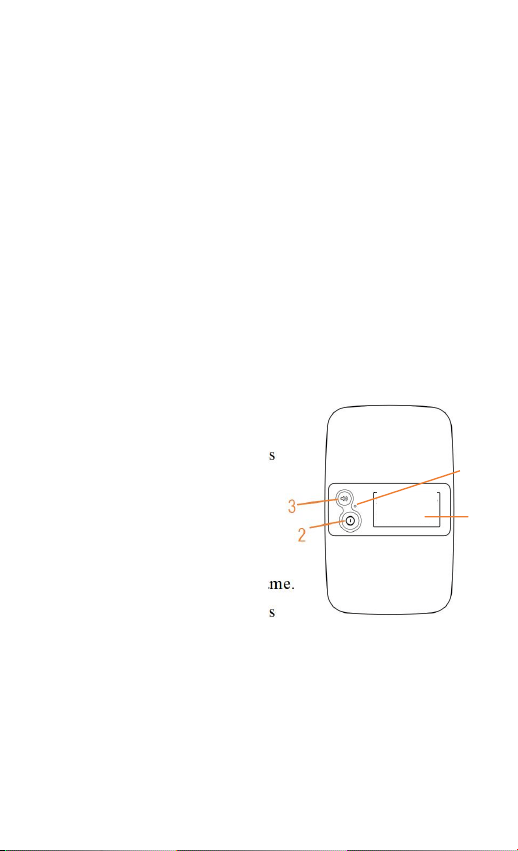
1. Écran d'affichage
2. Bouton d'alimentation
Appuyez pendant 2 secondes
pour allumer/éteindre.
Appuyez pour éteindre
l’écran.
3. Bouton de volume
Appuyez pour régler le volume.
Appuyez pendant 2 secondes
pour vérifier le numéro de série de la station et l’appareil
apparié.
Remarque :
Appuyez sur l'un des deux boutons pour réveiller l'écran ou
désactiver le rappel.
4. Indicateur
Vert clignotant lentement : Batterie ≥ 5%
4
1
47
Orange Clignotement lent : Batterie < 5%
Orange allumé : Charge
Vert allumé : Complètement chargé
3.2 Charge
Chargez la batterie avant l’utilisation.
Connectez l’appareil à un ordinateur ou adaptateur de
charge USB en utilisant le câble fourni.
4 Appariement de la station avec l’unité
principale
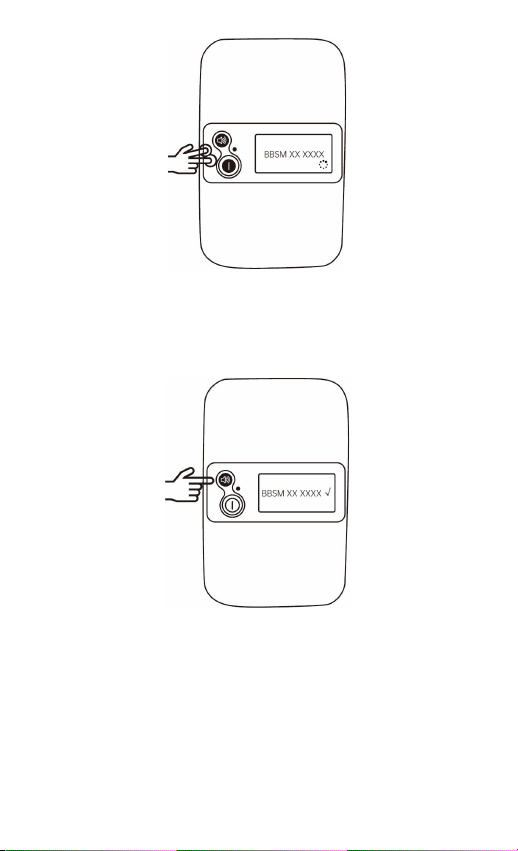
a) Allumez à la fois la station et l’unité principale.
b) Appuyez simultanément sur le bouton d’alimentation et
le bouton de volume de la station pour activer le
Bluetooth et rechercher l’unité principale.
48
c) Appuyez sur le bouton de volume de la station pour la
coupler avec l’unité principale.
d) Lorsque « √ » s’affiche à l’écran, la station et l’unité
principale sont appariées avec succès.
Remarque : Vous pouvez vérifier le numéro de série au dos
de l’unité principale.
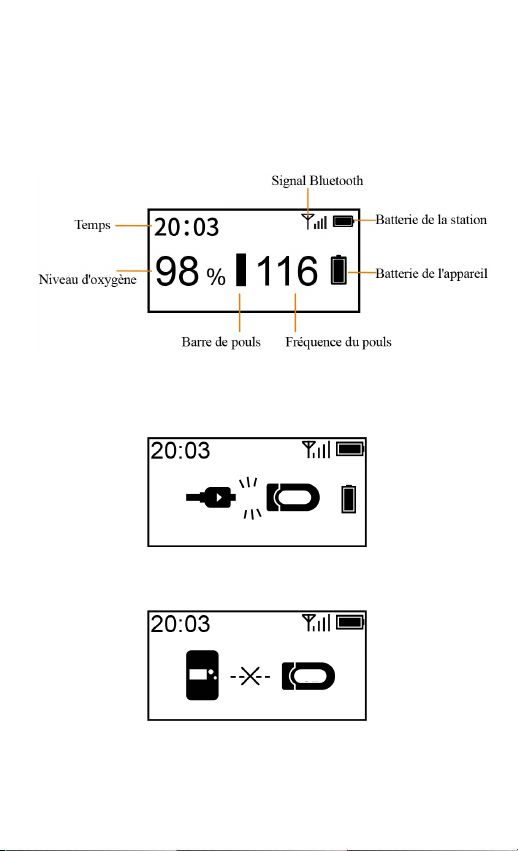
49
5 Contrôle avec la station
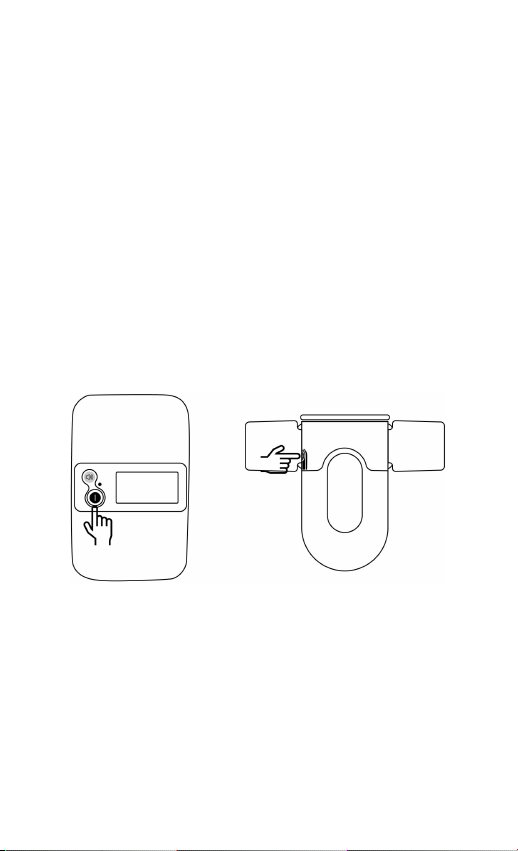
Appuyez sur le bouton d'alimentation pendant 2 secondes
pour mettre la station sous tension.
Lorsque l'appareil est normalement utilisé pour la mesure,
l'écran de la station s'affiche comme suit :
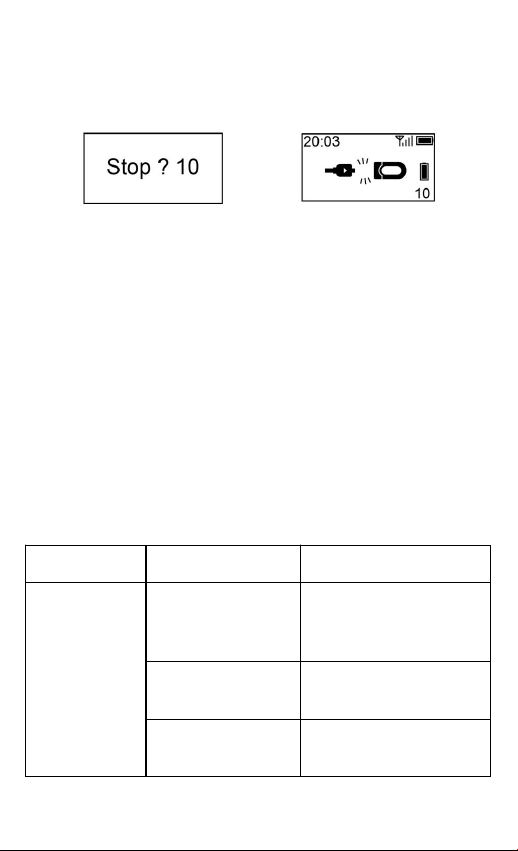
Si les situations suivantes se produisent, veuillez vérifier
l’appareil et la station dès que possible.
Le câble du capteur de l'appareil se détache.
La station est déconnectée de l'appareil.
50
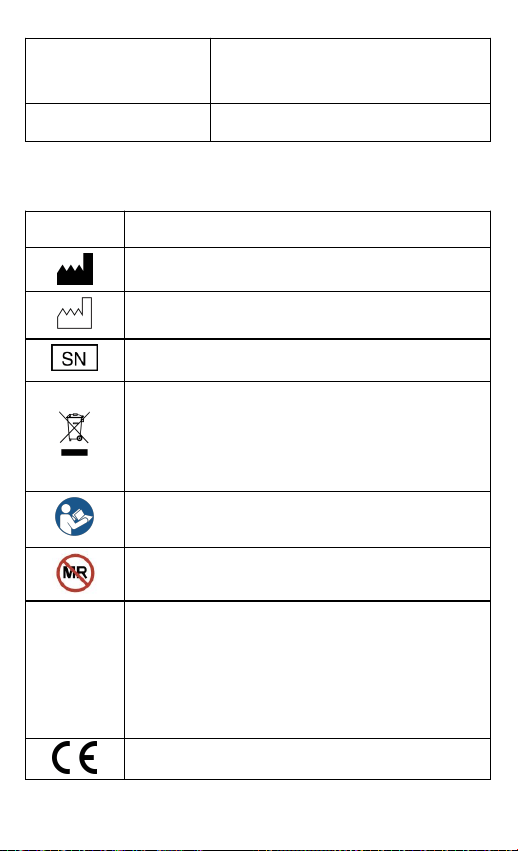
6 Arrêtez de mesurer
Débranchez le câble du capteur, le compte à rebours sur
l'écran va commencer.
Écran de l'appareil
Écran de la station
Pendant le compte à rebours, si vous rebranchez le câble
du capteur, l'enregistrement reprendra.
Après le compte à rebours, les données seront prêtes à
être synchronisées.
7 Nettoyage
Utilisez un chiffon doux humidifié avec de l'eau ou de
l'alcool pour nettoyer la surface de l'appareil.
8 Dépannage
Problème
Cause possible
Solution possible
Aucune
relève à
l’écran de
l’appareil et
de la station.
Le capteur n'est
pas positionné et
fixé correctement
Assurez-vous que le
dispositif est porté
correctement.
Le bébé bouge
fréquemment.
Il se rétablira quand le
bébé restera immobile.
Le pied est trop
froid.
Rendez le pied plus
chaud.

51
La station ne
s’allume pas
ou ne répond
pas.
La batterie est
peut-être faible.
Chargez la batterie et
réessayez.
L'appareil est
peut-être
endommagé.
Veuillez contacter le
vendeur ou le service
après-vente.
La station est
déconnectée
de l'appareil.
L'appareil est
éteint.
Allumez l'appareil.
L'appareil est trop
éloigné.
Rapprochez l'appareil.
Le connecteur
Bluetooth a
échoué à
s’appairer avec
l’appareil.
Appuyez
simultanément sur le
bouton d’alimentation
et le bouton de volume
de la station pour
rechercher l’appareil.
Ensuite, appuyez sur la
touche de volume pour
l’appairer avec
l’appareil.
9 Spécifications
Poids
103 g
Taille
90 mm* 56 mm*15 mm
Batterie
3,8 Vc.c., Li-ion rechargeable
Temps de
chargement
Environ 4 heures
52
Durée de vie de la
batterie
720 heures pour une utilisation
typique
Sans fil
Bluetooth 4.0 BLE
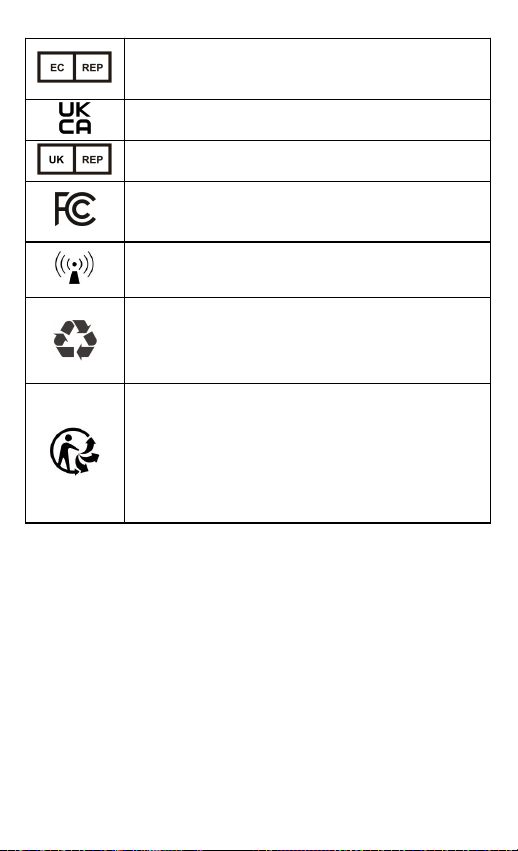
10 Symboles
Symbole
Description
Fabricant
Date de fabrication
Numéro de série
Indique que le produit ne doit pas être jeté avec
les déchets non triés, mais il faut le remettre à
des centres de collecte sélective pour qu'il soit
récupéré et recyclé.
Se référer au manuel d'instructions
Non-compatible IRM
IP22
Indique que le produit est protégé contre les
objets solides étrangers de 12,5 mm Ø et plus ;
il est également protégé contre les gouttes d'eau
qui tombent verticalement lorsque le boîtier est
incliné jusqu'à 15°.
Marquage CE
53
Représentant autorisé dans la communauté
européenne
Marquage UKCA
Personne responsable au Royaume-Uni
Indique que le produit respecte les exigences
applicables de la FCC.
Rayonnement non ionisant
Indique que l'article portant le marquage ou son
matériau fait partie d'un processus de
récupération ou de recyclage.
Nos produits et emballages peuvent être
recyclés, ne les jetez pas !
Vous trouverez l'endroit où les déposer sur le
site www.quefairedemesdechets.fr (uniquement
pour le marché français).
11 Déclaration de la FCC
Avertissement de la FCC :
ID FCC : 2ADXK-1660
Tout changement ou modification non expressément
approuvé par la partie responsable de la conformité peut
annuler le droit de l’utilisateur à faire fonctionner
l’équipement.
Cet appareil est conforme à la partie 15 des règles de la FCC.
Son fonctionnement est soumis aux deux conditions
suivantes :

54
(1) Cet appareil ne doit pas causer d’interférences nuisibles,
et
(2) cet appareil doit accepter toute interférence reçue, y
compris les interférences susceptibles de provoquer un
fonctionnement indésirable.
Remarque : Cet équipement a été testé et déclaré conforme
aux limites imposées aux appareils numériques de classe B,
conformément à la partie 15 des règles de la FCC. Ces limites
sont conçues pour fournir une protection raisonnable contre
les interférences nuisibles dans une installation résidentielle.
Cet équipement génère, utilise et peut émettre de l’énergie de
fréquence radio et, s’il n’est pas installé et utilisé
conformément aux instructions, peut causer des interférences
nuisibles aux communications radio. Cependant, il n’y a
aucune garantie que des interférences ne se produiront pas
dans une installation particulière. Si cet équipement provoque
des interférences nuisibles à la réception de la radio ou de la
télévision, ce qui peut être déterminé en éteignant et en
allumant l’équipement, l’utilisateur est encouragé à essayer
de corriger les interférences en prenant une ou plusieurs des
mesures suivantes :
-Réorienter ou déplacer l’antenne de réception.
-Augmenter la distance entre l’équipement et le récepteur.
-Brancher l’appareil sur une prise de courant d’un circuit
différent de celui sur lequel le récepteur est branché.
-Consultez le revendeur ou un technicien radio/TV
expérimenté pour obtenir de l’aide.
L’appareil a été évalué pour répondre aux exigences
générales en matière d’exposition aux radiofréquences.
L’appareil peut être utilisé sans restriction dans des
conditions d’exposition portable.
ViHealth
Product name: Smart Wireless Station
Model: WT-20
PN: 256-000178-00
Version: V1.0
Date: December 2025
Manufacturer:
Shenzhen Viatom Technology Co., Ltd.
901, Building West, Lepu Tower, No.66 Xingke Road, Xili Community,
Xili Street, Nanshan District, Shenzhen, 518055, Guangdong, P.R. China
www.viatomtech.com
Prolinx GmbH
Brehmstr. 56, 40239, Duesseldorf, Germany
Tel:0049 211 3105 4698
E-mail:[email protected]
Prolinx Global LTD
27 Old Gloucester Street, London, WC1N 3AX, UK
Tel: 0044 20 39661193
Email: [email protected]
