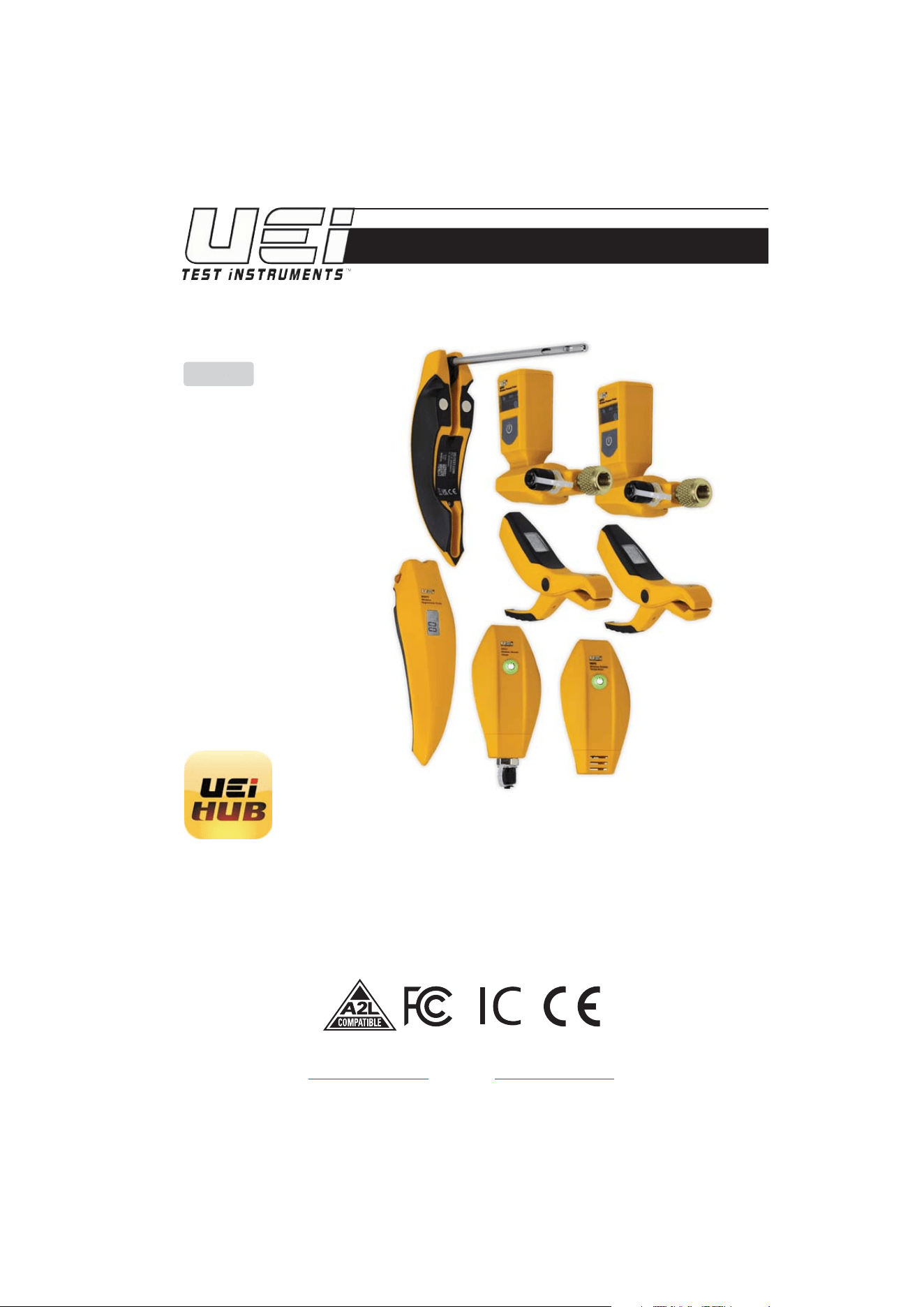
HUB8 HUB6 HUB4
INSTRUCTION MANUAL
ENGLISH
Wireless Refrigerant Probes
HUB8 Includes
2 Wireless Hygrometer Probe
2 Wireless Pressure Probe
2 Wireless Pipe Clamp
1 Wireless Outside Temperature Probe
1 Wireless Vacuum Gauge
14 Batteries (10 AA, 4 AAA)
1 45˚ Coupler
1 Carrying Case
HUB6 Includes
2 Wireless Hygrometer Probe
2 Wireless Pressure Probe
2 Wireless Pipe Clamp
10 Batteries (6 AA, 4 AAA)
1 Carrying Case
HUB4 Includes
2 Wireless Pressure Probe
2 Wireless Pipe Clamp
6 Batteries (AA)
1 Carrying Case
1-800-547-5740
www.ueitest.com • email: [email protected]
KEEPING HOMES & WORKPLACES SAFE & COMFORTABLE
Download and install the UEi HUB App
Available on Google Play and The App Store
N
UAL
2
IMPORTANT SAFETY WARNINGS & PRECAUTIONS
TABLE OF CONTENTS
Important Safety Warnings ............................ 2
Wireless Hygrometer Probe Overview .................. 3
Wireless Pressure Probe Overview .................... 4
Wireless Pipe Clamp Overview ........................ 5
Wireless Outside Temperature Probe Overview ......... 6
Wireless Vacuum Gauge Overview ..................... 6
Probe Specifications ................................ 7-8
FCC/IC Information ............................... 9 - 10
Storage ............................................ 12
Disposal. . . . . . . . . . . . . . . . . . . . . . . . . . . . . . . . . . . . . . . . . . . . .12
Cleaning ........................................... 12
Warranty ........................................... 12
HUB probes are designed for Indoor and Outdoor use.
WARNING
Read entire Safety Notes section regarding potential hazard and proper instructions before using
these probes. In this manual the word “WARNING” is used to indicate conditions or actions that may
pose physical hazards to the user. The word “CAUTION” is used to indicate conditions or actions that
may damage the instruments.
WARNING
To ensure safe operation and service of these probes, follow these instructions.
Failure to observe these warnings can result in severe injury or death. These probes are designed
for trade professionals who are familiar with the hazards of their trade.
• Always adhere to national and local safety codes. Use proper personal protective equipment (PPE)
• Observe all recommended safety procedures that include proper lockout utilization and use of
personal protective equipment that includes safety glasses, gloves and flame resistant clothing.
WARNING
Do Not exceed the following maximum pressure limits.
WVG2 Vacuum Gauge maximum over pressure 700 psi.
WPP2 and WPP3 Pressure Gauge maximum over pressure 725 psi.
CAUTION
• Do not open WPP3 or WPP2 probes to replace batteries while the probes are connected.
• To avoid false readings, replace batteries if a low battery indicator appears.
• Use batteries that meet the specified requirements.
• If there is any leakage or abnormality with the battery, handle it immediately and clean
the instrument.
• Do not expose probes to extreme high or low temperatures, humidity, or corrosive environments.
• Avoid placing the probes in direct sunlight or high-vibration environments.
• Do not use these probes if they appear damaged. In case of malfunction or damage, stop using
probes immediately and contact technical support.
3
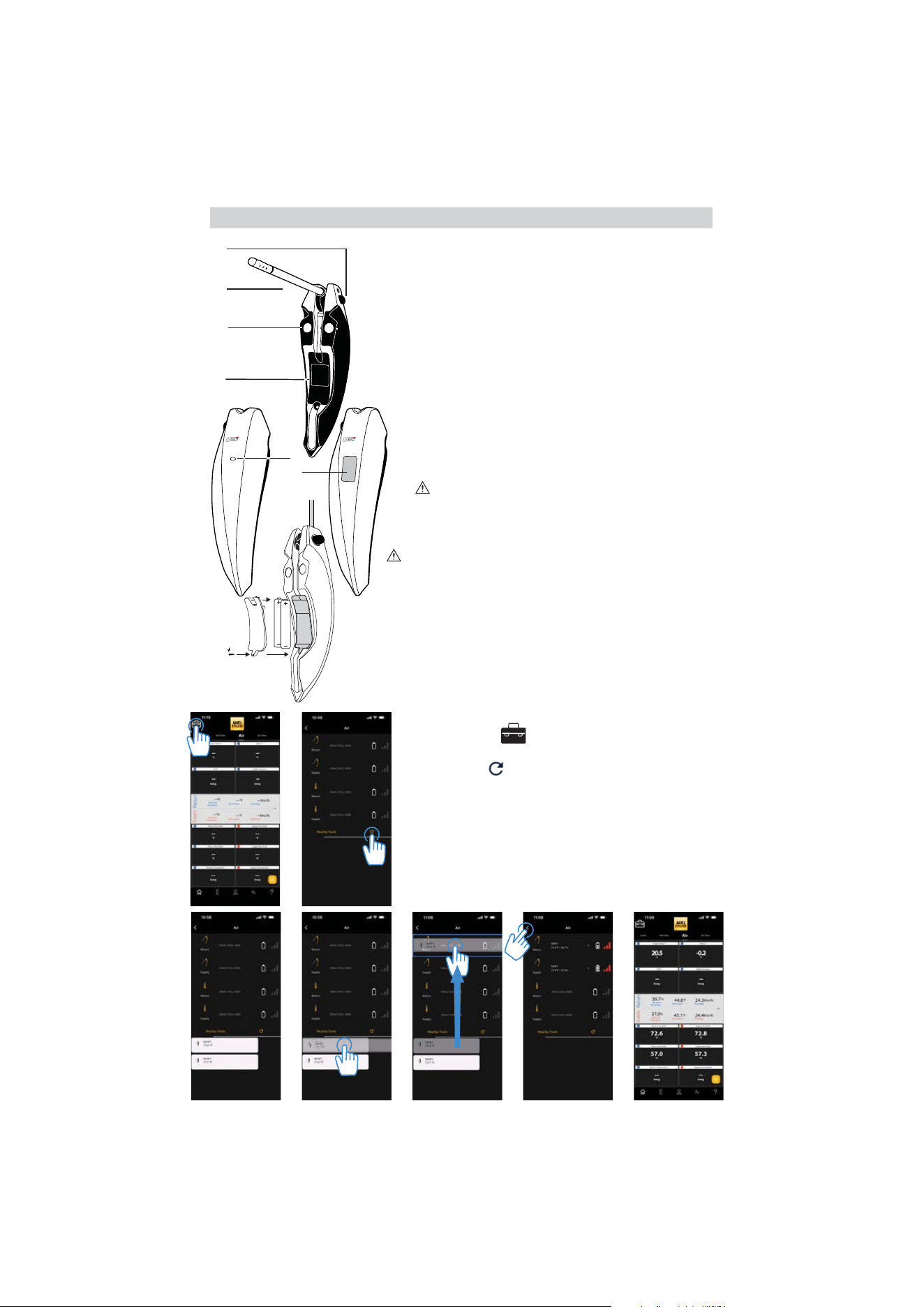
Hygrometer Overview (WHP3, WHP1)
A. Lock Button: Press to unlock and open probe.
Move to 90° or 180° until it locks in place.
Press button again to unlock and rotate back to
closed position.
B. 1/4” diameter probe
C. Magnetic Mount
D. Battery Cover
E. Status Light (WHP1 only)
Blinks
GREEN when probe is powered on.
Blinks RED when battery is low (Low battery
indication is also visible in app Toolbox screen).
F. LCD Display (WHP3 only)
Display (rotates through measurements...)
CAUTION: Press down Lock Button to release probe.
Failure to do so may break probe and is not covered
under warranty.
Battery Replacement
CAUTION: Take care not to lose screws when
opening battery compartments
• Remove battery cover.
• Replace the old batteries with 2 new
(AAA) batteries.
• Replace the battery cover.
See probe specifications on page 7
WHP1
Wireless
Hygrometer Probe
E.
B.
A.
C.
D.
Screw
WHP3
Wireless
Hygrometer Probe
F.
Connecting Probes
WHP3/WHP1 work in the AIR screen.
A. Select "Toolbox" icon in upper left corner.
B. In Toolbox screen, probes appear in the “Nearby Tools" list.
Tap "Refresh"
icon if powered on probes don't appear.
C. Available probes appear in list.
D. Touch and Hold a probe to select for connection.
E. Drag the probe to the matching probe icon for either "Return" or
"Supply" slot assignment and release. Repeat with other probe.
F. The UEi HUB will remember the assignment and automatically
connect in future.
G. Once connected, Tap the "back arrow"
< icon to return Home to
view measurements
A. B.
C. D. E. F. G.
WHP1 WHP3
4
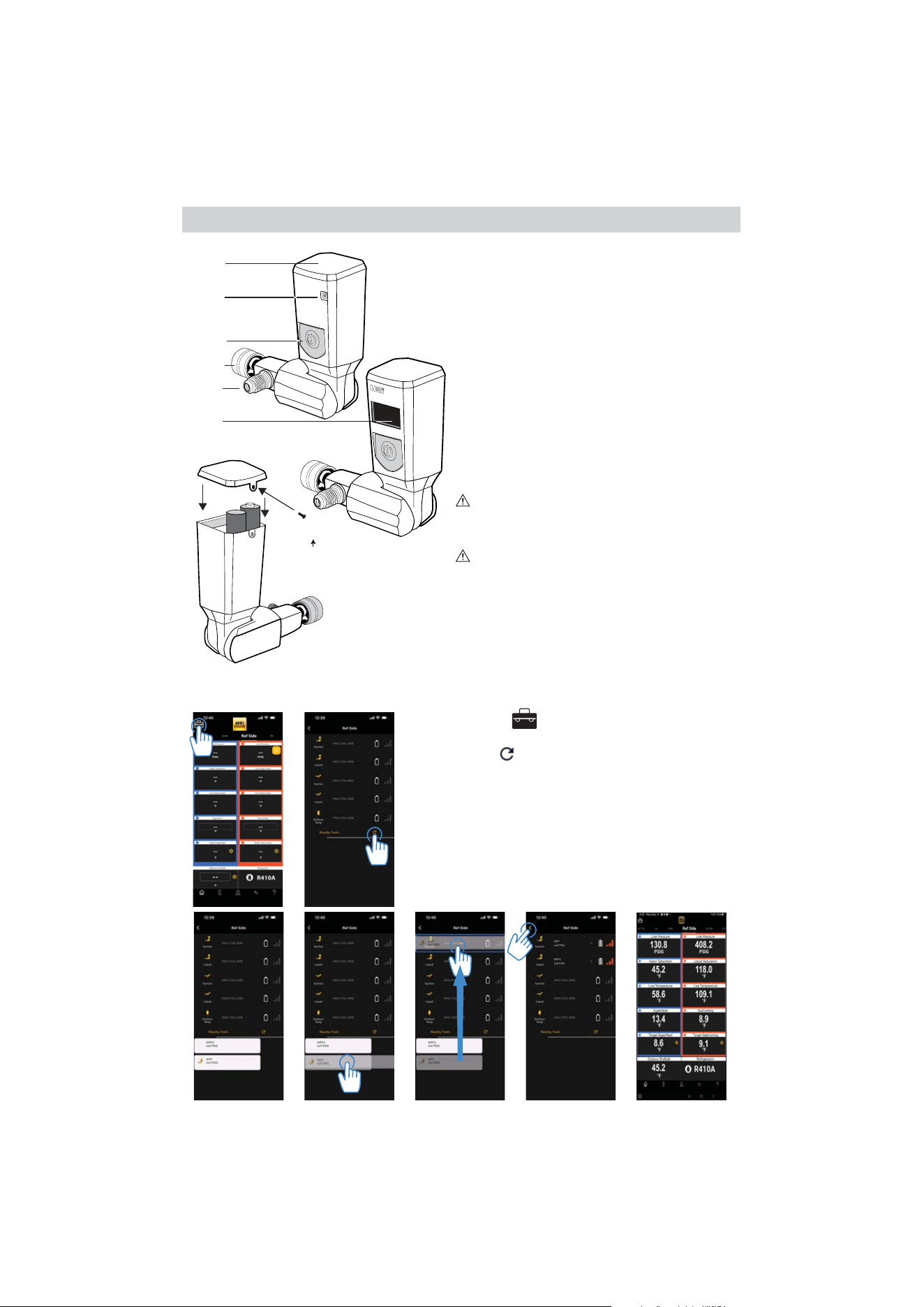
Pressure Probe Overview (WPP3, WPP2)
A. Battery cover
B. Status Light (WPP2 only)
Blinks
GREEN when probe is powered on.
Blinks RED when battery is low (Low battery
indication is also visible in app Toolbox screen).
C. Power Button: Press to Power On
Press & Hold for 1 second and release to Power Off
(WPP3 only)
Press & Hold for 5 seconds, UNIT appears
Press & Hold for 2 seconds to switch UNITS
Press & Hold for 5 seconds, to exit UNIT
D. 1/4”pressure connector
E. 1/4” pass-through connector
F. LCD Display (WPP3 only)
Display rotates through measurements
CAUTION: Max over pressure is 725 PSI
Battery Replacement
CAUTION: Take care not to lose the screws when
opening battery compartments
• Remove battery cover.
• Replace old batteries with 2 new AA batteries.
• Replace the battery cover.
See probe specifications on page 8
A.
B.
C.
D.
E.
Screw
WPP3
Wireless Pressure Probe
WPP2
WPP3
F.
Connecting Probes
WPP3/WPP1 work in REF SIDE and Nitrogen Test Screens.
A. Select "Toolbox" icon in upper left corner.
B. In Toolbox screen, probes appear in the “Nearby Tools" list.
Tap "Refresh"
icon if powered on probes don't appear.
C. Available probes appear in list.
D. Touch and Hold a probe to select for connection.
E. Drag the probe to matching probe icon for "Suction" or "Liquid"
slot assignment and release. Repeat to connect other probe.
Nitrogen Test only connects "Suction" pressure probe.
F. The UEi HUB will remember the assignment and automatically
connect in future.
G. Once connected, Tap the "back arrow"
< icon to return Home
to view measurements
A. B.
C. D. E. F. G.
5
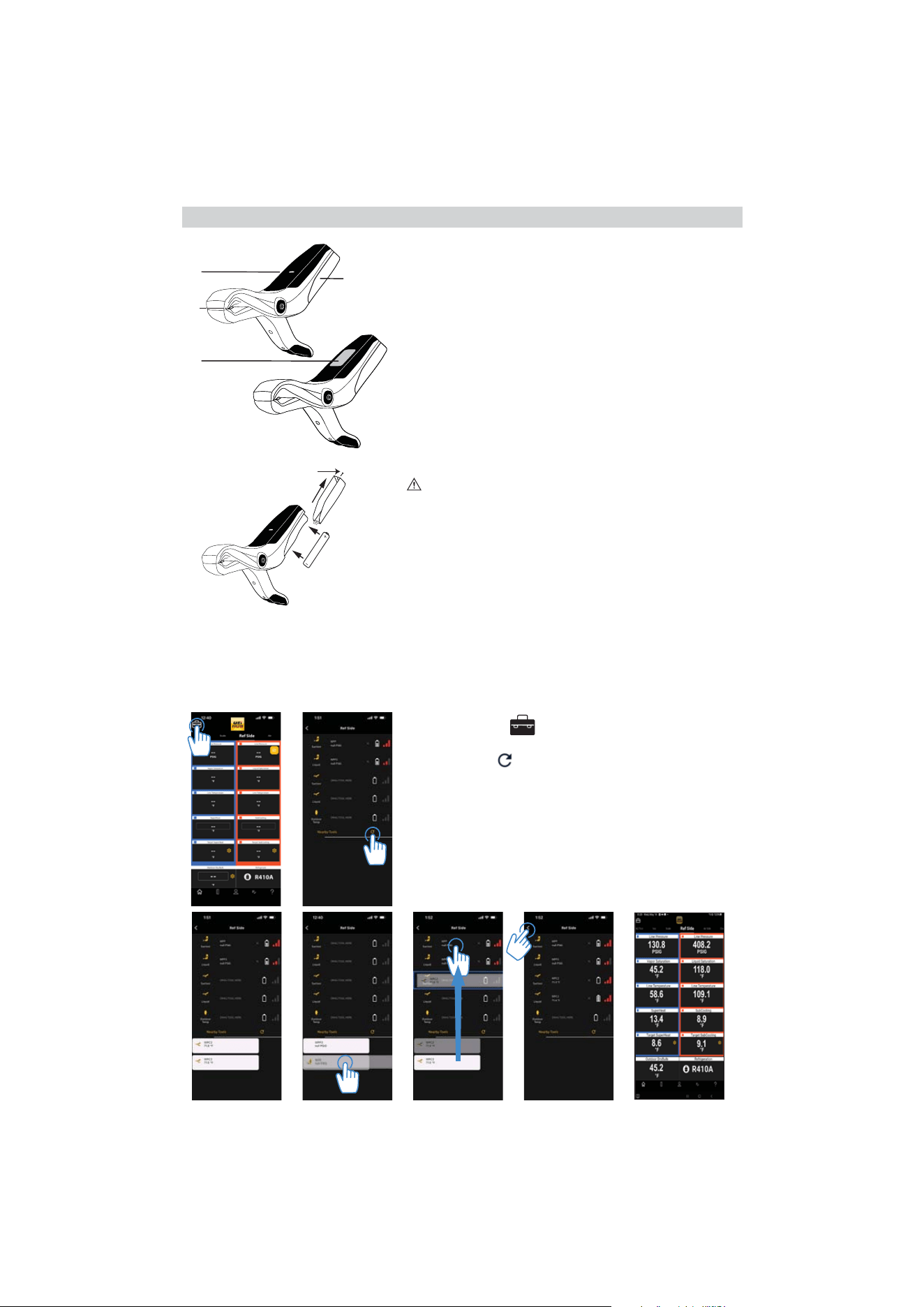
Pipe Clamp Overview (WPC3, WPC2)
Opening jaw powers on pipe clamp
A. Status Light (WPC2 only)
Blinks GREEN when probe is powered on.
Blinks
RED when battery is low (Low battery
indication is also visible in app Toolbox screen).
B. Thermally insulated temperature thermistor
C. LCD Display (WPC3 only)
D. Battery cover
Battery Replacement
CAUTION: Take care not to lose the screws when opening
battery compartments
• Remove battery cover.
• Replace the old batteries with 1 new
(AA) battery.
• Replace the battery cover.
See probe specifications on page 8
Screw
A.
B.
C.
D.
Connecting Probes
WPC3/WPC2 work in the REF SIDE Screen.
A. Select "Toolbox" icon in upper left corner.
B. In Toolbox screen, probes appear in the “Nearby Tools" list.
Tap "Refresh"
icon if powered on probes don't appear.
C. Available probes appear in list.
D. Touch and Hold a probe to select for connection.
E. Drag the probe to matching probe icon for "Suction" or "Liquid"
slot assignment and release. Repeat to connect other probe.
F. The UEi HUB will remember the assignment and automatically
connect in future.
G. Once connected, Tap the "back arrow"
< icon to return Home
to view measurements
A. B.
C. D. E. F. G.
6
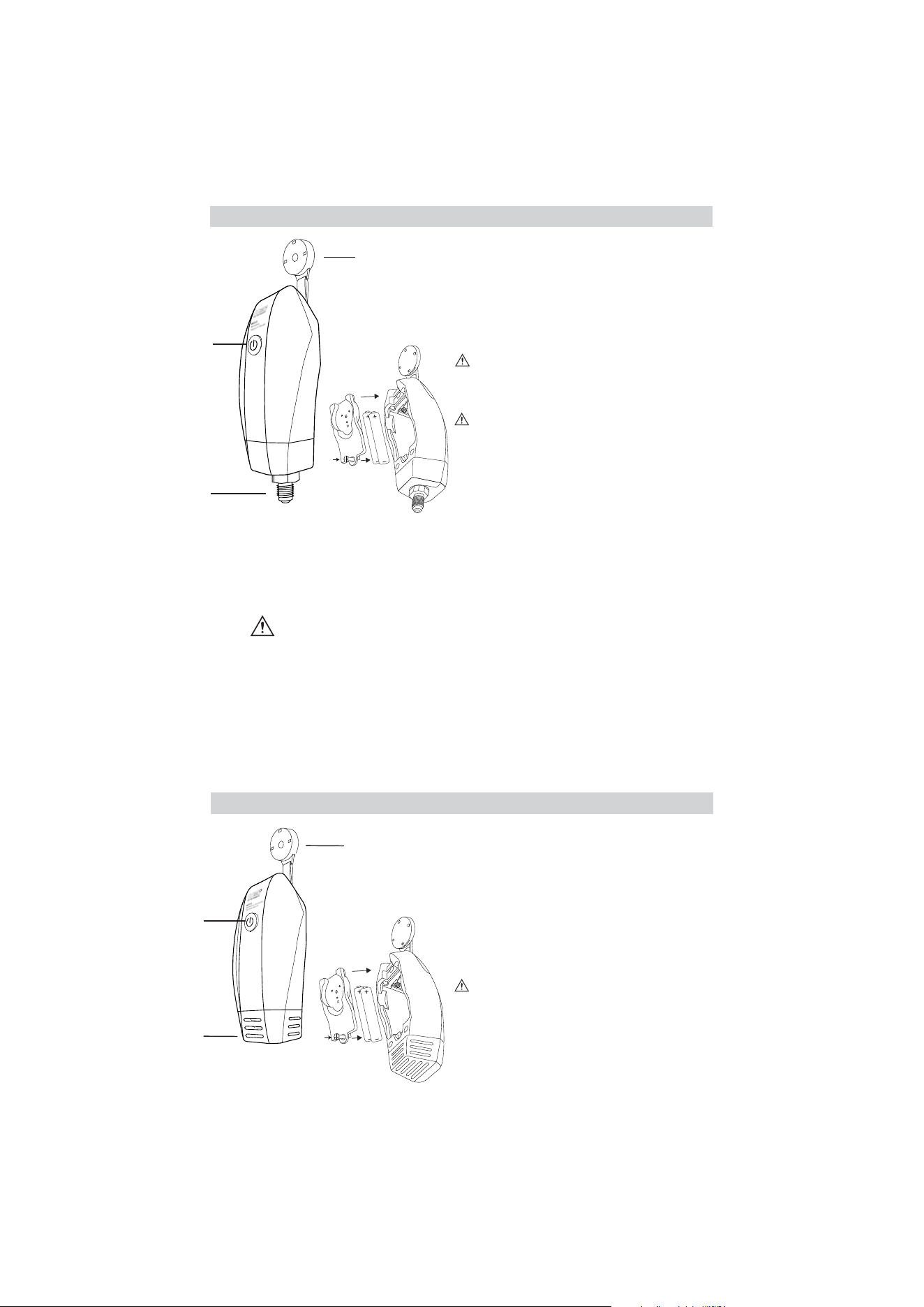
Outside Temperature Overview (WOT2)
A. Power button/Status Light
Press & Hold for 1 second to Power On
Blinks
GREEN when probe is powered on.
Blinks RED when battery is low (Low battery
indication is also visible in app Toolbox screen).
B. Temperature Sensor
C. Magnetic Hanger Strap
Screw
A.
B.
C.
Screw
Vacuum Gauge Overview (WVG2)
A. Power button/Status Light
Press & Hold for 1 second to Power On
Blinks
GREEN when probe is powered on.
Blinks RED when battery is low (Low battery
indication is also visible in app Toolbox screen).
B. 1/4” Vacuum Gauge Sensor
C. Magnetic Hanger Strap
Maximum over pressure is 700 PSI
A.
B.
C.
Battery Replacement
CAUTION: Take care not to lose the screws
when opening battery compartments
• Remove battery cover.
• Replace the old batteries with 2 new
(AA) batteries.
• Replace the battery cover.
Battery Replacement
CAUTION: Take care not to lose the screws
when opening battery compartments
• Remove battery cover.
• Replace the old batteries with 2 new
(AA) batteries.
• Replace the battery cover.
Cleaning the WVG2 Vacuum Sensor
If the vacuum sensor becomes contaminated with oil, follow this procedure:
1. Power off the WVG2, carefully shake the gauge to remove any large quantities of oil
from the sensor
2. Apply a few drops of rubbing alcohol inside the vacuum port
CAUTION: DO NOT INSERT ANY OBJECT INTO PORT, AS THIS WILL
PERMANENTLY DAMAGE THE SENSOR)
3. Place your finger over the port and shake for 30 seconds
4. Remove your finger and allow alcohol to flow out the sensor part
5. Repeat steps 3 to 5 at least three times
6. Allow the sensor to air dry at least an hour
NOTE: It is important to remove all the vapors from the sensor, either through air-drying or via
vacuum. Any remaining vapors will cause an incorrect reading.
7
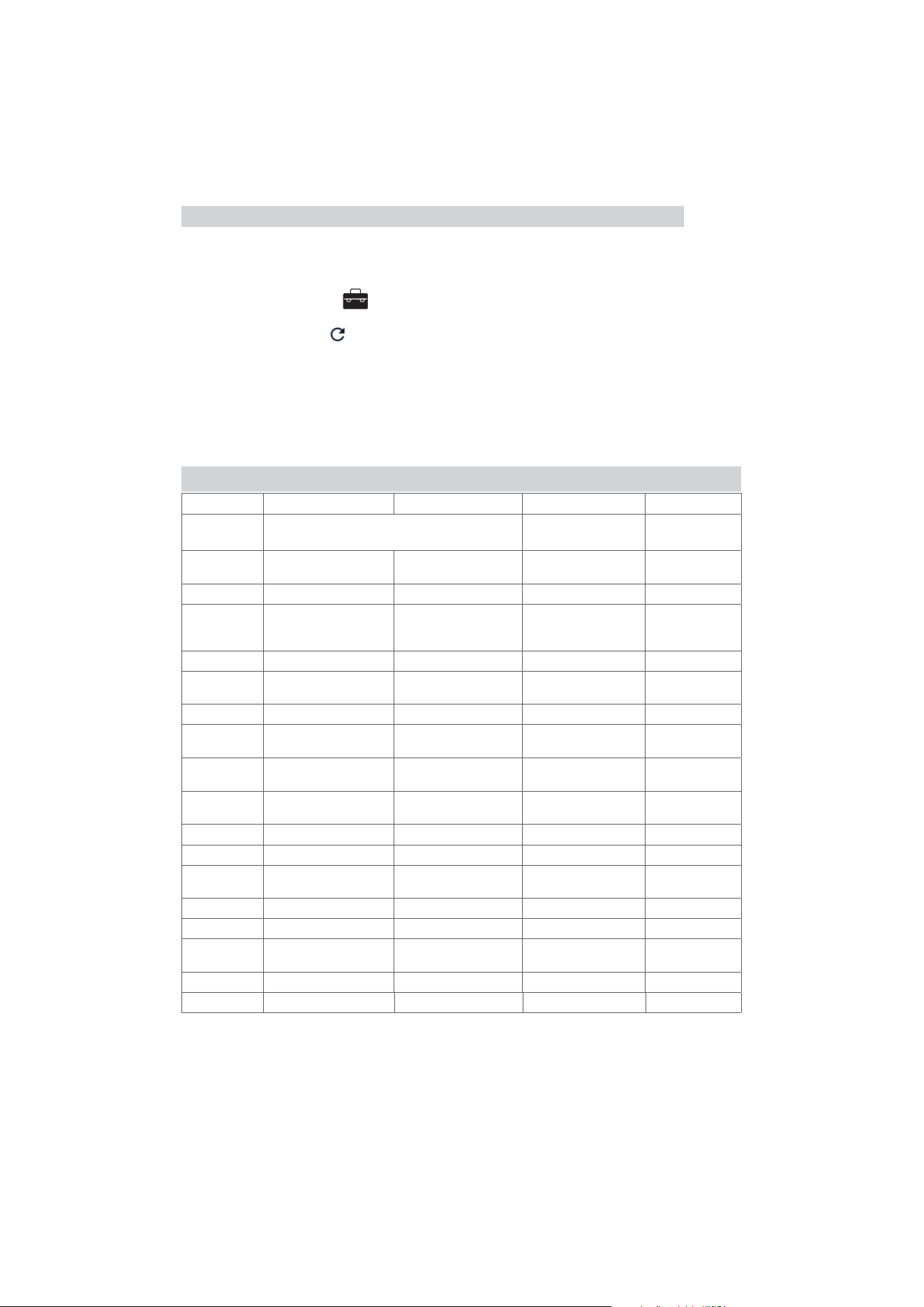
Connecting Probes
WVG2 works in the VACUUM Screen.
WOT2 works in the REF SIDE Screen.
A. Select "Toolbox" icon in upper left corner.
B. In Toolbox screen, probes appear in the “Nearby Tools" list.
Tap "Refresh"
icon if powered on probes don't appear.
C. Available probes appear in list.
D. Touch and Hold the probe to select for connection.
E. Drag the probe to matching probe icon slot and release.
F. The UEi HUB will remember the assignment and automatically
connect in future.
G. Once connected, Tap the "back arrow"
< icon to return Home
to view measurements
WHP1 WHP3 WOT2 WVG2
Hygrometer
Outside
Temp Probe
Vacuum Gauge
Range
-4° to 257°F
(-20° to 125°C)
-4° to 257°F
(-20° to 125°C)
-22° to 257°F
(30° to 125°C)
0 - 20,000 Microns
Resolution 0.1˚F (0.1˚C) 0.1˚F (0.1˚C) 0.1°F (0.1°C) 1 micron
Accuracy
±0.6°F (32°F to 140°F)
±0.3°C (0°C to 60°C)
otherwise ±1°F (±1°C)
±0.6°F (32°F to 140°F)
±0.3°C (0°C to 60°C)
otherwise ±1°F (±1°C)
± 0.6°F 14°F to 176°F
(±0.3°C -10°C to 80°C)
otherwise ±1.0°F (±0.5°C)
±5% rdg
±5 microns
RH% Range 0% to 100% RH 0% to 100% RH - -
RH% Res
±3%RH (20-80%RH @ 77°F)
±5% RH otherwise @ 77°F
±3%RH (20-80%RH @ 77°F)
±5% RH otherwise @ 77°F
--
RH% Accuracy 0.1% 0.1% - -
Operating
Temperature:
-40°F to 185°F
(-40° to 85°C)
14°F to 185°F
(-10° to 85°C)
-40°F to 85°F
(-40°C to 185°C)
14° to 158°F
(-10° to 70°C)
Storage
Temperature:
14° to 104°F
(-10° to 40°C)
14° to 104°F
(-10° to 40°C)
14° to 104°F
(-10° to 40°C)
13° to 185°F
(-25° to 85°C)
Operating
Humidity:
20% to 80% RH 20% to 80% RH 20% to 80% RH 30% to 85% RH
Dimensions: 6.84x1.93x1.53in 6.84x1.93x1.53in 4.75 x 2.4 x 1.5in 5.6 x2.4 x 1.5in
Item Weight: 4.4 oz 5 oz 5.4 oz 4.2 oz
Certification: CE Conformity, FCC/IC CE Conformity, FCC/IC
CE Conformity,
FCC/IC
CE Conformity,
FCC/IC
Battery Type: AAA x2 AAA x2 AA x2 AA x2
Battery Life: 100+ hours 100+ hours 100+ hours 100+ hours
Pressure
Over-range:
- - - 700 PSI
Jaw Opening: ----
Response Time: <1 sec <1 sec <30 sec -
HUB Probes Specifications
Connecting WVG2 & WOT2

8
WPP2 WPP3 WPC2 WPC3
Pressure Probe
Temperature
Pipe Clamp
Range 0 to 725 PSI 3 to 725 PSI
22˚ to 257˚F
(-30˚ to 125˚C)
22˚ to 257˚F
(-30˚ to 125˚C)
Resolution 0.1 PSI 0.1 PSI 0.1˚F (0.1°C) 0.1˚F (0.1°C)
Accuracy
±1% F.S.
32˚ to 158˚F
(0˚ to 70˚C)
±0.5% F.S. 77˚F ±5.4˚F
(25˚C ±3˚C)
±1% F.S. 32˚ to 158˚F
(0˚ to 70˚C)
± 0.6°F 14°F to 176°F
(±0.3°C -10°C to 80°C)
otherwise ±1.0°F (±0.5°C)
± 0.6°F 14°F to 176°F
(±0.3°C -10°C to 80°C)
otherwise ±1.0°F (±0.5°C)
Operating
Temperature:
14° to 158°F
(-10° to 70°C)
14 to 158°F
(-10 to 70°C)
-40°F to 185°F
(-40°C to 85°C)
14°F to 185°F
(-10°C to 85°C)
Storage
Temperature:
13° to 185°F
(-25° to 85°C)
13 to 185°F
(-25 to 85°C)
14° to 104°F
(-10° to 40°C)
14° to 104°F
(-10° to 40°C)
Operating
Humidity:
30% to 85% RH 30 to 85% 20% to 80% RH 20% to 80% RH
Dimensions: 6.70x1.56x1.44in 6.70x1.56x1.44in 5.66x3.8x1.1 in 5.66x3.8x1.1 in
Item Weight: 7.4 oz 8 oz 2.1 oz 2.6 oz
Certification:
CE Conformity,
FCC/IC
CE Conformity, FCC/IC CE Conformity, FCC/IC CE Conformity, FCC/IC
Battery Type: AA x2 AA x2 AA 1 AA 1
Battery Life: 100+ hours 80+ hours 100+ hours 80+ hours
Pressure
Over-range:
1000 PSI 1000 PSI - -
Jaw Opening: - - 1.5 in diameter 1.5 in diameter
Response
Time:
- - <30 sec. <30 sec.
HUB Probes Specifications (continued)
• Operating Altitude: 6,562 ft (2000 meters) above sea level
• Maximum Output Power: 10.5dBm
• Wireless Frequency Reception Range: 169 MHz to 2.4 GHz
• Wireless Frequency Transmission: 2.4GHz
• Pollution Degree: 2

9
FCC AND IC STATEMENT
This equipment has been tested and found to comply with the limits for a Class B digital device, pursuant to part
15 of the FCC Rules. These limits are designed to provide reasonable protection against harmful interference in
a residential installation. This equipment generates, uses and can radiate radio frequency energy and, if not in-
stalled and used in accordance with the instructions, may cause harmful interference to radio communications.
However, there is no guarantee that interference will not occur in a particular installation. If this equipment does
cause harmful interference to radio or television reception, which can be determined by turning the equipment
off and on, the user is encouraged to try to correct the interference by one or more of the following measures:
• Reorient or relocate the receiving antenna.
• Increase the separation between the equipment and receiver.
• Connect the equipment into an outlet on a circuit different from that to which the receiver is connected.
• Consult the dealer or an experienced radio/TV technician for help.
This equipment complies with FCC/IC RSS102 radiation exposure limits set forth for an uncontrolled envi ronment.
This device complies with Industry Canada license-exempt RSS standard(s). Operation is subject to the following
two conditions: (1) this device may not cause interference, and (2) this device must accept any interference,
including interference that may cause undesired operation of the device.
Under Industry Canada regulations, this radio transmitter may only operate using an antenna of a type and
maximum (or lesser) gain approved for the transmitter by Industry Canada. To reduce potential radio interference
to other users, the antenna type and its gain should be so chosen that the equivalent isotropically radiated power
(e.i.r.p.) is not more than that necessary for successful communication.
Conformément à la réglementation d'Industrie Canada, le présent émetteur radio peut fonctionner avec une
antenne d'un type et d'un gain maximal (ou inférieur) approuvé pour l'émetteur par Industrie Canada. Dans le
but de réduire les risques de brouillage radioélectrique à l'intention des autres utilisateurs, il faut choisir le type
d'antenne et son gain de sorte que la puissance isotrope rayonée équivalente (p.i.r.e.) ne dépasse pas l'intensité
nécessaire à l'établissement d'une communication satisfaisante.
Le présent appareil est conforme aux CNR d'Industrie Canada applicables aux appareils radio exempts de
licence. L'exploitation est autoris é e aux deux conditions suivantes : (1) l'appareil ne doit pas produire de brouil-
lage, et (2) l'utilisateur de l'appareil doit accepter tout brouillage radioélectrique subi, même si le brouillage est
susceptible d'en compromettre le fonctionnement.
FCC AND IC NOTICE
This device complies with Part 15 of the FCC rules and Industry Canada license-exempt RSS 247. Operation is
subject to the following two conditions: (1) This device may not cause harmful interference; and (2) this device
must accept any interference received, including interference that may cause undesired operation.
Cet appareil est conforme à la partie 15 des règles de la FCC, ainsi qu’à la norme RSS 247 exempte de licence
d’Industrie Canada. Son fonctionnement est soumis aux deux conditions suivantes : (1) Cet appareil ne doit pas
provoquer d’interférences nuisibles; et (2) cet appareil doit accepter toutes les interférences reçues, y compris
celles susceptibles d’entraîner un dysfonctionnement de l’appareil.
FCC/IC INFORMATION

10
FCC CAUTION
The device must not be co-located or operated in conjunction with any other antenna or transmitter.
Caution the user that changes or modifications not expressly approved by the party responsible
for compliance could void the user’s authority to operate the equipment.
L'appareil ne doit pas être placé ou utilisé conjointement avec une autre antenne ou un autre émetteur. Attention
à l'utilisateur que des changements ou des modifications non expressément approuvés par la partie responsable
pour la conformité pourrait annuler l'autorité de l'utilisateur pour faire fonctionner l'équipement.
a. The device should be installed and operated with a minimum distance of 20cm between the radiator and your
body.
L'appareil doit être installé et utilisé avec une distance minimale de 20 cm entre le radiateu et votre corps.
b. This device complies with RSS247 of Industry Canada. Cet appareil se conforme à RSS247 de Canada d'In-
dustrie. This device complies with Industry Canada license-exempt RSS standard(s). Operation is subject to
the following two conditions: (1) this device may not cause interference, and (2) this device must accept any
interference, including interference that may cause undesired operation of the device.
appareils radio exempts de licence. Son fonctionnement est sujet aux deux conditions suivantes: (1) le dispositif
ne doit pas produire de brouillage prejudiciable, et (2) ce dispositif doit accepter tout brouillage recu, y compris
un brouillage susceptible de provoquer un fonctionnement indesirable.
This Class B digital apparatus complies with Canadian ICES-003.
Cet appareil numérique de la classe B est conforme a la norme NMB-003 du Canada.
Exposure of humans to RF fields (RSS-102)
The computers employ low gain integral antennas that do not emit RF field in excess of Health Canada limits for
the general population; consult Safety Code 6, obtainable from Health Canada's Web site at http://www.hc-sc.
gc.ca/
The radiated energy from the antennas connected to the wireless adapters conforms to the IC limit of the RF
exposure requirement regarding IC RSS-102, Issue 5 clause 4. SAR tests are conducted using
recommended operating positions accepted by the FCC/ RSS with the device transmitting at its highest certified
power level in all tested frequency band without distance attaching away from the body. Non- compliance with
the above restrictions may result in violation of FCC RF exposure guidelines.
Conformité des appareils de radiocommunication aux limites d'exposition humaine aux radiofréquences (CNR-
102) L'ordinateur utilise des antennes intégrales à faible gain qui n'émettent pas un champ électromagnétique
supérieur aux normes imposées par Santé Canada pour la population. Consultez le Code de sécurité 6 sur le
site Internet de Santé Canada à l'adresse suivante : http://www.hc-sc.gc.ca/ L'énergie émise par les antennes
reliées aux cartes sans fil respecte la limite d'exposition aux radiofréquences telle que définie par Industrie
Canada dans la clause 4.1 du document CNR-102, version
5. Tests DAS sont effectués en utilisant les positions recommandées par la FCC/CNR avec le téléphone émet à
la puissance certifiée maximale dans toutes les bandes de fréquences testées sans distance attacher loin du
corps. Non-respect des restrictions ci-dessus peut entraîner une violation des directives de la FCC/CNR.
FCC/IC INFORMATION (continued)
11
CAUTION: This symbol indicates that equipment and its accessories shall be
subject to separate collection and correct disposal.
Periodically clean your probes case using a damp cloth. DO NOT use abrasive, flammable liquids,
cleaning solvents, or strong detergents as they may damage the finish, impair safety, or affect the
reliability of the structural components.
DISPOSAL
CLEANING
STORAGE
Remove the batteries when instrument is not in use for a prolonged period of time. Do not expose to
high temperatures or humidity. After a period of storage in extreme conditions exceeding the limits
mentioned in the Specifications section, allow the instrument to return to normal operating condi-
tions before using it.
WARRANTY
The HUB probes (WPP2, WPP3, WPC2, WPC3, WHP1, WHP3, WOT2, and/or WVG2) are warranted
to be free from defects in materials and workmanship for a period of 1 year from the date of pur-
chase. If within the warranty period your instrument should become inoperative from such defects,
the unit will be repaired or replaced at UEi’s option. This warranty covers normal use and does
not cover damage which occurs in shipment or failure which results from alteration, tampering,
accident, misuse, abuse, neglect or improper maintenance. Batteries and consequential damage
resulting from failed batteries are not covered by warranty.
Any implied warranties, including but not limited to implied warranties of merchantability and fitness
for a particular purpose, are limited to the express warranty. UEi shall not be liable for loss of use of
the instrument or other incidental or consequential damages, expenses, or economic loss, or for any
claim or claims for such damage, expenses or economic loss.
A purchase receipt or other proof of original purchase date will be required before warranty repairs
will be rendered. Instruments out of warranty will be repaired (when repairable) for a service
charge
Warranty and technical support provided by:
UEi Test Instruments, 7601 E 88th Place, Building 8, Indianapolis, IN 46256
This warranty gives you specific legal rights. You may have additional rights,
which vary from state to state.
Copyright © 2026 Kane USA Inc. All Rights Reserved. 20192 5/26