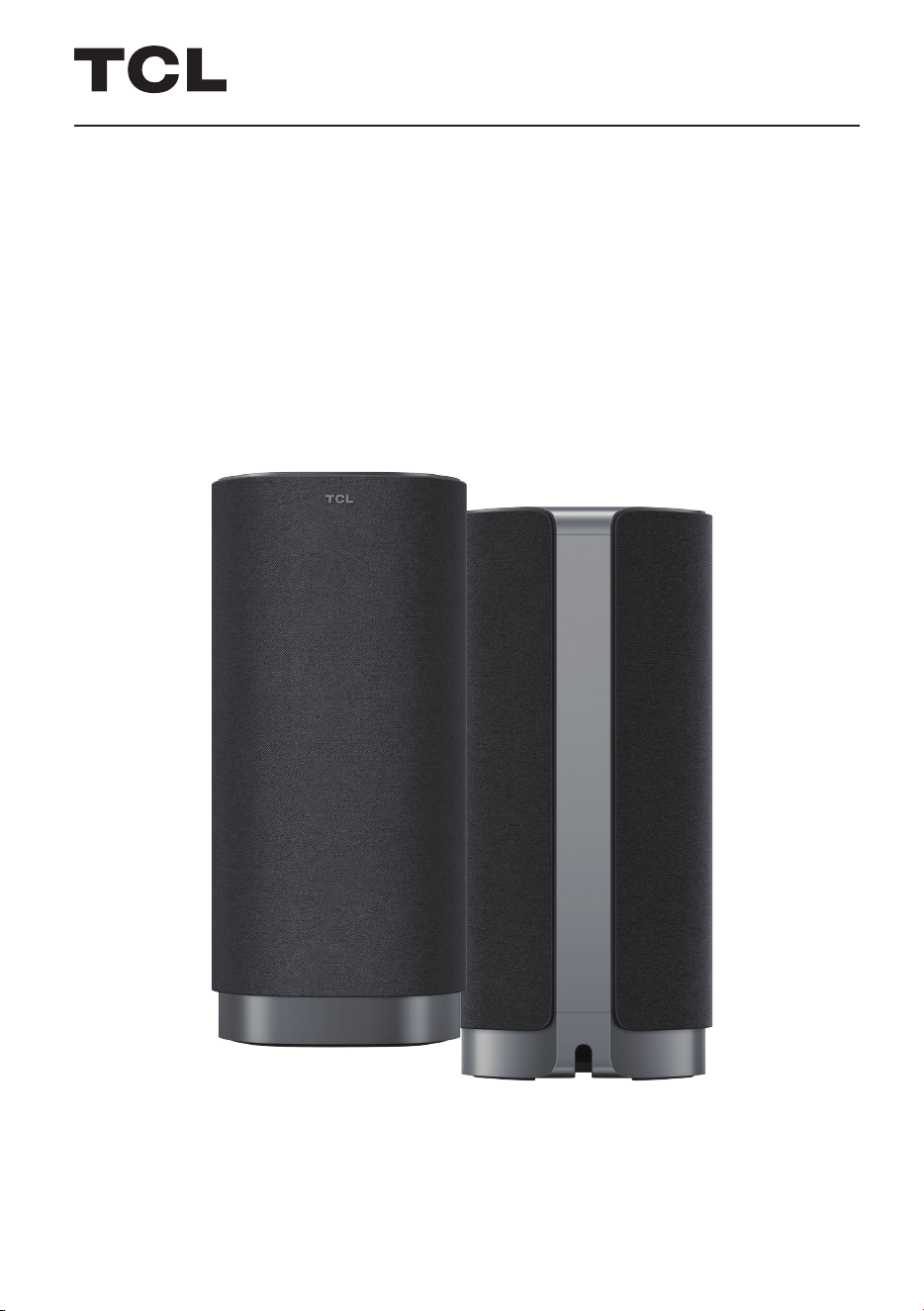
Illustrations in this guide are provided for reference only and may dier from actual product appearance.
Product design and specifications may be changed without notice.
User Manual
Z100
Wireless free sound speaker with
Dolby Atmos FlexConnect
For United States & Canada

Contents
Before you Begin 3
Important Safety Instructions 4
Welcome 7
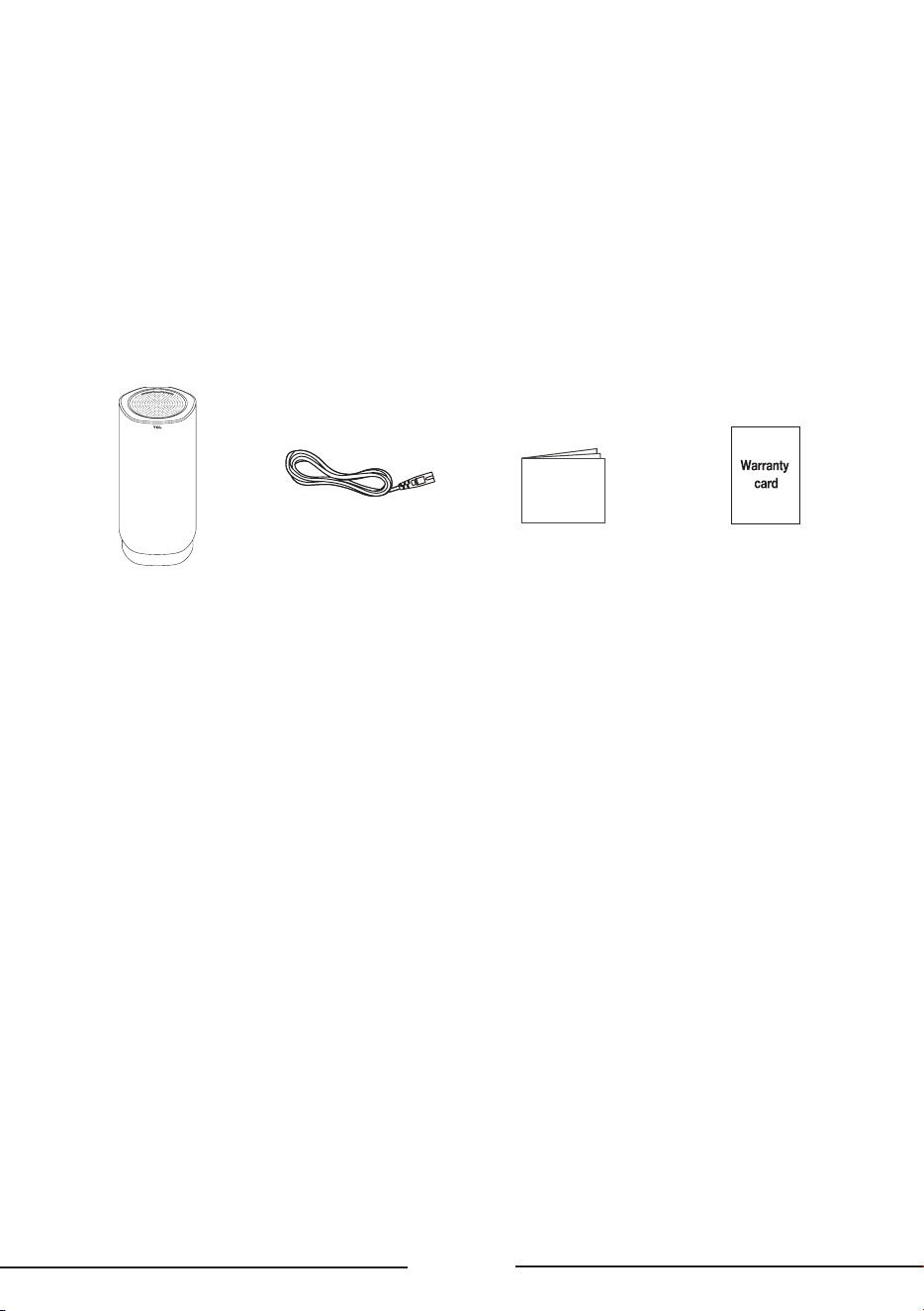
What’s in the box ………………………………………………………………………………………………… 7
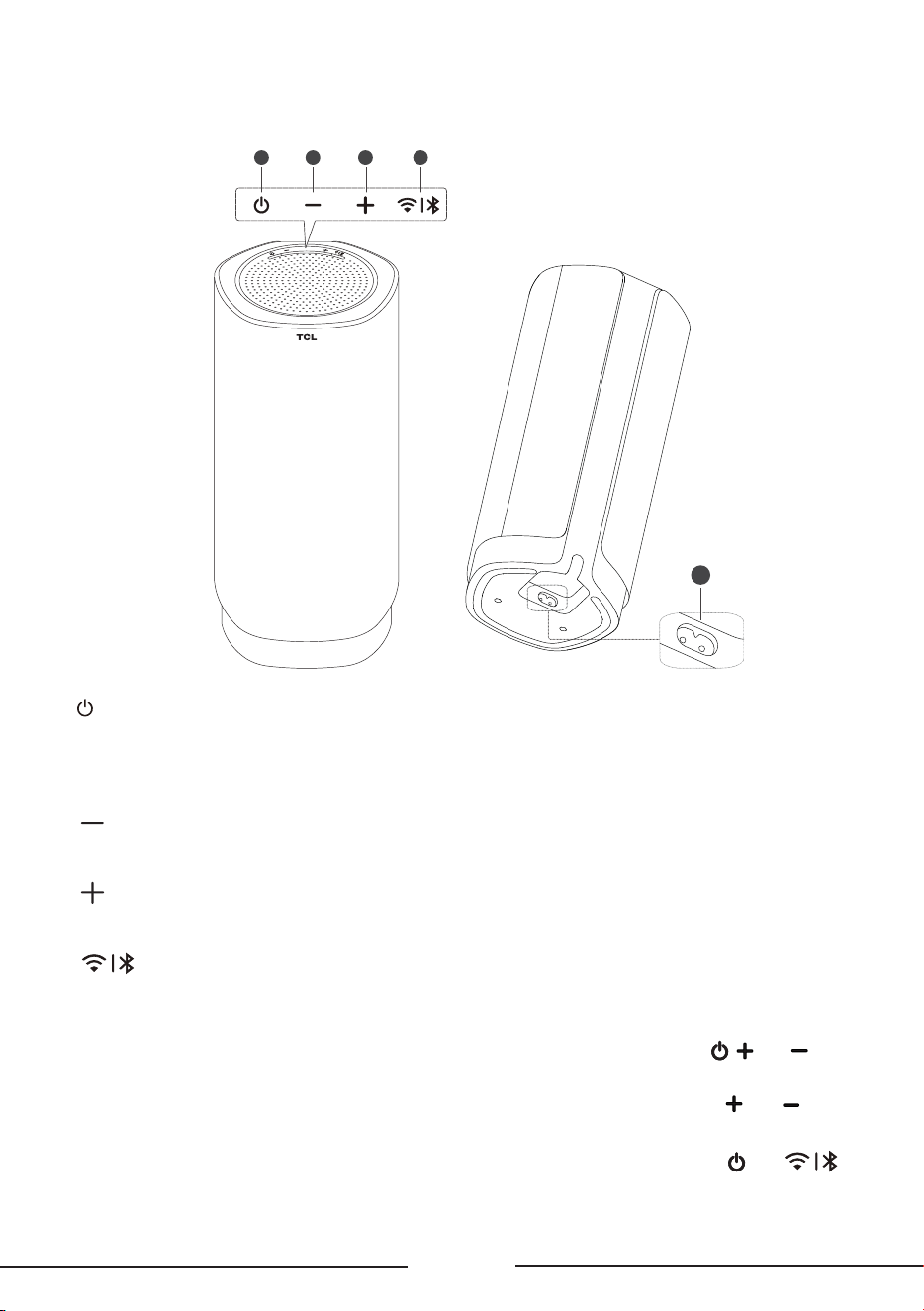
Speaker description …………………………………………………………………………………………… 8
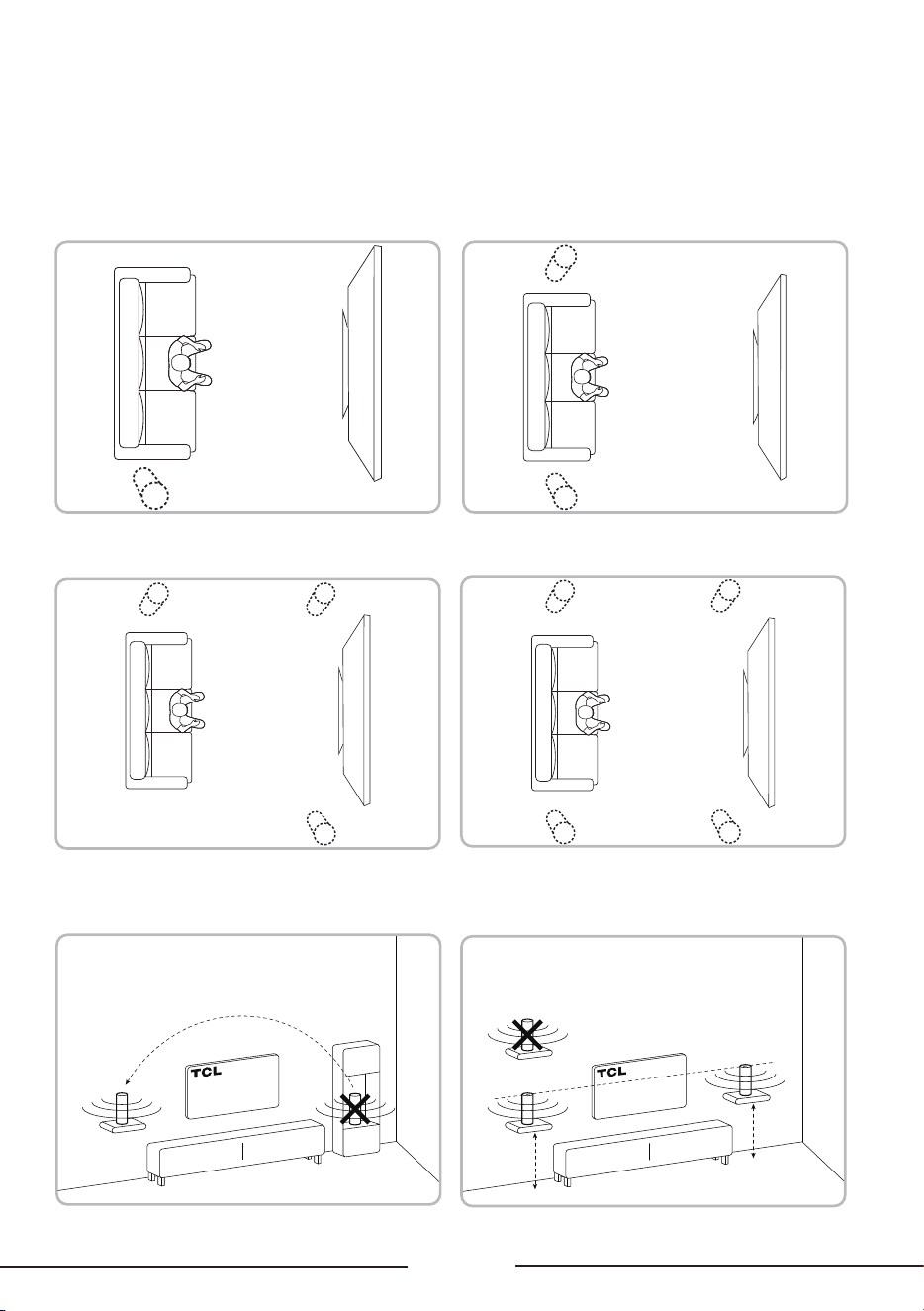
Speaker position selection ……………………………………………………………………………… 9
Wireless Dolby Atmos Speaker Connections 12
Connect the speaker to power ………………………………………………………………………… 12
TV pairing …………………………………………………………………………………………………………… 12
Speaker management ……………………………………………………………………………………… 14
Connect the speaker to a Bluetooth device ………………………………………………… 15
Bluetooth networking function ……………………………………………………………………… 15
Using the Speaker 17
Control the speaker through the panel ………………………………………………………… 17
Specications 18
Notice 19
Disposal of your old product …………………………………………………………………………… 19
Trademarks …………………………………………………………………………………………………………… 19

3
Before you Begin
• Carefully read and observe all safety instructions in the safety leaflet.
• This speaker is intended for indoor use only. In case it accidentally gets in contact with small
amounts of water, unplug immediately and use a dry cloth to remove the water.
• Unplug the speaker if it is not used for long periods of time or during lightning storms.
• In case any of the cables are visibly damaged or pinched, unplug the speaker and
replace the cable.
• Protect your hearing by adjusting to a proper volume. Predefined and customizable sound
settings are available for your listening comfort.
4
Important Safety Instructions
Make sure you read all the safety information before you use this product.
TCL North America bears no responsibility for accidents or damages caused by unauthorized
changes, modifications or improper use of the product.
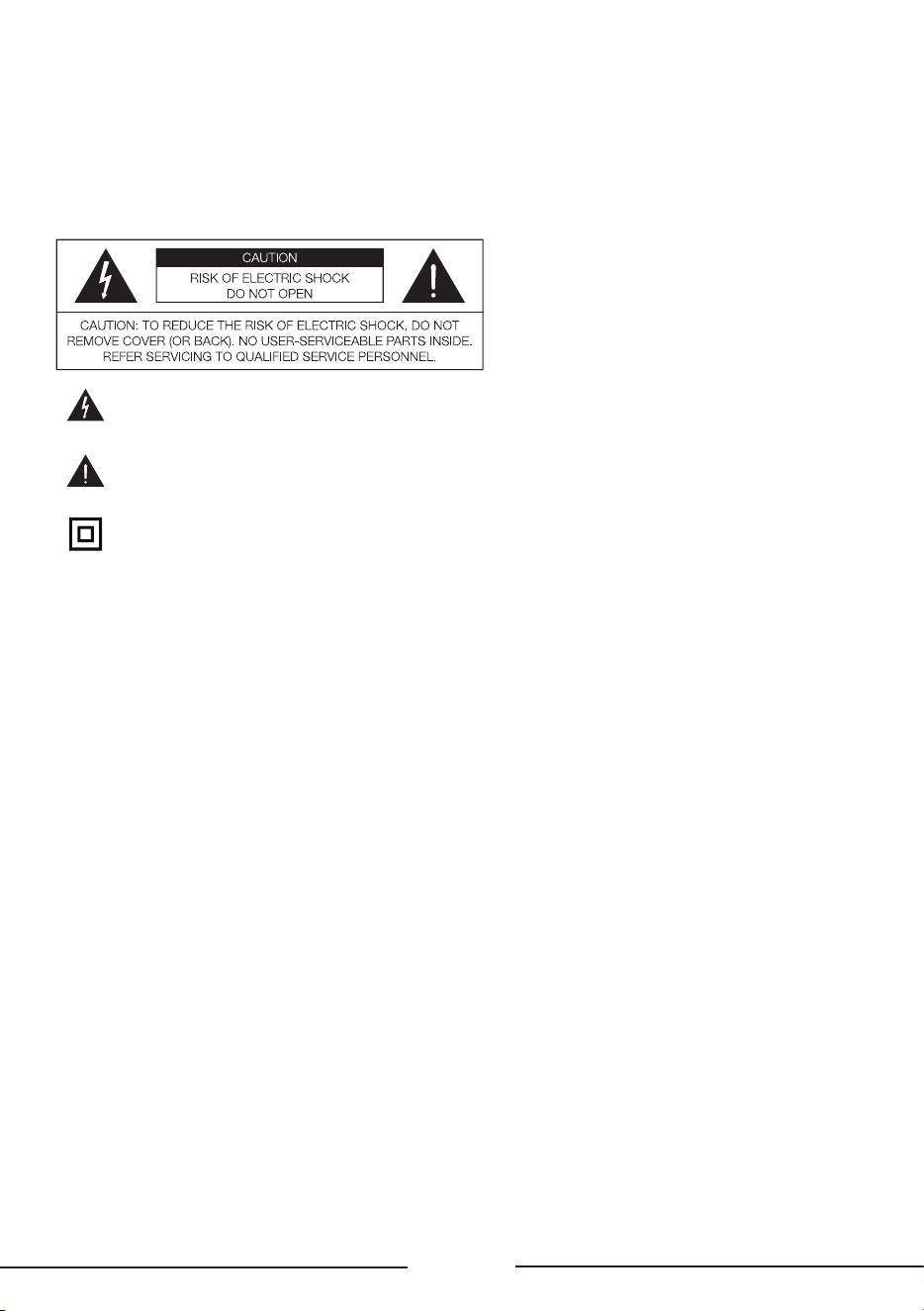
The lightning flash with arrowhead symbol, within an equilateral triangle is intended to alert
the user to the presence of uninsulated dangerous voltage within the product's enclosure
that may be of sucient magnitude to constitute a risk of electric shock.
The exclamation point within an equilateral triangle is intended to alert the user to the
presence of important operating and maintenance (servicing) instructions in the literature
accompanying the product.
This symbol indicates that this product incorporates double insulation between hazardous
main voltage and user accessible parts. When servicing, use only identical replacement
parts.
Warnings
To reduce the risk of fire or electric shock, do not expose this product to rain or moisture. This
product should not be exposed to dripping or splashing. No objects filled with liquids, such as
vases, should be placed on or near the product.
To avoid danger of suocation, keep this plastic bag away from babies and children. Do not use
this bag in cribs, beds, carriages or playpens. This bag is not a toy.
Safety
Read these instructions - Read all the safety and operating instructions before operating the
product.
Retain these instructions - Retain the safety and operating instructions for future reference.
Heed all warnings - Adhere to all warnings on the product and in the operating instructions.
Follow all instructions - Follow all operating and use instructions.
Do not use this apparatus near water - The appliance should not be used near water or moisture -
for example, in a wet basement or near a swimming pool and the like.
Clean only with a dry cloth.
Do not block any ventilation openings. Install in accordance with the manufacturer's instructions.
Do not install near any heat sources such as radiators, heat registers, stoves, or other apparatus
(including amplifiers) that produce heat.
Do not defeat the safety purpose of the polarized or grounding-type plug. A polarized plug has
two blades with one wider than the other. A grounding type plug has two blades and a third
grounding prong. The wide blade or the third prong are provided for your safety. lf the provided
plug does not fit into your outlet, consult an electrician for replacement of the obsolete outlet.
Protect the power cord from being walked on or pinched particularly at plugs, convenience
receptacles, and the point where it exits from the product. If the cord set is damaged, it must be
replaced by a special cord set available from the manufacturer or its service agent.
5
Use only attachments/accessories specified by the manufacturer.
Use only with the cart, stand, tripod, bracket, or table specified by the manufacturer, or sold with
the apparatus. When a cart is used, use caution when moving the cart/apparatus combination to
avoid injury from tip-over.
Unplug this apparatus during lightning storms or when unused for long periods of time.
Refer all servicing to qualified service personnel. Servicing is required when the apparatus has
been damaged in any way, such as power-supply cord or plug damaged, liquid has been spilled or
objects have fallen into the apparatus, the apparatus has been exposed to rain or moisture, does
not operate normally, or has been dropped.
The user must maintain a minimum distance of 20CM from the device at all time.
This appliance is not intended for use by young children or infirm persons without supervision.
Young children should be supervised to ensure that they do not play with the appliance.
Cautions
To prevent electric shock, match wide blade of plug to wide slot, fully insert.
Do not place any sources of danger on the product (for example: liquid filed objects, lighted
candles).
Disconnect the power cord to shut o when find trouble or not in use. The power cord shall be
readily operable.
Use of controls or adjustments or performance of procedures other than those described herein,
may result in hazardous radiation exposure or other unsafe operation.
The power cord/appliance coupler is used as the disconnect device, the disconnect device must
remain readily operable.
The rating label is located at the bottom or back of the product.
The use of apparatus in tropical and moderate climates.
Disposal of Your Old Product
Your product is designed and manufactured with high quality materials and components, which
can be recycled and reused.
This product may contain lead and mercury. Disposal of these materials may be regulated due
to environmental considerations. For disposal or recycling information, please contact your local
authorities.
Compliance notice
Notice for US
FCC Information
Warning
Changes or modifications to this unit not expressly approved by the party responsible for
compliance could void the user’s authority to operate the equipment.
Note
This equipment has been tested and found to comply with the limits for a Class B digital device,
pursuant to Part 15 of the FCC Rules. These limits are designed to provide reasonable protection
against harmful interference in a residential installation. This equipment generates, uses and can
radiate radio frequency energy and, if not installed and used in accordance with the instructions,

6
may cause harmful interference to radio communications. However, there is no guarantee that
interference will not occur in a particular installation.
If this equipment does cause harmful interference to radio or television reception, which can be
determined by turning the equipment of and on, the user is encouraged to try to correct the
interference by one or more of the following measures:
• Reorient or relocate the receiving antenna.
• Increase the separation between the equipment and receiver.
• Connect the equipment into an outlet on a circuit different from that to which the receiver is
connected.
• Consult the dealer or an experienced radio/TV technician for help.
This device complies with Part 1 5 of the FCC Rules. Operation is subject to the following two
conditions:
(1) this device may not cause harmful interference, and
(2) this device must accept any interference received, including interference that may cause
undesired operation.
FCC Radiation Exposure Statement: This equipment complies with FCC radiation exposure limits
set forth for an uncontrolled environment. This equipment should be installed and operated with a
minimum distance of 20cm between the radiator and your body. This transmitter must not be co-
located or operated in conjunction with any other antenna or transmitter.
Notice for Canada
Class B Clause
This Class B digital apparatus complies with Canadian ICES-003
This device contains licence-exempt transmitter(s)/receiver(s) that comply with Innovation, Science
and Economic Development Canada’s licence-exempt RSS(s). Operation is subject to the following
two conditions:
1. This device may not cause interference.
2. This device must accept any interference, including interference that may cause undesired
operation of the device.
Radiation Exposure Statement
This equipment complies with IC radiation exposure limits set forth for an uncontrolled
environment. This equipment should be installed and operated with minimum distance 20cm
between the radiator & your body.
Warning: The user is cautioned that changes or modifications not expressly approved by the party
responsible for compliance could void the user's authority to operate the equipment.
The device for operation in the band 5150–5250 MHz is only for indoor use to reduce the potential
for harmful interference to co-channel mobile satellite systems.
7
Welcome
What’s in the box
Congratulations on the purchase of your new TCL Speaker! After it is set up and connected,
you can experience a superb sound quality and state-of-the-art design to best fit your home
entertainment system. You are recommended to read through this user manual which helps you
set up, connect and operate the product easily and properly.
Manual
Speaker AC Power Cord
Manual Warranty Card
8
Speaker description
1 2 3 4
5
1
Short press: Power on or enter
network standby
Long press: Long press for 5s to power o
2
Press to decrease the volume
3
Press to increase the volume
4
Short press: Switch between Wi-Fi and
Bluetooth sources. After switching, perform
the following:
Bluetooth:
1. If no devices are in the Bluetooth history
list, "Bluetooth" will display for 3s, then enter
pairing mode.
2. Under Bluetooth source, long press
for 3s to enter pairing mode, then display
pairing status.
Wi-Fi:
1. Default: Wi-Fi
2. Long press for 3s to enter Wi-Fi
pairing mode. The TV can then detect the
standalone power on/o SPK and maintain
the previous source before shutdown.
5 Power supply
After connecting the power cable, the device
powers on and automatically enters
user mode.
Key combinations:
• Factory reset: While powered on,
simultaneously press and hold , and for 10s.
• Check version number: While powered on,
simultaneously press and hold
and for 10s.
• Bluetooth networking function:
Simultaneously press and hold
and on
the panel for 5s.
9
Speaker position selection
Ensure there are no obstacles between the TV and the speakers.
Refer to the diagram below for recommended speaker positions (up to 4 Z100 units).
Avoid placing speakers in resonant cavities
such as bookshelves and cupboards.
Position speakers at similar heights.
Recommended positions for 3 speakers: Recommended positions for 4 speakers:
Recommended position for 1 speaker: Recommended positions for 2 speakers:
10
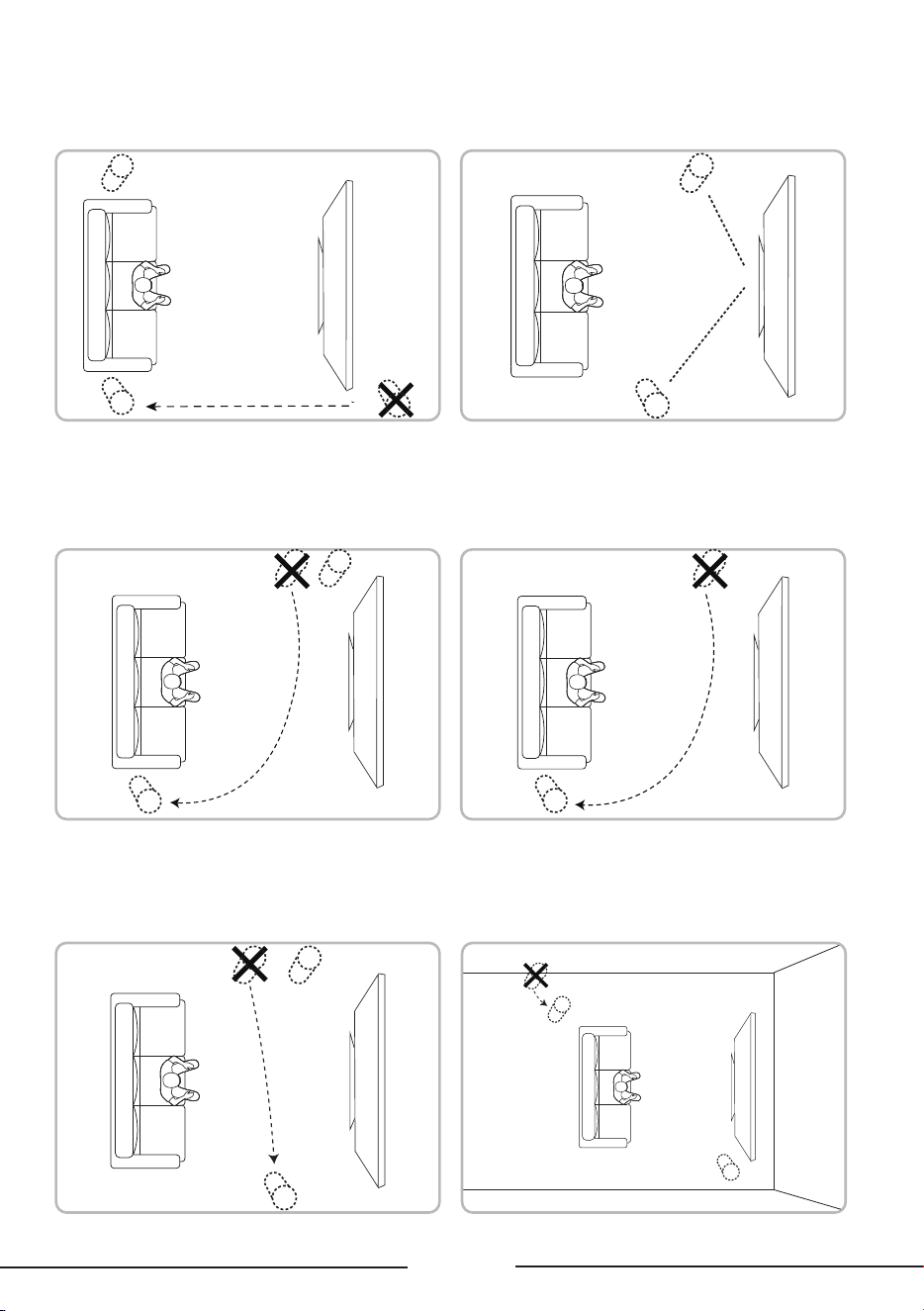
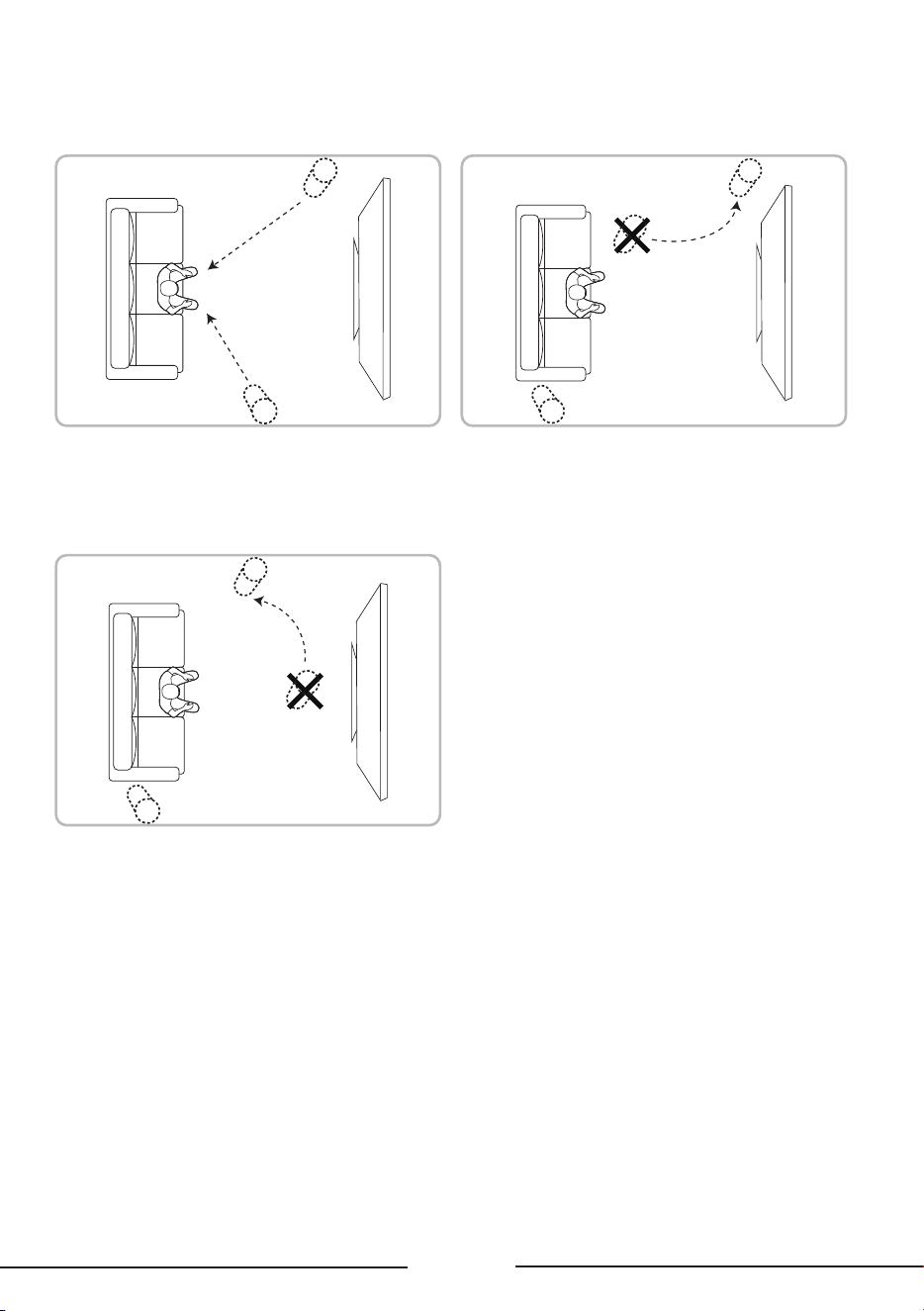
Do not position your speakers behind the TV. Ensure that there are no physical barriers
between the TV and speakers.
Avoid positioning all your speakers on one
side. Balance them on the left and right side.
Balance speakers between the front and back
(TV speakers count as front).
Do not cluster speakers together. Aim for an
even distribution around the room.
Avoid positioning speakers in a corner.
11
Position the speakers facing the
listening position.
Avoid positioning speakers in close proximity
to the listener position.
Do not use speakers as the central speaker.
12
Wireless Dolby Atmos
Speaker Connections
After securing the position of the speaker, connect them to your TV or other devices for audio
playback. Ensure the audio on the TV or device is muted. For more information, refer to your TV
or device user manual.
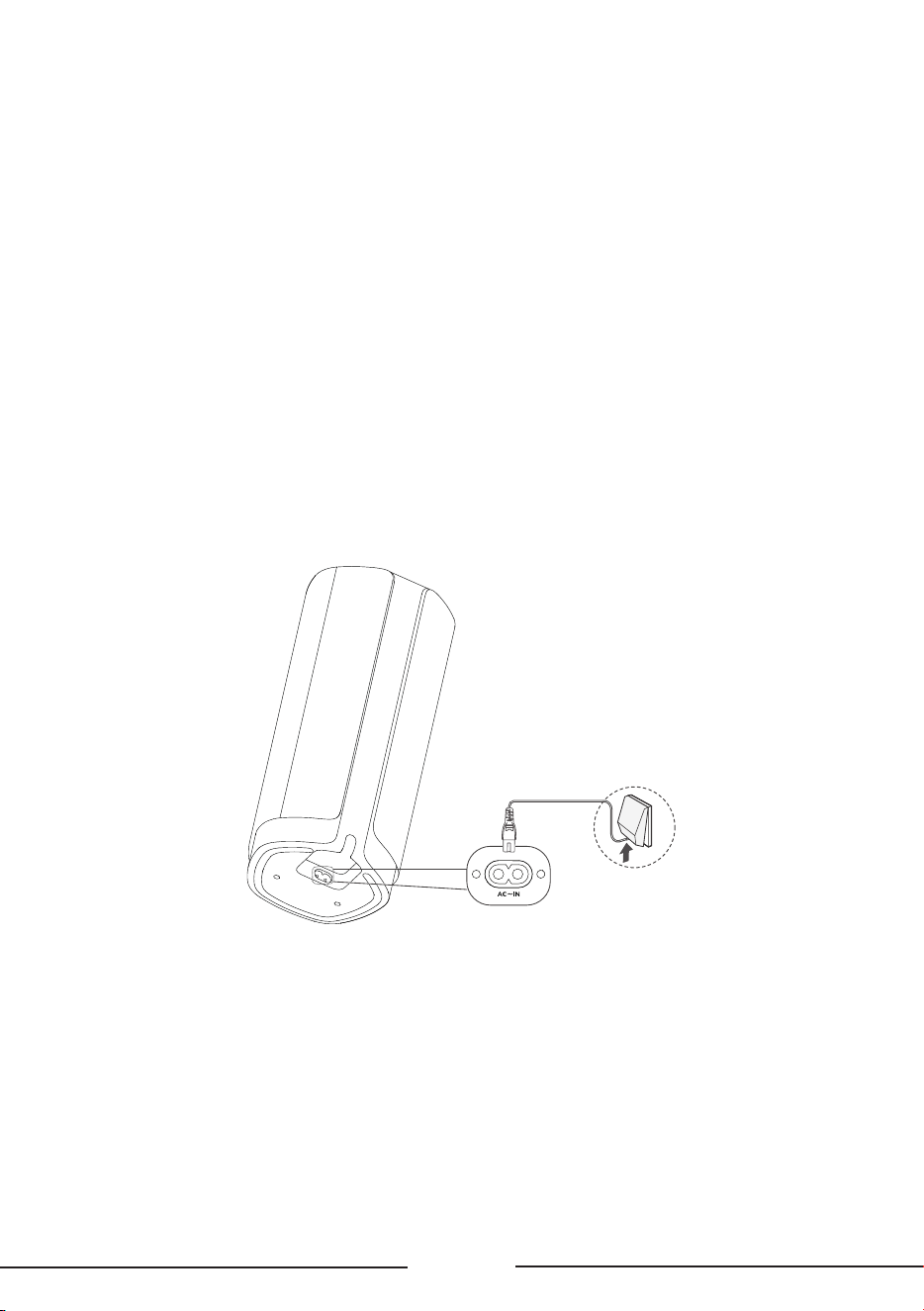
Connect the speaker to power
1 Before connecting the speaker to power, ensure all other connections are completed.
2 Ensure that the power voltage complies with your country's safety standards.
3 Connect one end of the provided AC power cable to the AC input port on the speaker, and the
other end to a wall power outlet.
TV pairing
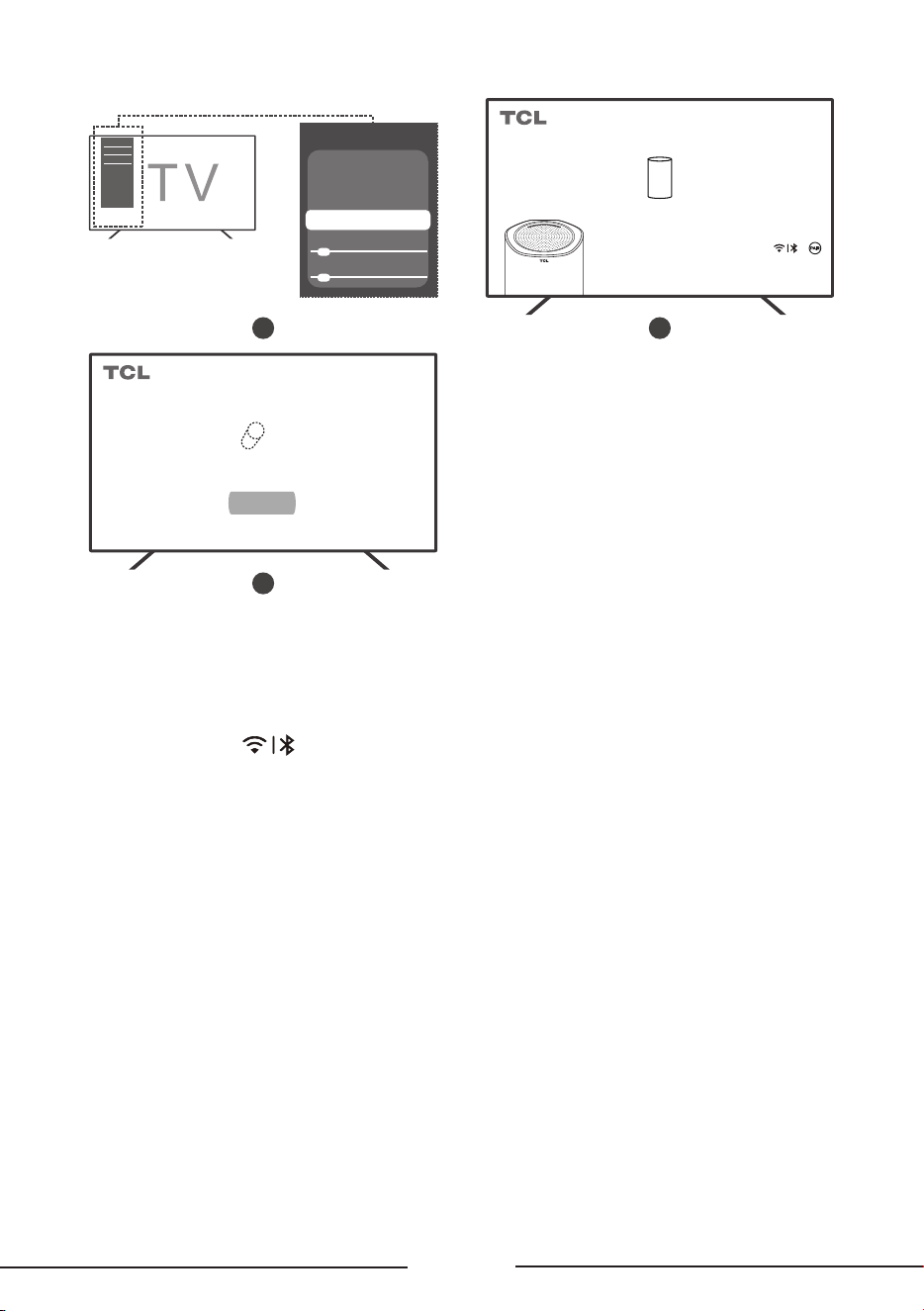
Method 1: When the product is started for the first time, it will automatically enter the pairing
mode. The TV terminal needs to open the specified page to discover the list of speakers.
The path of the specified page: All Settings > Display and Sound > Audio Output Settings >
Speaker Management (Z100)
(
> Pair and Manage > Add New Device
)
(The path may vary depending on the specific model of the television.)
Note: 5GHz Wi-Fi network is required.
13
1
Audio Output Settings
Digital Audio Out
PCM
Audio Output
Internal Speaker
Speaker Management (Z100)
Audio Delay 0
0
Digital Audio Out Delay
2
Welcome to use TCL Z100
Scanning for surrounding speakers...
When the device is turned on for the first time, it will
automatically scan the surrounding devices, and the white
breathing light will flash. You can also long press or
(low volume) for three seconds to initiate the scan actively.
For specific operations, please refer to the speaker's
instruction manual to adjust the speaker to the best sounding
state.
3
Note: When pairing, please do not use casting or other function.
Welcome to use TCL Z100
1 speaker pairing requests detected
Z100_XXXX
Pairing
Notes
• XXXX represents the last four digits of the MAC address.
• If pairing fails with Method 1, execute Method 2 to re-trigger the speaker pairing.
Method 2: Short press
to switch to the Wi-Fi source, and then press and hold it for 3s to
enter the pairing mode with the TV.
Follow the TV pairing path in Method 1 to pair.
Notes
• Refer to TCL ocial website for supported TV models.
• Maintain connection in a 5GHz Wi-Fi environment.
• Obtain optimal viewing position before auto-calibration.
• When using Z100 speakers, video playback may pause during certain scenarios when accessing
settings for optimal audio-visual experience.
• For best viewing eect, ensure speaker fronts face the user during calibration.
14
1
Audio Output Settings
Digital Audio Out
PCM
Audio Output
Internal Speaker
Speaker Management (Z100)
Audio Delay 0
0
Digital Audio Out Delay
2
Speaker Management (Z100)
Success: 1, Failures: 0
Recalibration
Device
Management
Software
Updates
Add
new device
3
Welcome to use TCL Z100
Scanning for surrounding speakers...
When the device is turned on for the first time, it will
automatically scan the surrounding devices, and the white
breathing light will flash. You can also long press or
(low volume) for three seconds to initiate the scan actively.
For specific operations, please refer to the speaker's
instruction manual to adjust the speaker to the best sounding
state.
4
Note: When pairing, please do not use casting or other function.
Welcome to use TCL Z100
1 speaker pairing requests detected
Z100_XXXX
Pairing
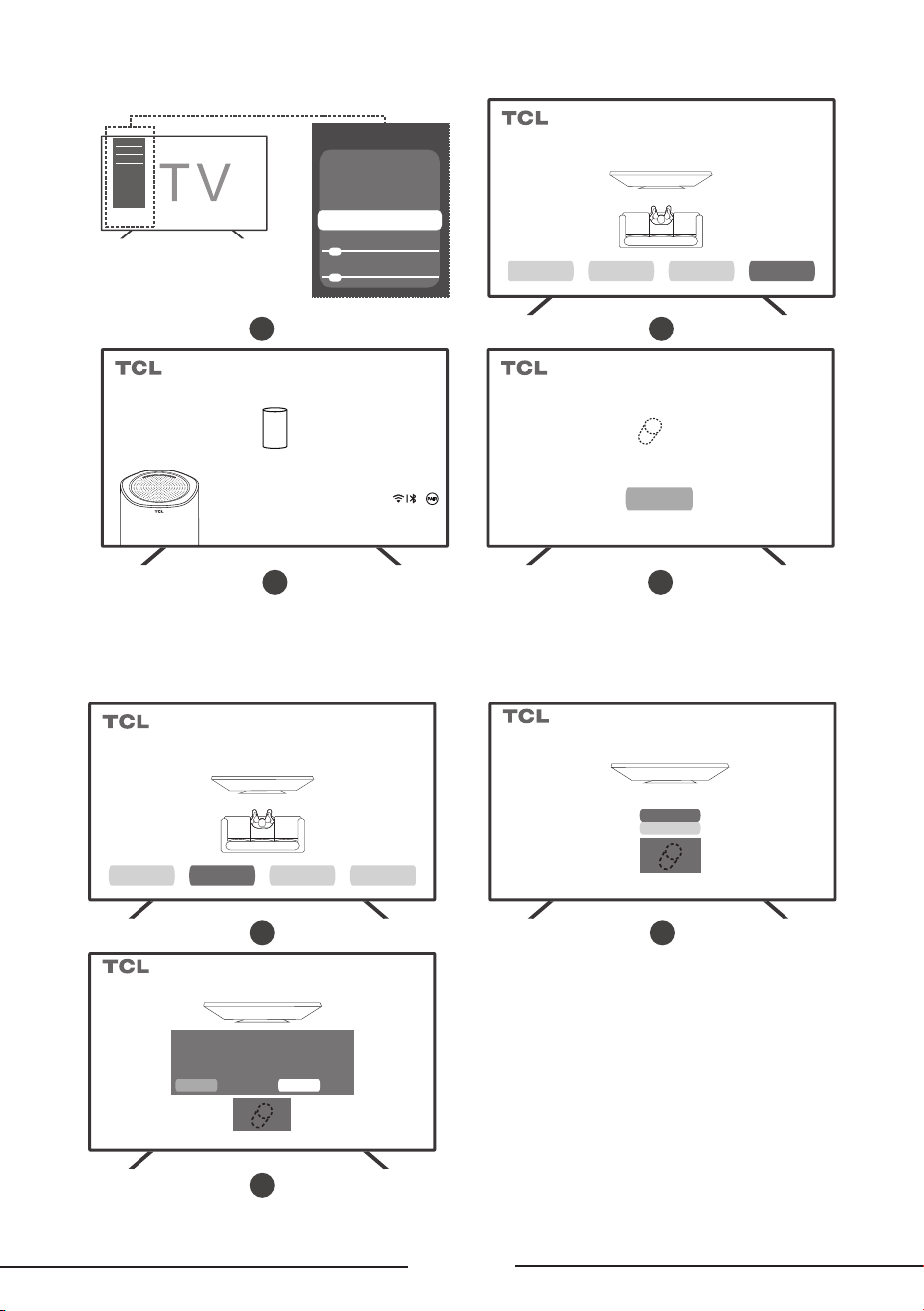
Speaker management
Click "Sound" -> "Speaker Management".
2
Device Management
Remove
Rename
Z100_XXXX
Speaker Management (Z100)
Success: 1, Failures: 0
Recalibration
Device
Management
Software
Updates
Add
new device
1
Delete
Rename
Z100_XXXX
Device Management
Are you sure you want to remove
Z100 _XXXX?
Removing this speaker will make it unusable and
may affect the performance of other speakers. lt's
recommended to recalibrate the speakers
ConfirmCancel
3
* TV related schematic diagram. The actual TV interface display may vary.
15
Connect the speaker to a Bluetooth device
Notes
• Ensure your wireless device supports Bluetooth function.
• Operating range between speaker and Bluetooth device is approximately 10m
(no obstacles between devices)
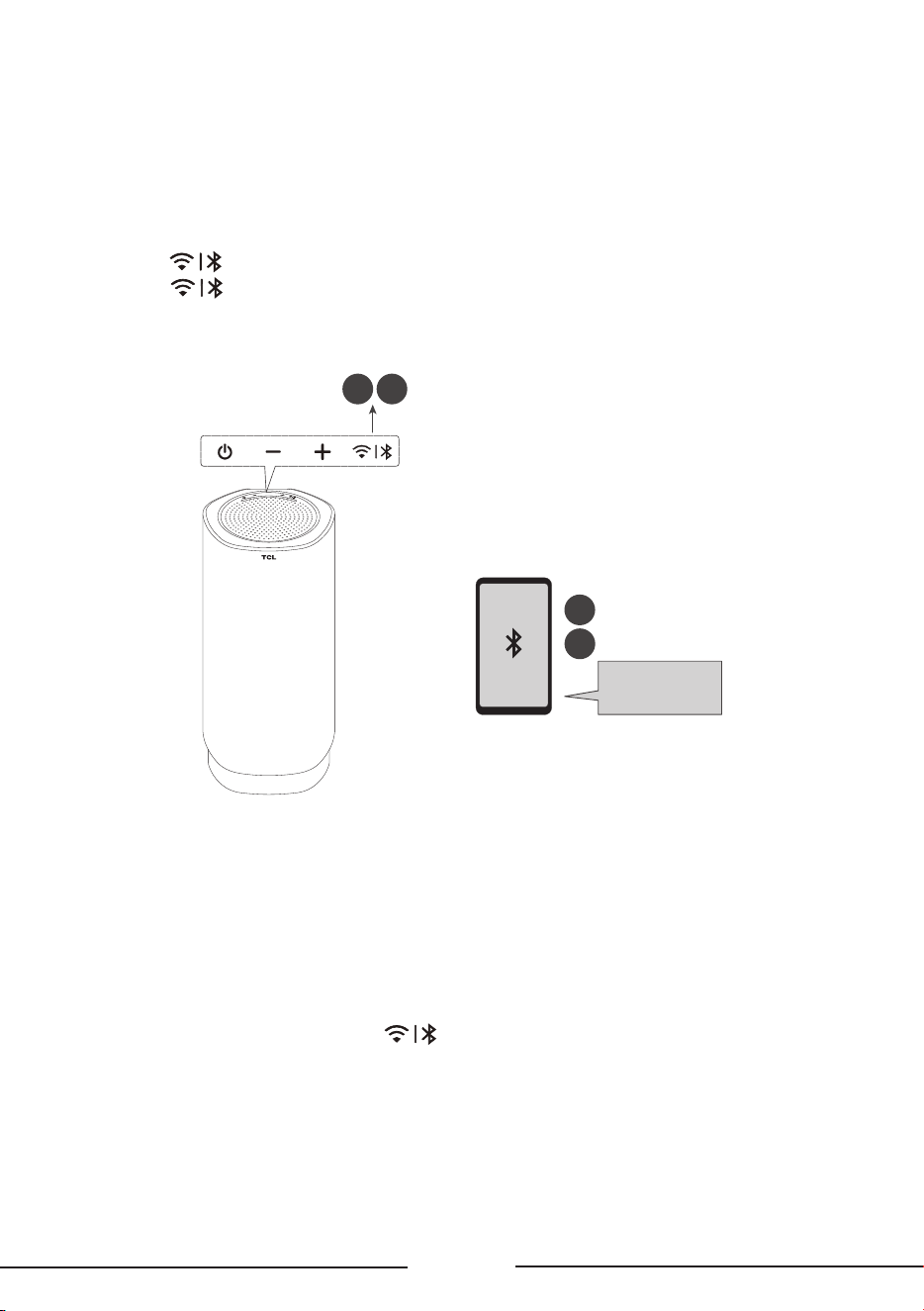
1 Short press
button ->Switch to Bluetooth source (blue light will display).
2 Long press
button for 3s to enter pairing mode.
3 Enable Bluetooth on your device and ensure it is in pairing mode.
4 Select TCL Z100.
2
1
4
3
TCL Z100
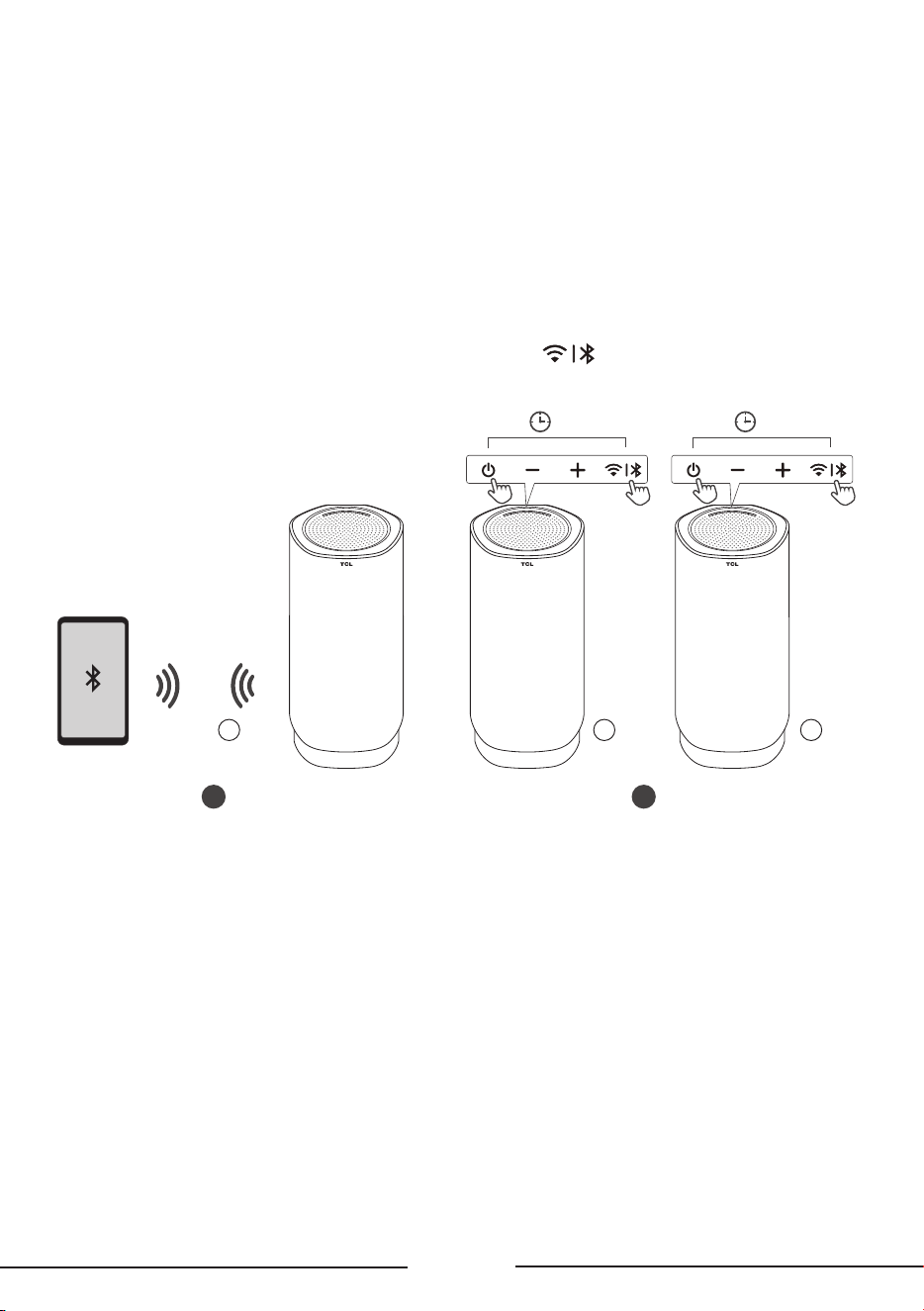
Bluetooth networking function
Connection and pairing:
1 Activate networking function by long-pressing combo keys in Bluetooth mode.
2 For networking, one speaker must be connected to phone as host while the other speaker must
not be phone-connected.
3 Host speaker (phone-connected) pairs with secondary (unconnected). System will auto-
announce Left/Right after networking.
4 In the networking state, double-press
button to toggle stereo L/R channels
(works with/without Bluetooth connection). Voice prompt indicates Left/Right.
5 Secondary speaker disables Bluetooth visibility/connectivity.
6 The network feature has memory function. After restarting, the host/secondary devices will
maintain their previous mode and roles. If previously paired, they will automatically reconnect.
7 Upon successful networking, host shows solid orange light while secondary shows slow breathing
orange light.
16
Operation control:
1 Supports synchronized volume adjustment between host and secondary.
2 Host and secondary power buttons operate independently.
3 Secondary automatically syncs to host volume after connection.
4 In networking mode, the host maintains normal functions such as Bluetooth disconnection,
pairing (long press the Bluetooth button), and reconnect with the same connection logic and
LED indicators as standalone mode, while the secondary remains unavailable.
5 Switching input source on host or secondary automatically exits network mode.
6 After the host and secondary are networked, to connect secondary separately to Bluetooth
devices, perform factory reset.
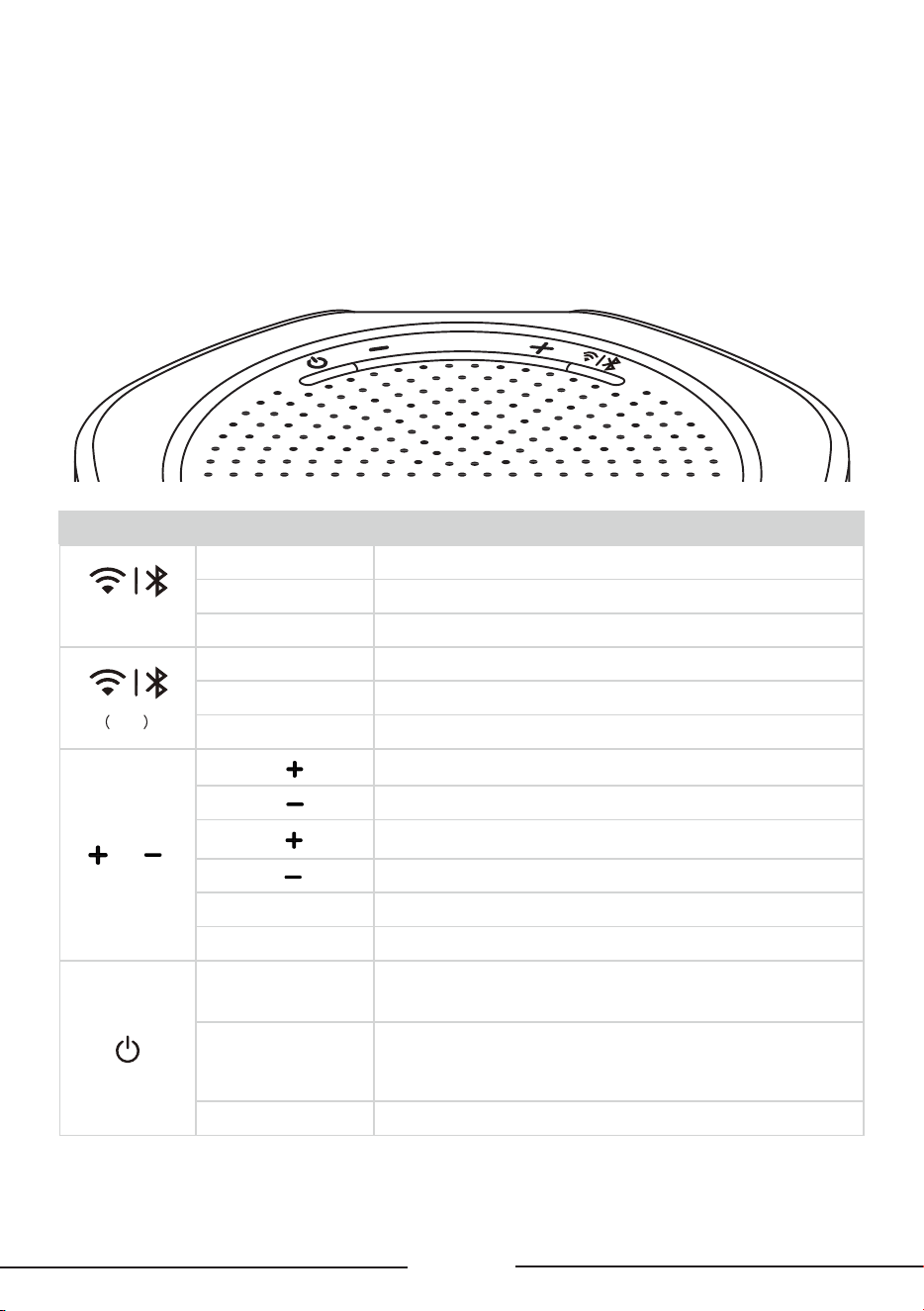
7 When the Bluetooth network is disconnected, long press
for more than 3s clears
host/secondary configuration. Network reconnect becomes unavailable (requires combo key
press to re-establish).
2
>5s >5s
1
A
Speaker
A
Speaker
B
Speaker
17
Using the Speaker
Control the speaker through the panel
The LED status shown on the speaker is helpful to understand the behavior of the speaker.
Bluetooth: blue; Wi-Fi: white; system reset: yellow; abnormal: red; other status: changing white.
Key Function LED status on the speaker
(Bluetooth)
Disconnect The blue light flashes for 5s and then turns o.
Pairing The blue light flashes quickly and turns o after 180s.
Connected The light is on for 2.5s and fades out in 0.5s.
Wi-Fi
Disconnect The light fades in and out for 5 times within 5s.
Pairing The white light flashes quickly and turns o after 180s.
Connected The light is normally on for 2.5s and fades out in 0.5s.
and
Short press The light fades in and out in 0.5s.
Short press
The light fades in and out in 0.5s.
Long press
The light fades in and out in 0.5s.
Long press
The light fades in and out in 0.5s.
Maximum volume The light fades in and out twice, and then turns o.
Minimum volume The light fades in and out twice, and then turns o.
Power on
(standby/sleep ->
power on)
After the startup process ends, the light turns on in the color of the last
input and switches to the corresponding input source.
Standby/sleep
1. The light turns on, turns o gradually and sleeps in 3s.
2. The light turns on, turns o gradually, and then flashes twice and turns o
(flashing twice in 1s and then turning o) and then stays standby in totally 4s.
Restore setting
The yellow light flashes continuously until the device is restored to user mode.

18
Specifications
Product Name
Wireless free sound speaker with Dolby Atmos FlexConnect
Speaker
• Power supply: AC 100-240V~50/60Hz
• Power consumption: 40W
• Standby power consumption (after long pressing the power button for 5s): < 0.3W
• Standby power consumption when network standby is enabled
(Bluetooth source/Wi-Fi not connected: when no signal input or audio output for 20 minutes;
Wi-Fi connected: follows TV standby): <2W
• Bass impedance: 4
Ω
• Tweeter impedance: 8
Ω
• Sky sound & full-frequency impedance: 6
Ω
Frequency response: 20 Hz-20 KHz
• Dimensions (length x height x width): 137.6x301.6x132.6mm
• Weight: 2.55 kg
• Operating temperature: 0°C-45°C
• Bluetooth frequency range: 2.40 - 2.4835 GHz
• Bluetooth transmitter power: < 20 dBm (EIRP)
• Wi-Fi network: IEEE 802.11 a/b/g/n/ac (2.4GHz/5GHz)
• 5GHz Wi-Fi frequency range: 5.15 – 5.35 GHz, 5.470 – 5.725 GHz, 5.725 – 5.85 GHz
• 2.4GHz Wi-Fi frequency range: 2.4 – 2.4835 GHz
• FTC Power Output Rating: 72W
Bluetooth
• Bluetooth version: 5.3, Bluetooth profiles - supports stereo Bluetooth
(Advanced Audio Distribution Profile-A2DP; Audio/Video Remote Control Profile-AVRCP)
19
Notice
Disposal of your old product
Your product is designed and manufactured with high quality materials and components,
which can be recycled and reused.
Environmental protection and sustainability
We have omitted all unnecessary packaging and make sure it is eco-friendly and sustainable.
Trademarks
Dolby, Dolby Atmos, and the double-D symbol are registered trademarks of Dolby
Laboratories Licensing Corporation. Manufactured under license from Dolby Laboratories.
Confidential unpublished works. Copyright © 2012-2025 Dolby Laboratories. All rights reserved.
The Bluetooth® word mark and logos are registered trademarks owned by Bluetooth SIG, Inc. and
any use of such marks by TTE Corporation is under license. Other trademarks and trade names are
those of their respective owners.

TCL support:
US: support.tcl.com
CA: www.tcl.com/ca/en
www.tcl.com/ca/fr
1-877-300-9223
WE ARE READY TO HELP
Contactusrstwithanyquestions
TAKE CARE WHEN REMOVING THE
SPEAKER
Copyright © 2025 TCL. All rights reserved.
Z100-US&CA_UM_V1.5
