
PointerCard C1
User Manual
Apple Find My Network Compatible Card Tracker
Model: GI-PC1
Version: V1.0

Table of Contents
(Hint: Right-click the table of contents and select "Update Field" to refresh page numbers)
Table of Contents ...............................................................................................................................2
Product Overview ..............................................................................................................................3
Technical Specifications ......................................................................................................................4
Physical Parameters ............................................................................................................................... 4
Environmental Reliability ....................................................................................................................... 4
Wireless & RF......................................................................................................................................... 4
Positioning Performance ....................................................................................................................... 5
Power & Battery .................................................................................................................................... 5
Audio & Alerts ....................................................................................................................................... 5
Sensors & Extensions ............................................................................................................................. 5
User Guide .........................................................................................................................................6
Power On ............................................................................................................................................... 6
Pairing Device ........................................................................................................................................ 6
Enable Lost Mode .................................................................................................................................. 6
Remove Device ...................................................................................................................................... 6
Button Instructions ................................................................................................................................ 7
LED Indicator ......................................................................................................................................... 7
Important Notes ................................................................................................................................8
Safety & Compliance ..........................................................................................................................9
Data Security ......................................................................................................................................... 9
Certifications ......................................................................................................................................... 9
Package Contents ............................................................................................................................. 11
PointerCard C1 | User Manual
3 / 12
Product Overview
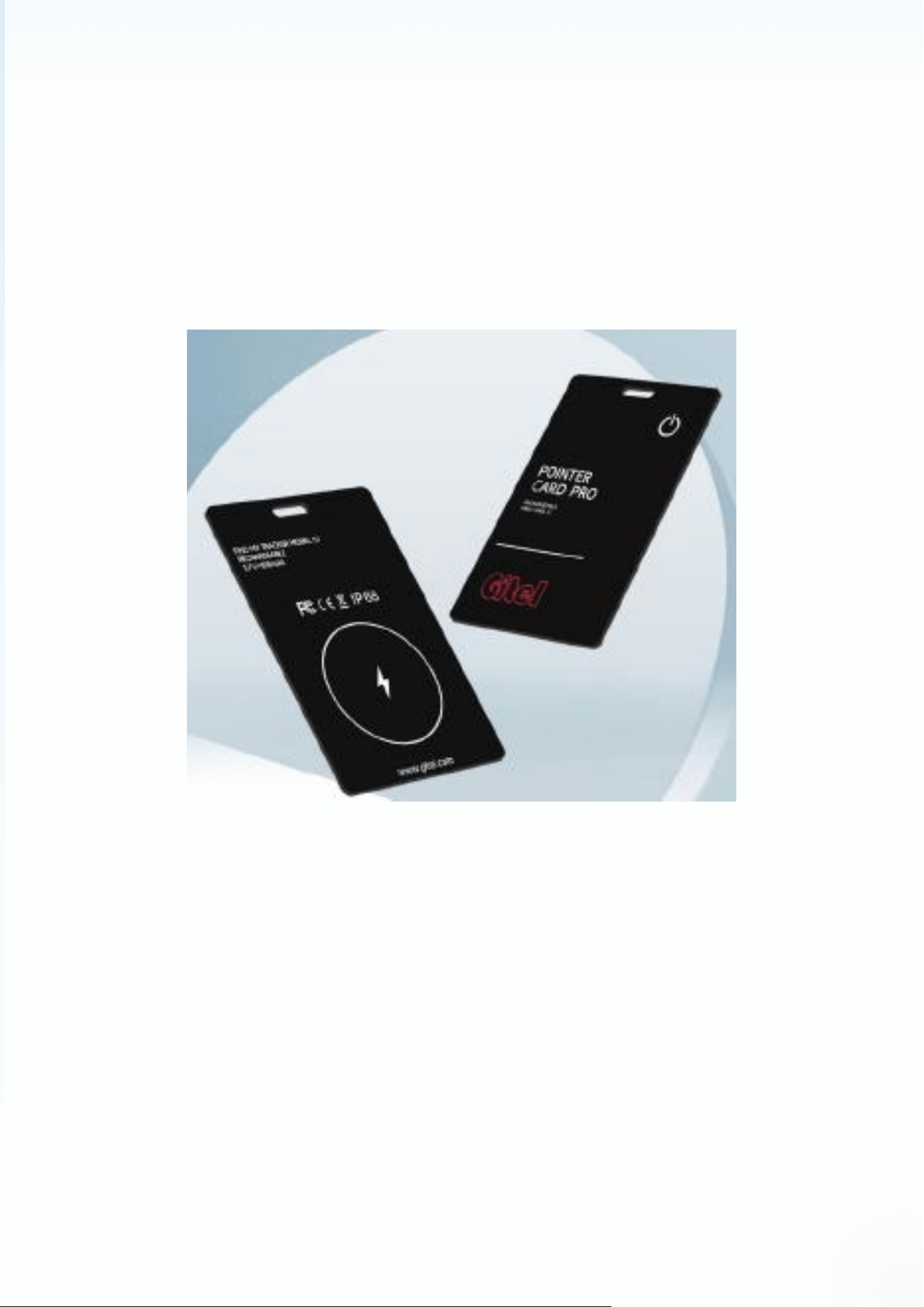
PointerCard C1 is an ultra-thin card tracker designed for Apple Find My Network. It uses advanced
Bluetooth 5.3 LE technology to work with the global Find My Network consisting of hundreds of
millions of Apple devices, helping you track and protect your important items anytime, anywhere.
Figure 1: PointerCard C1
Key features include: Ultra-thin design (only 1.7mm thick), easily fits in wallets, card holders or
passport cases; Ultra-long battery life (over 1 year), no frequent charging needed; 90dB buzzer for
quick location with one-click call; IP68 protection rating, waterproof and dustproof; Lost Mode
support to protect your privacy and security.

PointerCard C1 | User Manual
4 / 12
Technical Specifications
Physical Parameters
Dimensions
83.7 x 54.4 x 1.7 mm (Ultra-thin)
Weight
12.6g +/- 0.5g (with battery)
Housing Material
PC with painted surface
Color
Black
Installation
Lamination
Environmental Reliability
Protection Rating
IP68 (1m depth for 30 minutes)
Operating Temperature
-20°C ~ +60°C
Storage Temperature
-40°C ~ +85°C
Drop Test
1.5m to concrete on all 6 sides, no functional damage
Thermal Cycling
-20°C to 60°C, 10 cycles, normal function
Wireless & RF
Protocol
Bluetooth® 5.4 LE (supports Long-Range Coded PHY)
Frequency Band
2402 - 2480 MHz (ISM 2.4 GHz)
Modulation
GFSK
Max TX Power
0 dBm
RX Sensitivity
-97 dBm (PER≤30.8%)
Antenna
On-board ceramic + optional external IPEX connector
Certifications
CE-RED, FCC Part 15, IC, SRRC, BQB, RoHS, REACH

PointerCard C1 | User Manual
5 / 12
Positioning Performance
Operating Mode
Apple Find My Network (iOS 14.5+ / iPadOS 14.5+ / macOS 11+)
Broadcast Interval
Slow 2s (stationary); Fast 200ms (motion triggered)
Effective Range
≈ 80m (tested with iPhone 12 and above)
Offline Cache
72h trajectory saved during power loss, auto-sync when online
Accuracy
≤ 2m in open areas (depends on Apple device density)
Power & Battery
Battery Model
PL084545 Li-Polymer, 100 mAh
Battery Life
> 1 year (slow broadcast 2s, 25°C, 5 triggers/day)
Low Battery Alert
Phone popup + device beeps 3 times when < 15%
Standby Current
≤ 9 µA (sleep mode)
TX Peak Current
≤ 18 mA (+10 dBm burst)
Buzzer Current
≤ 30 mA (3V, continuous 80 dB @10cm)
Audio & Alerts
Buzzer
Φ20.5mm piezo, dual resonant cavity design
Volume
80 dB @10cm (10s during one-click call)
Alert Methods
Buzzer + Blue LED flash (sound can be disabled in App)
Sensors & Extensions
G-Sensor
3-axis accelerometer, programmable motion threshold
Extension Interface
2xPogo Pin for programming/testing (VDD, SWDIO, SWCLK, GND)

PointerCard C1 | User Manual
6 / 12
User Guide
Power On
Press the FindMy button once. You will hear "beep-beep-beep" indicating the device is powered on.
The blue LED will flash during power on.
Pairing Device
Follow these steps to pair PointerCard C1 with your Apple device:
1. Place the FindMy card near your Apple device (e.g., iPhone);
2. Turn on Bluetooth and connect to the internet on your Apple device;
3. Open the "Find My" app, select "Items", tap "+", and choose "Add Other Item";
4. When "PointerCard C1" is detected, tap "Connect";
5. Name your device, select an emoji, tap "Continue", then tap "Done" to complete pairing.
Enable Lost Mode
When your item is lost, you can enable Lost Mode:
6. Open the "Find My" app, tap "Items" at the bottom, then tap the item name;
7. Under "Lost Mode", tap "Enable";
8. Follow the on-screen instructions, tap "Continue" and enter a phone number or email;
9. Tap "Next" to verify the information, then tap "Enable" again to complete.
Note: For iOS 26.1 and above, there is no Enable button. In case of lost item, follow the prompts in
the App to enter contact information and share location.
Remove Device
To remove a paired device:
10. Open the "Find My" app, tap "Items" at the bottom, then tap the item name;

PointerCard C1 | User Manual
7 / 12
11. Find "Remove Item" at the bottom of the list, tap "Remove" to complete.
Note: After removing the device, it will beep and the blue LED will flash twice. The device will not
power off but enter pairing mode. If no connection is made within 10 minutes, it will automatically
power off.
Button Instructions
Power On
Press once, hear "beep-beep..", blue LED flashes
Power Off
Press twice, press and hold on third press, hear "beep-beep..", blue LED
flashes
Reset (Factory Reset)
Press four times, press and hold on fifth press, rapid "beep-beep..", blue
LED flashes
Trigger LearnMore Page
Press twice
LED Indicator
Blue LED
Lights up during power on/off, reset, or triggering LearnMore page
Red LED
Lights up during charging
Green LED
Lights up when fully charged
Blue Flashing
Blue LED lights up and flashes when buzzer sounds

PointerCard C1 | User Manual
8 / 12
Important Notes
When pairing the device with the Find My app, it needs to connect to Apple servers. If pairing fails, it
is usually because your network cannot temporarily connect to Apple servers. We recommend the
following:
12. Switch network, e.g., between WiFi and cellular data;
13. Factory reset the device: After powering on, press four times, press and hold on fifth press.
You will hear rapid "beep-beep.." with blue LED flashing;
14. Re-pair with the Find My app.

PointerCard C1 | User Manual
9 / 12
Safety & Compliance
Data Security
PointerCard C1 uses end-to-end AES-128-GCM + ECDH P-224 encryption technology to ensure your
location data security. The Bluetooth beacon contains no personal ID, and location data can only be
decrypted by your own device. The elliptic curve P-224 public key rotates every 15 minutes to
effectively prevent tracking.
Certifications
This product has passed MFi certification, and the certification number can be verified on the official
website. The product complies with Apple Find My Network Accessory R3 specification. Certifications
passed: FCC
FCC Statement:
This device complies with part 15 of the FCC Rules. Operation is subject to the following two
conditions: (1) this device may not cause harmful interference, and (2) this device must accept any
interference received, including interference that may cause undesired operation.
Changes or Modifications not expressly approved by the party responsible could void the user’s
authority to operate this device.
NOTE: This equipment has been tested and found to comply with the limits for a Class B digital
device, pursuant to Part 15 of the FCC Rules. These limits are designed to provide reasonable
protection against harmful interference in a residential installation. This equipment generates, uses
and can radiate radio frequency energy and, if not installed and used in accordance with the
instructions, may cause harmful interference to radio communications. However, there is no
guarantee that interference will not occur in a particular installation.
If this equipment does cause harmful interference to radio or television reception, which can be
determined by turning the equipment off and on, the user is encouraged to try to correct the
interference by one or more of the following measures:
-- Reorient or relocate the receiving antenna.

PointerCard C1 | User Manual
10 / 12
-- Increase the separation between the equipment and receiver.
-- Connect the equipment into an outlet on a circuit different from that to which the receiver is
connected.
-- Consult the dealer or an experienced radio/TV technician for help.
RF Exposure statement:
This equipment complies with FCC radiation exposure limits set forth for an uncontrolled
environment.

PointerCard C1 | User Manual
11 / 12
Package Contents
Please confirm the following items are included when opening the package:
PointerCard C1 Tracker
x 1
Color Box
x 1
Blister Tray
x 1
Package dimensions: 100 x 80 x 10 mm, Gross weight: 25.2 g

PointerCard C1 | User Manual
12 / 12
PointerCard C1
Smart Tracking, Peace of Mind
www.gitell.com
© 2024 All Rights Reserved