USER MANUAL
WASHING MACHINE
Life is complicated today. Let's make laundry care simple! Your new washing machine
uses innovative technology and latest achievements in laundry care to help you simplify
your daily household chores.
The latest technology used in our washing machine ensures the gentlest care for each
garment with minimum creasing. At the same time, your washing machine will be easy
on the environment, owing to its highly efficient use of power, water and detergent.
This washing machine is intended solely for household use. Please do not use it for any
laundry labelled as not suitable for machine washing.
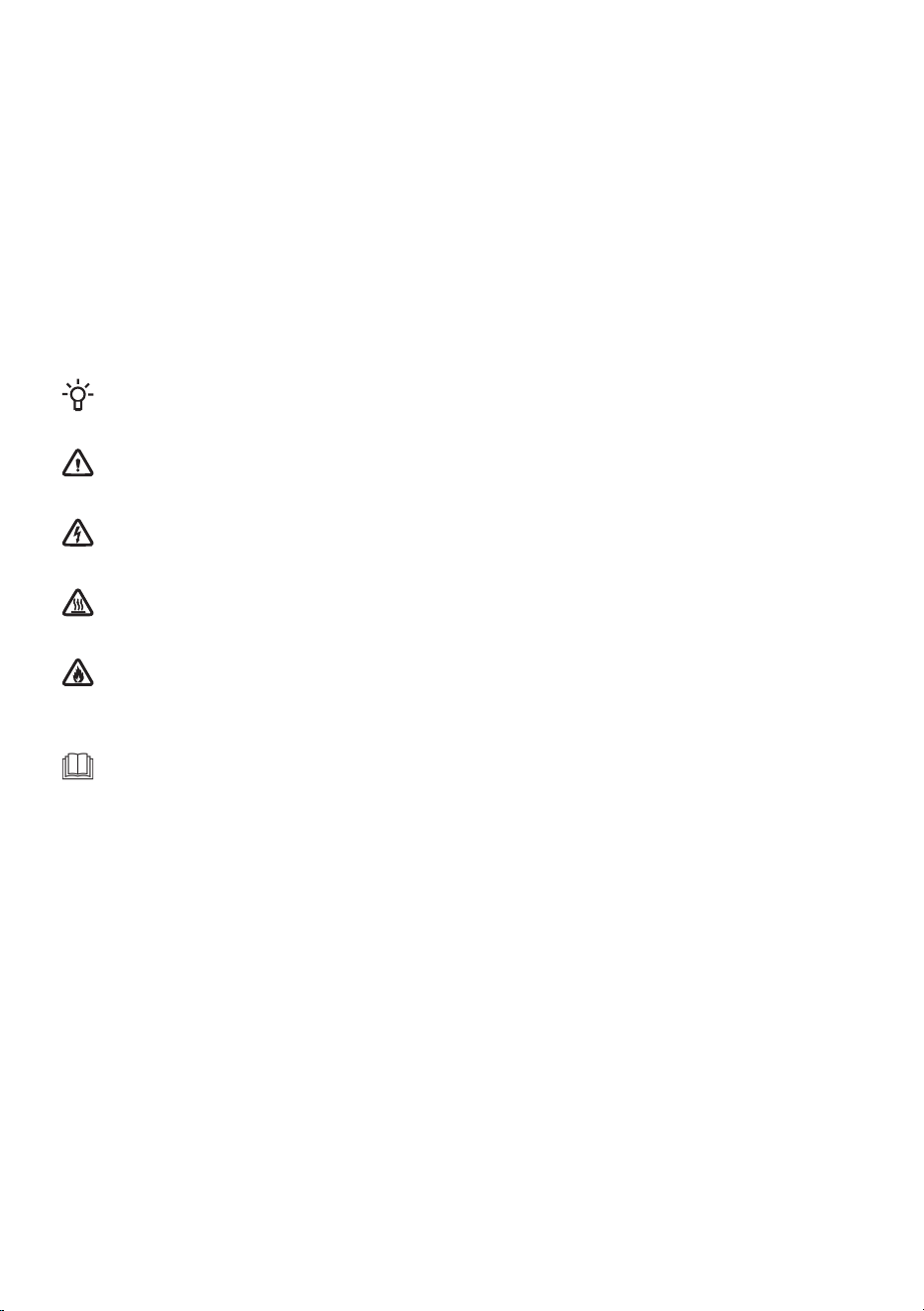
The following symbols are used throughout the manual and they have the following meanings:
INFORMATION!
Information, advice, tip, or recommendation
WARNING!
Warning – general danger
ELECTRIC SHOCK!
Warning – danger of electric shock
HOT SURFACE!
Warning – danger of hot surface
DANGER OF FIRE!
Warning – danger of fire
It is important that you carefully read the instructions.

Contents
51. SAFETY PRECAUTIONS .................................................................................................
51.1 Use in accordance with regulations ................................................................................
61.2 Installation and connection .............................................................................................
81.3 Proper use .......................................................................................................................
81.4 Child safety ......................................................................................................................
91.5 Danger of hot surface ......................................................................................................
102. ENVIRONMENTAL PROTECTION ..................................................................................
102.1 Disposal of packaging .....................................................................................................
102.2 General advice ................................................................................................................
102.3 Disposal of the end-of-life appliance ..............................................................................
113. WASHING MACHINE DESCRIPTION .............................................................................
113.1 Washing machine overview .............................................................................................
123.2 Dimensions of the washing machine ...............................................................................
123.3 Opening and closing the washing machine door ............................................................
133.4 Technical data .................................................................................................................
163.5 Control unit ......................................................................................................................
184. INSTALLATION AND CONNECTION ..............................................................................
184.1 Before the first installation and during subsequent transport .........................................
214.2 Positioning the washing machine ....................................................................................
254.3 Connecting the washing machine to the water supply network .....................................
284.4 Connecting the washing machine to the electricity supply .............................................
295. BEFORE USING THE APPLIANCE FOR THE FIRST TIME ............................................
295.1 Before switching on the appliance for the first time ........................................................
295.2 First appliance settings ...................................................................................................
305.3 First connection to a Wi-Fi network ................................................................................
336. WASHING PROCESS, STEP BY STEP (1–7) ..................................................................
336.1 Sort the laundry ...............................................................................................................
356.2 Put the laundry in the washing machine and add the detergent and/or softener ...........
386.3 Switch on the washing machine .....................................................................................
396.4 Choose the washing program .........................................................................................
466.5 Select the additional functions ........................................................................................
526.6 Start the washing programme .........................................................................................
546.7 Complete the washing cycle ...........................................................................................
557. APPLIANCE SETTINGS AND ADJUSTMENTS ..............................................................
557.1 Saving programe and selected functions ........................................................................
567.2 Additional appliance settings ..........................................................................................
577.3 User settings menu .........................................................................................................
607.4 Statistics ..........................................................................................................................
618. CLEANING AND MAINTENANCE ...................................................................................
618.1 Cleaning the washing machine exterior ..........................................................................
628.2 Cleaning the dispenser tray .............................................................................................
638.3 Cleaning the water supply hose, detergent dispenser housing, and rubber door gasket .
648.4 Cleaning the pump filter ..................................................................................................
659. TROUBLESHOOTING AND SERVICING ........................................................................
659.1 What to do in case of problems? ....................................................................................
3

669.2 Display Message Table ...................................................................................................
729.3 Service .............................................................................................................................
729.4 Warranty ..........................................................................................................................
729.5 Spare parts ......................................................................................................................
7310. RECOMMENDATIONS FOR WASHING AND ECONOMIC USE ...................................
7310.1 Tips for optimal laundry results .......................................................................................
7510.2 Prevention and removal of limescale ..............................................................................
7610.3 Stain removal tips ............................................................................................................
7811. CONSUMPTION VALUES ................................................................................................
4
1. SAFETY PRECAUTIONS
Carefully read the instructions for use before using
the washing machine.
Please, do not use the washing machine without reading
and understanding these instructions or use first.
These instructions for use of a washing machine are
supplied with different types or models of washing
machines. Therefore, they may include descriptions of
settings or equipment that are not available in your
washing machine.
Instructions for use are available on our website at
www.gorenje.com.
1.1 Use in accordance with regulations
Failure to observe the instructions for use or inappropriate
use of the washing machine may result in damage to the laundry
or the appliance, or injury to the user. Keep the instruction
manual handy, near the washing machine.
This appliance is intended to be used in household and
similar applications, such as:
•
staff kitchen areas in shops, offices and other working
environments;
•
farm houses;
•
by clients in hotels, motels and other residential type
environments;
•
bed and breakfast type environments.
5
This appliance must not be used in:
•
areas for communal use in blocks of flats,
•
in open spaces or outdoors.
This appliance is not intended for use by persons (including
children) with reduced physical, sensory or mental capabilities,
or lack of experience and knowledge, unless they have been
given supervision or instruction concerning use of the appliance
by a person responsible for their safety.
1.2 Installation and connection
WARNING!
The washing machine may only be used with the
factory-installed power cord.
ELECTRIC SHOCK!
To avoid danger, a damaged power cord may only be
replaced by the manufacturer, a service technician, or an
authorized person.
WARNING!
Do not connect the washing machine to power mains using
an external switching device such as a programme timer,
or connect it to power mains that is regularly switched on
and off by the power supply provider.
Follow the instructions for correct installation of the Gorenje
washing machine and connection to the water and power mains
(see chapter INSTALLATION AND CONNECTION).
Connection to water and power supply has to be executed by
an adequately trained technician or expert.
6

Any repair and maintenance pertaining to safety or performance
should be done by trained experts.
Do not install the washing machine in a room where the
temperature can drop to below 5°C, as washing machine
parts may be damaged in case of water freezing.
The ventilation openings in the base of washing machine must
not be obstructed by a carpet.
To connect the washing machine to water supply, make
sure to use the supplied water supply hose and gaskets. Water
pressure must be between 0,05 and 1 MPa (0,5–10 bar).
Always use a new water supply hose to connect the washing
machine to water supply; do not reuse an old water supply
hose.
The end of the water discharge hose should reach into a water
drain line.
Before the start of the washing cycle, press the door on the
indicated spot until it locks into place. The door cannot be
opened during washing machine operation.
We recommend that, before the first wash, you remove any
impurities from the drum by using the Cotton white 90 °C
program (see chapter Set of washing programs).
After washing is completed, close the water tap and unplug
the appliance from the wall socket (disconnect it from the
mains power supply).
7
1.3 Proper use
Only use the washing machine for washing laundry, as
described in the instruction manual. The machine is not
intended for dry cleaning.
No silver ions are released during the washing programme.
Only use agents for machine washing and care of laundry. We
shall not be responsible for any damages or discolouration of
gaskets and plastic parts resulting from incorrect use of
bleaching or colouring agents.
When descaling, only use descaling agents with added
anti-corrosion protection. (Only use non-corrosive descaling
agents.) Follow the manufacturer's instructions. Finish the
descaling process with several rinse cycles or by running the
Ultra clean (Self-cleaning programme) in order to remove any
residual acid (e.g. vinegar etc.).
DANGER OF FIRE!
Do not use detergents that contain solvents as this could
lead to release of poisonous gases, damage to the washing
machine, and risk of fire and explosion.
1.4 Child safety
WARNING!
Children of less than 3 years should be kept away unless
continuously supervised.
Children should be supervised to ensure that they do
not play with the appliance.
Keep the detergent and conditioner out of reach of
children.
8
Activate the child lock. See chapter APPLIANCE SETTINGS
AND ADJUSTMENTS / Additional appliance settings / Child
Lock.
Before closing the washing machine door and running the
programme, make sure there is nothing except laundry in the
drum (e.g. if a child climbed into the washing machine drum
and closed the door from the inside).
The washing machine is made in compliance with all
relevant safety standards.
This appliance can be used by children aged from 8 years and
above and persons with reduced physical, sensory or mental
capabilities or lack of experience and knowledge if they have
been given supervision or instruction concerning use of the
appliance in a safe way and understand the hazards involved.
Children shall not play with the appliance.
Cleaning and user maintenance, shall not be made by children
without supervision.
1.5 Danger of hot surface
HOT SURFACE!
At higher washing temperatures, the door glass will heat
up. Be careful to avoid burns. Make sure children do not
play near the door glass.
9
2. ENVIRONMENTAL PROTECTION
2.1 Disposal of packaging
Once you have unpacked the appliance, we advise you to recycle all packaging materials. Dispose
of them in the appropriate containers or take them to a local collection center.
2.2 General advice
To ensure that your appliance works as well and for as long as possible, we recommend that you:
• follow the recommended rated load for each washing programme (see chapter Set of washing
programs),
• use detergent and fabric softener sparingly,
• clean the appliance regularly (see chapter CLEANING AND MAINTENANCE) and use the Ultra
clean self-cleaning program regularly (see chapter TROUBLESHOOTING AND SERVICING / Display
Message Table/ CLn ).
• select programs with longer washing times and lower temperatures.
This will help protect the environment and save natural resources.
2.3 Disposal of the end-of-life appliance
DISPOSAL
Packaging is made of environmentally friendly materials that can be recycled, disposed
of, or destroyed without any hazard to the environment. To this end, packaging materials
are labelled appropriately.
The symbol on the product or its packaging indicates that the product should not be treated as
normal household waste. Take the product to an authorized collection centre for waste electric and
electronic equipment processing.
When disposing of the appliance at the end of its useful life, remove all power cords, and destroy
the door latch and switch to prevent the door from locking or latching (child safety).
Correct disposal of the product will help prevent any negative effects on the environment and health
of people, which could occur in case of incorrect product removal. For detailed information on
removal and processing of the product, please contact the relevant municipal body in charge of
waste management, your waste disposal service, or the store where you bought the product.
10
3. WASHING MACHINE DESCRIPTION
In this chapter, you will get to know your washing machine, including:
- its appearance,
- its dimensions,
- how to open the washing machine door,
- the location of the technical specifications and other relevant information,
- the layout and functions of the appliance’s control panel.
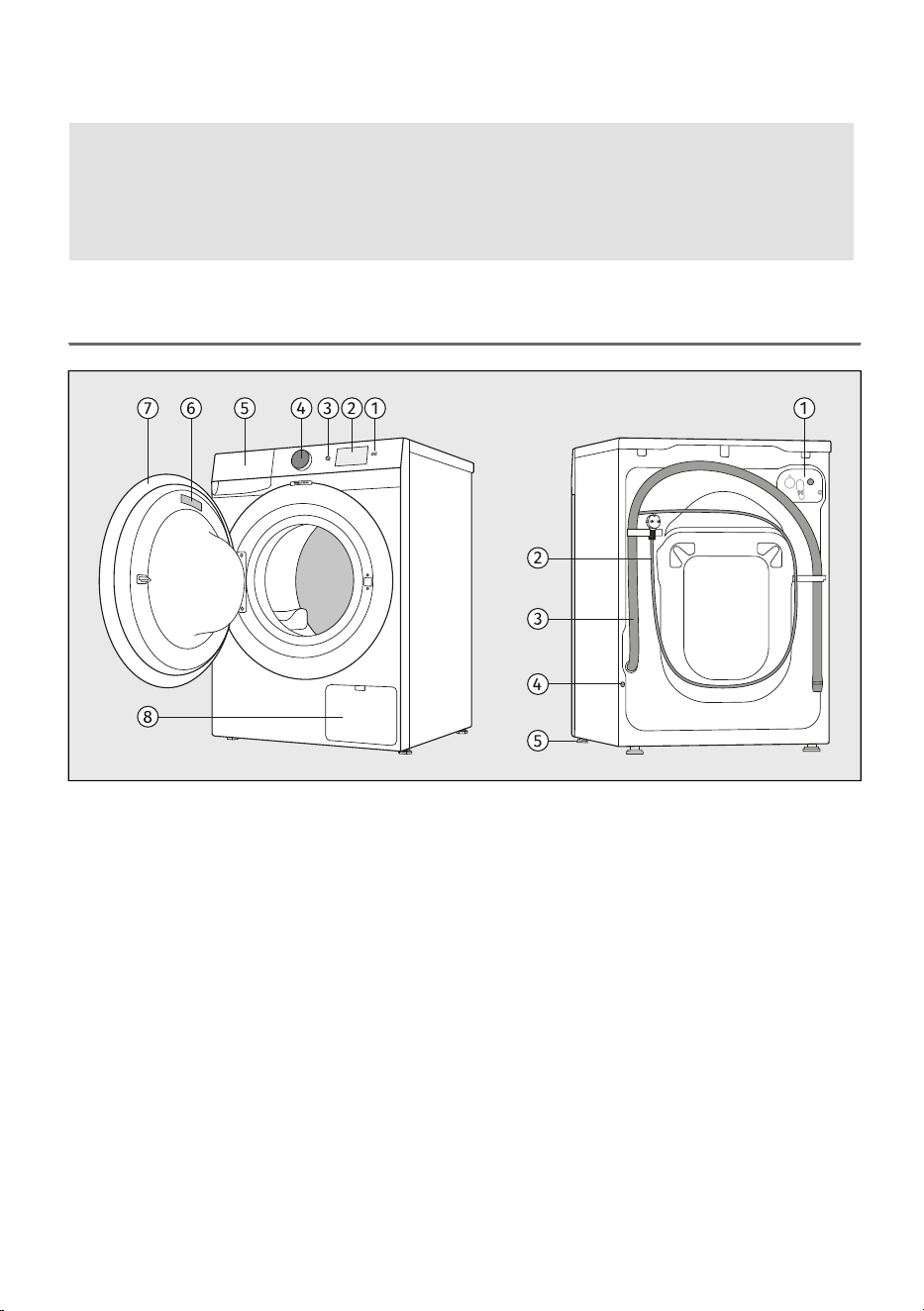
3.1 Washing machine overview
BACKFRONT
Water inlet connector1.Start key Start/Pause1.
Power cord2.Colour display control unit2.
Water discharge hose3.Button for switching the appliance on and off
On/Off
3.
Hole for installing the protective plug4.
Selection and confirmation button (hereinafter
referred to as the selector)
4. Adjustable feet5.
Detergent compartment5.
Rating plate6.
Door7.
Pump filter8.
11
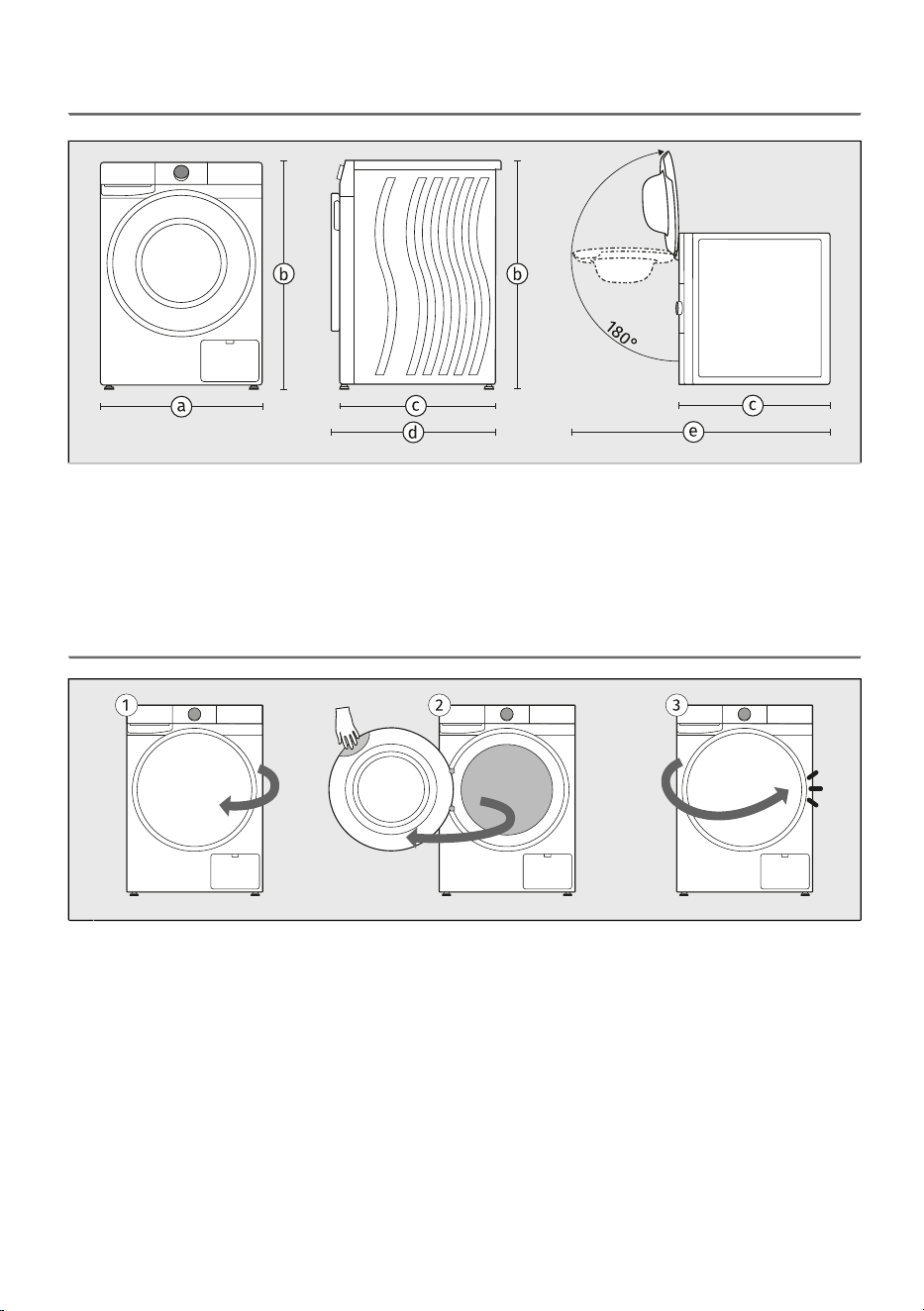
3.2 Dimensions of the washing machine
width of the appliance: 600 mm–a
height of the appliance: 850 mm–b
depth of the appliance’s top surface: 600 mm–c
depth with door closed: 635 mm–d
depth with door open: 1105 mm–e
3.3 Opening and closing the washing machine door
The washing machine door is hinged on the left side of the appliance and opens from the right.1
Place your hand in the recess at the top right corner of the door. (The recess is not visible from
the front.)
2
Pull the door towards you.
Close the door in reverse order until it locks into place.3
12
3.4 Technical data
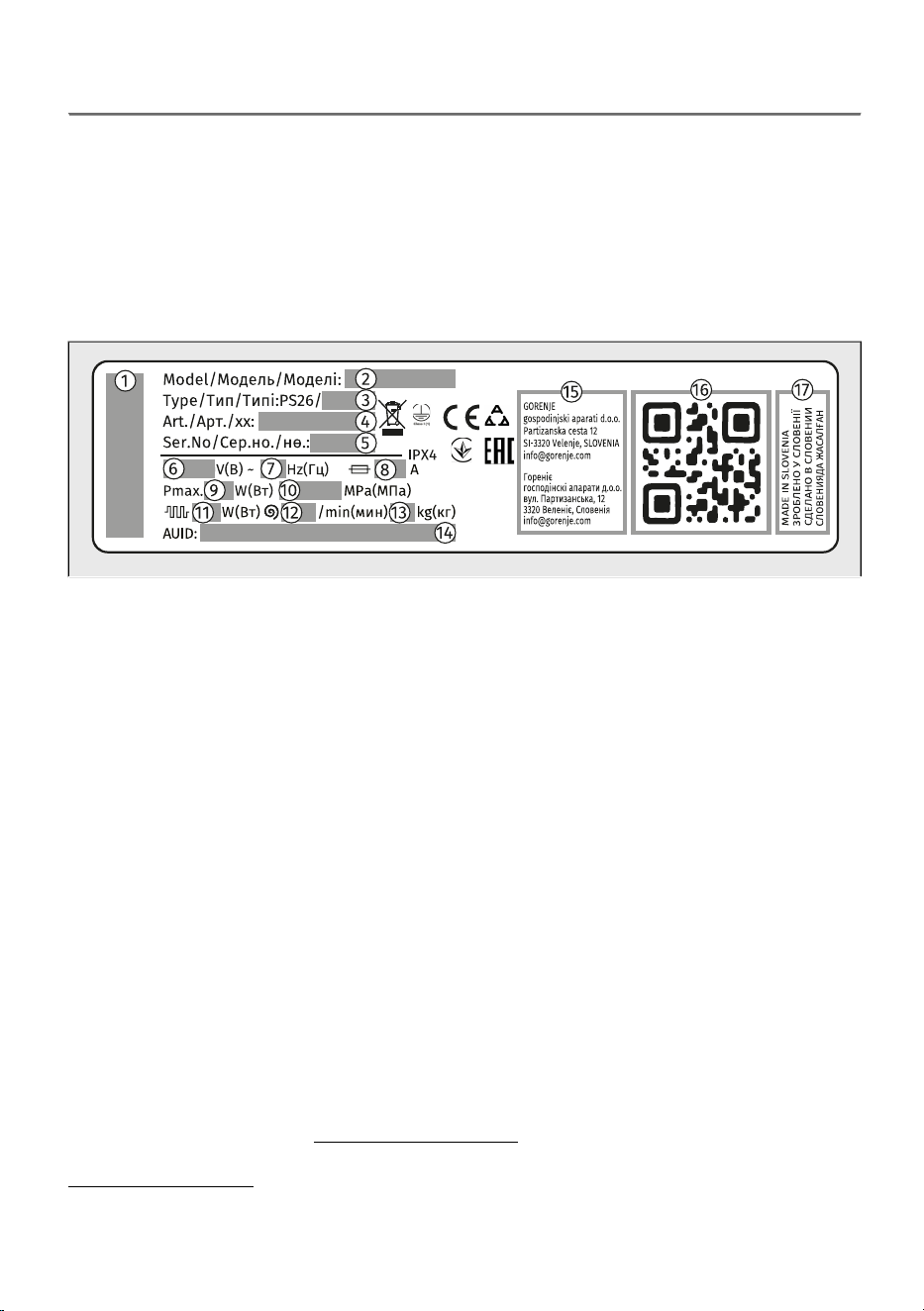
Technical data on the rating plate
Rating plate with basic information about the washing machine is located on the inner side of the
washing machine door (see the beginning of this chapter).
The rating plate contains various technical details about your appliance. An important element is the
QR koda, which provides access to a website where you can find additional information about your
appliance, as well as all relevant documentation, such as the user manual, declaration of conformity,
product information sheet, consumption data and the energy label, and after-sales support information.
You will also need the QR code to connect the appliance for remote control.
brand of the appliance–1
model designation of the appliance–2
type designation of the appliance–3
the article number/service index (you will need them when contacting customer service)–4
serial number of the appliance (you will need them when contacting customer service)–5
rated voltage (V)–6
frequency (Hz)–7
maximum current consumption (A)–8
maximum nominal power (W)–9
maximum permitted water pressure (MPa)–10
rated water heater power (W)–11
maximum spinning rate–12
maximum rated load (kg)–13
unique AUID number–14
manufacturer's address–15
unique QR code (required when connecting the appliance to a Wi-Fi network)–16
country of origin–17
Link to the EU EPREL database
From 1 March 2021, information on energy labelling and ecodesign requirements is available in the
EU EPREL product database.
The QR code on the energy label supplied with the appliance contains a web link through which you
can find your registered appliance in the EU EPREL database.
Information regarding the performance of the product can also be found in the EU EPREL database,
which is accessible via the link https://eprel.ec.europa.eu where you have to enter the model and
product number; both are indicated on the rating plate on the appliance. On the website
www.theenergylabel.eu you can find more detailed information about the energy label.
13
Keep the energy label in case it is needed in the future, together with the user manual and other
documents supplied with this appliance.
Compliance information
Radio equipment type
Built-in Wi-Fi/BLE module
Wi-Fi
2412 ~ 2472 MHzOperating frequency range
19.99 dBm EIRPMaximum output power
3.26 dBiMaximum antenna gain
Bluetooth
2402 ~ 2480 MHzOperating frequency range
10.00 dBmCarrier output
F1DEmission type
Declaration of conformity
The company declares that the device with the function ConnectLife complies with the essential
requirements and other relevant provisions of Directive 2014/53/EU. The detailed Declaration of
Conformity can be found at the web address https://auid.connectlife.io on the page of your device
among the additional documents.
Wi-Fi Network Requirements and Recommendations
1. Access Point and Coverage
• Standard 2,4 GHz Band Wi-Fi network IEEE 802.11b/g/n required,
• use a stable router or access point with adequate signal strength (minimum −60 dBm) at the
appliance installation location,
• avoid excessive channel overlap; use non-overlapping 2,4 GHz channels (1, 6, or 11) and 20 MHz
channel width,
• Wi-Fi network capacity must be dimensioned appropriately in multi-appliance installations.
2. Security and Encryption
• Network must use WPA2-PSK (AES) or WPA/WPA2 encryption,
• open (unencrypted) networks are not supported,
• appliance and mobile device must be connected to the same SSID during initial setup,
• continuous internet connection is required for operation of remote features.
3. Unsupported Network Types
• Networks with captive portals (browser-based login pages) or public Wi-Fi networks (hotel, guest
hotspot with login, etc.),
• networks requiring proxy servers or VPN tunnels,
• networks with strict MAC filtering (unless appliance MAC is manually whitelisted),
• networks enforcing client-based default-deny access control (unless appliance is manually granted
access).
14
Low standby mode
If you do not run any program or choose any settings after switching on the washing machine, the
display unit will be switched off after 5 minutes and switched to stand-by mode in order to save energy.
The display unit will be reactivated if you rotate the selector or press the On/Off button. If you do not
do anything for 5 minutes after the end of a programme, the display unit will be switched off to save
power.
< 0,5P o = weighted power when off [W]
< 0,5P I = weighted power when in standby [W]
5,00T I = standby time [min]
INFORMATION!
Low water temperature, low mains voltage and different washing loads, may affect the washing
time; the remaining time displayed is adjusted accordingly during the washing process.
INFORMATION!
Appliance with a wireless connection uses less than 2 W of electric energy in standby mode.
INFORMATION!
When the appliance is in Remote Control mode, the display switches off after entering standby,
and only the symbol remains illuminated.
15
3.5 Control unit
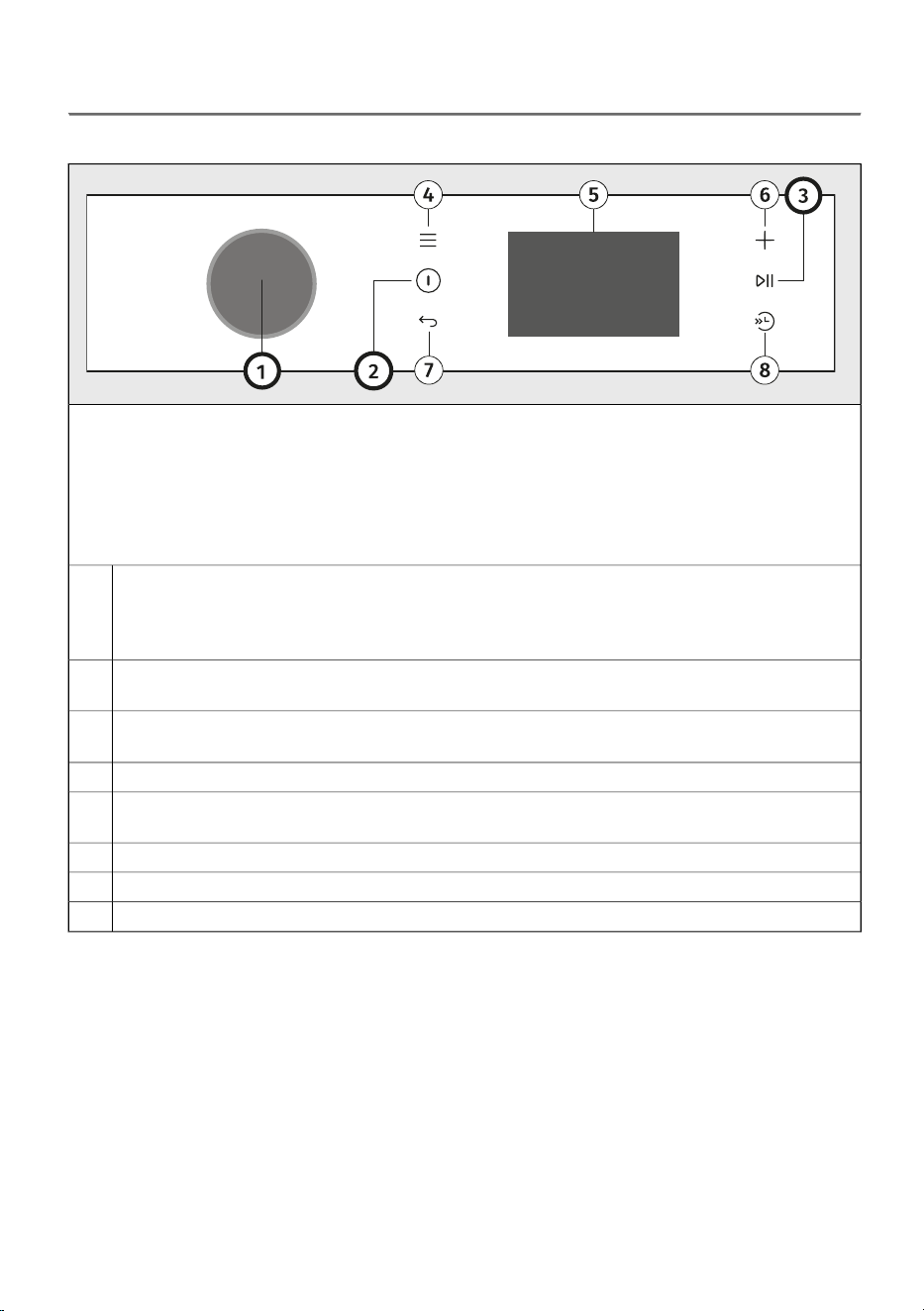
Control panel overview
The control unit is located on the upper right part of the appliance.
With it, you will be able to control the operation of the appliance:
- switch the appliance on or off,
- select the washing programme and additional options,
- adjust additional appliance settings,
- start and stop the washing cycle,
- identify possible malfunctions and errors, and perform basic troubleshooting.
Selection and confirmation button (hereinafter referred to as the selector)
To select a program, rotate the selector to the desired program. See chapter WASHING
PROCESS, STEP BY STEP (1–7) / Choose the washing program
To confirm the selection, press the selector.
1
Button for switching the appliance on and off
To turn the appliance on or off, press On/Off.
2
Key Start/Pause (lights up when active)
To start, pause, or resume a program, press key Start/Pause.
3
Function key Settings
4
Colour display (referred to as the screen or display)
Main menu set / Advanced settings in the menu / Submenu set
5
Function key Extras
6
Function key Back
7
Function key Fast wash
8
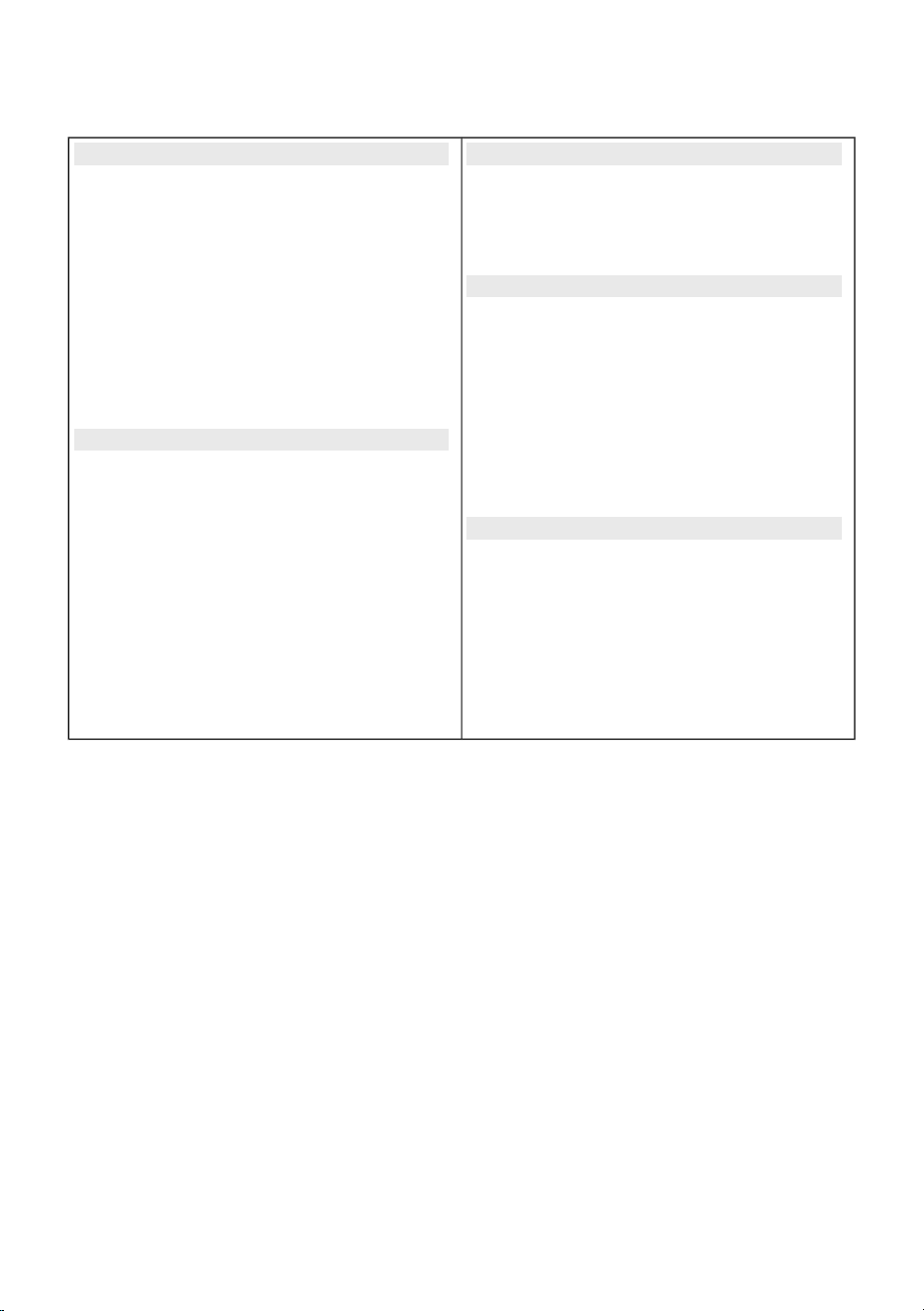
Main menu overview
The table lists all menus and submenus available on the appliance.
Before using the appliance for the first time, you will need to select certain initial settings, such as
Language. See chapter BEFORE USING THE APPLIANCE FOR THE FIRST TIME / First appliance
settings.
You can access individual menus in one or more of the following ways:
- by turning the selector,
- by pressing the selector,
- by pressing one of the function keys.
Confirm the selection by pressing the selector.
16
Follow the instructions on the screen.
The display provides the following information:
Extras (6)Initial settings before use
Child LockLanguage
Remote controlRemove transport protection
Delay endWater hardness
Dose aidSoft
Reset changesMedium
Settings (4)Hard
Wash laundrySkip
Remote control Wi-Fi On/OffFinish setup
SettingsConnect device to Wi-Fi
Sound / Language / Drum illumination /
Display brightness / Manage programs /
Wi-Fi settings / Water hardness / Reset to
default/ Factory reset
Wi-Fi
Yes / Finish setup
Open the ConnectLife app
Knob for selection and confirmation (1)
InformationProgram selection (press the selector)
Statistics / CyclesStains
Statistics / ErrorsSweat / Grass / Red wine / Grease /
Tomato / Blood / Off
Fast wash (Fast/Faster) (8)
Modes
Default/ Intensive / Silent / Saving mode
Temperature °C
Cold – 90 °C
Spin
1400 – 0 rpm/ Rinse hold
Extras
Off / Steam / Extra rinse / Prewash /
Extra water / Anti crease
17
4. INSTALLATION AND CONNECTION
This chapter describes how to:
- handle the washing machine before the first installation and during any subsequent transport,
- position the washing machine,
- connect the appliance to the water supply and electrical network.
INFORMATION!
Remove all packaging. When removing the packaging, make sure not to damage the appliance
with a sharp object.
4.1 Before the first installation and during subsequent
transport
INFORMATION!
Before using the washing machine for the first time, and before removing the transport securing
rods, it is essential to install:
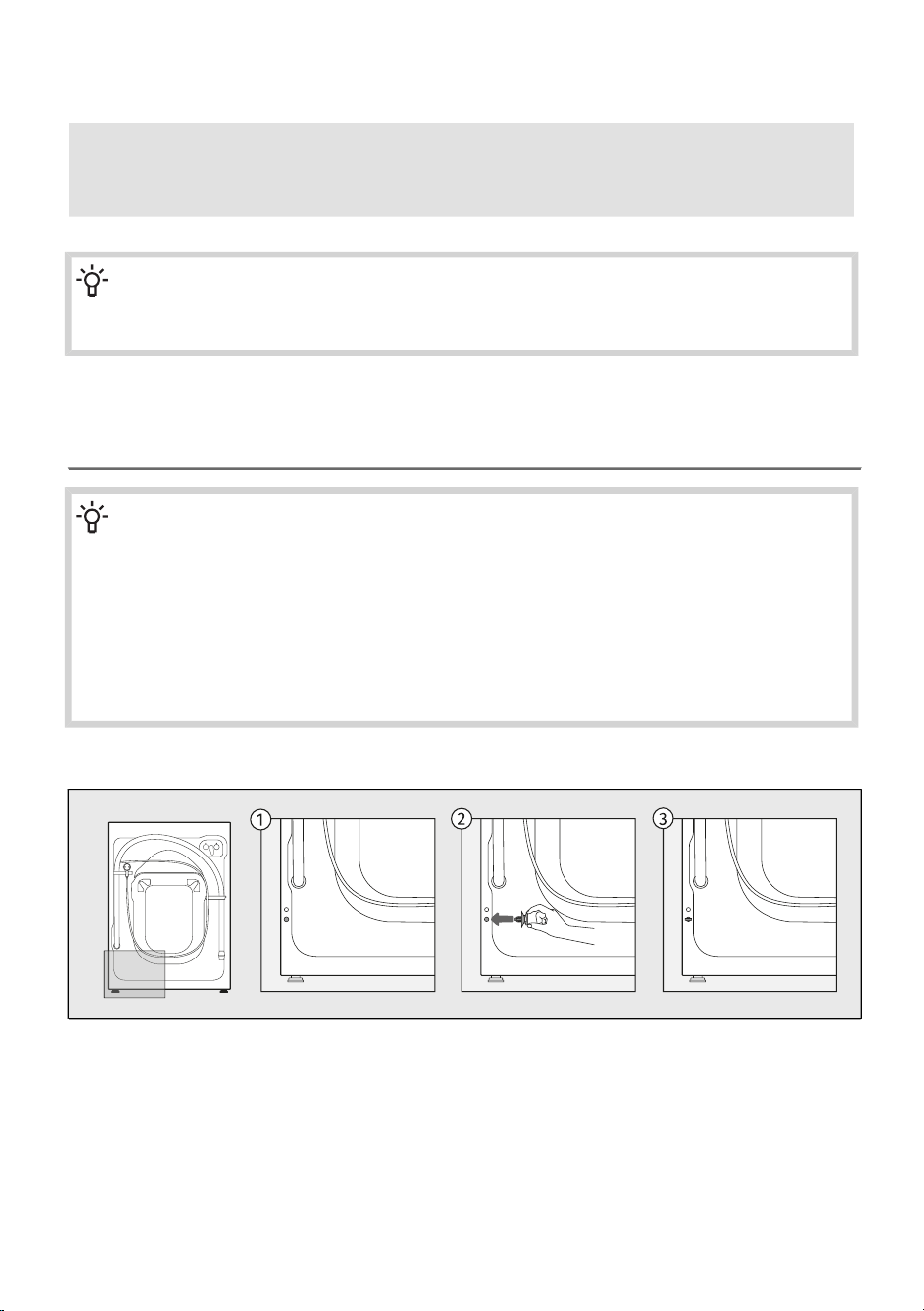
• the rear hole plug on the back of the washing machine, and
• the insulation strip at the bottom of the washing machine.
(depending on the model)
The rear hole plug, and insulation strip can be found in the bag inside the drum of the washing
machine.
Install the rear hole plug
Insert the plug into the hole located at the lower left-hand side of the back of the washing machine.
18
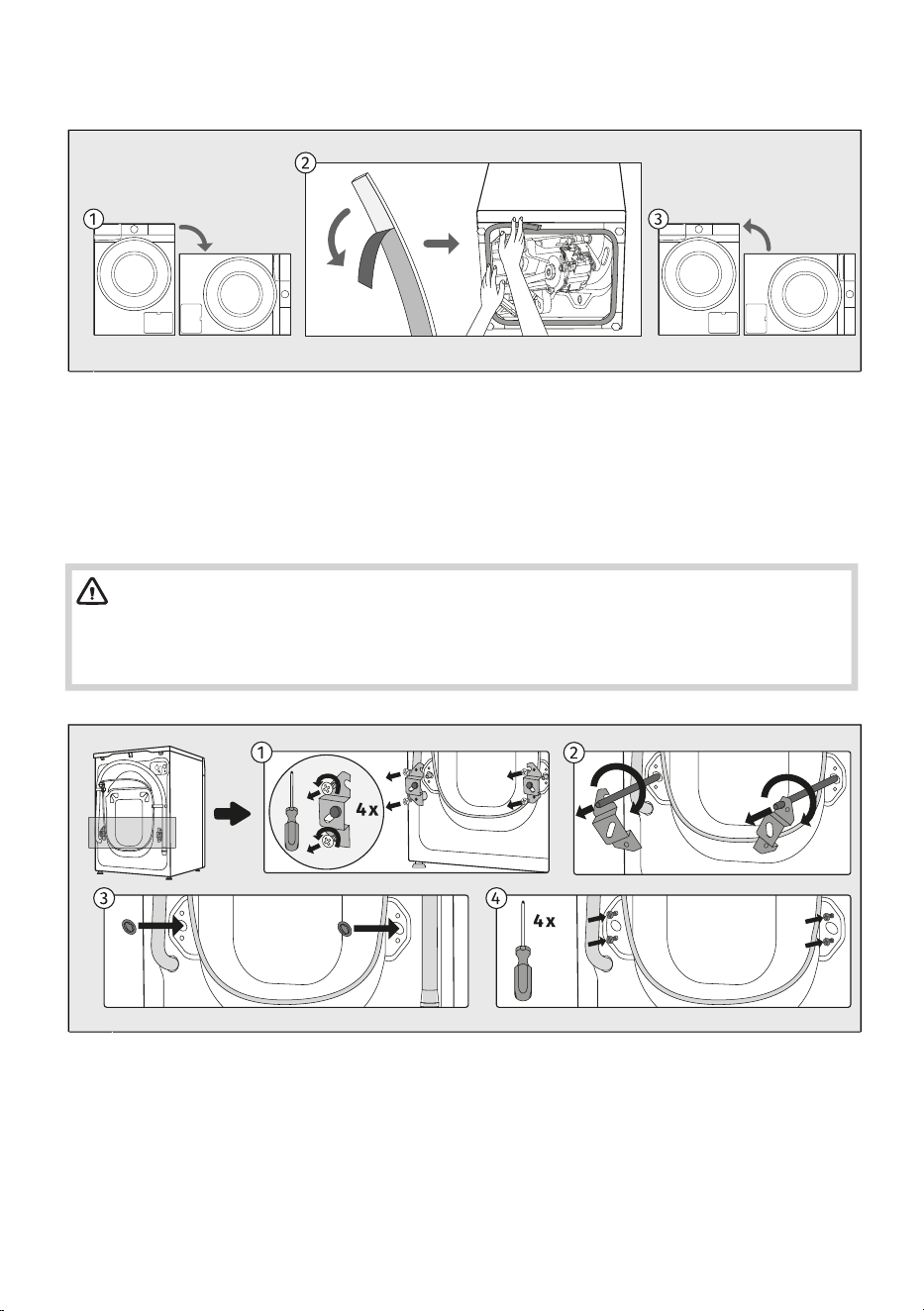
Install the insulation strip
(depending on the model)
Tilt the appliance onto its side and place it on the floor.1
Peel off the protective film from the insulation strip and attach it around the edge of the lower
opening, as shown in the illustration.
2
Return the appliance to its upright position.3
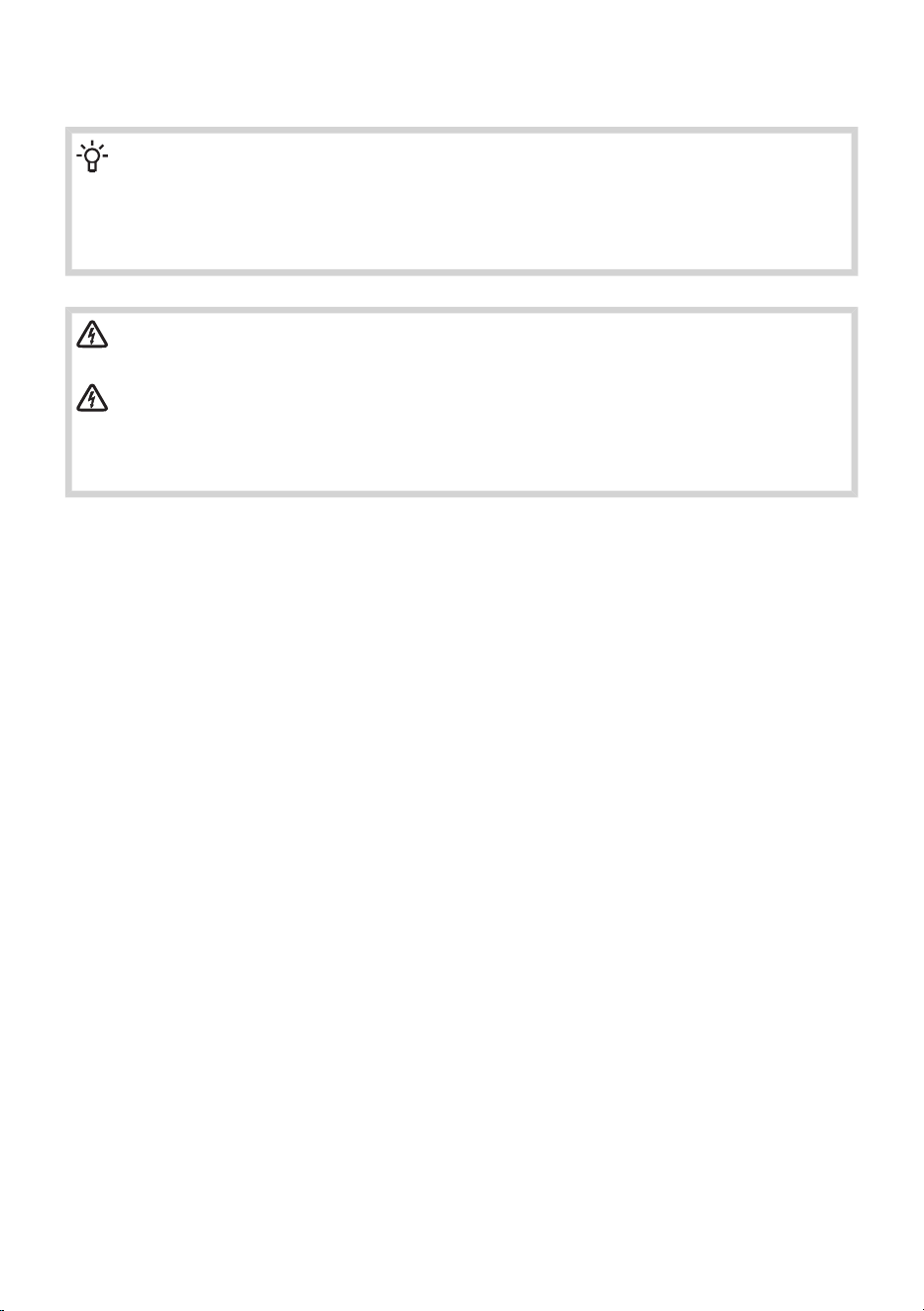
Remove the transport securing device
WARNING!
Before the first use of the appliance, transport rods must be removed. A blocked washing
machine may be damaged when it is switched on for the first time. Warranty shall be void in
cases of such damage!
Move the hoses and undo the screws on the back of the washing machine.
Remove the two angular pieces.
1
Slide the angular pieces onto the grove in the blocking rod; before doing so, rotate the right
angular piece to the opposite side.
Use the angular pieces to rotate the blocking rods by 90°and pull them out.
2
Cover the two holes through which the blocking rods were inserted with plastic plugs, and
redo the screws that you undid in step 1.
The plastic plugs are supplied in the bag with the washing machine instruction manual.
3,4
19
Moving and transport after installation
Before any subsequent transport, clean and dry the washing machine and the dispenser tray.
INFORMATION!
If you need to move the washing machine, reinstall the angle brackets and insert at least one
transport securing rod to prevent damage to the appliance during transport (see the previous
chapter). If the angle brackets or transport rods are lost, replacements can be ordered from
the manufacturer.
ELECTRIC SHOCK!
The appliance should be installed and connected by a trained technician.
ELECTRIC SHOCK!
Carefully read the instructions for use before connecting the washing machine. Repair
or any warranty claim resulting from incorrect connection or use of the washing machine
shall not be covered by the warranty.
20
4.2 Positioning the washing machine
Selecting the room
INFORMATION!
Floor on which the washing machine is placed must have a concrete base. It should be clean
and dry; otherwise, the washing machine may slide. Also, clean the bottom surface of
adjustable feet.
INFORMATION!
The washing machine must stand level and stable on a solid base.
INFORMATION!
If the washing machine is placed on an elevated stable base, the washing machine has to be
additionally secured against tipping.
The room in which you will install the washing machine should be sufficiently ventilated. Do not place
the appliance into a place where there is danger of freezing. Frozen water in the appliance may damage
the dryer.
Lighting in the room should be sufficient to allow reading the information on the display unit on the
control panel.
WARNING!
Do not place the washing machine behind lockable or sliding door, or door with a hinge on
the opposite side of the door hinge of the washing machine. Place it in the room in such a
way that the washing machine door can be freely opened.
21
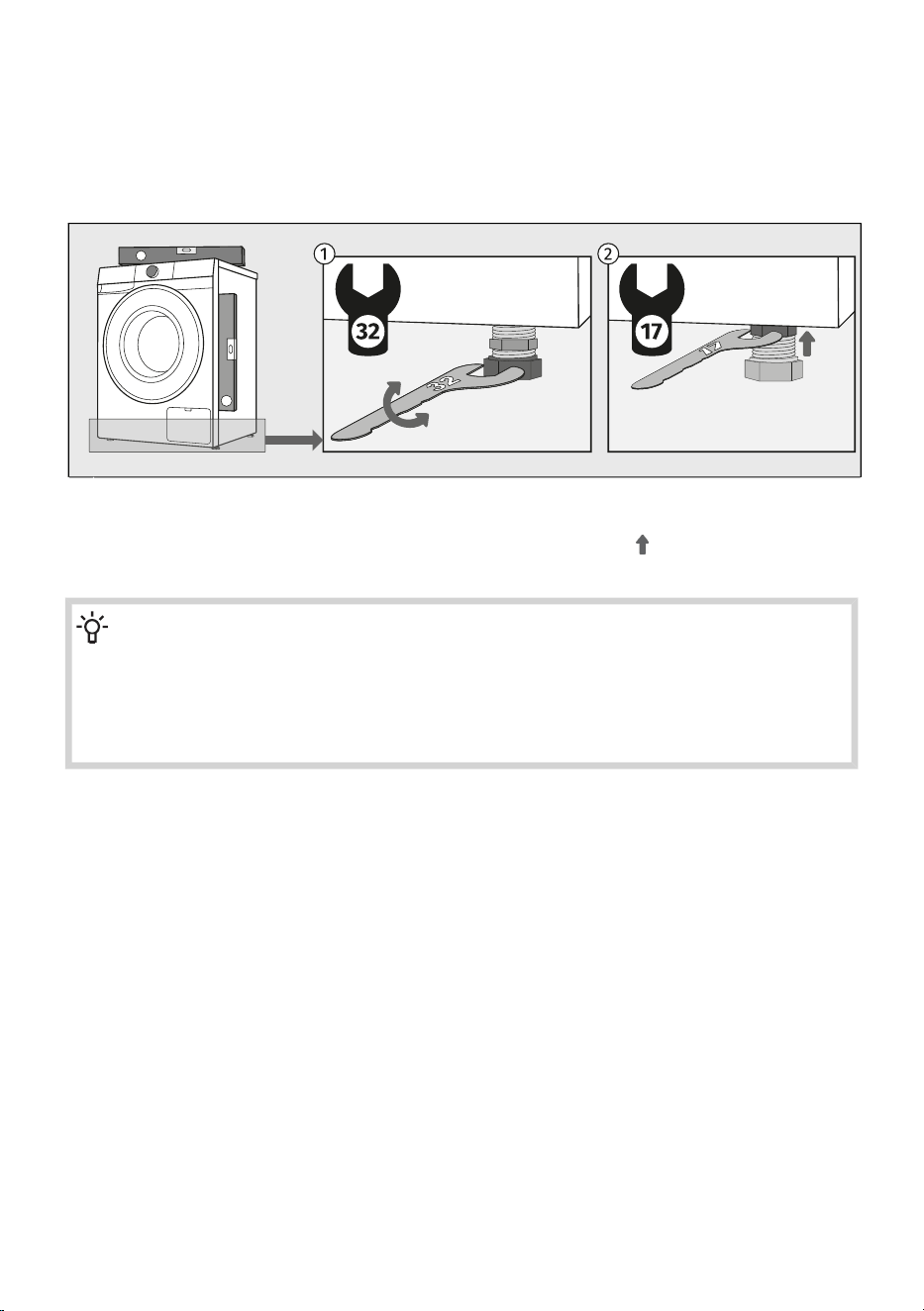
Leveling the appliance
It is important to level your washing machine to prevent it from moving around the room and to prevent
excessive vibration or noise when the appliance is operating. This can be achieved by adjusting the
washing machine's feet.
Use a water scale and spanner No. 32 (for feet) and 17 (for the nut). The spanners are not supplied.
Level the washing machine in longitudinal and traverse direction by rotating the adjustable feet.1
After adjusting the height of the feet, firmly tighten the jam nuts (counter nuts) using a spanner
No 17, by turning them towards the bottom of the washing machine (see figure).
2
INFORMATION!
Sometimes unusual or louder noise may appear during appliance operation; these are mostly
the result of improper installation.
Incorrect levelling of the washing machine with the adjustable legs may cause vibration,
appliance sliding across the room, and loud operation. Incorrect levelling of the washing
machine is not subject to warranty.
22
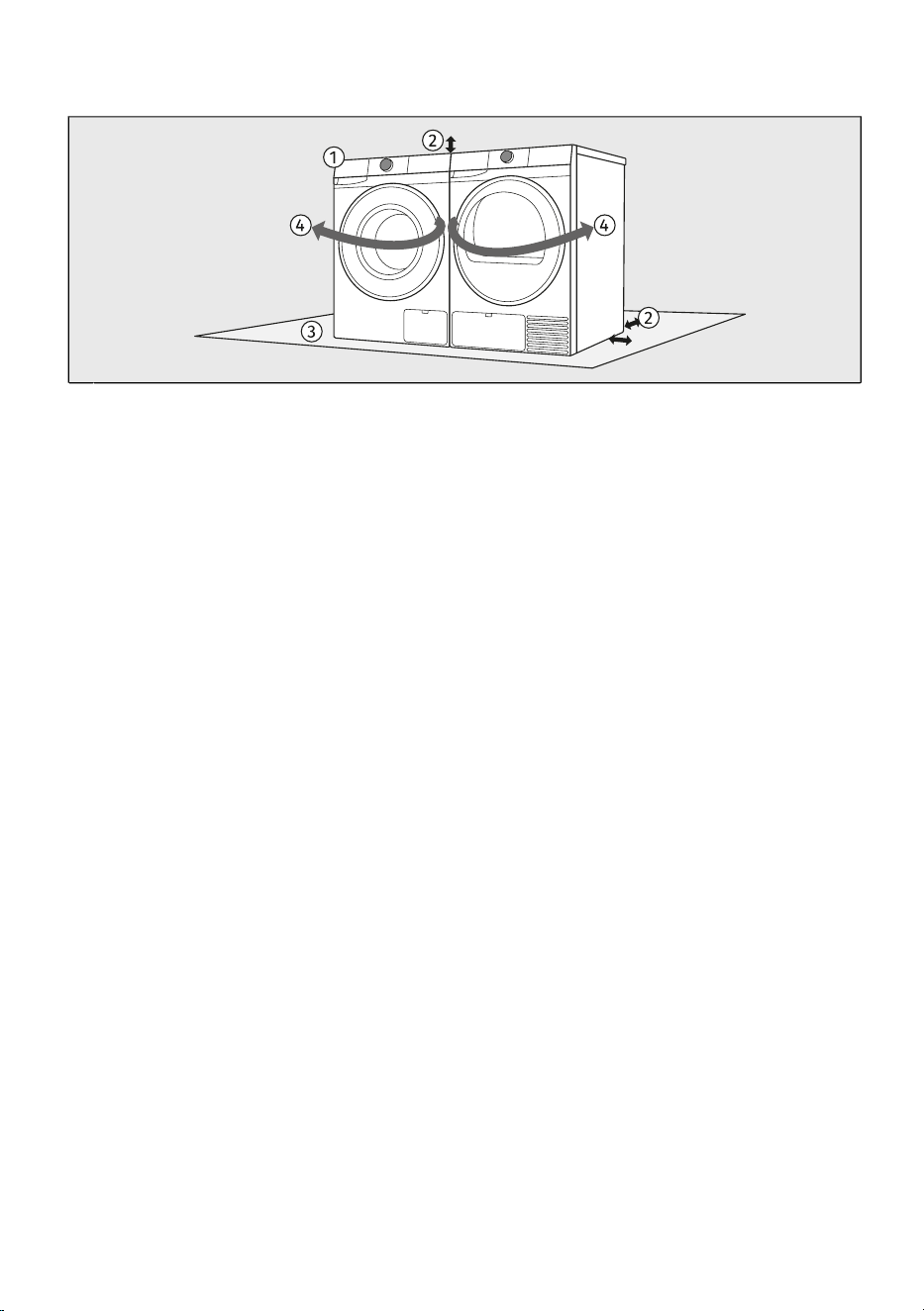
Combination of washing machine and tumble dryer installation
The washing machine and the dryer can be placed next to each other.1
When positioning the appliance, observe the required clearances from the top and side surfaces
of the washing machine and tumble dryer. (See chapter Washing machine installation clearances
when installing in a room.)
2
The surface on which the washing machine and/or dryer is placed should be clean and level.3
Due to the door opening direction and the handling process of laundry, it is recommended to
place the washing machine on the left and the tumble dryer on the right.
4
23
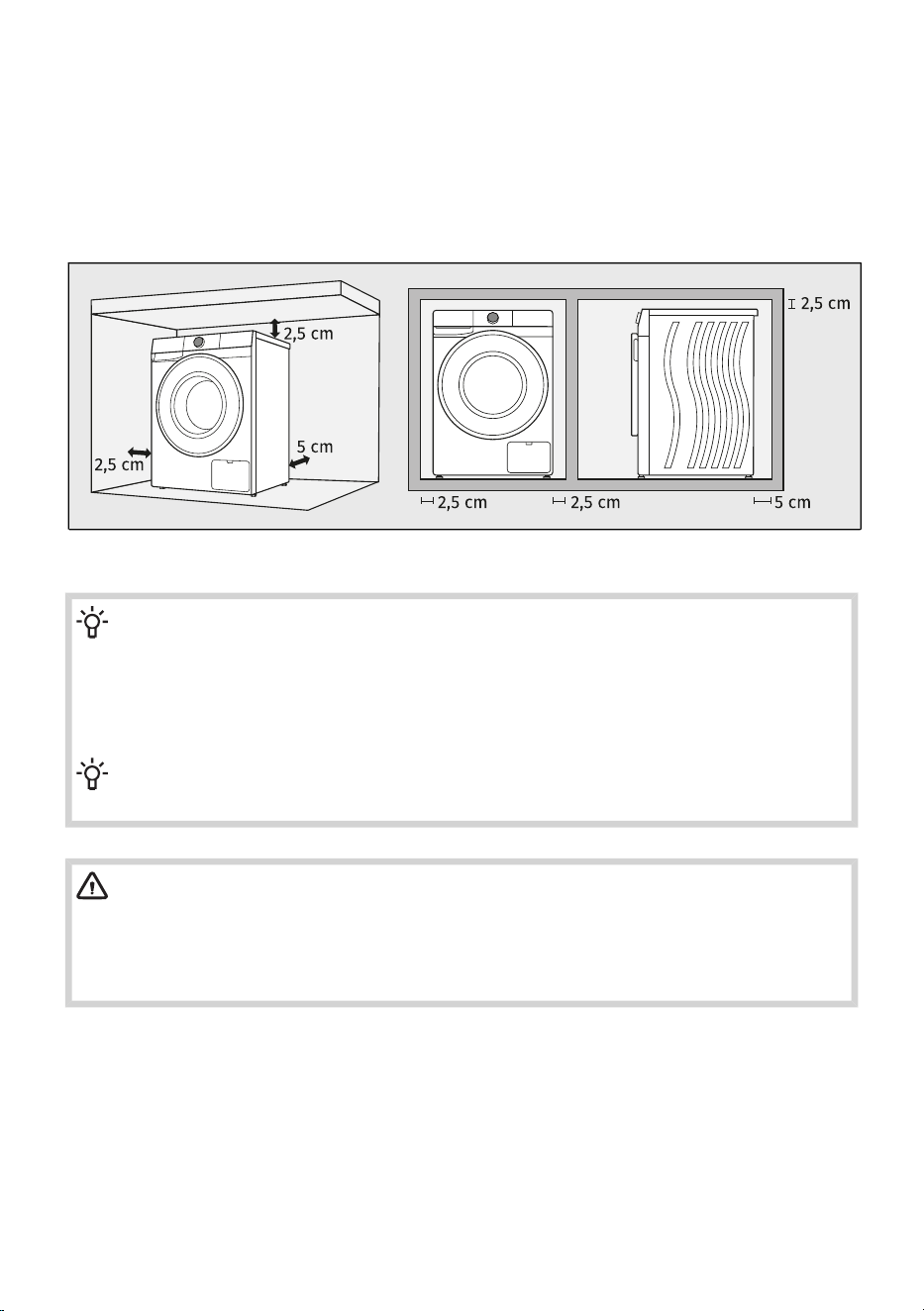
Washing machine installation clearances when installing in a room
For safety reasons, the minimum distance between the back of the appliance and the wall must be
at least 5 cm, and the distance between the appliance and any furniture above or beside it must be
at least 2,5 cm.
When positioning the washing machine, also consider other elements in the room, such as doors or
windows and their opening into the room. The washing machine must have enough space to open
the door. (See chapter WASHING MACHINE DESCRIPTION / Dimensions of the washing machine.)
Observe the clearances shown in the illustration.
INFORMATION!
The washing machine may not be in contact with a wall or adjacent furniture. For optimum
washing machine operation, we recommend observing the clearances from the walls as
indicated in the figure. In case of failure to observe the minimum required clearances, safe
and correct washing machine operation cannot be ensured. Moreover overheating can also
occur.
INFORMATION!
The washing machine must not be enclosed or built into furniture.
WARNING!
We recommend a minimum clearance of 2,5 cm from the top edge of the unit to ensure
sufficient ventilation. The minimum clearances from the side walls and the rear panel must
also be observed.
The user must not interfere with or modify the appliance structure.
24
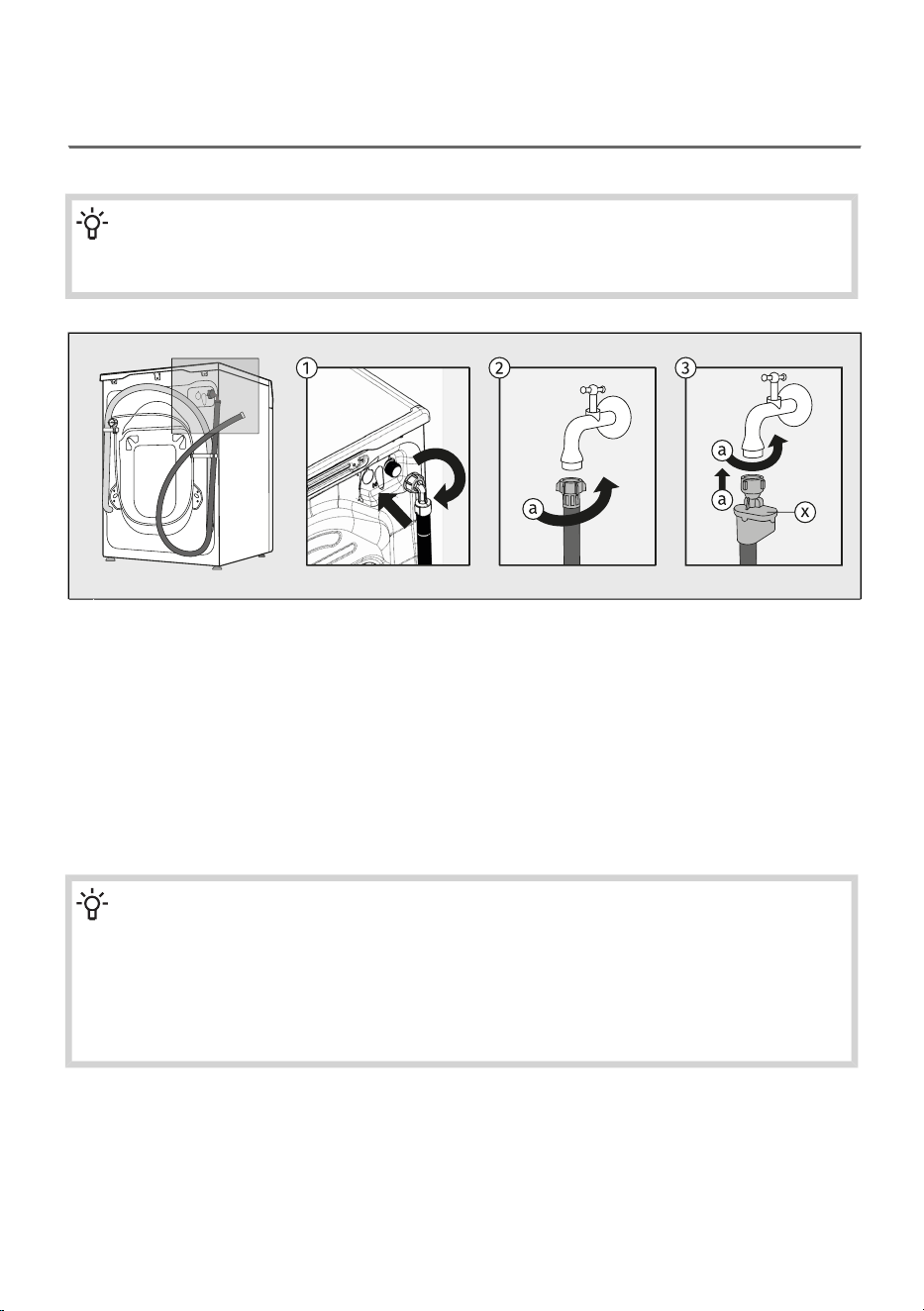
4.3 Connecting the washing machine to the water supply
network
Connection to water supply
INFORMATION!
The type of water inlet connection on your washing machine’s inlet hose may be a standard
(2) connector or a safety shut-off system (3), depending on the model.
First, screw the rectangular end of the water inlet hose onto the valve on the rear wall of the
washing machine (upper right).
The inlet hose is supplied inside the washing machine drum.
1
STANDARD CONNECTION2
Attach the hose to the water tap by screwing it onto the thread (a).
AQUA - STOP CONNECTION3
Attach the hose to the water tap by screwing it onto the thread (a).
If an internal tube or hose is damaged, a shut-off system is activated that cuts the water supply
to the washing machine. In such case, the control glass (x) will turn red. Replace the water supply
hose.
INFORMATION!
For normal washing machine operation, the pressure in the water mains should be between
0,05 and 1 MPa (0,5–10 bar). Minimum dynamic water pressure can be determined by
measuring the water flow.
In 60 seconds, min. 10 L of water should flow from a fully open tap.
With a lower water flow, rinsing of detergent and fabric softener from the dispenser
compartments may be reduced.
25
INFORMATION!
Tighten the water supply hose by hand, firmly enough for the hose to have a good seal (max.
2 Nm). After connecting the hose, the seal must be checked for any leaks. Do not use pliers
or similar tools when connecting the hose as this could damage the nut thread.
Only use the water supply hose supplied with the appliance. Do not use any used or other
hoses.
When connecting the water supply hose, make sure to connect it in a way that allows adequate
and unobstructed water supply.
Connecting and securing the water discharge hose
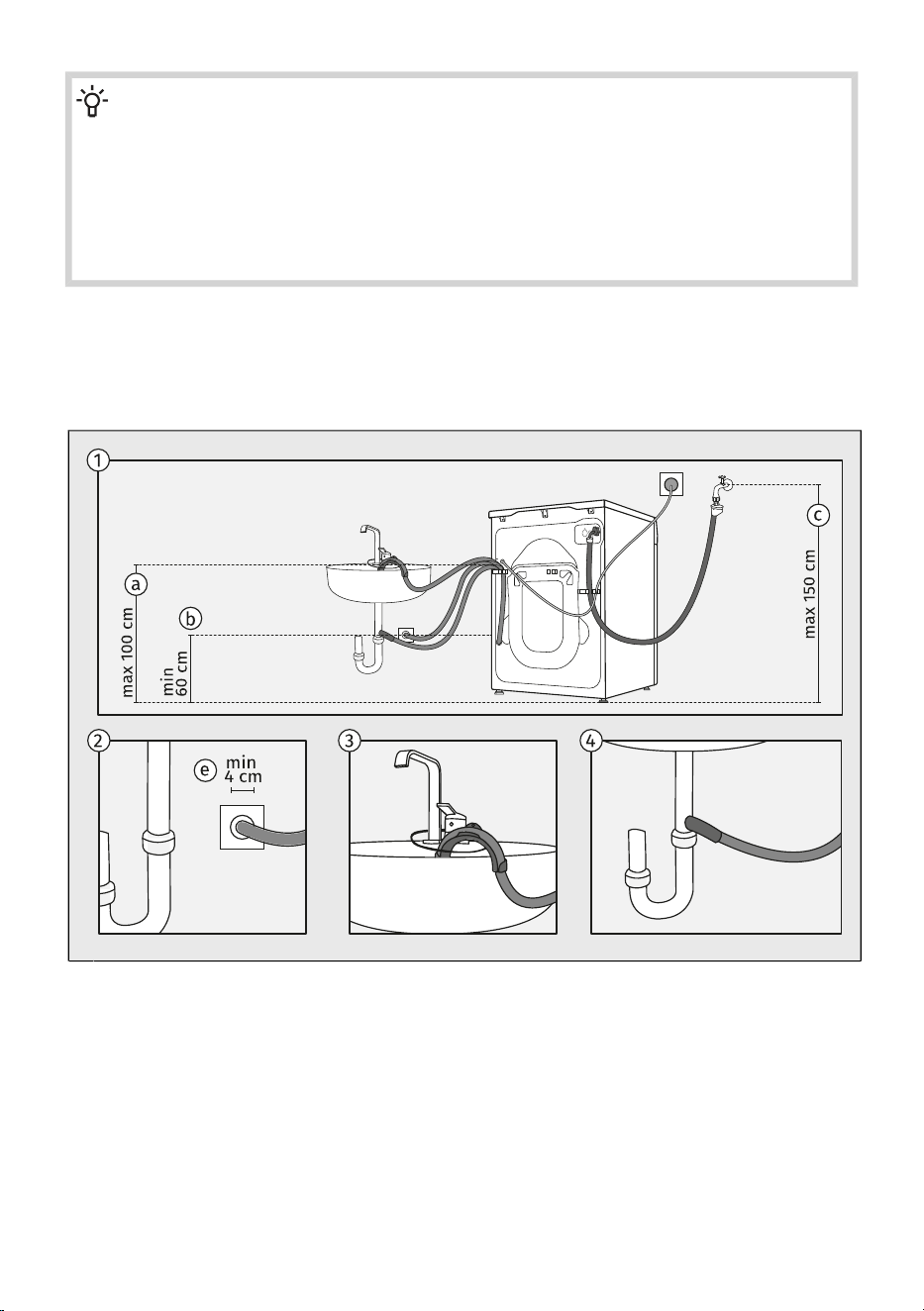
Position the drain hose in a washbasin, bathtub, or directly into a drain (the drain pipe diameter must
be at least 4 cm (e)). The end of the drain hose may be no more than 100 cm (a) and no less than
60 cm (b) above floor level. It can be installed in three different ways.
Observe the required distances for installing the hose. The distances and installation methods
for the drain hose are shown in the illustration.
1
If you install the drain hose into a wall-mounted siphon, it must be correctly fitted so it can be
cleaned, and the drain pipe diameter must be at least 4 cm.
2
Discharge hose end may be placed over a washbasin or a bathtub. B Use a string fed through
the opening in the elbow support to attach the hose and prevent it from slipping to the floor.
3
Discharge hose may also be attached directly to the washbasin drain.4
26
INFORMATION!
If the drain hose is not correctly attached, safe and correct washing machine operation cannot
be ensured.
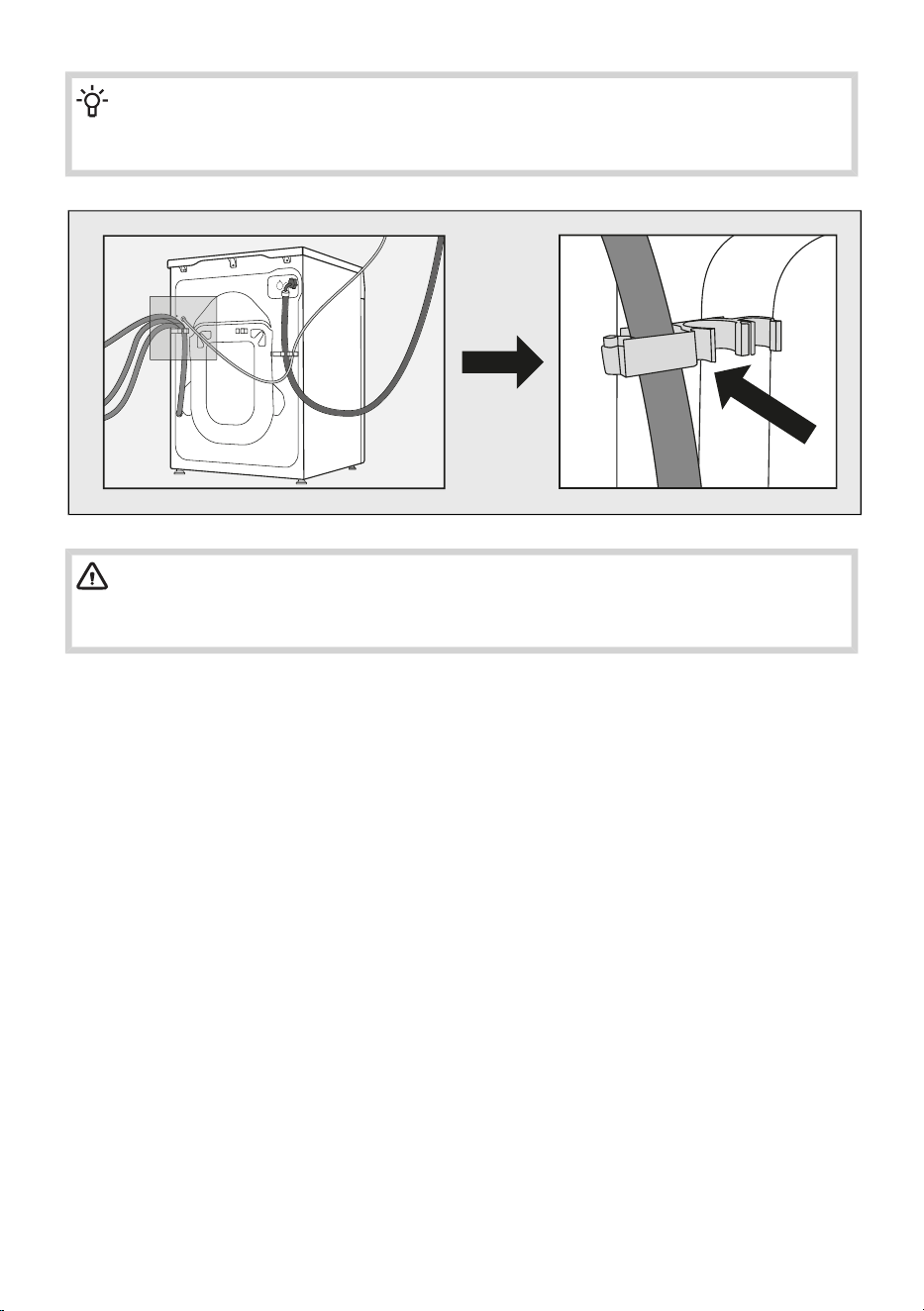
WARNING!
The drain hose must not be disconnected, placed on the floor, or extended.
The drain hose must always be secured in the plastic holder.
27
4.4 Connecting the washing machine to the electricity
supply
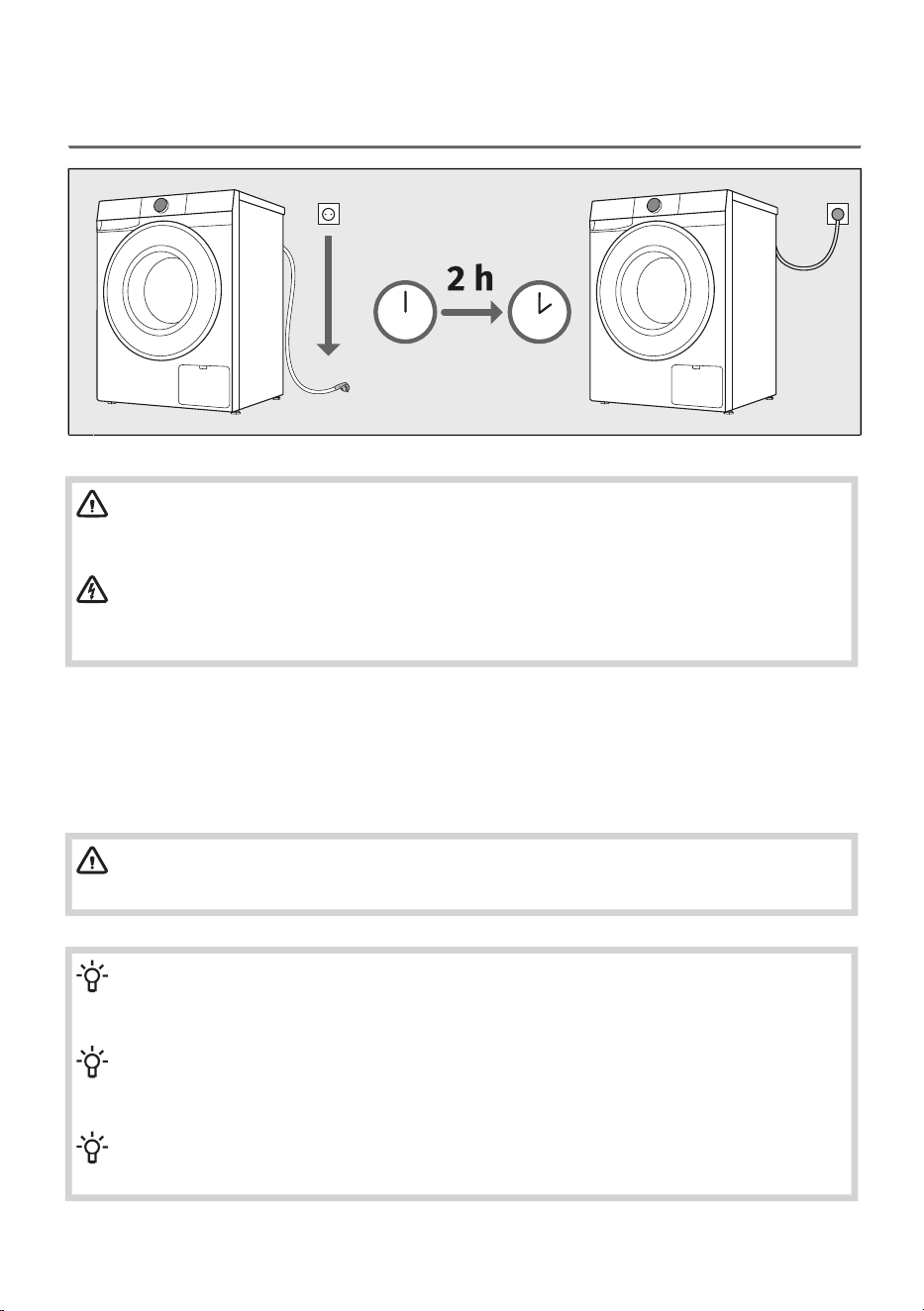
WARNING!
Before connecting the washing machine to the power mains, wait for at least 2 hours
until it reaches room temperature.
ELECTRIC SHOCK!
We recommend using over-voltage protection overvoltage protection to protect the
appliance in case of a lightning strike.
Connect the washing machine to a grounded power outlet. After installation, the wall outlet should be
freely accessible. The outlet should be fitted with an earth contact (in compliance with the relevant
regulations).
Information on your washing machine is indicated on the rating plate (see chapter WASHING MACHINE
DESCRIPTION / Technical data).
WARNING!
The washing machine may not be connected to the power mains using an extension cord.
INFORMATION!
Do not connect the washing machine to an electrical outlet intended for an electric shaver or
hair dryer.
INFORMATION!
Any repair and maintenance pertaining to safety or performance should be done by trained
experts.
INFORMATION!
A damaged power cord may only be replaced by a person authorized by the manufacturer.
28
5. BEFORE USING THE APPLIANCE FOR THE
FIRST TIME
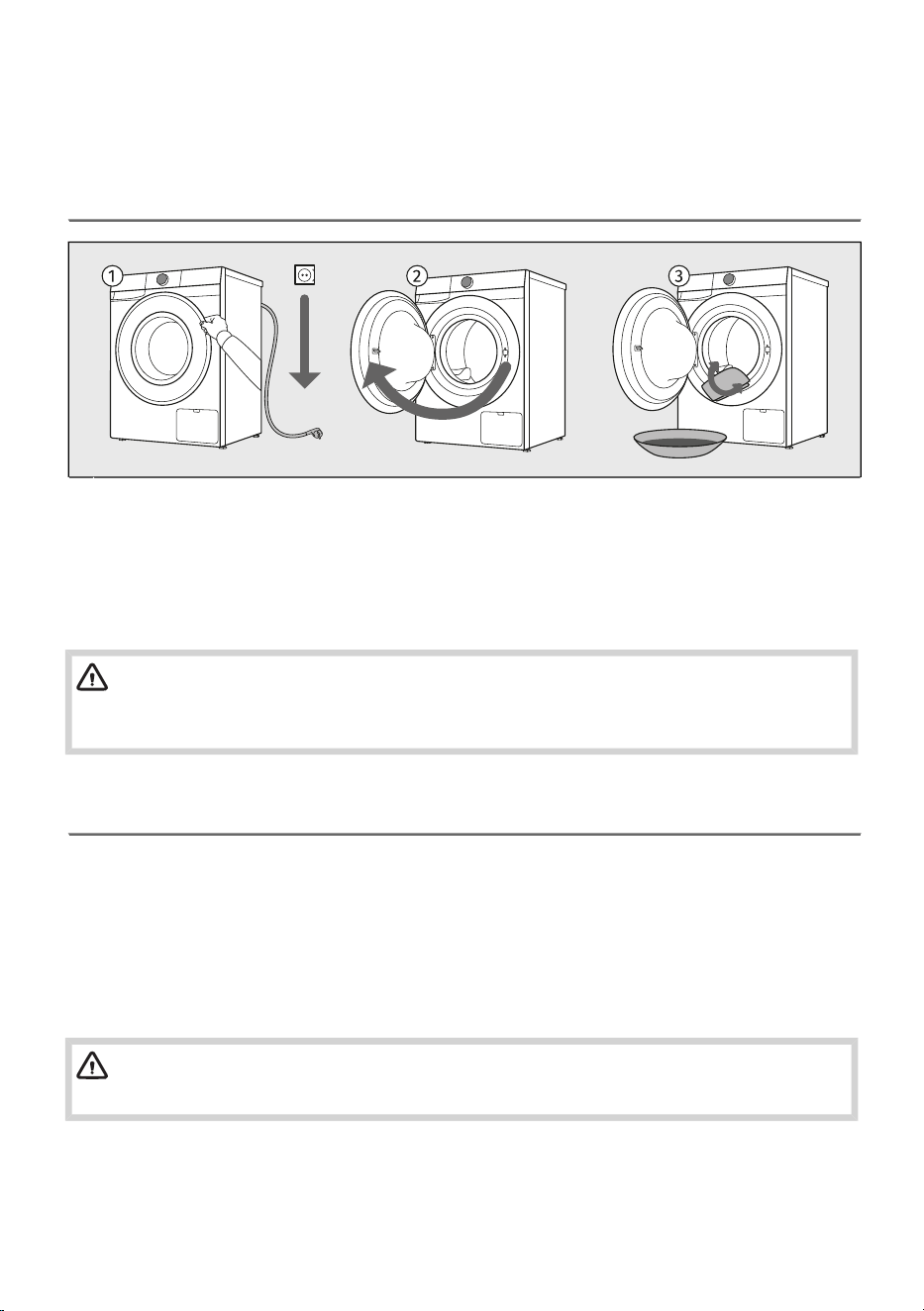
5.1 Before switching on the appliance for the first time
Make sure the washing machine is disconnected from the power supply.1
Open the door towards yourself.2
Clean the washing machine drum with a soft moist cotton cloth and water, or use the Cotton
white 90 °C programme. There should be no laundry in the washing machine drum; the drum
should be empty.
3
WARNING!
Do not use any solvents or cleaning agents that could damage the washing machine (please
observe the recommendations and warnings provided by the cleaning agent manufacturers).
5.2 First appliance settings
When you connect the appliance and switch it on for the first time, first select Language. Rotate the
selector to scroll through the languages and confirm by pressing the selector.
A warning Remove transport protection appears, informing you that the transport protection must be
removed before using the appliance. See chapter INSTALLATION AND CONNECTION / Remove the
transport securing device and follow the instructions.
After removing the transport protection, confirm this by pressing the selector. You can now use the
appliance.
WARNING!
The warranty does not apply to damage caused by removed transport securing device!
During the first settings, additional settings such as Water hardness, and Wi-Fi settings are available.
These settings can also be configured later; in this case, select Skip. For these settings, refer to the
following chapters.
29
5.3 First connection to a Wi-Fi network
Application ConnectLife
ConnectLife is a smart home platform that connects people, devices and services. The ConnectLife
application includes advanced digital services and carefree solutions that allow users to monitor and
control appliances, receive notifications from a smartphone, and update software (supported features
may vary depending on your appliance and the region/country in which you are located).
Install the app
To connect your smart device, you need a home 2,4 GHz Wi-Fi network and a smartphone equipped
with the application ConnectLife.
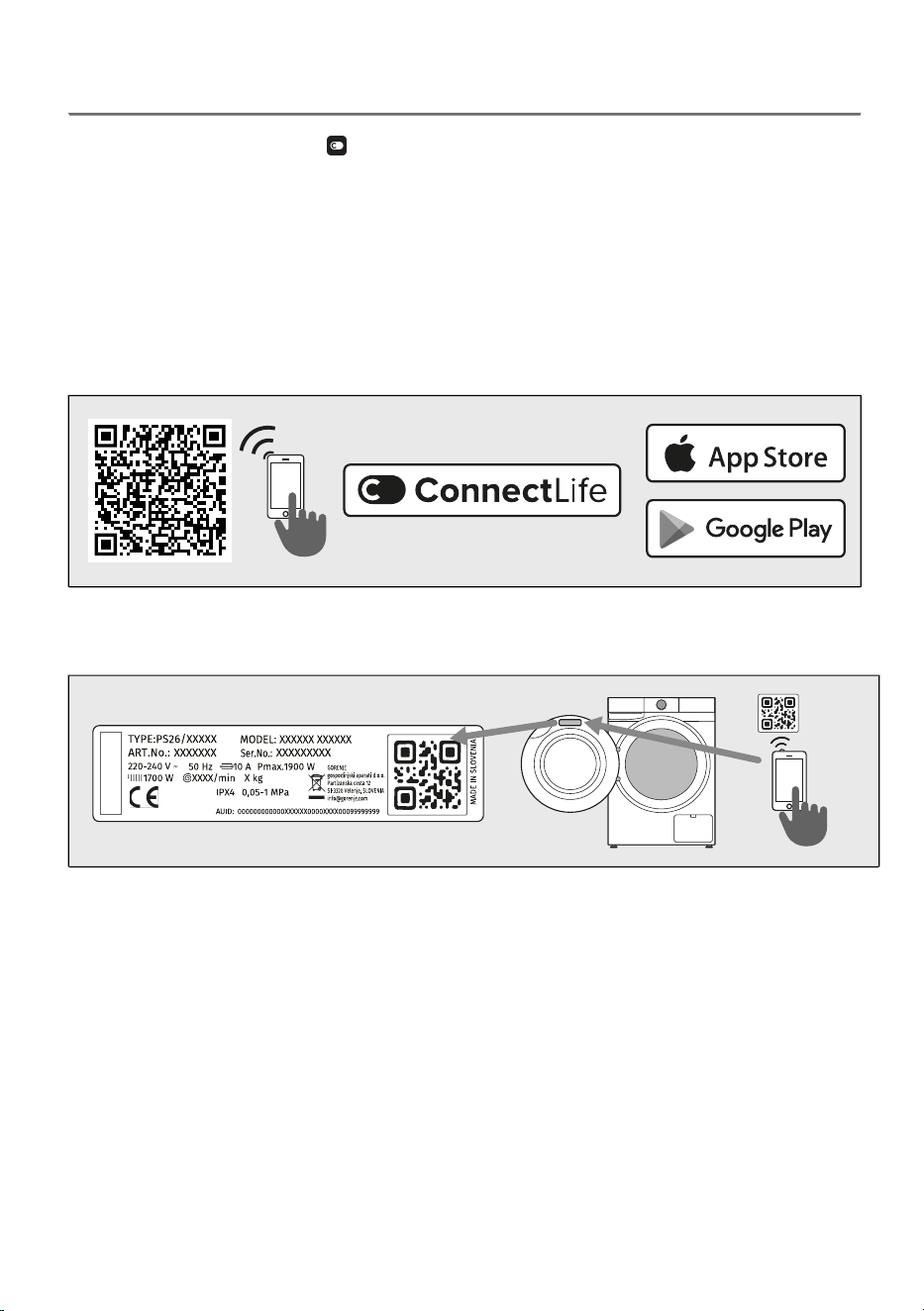
You can download the ConnectLife app for free from the Apple App Store® or Google Play™, or scan
the code:
Install the ConnectLife app and create an account or log in to your existing account if you
already have one.
1.
In the ConnectLife app, go to the Add device menu and follow the instructions.2.
Unique QR code can be found on the warranty card or on the rating plate of the appliance.
After a successful connection, the appliance can be operated remotely via the application.3.
30
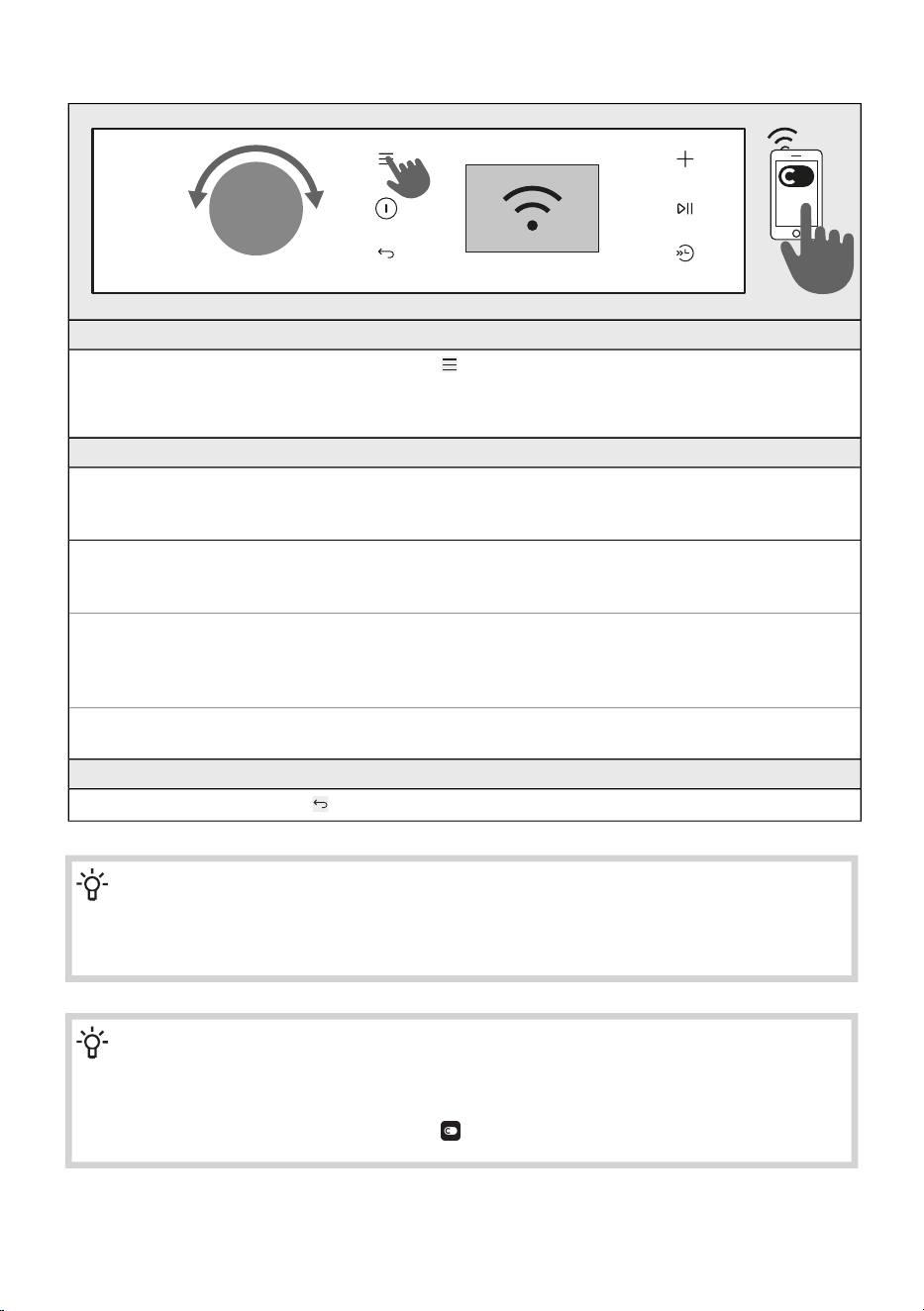
How do I connect my device?
ENTER THE MENU
The appliance must be switched on; press the and choose Settings.
Turn the selector to position Wi-Fi settings and press the selector to enter the settings.
Select Wi-Fi On/Off to switch on Wi-Fi. After activation, the options described below appear.
CONNECTION BETWEEN THE APPLIANCE AND THE APPLICATION
CONNECTION SETUP
Upon activation, the countdown of 5 minutes begins, continue your activities in the application.
Use this option to connect the appliance to the Wi-Fi network.
PAIRING
Upon activation, the countdown of 3 minutes begins, continue your activities in the application.
Use this option to pair/add a user and the appliance.
UNPAIRING
Upon activation, the countdown of 1 minutes begins. All users will be removed from appliance.
Use this option to remove all active users of the appliance. If you want to control the appliance
remotely again, you will need to repeat the user-adding procedure.
Wi-Fi On/Off for enabling or disabling the Wi-Fi functionality.
All appliance settings remain unchanged.
EXITING MENU
Exit the menu by pressing the key.
INFORMATION!
You can also control your appliance from your phone if you are not connected to the same
Wi-Fi network as your appliance (the phone only needs an active internet connection). This
means you can also control your appliance when you are away from home.
INFORMATION!
You can operate the appliance with multiple devices. You can also control and monitor the
operation of the appliance with any phone connected to the appliance, regardless of which
user has initiated the washing cycle. The appliance can be connected to/controlled
simultaneously with several ConnectLife user accounts.
31
INFORMATION!
After you have started the appliance from your phone, a person located next to the appliance
can take over and manually turn off or control the appliance; the app will notify you in such
case. In such case, controlling the appliance remotely from your phone is no longer possible.
If you wish to control the appliance from your phone again, all required steps must be repeated.
Which Wi-Fi router can be used?
Only 2,4 GHz networks are supported. If the ConnectLife app cannot find your local network during
the connection set-up process, check the following:
• your router is operating at the frequency of 2.4 GHz,
• your network is hidden, and
• your signal is strong enough.
Do you have more questions?
Remotely upgrading the software
Check the software update options in the app ConnectLife.
32
6. WASHING PROCESS, STEP BY STEP (1–7)
This chapter describes how to:
step 1: sort the laundry,
step 2: load the laundry into the washing machine and add detergents,
step 3: switch on the washing machine,
step 4: select the washing programme,
step 5: select additional functions,
step 6: start the washing programme,
step 7: complete the washing cycle.
6.1 Sort the laundry
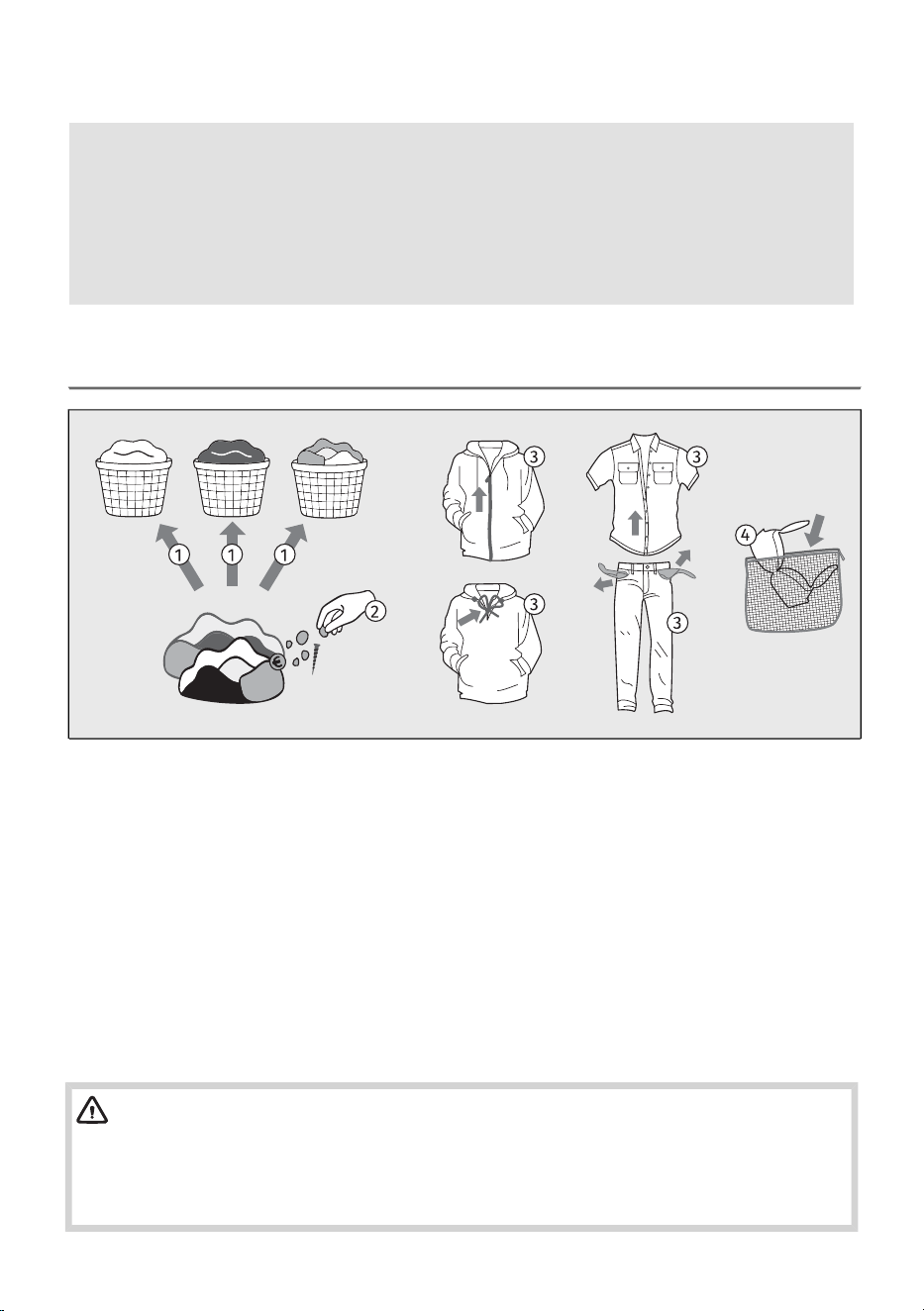
1. Sort the laundry by type of fabric, colour, soiling, and allowed washing temperature (see Set of
washing programs).
Wash the laundry that sheds a lot of fibre or lint separately from other laundry.
2. Before using the washing machine, carefully remove any solid objects and particles from the
textiles you intend to wash to prevent damage to the appliance or clogging of the pump filter.
This includes (also check all pockets and flaps):
• solid objects (e.g., screws, clips, small stones, hay, etc.),
• food residues (e.g., bones, dried dough, etc.),
• dried particles of construction materials (e.g., mortar, sand, mud, etc.).
3. Close the buttons and zippers, tie any ribbons, and turn the pockets inside out; remove any
metal clips that could damage the laundry and washing machine interior, or clog the drain.
Empty the pockets. Coins, nails etc. could damage the machine and the fabric.
4. Place very sensitive clothes and small items in a special-purpose laundry washing bag.
(The special-purpose laundry bag is available as an optional accessory.)
WARNING!
The manufacturer assumes no responsibility for malfunctions resulting from failure to follow
these instructions, which may also affect the validity of the warranty. Furthermore, the
manufacturer does not cover service costs in the event of foreign objects in the pump or pump
cleaning.
33
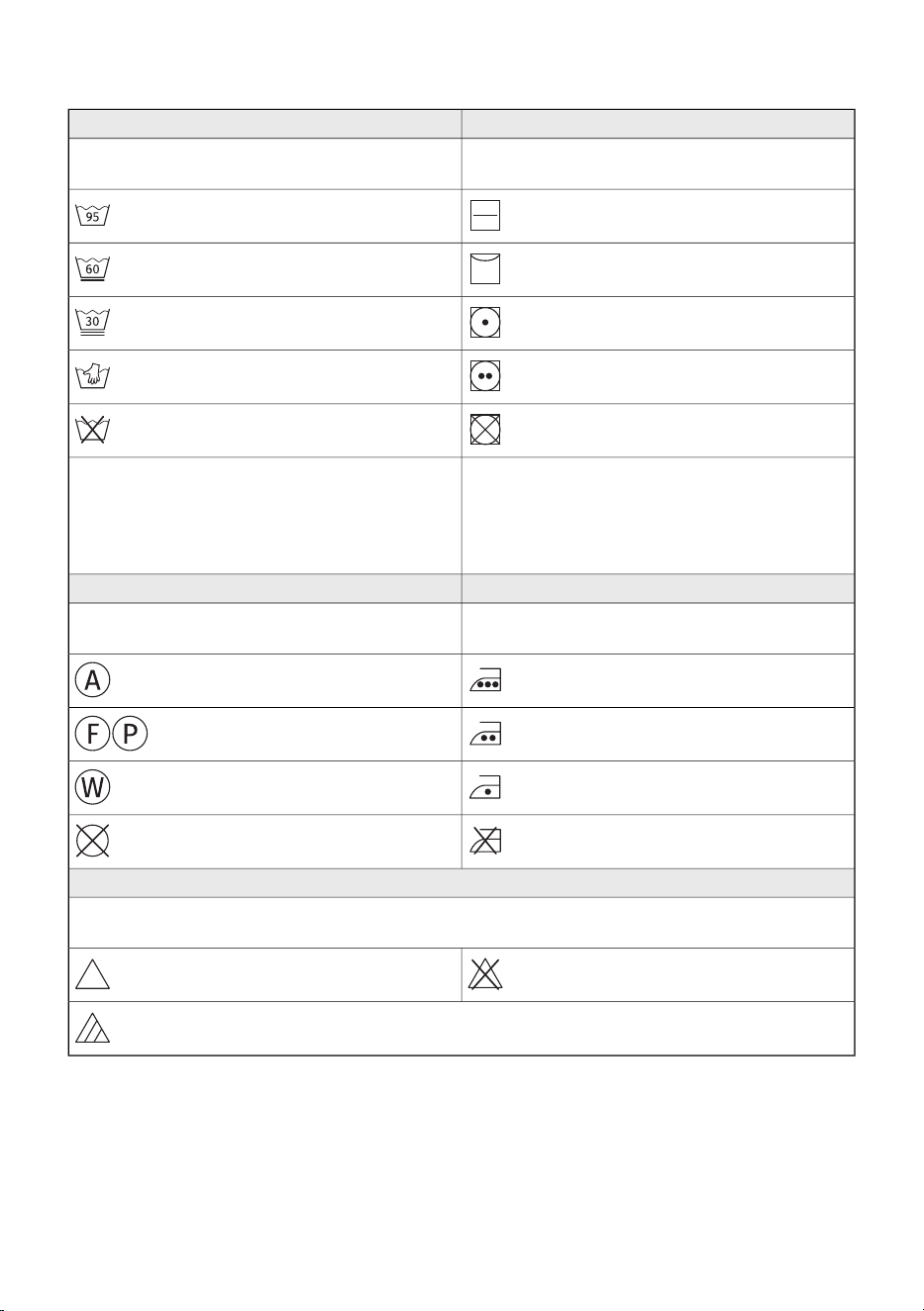
When sorting laundry, see the table below and pay attention to the labels on the laundry.
DryingWashing
The mark in the square means the drying method
for the laundry.
The number in the basket symbol means the
maximum allowed washing temperature in (°C).
Drying on a flat surfaceNormal wash
Line dryDelicate wash
Drying at a low temperatureVery delicate wash
Drying at a high temperatureHand wash only up to max. 40°C
Tumble drying not allowedWashing is not allowed
If the square symbol has slanted lines, this
indicates natural drying in the shade. Slanted
lines can be used in combination with other
symbols in the square.
The line under the basket symbol indicates the
level of treatment intensity: one line indicates
gentle washing (less mechanical effect, lower
spin speed), two lines indicate very gentle
washing (e.g. wool, silk, synthetics).
IroningDry cleaning
Steam ironing can permanently damage textiles.Dry cleaning is intended for textiles that cannot
or should not be machine washed.
Ironing at maximum 200°CDry cleaning with all types of solvents
Ironing at maximum 150°C
Dry cleaning with certain solvents
(depending on the label)
Ironing at maximum 110°CProfessional wet cleaning
Ironing not allowedDry cleaning not allowed
Bleaching
Bleaching is intended for refreshing and removing stains from textiles that are suitable for washing
with bleach in a washing machine. Always follow the manufacturer’s instructions.
Bleaching not allowed
Bleaching with all types of bleaching
agents
Bleaching with oxygen-based bleaching agents
34
6.2 Put the laundry in the washing machine and add the
detergent and/or softener
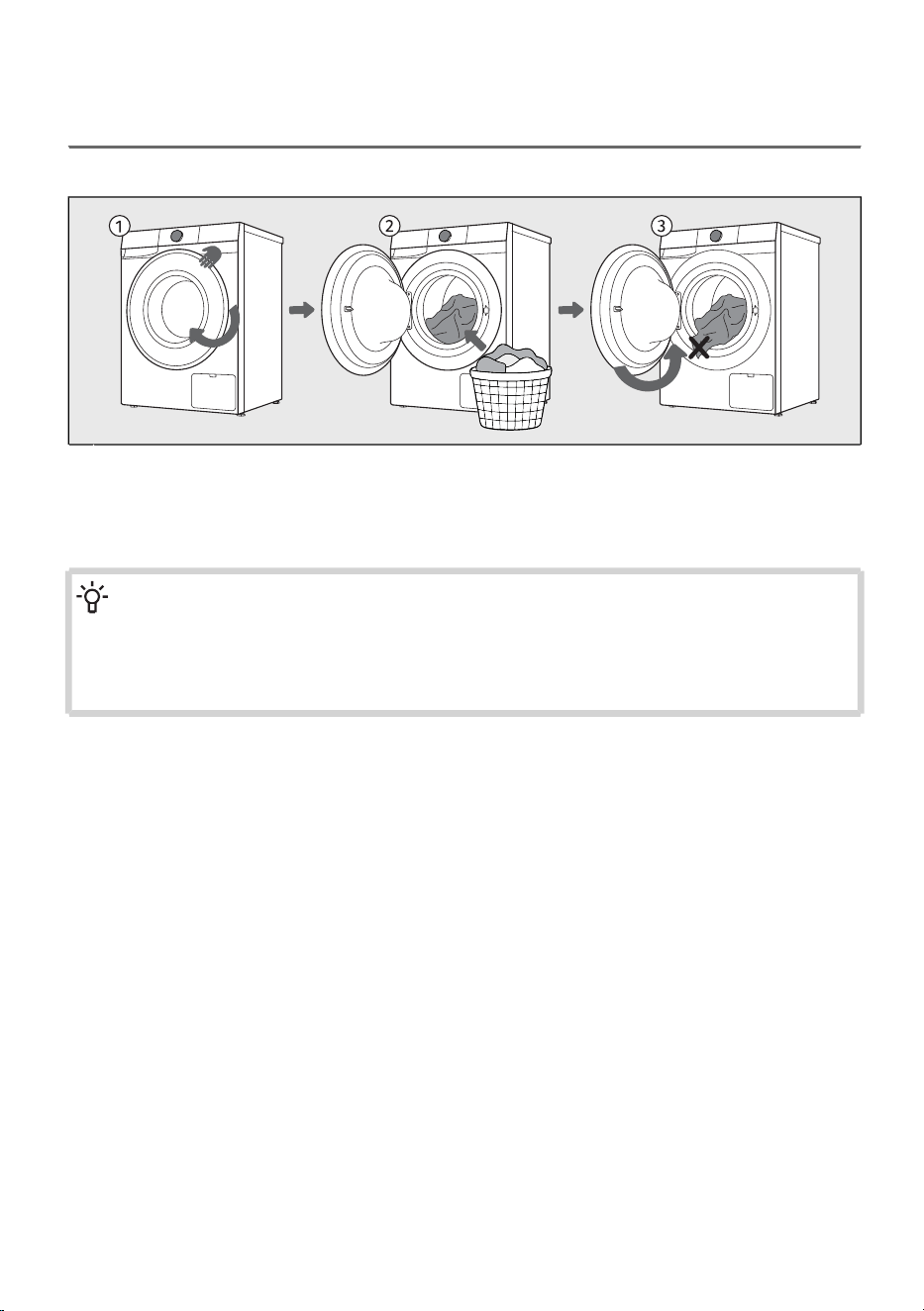
Loading the washing machine
Open the washing machine door by pulling the handle towards you.1
Insert the laundry into the drum (after making sure the drum is empty).2
Make sure that no garment is stuck between the door and the rubber gasket. Close the washing
machine door.
3
INFORMATION!
Do not overload the drum! See chapter Set of washing programs and observe your nominal
load as indicated on the rating plate. If the washing machine drum is too full, the laundry will
not be washed as thoroughly.
We recommend loosening the laundry and distributing it evenly in the washing machine drum.
35
Adding detergents and fabric softeners
INFORMATION!
For more detailed instructions on using the dosing container, see section WASHING PROCESS,
STEP BY STEP (1–7) / A set of additional features / Dose aid and RECOMMENDATIONS FOR
WASHING AND ECONOMIC USE.
Do not add hardened lumps of powder detergent into the detergent dispenser as this may
clog the piping in the washing machine.
Always insert the single-use detergent capsule directly into the drum; never place it in the
dispenser drawer!
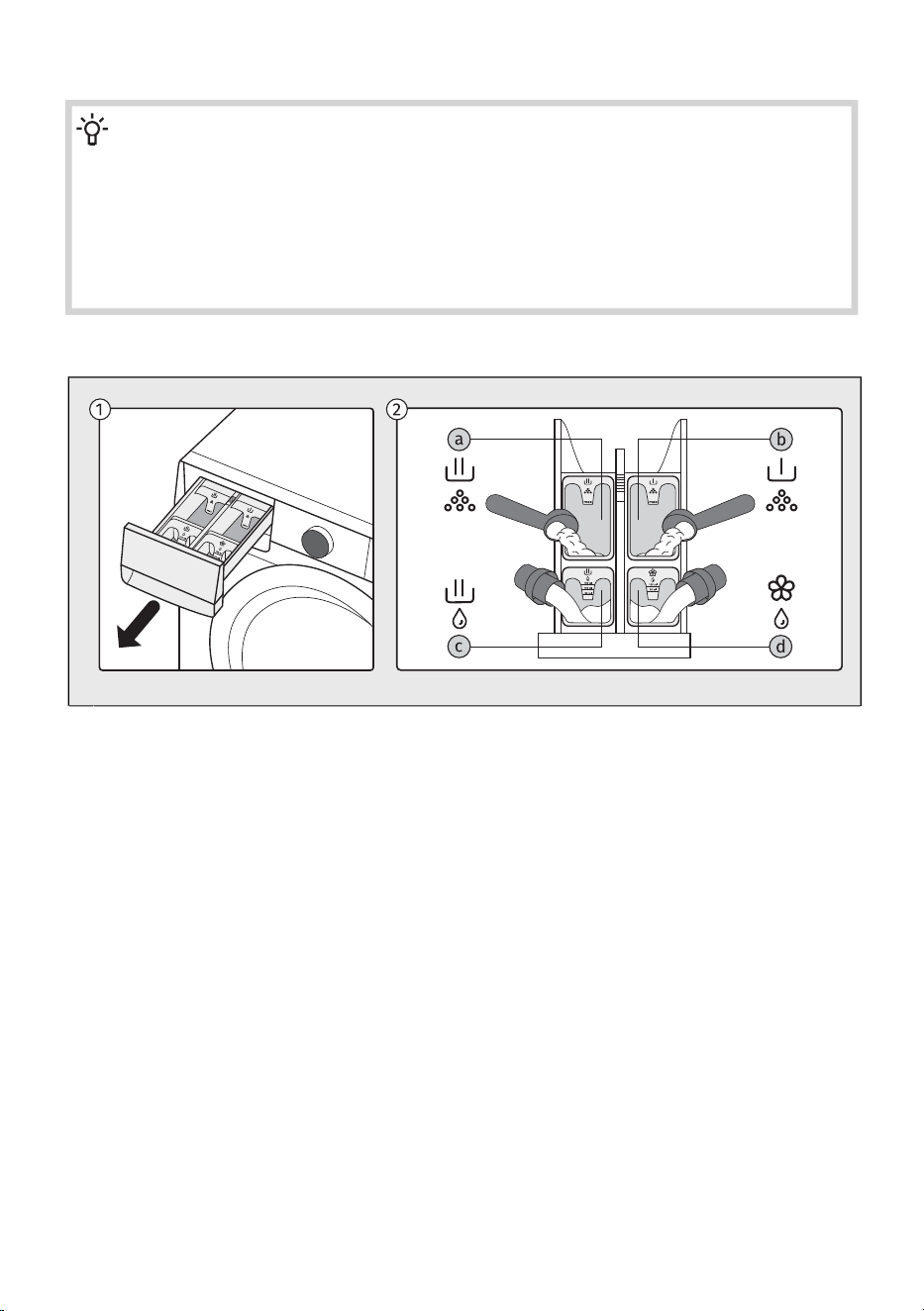
View of the dosing container layout
The dosing container is located on the upper left side of the washing machine. To remove it, hold
the handle on the underside of the tray and pull it towards you.
1
You can add powdered or liquid detergents and liquid fabric softeners into the compartments of
the dosing container:
2
compartment for powdered detergent for the main washa -
compartment for powdered detergent for the prewashb -
compartment for liquid detergent for the main washc -
compartment for liquid fabric softenerd -
36
Filling the dosing container
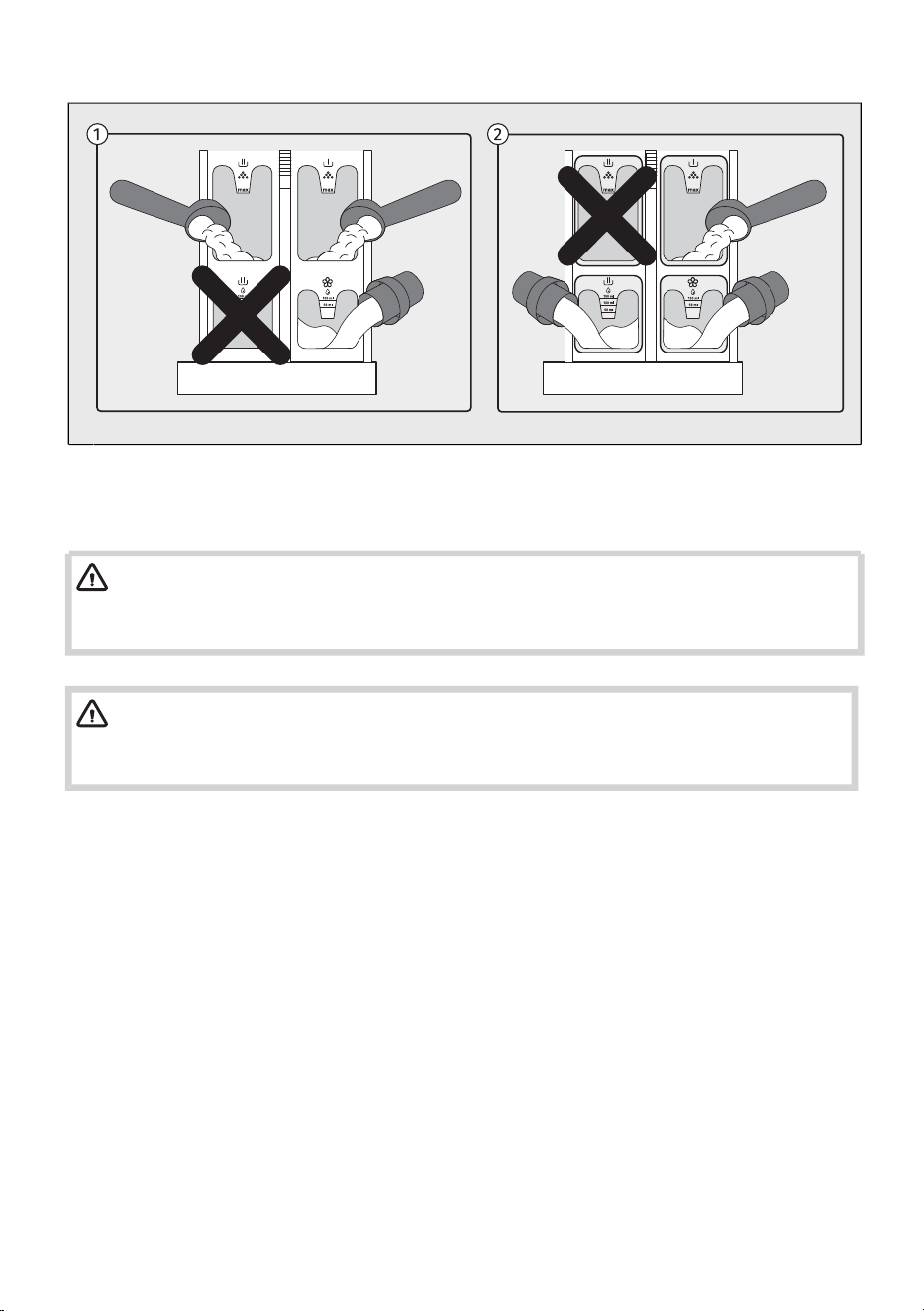
When using the compartment for powdered detergent during the main wash, you must not fill
the compartment for liquid detergent at the same time.
1
When using the compartment for liquid detergent during the main wash, you must not fill the
compartment for powdered detergent at the same time.
2
WARNING!
If you fill both compartments, the washing machine will produce excessive foam and the
washing programme will not complete correctly!
WARNING!
Do not open the dispenser drawer while a washing programme is running, as this may result
in incorrect operation.
37
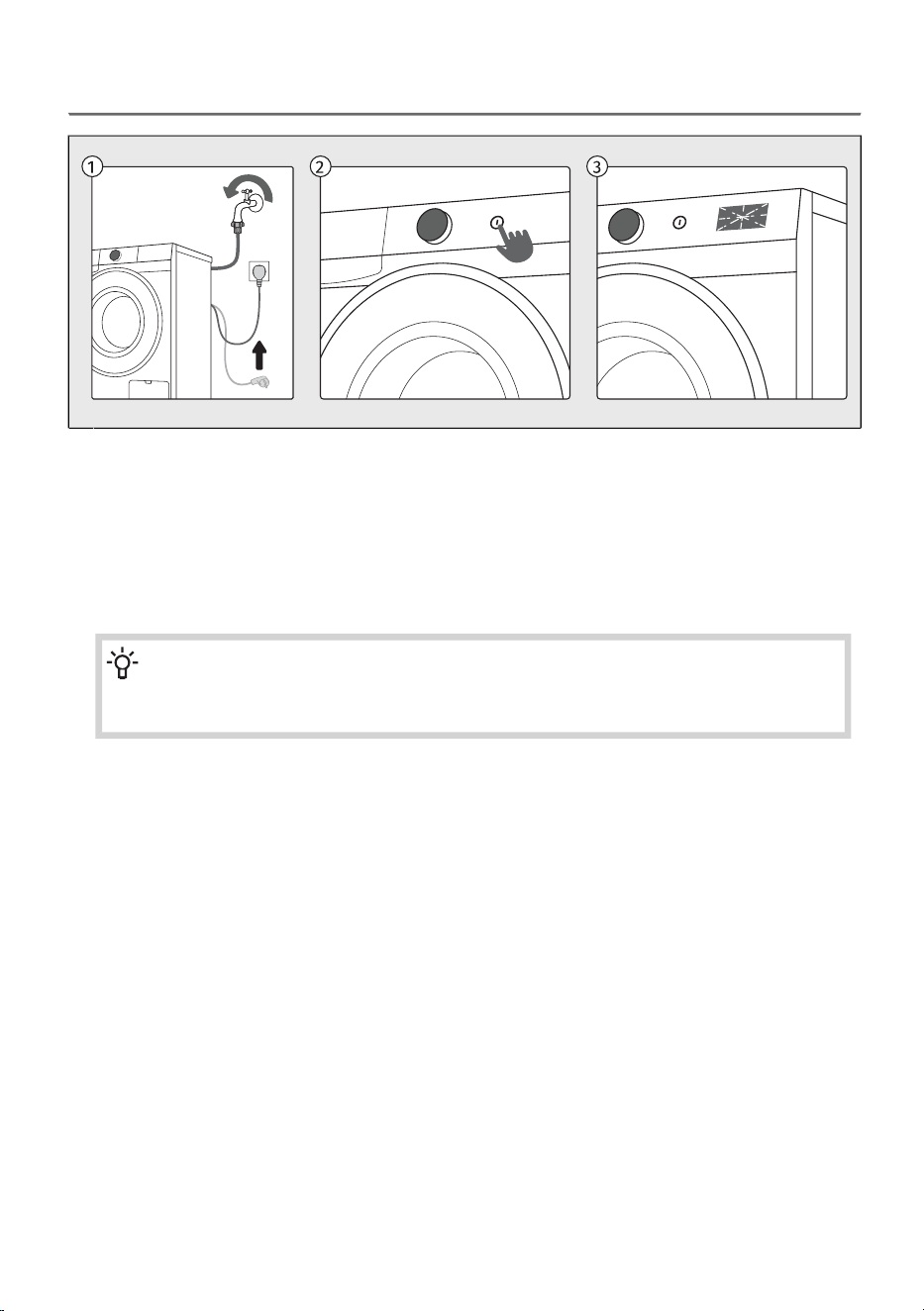
6.3 Switch on the washing machine
Use the power cord to connect the washing machine to power mains, and make sure the water
supply is open.
1
To switch on the appliance, press the On/Off button.2
The symbols on the display will light up, and an animation will be present.
The washing machine drum lights up for 5 minutes.
The light in the washing machine drum can also remain lit during appliance operation, if you press
the Start/Pause button, as well as after the washing programme is completed.
(The lamp in the washing machine drum is not suitable for any other use.)
3
INFORMATION!
The lamp in the washing machine drum may only be replaced by the manufacturer, a
service technician or an authorized person.
38
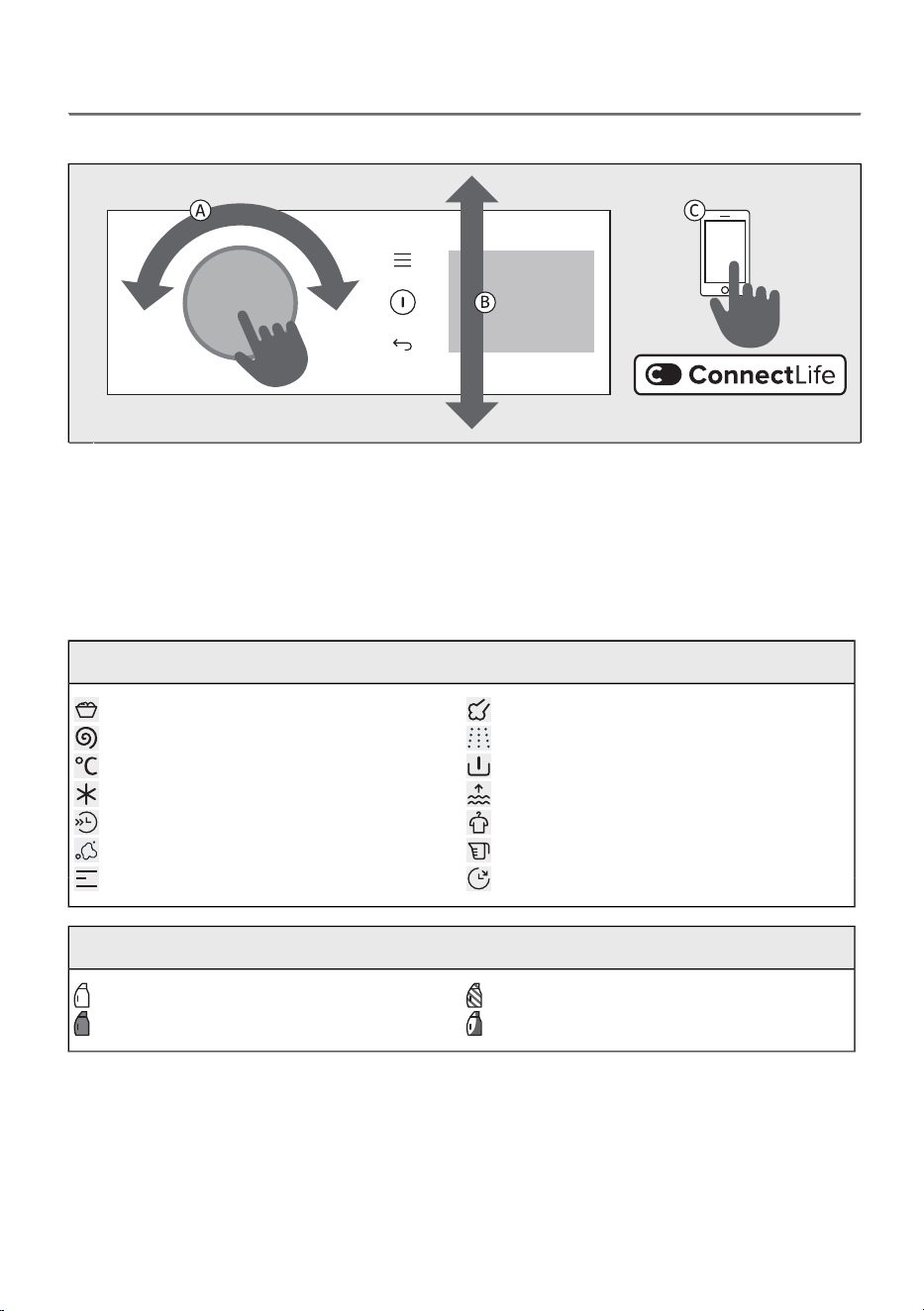
6.4 Choose the washing program
Selecting a program on the control unit
Rotate the selector to the left or right side.A
The display shows a selection of programmes that can be navigated by turning the selector.
Confirm the selected programme by pressing the selector inward. The display will then show the
available additional function options.
B
In addition to the programmes shown on the control panel, further programmes are available
through the ConnectLife app. Follow the instructions provided in the app.
C
Explanation of symbols used below:
SteamMaximum load
Extra rinseSpinning rate
PrewashTemperature
Extra waterCold wash
Anti creaseFast + Faster
Dose aidStains
Delay endModes
Explanation of symbols for detergent types according to Regulation (EU) No. 1015/2010:
For delicate laundry and woolUniversal
SpecialFor coloured laundry
39
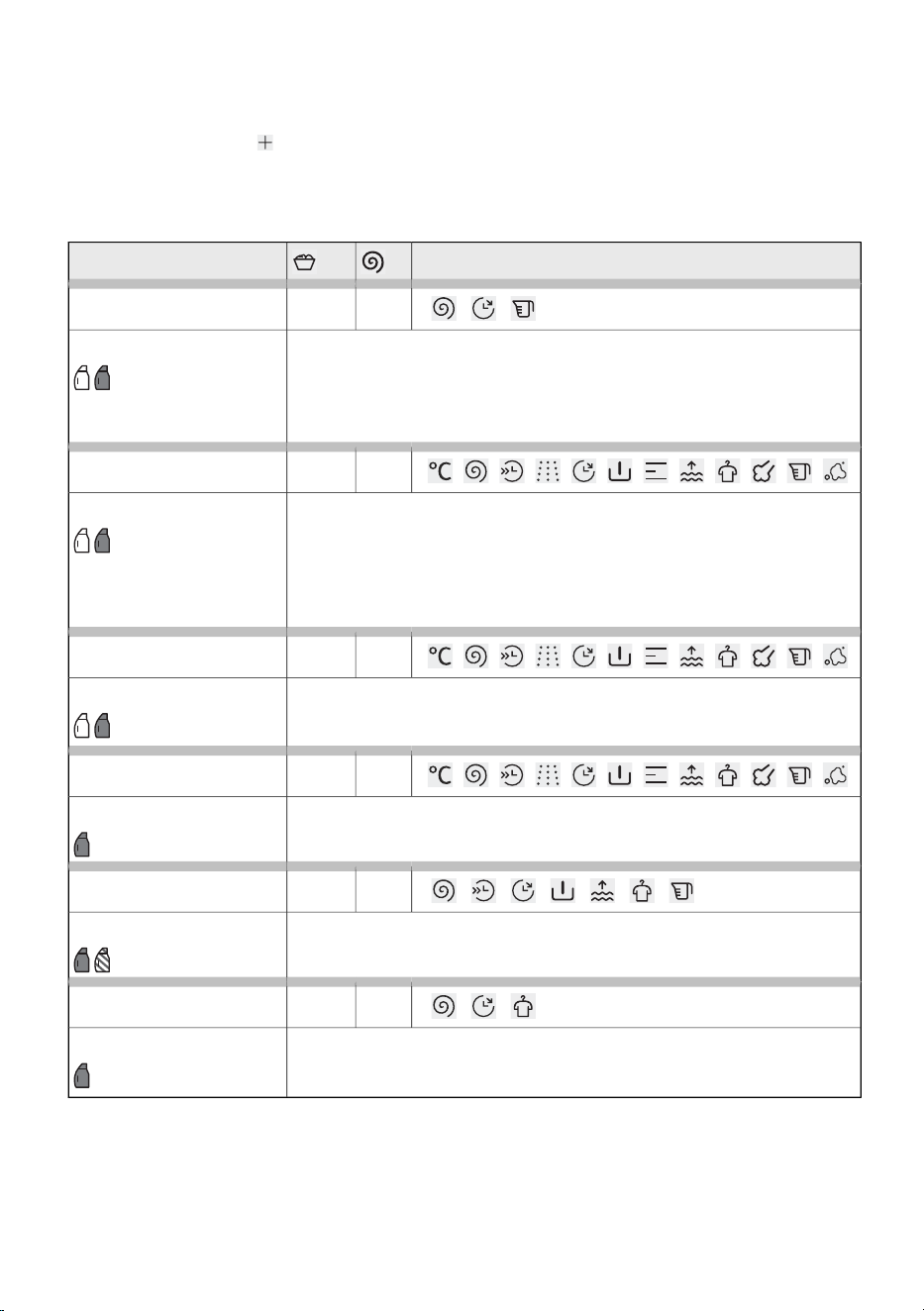
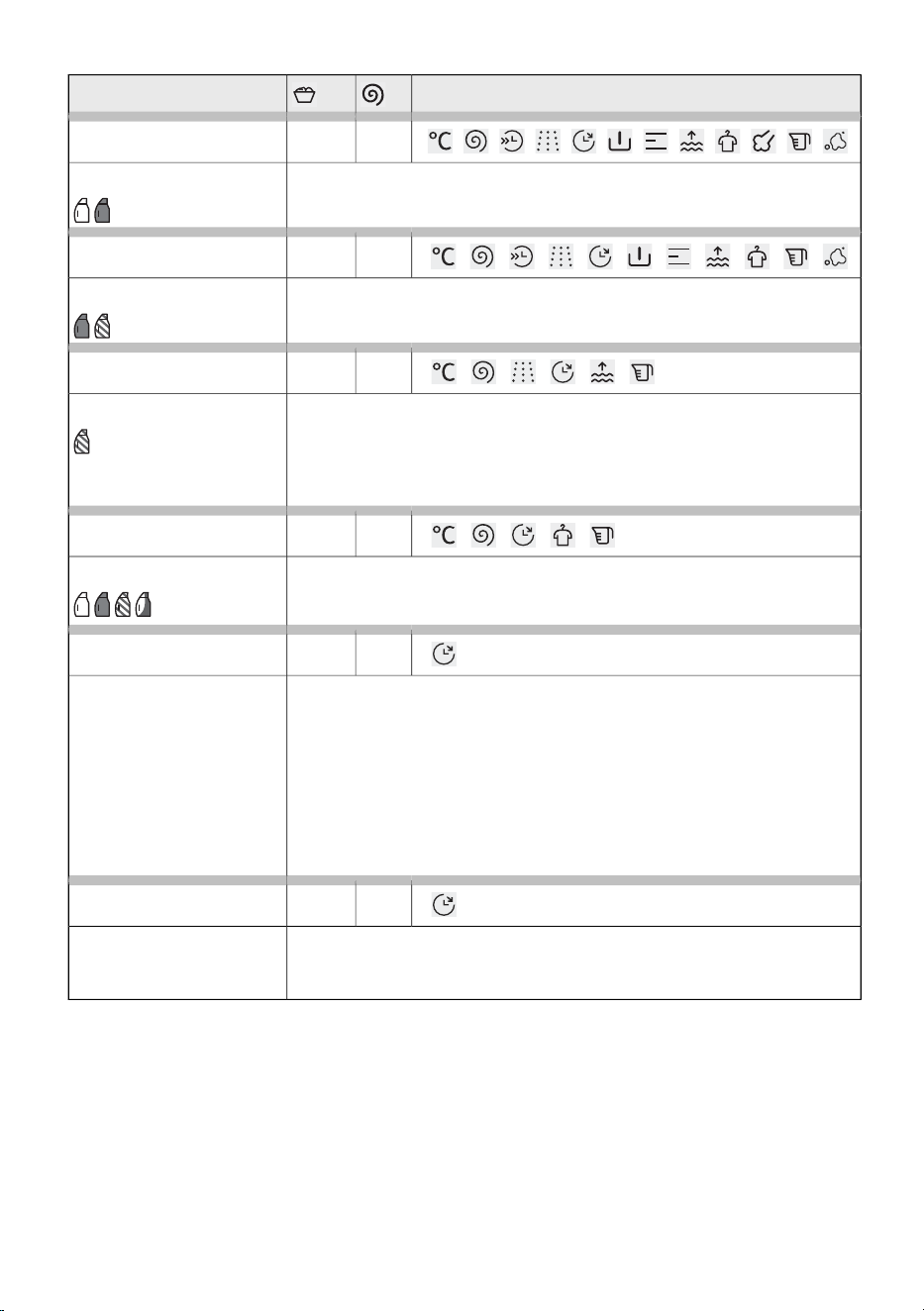
Set of washing programs
All programmes on the display can be started on the appliance or from the app. To start a programme
from the app, press the button on the appliance and select Remote control. Close the door and
press the Start/Pause button. The appliance will then be ready for remote control via the app for 24
hours. See also the chapter below.
Programmes on the control unit
Option of selecting additional functionsProgram
140010 kg
Eco 40-60*
Normally soiled cotton laundry that can be washed at both 40°C and
60°C together in the same cycle.
Test programme for compliance with the Commission Regulation (EU)
No. 2019/2023 on ecodesign and Regulation No. 2019/2014 on energy
labelling.
*
40°C–60°C
140010 kg
Cotton white
Use Cotton white programme to wash normally soiled cotton linen.
Choose between different washing temperatures. Spinning speed can
be set to your preference. Programme duration and amount of water will
be adjusted to the amount of laundry. Select Prewash or Extra waterl
function for heavily soiled garment. For customers with allergies, we
recommend the Extra rinse function for better rinsing of the laundry.
20°C–90°C
12005 kg
Cotton colour
This programme is used for washing coloured laundry using
special-purpose detergents for coloured laundry. We recommend turning
dark garments inside out.
Cold–60°C
12003,5 kg
Mix / Synthetics
The Mix / Synthetics programme is adapted for clothing made of synthetic
and mixed fibres or viscose and for easy care of cotton laundry.
Cold–60°C
12001 kg
Power 29'
A programme for smaller loads of lightly soiled laundry.40°C
10001 kg
Speed 14'
A programme for cotton garments that have hardly been worn or are
only very lightly soiled.
30°C
40
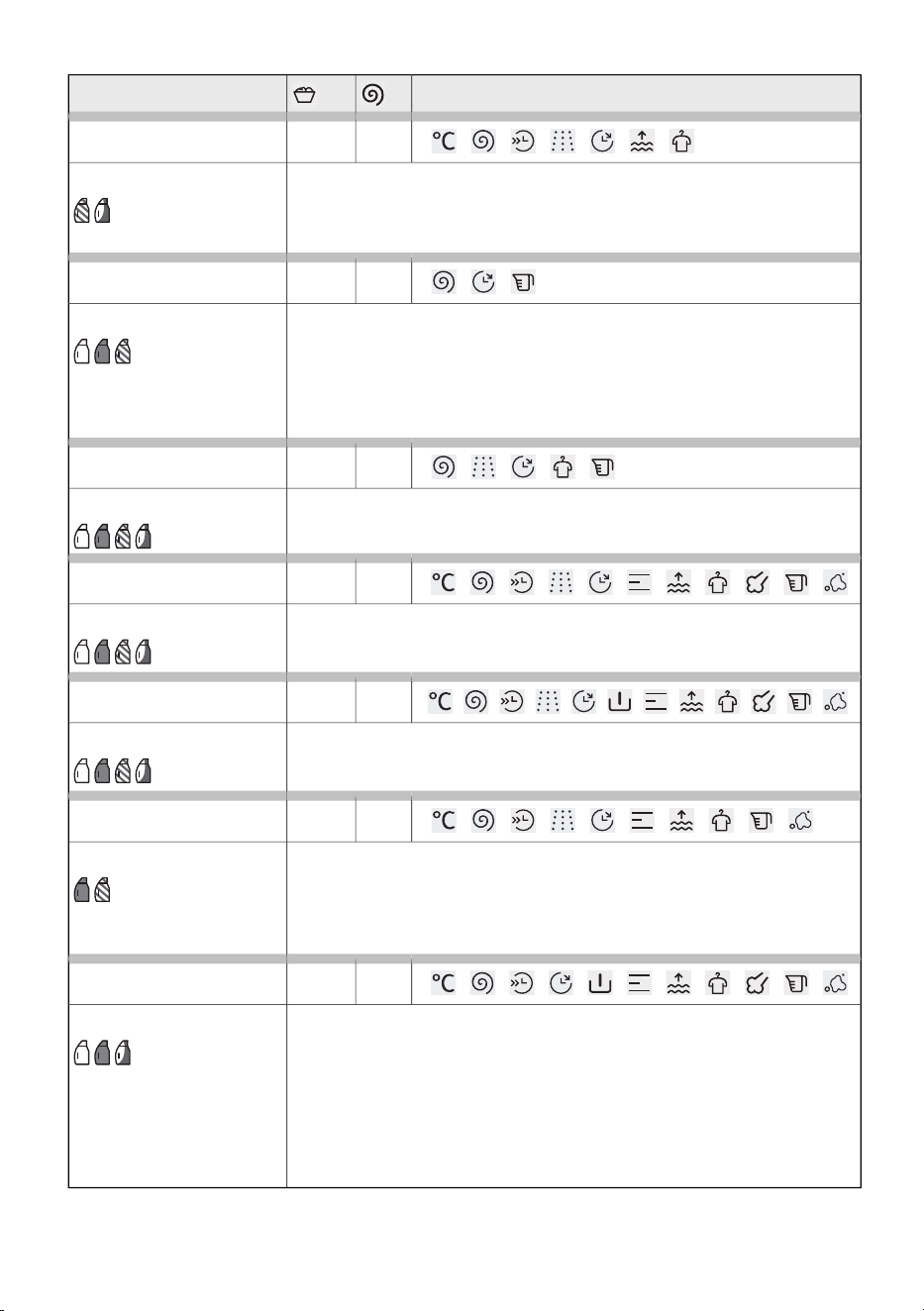
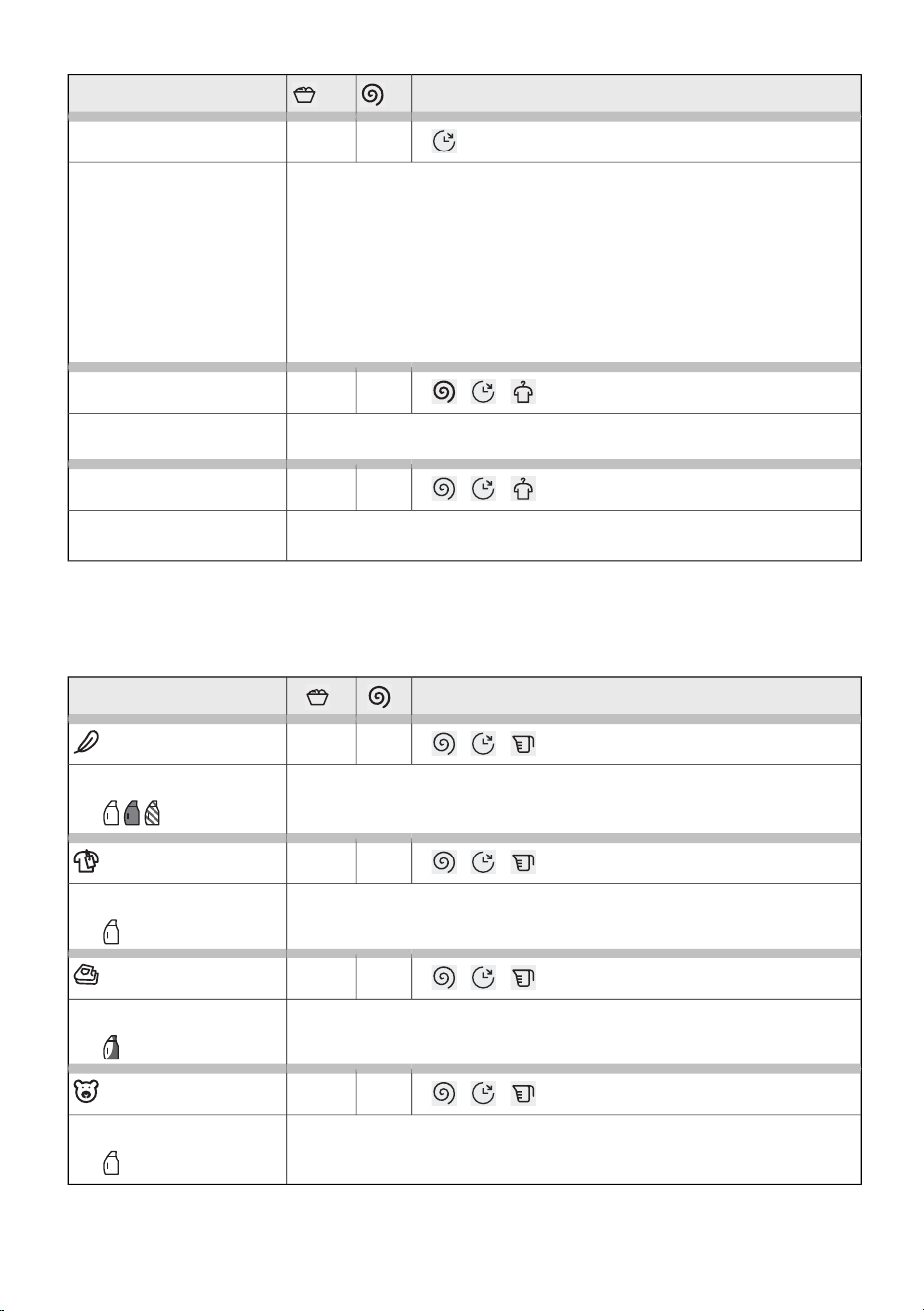
Option of selecting additional functionsProgram
8002 kg
Wool / Handwash
Gentle washing programme for washing wool, silk, and clothes that
require manual washing. Maximum temperature is 40°C. This programme
has a short spinning cycle. Top spinning speed available is 800 rpm.
Do not use conditioner with this programme!
Cold–40°C
12005 kg
Pets
During this programme, pet hair is removed from your garments. The
washing programme includes an automatic prewash.
After the washing programme completion, clean the glass on the washing
machine door and the pump filter in which pet hair could be trapped.
We recommend running the Ultra clean programme after the wash, in
order to thoroughly remove any pet hair from the washing machine.
40°C
12005 kg
Casual wash
A programme ideal for lightly soiled casual wear, helping maintain color
and fabric quality with optimized energy efficiency.
30°C
12005 kg
Baby
This programme is used for washing clothes that require special care.
Such as baby clothes or clothes for people suffering from skin allergies.
The washing programme includes an automatic prewash.
40°C–90°C
8005 kg
Shirts
This programme washes the collars and cuffs without wrinkling them.
The wash takes place at a low temperature, with a greater amount of
water and gentle tumbling.
Cold–40°C
10003,5 kg
Sports
This programme is suitable for washing clothing with membranes,
waterproof clothing, and breathable clothing, requiring simple care. It is
suitable for sportswear made of mixed materials. It combines low
temperature with gentle tumbling.
Do not use conditioner with this programme!
Cold–40°C
12005 kg
Allergy safe
This programme is used to wash normal to heavily soiled clothes that
require special care, such as clothes for people with highly sensitive skin
or skin allergies. We recommend turning the garments inside out as this
will also thoroughly wash out the skin and other residues. You can also
select the option to wash at maximum temperature and maximum
spinning speed. Set temperature will be maintained for a longer time
period than on conventional programmes in combination with intense
agitation.
40°C–90°C
41
Option of selecting additional functionsProgram
12005 kg
Bedding
This programme is used to wash bedding, pillows, and larger items.
Weekly wash of your bedding will remove skin residue and mites.
30°C–90°C
12005 kg
Jeans
A programme for denim and jeans. Wash inside out.Cold–40°C
8005 kg
Shoes
A programme fro trainers without leather. Coarse soiling should be
brushed off first before washing. The washing programme includes an
automatic prewash. A small additional load of towelling or cleaning cloths
increases the cleaning performance and reduces noise. Do not use fabric
conditioner. Follow the instructions on the care label.
Cold–40°C
8005 kg
Fabric care
The programme is ideal for delicate fabrics, as it reduces wear and tear
by washing them gently. Fabrics retain their quality and their life is
extended.
Cold–40°C
/
Total Fresh
The programme is designed for effective drying of the inside of the
washing machine and the dispenser drawer, without any laundry in the
drum. The purpose of drying is to reduce and prevent conditions that
lead to the development of mould and microbes, which may cause
unpleasant odours on clothes. The advanced programme removes up
to 99.99% of bacteria inside the washing machine and ensures
long-lasting freshness. If needed, the programme can run for up to 8
hours, with frequent drum rotations providing efficient air circulation and
thorough interior drying.
1,5 kg
Refresh & Go
The programme enables softening and sanitising of clothes. It is intended
for refreshing a small amount of laundry and preventing unpleasant
odours.
/
42
Option of selecting additional functionsProgram
/
Ultra clean
This programme is used for cleaning the drum and removing the residue
of detergent and bacteria. To select the programme, rotate the selector
to the left or to the right to the Ultra clean (Self-cleaning programme)
position. Other extra functions cannot be selected.
The drum must be empty. Do not add detergent or softener! You can
add some spirit vinegar (approx. 2 dl) or sodium bicarbonate (1
tablespoon or 15 g) for effective descaling. We recommend that you use
the programme at least once a month.
You can add the agents to the main wash compartment or to the drum.
90°C
140010 kg
Spin & Drain
Use the programme when you only wish to spin the laundry or to drain
out the water from wet laundy.
/
140010 kg
Rinse & Softening
This programme includes two cold rinses and a short spinning cycle.
The programme is suitable for laundry that only needs rinsing.
/
The following washing programmes can be selected in the ConnectLife app:
If you have connected the appliance to the app the programmes are transferred to the appliance
automatically.
Option of selecting additional functionsProgram
8005 kg
Pillow
Use this programme to wash blankets, coats, vest or jackets. Insert
garments into the machine so that they do not touch the rubber seal or
the glass.
40°C
12005 kg
New Clothes
A programme ideal for the initial wash of new garments that may release
dye or contain textile finishing residues.
30°C
12005 kg
Dark Clothes
This programme helps maintain the intensity of dark colors.40°C
10005 kg
Plush Toys
A programme for fluffy toys, gentle and effective.30°C
43
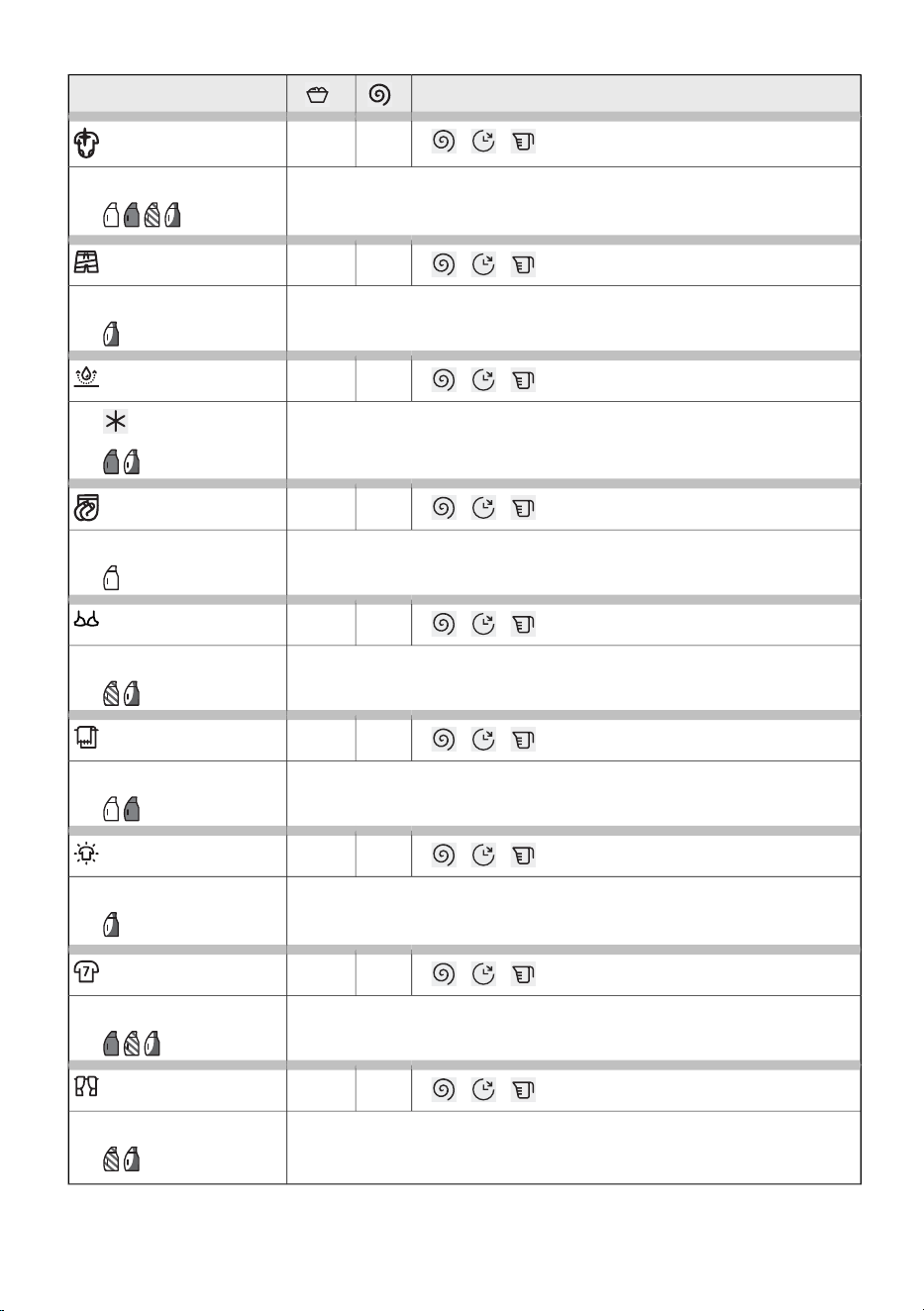
Option of selecting additional functionsProgram
12005 kg
Kids Wear
A programme designed for effective stain removal and enhanced hygiene.
Ideal for everyday children’s clothing.
The washing programme includes an automatic prewash.
60°C
10005 kg
Swimwear
A programme for your delicate swimwear, remove the salt and prolong
the fabric.
30°C
8002,5 kg
Waterproof
A programme for impregnating garments with special agents that increase
water resistance.
12005 kg
Tights / Stockings
An extra-gentle programme for fine and stretchable fabrics.30°C
8005 kg
Lingerie
A gentle programme for fine, lace, and stretchable fabrics. The use of a
laundry bag is recommended.
30°C
12005 kg
Kitchen Towels
A programme designed for heavily soiled kitchen textiles such as cloths
and towels.
60°C
12005 kg
Bleaching
This programme is designed for use with chlorine-free bleaching agents.
It helps remove stubborn stains and restore the brightness of
light-colored fabrics. Suitable only for textiles labeled as bleach-resistant.
60°C
8005 kg
Activewear
Programme suitable for functional fibers and elastic materials commonly
used in sportswear.
30°C
8005 kg
Curtains
A gentle programme that uses a higher water level and minimal
mechanical action to prevent creasing and damage to delicate decorative
fabrics.
30°C
44
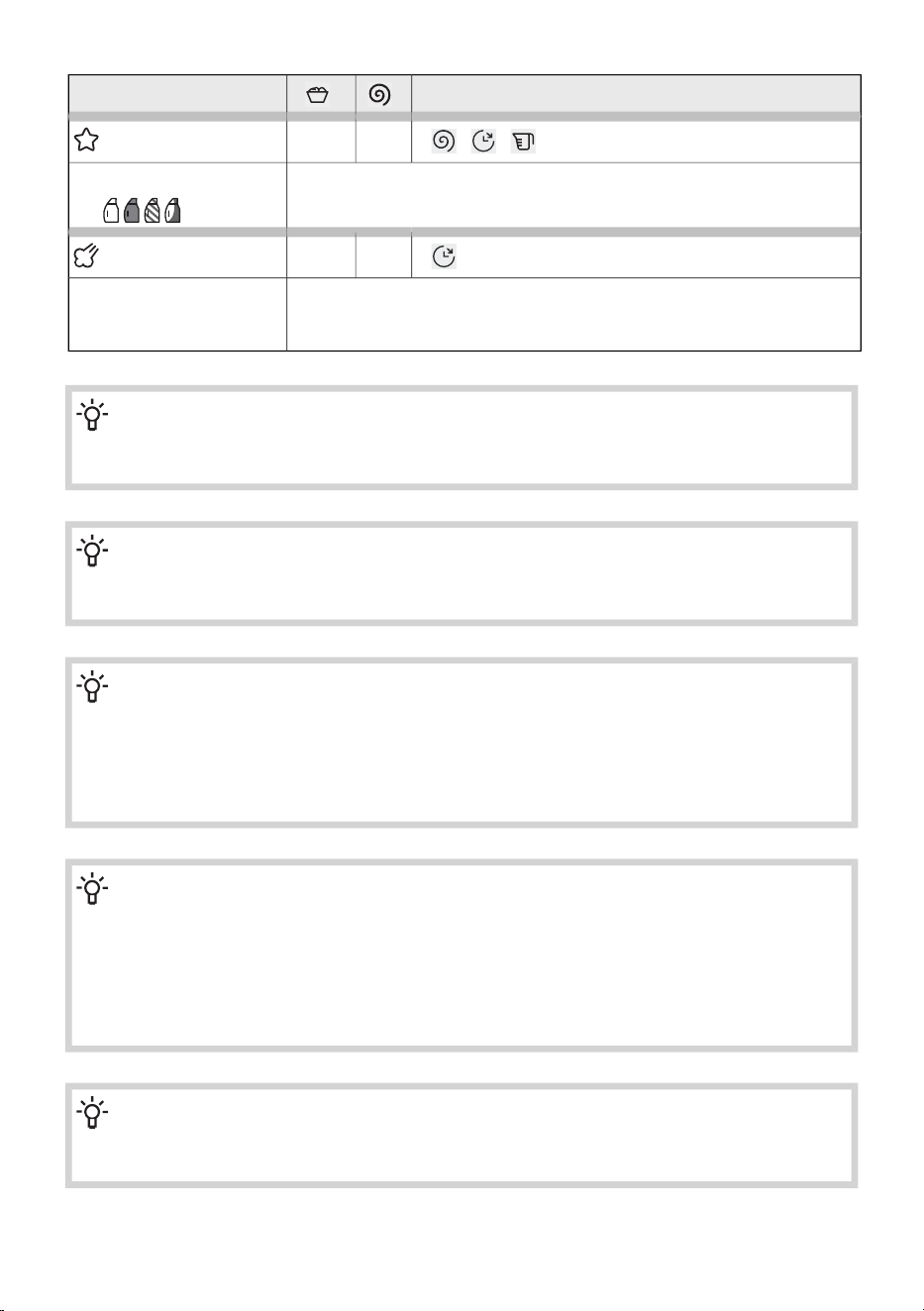
Option of selecting additional functionsProgram
10005 kg
Easy Care
A programme for clothing made of synthetic and mixed fibres, and for
simple care of cotton. Carefully read the washing instructions.
40°C
1,5 kg
Steam Refresh
The programme allows clothes to be softened and disinfected. Steam
refresh reduces or eliminates the need for ironing. After steam refresh
the laundry may be slightly damp or contain minor traces of water.
/
INFORMATION!
In terms of energy and water consumption, programmes that operate at lower temperatures
and last longer are generally the most efficient.
INFORMATION!
Noise and residual moisture content are affected by the spinning rate: the higher the spinning
rate in the spin cycle, the higher the noise and the lower the residual moisture content.
INFORMATION!
Add powder or liquid detergents according to the manufacturer's instructions, considering
the washing temperature, washing program, how soiled the laundry is, and water hardness.
When excessive foaming occurs in the washing machine or foam spills through the dosing
container, the washed laundry must be thoroughly rinsed. Choose a washing programme with
a large amount of water without using detergent.
INFORMATION!
Maximum amount of laundry in kg (for the Cotton programme) is indicated on the rating plate
fitted under the washing machine door (see chapter WASHING MACHINE DESCRIPTION /
Technical data on the rating plate).
Maximum or nominal load applies to laundry prepared pursuant to the IEC 60456 standard.
For better washing effect, we recommend loading the drum to 2/3 when using the Cotton
programmes.
INFORMATION!
Low water temperature, low mains voltage and different washing loads may affect the washing
time; the remaining time displayed is adjusted accordingly during the washing process.
45
6.5 Select the additional functions
Choosing extra functions
Once you have selected a washing programme, you can also choose and adjust additional functions
for certain programmes.
Some functions can also be selected and adjusted later, while the programme is running. (See chapter
APPLIANCE SETTINGS AND ADJUSTMENTS.)
This is done in two or three steps:
- selecting the function (hereinafter referred to as Selection),
- setting the function level, if the function allows it (hereinafter referred to as Level / Description /
Display),
- activating the function (hereinafter referred to as Activation / Deactivation / Exit).
If you do not want to select additional functions, press the Start/Pause button.
The individual functions are described below.
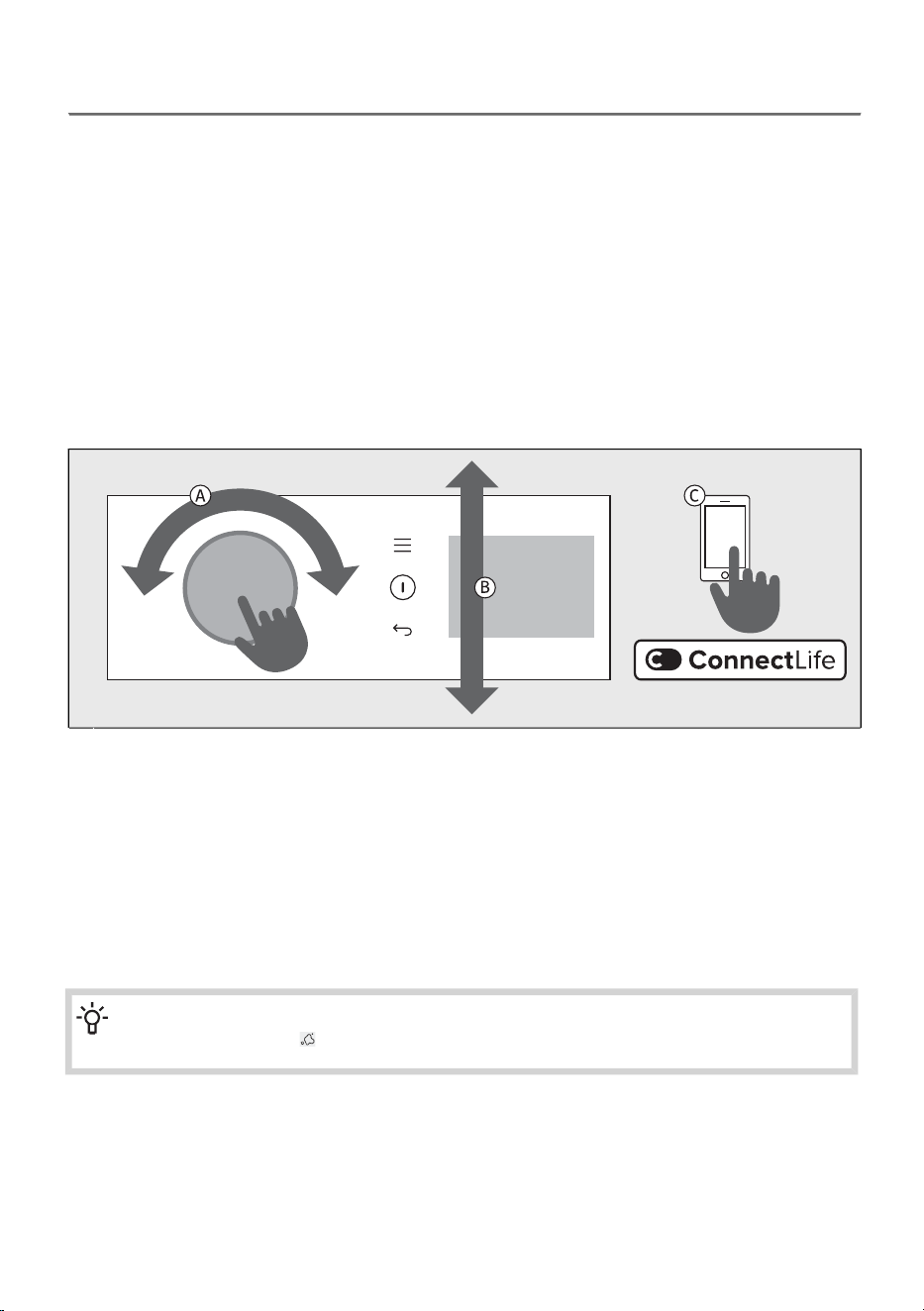
Turn the selector to the desired programme. Confirm the selection by pressing the selector
inwards.
A
On the right side of the display, additional options and functions appear in the form of submenus
(e.g. Stains, Modes, Temperature, Spin, Extras, etc.), which you can select and which are
highlighted.
By pressing the selector, you enter the settings of the selected function. By rotating the selector
to the left or right, you move through the range, and by pressing the selector again, you confirm.
B
You can also select additional programs in the app ConnectLife. Follow the instructions in the
app.
C
INFORMATION!
If you select the Stains option, the Prewash option becomes disabled.
46
INFORMATION!
In the Stains submenu, you can choose between six different stains: Sweat / Grass / Red wine
/ Grease / Tomato / Blood.
In the submenu Modes, you have the option to select three different modes: Saving mode /
Silent / Intensive.
Prewash is located in the submenu Extras.
A set of additional features
Additional function options vary depending on the programme.
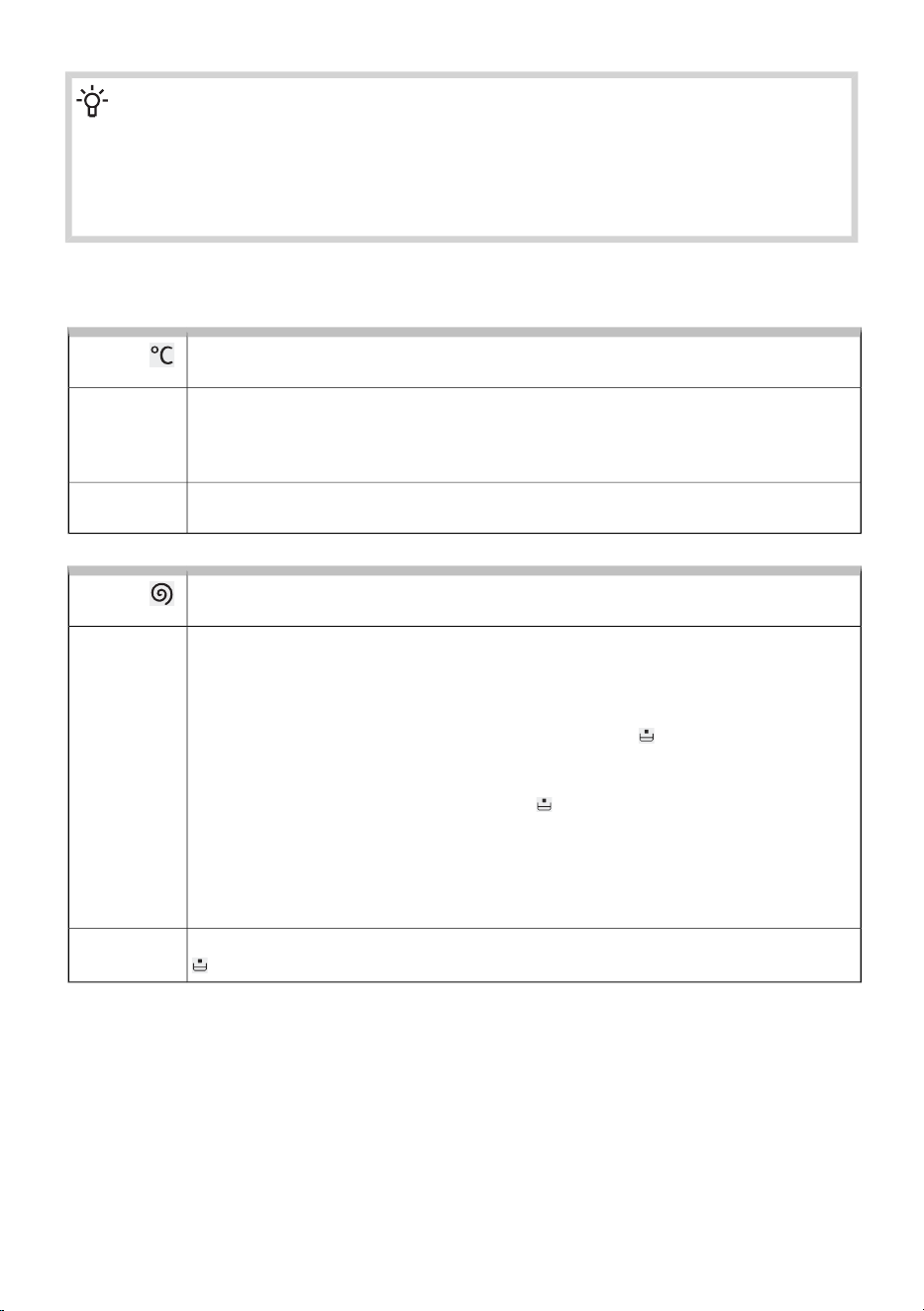
Temperature
Changing the temperature for the selected program.
Each programme has a preset temperature, which can be changed on some
programmes. Rotate the selector left or right to change the wash temperature. The
selected temperature is fully illuminated.
When cold wash is selected, the Cold indicator is illuminated.
Selection:
The selected temperature is shown on the display. If the setting cannot be changed,
the preset setting is partially illuminated.
Activation:
Spin (spinning rate/pump stop/drain)
To adjust the spinning rate.
You can set the desired spin speed.
Each programme (except programmes Total Fresh, Refresh & Go and Ultra clean)
has preset spin speeds that can be adjusted.
The selected spin speed is fully illuminated.
Selection:
•
If you want to keep the final rinse, select Rinse hold . Activate this function to
prevent creasing when you cannot remove the laundry from the washing machine
immediately after the cycle ends.
The button Start/Pause and the symbol flash. Before continuing, you can set
the spin speed. To complete the cycle, you must press the button Start/Pause;
until then, the washing programme will remain on hold before the final rinse.
To continue, press the Start/Pause button. The water will be drained and the final
spin will be performed.
The selected spin speed is shown on the display. If the Rinse hold function is enabled,
is illuminated on the display.
Activation:
47
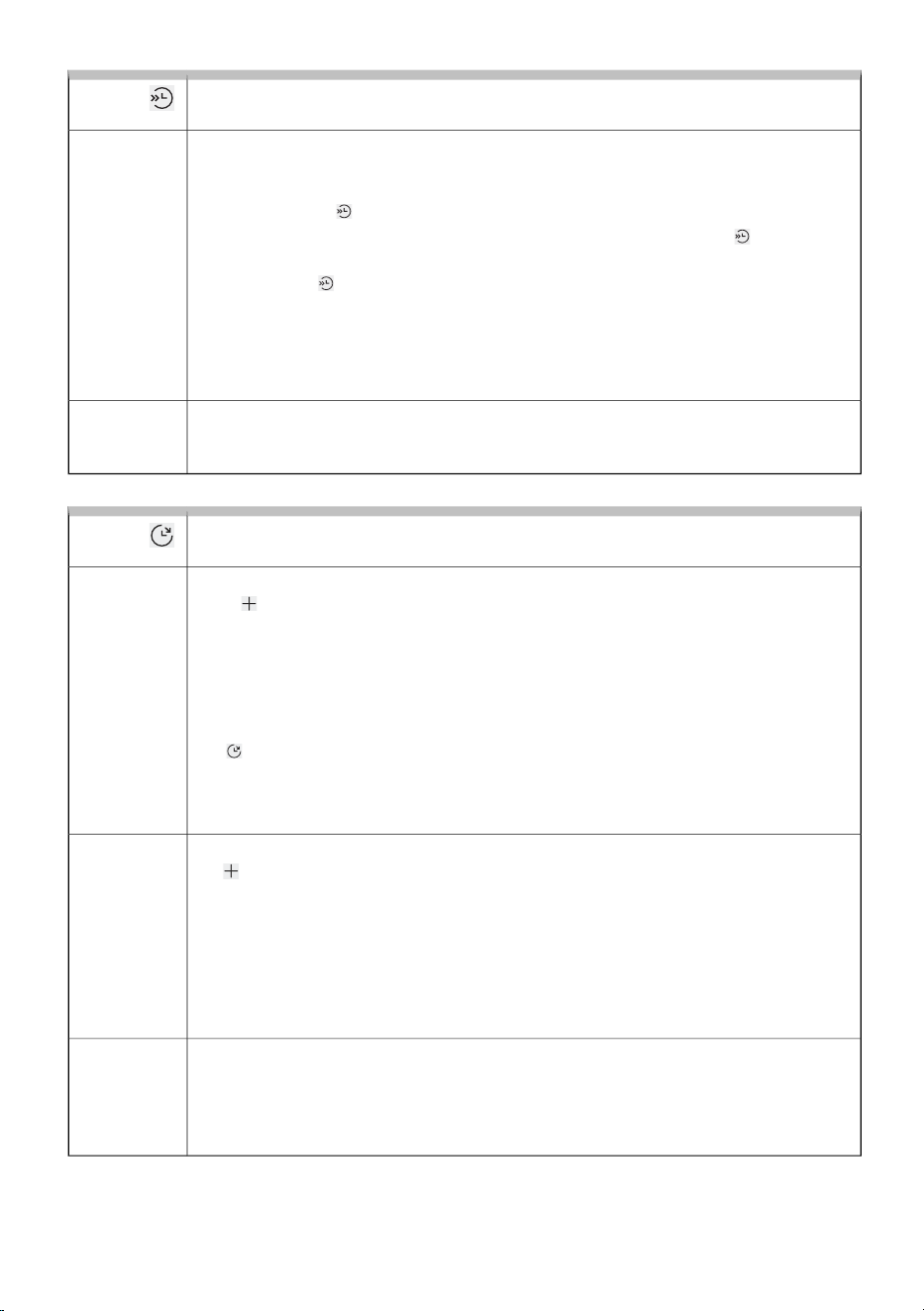
Fast wash (shorter washing time)
For quick washing of laundry.
When the function is activated, the washing programme will be carried out with a
shorter washing duration. There are two available choices (depending on the selected
washing programme).
After pressing the button, the final programme time is corrected on the display.
If you want to shorten the washing programme even further, press the button once
more; the final programme time is corrected again.
If you press the button again, the setting is reset.
Selection:
Fast1. press :
Faster2nd press :
Default – default washing mode (default)3rd press :
We recommend a half-load for the Cotton white programme.
If the setting is not available, the washing time on the display does not shorten.
When you have selected the function Fast, press the Start/Pause button to start the
programme.
Activation:
Delay end
Function for delaying the end of the wash cycle
Select the desired programme and extra functions. Close the washing machine door.
Press button to enter setting Extras.
Select Delay end and Set end time.
The Delay end function can be set up to 24 h:
- up to 6 hours: in 30-minute steps,
- then up to 24 hours: in 1-hour steps.
Press the selector button to confirm the delay end time.
The indicator lights up on the display. The end-of-cycle time is shown.
Example of function setting:
It is now 9 PM, and you wish the washing programme to be completed at 6 AM
the next morning. In this case, set the delay end time to 9 hours.
Selection:
Interruption: • If you want to cancel the Delay end function while you are setting it, press the
button, select Delay end and then Cancel.
• You can also interrupt the function by turning the selector to another programme
and then returning it to the previously selected one. Re-select the desired functions
and press the Start/Pause button to start the washing cycle.
• If the Delay end function is already running, press the Start/Pause button and
then Stop program to end the programme, or Skip delay end to cancel the Delay
end function.
Press the Start/Pause button to activate.
After activation, all washing parameters and selected additional functions are displayed
on the display.
Washing machine starts counting down the set time. When the countdown reaches
the programme duration (e.g. 2:30), the washing programme starts automatically.
Activation:
48
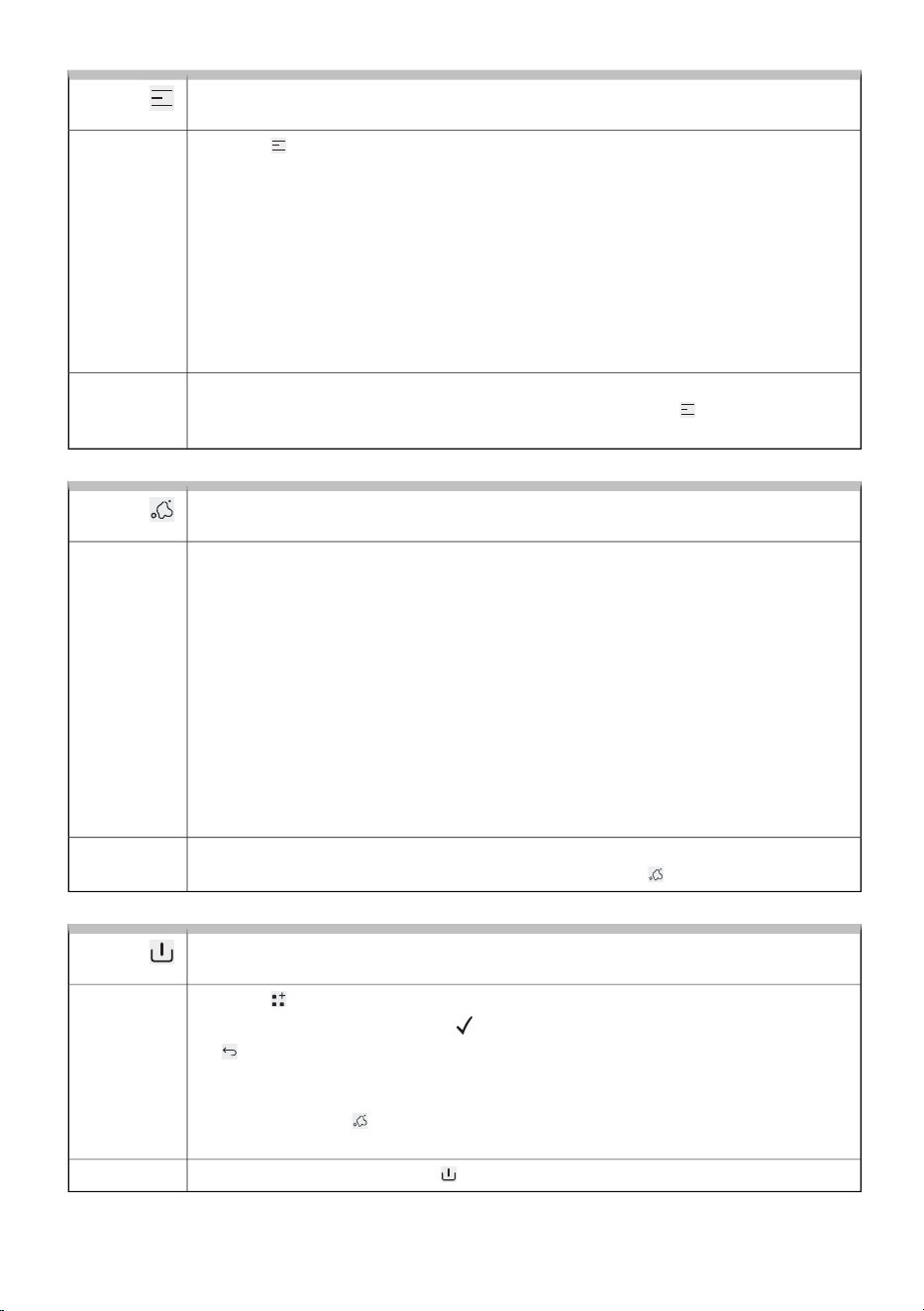
Modes (Washing mode)
To select the washing mode.
Press the Modes to enter the settings, where you select between the washing
mode options.
Only one option can be set:
Selection:
Saving mode – for economical wash mode (wash that saves energy – lower water
consumption) or
–
Silent – for silent wash or night wash mode (wash that reduces noise and extends
washing time) or
–
Intensive – for intensive wash mode (wash that improves cleaning performance,
with extra water and extended washing time) or
–
Default – default washing mode (preset).–
The function is activated by pressing the selector.
The name of the selected washing mode is shown next to the symbol, then you
can additionally select one of the other available functions.
Activation:
Stains (stain removal)
For removing different types of stains.
Press the Stains to enter the settings where you select between the stain removal
options.
Only one option can be set:
Selection:
Sweat or–
Grass (grass, soil, ...) or–
Red wine (red wine, coffee, tea, ...) or–
Grease (oil, butter, eggs, mayonnaise, salad dressing, machine oil, ...) or–
Tomato (tomato purée, jams, baby food, cherries, chili sauces, spinach, ...) or–
Blood (stains of organic origin, blood, eggs, milk, ...) or–
Off (preset).–
If you have selected the Stains function, the following functions cannot be selected:
Modes, Steam, Extra rinse, Prewash, Extra water, Anti crease, Fast, Faster.
The function is activated by pressing the selector.
The name of the stain removal mode is shown next to the symbol.
Activation:
Prewash
Washing heavily soiled laundry, particularly with stubborn superficial stains.
Press the Extras to enter the settings.
Select Prewash and confirm. The appears next to the text. Confirm by pressing
the button.
Prewash cannot be selected on all programmes. It can be selected only when the
Prewash text is lit.
Prewash and Stains cannot be selected at the same time.
After selecting Prewash, add detergent to the prewash compartment.
Selection:
The function is active when the is lit on the display.
Activation:
49
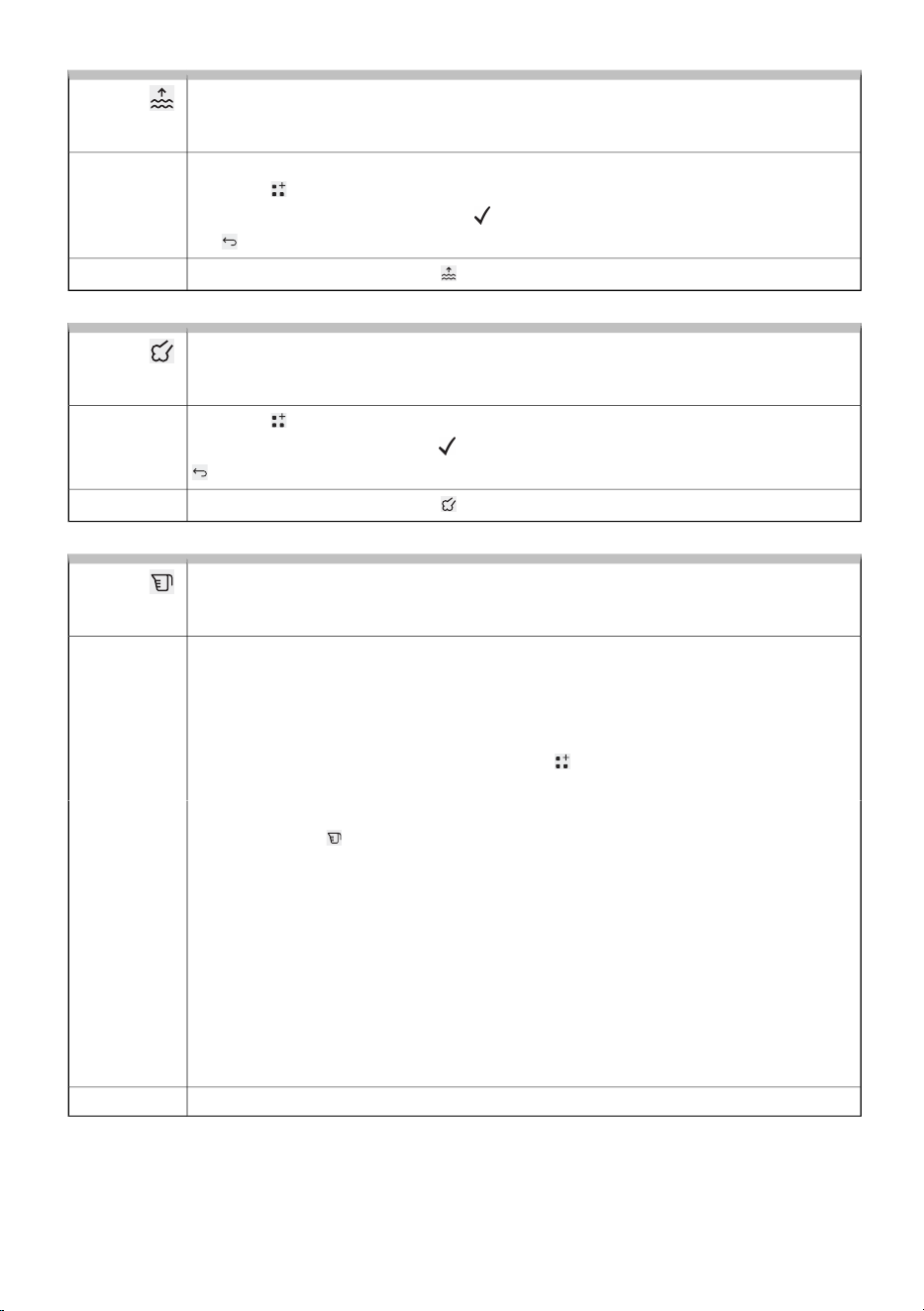
Extra water (additional water/high water level)
Function for washing laundry with a larger amount of water on some
programmes.
For washing with a higher water level.
Press the Extras to enter the settings.
Select Extra water and confirm. The appears next to the text. Confirm by pressing
the button.
Selection:
The function is active when the is lit on the display.
Activation:
Steam (steam desinfection)
Function for adding a steam cycle at the end of the wash program to disinfect
laundry.
Press the Extras to enter the settings.
Select Steam and confirm. The appears next to the text. Confirm by pressing the
button.
Selection:
The function is active when the is lit on the display.
Activation:
Dose aid (information on dosing liquid detergent)
Information on recommended amount of powder and liquid detergent, according
to the selected settings and the amount
The recommended amount of liquid detergent depends on the water hardness, the
selected washing programme, and the amount of laundry (the load) – the washing
machine performs a load measurement each time the function is used. For some
programmes, the load measurement is not performed (Speed 14', Rinse & Softening,
Wool).
Select the washing programme and press the Extras to enter the settings.
Select Dose aid and confirm.
Selection:
Press the Start/Pause button. The washing machine starts measuring the load in
the drum. The symbol lights up on the display.
1.
Based on the measured load in the drum and the other settings, the recommended
amounts of concentrated or non-concentrated liquid detergent are shown on the
display.
2.
Add the recommended amount of liquid detergent into the dosing tank. For
guidance, observe the detergent amount/ level indication in the washing detergent
compartment. (See chapter Put the laundry in the washing machine and add the
detergent and/or softener/Loading the washing machine.)
3.
You can check whether your liquid detergent is concentrated or
non-concentrated on the detergent packaging.
Close the detergent compartment.4.
To start the washing press the Start/Pause.Activation:
50
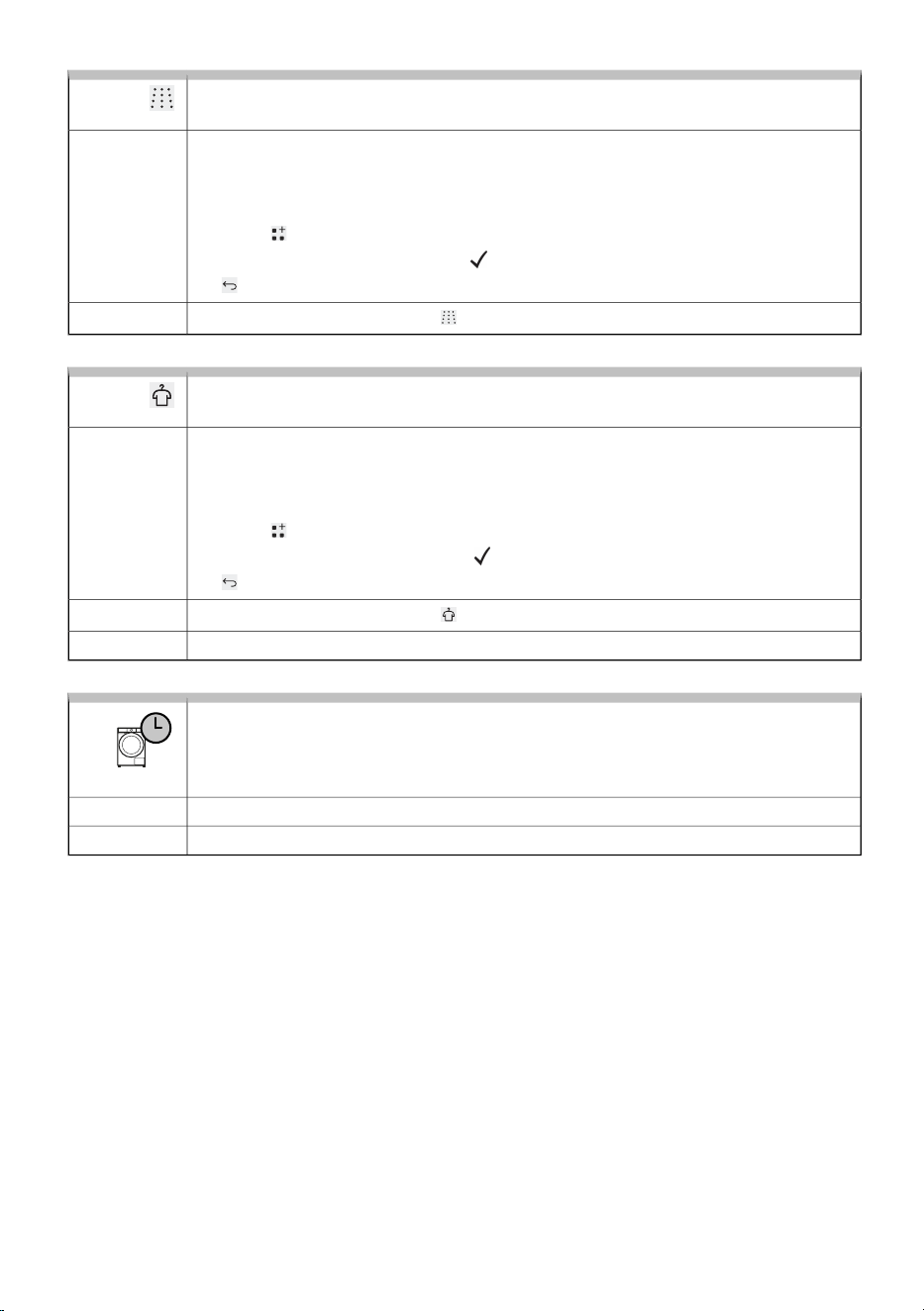
Extra rinse (additional final rinses)
A function to loosen and reduce creasing of laundry.
To increase the number of rinse cycles (+2), select the Extra rinse. This is
recommended for persons with highly sensitive skin and/or in areas with very soft
water.
Availability of this setting will depend on the selected washing program.
Press the Extras to enter the settings.
Select Extra rinse and confirm. The appears next to the text. Confirm by pressing
the button.
Selection:
The function is active when the is lit on the display.
Activation:
Anti crease (anticrease)
A function to loosen and reduce creasing of laundry.
Using this function is recommended for the care of more delicate laundry. You can
select the function if you do not remove the laundry from the washing machine
immediately after the cycle has finished.
The function must be activated before starting the programme.
Press the Extras to enter the settings.
Select Anti crease and confirm. The appears next to the text. Confirm by pressing
the button.
Selection:
The function is active when the is lit on the display.
Activation:
A function can be deactivated at any time by pressing the Start/Pause button.Interruption:
OPTIMIZING WASHING TIME
In the early stage of the washing programme, the washing machine uses
advanced technology to detect the amount of laundry. After load detection, the
washing machine adjusts the programme duration.
AutomaticSelection:
AutomaticActivation:
51
6.6 Start the washing programme
Starting the programme
Close the washing machine door and start the washing programme by pressing the Start/Pause button
on the right side of the display.
Pausing, stopping and changing the program
The programme is temporarily paused by pressing the Start/Pause button. The Stop program message
appears on the display. If you press the Start/Pause again, the programme resumes.
Stop the programme by pressing the Start/Pause button. The Stop program message appears on the
display. Press the selector to confirm. The washing machine will drain the water, and the Program
completed message appears on the display. The door will unlock after a certain time.
Opening the Door
The door unlocks after the washing programme is completed and can be opened.
It can also be opened after pausing or stopping the washing programme, provided the water level in
the washing machine is sufficiently low and the water temperature is not too high.
INFORMATION!
If the washing machine is not connected to the power mains or in case of a power supply
failure during the programme execution, then the washing machine door cannot be opened.
In such case, the washing machine has to be properly connected, or a service technician
should be contacted.
Adding/removing laundry during the operating of the appliance
Press the Start/Pause button; after a certain time you will be able to open the door:
• If the water temperature in the drum is below 50 °C and the water level in the drum is below a
certain level (and the washing machine is not in the final spin phase), the conditions are met for
the electronic door lock to release and the washing machine door to unlock (the Start/Pause button
flashes and the remaining time flashes on the display). If the water temperature in the drum is
above 50 °C, adding laundry during washing is not possible.
• If the water level is too high, the water must first be drained from the washing machine drum.
You can open the washing machine door and add or remove laundry from the drum. Press button
Start/Pause to continue the washing programme.
INFORMATION!
Washing time will resume from the point at which the washing programme was interrupted.
52

INFORMATION!
If you add a considerable amount of laundry during the wash, the laundry could be washed
less effectively, since the washing machine initially sensed a lower weight of the load of laundry
and added a smaller amount of water. Insufficient amount of water relative to the amount of
laundry could also cause damage to the laundry (rubbing of dry laundry), and washing time
can be longer.
Power supply failure
In the event of a power failure, the programme is interrupted. When the power supply is restored, the
Power failure warning with an explanation appears on the display. After 5 sec, the programme continues
automatically from the point where it was interrupted.
After the cycle has finished, you can review the programme sequence. If an error occurred during
operation, a red exclamation mark is shown next to the programme display. The submenu lists the
error title, the error number, its explanation, and the cycle in which the error occurred. When the power
supply is restored, the programme continues from the point where it was interrupted.
53
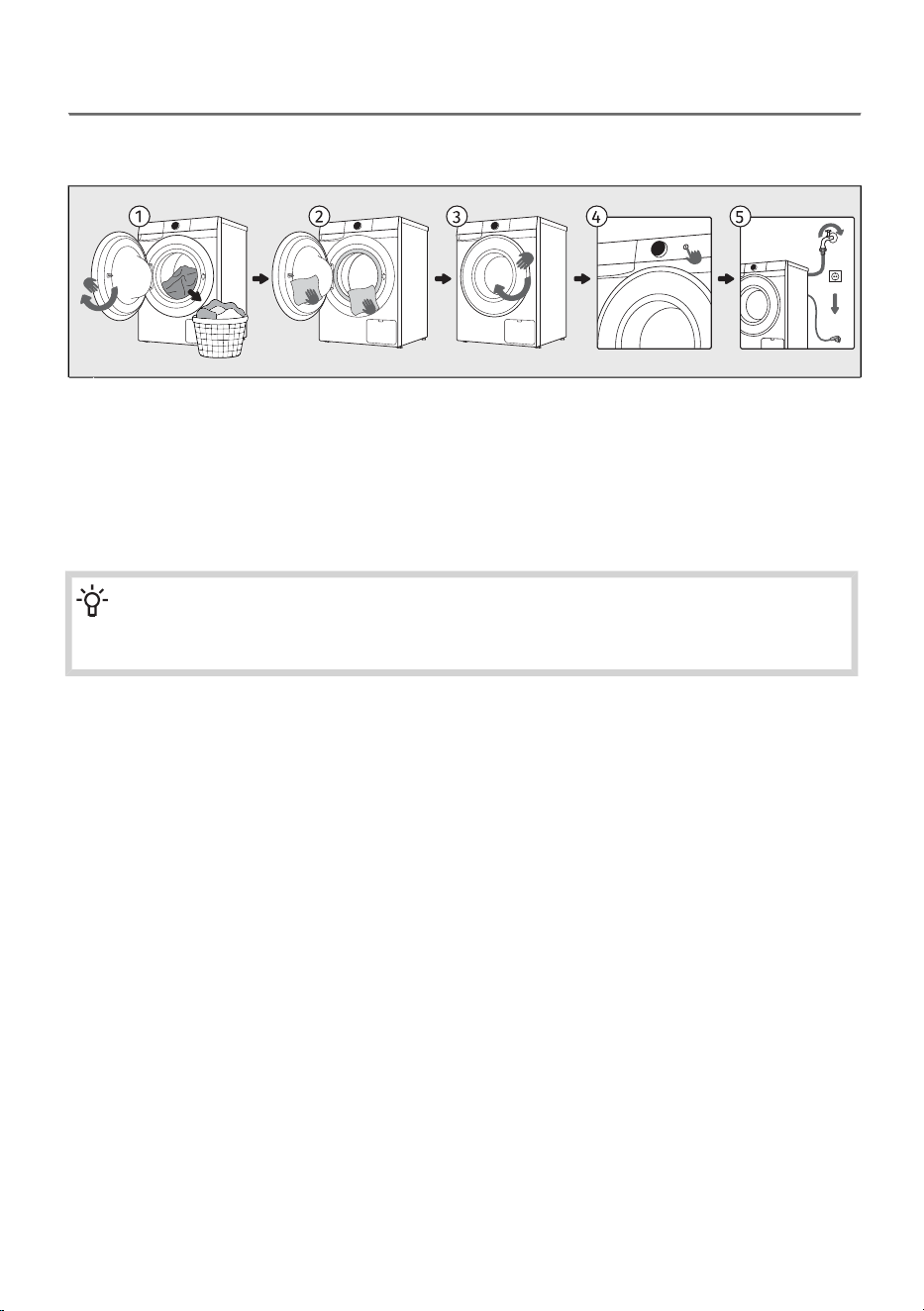
6.7 Complete the washing cycle
At the end of the wash, an audible signal sounds and Program completed is displayed on the screen.
5 min after the program ends, the appliance switches to a low-power standby or sleep mode.
Open the washing machine door. Take the laundry from the drum.1
Wipe the rubber door gasket and the door glass.2
Close the door.3
Switch off the washing machine (press the On/Off button).4
Shut off the water supply tap. Unplug the power cord from the outlet.5
INFORMATION!
After the programme is finished, remove the laundry from the drum as soon as possible to
maintain the freshness of the laundry.
54
7. APPLIANCE SETTINGS AND ADJUSTMENTS
This chapter describes how to:
- save the selected program and functions,
- customise your appliance using additional settings and
- access the user settings menu.
There are a few additional settings that can be set on the appliance. This will allow you to further
customize the device to your personal use and needs.
The basic principle for selecting additional settings is similar to selecting functions. See chapter
WASHING PROCESS, STEP BY STEP (1–7) / A set of additional features.
7.1 Saving programe and selected functions
You can change the default settings of each washing programme and save them for easier personal
use.
Settings saved
Function to save your settings for selected programs and functions.
If the settings differ from the default (factory preset) values, the symbol is shown
next to the programme name.
Selection:
You can save a favourite programme with the selected additional settings:Activation:
• before starting the programme,
•
during a temporary pause (by pressing the ) or
• at the end of the programme (when you open the door, the programme saving
function appears automatically).
The programme is saved until you change it again using the same procedure or if
you reset the personal settings to the factory settings (see the chapter below).
AdaptTech
Automatic function for saving frequently used programs and functions.
When a washing programme setting is used three times in a row, this setting is stored
as default and will always be suggested when you select that washing programme.
If you manually store the settings of a washing programme, the AdaptTech function
on this washing programme is deactivated.
The programme is saved until you reset the personal settings to the factory settings
(see the chapter below).
Activation:
55
7.2 Additional appliance settings
Child Lock
A safety feature.
As long as the child lock is activated, programme, settings, or additional
functions cannot be changed.
By using this setting, you lock the display so that children cannot accidentally start
or change the cycle.
Press to enter the menu and select the Child Lock function. Confirm activation of
the Child Lock function by pressing the selector. When you touch any button or use
the selector, the display shows that the Child Lock function is active/on.
The function can also be activated during the programme using the procedure
described above.
If the child lock is activated, programme or additional functions cannot be changed.
It remains active even after the appliance is switched off, so you must switch it off
before selecting a new programme.
Activation:
To switch off (deactivate) the child lock, press and hold button for 3 sec.
In the same way, the function Child Lock can also be turned off during the washing
programme.
Deactivation:
Remote control
Function for remote control.
To use this function, the appliance must be connected to the network, see chapter
BEFORE USING THE APPLIANCE FOR THE FIRST TIME.
Remote control is available for 24 hours after activation, even when the appliance
enters standby mode (the is lit). The door is locked during this time, so it cannot
be opened. End remote control by pressing the Start/Pause button or by switching
off the appliance.
Continue operating the appliance in the ConnectLife app, where you can choose
from several options (selection, launch, and monitoring and stopping of the
programme, amongst other additional settings, ...)
Washing machine operation can be paused or stopped by choosing Start/Pause,
Add clothes ...
Some options can be implemented remotely in full, and some require your physical
presence, such as adding laundry during a washing cycle (Add clothes).
Description:
After loading the laundry, close the washing machine door. Press the to enter the
menu and select Remote control. Follow the instructions on the screen.
Selection:
Continue activities in the app (select a program, additional functions and start
washing).
Activation:
56
7.3 User settings menu
Press the button to enter the User Settings menu and select Settings. Use the selector to move
through the available user settings.
When you reach the desired setting, rotate the selector left or right to move between the available
options.
Press the selector inwards to enter the desired option; the setting will be saved and you will return to
the previous settings level.
Press the button to exit.
You can change the following settings:
Sound On/Off
Option to switch off or adjust the sound volume.
You can change the following 3 settings:Available
settings:
Volume
Notifications
Interactions
1.
Volume for adjusting the volume level.
Possible volume level settings:
• Low = silent sound setting (preset),
• High = loud sound setting,
• On/Off = sound off.
2.
Notifications for switching the notification sound on or off on the display.
Available settings:
• On = sound on when a notification is shown,
• Off = sound off when a notification is shown.
3.
Interactions for switching the operating sound on or off.
Available settings:
• On = sound on when pressing a button or turning the selector,
• Off = sound off when pressing a button or turning the selector.
If the sound is switched off, there will be no audible signal at the end of the washing
programme.
Language
Option to change the language on the user interface.
Turn the selector to scroll through the list of languages (see chapter BEFORE USING
THE APPLIANCE FOR THE FIRST TIME / First appliance settings).
Language selection is not available while a cycle is running.
57
Drum illumination
Option to set the drum lighting.
You can set the drum illumination on or off and choose the illumination colour.Available
settings:
On/Off
Light colour
1.
Drum illumination
• On (preset)
• Off
2.
Light colour
• White & Blue (preset)
• White
• Blue
Display brightness
Option to adjust the display brightness.
The preset brightness is Level 3 (100%).
Available settings:
Display:
Level 1
Level 2
Level 3
1. Level 1 = 30% brightness
2. Level 2 = 50% brightness
3. Level 3 = 100% brightness
58
Manage programs
Display of programmes and editing their order.
In this setting you can adjust how the programmes are shown on the display and
change their display order.
Display:
Position
Visibility
1.
Position for changing the display order of the programmes.
Turn the selector to highlight the programme (shown in larger letters) that you
want to move to another position and confirm with the selector. Arrows appear
next to the programme, indicating that it is ready to be moved. Turn the selector
left or right to move the selected programme to the desired position. Confirm by
pressing the selector. The arrows disappear. The programme is now moved.
2.
Visibility for adjusting the programme display on the display.
Turn the selector to highlight the programme that you do not want to be shown
on the display and press the selector. Two options are shown:
•
Show the programme is visible on the display,
•
Hide the programme is not visible on the display.
If you want the programme not to be visible in the programme list on the home screen,
select Visibility in the Hide setting.
The programme is moved to the end of the list in the Manage programs setting, and
the appears next to it.
All programmes that are visible in the programme list on the home screen have the
next to their name.
If you have connected the appliance with the ConnectLife app, all programmes
available in the app are shown in the Manage programs. Mark the desired programme
with Show to reveal it.
A revealed programme is always placed at the end of the programme list.
Wi-Fi settings
Option to enable or disable the Wi-Fi connection.
In this setting you can switch the Wi-Fi connection on or off.
For connecting the appliance to the ConnectLife app, see chapter BEFORE USING
THE APPLIANCE FOR THE FIRST TIME / First connection to a Wi-Fi network.
Display:
On
Off
Water hardness
Option to set the water hardness.
The water hardness is preset to level Medium.
Available settings is:
Soft = soft water
Medium = medium-hard water
Hard = hard water
Display:
Soft
Medium
Hard
59
Reset to default
Reset all appliance settings to default.
Press the Confirm to restore all settings to the default (your own settings and all saved
programmes will be deleted).
This does not affect the language selection.
The appliance automatically returns to the home screen.
Display:
Confirm
Cancel
If you do not want to restore the Reset to default, press the Cancel to exit. You return
one step back to the previous display.
Exit:
Factory reset
Delete all settings and return to the factory settings.
Press the Confirm to restore all settings to the factory settings (your own settings
and all saved programmes will be deleted).
The appliance automatically switches to language selection.
Display:
Confirm
Cancel
If you do not want to restore the Factory reset, press the Cancel to exit. You return
one step back to the previous display.
Exit:
7.4 Statistics
Cycles
Option to review the completed cycles of the appliance.
Press the Cycles to display the number of completed cycles.Display:
Cycles
Errors
Option to review the last detected errors of the washing machine.
Press Errors to scroll through the last errors. The error code will be displayed, see
chapter TROUBLESHOOTING AND SERVICING / Display Message Table.
Display:
Errors
60
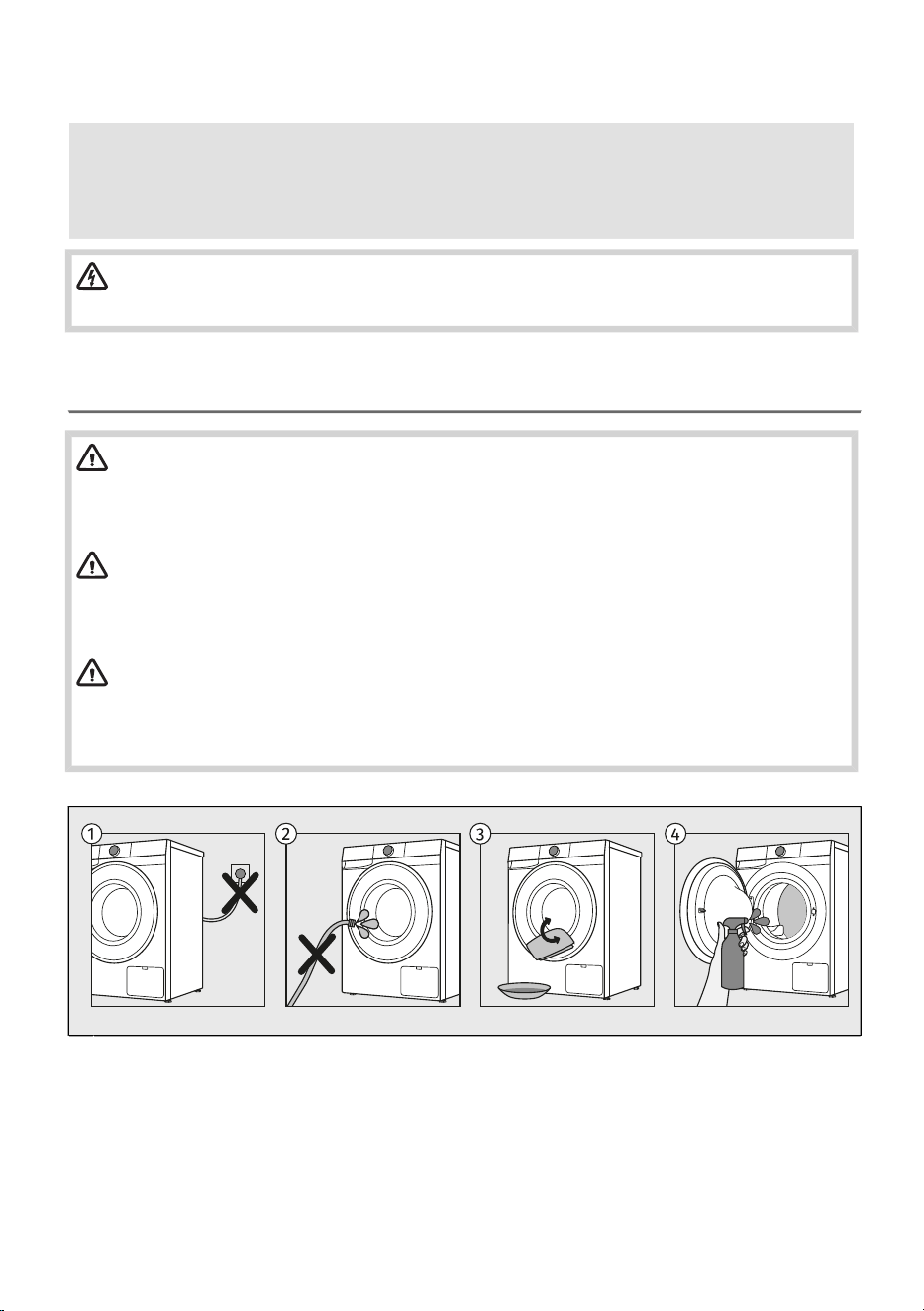
8. CLEANING AND MAINTENANCE
This chapter describes how to:
- clean the exterior of the washing machine,
- clean the detergent despenser,
- clean the water inlet connection and door seal,
- clean the pump filter.
ELECTRIC SHOCK!
Before cleaning, unplug the washing machine from the power mains.
8.1 Cleaning the washing machine exterior
WARNING!
Danger of electric shock.
Even when the washing machine is switched off, it remains under voltage for some time.
Always unplug the power cord before cleaning or performing maintenance.
WARNING!
Damage that can be caused by water.
Do not clean the washing machine with a jet of water, as water could enter the appliance and
damage its components.
WARNING!
Damage that can be caused by cleaning agents.
Do not use any solvents or cleaning agents that could damage the washing machine (please
observe the recommendations and warnings provided by the cleaning agent manufacturers).
Before cleaning, unplug the washing machine from the power mains.1
Do not clean the washing machine with a jet of water!2
Clean the washing machine exterior and display unit using a soft damp cotton cloth and water.3
Clean the drum using a soft cotton cloth and a suitable cleaning agent.4
61
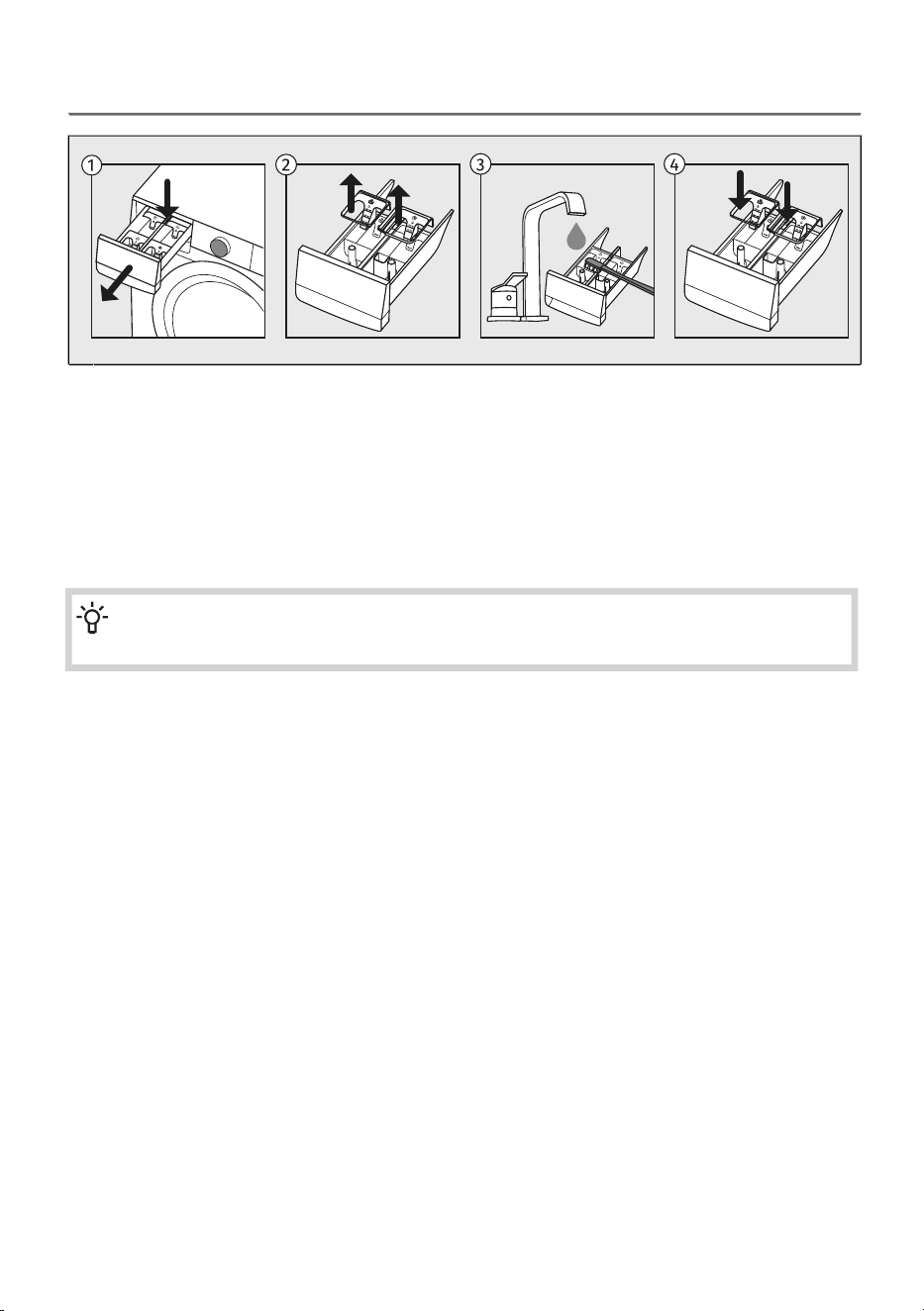
8.2 Cleaning the dispenser tray
To remove the dispenser tray from the housing, press the small tab.1
Clean the dispenser tray under running water using a brush, and dry it. Also, remove any detergent
residue from the bottom of the housing.
2
If required, remove and clean the plug cap.3
Use a toothpick or a similar thin object to also clean the hole at the bottom of the compartment.
Clean the plug cap under running water and replace it.
Reinstall the upper removable part onto the dosing drawer and close the drawer.
4
INFORMATION!
Do not wash the detergent compartment in the dishwasher!
62
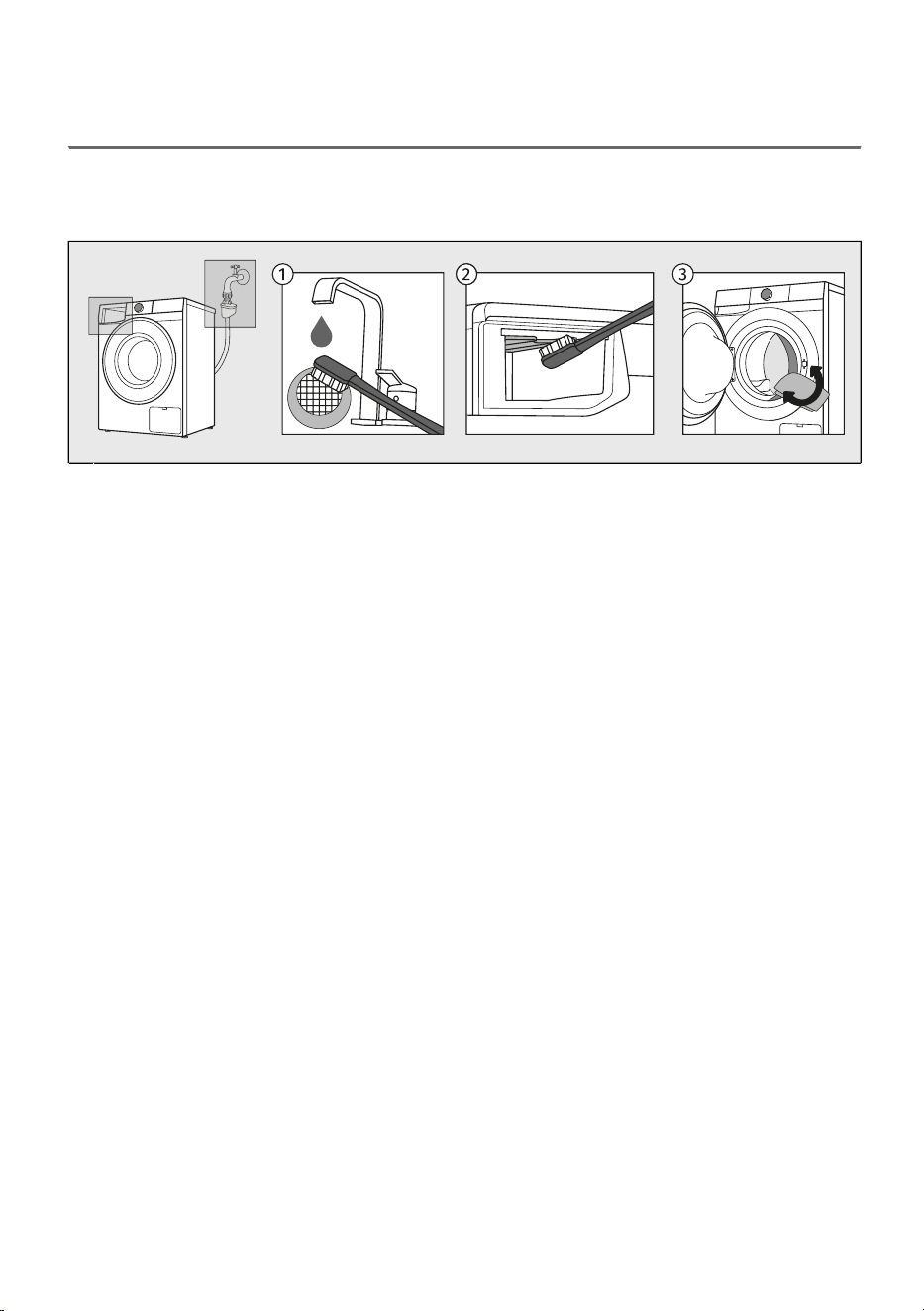
8.3 Cleaning the water supply hose, detergent dispenser
housing, and rubber door gasket
To avoid the buildup of limescale and dirt in parts of the washing machine that come into contact with
water and detergent or fabric softener, clean these parts several times. This will extend the life of the
washing machine and increase its efficiency. See the chapter below.
Close the water supply, unscrew the water inlet hose and clean the net in the hose connection.1
Pull out the dosing container and clean the entire rinsing area of the washing machine, especially
the nozzles on the upper side of the rinsing compartment, with a brush.
2
After every wash, wipe the rubber door gasket and remove any objects that may have become
stuck in the gasket to extend its useful life.
3
63
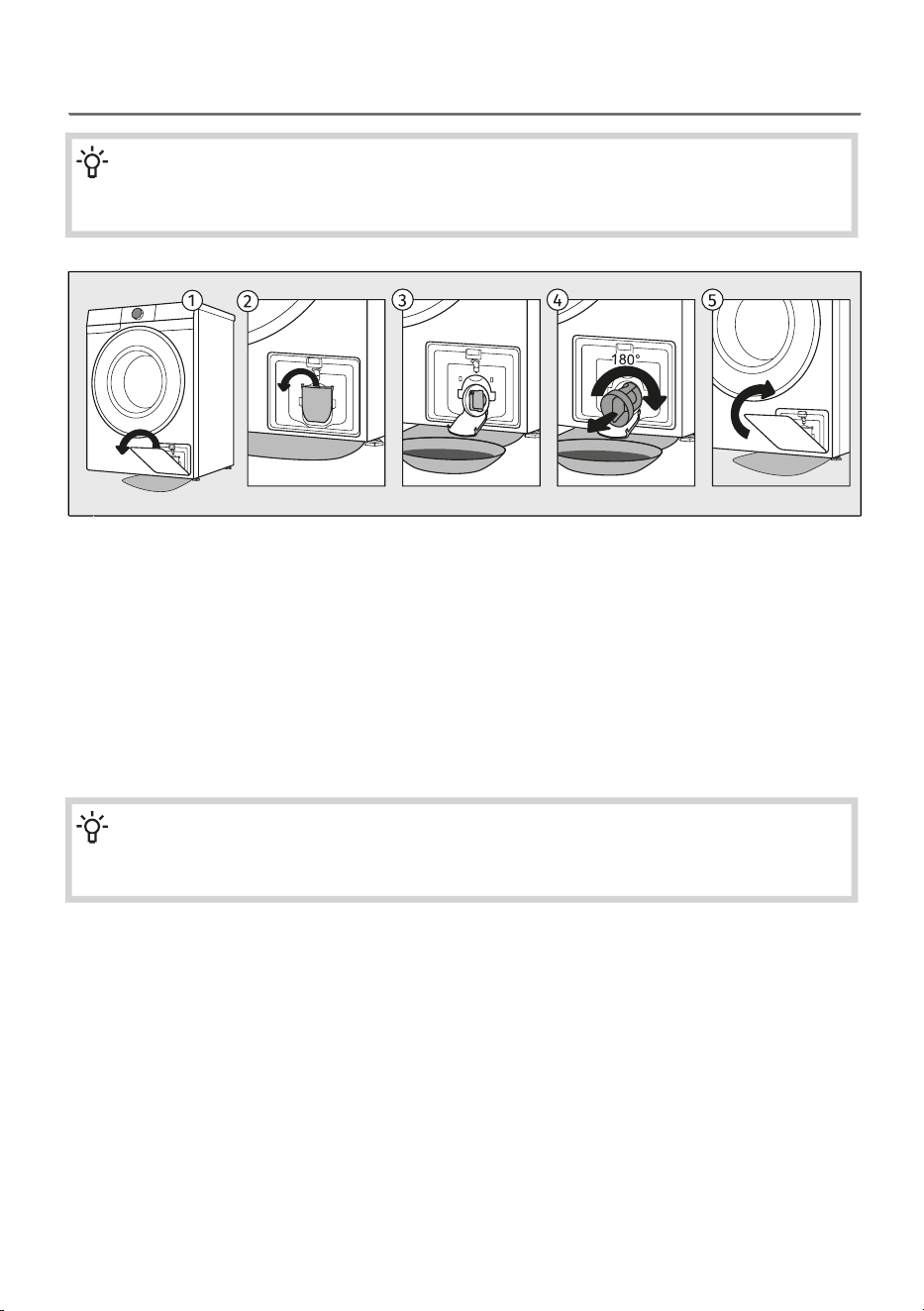
8.4 Cleaning the pump filter
INFORMATION!
During cleaning, some water may be spilled. It is therefore recommended to place an absorbent
cloth on the floor.
Open the filter cover and remove it from the appliance housing.1
Open the water outlet funnel before cleaning the pump filter.
Rotate the pump filter slowly in the counter-clockwise direction. Pull out and remove the pump
filter to allow the water to slowly drain.
2
Clean the pump filter thoroughly under running water.3
Remove all objects and impurities from the filter housing and the impeller.
Reinsert the pump filter and screw it in clockwise.
For a good seal, the filter gasket surface should be clean.
4
Reinsert the filter cover into the appliance housing.5
INFORMATION!
We recommend regular cleaning of the pump filter once a month. When washing very fleecy,
very dirty or old laundry, do it more often.
64
9. TROUBLESHOOTING AND SERVICING
In this chapter, you will learn:
- how to act in case of malfunctions or problems during washing,
- descriptions of warnings, alerts, and error messages displayed on the screen,
- when and how to contact the service centre,
- what to do in case of a warranty claim and what the warranty covers,
- where to order spare parts.
9.1 What to do in case of problems?
The washing machine automatically checks the operation of individual functions during washing. If it
detects irregularities, it reports an error by showing the (EXX) and the error description on the display.
If the machine continues the washing cycle despite the detected irregularity, the Program completed
is shown on the display after the programme has finished, and a red exclamation mark appears next
to the Overview. Enter the Overview to view the fault/error. Due to external disturbances (e.g. electrical
installation), various errors may be displayed (see the chapter below).
In such case:
• Switch off the washing machine, wait a few seconds or unplug the washing machine from the
mains.
• Switch on the washing machine and repeat the washing programme.
• Most errors during operation can be resolved by the user (see the comming chapter).
• If the error occurs again, call an authorized service unit.
• Repairs may only be carried out by an adequately trained person.
INFORMATION!
Noise and vibration – make sure the appliance is levelled using the adjustable legs and that
the jam nuts are securely tightened.
The UKS - stability control system
Unevenly distributed laundry or lumps of laundry in the washing machine drum can cause problems
such as vibration and noisy operation. The washing machine detects such problems and the UKS*
(*stability control system) will be activated.
Smaller loads (e.g. one towel, one sweater, one bathrobe etc.) or clothes made of materials with special
geometrical properties are virtually impossible to distribute evenly across the washing machine drum
(slippers, large items etc.). This results in several attempts to redistribute the laundry, which in turn
leads to longer programme duration. In extreme cases of unfavourable conditions, the programme
can be completed without the spinning cycle.
The UKS* (*stability control system) allows stable operation and a longer washing machine useful life.
The following lists all the errors that the user can see on the user interface.
65
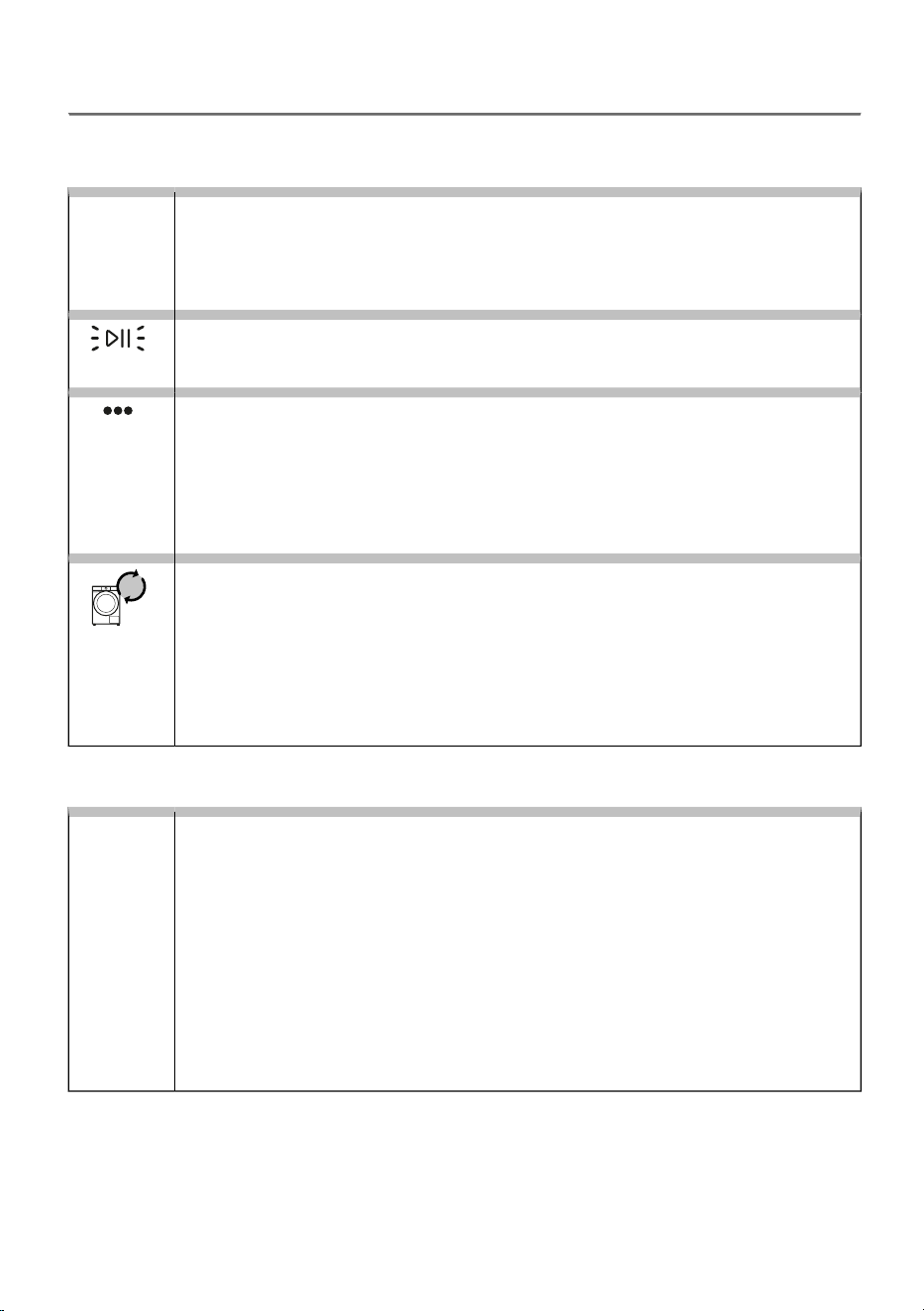
9.2 Display Message Table
Warnings/information for the user, which can be indicated on the display unit, may include the following:
INFORMATION
Anti crease function that you have selected as a part of the washing programme
is activated and in progress
The Program finished and To complete press Stop ... signs will alternate on the display
unit.
To stop the Anti crease function, press the Start/Pause ON/OFF button.
Anti
crease
Washing machine standing by, ready to resume the washing programme
The display shows Program paused and the Start/Pause button flashes.
To resume the washing programme, press the Start/Pause button.
Preparation for unlocking the door
On the display, an animation of three dots is shown.
Wait for the process to finish. If no errors are shown after the process, a new cycle can
be run.
Water is being drained. Wait for the door to unlock.
If the water in the appliance is too hot, the door cannot be opened. See the notice on
the display.
Displaying the number of completed wash cycles
Information about the number of washing cycles performed is displayed on the display
for 3 seconds if you unplug the power cord from the power supply (after setting the
selector to position Off), wait 10 seconds and then plug the power cord back in. After
3 seconds, the appliance switches to standby mode.
The number of cycles performed is also available in the user settings menu. See chapter
APPLIANCE SETTINGS AND ADJUSTMENTS / User settings menu / Total number of
cycles.
WARNINGS
Water drain system alert
(Draining error)
After the washing programme has finished, the display shows Program completed.
Check the message in Overview.
Alert about reduced water flow in the pumping stage. Check the following:
• is the pump filter clean,
• is the drain hose clogged,
• is the drain clogged,
• if the drain hose is placed below the maximum and above the minimum height (see
chapter INSTALLATION AND CONNECTION / Connecting and securing the water
discharge hose ).
E7.1
66
System warning to run the Ultra clean
(The washing machine drum needs cleaning)
After the washing programme has finished, the display shows Program completed.
Check the message in Overview.
In case of a The washing machine drum needs cleaning warning on the display after
washing, proceed as follows:
• clean the dosing container,
• clean the water supply hose, detergent dispenser, and rubber door gasket,
• clean the pump filter (see chapter CLEANING AND MAINTENANCE ) and
• run the self-cleaning program Ultra clean (see chapter Programmes on the control
unit ).
Self-cleaning programme is used to clean the drum and to remove detergent residues
and bacteria. The drum must be empty. Do not add detergent or softener! You can
add some spirit vinegar (approx. 2 dl) or sodium bicarbonate (1 tablespoon or 15 g) for
effective descaling. We recommend that you use the programme at least once a month
or whenever the warning appears E92 The washing machine drum needs cleaning.
E92
Warning by the system for detecting excessive foaming during the washing
programme
(Foam detected)
After the washing programme has finished, the display shows Program completed.
Check the message in Overview.
In case of excessive foaming in the washing machine or leak of foam through the
detergent dispenser tray, the washed laundry has to be rinsed thoroughly with a large
amount of water. Choose a washing programme, but do not add any detergent.
• We recommend choosing the Rinse & Softening programme.
• Decrease the amount of detergent added.
E91
Power supply failure warning (PF)
(Power failure)
The system detected a power supply failure during the washing programme progress,
which affected functional execution of the washing programme.
After the washing programme has finished, the display shows Program completed.
Check the message in Overview.
PF
Voltage value out of range
Warning that the voltage is above 260 V or below 180 V.
During the washing programme, a prolonged drop of the supply voltage below 180 V
or an excessive rise of the supply voltage above 260 V was detected, which affects
the functionality of the washing machine.
Check the message in Overview.
Check the power supply network to which your washing machine is connected.
Unresponsive display unit and all buttons
Unplug the power cord from the outlet. Check if the supply voltage is suitable for the
washing machine (220–240 V); then, plug the power cord back into the outlet and
switch on the washing machine.
E40
67
The following lists all the errors that the user can see on the user interface.
GENERAL MALFUNCTIONS
Incorrect settings
(Motor alternative not confirmed)
Restart the programme. If the error occurs again, contact the service technician, who
will guide you through the procedure for confirming the reset.
E0
Temperature sensor error
(Thermistor error)
Inlet water too cold. Repeat the washing program.
If the washing machine reports this error again, call a service technician.
E1
Door lock error
(Door lock error)
Make sure the washing machine door is closed.
If you hear an acoustic signal after pressing the Start/Pause button, it means that the
door of the washing machine is not closed. Close the washing machine door.
Switch off the power cord from the socket, drain the water from the appliance through
the pump filter, reconnect the power cord to the socket and switch on the appliance
by pressing On/Off. The appliance enters the end-of-programme menu.
If the cycle is interrupted for any reason and the appliance does not unlock the door,
the display shows error E02.
If the error reoccurs call a service technician.
E2
WATER-RELATED MALFUNCTIONS
Water filling error
(Water filling error)
Check the following:
• the suitability of the drain height,
• whether the drain hose is secured to the washing machine housing,
• is the water inlet valve open,
• whether the filter on the inlet hose and on the water valve is clean,
• is the water supply hose deformed (clipped, clogged etc.),
• is the pressure in the water mains between 0,05 and 1 MPa (0,5–10 bar),
• in 60 seconds, min. 10 L of water should flow from a fully open tap,
Then, press the Start/Pause button to resume the program.
If the error reoccurs call a service technician.
E3
Water heating error
(Water heating error)
Restart the program; if the error reoccurs, call a service technician.
E6
68
Water draining error
(Draining error / Drain system alert)
Check the following:
• is the pump filter clean,
• is the drain hose clogged,
• is the drain clogged,
• if the drain hose is placed below the maximum and above the minimum height (see
chapter INSTALLATION AND CONNECTION / Connecting and securing the water
discharge hose ),
• whether the pump impeller is not blocked (the impeller must rotate freely);
then, press the Start/Pause button again.
If the error reoccurs call a service technician.
E7
E7.2
Excessive amount of detergent
Excessive use of detergent may cause increased foam in the drum. If the error is shown,
confirm the foam removal from the washing machine by pressing the Start/Pause
button.
Water leak detected in the washing machine area
(Water leakage detected)
Turn off the washing machine and turn it back on.
Inspect the exterior of the appliance. If you do not observe any leaks, you can continue
to use the washing machine.
Check the height of the wall siphon (see chapter INSTALLATION AND CONNECTION
/ Connecting and securing the water discharge hose).
E9
Water level sensor error
(Water level sensor error)
Unplug the power cord from the socket, wait 1 min, then plug it back in and switch on
the washing machine.
Vent the appliance. Do this by draining and cleaning the washing machine filter and
cleaning the wall-mounted trap.
If the error reoccurs call a service technician.
E10
Water overflow
(Overflow)
If there is water in the drum that exceeds a certain level, and an error is reported on
the display unit, the washing program will be interrupted and water will be pumped out
of the washing machine.
Restart the program; if the error reoccurs, call a service technician.
If there is water in the drum that exceeds a certain level, and an error is reported on
the display unit, while the washing machine continues to add water, close the water
tap and call a service technician.
Excessive amount of detergent
Excessive use of detergent may cause increased foam in the drum. If the error is shown,
confirm the foam removal from the washing machine by pressing the Start/Pause
button.
E11
69
ELECTRICAL SUPPLY MALFUNCTIONS
Phase current exceeded
The washing machine detected an exceeded phase current in one of the phases and
therefore stopped operation.
Disconnect the washing machine from the power supply (unplug the power cord) and
wait for 1 minute.
In the meantime, check whether the drum is overloaded or unevenly loaded; if necessary,
redistribute the laundry or remove some of it.
Reconnect the appliance and start the program again.
If the error reoccurs call a service technician.
E12.1
Phase current exceeded – operation disabled
(Fatal hardware error)
Disconnect the washing machine from the power supply (unplug the power cord) and
wait for 1 minute.
Reconnect the appliance and start the program again.
If the error reoccurs call a service technician.
E12.4
Rotor blocked
(Locked rotor)
The motor is unable to rotate, which prevents the program from operating normally.
Switch off the washing machine and check whether the drum is mechanically blocked
(an object in the drum, a trapped piece of laundry, etc.). Remove the obstruction.
Turn the machine back on and start the program.
If the error occurs again, the motor or drive assembly may be faulty; call a service
technician.
E12.5
Electronics communication failure in the washing machine
(Communication time out)
Disconnect the washing machine from the power supply (unplug the power cord) and
wait for 1 minute.
Reconnect the appliance and start the program again.
If the error reoccurs call a service technician.
E12.8
Wrong software version
(Wrong MCU version)
Disconnect the washing machine from the power supply (unplug the power cord) and
wait for 1 min. Reconnect the appliance and start the program again.
A software update or reinstallation is required.
Contact an authorized service center.
E12.12
Motor is not connected
(No communication with motor)
The washing machine does not detect a connection between the motor and the control
module.
Disconnect the washing machine from the power supply (unplug the power cord) and
wait for 1 minute.
Reconnect the appliance and start the program again.
If the error occurs again, the connection to the motor is likely broken.
E12.17
70
Load detected during the programme (Ultra clean, Total Fresh)
(Laundry detected during drum clean program)
Disconnect the washing machine from the power supply (unplug the power cord) and
wait for 1 minute.
Meanwhile, remove all items from the drum.
Reconnect the appliance and start the program again.
E13.3
Error while locking the door
(Unable to lock the door)
The door cannot be locked. The door locking mechanism is not working properly, so
the appliance cannot start the programme.
Check that the door is properly closed and nothing is blocking the latch.
Disconnect the washing machine from the power supply (unplug the power cord) and
wait for 1 minute.
Reconnect the appliance and start the program again.
If the error occurs again, the door lock mechanism or door switch may be faulty.
E22
Error while unlocking the door
(Unable to unlock the door)
Door is closed, but it cannot be unlocked.
Unplug the power cord from the socket, wait 1 min, then plug it back in and switch on
the washing machine.
E23
CONNECTIVITY MALFUNCTIONS
The appliance cannot be controlled remotely
Appliance remote control is not activated or enabled.
Check whether the Wi-Fi symbol on the appliance is lit. To enable remote control,
confirm the selection by pressing the Start/Pause button.
The appliance will not connect to the Wi-Fi network
The appliance cannot find your Wi-Fi network.
Check whether 2.4 GHz network is activated on your router and whether the Wi-Fi
signal at the appliance is strong enough.
If the problems persist despite observing the advice above, call an authorized service technician.
71
9.3 Service
When you contact a service centre, please state your washing machine's type, code/ID, model number,
and serial number.
Washing machine type, code, model, and serial number can be found on the rating (type) plate on the
inner side of the washing machine door.
WARNING!
In case of a failure, only use approved spare parts by authorized manufacturers.
WARNING!
Repair or any warranty claim resulting from incorrect connection or use of the washing machine
shall not be covered by the warranty. In such cases, the costs of repair shall be charged to
the user.
9.4 Warranty
INFORMATION!
The warranty does not cover consumables, minor deviations in colour, increased noise that
results from appliance age and which does not affect the functionality of the appliance, and
aesthetic defects on components, which do not affect the functionality and safety of the
appliance.
The warranty does not cover the errors or failures resulting from disturbances from the
environment (lightning strike, power grid failures, natural disasters etc.).
INFORMATION!
Report any malfunction to your local call centre or web address; all information can be found
in the enclosed warranty statement. Contact details of your authorised service centre are
available in the warranty statement supplied with the appliance and on the website by scanning
the QR code on the rating plate.
INFORMATION!
Some simple faults described in the chapter TROUBLESHOOTING AND SERVICING / Display
Message Table can be fixed by the user himself by taking into account the instructions without
risk to their own safety and without affecting the warranty conditions.
9.5 Spare parts
INFORMATION!
Functional spare parts for the washing machine you purchased will be available for 10 years.
During this time, original spare parts will be available to ensure the correct operation of your
appliance.
A list of spare parts and repair tips in accordance with the current Ecodesign Directive can
be found by scanning the QR code located on the inside of the door of the washing machine.
Or on the following link: https://auid.connectlife.io.
72
10. RECOMMENDATIONS FOR WASHING AND
ECONOMIC USE
In this chapter, you will find advice on:
- optimal washing results and how to use detergents and fabric softeners,
- removing limescale to extend the lifespan of your washing machine,
- removing stains before washing laundry,
- recommendations for using detergents.
10.1 Tips for optimal laundry results
Wash new coloured garments separately the first time.
Wash heavily soiled laundry in smaller amounts, with more powder detergent or with a pre-wash
cycle.
With slightly soiled laundry, we recommend a programme without a pre-wash cycle, use of
shorter programmes (e.g. Speed 14') and a lower washing temperature.
Apply a special stain remover on stubborn stains before the wash.
Use of chlorine-based bleaches is not recommended as they can damage the heater.
We recommend avoiding washing very small amounts of laundry as this will lead to excessive use of
energy and poorer washing machine performance.
You can save energy and water by filling up the washing machine to the capacity specified by the
manufacturer for each programme.
INFORMATION!
The following information is accessible via the QR AUID code on the rating plate (see chapter
WASHING MACHINE DESCRIPTION / Technical data):
• rated capacity in kg;
• duration of the programme in hours and minutes;
• energy consumption in kWh per cycle;
• water consumption;
• maximum temperature reached in the washing machine drum;
• residual moisture content after washing cycle and spinning rate.
At higher spinning rates, there will be less residual moisture in the laundry. As a result, drying in a
tumble dryer will be more economical and faster.
Loosen any folded laundry before putting it into the drum.
Detergents
INFORMATION!
Detergents carrying the environment protection label are less harmful to the environment.
73
Only add the detergents in compliance with the recommendations by detergent manufacturers.
Recommended amount of washing detergent at certain loads and water hardness levels are specified
on the detergent packaging.
To correctly dose detergents, especially liquid ones, use the accessories provided by the detergent
manufacturer.
INFORMATION!
We recommend adding powder detergent immediately before the washing cycle. If you add
it sooner, make sure the detergent compartment in the dispenser tray is completely dry before
adding the powder detergent: otherwise, the powder detergent may cake before the start of
the washing process.
Only use detergents for machine washing.
When using thick liquid laundry care products, we recommend diluting them with water to prevent
clogging the dispenser tray drain.
Liquid detergents are intended for washing programmes without a prewash cycle.
You can use all modern detergents intended for household washing machines. The detergent packaging
contains instructions for use and dosing, which apply to the maximum amount of filling.
The detergent dosage depends on:
• how heavily soiled the laundry is;
• the amount of laundry and
• water hardness.
Hardness levels
Water hardness
p.p.m.°fH (°F)m mol/l°dH (°N)
< 150< 15< 1,5< 8,41 – soft
150–25015–251,5–2,58,4–142 – normal
> 250> 25> 2,5> 143 – hard
INFORMATION!
Check the information on water hardness with your local water supply company or authority.
Softeners
INFORMATION!
Pour the conditioner into the dispenser tray, into the compartment with the symbol . Observe
the recommendation on the conditioner packaging.
74

INFORMATION!
Do not fill the conditioner compartment over the max. indication (maximum indicated level).
Otherwise, the conditioner will be added to the laundry too soon, leading to poorer washing
effect.
10.2 Prevention and removal of limescale
If you wash at low temperatures and/or use liquid detergents, there is a risk of microorganisms and
unpleasant odours developing in the washing machine. Use the Total Fresh function to dry the interior
of the washing machine.
To prevent and remove limescale deposits only use agents with added anti-corrosion protection.
Observe the cleaning agent manufacturer's instructions. To remove limescale deposits, we recommend
starting the Ultra clean programme. Add spirit vinegar (2 dL).
If water hardness exceeds 14°dH, water softener should be used. Heater damage resulting from
incorrect use of water softeners shall not be covered by the warranty. Check the information on water
hardness with your local water supply company or authority.
75
10.3 Stain removal tips
Before using special-purpose stain removers, try using the natural methods that do not harm the
environment on less stubborn stains.
However, prompt action is required! Soak the stain with an absorbent sponge or a paper towel; then,
rinse with cold (lukewarm) water – but never with hot water!
When using bleaches or stain removal agents, there is danger of rust (corrosion) and
discolouration.
WARNING!
To protect the environment, we advise against using powerful chemicals.
Stain removalStains
When the stain is dry, first scrape it off the garment before washing it in the
washing machine. If the stain is stubborn, soak it with an enzyme-based stain
remover before the wash. If the stain is not stubborn, wash the laundry with
liquid detergent or powder detergent and water before the wash.
Mud
Before washing in the washing machine, apply liquid detergent onto the laundry.
Apply stain removers on any stubborn stains. Alternatively, use oxygen-based
bleach for the wash.
Antiperspirant
Soak or rinse the laundry in cold water and add stain remover if necessary.Tea
Soak or rinse the laundry with lukewarm soapy water. Then, apply lemon juice
and rinse.
Chocolate
Before washing in the washing machine, apply stain removers on the stain. You
may also use denatured alcohol. Turn the garment inside out and place a paper
towel under the stain. Use the alcohol on the back side of the stain. At the end
of the pro-cess, thoroughly rinse the garment.
Ink
Dilute some starch in water and apply it to the stain. When it dries, scrape it off
with a brush; then, wash the garment in the washing machine.
Felt tip pens
Before washing in the washing machine, soak the stains in lukewarm water for
at least half an hour. For easier stain re-moval, add an enzyme-based stain
remover.
Baby clothes
(urine, mud, food
stains)
Before washing in the washing machine, soak the laundry in an enzyme-based
stain remover. Grass stains can also be re-moved by soaking (for approx. 1
hour) in diluted lemon juice or distilled vinegar.
Grass
Soak the garment in an enzyme-based stain remover. Soak in cold water for at
least 30 minutes or a few hours if the stains are stubborn. Then, wash in the
washing machine.
Eggs
Soak the garment in salt water. If the stain is not fresh, soak it with a mixture
of glycerine, ammonia and alcohol.
Coffee
Apply cooking oil to the stain and rinse.Shoe polish
Fresh stain – rinse the garment with cool water and wash it in the washing
machine.
Blood
Dried stain – soak the garment in an enzyme-based stain remover. Then, wash
in the washing machine. If the stain does not vanish, try to remove it with a
bleach suitable for your garment.
76
Stain removalStains
Place the garment in a bag and put it in the freezer until the stain hardens. Then,
remove it with a blunt knife. Then, dilute the stain with a prewash stain remover
and rinse thoroughly. Then, wash the laundry as usual.
Glue, chewing
gum
Use a stain remover for the prewash; then, wash in the washing machine.Makeup
Before washing in the washing machine, apply stain remover to the stain. Then,
rinse with hot water (as hot as the fabric will al-low).
Butter
Soak the garment in an enzyme-based stain remover. Soak for at least 30
minutes or a few hours if the stains are stubborn. Then, wash in the washing
machine.
Milk
Apply a mixture of salt and water on the stain. Leave to take effect for a while,
then rinse. You can apply sodium bicarbonate, distilled vinegar or lemon juice
on the stain before washing in the washing machine. For old stains, use glycerine.
After 20 minutes, rinse with cold water, then wash the laundry in the washing
machine.
Fruit juice
Soak the laundry in cold water for at least 30 minutes. Also, use a stain remover.
Then, wash in the washing machine.
Wine
Put the garment into the freezer until the wax hardens. Then, scrape it off.
Remove the remaining wax by placing a paper towel onto the stain, and then
heat it with an iron until the paper absorbs the wax.
Wax
Before washing in the washing machine, rub liquid detergent thoroughly into
the stain.
Sweat
77
11. CONSUMPTION VALUES
INFORMATION!
The provided information is in accordance with EU Regulation 2019/2023. The values indicated
for programmes other than Eco 40-60 have been determined in accordance with the applicable
standard EN60456.
Explanation of symbols used below:
Water consumption (L per cycle)
(1)
Energy efficiency class
Maximum temperature (°C) 5 min
(1)
Washing temperature (°C)
Remaining moisture content (%)
(1)
Rated capacity (kg)
Spin speed (rpm)
(1)
Programme duration (h:min)
(1)
Energy consumption (kWh per cycle)
(1)
64 cm / 10 kg:
Program
1400
53
23710,38003:4010 kg
40-60A
Eco 40-60i
140022320,20002:285 kg
140022230,19002:112,5 kg
14005520930,3103:3110 kg20Cotton whiteii
140055421211,7604:5110 kg40Cotton white
140055621302,5804:3310 kg60Cotton whiteiii
12003432660,5502:463,5 kg30Mix / Syntheticsiv
10005030170,1000:141 kg30Speed 14'v
140055801253,8204:3310 kg90Cotton whitevi
the eco 40-60 programme at the rated capacity, half of the rated capacity and a quarter of the rated capacity;i
the 20 °C programme at the rated capacity for this programme;ii
one cotton programme at nominal temperature higher than or equal to 60 °C (if present) at the rated capacity
for this programme;
iii
one programme for other textiles than cotton or a mix of textiles (if present) at the rated capacity for this
programme;
iv
one programme for the quick washing of lightly soiled laundry (if present) at the rated capacity for this
programme;
v
one programme for heavily soiled textiles (if present) at the rated capacity for this programme;vi
Due to the influence of water pressure, hardness, and inlet temperature, the type, quantity, and soiling of the
laundry, the detergent used, power supply, and selected functions, the actual values may differ from the
specified values.
(1)
Test program with cold water (15°C) in accordance with the EU Directive on Eco-design and the EU Regulation
on Energy Labeling.
(2)
78

Washing machine type, code, model, and serial number can be found on the rating (type) plate on the inner
side of the washing machine door.
(3)
Full loadFL
Half load (Half Load)HL
Quarter load (Quarter Load)QL
79
We reserve the right to any changes and errors in the instructions for use.
PS26/8714A GOR en965977
GORENJE gospodinjski aparati, d.o.o. Address: Partizanska 12, 3320 Velenje, Slovenia
Phone: +386 (0)3 899 10 00 Fax: +386 (0)3 899 28 00 www.gorenje.com
965977-a1