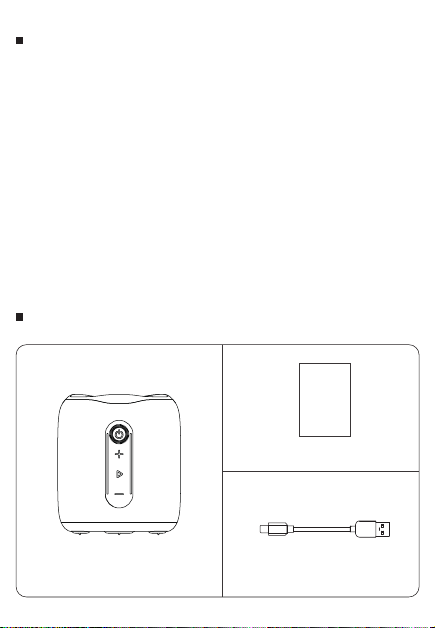
WHAT IS IN THE BOX
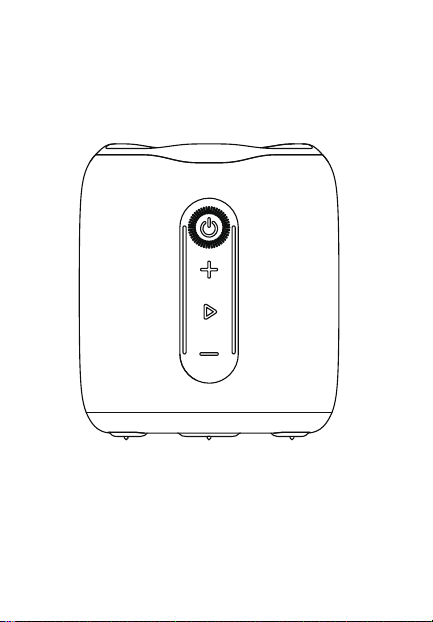
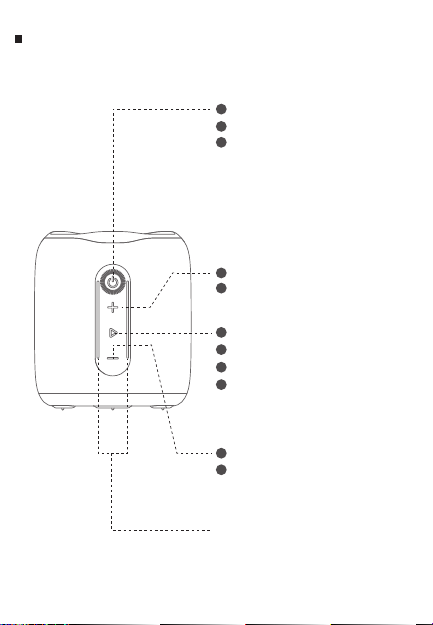
Short press: Volum up.
Long press: the next song.
Short press: Volume down.
Long press: the previous song.
RGB light
1
1
Long press:Turn on/off.
1
Play and pause.
TWS.
2
1
2
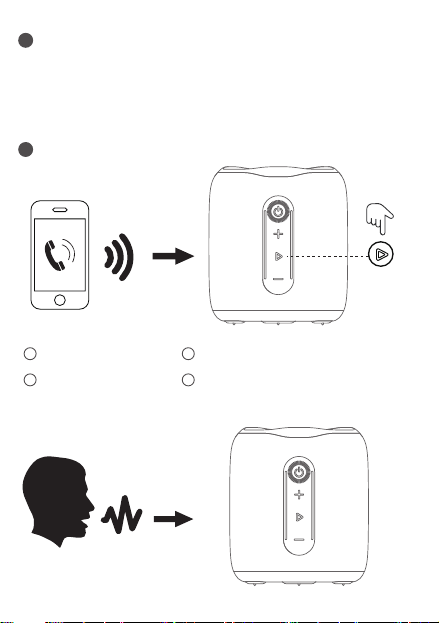
Call answering and hanging up.
3
Long press for default settings.
4
Double press:
Bluetooth is connected,
double-click to disconnect the
Bluetooth connection.
Bluetooth is disconnected,
double-click to reconnect to the
last disconnected phone.
3
2
2
Short press: Switch EQ.
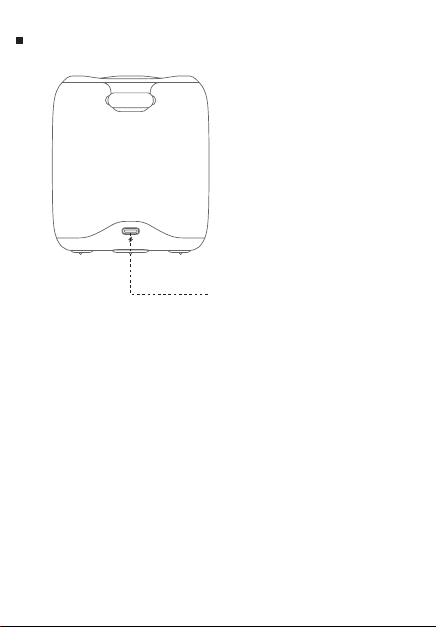
TYPE-C charging port.
WARNING
70.0 mm
100.0 mm
490.0 mm
正面
反面
公司品牌: 备注
第一版,
产品型号:OZ-H60S
文件名称:OZ-H60S_中性_英文说明书_折页_01
说明书尺寸:70mm X 100mm (展开尺寸:490mm X 100mm)
工艺说明:105g铜板纸,单色正反面印刷,折页(扇形)
OZ-H60S
U
SER MANUAL
制作版本:01
SPECIFICATION BUTTONS AND FUNCTIONS LED LIGHT DEFINITIONCONNECTION
Wireless Speaker x1
User Manual x1
Type-C USB cable x1
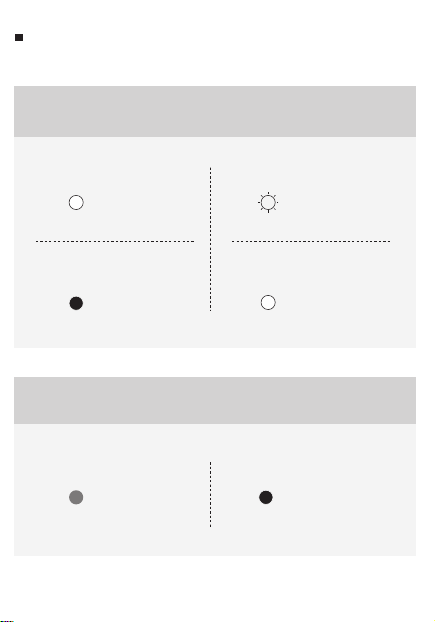
light on
Trun on
Bluetooth Indicator
Bluetooth Connecting
Connection successfully
Flashing light
Light off Light stays on
Playing music Audio
Red light on
Charging
Charging Indicator
Fully charged
Red light off
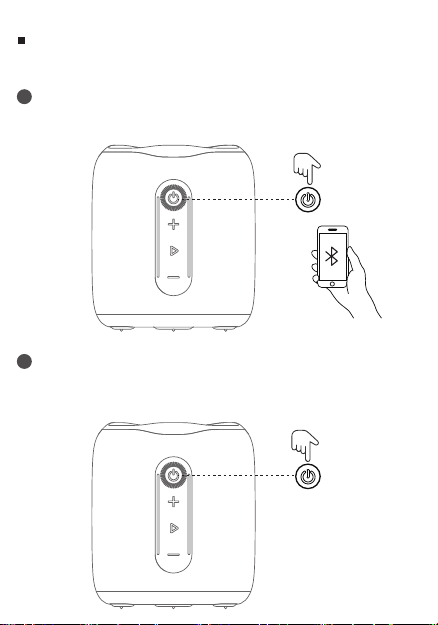
Bluetooth connection:
Turning on the speaker will automatically enter the Bluetooth mode.
Disconnecting the speaker:
When it's connected via bluetooth, double press the Power Button
to disconnect.
BLUETOOTH
1
2
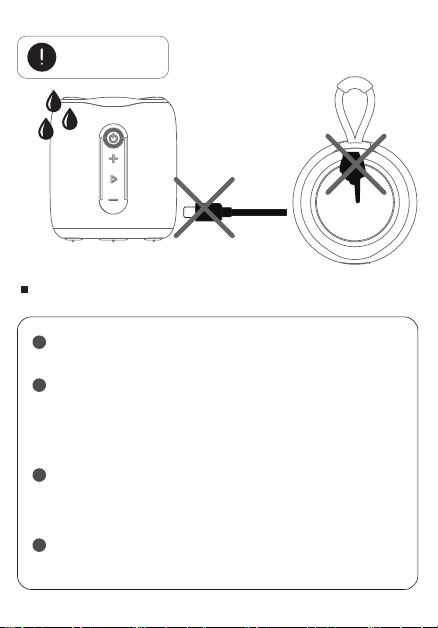
IMPORTANT NOTE
To ensure the waterproof performance of the Bluetooth
speaker, remove all cable connections and close the USB plug.
1
Battery life varies depending on usage patterns and
environmental conditions.
4
The IPX7 waterproof rating is defined as the speaker can be
submerged for up to 30 minutes at a depth of 1 meter If the
speaker is not used for a long time, please charge it at least
every three months.
3
Exposing a Bluetooth speaker to liquid without taking
these steps can cause permanent damage to the speaker,
Do not expose your Bluetooth speaker to water while it is
charging, as doing so may cause permanent damage to the
speaker or power supply.
2
· Model : OZ-H60S
· Bluetooth : V5.3
· Waterproof level :IPX7
· Battery : 3.7V/1800mAh
· Chargi
ng time : 3.5 hours
· Playing time : 8 hours
· Input : 5V / 0.8A
· Output : 10W
· Product Size : 84 x 84 x 96 mm
· Product Weight : 253g
x2
seconds
Bluetooth
Bluetooth
H60S
Bluetooth
Bluetooth
H60S
H60S
Primary speaker
Secondary speaker
Short press to answer. Short press to hang up.
Long press to reject. Double press to call back.
Power on the speaker.
Use the 3.5mm audio cable to connect the speaker and your device.
The speaker is now connected after a prompt tone and ready to play.
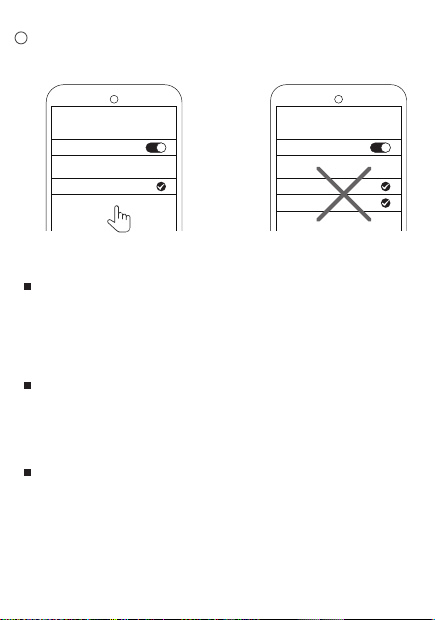
Find the Bluetooth name and connect.There will be only one
bluetooth name on device after 2 speakers are paired.
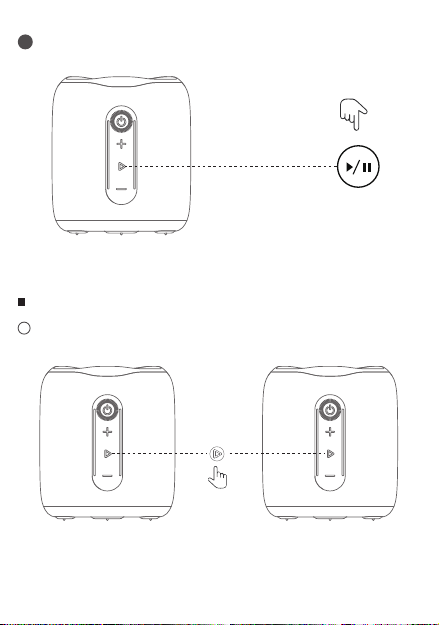
Press and hold the Play/Pause-button on one of the speakers for
about 2 seconds until you hear a prompt sound.
TWS CONNECT
AUX PLAY MODE
TWS DISCONNECT
Long press Play/Pause button for 5 seconds to clear the pairing
information and return to the default volume after a prompt tone,the
speaker will automatically turn off.
Restore Default Settings
If the speaker is crashed,press and hold the power button for 8 seconds
to automatically reset the speaker and turn it off .
RESET
Reconnect the speaker:
Some Bluetooth devices support automatic reconnection. When it's
not connected, double press the Power Button to connect to the
last disconnected device.
3
Hands Free Function:
4
Music Control:
5
1
Press and hold the Play/Pause-button on one of the speakers for
about 2 seconds until you hear a“beep"sound and let go.
1
2
2
3 4
Short press to play/pause the music.
SAFETY PRECAUTIONS FCC WARNING
Do not place the speaker in a place where it is easy to fall.
1
Do not disassemble, repair or modify this product by
yourself.
2
Keep the speaker away from extreme temperatures.
3
Do not use the speaker in an outdoor thunderstorm
environment.
4
Do not use any corrosive cleaners to clean the speaker.
5
TROUBLESHOOTING
The speaker does not turn on ?
Recharge the speaker.
The speaker does not turn off or does not respond ?
Reset your speaker, press and hold Power Button for 10 seconds
to shut down and reset.
There is no sound?
Adjust the volume. make sure that your Bluetooth device is within
range. ensure there is no obstacles in the way that can
block/disturb the signal. check via the device’s Bluetooth
connection if the speaker is connected with the device.
There is poor sound quality?
Move the device closer to the speaker or try removing obstacles
between them.
Cannot connect the device with the speaker?
Disconnect other connected devices and ignore the pairing from
your devices and re-pair the speaker.
Or you can long press and hold Power Button for 10 seconds to
reset the speaker to re-pair it.
Please make sure the speaker is within the Bluetooth covering
range by 10 meters and powered on.
This device complies with part 15 of the FCC Rules. Operation is
subject to the following two conditions: (1) this device may not cause
harmful interference, and (2) this device must accept any interference
received, including interference that may cause undesired operation.
Any changes or modifications not expressly approved by the party
responsible for compliance could void the user's authority to operate
the equipment.
NOTE: This equipment has been tested and found to comply with the
limits for a Class B digital device, pursuant to Part 15 of the FCC Rules.
These limits are designed to provide reasonable protection against
harmful interference in a residential installation. This equipment
generates, uses and can radiate radio frequency energy and, if not
installed and used in accordance with the instructions, may cause
harmful interference to radio communications. However, there is no
guarantee that interference will not occur in a particular installation.
If this equipment does cause harmful interference to radio or television
reception, which can be determined by turning the equipment off and
on, the user is encouraged to try to correct the interference by one or
more of the following measures:
-- Reorient or relocate the receiving antenna.
-- Increase the separation between the equipment and receiver.
-- Connect the equipment into an outlet on a circuit different from
that to which the receiver is connected.
-- Consult the dealer or an experienced radio/TV technician for help.
The device has been evaluated to meet general RF exposure
requirement. The device can be used in portable exposure condition
without restriction.
WHAT IS IN THE BOX
Short press: Volum up.
Long press: the next song.
Short press: Volume down.
Long press: the previous song.
RGB light
1
1
Long press:Turn on/off.
1
Play and pause.
TWS.
2
1
2
Call answering and hanging up.
3
Long press for default settings.
4
Double press:
Bluetooth is connected,
double-click to disconnect the
Bluetooth connection.
Bluetooth is disconnected,
double-click to reconnect to the
last disconnected phone.
3
2
2
Short press: Switch EQ.
TYPE-C charging port.
WARNING
70.0 mm
100.0 mm
490.0 mm
正面
反面
公司品牌: 备注
第一版,
产品型号:OZ-H60S
文件名称:OZ-H60S_中性_英文说明书_折页_01
说明书尺寸:70mm X 100mm (展开尺寸:490mm X 100mm)
工艺说明:105g铜板纸,单色正反面印刷,折页(扇形)
OZ-H60S
U
SER MANUAL
制作版本:01
SPECIFICATION BUTTONS AND FUNCTIONS LED LIGHT DEFINITIONCONNECTION
Wireless Speaker x1
User Manual x1
Type-C USB cable x1
light on
Trun on
Bluetooth Indicator
Bluetooth Connecting
Connection successfully
Flashing light
Light off Light stays on
Playing music Audio
Red light on
Charging
Charging Indicator
Fully charged
Red light off
Bluetooth connection:
Turning on the speaker will automatically enter the Bluetooth mode.
Disconnecting the speaker:
When it's connected via bluetooth, double press the Power Button
to disconnect.
BLUETOOTH
1
2
IMPORTANT NOTE
To ensure the waterproof performance of the Bluetooth
speaker, remove all cable connections and close the USB plug.
1
Battery life varies depending on usage patterns and
environmental conditions.
4
The IPX7 waterproof rating is defined as the speaker can be
submerged for up to 30 minutes at a depth of 1 meter If the
speaker is not used for a long time, please charge it at least
every three months.
3
Exposing a Bluetooth speaker to liquid without taking
these steps can cause permanent damage to the speaker,
Do not expose your Bluetooth speaker to water while it is
charging, as doing so may cause permanent damage to the
speaker or power supply.
2
· Model : OZ-H60S
· Bluetooth : V5.3
· Waterproof level :IPX7
· Battery : 3.7V/1800mAh
· Chargi
ng time : 3.5 hours
· Playing time : 8 hours
· Input : 5V / 0.8A
· Output : 10W
· Product Size : 84 x 84 x 96 mm
· Product Weight : 253g
x2
seconds
Bluetooth
Bluetooth
H60S
Bluetooth
Bluetooth
H60S
H60S
Primary speaker
Secondary speaker
Short press to answer. Short press to hang up.
Long press to reject. Double press to call back.
Power on the speaker.
Use the 3.5mm audio cable to connect the speaker and your device.
The speaker is now connected after a prompt tone and ready to play.
Find the Bluetooth name and connect.There will be only one
bluetooth name on device after 2 speakers are paired.
Press and hold the Play/Pause-button on one of the speakers for
about 2 seconds until you hear a prompt sound.
TWS CONNECT
AUX PLAY MODE
TWS DISCONNECT
Long press Play/Pause button for 5 seconds to clear the pairing
information and return to the default volume after a prompt tone,the
speaker will automatically turn off.
Restore Default Settings
If the speaker is crashed,press and hold the power button for 8 seconds
to automatically reset the speaker and turn it off .
RESET
Reconnect the speaker:
Some Bluetooth devices support automatic reconnection. When it's
not connected, double press the Power Button to connect to the
last disconnected device.
3
Hands Free Function:
4
Music Control:
5
1
Press and hold the Play/Pause-button on one of the speakers for
about 2 seconds until you hear a“beep"sound and let go.
1
2
2
3 4
Short press to play/pause the music.
SAFETY PRECAUTIONS FCC WARNING
Do not place the speaker in a place where it is easy to fall.
1
Do not disassemble, repair or modify this product by
yourself.
2
Keep the speaker away from extreme temperatures.
3
Do not use the speaker in an outdoor thunderstorm
environment.
4
Do not use any corrosive cleaners to clean the speaker.
5
TROUBLESHOOTING
The speaker does not turn on ?
Recharge the speaker.
The speaker does not turn off or does not respond ?
Reset your speaker, press and hold Power Button for 10 seconds
to shut down and reset.
There is no sound?
Adjust the volume. make sure that your Bluetooth device is within
range. ensure there is no obstacles in the way that can
block/disturb the signal. check via the device’s Bluetooth
connection if the speaker is connected with the device.
There is poor sound quality?
Move the device closer to the speaker or try removing obstacles
between them.
Cannot connect the device with the speaker?
Disconnect other connected devices and ignore the pairing from
your devices and re-pair the speaker.
Or you can long press and hold Power Button for 10 seconds to
reset the speaker to re-pair it.
Please make sure the speaker is within the Bluetooth covering
range by 10 meters and powered on.
This device complies with part 15 of the FCC Rules. Operation is
subject to the following two conditions: (1) this device may not cause
harmful interference, and (2) this device must accept any interference
received, including interference that may cause undesired operation.
Any changes or modifications not expressly approved by the party
responsible for compliance could void the user's authority to operate
the equipment.
NOTE: This equipment has been tested and found to comply with the
limits for a Class B digital device, pursuant to Part 15 of the FCC Rules.
These limits are designed to provide reasonable protection against
harmful interference in a residential installation. This equipment
generates, uses and can radiate radio frequency energy and, if not
installed and used in accordance with the instructions, may cause
harmful interference to radio communications. However, there is no
guarantee that interference will not occur in a particular installation.
If this equipment does cause harmful interference to radio or television
reception, which can be determined by turning the equipment off and
on, the user is encouraged to try to correct the interference by one or
more of the following measures:
-- Reorient or relocate the receiving antenna.
-- Increase the separation between the equipment and receiver.
-- Connect the equipment into an outlet on a circuit different from
that to which the receiver is connected.
-- Consult the dealer or an experienced radio/TV technician for help.
The device has been evaluated to meet general RF exposure
requirement. The device can be used in portable exposure condition
without restriction.
WHAT IS IN THE BOX
Short press: Volum up.
Long press: the next song.
Short press: Volume down.
Long press: the previous song.
RGB light
1
1
Long press:Turn on/off.
1
Play and pause.
TWS.
2
1
2
Call answering and hanging up.
3
Long press for default settings.
4
Double press:
Bluetooth is connected,
double-click to disconnect the
Bluetooth connection.
Bluetooth is disconnected,
double-click to reconnect to the
last disconnected phone.
3
2
2
Short press: Switch EQ.
TYPE-C charging port.
WARNING
70.0 mm
100.0 mm
490.0 mm
正面
反面
公司品牌: 备注
第一版,
产品型号:OZ-H60S
文件名称:OZ-H60S_中性_英文说明书_折页_01
说明书尺寸:70mm X 100mm (展开尺寸:490mm X 100mm)
工艺说明:105g铜板纸,单色正反面印刷,折页(扇形)
OZ-H60S
U
SER MANUAL
制作版本:01
SPECIFICATION BUTTONS AND FUNCTIONS LED LIGHT DEFINITIONCONNECTION
Wireless Speaker x1
User Manual x1
Type-C USB cable x1
light on
Trun on
Bluetooth Indicator
Bluetooth Connecting
Connection successfully
Flashing light
Light off Light stays on
Playing music Audio
Red light on
Charging
Charging Indicator
Fully charged
Red light off
Bluetooth connection:
Turning on the speaker will automatically enter the Bluetooth mode.
Disconnecting the speaker:
When it's connected via bluetooth, double press the Power Button
to disconnect.
BLUETOOTH
1
2
IMPORTANT NOTE
To ensure the waterproof performance of the Bluetooth
speaker, remove all cable connections and close the USB plug.
1
Battery life varies depending on usage patterns and
environmental conditions.
4
The IPX7 waterproof rating is defined as the speaker can be
submerged for up to 30 minutes at a depth of 1 meter If the
speaker is not used for a long time, please charge it at least
every three months.
3
Exposing a Bluetooth speaker to liquid without taking
these steps can cause permanent damage to the speaker,
Do not expose your Bluetooth speaker to water while it is
charging, as doing so may cause permanent damage to the
speaker or power supply.
2
· Model : OZ-H60S
· Bluetooth : V5.3
· Waterproof level :IPX7
· Battery : 3.7V/1800mAh
· Chargi
ng time : 3.5 hours
· Playing time : 8 hours
· Input : 5V / 0.8A
· Output : 10W
· Product Size : 84 x 84 x 96 mm
· Product Weight : 253g
x2
seconds
Bluetooth
Bluetooth
H60S
Bluetooth
Bluetooth
H60S
H60S
Primary speaker
Secondary speaker
Short press to answer. Short press to hang up.
Long press to reject. Double press to call back.
Power on the speaker.
Use the 3.5mm audio cable to connect the speaker and your device.
The speaker is now connected after a prompt tone and ready to play.
Find the Bluetooth name and connect.There will be only one
bluetooth name on device after 2 speakers are paired.
Press and hold the Play/Pause-button on one of the speakers for
about 2 seconds until you hear a prompt sound.
TWS CONNECT
AUX PLAY MODE
TWS DISCONNECT
Long press Play/Pause button for 5 seconds to clear the pairing
information and return to the default volume after a prompt tone,the
speaker will automatically turn off.
Restore Default Settings
If the speaker is crashed,press and hold the power button for 8 seconds
to automatically reset the speaker and turn it off .
RESET
Reconnect the speaker:
Some Bluetooth devices support automatic reconnection. When it's
not connected, double press the Power Button to connect to the
last disconnected device.
3
Hands Free Function:
4
Music Control:
5
1
Press and hold the Play/Pause-button on one of the speakers for
about 2 seconds until you hear a“beep"sound and let go.
1
2
2
3 4
Short press to play/pause the music.
SAFETY PRECAUTIONS FCC WARNING
Do not place the speaker in a place where it is easy to fall.
1
Do not disassemble, repair or modify this product by
yourself.
2
Keep the speaker away from extreme temperatures.
3
Do not use the speaker in an outdoor thunderstorm
environment.
4
Do not use any corrosive cleaners to clean the speaker.
5
TROUBLESHOOTING
The speaker does not turn on ?
Recharge the speaker.
The speaker does not turn off or does not respond ?
Reset your speaker, press and hold Power Button for 10 seconds
to shut down and reset.
There is no sound?
Adjust the volume. make sure that your Bluetooth device is within
range. ensure there is no obstacles in the way that can
block/disturb the signal. check via the device’s Bluetooth
connection if the speaker is connected with the device.
There is poor sound quality?
Move the device closer to the speaker or try removing obstacles
between them.
Cannot connect the device with the speaker?
Disconnect other connected devices and ignore the pairing from
your devices and re-pair the speaker.
Or you can long press and hold Power Button for 10 seconds to
reset the speaker to re-pair it.
Please make sure the speaker is within the Bluetooth covering
range by 10 meters and powered on.
This device complies with part 15 of the FCC Rules. Operation is
subject to the following two conditions: (1) this device may not cause
harmful interference, and (2) this device must accept any interference
received, including interference that may cause undesired operation.
Any changes or modifications not expressly approved by the party
responsible for compliance could void the user's authority to operate
the equipment.
NOTE: This equipment has been tested and found to comply with the
limits for a Class B digital device, pursuant to Part 15 of the FCC Rules.
These limits are designed to provide reasonable protection against
harmful interference in a residential installation. This equipment
generates, uses and can radiate radio frequency energy and, if not
installed and used in accordance with the instructions, may cause
harmful interference to radio communications. However, there is no
guarantee that interference will not occur in a particular installation.
If this equipment does cause harmful interference to radio or television
reception, which can be determined by turning the equipment off and
on, the user is encouraged to try to correct the interference by one or
more of the following measures:
-- Reorient or relocate the receiving antenna.
-- Increase the separation between the equipment and receiver.
-- Connect the equipment into an outlet on a circuit different from
that to which the receiver is connected.
-- Consult the dealer or an experienced radio/TV technician for help.
The device has been evaluated to meet general RF exposure
requirement. The device can be used in portable exposure condition
without restriction.
WHAT IS IN THE BOX
Short press: Volum up.
Long press: the next song.
Short press: Volume down.
Long press: the previous song.
RGB light
1
1
Long press:Turn on/off.
1
Play and pause.
TWS.
2
1
2
Call answering and hanging up.
3
Long press for default settings.
4
Double press:
Bluetooth is connected,
double-click to disconnect the
Bluetooth connection.
Bluetooth is disconnected,
double-click to reconnect to the
last disconnected phone.
3
2
2
Short press: Switch EQ.
TYPE-C charging port.
WARNING
70.0 mm
100.0 mm
490.0 mm
正面
反面
公司品牌: 备注
第一版,
产品型号:OZ-H60S
文件名称:OZ-H60S_中性_英文说明书_折页_01
说明书尺寸:70mm X 100mm (展开尺寸:490mm X 100mm)
工艺说明:105g铜板纸,单色正反面印刷,折页(扇形)
OZ-H60S
U
SER MANUAL
制作版本:01
SPECIFICATION BUTTONS AND FUNCTIONS LED LIGHT DEFINITIONCONNECTION
Wireless Speaker x1
User Manual x1
Type-C USB cable x1
light on
Trun on
Bluetooth Indicator
Bluetooth Connecting
Connection successfully
Flashing light
Light off Light stays on
Playing music Audio
Red light on
Charging
Charging Indicator
Fully charged
Red light off
Bluetooth connection:
Turning on the speaker will automatically enter the Bluetooth mode.
Disconnecting the speaker:
When it's connected via bluetooth, double press the Power Button
to disconnect.
BLUETOOTH
1
2
IMPORTANT NOTE
To ensure the waterproof performance of the Bluetooth
speaker, remove all cable connections and close the USB plug.
1
Battery life varies depending on usage patterns and
environmental conditions.
4
The IPX7 waterproof rating is defined as the speaker can be
submerged for up to 30 minutes at a depth of 1 meter If the
speaker is not used for a long time, please charge it at least
every three months.
3
Exposing a Bluetooth speaker to liquid without taking
these steps can cause permanent damage to the speaker,
Do not expose your Bluetooth speaker to water while it is
charging, as doing so may cause permanent damage to the
speaker or power supply.
2
· Model : OZ-H60S
· Bluetooth : V5.3
· Waterproof level :IPX7
· Battery : 3.7V/1800mAh
· Chargi
ng time : 3.5 hours
· Playing time : 8 hours
· Input : 5V / 0.8A
· Output : 10W
· Product Size : 84 x 84 x 96 mm
· Product Weight : 253g
x2
seconds
Bluetooth
Bluetooth
H60S
Bluetooth
Bluetooth
H60S
H60S
Primary speaker
Secondary speaker
Short press to answer. Short press to hang up.
Long press to reject. Double press to call back.
Power on the speaker.
Use the 3.5mm audio cable to connect the speaker and your device.
The speaker is now connected after a prompt tone and ready to play.
Find the Bluetooth name and connect.There will be only one
bluetooth name on device after 2 speakers are paired.
Press and hold the Play/Pause-button on one of the speakers for
about 2 seconds until you hear a prompt sound.
TWS CONNECT
AUX PLAY MODE
TWS DISCONNECT
Long press Play/Pause button for 5 seconds to clear the pairing
information and return to the default volume after a prompt tone,the
speaker will automatically turn off.
Restore Default Settings
If the speaker is crashed,press and hold the power button for 8 seconds
to automatically reset the speaker and turn it off .
RESET
Reconnect the speaker:
Some Bluetooth devices support automatic reconnection. When it's
not connected, double press the Power Button to connect to the
last disconnected device.
3
Hands Free Function:
4
Music Control:
5
1
Press and hold the Play/Pause-button on one of the speakers for
about 2 seconds until you hear a“beep"sound and let go.
1
2
2
3 4
Short press to play/pause the music.
SAFETY PRECAUTIONS FCC WARNING
Do not place the speaker in a place where it is easy to fall.
1
Do not disassemble, repair or modify this product by
yourself.
2
Keep the speaker away from extreme temperatures.
3
Do not use the speaker in an outdoor thunderstorm
environment.
4
Do not use any corrosive cleaners to clean the speaker.
5
TROUBLESHOOTING
The speaker does not turn on ?
Recharge the speaker.
The speaker does not turn off or does not respond ?
Reset your speaker, press and hold Power Button for 10 seconds
to shut down and reset.
There is no sound?
Adjust the volume. make sure that your Bluetooth device is within
range. ensure there is no obstacles in the way that can
block/disturb the signal. check via the device’s Bluetooth
connection if the speaker is connected with the device.
There is poor sound quality?
Move the device closer to the speaker or try removing obstacles
between them.
Cannot connect the device with the speaker?
Disconnect other connected devices and ignore the pairing from
your devices and re-pair the speaker.
Or you can long press and hold Power Button for 10 seconds to
reset the speaker to re-pair it.
Please make sure the speaker is within the Bluetooth covering
range by 10 meters and powered on.
This device complies with part 15 of the FCC Rules. Operation is
subject to the following two conditions: (1) this device may not cause
harmful interference, and (2) this device must accept any interference
received, including interference that may cause undesired operation.
Any changes or modifications not expressly approved by the party
responsible for compliance could void the user's authority to operate
the equipment.
NOTE: This equipment has been tested and found to comply with the
limits for a Class B digital device, pursuant to Part 15 of the FCC Rules.
These limits are designed to provide reasonable protection against
harmful interference in a residential installation. This equipment
generates, uses and can radiate radio frequency energy and, if not
installed and used in accordance with the instructions, may cause
harmful interference to radio communications. However, there is no
guarantee that interference will not occur in a particular installation.
If this equipment does cause harmful interference to radio or television
reception, which can be determined by turning the equipment off and
on, the user is encouraged to try to correct the interference by one or
more of the following measures:
-- Reorient or relocate the receiving antenna.
-- Increase the separation between the equipment and receiver.
-- Connect the equipment into an outlet on a circuit different from
that to which the receiver is connected.
-- Consult the dealer or an experienced radio/TV technician for help.
The device has been evaluated to meet general RF exposure
requirement. The device can be used in portable exposure condition
without restriction.
WHAT IS IN THE BOX
Short press: Volum up.
Long press: the next song.
Short press: Volume down.
Long press: the previous song.
RGB light
1
1
Long press:Turn on/off.
1
Play and pause.
TWS.
2
1
2
Call answering and hanging up.
3
Long press for default settings.
4
Double press:
Bluetooth is connected,
double-click to disconnect the
Bluetooth connection.
Bluetooth is disconnected,
double-click to reconnect to the
last disconnected phone.
3
2
2
Short press: Switch EQ.
TYPE-C charging port.
WARNING
70.0 mm
100.0 mm
490.0 mm
正面
反面
公司品牌: 备注
第一版,
产品型号:OZ-H60S
文件名称:OZ-H60S_中性_英文说明书_折页_01
说明书尺寸:70mm X 100mm (展开尺寸:490mm X 100mm)
工艺说明:105g铜板纸,单色正反面印刷,折页(扇形)
OZ-H60S
U
SER MANUAL
制作版本:01
SPECIFICATION BUTTONS AND FUNCTIONS LED LIGHT DEFINITIONCONNECTION
Wireless Speaker x1
User Manual x1
Type-C USB cable x1
light on
Trun on
Bluetooth Indicator
Bluetooth Connecting
Connection successfully
Flashing light
Light off Light stays on
Playing music Audio
Red light on
Charging
Charging Indicator
Fully charged
Red light off
Bluetooth connection:
Turning on the speaker will automatically enter the Bluetooth mode.
Disconnecting the speaker:
When it's connected via bluetooth, double press the Power Button
to disconnect.
BLUETOOTH
1
2
IMPORTANT NOTE
To ensure the waterproof performance of the Bluetooth
speaker, remove all cable connections and close the USB plug.
1
Battery life varies depending on usage patterns and
environmental conditions.
4
The IPX7 waterproof rating is defined as the speaker can be
submerged for up to 30 minutes at a depth of 1 meter If the
speaker is not used for a long time, please charge it at least
every three months.
3
Exposing a Bluetooth speaker to liquid without taking
these steps can cause permanent damage to the speaker,
Do not expose your Bluetooth speaker to water while it is
charging, as doing so may cause permanent damage to the
speaker or power supply.
2
· Model : OZ-H60S
· Bluetooth : V5.3
· Waterproof level :IPX7
· Battery : 3.7V/1800mAh
· Chargi
ng time : 3.5 hours
· Playing time : 8 hours
· Input : 5V / 0.8A
· Output : 10W
· Product Size : 84 x 84 x 96 mm
· Product Weight : 253g
x2
seconds
Bluetooth
Bluetooth
H60S
Bluetooth
Bluetooth
H60S
H60S
Primary speaker
Secondary speaker
Short press to answer. Short press to hang up.
Long press to reject. Double press to call back.
Power on the speaker.
Use the 3.5mm audio cable to connect the speaker and your device.
The speaker is now connected after a prompt tone and ready to play.
Find the Bluetooth name and connect.There will be only one
bluetooth name on device after 2 speakers are paired.
Press and hold the Play/Pause-button on one of the speakers for
about 2 seconds until you hear a prompt sound.
TWS CONNECT
AUX PLAY MODE
TWS DISCONNECT
Long press Play/Pause button for 5 seconds to clear the pairing
information and return to the default volume after a prompt tone,the
speaker will automatically turn off.
Restore Default Settings
If the speaker is crashed,press and hold the power button for 8 seconds
to automatically reset the speaker and turn it off .
RESET
Reconnect the speaker:
Some Bluetooth devices support automatic reconnection. When it's
not connected, double press the Power Button to connect to the
last disconnected device.
3
Hands Free Function:
4
Music Control:
5
1
Press and hold the Play/Pause-button on one of the speakers for
about 2 seconds until you hear a“beep"sound and let go.
1
2
2
3 4
Short press to play/pause the music.
SAFETY PRECAUTIONS FCC WARNING
Do not place the speaker in a place where it is easy to fall.
1
Do not disassemble, repair or modify this product by
yourself.
2
Keep the speaker away from extreme temperatures.
3
Do not use the speaker in an outdoor thunderstorm
environment.
4
Do not use any corrosive cleaners to clean the speaker.
5
TROUBLESHOOTING
The speaker does not turn on ?
Recharge the speaker.
The speaker does not turn off or does not respond ?
Reset your speaker, press and hold Power Button for 10 seconds
to shut down and reset.
There is no sound?
Adjust the volume. make sure that your Bluetooth device is within
range. ensure there is no obstacles in the way that can
block/disturb the signal. check via the device’s Bluetooth
connection if the speaker is connected with the device.
There is poor sound quality?
Move the device closer to the speaker or try removing obstacles
between them.
Cannot connect the device with the speaker?
Disconnect other connected devices and ignore the pairing from
your devices and re-pair the speaker.
Or you can long press and hold Power Button for 10 seconds to
reset the speaker to re-pair it.
Please make sure the speaker is within the Bluetooth covering
range by 10 meters and powered on.
This device complies with part 15 of the FCC Rules. Operation is
subject to the following two conditions: (1) this device may not cause
harmful interference, and (2) this device must accept any interference
received, including interference that may cause undesired operation.
Any changes or modifications not expressly approved by the party
responsible for compliance could void the user's authority to operate
the equipment.
NOTE: This equipment has been tested and found to comply with the
limits for a Class B digital device, pursuant to Part 15 of the FCC Rules.
These limits are designed to provide reasonable protection against
harmful interference in a residential installation. This equipment
generates, uses and can radiate radio frequency energy and, if not
installed and used in accordance with the instructions, may cause
harmful interference to radio communications. However, there is no
guarantee that interference will not occur in a particular installation.
If this equipment does cause harmful interference to radio or television
reception, which can be determined by turning the equipment off and
on, the user is encouraged to try to correct the interference by one or
more of the following measures:
-- Reorient or relocate the receiving antenna.
-- Increase the separation between the equipment and receiver.
-- Connect the equipment into an outlet on a circuit different from
that to which the receiver is connected.
-- Consult the dealer or an experienced radio/TV technician for help.
The device has been evaluated to meet general RF exposure
requirement. The device can be used in portable exposure condition
without restriction.
WHAT IS IN THE BOX
Short press: Volum up.
Long press: the next song.
Short press: Volume down.
Long press: the previous song.
RGB light
1
1
Long press:Turn on/off.
1
Play and pause.
TWS.
2
1
2
Call answering and hanging up.
3
Long press for default settings.
4
Double press:
Bluetooth is connected,
double-click to disconnect the
Bluetooth connection.
Bluetooth is disconnected,
double-click to reconnect to the
last disconnected phone.
3
2
2
Short press: Switch EQ.
TYPE-C charging port.
WARNING
70.0 mm
100.0 mm
490.0 mm
正面
反面
公司品牌: 备注
第一版,
产品型号:OZ-H60S
文件名称:OZ-H60S_中性_英文说明书_折页_01
说明书尺寸:70mm X 100mm (展开尺寸:490mm X 100mm)
工艺说明:105g铜板纸,单色正反面印刷,折页(扇形)
OZ-H60S
U
SER MANUAL
制作版本:01
SPECIFICATION BUTTONS AND FUNCTIONS LED LIGHT DEFINITIONCONNECTION
Wireless Speaker x1
User Manual x1
Type-C USB cable x1
light on
Trun on
Bluetooth Indicator
Bluetooth Connecting
Connection successfully
Flashing light
Light off Light stays on
Playing music Audio
Red light on
Charging
Charging Indicator
Fully charged
Red light off
Bluetooth connection:
Turning on the speaker will automatically enter the Bluetooth mode.
Disconnecting the speaker:
When it's connected via bluetooth, double press the Power Button
to disconnect.
BLUETOOTH
1
2
IMPORTANT NOTE
To ensure the waterproof performance of the Bluetooth
speaker, remove all cable connections and close the USB plug.
1
Battery life varies depending on usage patterns and
environmental conditions.
4
The IPX7 waterproof rating is defined as the speaker can be
submerged for up to 30 minutes at a depth of 1 meter If the
speaker is not used for a long time, please charge it at least
every three months.
3
Exposing a Bluetooth speaker to liquid without taking
these steps can cause permanent damage to the speaker,
Do not expose your Bluetooth speaker to water while it is
charging, as doing so may cause permanent damage to the
speaker or power supply.
2
· Model : OZ-H60S
· Bluetooth : V5.3
· Waterproof level :IPX7
· Battery : 3.7V/1800mAh
· Chargi
ng time : 3.5 hours
· Playing time : 8 hours
· Input : 5V / 0.8A
· Output : 10W
· Product Size : 84 x 84 x 96 mm
· Product Weight : 253g
x2
seconds
Bluetooth
Bluetooth
H60S
Bluetooth
Bluetooth
H60S
H60S
Primary speaker
Secondary speaker
Short press to answer. Short press to hang up.
Long press to reject. Double press to call back.
Power on the speaker.
Use the 3.5mm audio cable to connect the speaker and your device.
The speaker is now connected after a prompt tone and ready to play.
Find the Bluetooth name and connect.There will be only one
bluetooth name on device after 2 speakers are paired.
Press and hold the Play/Pause-button on one of the speakers for
about 2 seconds until you hear a prompt sound.
TWS CONNECT
AUX PLAY MODE
TWS DISCONNECT
Long press Play/Pause button for 5 seconds to clear the pairing
information and return to the default volume after a prompt tone,the
speaker will automatically turn off.
Restore Default Settings
If the speaker is crashed,press and hold the power button for 8 seconds
to automatically reset the speaker and turn it off .
RESET
Reconnect the speaker:
Some Bluetooth devices support automatic reconnection. When it's
not connected, double press the Power Button to connect to the
last disconnected device.
3
Hands Free Function:
4
Music Control:
5
1
Press and hold the Play/Pause-button on one of the speakers for
about 2 seconds until you hear a“beep"sound and let go.
1
2
2
3 4
Short press to play/pause the music.
SAFETY PRECAUTIONS FCC WARNING
Do not place the speaker in a place where it is easy to fall.
1
Do not disassemble, repair or modify this product by
yourself.
2
Keep the speaker away from extreme temperatures.
3
Do not use the speaker in an outdoor thunderstorm
environment.
4
Do not use any corrosive cleaners to clean the speaker.
5
TROUBLESHOOTING
The speaker does not turn on ?
Recharge the speaker.
The speaker does not turn off or does not respond ?
Reset your speaker, press and hold Power Button for 10 seconds
to shut down and reset.
There is no sound?
Adjust the volume. make sure that your Bluetooth device is within
range. ensure there is no obstacles in the way that can
block/disturb the signal. check via the device’s Bluetooth
connection if the speaker is connected with the device.
There is poor sound quality?
Move the device closer to the speaker or try removing obstacles
between them.
Cannot connect the device with the speaker?
Disconnect other connected devices and ignore the pairing from
your devices and re-pair the speaker.
Or you can long press and hold Power Button for 10 seconds to
reset the speaker to re-pair it.
Please make sure the speaker is within the Bluetooth covering
range by 10 meters and powered on.
This device complies with part 15 of the FCC Rules. Operation is
subject to the following two conditions: (1) this device may not cause
harmful interference, and (2) this device must accept any interference
received, including interference that may cause undesired operation.
Any changes or modifications not expressly approved by the party
responsible for compliance could void the user's authority to operate
the equipment.
NOTE: This equipment has been tested and found to comply with the
limits for a Class B digital device, pursuant to Part 15 of the FCC Rules.
These limits are designed to provide reasonable protection against
harmful interference in a residential installation. This equipment
generates, uses and can radiate radio frequency energy and, if not
installed and used in accordance with the instructions, may cause
harmful interference to radio communications. However, there is no
guarantee that interference will not occur in a particular installation.
If this equipment does cause harmful interference to radio or television
reception, which can be determined by turning the equipment off and
on, the user is encouraged to try to correct the interference by one or
more of the following measures:
-- Reorient or relocate the receiving antenna.
-- Increase the separation between the equipment and receiver.
-- Connect the equipment into an outlet on a circuit different from
that to which the receiver is connected.
-- Consult the dealer or an experienced radio/TV technician for help.
The device has been evaluated to meet general RF exposure
requirement. The device can be used in portable exposure condition
without restriction.
WHAT IS IN THE BOX
Short press: Volum up.
Long press: the next song.
Short press: Volume down.
Long press: the previous song.
RGB light
1
1
Long press:Turn on/off.
1
Play and pause.
TWS.
2
1
2
Call answering and hanging up.
3
Long press for default settings.
4
Double press:
Bluetooth is connected,
double-click to disconnect the
Bluetooth connection.
Bluetooth is disconnected,
double-click to reconnect to the
last disconnected phone.
3
2
2
Short press: Switch EQ.
TYPE-C charging port.
WARNING
70.0 mm
100.0 mm
490.0 mm
正面
反面
公司品牌: 备注
第一版,
产品型号:OZ-H60S
文件名称:OZ-H60S_中性_英文说明书_折页_01
说明书尺寸:70mm X 100mm (展开尺寸:490mm X 100mm)
工艺说明:105g铜板纸,单色正反面印刷,折页(扇形)
OZ-H60S
U
SER MANUAL
制作版本:01
SPECIFICATION BUTTONS AND FUNCTIONS LED LIGHT DEFINITIONCONNECTION
Wireless Speaker x1
User Manual x1
Type-C USB cable x1
light on
Trun on
Bluetooth Indicator
Bluetooth Connecting
Connection successfully
Flashing light
Light off Light stays on
Playing music Audio
Red light on
Charging
Charging Indicator
Fully charged
Red light off
Bluetooth connection:
Turning on the speaker will automatically enter the Bluetooth mode.
Disconnecting the speaker:
When it's connected via bluetooth, double press the Power Button
to disconnect.
BLUETOOTH
1
2
IMPORTANT NOTE
To ensure the waterproof performance of the Bluetooth
speaker, remove all cable connections and close the USB plug.
1
Battery life varies depending on usage patterns and
environmental conditions.
4
The IPX7 waterproof rating is defined as the speaker can be
submerged for up to 30 minutes at a depth of 1 meter If the
speaker is not used for a long time, please charge it at least
every three months.
3
Exposing a Bluetooth speaker to liquid without taking
these steps can cause permanent damage to the speaker,
Do not expose your Bluetooth speaker to water while it is
charging, as doing so may cause permanent damage to the
speaker or power supply.
2
· Model : OZ-H60S
· Bluetooth : V5.3
· Waterproof level :IPX7
· Battery : 3.7V/1800mAh
· Chargi
ng time : 3.5 hours
· Playing time : 8 hours
· Input : 5V / 0.8A
· Output : 10W
· Product Size : 84 x 84 x 96 mm
· Product Weight : 253g
x2
seconds
Bluetooth
Bluetooth
H60S
Bluetooth
Bluetooth
H60S
H60S
Primary speaker
Secondary speaker
Short press to answer. Short press to hang up.
Long press to reject. Double press to call back.
Power on the speaker.
Use the 3.5mm audio cable to connect the speaker and your device.
The speaker is now connected after a prompt tone and ready to play.
Find the Bluetooth name and connect.There will be only one
bluetooth name on device after 2 speakers are paired.
Press and hold the Play/Pause-button on one of the speakers for
about 2 seconds until you hear a prompt sound.
TWS CONNECT
AUX PLAY MODE
TWS DISCONNECT
Long press Play/Pause button for 5 seconds to clear the pairing
information and return to the default volume after a prompt tone,the
speaker will automatically turn off.
Restore Default Settings
If the speaker is crashed,press and hold the power button for 8 seconds
to automatically reset the speaker and turn it off .
RESET
Reconnect the speaker:
Some Bluetooth devices support automatic reconnection. When it's
not connected, double press the Power Button to connect to the
last disconnected device.
3
Hands Free Function:
4
Music Control:
5
1
Press and hold the Play/Pause-button on one of the speakers for
about 2 seconds until you hear a“beep"sound and let go.
1
2
2
3 4
Short press to play/pause the music.
SAFETY PRECAUTIONS FCC WARNING
Do not place the speaker in a place where it is easy to fall.
1
Do not disassemble, repair or modify this product by
yourself.
2
Keep the speaker away from extreme temperatures.
3
Do not use the speaker in an outdoor thunderstorm
environment.
4
Do not use any corrosive cleaners to clean the speaker.
5
TROUBLESHOOTING
The speaker does not turn on ?
Recharge the speaker.
The speaker does not turn off or does not respond ?
Reset your speaker, press and hold Power Button for 10 seconds
to shut down and reset.
There is no sound?
Adjust the volume. make sure that your Bluetooth device is within
range. ensure there is no obstacles in the way that can
block/disturb the signal. check via the device’s Bluetooth
connection if the speaker is connected with the device.
There is poor sound quality?
Move the device closer to the speaker or try removing obstacles
between them.
Cannot connect the device with the speaker?
Disconnect other connected devices and ignore the pairing from
your devices and re-pair the speaker.
Or you can long press and hold Power Button for 10 seconds to
reset the speaker to re-pair it.
Please make sure the speaker is within the Bluetooth covering
range by 10 meters and powered on.
This device complies with part 15 of the FCC Rules. Operation is
subject to the following two conditions: (1) this device may not cause
harmful interference, and (2) this device must accept any interference
received, including interference that may cause undesired operation.
Any changes or modifications not expressly approved by the party
responsible for compliance could void the user's authority to operate
the equipment.
NOTE: This equipment has been tested and found to comply with the
limits for a Class B digital device, pursuant to Part 15 of the FCC Rules.
These limits are designed to provide reasonable protection against
harmful interference in a residential installation. This equipment
generates, uses and can radiate radio frequency energy and, if not
installed and used in accordance with the instructions, may cause
harmful interference to radio communications. However, there is no
guarantee that interference will not occur in a particular installation.
If this equipment does cause harmful interference to radio or television
reception, which can be determined by turning the equipment off and
on, the user is encouraged to try to correct the interference by one or
more of the following measures:
-- Reorient or relocate the receiving antenna.
-- Increase the separation between the equipment and receiver.
-- Connect the equipment into an outlet on a circuit different from
that to which the receiver is connected.
-- Consult the dealer or an experienced radio/TV technician for help.
The device has been evaluated to meet general RF exposure
requirement. The device can be used in portable exposure condition
without restriction.
WHAT IS IN THE BOX
Short press: Volum up.
Long press: the next song.
Short press: Volume down.
Long press: the previous song.
RGB light
1
1
Long press:Turn on/off.
1
Play and pause.
TWS.
2
1
2
Call answering and hanging up.
3
Long press for default settings.
4
Double press:
Bluetooth is connected,
double-click to disconnect the
Bluetooth connection.
Bluetooth is disconnected,
double-click to reconnect to the
last disconnected phone.
3
2
2
Short press: Switch EQ.
TYPE-C charging port.
WARNING
70.0 mm
100.0 mm
490.0 mm
正面
反面
公司品牌: 备注
第一版,
产品型号:OZ-H60S
文件名称:OZ-H60S_中性_英文说明书_折页_01
说明书尺寸:70mm X 100mm (展开尺寸:490mm X 100mm)
工艺说明:105g铜板纸,单色正反面印刷,折页(扇形)
OZ-H60S
U
SER MANUAL
制作版本:01
SPECIFICATION BUTTONS AND FUNCTIONS LED LIGHT DEFINITIONCONNECTION
Wireless Speaker x1
User Manual x1
Type-C USB cable x1
light on
Trun on
Bluetooth Indicator
Bluetooth Connecting
Connection successfully
Flashing light
Light off Light stays on
Playing music Audio
Red light on
Charging
Charging Indicator
Fully charged
Red light off
Bluetooth connection:
Turning on the speaker will automatically enter the Bluetooth mode.
Disconnecting the speaker:
When it's connected via bluetooth, double press the Power Button
to disconnect.
BLUETOOTH
1
2
IMPORTANT NOTE
To ensure the waterproof performance of the Bluetooth
speaker, remove all cable connections and close the USB plug.
1
Battery life varies depending on usage patterns and
environmental conditions.
4
The IPX7 waterproof rating is defined as the speaker can be
submerged for up to 30 minutes at a depth of 1 meter If the
speaker is not used for a long time, please charge it at least
every three months.
3
Exposing a Bluetooth speaker to liquid without taking
these steps can cause permanent damage to the speaker,
Do not expose your Bluetooth speaker to water while it is
charging, as doing so may cause permanent damage to the
speaker or power supply.
2
· Model : OZ-H60S
· Bluetooth : V5.3
· Waterproof level :IPX7
· Battery : 3.7V/1800mAh
· Chargi
ng time : 3.5 hours
· Playing time : 8 hours
· Input : 5V / 0.8A
· Output : 10W
· Product Size : 84 x 84 x 96 mm
· Product Weight : 253g
x2
seconds
Bluetooth
Bluetooth
H60S
Bluetooth
Bluetooth
H60S
H60S
Primary speaker
Secondary speaker
Short press to answer. Short press to hang up.
Long press to reject. Double press to call back.
Power on the speaker.
Use the 3.5mm audio cable to connect the speaker and your device.
The speaker is now connected after a prompt tone and ready to play.
Find the Bluetooth name and connect.There will be only one
bluetooth name on device after 2 speakers are paired.
Press and hold the Play/Pause-button on one of the speakers for
about 2 seconds until you hear a prompt sound.
TWS CONNECT
AUX PLAY MODE
TWS DISCONNECT
Long press Play/Pause button for 5 seconds to clear the pairing
information and return to the default volume after a prompt tone,the
speaker will automatically turn off.
Restore Default Settings
If the speaker is crashed,press and hold the power button for 8 seconds
to automatically reset the speaker and turn it off .
RESET
Reconnect the speaker:
Some Bluetooth devices support automatic reconnection. When it's
not connected, double press the Power Button to connect to the
last disconnected device.
3
Hands Free Function:
4
Music Control:
5
1
Press and hold the Play/Pause-button on one of the speakers for
about 2 seconds until you hear a“beep"sound and let go.
1
2
2
3 4
Short press to play/pause the music.
SAFETY PRECAUTIONS FCC WARNING
Do not place the speaker in a place where it is easy to fall.
1
Do not disassemble, repair or modify this product by
yourself.
2
Keep the speaker away from extreme temperatures.
3
Do not use the speaker in an outdoor thunderstorm
environment.
4
Do not use any corrosive cleaners to clean the speaker.
5
TROUBLESHOOTING
The speaker does not turn on ?
Recharge the speaker.
The speaker does not turn off or does not respond ?
Reset your speaker, press and hold Power Button for 10 seconds
to shut down and reset.
There is no sound?
Adjust the volume. make sure that your Bluetooth device is within
range. ensure there is no obstacles in the way that can
block/disturb the signal. check via the device’s Bluetooth
connection if the speaker is connected with the device.
There is poor sound quality?
Move the device closer to the speaker or try removing obstacles
between them.
Cannot connect the device with the speaker?
Disconnect other connected devices and ignore the pairing from
your devices and re-pair the speaker.
Or you can long press and hold Power Button for 10 seconds to
reset the speaker to re-pair it.
Please make sure the speaker is within the Bluetooth covering
range by 10 meters and powered on.
This device complies with part 15 of the FCC Rules. Operation is
subject to the following two conditions: (1) this device may not cause
harmful interference, and (2) this device must accept any interference
received, including interference that may cause undesired operation.
Any changes or modifications not expressly approved by the party
responsible for compliance could void the user's authority to operate
the equipment.
NOTE: This equipment has been tested and found to comply with the
limits for a Class B digital device, pursuant to Part 15 of the FCC Rules.
These limits are designed to provide reasonable protection against
harmful interference in a residential installation. This equipment
generates, uses and can radiate radio frequency energy and, if not
installed and used in accordance with the instructions, may cause
harmful interference to radio communications. However, there is no
guarantee that interference will not occur in a particular installation.
If this equipment does cause harmful interference to radio or television
reception, which can be determined by turning the equipment off and
on, the user is encouraged to try to correct the interference by one or
more of the following measures:
-- Reorient or relocate the receiving antenna.
-- Increase the separation between the equipment and receiver.
-- Connect the equipment into an outlet on a circuit different from
that to which the receiver is connected.
-- Consult the dealer or an experienced radio/TV technician for help.
The device has been evaluated to meet general RF exposure
requirement. The device can be used in portable exposure condition
without restriction.
WHAT IS IN THE BOX
Short press: Volum up.
Long press: the next song.
Short press: Volume down.
Long press: the previous song.
RGB light
1
1
Long press:Turn on/off.
1
Play and pause.
TWS.
2
1
2
Call answering and hanging up.
3
Long press for default settings.
4
Double press:
Bluetooth is connected,
double-click to disconnect the
Bluetooth connection.
Bluetooth is disconnected,
double-click to reconnect to the
last disconnected phone.
3
2
2
Short press: Switch EQ.
TYPE-C charging port.
WARNING
70.0 mm
100.0 mm
490.0 mm
正面
反面
公司品牌: 备注
第一版,
产品型号:OZ-H60S
文件名称:OZ-H60S_中性_英文说明书_折页_01
说明书尺寸:70mm X 100mm (展开尺寸:490mm X 100mm)
工艺说明:105g铜板纸,单色正反面印刷,折页(扇形)
OZ-H60S
U
SER MANUAL
制作版本:01
SPECIFICATION BUTTONS AND FUNCTIONS LED LIGHT DEFINITIONCONNECTION
Wireless Speaker x1
User Manual x1
Type-C USB cable x1
light on
Trun on
Bluetooth Indicator
Bluetooth Connecting
Connection successfully
Flashing light
Light off Light stays on
Playing music Audio
Red light on
Charging
Charging Indicator
Fully charged
Red light off
Bluetooth connection:
Turning on the speaker will automatically enter the Bluetooth mode.
Disconnecting the speaker:
When it's connected via bluetooth, double press the Power Button
to disconnect.
BLUETOOTH
1
2
IMPORTANT NOTE
To ensure the waterproof performance of the Bluetooth
speaker, remove all cable connections and close the USB plug.
1
Battery life varies depending on usage patterns and
environmental conditions.
4
The IPX7 waterproof rating is defined as the speaker can be
submerged for up to 30 minutes at a depth of 1 meter If the
speaker is not used for a long time, please charge it at least
every three months.
3
Exposing a Bluetooth speaker to liquid without taking
these steps can cause permanent damage to the speaker,
Do not expose your Bluetooth speaker to water while it is
charging, as doing so may cause permanent damage to the
speaker or power supply.
2
· Model : OZ-H60S
· Bluetooth : V5.3
· Waterproof level :IPX7
· Battery : 3.7V/1800mAh
· Chargi
ng time : 3.5 hours
· Playing time : 8 hours
· Input : 5V / 0.8A
· Output : 10W
· Product Size : 84 x 84 x 96 mm
· Product Weight : 253g
x2
seconds
Bluetooth
Bluetooth
H60S
Bluetooth
Bluetooth
H60S
H60S
Primary speaker
Secondary speaker
Short press to answer. Short press to hang up.
Long press to reject. Double press to call back.
Power on the speaker.
Use the 3.5mm audio cable to connect the speaker and your device.
The speaker is now connected after a prompt tone and ready to play.
Find the Bluetooth name and connect.There will be only one
bluetooth name on device after 2 speakers are paired.
Press and hold the Play/Pause-button on one of the speakers for
about 2 seconds until you hear a prompt sound.
TWS CONNECT
AUX PLAY MODE
TWS DISCONNECT
Long press Play/Pause button for 5 seconds to clear the pairing
information and return to the default volume after a prompt tone,the
speaker will automatically turn off.
Restore Default Settings
If the speaker is crashed,press and hold the power button for 8 seconds
to automatically reset the speaker and turn it off .
RESET
Reconnect the speaker:
Some Bluetooth devices support automatic reconnection. When it's
not connected, double press the Power Button to connect to the
last disconnected device.
3
Hands Free Function:
4
Music Control:
5
1
Press and hold the Play/Pause-button on one of the speakers for
about 2 seconds until you hear a“beep"sound and let go.
1
2
2
3 4
Short press to play/pause the music.
SAFETY PRECAUTIONS FCC WARNING
Do not place the speaker in a place where it is easy to fall.
1
Do not disassemble, repair or modify this product by
yourself.
2
Keep the speaker away from extreme temperatures.
3
Do not use the speaker in an outdoor thunderstorm
environment.
4
Do not use any corrosive cleaners to clean the speaker.
5
TROUBLESHOOTING
The speaker does not turn on ?
Recharge the speaker.
The speaker does not turn off or does not respond ?
Reset your speaker, press and hold Power Button for 10 seconds
to shut down and reset.
There is no sound?
Adjust the volume. make sure that your Bluetooth device is within
range. ensure there is no obstacles in the way that can
block/disturb the signal. check via the device’s Bluetooth
connection if the speaker is connected with the device.
There is poor sound quality?
Move the device closer to the speaker or try removing obstacles
between them.
Cannot connect the device with the speaker?
Disconnect other connected devices and ignore the pairing from
your devices and re-pair the speaker.
Or you can long press and hold Power Button for 10 seconds to
reset the speaker to re-pair it.
Please make sure the speaker is within the Bluetooth covering
range by 10 meters and powered on.
This device complies with part 15 of the FCC Rules. Operation is
subject to the following two conditions: (1) this device may not cause
harmful interference, and (2) this device must accept any interference
received, including interference that may cause undesired operation.
Any changes or modifications not expressly approved by the party
responsible for compliance could void the user's authority to operate
the equipment.
NOTE: This equipment has been tested and found to comply with the
limits for a Class B digital device, pursuant to Part 15 of the FCC Rules.
These limits are designed to provide reasonable protection against
harmful interference in a residential installation. This equipment
generates, uses and can radiate radio frequency energy and, if not
installed and used in accordance with the instructions, may cause
harmful interference to radio communications. However, there is no
guarantee that interference will not occur in a particular installation.
If this equipment does cause harmful interference to radio or television
reception, which can be determined by turning the equipment off and
on, the user is encouraged to try to correct the interference by one or
more of the following measures:
-- Reorient or relocate the receiving antenna.
-- Increase the separation between the equipment and receiver.
-- Connect the equipment into an outlet on a circuit different from
that to which the receiver is connected.
-- Consult the dealer or an experienced radio/TV technician for help.
The device has been evaluated to meet general RF exposure
requirement. The device can be used in portable exposure condition
without restriction.

WHAT IS IN THE BOX
Short press: Volum up.
Long press: the next song.
Short press: Volume down.
Long press: the previous song.
RGB light
1
1
Long press:Turn on/off.
1
Play and pause.
TWS.
2
1
2
Call answering and hanging up.
3
Long press for default settings.
4
Double press:
Bluetooth is connected,
double-click to disconnect the
Bluetooth connection.
Bluetooth is disconnected,
double-click to reconnect to the
last disconnected phone.
3
2
2
Short press: Switch EQ.
TYPE-C charging port.
WARNING
70.0 mm
100.0 mm
490.0 mm
正面
反面
公司品牌: 备注
第一版,
产品型号:OZ-H60S
文件名称:OZ-H60S_中性_英文说明书_折页_01
说明书尺寸:70mm X 100mm (展开尺寸:490mm X 100mm)
工艺说明:105g铜板纸,单色正反面印刷,折页(扇形)
OZ-H60S
U
SER MANUAL
制作版本:01
SPECIFICATION BUTTONS AND FUNCTIONS LED LIGHT DEFINITIONCONNECTION
Wireless Speaker x1
User Manual x1
Type-C USB cable x1
light on
Trun on
Bluetooth Indicator
Bluetooth Connecting
Connection successfully
Flashing light
Light off Light stays on
Playing music Audio
Red light on
Charging
Charging Indicator
Fully charged
Red light off
Bluetooth connection:
Turning on the speaker will automatically enter the Bluetooth mode.
Disconnecting the speaker:
When it's connected via bluetooth, double press the Power Button
to disconnect.
BLUETOOTH
1
2
IMPORTANT NOTE
To ensure the waterproof performance of the Bluetooth
speaker, remove all cable connections and close the USB plug.
1
Battery life varies depending on usage patterns and
environmental conditions.
4
The IPX7 waterproof rating is defined as the speaker can be
submerged for up to 30 minutes at a depth of 1 meter If the
speaker is not used for a long time, please charge it at least
every three months.
3
Exposing a Bluetooth speaker to liquid without taking
these steps can cause permanent damage to the speaker,
Do not expose your Bluetooth speaker to water while it is
charging, as doing so may cause permanent damage to the
speaker or power supply.
2
· Model : OZ-H60S
· Bluetooth : V5.3
· Waterproof level :IPX7
· Battery : 3.7V/1800mAh
· Chargi
ng time : 3.5 hours
· Playing time : 8 hours
· Input : 5V / 0.8A
· Output : 10W
· Product Size : 84 x 84 x 96 mm
· Product Weight : 253g
x2
seconds
Bluetooth
Bluetooth
H60S
Bluetooth
Bluetooth
H60S
H60S
Primary speaker
Secondary speaker
Short press to answer. Short press to hang up.
Long press to reject. Double press to call back.
Power on the speaker.
Use the 3.5mm audio cable to connect the speaker and your device.
The speaker is now connected after a prompt tone and ready to play.
Find the Bluetooth name and connect.There will be only one
bluetooth name on device after 2 speakers are paired.
Press and hold the Play/Pause-button on one of the speakers for
about 2 seconds until you hear a prompt sound.
TWS CONNECT
AUX PLAY MODE
TWS DISCONNECT
Long press Play/Pause button for 5 seconds to clear the pairing
information and return to the default volume after a prompt tone,the
speaker will automatically turn off.
Restore Default Settings
If the speaker is crashed,press and hold the power button for 8 seconds
to automatically reset the speaker and turn it off .
RESET
Reconnect the speaker:
Some Bluetooth devices support automatic reconnection. When it's
not connected, double press the Power Button to connect to the
last disconnected device.
3
Hands Free Function:
4
Music Control:
5
1
Press and hold the Play/Pause-button on one of the speakers for
about 2 seconds until you hear a“beep"sound and let go.
1
2
2
3 4
Short press to play/pause the music.
SAFETY PRECAUTIONS FCC WARNING
Do not place the speaker in a place where it is easy to fall.
1
Do not disassemble, repair or modify this product by
yourself.
2
Keep the speaker away from extreme temperatures.
3
Do not use the speaker in an outdoor thunderstorm
environment.
4
Do not use any corrosive cleaners to clean the speaker.
5
TROUBLESHOOTING
The speaker does not turn on ?
Recharge the speaker.
The speaker does not turn off or does not respond ?
Reset your speaker, press and hold Power Button for 10 seconds
to shut down and reset.
There is no sound?
Adjust the volume. make sure that your Bluetooth device is within
range. ensure there is no obstacles in the way that can
block/disturb the signal. check via the device’s Bluetooth
connection if the speaker is connected with the device.
There is poor sound quality?
Move the device closer to the speaker or try removing obstacles
between them.
Cannot connect the device with the speaker?
Disconnect other connected devices and ignore the pairing from
your devices and re-pair the speaker.
Or you can long press and hold Power Button for 10 seconds to
reset the speaker to re-pair it.
Please make sure the speaker is within the Bluetooth covering
range by 10 meters and powered on.
This device complies with part 15 of the FCC Rules. Operation is
subject to the following two conditions: (1) this device may not cause
harmful interference, and (2) this device must accept any interference
received, including interference that may cause undesired operation.
Any changes or modifications not expressly approved by the party
responsible for compliance could void the user's authority to operate
the equipment.
NOTE: This equipment has been tested and found to comply with the
limits for a Class B digital device, pursuant to Part 15 of the FCC Rules.
These limits are designed to provide reasonable protection against
harmful interference in a residential installation. This equipment
generates, uses and can radiate radio frequency energy and, if not
installed and used in accordance with the instructions, may cause
harmful interference to radio communications. However, there is no
guarantee that interference will not occur in a particular installation.
If this equipment does cause harmful interference to radio or television
reception, which can be determined by turning the equipment off and
on, the user is encouraged to try to correct the interference by one or
more of the following measures:
-- Reorient or relocate the receiving antenna.
-- Increase the separation between the equipment and receiver.
-- Connect the equipment into an outlet on a circuit different from
that to which the receiver is connected.
-- Consult the dealer or an experienced radio/TV technician for help.
The device has been evaluated to meet general RF exposure
requirement. The device can be used in portable exposure condition
without restriction.
WHAT IS IN THE BOX
Short press: Volum up.
Long press: the next song.
Short press: Volume down.
Long press: the previous song.
RGB light
1
1
Long press:Turn on/off.
1
Play and pause.
TWS.
2
1
2
Call answering and hanging up.
3
Long press for default settings.
4
Double press:
Bluetooth is connected,
double-click to disconnect the
Bluetooth connection.
Bluetooth is disconnected,
double-click to reconnect to the
last disconnected phone.
3
2
2
Short press: Switch EQ.
TYPE-C charging port.
WARNING
70.0 mm
100.0 mm
490.0 mm
正面
反面
公司品牌: 备注
第一版,
产品型号:OZ-H60S
文件名称:OZ-H60S_中性_英文说明书_折页_01
说明书尺寸:70mm X 100mm (展开尺寸:490mm X 100mm)
工艺说明:105g铜板纸,单色正反面印刷,折页(扇形)
OZ-H60S
U
SER MANUAL
制作版本:01
SPECIFICATION BUTTONS AND FUNCTIONS LED LIGHT DEFINITIONCONNECTION
Wireless Speaker x1
User Manual x1
Type-C USB cable x1
light on
Trun on
Bluetooth Indicator
Bluetooth Connecting
Connection successfully
Flashing light
Light off Light stays on
Playing music Audio
Red light on
Charging
Charging Indicator
Fully charged
Red light off
Bluetooth connection:
Turning on the speaker will automatically enter the Bluetooth mode.
Disconnecting the speaker:
When it's connected via bluetooth, double press the Power Button
to disconnect.
BLUETOOTH
1
2
IMPORTANT NOTE
To ensure the waterproof performance of the Bluetooth
speaker, remove all cable connections and close the USB plug.
1
Battery life varies depending on usage patterns and
environmental conditions.
4
The IPX7 waterproof rating is defined as the speaker can be
submerged for up to 30 minutes at a depth of 1 meter If the
speaker is not used for a long time, please charge it at least
every three months.
3
Exposing a Bluetooth speaker to liquid without taking
these steps can cause permanent damage to the speaker,
Do not expose your Bluetooth speaker to water while it is
charging, as doing so may cause permanent damage to the
speaker or power supply.
2
· Model : OZ-H60S
· Bluetooth : V5.3
· Waterproof level :IPX7
· Battery : 3.7V/1800mAh
· Chargi
ng time : 3.5 hours
· Playing time : 8 hours
· Input : 5V / 0.8A
· Output : 10W
· Product Size : 84 x 84 x 96 mm
· Product Weight : 253g
x2
seconds
Bluetooth
Bluetooth
H60S
Bluetooth
Bluetooth
H60S
H60S
Primary speaker
Secondary speaker
Short press to answer. Short press to hang up.
Long press to reject. Double press to call back.
Power on the speaker.
Use the 3.5mm audio cable to connect the speaker and your device.
The speaker is now connected after a prompt tone and ready to play.
Find the Bluetooth name and connect.There will be only one
bluetooth name on device after 2 speakers are paired.
Press and hold the Play/Pause-button on one of the speakers for
about 2 seconds until you hear a prompt sound.
TWS CONNECT
AUX PLAY MODE
TWS DISCONNECT
Long press Play/Pause button for 5 seconds to clear the pairing
information and return to the default volume after a prompt tone,the
speaker will automatically turn off.
Restore Default Settings
If the speaker is crashed,press and hold the power button for 8 seconds
to automatically reset the speaker and turn it off .
RESET
Reconnect the speaker:
Some Bluetooth devices support automatic reconnection. When it's
not connected, double press the Power Button to connect to the
last disconnected device.
3
Hands Free Function:
4
Music Control:
5
1
Press and hold the Play/Pause-button on one of the speakers for
about 2 seconds until you hear a“beep"sound and let go.
1
2
2
3 4
Short press to play/pause the music.
SAFETY PRECAUTIONS FCC WARNING
Do not place the speaker in a place where it is easy to fall.
1
Do not disassemble, repair or modify this product by
yourself.
2
Keep the speaker away from extreme temperatures.
3
Do not use the speaker in an outdoor thunderstorm
environment.
4
Do not use any corrosive cleaners to clean the speaker.
5
TROUBLESHOOTING
The speaker does not turn on ?
Recharge the speaker.
The speaker does not turn off or does not respond ?
Reset your speaker, press and hold Power Button for 10 seconds
to shut down and reset.
There is no sound?
Adjust the volume. make sure that your Bluetooth device is within
range. ensure there is no obstacles in the way that can
block/disturb the signal. check via the device’s Bluetooth
connection if the speaker is connected with the device.
There is poor sound quality?
Move the device closer to the speaker or try removing obstacles
between them.
Cannot connect the device with the speaker?
Disconnect other connected devices and ignore the pairing from
your devices and re-pair the speaker.
Or you can long press and hold Power Button for 10 seconds to
reset the speaker to re-pair it.
Please make sure the speaker is within the Bluetooth covering
range by 10 meters and powered on.
This device complies with part 15 of the FCC Rules. Operation is
subject to the following two conditions: (1) this device may not cause
harmful interference, and (2) this device must accept any interference
received, including interference that may cause undesired operation.
Any changes or modifications not expressly approved by the party
responsible for compliance could void the user's authority to operate
the equipment.
NOTE: This equipment has been tested and found to comply with the
limits for a Class B digital device, pursuant to Part 15 of the FCC Rules.
These limits are designed to provide reasonable protection against
harmful interference in a residential installation. This equipment
generates, uses and can radiate radio frequency energy and, if not
installed and used in accordance with the instructions, may cause
harmful interference to radio communications. However, there is no
guarantee that interference will not occur in a particular installation.
If this equipment does cause harmful interference to radio or television
reception, which can be determined by turning the equipment off and
on, the user is encouraged to try to correct the interference by one or
more of the following measures:
-- Reorient or relocate the receiving antenna.
-- Increase the separation between the equipment and receiver.
-- Connect the equipment into an outlet on a circuit different from
that to which the receiver is connected.
-- Consult the dealer or an experienced radio/TV technician for help.
The device has been evaluated to meet general RF exposure
requirement. The device can be used in portable exposure condition
without restriction.
WHAT IS IN THE BOX
Short press: Volum up.
Long press: the next song.
Short press: Volume down.
Long press: the previous song.
RGB light
1
1
Long press:Turn on/off.
1
Play and pause.
TWS.
2
1
2
Call answering and hanging up.
3
Long press for default settings.
4
Double press:
Bluetooth is connected,
double-click to disconnect the
Bluetooth connection.
Bluetooth is disconnected,
double-click to reconnect to the
last disconnected phone.
3
2
2
Short press: Switch EQ.
TYPE-C charging port.
WARNING
70.0 mm
100.0 mm
490.0 mm
正面
反面
公司品牌: 备注
第一版,
产品型号:OZ-H60S
文件名称:OZ-H60S_中性_英文说明书_折页_01
说明书尺寸:70mm X 100mm (展开尺寸:490mm X 100mm)
工艺说明:105g铜板纸,单色正反面印刷,折页(扇形)
OZ-H60S
U
SER MANUAL
制作版本:01
SPECIFICATION BUTTONS AND FUNCTIONS LED LIGHT DEFINITIONCONNECTION
Wireless Speaker x1
User Manual x1
Type-C USB cable x1
light on
Trun on
Bluetooth Indicator
Bluetooth Connecting
Connection successfully
Flashing light
Light off Light stays on
Playing music Audio
Red light on
Charging
Charging Indicator
Fully charged
Red light off
Bluetooth connection:
Turning on the speaker will automatically enter the Bluetooth mode.
Disconnecting the speaker:
When it's connected via bluetooth, double press the Power Button
to disconnect.
BLUETOOTH
1
2
IMPORTANT NOTE
To ensure the waterproof performance of the Bluetooth
speaker, remove all cable connections and close the USB plug.
1
Battery life varies depending on usage patterns and
environmental conditions.
4
The IPX7 waterproof rating is defined as the speaker can be
submerged for up to 30 minutes at a depth of 1 meter If the
speaker is not used for a long time, please charge it at least
every three months.
3
Exposing a Bluetooth speaker to liquid without taking
these steps can cause permanent damage to the speaker,
Do not expose your Bluetooth speaker to water while it is
charging, as doing so may cause permanent damage to the
speaker or power supply.
2
· Model : OZ-H60S
· Bluetooth : V5.3
· Waterproof level :IPX7
· Battery : 3.7V/1800mAh
· Chargi
ng time : 3.5 hours
· Playing time : 8 hours
· Input : 5V / 0.8A
· Output : 10W
· Product Size : 84 x 84 x 96 mm
· Product Weight : 253g
x2
seconds
Bluetooth
Bluetooth
H60S
Bluetooth
Bluetooth
H60S
H60S
Primary speaker
Secondary speaker
Short press to answer. Short press to hang up.
Long press to reject. Double press to call back.
Power on the speaker.
Use the 3.5mm audio cable to connect the speaker and your device.
The speaker is now connected after a prompt tone and ready to play.
Find the Bluetooth name and connect.There will be only one
bluetooth name on device after 2 speakers are paired.
Press and hold the Play/Pause-button on one of the speakers for
about 2 seconds until you hear a prompt sound.
TWS CONNECT
AUX PLAY MODE
TWS DISCONNECT
Long press Play/Pause button for 5 seconds to clear the pairing
information and return to the default volume after a prompt tone,the
speaker will automatically turn off.
Restore Default Settings
If the speaker is crashed,press and hold the power button for 8 seconds
to automatically reset the speaker and turn it off .
RESET
Reconnect the speaker:
Some Bluetooth devices support automatic reconnection. When it's
not connected, double press the Power Button to connect to the
last disconnected device.
3
Hands Free Function:
4
Music Control:
5
1
Press and hold the Play/Pause-button on one of the speakers for
about 2 seconds until you hear a“beep"sound and let go.
1
2
2
3 4
Short press to play/pause the music.
SAFETY PRECAUTIONS FCC WARNING
Do not place the speaker in a place where it is easy to fall.
1
Do not disassemble, repair or modify this product by
yourself.
2
Keep the speaker away from extreme temperatures.
3
Do not use the speaker in an outdoor thunderstorm
environment.
4
Do not use any corrosive cleaners to clean the speaker.
5
TROUBLESHOOTING
The speaker does not turn on ?
Recharge the speaker.
The speaker does not turn off or does not respond ?
Reset your speaker, press and hold Power Button for 10 seconds
to shut down and reset.
There is no sound?
Adjust the volume. make sure that your Bluetooth device is within
range. ensure there is no obstacles in the way that can
block/disturb the signal. check via the device’s Bluetooth
connection if the speaker is connected with the device.
There is poor sound quality?
Move the device closer to the speaker or try removing obstacles
between them.
Cannot connect the device with the speaker?
Disconnect other connected devices and ignore the pairing from
your devices and re-pair the speaker.
Or you can long press and hold Power Button for 10 seconds to
reset the speaker to re-pair it.
Please make sure the speaker is within the Bluetooth covering
range by 10 meters and powered on.
This device complies with part 15 of the FCC Rules. Operation is
subject to the following two conditions: (1) this device may not cause
harmful interference, and (2) this device must accept any interference
received, including interference that may cause undesired operation.
Any changes or modifications not expressly approved by the party
responsible for compliance could void the user's authority to operate
the equipment.
NOTE: This equipment has been tested and found to comply with the
limits for a Class B digital device, pursuant to Part 15 of the FCC Rules.
These limits are designed to provide reasonable protection against
harmful interference in a residential installation. This equipment
generates, uses and can radiate radio frequency energy and, if not
installed and used in accordance with the instructions, may cause
harmful interference to radio communications. However, there is no
guarantee that interference will not occur in a particular installation.
If this equipment does cause harmful interference to radio or television
reception, which can be determined by turning the equipment off and
on, the user is encouraged to try to correct the interference by one or
more of the following measures:
-- Reorient or relocate the receiving antenna.
-- Increase the separation between the equipment and receiver.
-- Connect the equipment into an outlet on a circuit different from
that to which the receiver is connected.
-- Consult the dealer or an experienced radio/TV technician for help.
The device has been evaluated to meet general RF exposure
requirement. The device can be used in portable exposure condition
without restriction.

WHAT IS IN THE BOX
Short press: Volum up.
Long press: the next song.
Short press: Volume down.
Long press: the previous song.
RGB light
1
1
Long press:Turn on/off.
1
Play and pause.
TWS.
2
1
2
Call answering and hanging up.
3
Long press for default settings.
4
Double press:
Bluetooth is connected,
double-click to disconnect the
Bluetooth connection.
Bluetooth is disconnected,
double-click to reconnect to the
last disconnected phone.
3
2
2
Short press: Switch EQ.
TYPE-C charging port.
WARNING
70.0 mm
100.0 mm
490.0 mm
正面
反面
公司品牌: 备注
第一版,
产品型号:OZ-H60S
文件名称:OZ-H60S_中性_英文说明书_折页_01
说明书尺寸:70mm X 100mm (展开尺寸:490mm X 100mm)
工艺说明:105g铜板纸,单色正反面印刷,折页(扇形)
OZ-H60S
U
SER MANUAL
制作版本:01
SPECIFICATION BUTTONS AND FUNCTIONS LED LIGHT DEFINITIONCONNECTION
Wireless Speaker x1
User Manual x1
Type-C USB cable x1
light on
Trun on
Bluetooth Indicator
Bluetooth Connecting
Connection successfully
Flashing light
Light off Light stays on
Playing music Audio
Red light on
Charging
Charging Indicator
Fully charged
Red light off
Bluetooth connection:
Turning on the speaker will automatically enter the Bluetooth mode.
Disconnecting the speaker:
When it's connected via bluetooth, double press the Power Button
to disconnect.
BLUETOOTH
1
2
IMPORTANT NOTE
To ensure the waterproof performance of the Bluetooth
speaker, remove all cable connections and close the USB plug.
1
Battery life varies depending on usage patterns and
environmental conditions.
4
The IPX7 waterproof rating is defined as the speaker can be
submerged for up to 30 minutes at a depth of 1 meter If the
speaker is not used for a long time, please charge it at least
every three months.
3
Exposing a Bluetooth speaker to liquid without taking
these steps can cause permanent damage to the speaker,
Do not expose your Bluetooth speaker to water while it is
charging, as doing so may cause permanent damage to the
speaker or power supply.
2
· Model : OZ-H60S
· Bluetooth : V5.3
· Waterproof level :IPX7
· Battery : 3.7V/1800mAh
· Chargi
ng time : 3.5 hours
· Playing time : 8 hours
· Input : 5V / 0.8A
· Output : 10W
· Product Size : 84 x 84 x 96 mm
· Product Weight : 253g
x2
seconds
Bluetooth
Bluetooth
H60S
Bluetooth
Bluetooth
H60S
H60S
Primary speaker
Secondary speaker
Short press to answer. Short press to hang up.
Long press to reject. Double press to call back.
Power on the speaker.
Use the 3.5mm audio cable to connect the speaker and your device.
The speaker is now connected after a prompt tone and ready to play.
Find the Bluetooth name and connect.There will be only one
bluetooth name on device after 2 speakers are paired.
Press and hold the Play/Pause-button on one of the speakers for
about 2 seconds until you hear a prompt sound.
TWS CONNECT
AUX PLAY MODE
TWS DISCONNECT
Long press Play/Pause button for 5 seconds to clear the pairing
information and return to the default volume after a prompt tone,the
speaker will automatically turn off.
Restore Default Settings
If the speaker is crashed,press and hold the power button for 8 seconds
to automatically reset the speaker and turn it off .
RESET
Reconnect the speaker:
Some Bluetooth devices support automatic reconnection. When it's
not connected, double press the Power Button to connect to the
last disconnected device.
3
Hands Free Function:
4
Music Control:
5
1
Press and hold the Play/Pause-button on one of the speakers for
about 2 seconds until you hear a“beep"sound and let go.
1
2
2
3 4
Short press to play/pause the music.
SAFETY PRECAUTIONS FCC WARNING
Do not place the speaker in a place where it is easy to fall.
1
Do not disassemble, repair or modify this product by
yourself.
2
Keep the speaker away from extreme temperatures.
3
Do not use the speaker in an outdoor thunderstorm
environment.
4
Do not use any corrosive cleaners to clean the speaker.
5
TROUBLESHOOTING
The speaker does not turn on ?
Recharge the speaker.
The speaker does not turn off or does not respond ?
Reset your speaker, press and hold Power Button for 10 seconds
to shut down and reset.
There is no sound?
Adjust the volume. make sure that your Bluetooth device is within
range. ensure there is no obstacles in the way that can
block/disturb the signal. check via the device’s Bluetooth
connection if the speaker is connected with the device.
There is poor sound quality?
Move the device closer to the speaker or try removing obstacles
between them.
Cannot connect the device with the speaker?
Disconnect other connected devices and ignore the pairing from
your devices and re-pair the speaker.
Or you can long press and hold Power Button for 10 seconds to
reset the speaker to re-pair it.
Please make sure the speaker is within the Bluetooth covering
range by 10 meters and powered on.
This device complies with part 15 of the FCC Rules. Operation is
subject to the following two conditions: (1) this device may not cause
harmful interference, and (2) this device must accept any interference
received, including interference that may cause undesired operation.
Any changes or modifications not expressly approved by the party
responsible for compliance could void the user's authority to operate
the equipment.
NOTE: This equipment has been tested and found to comply with the
limits for a Class B digital device, pursuant to Part 15 of the FCC Rules.
These limits are designed to provide reasonable protection against
harmful interference in a residential installation. This equipment
generates, uses and can radiate radio frequency energy and, if not
installed and used in accordance with the instructions, may cause
harmful interference to radio communications. However, there is no
guarantee that interference will not occur in a particular installation.
If this equipment does cause harmful interference to radio or television
reception, which can be determined by turning the equipment off and
on, the user is encouraged to try to correct the interference by one or
more of the following measures:
-- Reorient or relocate the receiving antenna.
-- Increase the separation between the equipment and receiver.
-- Connect the equipment into an outlet on a circuit different from
that to which the receiver is connected.
-- Consult the dealer or an experienced radio/TV technician for help.
The device has been evaluated to meet general RF exposure
requirement. The device can be used in portable exposure condition
without restriction.