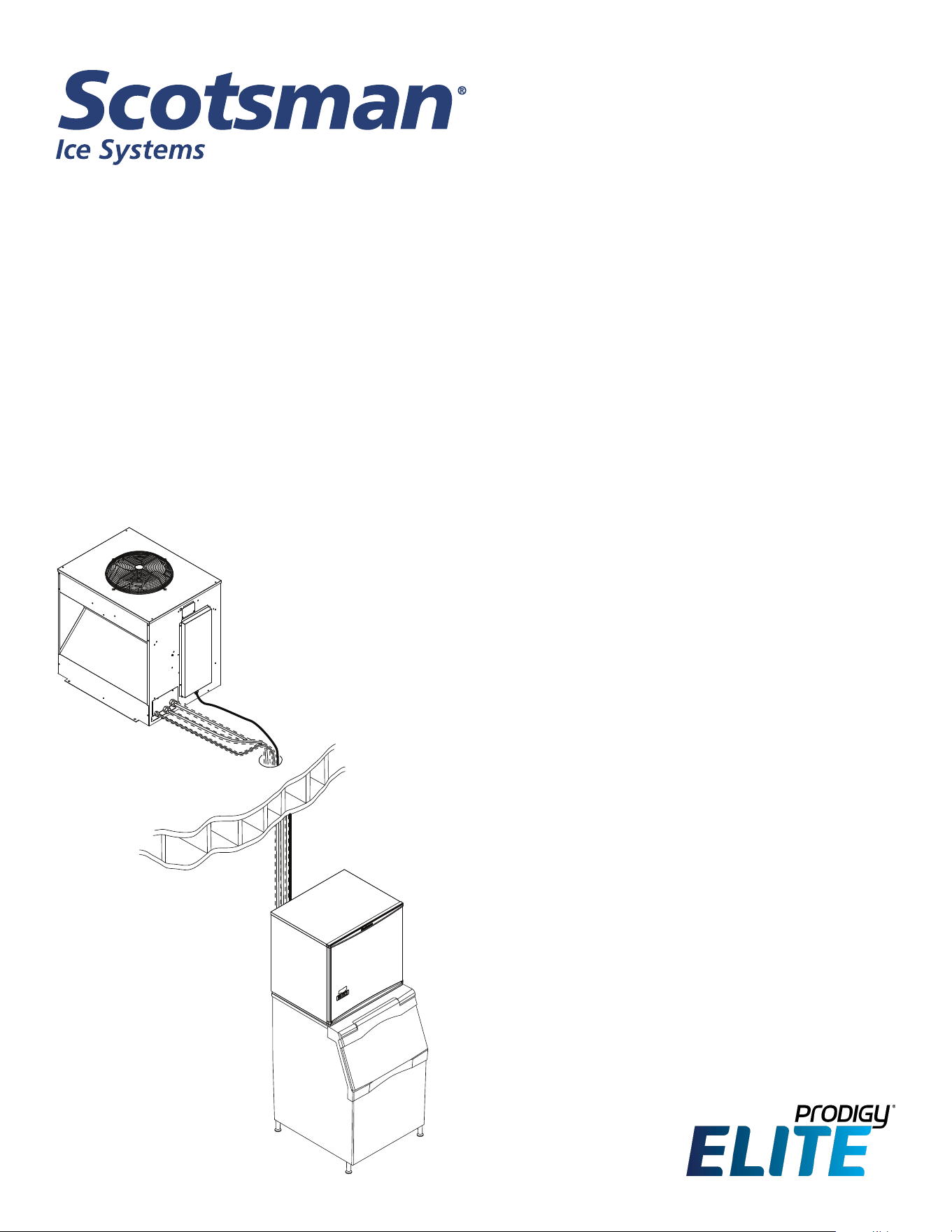
Installation and User’s Manual for
Remote Low Side Modular Cube
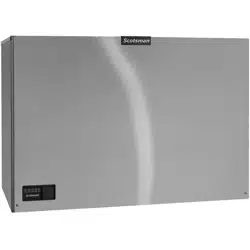
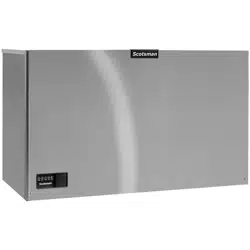
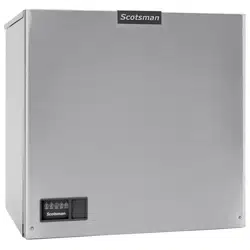
Prodigy ELITE® A Series Models MC330
and MC430 with ECC Condensing Unit
ECC1200, ECC1410, ECC1800
June 2022
Page 1
MC330, MC430, and ECC Condensing Unit
Remote Low Side User Manual
Contents
Conguration .................................................................. Page 2
Technical Specications ......................................................... Page 3
Cabinet Drawings, MC330 Ice Making Head. . . . . . . . . . . . . . . . . . . . . . . . . . . . . . . . . . . . . . . . . . Page 4
Cabinet Drawings, MC430 Ice Making Head. . . . . . . . . . . . . . . . . . . . . . . . . . . . . . . . . . . . . . . . . . Page 5
Cabinet Drawings, ECC Condensing Unit ............................................ Page 6
Pre-Installation Details. . . . . . . . . . . . . . . . . . . . . . . . . . . . . . . . . . . . . . . . . . . . . . . . . . . . . . . . . . . Page 7
Create the System .............................................................. Page 8
System Example ............................................................... Page 9
Place Remote System ........................................................... Page 10
Place Ice Making Head .......................................................... Page 11
Condensing Unit Electrical ....................................................... Page 12
Water and Drain ............................................................... Page 13
Connect Refrigeration ........................................................... Page 14
Complete the Installation ......................................................... Page 15
Reference for Start Up: Controller Operation ......................................... Page 16
Initial Start Up ................................................................. Page 17
Ice Thickness and Water Purge Adjustment .......................................... Page 18
Cleaning, Sanitation and Maintenance .............................................. Page 19
Operational Characteristics 1200 lb system .......................................... Page 21
Operational Characteristics 1800 lb system .......................................... Page 22
What to do before calling for service ................................................ Page 23
Introduction:
The design of this modular remote cuber is the result
of years of experience with remote ice machine
refrigeration systems. Standard features of this
product include front accessible on-o switches,
always-visible indicator lights, mechanical assist ice
harvest for extra eciency, automatically adjusting
water purge and a control system that optimizes
system operation.
In addition, the Scotsman ICELINQ® app allows users
to connect to the machine via Bluetooth® to monitor,
control, and maintain the ice machine.
This installation and user manual is divided into
three sections: Installation, Use and Operation and
Maintenance.
The Installation section provides the trade person with
the information needed to properly install and start
up this ice system. The Use and Operation section
provides the user with the information needed to use
the machine. The Maintenance section contains the
instructions and schedules for the sanitation and
cleaning of the machine.
Note any Caution or Warning symbols when they
appear on the product or in this manual. They indicate
potential hazards.
MC330, MC430, and ECC Condensing Unit
Remote Low Side User Manual
June 2022
Page 2
Conguration
A remote low side cuber system includes two
sub systems: an ice head section and a remote
condensing unit. Additionally, there are several
models of each sub-system and this manual covers
all of them.
The ice making sections are designed for use indoors
in a controlled environment. The remote condensing
units are designed to operate outdoors. Each sub-
system has limits for power, water and temperature.
Operational Limitations:
Minimum Maximum
Air Temp (IH) 50
o
F 100
o
F.
Air Temp (CU) -20
o
F. 120
o
F.
Water Temp 40
o
F. 100
o
F.
Water Pressure 20 psi 80 psi
Water Conductivity 10 microSiemens/cm
Voltage (IH) 104 126
Voltage (CU) 198 253
IH = Ice Head, CU= Condensing Unit
Do Not operate the machine in conditions beyond
these limitations. Doing so will void the warranty.
Scotsman ice systems are designed and
manufactured with the highest regard for safety and
performance. They meet or exceed the standards of
UL and NSF.
Scotsman assumes no liability of responsibility of
any kind for products manufactured by Scotsman
that have been altered in any way, including the use
of any part and/or other components not specically
approved by Scotsman.
Scotsman reserves the right to make design changes
and/or improvements at any time. Specications and
design are subject to change without notice.
System Information
Warranty
Refer to the warranty coverage in eect when the
equipment was sold. Warranty statements are
included with each product.
Systems:
Each sub-system is a separate entity that carries
its own model and serial number. They must be
combined to create a remote cuber low side system.
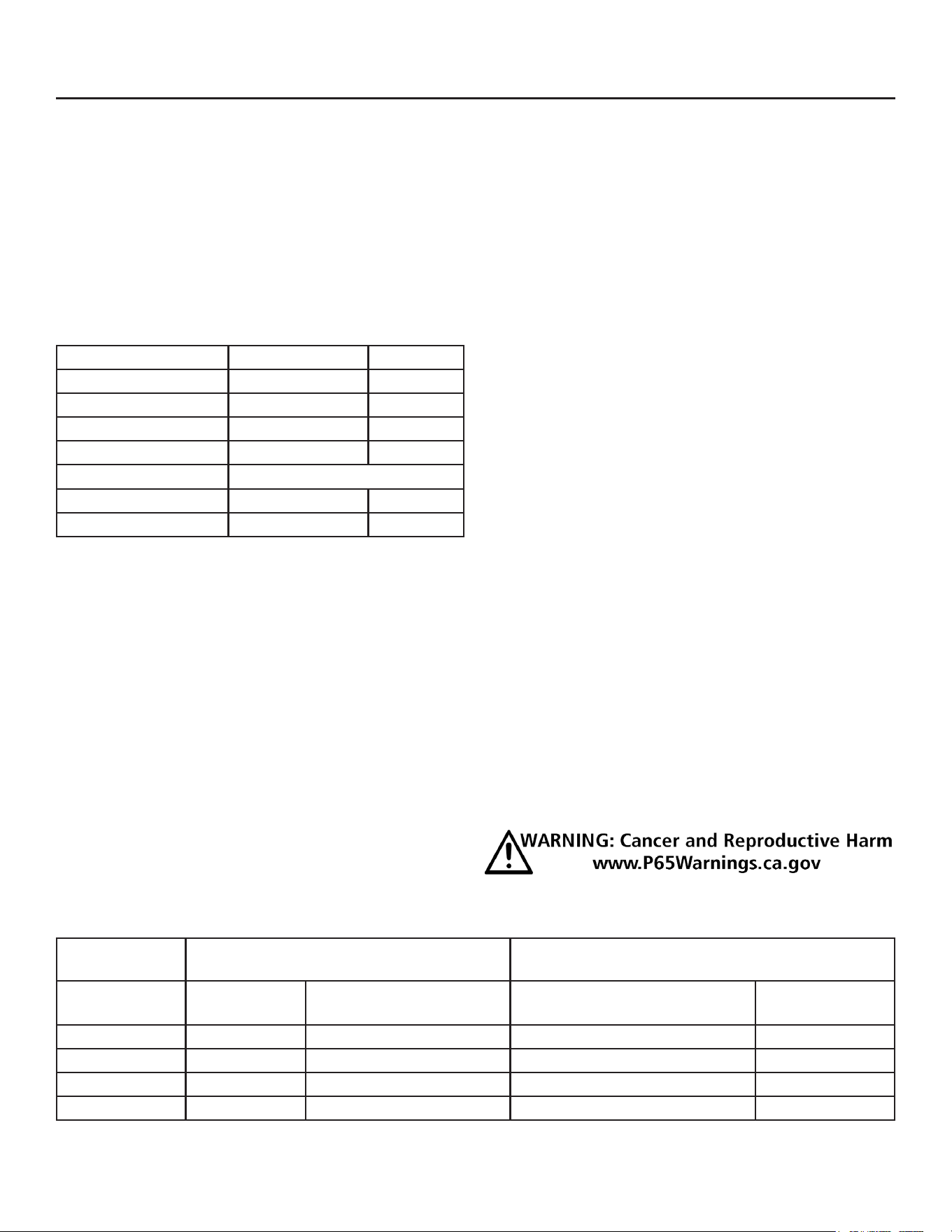
Warning:
Notes: Voltage Codes are at the end of the model
number. Codes read Voltage/Hertz/Phase. Those
related to these products include:
-1 = 115/60/1
-3 = 208-230/60/3
-32 = 208-230/60/1
Tubing kits are required to interconnect the head to
the CU
• 20 foot: 3BRTE20-EH,
• 35 foot: 3BRTE35-EH
• 50 foot: 3BRTE50-EH
• 75 foot: 3BRTE75-EH
Interconnecting 24 volt control wire ships in the
condensing unit.
Prodigy Eclipse
System Size
Condensing Unit (CU) Ice Making Head (IH)
Model Electrical
(volts/Hz/phase)
Model Electrical
(volts/Hz/phase)
1200 ECC1200-32A 208-230/60/1 MC330SL-1D or MC330ML-1E 115/60/1
1400 ECC1410-32A 208-230/60/1 MC430SL-1D or MC430ML-1E 115/60/1
1400 ECC1410-3A 208-230/60/3 MC430SL-1D or MC430ML-1E 115/60/1
1800 ECC1800-3A 208-230/60/3 MC430SL-1D or MC430ML-1E 115/60/1
June 2022
Page 3
MC330, MC430, and ECC Condensing Unit
Remote Low Side User Manual
Technical Specications
Model Electrical
(volts/Hz/phase)
Minimum
Circuit
Ampacity
Maximum
Fuse Size
System
Charge oz of
R-404A
Cabinet Size*
w” x d” x h”
Approx. Unit
Weight (lb)
MC330SL-1E 115/60/1 3 15 - 30 x 24 x 23 130
MC430SL-1E 115/60/1 3 15 - 30 x 24 x 29 165
ECC1200-32 208-230/60/1 17.7 30 248 32 x 39 x 39.75
ECC1410-3 208-230/60/3 11.6 20 248 32 x 39 x 39.75
ECC1410-32 208-230/60/1 15.8 30 248 32 x 39 x 39.75
ECC1800-3 208-230/60/3 19.0 30 232 32 x 39 x 39.75
* See Cabinet Drawings for exact dimensions.
Location Limitations
Maximum Distance between Head and Condensing
Unit: Limited to the length of the longest available
single tubing kit, 75 feet.
Maximum Condensing Unit Elevation over Ice Making
Head: 35 feet.
Note: Elevations greater than 20 feet require
installation of a suction line trap at the 20 foot mark.
Maximum Ice Making Head Elevation over
Condensing Unit: 15 feet.
Line Routing:
• Allowed: One rise after a drop.
• Allowed: One drop after a rise.
• Not Allowed: More than one rise after a drop
• Not Allowed: More than one drop after a rise.
Model Number Locations
Ice Making Head
The dataplate on the back of the ice machine contains
the model number, serial number and electrical data.
A second plate, located behind the front panel at
the lower right front, also lists the model and serial
numbers.
Condensing unit
The dataplate on the condensing unit contains the
model number, serial number, electrical data and
system refrigerant charge.
A second plate, located behind the front panel in front
of the compressor, also lists the model number, serial
number and refrigerant charge.
MC330, MC430, and ECC Condensing Unit
Remote Low Side User Manual
June 2022
Page 4
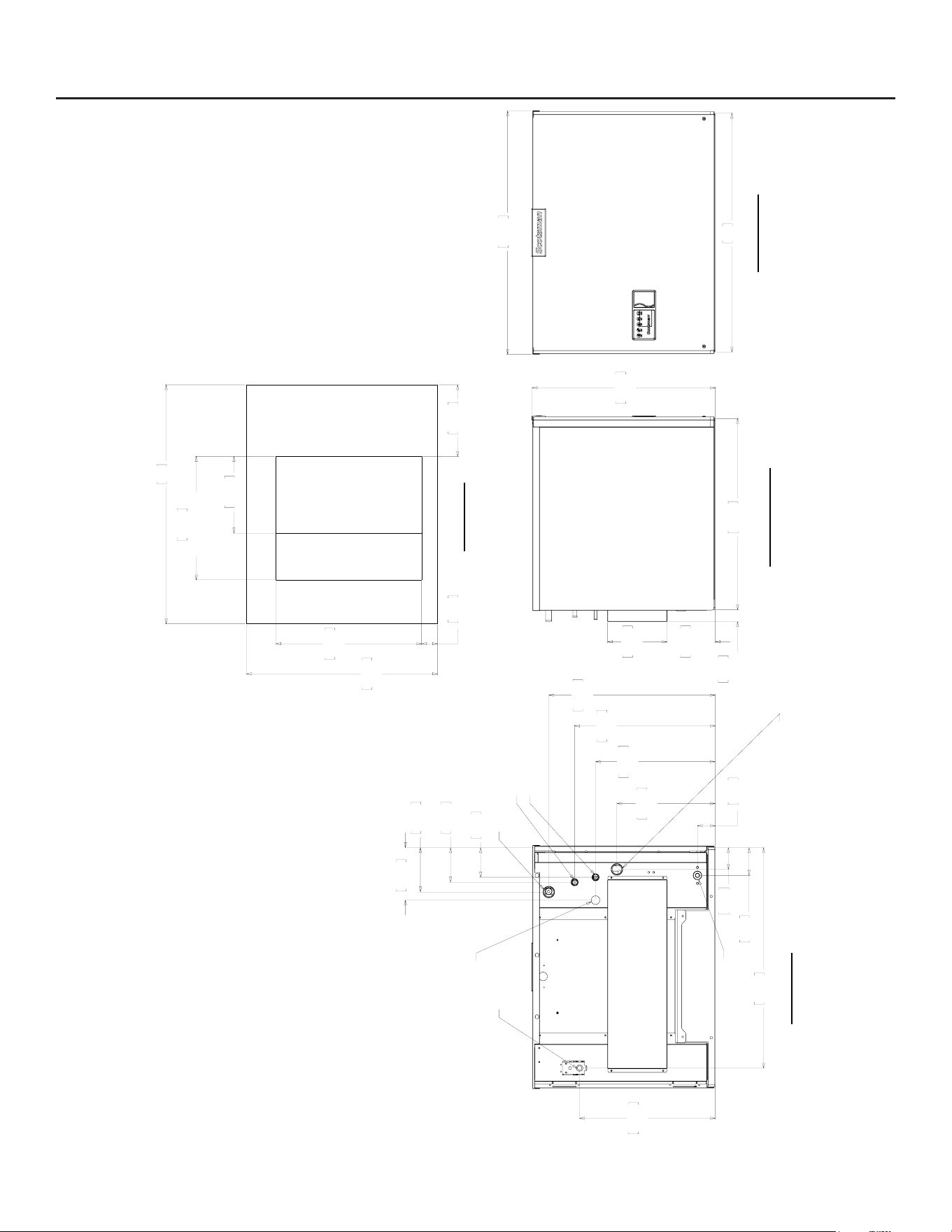
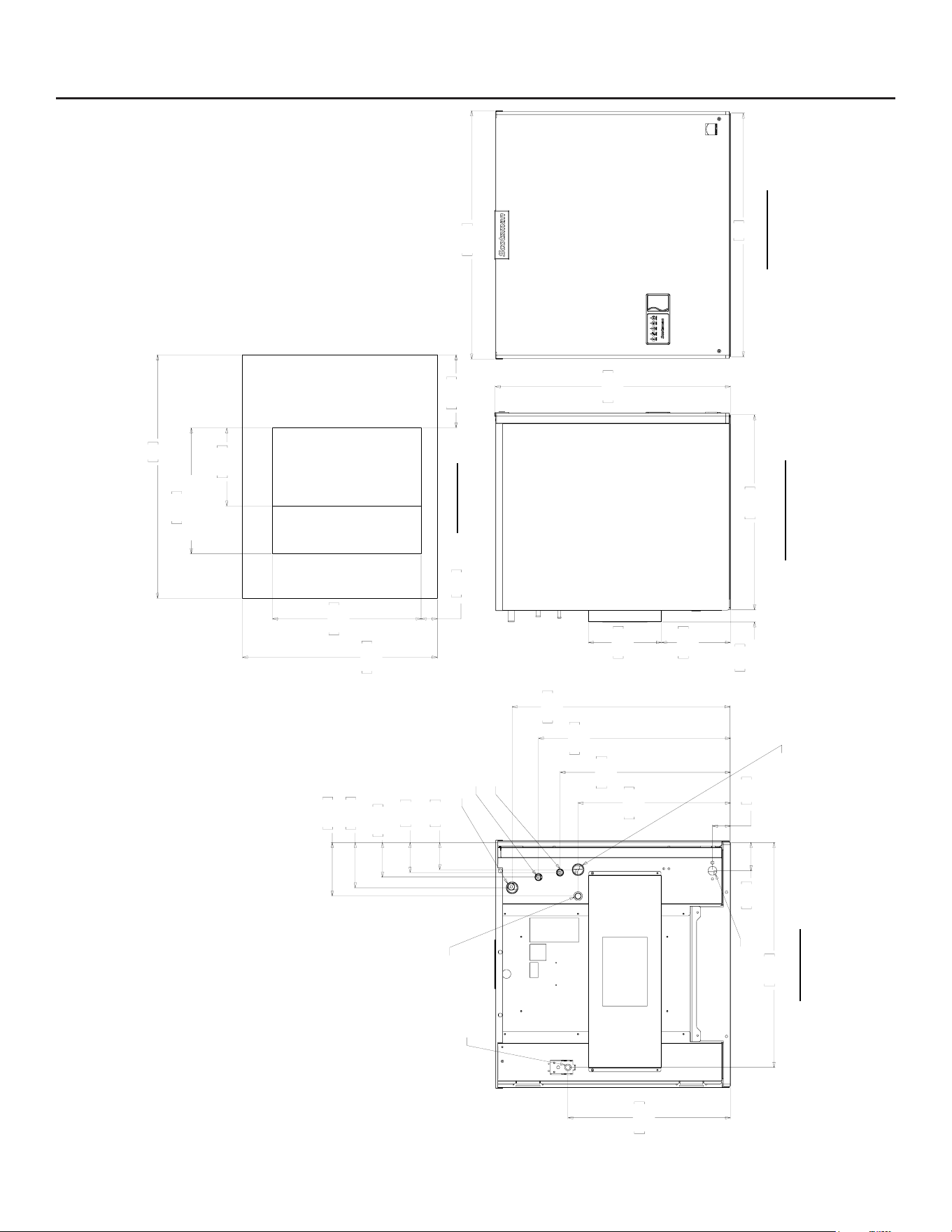
Cabinet Drawings, MC330 Ice Making Head
609.60
24.00
153.16
6.03
190.50
7.50
38.23
1.51
UTILITY
CASE
584.20
23.00
LEFT SIDE VIEW
432.56
17.03
88.62
3.49
703.20
27.69
56.64
2.23
313.69
12.35
381.76
15.03
448.56
17.66
530.86
20.90
69.32
2.73
94.72
3.73
110.46
4.35
141.73
5.58
167.61
6.60
BACK VIEW
ELECTRICAL CORD
ACCESS HOLE
3/8" LIQUID LINE
1/2" COOL VAPOR LINE
3/8" FPT
WATER
INLET
3/4" SUCTION LINE
INFERFACE CABLE
ACCESS HOLE
3/4" FPT
DRAIN
762
30.00
776.73
30.58
FRONT VIEW
609.60
24.00
762
30.00
393.70
15.50
MINIMUM BIN
TOP OPENING
244.60
9.63
228.60
9.00
464.82
18.30
50.80
2.00
PLAN VIEW
ICE DROP OPENING
June 2022
Page 5
MC330, MC430, and ECC Condensing Unit
Remote Low Side User Manual
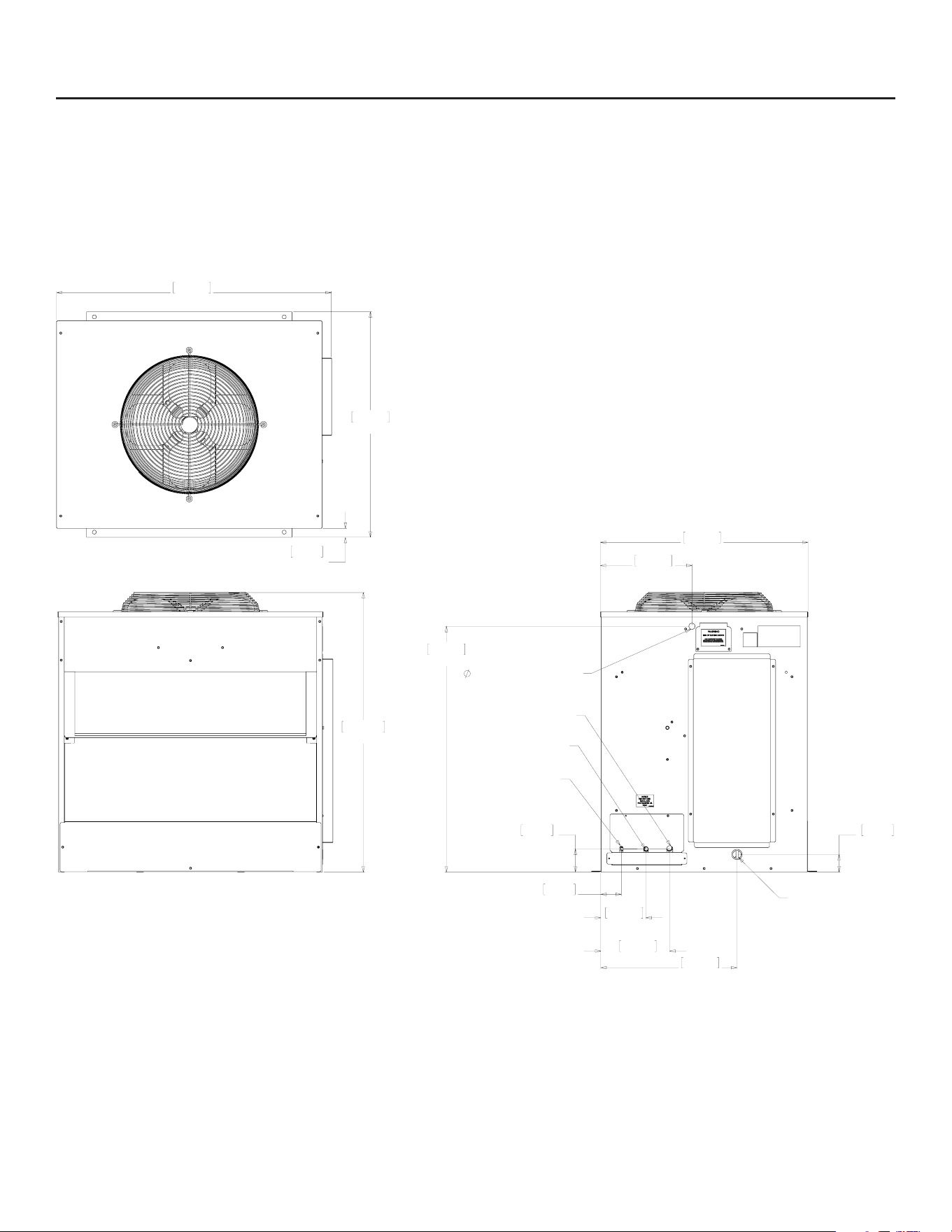
Cabinet Drawings, MC430 Ice Making Head
609.60
24.00
38.23
1.51
UTILITY
CASE
228.60
9.00
216.15
8.51
736.60
29.00
LEFT SIDE VIEW
776.73
30.58
762
30.00
FRONT VIEW
508.76
20.03
703.58
27.70
88.62
3.49
56.64
2.23
477.01
18.78
533.62
21.01
600.71
23.65
681.74
26.84
108.46
4.27
141.73
5.58
85.06
3.35
93.98
3.70
167.61
6.60
3/4" SUCTION LINE
1/2" COOL VAPOR LINE
3/8" LIQUID LINE
INFERFACE CABLE
ACCESS HOLE
3/8" FPT
WATER
INLET
ELECTRICAL CORD
ACCESS HOLE
BACK VIEW
3/4" FPT
DRAIN
762
30.00
393.70
15.50
MINUMUM
TOP OPENING
244.60
9.63
228.60
9.00
50.80
2.00
609.60
24.00
464.82
18.30
PLAN VIEW
ICE DROP OPENING
MC330, MC430, and ECC Condensing Unit
Remote Low Side User Manual
June 2022
Page 6
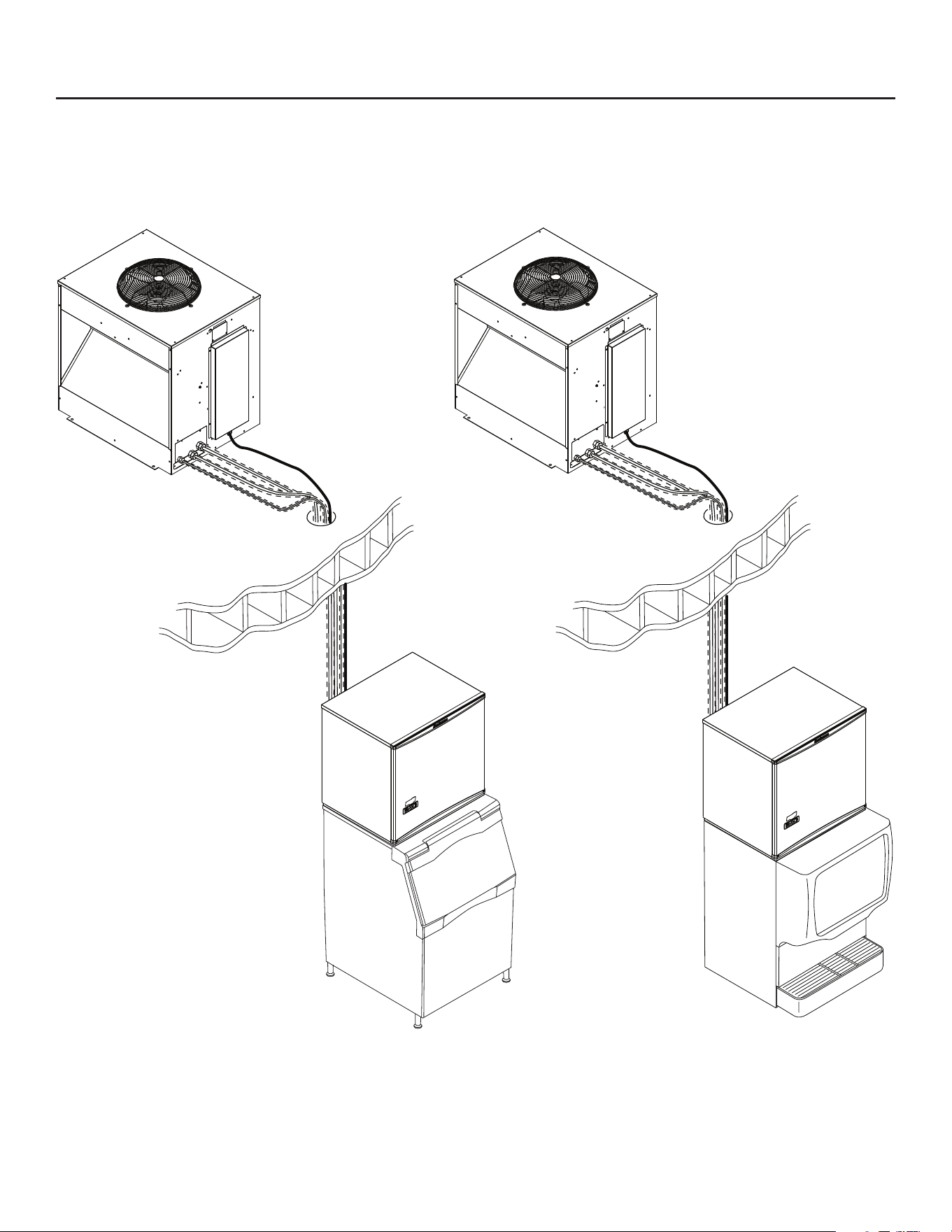
Cabinet Drawings, ECC Condensing Unit
992.81
39.09
814.22
32.06
32.05
1.26
TYP.
TOP VIEW
1009.65
39.75
FRONT VIEW
83.67
3.29
74.12
2.92
163.02
6.42
248.87
9.80
491.69
19.36
63.50
2.50
887.73
34.95
750.06
29.53
330.86
13.03
SIDE VIEW
LINE SET AND ELECTRICAL ATTACHMENT SIDE
1/2" COOL VAPOR LINE
3/8" LIQUID LINE
3/4" SUCTION LINE
.88" ELECTRICAL INLET
INTERFACE HARNESS
ACCESS HOLE

June 2022
Page 7
MC330, MC430, and ECC Condensing Unit
Remote Low Side User Manual
Pre-Installation Details
Note: The ice making head cannot be stacked
vertically.
Accessories such as bin adapters and tubing kits are
required to complete the installation.
Dispenser Adapter Kits:
• Scotsman ID200 or ID250: KBT44
Bin Adapter Kits:
• B948S: KBT22A
Tubing Kits:
• 20 foot: 3BRTE20-EH
• 35 foot: 3BRTE35-EH
• 50 foot: 3BRTE50-EH
• 75 foot: 3BRTE75-EH
Note: Line set may have quick connects. See
refrigeration system detailed instructions connection
details.
Items required for installation:
• Ice making head
• Condensing unit (includes interconnecting control
system wire)
• Tubing kit. 20’, 35', 50’ or 75’ triple line set (liquid,
vapor and suction)
• Bin or dispenser adapter
Special Considerations
The ice making section’s footprint is 30” wide by 24”
deep plus another 1.5” for a utility chase on the back
panel. The refrigeration connections can be made to
go up or out the back by bending the line set tubing.
The electrical power cord and the water inlet line can
also be routed through either of those areas. The
drain may be routed out the back or to the left side.
Water
Pure water does not exist. All water supplies contain
some amounts of impurities, although potable water
is, by denition, t for human consumption. Because
the contents of the water to an ice machine directly
impact its performance, consideration should be given
to improving the water’s quality.
There are two ways water can contain impurities:
in suspension or in solution. Suspended solids can
be ltered out of the water. In solution or dissolved
solids must be diluted or treated. Water lters are
recommended to remove the suspended solids.
Some lters or lter systems have treatment
chemicals in them for treating the suspended solids.
This ice machine has an adjustment for the amount
of water rinsed or purged. Water use adjustments
are customer convenience adjustments; they are not
factory defects and are not covered by warranty.

MC330, MC430, and ECC Condensing Unit
Remote Low Side User Manual
June 2022
Page 8
Create the System
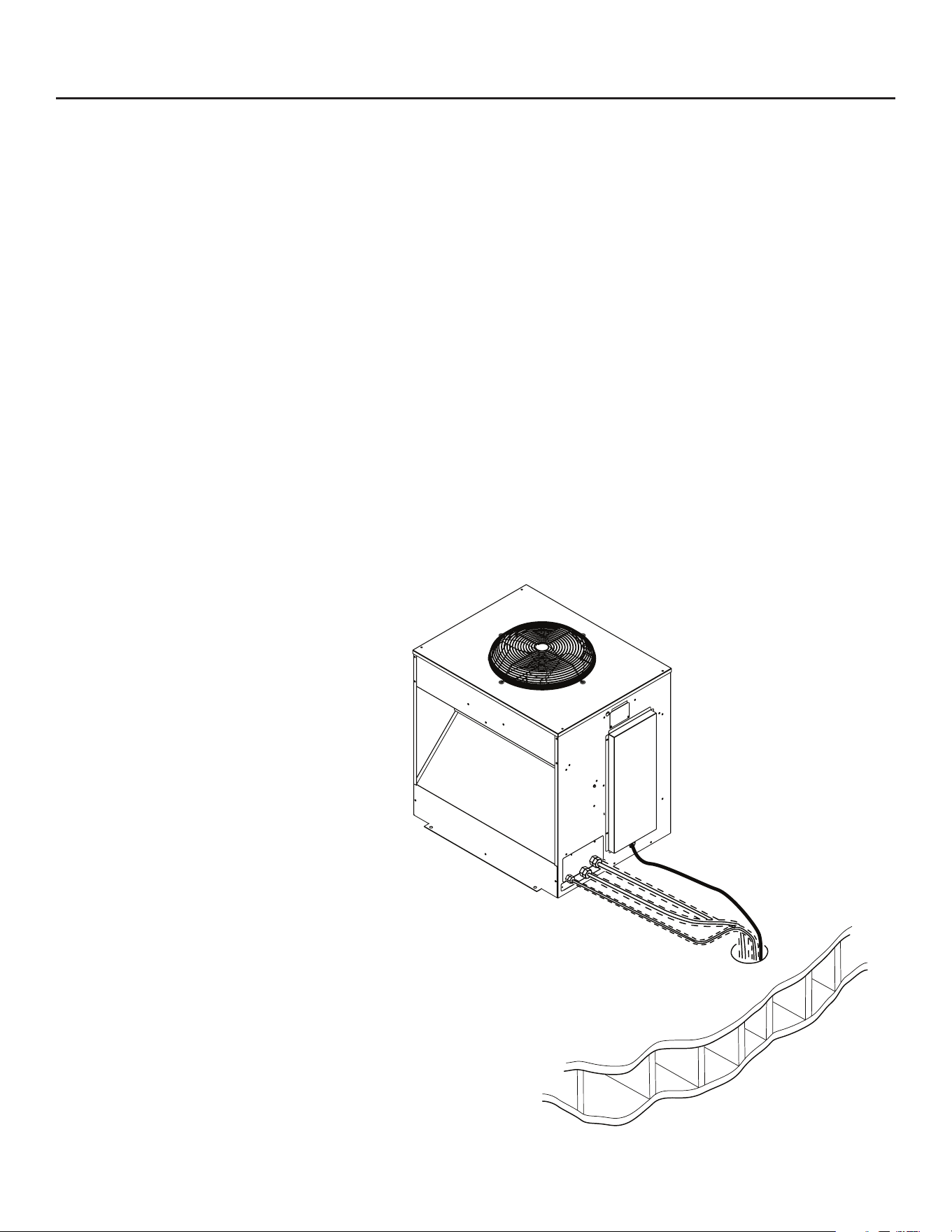
Plan the installation. The system consists of three
parts: the ice making head, the condensing unit and
the interconnecting tubing. Of these, the biggest
variable is the interconnecting tubing.
Tubing: The tubing consists of three insulated and
sealed soft copper tubes. One tube, the liquid line,
is 3/8” OD. The vapor tube is ½” OD and the suction
tube is ¾” OD. A site inspection will determine what
length of tubing is required for the installation.
In 2013 Scotsman made a change to the Eclipse
tubing kits:
• Prior Tubing Kits: They each contain a small
holding charge of R-404A and have quick
connects at the ends.
• Current Tubing Kits: The do not contain any
refrigerant and do not have quick connects.
Either type can be used to connect the head and
condensing unit.
Quick Connect type: Check ice making head and
condensing unit for quick connects. If none, recover
refrigerant from tubing and cut the quick connects o.
If the head or condensing unit has a quick connect,
recover refrigerant and only cut o the quick connect
at the system with the stub connections.
Tubing without quick connects: Check head and
condensing unit, if neither have quick connects, use
as is. If one or both do, obtain kit KTE6 to add quick
connects to the line set.
Excess tubing must be shortened at the job site.
Installations with greater than 20 feet of vertical lift
between ice machine and the compressor require
a suction line trap. The suction line requires careful
handling and large radius bends to prevent kinking.
Roof mounting: Some installations will require the use
of a hoist to lift the components to the roof.
Pad mounting: The condensing unit may be located
below the ice making section, up to a limit of 15 feet.
Distance from unit: Limited to the length of the
available tubing.
Elevation: Condensing unit limited to 35 feet above
the ice making head.
Condensing Unit: Electrical power must be supplied to
the condensing unit, it will be separate from the head.
The remote tubing connections are at the top of the
machine, and connections should not be made until
the machine is nearly in its nal installed position.
The 115/60 Hz ice making section is cord connected
and requires an outlet within 6 feet of the installation.
Interconnecting wires: A low voltage interconnecting
wire harness is included with the condensing unit.
One end plugs into the ice making head and the other
into the condensing unit. The system will NOT operate
without this harness.
Exposed tubing: Minimize the amount of tubing
exposed outdoors.
June 2022
Page 9
MC330, MC430, and ECC Condensing Unit
Remote Low Side User Manual
System Example
MC330, MC430, and ECC Condensing Unit
Remote Low Side User Manual
June 2022
Page 10
Place Remote System
Roof preparation
Most installations of this system will place the
condensing unit on the roof of a building. The roof
must be physically able to accept the load of the
equipment and the roong material must be prepared
to prevent water leaks.
Follow local codes for the placement and attachment
of the equipment.
Location
The condensing unit requires unobstructed air ow
to operate eciently. A four foot space between
each intake side and a wall or other cabinet is
recommended.
Do not place where it will pick up hot discharged air
from an air conditioner or other refrigeration system
condensing unit.
Space must also be reserved for service on the
condensing unit.
Roof Piercing:
The roof (or wall) must have an opening
large enough for the three refrigeration tubes
and the control wire to pass through. The
minimum recommended size is 4” ID. In
most areas the power supply may also pass
through the same passage. If there isn’t a
passage one must be created. In most cases
this must be done by a licensed and bonded
roofer in order to maintain the roof’s integrity.
Roof Pipe Curb or Pitch Pocket:
To avoid potential kinking of the refrigeration tubing,
avoid small, tight radius types of covers on pitch
pockets.
Suggestions:
In most cases a mechanical lift, boom truck or crane
will be required to hoist the condensing unit.
Mount unit to roof rails or curbs and secure with lag
screws or similar eld supplied fasteners.
Orient the assembled unit so that the unit’s mounts
are parallel to the pitch of the roof to allow water to
drain freely.
Do NOT place the unit directly onto roof rock.
In all cases the line set will need to be
shortened to t.
Do NOT leave excess line set exposed
outdoors, especially on a roof.
Refrigerant Recovery and System
Evacuation Notice
In the event the refrigerant must be
recovered from this system and the
system evacuated, recover and evacuate
from the three ball valve access valves.
June 2022
Page 11
MC330, MC430, and ECC Condensing Unit
Remote Low Side User Manual
Place Ice Making Head
Remove from carton.
Remove all panels.
Utility Connection Route:
Electrical: The unit is supplied with a power cord.
There is also an interconnecting control wire that
must be routed between the ice making head and the
condensing unit.
Water Supply: The water supply can be routed from
the top or back.
Drain: The drain must be routed out the back.
Refrigeration Tubing: Field bending will allow the
tubing to be routed up or towards the back.
Adapters:
In many cases an adapter kit will be required when
placing the head unit on a bin or dispenser. See
sales information for the correct kit. Place adapter
kit onto bin or dispenser top. If adapter does NOT
have gasket tape install tape such as Scotsman part
number 19-0503-04.
Note: External drain tubing must be supported to
insure that it does not move and kink the internal
rubber tube.
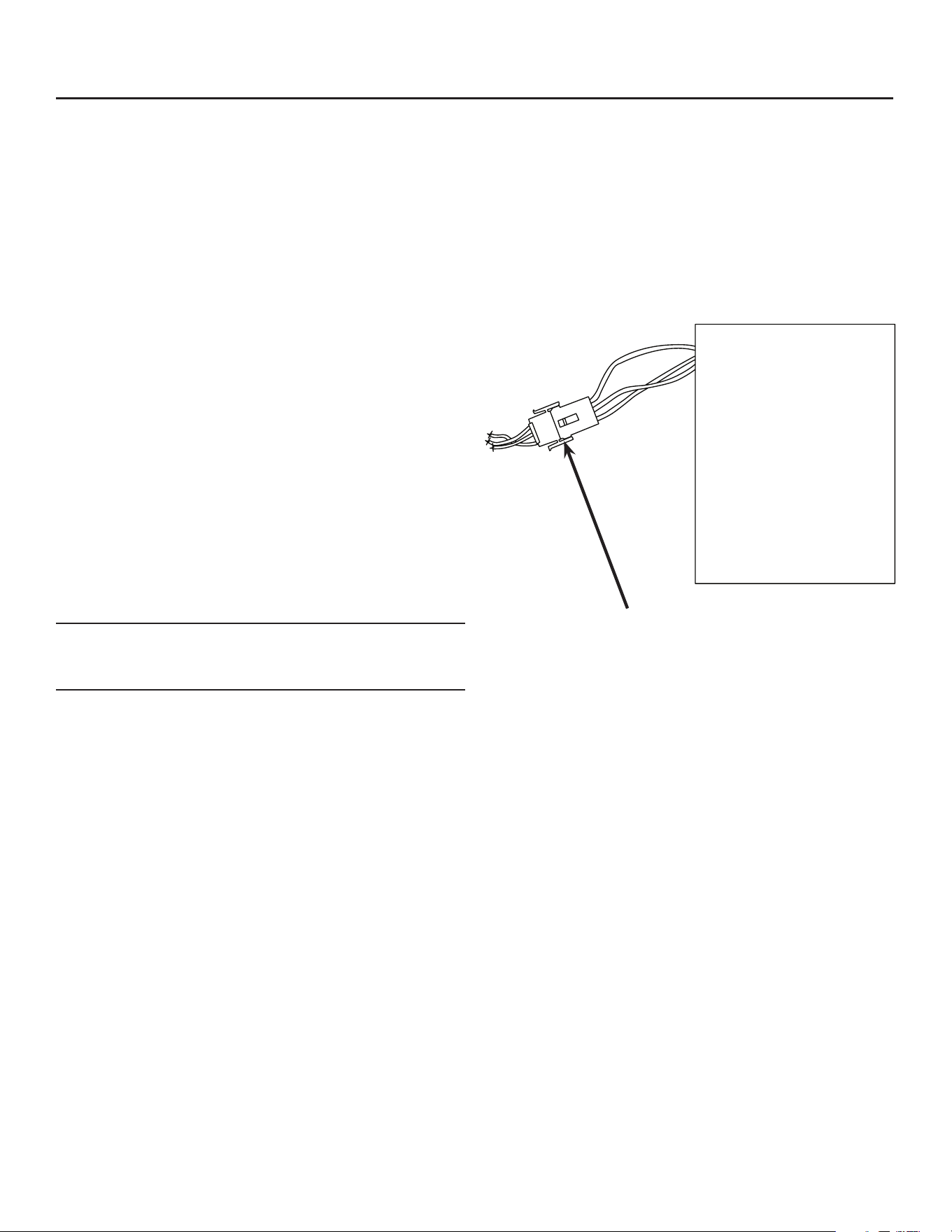
Communication Cable
Plug the interconnecting communication cable into the
harness at the back of the head unit’s electrical box.
Connect Communication Cable Here
MC330, MC430, and ECC Condensing Unit
Remote Low Side User Manual
June 2022
Page 12
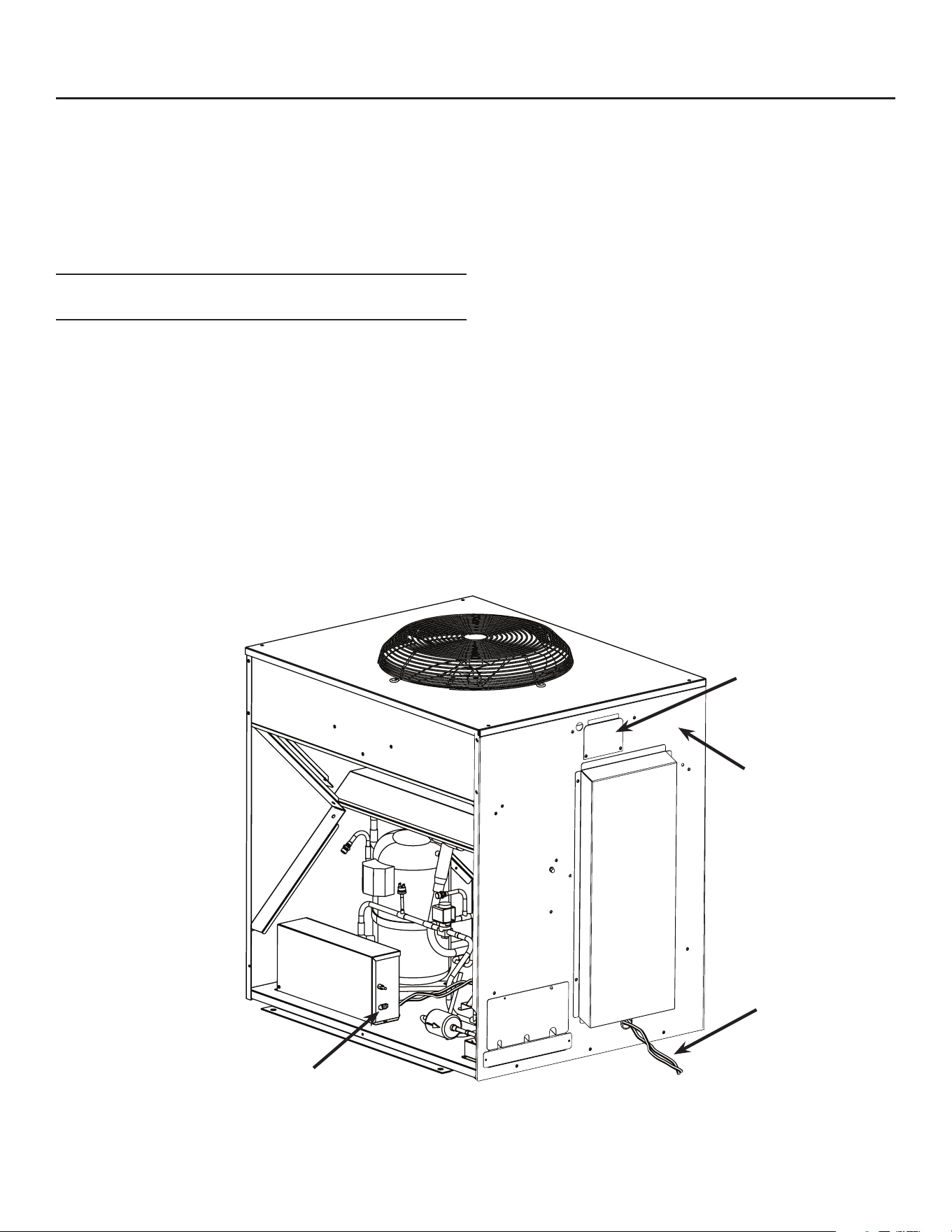
Condensing Unit Electrical
Route interconnecting control wire through proper
hole in side of CU unit and plug into the connection on
the side of the control box.
Route power conduit (liquid tight) and wires to the
hole in the side of the CU unit. Connect to wire leads
or terminal strip, if used, with the proper type of
connector.
Note: The power supply wires must be the correct
size and type per the National Electric Code.
Locate the nameplate on the CU unit for the Voltage,
Phase, Minimum Circuit Ampacity and Maximum Fuse
Size. Either fuses or HACR type circuit breakers may
be used.
Follow all Local, State and National Codes.
Three Phase Notice: Check voltage between legs
at contactor. If there is a “wild leg” in the three phase
power supply move supply wires so the higher voltage
is on L3 of the contactor, which connects to the
compressor motor only.
Electrical Junction Box
Dataplate Location
Communication
Cable
Connect Cable Here
June 2022
Page 13
MC330, MC430, and ECC Condensing Unit
Remote Low Side User Manual
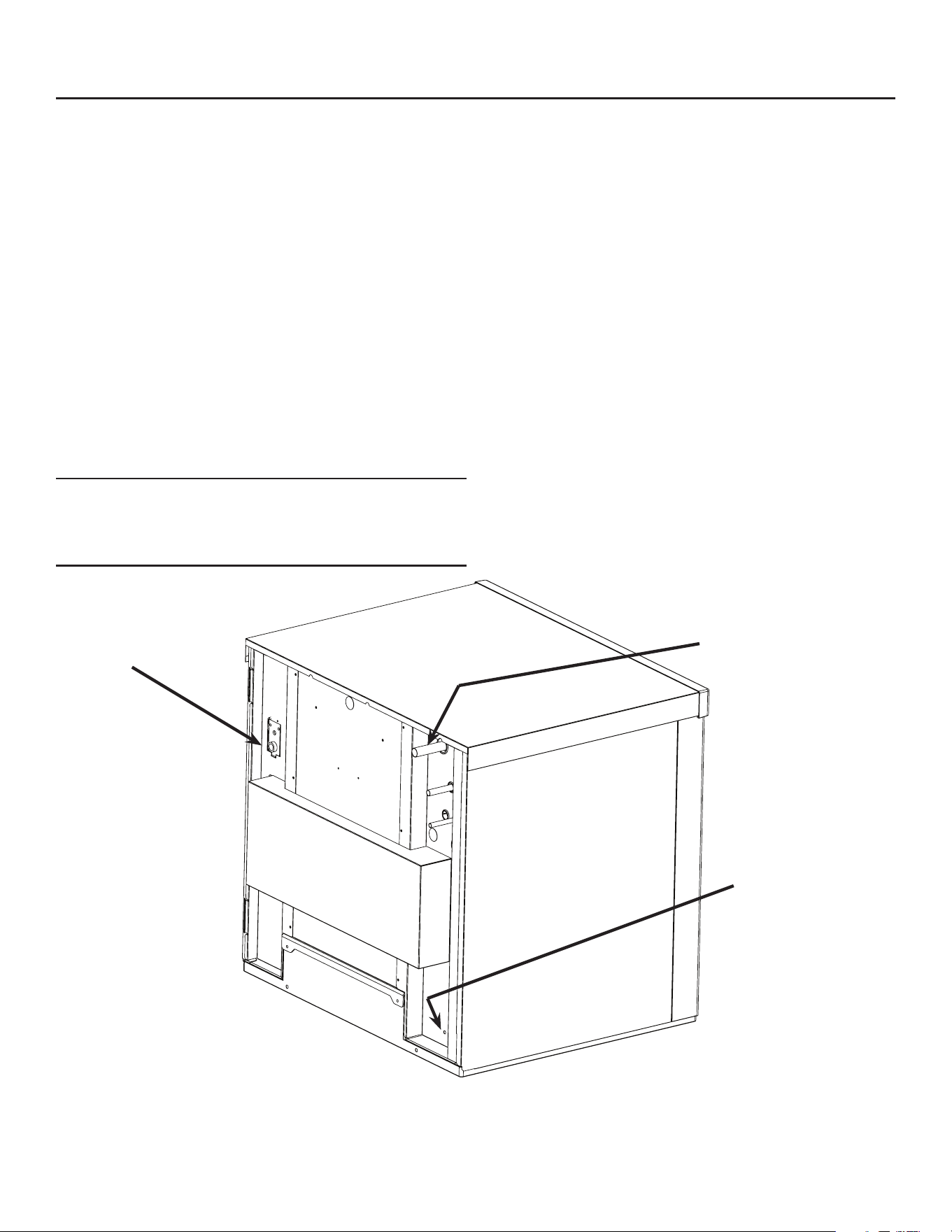
Water and Drain
All models require connection to cold, potable water.
A hand actuated valve within sight of the machine
is required. There is a single 3/8” FPT inlet water
connection.
Water Filters
Install a new cartridge if the lters were used with a
prior machine.
All models require drain tubing to be attached to them.
There is a single ¾” FPT drain tting in the back of the
cabinet.
Install new tubing when replacing a prior ice machine,
as the tubing will have been sized for the old model
and might not be correct for this one.
1. Connect water supply to water inlet tting.
Note: This NSF listed model has a 1" anti-back ow
air gap between the potable water inlet tube end and
the highest possible reservoir water level, no back
ow device is required.
2. Connect drain tubing to drain tting.
3. Route the drain tubing to building drain. Follow
local codes for drain air gap. Use rigid drain tubes
and route them separately – do not Tee into the bin’s
drain.
Vent the reservoir drain. A vertical vent at the back
of the drain, extended about 8 – 10” will allow the
gravity drain to empty and also keep any surges
during draining from discharging water.
Horizontal runs of drain tubing need a ¼” per fall per
foot of run for proper draining.
Follow all applicable codes.
Water
Inlet
Refrigeration
Connections
Reservoir Drain
Fitting
MC330, MC430, and ECC Condensing Unit
Remote Low Side User Manual
June 2022
Page 14
Connect Refrigeration
Requires brazing, steps must be performed by an
EPA certied type II or higher technician.
At Head:
1. Remove protective plugs from all three
connections and vent the nitrogen from the ice
machine.
2. Route the each of the three tubes to its
connection.
3. Remove the top panel and attach a refrigeration
hose with depressor to the 1/2 inch ID vapor line
access valve so the valve is OPEN. This is a vent
for nitrogen purging.
4. Clean tubing ends and position into the couplings.
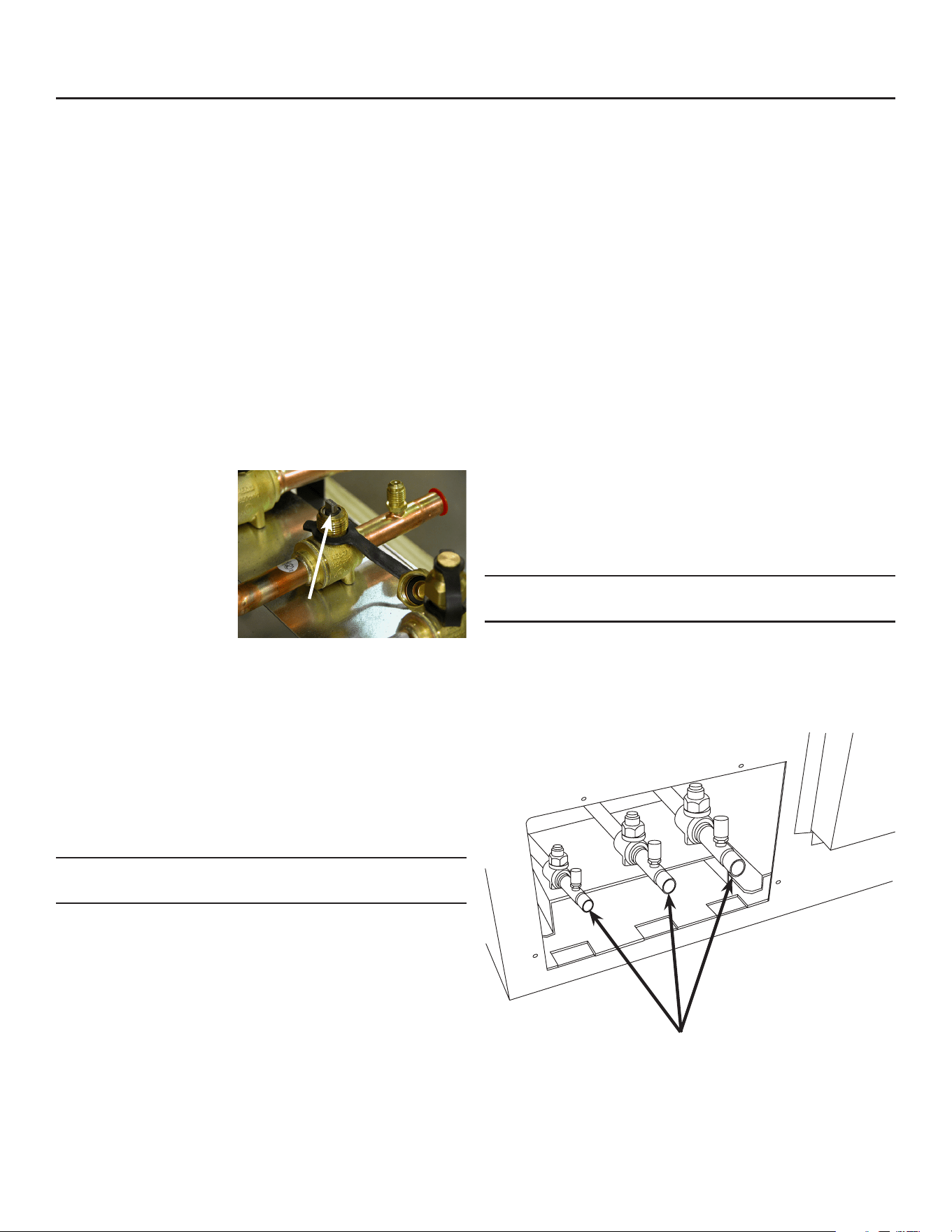
At Condensing Unit
1. Conrm connection
valves are fully
closed.
2. Remove protective
plugs from all three
connections.
3. Remove caps from access valve connections.
4. Remove cores from access valves.
5. Connect refrigeration hoses to access valves.
6. Connect dry nitrogen source to liquid line
connection and vapor line connection.
7. Shorten tubing to correct length, clean ends and
insert them into valve stubs.
Note: Be sure tube and stubs are round, dress with
swage tool if needed.
8. Add heat sink material to ball valve body.
9. Open nitrogen and ow 1 psi nitrogen into liquid
line and vapor line tubes and braze the liquid
line, vapor line and suction line tubes to the valve
stubs.
At Head
1. With nitrogen owing from condensing unit, braze
the liquid, vapor and suction line connections.
2. Remove refrigeration hose from head. Be sure
valve cap is on tight.
At Condensing Unit
1. Remove nitrogen supply.
2. Return valve cores to access valves.
3. Connect vacuum pump to all three access valves
and evacuate the tubing and head to at least a
300 micron level.
4. Remove vacuum pump and add R-404A vapor to
all three tubes to provide a positive pressure.
5. Leak check the braze connections and repair any
leaks.
6. Open all three valves to full open.
Note: The full refrigerant charge is contained in the
receiver of the condensing unit.
Valves Closed
Refrigeration Connections
June 2022
Page 15
MC330, MC430, and ECC Condensing Unit
Remote Low Side User Manual
Complete the Installation
After the utilities and refrigeration connections have
been made, secure the unit to the dispenser or bin
top.
Secure ice making section to dispenser or bin
adapter.
Use strap/clips to secure unit. On some bins or
dispensers it may be necessary to drill small holes
and use eld supplied sheet metal screws to secure
the ice making head to that bin, dispenser or adapter.
If the ice maker & bin or dispenser is not yet in its nal
position gently move it there.
Note: The refrigerant lines above the machine must
be able to move freely while the machine is being
moved into position.
Final Check List Before Initial Start Up
1. Conrm that the ice making section is installed
indoors in a controlled environment.
2. Conrm that all packing materials have been
removed from all products.
3. Conrm that the ice making section is level.
4. Conrm that all the refrigerant connections have
been made and checked for leaks.
5. Conrm that the proper power supply has been
turned on to the condensing unit.
6. Conrm that cold, potable water has been supplied
to the ice making section and checked for leaks.
7. Conrm that the water supply is adequate.
8. Conrm that there is adequate water pressure and
that any water lters have been checked to conrm
that the cartridges do not need changing.
9. Conrm that the proper size drain tubing has been
installed and properly routed.
10. Conrm that the ice making section has been
connected to the proper power supply.
11. Conrm that the interconnecting wire has been
routed and connected between the ice making section
and the condensing unit.
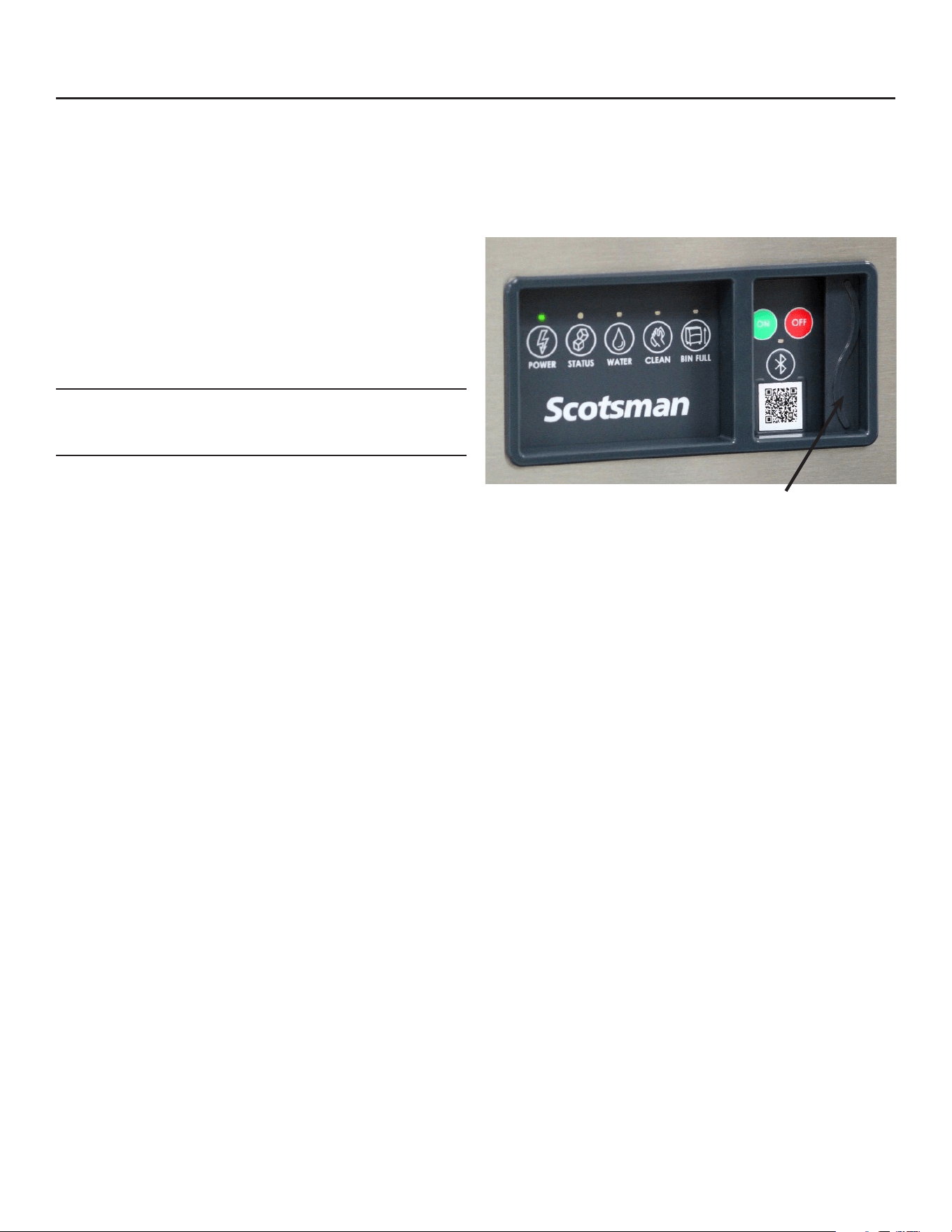
Lower Light and Switch Panel
This user accessible panel provides important
operational information and duplicates the lights and
switches on the controller. It also allows access to the
On and O buttons that operate the ice machine.
Sometimes access to the switches should be limited
to prevent unauthorized operation. For that purpose a
xed panel is shipped in the hardware package. The
xed panel cannot be opened.
To install the xed panel:
1. Remove the front panel.
2. From the back side of the panel, slide the door
to left while spreading the clips to remove the
original door from the bezel.
3. Slide the xed panel into bezel until it snaps into
place.
4. Reinstall front panel.
Open door to access On
and O switch buttons.
MC330, MC430, and ECC Condensing Unit
Remote Low Side User Manual
June 2022
Page 16
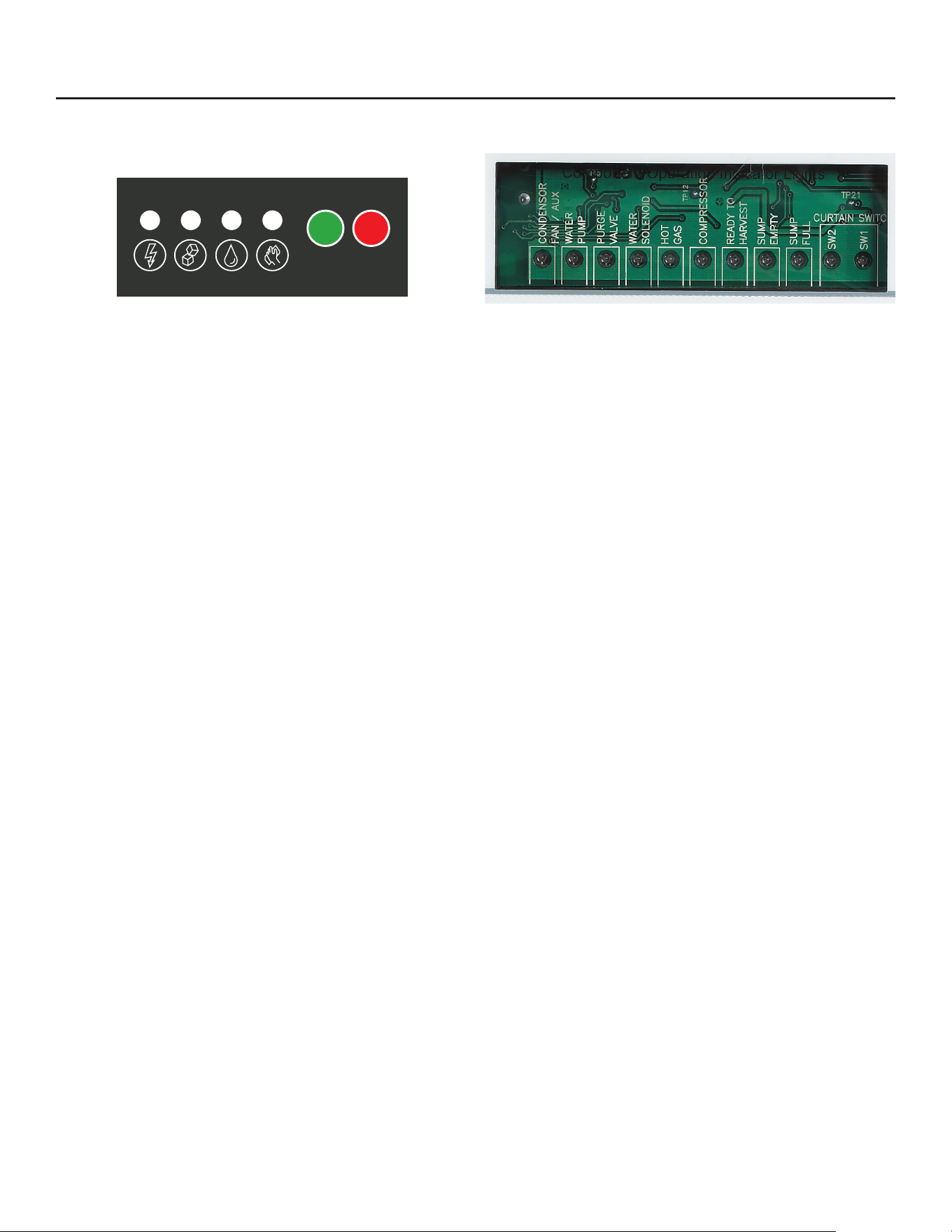
Reference for Start Up: Controller Operation
The controller has four indicator lights, a code display,
four push buttons, and eleven component indicator
lights.
Indicator Lights
• Power - on when there is power to the controller
• Status - on in ice making mode
• Water - on and blinking when there is no water
• De-scale & Sanitize - on when it is time to clean
the machine
Code Display
• Displays status and diagnostic codes
Push Buttons
• On
• O
• Manual Harvest
• Clean
Component indicator lights
• Fan - not used on this model
• Water Pump - on when the pump is
• Purge Valve - on when the purge valve is
• Water Solenoid - on when the inlet water solenoid
valve is
• Hot Gas - on when the vapor inlet valve and
harvest assist solenoid have power
• Compressor - on when the compressor contactor
is energized
• Ready to Harvest - on when the ice thickness
sensor has water touching it
• Sump Empty - on when there is no water touching
the mid-length probe
• Sump Full - on when water is touching the
shortest probe
• SW2 - on when the curtain is open
• SW1 - on when the curtain is open
Cycle Denitions:
Freeze: The refrigeration system is operating to
remove heat from the evaporators. The compressor,
fan motor, and water pump are on.
Harvest: The refrigeration system and water system
are operating to harvest the ice and rinse the
reservoir. The compressor is on for the full cycle, the
pump is on until the purge valve closes.
The inlet water valve opens and rells the reservoir.
The vapor and condenser by-pass valves are open
during the entire harvest cycle, as are the harvest
assist mechanisms.
POWER STATUS WATER CLEAN
ICE PRODUCTION
MANUAL
HARVEST
INITIATE
CLEAN
OPTIONAL KVS PLACED HERE
(Vari-Smart
TM
Adjustable Ice Level Control)
The following codes will be displayed when
unit is operating as expected:
F
- Freeze
H
- Harvest
B
- Bin Full
O
- Standby/Off
Additional operational and error codes can
be found on the inside of the front panel.
Scan QR code to download the Scotsman ICELINQ™ App:
Connect to this machine via Bluetooth to access additional machine operations,
view error information, adjust settings, and initiate self-guided cleaning.
ON OFF
02-5166-01
OPTIONAL KSBU, KPAS, KSBU-N PLACED HERE
(Smart-Board™ Advanced Control Panel)
Component Operation Indicator Lights

June 2022
Page 17
MC330, MC430, and ECC Condensing Unit
Remote Low Side User Manual
Initial Start Up
Pre Start
A soak-out period of four hours is optional for this
system. If desired, powering the compressor unit
for four hours prior to start up allows the crankcase
heater to warm up the oil in the compressor.
Start Up
1. Connect power to the condensing unit and move
its toggle switch to Run or On.
2. Open the water supply valve.
3. Remove the head’s front panel. Check for any
packing or wires rubbing moving parts. Note
location of control board in upper left corner of the
machine’s front.
4. Remove any tape securing curtain to evaporator.
5. Switch on the electrical power to the EH head.
Observe that some of the control’s indicator lights
glow and its display shows O.
6. Push and release the ON button. The code display
will begin to blink F.
The purge valve opens, the water pump starts and the
inlet water valve opens to add water to the reservoir.
In a few seconds the purge valve closes and the
water pump stops. Water will ow into the machine
until the reservoir is full. The vapor valves and harvest
assist devices will activate, then the compressor and
water pump will start. The F will be on steady.
Note: Because the condensing unit is external to the
ice making section, no visible signs of operation will
be noticeable until the water begins to cool and frost
forms on the evaporator tubing.
7. Go to the condensing unit and conrm that the
compressor and fan motor are operating. Warm
air will be discharged from the condenser.
Observe the Ready for Harvest indicator light. It may
blink early in the cycle, that is normal. The control will
ignore that signal for the rst 6 minutes of freeze.
During the Freeze cycle move the curtains and
observe that the SW1 or SW2 light on the control
board blinks On when the curtain moves away from
the evaporator and O when returned to its normal
position.
Note: Moving a curtain during the Freeze cycle has no
aect on control function, but will cause water to ow
into the cube chute. When enough ice has frozen, the
Ready for Harvest indicator light will be on steady.
After it’s been on steady for a few seconds Harvest
will begin.
The display shows an H. The vapor valve in the EH
opens, and the harvest assist mechanism activates.
In the CU the condenser fan stops and the condenser
bypass valve opens and the receiver inlet valve
closes. In the EH, the purge valve opens to drain
some water, when it does the inlet water valve opens
to rell the reservoir. After a few seconds the purge
valve closes but the inlet water valve continues to
ll the reservoir. Harvest continues until the ice is
released as a unit and forces the curtain to open.
When the curtain opens it signals the controller that
harvest is complete, and it returns the unit to a freeze
cycle.
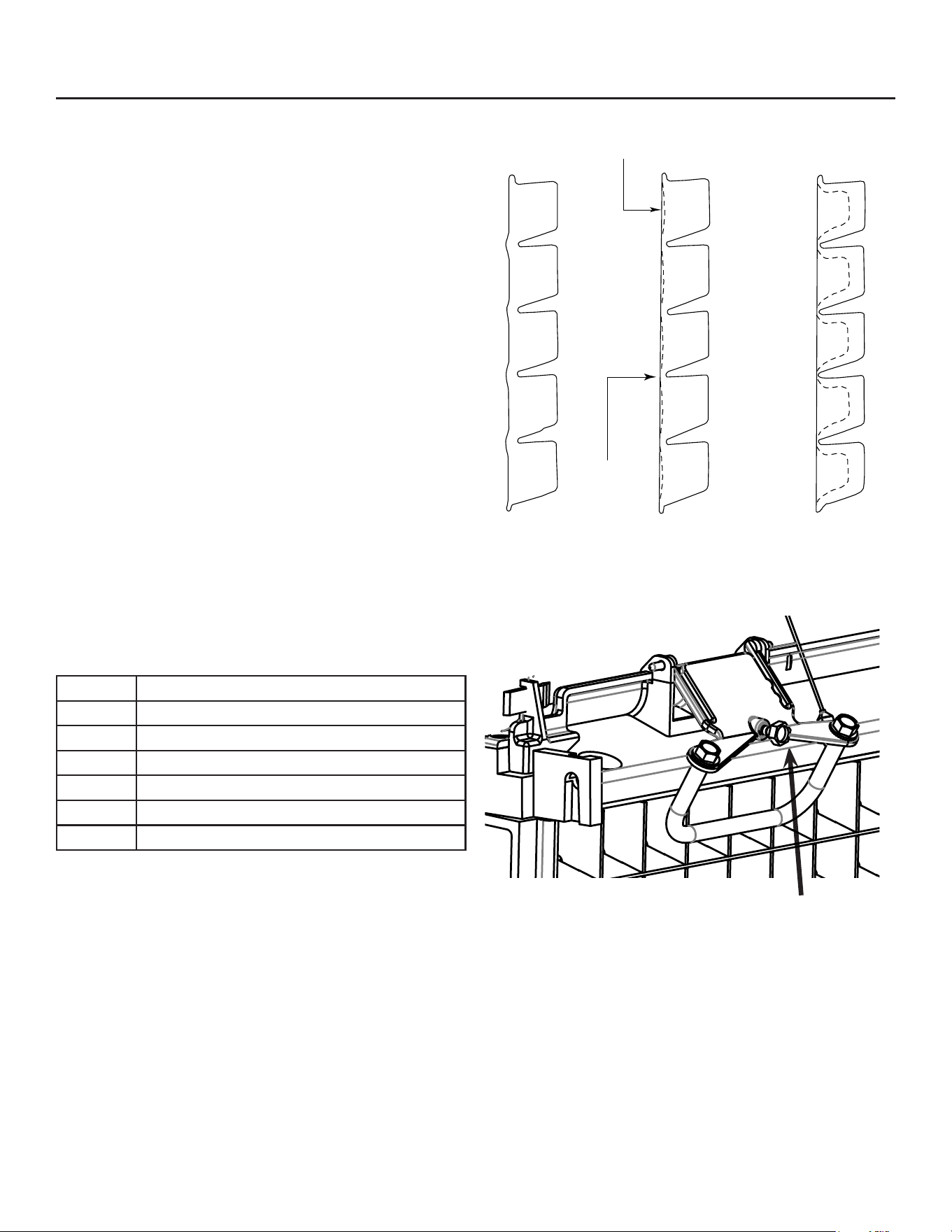
8. Check the ice harvested for proper bridge
thickness. The ice bridge is factory set at 1/8 inch.
If needed, adjust bridge thickness. Do NOT make
it too thin.
9. Return the front panel to its normal position and
secure it to the machine.
10. Instruct the user in the operation of the machine
and its maintenance requirements.
11. Fill out and mail the warranty registration form or
register it on line at www.scotsman-ice.com.
MC330, MC430, and ECC Condensing Unit
Remote Low Side User Manual
June 2022
Page 18
Ice Thickness and Water Purge Adjustment
Bridge Thickness - For the Service Tech Only
1. Push and hold O till the machine stops.
2. Remove evaporator cover.
3. Remove left curtain.
4. Use a hex wrench and rotate the bridge thickness
adjustment screw in 1/16 turn increments CW to
increase bridge thickness.
5. Rotate CCW to decrease bridge thickness.
Caution: Do not make the bridge too thin or the
machine will not harvest properly. Bridge thickness
adjustments are not covered by warranty.
6. Return curtain and evaporator cover to their
normal positions.
7. Push and release the On button. Check next
harvest of ice. Repeat steps 1-6 if needed.
Water Purge Setting
The water purge is factory set to the automatic
position, suitable for most water conditions. The
setting can be changed to one of 5 manual settings or
left on automatic.
Setting Water Type
1 Minimum - RO water or equivalent
2 Moderate - Low TDS, non RO
3 Standard - Use with typical water
4 Heavy - High TDS
5 Maximum - Very high TDS
A Automatic - Factory setting
To set:
1. Switch the machine OFF by holding the O button
in until a number or the letter A shows on the
display.
2. Press and release the On button repeatedly until
the number on the display corresponds to the
desired setting.
3. Press and release the O switch again to return to
the normal control state.
TOO BIG
JUST RIGHT
TOO SMALL
1/8 to 3/16”
Bridge
Small Depression
Adjustment
Screw
June 2022
Page 19
MC330, MC430, and ECC Condensing Unit
Remote Low Side User Manual
Cleaning, Sanitation and Maintenance
This ice system requires three types of maintenance:
• Remove the build up of mineral scale from the ice machine’s water system and sensors.
• Sanitize the ice machine’s water system and the ice storage bin or dispenser.
• Clean or replace the air lter and clean the air cooled condenser (air cooled models only).
It is the User’s responsibility to keep the ice machine and ice storage bin in a sanitary condition. Without
human intervention, sanitation will not be maintained. Ice machines also require occasional cleaning of their
water systems with a specically designed chemical. This chemical dissolves mineral build up that forms during
the ice making process.
The ice machine’s water system should be cleaned and sanitized a minimum of twice per year. Sanitize the
ice storage bin as frequently as local health codes require, and every time the ice machine is cleaned and
sanitized.
Preparing to Clean:
1. Remove the front panel.
2. Remove the evaporator cover.
Scale Removal:
3. Push and release the Clean button. The yellow
Clean light will blink and the display will show C.
The machine will harvest any ice, drain the reservoir
and begin to rell it.
4. Observe code display, when it blinks the characters
“A d 1” immediately go to the next step.
5. Pour the below specied amount Scotsman Clear
1 ice machine scale remover into the reservoir. The
unit will circulate the scale remover, then drain and
ush it. This will take 35 minutes, then the machine
will stop and the display will show O.
Note: Using chemicals or dilution ratios other than
what is specied will damage the ice machine and
signicantly aect the performance and life of the ice
machine.
Clean internal parts:
6. Mix a cleaning solution of 6oz of Scotsman Clear
1 scale remover with 9 cups (72oz) of 105-115° F
potable water.
7. In a separate bucket, mix a sanitizing solution of 1.6
oz of Nu-Calgon IMS Sanitizer with 1 gallon (128
oz) of 105-115 degree F. potable water.
8. Remove air lter(s)(if applicable), water level sensor
and housing, water distributor(s), curtain(s), ice
thickness sensor, and splash panel for additional
cleaning.
9. Soak and scrub each part (including the
evaporator cover!) using the previously prepared
solution of Scotsman Clear 1 scale remover and a
nylon brush, and then rinse with water. Save scale
remover solution.
10. Soak and scrub each part using the previously
prepared sanitizing solution. No rinse needed. Save
sanitizing solution.
11. Using a non-metallic scouring pad, scrub spillway
with sanitizer to remove any material buildup and
debris.
12. Reinstall ice thickness sensor, curtain(s), splash
panel, water distributor(s), and water level sensor in
their original positions. Be sure water level sensor
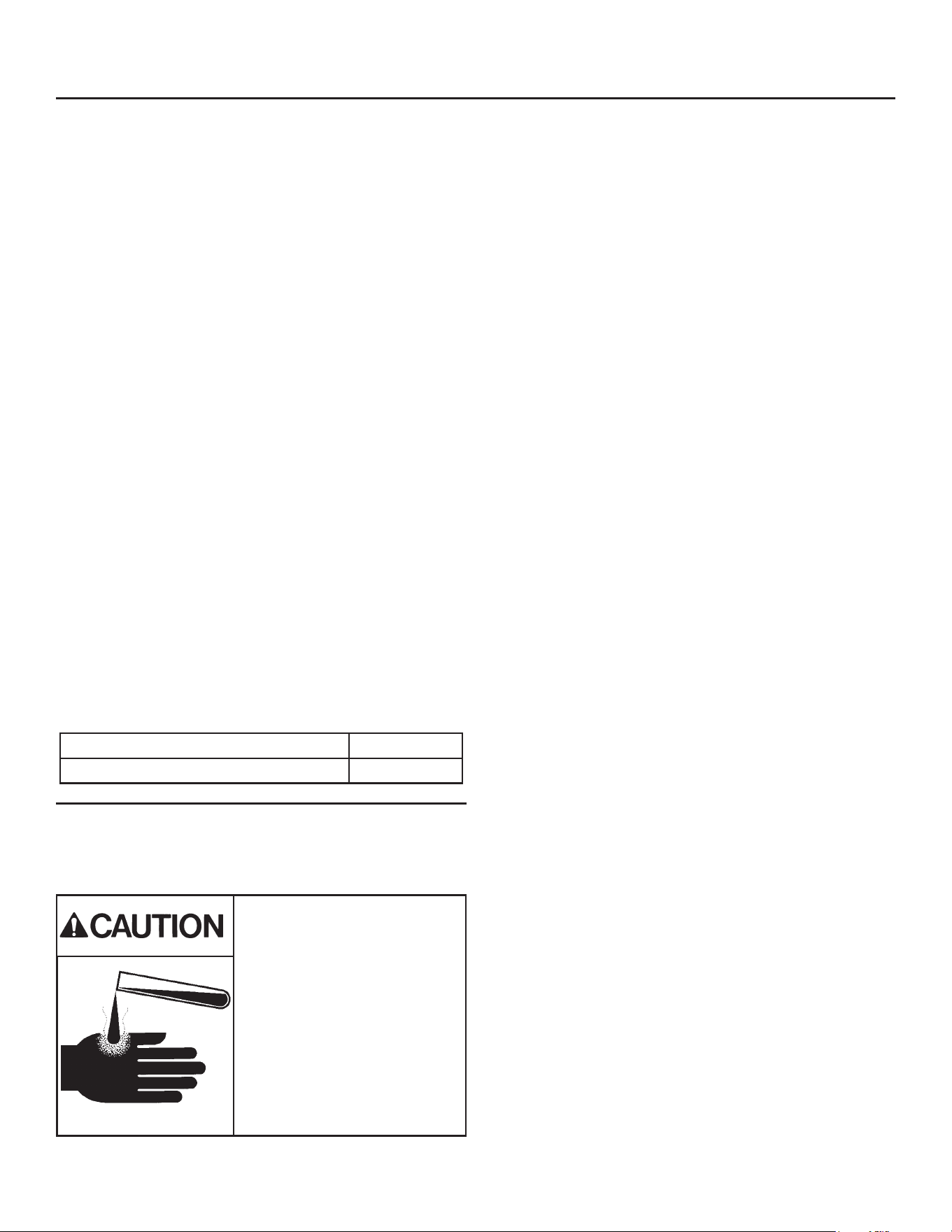
and ice thickness sensor are completely dry.
Ice machine scale remover
contains acids. Acids can
cause burns.
If concentrated cleaner comes
in contact with skin, ush with
water. If swallowed, do NOT
induce vomiting. Give large
amounts of water or milk. Call
Physician immediately. Keep
out of the reach of children.
MC330 20 ounces
MC430 24 ounces
MC330, MC430, and ECC Condensing Unit
Remote Low Side User Manual
June 2022
Page 20
Sanitize:
13. Push and release the Clean button. The yellow
Clean light will blink and the display will show C.
The machine will go through a harvest cycle, drain
the reservoir and begin to rell it.
14. Observe code display, when it blinks the
characters “A d 1” immediately go to the next
step.
15. Pour the previously prepared sanitizing solution
into the reservoir until it is full. The unit will circulate
the sanitizer, then drain and ush it. This will take
35 minutes, then the machine will stop and the
display will show O.
16. Remove all ice from storage bin or dispenser and
sanitize bin or dispenser with remaining sanitizing
solution while machine completes sanitizing cycle.
Pour excess sanitizer down drain.
Finish Cleaning Process:
17. Reinstall evaporator cover and front panel (with
air lter(s) if applicable) in their original positions.
18. Push and release the “ON” button to resume ice
making.
Want more detail?
Scan QR Code to download the Scotsman IcelinQ™
App to connect to this machine via Bluetooth and
access the self-guided cleaning process.
Other Maintenance
The remote air cooled condenser coil must be
cleaned occasionally to keep the system operating at
high eciency. Airow is from the outside in.
Remove any large debris from the outside of the coil.
Vacuum accumulated dust.
Wash out the coils with water.
Caution: Do NOT use excessive water pressure as
that will bend the ns.
If the coils have become coated with grease, a coil
cleaner will have to be used to wash the coils.
Disconnect power to the condensing unit and remove
the condenser top.
Inspect the fan blade to be sure it is not cracked and
is clean.
Return the condenser top to its original position and
reconnect the power supply.
Rotating fan blade can
cause personal injury.
Disconnect power to
unit before servicing it.
June 2022
Page 21
MC330, MC430, and ECC Condensing Unit
Remote Low Side User Manual
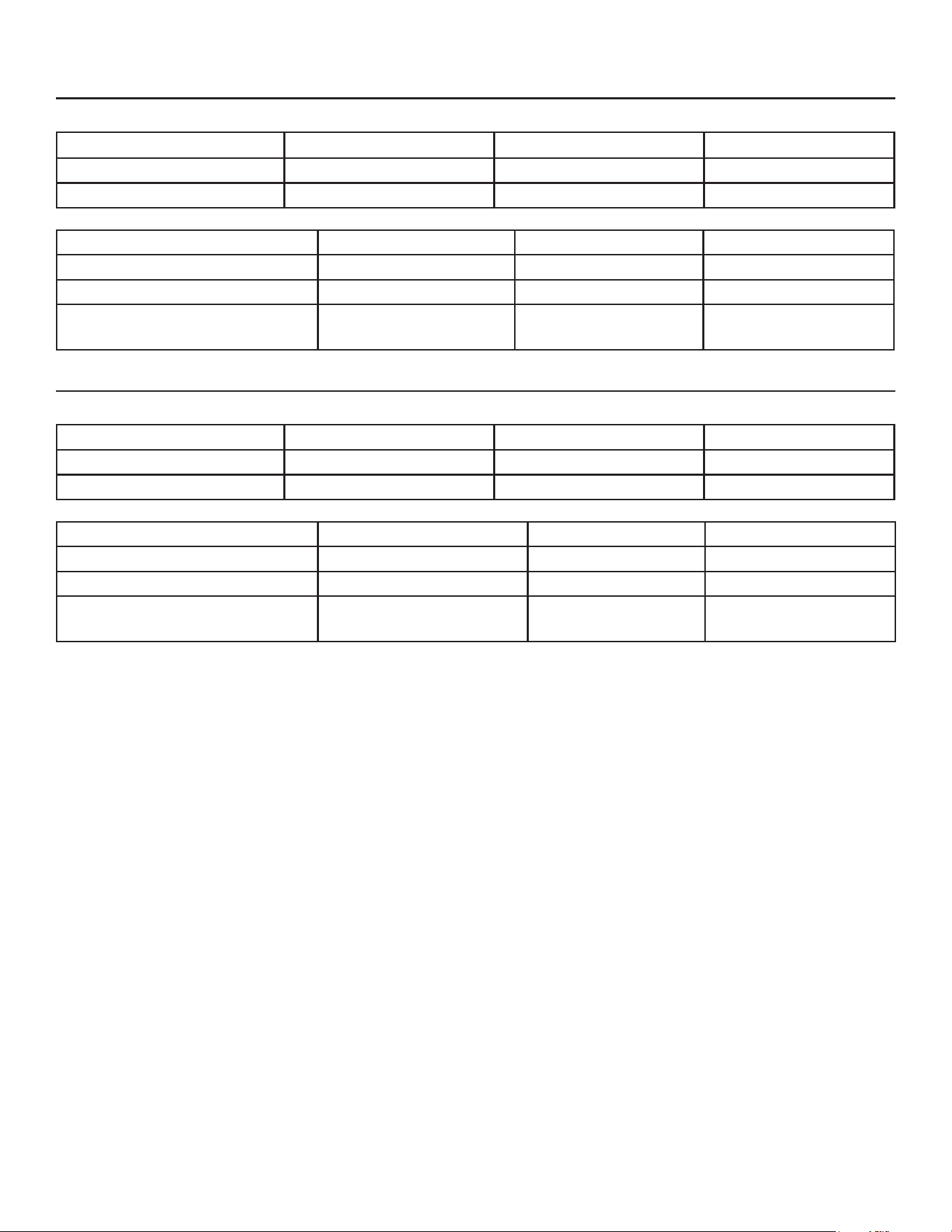
Operational Characteristics 1200 lb system
Cycle Times @ Condenser Temp/Cabinet Temp/Water Temp in degrees F.
70/70/50 90/90/70 120/110/100
Freeze 9 to 11 minutes 12 to 14 minutes 17 to 19 minutes
Harvest 1 to 1.5 minutes 1 to 1.5 minutes .5 to 1 minute
System Pressures @ Condenser Temp/Cabinet Temp/Water Temp in degrees F
70/70/50 90/90/70 120/110/100
Suction at head, end of Freeze 29 to 31 PSIG 34 to 36 PSIG 36 to 38 PSIG
Suction at head, Harvest - Peak 92 to 98 PSIG 165 PSIG 170 PSIG
Discharge at Condensing Unit:
Freeze - 5 minutes in
230 to 250 PSIG 250 to 270 PSIG 350 PSIG
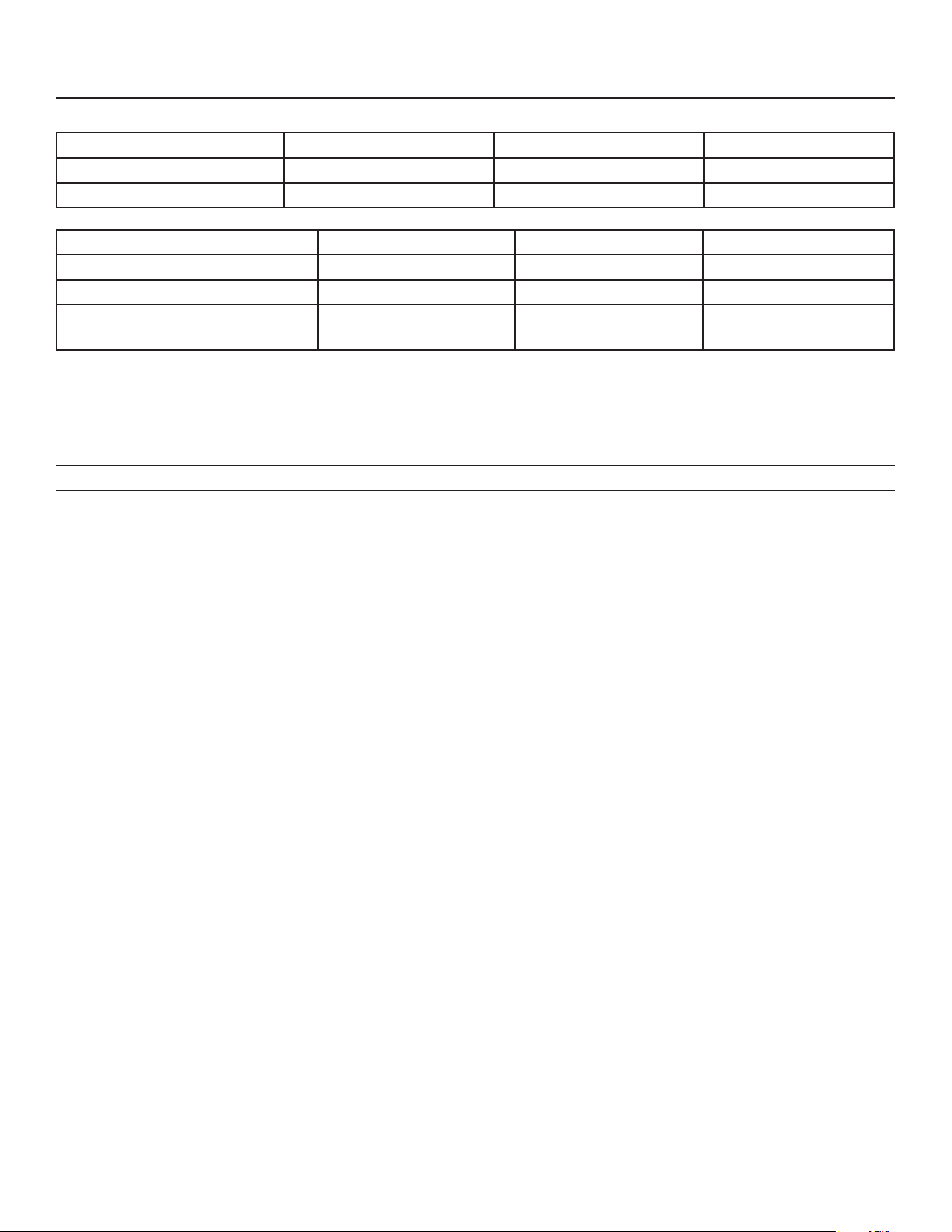
Operational Characteristics 1400 lb system
Cycle Times @ Condenser Temp/Cabinet Temp/Water Temp in degrees F.
70/70/50 90/90/70 120/110/100
Freeze 10 to 14 minutes 13 to 17 minutes 21 to 25 minutes
Harvest 1 to 1.5 minutes 1 to 1.5 minutes .5 to 1 minute
System Pressures @ Condenser Temp/Cabinet Temp/Water Temp in degrees F
70/70/50 90/90/70 120/110/100
Suction at head, end of Freeze 35 to 45 PSIG 35 to 45 PSIG 40 to 50 PSIG
Suction at head, Harvest - Peak 85 to 105 PSIG 100 to 120 PSIG 120 to 150 PSIG
Discharge at Condensing Unit:
Freeze - 5 minutes in
220 to 260 PSIG 250 to 270 PSIG 370 to 380 PSIG
Below information applies to both size systems:
Headmaster maintains a minimum discharge pressure during freeze of 217 PSIG + 25, -15 PSIG.
CPR Valve Setting: 55 - 60 PSIG.
Note: CPR allows a maximum low side pressure at the compressor. Maximum only occurs during harvest.
Refrigerant Charge
• 1200 - 24 oz.; 1400 - 224 oz,
Compressor Amps 1200
• Single Phase - 10 to 14
Compressor Amps, 1400
• Single Phase - 8 to 12
• Three Phase - 6 to 10
Batch Weight: 1200 - 10 lb
Batch Weight - 1400 - 14 lb
Discharge Pressure Cut Out Switch
• Cuts Out at: 450 PSIG Resets at: 350 PSIG
MC330, MC430, and ECC Condensing Unit
Remote Low Side User Manual
June 2022
Page 22
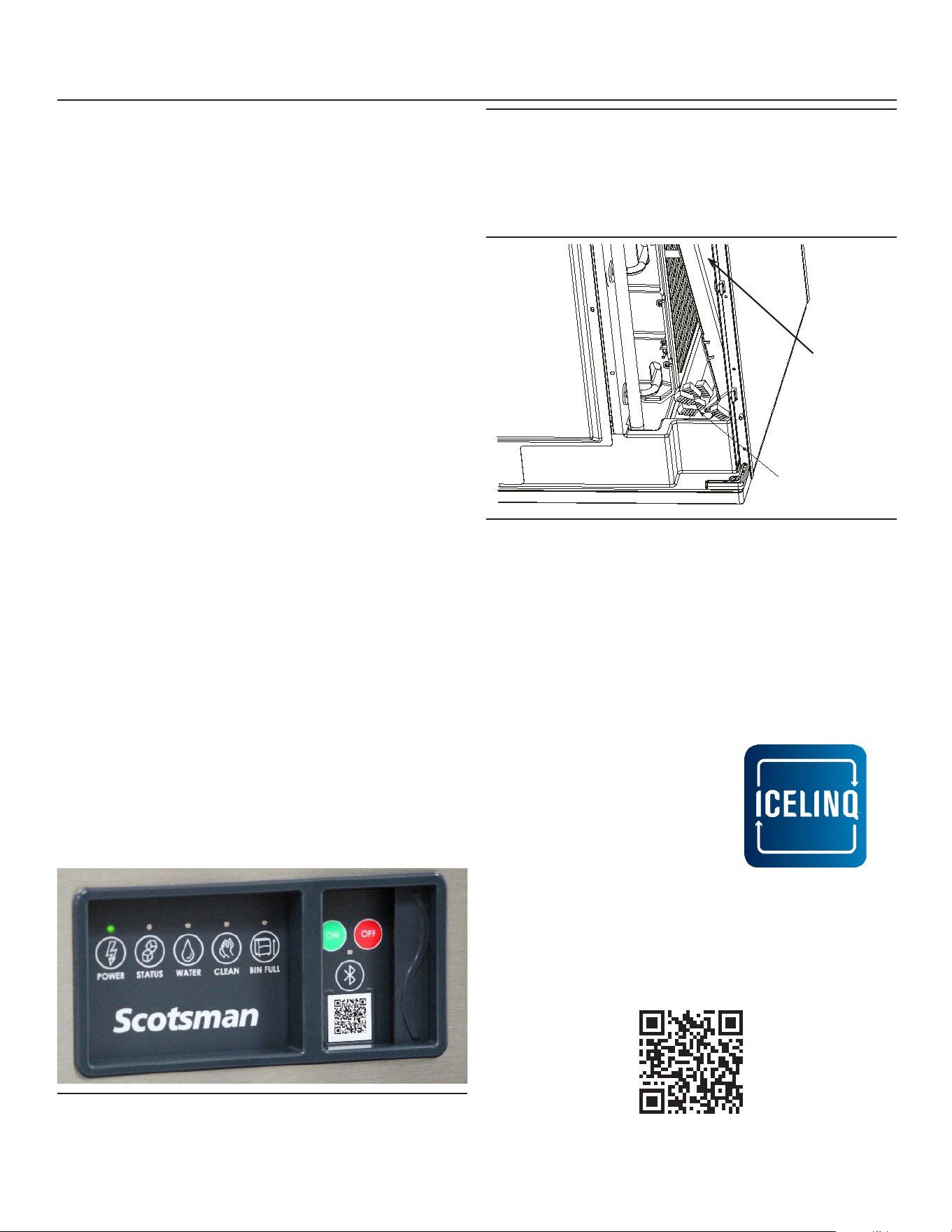
Operational Characteristics 1800 lb system
Cycle Times @ Condenser Temp/Cabinet Temp/Water Temp in degrees F.
70/70/50 90/90/70 120/110/100
Freeze 10 to 14 minutes 12 to 16 minutes 17 to 19 minutes
Harvest 1 to 1.5 minutes 1 to 1.5 minutes .5 to 1 minute
System Pressures @ Condenser Temp/Cabinet Temp/Water Temp in degrees F
70/70/50 90/90/70 120/110/100
Suction at head, end of Freeze 25 to 35 PSIG 25 to 35 PSIG 25 to 35 PSIG
Suction at head, Harvest - Peak 80 to 100 PSIG 90 to 110 PSIG 140 t0 160 PSIG
Discharge at Condensing Unit:
Freeze - 5 minutes in
260 to 280 PSIG 260 to 280 PSIG 330 to 350 PSIG
Headmaster maintains a minimum discharge pressure during freeze of 217 PSIG + 25, -15 PSIG.
CPR Valve Setting: 55 - 60 PSIG.
Note: CPR allows a maximum low side pressure at the compressor. Maximum only occurs during harvest.
Refrigerant Charge
• 1800 - 232 oz
Compressor Amps, 1800
• Three Phase - 10 to 14
Batch Weight: 13 to 14 lb
Discharge Pressure Cut Out Switch
• Cuts Out at: 450 PSIG Resets at: 350 PSIG
June 2022
Page 23
MC330, MC430, and ECC Condensing Unit
Remote Low Side User Manual
What to do before calling for service
Reasons the machine might shut itself o:
• Lack of water.
• Freeze cycle takes too long.
• Harvest cycle takes too long.
• High discharge temperature.
• Controller self test failure.
Check the following:
1. Has the water supply to the ice machine or
building been shut o? If yes, the ice machine will
automatically restart within 25 minutes after water
begins to ow to it.
2. Has power been shut o to the ice machine? If
yes, the ice machine will automatically restart
when power is restored.
3. Has someone shut the water o to a water
cooled unit? If yes, after the water supply has
been restored the ice machine may need to be
manually reset.
4. Is the curtain open because some ice is stuck
under it? If so, remove the ice and the machine
should start in a few minutes.
To Manually Reset the machine.
• Open the switch door
• Push and release the O button.
• Push and release the On button.
To Shut the Machine O:
1. Push and hold the O button for 3 seconds or until
the machine stops.
Note: Curtain can be removed & replaced anytime the
machine is in a standby mode or when it is in a freeze
cycle. However, removal of the curtain during freeze
will result in water owing into the bin. Removal of the
curtain during harvest terminates harvest at that point
and, if left o, will result in the machine shutting o.
• View machine status
• Control machine operation
• Adjust machine settings
• View active errors with troubleshooting tips
• Initiate self-guided cleaning
• Access service resources and warranty info
Scan QR Code to download the
Scotsman ICELINQ® App
Curtain
Clear Ice
From Here
Clear Ice From Beneath Curtain
Scotsman ICELINQ® Mobile App
All Prodigy ELITE® models are Bluetooth® enabled
and are compatible with the Scotsman ICELINQ®
app, available on both the Apple App Store and
Google Play Store.
The ICELINQ mobile app uses Bluetooth connectivity
to allow users to easily monitor, control, and maintain
their machine:
Open Door to Reset or Switch O

17-3760-01
SCOTSMAN ICE SYSTEMS
101 Corporate Woods Parkway
Vernon Hills, IL 60061
www.scotsman-ice.com
800-726-8762