20239380
Before using the TV, please read this guide thoroughly and
retain it for future reference.
English
100U6SAU
Accessories List
The following accessories are included with TV:
Quick Setup Guide × 1 Remote Control × 1 Power Cord × 1
Base Stand × 2 Screw × 4
NOTE
The accessories may be dierent from the list above due to dierent models, countries
/
regions. Please refer to the actual accessory bag.
Contents
Installation ..............................................................................................................................1
TV Front and Rear ..................................................................................................................3
Connection .............................................................................................................................4
Remote Control ......................................................................................................................6
Specifications .........................................................................................................................8
Other Information....................................................................................................................9
This TV is equipped with this quick setup guide and embedded E-Manual (
Settings >
Support > E-Manual
).
E-Manual support functions
Search
Try Now
QR Code
Find the help you are looking for.
Go directly to the function page and try it.
Scan to open the E-Manual on your mobile device.
Find what you want
Figures and illustrations in this manual are provided for reference only and may dier
from actual product appearance.
Parts of the software function changes with the system upgrade.
If you encountered diculty when setting up your TV, we suggest you refer to the
troubleshooting tips in the User Manual or the E-Manual.
A
Declaration
Any content and service accessed through this device, while only intended for individual non-
commercial use, shall be the property of the applicable third party and subject to protection by
regulations and laws on copyright, patent, trademark and other intellectual property rights. No
part of such content and service may be modified, duplicated, published, uploaded, distributed,
translated, marketed, or used to make and distribute products derived from it without the prior
permission of the content owner or service provider.
You acknowledge and agree explicitly that you will solely bear the risk associated with the use of
this device, and further you will solely bear any risk related to satisfactory quality, performance
and accuracy for any content and service accessed through this device. To the maximum extent
permitted by applicable law, this device and any third party’s content and service is provided as it
is without any guarantee, express or implied.
Manufacturer hereby declare explicitly that Manufacturer shall not be held liable for any guarantee
and conditions, express or implied, related to this device and any content and service, including
but not limited to warranty on marketability, satisfactory quality, fitness for a particular purpose,
accuracy, quiet use and non-violation of any third party’s rights; to the maximum extent permitted
by applicable law, Manufacturer gives no guarantee on the accuracy, validity, timeliness,
legitimacy and completeness of any content or service provided through this device, or the
fitness of such device, content or service for your particular requirement, or the protection from
interruption and error during operation of such device, content or service; to the maximum extent
permitted by applicable law, in any case, including fault or neglect, Manufacturer shall not be
held liable for legal actions or indemnity obligation arising from any consequence as a result of or
related to any information loaded in this device or use of such device, content or service by you or
any third party.
Any content and service provided as it is together with this device shall be the property of the
applicable third party, therefore Manufacturer gives no declaration or warranty on modification,
suspension, cancellation, termination or abortion thereof, and shall not be held liable for legal
actions or indemnity obligation arising thereof.
Manufacturer reserves the rights to restrict the use or access of certain content or service. As
the content and service are transmitted through third party’s network and transmission facilities,
Manufacturer undertakes no customer service thereof or the obligation for such customer service.
This symbol alerts user about the
presence of a dangerous voltage not
isolated inside the product which can
be sufficiently powerful to constitute a
risk of electrocution.
This symbol alerts user about the
presence of important operating
instructions and maintenance in the
document enclosed in the package.
ATTENTION
RISK OF ELECTRIC
SHOCK
Do not open the back cover.
In no case the user is allowed to operate
inside the TV set. Only a qualified
technician is entitled to operate.

B
Warning
Stability Hazard
A television set may fall, causing serious
personal injury or death. Many injuries,
particularly to children, can be avoided by
taking simple precautions such as:
ALWAYS use cabinets or stands or
mounting methods recommended by
the manufacturer of the television set.
ALWAYS use furniture that can safely
support the television set.
ALWAYS ensure the television set is not
overhanging the edge of the supporting
furniture.
ALWAYS educate children about the
dangers of climbing on furniture to
reach the television set or its controls.
ALWAYS route cords and cables
connected to your television so they
cannot be tripped over, pulled or
grabbed.
NEVER place a television set in an
unstable location.
NEVER place the television set on tall
furniture (for example, cupboards or
bookcases) without anchoring both the
furniture and television set to a suitable
support.
NEVER place the television set on
cloth or other materials that may be
located between the television set and
supporting furniture.
NEVER place items that might tempt
children to climb, such as toys and
remote controls, on the top of the
television or furniture on which the
television is placed.
If your existing television set is being
retained or relocated, the same
considerations as above should be
applied.
Safeguards
Please read the following safeguards for
your TV and retain for future reference.
Always follow all warnings and instructions
marked on the television.
1. A note about safety and operating
instructions
Read and follow all safety and operating
instructions, and retain them safely for
future reference.
2. Heed Warnings
Adhere to all warnings on the appliance and
in the operating instructions.
3. Cleaning
Unplug the TV from the wall outlet before
cleaning. Do not use liquid, abrasive, or
aerosol cleaners. Cleaners can permanently
damage the cabinet and screen. Use a
lightly dampened cloth for cleaning.
4. Wall Mount Bracket
Wall mount bracket is only available for
some models. If wall mount bracket is not
supplied with this product, you can buy it at
the local market.
Please refer to the Installing the Wall Mount
Bracket page for dimensions.
5. Water and Moisture
Avoid dripping or splashing of liquids onto
the product. Objects filled with liquids, such
as vases, should not be placed above the
product.
6. Setting
Do not place this TV on an unstable cart,
stand or table. Placing the TV on an
unstable base can cause the TV to fall,
resulting in serious personal injuries as
well as damage to the TV. Use only a cart,
stand, bracket or table recommended by the
manufacturer or salesperson.

C
7. Ventilation
Slots and openings in the cabinet are
provided for ventilation, to ensure reliable
operation of the TV and to protect it from
overheating. Do not cover the ventilation
openings in the cabinet and never place
the set in a confined space such as built-
in cabinet unless proper ventilation is
provided. Leave a minimum 10cm gap all
around the unit, the rear of the TV should
be 6cm away from the wall.
8. Power Source
This TV should be operated only from
the type of power source indicated on
the marking label. If you are not sure of
the type of power supplied to your home,
consult your appliance dealer or local power
company.
9. Power-Cord Protection
Power- supply cords should be routed so
that they are not likely to be walked on or
pinched by items placed upon or against
them, paying particular attention to cords at
plug, wall outlets, and the point where they
exit from the TV. MAIN plug on the power
cord is used as the disconnect device, the
disconnect device and socket-outlet shall be
easily accessible.
10. Lightning
For added protection for this TV during a
lightning storm, or when it is left unattended
and unused for long periods of time, unplug
it from the wall outlet and disconnect the
antenna or cable system. This will prevent
damage to the TV due to lightning or power-
line surge.
11. Power Lines
An outside antenna system should not be
located in the vicinity of overhead power
lines or other electric light or power circuits,
or where it can fall into such power lines or
circuits. Where installing an outside antenna
system, extreme care should be taken to
keep from touching such power lines or
circuits as contact with them might be fatal.
12. Overloading
Do not overload wall outlets and extension
cords as this can result in a risk of fire or
electric shock.
13. Object and Liquid Entry
Never push objects of any kind into this
TV through openings as they may touch
dangerous voltage points or short-out parts
that could result in fire or electric shock.
Never spill liquid of any kind on or into the
TV.
14. Outdoor Antenna Grounding
If an outside antenna or cable system is
connected to the TV, be sure the antenna or
cable system is grounded so as to provide
some protection against voltage surges and
built-up static charges.
15. Servicing
Do not attempt to service this TV yourself
as opening or removing covers may expose
you to dangerous voltage or other hazards.
Refer all servicing to qualified service
personnel.
16. Damage Requiring Service
Unplug the TV from the wall outlet and refer
servicing to qualified service personnel
under the following conditions:
(a) When the power - supply cord or plug is
damaged.
(b) If liquid has been spilled, or objects
have fallen into the TV.
(c) If the TV has been exposed to rain or
water.
(d) If the TV does not operate normally by
following the operating instructions.
Adjust only those controls that are
covered by the operating instructions as
D
an improper adjustment of other controls
may result in damage and will often
require extensive work by a qualified
technician to restore the TV to its normal
operation.
(e) If the TV has been dropped or the
cabinet has been damaged.
(f) When the TV exhibits a distinct change
in performance - this indicates a need
for service.
17. Replacement Parts
When replacement parts are required,
be sure the service technician has
used replacement parts specified by
the manufacturer or have the same
characteristics as the original part.
Unauthorized substitutions may result in
fire, electric shock or other hazards.
18. Safety Check
Upon completion of any service or repair
to the TV, ask the service technician to
perform safety checks to determine that the
TV is in safe operating condition.
19. Heat
The product should be situated away
from heat sources such as radiators,
heat registers, stoves, or other products
(including amplifiers) that produce heat.
20. Fire
The product should be situated away
from naked flame sources such as lighted
candle.
21. Off-gassing
The TV smells of plastic is normal and will
dissipate over time.
To fully disconnect the TV, remove
power plug from wall socket. Be sure
to have the wall socket and power
plug readily accessible.
Do not mix and use new batteries
with old batteries, or batteries with
different types. Do not expose
batteries to heat such as direct
sunlight or fire. Make sure the
batteries' positive and negative ends
are facing the correct direction.
The device should not be exposed to
dripping and spraying and it cannot
be placed under objects filled with
liquids.
AC voltage: This symbol indicates
that the rated voltage marked with
the symbol is AC voltage.
Class II product : This symbol
indicates that it does not require
a safety connection of protective
earthing (ground).
1
Installation
CAUTION
Be sure to disconnect the AC power cord before installing a stand or wall mount brackets.
The display on your TV is fragile. Make sure the TV screen is not scratched or damaged
by hard objects or from pressure.
After the installation is completed, make sure the TV is steady on a table or firmly attached
to a wall mount, before removing all protective film, if any.
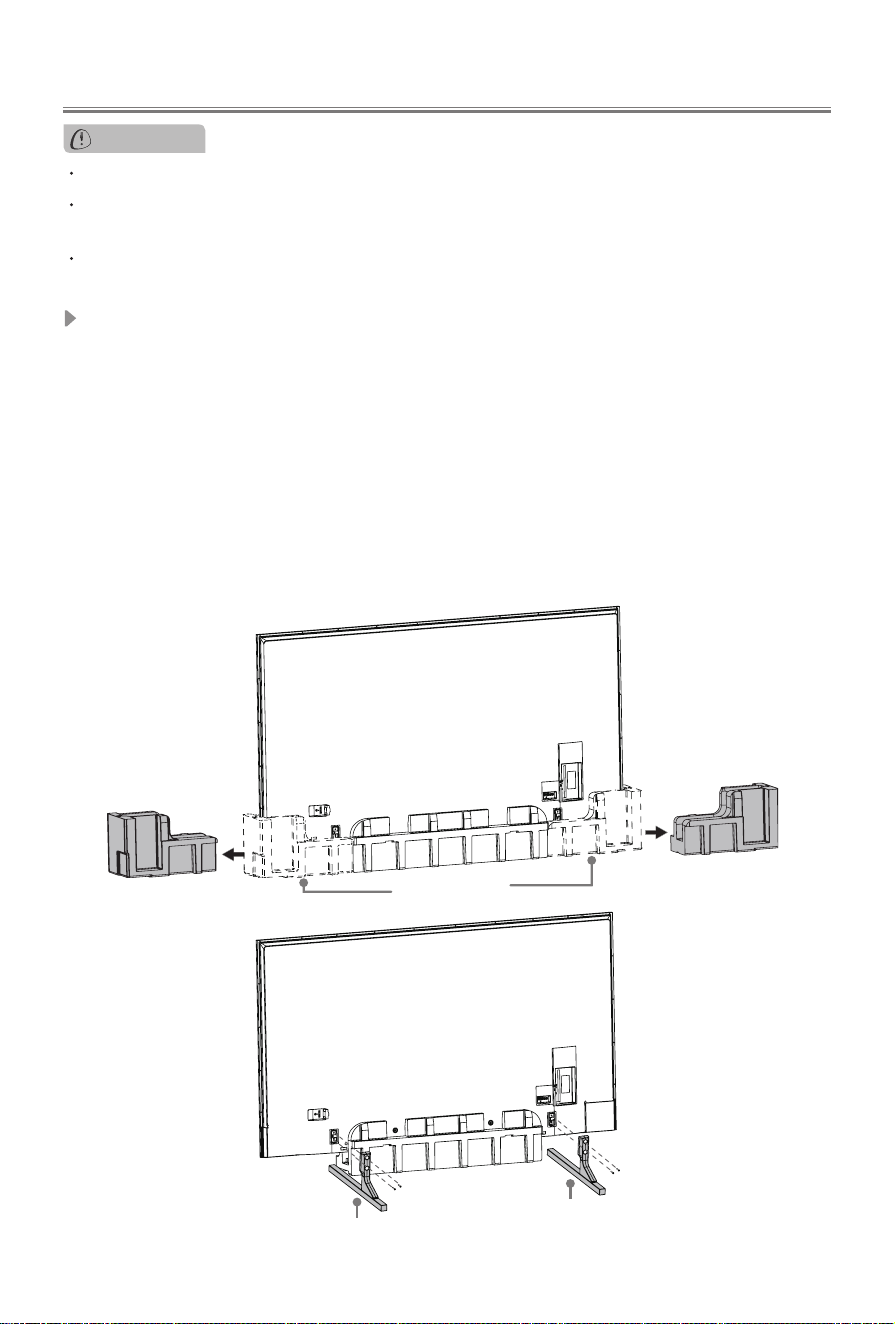
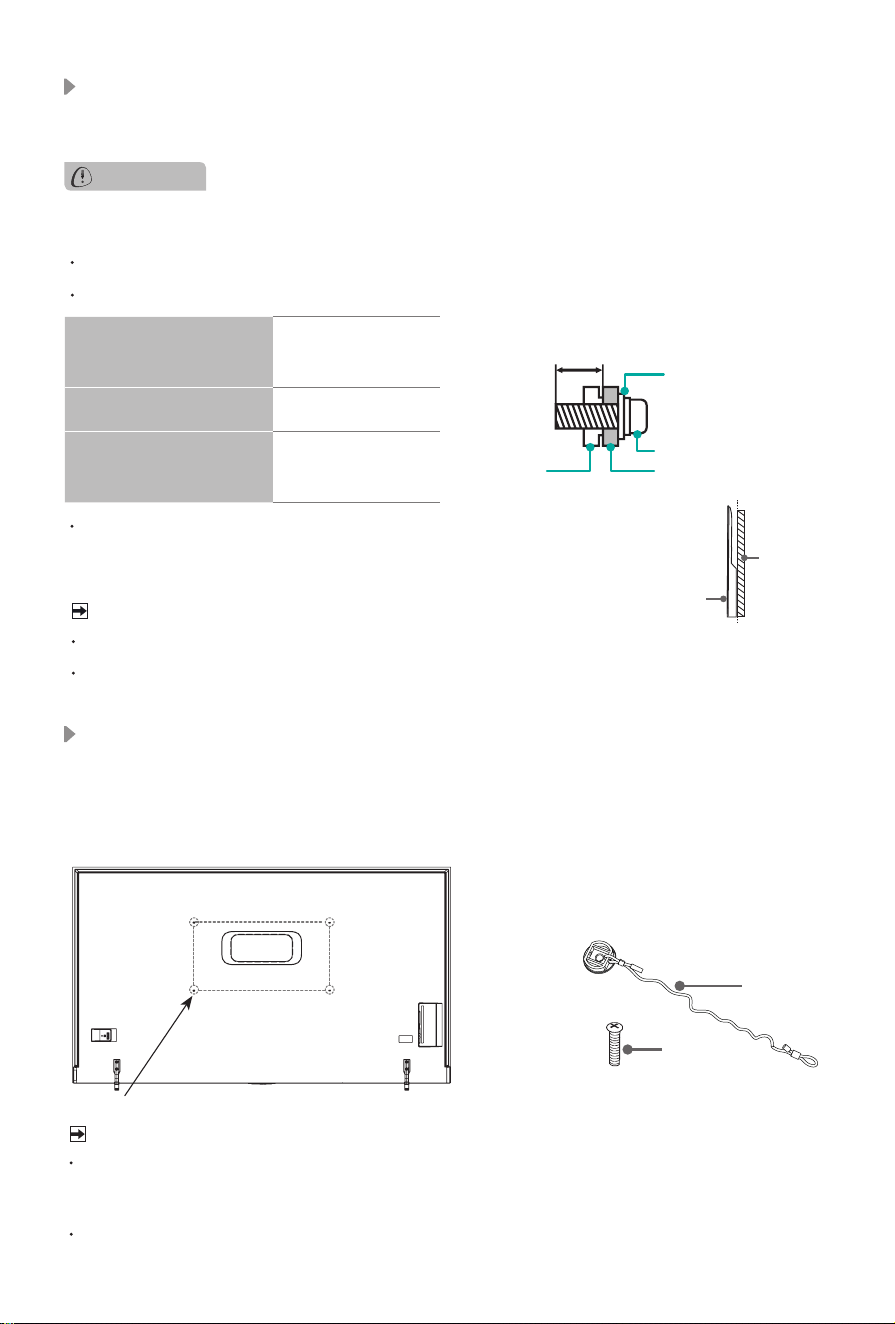
Installing the stand
Follow the illustrations and textual instructions below to complete the installation steps:
1. One person holds the side of the TV, and the others remove the side cushions. Do not
pinch the screen when hold the TV.
2. Insert the TV base stands into the bottom slots on your TV. Use the screws provided to
secure each base stand tightly.
3. It takes three persons to transport the TV. The weight of TV with base stands is 140.0
lbs (63.5 kg), the furniture where the TV is placed should be tough enough to support.
Please make sure the width of the furniture is above 18.9 inches (480 mm).
NOTE:
Three or more persons are needed to install the TV. One person holds the TV to
prevent tipping through the whole installation process.
side cushions
Base Stand
Screws:
M5×16
Base Stand
Screws:
M5×16
2
Installing the wall mount bracket
Before mounting the TV, remove the TV stand if you have already attached it, and make sure the
wall mount bracket supports the weight of your TV.
CAUTION
When mounting the TV on a wall, follow instructions provided with the wall mount bracket. If it is
not correctly mounted, the TV may fall and cause property damage or personal injury.
NOTE
The diameter and length of the screws differ depending on the wall mount bracket model.
Wall mount bracket is optional. Your TV may not have wall mount bracket. Please refer to
the actual accessories.
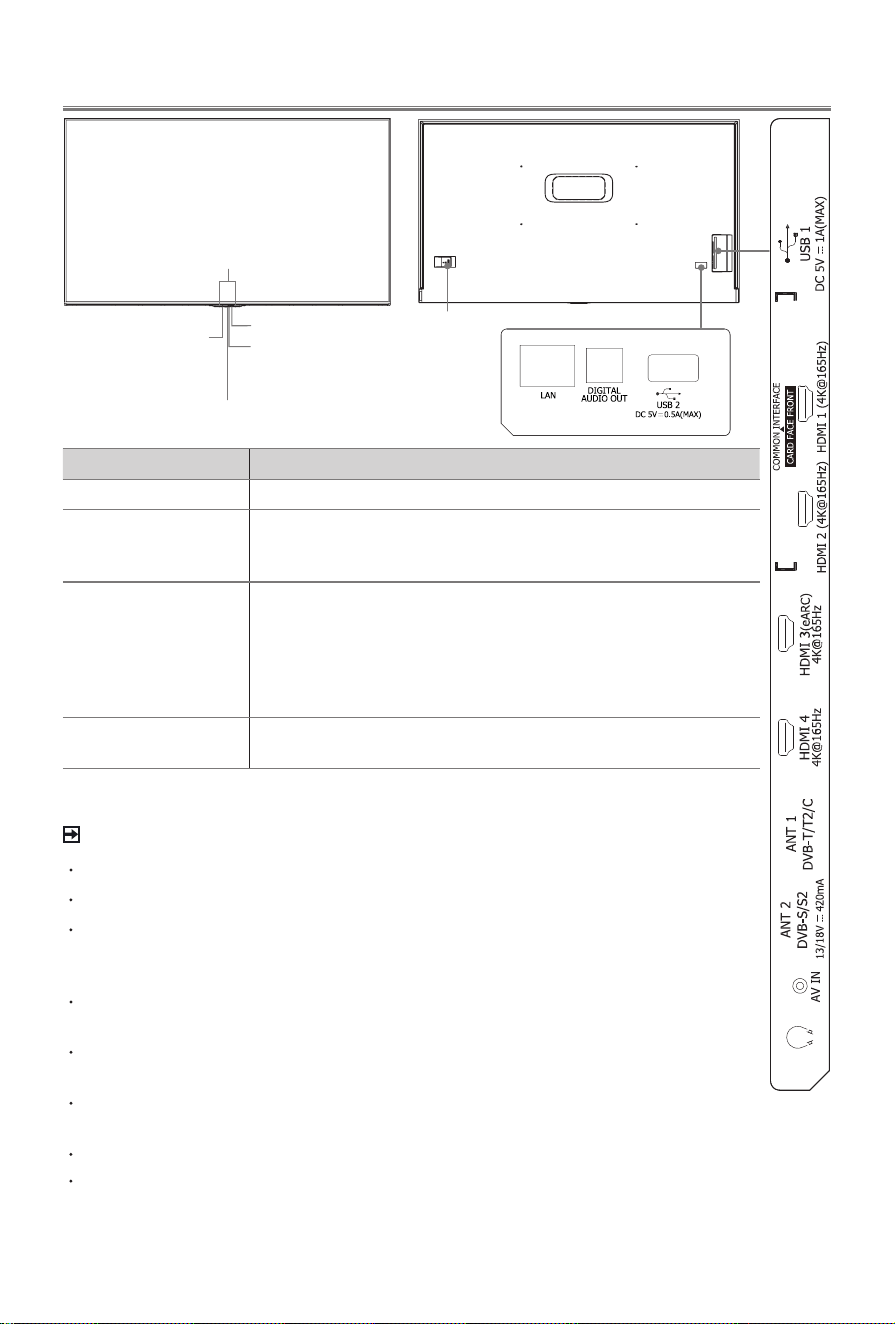
Place spacers between the TV and bracket.
Standard dimensions are shown below.
We do not recommend hanging the TV on a slanted wall, and when
wall mounting make sure your television remains parallel to the wall
and does not lean forward.
TV
screen
Vertical
surface
Wall mount hole
pattern (mm)
800 × 400
Wall mount screw size M8
Number of wall mount
screw
4
11.0 - 13.0 mm
Wall Mount Bracket
Wall Mount Screw
Wall Mount Spacer
Rear cover
of the TV
Installing the P-Clip
Please place the TV on a horizontally stable surface, and then use P-Clip to connect the TV and
the wall or pillar. (Marked in the illustration below.)
NOTE
Insecure installation may cause the tilt or falling of the product, and further lead to personal
injuries or product damages. If the method above can not fix the product, please consult the
manufacturers.
P-clip and corresponding screws may not included with TV set, please purchase them by
yourself if necessary.
1. Fix the larger side of P-Clip to the screw hole on the back of TV set with a M8×30 screw.
2. Fix the other side of P-Clip to the wall or pillar.
P-Clip
Screw
Select a suitable screw hole
based on the actual situation.
screw hole
3
TV Front and Rear
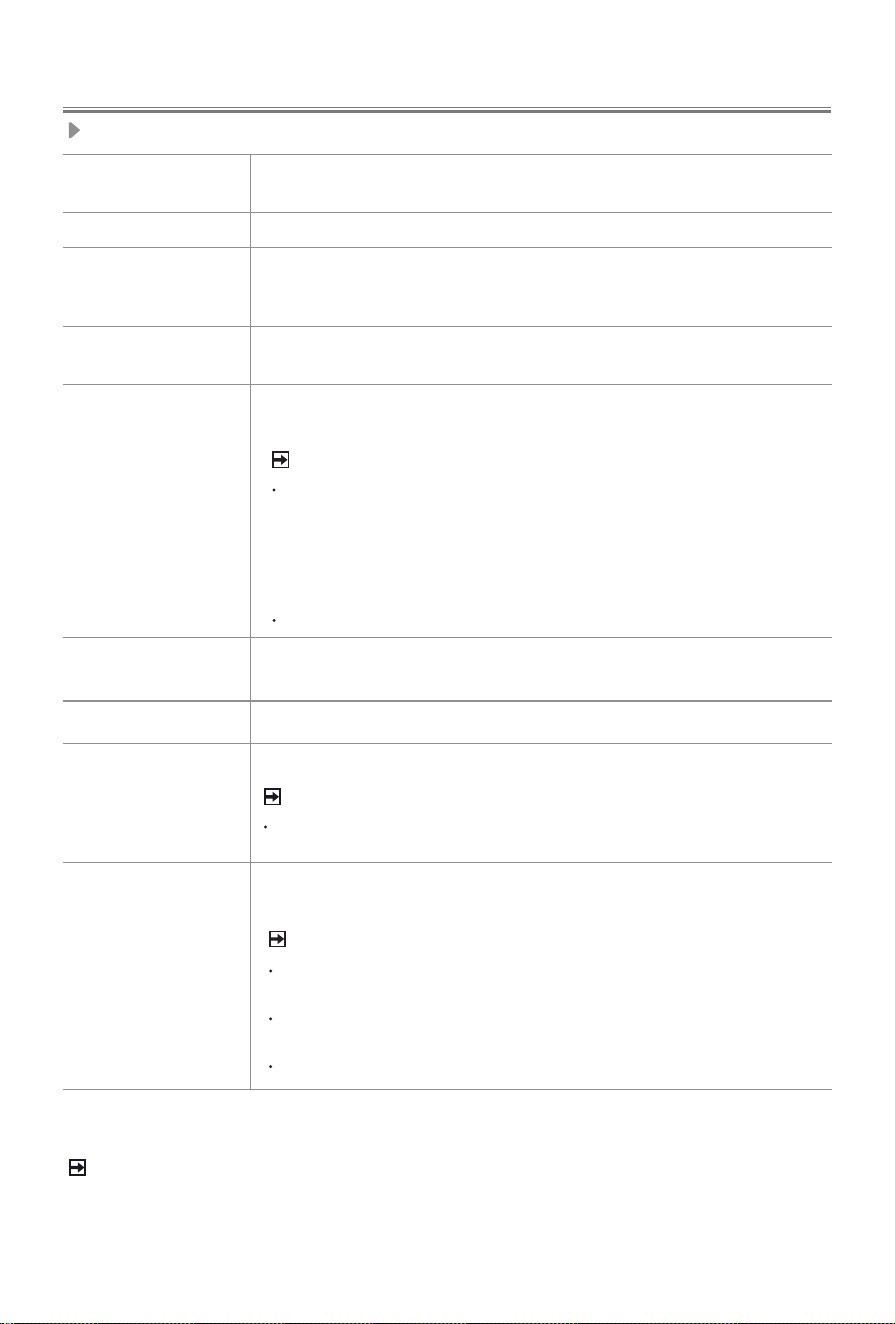
Item Description
Power indicator
The light is white in standby mode.
Power button
(Standby/Source)
Press the button to turn the TV on. Press it again to bring up the
control menu and move the focus between different inputs. Long
press the button to make a selection.
Light sensor
The light-sensing function automatically adjusts the TV's backlight
brightness to match the ambient light levels in the room, providing
an optimised viewing experience. To enable or disable light
sensor, please go to
Settings
>
Picture
>
Picture Mode Settings
>
Advanced Settings
>
Brightness
>
Light Sensor settings
,
and toggle on or off
Automatic Light Sensor
as needed.
Built-in microphone
control button
To use Hands-Free Wake-up, first turn on the built-in microphone
control button.
Power indicator /
Power button
(Standby/Source)
MIC
Built-in microphone
control button
Voice indicator
AC INPUT
NOTE
ANT2 Jack supports power supply for satellite antenna (13/18V, 420mA max).
DVB-S/S2 may not be applicable in some models/countries/regions.
Check the jacks for position and type before making any connections. Loose
connections can result in image or colour problems. Make sure that all connections are
tight and secure.
Not all A/V devices have the ability to connect to a TV, please refer to the user’s
manual of your A/V device for compatibility and connections procedure.
Before connecting external equipment, remove the mains plug from the wall socket.
Otherwise, it may cause electric shock.
Powering on the TV requires several seconds to load programmes. Do not rapidly turn
the TV off as it may cause the TV work abnormally.
The Picture is Only for Reference.
Before using Hands-Free Wake-up, connect your TV to the network. The Hands-Free
Wake-up and some of its features are available on limited country/region/language.
Light sensor
4
Connection
Terminals
ANT
Connect an outdoor VHF/UHF antenna or cable.
Connecting a satellite antenna.
HDMI Connect an HDMI cable from an external equipment.
HDMI
(eARC)
Connect an HDMI cable from an external digital audio system.
Please note that it works only when the TV is connected to the
audio receiver that supports the eARC function.
AV IN
Connect a composite video cable and left-right audio cables
from an external AV device.
USB
Connect a USB device for browsing photos, listening to music
and watching movies.
DIGITAL
AUDIO OUT
Connect an optical cable from an external digital audio system.
LAN Connect an Ethernet cable to access a network or the Internet.
HEADPHONE
Connect headphone for audio out of the TV.
COMMON
INTERFACE
Insert the CI+ module for watching scrambled services like pay-
tv channels or some HD channels.
NOTE
Do not repeatedly insert or remove the Common Access Module as
this may damage the interface and cause a malfunction.
You must obtain a CI+ module and card from the service provider of
the channels you want to watch.
CI+ is not supported in some countries and regions.
NOTE
When connecting a hard disk or a USB hub, always connect the
mains adapter of the connected device to the power supply. If a
USB 1.1 or USB2.0 device requires more than 500mA or 5V, the
USB device may not be supported. Max supported current for
USB 3.0 device is 1A
(only for some models). Exceeding the max
supported current may result in damage or data loss.
Certain digital cameras may not be compatible with the TV.
ATTENTION
Excessive sound pressure from earphones and headphones can
cause hearing loss.
NOTE
•
The location and names of the terminals on the TV may vary according to TV model,
and not all terminals available on all models.
5
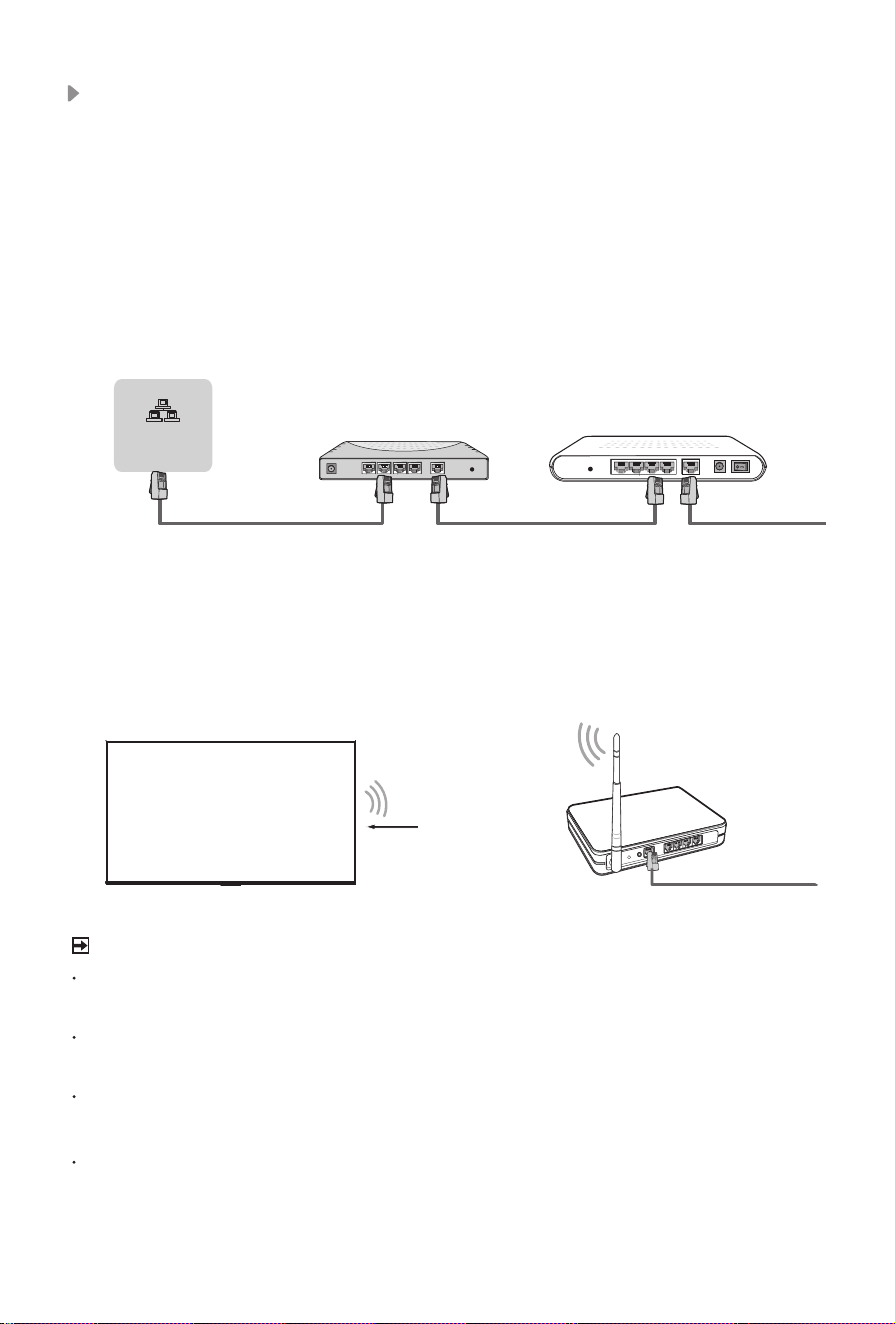
Wired setup
Connect your TV to your network by connecting the LAN port on the back of your
TV to an external modem or router using a LAN (Ethernet/Cat 5) cable. See the
illustration below.
·
We recommend you to use a modem or router that supports Dynamic Host
Configuration Protocol (DHCP). Modems and routers that support DHCP
automatically provide the IP address, subnet mask, gateway, and DNS, so you
don’t have to enter them manually. Most home networks already have DHCP.
TV JACK
Modem CableLAN CableLAN Cable
External Modem
(ADSL / VDSL / Cable TV)
IP Sharer (Router)
(with DHCP server)
LAN
Wireless setup
Connect your TV to your wireless network, you need a wireless router or modem.
See the illustration below.
·
The TV’s built-in Wireless LAN Adapter supports the IEEE 802.11 a/b/g/n/ac
communication protocols.
Wireless router with DHCP
LAN Cable
Wireless LAN Adapter
built-in TV set
NOTE
You must use the built-in Wireless LAN Adapter to use a wireless network because
the set doesn’t support external USB network adapter.
If the wireless router supports DHCP, your TV can connect more easily to the
wireless network.
If you apply a security system which is not listed below, it will not work with the TV.
Security system : WPA, WEP, WPA2.
In order to guarantee smooth network, the distance between router and TV should be
less than 10 meters.
Network
6
Remote Control
NOTE
The included remote control will vary depending on model, country/region. Check
information according to the actual remote control in the accessory bag.
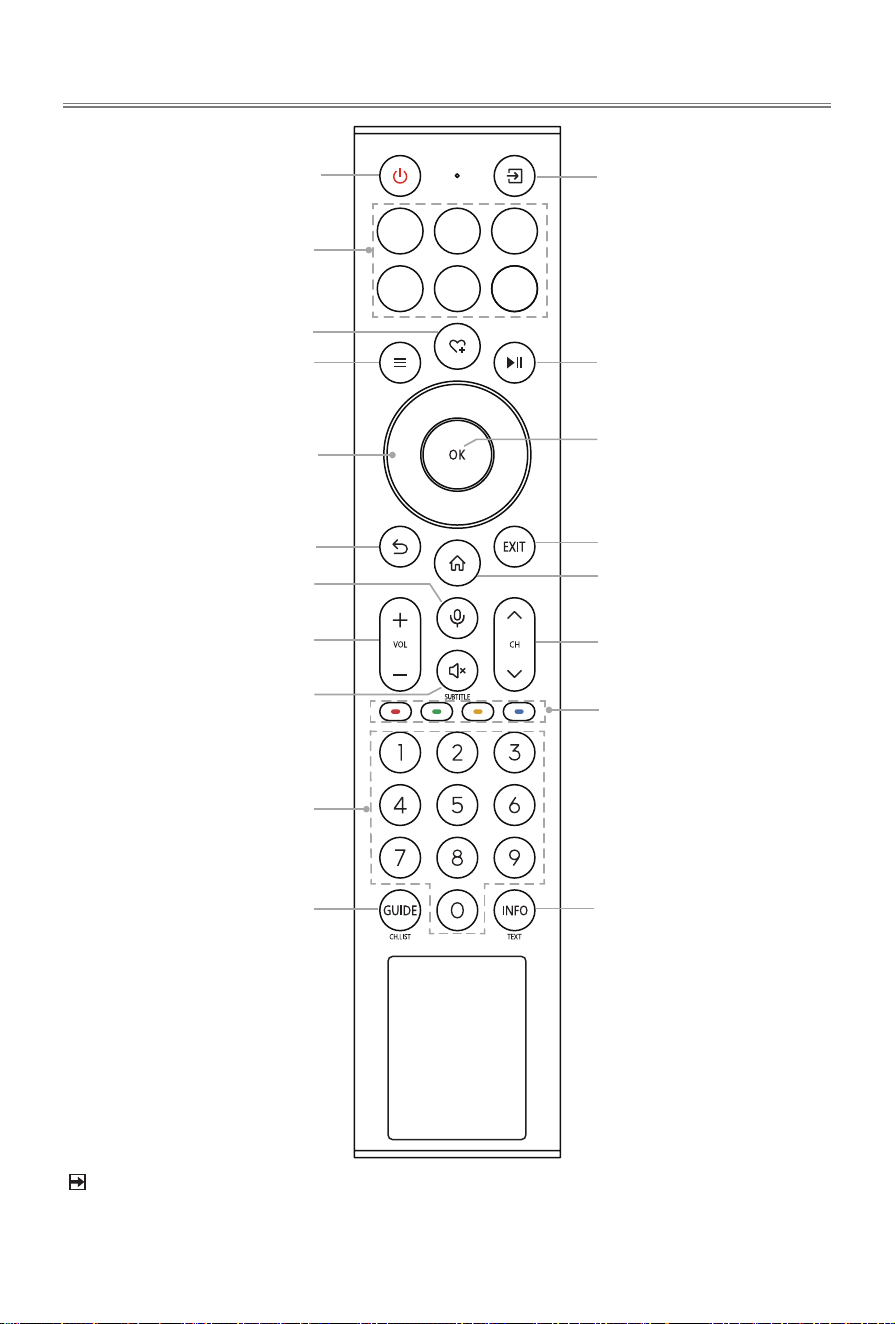
Power on/Standby
Quick access buttons to
apps
Special function buttons
Quick setup
Navigation buttons
(Up/Down/Left/Right)
Under the Menu or App,
return to the previous
place
Volume (up/down)
Mute and restore sound
(Long press to be used
as
SUBTITLE
: Display
subtitles in the Live TV)
Select a channel or input
numbers
Display the Electronic
Program Guide (DTV mode)
(Long press to be used as
CH.LIST:
Display the Channel
List)
Custom button to launch
contents quickly
Select input sources
Playpad keys
Exit the menu or exit
the application
Display the Home screen
Channel (up/down)
Display the current program
information
(
Long press to be used as
TEXT
:
Turn on/o the
teletext function)
OK / Display the on-screen
keyboard
Activate the microphone
7
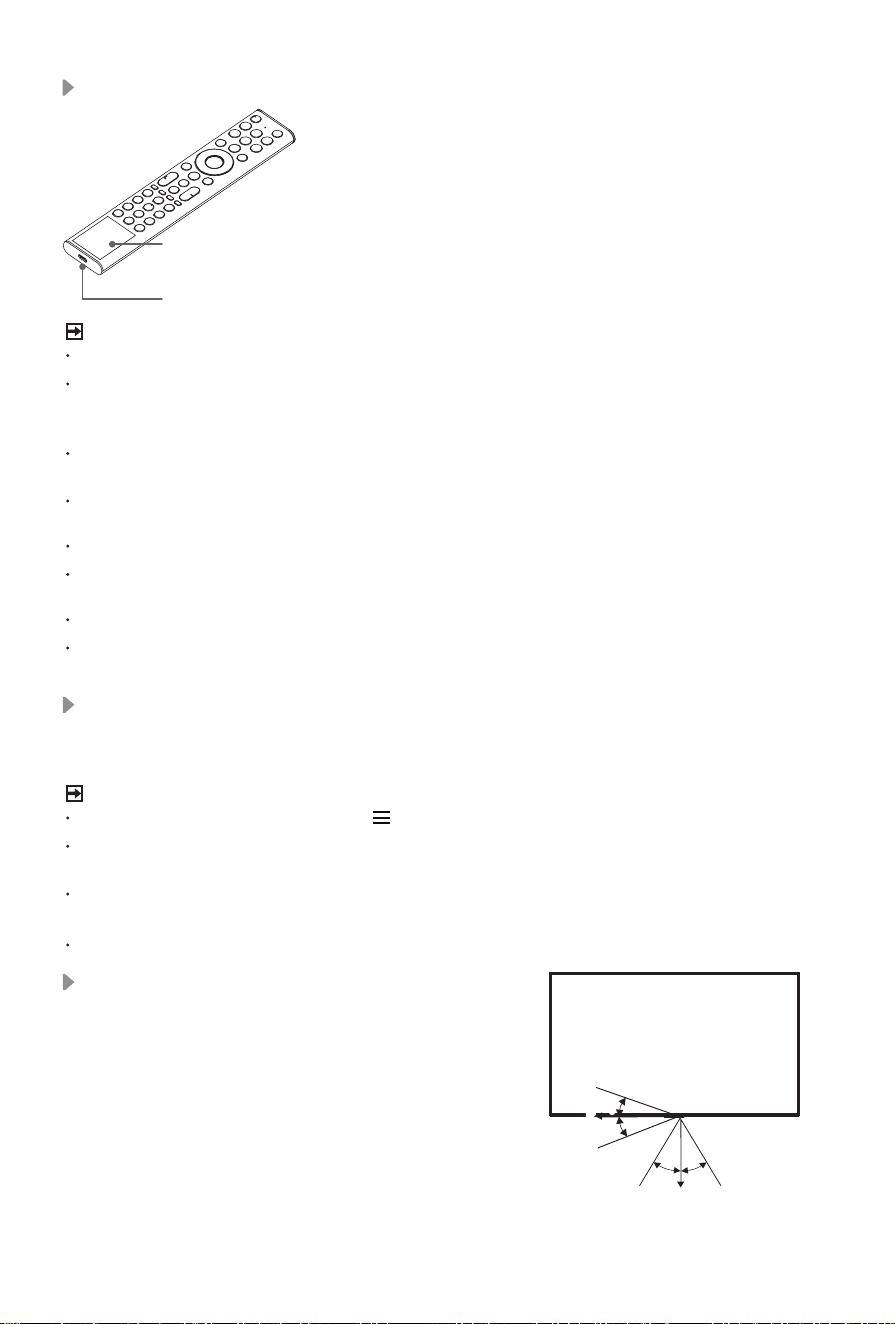
Charging the Remote Control (for solar powered remote)
You can charge the remote by exposing the solar cell
to light or using a USB
type-C cable(not provided).
When charging by type-C port, the red indicator
will blink. When fully charged, the indicator will stop
blinking first and then turn off.
solar cell
type-C port
(5V,
≥
500mA)
NOTE
Product image is only for reference, actual product may vary in appearance.
The battery is not user replaceable. Do not try to remove or change the internal battery
by yourself, cause it may cause damage to the battery/device, personal injury, fire or
explosion.
When you do not use the remote control, place it face up to make the solar cell expose
to light.
Leaving a battery in an extremely high temperature surrounding environment that can
result in an explosion or the leakage of flammable liquid or gas.
Battery chemicals can cause a rash. If chemicals touch your skin, wash immediately.
Disposal of a battery into fire or a hot oven, or mechanically crushing or cutting of a
battery, that can result in an explosion.
Place the remote control correctly to prevent it from falling down.
A battery subjected to extremely low air pressure that may result in an explosion or the
leakage of flammable liquid or gas.
Remote Control Operation Range
Disposal of this unit
Product should not be damaged, dismantled or thrown in municipal waste.
It should be packed and handed over to authorised re-cycler.
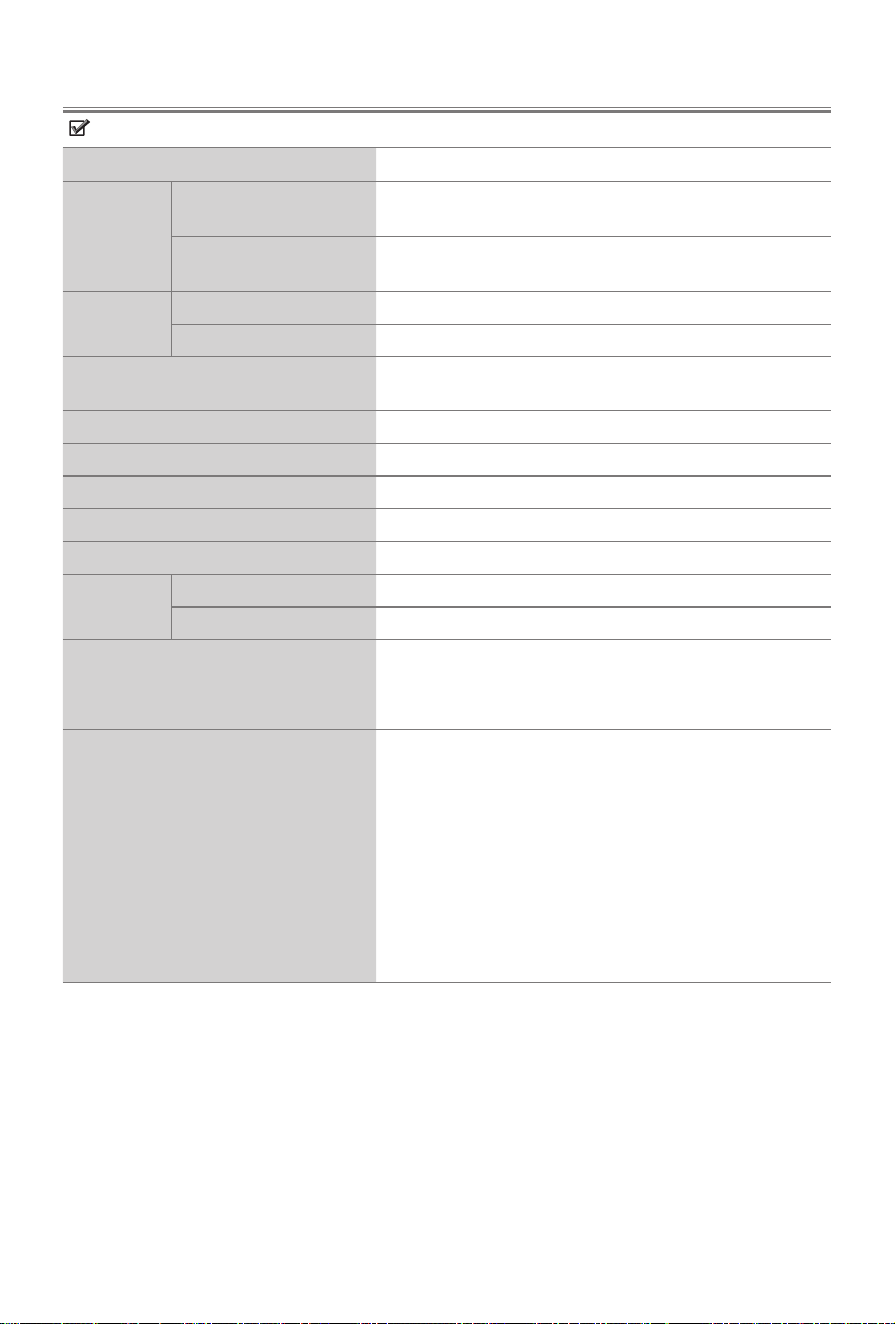
1. The remote control can work at a distance of up to 8
meters in
front of the TV set.
2. The remote control angle: taking the remote sensor as
an apex, 6 meters away, its controlled horizontal angle
is within ±30°, while the vertical angle is within ±15°.
3. The operating distance may vary depending on the
brightness of the room.
Pairing the Remote Control (only for Bluetooth remote control)
Pair the remote to the TV after you power it on. Keep the remote control within 3 metres
from the TV. Press any button (except power and mic button) to pair.
NOTE
In special cases, press and hold [ ] button to pair.
If an unknown error occurred with the remote, then it could have been caused by
interference. Try to remove what's causing the interference and pair it again.
If an unknown error occurred in the remote control, please recharge and activate the
remote control.
The remote cannot be paired to the TV while the TV is in standby mode.
6m
8m
6m
6m
8m
6m
30° 30°
15°
15°
8
Features, appearance and specifications are subject to change without notice.
Specications
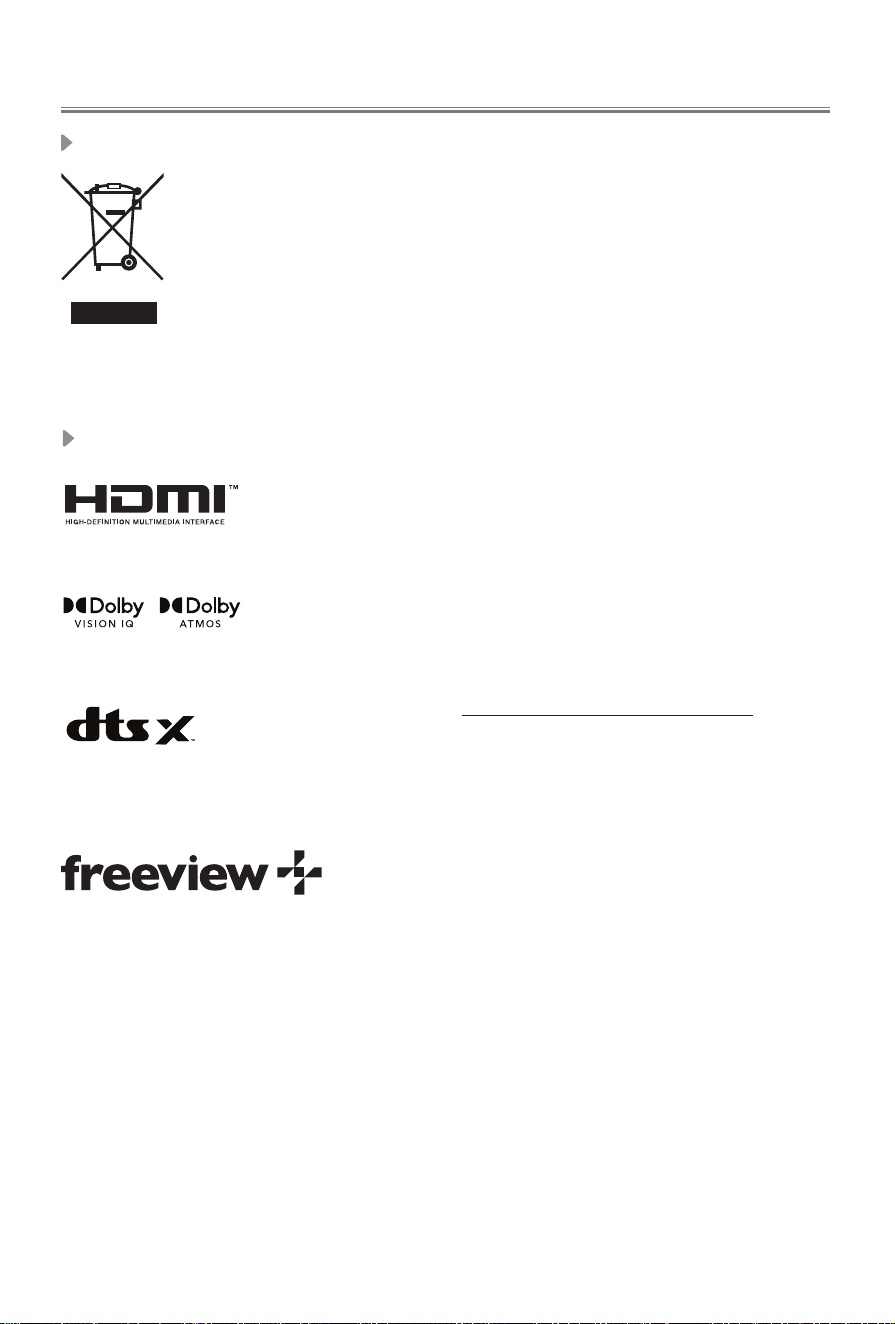
Item 100"
Dimension
(mm)
Without Stand
(W × H × D)
2229 × 1282 × 82
With Stand
(W × H × D)
2229 × 1317 × 480
Weight
(kg)
Without Stand
62.0
With Stand
63.5
Active Screen Size (Diagonal) (cm)
253
Audio power
15W × 2 + 20W
Screen resolution
3840 × 2160
Power consumption
Please refer to the rating label.
Power supply
Please refer to the rating label.
Standby Power
0.5W
Receiving
systems
Analog
PAL-D/K, B/G, I SECAM-D/K, B/G
Digital
DVB-T/T2, DVB-C, DVB-S/S2
Environmental conditions
Temperature: 5°C - 40°C
Humidity: 20% - 80% RH
Atmospheric pressure: 86 kPa - 106 kPa
HDMI Input
RGB / 60Hz (640×480, 800×600, 1024×768)
YUV / 60Hz (480i, 480p, 720p, 1080i, 1080p)
YUV / 50Hz (576i, 576p, 720p, 1080i, 1080p)
3840×2160 / 24Hz, 3840×2160 / 25Hz,
3840×2160 / 30Hz, 3840×2160 / 50Hz,
3840×2160 / 60Hz, 3840×2160 / 120Hz,
3840×2160 / 144Hz, 3840×2160 / 165Hz,
2560×1440 / 120Hz, 2560×1440 / 144Hz,
2560×1440 / 165Hz, 2560×1440 / 240Hz,
2560×1440 / 288Hz, 1920×1080 / 120Hz,
1920×1080 / 144Hz, 1920×1080 / 165Hz,
1920×1080 / 240Hz, 1920×1080 / 288Hz
9
Other Information
Packaging and electrical goods should be recycled appropriately, and not treated
as household waste. Please dispose of this equipment at your applicable collection
point for the recycling of electrical & electronic equipment waste. By ensuring the
correct disposal of this product, you will help prevent potentially hazardous to the
environment and to human health, which could otherwise be caused by unsuitable
waste handling of this product. The recycling of materials will help conserve natural
resources. Please do not therefore dispose of your old electrical and electronic
equipment with your household waste. For more detailed information about
recycling of this product, please contact your local city office, your household waste
disposal service or the shop where you purchased the product.
Disposal of Used Electrical & Electronic Equipment
What is Freeview Plus?
Freeview Plus is a new television service delivered via broadband providing a state of the
art Electronic Program Guide (EPG) and seamless access to catch-up TV across the free-
to-air networks with the simple press of a button.
How does it work?
First ensure the TV is connected to internet and an antenna system. Then when you’re
watching TV, you’ll briey see a prompt at the top left of the screen. Press the ‘Green’ button
on your remote to launch Freeview Plus. More information about Freeview Plus can be
found on http://www.freeview.com.au/
License
The terms HDMI, HDMI High-Denition Multimedia Interface, HDMI
Trade dress and the HDMI Logos are trademarks or registered
trademarks of HDMI Licensing Administrator, Inc.
Dolby, Dolby Vision, Dolby Atmos, and the double-D symbol are
registered trademarks of Dolby Laboratories Licensing Corporation.
Dolby Vision IQ is a trademark of Dolby Laboratories Licensing
Corporation. Manufactured under license from Dolby Laboratories.
Condential unpublished works. Copyright © 2012-2024 Dolby
Laboratories. All rights reserved.
FOR DTS PATENTS, SEE HTTP://XPERI.COM/DTS-PATENTS/. MANU-
FACTURED UNDER LICENSE FROM DTS, INC. AND ITS AFFILIATES.
DTS, DTS:X, AND THE DTS:X LOGO ARE REGISTERED TRADE-
MARKS OR TRADEMARKS OF DTS, INC. AND ITS AFFILIATES IN
THE UNITED STATES AND/OR OTHER COUNTRIES. © DTS, INC.
AND ITS AFFILIATES. ALL RIGHTS RESERVED.