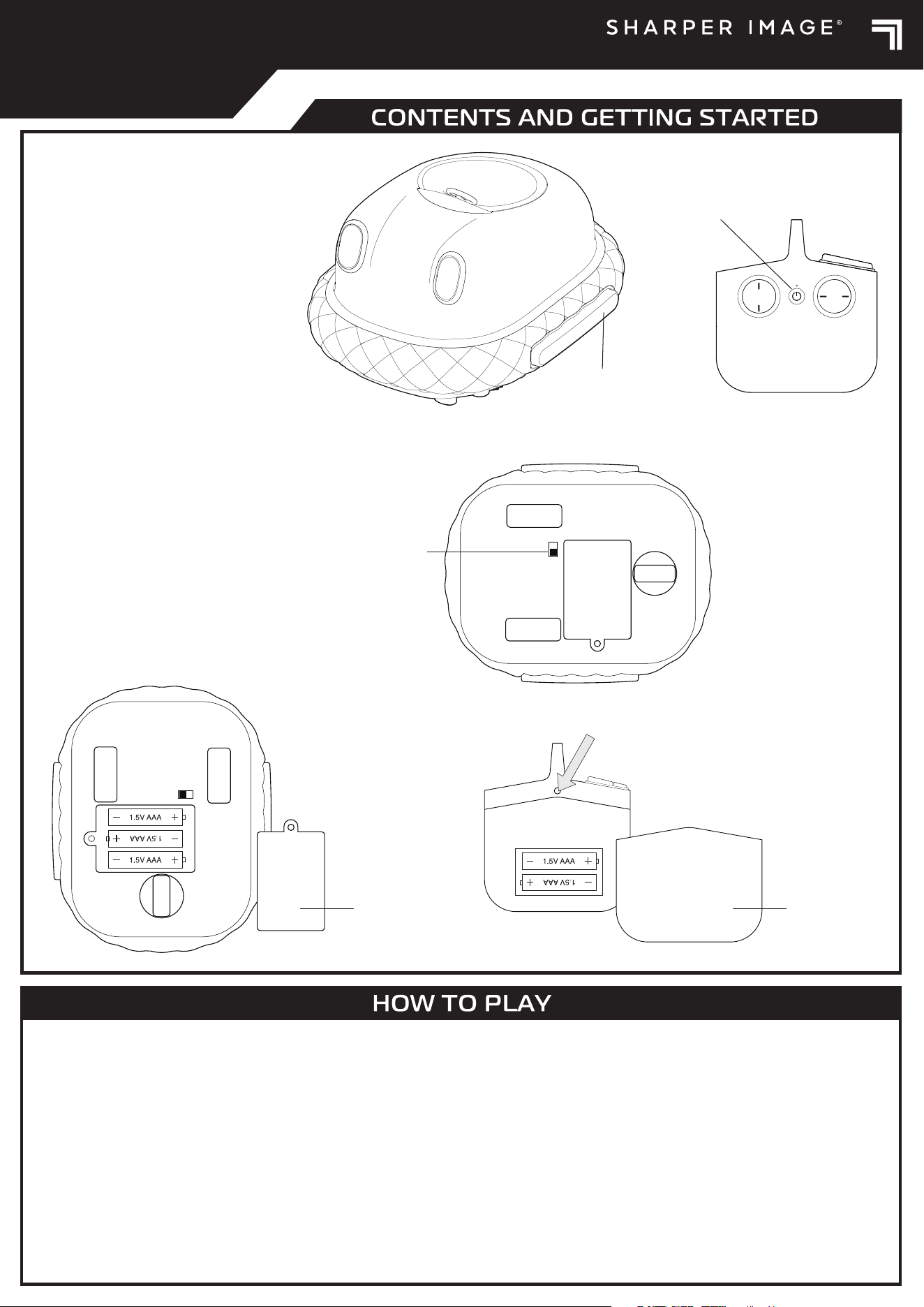
ON/OFF Switch
Battery Cover
TURBO TWINKLE
6+
Contents
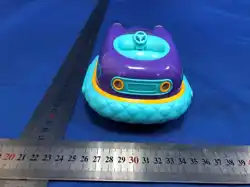
2 Turbo Twinkle Vehicles
2 Remote Controls
2 Turbo Twinkle Drivers
Getting Started
Vehicle
1. Make sure the power switch on the
bottom of each vehicle is in the o
position. Use a phillips-head
screwdriver to remove the screw
from each battery cover and then
remove each battery cover.
2. Insert 3 AAA 1.5V batteries (not
included) in the orientation shown.
3. Replace each battery cover and
securely tighten each screw.
Remote control
1. Use a tool to press and hold the
battery cover release on the back
of each remote control and then
slide down each battery cover.
2. Insert 2AAA 1.5V batteries (not
included) into each battery
compartment according to the
battery diagram.
3. Slide each battery cover back into
place securely.
1. Make sure the remote controls and vehicles are powered o.
2. Press the power button on the first remote control to power on the remote control. The pairing light will glow white, fading on and o, to indicate the remote
control is in pairing mode and ready to pair with the first vehicle.
3. Flip the switch on the bottom of the first vehicle to the on position to power on the vehicle. The vehicle lights will glow, fading on and o, to indicate the
vehicle is in pairing mode. The vehicle will automatically begin pairing with the remote control.
4. Wait for the pairing light on the remote control to quit fading on and o. It will stay solidly lit when pairing is successful.
5. Repeat steps 1 through 4 for the other remote control and vehicle.
6. If pairing is unsuccessful within 60 seconds, power o both the remote control and vehicle and then repeat steps 1 through 3.
7. If pairing is interrupted or out of range, the remote control and vehicle will both enter pairing mode and attempt to reconnect. Move the remote control and
vehicle closer together. If pairing is unsuccessful within 60 seconds, power o both the remote control and vehicle and then repeat steps 2 through 4.
8. When finished driving, press the power button on the remote control to power o the remote control and flip the switch on the bottom of the vehicle to the o
position to power o the vehicle.
Note: To save battery life, the remote control and vehicle automatically enter sleep mode after 5 minutes of inactivity. To wake from sleep mode, power o and
then power on the remote control and vehicle.
Eject Button
ON/OFF Switch
Battery Cover
Forward Or Reverse
This device complies with Part 15 of the FCC Rules. Operation is
subject to the following two conditions: (1) this device may not
cause harmful interference, and (2) this device must accept any
interference received, including interference that may cause
undesired operation.
Note: This equipment has been tested and found to comply with
the limits for a Class B digital device, pursuant to Part 15 of the
FCC Rules. These limits are designed to provide reasonable
protection against harmful interference in a residential
installation. This equipment generates, uses and can radiate
radio frequency energy and, if not installed and used in
accordance with the instructions, may cause harmful
interference to radio communications.
However, there is no guarantee that interference will not occur
in a particular installation. If this equipment does cause
harmful interference to radio or television reception, which can
be determined by turning the equipment o and on, the user is
encouraged to try to correct the interference by one or more of
the following measures:
— Reorient or relocate the receiving antenna.
— Increase the separation between the equipment and
receiver.
— Connect the equipment into an outlet on a circuit dierent
from that to which the receiver is connected.
— Consult the dealer or an experienced radio/TV technician for
help.
Warning: Changes or modifications to this unit not expressly
approved by the party responsible for compliance could void
the user's authority to operate the equipment.
Sharper Image® name and logos (including the 77 logo) are
trademarks or registered trademarks. Distributed by and © 2025
MerchSource, LLC. Irvine, CA 92618. All rights reserved.
Model No.: 1018812
• Adult supervision is recommended when operating the
vehicles.
• Always drive responsibly and make sure driving paths are
clear. Never drive towards or in close proximity to people or
animals. Never drive on streets or roadways to avoid trac
hazards.
• Keep fingers, hair, and loose clothing away from tires and all
moving parts while the vehicles are in motion.
• Avoid exposing the vehicles and remote controls to water.
Avoid driving through water. Never drive outdoors in rain or
snow. Never leave the vehicles or remote controls outdoors
overnight.
• Do not expose the vehicles or remote controls to extreme
temperatures.
• Do not leave the vehicles or remote controls near sources of
heat or under direct sunlight for extended periods.
• Do not sit, step, stand, or place objects on the vehicles. They
are not designed to support extra weight.
• Do not disassemble or modify the vehicles or remote controls.
• Thoroughly inspect the vehicles and remote controls before
every use. If the vehicles or remote controls appear worn,
frayed, splintered, cracked, or broken in any manner,
discontinue use and discard immediately.
ALKALINE BATTERY WARNINGS
• Do not mix old and new batteries.
• Do not mix alkaline, standard (carbon-zinc), or
rechargeable batteries.
• Alkaline batteries are recommended. Use only the
specified voltage.
• Insert batteries using the correct polarity. Always use,
replace, and recharge (if applicable) batteries under adult
supervision.
• Do not attempt to charge non-rechargeable batteries.
• Do not short-circuit the battery supply terminals.
• Do not dispose of batteries in fire: batteries may explode
or leak.
• Remove batteries before storing.
• Recycle or dispose of batteries according to federal, state,
and local laws.
• Keep these instructions for future reference.
Printed in China
WARNING:
CHOKING HAZARD –
Small Parts.
Not for children under 3 years of age.
1-800-374-2744
KEEP THIS INSTRUCTION MANUAL AS IT CONTAINS IMPORTANT
INFORMATION FOR FUTURE REFERENCE.
Due to continuous product improvements, the pictures on this
manual may dier slightly from the actual product.
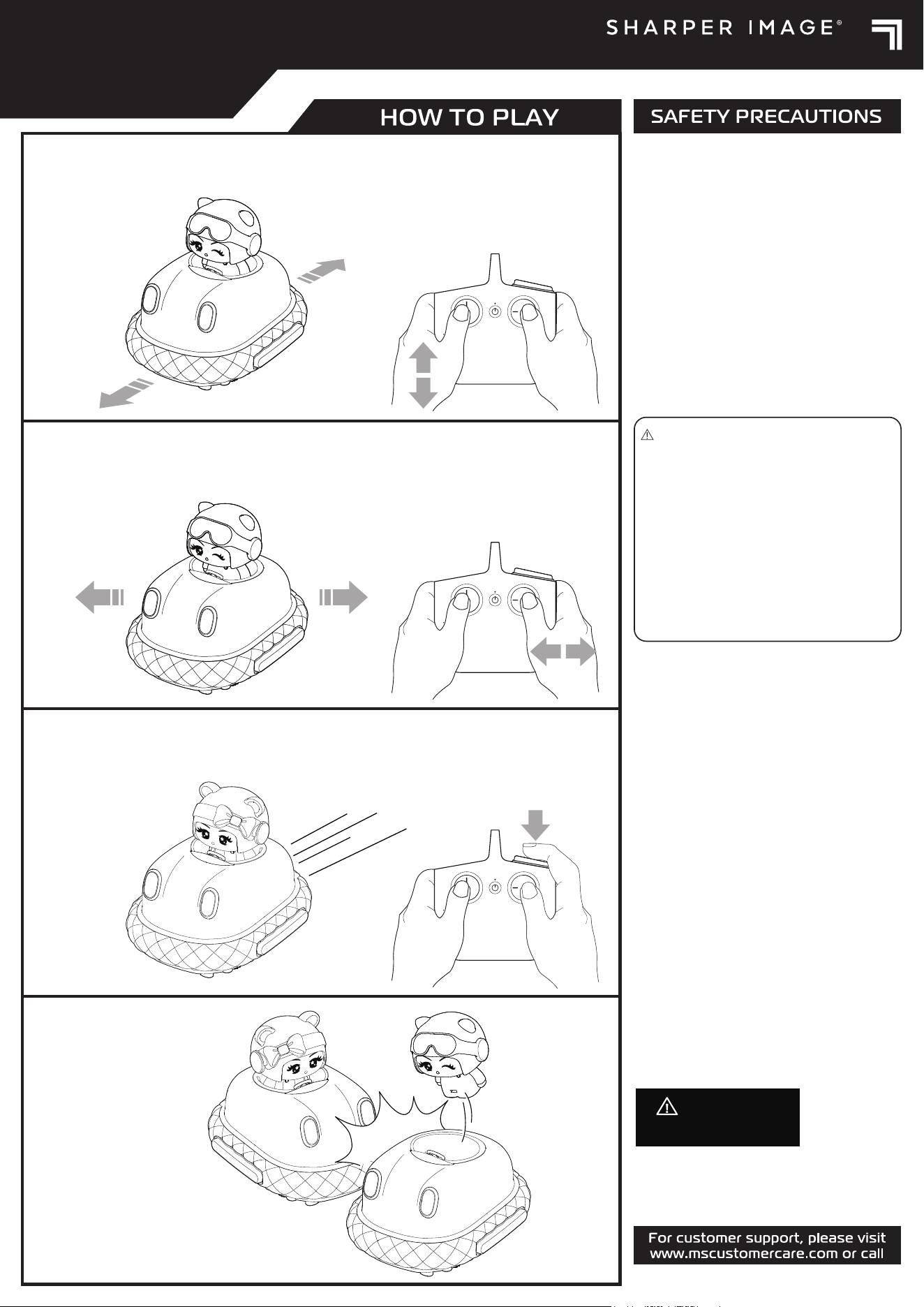
Push the left joystick to
drive forward or
reverse.
Turn Left Or Right
Push the right joystick to
drive turn left or turn
right.
Turbo
Press for a boost of
speed!
Eject Win!
Aim for the rival vehicle’s
side bumpers and send
the driver flying!
TURBO TWINKLE
6+

