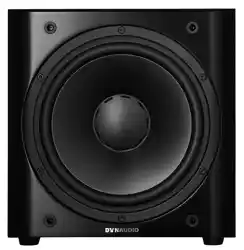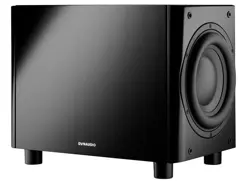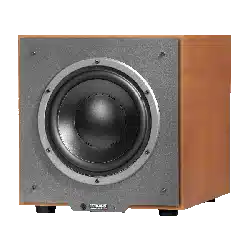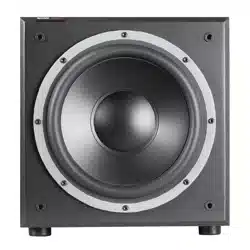

BM14SII – Owner’s manual
Dynaudio Professional BM14SII manual.indd 1 2014-02-24 14:45

Dynaudio Professional BM14SII manual.indd 2 2014-02-24 14:45

Introduction
Owner’s manual 1
Introduction
Important safety instructions
Thelightningashwithanarrowheadsymbolwithinan
equilateral triangle, is intended to alert the user to the
presence of uninsulated “dangerous voltage” within
theproduct’senclosurethatmaybeofsufcientmag-
nitude to constitute a risk of electric shock to persons.
The exclamation point within an equilateral triangle is
intended to alert the user to the presence of important
operating and maintenance (servicing) instructions in
theliteratureaccompanyingtheproduct.
1. Read these instructions.
2. Keep these instructions.
3. Heed all warnings.
4. Follow all instructions.
5. Do not use this apparatus near water.
6.Cleanonlywithdrycloth.
7.Do not block any ventilation openings. Install in accor-
dance with the manufacturer’s instructions.
8.Do not install near any heat sources such as radiators,
heat registers, stoves, or other apparatus (including ampli-
ers)thatproduceheat.
9.Do not defeat the safety purpose of the polarized or
grounding-typeplug.Apolarizedplughastwobladeswith
onewiderthantheother.Agroundingtypeplughastwo
bladesandathirdgroundingprong.Thewidebladeorthe
third prong are provided for your safety. If the provided
plugdoesnottintoyouroutlet,consultanelectricianfor
replacementoftheobsoleteoutlet.
10.Protectthepowercordfrombeingwalkedonorpinched
particularly at plugs, convenience receptacles, and the
pointwheretheyexitfromtheapparatus.
11.Onlyuseattachments/accessoriesspeciedbythemanu-
facturer.
12.Useonlywiththecart,stand,tripod,bracket,orta-
blespeciedbythemanufacturer,orsoldwiththe
apparatus. When a cart is used use caution when moving
the cart/apparatus combination to avoid injury from tip-
over.
13. Unplug this apparatus during lightning storms or when un-
used for long periods of time.
14.Referallservicingtoqualiedservicepersonnel.Servicing
isrequiredwhentheapparatushasbeendamagedinany
way,suchaspower-supplycordorplugisdamaged,liquid
hasbeenspilledorobjectshavefallenintotheapparatus,
theapparatushasbeenexposedtorainormoisture,does
notoperatenormally,orhasbeendropped.
15.WARNING:Toreducetheriskofreorelectricshock,this
apparatusshouldnotbeexposedtorainormoistureand
objects lled with liquids, such as vases, should not be
placed on this apparatus.
16.Tocompletelydisconnectthisequipmentfromthemains,
disconnectthepowersupplycordplugfromtherecepta-
cle.
17.The mains plug of the power supply cord shall remain
readilyoperable.
18.Danger: To reduce the risk of electric shock, do not re-
movethebackpanelanddonotexposetheapparatusto
rainormoisture.No userserviceableparts inside.Refer
servicingtoqualiedpersonnel.
About this operating manual
Signal words
Caution–Indicatesapotentiallyhazardoussituationwhich,if
not avoided, could result in damage to equipment.
CAUTION–Indicatesincombinationwithasafetysign
apotentiallyhazardoussituationwhich,ifnotavoided,
couldresultinminorormoderateinjuryordamageto
equipment.
WARNING – Indicates in combination with a safety
sign a potentially hazardous situation which, if not
avoided,couldresultindeathorseriousinjury.
DANGER–Indicatesincombinationwithasafetysign
ahazardoussituationwhich,ifnotavoided,willresult
indeathorseriousinjury.
Dynaudio Professional BM14SII manual.indd 1 2014-02-24 14:45
Introduction
2 BM14SII
Dynaudio Professional BM14SII manual.indd 2 2014-02-24 14:45

Introduction
Owner’s manual 3
About this manual
Thismanualisdivided inthreemainchapters, inwhichyou
canndalltheinformationneededtooperatethe BM14SII
successfully:
– Before operation: Learn all about unpacking and con-
nectingthe subwoofer.The controls andconnections on
thebackpanelarealsodescribedhere.
– Operation:In thischapter youwill learnhow tooperate
thesubwooferingeneralandhowtopositionitproperlyfor
optimum performance.
– Optimizing settings/Troubleshooting: Here detailed ex-
planationscanbefoundonhowtooptimizethesettingsin
ordertoachievethemaximumsoundquality.
Dynaudio Professional BM14SII manual.indd 3 2014-02-24 14:45

Before operation
4 BM14SII
Before operation
Unpacking the subwoofer
4. Getting started
4 Dynaudio Acoustics BM14S
Getting started
Unpacking the subwoofer
1. Unpack the subwoofer on a clean, even and soft area; floor carpeting is very
suitable.
2. The packaging should be opened from the top (1). Remove all accessories that
come packed with the subwoofer (such as AC power cord and grille). Do not
remove the top part of the protective material.
3. With the protective material still in place but with accessories removed, carefully
tilt the packaging on its side (1) and tilt again to turn it upside-down (2). Ensure
that no part of the top-cover is obstructing the opening at the top.
4. The outer packaging can now be lifted away from the subwoofer itself (3).
Remove the protective material that now is on top.
5. Open the bag and remove such from around the base of the subwoofer.
6. Again, carefully tilt the subwoofer on its side and again to turn it onto its feet.
Note that the top part of the protective material will now come off easily so ensure
that the subwoofer doesn’t drop or slide away in the process.
Check that the contents are complete:
• Subwoofer: The factory-set power requirements (refer to label on rear of
subwoofer) should correspond for the region where the subwoofer was
purchased. Refer also to chapter “Important Safety Instructions” on page 3.
• Front baffle grille.
• AC mains lead. The supplied lead should be suitable for the region where the
subwoofer was purchased.
• Owners
Manual.
Grille
The subwoofer can be operated without the grille. However, it is recommended that
the grille is mounted during normal use to help prevent accidental damage or dirt
settling on the cone of the loudspeaker. With subwoofers, the influence of the grille on
the sound is virtually negligible.
To remove the grille:
Gently pull the grille at all corners.
To fit the grille:
Line up the studs with the corresponding front baffle holes.
Gently push the grille in at all corners.
Note: Be careful when mounting the grille not to touch the cone of the loudspeaker
itself.
1
2
3
1.Unpack the subwoofer on a clean, even and soft area;
oorcarpetingisverysuitable.
2.The packaging should be opened from the top (1). Re-
moveallaccessoriesthatcomepackedwiththesubwoof-
er(suchasACpowercordandgrille).Donotremovethe
top part of the protective material.
3.With theprotective material still inplace but with acces-
soriesremoved,carefullytiltthepackagingonitsside(1)
and tilt again to turn it upside-down (2). Ensure that no part
ofthetop-coverisobstructingtheopeningatthetop.
4.Theouterpackagingcannowbeliftedawayfromthesub-
woofer itself (3). Remove the protective material that now
is on top.
5.Openthebagandremovesuchfromaroundthebaseof
thesubwoofer.
6.Again,carefullytiltthesubwooferonitssideandagainto
turnitontoitsfeet.Notethatthetoppartoftheprotective
materialwillnowcomeoffeasilysoensurethatthesub-
wooferdoesn’tdroporslideawayintheprocess.
Checkthatthecontentsarecomplete:
– Subwoofer:Thefactory-setpowerrequirements(referto
labelonrearofsubwoofer)shouldcorrespondforthere-
gionwhere thesubwoofer waspurchased. Referalso to
“Importantsafetyinstructions”onpage1.
– Front bafe grille.
– AC mains lead.Thesuppliedleadshouldbesuitablefor
theregionwherethesubwooferwaspurchased.
– This owner’s manual.
Grille
Thesubwoofercanbeoperatedwithoutthegrille.However,it
is recommended that the grille is mounted during normal use
to help prevent accidental damage or dirt settling on the cone
oftheloudspeaker.Withsubwoofers,theinuenceofthegrille
onthesoundisvirtuallynegligible.
Toremovethegrille:
–Gentlypullthegrilleatallcorners.
Totthegrille:
–Lineupthestudswiththecorrespondingfrontbafeholes.
Gentlypushthegrilleinatallcorners.
Note:
Be careful when mounting the grille not to touch the cone of
the loudspeaker itself.
Dynaudio Professional BM14SII manual.indd 4 2014-02-24 14:45
Before operation
Owner’s manual 5
Controls and connections
4. Getting started
Dynaudio Acoustics BM14S 5
Controls and connections
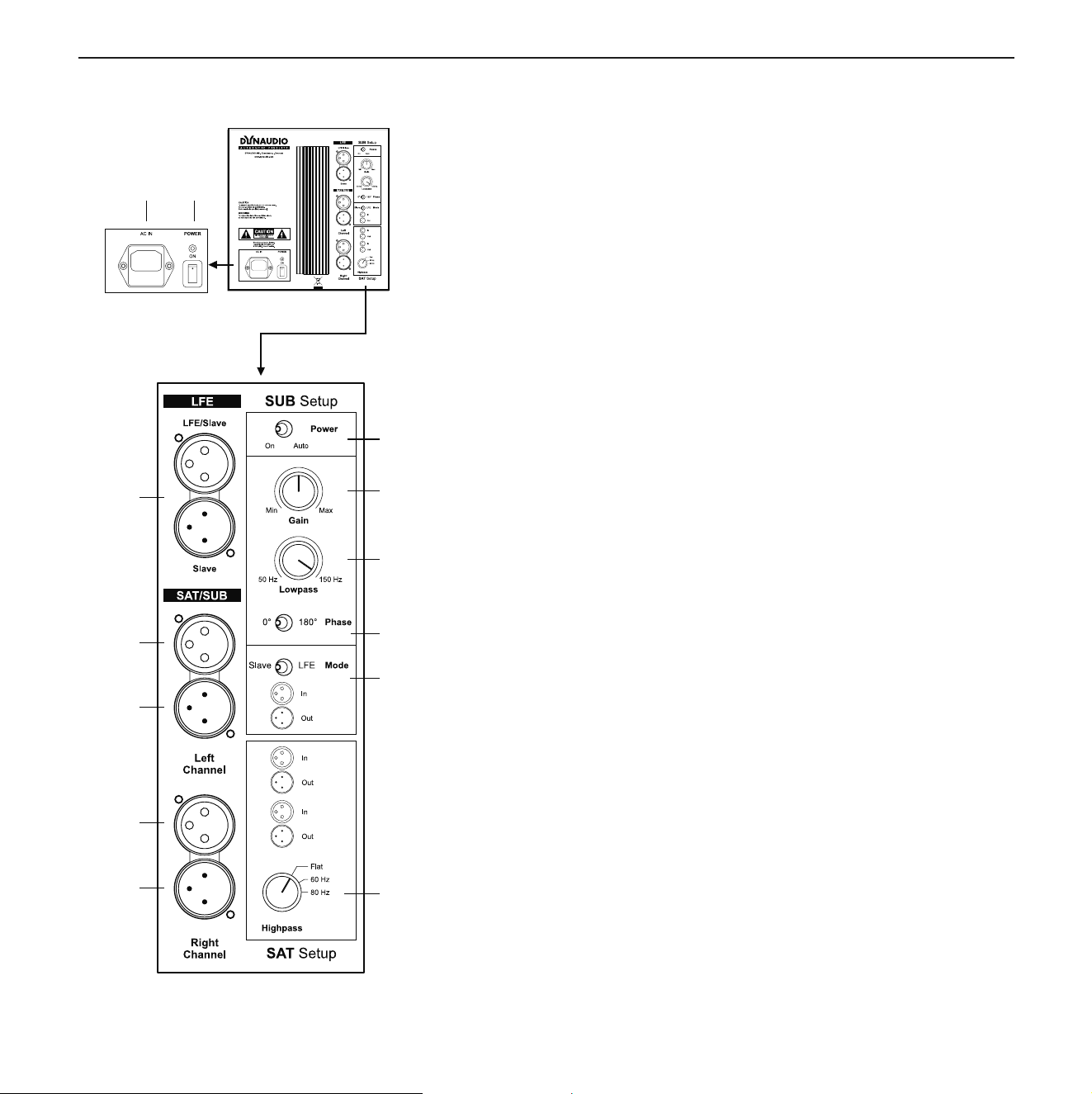
1 AC IN
Mains power input.
2 POWER ON (Main)
Main power switch (to switch the subwoofer manually on and off).
LED shows operation mode:
• red: subwoofer switched on and in mute mode
• green: subwoofer is activated
3 Power (Mode)
• On: subwoofer is permanently on
• Auto: subwoofer switches on when signal is detected
4 Gain
Subwoofer volume level.
5 Lowpass
Subwoofer lowpass frequency: continuously variable from 50 to 150 Hz.
6 Phase
Phase setting: phase can be set to 0° or 180°.
7 Mode
Subwoofer operation mode LFE or Slave:
• LFE: setting for normal use and Master use
• Slave: setting for second and all following subwoofers
8 Highpass
Allows cutting off low frequencies of the signal provided at the
SAT/SUB
output:
• Flat: signal is not processed
• 60: cut-off frequency at 60 Hz
• 80: cut-off frequency at 80 Hz
9 SAT/SUB (output)
Output for satellite system to be connected. This signal is processed according to
the Highpass setting.
10 SAT/SUB (input)
Input for full bandwidth signal. This signal will be processed according to the
Highpass setting and provided at the SAT/SUB output.
11 LFE
• LFE/Slave: input for LFE signal
• Slave: output to next subwoofer if install
ed
Terminal pinout (sockets 9, 10 and 11)
1 = 0 2 = + 3 = –
1 2
3
4
5
6
7
8
9
10
9
10
11
(1)ACIN
Mains power input.
(2)POWERON(Main)
Mainpowerswitch(toswitchthesubwoofermanuallyonand
off).LEDshowsoperationmode:
–red:subwooferswitchedonandinmutemode
–green:subwooferisactivated
(3) Power (Mode)
–On:subwooferispermanentlyon
–Auto:subwooferswitchesonwhensignalisdetected
(4)Gain
Subwoofervolumelevel.
(5) Lowpass
Subwooferlowpassfrequency:continuouslyvariablefrom50
to150Hz.
(6) Phase
Phasesetting:phasecanbesetto0°or180°.
(7) Mode
SubwooferoperationmodeLFEorSlave:
–LFE:settingfornormaluseandMasteruse
–Slave:settingforsecondandallfollowingsubwoofers
(8) Highpass
Allowscuttingofflowfrequenciesofthesignalprovidedatthe
SAT/SUBoutput:
–Flat:signalisnotprocessed
–60:cutofffrequencyat60Hz
–80:cutofffrequencyat80Hz
(9)SAT/SUB(output)
Outputforsatellitesystemtobeconnected.Thissignalispro-
cessed according to the Highpass setting.
Dynaudio Professional BM14SII manual.indd 5 2014-02-24 14:45
Before operation
6 BM14SII
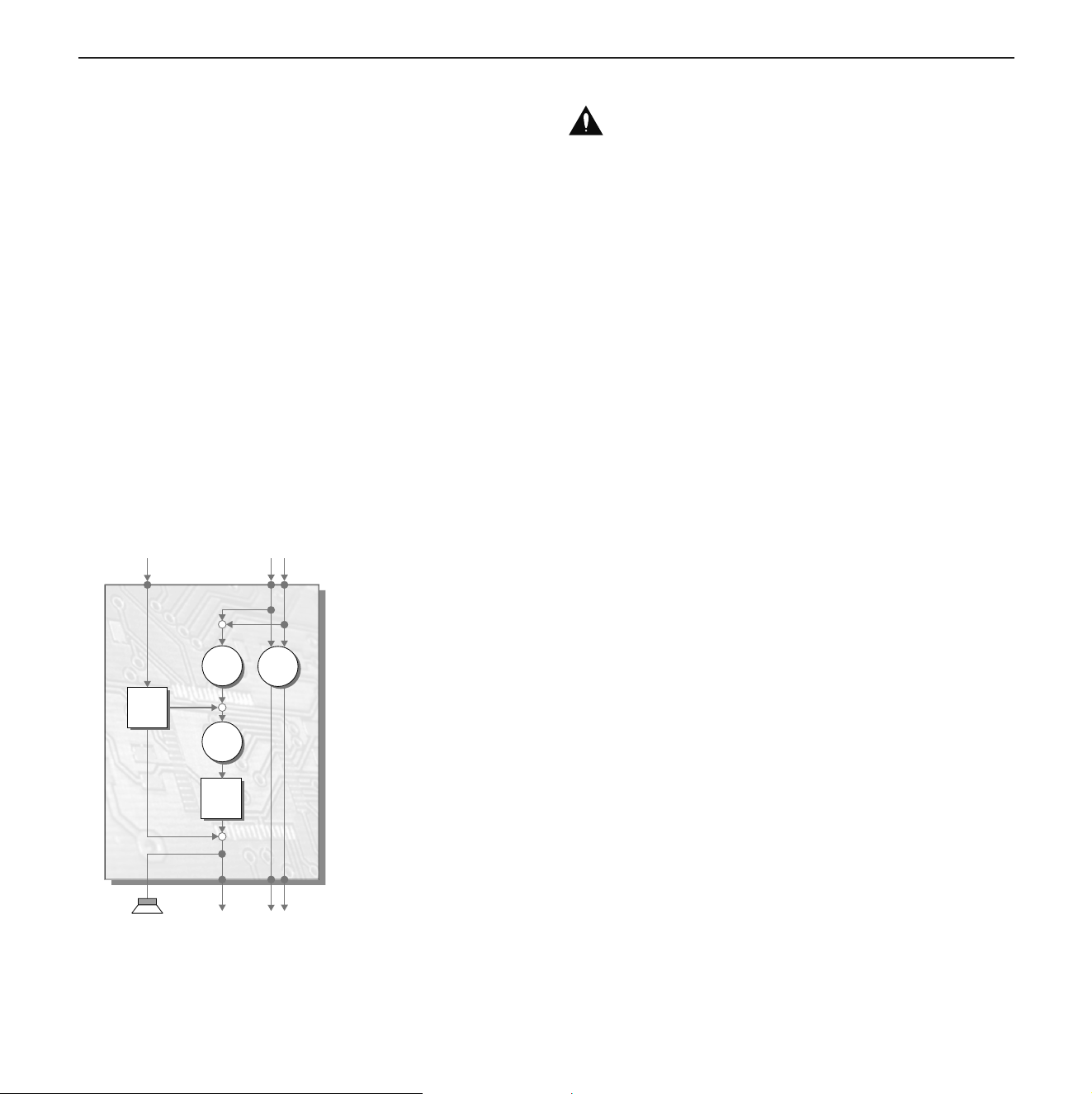
(10)SAT/SUB(input)
Inputforfullbandwidth signal.Thissignal willbeprocessed
accordingto the Highpass setting and provided at theSAT/
SUBoutput.
(11) LFE
–LFE/Slave:inputforLFEsignal
–Slave:outputtonextsubwooferifinstalled
Terminal pinout (sockets 9, 10 and 11)
1 = 0
2 = +
3 = –
Connecting the subwoofer
4. Getting started
6 Dynaudio Acoustics BM14S
Connecting the subwoofer
Subwoofer inputs
The BM14S provides two different signal inputs:
LFE/Slave
This input allows the LFE (Low Frequency Effect) channel to be connected.
The signal is:
• reproduced by the subwoofer
• routed to the Slave output for a second subwoofer to be connected.
The Lowpass control has no impact on this input.
SAT/SUB
This input allows the connection of a full bandwidth signal.
The signal is:
• reproduced by the subwoofer,
• routed to the SAT/SUB output terminals. Low frequencies are cut-off according to
the Highpass setting,
• routed to the Slave output for a second subwoofer to be connected. High
frequencies are cut-off according to the Lowpass setting.
CAUTION
Damage due to improper connections!
Improper connections may damage the device.
Set the mains power switch to OFF before connecting the BM14S.
Only switch the subwoofer on (mains power switch to ON) after all connections
and set up steps have been properly completed.
Highpass
Lowpass
+
Gain
+
LFE/Slave
Mode
Phase
+
SAT/SUB
SAT/SUBSlave
CAUTION
Damage due to improper connections!
Improperconnectionsmaydamagethedevice.
–SetthemainspowerswitchtoOFFbeforeconnectingthe
BM14SII.
–Onlyswitchthesubwooferon(mainspowerswitchtoON)
afterallconnectionsandsetupstepshavebeenproperly
completed.
Subwoofer inputs
TheBM14SIIprovidestwodifferentsignalinputs:
LFE/Slave
ThisinputallowstheLFE(LowFrequencyEffect)channelto
beconnected.Thesignalis:
–reproducedbythesubwoofer
–routedtotheSlaveoutputforasecondsubwoofertobe
connected.
The Lowpass control has no impact on this input.
SAT/SUB
This input allows the connection of a full bandwidth signal.
Thesignalis:
–reproducedbythesubwoofer,
–routedtotheSAT/SUBoutputterminals.Lowfrequencies
are cut-off according to the Highpass setting,
–routedtotheSlaveoutputforasecondsubwoofertobe
connected. High frequencies are cut-off according to the
Lowpass setting.
Dynaudio Professional BM14SII manual.indd 6 2014-02-24 14:45
Before operation
Owner’s manual 7
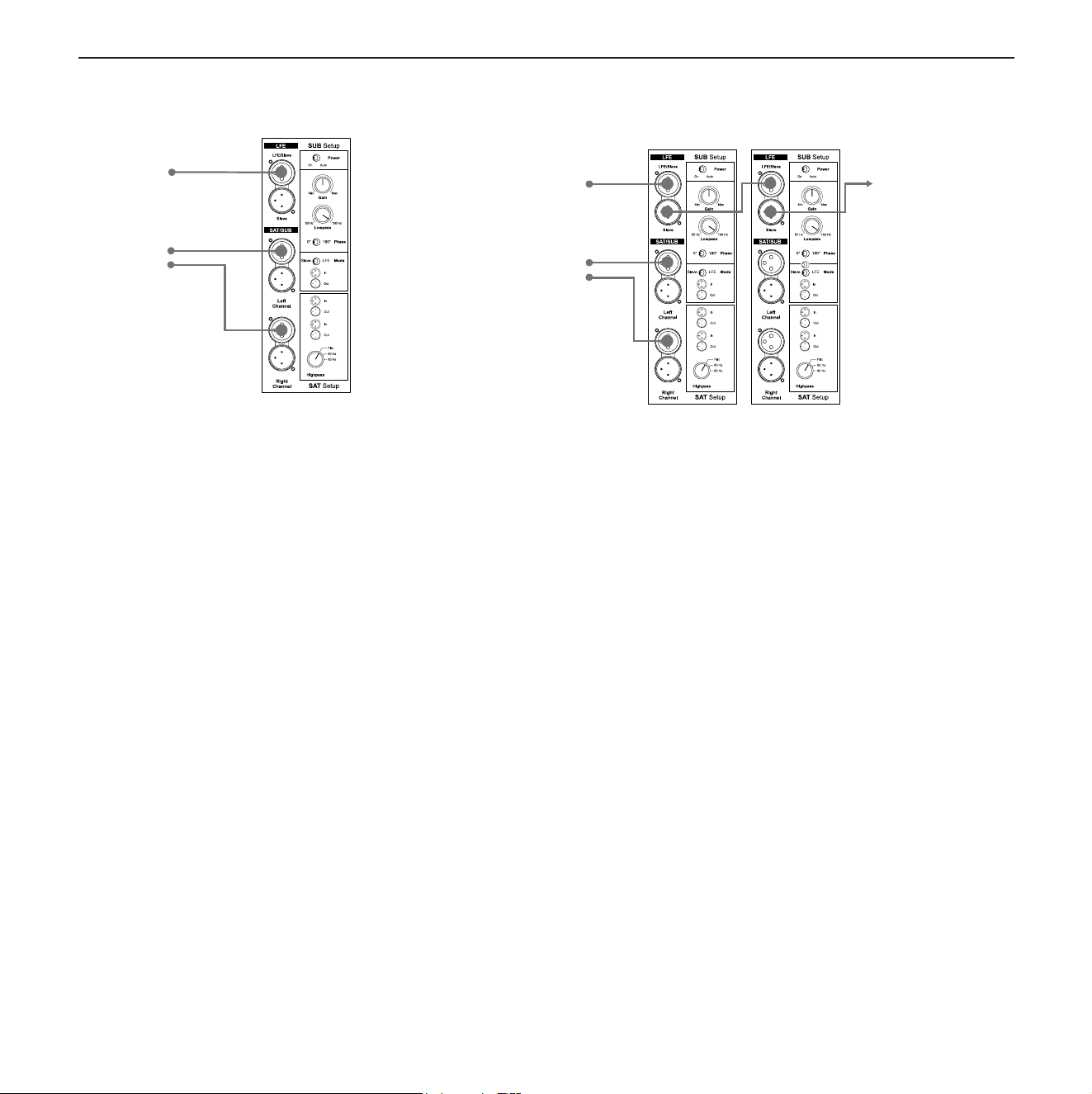
Connecting a single subwoofer
4. Getting started
Dynaudio Acoustics BM14S 7
Connecting a single subwoofer
Connecting as LFE channel (1)
X Connect subwoofer to LFE/Slave input.
Connecting as subwoofer for satellites (2)
X Connect full bandwidth signal to SAT/SUB input.
Sub reproduces sum of right and left signal.
X Set the Mode switch to LFE.
Multiple subwoofer connections
The BM14S can be used stand-alone or together with multiple subwoofer units.
Using multiple units may be helpful if the listening room is quite large or has difficult
acoustic conditions.
When using two or more subwoofers, the first one (designated “Master”) controls the
following subs (designated “Slave”) via a subwoofer cable.
To connect multiple subwoofers:
1. Connect the first subwoofer as described before.
2. Set Mode switch of first subwoofer to LFE.
3. From the Slave output of the first subwoofer connect a XLR cable to the
LFE/Slave input of the following subwoofer. This one now becomes the slave.
4. Set the Mode switch of the second subwoofer to Slave.
X Further subwoofers can be connected in the same way. Set the Mode switch of
all following subwoofers to Slave respectively.
Note: • You can also use both connection types. The signals will be combined in
the BM14S and routed accordingly. This allows the BM14S to reproduce
both the LFE channel information as well as the bass range of the
connected satellite system.
• Use Slave mode if you want to use an external bass management
system.
Note: • When using multiple subwoofers in a Master-Slave setup, it is
recommended that the subwoofers are all the same model.
• If you wish to use multiple subwoofers with full individual control, set the
Input switch for all to the LFE position. From the source subwoofer
output, use a Y-connector.
1
2
LFE
Stereo
Sub 1
(Master)
Sub 2
(Slave)
Sub...
(Slave)
LFE
Stereo
Connecting as LFE channel (1)
–ConnectsubwoofertoLFE/Slaveinput.
Connecting as subwoofer for satellites (2)
–ConnectfullbandwidthsignaltoSAT/SUBinput.
Subreproducessumofrightandleftsignal.
–SettheModeswitchtoLFE.
Notes:
–Youcanalsousebothconnectiontypes.Thesignalswill
becombinedintheBM14SIIandroutedaccordingly.This
allowsthe BM14S IIto reproduce both theLFE channel
information as well as the bass range of the connected
satellitesystem.
–UseSlavemodeifyouwanttouseanexternalbassman-
agementsystem.
Multiple subwoofer connections
4. Getting started
Dynaudio Acoustics BM14S 7
Connecting a single subwoofer
Connecting as LFE channel (1)
X Connect subwoofer to LFE/Slave input.
Connecting as subwoofer for satellites (2)
X Connect full bandwidth signal to SAT/SUB input.
Sub reproduces sum of right and left signal.
X Set the Mode switch to LFE.
Multiple subwoofer connections
The BM14S can be used stand-alone or together with multiple subwoofer units.
Using multiple units may be helpful if the listening room is quite large or has difficult
acoustic conditions.
When using two or more subwoofers, the first one (designated “Master”) controls the
following subs (designated “Slave”) via a subwoofer cable.
To connect multiple subwoofers:
1. Connect the first subwoofer as described before.
2. Set Mode switch of first subwoofer to LFE.
3. From the Slave output of the first subwoofer connect a XLR cable to the
LFE/Slave input of the following subwoofer. This one now becomes the slave.
4. Set the Mode switch of the second subwoofer to Slave.
X Further subwoofers can be connected in the same way. Set the Mode switch of
all following subwoofers to Slave respectively.
Note: • You can also use both connection types. The signals will be combined in
the BM14S and routed accordingly. This allows the BM14S to reproduce
both the LFE channel information as well as the bass range of the
connected satellite system.
• Use Slave mode if you want to use an external bass management
system.
Note: • When using multiple subwoofers in a Master-Slave setup, it is
recommended that the subwoofers are all the same model.
• If you wish to use multiple subwoofers with full individual control, set the
Input switch for all to the LFE position. From the source subwoofer
output, use a Y-connector.
1
2
LFE
Stereo
Sub 1
(Master)
Sub 2
(Slave)
Sub...
(Slave)
LFE
Stereo
TheBM14SIIcanbeusedstand-aloneortogetherwithmulti-
plesubwooferunits.Usingmultipleunitsmaybehelpfulifthe
listeningroomisquitelargeorhasdifcultacousticconditions.
Whenusingtwoormoresubwoofers,therstone(designated
“Master”)controlsthefollowingsubs(designated“Slave”)via
asubwoofercable.
To connect multiple subwoofers:
1.Connecttherstsubwooferasdescribedbefore.
2.SetModeswitchofrstsubwoofertoLFE.
3.From the Slave output of the rst subwoofer connect a
XLR cable to the LFE/Slave input of the following sub-
woofer.Thisonenowbecomestheslave.
4.SettheModeswitchofthesecondsubwoofertoSlave.
Furthersubwooferscanbeconnectedinthesameway.Set
theModeswitchofallfollowingsubwooferstoSlaverespec-
tively.
Dynaudio Professional BM14SII manual.indd 7 2014-02-24 14:45
Before operation
8 BM14SII
Notes:
–WhenusingmultiplesubwoofersinaMaster-Slavesetup,
itis recommendedthat thesubwoofers areall thesame
model.
–If you wish to use multiple subwoofers withfull individu-
al control, set the Input switch for all to the LFE position.
Fromthesourcesubwooferoutput,useaY-connector.
Connecting loudspeakers
5. Operation
8 Dynaudio Acoustics BM14S
Connecting loudspeakers
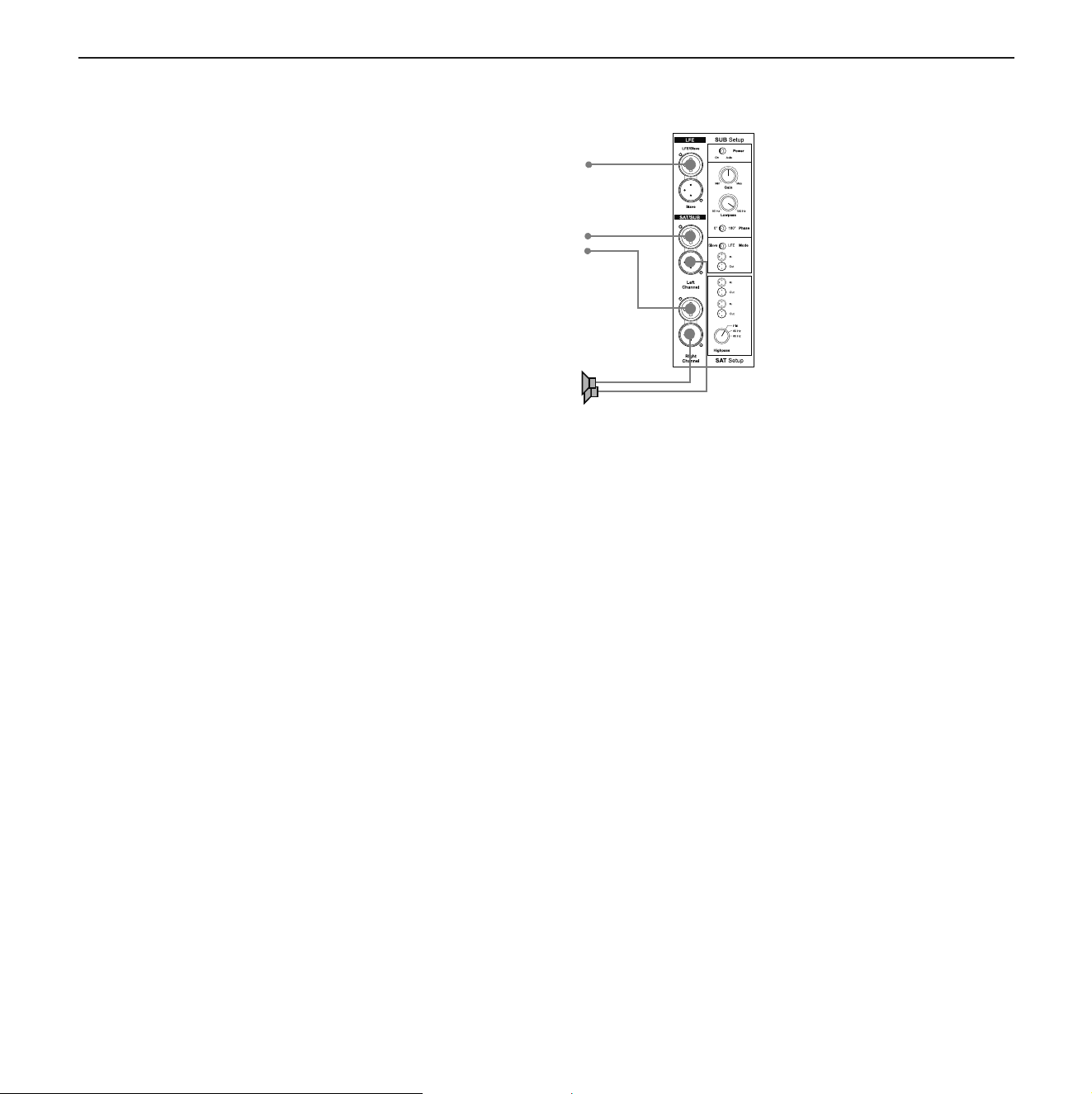
If your source provides bass management, you can use the BM14S LFE input alone
in LFE or SLAVE mode, depending on the management system capabilities. Avoid
double processing if possible.
To connect loudspeakers
1. Connect the subwoofer (see “Connecting a single subwoofer” on page 8).
2. From the subwoofer SAT/SUB output connect a XLR cable to the inputs of the
power amplifier you use for your speakers.
Operation
Switching the subwoofer on
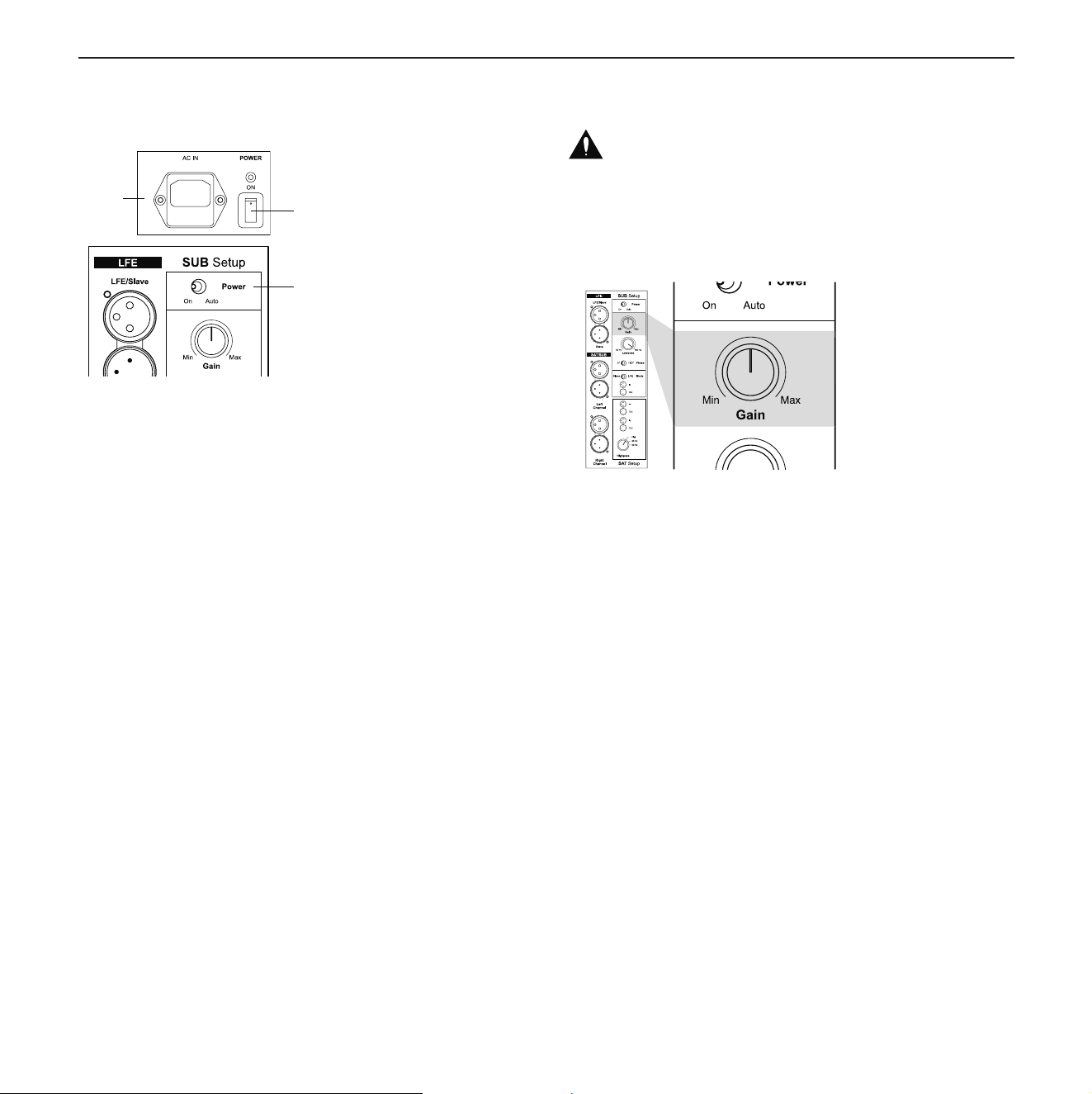
Once you have ensured yourself that all necessary connections have been made, the
subwoofer and the connected components can be switched on.
1. Connect the subwoofer to the mains power.
2. Switch the subwoofer on with the main POWER switch on the rear panel.
The status LED on the rear of the subwoofer will light up red.
3. Select a power mode with the Power switch on the rear panel.
Power modes
• On: the subwoofer is switched on permanently
• Auto
– When a music signal is detected, the internal amplifier is activated
automatically. The status LED on the back of the subwoofer will light up green.
As long as a music signal is available on the subwoofer’s input, it will remain
switched on.
– After 15 to 20 minutes of not sensing any input music signal, the subwoofer will
switch itself to Standby mode automatically. The status LED on the back of the
subwoofer will light up red.
Note: The signals connected to the inputs are provided at the Slave output for
connecting another subwoofer. See page 8 to learn more about connecting
multiple subwoofers.
Note: To switch the subwoofer completely off, set the main POWER switch to the
OFF position.
LFE
Stereo
To power amplifier
or active speakers
2.
3.
1.
Ifyoursourceprovidesbass management,youcanusethe
BM14SII’sLFEinputaloneinLFEorSLAVEmode,depend-
ingonthemanagementsystemcapabilities.Avoiddoublepro-
cessingifpossible.
To connect loudspeakers
1.Connect the subwoofer (see “Connecting a single sub-
woofer” on page 8).
2.FromthesubwooferSAT/SUBoutputconnectaXLRcable
totheinputsofthepoweramplieryouuseforyourspeak-
ers.
Note:
The signals connected to the inputs are provided at the
Slaveoutputforconnectinganothersubwoofer.Seepage8to
learnmoreaboutconnectingmultiplesubwoofers.
Dynaudio Professional BM14SII manual.indd 8 2014-02-24 14:45
Operation
Owner’s manual 9
Operation
Switching the subwoofer on
5. Operation
8 Dynaudio Acoustics BM14S
Connecting loudspeakers
If your source provides bass management, you can use the BM14S LFE input alone
in LFE or SLAVE mode, depending on the management system capabilities. Avoid
double processing if possible.
To connect loudspeakers
1. Connect the subwoofer (see “Connecting a single subwoofer” on page 8).
2. From the subwoofer SAT/SUB output connect a XLR cable to the inputs of the
power amplifier you use for your speakers.
Operation
Switching the subwoofer on
Once you have ensured yourself that all necessary connections have been made, the
subwoofer and the connected components can be switched on.
1. Connect the subwoofer to the mains power.
2. Switch the subwoofer on with the main POWER switch on the rear panel.
The status LED on the rear of the subwoofer will light up red.
3. Select a power mode with the Power switch on the rear panel.
Power modes
• On: the subwoofer is switched on permanently
• Auto
– When a music signal is detected, the internal amplifier is activated
automatically. The status LED on the back of the subwoofer will light up green.
As long as a music signal is available on the subwoofer’s input, it will remain
switched on.
– After 15 to 20 minutes of not sensing any input music signal, the subwoofer will
switch itself to Standby mode automatically. The status LED on the back of the
subwoofer will light up red.
Note: The signals connected to the inputs are provided at the Slave output for
connecting another subwoofer. See page 8 to learn more about connecting
multiple subwoofers.
Note: To switch the subwoofer completely off, set the main POWER switch to the
OFF position.
LFE
Stereo
To power amplifier
or active speakers
2.
3.
1.
Onceyouhave ensuredyourselfthat allnecessaryconnec-
tions have been made, the subwoofer and the connected
componentscanbeswitchedon.
1.Connectthesubwoofertothemainspower.
2.SwitchthesubwooferonwiththemainPOWERswitchon
therearpanel.ThestatusLEDontherearofthesubwoof-
er will light up red.
3.Select apower mode with thePower switch onthe rear
panel.
Power modes
– On:thesubwooferisswitchedonpermanently
– Auto
– When a music signal is detected, the internal ampli-
erisactivatedautomatically.ThestatusLEDonthe
backofthesubwooferwilllightupgreen.Aslongas
amusicsignalisavailableonthesubwoofer’sinput,it
will remain switched on.
–After15to20minutesofnotsensinganyinputmusic
signal,thesubwooferwillswitchitselftoStandby
modeautomatically.ThestatusLEDonthebackof
thesubwooferwilllightupred.
Note:
Toswitchthesubwoofercompletelyoff,setthemainPOWER
switch to the OFF position.
Adjusting the volume (Gain)
CAUTION
High Sound Levels!
Highsoundlevelscancauseauditorydefects.
–Toavoidauditorydefects,donotlistentohighsoundlev-
els over a longer period of time.
5. Operation
Dynaudio Acoustics BM14S 9
Adjusting the volume (Gain)
The correct volume setting is an important aspect in achieving a well balanced
speaker combination.
To adjust the gain:
Adjust the Gain control, until correct setting is reached.
Selecting the subwoofer cut-off frequency
(Lowpass)
The Lowpass control allows the frequency range of the subwoofer to be defined.
Above the selected frequency the sound level decreases rapidly. The correct setting
of this cut-off frequency is important for a well balanced combination of subwoofer and
speakers.
To selec the cut-off frequency
Set the Lowpass control to the desired frequency between 50 and 150 Hz.
Please also heed the instructions given in the operating manual of your
loudspeakers.
CAUTION
High Sound Levels!
High sound levels can cause auditory defects.
To avoid auditory defects do not listen to high sound levels over a longer period
of time.
Note: You cannot adjust the volume, when subwoofer is in slave mode. In this case
the volume is controlled by the setting of the master subwoofer.
Note: • The Lowpass only works on SAT/SUB input.
• Perhaps subwoofer cut-off frequency is already set in the bass
management of your source. Please refer to the operating manual of
your source. In general use only one bass management system.
The correct volume setting is an important aspect in achieving
awellbalancedspeakercombination.
To adjust the gain:
–AdjusttheGaincontrol,untilcorrectsettingisreached.
Note:
Youcannotadjustthevolumewhenthesubwooferisinslave
mode.Inthiscasethevolumeiscontrolledbythesettingof
themastersubwoofer.
Dynaudio Professional BM14SII manual.indd 9 2014-02-24 14:45
Operation
10 BM14SII
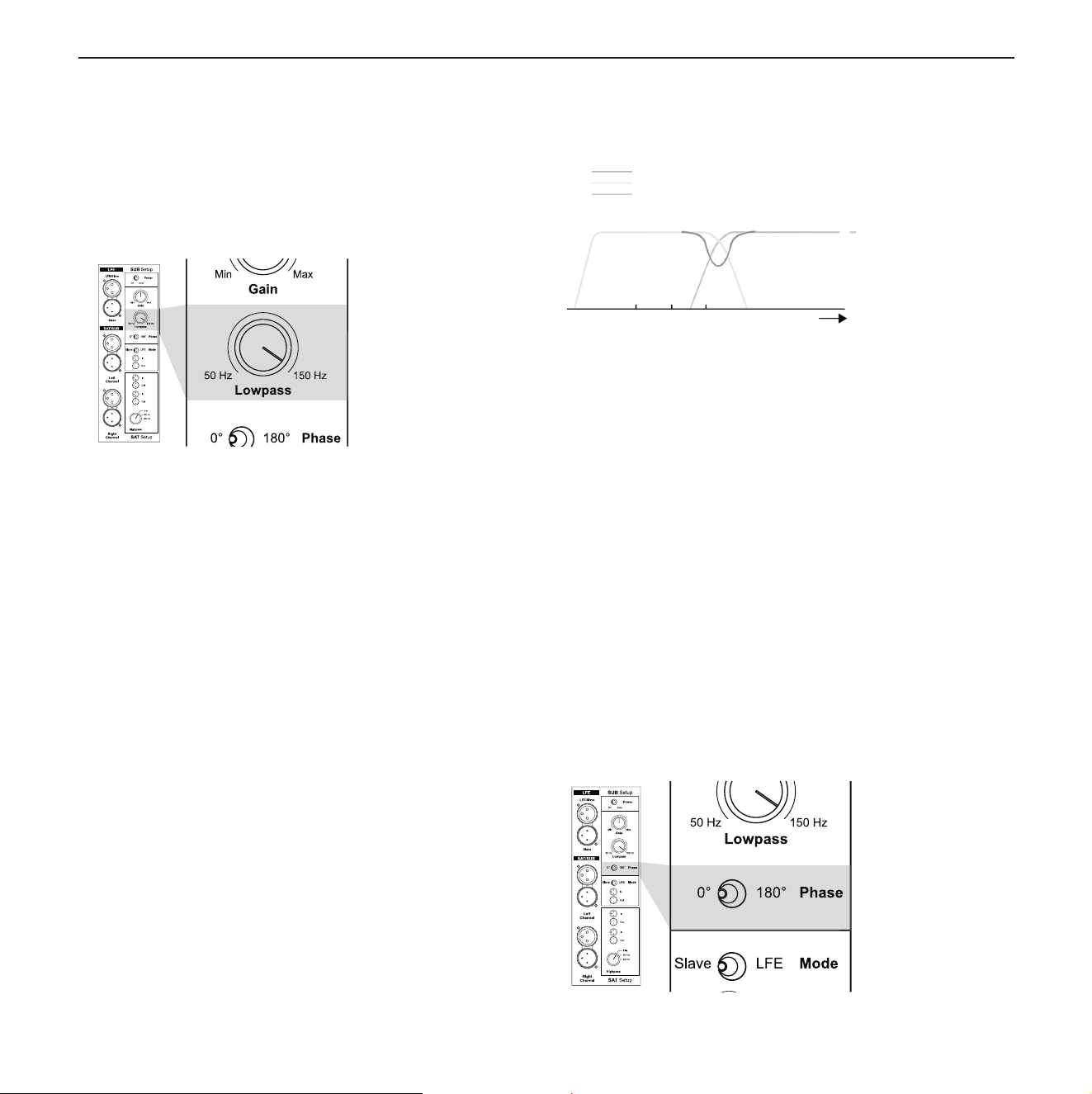
Selecting the subwoofer cut-off frequency (Lowpass)
TheLowpasscontrolallowsthefrequencyrangeofthesub-
woofertobedened.Abovetheselectedfrequencythesound
leveldecreasesrapidly.Thecorrectsettingofthiscut-offfre-
quencyisimportantforawellbalancedcombinationofsub-
woofer and speakers.
5. Operation
Dynaudio Acoustics BM14S 9
Adjusting the volume (Gain)
The correct volume setting is an important aspect in achieving a well balanced
speaker combination.
To adjust the gain:
Adjust the Gain control, until correct setting is reached.
Selecting the subwoofer cut-off frequency
(Lowpass)
The Lowpass control allows the frequency range of the subwoofer to be defined.
Above the selected frequency the sound level decreases rapidly. The correct setting
of this cut-off frequency is important for a well balanced combination of subwoofer and
speakers.
To selec the cut-off frequency
Set the Lowpass control to the desired frequency between 50 and 150 Hz.
Please also heed the instructions given in the operating manual of your
loudspeakers.
CAUTION
High Sound Levels!
High sound levels can cause auditory defects.
To avoid auditory defects do not listen to high sound levels over a longer period
of time.
Note: You cannot adjust the volume, when subwoofer is in slave mode. In this case
the volume is controlled by the setting of the master subwoofer.
Note: • The Lowpass only works on SAT/SUB input.
• Perhaps subwoofer cut-off frequency is already set in the bass
management of your source. Please refer to the operating manual of
your source. In general use only one bass management system.
To select the cutoff frequency
–SettheLowpasscontroltothedesiredfrequencybetween
50and150Hz.
Note:
–TheLowpassonlyworksonSAT/SUBinput.
–Perhapssubwoofercut-offfrequencyisalreadysetinthe
bassmanagementofyoursource.Pleaserefertotheop-
erating manual of your source. In general use only one
bassmanagementsystem.
You should also heed the instructions given in the operating
manualofyourloudspeakers.
Setting the phase (Phase)
5. Operation
10 Dynaudio Acoustics BM14S
Setting the phase (Phase)
With the phase settings you can adjust the phase relationship between the subwoofer
and main speakers. If either subwoofer or main speaker are slightly out of phase in
relation to the other, it can result in decreased bass output in the frequency response
area where they overlap each other.
The phase relationship between subwoofer and satellite speakers is very dependent
on relative distance, construction and working principles of the main speakers. The
figure on the left shows a case whereby phase of the subwoofer and main speakers
are incorrect in the critical overlap area, thus significantly reducing acoustic output in
the listening room in that area.
To find the correct phase setting:
1. Play a bass-rich track which also covers the overlap area.
2. Toggle the Phase switch between 0° and 180°.
Choose the setting for which you experience the most bass.
Setting the satellite cut-off frequency (Highpass)
Depending on the bass capabilities of the speakers, the frequency range of
subwoofer and speakers can overlap between 50 Hz and 150 Hz. A bump or a gap in
the frequency response and thus a lower sound quality will be experienced if the
system is not matched properly. In addition, small speakers and low powered
amplifiers will particularly be affected by the low frequency signals, which again has
a negative effect on the sound
quality. Therefore it makes sense to limit the bass
range of the connected speakers (called “satellites” in this case) by a highpass filter.
The BM14S provides three settings to achieve this:
• Flat = no limitation
• 60 Hz = frequencies below 60 Hz are cut-off
• 80 Hz = frequencies below 80 Hz are cut-off
To set the cut-off frequency
Switch Highpass control to needed position.
Note: You can not set the phase if the subwoofer is in slave mode. In this case the
phase is controlled by the setting of the master subwoofer.
Combined frequency response
Subwoofer
Main speakers
Level
Frequency
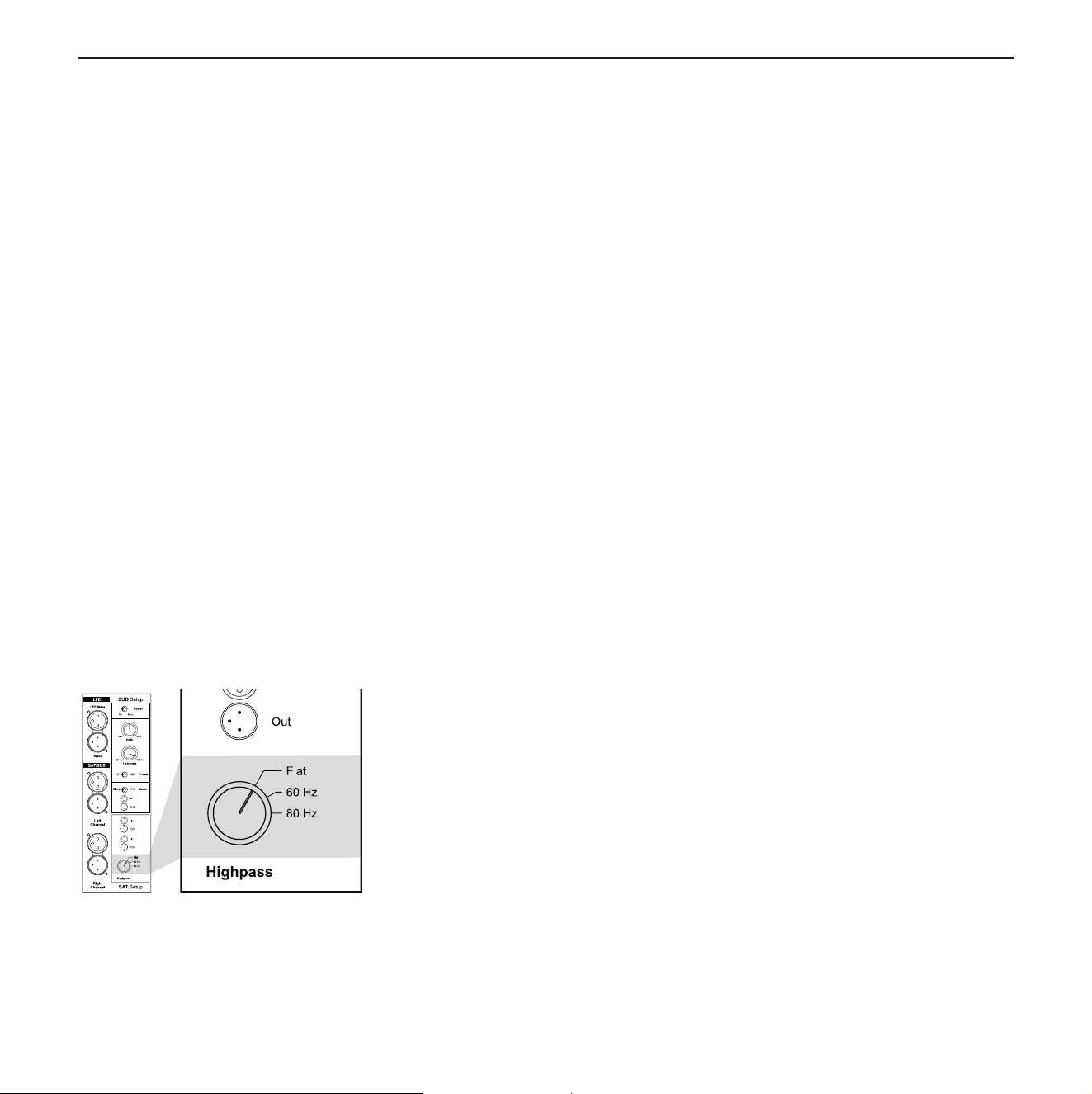
Withthephasesettingsyoucanadjustthephaserelationship
betweenthesubwooferandmainspeakers.Ifeithersubwoof-
erormainspeakerareslightlyoutofphaseinrelationtothe
other,itcanresultindecreasedbassoutputinthefrequency
responseareawheretheyoverlapeachother.
The phase relationship between subwoofer and satellite
speakersisverydependentonrelativedistance,construction
and working principles of the main speakers.The gure on
theleft showsa case wherebyphase ofthe subwoofer and
main speakers are incorrect in the critical overlap area, thus
signicantlyreducingacousticoutputinthelisteningroomin
that area.
To nd the correct phase setting:
1.Playabass-richtrackwhichalsocoverstheoverlaparea.
2.TogglethePhaseswitchbetween0°and180°.
Choose the setting for which you experience the most
bass.
5. Operation
10 Dynaudio Acoustics BM14S
Setting the phase (Phase)
With the phase settings you can adjust the phase relationship between the subwoofer
and main speakers. If either subwoofer or main speaker are slightly out of phase in
relation to the other, it can result in decreased bass output in the frequency response
area where they overlap each other.
The phase relationship between subwoofer and satellite speakers is very dependent
on relative distance, construction and working principles of the main speakers. The
figure on the left shows a case whereby phase of the subwoofer and main speakers
are incorrect in the critical overlap area, thus significantly reducing acoustic output in
the listening room in that area.
To find the correct phase setting:
1. Play a bass-rich track which also covers the overlap area.
2. Toggle the Phase switch between 0° and 180°.
Choose the setting for which you experience the most bass.
Setting the satellite cut-off frequency (Highpass)
Depending on the bass capabilities of the speakers, the frequency range of
subwoofer and speakers can overlap between 50 Hz and 150 Hz. A bump or a gap in
the frequency response and thus a lower sound quality will be experienced if the
system is not matched properly. In addition, small speakers and low powered
amplifiers will particularly be affected by the low frequency signals, which again has
a negative effect on the sound
quality. Therefore it makes sense to limit the bass
range of the connected speakers (called “satellites” in this case) by a highpass filter.
The BM14S provides three settings to achieve this:
• Flat = no limitation
• 60 Hz = frequencies below 60 Hz are cut-off
• 80 Hz = frequencies below 80 Hz are cut-off
To set the cut-off frequency
Switch Highpass control to needed position.
Note: You can not set the phase if the subwoofer is in slave mode. In this case the
phase is controlled by the setting of the master subwoofer.
Combined frequency response
Subwoofer
Main speakers
Level
Frequency
Dynaudio Professional BM14SII manual.indd 10 2014-02-24 14:45
Operation
Owner’s manual 11
Note:
Youcannotsetthephaseifthesubwooferisinslavemode.
Inthiscasethephaseiscontrolledbythesettingofthemaster
subwoofer.
Setting the satellite cut-off frequency (Highpass)
Dependingonthebasscapabilitiesofthespeakers,thefre-
quency range of subwoofer and speakers can overlap be-
tween50Hzand150Hz.Abumporagapinthefrequency
responseandthusalowersoundqualitywillbeexperiencedif
thesystemisnotmatchedproperly.Inaddition,smallspeak-
ersandlowpoweredamplierswillparticularlybeaffectedby
thelowfrequencysignals,whichagainhasanegativeeffect
on the sound quality. Therefore it makes sense to limit the
bass range of the connected speakers (called “satellites” in
thiscase)bya highpasslter.The BM14SIIprovides three
settingstoachievethis:
– Flat = no limitation
– 60 Hz=frequenciesbelow60Hzarecutoff.
– 80 Hz=frequenciesbelow80Hzarecutoff.
To set the cut-off frequency
–SwitchHighpasscontroltoneededposition.
5. Operation
10 Dynaudio Acoustics BM14S
Setting the phase (Phase)
With the phase settings you can adjust the phase relationship between the subwoofer
and main speakers. If either subwoofer or main speaker are slightly out of phase in
relation to the other, it can result in decreased bass output in the frequency response
area where they overlap each other.
The phase relationship between subwoofer and satellite speakers is very dependent
on relative distance, construction and working principles of the main speakers. The
figure on the left shows a case whereby phase of the subwoofer and main speakers
are incorrect in the critical overlap area, thus significantly reducing acoustic output in
the listening room in that area.
To find the correct phase setting:
1. Play a bass-rich track which also covers the overlap area.
2. Toggle the Phase switch between 0° and 180°.
Choose the setting for which you experience the most bass.
Setting the satellite cut-off frequency (Highpass)
Depending on the bass capabilities of the speakers, the frequency range of
subwoofer and speakers can overlap between 50 Hz and 150 Hz. A bump or a gap in
the frequency response and thus a lower sound quality will be experienced if the
system is not matched properly. In addition, small speakers and low powered
amplifiers will particularly be affected by the low frequency signals, which again has
a negative effect on the sound quality. Therefore it makes sense to limit the bass
range of the connected speakers (called “satellites” in this case) by a highpass filter.
The BM14S provides three settings to achieve this:
• Flat = no limitation
• 60 Hz = frequencies below 60 Hz are cut-off
• 80 Hz = frequencies below 80 Hz are cut-off
To set the cut-off frequency
Switch Highpass control to needed position.
Note: You can not set the phase if the subwoofer is in slave mode. In this case the
phase is controlled by the setting of the master subwoofer.
Combined frequency response
Subwoofer
Main speakers
Level
Frequency
Dynaudio Professional BM14SII manual.indd 11 2014-02-24 14:45

Troubleshooting
12 BM14SII
Troubleshooting
There may be various reasons why the subwoofer doesn’t
function properly in a system without it being faulty. The
checklistbelowwillhelpsolveproblemsyoumayencounter.
Beforeconsulting your Dynaudio Professional dealer,check
thislistrst.
Checkthisrst:
–Checkifallsignalcablesareconnectedproperly.
–Checksettingsinbassmanagementmenuoftheconnect-
ed source.
–Carefully and gradually increase the subwoofer volume
level on the source.
–Carefully and gradually increase the subwoofer volume
levelonthesubwooferGaincontrol.
Problem Cause Solution
Thesubwooferswitchesitselfoff
whilemusicisbeingplayed.
Thereishardlyanylow-frequencysignalavailableinthe
signal. This can happen if the music or movie itself does
notcontainverylowfrequencies(e.g.longdialogues).
– Thesubwooferwillswitchonautomaticallyassoonas
low frequent music signals are detected.
– Switchsubwooferoffandonagainbymeansofthemain
POWER switch.
Thesubwooferwillnotswitchon
at all.
– ACmainscablehasbecomedisconnected(LEDdoes
not lit)
– MainsswitchonthebackisswitchedtoOFF(LEDdoes
not lit)
Makesuretoswitchthesystemoffrstbeforemaking
anychanges!
– Reconnectmainscable.
– Switchmainsbackon.
– Checkifallsignalcablesareconnectedproperly.
Thesubwooferwillnotswitchon
automatically.
– Nosignalispresentoneitherofthesubwoofer’sinputs
(LED lights red).
Makesuretoswitchthesystemoffrstbeforemaking
anychanges!
– Checkifallsignalcablesareconnectedproperly.
– Checkifthesubwooferoutputonthesourceisengaged.
Subwooferisswitchedonbutno
soundfromthesubwoofer.
– Nosignalispresentoneitherofthesubwoofer’sinputs.
– Inthesource’sbass-managementset-up,subwoofer
hasbeendisabled.
– Subwoofervolumelevelhasbeenturneddownallthe
wayonthesource.
– Subwoofervolumelevelhasbeenturneddownallthe
waywiththesubwoofer’scontrol.
Makesuretoswitchthesystemoffrstbeforemaking
anychanges!
– Checkifallsignalcablesareconnectedproperly.
– Checksettingsinbassmanagementmenuofthe
source.
– Carefullyandgraduallyincreasethesubwoofervolume
level on the source.
– Carefullyandgraduallyincreasethesubwoofervolume
levelonthesubwooferGaincontrol.
Dynaudio Professional BM14SII manual.indd 12 2014-02-24 14:45
Troubleshooting
Owner’s manual 13
Maintenance
Cleaning the subwoofer
Dynaudio loudspeakers require no special treatment apart
fromthekindofcarefulhandlingyouwouldnormallyapplyto
anyhightechproductinyourhome.
DANGER
Dangerous voltage inside!
Cleaning the BM14S II or other system components when
switched on can lead to damages or electric shock.
–Switchoffthesubwooferandallothercomponentsofyour
systemwhencleaninganyofthesecomponents.
Note:
Becausemanydifferentmaterialslikewoodveneer,aluminum
andfabricareutilizedwithintheAudience,all-in-onecleaning
materials should not be used. Please avoid any aggressive
cleaninguidsorspecialfurniturepolishesaswell.
To clean the subwoofer:
–Thecabinetandotherplainpartsshouldbecleanedwitha
softdryorslightlydampcloth.
–Dust onthe woofer diaphragms maybe removed witha
nefurniturebrush.
Note:
Avoid touching the tweeter domes as any change of their
shapemayhaveanimpactonsoundquality.
Changing the fuse
WARNING
Risk of re due to wrong fuse type!
Insertingthewrongfusetypecanleadtooverheatingandin-
ammationofthesubwoofer.
–Forcontinuedprotectionagainstriskofre,replaceonly
withsametypefuseandrating.
The fuse is placed on the rear of the subwoofer below the
mainspower input.It can bechanged withoutremoving the
ampliermodule.
8. Warranty
Dynaudio Acoustics BM14S 13
Changing the fuse
The fuse is placed on the rear of the subwoofer below the mains power input. It can
be changed without removing the amplifier module.
To change the fuse:
1. Switch off the mains power switch and unplug the power cable.
2. Pull out the fuse holder
3. Replace fuse with same type and rating
4. Push fuse holder back firmly until it is locked into position.
WARNING
Risk of fire due to wrong fuse type!
Inserting the wrong fuse type can lead to overheating and inflammation of the
subwoofer.
For continued protection against risk of fire, replace only with same type fuse
and rating.
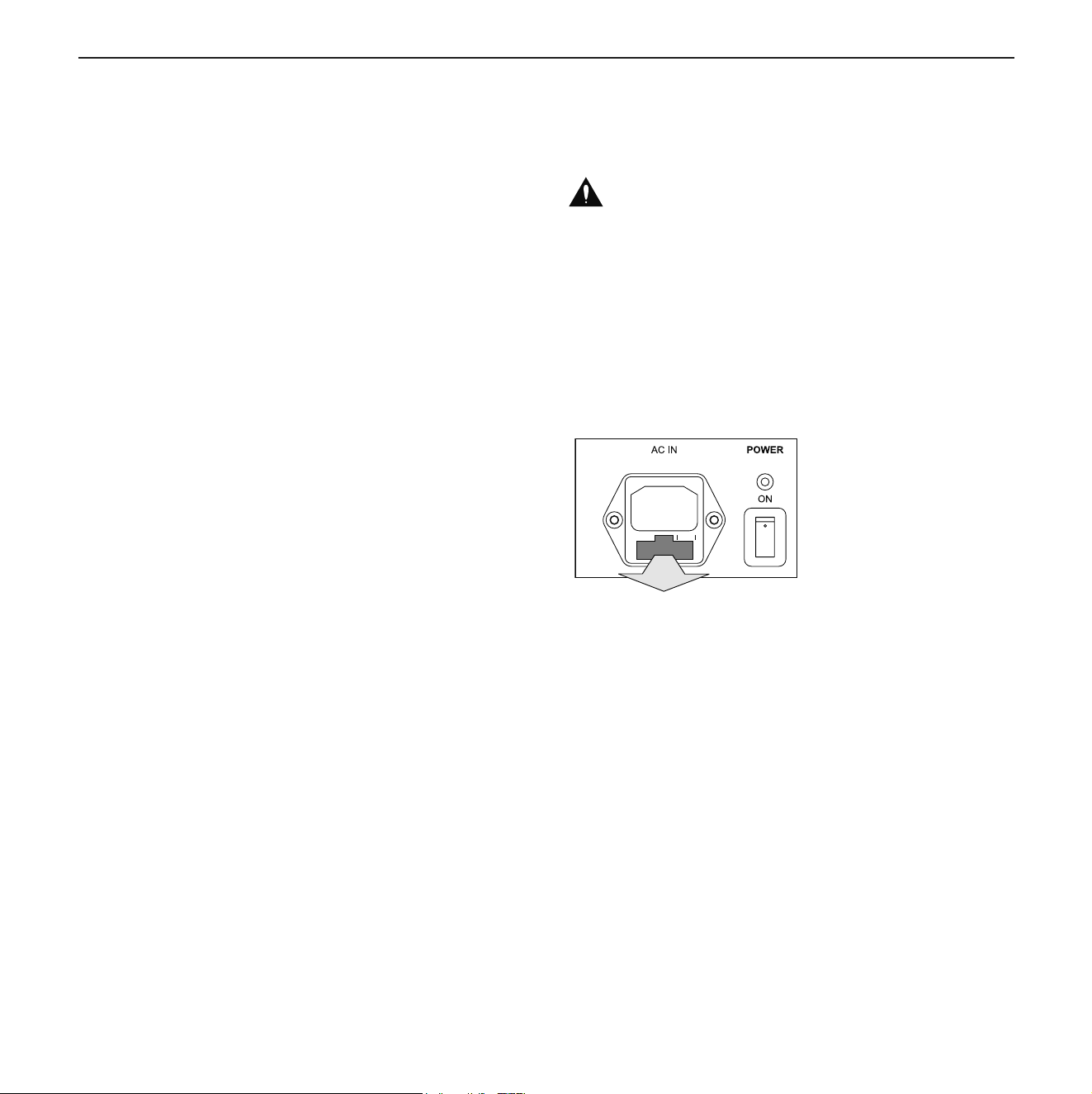
To change the fuse:
1.Switchoffthemainspowerswitchandunplugthepower
cable.
2. Pull out the fuse holder.
3.Replacefusewithsametypeandrating.
4.Pushfuseholderbackrmlyuntilitislockedintoposition.
Dynaudio Professional BM14SII manual.indd 13 2014-02-24 14:45

Warranty
14 BM14SII
Warranty
DynaudioProfessionalproductsarewarrantedtobefreefrom
defectsin components and factory workmanship undernor-
maluseandserviceforaperiodoftwo(2)yearswhenbought
from a reseller within the EU.
DynaudioProfessionalproductsarewarrantedtobefreefrom
defectsin components and factory workmanship undernor-
maluseandserviceforaperiodofone(1)yearwhenbought
from a reseller outside the EU.
Whenfailingtoperformasspeciedduringthewarrantype-
riod we will undertake to repair, or at our option, replace this
product at no charge to its owner, provided the unit is returned
undamaged and shipping prepaid, to an authorized service
facilityortothefactory.
Dynaudioshallnotberesponsibleforanyincidentalorcon-
sequential damages. Dynaudio’s responsibility is limited to
theproductitself.Dynaudioassumesnoresponsibilityforany
lossduetocancellationofanyevents,orrentofreplacement
equipmentorcostsduetothirdparty’sorcustomer’slossof
prot,oranyotherindirectcostorlosseshoweverincurred.
Dynaudio reserves the right to make changes or improve-
mentsindesignormanufacturingwithoutassuminganyob-
ligation to change or improve products previously manufac-
turedand/orsold.
The product warranty is only valid in the country where the
product was purchased.
Exceptions
Dynaudiowillalwaysfollowthelawoftherespectivemarkets
shoulditdifferfromthepolicystatedaboveortheexceptions
statedbelow.
Thiswarrantyshallbenullandvoid,iftheproductissubject-
ed to repair work or alteration by a person or facility other
thanthose authorizedby Dynaudio;mechanical damagein-
cluding shipping accidents; war, civil insurrection, misuse,
abuse,operationwithincorrectACvoltage,incorrectconnec-
tions, wrong accessories, incorrect use of accessories, oper-
ationwithfaultyassociatedequipment,exposuretoinclement
weather conditions and normal wear and tear.
Units,onwhichtheserialnumberhasbeenremovedorde-
faced,arenoteligibleforwarrantyservice.
Dynaudio Professional BM14SII manual.indd 14 2014-02-24 14:45

TechnicalSpecications
Owner’s manual 15
Technical Specications
System Activesubwoofer
Bass principle Closed
Frequencyresponse 18Hzto250Hz(+/-3dB)
Inputs–LFE/Slave XLR
Inputs–SAT/SUB Right/leftfullbandwidth,XLR
Inputimpedance–+branch 20 kOhm
Inputimpedance–-branch 10 kOhm
Sensitivity 75mVRMSto5VRMS,adjustable
Max. input voltage 10VRMS
Outputs–Slave XLR
Outputs–SAT/SUB Right/left,Highpassltered,XLR
Output impedance 100Ohm(eachbranch)
XLR Pinout 1=0/2=+/3=–
Mode selector LFE,Slave(Phaseandvolumecontrolsarebypassedinslavemode)
Phaseadjustment 0°,180°
Highpass Flat,60Hz,80Hz
Lowpass 50Hzto150Hz
Power modes On,Auto
Amplierpower 300 W, 4 Ohm
Powerconsumption–Standby < 0.5 W
Power consumption – max. 325 W
Woofer – Cone 300mm/12”,longthrow,
onepiecemoldedMSP(MagnesiumSilicatePolymer)cone
Woofer – Coil 100mm/4”,purealuminumvoicecoil
Dimensions, external (Depth x Width x Height) 412 x 350 x 350 mm (incl. cloth cover)
Cabinetvolume 31 liters
Weight 21 kg
Mains–100-120V,50/60Hz FuseT4A
Mains–220-240V,50/60Hz FuseT2A
Duetocontinuousdevelopment,thesespecicationsaresubjecttochangewithoutnotice.
Dynaudio Professional BM14SII manual.indd 15 2014-02-24 14:45

Notes
16 BM14SII
Notes
Dynaudio Professional BM14SII manual.indd 16 2014-02-24 14:45

Notes
Owner’s manual 17
Dynaudio Professional BM14SII manual.indd 17 2014-02-24 14:45

Notes
18 BM14SII
© Dynaudio A/S, 8660 Skanderborg, Denmark
Owner’sManualBM14SII0214–itemno.455408
Alltextandimagecopyrightsreserved.Subjecttochangewithoutnotice.
www.dynaudioprofessional.com
Dynaudio Professional BM14SII manual.indd 18 2014-02-24 14:45