
成品尺寸:80*54mm 128克铜版纸 四色印刷 过油 封面封底 哑膜
骑马钉
USER MANUAL
SPEAQUA.COM
@SPEAQUASOUNDCO
#MOREMUSICMOREPLACES

Greetings from SPEAQUA SOUND COMPANY headquarters in San Diego,
CA - and thank you for purchasing BARNACLE X!
Our mission is to bring more music, more places. Products built with
purpose: function driven, form refined, and built to go where other
speakers can’t.
SPEAQUA SOUND COMPANY
Wall outlet - you'll need to find a power cord with a USB-C or a USB AC
adapter. This includes the one typically used for your cell phone.
Computer - simply plug the USB end of the cable into your computer.
Charging Barnacle X is really easy. We have enclosed a USB charging cord, which you can
plug into a wall outlet or your computer. The battery is rechargeable and allows for up to 12
hours of jamming.
CHARGING
PACKAGING CONTENTS
12 Months Limited Warranty. Please visit www.Speaqua.com for details.
WARRANTY
Speaker, USB charging cable, GoPro Mount Adapter, User Manual
•Press the EQ key to switch between "Indoor" and "Outdoor" modes.
•EQ indicator: In “Outdoor” mode, a white indicator light will turn on.
•When in “Indoor” mode: RGB ring turns to blue.
•When in “Outdoor” mode: RGB ring turns to Red.
BUTTON CONTROL
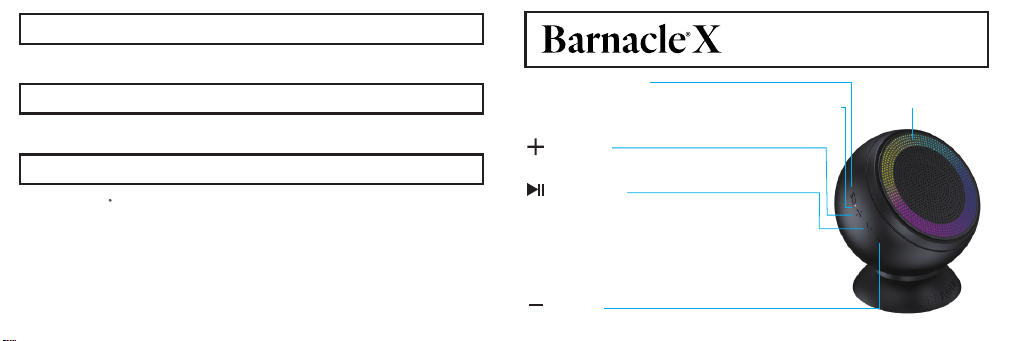
EQ adjustment
• Press to increase volume. The RGB ring light will be fully
displayed at maximum volume. Hold for the next track.
Volume+
Pause/Play
• Press to pause music currently playing.
• Press to receive incoming phone calls, as well as hang
up a phone call.
• Hold to reject an incoming phone call.
• Bluetooth pairing: Hold Play key for 2 seconds to enter the
Bluetooth pairing mode, and a blue indicator light will flicker.
• Disable Bluetooth: Hold Play key for 5 seconds to clear the
Bluetooth pairing list.
• Press to decrease volume. The RGB ring light will decrease gradually. Hold for the previous track.
Volume-
RGB Light Ring
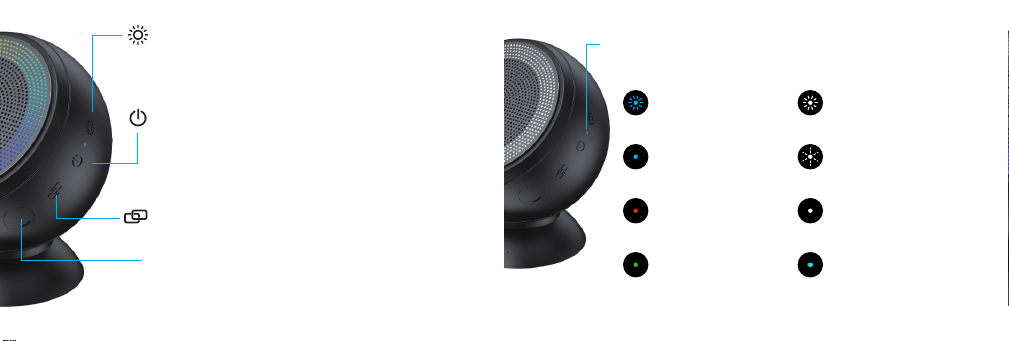
Description of LED Indicators
RGB Atmosphere Light
• Short Press: Switch the ambient light effect, (white light/colorful
rotating light/rhythmic light/mixed color ring light/monochromatic
breathing light), the RGB ambient light is turned off by default
once you turn it on.
• Press and hold to turn off the RGB light.
Power key
• Hold the Power key to power on the speaker and the blue
indicator light will be on for 1 second.
• Hold the Power key to power off the speaker and the indicator
light will turn off before the speaker powers down.
• Mode switching: Press Power key to switch between Bluetooth
mode and memory mode.
USB Type-C interface
•Connect the DC 5V2A~5V3A USB power adapter for charging.
•Memory mode: When powered-on, connect the charging cable to
enter memory mode, and the green indicator light will flicker.
Remove the charging cable and the speaker automatically switches
to memory mode.
Multi-speaker pairing
•Press Link key for the host and hold the Link key for the slave.
Bluetooth pairing-flickering.
Blue light is on for
Bluetooth connection.
Green light is on while
in memory mode.
The host enters multi-pairing
mode and the white light-flickers
slowly.
Red light is on while
charging and off once
fully charged.
The slave enters multi-pairing
mode and the white light-flickers
quickly.
White light of the slave speaker
is on once multi-speaker pairing
is completed.
Blue or green light is on while
songs are being shuffled
in memory mode.
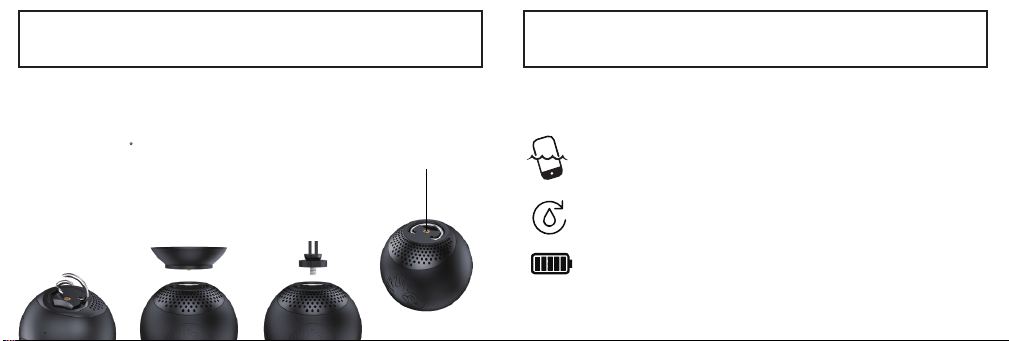
BUILT-IN FEATURES
UNIVERSAL MOUNTING
BUILT-IN CARABINER + 1/4” THREADED SCREW
WHAT IS FUNCTIONALITY WATERPROOF?
NO PHONE NEEDED
UNINTERRUPTED PLAY
SAVES BATTERY LIFE
BUILT-IN CARABINER
1/4” THREADED SCREW
REMOVABLE SUCTION GOPRO® MOUNT ADAPTER
Stick it. Hang it. Fasten it. Designed for true portable outdoor
performance, Barnacle X offers unprecedented versatility with its
tool-free mounting options. 1/4" thread secures the speaker to any
universal camera mount, while the metal hanger offers convenient
on-the-go attachment and hanging options.
The ability to function and continuously play music IN, AROUND, AND UNDERWATER
independent of a smart speaker.
NO MORE. Being tethered to your phone or water damage.
NO MORE. Bluetooth disconnecting when submersed. Continuous (& audible)
underwater play.
NO MORE: Draining your phone’s battery life or streaming data.

PLAYING OF MEMORY MODE MULTI-SPEAKER PAIRING
Step 1: The speaker enters Bluetooth mode by default after it powers on. At this time, press the
Power key to switch to memory mode.
Step 2: When songs in memory mode are playing, the indicator light will turn green. When the
songs are paused, the indicator light will remain green and flicker slowly.
Step 3: Switch to shuffle mode: The songs will play in the order they are added. Double click the
Power key to access shuffle mode. At this time, the indicator light will cycle between green and
blue, indicating that the switch was successful. Double click the Power key again to disable
shuffle mode.
Press Link key for the host, and hold Link key for the slave.
Step 1: Prepare two or more speakers in power-on state.
Step 2: Select one of them as the host, press Link key. The white indicator light will start
flickering slowly, and the host will enter multi-speaker mode.
Step 3: Hold Link key for any of the other speakers and the white indicator light will start
flickering quickly. The speaker(s) that isn’t paired will enter multi-speaker pairing mode and start
searching for the host signal to connect with.
Step 4: After multi-speaker pairing mode is successful, the white indicator light of the host
speaker will flicker slowly. At this time, the indicator light of the slave speaker(s) will also turn
white.
Attention:
1.After multi-speaker pairing is successful, the slave can be disconnected by pressing the Link
key. The speaker will enter Bluetooth pairing mode. At this time, the white indicator light will turn
blue and flicker quickly.
2.If the host speaker needs to disconnect from multi-speaker pairing mode, press the Link key.
No wires, no worries. Our Bluetooth range allows your speaker to play from as far as 10
meters (33 feet) away.
Naturally, you will have to use a smartphone, tablet, or computer that has Bluetooth capabilities.
BLUETOOTH CONNECTIVITY: TURN ON & TUNE IN
HOW BLUETOOTH TECHNOLOGY WORKS?
SPEAKERPHONE
HOW THE SPEAKERPHONE WORKS?
• When receiving a phone call, press the Play key to receive. If you do not want to receive,
hold the Play key to reject the call.
• In the course of communication/dialing of a call, press the Play key to hang it up.
• When a call is coming in, the music will be paused automatically. Playing will be restored
automatically after the call is over.
• Sound source switching: During Bluetooth calls, hold the Volume+ key to transfer the call
from the speaker to your phone.
Step 1: When powered-off, hold the Power key for 2 seconds to power on the speaker. When
powered-on for the first time, the speaker will enter Bluetooth mode by default, and search for a
connection indicated by a quick-flickering blue light.
Step 2: Enable Bluetooth on your mobile phone/device. Find the new speaker named “Barnacle
X” in your Bluetooth list, and click to connect.
Step 3: After the speaker is successfully connected, it will automatically be remembered in your
Bluetooth settings when looking to reconnect during future uses.
Attention:
If the pairing list needs to be cleared, hold the Play key for 5 seconds to clear the record of all
connected devices.
As if you were not on your phone enough, we made it possible to take hands-free calls using
Barnacle X. We have found this to be really useful for not missing a call while in the shower. We
also encourage you to put down your cell phone while in the car.

What does IP68 mean?
WATERPROOF/DUSTPROOF: IP68
FCC DISCLAIMER
• Reorient or relocate the receiving antenna.
• Increase the separation between the equipment and receiver.
• Connect the equipment into an outlet on a circuit different from that to which the receiver
is connected.
The device has been evaluated to meet general RF exposure requirement.
The device can be used in portable exposure condition without restriction.
IP stands for ingress protection. The IP system is a solid particle protection and water protection
grading system. The 1st number is solid particle protection, rated (0-6). The 2nd number is
water protection, rated (0-8). We uphold the best rating of solid particle protection (6). This
means the speaker is fully dustproof. If you were to place the speaker in a box of talcum powder
and stir the powder around for up to eight hours, the dust could not enter the speaker.
Like we said, Barnacle X is a creature of the sea and we designed this creature to endure any
aquatic adventure. Barnacle X upholds the highest rating of water protection (8)! - Capable of
withstanding full water immersion.
• To be specific, a depth of one meter (3.3 feet) for up to 60 minutes.
Note: We encourage you to bring this speaker with you on all your adventures. Don't be afraid of
some sand, mud, snow, or ocean water. For this reason, we have made the speaker really easy
to clean. Use fresh water and a soft towel to wipe away dirt/dust.
FCC ID: 2BWIR-BARNACLEX
Note: this device complies with part 15 of the FCC Rules. Operation is subject to the following
two conditions: (1) this device may not cause harmful interference, and (2) this device must
accept any interference received, including interference that may cause undesired operation.
Note: this equipment has been tested and found to comply with the limits for a Class B digital
device, pursuant to part 15 of the FCC Rules. These limits are designed to provide
reasonable protection against harmful interference in a residential installation.
This equipment generates uses and can radiate radio frequency energy and, if not
installed and used in accordance with the instructions, may cause harmful interference to radio
communications. However, there is no guarantee that interference will not occur in a particular
installation. If this equipment causes harmful interference to radio or television reception,
which can be determined by turning the equipment off and on, the user is encouraged to
try to correct the interference by one or more of the following measures:
• Consult the dealer or an experienced radio/TV technician for help.
Note: changes or modifications not expressly approved by Speaqua Corp. could void the
user's authority to operate this equipment.
PLEASE USE THIS PRODUCT RESPONSIBLY.
Here are some standard safeguards to follow when using any consumer electronics:
• WARNING: do not place speaker very close to your ears. This may cause damage to your
eardrums, particularly in young children.
• For the reason above, please keep away from young children. This is not a toy.
• SPEAQUA is not liable for any damage to smartphones, iPods/MP3/M4A
• Keep speaker clear from heated surfaces.
• Use this product for its intended uses described in the manual.
• Do not operate this product if there is any damage to the cord, plug, or housing.
LET'S TAKE IT A STEP FORWARD. WE WILL MAKE IT EASY FOR YOU.
SEND IT BACK AND GET 20% OFF YOUR NEXT PURCHASE
1.If your product is damaged or unwanted, please email [email protected] the
reason for your return and your address.
2.We will send you a pre-paid packaging label (USA only). Please return the unwanted speaker
back to us.
3.Our team will dispose of the unit properly through a local registered electronic recycling center.
4.You receive 20% OFF your next purchase.
ELECTRONIC RECYCLING INITIATIVE
In an initiative to help bring awareness to the importance of electronic recycling, we aim to set
a trend not just in innovation, but also in environmental responsibility. Speaqua has initiated an
electronic-recycling program to help reduce the mining of rare earth metals and the refining
processes they go through. This program aims to help 1) reduce the overabundance of rare
earth mineral mining 2) preserve our land & oceans 3) bring education to the importance of
electronic recycling and its impact on our environment. For more information please visit
www.speaqua.com.