深圳市澜科创科技有限公司
独立站产品说明书
20260902
生产材料 128G双铜/单色印刷/展开尺寸700*120MM/风琴6折/折叠后尺寸120*100MM/
IMPORTANT SAFETY INSTRUCTIONS-CAREFULLY
• Retain this manual for future reference. It contains important safety and operating
information.
• Read all instructions before using the product and follow all safety warnings.
• This product is not intended for use by children or persons with reduced physical,
sensory, or mental capabilities unless properly supervised.
• Do not allow children to play with the product.
• Do not expose the product to fire or excessive heat.
• Do n
ot use or store the product in environments with extreme temperatures,
moisture, or humidity.
• Do not use the product if it has been dropped, damaged, or is not operating
normally.
• Do not disassemble, modify, or attempt to repair the product. Doing so may cause
injury or damage.
• Do not crush, puncture, throw, or apply excessive force to the product.
• Keep the product away from flammable or explosive materials.
• The built-in battery is not user-replaceable.
• Do not open the
product or attempt to replace the battery.
• Charge the product only with the provided or specified charging cable and a
certified power source.
• Do not charge the product near heat sources or in high-temperature environments.
• If the product becomes excessively hot, emits an unusual odor, or shows abnormal
behavior, stop using it immediately and disconnect from the power source.
• Use this product only for its intended purpose and in accordance with this manual.
• LK shall
not be liable for damage or injury resulting from misuse, unauthorized
modification, improper battery use, or operation outside recommended conditions.
• Dispose of the product and batteries in compliance with local environmental and
electronic waste regulations.
• Thank you for purchasing LK Hybrid Active Noise Cancelling Headphones. Please
read this User Manual thoroughly before use of the product and retain it for future
reference. If you have any problem u
sing this product, please contact us by the email
address provided on the back cover of the manual.
ANC / Transparency Mode
Single-click ANC button to switch between ANC Mode, Transparency Mode,
and Normal Mode.
Charging Instructions
FCC STATEMENT:
• When the battery is low, the headphones will play the voice prompt "Low
Battery" and the indicator will flash red every 3 seconds.
• Charge the headphones with the included charging cable.
The indicator stays solid red during charging and
turns solid blue once fully
charged.
This device complies with Part 15 of the FCC Rules. Operation is subject to the
following two conditions: (1) This device may not cause harmful interference, and (2)
this device must accept any interference received, including interference that may
cause undesired operation.
NOTE 1: This equipment has been tested and found to comply with the limits for a
Class B digital device, pursuant to part 15 of the FCC Rules. These limits are
designed
to provide reasonable protection against harmful interference in a residential
installation. This equipment generates, uses and can radiate radio frequency energy
and, if not installed and used in accordance with the instructions, may cause harmful
interference to radio communications. However, there is no guarantee that
interference will not occur in a particular installation. If this equipment does cause
harmful interference to radio or television rec
eption, which can be determined by
turning the equipment off and on, the user is encouraged to try to correct the
interference by one or more of the following measures:
• Reorient or relocate the receiving antenna.
• Increase the separation between the equipment and receiver.
• Connect the equipment into an outlet on a circuit different from that to which the
receiver is connected.
• Consult the dealer or an experienced radio/TV technician for help.
NOTE 2: Any changes or
modifications to this unit not expressly approved by the party
responsible for compliance could void the user's authority to operate the equipment.
The device has been evaluated to meet general RF exposure requirement. The device
can be used in portable exposure condition without restriction.
What this warranty covers?
Shenzhenshi Lankechaung Technology Co.,Ltd. (Manufacturer: "Lankechaung")
warrants to the original purchaser of this LK product that t
he product shall be
free of defects in design, assembly, material, or workmanship.
What the period of coverage is?
Lankechaung warrants the LK product for 12 months.
What will we do to correct problems?
Lankechaung will repair or replace, at its option, any defective product free of
charge (except for shipping charges for the product).
What is not covered by this warranty?
All above warranties are null and void if the LK product is not provided to
Lankechaung for inspecti
on upon Lankechaung’s request at the sole expense of
the purchaser, or if Lankechaung determines that the LK product has been
improperly installed, altered in any way, or tampered with. The LK Product
Warranty does not protect against acts of God such as flood, earthquake,
lightning, war, vandalism, theft, normal-use wear and tear, erosion, depletion,
obsolescence, abuse, damage due to low voltage disturbances (e.g. brownouts
or sags), non-authorized program, or system equipment modi
fication or
alteration.
How to claim the warranty?
For more information, please contact your retailer, visit the LK official website, or
reach us via the email address provided on the back cover. To extend the
warranty period, please visit LK website and register your LK products within 90
days of purchase.
Disclaimer
Every effort has been made to ensure that the information and procedures in
this guide are accurate and complete, no liability can
be accepted for any errors
or omissions and we reserve the right to make any changes without further
notice to any products mentioned herein.
Limited 12-Month Warranty
Correct Disposal of This Product
(Waste Electrical& Electronic Equipment)
This Marking shown on the product or its literature, indicate that it should not be
disposed with other household wastes at the end of its working life. To prevent
possible harm to the environment or human health from uncontrolled waste
disposal, please separate this from other types of wastes and recycle it responsibly
to promote the sustainable reuse of material resources. Household user should
contact either the retailer where they purchased this product, or their local
government office, for details of where and how they can take this item for
environmentally safe recycling. Business users should contact their supplier and
check the terms and conditions of the purchase contact. This product should not be
mixed with other commercial wastes for disposal.
H5 Lite
Wirless Headphones with Active Noice Cancellation
User Guide & Warranty Card
User Manual
Safety Information Read all instructions carefully before use.
• For your safety, do not use the headphones while driving or cycling.
• This device is not a toy. Children should only use it under adult supervision.
• Keep the device and its accessories out of reach of children to prevent
choking hazards.
• Do not listen at high volume for extended periods to avoid hearing damage.
• Use only accessories specified by the manufacturer.
• The device must be serviced by authorized personnel. Do not modify the
headphones
yourself.
• Do not continue using the device if the charging port is damaged, if liquid
or foreign objects have entered the device, or if it has been exposed to rain or
moisture.
• This device contains a non-removable battery. Do not attempt to replace it
yourself.
• The built-in lithium battery should not be exposed to prolonged direct
sunlight (e.g., on a car dashboard or windowsill).
• Keep the device away from heat sources or open flames, such as
heaters, microwaves, ovens, water heaters, stoves, or an
y other
high-temperature areas.
• Use the device within a temperature range of 0°-35°.
Extremely high or low temperatures may cause malfunction.
•
In environments with many 2.4GHz wireless devices, wireless performance
may be affected by interference.
• During dry seasons, you may feel a slight tingling sensation when wearing
or touching the device. This is caused by static electricity from your body and
does not indicate a defect.
• Use only a dry cloth to clean the device.
Noise Cancellation
The headphones default to Music Mode when powered on.
In Music Mode, press the ANC button once to enter Transparency Mode.
Each subsequent press of the ANC button cycles through:
Transparency Mode → ANC Mode → Music Mode.
LDAC Function
LDAC Function
The LDAC function is disabled by default upon factory shipment.
• With the headphones powered on, quadruple-press the ANC button to
enable LDAC; quadruple-press again to disable it.
• You can also turn LDAC on/off via the APP.
Spatial Audio
Double-press the ANC button to enable Spatial Audio
mode.
Double-press the ANC button again to disable it.
https://www.lkaudio.com
Username
Contact Details
Product Return
Username
Reason
After-Sales Service Warranty Card
AUX Mode
AUX Connection (Optional)
Insert the AUX cable (sold separately) into the AUX port. The
headphones will automatically enter AUX mode.
Note: If the AUX cable is inserted while the headphones are powered on,
they will automatically shut down.
Charging the Headphones
Use the supplied Type-C charging cable to connect the headphones to a USB
power adapter. The headphones will automatically power off and enter
charging mode once the cable is connected.
•Charging
in progress: Red LED stays on.
•Fully charged: Red LED turns off.
*The headphones will sound a low battery alert 30 minutes before shutting
down. A “Low Battery” voice prompt will be announced every 10 minutes,
and the red LED will flash every 5 seconds.
Factory Reset
With the headphones powered on and not connected to any device, press
the Multi-Function Button 5 times quickly. The headphones will reset to
factory settings.
Environmental Information| Eco-Friendly
List of names and contents of toxic and harmful substances of elements
This table is prepared in accordance with the provisions of SJ/T 11364.
○:Indicates that the content of the toxic or hazardous substance in all
homogeneous materials of this component is below the limit requirement specified
in GB/T 26572.
×: Indicates that the content of this hazardous substance in at least one
homogeneous material of the component exceeds the limit requirement specified
in G
B/T 26572, and that no mature alternative solution is currently available in the
industry.
The number within this mark indicates that the environmental protection
use period of the product under normal operating conditions is 10 years.
The number within this mark indicates that the environmental protection
use period of the battery under normal operating conditions is 5 years.
Part Name
PCB Assemblies
×
○
○
○
○
○
○
○
○
○
○
○
○
○
○
○
○
○
○
○
○
○
○
○
○
○
○
○
○
○
○
○
○
○
○
○
Magnet
Screw
Enclosure
Speaker Drive
Battery
Lead
(Pb)
Mercury
(Hg)
Cadmium
(Cd)
Hexavalent Chromium
[Cr(VI)]
Polybrominated Biphenyls
(PBB)
Polybrominated Diphenyl Ethers
(PBDE)
Toxic and Hazardous Substances / Elements
Music Playback
Play / Pause: Press the power button
briefly.
Previous Track: Press and hold the
Volume – button for 2 seconds.
Next Track: Press and hold the
Volume + button for 2 seconds.
Next Track: Press and hold the
Volume + button for 2 seconds.
Volume Up: Single-press the
Volume + button.
Volume Down: Single-press the
Volume – button.
Additional Functions
Answer: Single-press the
Multi-Function Button (MFB).
End Call: Single-press MFB.
Reject Call: Press and hold MFB for 2
seconds.
Game Mode: Triple-press the
Multi-Function Button (MFB).
Voice Assistant: Double-press
MFB (when not on a call).
Power On / Off
Power On: Press and hold the Multi-Function Button for 3 seconds. The LED
indicator will flash red and blue alternately.
Power Off: Press and hold the Multi-Function Button for 3 seconds. The LED
indicator will flash red 3 times
Bluetooth Connection
Initial Connection When powered on, the headphones automatically enter pairing mode. Turn on your
device's Bluetooth and search for available devices, keeping the headphones within 1 meter of your device.
Select “LK-H5 Lite”
from the list to pair. A confirmation tone will sound once pairing is successful.
*If the headphones have been previously paired with a device, they will automatically reconnect to the last
connected device when powered on again.
Bluetooth
LK-H5 Lite
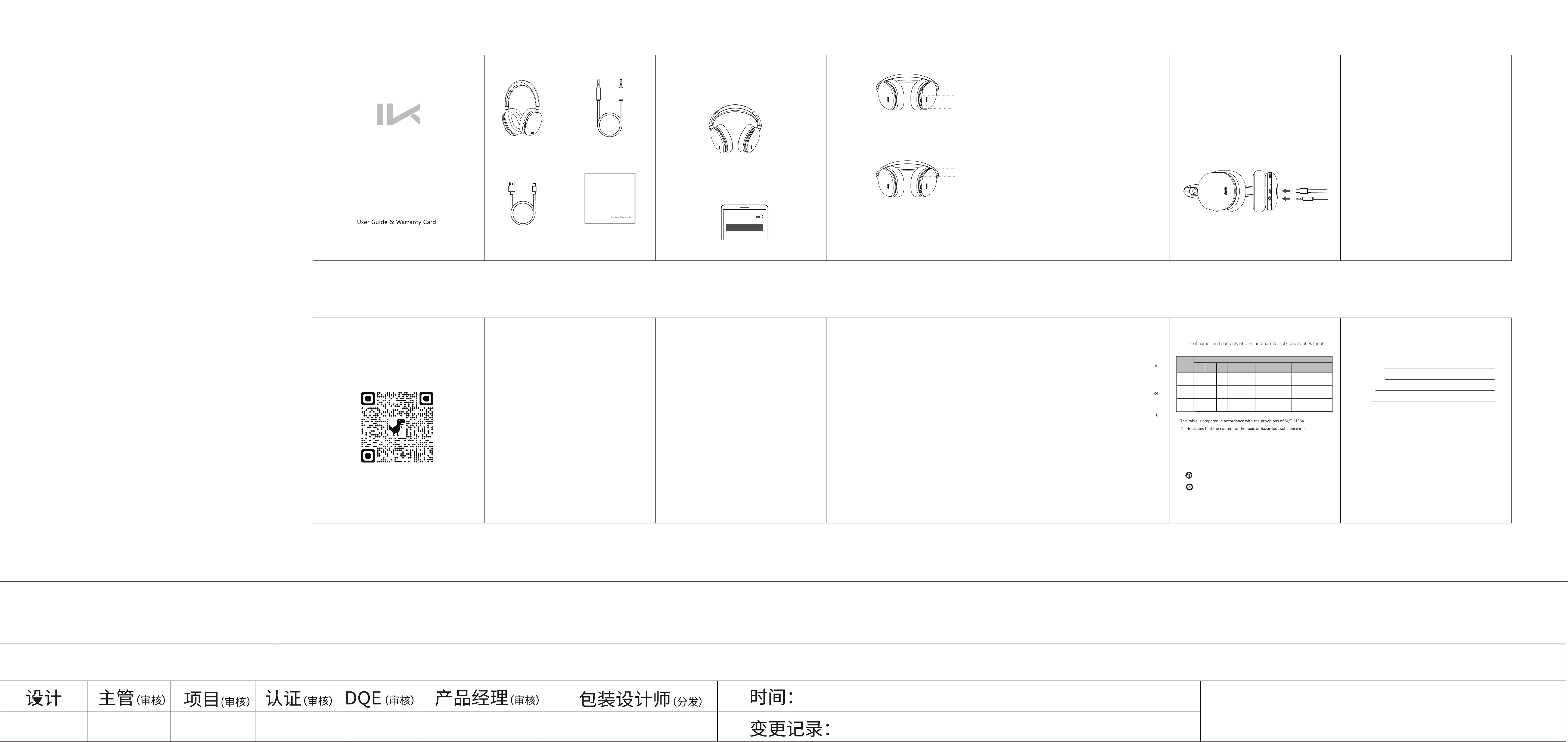
H5 Lite Headphones × 1
Type-C Charging Cable × 1
User Manual & Warranty Card × 1
AUX Audio Cable×1
User Guide & Warranty Card
H5 Lite
Wirless Headphones with Active Noice Cancellation
User Manual
Volume +
Volume −
Status Indicator Light
Type-C Port
Audio Port
Microphone Hole
ANC Key
Power Key
H5 Lite
英文版说明书
FCC WARNING
This device complies with part 15 of the FCC Rules. Operation is subject to the
following two conditions: (1) This device may not cause harmful interference, and
(2) this device must accept any interference received, including interference that
may cause undesired operation.
FCC warning:
Any Changes or modifications not expressly approved by the party responsible for
compliance could void the user's authority to operate the equipment.
Note: This equipment has been tested and found to comply with the limits for a Class
B digital device, pursuant to part 15 of the FCC Rules. These limits are designed to
provide reasonable protection against harmful interference in a residential installation.
T
his equipment generates uses and can radiate radio frequency energy and, if not
installed and used in accordance with the instructions, may cause harmful interference
to radio communications. However, there is no guarantee that interference will not
occur in a particular installation. If this equipment does cause harmful interference to
radio or television reception, which can be determined by turning the equipment off
and on, the user is encouraged to try to correct the interference by one or more of the
following measures:
-Reorient or relocate the receiving antenna.
-Increase the separation between the equipment and receiver.
-Connect the equipment into an outlet on a circuit different from that to which the
receiver is connected
.
-Consult the dealer or an experienced radio/TV technician for help.
The device has been evaluated to meet general RF exposure requirement. The device
can be used in portable exposure condition without restriction.