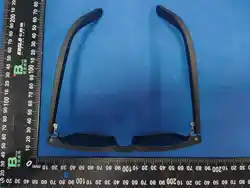
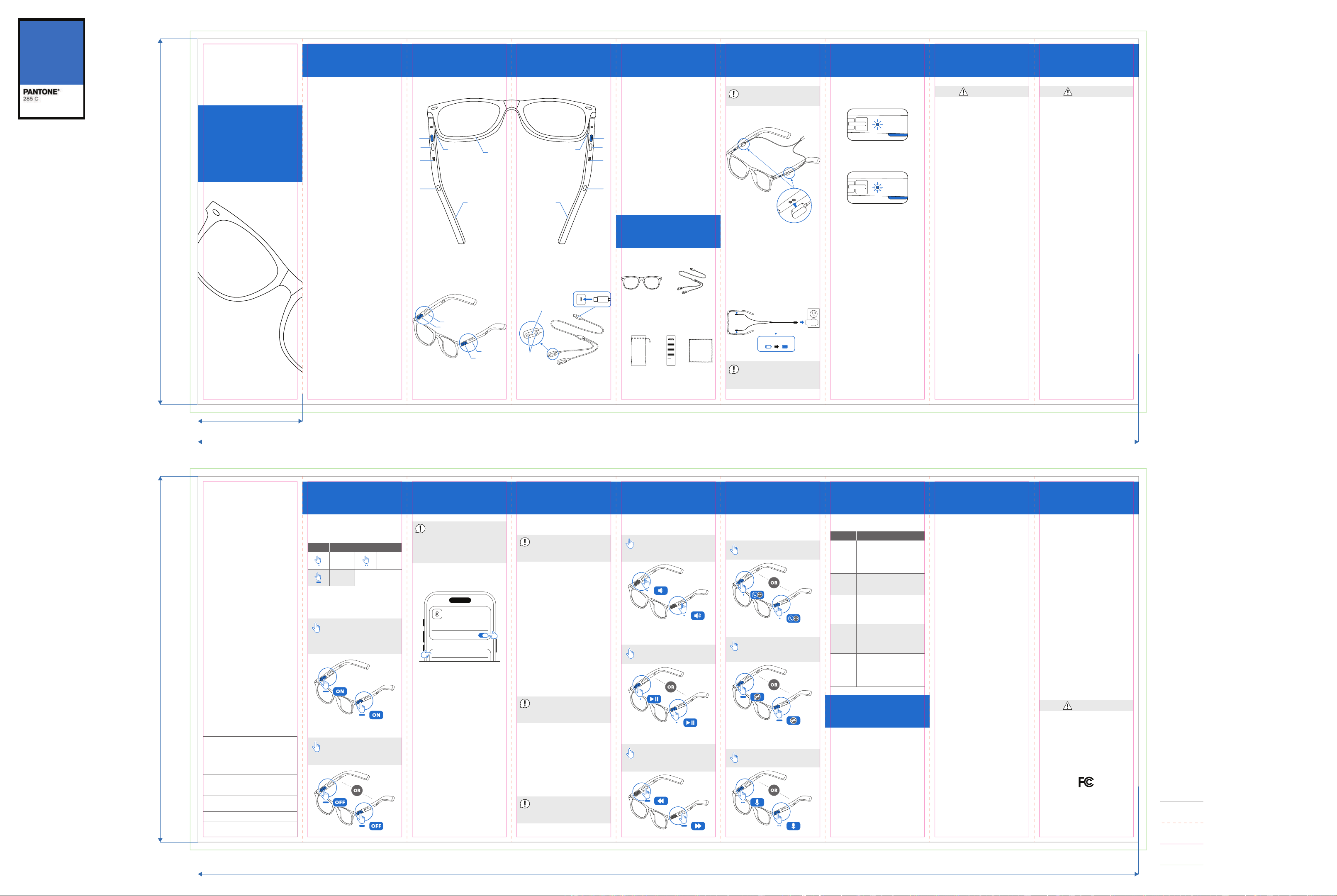
Figures 1-2:
Front, Right Temple, Left
Temple.
A - Power/Multifunction
Button.
RB - Right Functional
Button.
LB - Left Functional Button.
1 - Microphones and LED
Indicators.
2 - Magnetic Gold-plated
Charging Contacts.
3 - Speakers.
QUICK START
GUIDE
onn Smart Glasses
CONTENT &
INFORMATION
DEVICE
OVERVIEW
SAFETY
INSTRUCTIONS
CHARGING REGULATORY
NOTICES
LED IndicatorsCONTENT &
INFORMATION ................. 1
Features ......................... 1
DEVICE OVERVIEW ..........2
WHAT’S INCLUDED ......... 4
CHARGING ..................... 5
SAFETY INSTRUCTIONS ..7
REGULATORY NOTICES .. 8
OPERATION .................... 9
Power On/O................ 9
Pairing ..........................10
Unpairing ......................11
Reset Pairing.................11
Volume ......................... 12
Music............................ 12
Calls ............................. 13
Voice Assistant ........... 13
TROUBLESHOOTING ....14
FCC COMPLIANCE ........ 14
(Figures 1)
(Figures 2) (Figures 3)
1 32 4 6 7 85
FRONT VIEW
BACK VIEW
USB-C TO DUAL MAGNETIC
CHARGING CABLE
Pairing
Features
109 11 12 13 15 16
OPERATION
A
RB
3
A
LB
3
2 2
1
RIGHT TEMPLE
FRONT
LEFT TEMPLE
1
USB-C TO DUAL
MAGNETIC
CHARGING
CABLE
QUICK
START
GUIDE
CLEANING
CLOTH
WHAT’S
INCLUDED
FCC
COMPLIANCE
(Figures 11)
14
A
LB
A
RB
MAGNETS
SPRING-LOADED
CHARGING PINS
(Figures 4)
ONN SMART
GLASSES
PROTECTIVE
POUCH
Power On
Power On/O
(Figures 9)
Press and hold Button A
on each temple for 3
sec. Both temples will
automatically pair.
Power O
Press and hold Button A
on either temple for 5
sec.
(Figures 10)
Control Guide
(Table 1)
Control ControlAction Action
Single
press
Double
press
Press
and hold
5V 1A
(Figures 6)
About 1.5 hours
1. Attach one
Magnetic
Connector to
the Gold-plated Charging
Contacts on each temple.
2. Connect the USB-C plug
to a compatible 5V/1A USB
power adapter.
Before first use, fully
charge both temples.
Auto power OFF during
charging. Power ON
manually after charging.
(Figures 5)
If the glasses are not
connected to a device
within 3 min, both
temples will
automatically Power OFF.
Calls
Answer / End a Call
Press once Button A on
either temple.
(Figures 15)
Reject
Press and Hold 1 sec
Button A on either
temple.
(Figures 16)
Voice Assistant
Siri / Google Assistant
Press 2 times Button A
on either temple.
(Figures 17)
Volume
(Figures 12)
Press once Left Button /
Right Button for
Volume - / +.
(Figures 13)
Play / Pause
Music
Press once Button A on
either temple.
(Figures 14)
Previous / Next Track
Press and hold Left
Button / Right Button
for Previous / Next track.
TROUBLE-
SHOOTING
Turn ON both temples,
disconnect Bluetooth,
then reset pairing and
reconnect.
Connec-
tion
issues
Check that both
magnetic connectors
are attached correctly
and the USB-C cable is
connected.
Charging
does not
start
(Table 2)
Problem
Solution
Charge for 10-15
minutes, then press and
hold Buttons A on both
Left and Right Temples
for 3 seconds.
Cannot
power
ON
Enable Bluetooth, delete
previous pairing, then
reconnect.
Cannot
pair
Keep the phone within
Bluetooth range and
remove sources of
interference.
Poor
audio
quality
Find more at Walmart.com
THIS GUIDE CONTAINS
IMPORTANT SAFETY
INFORMATION.
For product assistance
WE CAN HELP
7 DAYS/WEEK
7:00am-9:00pm CST
1-888-516-2630
Manufactured in China for:
Walmart Inc.
Please read and keep
for future reference.
Warning
• Do not repair or modify
the product.
• Do not use if the product
is damaged.
• Keep away from water,
fire and excessive heat.
• Use only the supplied
USB-C magnetic
charging cable.
• Do not look directly at the
sun.
Battery
Charge: 0°C to 50°C.
Operate: −15°C to 55°C.
Cleaning
Clean with a microfiber
cloth. Keep charging
contacts dry. Do not use
alcohol, solvents,
abrasives, or compressed
air.
Privacy
Bluetooth audio only. No
personal data is stored or
uploaded.
Disposal
Dispose of according to
local e-waste regulations.
This device complies with
Part 15 of the FCC Rules.
Operation is subject to the
following two conditions:
1. This device may not
cause harmful
interference.
2. This device must accept
any interference received,
including interference that
may cause undesired
operation.
NOTE: This equipment has
been tested and found to
comply with the limits for a
Class B digital device,
pursuant to Part 15 of the
FCC Rules. These limits are
designed to provide
reasonable protection
against harmful
interference in a
residential installation. This
equipment generates, uses
and can radiate radio
frequency energy and, if
not installed and used in
accordance with the
instructions, may cause
harmful interference to
radio communications.
However, there is no
guarantee that
interference will not occur
in a particular installation.
If this equipment does
cause harmful interference
to radio or television
reception, which can be
determined by turning the
equipment o and on, the
user is encouraged to try
to correct the interference
by one or more of the
following measures:
FCC RF Exposure
Statement: This device
complies with FCC RF
exposure requirements for
portable use.
Impact Resistance: This
product complies with the
impact resistance
requirements of
21 CFR 801.410.
Changes or modifications
not expressly approved by
the party responsible for
compliance could void the
Warning
• Reorient or relocate the
receiving antenna.
• Increase the separation
between the equipment
and receiver.
• Connect the equipment
into an outlet on a circuit
dierent from that to
which the receiver is
connected.
• Consult the dealer or an
experienced radio/TV
technician for help.
This product can expose
you to chemicals including
Bisphenol A (BPA), which is
known to the State of
California to cause birth
defects or other
user's authority to operate t
his equipment.
FCC ID: 2BUHE-WEILAN13
reproductive harm. For
more information go to:
Warning
www.P65Warnings.ca.gov
Charging: Red light ON.
Fully charged: Green light
ON.
(Figures 7)
(Figures 8)
1.
WL13
Power ON both temples.
2. Enable Bluetooth on
your smartphone.
3. Select the Bluetooth
device name “onn Glasses
Black 01“.
4. A confirmation tone
indicates successful
pairing.
Other Devices
onn Glasses Black 01
Bluetooth
Bluetooth
Unpairing
Remove the Bluetooth
connection from your
smartphone.
1. Open the Bluetooth
settings on your
smartphone.
2. Select the connected
“onn Glasses Black 01”
device.
3. Select “Forget This
Device” or “Unpair”.
4. Pairing mode starts
automatically. Powers o
after 3 minutes if not
paired.
Reset Pairing
Use this if the glasses
cannot connect or
pairing problems occur.
1. Power ON both temples.
2. If connected,
disconnect the glasses
from Bluetooth.
3. Press Button A 5 times
on either temple.
4. Pair the glasses again.
If only one temple resets,
repeat Step 3 on the
other temple.
1. 100% UV-protected
polarized lenses.
2. Open-ear audio.
3. Hands-free calling.
4. Bluetooth® wireless
5. Up to 6 hours of
6.
connection.
playtime.
USB-C magnetic
7. On-frame button
charging.
controls.
8. IPX4 water- and
sweat-resistant.
Fold line
Cut line
Copy safe area
Outside bleed (3mm)
AGBFPL36025918
onn Glasses Black 01
100% UV-protected polarized lenses
140 mm
40 mm
140 mm
360 mm
360 mm
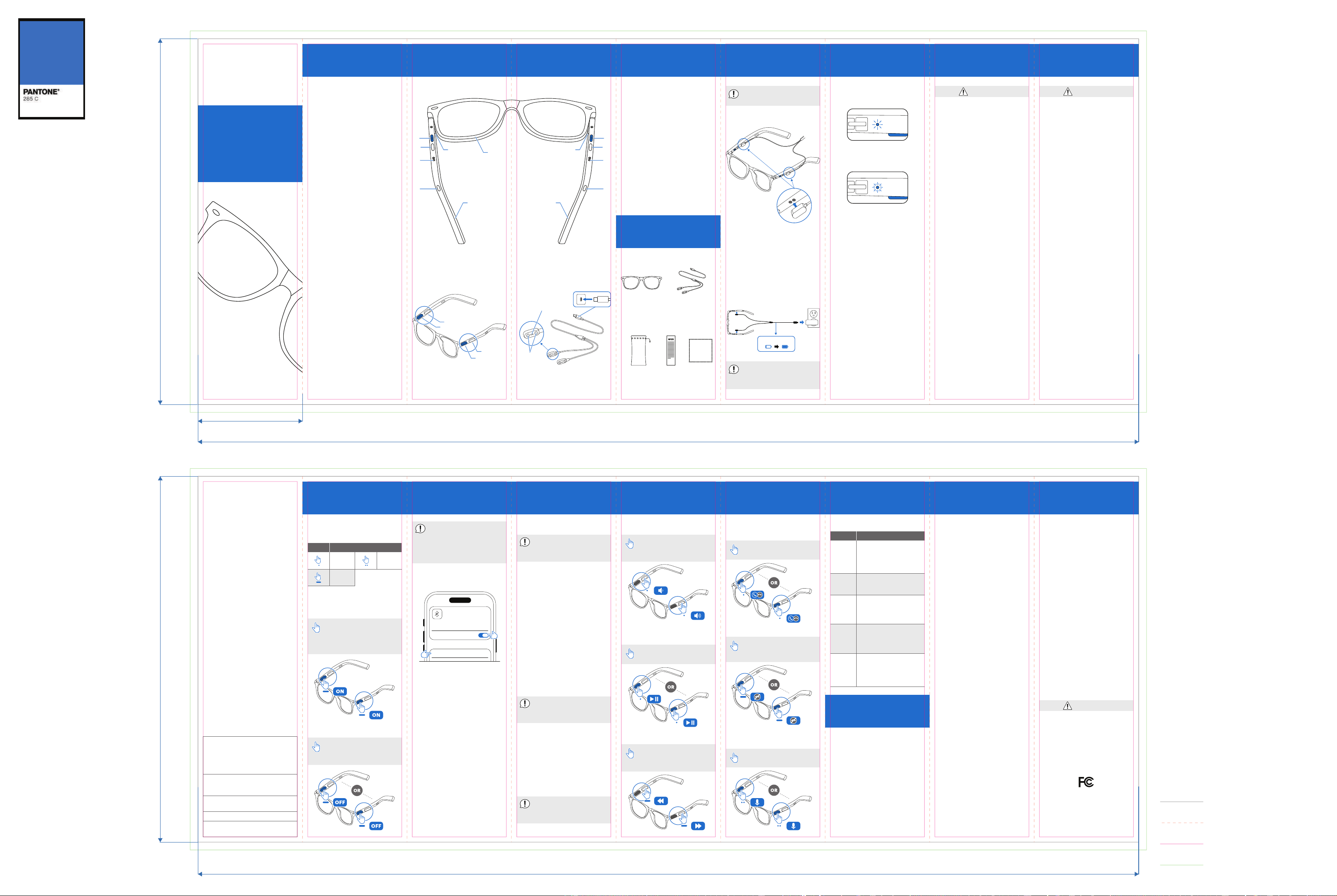
Figures 1-2:
Front, Right Temple, Left
Temple.
A - Power/Multifunction
Button.
RB - Right Functional
Button.
LB - Left Functional Button.
1 - Microphones and LED
Indicators.
2 - Magnetic Gold-plated
Charging Contacts.
3 - Speakers.
QUICK START
GUIDE
onn Smart Glasses
CONTENT &
INFORMATION
DEVICE
OVERVIEW
SAFETY
INSTRUCTIONS
CHARGING REGULATORY
NOTICES
LED IndicatorsCONTENT &
INFORMATION ................. 1
Features ......................... 1
DEVICE OVERVIEW ..........2
WHAT’S INCLUDED ......... 4
CHARGING ..................... 5
SAFETY INSTRUCTIONS ..7
REGULATORY NOTICES .. 8
OPERATION .................... 9
Power On/O................ 9
Pairing ..........................10
Unpairing ......................11
Reset Pairing.................11
Volume ......................... 12
Music............................ 12
Calls ............................. 13
Voice Assistant ........... 13
TROUBLESHOOTING ....14
FCC COMPLIANCE ........ 14
(Figures 1)
(Figures 2) (Figures 3)
1 32 4 6 7 85
FRONT VIEW
BACK VIEW
USB-C TO DUAL MAGNETIC
CHARGING CABLE
Pairing
Features
109 11 12 13 15 16
OPERATION
A
RB
3
A
LB
3
2 2
1
RIGHT TEMPLE
FRONT
LEFT TEMPLE
1
USB-C TO DUAL
MAGNETIC
CHARGING
CABLE
QUICK
START
GUIDE
CLEANING
CLOTH
WHAT’S
INCLUDED
FCC
COMPLIANCE
(Figures 11)
14
A
LB
A
RB
MAGNETS
SPRING-LOADED
CHARGING PINS
(Figures 4)
ONN SMART
GLASSES
PROTECTIVE
POUCH
Power On
Power On/O
(Figures 9)
Press and hold Button A
on each temple for 3
sec. Both temples will
automatically pair.
Power O
Press and hold Button A
on either temple for 5
sec.
(Figures 10)
Control Guide
(Table 1)
Control ControlAction Action
Single
press
Double
press
Press
and hold
5V 1A
(Figures 6)
About 1.5 hours
1. Attach one
Magnetic
Connector to
the Gold-plated Charging
Contacts on each temple.
2. Connect the USB-C plug
to a compatible 5V/1A USB
power adapter.
Before first use, fully
charge both temples.
Auto power OFF during
charging. Power ON
manually after charging.
(Figures 5)
If the glasses are not
connected to a device
within 3 min, both
temples will
automatically Power OFF.
Calls
Answer / End a Call
Press once Button A on
either temple.
(Figures 15)
Reject
Press and Hold 1 sec
Button A on either
temple.
(Figures 16)
Voice Assistant
Siri / Google Assistant
Press 2 times Button A
on either temple.
(Figures 17)
Volume
(Figures 12)
Press once Left Button /
Right Button for
Volume - / +.
(Figures 13)
Play / Pause
Music
Press once Button A on
either temple.
(Figures 14)
Previous / Next Track
Press and hold Left
Button / Right Button
for Previous / Next track.
TROUBLE-
SHOOTING
Turn ON both temples,
disconnect Bluetooth,
then reset pairing and
reconnect.
Connec-
tion
issues
Check that both
magnetic connectors
are attached correctly
and the USB-C cable is
connected.
Charging
does not
start
(Table 2)
Problem
Solution
Charge for 10-15
minutes, then press and
hold Buttons A on both
Left and Right Temples
for 3 seconds.
Cannot
power
ON
Enable Bluetooth, delete
previous pairing, then
reconnect.
Cannot
pair
Keep the phone within
Bluetooth range and
remove sources of
interference.
Poor
audio
quality
Find more at Walmart.com
THIS GUIDE CONTAINS
IMPORTANT SAFETY
INFORMATION.
For product assistance
WE CAN HELP
7 DAYS/WEEK
7:00am-9:00pm CST
1-888-516-2630
Manufactured in China for:
Walmart Inc.
Please read and keep
for future reference.
Warning
• Do not repair or modify
the product.
• Do not use if the product
is damaged.
• Keep away from water,
fire and excessive heat.
• Use only the supplied
USB-C magnetic
charging cable.
• Do not look directly at the
sun.
Battery
Charge: 0°C to 50°C.
Operate: −15°C to 55°C.
Cleaning
Clean with a microfiber
cloth. Keep charging
contacts dry. Do not use
alcohol, solvents,
abrasives, or compressed
air.
Privacy
Bluetooth audio only. No
personal data is stored or
uploaded.
Disposal
Dispose of according to
local e-waste regulations.
This device complies with
Part 15 of the FCC Rules.
Operation is subject to the
following two conditions:
1. This device may not
cause harmful
interference.
2. This device must accept
any interference received,
including interference that
may cause undesired
operation.
NOTE: This equipment has
been tested and found to
comply with the limits for a
Class B digital device,
pursuant to Part 15 of the
FCC Rules. These limits are
designed to provide
reasonable protection
against harmful
interference in a
residential installation. This
equipment generates, uses
and can radiate radio
frequency energy and, if
not installed and used in
accordance with the
instructions, may cause
harmful interference to
radio communications.
However, there is no
guarantee that
interference will not occur
in a particular installation.
If this equipment does
cause harmful interference
to radio or television
reception, which can be
determined by turning the
equipment o and on, the
user is encouraged to try
to correct the interference
by one or more of the
following measures:
FCC RF Exposure
Statement: This device
complies with FCC RF
exposure requirements for
portable use.
Impact Resistance: This
product complies with the
impact resistance
requirements of
21 CFR 801.410.
Changes or modifications
not expressly approved by
the party responsible for
compliance could void the
Warning
• Reorient or relocate the
receiving antenna.
• Increase the separation
between the equipment
and receiver.
• Connect the equipment
into an outlet on a circuit
dierent from that to
which the receiver is
connected.
• Consult the dealer or an
experienced radio/TV
technician for help.
This product can expose
you to chemicals including
Bisphenol A (BPA), which is
known to the State of
California to cause birth
defects or other
user's authority to operate t
his equipment.
FCC ID: 2BUHE-WEILAN13
reproductive harm. For
more information go to:
Warning
www.P65Warnings.ca.gov
Charging: Red light ON.
Fully charged: Green light
ON.
(Figures 7)
(Figures 8)
Unpairing
Remove the Bluetooth
connection from your
smartphone.
1. Open the Bluetooth
settings on your
smartphone.
2. Select the connected
“onn Glasses Black 02”
device.
3. Select “Forget This
Device” or “Unpair”.
4. Pairing mode starts
automatically. Powers o
after 3 minutes if not
paired.
Reset Pairing
Use this if the glasses
cannot connect or
pairing problems occur.
1. Power ON both temples.
2. If connected,
disconnect the glasses
from Bluetooth.
3. Press Button A 5 times
on either temple.
4. Pair the glasses again.
If only one temple resets,
repeat Step 3 on the
other temple.
1.
WL13
Filters up to 22% of
high-energy blue light.
2. Open-ear audio.
3. Hands-free calling.
4. Bluetooth® wireless
connection.
5. Up to 6 hours of
playtime.
6. USB-C magnetic
charging.
7. On-frame button
controls.
8. IPX4 water- and
sweat-resistant.
1. Power ON both temples.
2. Enable Bluetooth on
your smartphone.
3. Select the Bluetooth
device name “onn Glasses
Black 02“.
4. A confirmation tone
indicates successful
pairing.
Other Devices
onn Glasses Black 02
Bluetooth
Bluetooth
Fold line
Cut line
Copy safe area
Outside bleed (3mm)
AGBGBL36025918
onn Glasses Black 02
Filters up to 22% of high-energy blue light
140 mm
40 mm
140 mm
360 mm
360 mm
Figures 1-2:
Front, Right Temple, Left
Temple.
A - Power/Multifunction
Button.
RB - Right Functional
Button.
LB - Left Functional Button.
1 - Microphones and LED
Indicators.
2 - Magnetic Gold-plated
Charging Contacts.
3 - Speakers.
QUICK START
GUIDE
onn Smart Glasses
CONTENT &
INFORMATION
DEVICE
OVERVIEW
SAFETY
INSTRUCTIONS
CHARGING REGULATORY
NOTICES
LED IndicatorsCONTENT &
INFORMATION ................. 1
Features ......................... 1
DEVICE OVERVIEW ..........2
WHAT’S INCLUDED ......... 4
CHARGING ..................... 5
SAFETY INSTRUCTIONS ..7
REGULATORY NOTICES .. 8
OPERATION .................... 9
Power On/O................ 9
Pairing ..........................10
Unpairing ......................11
Reset Pairing.................11
Volume ......................... 12
Music............................ 12
Calls ............................. 13
Voice Assistant ........... 13
TROUBLESHOOTING ....14
FCC COMPLIANCE ........ 14
(Figures 1)
(Figures 2) (Figures 3)
1 32 4 6 7 85
FRONT VIEW
BACK VIEW
USB-C TO DUAL MAGNETIC
CHARGING CABLE
Pairing
Features
109 11 12 13 15 16
OPERATION
A
RB
3
A
LB
3
2 2
1
RIGHT TEMPLE
FRONT
LEFT TEMPLE
1
USB-C TO DUAL
MAGNETIC
CHARGING
CABLE
QUICK
START
GUIDE
CLEANING
CLOTH
WHAT’S
INCLUDED
FCC
COMPLIANCE
(Figures 11)
14
A
LB
A
RB
MAGNETS
SPRING-LOADED
CHARGING PINS
(Figures 4)
ONN SMART
GLASSES
PROTECTIVE
POUCH
Power On
Power On/O
(Figures 9)
Press and hold Button A
on each temple for 3
sec. Both temples will
automatically pair.
Power O
Press and hold Button A
on either temple for 5
sec.
(Figures 10)
Control Guide
(Table 1)
Control ControlAction Action
Single
press
Double
press
Press
and hold
5V 1A
(Figures 6)
About 1.5 hours
1. Attach one
Magnetic
Connector to
the Gold-plated Charging
Contacts on each temple.
2. Connect the USB-C plug
to a compatible 5V/1A USB
power adapter.
Before first use, fully
charge both temples.
Auto power OFF during
charging. Power ON
manually after charging.
(Figures 5)
If the glasses are not
connected to a device
within 3 min, both
temples will
automatically Power OFF.
Calls
Answer / End a Call
Press once Button A on
either temple.
(Figures 15)
Reject
Press and Hold 1 sec
Button A on either
temple.
(Figures 16)
Voice Assistant
Siri / Google Assistant
Press 2 times Button A
on either temple.
(Figures 17)
Volume
(Figures 12)
Press once Left Button /
Right Button for
Volume - / +.
(Figures 13)
Play / Pause
Music
Press once Button A on
either temple.
(Figures 14)
Previous / Next Track
Press and hold Left
Button / Right Button
for Previous / Next track.
TROUBLE-
SHOOTING
Turn ON both temples,
disconnect Bluetooth,
then reset pairing and
reconnect.
Connec-
tion
issues
Check that both
magnetic connectors
are attached correctly
and the USB-C cable is
connected.
Charging
does not
start
(Table 2)
Problem
Solution
Charge for 10-15
minutes, then press and
hold Buttons A on both
Left and Right Temples
for 3 seconds.
Cannot
power
ON
Enable Bluetooth, delete
previous pairing, then
reconnect.
Cannot
pair
Keep the phone within
Bluetooth range and
remove sources of
interference.
Poor
audio
quality
Find more at Walmart.com
THIS GUIDE CONTAINS
IMPORTANT SAFETY
INFORMATION.
For product assistance
WE CAN HELP
7 DAYS/WEEK
7:00am-9:00pm CST
1-888-516-2630
Manufactured in China for:
Walmart Inc.
Please read and keep
for future reference.
Warning
• Do not repair or modify
the product.
• Do not use if the product
is damaged.
• Keep away from water,
fire and excessive heat.
• Use only the supplied
USB-C magnetic
charging cable.
• Do not look directly at the
sun.
Battery
Charge: 0°C to 50°C.
Operate: −15°C to 55°C.
Cleaning
Clean with a microfiber
cloth. Keep charging
contacts dry. Do not use
alcohol, solvents,
abrasives, or compressed
air.
Privacy
Bluetooth audio only. No
personal data is stored or
uploaded.
Disposal
Dispose of according to
local e-waste regulations.
This device complies with
Part 15 of the FCC Rules.
Operation is subject to the
following two conditions:
1. This device may not
cause harmful
interference.
2. This device must accept
any interference received,
including interference that
may cause undesired
operation.
NOTE: This equipment has
been tested and found to
comply with the limits for a
Class B digital device,
pursuant to Part 15 of the
FCC Rules. These limits are
designed to provide
reasonable protection
against harmful
interference in a
residential installation. This
equipment generates, uses
and can radiate radio
frequency energy and, if
not installed and used in
accordance with the
instructions, may cause
harmful interference to
radio communications.
However, there is no
guarantee that
interference will not occur
in a particular installation.
If this equipment does
cause harmful interference
to radio or television
reception, which can be
determined by turning the
equipment o and on, the
user is encouraged to try
to correct the interference
by one or more of the
following measures:
FCC RF Exposure
Statement: This device
complies with FCC RF
exposure requirements for
portable use.
Impact Resistance: This
product complies with the
impact resistance
requirements of
21 CFR 801.410.
Changes or modifications
not expressly approved by
the party responsible for
compliance could void the
Warning
• Reorient or relocate the
receiving antenna.
• Increase the separation
between the equipment
and receiver.
• Connect the equipment
into an outlet on a circuit
dierent from that to
which the receiver is
connected.
• Consult the dealer or an
experienced radio/TV
technician for help.
This product can expose
you to chemicals including
Bisphenol A (BPA), which is
known to the State of
California to cause birth
defects or other
user's authority to operate t
his equipment.
FCC ID: 2BUHE-WEILAN13
reproductive harm. For
more information go to:
Warning
www.P65Warnings.ca.gov
Charging: Red light ON.
Fully charged: Green light
ON.
(Figures 7)
(Figures 8)
1.
WL13
100% UV-protected
polarized lenses.
2. Open-ear audio.
3. Hands-free calling.
4. Bluetooth® wireless
connection.
5. Up to 6 hours of
playtime.
6. USB-C magnetic
charging.
7. On-frame button
controls.
8. IPX4 water- and
sweat-resistant.
1. Power ON both temples.
2. Enable Bluetooth on
your smartphone.
3. Select the Bluetooth
device name “onn Glasses
Black 03“.
4. A confirmation tone
indicates successful
pairing.
Other Devices
onn Glasses Black 03
Bluetooth
Bluetooth
Unpairing
Remove the Bluetooth
connection from your
smartphone.
1. Open the Bluetooth
settings on your
smartphone.
2. Select the connected
“onn Glasses Black 03”
device.
3. Select “Forget This
Device” or “Unpair”.
4. Pairing mode starts
automatically. Powers o
after 3 minutes if not
paired.
Reset Pairing
Use this if the glasses
cannot connect or
pairing problems occur.
1. Power ON both temples.
2. If connected,
disconnect the glasses
from Bluetooth.
3. Press Button A 5 times
on either temple.
4. Pair the glasses again.
If only one temple resets,
repeat Step 3 on the
other temple.
Fold line
Cut line
Copy safe area
Outside bleed (3mm)
AGBMPL36025918
onn Glasses Black 03
100% UV-protected polarized lenses
140 mm
40 mm
140 mm
360 mm
360 mm
Figures 1-2:
Front, Right Temple, Left
Temple.
A - Power/Multifunction
Button.
RB - Right Functional
Button.
LB - Left Functional Button.
1 - Microphones and LED
Indicators.
2 - Magnetic Gold-plated
Charging Contacts.
3 - Speakers.
QUICK START
GUIDE
onn Smart Glasses
CONTENT &
INFORMATION
DEVICE
OVERVIEW
SAFETY
INSTRUCTIONS
CHARGING REGULATORY
NOTICES
LED IndicatorsCONTENT &
INFORMATION ................. 1
Features ......................... 1
DEVICE OVERVIEW ..........2
WHAT’S INCLUDED ......... 4
CHARGING ..................... 5
SAFETY INSTRUCTIONS ..7
REGULATORY NOTICES .. 8
OPERATION .................... 9
Power On/O................ 9
Pairing ..........................10
Unpairing ......................11
Reset Pairing.................11
Volume ......................... 12
Music............................ 12
Calls ............................. 13
Voice Assistant ........... 13
TROUBLESHOOTING ....14
FCC COMPLIANCE ........ 14
(Figures 1)
(Figures 2) (Figures 3)
1 32 4 6 7 85
FRONT VIEW
BACK VIEW
USB-C TO DUAL MAGNETIC
CHARGING CABLE
Pairing
Features
109 11 12 13 15 16
OPERATION
A
RB
3
A
LB
3
2 2
1
RIGHT TEMPLE
FRONT
LEFT TEMPLE
1
USB-C TO DUAL
MAGNETIC
CHARGING
CABLE
QUICK
START
GUIDE
CLEANING
CLOTH
WHAT’S
INCLUDED
FCC
COMPLIANCE
(Figures 11)
14
A
LB
A
RB
MAGNETS
SPRING-LOADED
CHARGING PINS
(Figures 4)
ONN SMART
GLASSES
PROTECTIVE
POUCH
Power On
Power On/O
(Figures 9)
Press and hold Button A
on each temple for 3
sec. Both temples will
automatically pair.
Power O
Press and hold Button A
on either temple for 5
sec.
(Figures 10)
Control Guide
(Table 1)
Control ControlAction Action
Single
press
Double
press
Press
and hold
5V 1A
(Figures 6)
About 1.5 hours
1. Attach one
Magnetic
Connector to
the Gold-plated Charging
Contacts on each temple.
2. Connect the USB-C plug
to a compatible 5V/1A USB
power adapter.
Before first use, fully
charge both temples.
Auto power OFF during
charging. Power ON
manually after charging.
(Figures 5)
If the glasses are not
connected to a device
within 3 min, both
temples will
automatically Power OFF.
Calls
Answer / End a Call
Press once Button A on
either temple.
(Figures 15)
Reject
Press and Hold 1 sec
Button A on either
temple.
(Figures 16)
Voice Assistant
Siri / Google Assistant
Press 2 times Button A
on either temple.
(Figures 17)
Volume
(Figures 12)
Press once Left Button /
Right Button for
Volume - / +.
(Figures 13)
Play / Pause
Music
Press once Button A on
either temple.
(Figures 14)
Previous / Next Track
Press and hold Left
Button / Right Button
for Previous / Next track.
TROUBLE-
SHOOTING
Turn ON both temples,
disconnect Bluetooth,
then reset pairing and
reconnect.
Connec-
tion
issues
Check that both
magnetic connectors
are attached correctly
and the USB-C cable is
connected.
Charging
does not
start
(Table 2)
Problem
Solution
Charge for 10-15
minutes, then press and
hold Buttons A on both
Left and Right Temples
for 3 seconds.
Cannot
power
ON
Enable Bluetooth, delete
previous pairing, then
reconnect.
Cannot
pair
Keep the phone within
Bluetooth range and
remove sources of
interference.
Poor
audio
quality
Find more at Walmart.com
THIS GUIDE CONTAINS
IMPORTANT SAFETY
INFORMATION.
For product assistance
WE CAN HELP
7 DAYS/WEEK
7:00am-9:00pm CST
1-888-516-2630
Manufactured in China for:
Walmart Inc.
Please read and keep
for future reference.
Warning
• Do not repair or modify
the product.
• Do not use if the product
is damaged.
• Keep away from water,
fire and excessive heat.
• Use only the supplied
USB-C magnetic
charging cable.
• Do not look directly at the
sun.
Battery
Charge: 0°C to 50°C.
Operate: −15°C to 55°C.
Cleaning
Clean with a microfiber
cloth. Keep charging
contacts dry. Do not use
alcohol, solvents,
abrasives, or compressed
air.
Privacy
Bluetooth audio only. No
personal data is stored or
uploaded.
Disposal
Dispose of according to
local e-waste regulations.
This device complies with
Part 15 of the FCC Rules.
Operation is subject to the
following two conditions:
1. This device may not
cause harmful
interference.
2. This device must accept
any interference received,
including interference that
may cause undesired
operation.
NOTE: This equipment has
been tested and found to
comply with the limits for a
Class B digital device,
pursuant to Part 15 of the
FCC Rules. These limits are
designed to provide
reasonable protection
against harmful
interference in a
residential installation. This
equipment generates, uses
and can radiate radio
frequency energy and, if
not installed and used in
accordance with the
instructions, may cause
harmful interference to
radio communications.
However, there is no
guarantee that
interference will not occur
in a particular installation.
If this equipment does
cause harmful interference
to radio or television
reception, which can be
determined by turning the
equipment o and on, the
user is encouraged to try
to correct the interference
by one or more of the
following measures:
FCC RF Exposure
Statement: This device
complies with FCC RF
exposure requirements for
portable use.
Impact Resistance: This
product complies with the
impact resistance
requirements of
21 CFR 801.410.
Changes or modifications
not expressly approved by
the party responsible for
compliance could void the
Warning
• Reorient or relocate the
receiving antenna.
• Increase the separation
between the equipment
and receiver.
• Connect the equipment
into an outlet on a circuit
dierent from that to
which the receiver is
connected.
• Consult the dealer or an
experienced radio/TV
technician for help.
This product can expose
you to chemicals including
Bisphenol A (BPA), which is
known to the State of
California to cause birth
user's authority to operate t
his equipment.
FCC ID: 2BUHE-WEILAN13
defects or other
reproductive harm. For
more information go to:
Warning
www.P65Warnings.ca.gov
Charging: Red light ON.
Fully charged: Green light
ON.
(Figures 7)
(Figures 8)
1.
WL13
Filters up to 22% of
high-energy blue light.
2. Open-ear audio.
3. Hands-free calling.
4. Bluetooth® wireless
connection.
5. Up to 6 hours of
playtime.
6. USB-C magnetic
charging.
7. On-frame button
controls.
8. IPX4 water- and
sweat-resistant.
1. Power ON both temples.
2. Enable Bluetooth on
your smartphone.
3. Select the Bluetooth
device name “onn Glasses
Tortoise“.
4. A confirmation tone
indicates successful
pairing.
Other Devices
onn Glasses Tortoise
Bluetooth
Bluetooth
Unpairing
Remove the Bluetooth
connection from your
smartphone.
1. Open the Bluetooth
settings on your
smartphone.
2. Select the connected
“onn Glasses Tortoise”
device.
3. Select “Forget This
Device” or “Unpair”.
4. Pairing mode starts
automatically. Powers o
after 3 minutes if not
paired.
Reset Pairing
Use this if the glasses
cannot connect or
pairing problems occur.
1. Power ON both temples.
2. If connected,
disconnect the glasses
from Bluetooth.
3. Press Button A 5 times
on either temple.
4. Pair the glasses again.
If only one temple resets,
repeat Step 3 on the
other temple.
Fold line
Cut line
Copy safe area
Outside bleed (3mm)
AGTFPL36025918
onn Glasses Tortoise
Filters up to 22% of high-energy blue light
140 mm
40 mm
140 mm
360 mm
360 mm