User Manual
Wireless Headphone
KH186
01 02
05
0706
Contents 1.Product Overview
4. Connection with Two Devices
1.Product Overview--------------------------------------------- 2
2.Basic Operation------------------------------------------------3
3.Bluetooth Pairing and Connection---------------------------4
4.Connection with Two Devices-------------------------------- 5
5.LED Indicator-------------------------------------------------- 6
6.Charging------------------------------------------------------- 6
7.Product Specification----------------------------------------- 7
8.Attentions and Q & A----------------------------------------- 8
A. In the off status, press and hold MFB for 5-7 seconds to
enter pairing mode, the LED flashes blue and red
alternately.
B. Search and click to connect KH186 on the Bluetooth list of
your device, the LED flashes blue when connected.
C. Now you can use the Bluetooth headset to adjust the
volume, track music, answer/ end/ reject the call, wake up
the voice assistant and do other operations.
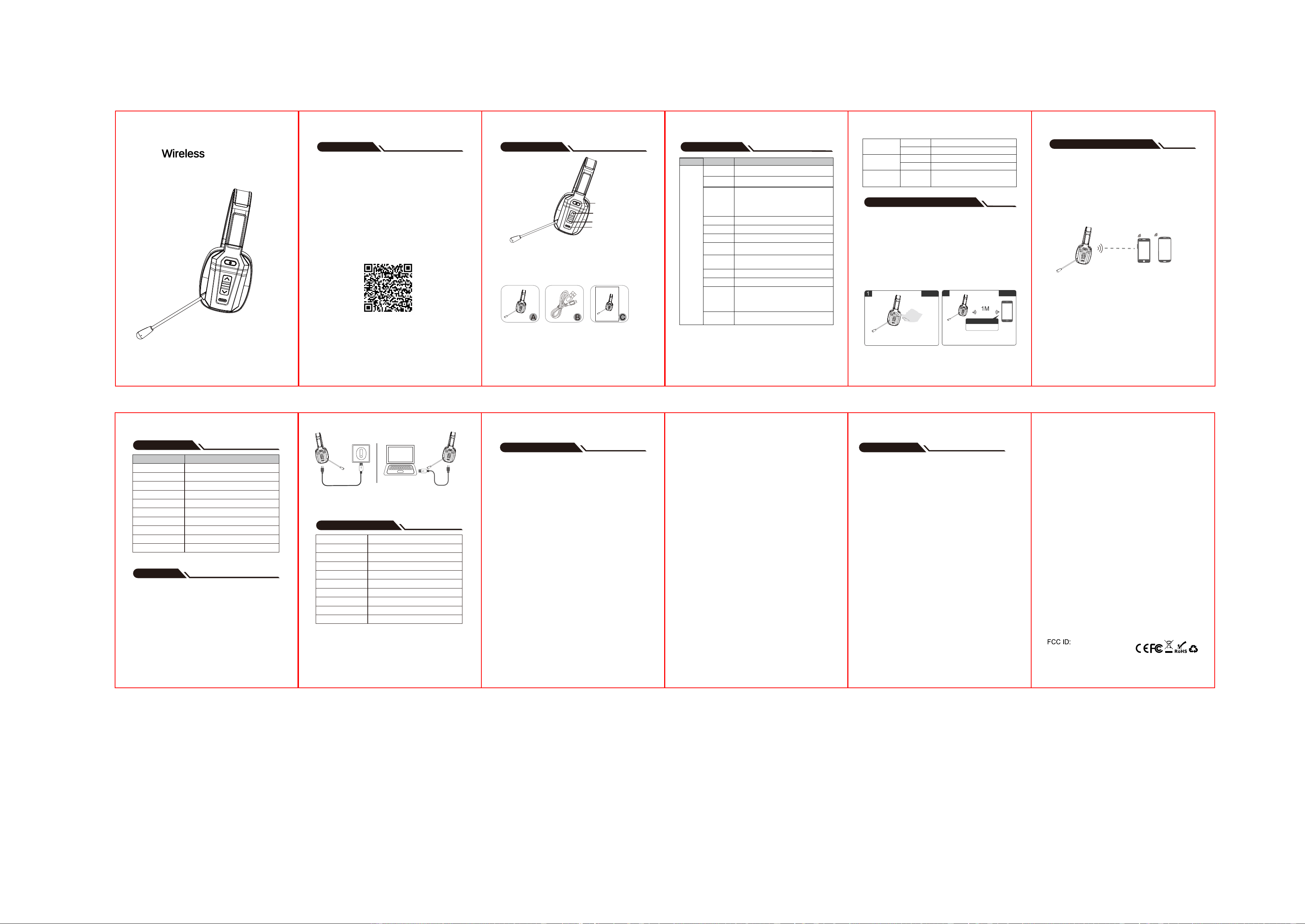
Packing list:
A. Wireless Headset KH186 x 1
B. Micro USB charging cable x 1
C. User manual x 1
5. LED Indicator
6. Charging
Mode
Power on
Power off
Pairing mode
Connected standby mode
Playing Music
Calling
Clear pairing record
Charging
Full charged
Low battery
LED Indicator
Blue LED flashes 3 times
Red LED is on for 1 second
Red and blue LEDs flash alternately
Blue LED flashes once every 10 seconds
Blue LED flashes twice every 10 seconds
Blue LED flashes twice every 10 seconds
Red and blue LEDs flash once at the same time
Solid Red LED
Solid Blue LED
Red LED flashes
7. Product Specification
Bluetooth Version
Bluetooth Chipset
Operation Range
Bluetooth Protocols
CODEC
Charging Time
Talking Time
Working Time
Headset Net Weight
Headset Dimension
Bluetooth V5.3
BT8926B
30 ft(Barrier-free place)
HSP HFP A2DP AVRCP
SBC,AAC
About 2 hours
About 35 hours(70% volume)
About 60 hours(70% volume)
About 141g
200*110*75mm
A. In the off state, press and hold MFB for 5-7 seconds to
power on and enter pairing status. Turn on the bluetooth
of the first device, search "KH186" and click to connect.
B. After the connection is successful, turn off the Bluetooth
on the first device, KH186 will enter pairing mode
automatically. Turn on the Bluetooth on the second device,
search "KH186" and click to connect.
C. Turn on the Bluetooth on the first device, click "KH186" and
connect the Bluetooth headset.
03
08
2. Basic Operation
3.Bluetooth Pairing and Connection
9. Attentions and Q & A
A. How to reconnect and what to do if reconnection fails?
When KH186 is connected to your cell phone successfully
once, it will reconnect to the paired device when powered on.
If failed, please connect it manually. Press and hold MFB for
5-7 seconds to enter into pairing mode, then click and
connect KH186 on your cell phone.
B. How to delete paired records?
In standby status, press and hold volume + and MFB at
the same time for 5 seconds to clear the pairing record.
After that, the KH186 will not automatically connect to
previous devices.
C. What’s the password for pairing?
Some connection devices require password for pairing,
please try 0000 or 8888 or 1111 or 1234.
D.How to activate Siri?
Press and hold MFB for 1 second to wake up the voice
assistant.
E. How to do if there is a connection issue?
Please try charging reset: plug in charging cable to
charging, this will reset the headset to power off. Then
remove the charging cable, press and hold the MFB to
power on. If you still cannot use it normally, please
04
09
contact customer service or manufacturer for technical
support.
F. Power off automatically?
The KH186 will automatically shut down if there is no
connection for more than 10 minutes or if the battery is l
ow.
G: I cannot answer or reject calls on computer?
The MFB can only answer/hang up mobile phone calls,
when connecting to computer or landline, the MFB is
unavailable.
H: How can I contact the seller if I have any other
problem?
If you have any problems, please feel free to email us:
SUPPORT EMAIL: [email protected]
Multifunction button
Volume+
Volume-
Mute button
Power On
MFB
In the off status, press and hold MFB for 5-7 seconds to
power on. You will hear the voice prompt: Power on.
Button Operation InstructionFunction
Power Off
In the on status, press and hold MFB for 5 seconds to
power off. You will hear the voice prompt: Power off.
Play / Pause
Single click MFB to play / pause when playing music.
Redial a Call
Double click MFB to redial the last call.
Voice Assistant
Press and hold MFB for 1 second to wake up the voice assistant.
Answer a call
When a call comes in, single click MFB. (Please note, the
MFB can only answer/hang up mobile phone calls)
Hang up a call
During a call, single click MFB.
Reject a call
When a call comes in, press and hold MFB for 1 second.
Clear Pairing
Record
In standby status, press and hold volume + and MFB at the
same time for 5 seconds to clear the pairing record.
Second Call
When a call comes in during a call, single click the MFB to
answer the new call and hang up the current call; Double click
the MFB to answer the new call and place the current call on hold;
Double-click the MFB again to switch between the current call
and the held call.
Audio Switch
During a call, press and hold MFB for 1 second to switch
the audio between phone and Bluetooth headset.
Enter
Pairing Mode
In the off status, press and hold MFB for 5-7 seconds to
power on, KH186 will enter paring mode automatically.
In the unconnected standby status, double click MFB to
enter paring mode.
After the Bluetooth is disconnected, KH186 will enter
paring mode automatically.
Volume +
Volume Up
Single click Volume + button.
Next Song
Press and hold Volume + button for 1 second.
Volume -
Volume Down
Single click Volume - button.
Previous Song
Press and hold Volume - button for 1 second.
Microphone
Mute Button
Microphone
Mute
During a call, click the mute button to mute
the call, and click again to unmute. You will
hear the voice prompt: Mute on/off.
2
connection
pairing
Search and connect
Search and Connect: Turn on Bluetooth of the cell phone,
search “KH186” and click to connect.
Enter Pairing Mode: Press and hold MFB for 5-7
seconds, the LED flashes blue and red alternately.
KH186
*When connected to 2 devices, audio can only be played
from one device. If you want to play music from another
device, please turn off the music on the previous device.
The same is true when making a call.
Please charge the KH186 when the red LED flashes (battery
low). Charging time is about 2 hours. Solid Red LED turns off
and Blue LED turns on when full charged.
Please charge the KH186 through the Micro USB charging
cable.
Charging with Charger
Micro USB charging cable
Charging with PC
*Note:Please charge the KH186 at least once every 2
months when not in use.
*The actual use time will vary depending on the
environment and usage conditions.
Made in China
WSG-KH186
SUPPORT EMAIL: [email protected]
Scan to get
1. Lifetime Extended Warranty.
2. Technical support if you have any usage problems.
Customer service email: [email protected]
Mono Bluetooth Headset
KH186
User Manual
SUPPORT EMAIL: [email protected]
FCC Warning
This device complies with part 15 of the FCC Rules. Operation
is subject to the following two conditions:(1) This device may
not cause harmful interference, and (2) this device must accept
any interference received, including interference that may
cause undesired operation.
Any Changes or modifications not expressly approved by the
party responsible for compliance could void the user's authority
to operate the equipment.
This equipment has been tested and found to comply with the
limits for a Class B digital device, pursuant to part 15 of the
FCC Rules. These limits are designed to provide reasonable
protection against harmful interference in a residential
installation. This equipment generates uses and can radiate
radio frequency energy and, if not installed and used in
accordance with the instructions, may cause harmful
interference to radio communications. However, there is no
guarantee that interference will not occur in a particular
installation. If this equipment does cause harmful interference
to radio or television reception, which can be determined by
turning the equipment off and on, the user is encouraged to try
to correct the interference by one or more of the following
measures:
- Reorient or relocate the receiving antenna.
- Increase the separation between the equipment and receiver.
- Connect the equipment into an outlet on a circuit different
from that to which the receiver is connected.
- Consult the dealer or an experienced radio/TV technician
for help.
SIZE:80X120MM ,
128克双铜纸双面单黑印刷 过油 折叠(手风琴式)
封面
封底
The device has been evaluated to meet
general RF exposure requirement.
The device can be used in portable
exposure condition without restriction.