
1
ECG Recorder
Instruction Manual
Product Model: YK-ER6
Date of preparation: July 2025
Version: V1.0

2
Table of contents
1. Security ..............................................................................................................4
1.1 Security Information ......................................................................................... 4
1.2 Symbol Introduction .........................................................................................6
2. Product Introduction ..........................................................................................7
2.1 Scope of Application .........................................................................................7
2.2 Contraindications .............................................................................................. 7
2.3 Structural Composition ..................................................................................... 8
2.4 Product Illustration ............................................................................................8
3. Instructions for Use ........................................................................................... 8
3.1 Unpacking Inspection ........................................................................................8
3.2 Download and install the APP .......................................................................... 9
3.3 APP Software Operating Environment ........................................................... 10
3.4 APP Software Usage Restrictions ................................................................... 10
3.5 Maximum concurrency: .................................................................................. 10
3.6 Test Method .....................................................................................................10
3.6.1 Six-lead measurement posture ......................................................................................... 11
3.6.2 Single-lead measurement posture .................................................................................... 11
3.7 Software Operation ......................................................................................... 13
3.7.1 Registration and Login ..................................................................................................... 13
3.7.2 Adding Device ..................................................................................................................13
3.7.3 Equipment Setup .............................................................................................................. 14
3.7.4 Measurement Record ........................................................................................................15
3.7.5 Page Search ...................................................................................................................... 17
3.7.6 Device Removal ............................................................................................................... 17
3.7.7 Personal Information Settings .......................................................................................... 18
3.7.8 User Feedback .................................................................................................................. 18
3.7.9 About Us ...........................................................................................................................19
3.7.10 Account Cancellation ..................................................................................................... 20
3.7.11 Change Password ........................................................................................................... 20
3.7.12 OTG data upload ............................................................................错误!未定义书签。

3
4.
Regarding charging ......................................................................................... 20
5. Maintenance and upkeep .................................................................................21
5.1 Maintenance .................................................................................................... 21
5.1.1 Daily cleaning and disinfection ........................................................................................21
5.1.2 Routine Inspection ............................................................................................................21
5.1.3 Repair ................................................................................................................................22
5.2 Common Faults and Solutions ........................................................................ 22
6. Electromagnetic compatibility ........................................................................ 22
7. Annex .............................................................................................................. 27
7.1 Product List ..................................................................................................... 27
8. 24-hour after-sales service 27

4
1.
Safety
1.1 Security Information
This instruction manual describes the purpose, functions, and safe operating
procedures of the device. Before using this device, please read and fully
understand the contents of this instruction manual to ensure that you can use the
device correctly and ensure the safety of the patient and the operator.
Notice
1. When Bluetooth is disconnected, the application cannot connect to the ECG monitoring
device via Bluetooth to view the ECG.
2. When the ECG monitoring device leads become detached, the application will display a lead
detachment notification.
3. This product is not suitable for users with disabilities or those who have language differences.
4. Users may encounter the following critical defects: software crashes and server downtime. If
you encounter the above situations and cannot recover on your own, please contact an
engineer for assistance.
5. The results of an electrocardiogram (ECG) diagnosis may differ from those of the doctor. The
doctor can make their own judgment based on their ECG expertise and past experience.
6. Please use the matching electrocardiogram (ECG) acquisition device. The acquisition device
must be able to provide data that conforms to the data interface standard of this product.
7. Heart rate calculation method: 60 * 1000 / RR interval (RR interval unit: ms);
8. When the heart rate value suddenly drops significantly or changes to an invalid value and
there is no heartbeat waveform, cardiac arrest may occur, and attention should be paid to this.
9. No modifications of this product are permitted.
10. This product is not permitted to be used in conjunction with defibrillators, high-frequency
surgical equipment, electrosurgical equipment, diathermy devices, pacemakers, electrical
stimulators, CT or MRI equipment.
11. Please keep this product dry, avoid getting it wet, and avoid strong impacts.
12. Do not use this product in strong magnetic fields, as this may affect the measurement results;
13. If you experience heart discomfort or irregular heartbeats, please contact your doctor
immediately for treatment.
14. Do not squeeze the product forcefully. If the outer shell cracks, please stop using it.

5
15. Do not place this product near a fire source to avoid damaging the product or causing the
battery to explode;
16. If the electrode pads are contaminated with foreign matter or dust, please clean them with a
soft cloth before taking the measurement.
17. When the battery of this product is low, please charge it in time by connecting it to a power
source using a Type-C data cable.
18. Improper disposal of products and accessories at the end of their lifespan can harm the
natural environment and human health. In such cases, they should be disposed of in
accordance with the relevant environmental protection regulations of the city and should not
be discarded at will.
19. Please use this product within the temperature and humidity range specified in the instruction
manual, and within a space with good heat dissipation. Extremely cold, hot, or humid
environments will affect the performance and lifespan of the product, so please avoid using it
in such environments.
20. Bluetooth requirements: Bluetooth 5.0 or above to transmit ECG data to the mobile app in
real time, with a Bluetooth transmission rate of ≥80KB.
21. This recorder belongs to the CF type application section (the application section includes
metal electrodes and a plastic housing) and internal power supply device, with a liquid
ingress protection rating of IP22;
22. This recorder is a device that cannot be used in the presence of flammable anesthetic gas
mixed with air or flammable anesthetic gas mixed with oxygen or nitrous oxide.
23. Recorder repairs must be performed by professional technicians from our company or our
designated repair centers. Unauthorized personnel are prohibited from disassembling the
recorder; otherwise, they will be solely responsible for any consequences. For repair inquiries,
please contact our company or our designated repair centers (circuit diagrams, component
lists, annotations, calibration details, and other relevant technical documents required for
repairs can be obtained from our company by our designated repair centers).
24. The physiological waveforms, physiological parameters, and prompts displayed by this
product are for reference only and should not be used as the basis for clinical treatment.
25. For a better user experience, please update your application version promptly.
26. This product collects surface electrical signals from the left and right thumbs and the left
6
knee or left ankle of the human body using metal electrode pads and calculates the voltage
difference to obtain electrocardiogram signals.
27. The electrodes must be custom-made metal electrodes from our company. Incompatible metal
electrodes must not be used. Electrodes must not be replaced or modified at will. During use,
care must be taken to prevent oxidation, otherwise the measurement results will be affected.
28. Unauthorized personnel are prohibited from replacing the internal battery. Our company will
not be responsible for any equipment damage or safety issues caused by unauthorized battery
replacement.
29. This product is for adults only.
30. This product should be properly stored away when not in use to prevent damage from pets,
insects, or children.
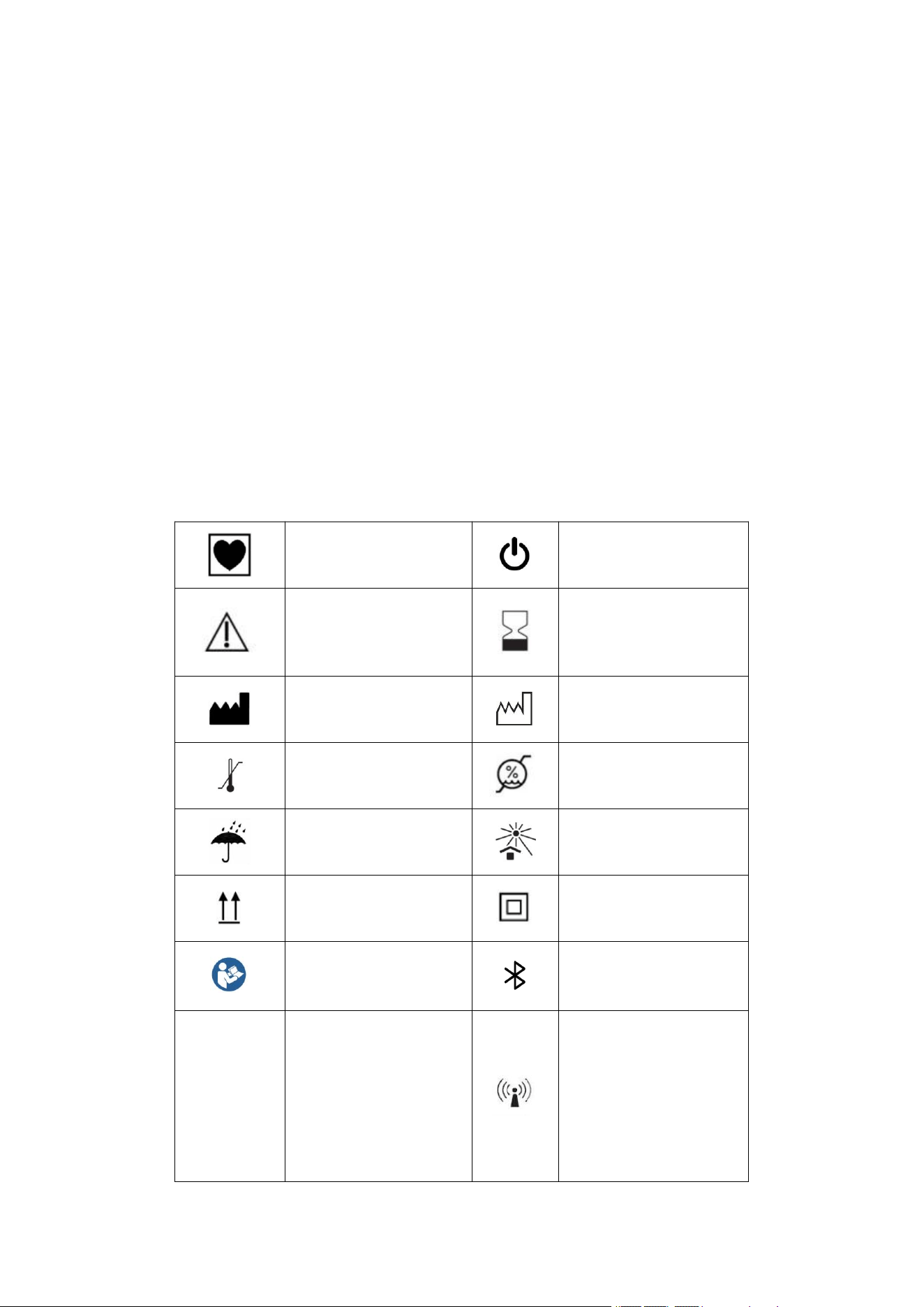
1.2 Symbol Introduction
CF type
Power on/off
warn
Validity period
Manufacturer
Production date
Temperature Limit
Humidity Limit
Afraid of rain
Sunscreen
up
Class II equipment
Follow the operating
instructions
Bluetooth
IP 22
Enclosure protection
rating: Protects
against entry of
particles with an
outer diameter of 12.5
Non-ionizing
radiation
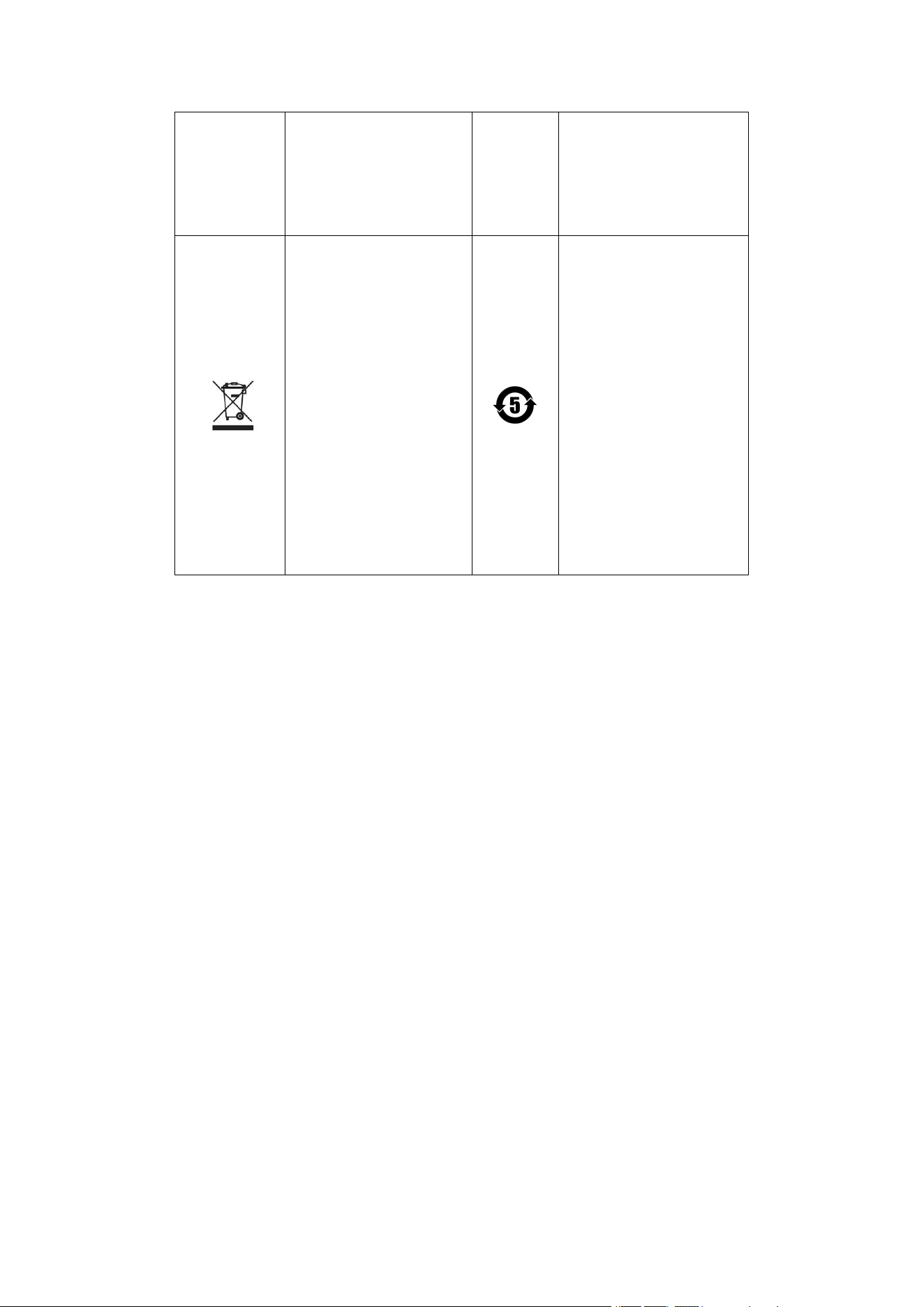
7
mm; protects against
vertical water
droplets.
Discarded electrical
and electronic
equipment is marked
separately .
The symbol is a
pollution control mark
for electronic
information products.
This indicates that
the product has an
environmentally
friendly lifespan of 5
years and can be
recycled; it should
not be discarded at
will; dry cell
batteries are not
included.
2. Product Introduction
ECG Recorder is a handheld six-lead ECG monitoring device. It is intended for use in
medical institutions or homes to detect the ECG waveform and heart rate of a person, and to
achieve ECG monitoring, health management, and data sharing functions through a wireless
transmission module and an application. The patient is the intended operator of this device.
2.1 Scope of application
This product is suitable for detecting electrocardiogram waveforms and heart rate in medical
institutions or homes, and can provide a reference for medical personnel in diagnosis.
2.2 Contraindications
Not found yet.
8
2.3 Structural composition
An electrocardiogram (ECG) recorder consists of a main unit, a Type-C data cable, and an
application program .
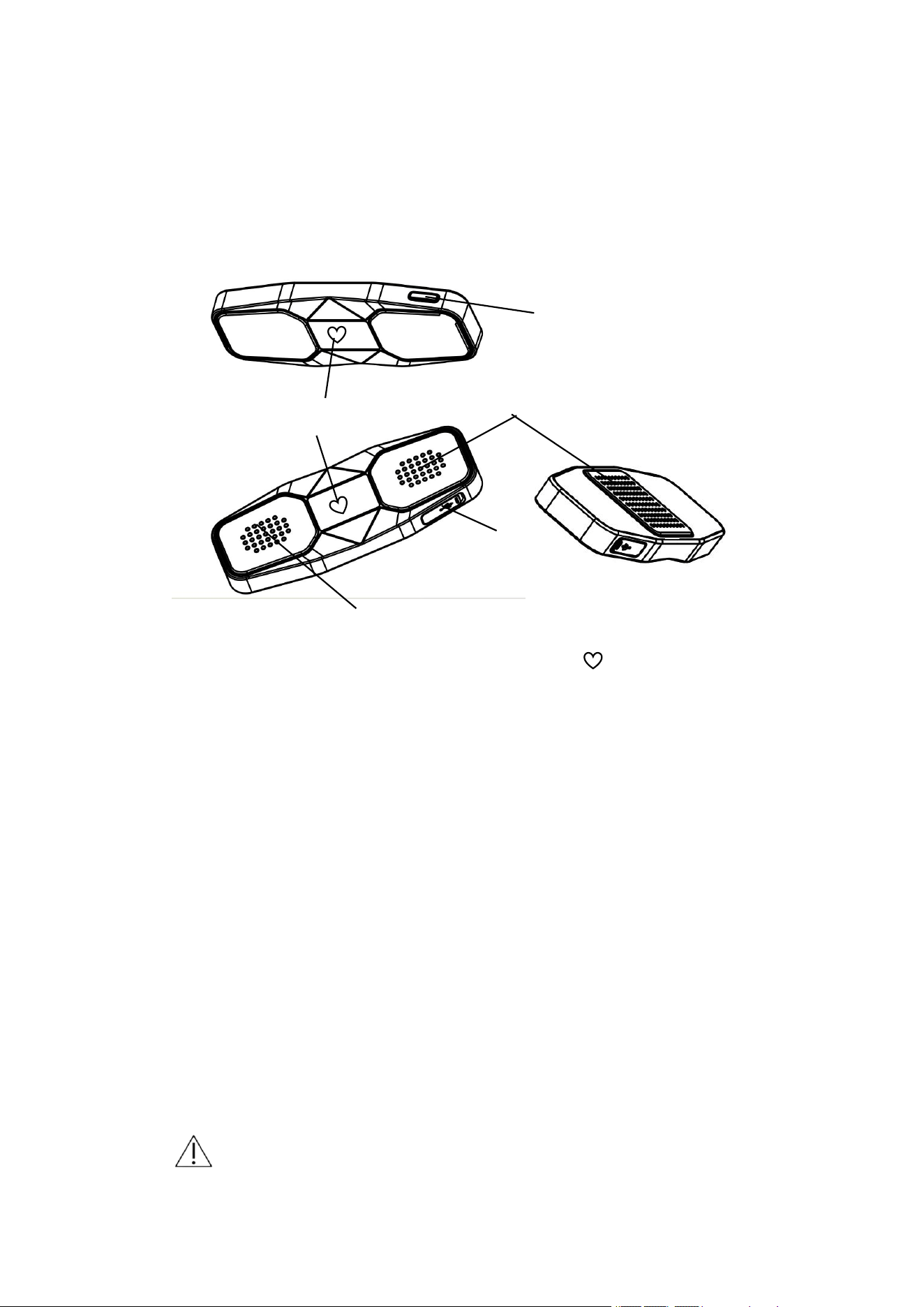
2.4 Product illustration
1. Indicator light : When powered on, the graphic " " will be displayed
as a flashing blue light ;
2. Electrode pads: responsible for signal acquisition. During measurement,
keep your thumbs and left knee (ankle) lightly touching the electrode pads
until the measurement is completed ( see Chapter 3.3 Test Methods for
specific test methods ) ;
3. Charging port: Connect the Type -C charging cable to the device and adapter,
and then plug it into a power source to start charging;
3. Instructions for use
3.1 Unpacking and inspection
Before opening the box, please carefully inspect the packaging. If any damage is found,
please contact the carrier or our company immediately. If the packaging is intact, please unpack it
correctly and carefully remove the equipment and other components from the box. Check the
equipment for any mechanical damage and ensure all items are present. If you have any questions,
please contact our company immediately.
warn
开/关机
指示灯
充电接口
电极片
电极片
9
1. Please keep the packaging box and packaging materials safe for future use during
transportation or storage.
2. Please keep the warranty card safe for warranty purposes.
3. When handling packaging materials, local regulations or hospital waste disposal procedures
must be followed, and packaging materials must be kept out of reach of children.
4. The equipment may be contaminated with microorganisms during storage, transportation and
use. Please check that the packaging is intact before use, especially for disposable accessories.
If any damage is found, please do not use it.
5. The product's production date and expiration date are shown on the label.
3.2 Download and install the APP
Apple (iOS) users, scan the QR code below to open it in your browser or WeChat.
Download path for Android users: Scan the QR code below. (This can only be opened with a
browser.)
10
3.3 APP software operating environment
equipment
Minimum configuration requirements
Software
environment
Android: Android 5.0 and compatible versions;
Apple: iOS 8.0 and compatible versions .
Hardware
configurati
on
Android version: Screen display resolution of 1920x1080px or
higher , RAM of 8GB or higher , storage of 32GB or higher, screen
size of 7 inches or higher ;
Apple iOS version: minimum screen resolution of 1920x1080px or
higher , RAM of 2GB or higher , storage of 32GB or higher, and
screen size of 7 inches or higher .
Network
conditions
Cellular network, WIFI
3.4 App usage restrictions
The app needs to be used in conjunction with our company's specified model of
electrocardiogram recorder;
The app requires a specific software runtime environment; see "App Software Runtime
Environment" for details.
3.5 Maximum concurrency
Maximum concurrency: 1, response time <10s.
3.6 Test methods
Depending on your measurement needs, you can choose a six-lead ECG or a single-lead ECG.
11
Follow these three methods to click "Start" to begin the measurement.
3.6.1 Six-lead posture measurement
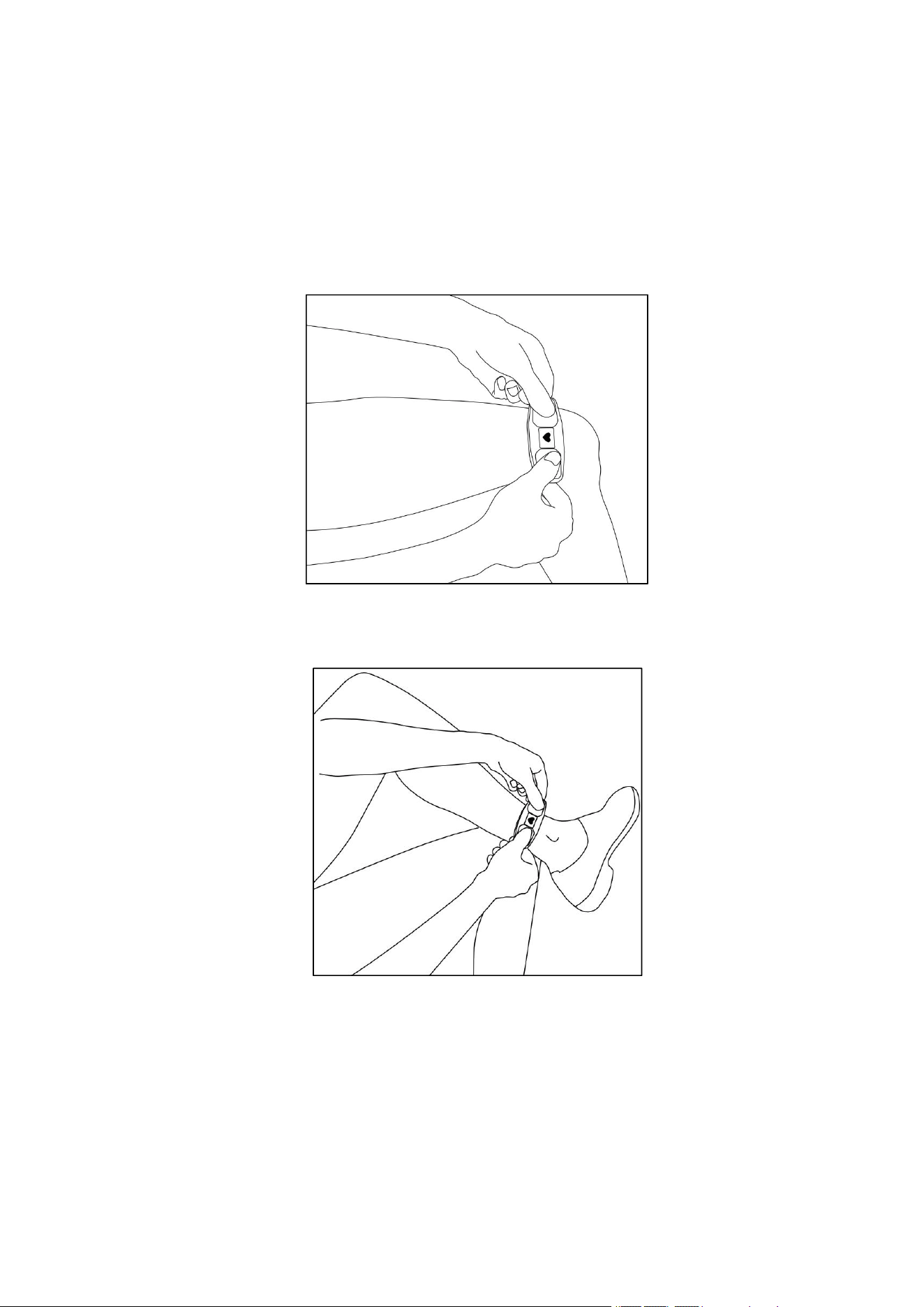
Method 1: Hold the ECG electrodes on both sides with both hands, with the electrodes on the
back pressed firmly against the left knee (as shown in the picture):
Method 2: Hold the ECG electrodes with both hands, with the back electrodes pressed firmly
against your left ankle (as shown in the picture).
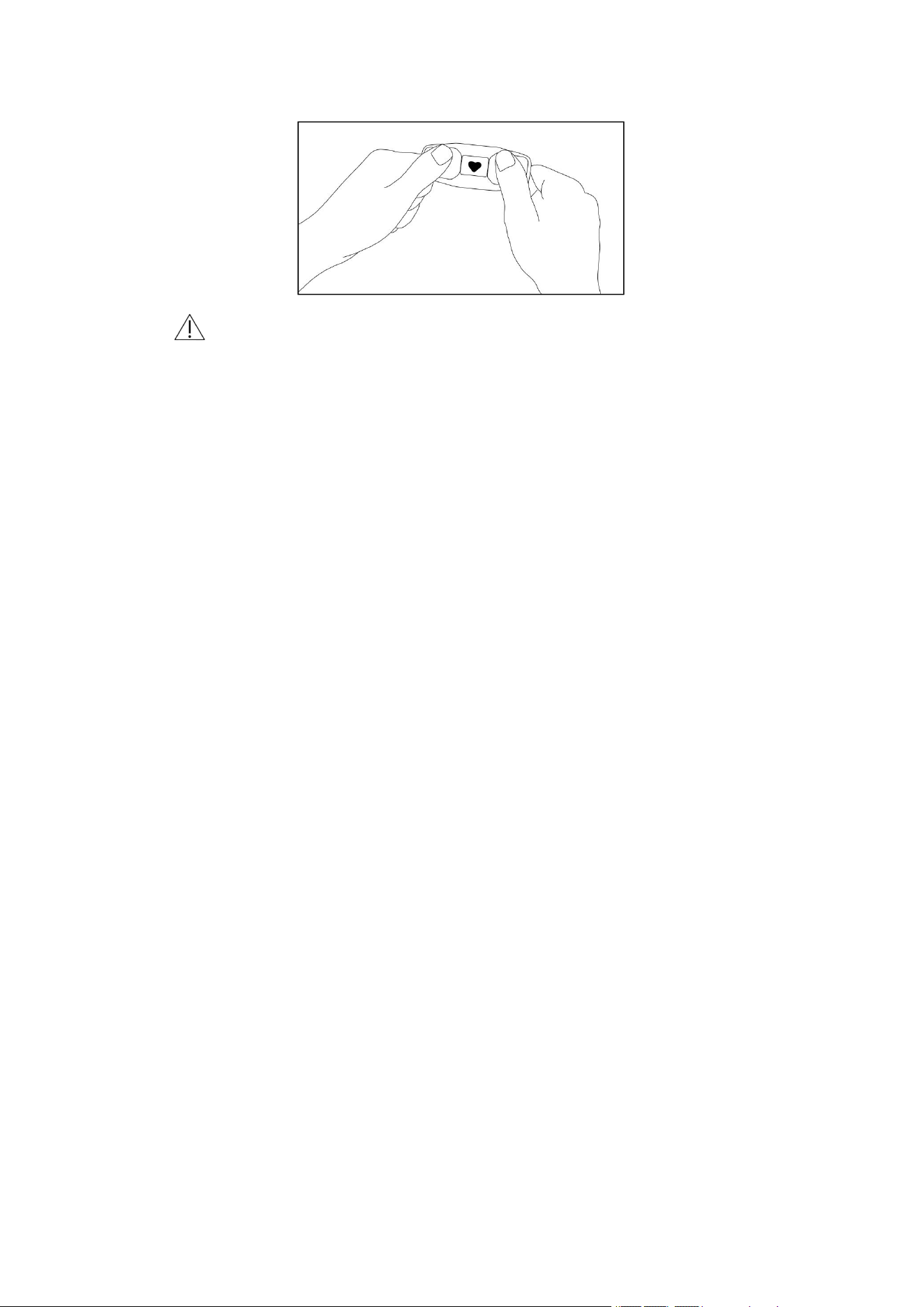
3.6.2 Single-lead measurement posture
Hold the ECG electrodes on both sides with both hands, using only your hands (as shown in
the picture).
12
Notice
1. During use, it is best to avoid shaking or moving your fingers .
2. Before you begin the measurement, please wash your hands with water or wipe them
with a damp cloth.
3. automatically enters the measurement stage after contact with both hands . The pressure
should be moderate, neither too tight nor too loose.
4. During the measurement process, you must remain seated, relaxed, and refrain from
talking or shaking the equipment, otherwise it will affect the electrocardiogram
waveform.
5. the software shows the current battery level. It is recommended to charge the battery in
time when the power is low to avoid affecting its use.
6. Automatic shutdown: When the ECG recorder's battery is low, the yellow light will flash
for 10 seconds and the device will automatically shut down; when the lead is detached
or Bluetooth is disconnected for 3 minutes ± 5 seconds, the device will automatically
shut down.
13
3.7 Software operation
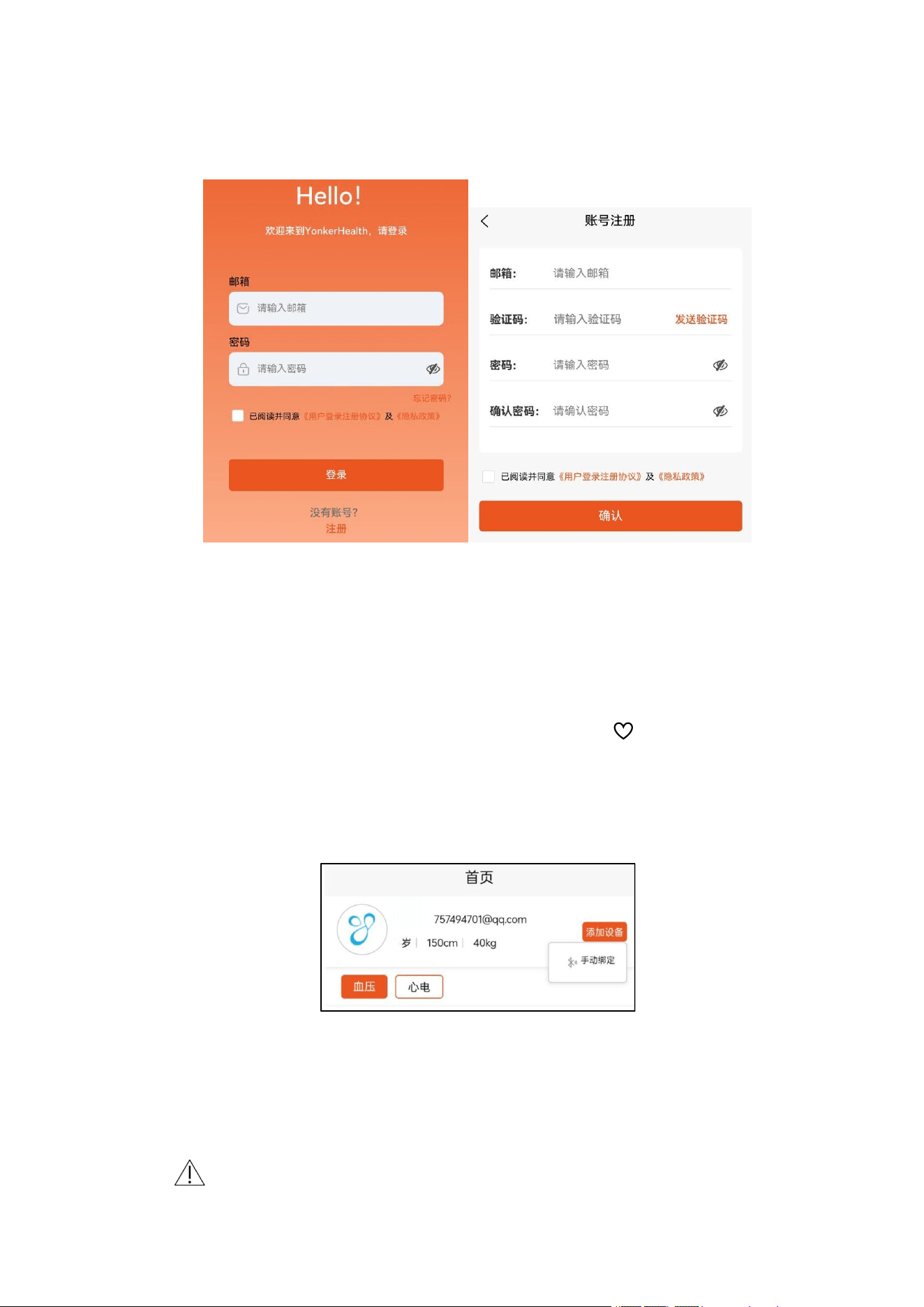
3.7.1 Registration and Login
1. Turn on your phone's Bluetooth
2. New users can click "Register" to register an account, enter the "Account Registration"
page, fill in the information, and start the registration process.
3. After successful account registration, you will be returned to the login page to log in.
3.7.2 Add device
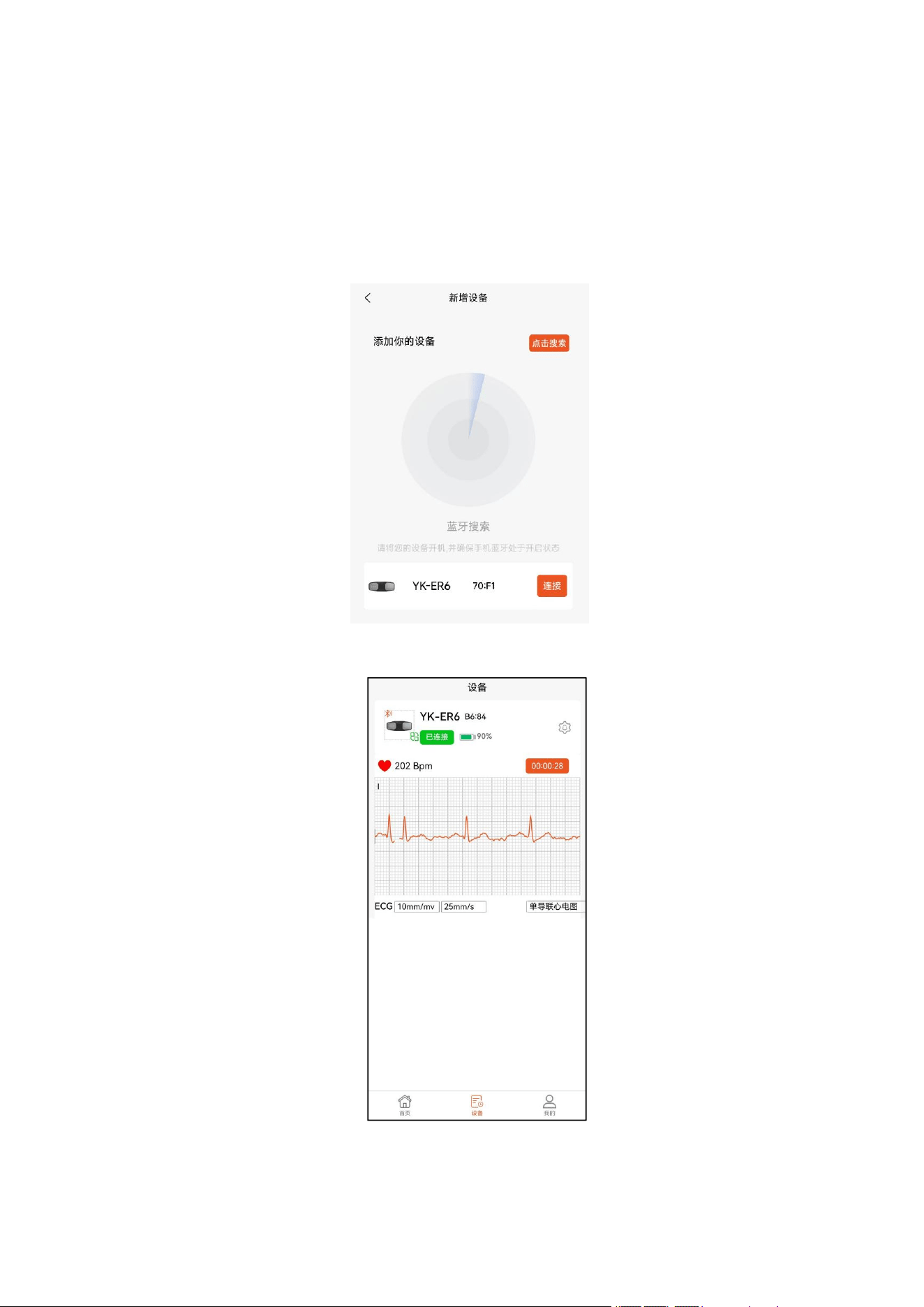
Press and hold the power button on the dashcam to turn it on. The blue light on the
dashcam screen will flash, indicating that it is waiting for Bluetooth connection . Open the mobile
app homepage (as shown in the picture below), click "Add Device" in the upper right corner, and
manually bind the device. Then, enter the search page:
Once the device to be paired is found, click to connect. After a successful Bluetooth
connection, the blue light will stay on. After completion, the test will begin (as shown in the
picture).
Notice
14
After exiting the app in the background, the device indicator light flashes blue .
If the device is not turned on, the page will display a message indicating that no device was
found.
When other devices are opened, one or more devices will be found. Select the device you
want to bind.
3.7.3 Equipment settings
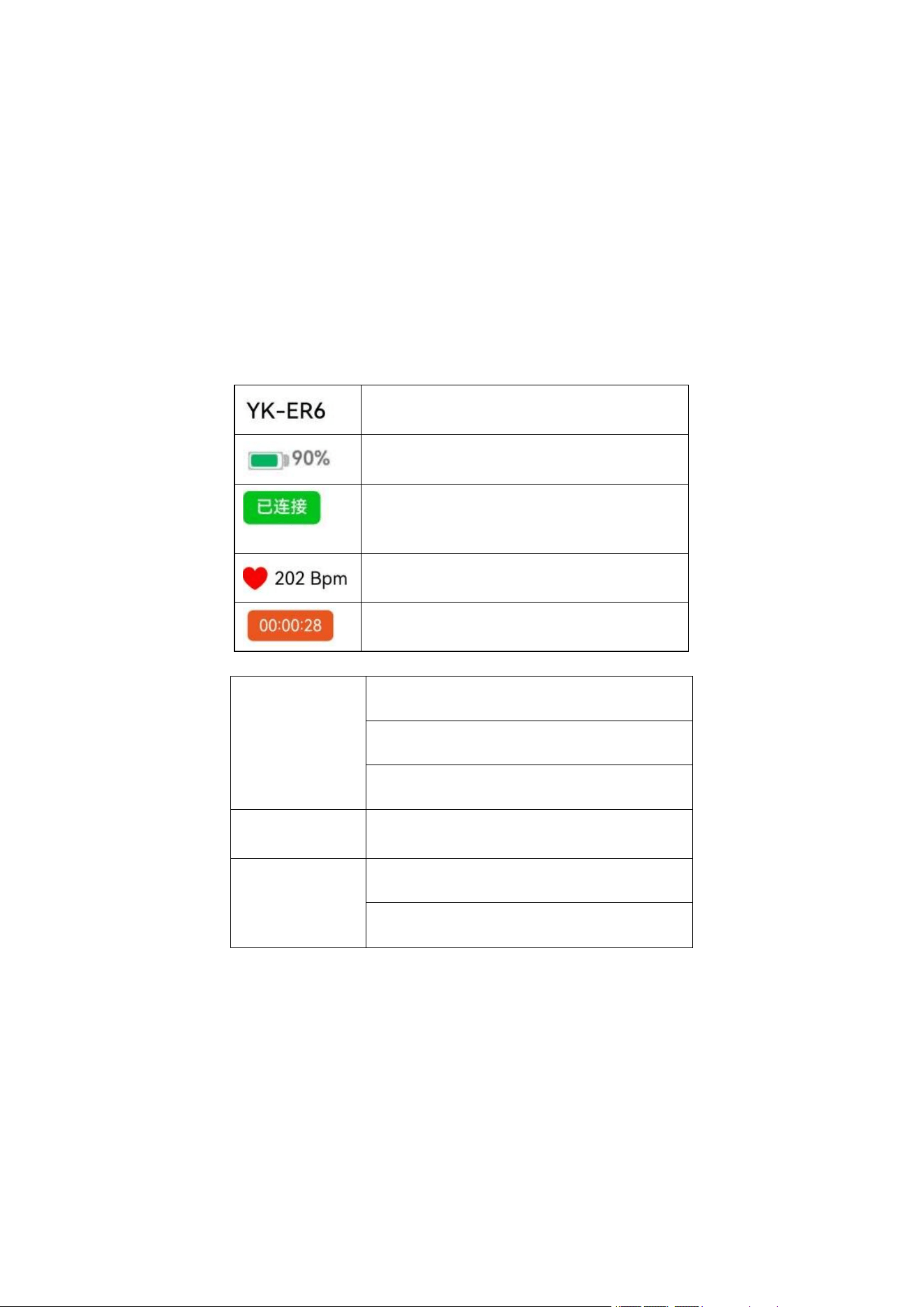
The current page displays the electrocardiogram (ECG) measurement waveform and heart
15
rate data in real time.
Once the posture is ready and ECG signal acquisition begins, the page will display " Data
entry will begin in 3 seconds" and start a countdown. The signal acquisition time is 30 seconds. If
a pop-up message appears saying "Data duration is less than 30 seconds and cannot be analyzed
normally," it means that the signal acquisition time is less than 30 seconds and ECG data needs to
be acquired again.
When a pop-up window displays "Device disconnected," it means that the device has been
disconnected and needs to be reconnected.
Equipment Model
Current device power
The current device connection status can be
displayed as either not connected or connected.
Current heart rate
Collection time
The switchable parameters in the software are shown in the table below.
Gain control
5 mm/mv
10 mm/mv
20 mm/mv
Paper feeding
management
25 mm/s
electrocardiogram
Six-lead electrocardiogram
Single-lead electrocardiogram
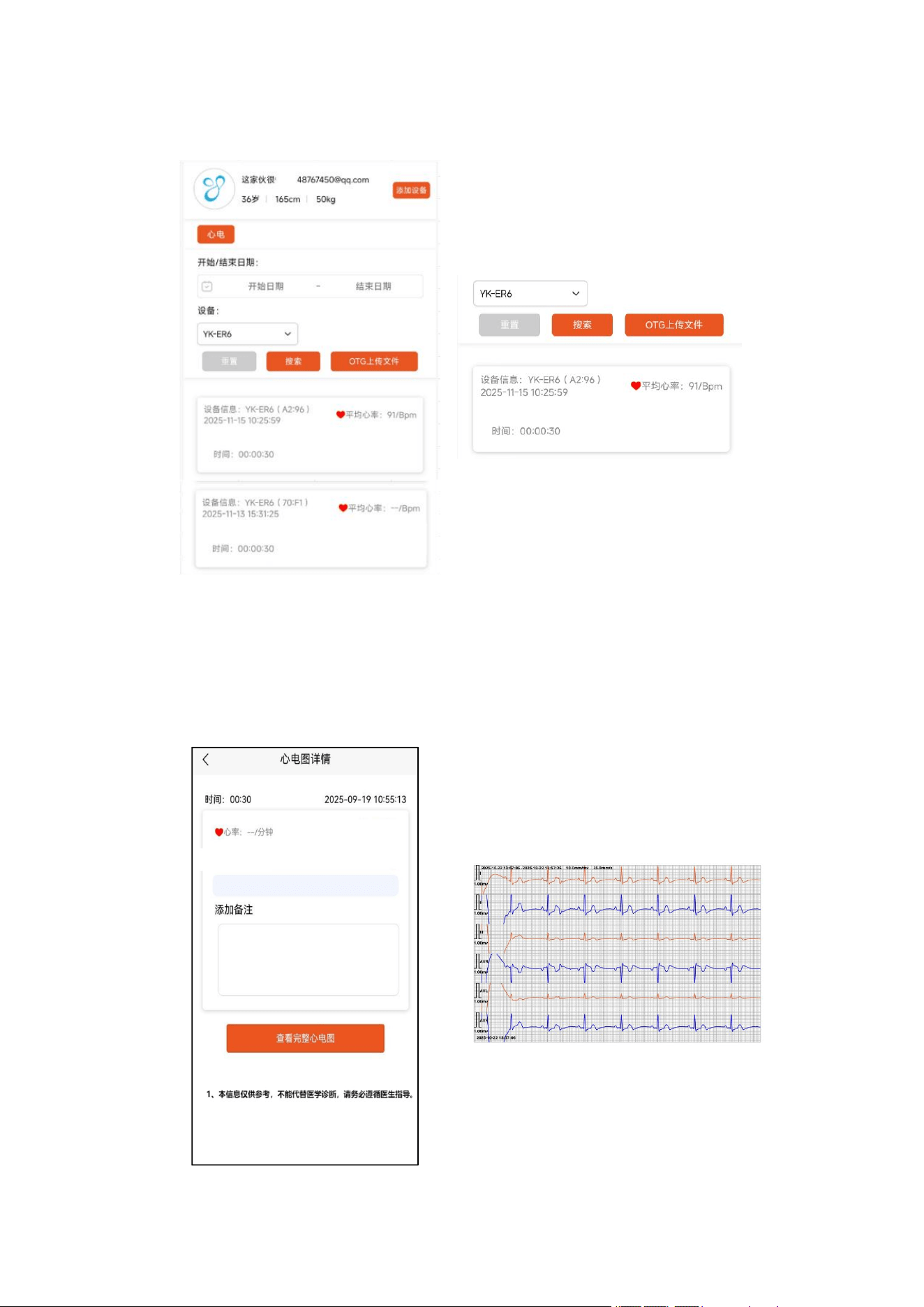
3.7.4 Measurement Records
1. After the measurement is completed, you can view the measurement results on the
homepage.
2. The "Home" dropdown menu displays historical measurement data, including specific
device model, measurement date, measurement time, and heart rate, as shown in the
image below:
16
3. Clicking on any data point below will take you to the page shown in the image. Clicking
"View Full ECG" will then take you to the ECG page. Swipe the progress bar left and
right to view the complete ECG, as shown in the image below:
17
3.7.5 Page Search
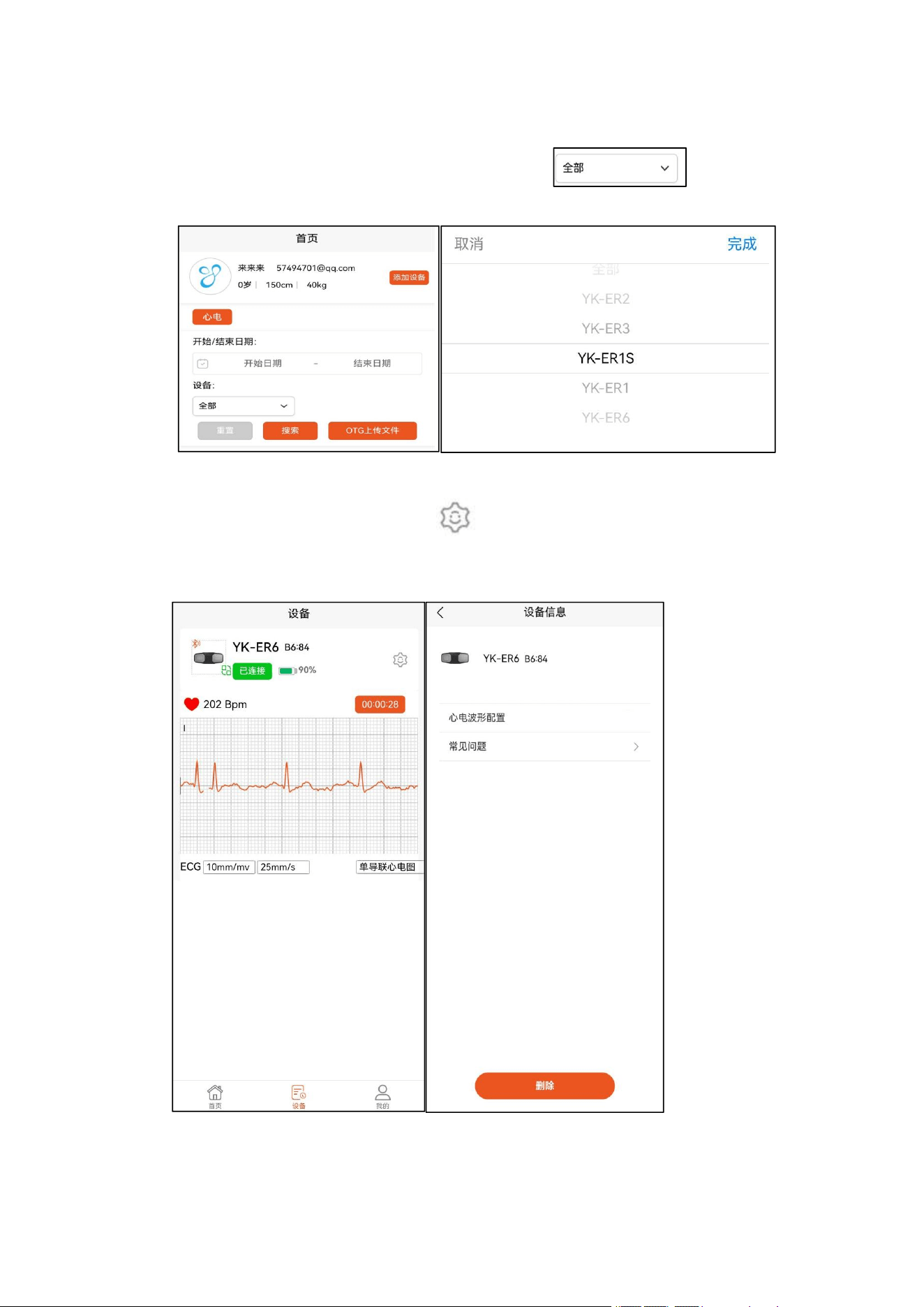
Select the start/end date, and use the dropdown menu " " to search by
product model, as shown in the image below:
3.7.6 Device Removal
On the bound device page, click the " " in the upper right corner to enter the device
management page, click "Delete" at the bottom of the interface, and a pop-up window will ask
"Confirm whether to unbind this device". Select "Confirm" to delete the bound device.
18
3.7.7 Personal Information Settings
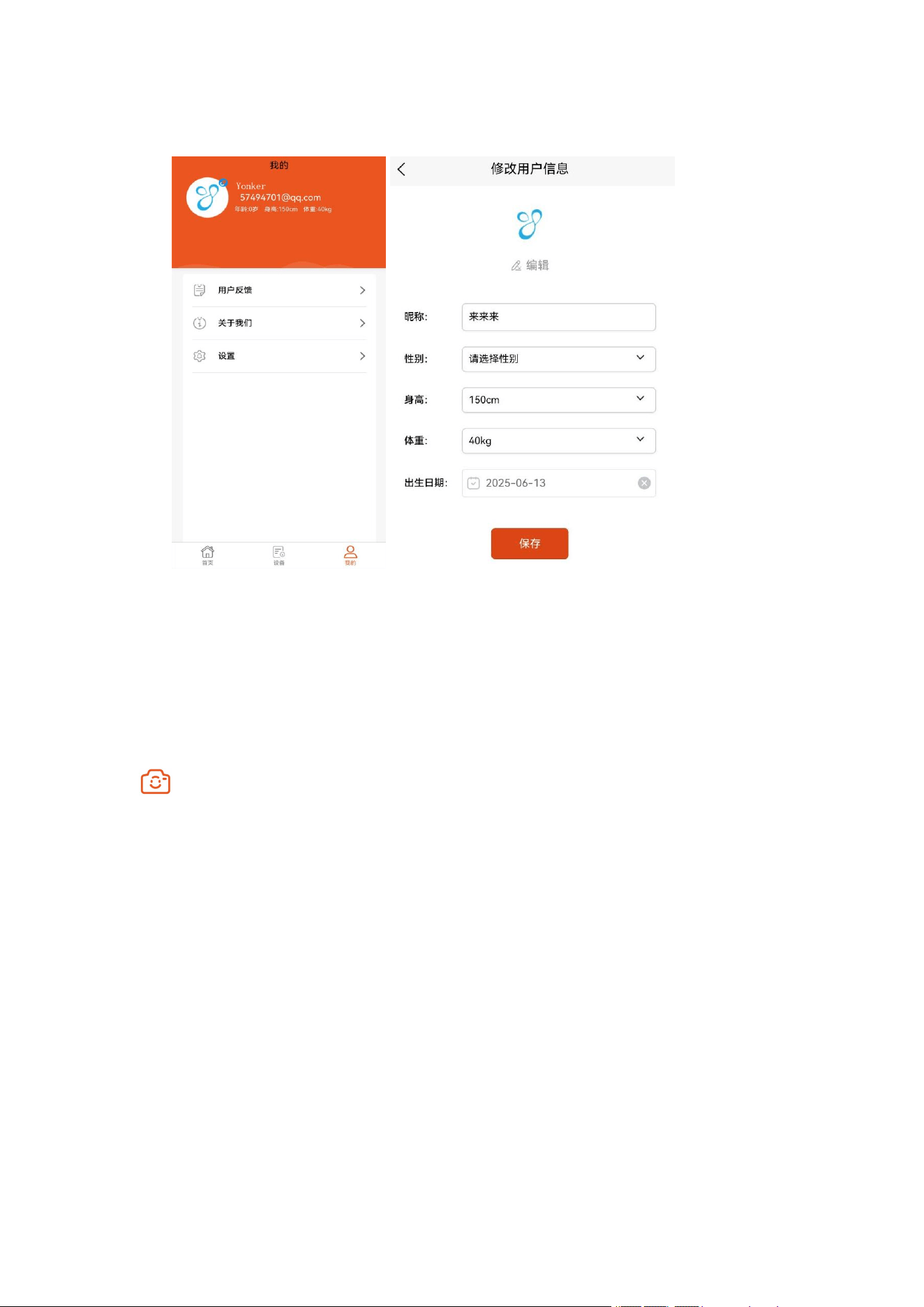
After logging in, your personal information will be displayed on the "My" page. Clicking on
your avatar will take you to the page shown in the image, where you can set the following
information: avatar, nickname, gender, height, weight, and date of birth.
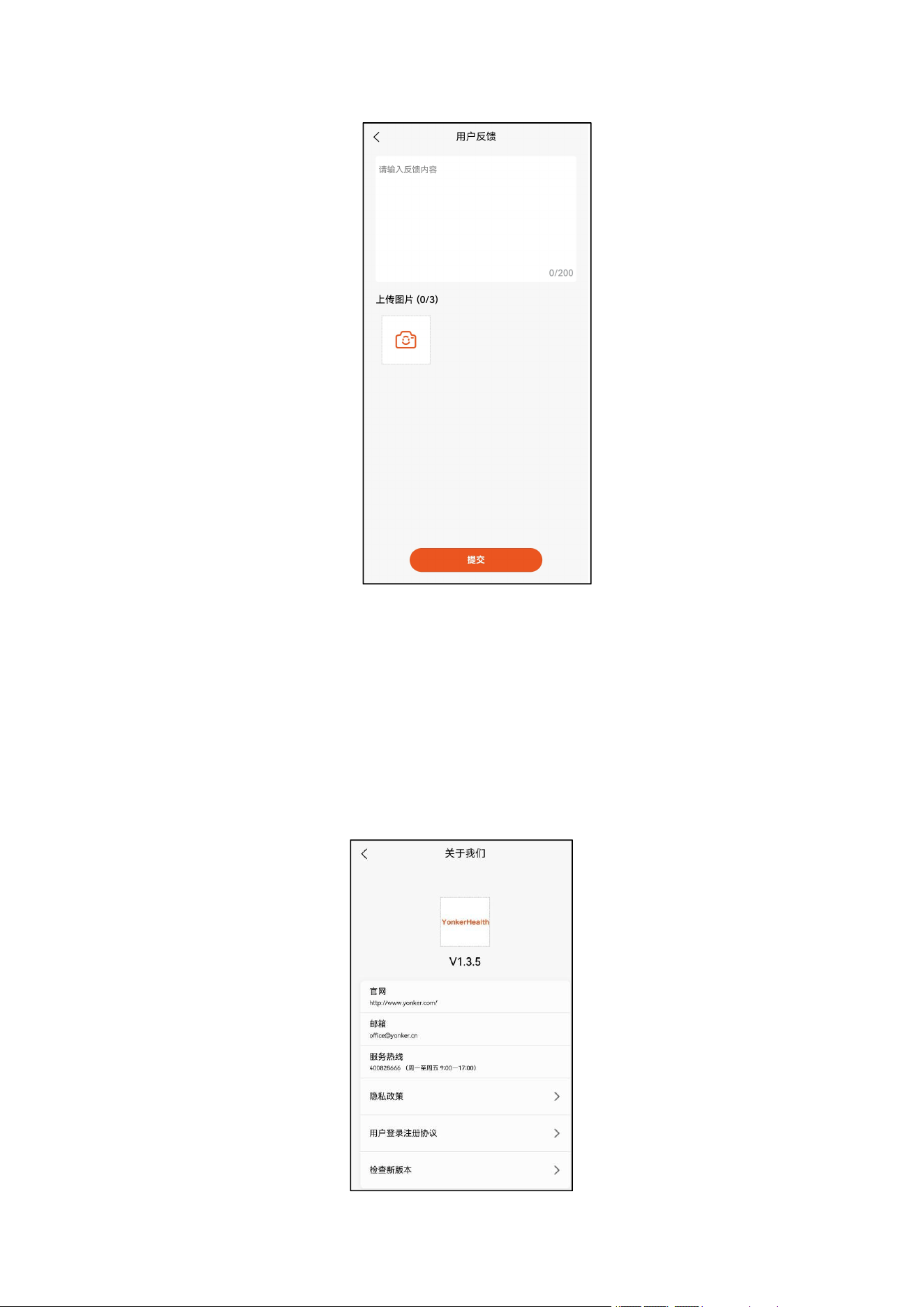
3.7.8 User Feedback
If you have any other issues you'd like to report to our company or our backend system, you
can go to the "My" page, click "User Feedback," edit the text content of your feedback, or click
to upload an image. Click "Submit" at the bottom of the page to complete your feedback.
19
3.7.9 about Us
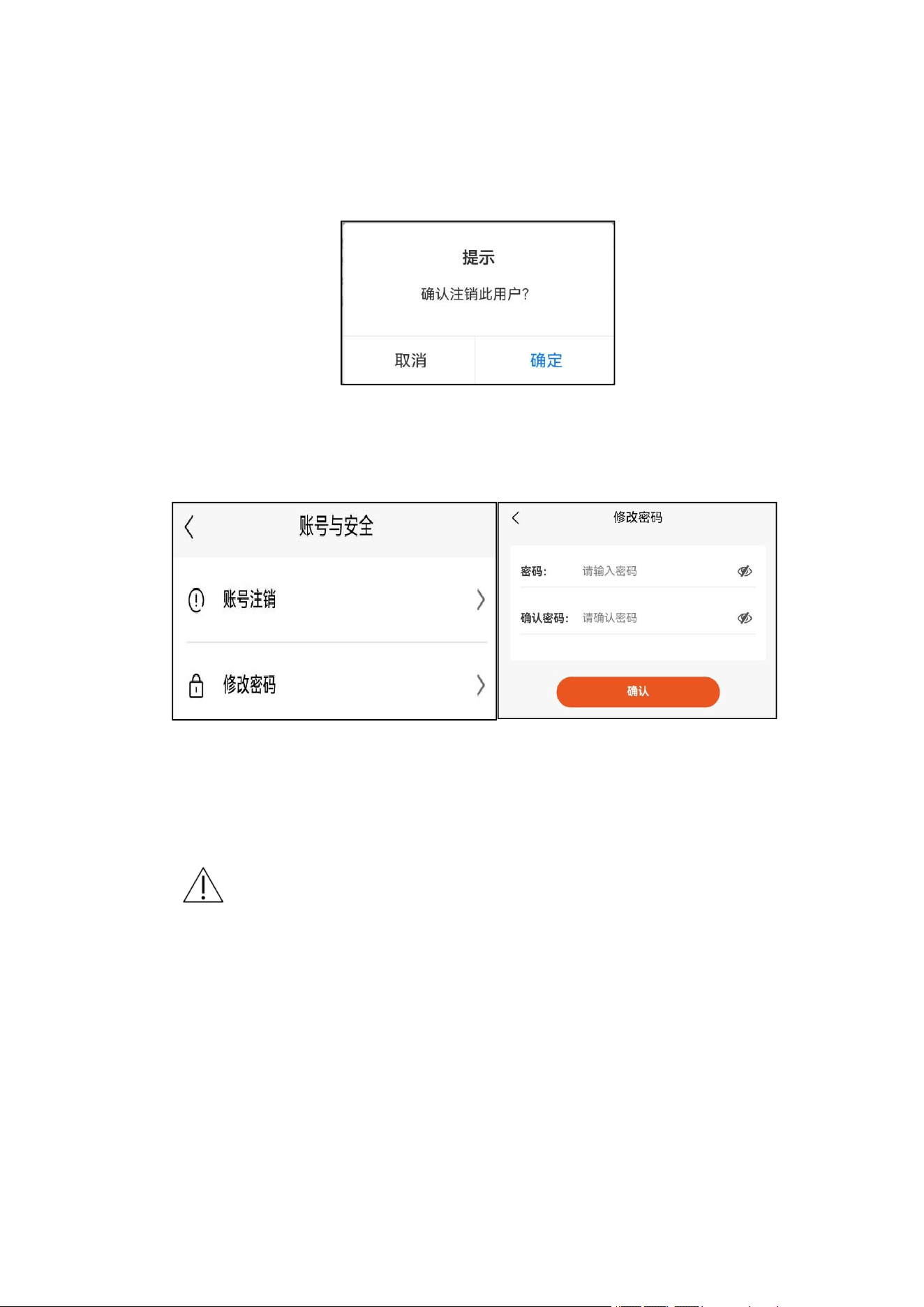
Clicking "About Us" will display the following information: current software version number,
official website, email address, service hotline, service hours, privacy policy, user login agreement,
and check for new version.
To update the software, click "Check for new versions". If an update is available, click to update.
If the current version is already the latest, a pop-up window will appear saying "This is already the
latest version".
20
3.7.10 Account cancellation
On the "My" page, click "Settings" → "Account and Security" → "Account Deregistration"
→ "Logout". A pop-up window will appear prompting "Confirm deregistration of this user". Click
"OK" to complete the deregistration process.
3.7.11 Change password
On the "My" page, click "Settings" → "Account and Security" → "Change Password".
Enter your password twice and click "Confirm" to complete the password change.
4. Regarding charging
Charging is done via a Type-C interface. The indicator light flashes green while charging and
remains on when fully charged.
Notice
When the dashcam's battery is low, the indicator light will flash yellow for 10 seconds and
then automatically shut down . Please charge it promptly to avoid affecting its use. The
battery level will be displayed on the app screen after connection.
If the device is not to be used for an extended period (more than 3 months), please fully
charge it before storing it.
This equipment requires a Class II adapter that meets the requirements of IEC
60601-1 or GB 9706.1-2020 standards, and the adapter must meet the 2 MOPP
insulation requirement.

21
5.
Maintenance and upkeep
5.1 maintainance
5.1.1 Daily cleaning and disinfection
When dust or dirt appears on the product surface, please wipe it with a dry, clean, soft cloth.
When the main unit is heavily soiled, wipe it with a soft cloth dampened with water or
neutral detergent, wrung out thoroughly. After wiping away the dirt, wipe it again with a dry,
soft cloth.
If the electrodes are heavily soiled, wipe them with a soft cloth dampened with alcohol
disinfectant.
Please use a clean cloth that will not produce lint.
Do not use abrasives.
If there is a temperature difference between the place of use and the place of storage, please
let it sit for 30 minutes before use.
Notice
When multiple people are using the product, please disinfect it with 75% medical alcohol
before use. Be careful not to let water or alcohol seep into the product.
Do not store the computer in the following places:
1. Places where water is likely to splash.
2. Places with high temperature, humidity, direct sunlight, high dust, and high
salt content.
3. Tilt, places that will vibrate or impact.
4. Places where chemicals or corrosive gases are stored.
Disposal Recommendation : Please dispose of the main unit, accessories, and separately
sold items in accordance with the relevant environmental protection regulations of the
city .
5.1.2 Routine inspection
To record an accurate electrocardiogram, please perform the following checks :
1. Before use, please check whether the main unit has any abnormal appearance
such as deformation, damage, electrode corrosion, or dirt.
2. When recording an electrocardiogram, please make sure that recording begins
as soon as the electrodes touch the skin.

22
3. During use, please check for any unusual odors or noises.
5.1.3 repair
If you experience any abnormalities during use or routine checks, please stop using the
product and contact our company for assistance.
5.2 Common Faults and Solutions
Fault
phenomenon
Possible reasons
Solution
The phone
cannot connect
recorder
1. The recorder battery is low.
2. Turn off Bluetooth on your
phone.
3. The recorder is damaged.
1. Charge the recorder
2. Turn on your phone's Bluetooth.
3. Contact customer service
The ECG
waveform has
large noise and
the displayed
waveform is
abnormal.
1. Skin that is too dry or oily
2. There are excessively strong
interference sources in the
environment.
3. Excessive muscle tension causes
electromyographic interference.
4. The device is too far away from
the mobile phone.
1. Clean your hands properly, making
them moist but not oily.
2. Try using it in a different
environment.
3. Relax your shoulders, back, and
fingers.
4. Bring your phone close to the
dashcam.
Historical data
cannot be viewed
on mobile phones
1. Insufficient phone storage space
2. Software issues
1. Clear the cache and delete useless
data.
2. Contact customer service
The recorder
cannot be turned
on.
1. Low battery power
2. The recorder is damaged.
1. Charge the recorder
2. Contact customer service
Other issues
/
Contact customer service
6. Electromagnetic compatibility
The electromagnetic compatibility (EMC) specifications of the recorder (YK-ER6) fully
comply with YY 9706.102-2021 and YY standards. Clause 202 of 9706.247-2023 stipulates that
the verification method for electromagnetic compatibility indicators shall also be carried out in
accordance with this standard.
23
When the recorder operates in the electromagnetic environment specified in this EMC
technical datasheet, its basic performance is unaffected.
Basic performance of the recorder (YK-ER6): detection of electrocardiogram waveform and
heart rate.
Magnetic fields may interfere with the normal operation of the instrument.
Furthermore, this recorder may cause electromagnetic interference to other electronic
products. Therefore, please note the following points when the instrument is in
operation:
warn
Purchasers or users of this device should use the recorder (YK-ER6) in the
electromagnetic environment specified in Tables 1, 2, 3, and 4 (see YY
9706.102-2021) , otherwise the recorder (YK-ER6) may malfunction.
Portable and mobile radio frequency communication devices may affect the normal
use of the recorder (YK-ER6) . Please use the recorder (YK-ER6) in the
recommended electromagnetic environment .
Using accessories and cables other than those provided by the recorder (YK-ER6)
manufacturer may result in increased emissions or reduced immunity of the
recorder (YK-ER6) .
The recorder (YK-ER6) should not be used near or stacked with other
devices. If it must be used near or stacked, its normal operation under the
configuration in which it is used should be observed and verified.
The following cables must be used to meet the requirements for
electromagnetic emission and interference immunity:
name
Cable length
( m )
Should I block
it?
charging cable
1.0
no
Table 1
Guidelines and Manufacturer's Statements—Electromagnetic Launch
The recorder ( YK-ER6 ) is intended for use in the electromagnetic environments specified
below, and the purchaser or user shall ensure that it is used in such electromagnetic environments.
Launch test
Compliance
Electromagnetic Environment - Guide
24
Radio frequency transmission
GB /T 4824 (CISPR 11)
Group 1
The recorder ( YK-ER6 ) uses RF
energy for its internal functions.
Therefore, its radio frequency
radiation is very low and the
possibility of interfering with nearby
electronic equipment is minimal.
Radio frequency transmission
GB /T 4824 (CISPR 11)
Category B
The recorder ( YK-ER6 ) is suitable
for use in all facilities, including home
facilities and those directly connected
to the public low-voltage power grid
of residential homes.
Harmonic emission
GB /T 17625.1
Category A
Voltage fluctuation/scintillation
emission
GB /T 17625.2 (IEC 61000-3-3)
conform to
Table 2
Guidelines and Manufacturer's Statements - Electromagnetic Immunity
The recorder (YK-ER6) is intended for use in the electromagnetic environments
specified below, and the purchaser or user shall ensure that it is used in such
electromagnetic environments.
Anti-interferenc
e test
IEC 60601 test
level
Compliance Level
Electromagnetic
Environment - Guide
electrostatic
discharge
GB/T 17626.2
(IEC61000-4-2)
±6kV contact
discharge
±8kV air
discharge
±6kV contact
discharge
±8kV air
discharge
The floor should be made
of wood, concrete, or
tile. If the floor is
covered with a synthetic
material, the relative
humidity should be at
least 30%.
Electric Fast
Transient Second
Charge Group
GB/T 17626.4
(IEC61000-4-4)
± 2kV power
supply line
±1kV
input/output
lines
±2kV power supply
line
not applicable
The mains power supply
should have the quality
typically used in
commercial or hospital
environments.
surge
GB/T 17626.5
(IEC61000-4-5)
± 1 kV
line-to-line
± 2 kV line to
ground
±1kV
line-to-line
not applicable
The mains power supply
should have the quality
typically used in
commercial or hospital
environments.
25
Voltage dips,
short
interruptions and
voltage
variations on
power input lines
GB/T 17626.11
(IEC61000-4-11)
< 5% UT
,
lasting
0.5 cycles ( >95%
transient
decrease in UT)
.
40% UT
,
for 5
consecutive
cycles ( 60%
temporary
decrease in UT)
.
70% UT
,
lasting
for 25 cycles
( 30% temporary
drop in UT)
.
<5% UT
,
lasting 5
seconds ( >95%
transient
decrease in UT)
.
< 5% UT
,
lasting
0.5 cycles (> 95%
sag on UT)
40% UT
,
lasting
for 5 cycles ( 60%
temporary drop in
UT)
.
70% UT
,
for 25
cycles (30% sag on
UT).
< 5% U
T
, lasting 5
seconds
(On
UT
, >95%
temporary drop)
The mains power supply
should have the quality
typical of commercial or
hospital environments.
If the user of the
equipment needs
continuous operation
during power outages, it
is recommended that the
equipment be powered by
an uninterruptible power
supply (UPS) or battery.
Power frequency
magnetic field
(50/60Hz)
GB/T 17626.8
3 A/m
3 A/m
The power frequency
magnetic field should
have the power frequency
magnetic field level
characteristics of
typical locations in a
typical commercial or
hospital environment.
Note: UT refers to the AC mains voltage before the test voltage is applied
.
Table 3
Guidelines and Manufacturer's Statements - Electromagnetic Immunity
The recorder (YK-ER6) is intended for use in the electromagnetic environments specified below,
and the purchaser or user shall ensure that it is used in such electromagnetic environments.
Anti-interfer
ence test
IEC 60601 test
level
Compliance
Level
Electromagnetic Environment - Guide
Radio
frequency
conduction
GB/T
17626.6
(IEC61000-4-
6)
Radio
frequency
radiation
GB/T
3 V (RMS value)
150 kHz~80 MHz
3 V/m
80 MHz ~ 2.5 GHz
3 V (RMS
value)
3 V/m
Portable and mobile radio frequency
communication devices, including cables,
should not be used closer to any part of the
recorder (YK-ER6) than the recommended
isolation distance . This distance should be
calculated using a formula corresponding to
the transmitter frequency.
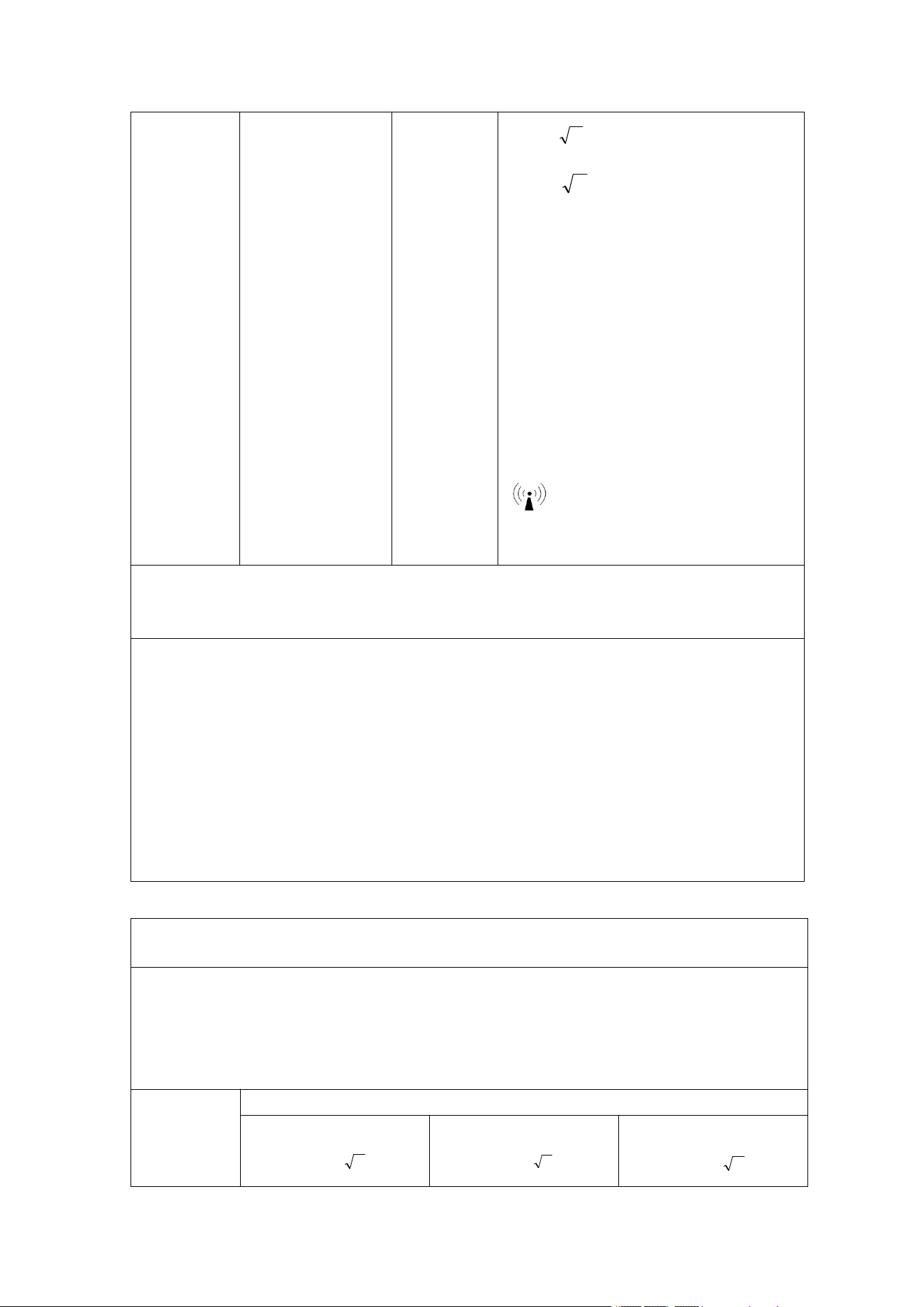
Recommended isolation distance
d =
P2.1
26
17626.3
(IEC61000-4-
3)
d =
P2.1
80 MHz to 800 MHz
d =
P3.2
800 MHz to 2.5 GHz
In the formula:
P—The maximum rated output power of the
transmitter as provided by the transmitter
manufacturer, in watts (W).
d—Recommended isolation distance, in
meters (m)
The field strength of a fixed radio frequency
transmitter is determined by
electromagnetic field survey
(a) ,
and should
be lower than the compliance level in each
frequency range
(b) .
Interference may occur near devices marked
with the following symbols .
Note 1: At the 80MHz and 800MHz frequencies, the formula for the higher frequency band is used.
Note 2: These guidelines may not be suitable for all situations, as electromagnetic propagation is
affected by absorption and reflection from buildings, objects, and the human body.
For fixed transmitters, such as base stations for wireless (cellular, cordless) telephones and
terrestrial mobile radios, amateur radio, AM and FM radio broadcasting, and television
broadcasting, the electromagnetic field strength cannot be accurately predicted in theory. To assess
the electromagnetic environment of a fixed RF transmitter, an electromagnetic field survey should
be considered. If the field strength at the location of the recorder (YK-ER6) is measured to be higher
than the applicable RF compliance level, the recorder (YK-ER6) should be observed to verify its
normal operation. If abnormal performance is observed, supplementary measures may be necessary,
such as readjusting the orientation or position of the recorder (YK-ER6) .
b. The electric field strength should be less than 3V/m across the entire frequency range of 150kHz
to 80MHz.
Table 4
Recommended isolation distance between portable and mobile radio frequency communication
devices and recorders (YK-ER6)
The recorder (YK-ER6) is intended for use in electromagnetic environments where radio frequency
radiated interference is controlled. Based on the maximum rated output power of the communication
equipment, purchasers or users can prevent electromagnetic interference by maintaining the
minimum distance between the portable and mobile radio frequency communication equipment
(transmitter) and the recorder (YK-ER6) as recommended below .
The
transmitter's
maximum
rated output
Isolation distance (m) corresponding to different frequencies of the transmitter
150 kHz~80 MHz
d =
P2.1
80MHz~800MHz
d =
P2.1
800MHz~2.5GHz
d =
P3.2
27
power W
0.01
0.12
0.12
0.23
0.1
0.38
0.38
0.73
1
1.2
1.2
2.3
10
3.8
3.8
7.3
100
12
12
twenty three
For transmitters whose maximum rated output power is not listed in the table above, the
recommended isolation d, in meters (m), can be determined using the formula in the corresponding
transmitter frequency column. Here, P is the transmitter's maximum rated output power provided by
the transmitter manufacturer, in watts (W).
Note 1: At the 80MHz and 800MHz frequencies, the formula for the higher frequency band is used.
Note 2: These guidelines may not be suitable for all situations, as electromagnetic propagation is
affected by absorption and reflection from buildings, objects, and the human body.
7. appendix
7.1 Product List
Serial
Number
Name
quantity
Remark
1
electrocardiogram
recorder
1
2
charging cable
1 item
3
manual
1 copy
4
Certificate of
Conformity
1
5
storage bag
1
8. After-sales service
8.1 illustrate
1) The company promises users a one-year free warranty and lifetime maintenance.
2) If the recorder malfunctions, do not attempt to disassemble or reassemble
it yourself. Please contact the manufacturer's customer service center immediately.
In special circumstances requiring repair by qualified technicians other than those
from the manufacturer, our company can provide product circuit diagrams, component
lists, etc. Please contact our customer service center for assistance.
3) The company is not responsible for free repair or replacement of any direct
or indirect damage caused by improper use of the equipment. The user shall pay for

28
the repair (including transportation costs).
The following situations are not covered by the warranty:
1. Unable to produce a warranty card, invoice, or proof of purchase.
2. Damage caused by improper use or other human factors
3. Damage caused by unforeseen natural disasters
For products beyond the warranty period, we will provide paid repair services. Our company
reserves the right to interpret this warranty information.
8.2 Manufacturer Information
Registrant Name/Manufacturer Name/After-Sales Service Provider Name: Xuzhou
Yongkang Electronic Technology Co., Ltd.
Registered Address : 2&3rd Floor, Block B, Huaihai Biomedical Industry Park,
No. 5 Tengzhai North Rd.,Xuzhou,China
Production Address/After-sales Service Unit Address:2&3rd Floor, Block B,
Huaihai Biomedical Industry Park, No. 5 Tengzhai North Rd.,Xuzhou,China
Production date: See product label
Service life: 5 years
Telephone: 0516-87892766
Fax: 0516-87892766-606
Postal code: 22100
Website: www.yonker.cn
Email: office@yonker.cn
29
Appendix A Safety
Product Name
electrocardiogram recorder
Product Model
YK-ER6
Protection level
IP22
Classification by level of protection
against electric shock
CF type equipment
Classification by type of electric
shock protection
Class II, Internal power supply equipment
Classification by operating mode
Continuous operation equipment
Does the equipment have an application
section that protects against
defibrillation discharge effects?
This equipment does not have any application section for
defibrillation discharge effect protection.
Permanent installation equipment or
non-permanent installation equipment
Non-permanent installation equipment
Classified according to the level of
safety when used in flammable
anesthetic gases mixed with air or
flammable anesthetic gases mixed with
oxygen or nitrous oxide.
It cannot be used in the presence of flammable anesthetic
gases mixed with air or flammable anesthetic gases mixed
with oxygen or nitrous oxide.
Charging power supply
External power supply : Input 100V-240V; 50/60Hz, Output
5V 2A
Electrical
parameters
Internal
power supply
DC 3.7V
Battery
capacity
180 mAh
Automatic
shutdown
The recorder automatically shuts down after 3 minutes of
inactivity.
Low voltage
warning
When the voltage is 3.3V±0.1V , the indicator light will flash yellow for 10
seconds and then automatically shut down.
Charging time
Approximately 3 hours
Working hours
>24 hours
30
Use period
5 years
Appendix B Environmental Requirements
Work
environment
Ambient
temperatur
e
5ºC ~ 45ºC
1. If stored or used outside the
temperature and humidity range
specified by the manufacturer, the
system may not achieve the claimed
performance.
2. During transportation, avoid strong
impacts, direct collisions, exposure to
sunlight or rain . After packaging, the
recorder should be stored in an
environment that meets the temperature,
humidity and atmospheric conditions,
free from corrosive gases and in a
well-ventilated indoor environment .
relative
humidity
10 % ~ 95 %
( Non-condensing )
Atmospheri
c pressure
70 kPa ~ 106 kPa
Transportati
on and
storage
environment
Ambient
temperatur
e
-20ºC~+55ºC
relative
humidity
≤ 95%
( non-condensing )
Atmospheri
c pressure
7.0 kPa ~ 10.6
kPa
Appendix C Product Specifications
Product
Dimensions
90*35*9mm
Product weight
27g
Number of leads
Single lead, six leads; dual-channel; I, II, III, aVL, aVR, aVF
Heart rate
measurement range
30-300 bpm
Heart rate
measurement error
±2bpm
Input impedance
≥10MΩ
System noise
<25μV (peak-to-valley value)
Impulse response
overshoot <10%
Frequency
response
Sine wave signal 0.67Hz~40Hz (+3dB~-3dB)
Rated input
amplitude
Input frequency and waveform
amplitude changes
31
2.0mv
0.67Hz~40Hz, sine wave
140%~70%
a
1.5mv
1Hz, triangular wave, 40ms bottom
width
70 %~ 110 %
b
a is the output amplitude relative to a 5 Hz sinusoidal input signal.
b is the output amplitude relative to a triangular wave input signal with a bottom
width of 200ms.
Gain accuracy
With all possible gain settings, the output signal is equivalent to the input test
signal, with a maximum amplitude error of ±10%.
Mobile software
Software Name
Dynamic electrocardiogram recorder software
Model/Specification
YK-ER6
Release version
V1
Embedded
software
Software Name
ECG recording software
Applicable
models/specifications
Y onker Health
Release version
1
Communication
methods
Bluetooth connection
Gain control
5 mm/mv , 1 0mm/mv , 2 0mm/mv
Speed
Management
25mm/s
Bluetooth module
frequency
2402~2480MHz
Modulation
type
GFSK
Effective
radiated power
≤20dBm

FCC Warning
This device complies with part 15 of the FCC Rules. Operation is subject to the following two conditions:
(1) This device may not cause harmful interference, and (2) this device must accept any interference
received, including interference that may cause undesired operation.
Any Changes or modifications not expressly approved by the party responsible for compliance could
void the user's authority to operate the equipment.
Note: This equipment has been tested and found to comply with the limits for a Class B digital device,
pursuant to part 15 of the FCC Rules. These limits are designed to provide reasonable protection
against harmful interference in a residential installation. This equipment generates uses and can radiate
radio frequency energy and, if not installed and used in accordance with the instructions, may cause
harmful interference to radio communications. However, there is no guarantee that interference will not
occur in a particular installation. If this equipment does cause harmful interference to radio or television
reception, which can be determined by turning the equipment off and on, the user is encouraged to try to
correct the interference by one or more of the following measures:
-Reorient or relocate the receiving antenna.
-Increase the separation between the equipment and receiver.
-Connect the equipment into an outlet on a circuit different from that to which the receiver is
connected.
-Consult the dealer or an experienced radio/TV technician for help.
The device has been evaluated to meet general RF exposure requirement. The device can be used in
portable exposure condition without restriction.

