Audio Safety Note
Excessive sound pressure from earphones and headphones can cause hearing loss. Adiustment of the equalizer to
maximum increases the earphone and headphone output voltage and the sound pressure level.
Therefore, to protectyour hearing, adjust the equalizer to an appropriate level.
Safety Note
Avoid subjecting your device to extreme temperatures (below 5°C/41'F or above 35°C/95°F).
In the unlikely event that you notice any safety concerns with your product, stop using the product and unplug it
from the power source until you can speak to the Customer Support Center for further guidance.
Do not attempt to service (repair) a product yourself unless instructed to do so by the Customer Support Center
or your documentation.
Portuguese Nota sobre áudio
Ajustar o equalizador para o máximo aumenta a voltagem de saida dos fones de ouvido e auscultadores,
nccvel apropriado.
Nota de Segurança
Evite expor seu dispositivo a temperaturas extremas (abaixo de 5°C/41°F ou acimac de 35°C/95°F)
No caso improvável de vocé notar quaisquer preocupacöes de seguranca com seu produto,
pare de usá-lo e desconecte-o da fonte de energia até que possa falar com o Centro de Suporte ao
charging.
2.Connect the charging case to the power supply by using a
L/R
2s
L/R X 2
L/R X 2
X 3:
Tap Triple
Press and hold 2 seconds
2s:
X 2:Tap twice
R X 3
L X 3
Power-on
1.Q:
A:Place both earbuds back into the charging case and close the lid, then take them out
again to check if both earbuds produce sound. If only one earbud still has sound, reset both
earbuds to factory settings.
2.Q:How to resolve when the phone shows unable to connect?
A:Delete the pairing record on your phone, then search and pair again to reconnect.
3.Q:
A:
both "Phone Audio" and "Media Audio," then turn them back on. If there is still no sound,
re-pair the earbuds with your phone.
4.Q:Why is there a delay in videos/games?
A:Due to factors like usage environment, network conditions, and phone audio decoding,
there may be varying degrees of delay when transmitting audio data from the phone to the
earbuds.
5.Q:
A:If there are strong Wi-Fi signals, 5G/4G signals, or high-power electrical devices nearby
causing interference, it may lead to choppy or intermittent sound. Try changing locations or
re-pairing the connection to resolve the issue.
For any other questions, please reach out to our after-sales team.
For UL 4200A:
Battery type: 1154HV Nominal voltage: 5.0Vdc
The product contains non-replaceable lithium batteries. Remove and immediately recycle or dispose
of used batteries according to localregulations and keep away from children. Do NOT dispose of
batteries inhousehold trash or incinerate.
Do not force discharge, recharge, disassemble, heat above 60°C (140°F) or incinerate. Doing so
may result in injury due to venting, leakage or explosion resulting in chemical burns.
Even used batteries may cause severe injury or death. If the lithium battery is swallowed or placed
inside any part of the body, call a local poison control center for treatment information.
FCC ID FCC ID: A5MOW1406
IC Number IC:5903G-OW1406
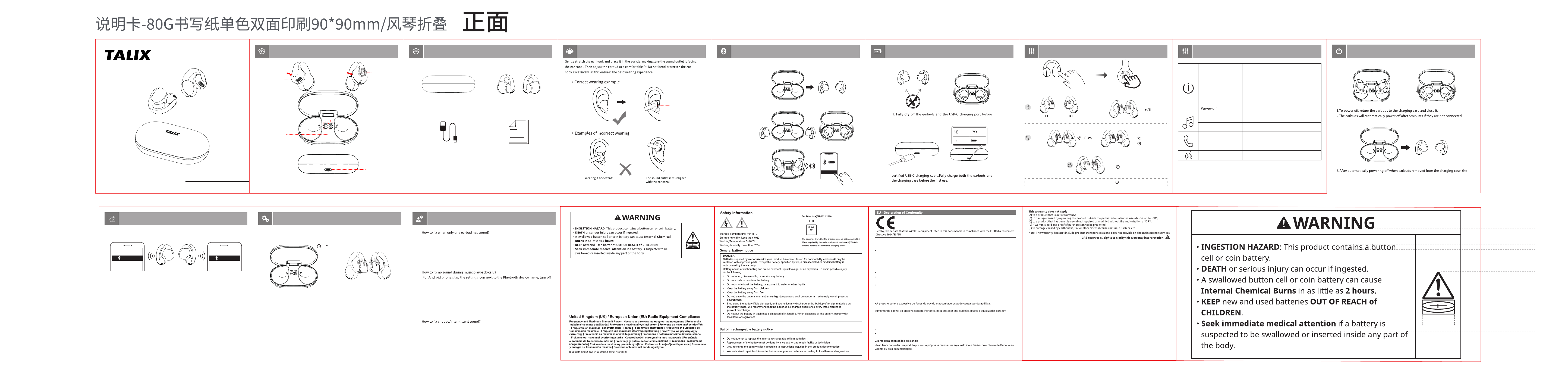
USER MANUAL
True Wireless
Ear-clip Open Earbuds
X7
Above pictures are for reference only yet actual items may vary.
Charging case
Earbuds (L&R)
Type-C cable
Manual
1. Pick up both earbuds
2.push them back in case
to activate.
3. Pick them up again.On
phone search TALIX X7 and
tap to connect.
ON
TALIX X7
=100%
LED blinks
white
L/R
Voice Assistant
2s
Battery part
Speaker part
Battery
Compartment
Power Display
Charging case
Charging port
Charging status LED
LED/Mic
Left Earbud Battery
Indicator Light
Right Earbud Battery
Indicator Light
The sound outlet
is misaligned with
the ear canal
FIRST TIME TO CONNECTPRODUCT OVERVIEW
WHAT’S IN THE BOX
WEARING CHARGING CONTROLS CONTROLS
TALIX X7
Device A Device B
TALIX X7
1.When the headphones are connected to device A,simultaneously press and hold both
touch panels for 3 seconds to open the second Bluetooth connection channel.
2.On device B, search for TALIX X7 and click connect.
MULTIPOINT
FAQ
The LED
white light
turns o
30
X5
RESET
Disconnect the earbuds from your device. Tap both the L and R panels 5 times
simultaneously within 30 seconds. The LED will ash rapidly three times to
indicate a successful reset.
* Try the following steps if the earbuds can't get connected.
1.Open the lid and remove the headphones
to power them on.
2.When the headphones are out of the
charging case and have automatically shut
down, press and hold the touch-sensitive
area for 3 seconds to power them on (the
LED indicator will light up).
Pause/resume
Next track
Voice assistant
Push back earbuds
Tap twice (L/R)
Tap three times (R)
Answer/end call
Tap twice(L/R)
lgnore call Tap and hold for 2s(L/R)
Tap and hold for 2s(L/R)
LED
Touch panel
Sound outlet
POWERING OFF
earbuds can be turned on by long-pressing the 3S MFB button.
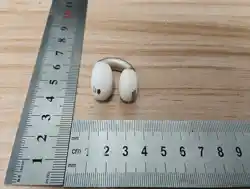
3.252 mm
24.694 mm
7.041 mm
3.492 mm
18.9 mm
ISED SAR
This equipment complies with RSS 102 radiation exposure limits set forth for an uncontrolled environment. End
user must follow the specic operating instructions for satisfying RF exposure compliance. This transmitter must
not be co-located or operating in conjunction with any other antenna or transmitter.
The portable device is designed to meet the requirements for exposure to radio waves established by the ISED.
These requirements set a SAR limit of 1.6 W/kg averaged over one gram of tissue. The highest SAR value reported
under this standard during product certication for use when properly worn on the body.
Ce matériel est conforme aux limites d'exposition aux radiations RSS 102 xées pour un environnement non
contrôlé.L'utilisateur nal doit suivre les instructions opérationnelles spéciques pour satisfaire à la conformité
à l'exposition RF.Cet émetteur ne doit pas être co-localisé ni fonctionné conjointement avec aucune autre
antenne ou émetteur.
L'appareil portable est conçu pour répondre aux exigences relatives à l'exposition aux ondes radio électriques
établies par l'ISED.Ces exigences xent une limite de SAR de 1,6 W/kg moyenne de plus d'un gram de tissu.
La valeur SAR la plus élevée signalée en vertu de cette norme pendant la certication du produit à utiliser
lorsqu'elle est correctement portée sur le corps.
FCC SAR
This equipment complies with FCC radiation exposure limits set forth for an uncontrolled environment. End
user must follow the specic operating instructions for satisfying RF exposure compliance. This transmitter
must not be co-located or operating in conjunction with any other antenna or transmitter.
The portable device is designed to meet the requirements for exposure to radio waves established by the
Federal Communications Commission (USA). These requirements set a SAR limit of 1.6 W/kg averaged over one
gram of tissue. The highest SAR value reported under this standard during product certication for use when
properly worn on the body.
This device complies with Part 15 of the FCC Rules. Operation is subject to the following two conditions: (1) this
device may not cause harmful interference, and (2) this device must accept any interference received, including
interference that may cause undesired operation.
Caution: The user is cautioned that changes or modications not expressly approved by the party responsible
for compliance could void the user's authority to operate the equipment.