
Table of Contents
What’s in the box......................................................................................4
Camera Diagram.......................................................................................5
Battery....................................................................................................... 7
Setup.......................................................................................................... 8
LED light indicator....................................................................................9
Settings....................................................................................................11
Camera......................................................................................................11
Trigger.......................................................................................................11
Work Day.................................................................................................. 12
System.......................................................................................................12
Wireless..............................................................................................................13
Scheduled Events.....................................................................................13
Specs.........................................................................................................14
FCC............................................................................................................15
Warranty..................................................................................................15
Support Info............................................................................................ 15
2

What’s in the box
■ Dtekt D1 LTE
■ USB C
■ Mounting Strap
■ User Manual
3
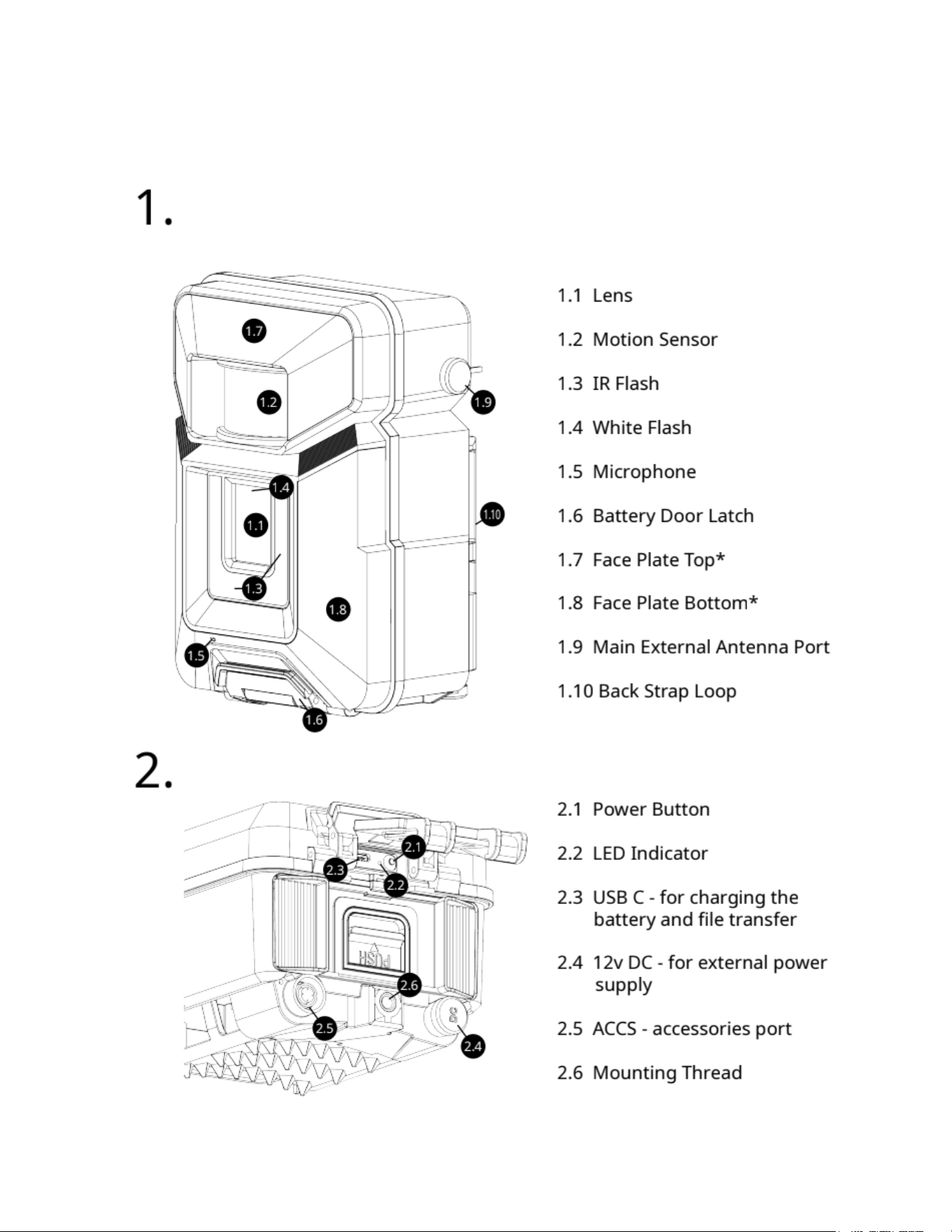
Camera Diagram
4
5

Battery
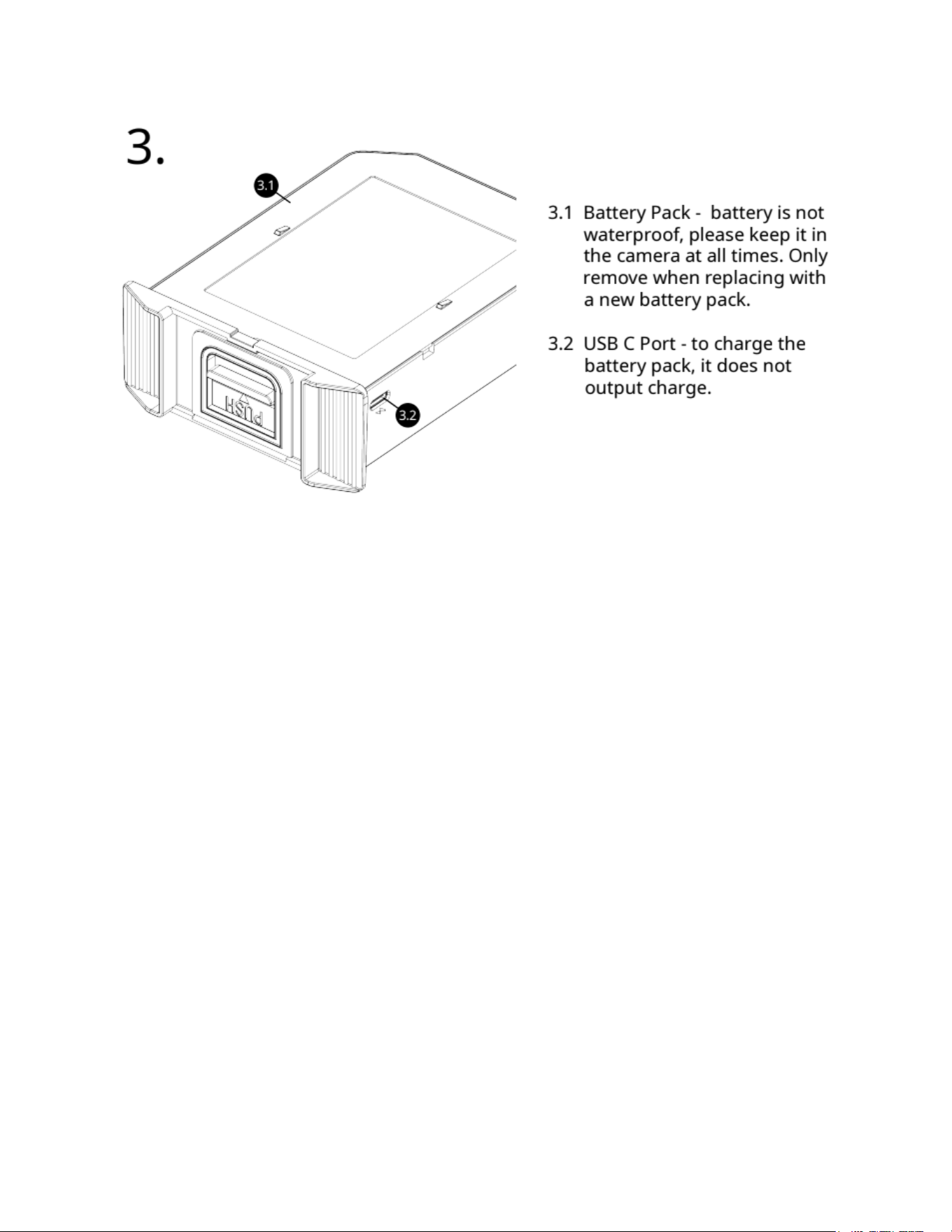
The camera contains a 10,000mAh internal battery, and comes with a
20,000mAh replaceable battery pack. Both batteries can be charged at the
same time when being connected to an external power source via USB C
port or 12v DC port. For the most optimal performance, fully charge both
batteries before deploying in the field. The camera LED light will be Red
while charging, then turn Green once it’s fully charged.
● USB-C Plugged in = LED Off
● USB-C Unplugged
○ < 100% (Charging) - Solid Red
○ = 100% (Full) - Solid Green
○ Battery Error Detected (Not Charging) - Flashing Yellow On for
0.5s, Off for 0.5s
Do not short circuit, dispose in fire, expose to excess heat or moisture,
puncture, disassemble.
Operating temperature:-20°C/-4F - 60°C/140F
Potential risk for fire, burning, and electrical shock.
Dispose of used batteries according to the instructions.
6

Setup
1. Charge battery
First, pull down the battery door latch and locate the USB C port.
Charge your camera with the USB C Cable provided in the box.
The LED light will light up Red while charging, then turn Green once
it’s fully charged.
Charging from empty to full: Internal battery 2.5 hr | Battery pack 4.5
hr
2. Download App
○ Download the “Dtekt” app
○ Add camera: Scan the QR code on the camera battery door.
○ Turn on the Camera to pair with the app
3. Network
○ Follow the steps on the app to activate your camera.
○ You’ll receive an email once the camera is activated.
○
4. Deploy
○ The app will show “Ready to Deploy”, tap the camera then
choose Deploy.
○ Your camera will run a set of verification. Once it’s finished, you’ll
be taken to the Device Management page.
○ Review and update your “Camera Settings”, then tap “Mount and
Arm” to aim your camera and to complete your setup process.
7

LED light indicator
Light Indicator is OFF
Camera is Off
Press & hold the power button to go to "Pairing mode".
Camera is Armed
To turn off the camera, press and hold the power button
To go to "Pairing mode", press the power button Once.
While the camera is Off, you can plug in the USB cable to charge the
device. The camera can be charged while in other modes, but it will
not reflect its charging state on the LED light.
Red Light - Device is charging
Green Light - Device is fully charge
Blinking White Light
Firmware Updating
If you turned on the camera while the USB cable is plugged in. It will
check for firmware files on storage and update the firmware. Once it’s
done, it’ll go to “Pairing mode”.
B linking Blue Light
Pairing mode
Your camera is ready to pair with the app.
It will Auto Arm after 2 min of inactivity.
8

Blue Light
Bluetooth Paired
Once you’ve paired the camera to the app, the camera will stay in
Setup mode until you either Arm it or turn it off.
White Light
USB Mode
While in “Pairing mode” or “Bluetooth Paired” state, plug in the USB C
cable with a computer, then double press the power button to enter
“USB mode”. This will allow you to access your camera’s internal
storage.
While the camera is in any state other than “Off”, press and hold the power
button to turn it off.
9
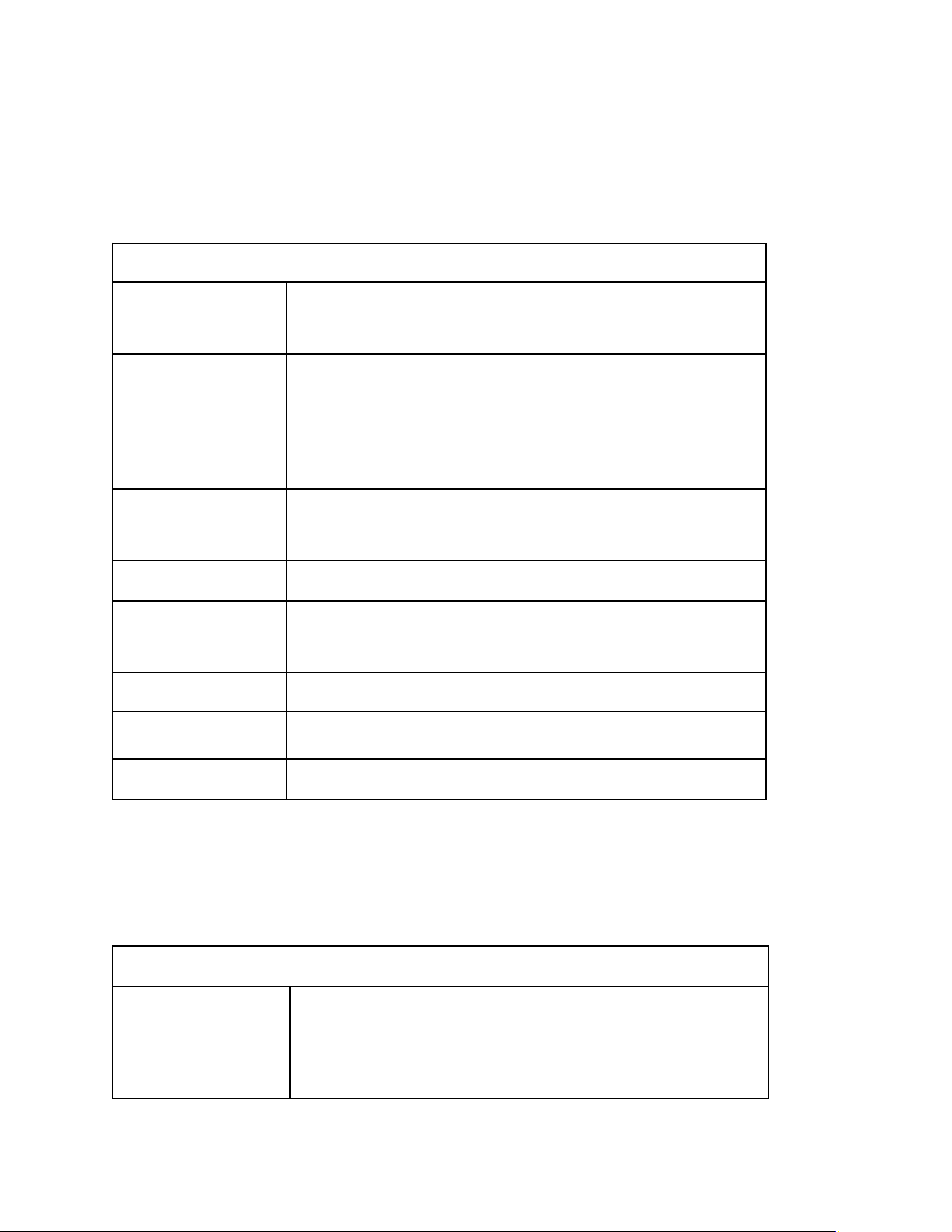
Settings
Camera
Camera Settings
Name Tag
Custom text for photo info strip, up to 8
characters.
Camera Mode
Photo mode - camera will take/send the photo.
Photo+Video mode - camera it will take a photo
and a video. It will send the photo, you can
request the video via app.
Photo Burst
1, 2, 3. Set the number of photos taken for each
trigger.
Photo Size
4MP, or 8MP.
Thumbnail Size
This is the transmitted photo resolution.
Normal 800x480, Large 1376x768
Video Size
800x480, 1280x720, 1920x1080
Video Length
5 sec, 10 sec, 15 sec, 20 sec, 25 sec, 30 sec
Sound
On/Off
Trigger
Trigger Settings
Trigger Mode
Always On - camera is operating on a 24-hour
schedule.
Start - Stop - limit the camera to operate within
10
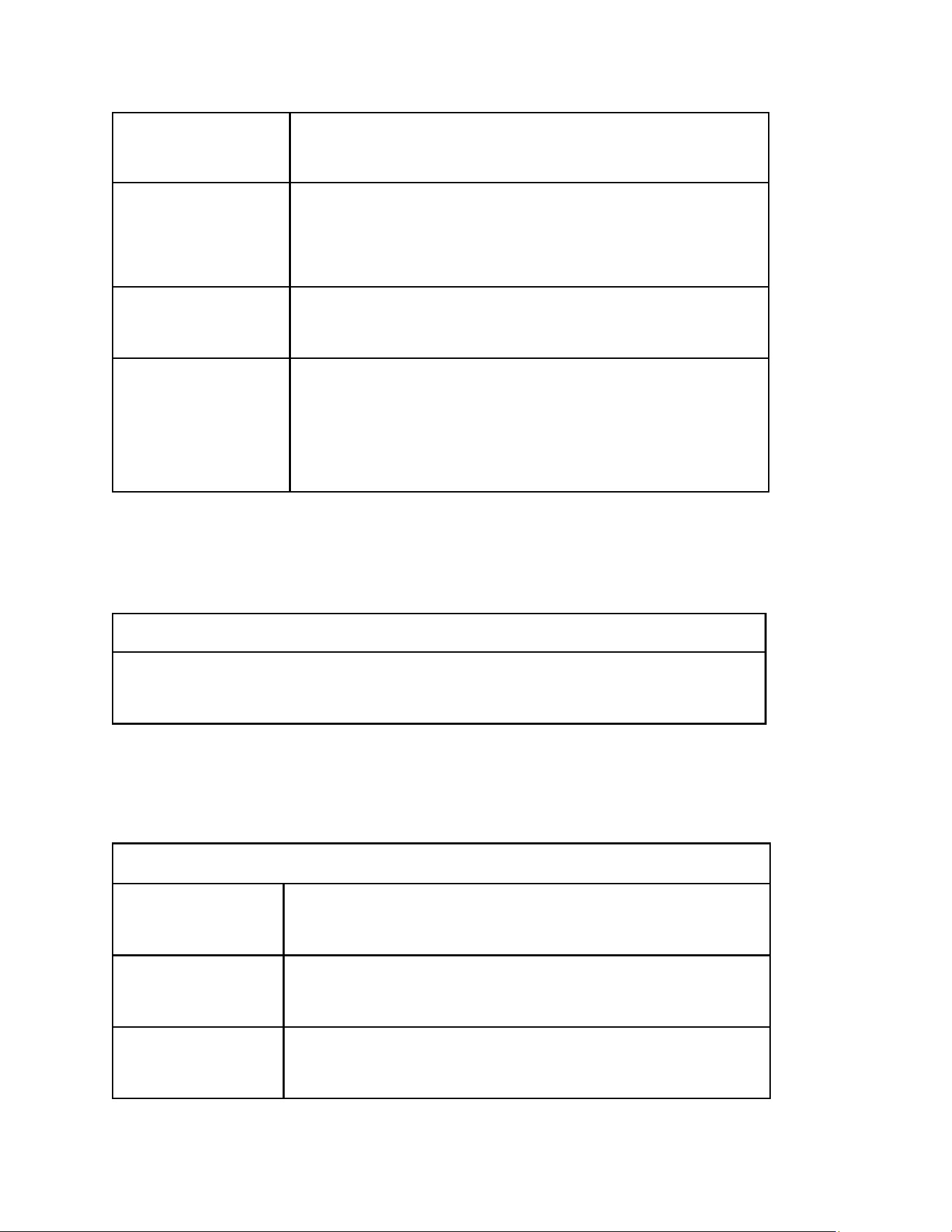
set time periods and independent Trigger
settings for each Start & Stop period.
Sensitivity
Off motion sensor off
Low (below 10°F), Normal (10°F - 80°F), High
(above 80°F)
Trigger Interval
Time between when a motion-triggered photo is
sent and the next photo can be triggered.
Timelapse
Interval
The camera will take pictures at specified
intervals. When the camera is in Timelapse mode,
it also will be triggered by motion unless
Sensitivity is set to Off.
Work Day
Work Day
Select what day(s) the camera will operate. Select All, one or more
days of the week for the camera to take photos.
System
System Settings
Camera Region
Sets which region of the world the camera is to be
set in.
Camera Time
Zone
Sets the time zone that the camera's internal clock
will sync to.
Flash Type
Infrared
White flash
11
Time Stamp
Choose to show or hide the information strip at
the bottom of each photo and video.
Overwrite
When On, the camera will delete the oldest
photo/video to write the newest if the internal
memory card is full. If this is set to Off, the camera
will stop taking pictures or recording videos when
the internal memory card is full.
Camera Locator
Enables the camera to send its geolocation when
it is moved.
Camera Tracker
Enables "Camera Locator" while the camera is
turned OFF. "Camera Locator" must be ON.
Wireless
Wireless Settings
Live Stream
Turn on to allow the camera to Livestream and
receive real time commands.
Scheduled Events
Scheduled Events
Schedule the camera to either Send a Status Report, Take a Photo,
or set up Batch Sending. Scheduled Event 1 sends a status report
every day. The only thing you can change for this event is the time,
which defaults to midnight.
12
Specs
Connectivity
4G LTE
Advanced Features
On-Device AI, Live Stream 800p, GPS, Setup via
Bluetooth, Remote Control via App
Memory
32 GB Internal
Rechargeable Battery
10,000 mAh (Internal) + 20,000 mAh (Replaceable
Battery) and 12V DC Jack for external power
source.
Photo and Video
4K Photo
1080P Video with Sound
Video length 10, 20, 30 sec.
Dual Flash
No-Glow Infrared IR
White Flash LED Color night photos
Illumination up to 80 ft
Wide FOV
90.3° (H), 47.7° (V), 108.4° (D)
Detection
Up to 78 ft at 90° angle
Trigger Type
Motion, Time Lapse, Scheduled Event.
Trigger Speed
0.16 sec
Dimensions
4.5" (L) x 3.8" (W) x 6.6" (H)
Weather Resistance
IP67
Operation
Temperature
-4℉ ~ 140℉
Humidity
5% ~ 90%
Antenna
Internal Antenna; Support up to 2x External
Antenna
USB C Port
for Charging and Data Transfer
13

FCC
FCC COMPLIANCE
This device complies with Part 15 of the FCC Rules. Changes or modification
not expressly approved by the party responsible for compliance could void
the user's authority to operate the equipment.
Operation is subject to the following two conditions:
(1) This device may not cause harmful interference, and
(2) This device must accept any interference received, including interference
that may cause undesired operation.
This equipment complies with FCC radiation exposure limits set forth for an
uncontrolled environment. This equipment should be installed and operated
with a minimum distance 20cm between the radiator & your body.*
Warranty
This device is covered by a 2 year warranty for products when registered
within 30 days of purchase. Visit our website dtekt.us/warranty for the full
warranty terms.
You can register your device’s warranty on your mobile app. Go to the device
options page, select status report, go down to warranty and tap “Add” to fill
out the warranty registration form.
Support Info
Need Help?
e-mail: [email protected]
M - F 8:30 am - 6:30 pm EST
14