BLACKGATEHUNTING.COM
INSTRUCTION
MANUAL

RETURN
BLACKGATEHUNTING.COM
DO NOT RETURN
THIS PRODUCT TO
YOUR RETAILER
PLEASE CALL
937-900-7195
OR EMAIL
CONTACT@BLACKGATEHUNTING.COM
For any warranty issues or questions
1053 PURCELL RD.
PEEBLES, OHIO 45660
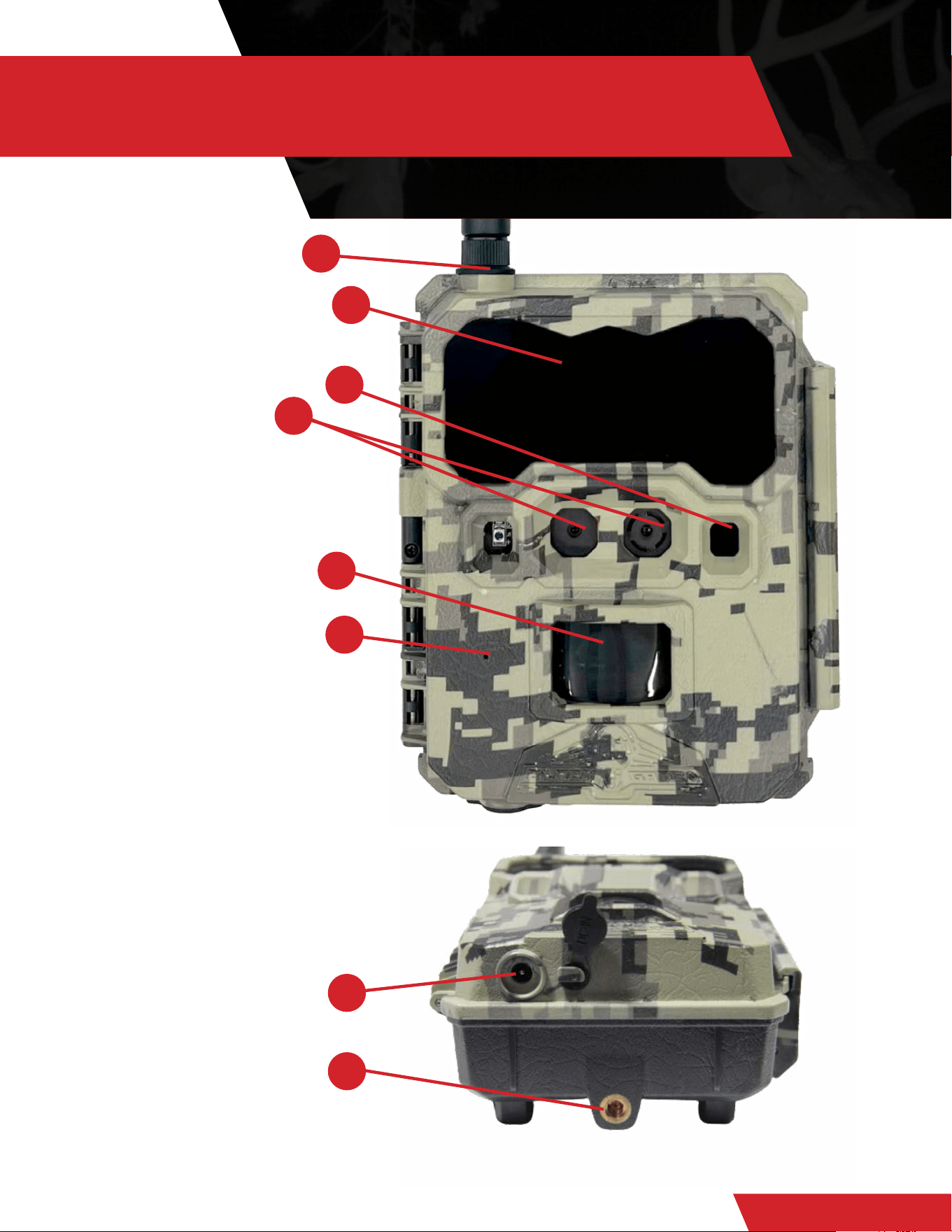
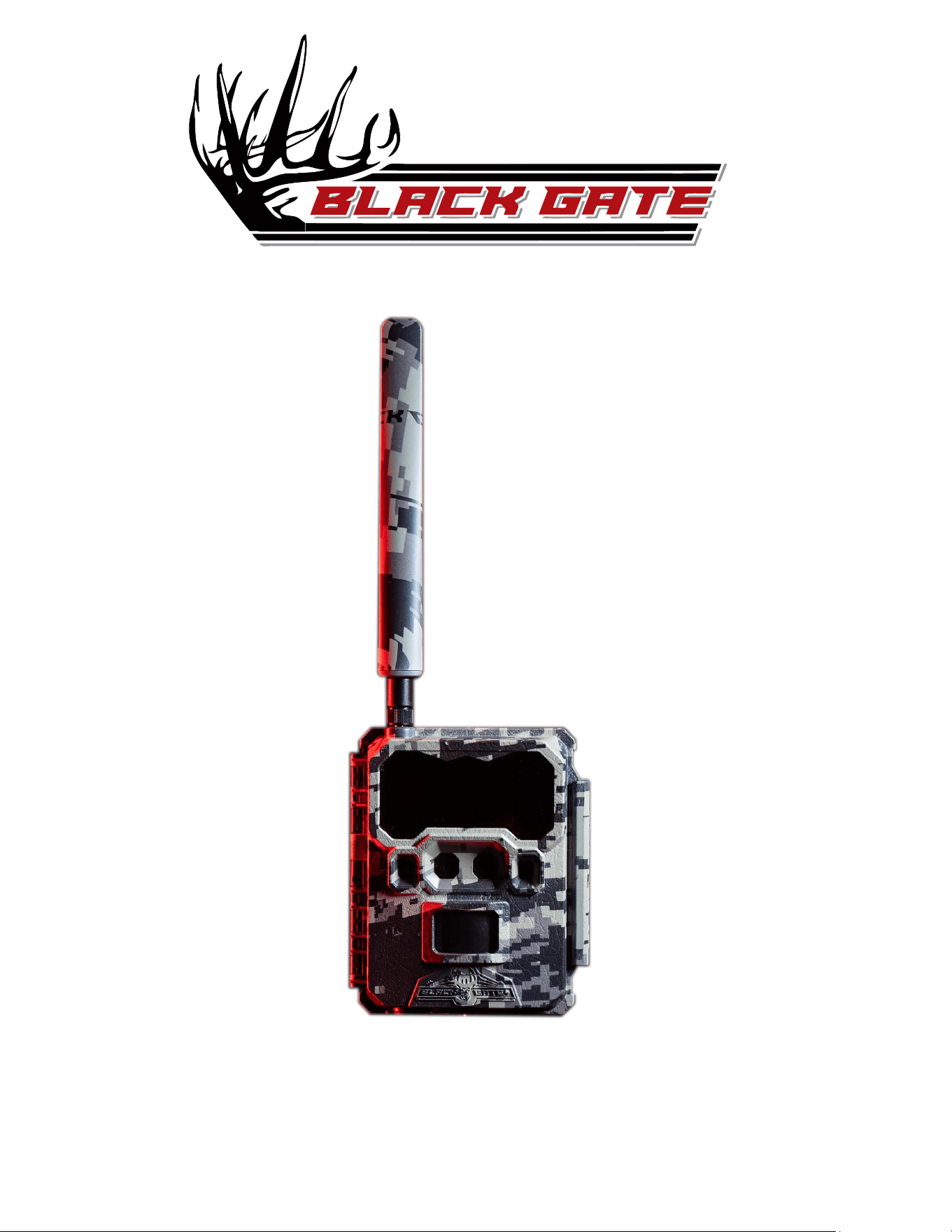
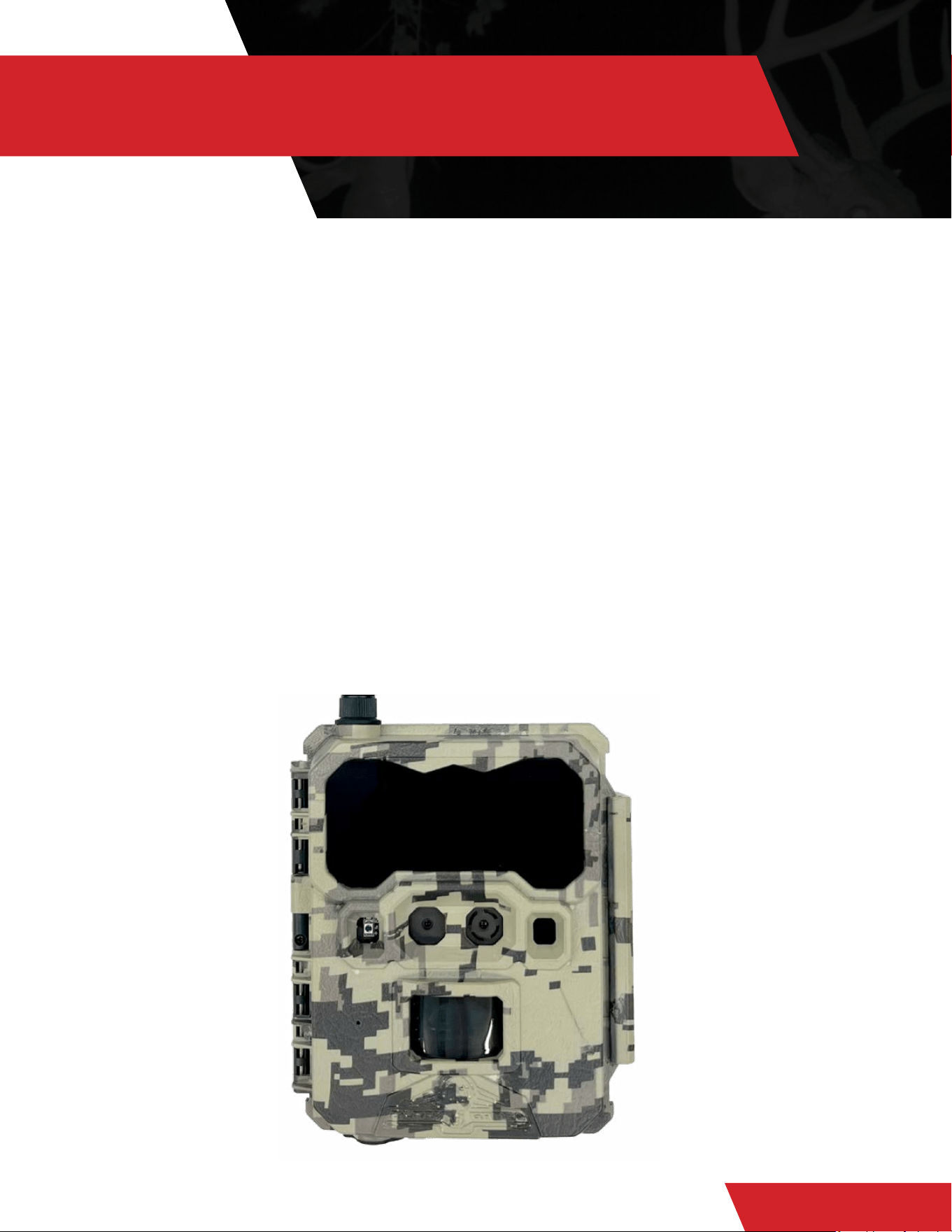
1 Lens/Sensors
2 Antenna
3 IR LEDs (940NM)
4 Camera Working Status
Indicator
5 Power Switch
6 PIR Motion Sensor
7 Microphone
8 External Battery In/DC Port
9 Tripod/Mount Attachment
1/4” x 20
INTRODUCTION R4G
BLACKGATEHUNTING.COM
1
6
9
8
3
4
2
7
QUICK START GUIDE
WHAT IS IN THE BOX?
WHAT YOU WILL NEED
(1) R4G TRAIL CAMERA
(1) INSTRUCTION MANUAL
(1) MOUNTING STRAP
(1) ANTENNA
(1) PRE-INSTALLED SIM CARD
(DO NOT REMOVE)
12 AA BATTERIES
(LITHIUM RECOMMENDED)
SD CARD - CLASS 10, U3, 32GB-64GB
BLACKGATEHUNTING.COM
BLACK GATE MOBILE APP DOWNLOAD
BLACKGATEHUNTING.COM
BLACK GATE
MOBILE
QUICK SET UP
BLACKGATEHUNTING.COM
1. Install Camera’s antenna
• Make sure the black rubber washer is underneath the antenna to form a good seal once tightened down.
2. Install a class 10 U3 SD card. 16GB up to 64GB
• Recommended brands are: Black Gate, SanDisk and Lexar
3. Install 12 AA batteries (Ultimate Lithium highly recommended)
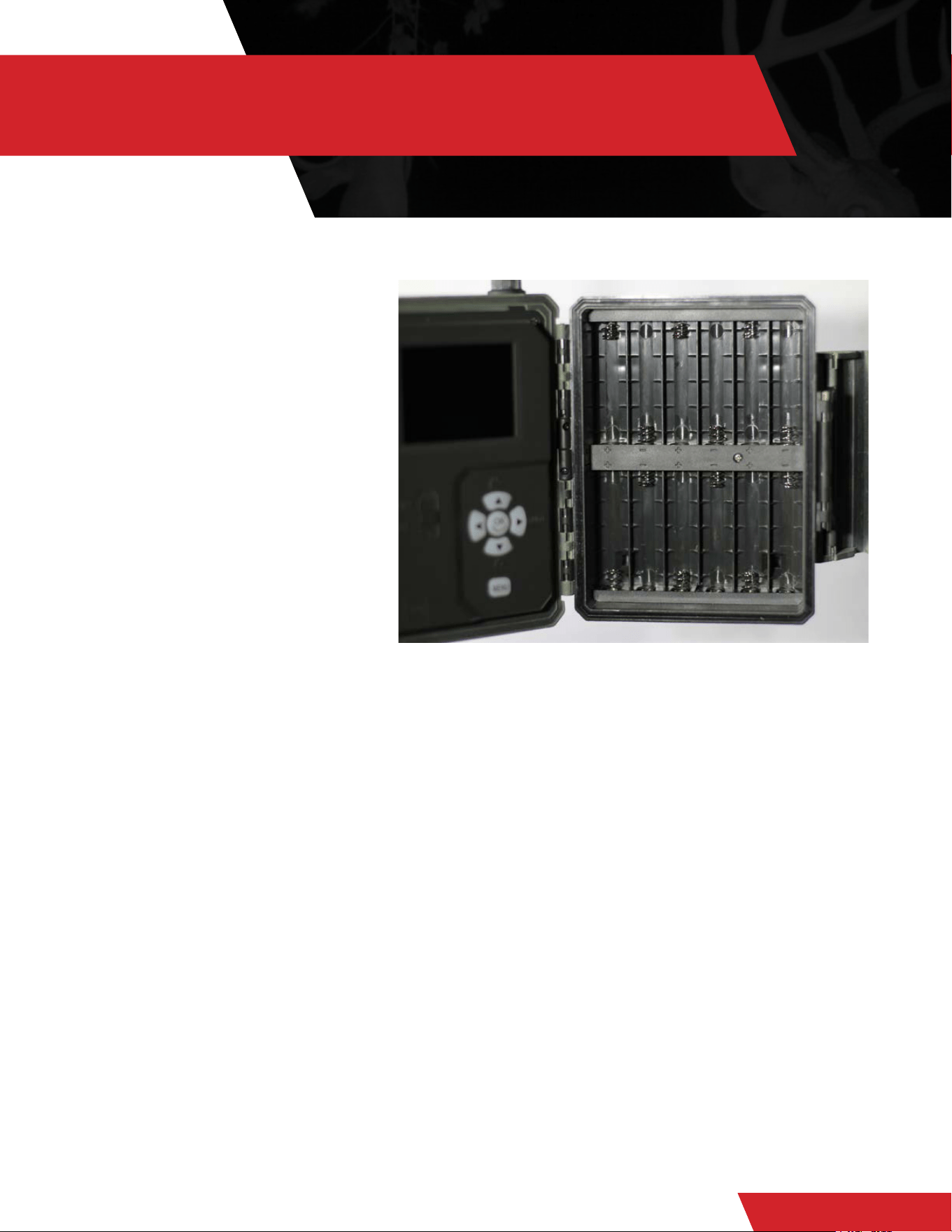
• To install the batteries, open the camera. Install the batteries in the correct orientation on the right side of the camera.
4. DO NOT REMOVE the SIM Card that is pre-installed in the R4G
5. Turn the power switch to “ON”
• Right arrow to the “4G” display
• After activation, toggle through the menu items to apply the desired settings.
• Press Menu to go back to the active screen. After a 10 second delay from leaving the menu screen the camera will begin the
countdown process and go into “live” mode.
SETTING UP THE CAMERA
In your Apple or Google Play Store, download the Black Gate
Mobile App and sign in using an email and password you
created.
If you already have a Black Gate account with ACTIVE
cameras, you can simply login to your app and add your
camera following the instructions below.
Once you have created your account, and set up your data
plan, it is time to activate your camera in the app:
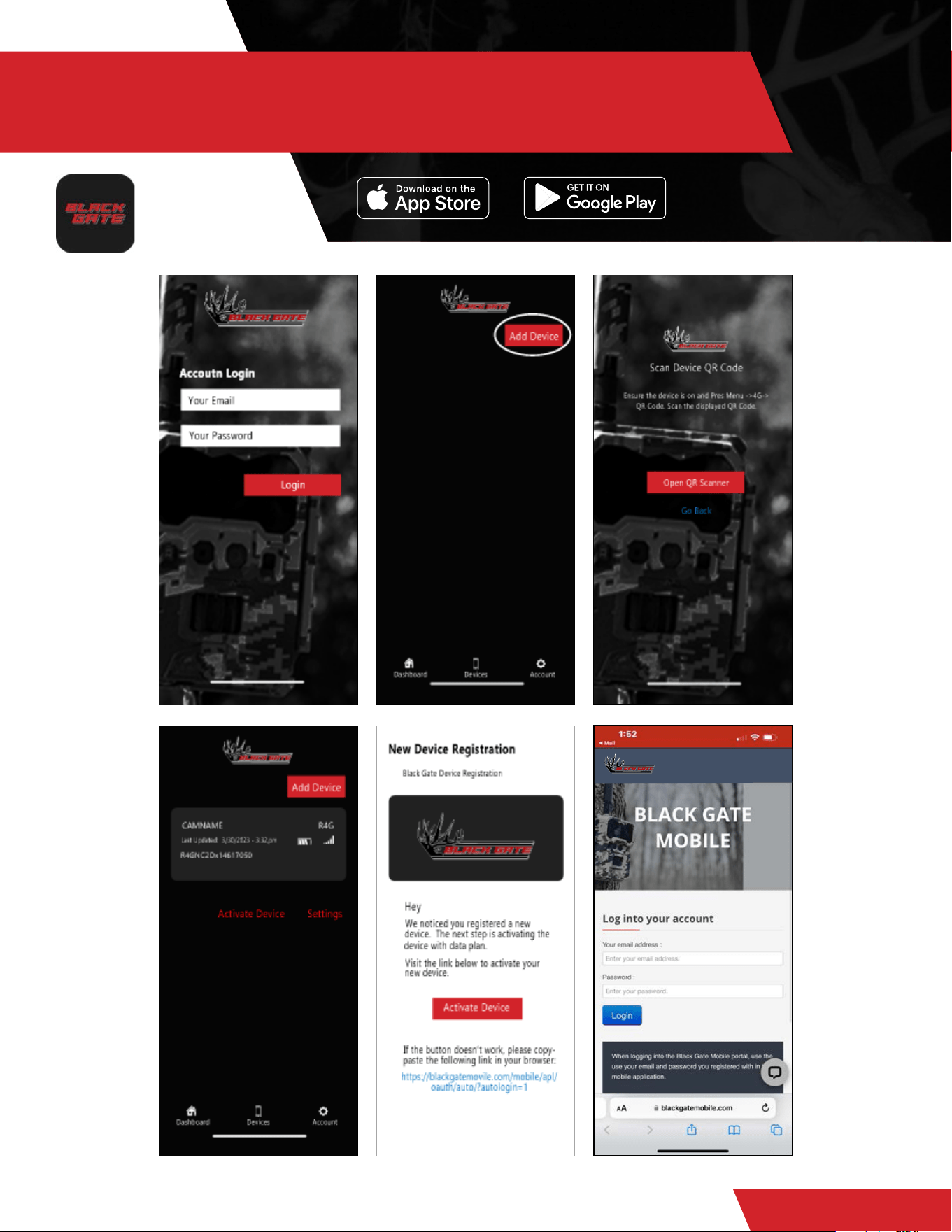
1. Click “Add Device”
2. Open the QR Scanner and under the 4G Menu on the
camera, open up the QR CODE
3. Using your phone, Scan the QR Code “If scanned
correctly, it will state that the camera has been added
successfully”
4. Check your email for an activation link to purchase data
on the Black Gate Mobile Portal
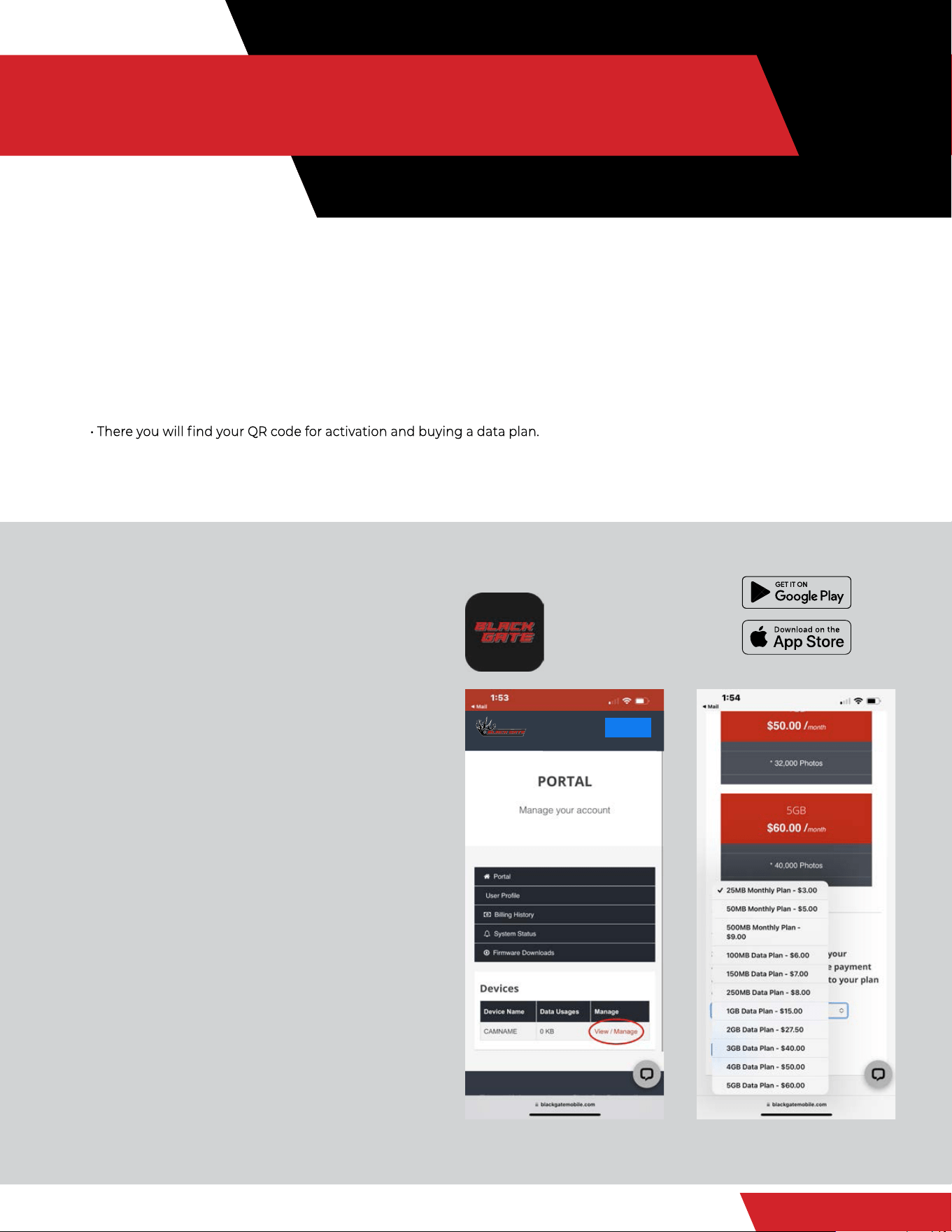
5. Once logged into www.blackgatemobile.com portal,
look under your devices and click on “View/Manage”
6. Select the data plan of your choice and continue
through the checkout process. (This will be a recurring
plan monthly unless device is deactivated in the portal)
7. Go back to the Black Gate Mobile App on your
phone, and your camera will now be activated and
ready for use.
8. Your new photos will come in under your device name
in the Dashboard tab.
9. Settings can be changed under the device tab
10. To add an additional camera, follow and repeat steps 1-9.
DOWNLOADING THE BLACK
GATE MOBILE APP
BLACK GATE
MOBILE
Logout
SETTINGS / SPECIFICATIONS
BLACKGATEHUNTING.COM
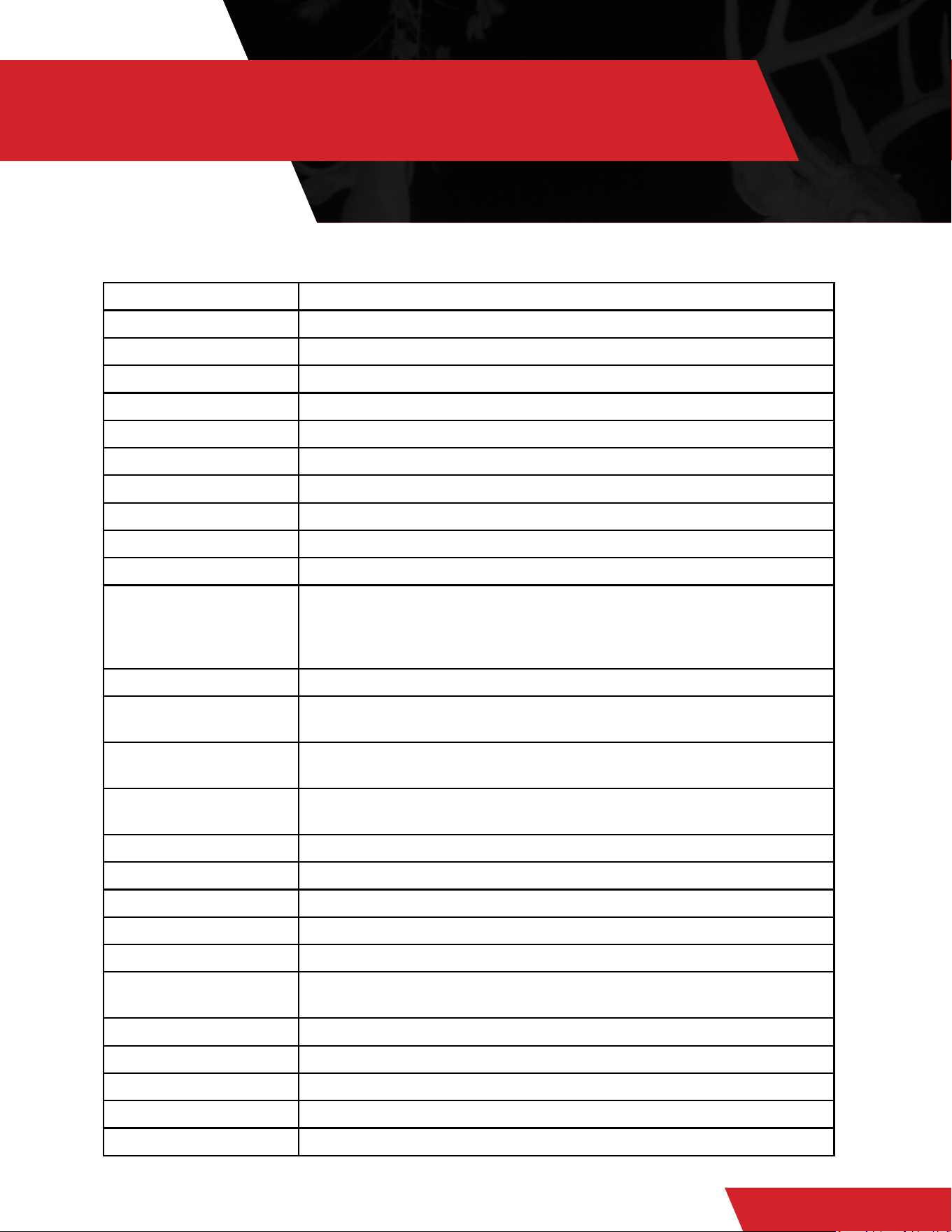
Camera Mode Camera, Video, Dual (Camera + Video)
Day/Night Mode Daytime: Color, Nighttime: B+W
IR Range 80+ Feet
PIR Angle 52 degrees
Flash 940 NM No-Glow
SD Card Class 10, U3, 16GB - 64GB, minimum 90 MB/Sec
Picture Format JPEG
Multishot Optional 1-9 Photo
Video Optional 1080 HD Video
Trigger Speed <.4 seconds
SD Card Recycle Default
Battery 12xAA Lithium Ultimate Optional external power source (12V
external battery pack or solar panel)
Recommended 3000mAh
Barrel plug reducer size 5.5x2.1mm
External DC 12V
Transfer Picture via 4G High, detailed thumbnail images sent to Black Gate App
(additional data charges may apply)
Request HD Photo via
4G
Only in supported locations (Additional data charges may apply)
Upload Frequency/
Send Type
Instantly (Timely) / 12 Hours / 24 Hours
4G Communication LTE wireless
4G Antenna 1 Antenna Module
Device Serial No. Yes
Interface LTE and SD Card
Mounting Strap; Tripod (1/4” x 20 threaded insert) - two locations
Operating
Temperature
-5F to 125F
Operation Humidity 5% - 95%
Waterproof rating IP67
Dimensions 4.5” x 2.5” x 5.5”
Weight 1.6 lbs (without batteries)
Certication FCC RoHs
PRODUCT CARE
BLACKGATEHUNTING.COM
INTERNAL CONDENSATION ON LENS
The R4G is IP67 rated waterproof. The camera housing is water resistant against rain and storm
elements. The only way the R4G can get condensation in or behind the lens is if the antenna
is not screwed down tightly or is missing the rubber sealing washer underneath it. Also,
condensation can occur if the DC plug cover is not in place or if there is dirt or debris on the
internal door seal. Follow instructions to alleviate this issue if need be:
• Pull the SD card out and let the camera sit for 3-4 days open, in an area where there is
circulating air (fan or vent).
• Or place in a sealed container with rice for 24 hours to draw out the moisture.
• Clean the seal well with soap and water and tighten your antenna.
• Place back out in the eld.
IF THE CAMERA HAS ACCIDENTALLY BEEN SUBMERGED IN WATER
1. Open camera and immediately remove batteries and SD card.
2. Leave the camera open to dry out for 3-4 days. If you try to power on while the camera is
still wet, it could destroy the module and computer board and ruin the camera. This will
void the warranty.

LIMITED WARRANTY
BLACKGATEHUNTING.COM
CHECK OUT WARRANTY
INFORMATION ON OUR WEBSITE
WWW.BLACKGATEHUNTING.COM

FCC REGULATIONS
BLACKGATEHUNTING.COM
FEDERAL COMMUNICATIONS COMMISSION - PART 15
This equipment has been tested and found to comply with the limits for a Class B digital
device, pursuant to Part 15 of the Federal Communications Commission rules. These limits
are designed to provide reasonable protection against harmful interference in a residential
installation. This equipment generates, uses and can radiate radio frequency energy and, if not
installed and used in accordance with the instructions, may cause harmful interference to radio
communications. However, there is no guarantee that interference will not occur in a particular
installation. If this equipment does cause harmful interference to radio or television reception,
which can be determined by turning the equipment off and on, the user is encouraged to try to
correct the interference by one or more of the following measures:
• Reorient or relocate the receiving antenna.
• Increase the separation between the equipment and receiver.
• Connect the equipment into an outlet on a circuit different from that to which the receiver
is connected.
• Consult the dealer or an experienced radio/TV technician for help.
Changes or modications to this equipment not expressly approved by the party responsible
for compliance could void the user’s authority to operate the equipment. This device complies
with Part 15 of the FCC rules. Operation is subject to the following two conditions: (1) this device
may note cause harmful interference, and (2) this device must accept any interference received,
including interference that may cause undesired operation.