
1
Copyright © 2023 MOKO TECHNOLOGY LTD.
Product Specification
M11 Pallet Tracking Tag
Version 1.0
MOKO TECHNOLOGY LTD.

M11 Pallet Tracking Tag Product Specification
1
Copyright © 2026 MOKO TECHNOLOGY LTD.
Revision History
Version
Data
Notes
Contributor(s)
V1.0
April 24, 2026
Initial version
Daniel
About document
This product specification was designed to help users to know the hardware overview and feature instructions of M11
Pallet Tracking Tag. Through this document, users will be initial to understand the application scenarios, hardware
specifications, basic instructions as well as packaging information of product.

M11 Pallet Tracking Tag Product Specification
2
Copyright © 2026 MOKO TECHNOLOGY LTD.
Table of Contents
1. Overview ............................................................................................................................................... 3
2. Product brief ......................................................................................................................................... 4
3. General specifications ........................................................................................................................... 5
3.1 Hardware specifications .................................................................................................................................. 5
3.2 Lifecycle estimation ......................................................................................................................................... 5
3.3 LED functionality .............................................................................................................................................. 6
4. Basic instructions .................................................................................................................................. 7
4.1 How to power ON/OFF device? ........................................................................................................................ 7
4.2 How to restore factory settings? ...................................................................................................................... 7

M11 Pallet Tracking Tag Product Specification
3
Copyright © 2026 MOKO TECHNOLOGY LTD.
1. Overview
This Product specification is mainly applicable for MOKO M9/M9A Rugged Asset Tag, which contains:
➢ Product brief
➢ General specifications
➢ Basic instructions
For more information about user guidance of product firmware functions and configuration APP, please contact our
sales team directly for other official document.
M11 Pallet Tracking Tag Product Specification
4
Copyright © 2026 MOKO TECHNOLOGY LTD.
2. Product brief
The M11 Pallet Tracking Tag is engineered to redefine durability in the demanding world of logistics and supply chain
management.
Built to withstand the rigors of real-world warehouse environments, this high-performance BLE tag features a
ruggedized, low-profile design specifically optimized to resist the frequent collisions and heavy-duty handling typical
of pallet transport. Its unique form factor allows the device to be seamlessly embedded into typical pallets or skids,
providing a flush fit that minimizes exposure to external damage.
Combined with an IP67 waterproof rating and IK08 impact resistance, the M11 thrives in the harshest conditions,
ensuring your assets remain visible and your hardware stays protected.
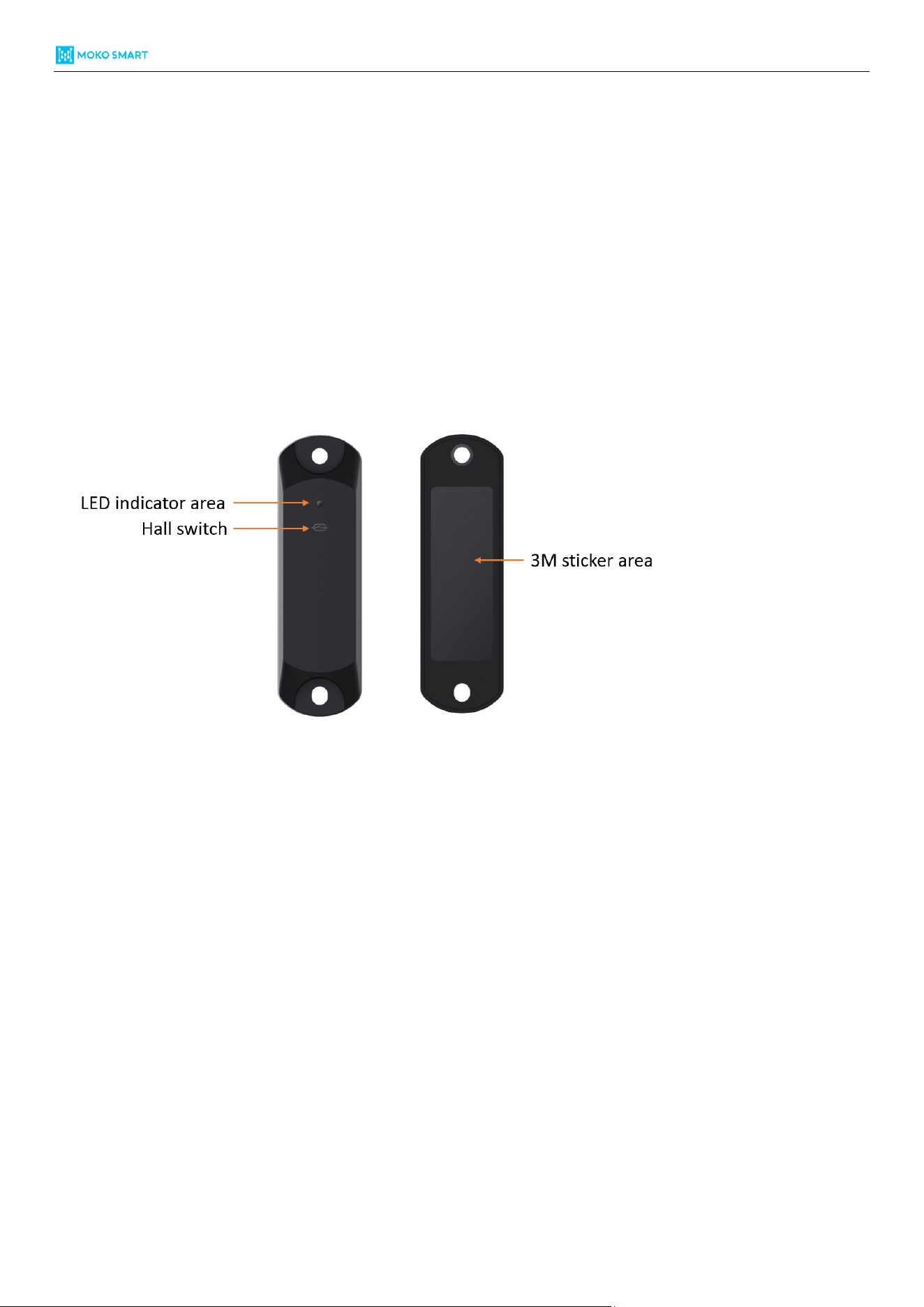
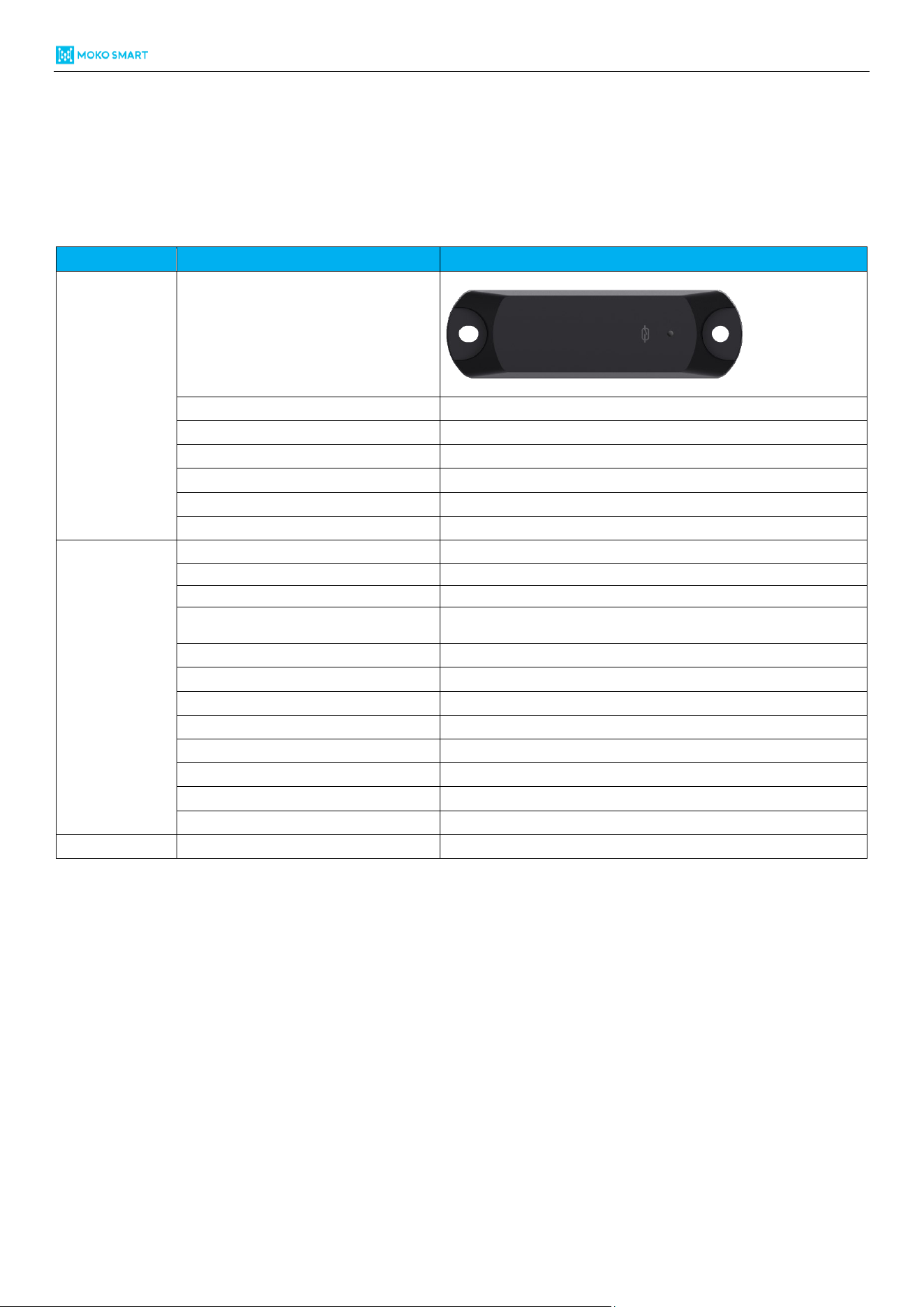
Figure 1: Appearance overview of M11
M11 Pallet Tracking Tag Product Specification
5
Copyright © 2026 MOKO TECHNOLOGY LTD.
3. General specifications
3.1 Hardware specifications
Item
Property
M11
Physical
Appearance ID
Dimensions (L*W*H)
112.0*33.5*14.7mm
IP rated
IP67
Shock resistance rated
IK08
Color
Black
RFID
Optional
Installation
Screw/3M tape/Zip Tie
Connectivity
Bluetooth
BLE 5.0
Maximum Tx Power
+6dBm
Long range mode*
Supported
Transmission range*
150m (Legacy mode)
350m (Long range mode)
Accelerometer sensor
Yes
Temperature sensor
Optional
Power on
Magnetic switch
LED
Red
Battery capacity
1000mAh
Replaceable battery
No
Lifespan (default settings*)
5 years
Operating temperature
-20°C / +60°C
Regulatory
Certifications
FCC | CE | RoHS | WEEE
Table 1: Hardware specifications of M11
*Long range mode: It means “coded PHY” advertisement.
*Transmission range: Tested in the open area and no obstacles in the route.
*Default settings: 0dBm Tx Power | 1000ms ADV interval | No Accelerometer Sensor | 25°C conditions
3.2 Lifecycle estimation
Please refer to documents – “MOKO Beacon_Battery Lifecycle summary” for more details on battery lifecycle.

M11 Pallet Tracking Tag Product Specification
6
Copyright © 2026 MOKO TECHNOLOGY LTD.
3.3 LED functionality
Here we have described the LED response status in some common situations.
LED response status
Scenarios
LED color
Response
Power ON
Red
Blinking for 3 seconds
Device connect
Red
Blinking twice
Power OFF
Red
Solid for 3 seconds
Factory restore
Red
Solid for 3 seconds and then device reboot
DFU upgrade
Red
Blinking during DFU upgrade, and solid for 3 seconds after finished, then device reboot
Low battery
Red
Blinking twice every 10 seconds
Table 2: LED response status in various situations

M11 Pallet Tracking Tag Product Specification
7
Copyright © 2026 MOKO TECHNOLOGY LTD.
4. Basic instructions
4.1 How to power ON/OFF device?
The M11 Pallet Tracking Tag do not reserve the external mechanical button, but equipped with magnetic switch, so
you can follow up below steps to power ON/OFF device.
➢ Power ON: Take the magnet to approach to the hall switch positions, hold on for 3 seconds and then red LED will
keep blinking for 3 seconds to indicate device power on status.
➢ Power OFF: Take the magnet to approach to the magnetic switch positions, hold on for 3 seconds and then red
LED will keep solid for 3 seconds to indicate device power off status.
4.2 How to restore factory settings?
There have two ways to restore factory settings.
➢ Software reset: Connect with device through configuration APP and then execute “Reset Beacon” operations to
finish the software reset.
➢ Hardware reset:
Step 1: Keep the device power OFF.
Step 2: Take the magnet to approach to the hall switch positions, hold for more than 10 seconds, during that
device will power on and LED start flashing for 3 seconds.
Step 3: After magnet hold positions for more than 10 seconds, take away the magnet and then approach to hall
switch again within 2 seconds, then device will proceed on factory reset, along with the LED solid for 3 seconds.
Step 4: Device will reboot and LED start flashing for 3 seconds to indicate the factory reset success.
Remark: Software reset won’t reset connection password.

M11 Pallet Tracking Tag Product Specification
6
Copyright © 2026 MOKO TECHNOLOGY LTD.
Warning Message
>Unless specifically indicated that it is safe to do so in the user guide or instruction manual do not use this
device in an environment that exceeds the recommended low or high temperature
>Unless specifically indicated that it is safe to do so in the user guide or instruction manual, avoid exposin
g your device to direct sunshine or excessively wet environments.
>The recommended temperature range for devices and accessories is -20°C to 60°C
>Do not use the product in any way other than described herein in order to avoid personal injury or prop
erty damage.
>User should comply with the laws and regulations of the corresponding countries and regions where the
equipment is used, abide by professional ethics, pay attention to safety obligations, and strictly prohibit
the use of our product or equipment for any illegal purposes.Our company will not be responsible for any
violators'legal liability under any circumstances.
>Replacing a battery with an incorrect type may bypass safeguards and create danger;
>Disposal of a battery in a fire or other source of significant heat, or by crushing, or cutting, may result in
an explosion as well as leakage of flammable liquids and gases;
>Leaving a battery in an extremely hot environment may result in an explosion as well as leakage of flam
mable liquids and gases;
>A battery subjected to extremely low air pressure may result in an explosion as well as leakage of flamm
able liquids and gases.
a)Remove and immediately recycle or dispose of used batteries according to local regulations and keep
away from children.Do NOT dispose of batteries in household trash or incinerate.
b)Even used batteries may cause severe injury or death.
c)Call a local poison control center for treatment information.
d)The compatible battery type is CR2450.
e)The nominal battery voltage is 3V.
f)Non-rechargeable batteries are not to be recharged.
g)Do not force discharge,recharge,disassemble,heat above(manufacturer's specified temperature
rating)or incinerate.Doing so may result in injury due to venting,leakage or explosion resulting in chemical
burns.
FCC Radio Frequency Exposure Statement
The device has been evaluated to meet general RF exposure requirements.The device can be used in
fixed/mobile exposure condition.The min separation distance is 20cm.
FCC Statement:
This device complies with part 15 of the FCC Rules.Operation is subject to the following two conditions:
(1)This device may not cause harmful interference,and
(2)this device must accept any interference received,including interference that may cause undesired
operation
This equipment generates uses and can radiate radio frequency energy and,if not installed and used in
accordance with the instructions,may cause harmful interference to radio communications.However,
there is no guarantee that interference will not occur in a particular installation.If this equipment does
cause harmful interference to radio or television reception,which can be determined by turning the
equipment off and on,the user is encouraged to try to correct the interference by one or more of the
following measures:(1)Reorient or relocate the receiving antenna
(2)Increase the separation between the equipment and receiver.
(3)Connect the equipment into an outlet on a circuit different from that to which the receiver is
connected.
(4)Consult the dealer or an experienced radio/TV technician for help.
Warning: Changes or modifications not expressly approved by the party responsible for compliance could
void the user's authority to operate the equipment.