
en Table of contents
You can find additional information and explanations online.
Scan the QR code on the title page.
Table of contentsTable of contents
1Safety ............................................ 3
1.1 Definition of the signal
words ............................................. 3
1.2 General information .................... 3
1.3 Intended use ................................ 4
1.4 Restriction on user group .......... 4
1.5 Safe transport .............................. 4
1.6 Safe installation ........................... 4
1.7 Safe use ........................................ 5
1.8 Damaged appliance ................... 7
2Preventing material damage ...... 8
3Environmental protection and
saving energy .............................. 8
3.1 Disposing of packaging ............. 8
3.2 Saving energy .............................. 8
4Installation and connection ........ 9
4.1 Scope of delivery ........................ 9
4.2 Criteria for the installation loc-
ation ............................................... 9
4.3 Installing the appliance ............ 10
4.4 Preparing the appliance for
the first time ............................... 10
4.5 Connecting the appliance to
the electricity supply ................. 10
5Familiarising yourself with
your appliance ........................... 11
5.1 Appliance .................................... 11
5.2 Control panel ............................. 12
6Features ..................................... 12
6.1 Shelf ............................................. 12
6.2 Door tray ..................................... 13
6.3 Ice cube maker ......................... 13
6.4 Accessories ............................... 14
7Basic operation ......................... 14
7.1 Switching on the appliance ..... 14
7.2 Operating tips ............................ 14
7.3 Switching off the appliance ..... 15
7.4 Setting the temperature ........... 15
8Additional functions ................. 15
8.1 Super freezing ........................... 15
8.2 Energy-saving mode ................. 15
8.3 Rest mode .................................. 15
9Alarm .......................................... 16
9.1 Door alarm ................................. 16
9.2 Temperature alarm ................... 16
10 HomeConnect ........................ 16
10.1 Setting up HomeConnect ..... 17
10.2 Switching on the connection
to the WLAN home network
(Wi-Fi) ........................................ 17
10.3 Switching off the connection
to the WLAN home network
(Wi-Fi) ........................................ 17
10.4 Installing updates for the
HomeConnectsoftware ........ 17
10.5 Resetting HomeConnect set-
tings ........................................... 17
10.6 Remote diagnostics ............... 18
10.7 Data protection ........................ 18
11 Freezer compartment ............. 18
11.1 Freezing capacity .................... 18
11.2 Tips for storing food in the
freezer compartment .............. 18
11.3 Tips for freezing fresh food ... 19
11.4 Shelf life of frozen food at
−18°C ...................................... 19
11.5 Defrosting methods for
frozen food ............................... 19
12 Defrosting ................................ 19
12.1 Defrosting in the freezer com-
partment ................................... 19
13 Cleaning and servicing ........... 20
13.1 Preparing the appliance for
cleaning .................................... 20
2
Safety en
13.2 Cleaning the appliance .......... 20
13.3 Removing the fittings ............. 20
14 Troubleshooting ...................... 22
14.1 Power failure ............................ 24
14.2 Conducting an appliance
self-test ...................................... 25
15 Storage and disposal .............. 25
15.1 Taking the appliance out of
operation .................................. 25
15.2 Disposing of old appliance ... 25
16 Customer Service ................... 25
16.1 Product number (E-Nr.), pro-
duction number (FD) and
consecutive numbering (Z-
Nr.) ............................................. 26
17 Technical data ......................... 26
17.1 Information regarding Free
and Open Source Software .. 27
18 Declaration of Conformity ...... 27
18.1 Statement of Compliance for
Great Britain ............................. 28
Safety 1 Safety
Observe the following safety instructions.
1.1 Definition of the signal words
This is where you can find explanations for the safety signal words
used in this manual.
WARNING
This indicates that death or serious injuries may occur as a result
of non-observance of this warning.
CAUTION
This indicates that minor or moderate injuries may occur as a res-
ult of non-observance of this warning.
ATTENTION
This indicates that damage to the appliance or other material
damage may occur as a result of non-compliance with this warn-
ing.
Note: This alerts you to important information.
1.2 General information
¡ Read this instruction manual carefully.
¡ Keep the instruction manual and the product information safe
for future reference or for the next owner.
¡ Do not connect the appliance if it has been damaged in transit.
3
en Safety
1.3 Intended use
This appliance is not intended to be used as a built-in appliance.
Only use this appliance:
¡ for freezing food and making ice cubes.
¡ in private households and in enclosed spaces in a domestic en-
vironment.
¡ Up to an altitude of 2000 m above sea level.
1.4 Restriction on user group
This appliance may be used by children aged 8 or over and by
people who have reduced physical, sensory or mental abilities or
inadequate experience and/or knowledge, provided that they are
supervised or have been instructed on how to use the appliance
safely and have understood the resulting dangers.
Do not let children play with the appliance.
Cleaning and user maintenance must not be performed by chil-
dren unless they are being supervised.
Children above the age of three years old and younger than eight
years old may load and unload the refrigerating appliance.
1.5 Safe transport
WARNING‒Risk of injury!
The heavy weight of the appliance may result in injury when lifted.
Do not lift the appliance on your own.
1.6 Safe installation
WARNING‒Risk of electric shock!
Incorrect installation is dangerous.
Connect and operate the appliance only in accordance with the
specifications on the rating plate.
Connect the appliance to a power supply with alternating cur-
rent only via a properly installed socket with earthing.
The protective conductor system of the domestic electrical in-
stallation must be properly installed.
Never equip the appliance with an external switching device,
e.g. a timer or remote control.
4
Safety en
When the appliance is installed, the mains plug of the power
cord must be freely accessible. If free access is not possible, an
isolating switch must be integrated into the permanent electrical
installation according to the installation regulations.
When installing the appliance, check that the power cable is not
trapped or damaged.
If the insulation of the power cord is damaged, this is dangerous.
Never let the power cord come into contact with heat sources.
WARNING‒Risk of explosion!
If the appliance's ventilation openings are closed off, a leak in the
refrigeration circuit may result in a flammable mixture of gas and
air.
Keep ventilation openings in the appliance casing or in the in-
tegrated casing clear of obstruction.
WARNING‒Risk of fire!
It is dangerous to use an extended power cord and non-approved
adapters.
Do not use extension cables or multiple socket strips.
Only use adapters and power cords approved by the manufac-
turer.
If the power cord is too short and a longer one is not available,
please contact an electrician to have the domestic installation
adapted.
Portable multiple socket strips or portable power supply units may
overheat and cause a fire.
Do not place portable multiple socket strips or power supply
units on the back of the appliance.
1.7 Safe use
WARNING‒Risk of electric shock!
An ingress of moisture can cause an electric shock.
Only use the appliance in enclosed spaces.
Never expose the appliance to intense heat or humidity.
Do not use steam- or high-pressure cleaners to clean the appli-
ance.
5
en Safety
WARNING‒Risk of suffocation!
Children may put packaging material over their heads or wrap
themselves up in it and suffocate.
Keep packaging material away from children.
Do not allow children to play with packaging material.
Children may breathe in or swallow small parts, causing them to
suffocate.
Keep small parts away from children.
Do not let children play with small parts.
WARNING‒Risk of explosion!
If the cooling circuit is damaged, flammable refrigerant may es-
cape and explode.
To accelerate the defrosting process, do not use any other
mechanical devices or means other than those recommended
by the manufacturer.
If food is stuck to the freezer compartment, loosen it with a blunt
object such as the handle of a wooden spoon.
Products which contain flammable propellants and explosive sub-
stances may explode, e.g. spray cans.
Do not store products which contain flammable propellants (e.g.
spray cans) or explosive substances in the appliance.
WARNING‒Risk of fire!
Electrical devices within the appliance may cause a fire, e.g. heat-
ers or electric ice makers.
Do not operate electrical devices within the appliance.
WARNING‒Risk of injury!
Containers that contain carbonated drinks may burst.
Do not store containers that contain carbonated drinks in the
freezer compartment.
Injury to the eyes caused by escaping flammable refrigerant and
hazardous gases.
Do not damage the tubes of the refrigerant circuit or the insula-
tion.
The appliance may tip.
Do not stand or support yourself on the base, runners or doors.
6

Safety en
WARNING‒Risk of burns!
Individual parts on the back of the appliance become hot during
operation.
Never touch these hot parts.
WARNING‒Risk of cold burns!
Contact with frozen food and cold surfaces may cause burns by
refrigeration.
Never put frozen food straight from the freezer compartment
into your mouth.
Avoid prolonged contact of the skin with frozen food, ice and
surfaces in the freezer compartment.
CAUTION‒Risk of harm to health!
To prevent food from being contaminated, you must observe the
following instructions.
If the door is open for an extended period of time, this may lead
to a considerable temperature increase in the compartments of
the appliance.
Regularly clean the surfaces that may come into contact with
food and accessible drain systems.
If the fridge/freezer is empty for an extended period of time,
switch off the appliance, defrost it, clean it and leave the door
open to prevent the formation of mould.
1.8 Damaged appliance
WARNING‒Risk of electric shock!
If the appliance or the power cord is damaged, this is dangerous.
Never operate a damaged appliance.
Never pull on the power cord to unplug the appliance. Always
unplug the appliance at the mains.
If the appliance, the power cord or the earthing cable is dam-
aged, immediately unplug the power cord or switch off the fuse
in the fuse box.
Call customer service.
Page25
Improper repairs are dangerous.
Repairs to the appliance should only be carried out by trained
specialist staff.
Only use genuine spare parts when repairing the appliance.
7
en Preventing material damage
If the power cord or the appliance power cable of this appliance
is damaged, it must be replaced with a special power cord or
special appliance power cable, which is available from the man-
ufacturer or its Customer Service.
WARNING‒Risk of fire!
If the tubes are damaged, flammable refrigerant and harmful
gases may escape and ignite.
Keep naked flames and ignition sources away from the appli-
ance.
Ventilate the room.
Switch off the appliance.
Page15
Unplug the mains plug from the mains or switch off the circuit
breaker in the fuse box.
Call customer service.
Page25
Preventing material damage2 Preventing material
damage
ATTENTION
If not rolling freely, the appliance's
castors may damage the floor when
the appliance is moved.
Transport the appliance using a
sack truck.
Use floor protection when moving
the appliance, and do not move it
in a zigzag fashion.
Using the appliance, base, runners or
doors as a seat or climbing surface
may damage the appliance.
Do not stand or lean on the appli-
ance, base, runners or doors.
Contamination with oil or fat may
cause plastic parts and door seals to
become porous.
Keep plastic parts and door seals
free of oil and grease.
If you clean fittings and accessories
in the dishwasher, this may cause
them to become deformed or discol-
our.
Never clean fittings and accessory
in the dishwasher.
Environmental protection and saving energy3 Environmental protec-
tion and saving energy
3.1 Disposing of packaging
The packaging materials are environ-
mentally compatible and can be re-
cycled.
Sort the individual components by
type and dispose of them separ-
ately.
3.2 Saving energy
If you follow these instructions, your
appliance will use less power.
Selecting the installation location
Keep the appliance out of direct
sunlight.
8
Installation and connection en
Install the appliance as far away as
possible from heating elements,
cookers and other heat sources:
– Maintain a 30mm clearance to
electric or gas cookers.
– Maintain a 300mm clearance to
oil or solid-fuel cookers.
Make sure there is a distance of
50mm between the wall and the
appliance.
Never cover or block the external
ventilation openings.
Saving energy during use
Note: The arrangement of the fittings
does not affect the energy consump-
tion of the appliance.
Open the appliance only briefly
and then close it carefully.
Never cover or block the interior
ventilation openings or the exterior
ventilation openings.
Transport purchased food in a
cool bag and place in the appli-
ance quickly.
Allow warm food and drinks to
cool down before storing them.
Always leave some space between
the food and to the back panel.
Installation and connection4 Installation and con-
nection
4.1 Scope of delivery
After unpacking all parts, check for
any transport damage and for com-
pleteness of delivery.
If you have any complaints, contact
your dealer or our after-sales service
Page25
.
The delivery consists of the following:
Free-standing appliance
Equipment and accessories
1
Installation instructions
User manual
Customer service directory
Warranty enclosure
2
Energy label
Information on energy consump-
tion and noises
Information about HomeConnect
4.2 Criteria for the installation
location
WARNING
Risk of explosion!
If the appliance is in a space that is
too small, a leak in the refrigeration
circuit may result in a flammable mix-
ture of gas and air.
Only install the appliance in a
space with a volume of at least
1m
3
per 8g refrigerant. The
volume of refrigerant is indicated
on the rating plate.
"Appliance", Fig.
1
/
Page12
The weight of the appliance ex works
may be up to 75kg depending on
the model.
The subfloor must be sufficiently
stable to bear the weight of the appli-
ance.
The surface must be level.
This refrigerator is intended for use at
ambient temperatures of 10°C to
43°C.
The appliance is fully functional within
the permitted room temperature.
1
Depending on the appliance specifications
2
Not in all countries
9

en Installation and connection
4.3 Installing the appliance
Install the appliance in accordance
with the enclosed installation in-
structions.
4.4 Preparing the appliance for
the first time
1.
Remove the informative material.
2.
Remove the protective foil and
transit bolts, e.g. remove the ad-
hesive strips and carton.
3.
Clean the appliance for the first
time.
Page20
4.5 Connecting the appliance
to the electricity supply
Requirement: After transporting the
appliance in a horizontal position and
installing it, wait at least one hour be-
fore connecting it to the mains.
1.
Insert the appliance plug of the
power cord into the appliance.
2.
Insert the mains plug of the appli-
ance's power cable in a socket
nearby.
The connection data of the appli-
ance can be found on the rating
plate.
"Appliance", Fig.
1
/
Page12
3.
Check the mains plug is inserted
properly.
The temperature display shows an
animation and the control panel is
locked.
The appliance is ready to use once
the animation has ended and the
temperature display lights up.
10
Familiarising yourself with your appliance en
Familiarising yourself with your appliance5 Familiarising yourself with your appliance
5.1 Appliance
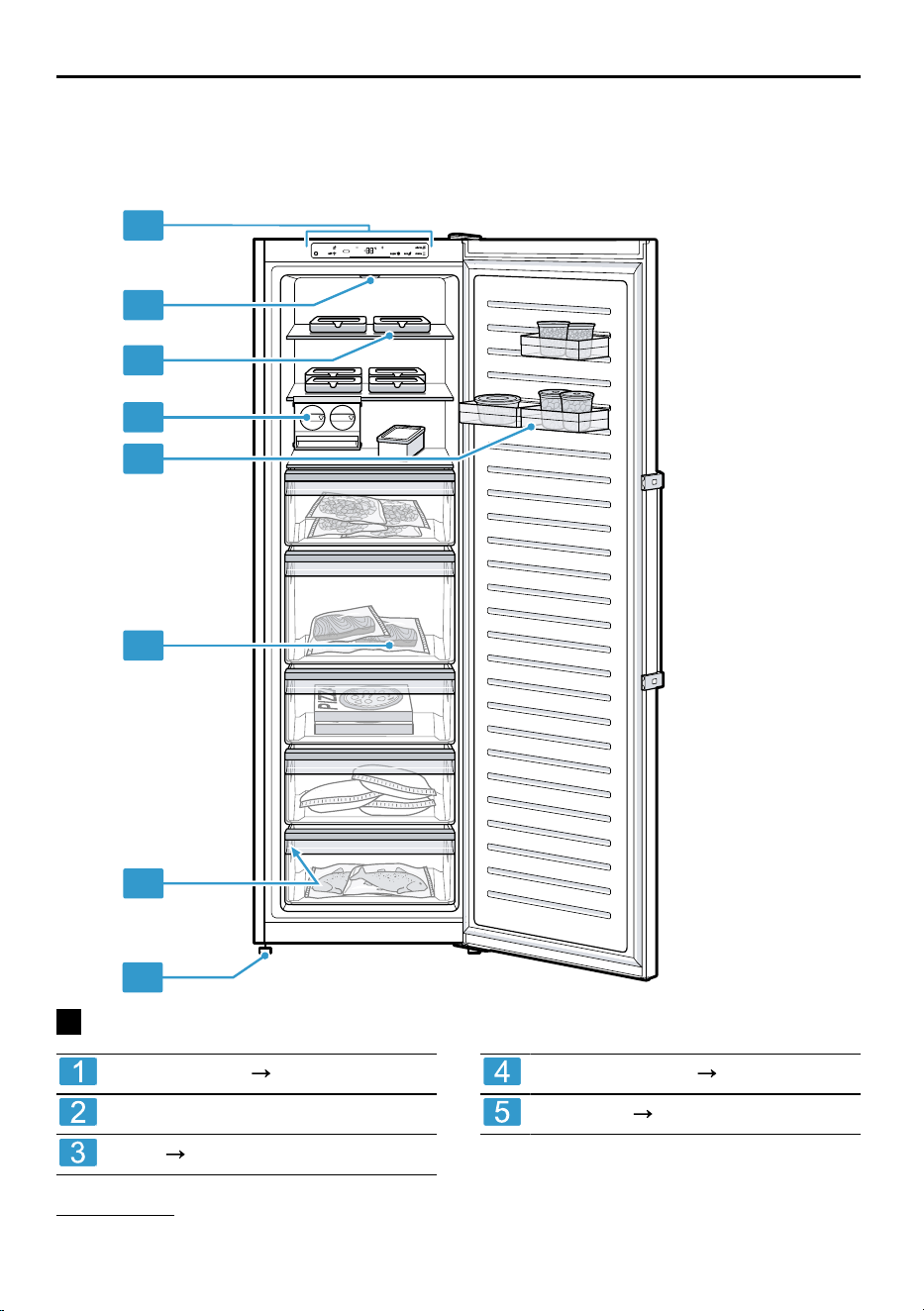
You can find an overview of the parts of your appliance here.
1
3
4
5
6
7
8
2
1
Control panel
Page12
Lighting
Shelf
Page12
Ice cube maker
Page13
1
Door tray
Page13
1
Depending on the appliance specifications
11
en Features
Frozen food container
Page21
Rating plate
Page26
Screw foot
Note: Deviations between your appli-
ance and the diagrams may differ
with regard to their features and size.
5.2 Control panel
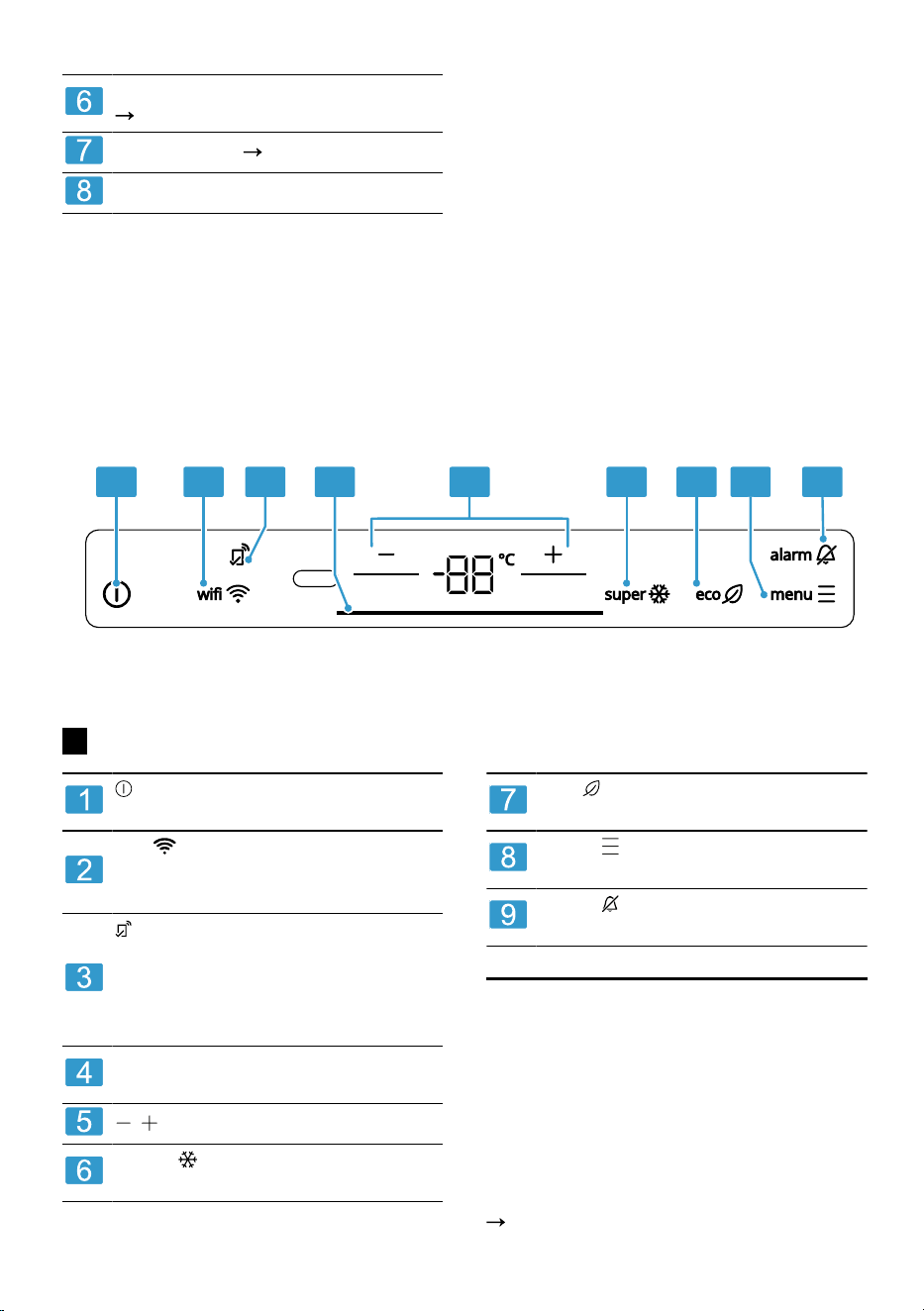
You can use the control panel to configure all functions of your appliance and
to obtain information about the operating status.
1 2 3 5 6 7 8 94
2
switches the appliance on or
off.
wifi switches the connection
to the WLAN home network (Wi-
Fi) on or off.
lights up if user-defined set-
tings have been set via the
HomeConnectapp. You can
find more information in the
HomeConnectapp.
The light bar provides visual
feedback.
/ sets the temperature.
super switches the Super
function on or off.
eco switches energy-saving
mode on or off.
menu activates and deactiv-
ates setting mode.
alarm switches the warning
signal off.
Features6 Features
The features of your appliance de-
pend on the model.
6.1 Shelf
To vary the shelf as required, you
can remove the shelf and re-insert it
elsewhere.
"Removing the shelf", Page21
12
Features en
6.2 Door tray
To adjust the door tray as required,
you can move or remove the door
tray and re-insert elsewhere.
"Removing door tray", Page21
Tips
If moving it when it is fully loaded,
lift the door tray slightly.
To organise food, place the door
tray in the mounting groove in the
holder.
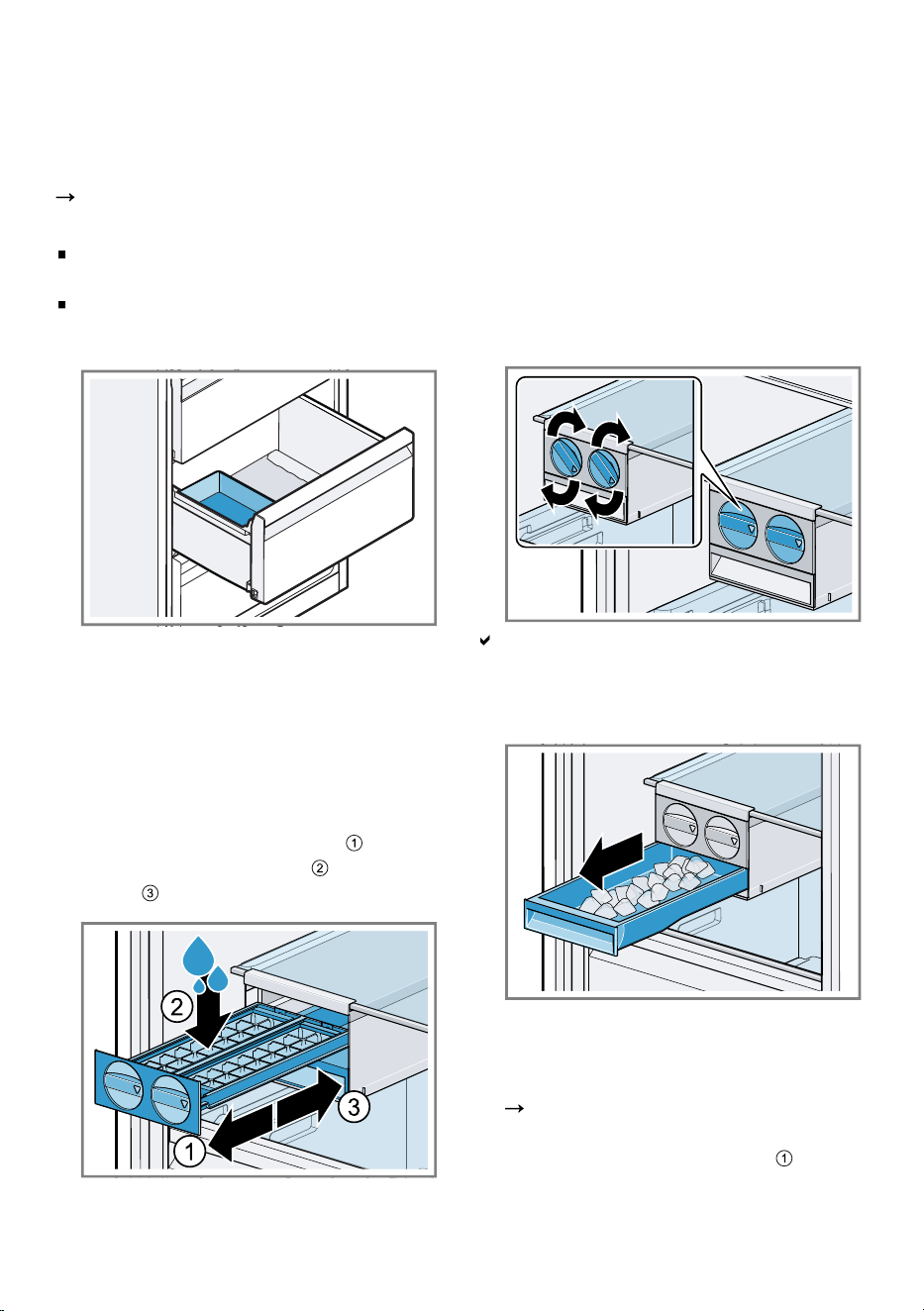
6.3 Ice cube maker
Use the ice cube maker to make ice
cubes out of drinking water.
Making ice cubes
Use only drinking water tomake ice
cubes.
1.
Remove the ice cube tray , fill ¾
full with drinking water and re-
insert .
Note: If it is filled with too much
drinking water, this may impair the
function of the ice cube maker.
The ice cubes cannot be removed
individually from the ice cube tray.
Too much drinking water was ad-
ded and isrunning into the ice
cube container, causing any ice
cubes tofreeze together.
2.
When the ice cubes are frozen, ro-
tate the knob on the ice cube tray
several times in a clockwise direc-
tion and release it.
The ice cubes will loosen and fall
into the ice cube container.
3.
Pull out the ice storage container
and remove the ice cubes.
Installing the ice cube maker up-
right
1.
Remove the ice cube maker.
Page21
2.
Place the ice cube maker on the
freezer compartment shelf and
move the fastening hooks forwards
13
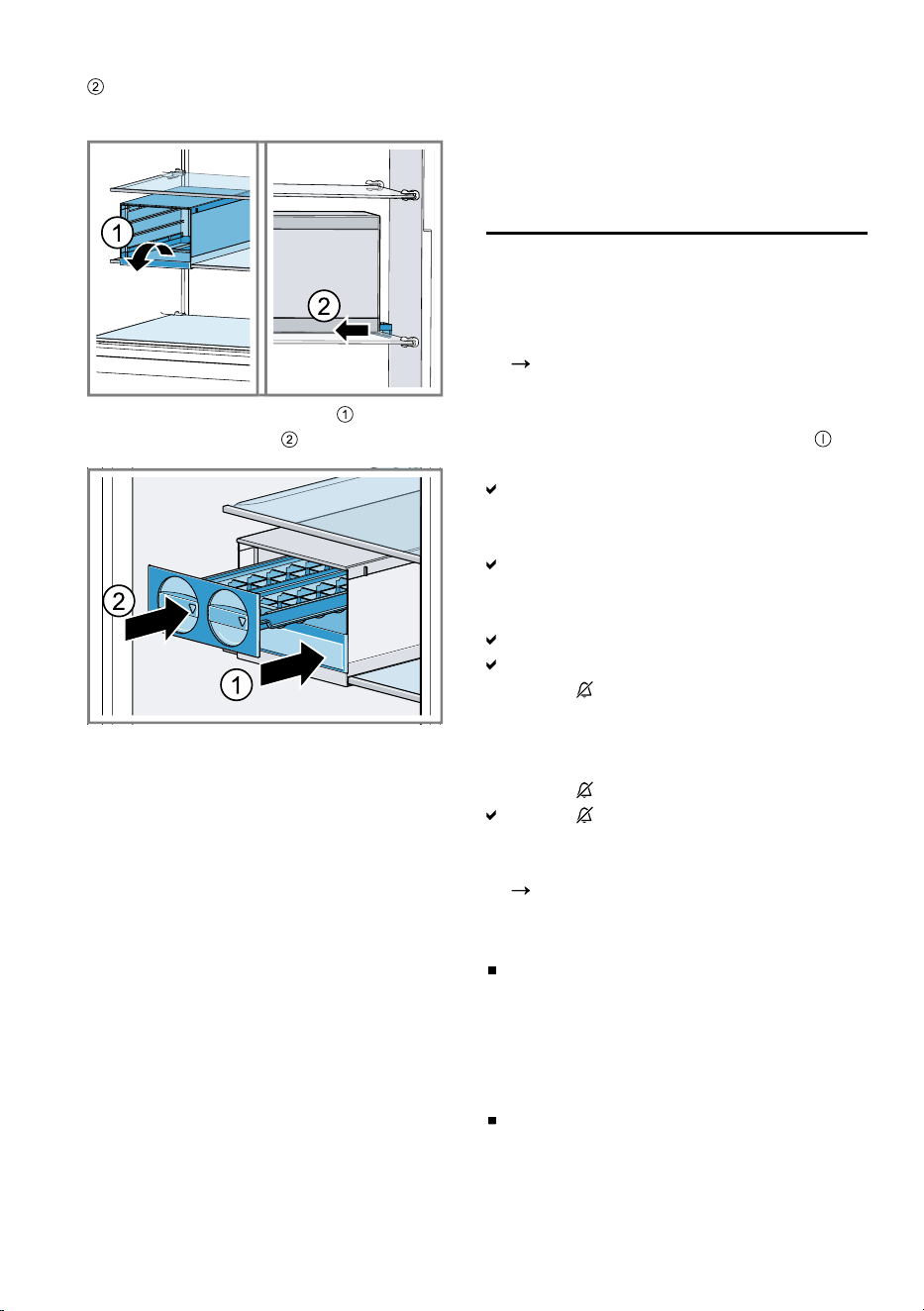
en Basic operation
until the ice cube maker is se-
cured.
3.
Insert the ice cube trays and the
ice cube container .
6.4 Accessories
Use original accessories. These have
been made especially for your appli-
ance.
The accessories for your appliance
depend on the model.
Ice cube tray
Use the ice cube tray to make ice
cubes.
Making ice cubes
Use only drinking water tomake ice
cubes.
1.
Fill the ice cube tray with drinking
water up to ¾ and place in the
freezer compartment.
If the ice cube tray is stuck to the
freezer compartment, loosen it with
a blunt object such as the handle
of a wooden spoon.
2.
To loosen the ice cubes, twist the
ice cube tray slightly or hold it
briefly under flowing water.
Basic operation7 Basic operation
7.1 Switching on the appliance
1.
Electrically connect the appliance.
Page10
Note: If the appliance has been
previously switched off using the
control panel, press and hold for
threeseconds.
The temperature display shows an
animation and the control panel is
locked.
The appliance is ready to use once
the animation has ended and the
temperature display lights up.
The appliance begins to cool.
A warning signal sounds and
alarm lights up because the
freezer compartment is still too
warm.
2.
Switch off the warning tone using
alarm .
alarm goes out as soon as the
set temperature has been reached.
3.
Set the required temperature.
Page15
7.2 Operating tips
Once you have switched on the
appliance, the set temperature is
only reached after several hours.
Do not put any food in the appli-
ance until the set temperature has
been reached.
The front panels of the housing are
temporarily heated slightly. This
prevents condensation in the area
of the door seal.
14
Additional functions en
When closing the door, make sure
that the door is not blocked by
stored items.
When you close the door, a va-
cuum may be created. The door is
then difficult to open again. Wait a
moment until the vacuum is offset.
The temperature in the appliance
varies due to the following condi-
tions:
– How often the appliance is
opened
– Load capacity
– Temperature of newly stored
food
– Ambient temperature
– Direct sunlight
7.3 Switching off the appliance
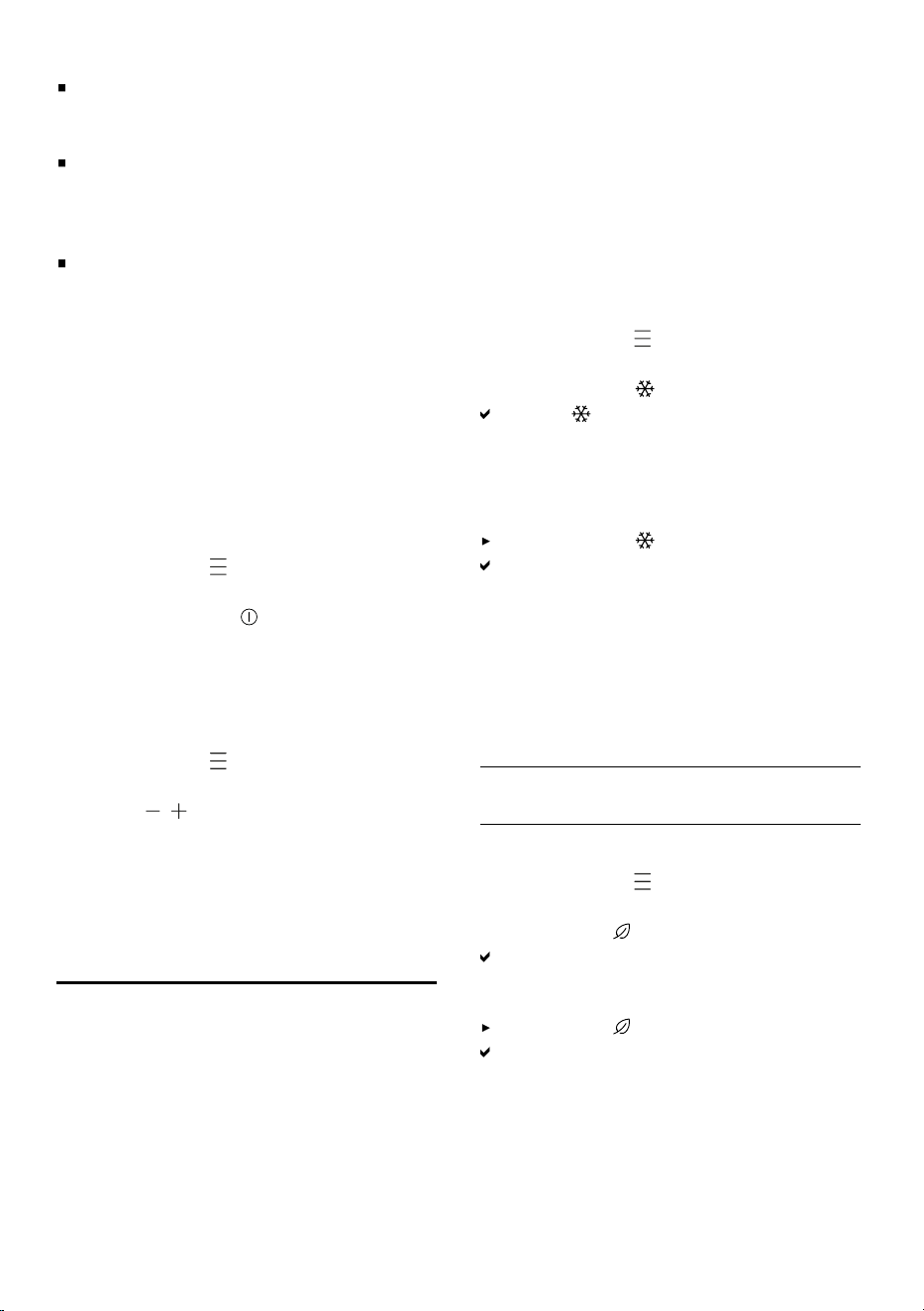
1.
Press menu to activate setting
mode.
2.
Press and hold for 3seconds.
7.4 Setting the temperature
Setting the freezer compartment
temperature
1.
Press menu to activate setting
mode.
2.
Press / repeatedly until the tem-
perature display shows the re-
quired temperature setting.
The recommended temperature in
the freezer compartment is
−18°C.
Additional functions8 Additional functions
Find out which additional functions
can be used for your appliance.
8.1 Super freezing
With Super freezing, the freezer com-
partment cools as cold as possible.
Switch on Super freezing before pla-
cing a larger quantity of food in the
appliance.
In order to utilise the freezer capacity,
use Super freezing.
Note: When Super freezing is
switched on, increased noise may
occur.
Switching on Super freezing
1.
Press menu to activate setting
mode.
2.
Press super .
super lights up.
Note: After approx. 54hours, the ap-
pliance switches to normal operation.
Switching off Super freezing
Press super .
The previously set temperature is
displayed.
8.2 Energy-saving mode
You can set the appliance to save
energy with the energy-saving mode.
The appliance automatically sets the
temperature.
Freezer compart-
ment
−18°C
Switching on energy-saving mode
1.
Press menu to activate setting
mode.
2.
Press eco .
The light bar lights up green.
Switching off energy-saving mode
Press eco .
The previously set temperature is
displayed.
8.3 Rest mode
The rest mode switches off all non-
essential functions.
15
en Alarm
During rest mode, the following func-
tions are switched off:
Super freezing
Alarm
Interior lighting
Signal tones
Messages on the control panel
Note: The control panel lighting is
switched off during rest mode. eco
lights up.
Switching on rest mode
1.
Press menu to activate setting
mode.
2.
Press and hold eco for 6
seconds until the display goes out.
eco lights up.
Switching off rest mode
Press and hold eco for
6seconds.
Alarm9 Alarm
9.1 Door alarm
If the appliance door is open for a
while, the door alarm switches on.
Switching off the door alarm
Close the appliance door or press
alarm .
The warning tone is switched off.
9.2 Temperature alarm
If the freezer compartment becomes
too warm, the temperature alarm is
switched on.
CAUTION
Risk of harm to health!
During the thawing process, bacteria
may multiply and spoil the frozen
food.
Do not refreeze food after it has
been defrosted or started to de-
frost.
Refreeze food only after cooking.
These items should no longer be
stored for the maximum storage
period.
The temperature alarm can be
switched on in the following cases:
The appliance is switched on.
Do not store any food until the ap-
pliance has reached the set tem-
perature.
Large quantities of fresh food are
being placed inside.
Switch on Super freezing before
placing large quantities of food in
the appliance.
The freezer compartment door is
open for too long.
Check whether the frozen food has
defrosted or thawed.
Switching off the temperature
alarm
Press alarm .
The warning tone is switched off.
HomeConnect10 HomeConnect
This appliance is network-capable.
Connect your appliance to a mobile
device to control its functions via the
HomeConnect app.
The HomeConnect services are not
available in every country. The avail-
ability of the HomeConnect function
depends on the availability of the
HomeConnect services in your coun-
16
HomeConnect en
try. You can find information about
this at:
www.home-connect.com
.
To be able to use HomeConnect,
you must first set up the connection
to the WLAN home network (Wi-Fi
1
)
and to the HomeConnect app.
After switching on the appliance, wait
at least 3minutes until internal device
initialisation is complete. Only then
should you set up HomeConnect.
The HomeConnect app guides you
through the entire login process. Fol-
low the instructions, noting the in-
formation in the HomeConnect app.
Notes
Please note the safety precautions
in this instruction manual and
make sure that they are also ob-
served when operating the appli-
ance via the HomeConnect app.
"Safety", Page3
Operating the appliance on the ap-
pliance itself always takes priority.
During this time it is not possible
to operate the appliance using the
HomeConnect app.
10.1 Setting up HomeConnect
Requirement: The appliance is re-
ceiving signals from the WLAN home
network (Wi-Fi) at its installation loca-
tion.
1.
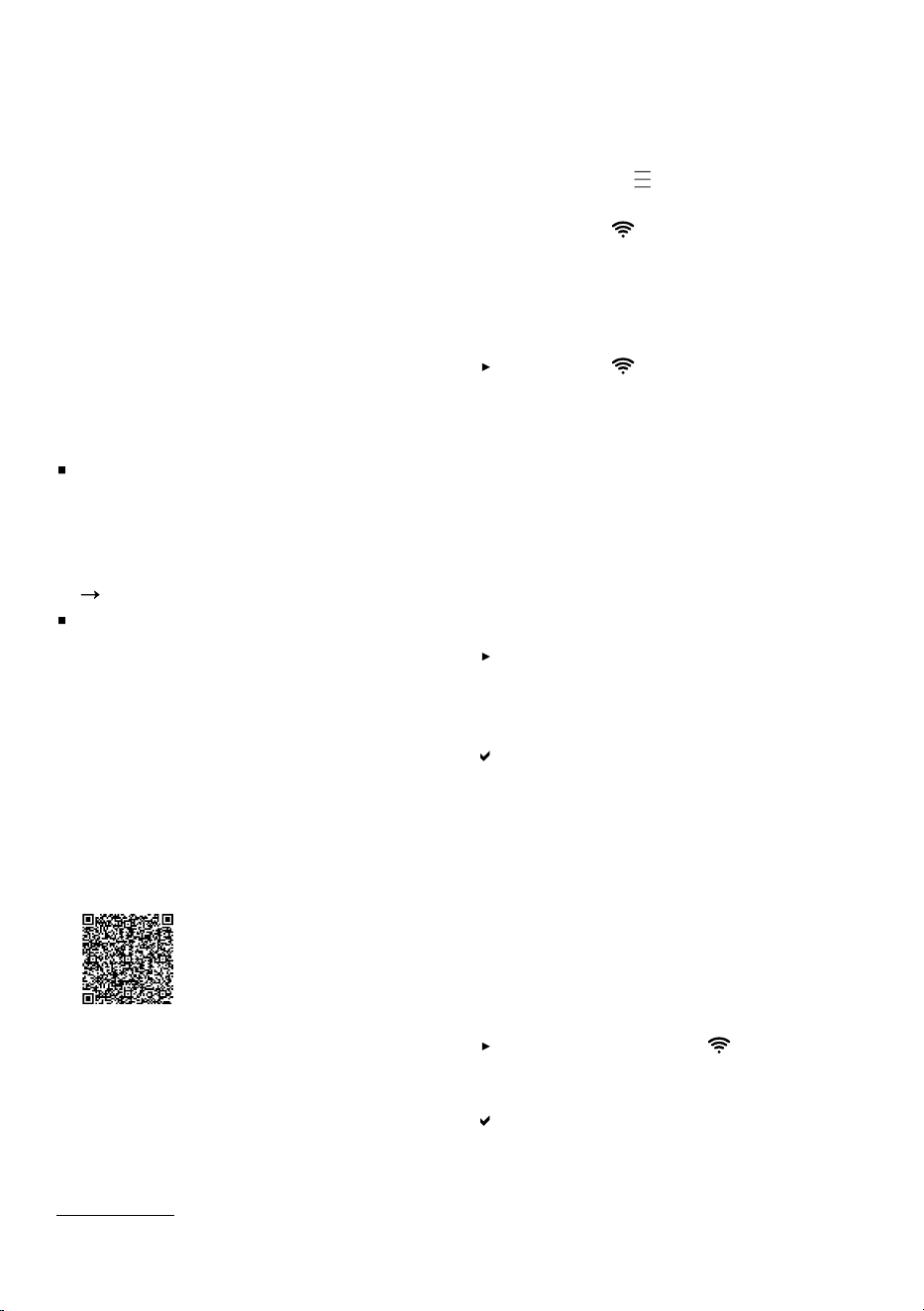
Scan the following QR code.
You can install the HomeConnect
app and connect your appliance
via the QR code.
2.
Follow the instructions in the
HomeConnect app.
10.2 Switching on the connec-
tion to the WLAN home
network (Wi-Fi)
1.
Press menu to activate setting
mode.
2.
Press wifi .
10.3 Switching off the connec-
tion to the WLAN home
network (Wi-Fi)
Press wifi .
10.4 Installing updates for the
HomeConnectsoftware
Note: If an update of the HomeCon-
nect software is available, a message
appears in the HomeConnect app.
You can find the current software ver-
sion in the HomeConnect app under
the appliance information for the ap-
pliance.
To install the update for the
HomeConnect software, follow the
instructions in the HomeConnect
app.
The control panel is partially
locked during the installation.
10.5 Resetting HomeConnect
settings
If your appliance experiences con-
nection problems with the WLAN
home network (Wi-Fi) or your appli-
ance wants to log into a different
WLAN home network (Wi-Fi), you can
reset the HomeConnectsettings.
Press and hold wifi for 7 to
10seconds until a third audible
signal sounds.
The HomeConnect settings have
been reset.
1
Wi-Fi is a registered trademark of the Wi-Fi Alliance.
17
en Freezer compartment
10.6 Remote diagnostics
Customer Service can use Remote
Diagnostics to access your appliance
if you contact them, have your appli-
ance connected to the HomeCon-
nect server and if Remote Dia-
gnostics is available in the country in
which you are using the appliance.
Tip: For further information and de-
tails about the availability of Remote
Diagnostics in your country, please
visit the service/support section of
your local website:
www.home-
connect.com
.
10.7 Data protection
Please see the information on data
protection.
The first time your appliance is re-
gistered on a home network connec-
ted to the Internet, your appliance will
transmit the following types of data to
the HomeConnect server (initial re-
gistration):
Unique appliance identification
(consisting of appliance codes as
well as the MAC address of the in-
stalled Wi-Fi communication
module).
Security certificate of the Wi-Fi
communication module (to ensure
a secure data connection).
The current software and hardware
version of your appliance.
Status of any previous resetting to
factory settings.
This initial registration prepares the
HomeConnect functions for use and
is only required when you want to
use the HomeConnect functions for
the first time.
Note: Please note that the
HomeConnect functions can only be
utilised with the HomeConnect app.
Information on data protection can be
retrieved in the HomeConnect app.
Freezer compartment11 Freezer compartment
You can store frozen food, freeze
food and make ice cubes in the
freezer compartment.
The temperature can be set from
−16°C to −24°C.
Long-term storage of food should be
at –18°C or lower.
The freezer compartment can be
used to store perishable food long-
term. The low temperatures slow
down or stop the spoilage.
11.1 Freezing capacity
The freezing capacity indicates the
quantity of food that can be frozen
right through to the centre within a
specific period of time.
Information on freezing capacity can
be found on the rating plate.
"Appliance", Fig.
1
/ Page12
Note: Approx. 24hours before stor-
ing fresh food in the appliance,
switch on Super freezing.
"Switching on Super freezing",
Page15
11.2 Tips for storing food in
the freezer compartment
Store food in air-tight packaging.
Do not bring food which is to be
frozen into contact with frozen
food.
Place thefood over thewhole area
ofthefrozen food containers.
To ensure that the air can circulate
freely in the appliance, push the
frozen food containers in as far as
they will go.
18
Defrosting en
11.3 Tips for freezing fresh
food
Freeze fresh and undamaged food
only.
Freeze food in portions.
Cooked food is more suitable than
food that can be eaten raw.
Vegetables: Wash, chop up and
blanch before freezing.
Fruit: Wash, pit and perhaps peel,
possibly add sugar or ascorbic
acid solution.
Food that is suitable for freezing in-
cludes baked items, fish and sea-
food, meat, game, poultry, eggs
without shells, cheese, butter and
quark, ready meals and leftovers.
Food that is unsuitable for freezing
includes lettuce, radishes, eggs in
shells, grapes, raw apples and
pears, yoghurt, sour cream, crème
fraîche and mayonnaise.
Packing frozen food
If you select suitable packaging ma-
terial and the correct type of pack-
aging, you can determine the product
quality and prevent freezer burn.
1.
Place the food in the packaging.
2.
Squeeze out the air.
3.
Pack food airtight to prevent it
from losing flavour and drying out.
4.
Label the packaging with the con-
tents and the date of freezing.
11.4 Shelf life of frozen food at
−18°C
Food Storage time
Fish, sausages, pre-
pared meals and
baked goods
up to
6months
Poultry, meat up to
8months
Food Storage time
Vegetables, fruit up to
12months
The imprinted freezer calendar indic-
ates the maximum storage duration
in months at a constant temperature
of –18°C.
11.5 Defrosting methods for
frozen food
CAUTION
Risk of harm to health!
During the thawing process, bacteria
may multiply and spoil the frozen
food.
Do not refreeze food after it has
been defrosted or started to de-
frost.
Refreeze food only after cooking.
These items should no longer be
stored for the maximum storage
period.
Defrost animal-based food, such
as fish, meat, cheese, quark, in the
refrigerator compartment.
Defrost bread at room temperat-
ure.
Prepare food for immediate con-
sumption in the microwave, in the
oven, or on the hob.
Defrosting12 Defrosting
12.1 Defrosting in the freezer
compartment
The fully automatic NoFrost system
ensures that the freezer compartment
remains frost-free. Defrosting is not
required.
19
en Cleaning and servicing
Cleaning and servicing13 Cleaning and servi-
cing
Customer Service must clean inac-
cessible points. Cleaning by cus-
tomer service can give rise to costs.
13.1 Preparing the appliance
for cleaning
1.
Switch off the appliance.
Page15
2.
Disconnect the appliance from the
power supply.
Unplug the appliance from the
mains or switch off the circuit
breaker in the fuse box.
3.
Take out all of the food and store it
in a cool place.
Place ice packs (if available) onto
the food.
4.
Remove all fittings and accessor-
ies from the appliance.
Page20
13.2 Cleaning the appliance
WARNING
Risk of electric shock!
An ingress of moisture can cause an
electric shock.
Do not use steam- or high-pres-
sure cleaners to clean the appli-
ance.
Do not use the appliance with
damp hands.
Liquid in the lighting or in the con-
trols can be dangerous.
The rinsing water must not drip
into the lighting or controls.
ATTENTION
Unsuitable cleaning products may
damage the surfaces of the appli-
ance.
Do not use hard scouring pads or
cleaning sponges.
Do not use harsh or abrasive de-
tergents.
Do not use cleaning products with
a high alcohol content.
Sharp or pointed objects damage the
door tray rail.
Never clean the door tray rail with
sharp or pointed objects, e.g. a
knife.
If you clean fittings and accessories
in the dishwasher, this may cause
them to become deformed or discol-
our.
Never clean fittings and accessory
in the dishwasher.
1.
Prepare the appliance for cleaning.
Page20
2.
Clean the appliance, the fittings,
the accessories and the door seals
with a dish cloth, lukewarm water
and a little pH-neutral washing-up
liquid.
3.
Dry thoroughly with a soft, dry
cloth.
4.
Insert the fittings.
5.
Electrically connect the appliance.
Page10
6.
Putting the food into the appliance.
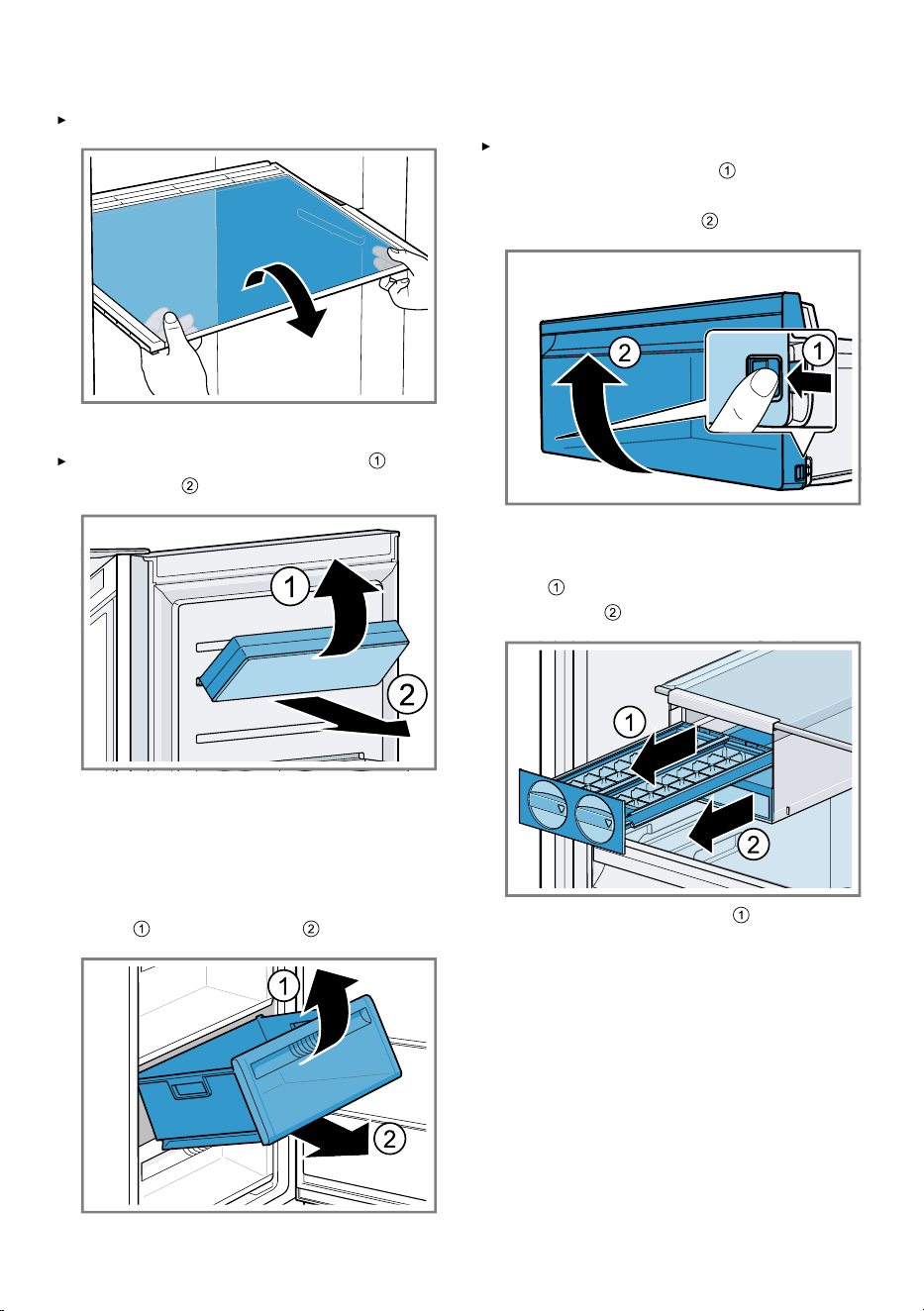
13.3 Removing the fittings
If you want to clean the fittings thor-
oughly, remove these from your ap-
pliance.
20
Cleaning and servicing en
Removing the shelf
Pull out and remove the shelf.
Removing door tray
Lift the door tray at the front and
remove it .
Removing the frozen food con-
tainer
1.
Take out the frozen food container
as far as it will go.
2.
Lift the frozen food container at the
front and remove it .
Removing the front of the con-
tainer
Press in the snap-in hooks on the
side of the container and re-
move the front from the container
in a turning motion .
Removing the ice cube maker
1.
Remove and empty the ice cube
tray and the ice storage
container .
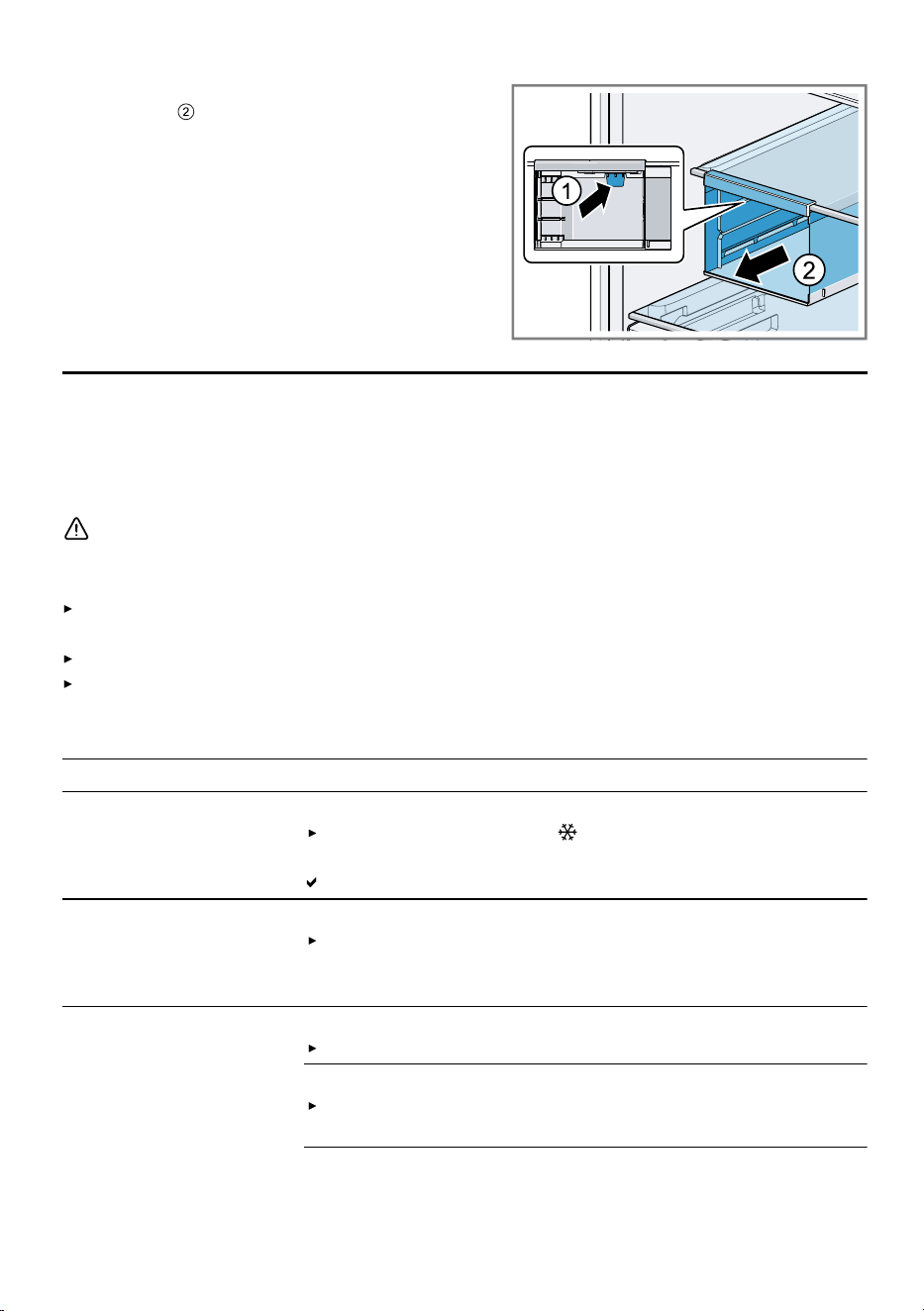
2.
Press the push-button to release
the ice cube maker from the shelf
21
en Troubleshooting
and remove the ice cube makerto
the front .
Troubleshooting14 Troubleshooting
You can rectify minor faults on your appliance yourself. Read the troubleshoot-
ing information before contacting after-sales service. This will avoid unneces-
sary costs.
WARNING
Risk of electric shock!
Improper repairs are dangerous.
Repairs to the appliance should only be carried out by trained specialist
staff.
Only use genuine spare parts when repairing the appliance.
If the power cord or the appliance power cable of this appliance is damaged,
it must be replaced with a special power cord or special appliance power
cable, which is available from the manufacturer or its Customer Service.
Fault Cause and troubleshooting
The appliance is not
cooling, the displays
and lighting are lit.
Showroom mode is switched on.
Press and hold super for 10 seconds until 4 aud-
ible signal tones sound.
"OFF" appears briefly on the control panel.
The LED lighting does
not work.
Different causes are possible.
Call customer service.
The customer service number can be found in the en-
closed customer service directory.
The refrigeration unit
is switching on more
frequently and for
longer.
The appliance has been opened frequently.
Do not open appliance door unnecessarily.
External ventilation openings are covered up.
Remove any obstructions from in front of the ex-
ternal ventilation openings.
22
Troubleshooting en
Fault Cause and troubleshooting
The refrigeration unit
is switching on more
frequently and for
longer.
Not a fault. Modern refrigeration machines switch on
more frequently and have different power levels to cool
more efficiently.
Remove any obstructions from in front of the ex-
ternal ventilation openings.
Install the appliance as far away as possible from
heating elements, cookers and other heat sources.
Avoid prolonged exposure of the appliance to direct
sunlight.
Only open the appliance door as briefly as neces-
sary.
Allow hot food and drinks to cool down first before
storing in the appliance.
HomeConnect is not
working properly.
Different causes are possible.
Go to
www.home-connect.com
.
"E" or "d" appears on
the temperature dis-
play.
The electronics have detected a fault.
1.
Switch off the appliance.
Page15
2.
Disconnect the appliance from the mains.
Unplug the appliance from the mains or switch off the
circuit breaker in the fuse box.
3.
Reconnect the appliance after five minutes.
4.
If the message still appears on the display, call Cus-
tomer Service.
The customer service number can be found in the en-
closed customer service directory.
A signal tone sounds,
alarm and the light
bar flash red.
The door alarm is
switched on.
The appliance door is open.
Close the appliance door.
A warning tone
sounds, the temperat-
ure display flashes
and alarm lights up.
Different causes are possible.
Press alarm .
The alarm is switched off.
The appliance door is open.
Close the appliance door.
External ventilation openings are covered up.
Remove any obstructions from in front of the ex-
ternal ventilation openings.
23
en Troubleshooting
Fault Cause and troubleshooting
A warning tone
sounds, the temperat-
ure display flashes
and alarm lights up.
Larger quantities of fresh food have been put in.
Do not exceed the max. freezing capacity.
"Freezing capacity", Page18
The temperature dif-
fers greatly from the
setting.
Different causes are possible.
1.
Switch off the appliance.
Page15
2.
Switch the appliance back on after fiveminutes.
Page14
If the temperature is too warm, check the temperat-
ure again after a couple of hours.
If the temperature is too cold, check the temperature
again on the following day.
The appliance hums,
bubbles, buzzes,
gargles, clicks or
crackles.
Not a fault. A motor is running, e.g. refrigerating unit,
fan. Refrigerant flows through the pipes. The motor,
switches or solenoid valves are switching on or off.
Automatic defrosting is running.
No action required.
The appliance makes
noises.
The appliance is not level.
Align the appliance using a spirit level and the screw
feet.
The appliance is not free-standing.
Observe the minimum clearances for the appliance.
Fittings wobble or stick.
Check the removable fittings and, if required, re-
place these.
Containers are touching.
Move the containers apart.
Super freezing is switched on.
No action required.
14.1 Power failure
During a power failure, the temperat-
ure in the appliance rises; this re-
duces the storage time and the qual-
ity of the frozen food.
On the website for your appliance,
the technical data provides you with
the storage times for frozen food in
the event of a fault.
Notes
Open the appliance as little as
possible during a power failure
and do not place any other food in
the appliance.
Check the quality of the food im-
mediately after a power failure.
– Dispose of any frozen food that
has defrosted and is hotter than
5°C.
– Cook or fry slightly thawed
frozen food, and then either con-
sume it or freeze it again.
24
Storage and disposal en
14.2 Conducting an appliance
self-test
Your appliance has an appliance self-
test which displays faults that can be
eliminated by your customer service.
1.
Switch off the appliance.
Page15
2.
Disconnect the appliance from the
power supply.
Unplug the appliance from the
mains or switch off the circuit
breaker in the fuse box.
3.
Electrically reconnect the appli-
ance after 5minutes.
Page10
The temperature display shows an
animation and the control panel is
locked.
If, at the end of the appliance self-
test, 5audible signals sound, in-
form customer service.
Storage and disposal15 Storage and disposal
15.1 Taking the appliance out
of operation
1.
Switch off the appliance.
Page15
2.
Disconnect the appliance from the
power supply.
Unplug the appliance from the
mains or switch off the circuit
breaker in the fuse box.
3.
Remove all of the food.
4.
Clean the appliance.
Page20
5.
To guarantee the ventilation inside
the appliance, leave the appliance
open.
15.2 Disposing of old appli-
ance
Valuable raw materials can be re-
used by recycling.
WARNING
Risk of harm to health!
Children can lock themselves in the
appliance, thereby putting their lives
at risk.
Leave shelves and containers in-
side the appliance to prevent chil-
dren from climbing in.
Keep children away from the re-
dundant appliance.
WARNING
Risk of fire!
If the tubes are damaged, flammable
refrigerant and harmful gases may
escape and ignite.
Do not damage the tubes of the re-
frigerant circuit or the insulation.
1.
Unplug the appliance from the
mains.
2.
Cut through the power cord.
3.
Dispose of the appliance in an en-
vironmentally friendly manner.
Information about current disposal
methods are available from your
specialist dealer or local authority.
This appliance is labelled
in accordance with
European Directive
2012/19/EU concerning
used electrical and elec-
tronic appliances (waste
electrical and electronic
equipment - WEEE).
The guideline determines
the framework for the re-
turn and recycling of
used appliances as ap-
plicable throughout the
EU.
Customer Service16 Customer Service
Function-relevant genuine spare parts
according to the corresponding Eco-
25
en Technical data
design Directive can be obtained
from Customer Service for a period
of at least 10years from the date on
which your appliance was placed on
the market within the European Eco-
nomic Area.
Furthermore, our Customer Service
will continue to provide you with
other function-relevant and storable
genuine spare parts for up to
15years from the date on which your
appliance was placed on the market.
For more information, please contact
our Customer Service team.
Note: Under the terms of the manu-
facturer's warranty applicable to the
location, the use of Customer Service
is free of charge. The minimum dura-
tion of the warranty (manufacturer's
warranty for private consumers) in
the European Economic Area is 2
years according to the terms of war-
ranty applicable to the location. The
terms of warranty do not affect other
rights or claims held by yourself un-
der local legislation.
Detailed information about the war-
ranty period and the warranty condi-
tions in your country is available via
the QR code on the enclosed docu-
ment on service contacts and war-
ranty conditions, from our customer
service or on our website.
You can find the contact details for
our customer service via the QR
code on the enclosed document on
service contacts and warranty condi-
tions or on our website.
16.1 Product number (E-Nr.),
production number (FD)
and consecutive number-
ing (Z-Nr.)
If you contact Customer Service, you
will require the product number (E-
Nr.), the production number (FD) and
the consecutive numbering (Z-Nr.),
which you can find on the appliance's
rating plate.
"Appliance", Fig.
1
/ Page12
Make a note of your appliance's de-
tails and the Customer Service tele-
phone number to find them again
quickly.
Technical data17 Technical data
Refrigerant, cubic capacity and fur-
ther technical specifications can be
found on the rating plate.
"Appliance", Fig.
1
/ Page12
You can find more information about
your model online at
https://
eprel.ec.europa.eu/
1
. This web ad-
dress is linked to the official EU
EPREL product database. Please
then follow the instructions on
searching for the model. The model
identifier is made up of the charac-
ters before the slash in the product
number (E-Nr.) on the rating plate. Al-
ternatively, you can also find the
model identifier in the first line of the
EU energy label.
The number of light sources included
depends on the model.
This product contains a light source
from energy efficiency class D.
The light sources are available as a
spare part and must only be re-
placed by trained specialist staff.
1
Only applies to countries in the European Economic Area
26
Declaration of Conformity en
17.1 Information regarding
Free and Open Source
Software
This product includes software com-
ponents that are licensed by the
copyright holders as free software or
open source software.
The applicable licence information is
stored on your home appliance. You
can also access the applicable li-
cence information via your
HomeConnect app: "Profile -> Legal
information -> Licence Information".
1
You can also download the licence
information on the brand product
website. (Please search on the
product website for your appliance
model and additional documents). Al-
ternatively, you can request the relev-
ant information from oss-
[email protected] or BSH Hausger-
äte GmbH, Carl-Wery-Str. 34, 81739
Munich, Germany.
The relevant source code will be
made available on request.
Please send your request to oss-
[email protected] or BSH Hausger-
äte GmbH, Carl-Wery-Str.34, 81739
Munich, Germany.
Subject: „OSSREQUEST“
The cost of performing your request
will be charged to you. This offer is
valid for three years from the date of
purchase or at least as long as we
offer support and spare parts for the
relevant appliance.
Declaration of Conformity18 Declaration of Conformity
BSH Hausgeräte GmbH hereby declares that the appliance with Home Connect
functionality conforms to the essential requirements and other relevant provi-
sions of Directive 2014/53/EU.
A detailed RED Declaration of Conformity can be found online at
www.bosch-
home.com
among the additional documents on the product page for your ap-
pliance.
Hereby, BSH Hausgeräte GmbH declares that the appliance with HomeCon-
nect functionality is in compliance with relevant statutory requirements.
2
A detailed Declaration of Conformity can be found online at
www.bosch-
home.co.uk
among the additional documents on the product page for your
appliance.
2
2.4 GHz band (2400–2483.5MHz): Max. 100mW
5-GHz band (5150–5350MHz + 5470–5725MHz): max. 150mW
BE BG CZ DK DE EE IE EL ES
1
Depending on the appliance specifications
2
Only applies to Great Britain
27
en Declaration of Conformity
FR HR IT CY LI LV LT LU HU
MT NL AT PL PT RO SI SK FI
SE NO CH TR IS UK (NI)
5GHz WLAN (Wi-Fi): For indoor use only.
AL BA MD ME MK RS UK UA
5GHz WLAN (Wi-Fi): For indoor use only.
18.1 Statement of Compliance
for Great Britain
The full Statement of Compliance ac-
cording to the Product Security and
Telecommunications Infrastructure
(Security Requirements for Relevant
Connectable Products) Regulations
2023 can be found online at
www.bosch-home.co.uk among the
additional documents on the product
page for your appliance.
Product type
This statement of compliance covers
the products described in this inform-
ation for use whose model identifier
group is seen on the title page. The
full model identifier is made up of the
characters before the slash in the
product number (E no.) which can be
found on the rating plate. Alternat-
ively, you can also find the model
identifier in the first line of the UK En-
ergy Label.
Name and address of manufacturer
BSH Hausgeräte GmbH, Carl-Wery-
Strasse 34, 81739 München, Ger-
many
This statement of compliance is pre-
pared by the manufacturer.
The manufacturer, BSH Hausgeräte
GmbH deems that it has complied
with
provision 5.1-1 of ETSI EN 303
645 v2.1.1 and, where relevant,
provision 5.1-2 of ETSI EN 303
645 v2.1.1;
provision 5.2-1 of ETSI EN 303
645 v2.1.1;
provision 5.3-13 of ETSI EN 303
645 v2.1.1.
Support period
BSH Hausgeräte GmbH will provide
security updates that are necessary
to maintain the main functions free of
charge until at least 28/02/2034.
28
Many thanks for choosing a
Bosch home appliance!
Register your new appliance now on MyBosch and benefit directly from:
• Expert advice and tips to make the most of your appliance
• Options for warranty extension
• Discounts on spare parts and accessories
• Digital information for use and all appliance data to hand
• Easy access to Bosch Home Appliance Service
Simple to register, free of charge – including on mobile devices:
www.bosch-home.com/welcome
Need some help?
You can find it here.
Expert advice on your Bosch home appliances, help with problems or repairs by
professionals from Bosch.
Discover all the different ways Bosch can assist you:
www.bosch-home.com/service
The contact details of all countries are listed in the attached service directory.
BSH Hausgeräte GmbH
Carl-Wery-Straße 34
81739 München, GERMANY
www.bosch-home.com
A Bosch Company
Valid within Great Britain:
Imported to Great Britain by
BSH Home Appliances Ltd.
Grand Union House
Old Wolverton Road
Wolverton, Milton Keynes
MK12 5PT
United Kingdom
*9002023174*
9002023174 (060622)
en