
in-lite INSTALLATION MANUAL SMART FLUX TONE
www.in-lite.com 27-04-2024
INSTALLATION MANUAL
SMART FLUX TONE
12/21V
Attention
This product may only be used within the in-lite system. If components are used
in the system that do not originate from in-lite, the warranty no longer applies.
Install the in-lite system components (fixtures, transformers, mini-connectors,
Easy-Locks and cable connectors) in a way that they can easily be replaced.
Never use the in-lite low-voltage cable directly connected to 100-230V. This
cable is only meant for use with the components of the in-lite 12/21 Volt (low-
voltage) system.
Please keep a distance of at least 20 cm to this product under normal use
condition. It’s therefore also prohibited to operate this product in direct contact
to a person.
in-lite INSTALLATION MANUAL SMART FLUX TONE
www.in-lite.com 27-04-2024
Contents
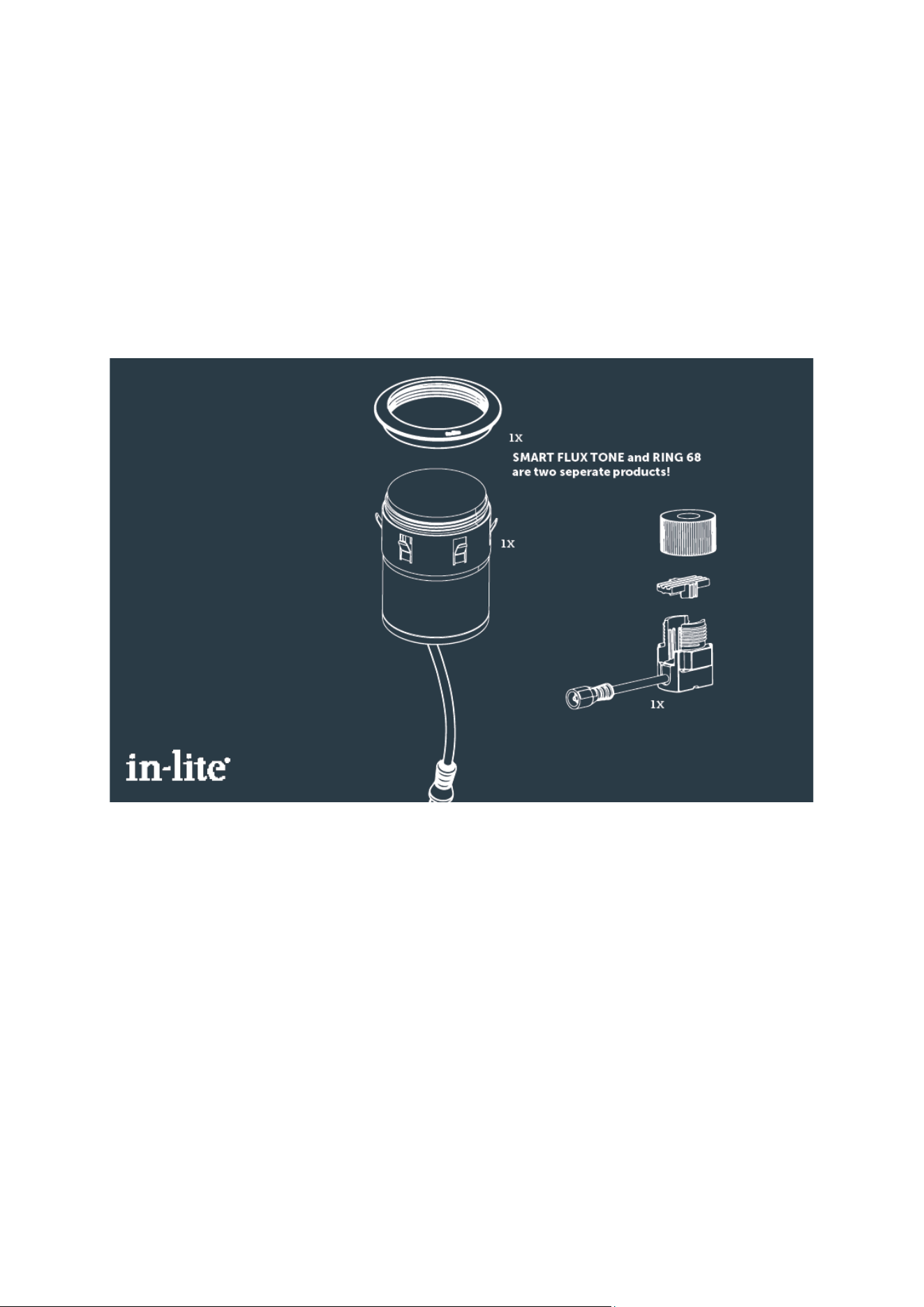
1x SMART FLUX TONE
INPUT: 12V or 21V AC.
ANTENNA SPECS: 2400-2480 MHz, Max. 20 dBm.
RADIO TYPE: 2.4 GHz wideband data transmission equipment
Dimensions (excl. groundstake): 86 x 60 mm / 3.1 x 2.4 inches.
1x Easylock.

in-lite INSTALLATION MANUAL SMART FLUX TONE
www.in-lite.com 27-04-2024
Please read the following instructions before installing. You are advised
to keep these installation instructions in a safe place. Although a low-
voltage system is safe, we advise you to have a qualified electrician
check the installation.
Use
The SMART FLUX TONE is controlled by the in-lite app, suitable for Android and
iOS phones or tablets produced, for example, by Samsung and Apple. In
combination with an in-lite SMART HUB you can make use of various routines
whereby the lamps are activated during the hours of darkness or for a certain
time period you can set yourself. You can also manually switch the lamps ON and
OFF at any time. With the app this smart lamp can also be adjusted regarding
the light colour and brightness.
Bluetooth Low Energy
The transformer connects to the phone or tablet using Bluetooth Low Energy.
BLE is a new low-energy form of Bluetooth and is more user-friendly and more
secure than, for instance Wi-Fi.
Safety
The external flexible cord of this product cannot be replaced; if the cord is
damaged, the product shall be scrapped.
EU Declaration of Conformity
"Hereby in-lite Design B.V. declares that the radio equipment SMART FLUX TONE
is in compliance with Directive 2014/53/EU. The DoC is available at https://in-
lite.use-cocoon.com/beeldbank/index/searchValue/ce-document/
IC Statement
This device complies with Industry Canada licence-exempt RSS standard(s).
Operation is subject to the following two conditions:
1) this device may not cause interference and
2) this device must accept any interference, including interference that may
cause undesired operation of the device
Le présent appareil est conforme aux CNR d'Industrie Canada applicables aux
appareils radio
exempts de licence.
L'exploitation est autorisée aux deux conditions suivantes :
(1) l'appareil ne doit pas produire de brouillage, et
(2) l'utilisateur de l'appareil doit accepter tout brouillage radioélectrique
subi, même si le brouillage est susceptible d'en compromettre le
fonctionnement.
To comply with FCC/IC RF exposure limits for general population / uncontrolled
exposure, the antenna(s) used for this transmitter must be installed on outdoor
permanent structures to provide a separation distance of at least 20 cm from all
persons and must not be co-located or operating in conjunction with any other
antenna or transmitter.

in-lite INSTALLATION MANUAL SMART FLUX TONE
www.in-lite.com 27-04-2024
Pour être conforme aux limites d’exposition aux radiofréquences (RF) de la
FCC/IC pour le grand public / une exposition non contrôlée, l’(les) antenne(s)
utilisée(s) pour cet émetteur doivent être installées sur des structures
permanentes extérieures afin de garantir une distance de séparation d’au moins
20 cm par rapport à toute personne, et ne doivent pas être co-localisées ni
fonctionner en association avec une autre antenne ou un autre émetteur.
FCC Statement
This equipment has been tested and found to comply with the limits for a Class B
digital device, pursuant to Part 15 of the FCC Rules. These limits are designed to
provide reasonable protection against harmful interference in a residential
installation.
This equipment generates, uses and can radiate radio frequency energy and, if
not installed and used in accordance with the instructions, may cause harmful
interference to radio communications. However, there is no guarantee that
interference will not occur in a particular installation. If this equipment does
cause harmful interference to radio or television reception, which can be
determined by turning the equipment off and on, the user is encouraged to try to
correct the interference by one of the following measures:
Reorient or relocate the receiving antenna.
Increase the separation between the equipment and receiver.
Connect the equipment into an outlet on a circuit different from that to which the
receiver is connected.
Consult the dealer or an experienced radio/TV technician for help.
To assure continued compliance, any changes or modifications not expressly
approved by the party responsible for compliance could void the user's authority
to operate this equipment. (Example - use only shielded interface cables when
connecting to computer or peripheral devices).
This device complies with Part 15 of the FCC Rules. Operation is subject to the
following two conditions:
(1) This device may not cause harmful interference, and
(2) This device must accept any interference received, including
interference that may cause undesired operation.
To comply with FCC/IC RF exposure limits for general population / uncontrolled
exposure, the antenna(s) used for this transmitter must be installed on outdoor
permanent structures to provide a separation distance of at least 20 cm from all
persons and must not be co-located or operating in conjunction with any other
antenna or transmitter.

in-lite INSTALLATION MANUAL SMART FLUX TONE
www.in-lite.com 27-04-2024
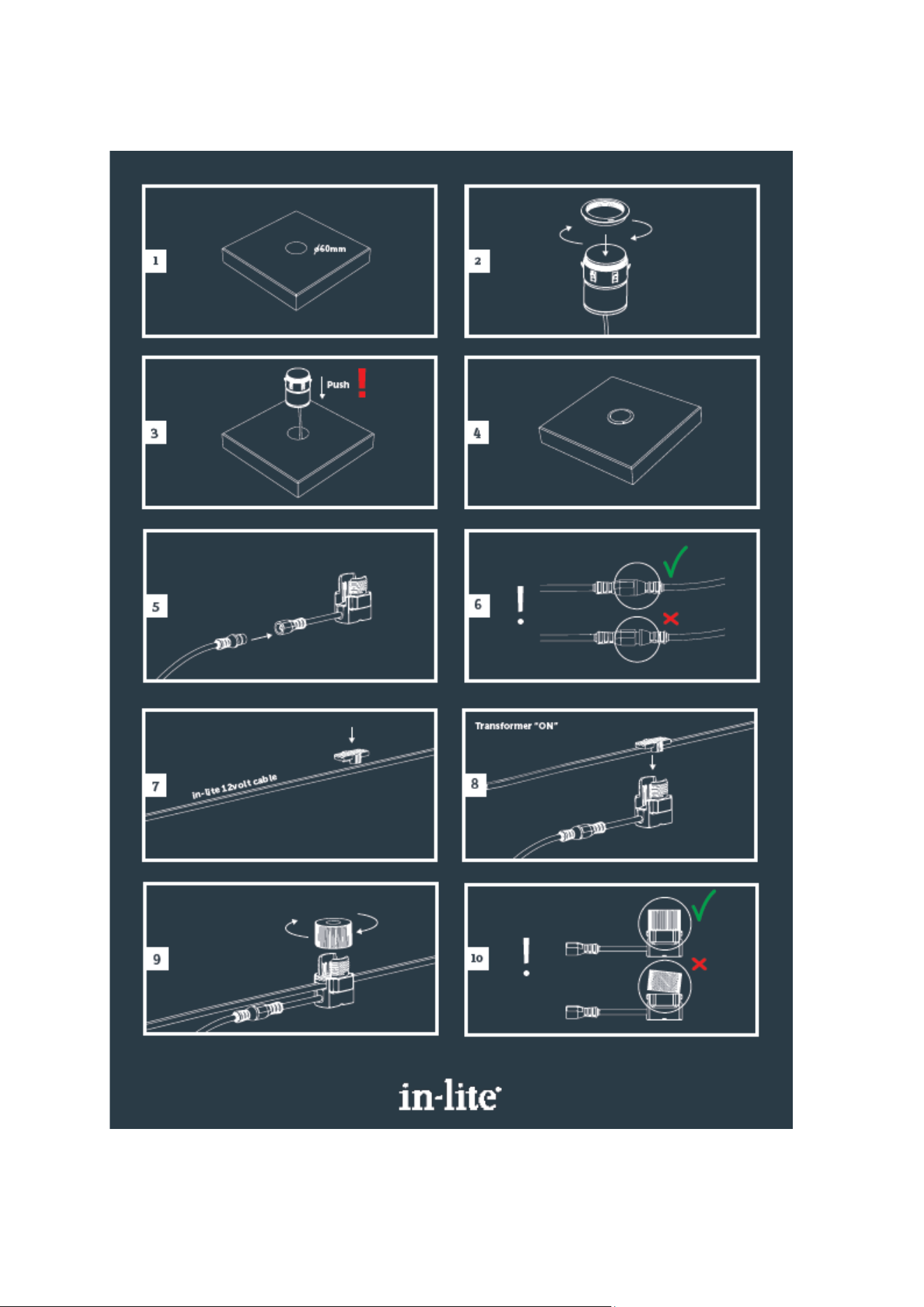
Installation
The SMART FLUX TONE is easy to install. After having installed an in-lite SMART
HUB and having downloaded and installed the in-lite application (app), the
system is ready for connection. Mount the SMART FLUX TONE and follow the
instructions in the app. The smart lamp is detected automatically and then be set
up with the instructions in the app.
A smart lamp like the SMART FLUX TONE can be controlled with the in-lite app on
a smart phone or tablet. The app, which is suitable for an Android and iOS
device, can be downloaded from the app store and installed on your device.
The in-lite app makes it possible to communicate with the lamp by a Bluetooth
connection. In combination with an in-lite SMART HUB you can make use of
various routines whereby the lamps are activated during the hours of darkness or
for a certain time period you can set yourself. You can also manually switch the
lamps ON and OFF at any time. With the app this smart lamp can also be
adjusted regarding the light colour and brightness.
It’s possible to share the in-lite app with other people like familiy members. The
Share function makes it possible to quickly link an extra device. The settings are
duplicated so there’s no need to set again for the linked device.
in-lite INSTALLATION MANUAL SMART FLUX TONE
www.in-lite.com 27-04-2024
Installation step by step
in-lite INSTALLATION MANUAL SMART FLUX TONE
www.in-lite.com 27-04-2024
Set-up the smart lamp with the in-lite app
Before you begin make sure you have installed an in-lite SMART HUB to be able
to set up the SMART FLUXTONE. In case you’re a first time user and you haven’t
already installed the SMART HUB, please start with that. Use the available
instructions. When you’ve installed a SMART HUB and the in-lite app, you’re
ready for the next steps below.
in-lite INSTALLATION MANUAL SMART FLUX TONE
www.in-lite.com 27-04-2024
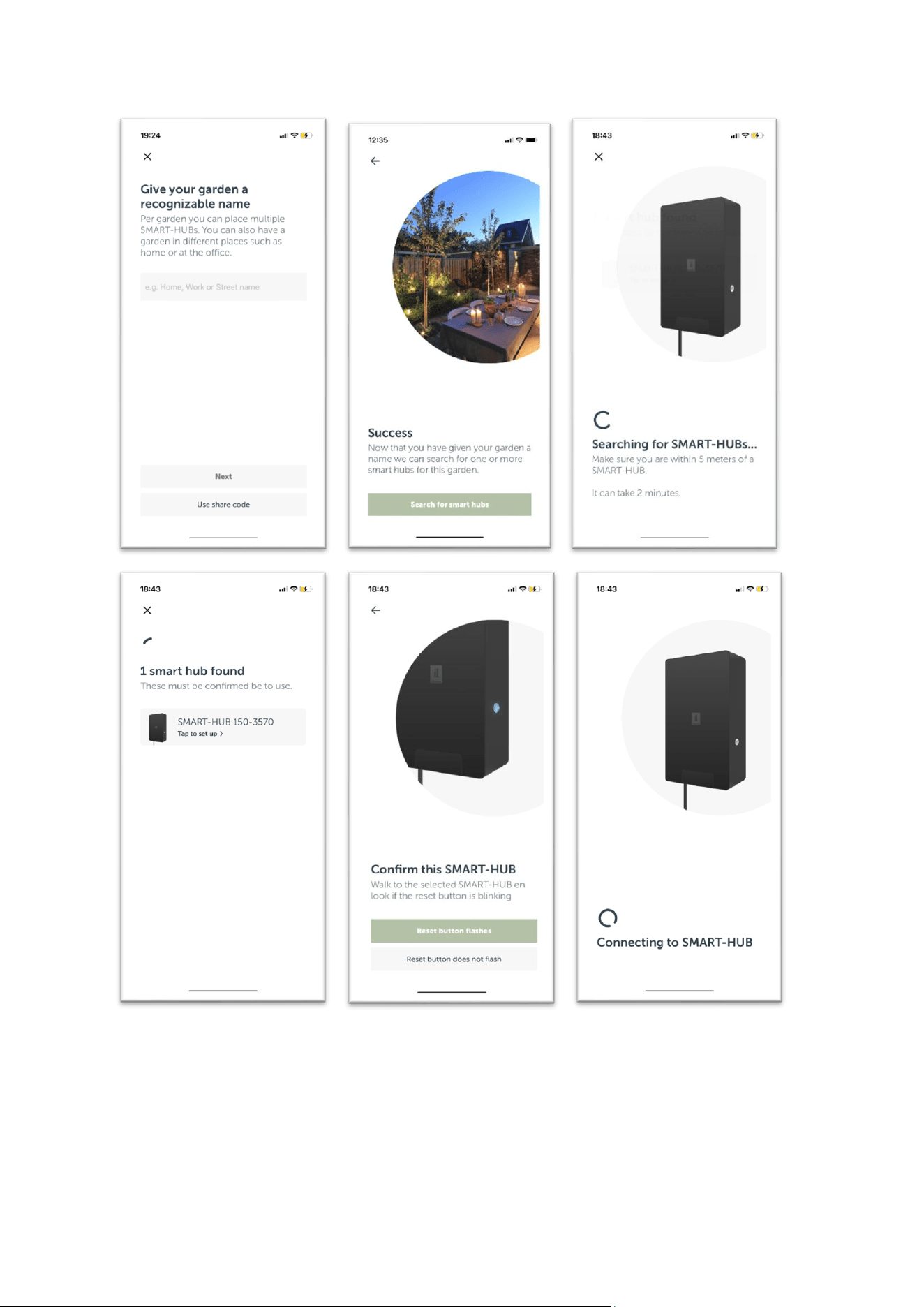
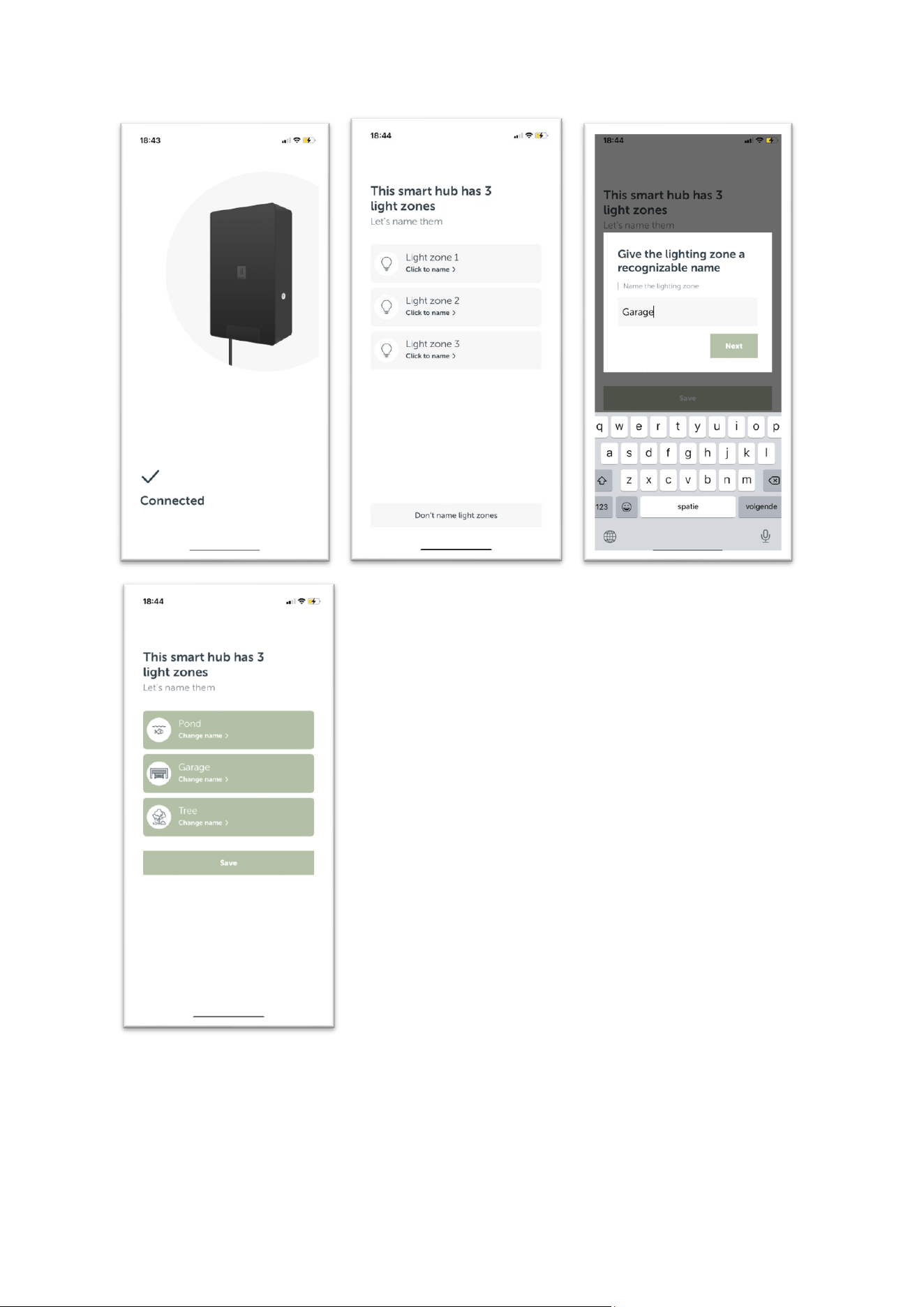
Some highlights from the SMART HUB installation process:
Step 1
Open the app store on your Android or iOS device (smart phone or tablet).
Search for in-lite and download the app.
Step 2
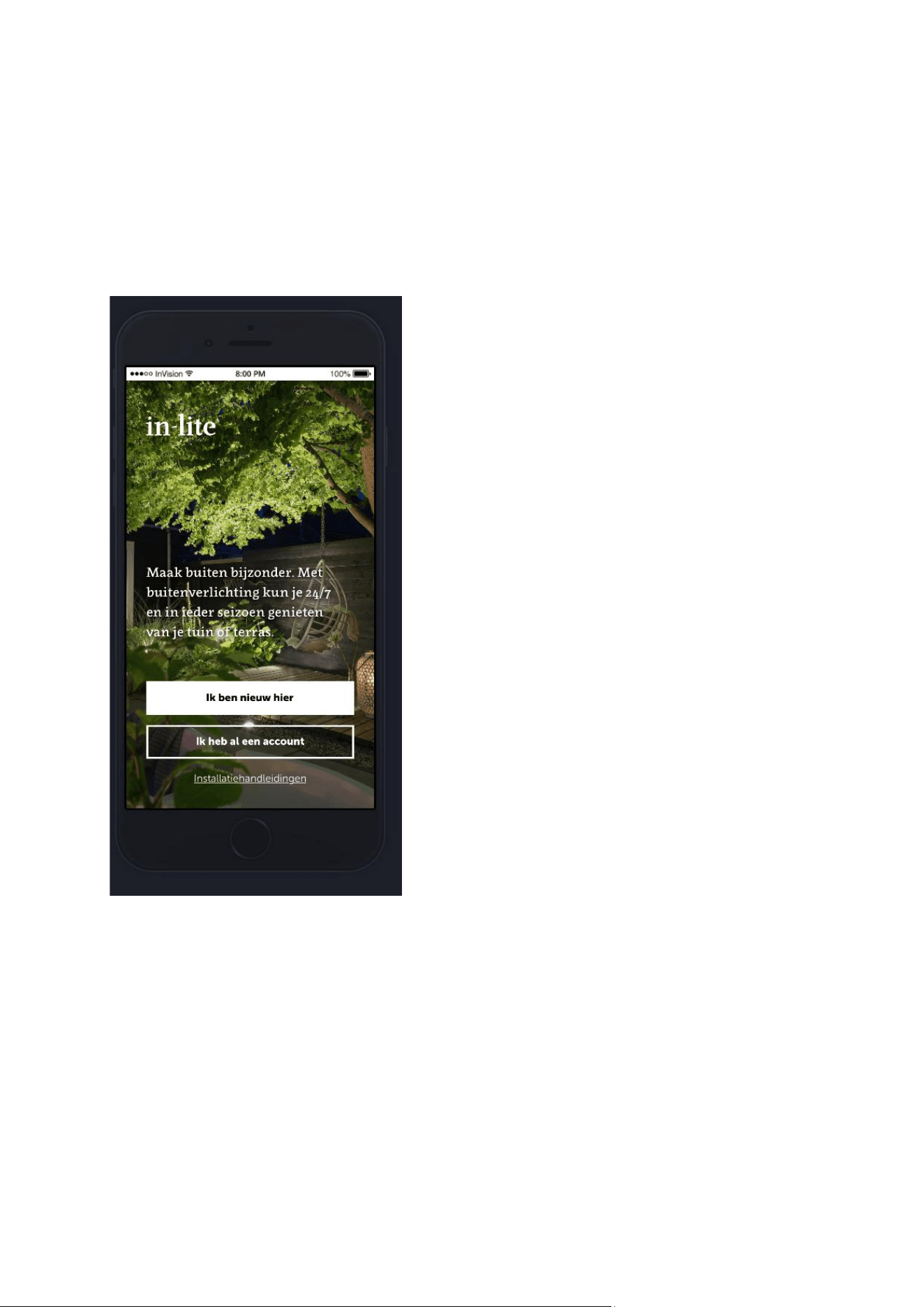
Open the app on your device. You have two options to select; you’re a new user
or you already have an account.
Step 3
Follow the instructions in the app. You’ll be guided through the process of logging
in or creating your account.
While creating your account you will configure the Bluetooth connection with the
transformer, the set up of your outdoor space and the names of the light
sections.
in-lite INSTALLATION MANUAL SMART FLUX TONE
www.in-lite.com 27-04-2024
in-lite INSTALLATION MANUAL SMART FLUX TONE
www.in-lite.com 27-04-2024
in-lite INSTALLATION MANUAL SMART FLUX TONE
www.in-lite.com 27-04-2024
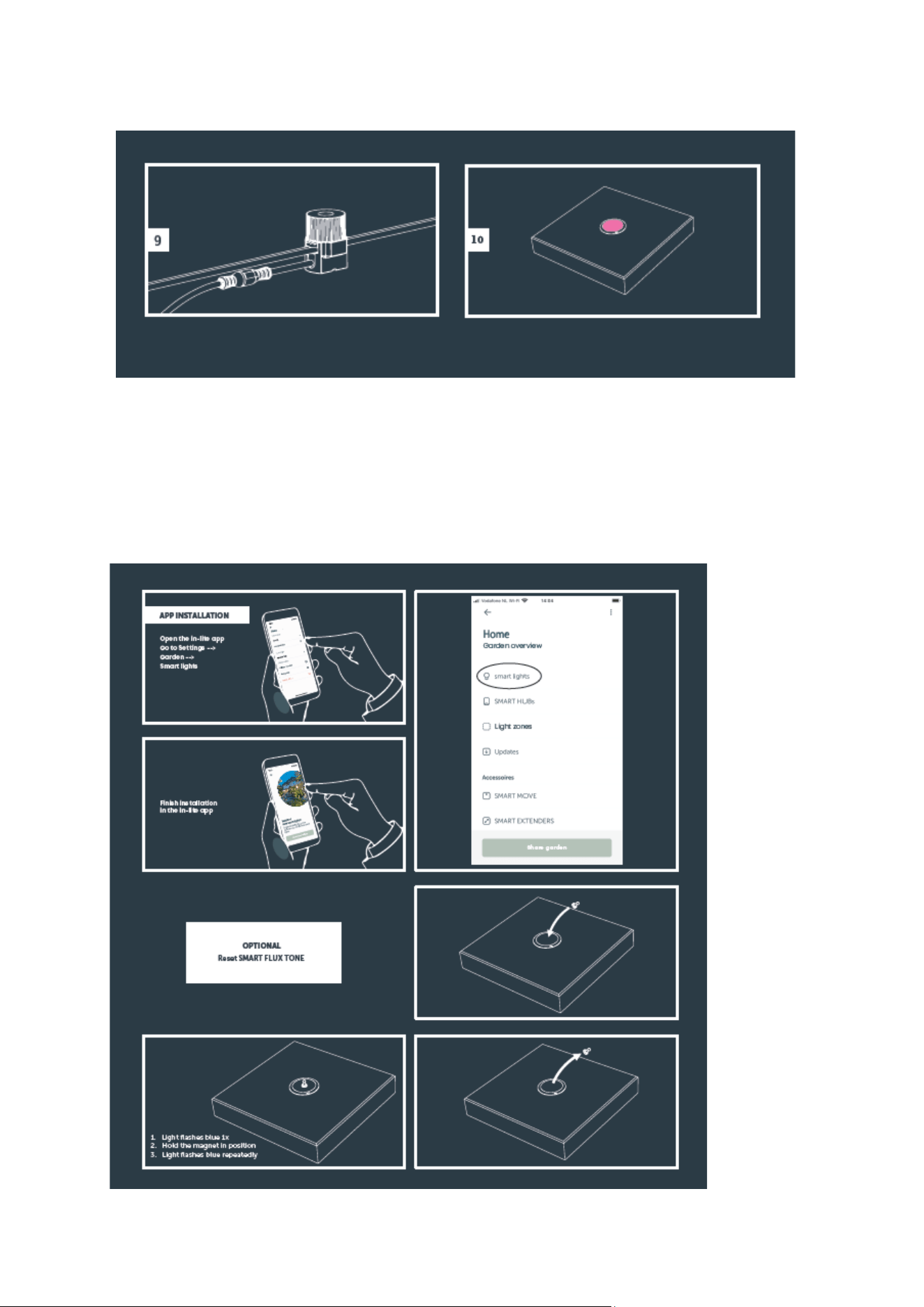
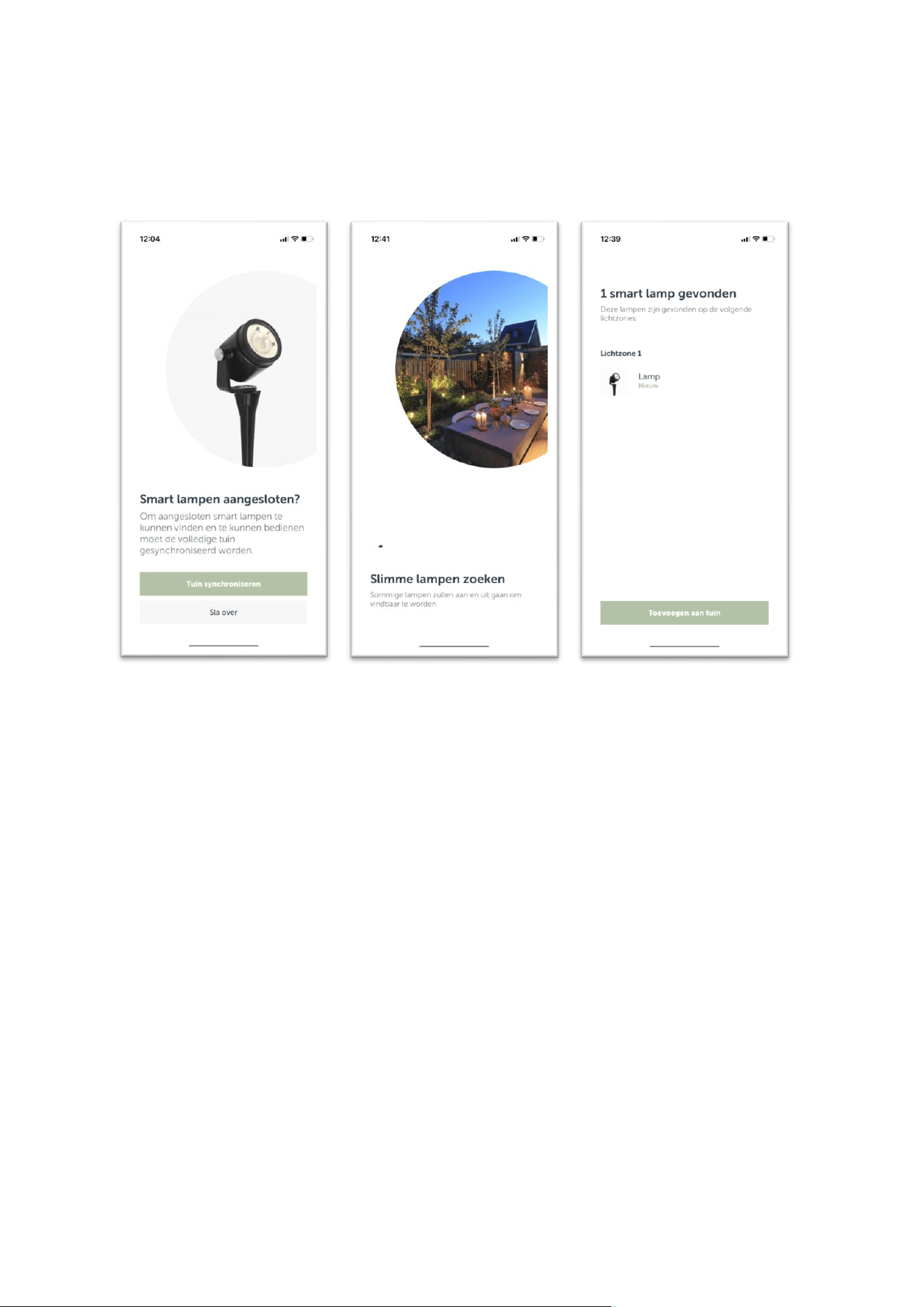
The SMART FLUX TONE installation process:
Mount the SMART FLUX TONE and follow the instructions in the app. The smart
lamp is detected automatically and can be set up with the instructions in the app.
in-lite INSTALLATION MANUAL SMART FLUX TONE
www.in-lite.com 27-04-2024
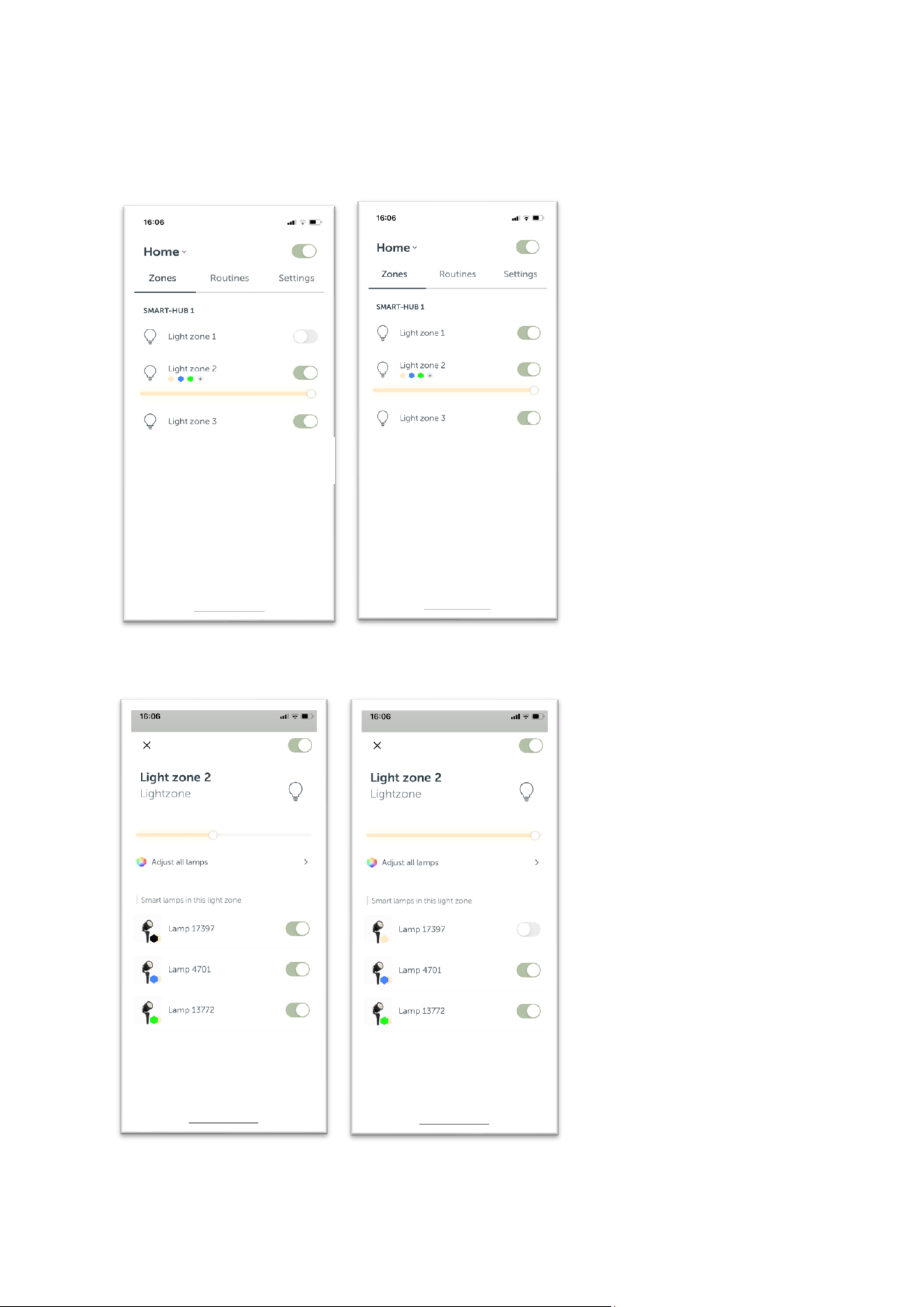
USE
Control the smart lamp
Enter “Light zone 2” by clicking on it.
Enter “Light zone 2” by clicking on it. You can now control each SMART
FLUXTONE.
in-lite INSTALLATION MANUAL SMART FLUX TONE
www.in-lite.com 27-04-2024
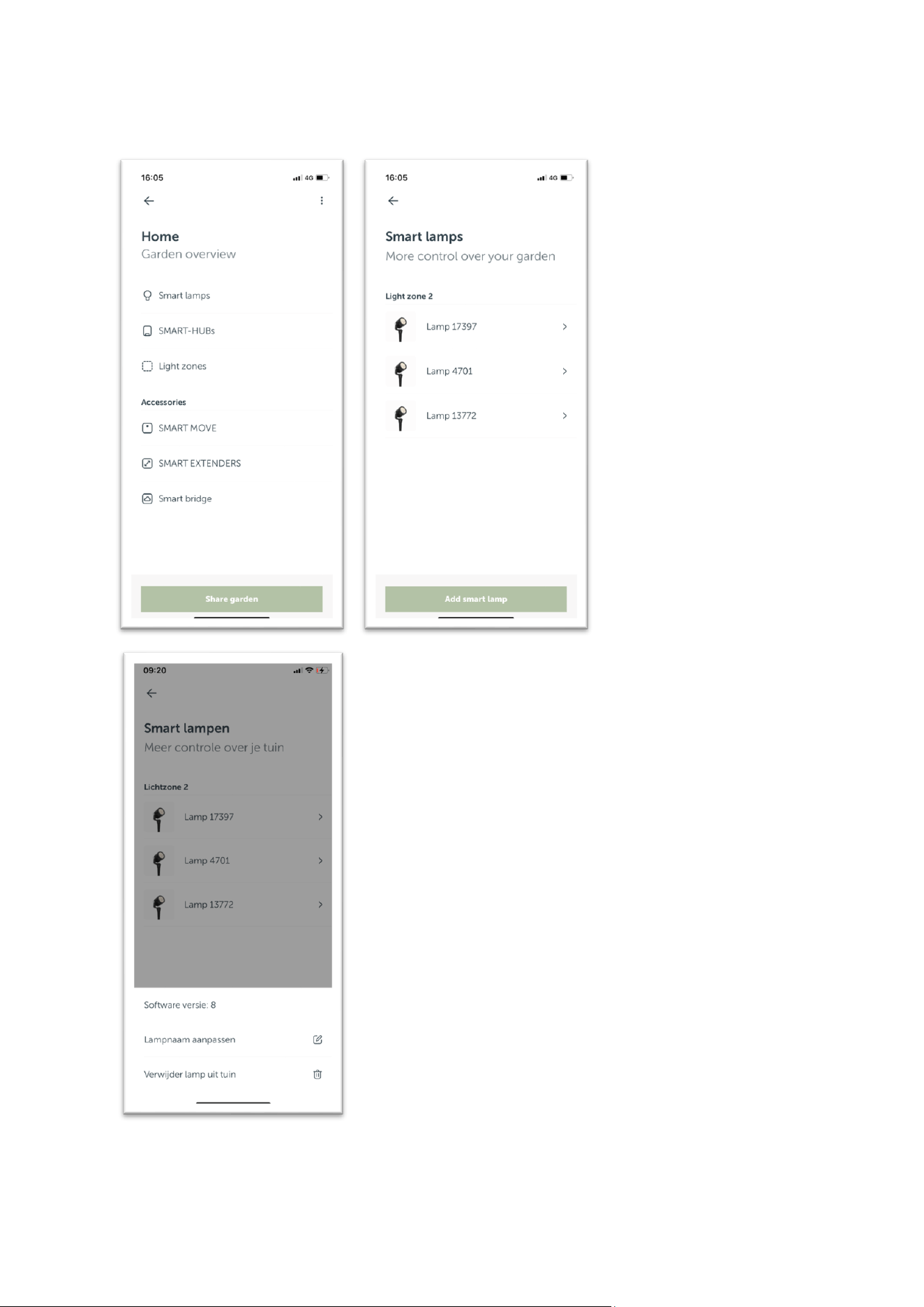
Overview of the garden lighting:
in-lite INSTALLATION MANUAL SMART FLUX TONE
www.in-lite.com 27-04-2024
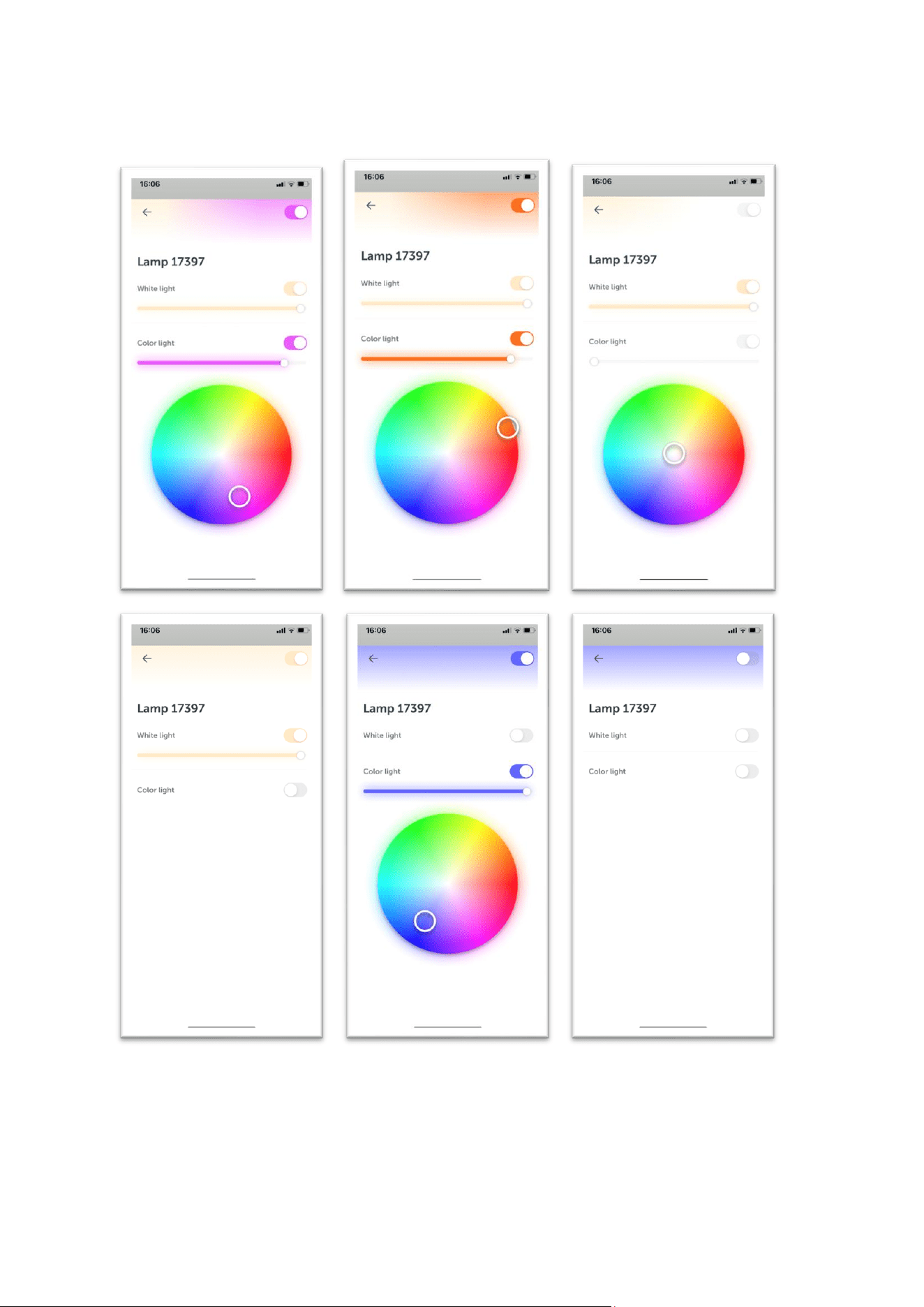
Change color and brightness: