Sound card microphone
operating instruction
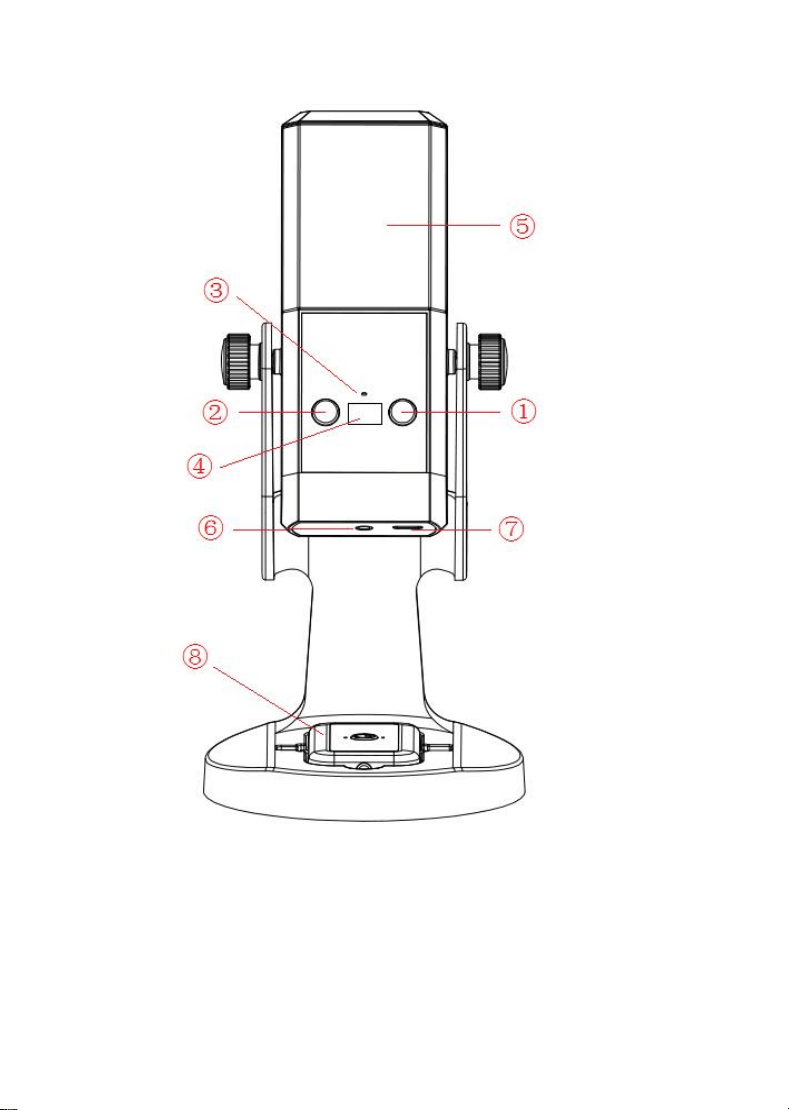
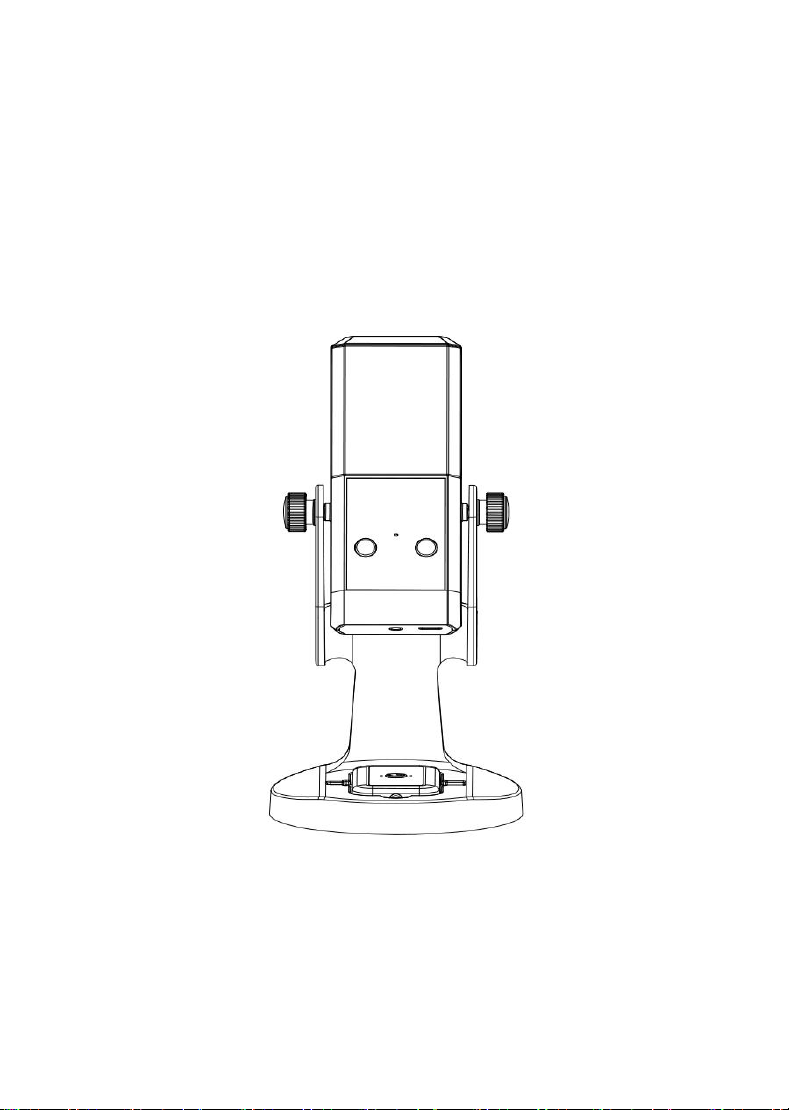
1、Feature Overview
①
Power button
②
Mute key
③
status hole
④
display screen
⑤
chandelier
⑥
headset jack
⑦
TYPE-C joggle
⑧
acceptor

2、direction for use
Set up the live phone:
Setting 1: Turn off Bluetooth on your phone.
Setting 2:
(1) Huawei/Honor/Xiaomi/Redmi are generally not required to set
up these brand phones.
(2) OPPO series phones:
1. Default recording device: Set as external device
2. Before connecting to the receiver each time, turn on the
OTG switch on your phone.
(3) Other brands like VIVO phones:
Before connecting to the receiver each time, turn on the OTG
switch on your phone.
This plug-and-play smart sound card microphone requires no app. Ideal
for live streaming (live commerce, influencer broadcasts, talent
shows), mobile karaoke, earphone recording, and Bluetooth music
playback.
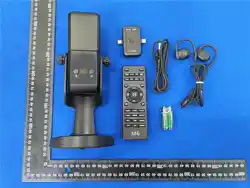
The sound card microphone consists of three parts: the sound card
microphone, the receiver, and the remote control.
(1)Sound card microphone instructions:
①
Power button: Long press for 3 seconds to power on or off, short
press to switch decorative light mode.
②
Mute button: Press once to turn off the microphone, then press again
to turn it on.
③
Status indicator lights: The green light indicates a 2.4G connection
(connected to the receiver), with flashing meaning no connection and
steady light indicating successful connection. The blue light
indicates a Bluetooth connection, with flashing meaning no connection

and steady light indicating successful connection.
④
Display: Shows battery level after startup and volume level when
adjusting volume.
⑤
Decorative lights display: 3 modes available-breathing display,
scrolling display, slow light-up, and off.
⑥
Headphone jack: Use a 3.5mm headphone jack for monitoring purposes.
⑦
Type-C port: For charging and connecting to OTG for live streaming.
(2) Receiver instructions:
After the receiver is powered on and connected successfully, connect
it to the phone for wireless live streaming.
1. Switch key: Hold for 3 seconds to power on, or hold for 3 seconds
to power off.
2.Light status: The indicator flashes when the sound card microphone
is not connected, and stays on after successful pairing (the sound card
microphone automatically pairs with the receiver upon startup, ideally
both devices should be powered on simultaneously).
3.TYPE-C male connector: Designed for connecting to TYPE-C interface
mobile phones.
4. Apple Head Mount: A connector for Apple Head Interface phones.
5. 3.5mm headphone jack: Connect your live-streaming or
music-recording phone using a 3.5mm cable.
6. 3.5mm output jack: Connects to external speakers via a 3.5mm cable
for external playback.
7. Charging indicator: The red light stays on when charging with a
DC5V/2A charger, and turns off when the battery is fully charged.
(3) Remote control instructions:
The remote control is used to operate the microphone on the sound card

and play sound effects.
Key functions
Noise reduction key: Switch between noise reduction levels.
Flashback key: When the microphone is in use, the background music will
automatically fade out after enabling the flashback key.
Mode keys: Short press for Original Sound, KTV, Professional, and Voice Change
to select different mode functions.
Reverb +/-button: adjusts the microphone's reverb volume.
Music +/-key: adjusts the volume of the accompaniment.
Monitor +/-keys: Adjust headphone volume;
Microphone +/-buttons: Adjust the microphone volume.
Previous/Next key: Adjusts the previous/next track function for
Bluetooth accompaniment songs.
Play/Pause button: controls the playback and pause of Bluetooth
accompaniment songs.
Internal recording: When using karaoke on your computer, select 'Internal
Recording On' to record the original performance. If you choose 'Internal
Recording Off', the original performance won't be recorded even if enabled. You
can turn this on or off as needed. Note: The mobile accompaniment feature
requires no selection.
Turn off the original vocal key: When this option is enabled, the song will mute
the vocals.
Special Effects: The product offers various live sound effects. Short
press the corresponding button to trigger the sound effect. Select the
sound effect based on your needs.
Ear feedback: When enabled during live streaming, you can hear your
voice in the live room but not in the monitor headphones. When disabled,
your voice is audible in the monitor headphones.

3、Product Parameter
Bluetooth version: V5.3
Bluetooth range: 15 meters (barrier-free)
Wireless transmission: 2.4G
Lithium battery voltage: 3.7V
Charger: DC5V/2A
Charging time: about 3 hours
4、matters need attention
*Do not place the machine in a high-temperature environment, including
direct sunlight.
*Do not place the machine near a fire or in an overheated environment.
*Do not place the machine in a damp or overly humid place.
*Do not attempt to charge the device using any other method except the
provided charging cable.
*Do not disassemble the machine. Any attempts to repair or modify it
are prohibited.
*Please note that falls, impacts, scratches, or any other actions
affecting the machine's functionality should be avoided. If any damage
occurs, such as overheating, deformation, or corrosion, stop using the
product immediately and contact the seller.
5、warn, caution
*If the machine emits an unusual odor, has a temperature higher than
normal, or shows abnormal color or shape changes, stop using it
immediately and contact the seller or us using the contact information
on the warranty card.
*The equipment should not be exposed to water droplets or splashes, and should
not be placed on objects such as vases or similar objects filled with liquid.

*This product is not a children's toy. Children under 14 must be accompanied by
a parent.
*Using the device at high volume for extended periods may damage your
hearing.
6、How to charge
Connect the accessory to the standard 5V output charger using the USB-C
charging cable. The display will flash to indicate charging status. When fully
charged, the screen will show a 100% battery level.
kindly reminder:
1、 Use the DC5V /2A charger to power the device. Charging with a device that
outputs excessive voltage may damage or prevent charging.
2、 When not in use for a long time, it is recommended to charge the device
every 3 months to better protect the battery.
3、 When the device has been used for more than 3 months, the battery level
indicator may take some time to light up after charging.
4、 It is recommended to use the device after it is fully charged.

FCC Warnning:
This equipment has been tested and found to comply with the limits for a Class B digital device,
pursuant to part 15 of the FCC Rules. These limits are designed to provide
reasonable
protection against harmful interference in a residential installation. This equipment generates,
uses and can radiate radio
frequency
energy
and,
if
not
installed
and
used
in
accordance
with
the
instructions,
may cause
harmful
interference
to
radio
communications.
However,
there
is
no
guarantee
that interference
will
not
occur
in
a
particular
installation.
If
this
equipment
does
cause
harmful interference to radio or television reception, which can be
determined by turning the equipment off
and
on,
the
user
is
encouraged
to
try
to
correct
the interference
by
one
or
more
of
the following measures:
•
Reorient or relocate the receiving antenna.
•
Increase the separation between the equipment and receiver.
•
Connect the equipment into an outlet on a circuit different from that to which the receiver is
connected.
• Consult the dealer or an experienced radio/TV technician for help.
Caution:
Any
changes
or
modifications
to
this
device
not
explicitly
approved
by
manufacturer
could void your authority to operate this equipment.
This
device
complies
with
part
15
of
the
FCC
Rules.
Operation
is
subject
to
the
following
two
conditions:
(1)This
device
may
not
cause
harmful
interference,
and
(2)
this
device
must
accept
any
interference received, including interference that may cause undesired operation.
This
equipment
complies
with
FCC
radiation
exposure
limits
set
forth
for
an
uncontrolled
environment.
This
equipment
should
be
installed
and
operated
with
minimum
distance
0cm
between the radiator and your body.