� � �
�
� ��
�
�
� � � ��
尊敬的用户!感谢您选择虎猫M���鼠标,在使用本产品前
请仔细阅读好使用手册,祝您使用愉快!
无线鼠标 读卡器
2 :蓝 牙 连 接
第一步:将鼠标背部2.4G/OFF/BT切换键 推到“BT”位置,对应鼠标指示灯为蓝色
并快速闪烁,开始进入对码模式。
第二步:打开电脑/平板/手机,点击设置菜单中的“蓝牙”界面连接配对鼠标
(BT mouse),连接上设备后随即蓝光熄灭进入正常模式。
第三步:移动鼠标或按左右键即可正常使用。(如无法搜索到蓝牙名称请按 键3秒
进入强制对码模式,此时蓝灯快闪,然后选择对应的蓝牙名,点击连接即可完成配对
1 :U S B 连 接
第一步:将接收器插入计算机的USB端口处。
第二步:将鼠标背部2.4G/OFF/BT切换键 推到“ ”位置,对应指示灯为绿色
并闪烁,连接上设备后随即绿光熄灭进入正常模式。
第三步:移动鼠标或按左右键即可正常使用。
指示灯
本表格依据SJ/T11364的规定编制
0=表示该有毒有害物质在该部件所有均质材料中的含量均在GB/T26572标准规定的限量要求以下。
X=表示该有毒有害物质至少在该部件的某一均质的含量超出GB/T26572标准规定的限量要求。
表中标有“X”的所有部件都符合欧盟RoHSRecast法规-2011/65/EU指令。
此表显示的电子电气产品部件中何处存在这些有害物质,请注意并非内装产品都包含上述所有部件。
注:环保使用期限的参考标准取决于产品正常工作的温度和湿度等条件。
产品中有害物质的名称及含量
根据中国《电子电气产品有害物质限制使用标识要求》
1:鼠标光标移动迟缓时,请检查电池电量,建议及时充电。
2:当鼠标无法连接时,请检查鼠标底部的电源开关是否打开,并选择正确的连接方式。
3:如果长时间不使用鼠标,请手动关闭电源开关,以节省电源。
4:鼠标长时间不使用,会自动进入休眠模式,移动鼠标或按任意键唤醒鼠标。
5:请勿拆卸或者尝试试图修复本产品,因为这样做可能会导致产品损坏。
800/1200/1600
L83*W38*H23mm
33±5g
ABS
2.4G+BT
120mAh
光学技术
��米
)
使用指南-安全正确的使用产品
求,同时符合21CFR1040.10的要求,IEC60825-1Ed.3.除外,如2019年5月8日发布的
第56号Laser Notice(激光公告)中所述。不可见红外光放射至少+/-2°的辐散光束;最
大功率为1.4微瓦的连续波,放射的波长范围832-865纳米操作温度0°C至40°C.
警告!激光辐射.使用光学放大仪器在100毫米距离内查看激光输出可能造成眼睛受伤。
电池、电子设备和电气设备不应与生活垃圾一同处理。只要情况允许,应将其隔
离并带到适当的收集点,以便回收利用,并避免对环境和人类健康造成的潜在影
响。欲了解更多信息,请联系当地主管部门或购买地点。
-除电池移除和更换外,请勿自行拆卸或改装产品。
-请勿拆卸或尝试维修本产品,因为这样做可能会导致辐射伤害。
-请勿将红外/激光光束指向任何人的眼睛或反射物体。
-请勿将产品浸入任何液体中、或暴露在炎热或潮湿的环境中。
-如果将产品暴露于超出既定温度范围的环境中,则切断电源设备,直至温度在指定的
操作温度范围内达到稳定。
-本产品仅可使用随附的电源,不得改装电源。不得在雷雨天气时为产品充电 -使用此
产品请搭配所列出/认证的ITE电脑和附件。
-此产品不适合儿童使用,14岁以下儿童为非预期用户。
-如果使用产品长时间重复单一动作,则可能导致手部、手腕、胳膊、肩部、颈部或背
部 的 神 经 、肌 腱 或 肌 肉 损 伤 。如 果 存 在 疼 痛、麻 木 、酸 软 无 力 、肿 胀、灼 痛 、抽 筋 或 僵
硬等症状,请向合格的专业保健人士咨询。
-在正常和合理可预见的操作条件下,本产品不存在安全隐患。如果产品运行不正
常 ,请 致 电 支 持 人 员 。 如 需 任 何 服 务 或 维 修 ,请 务 必 将 产 品 送 回 相 关 部 门 - 请 注 意 :未
经官方许可,请勿对本产品进行任何改装或改造,否则您将失去设备的使用权利,产
品保修也将自动失效。
2.4G / OFF /
BT Switch Key
Click to switch DPI.
Press and hold for 3s
to reconnect.
Type-C Charging Port
Optical Engine
TF Card Slot Cover
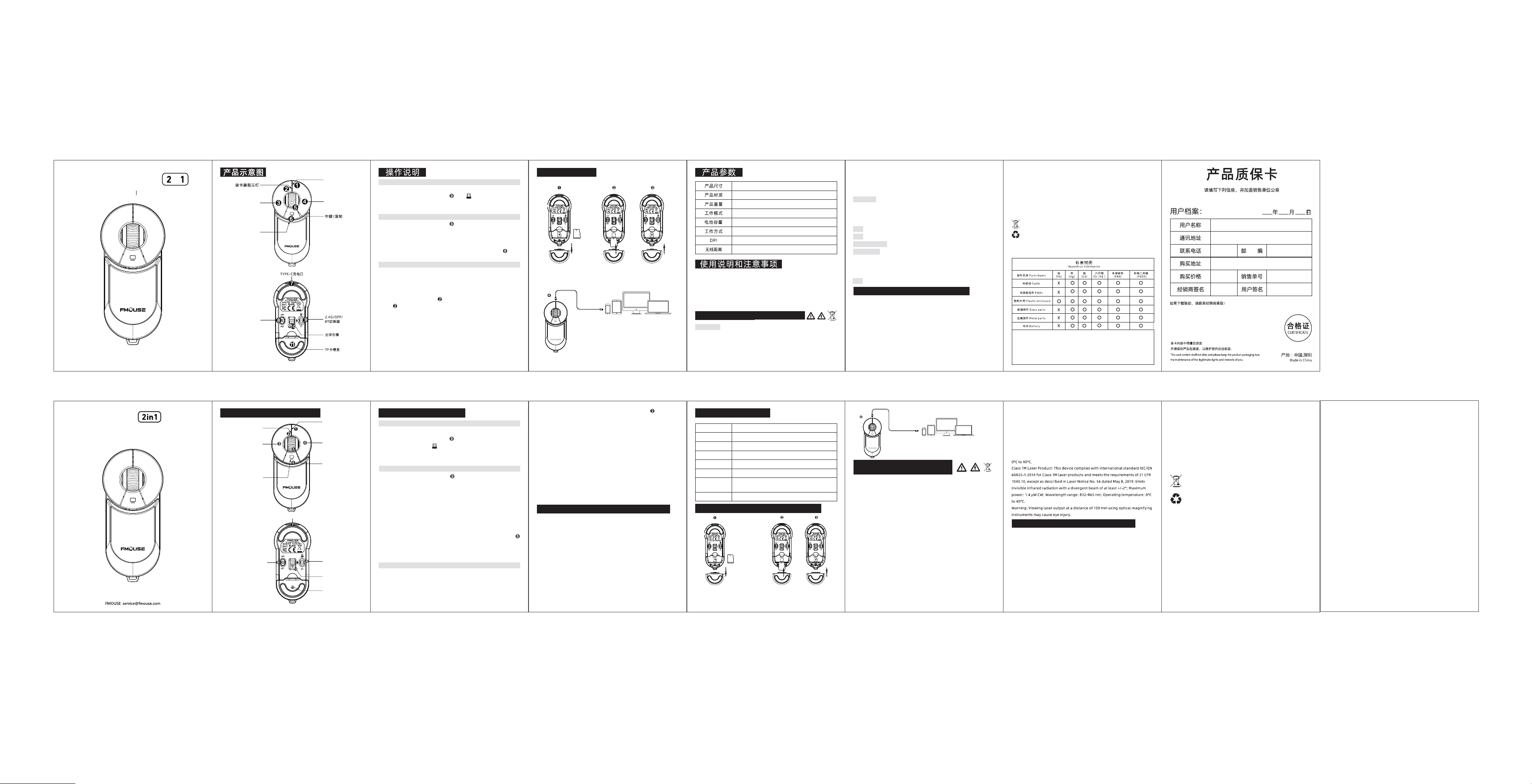
Thank you for choosing FMOUSE M209 mouse
Please read the manual carefully before using this product
Wireless Mouse / Card Reader
Instruction Manual
Product Function Diagram Operating Instructions
Step 4: After connecting the cable, the TF card indicator light will flash
rapidly, indicating data reading is in progress. It will stay lit steadily
once reading is completed.
Step 5: Open the disk folder on your computer, tablet or smartphone to access
the removable disk.
Step 6: You may read and write files on the disk. The indicator light will flash
rapidly during data transmission.
Step 7: After the read and write are completed, right-click on the mobile disk
to safely romove it. Then press the TF card and pull it out of the slot.
You can also keep the TF card inside the mouse and then close the TF
card slot cover. Then you can use the mouse normally.
*The maximum supported capacity is 2TB and the average read/write speed
is 20MB/s.
一键返回桌面
右键
左键
单击切换DPI
长按3s可以
重新对码
TF卡功能说明
打开TF卡的卡槽盖
将TF卡沿此方向插入卡槽内按压到底儿
(如需取出TF卡请再次按压TF卡即可弹出)
Micro SD
Micro SD
TF
使用带数据传输功能的Type-C接口连接鼠标
与设备,此时鼠标的TF卡指示灯会快速闪烁
进行读取TF卡数据,读取成功后显示为常亮。
请在使用产品之前阅读手册
电池使用警告! 电池如果更换不当,则可能存在泄漏或爆炸及造成人身伤害的危险。如
果替换为错误的电池类型,可能有引起火灾或爆炸的风险。请参照所附说明,确保电池
的正确安装,可充电电池如果处置不当,可能存在火灾或化学烧伤的危险。切勿拆卸或
将电池与导电材料、液体接触、或暴露于温度超过54°C(130°F)的坏境中。处于极低气
压下的电池可能会导致爆炸或者易燃液体或气体泄漏,切勿在电池出现泄漏、变色、变
Right Button
Left Button
Card Reader
Indicator Light
Scroll Wheel /
Middle Button
RGB Light
One-click
return to desktop
TF Card Function Instructions
Use the Type-C interface with data transmission function to
connect the mouse to the device. At this time, the TF card
indicator light of the mouse will blink quickly to show it's reading
the TF card data. If this is successful, the light will stay on.
Instructions and precautions for use
1、 When the mouse cursor moves slowly, check whether the battery is low.
Please charge promptly.
2、 lf the mouse cannot be connected, check whether the power switch at
the bottom of the mouse is on and select a correct connection mode.
3、lf you do not use the mouse for a long time, manually turn off the power
switch to save power.
4、lf you do not use the mouse for a long time, it will automatically enter
sleep mode, move the mouse or press any key to wake up the mouse.
5、Please do not disassemble or try to repair the product as doing so may
cause damage.
Product Parameters
L83 × W38 × H23 mm
33 ± 5 g
800/1200/1600
2.4G + BT
120 mAh
10m
Optical technology
ABS
Dimensions
Product material
Product Weight
Operating Mode
Batter y capacity
Tracking Method
Three-level DPI
Wireless distance
Insert the TF card into the card slot in this
direction and press it to the end
(If you need to take out the TF card, press the
TF card again to pop out).
Open TF card slot cover
Micro SD
Micro SD
TF
1:USB Connection
Step 1: Inser t the receiver into a USB port on your computer.
Step 2: Slide the 2.4G/OFF/BT switch on the bottom of the mouse to the
position marked as . The corresponding RGB light will flash green
and turn off once the device is connected, entering normal mode.
Step 3: Move the mouse or press the left/right buttons to start normal use.
3. TF Card Read & Write
Step 1: Open the TF card slot cover on the rear of the mouse.
Step 2: Insert the TF card into the mouse following the indicated direction.
Step 3: Use a Type-C data cable. Plug one end into the mouse and the other
into a computer, tablet or smartphone.
2:Bluetooth Connection
Step 1: Slide the 2.4G/OFF/BT switch on the bottom of the mouse to the
"BT" position. The corresponding RGB light will flash blue rapidly,
and the mouse will enter pairing mode.
Step 2: On your computer, tablet or smartphone, open the Bluetooth page
in Settings to pair with the mouse (BT mouse). The blue light will
turn off upon successful connection, and the mouse will enter
normal mode.
Step 3: Move the mouse or press the left/right buttons for normal operation.
If the Bluetooth name cannot be found, press the marked button
for 3 seconds to enter forced pairing mode. The blue light will flash
rapidly. Then select the corresponding Bluetooth name and tap/click
Connect to complete pairing.
Batteries, electronic and electrical equipment must not be disposed
of with household waste. Where possible, please separate them and
take them to designated collection points for recycling, to prevent
potential risks to the environment and human health. For further
information, please contact your local authorities or the place of
purchase.
Read the Manual Before Using the
Product | Battery Usage Warning
If the battery is replaced improperly, it may cause leakage, explosion, or
personal injury.
Using an incorrect battery type may lead to fire or explosion risks. Please refer to
the attached instructions to ensure proper battery installation.
Mishandling rechargeable batteries may cause fire or chemical burns. Do not
disassemble the battery, expose it to conductive materials or liquids, or subject it
to temperatures above 54°C (130°F).
Bat teries under extremely low pressure may explode or release flammable liquids
or gases.
Do not use or charge a bat tery showing signs of leakage, discoloration,
deformation, or any other abnormalities.
Avoid leaving batteries discharged or unused for extended periods.
Do not short-circuit batteries.
Your device may include a built-in rechargeable battery that is non-replaceable.
Bat tery life varies depending on usage. Discard used batteries according to local
laws. If no regulations are available, dispose of the device in an electronics
recycling bin.
Keep bat teries out of reach of children
Class 1 Laser Product: This product complies with international standard IEC/EN
60825-1:2014 for Class 1 laser products and meets the requirements of 21 CFR
1040.10, except as described in Laser Notice No. 56 dated May 8, 2019. Maximum
power: 716 µW CW; Emission wavelength: 832-865 nm; Operating temperature:
0°C-40°C.
Warning: Failure to follow specified control, adjustment, or operation
procedures may result in radiation hazards. Avoid prolonged direct contact with
laser apertures on the eyes and/or skin, as it may cause burns.
Class 1 LED Product: This product contains a Class 1 LED. Operating temperature:
User Guide - Safe and Proper Use of the Product:
This product is not intended for use by children under 14.
Prolonged repetitive motions may cause nerve, tendon, or muscle injuries in
hands, wrists, arms, shoulders, neck, or back. If symptoms like pain, numbness,
swelling, or stiffness occur, consult a qualified health professional.
Under normal and reasonably foreseeable conditions, this product does not
pose safety hazards. If the product malfunctions, contact support. For service or
repair, return the product to the designated department.
Any unauthorized modifications will void the user’ s rights to operate this device
and the product warranty.
Do not disassemble or modify the product, except for bat tery removal and
replacement.
Do not attempt to repair the product, as this may result in radiation hazards.
Do not point infrared/laser beams at any person’ s eyes or reflective surfaces.
Do not submerge the product in any liquid or expose it to extreme heat or
humidity.
If the product is exposed to temperatures outside the specified range, disconnect
it until the temperature stabilizes within the operating range.
Only use the supplied power adapter. Do not modify the power supply or charge
the product during thunderstorms.
Use this product only with listed/certified ITE computers and accessories.
3 :T F 卡 读 写
第一步:将鼠标背面尾部TF卡槽盖子打开。
第 二 步 :将 T F 卡 沿 提 示 方 向 插 入 鼠 标 内 。
第三步:使用带数据传输功能的Type-C数据线,一端插入鼠标,另外一端插入电脑/
平板/手机。
第四步:插入数据线后TF卡指示灯 快速闪烁寓意开始读取TF卡数据,读取成功后,
指示灯 常亮。
第五步:打开电脑/平板/手机的本地磁盘可看到读取出来的移动磁盘。
第六步:可对磁盘进行读写,读写时指示灯会快速闪烁。
第七步:读写完成后右键点击移动磁盘安全弹出,然后按压TF卡,将TF卡弹出卡槽,便
可以取出。亦可将TF卡留存于鼠标内部,然后扣上TF卡卡槽盖子,正常使用鼠标即可。
*最大支持读取容量2TB, 平均读写速度20MB/s。
形或出现任何其它异常的情况下使用或充电,不要让电池长时间处于放电或不使用的
状态,切勿短路。设备包含内置可充电电池,此电池不可更换。电池寿命随使用情况而
异。已报废电池应当依据当地法律进行弃置,如果没有相关法律或法规,请将您的设备
丢弃在用于电子设备的垃圾桶中,应将电池放置于远离儿童的地方。
1类激光产品:本产品符合国际标准IEC/EN60825-1:2014,1类激光产品规定,同时符
合21CFR1040.10规定,IEC60825-1Ed.3.除外,如2019年5月8日发布的第56号
Laser,Notice(激光公告)中所述。最大功率716微瓦CW,发射波长832-865纳米;工
作温度在0°C-40°C。
警告! 如果不按照此处指定的程序进行控制、调整或操作、则可能导致辐射伤害
警告! 请避免长时间直接以眼睛或皮肤接触激光光圈。可能导致烧伤。
本产品包含1类LED:操作温度在0°C 至40° C之间.
1M类激光产品:本设备符合国际标准IEC/EN60825-1:2014,1M类激光产品的相关要
M���使用手册
合
M209
FCC Warnning:
This equipment has been tested and found to comply with the limits for a Class B digital device,
pursuant to part 15 of the FCC Rules. These limits are designed to provide reasonable
protection against harmful interference in a residential installation. This equipment generates,
uses and can radiate radio frequency energy and, if not installed and used in accordance with
the instructions, may cause harmful interference to radio communications. However, there
is no guarantee that interference will not occur in a particular installation. If this
equipment does cause harmful interference to radio or television reception, which can be
determined by turning the equipment off and on, the user is encouraged to try to correct
the interference by one or more of the following measures:
• Reorient or relocate the receiving antenna.
• Increase the separation between the equipment and receiver.
• Connect the equipment into an outlet on a circuit different from that to which the receiver is
connected.
• Consult the dealer or an experienced radio/TV technician for help.
Caution: Any changes or modifications to this device not explicitly approved by manufacturer
could void your authority to operate this equipment.
This device complies with part 15 of the FCC Rules. Operation is subject to the following two
conditions:
(1)This device may not cause harmful interference, and (2) this device must accept any
interference received, including interference that may cause undesired operation.
This equipment complies with FCC radiation exposure limits set forth for an uncontrolled
environment. This equipment should be installed and operated with minimum distance 0cm
between the radiator and your body.