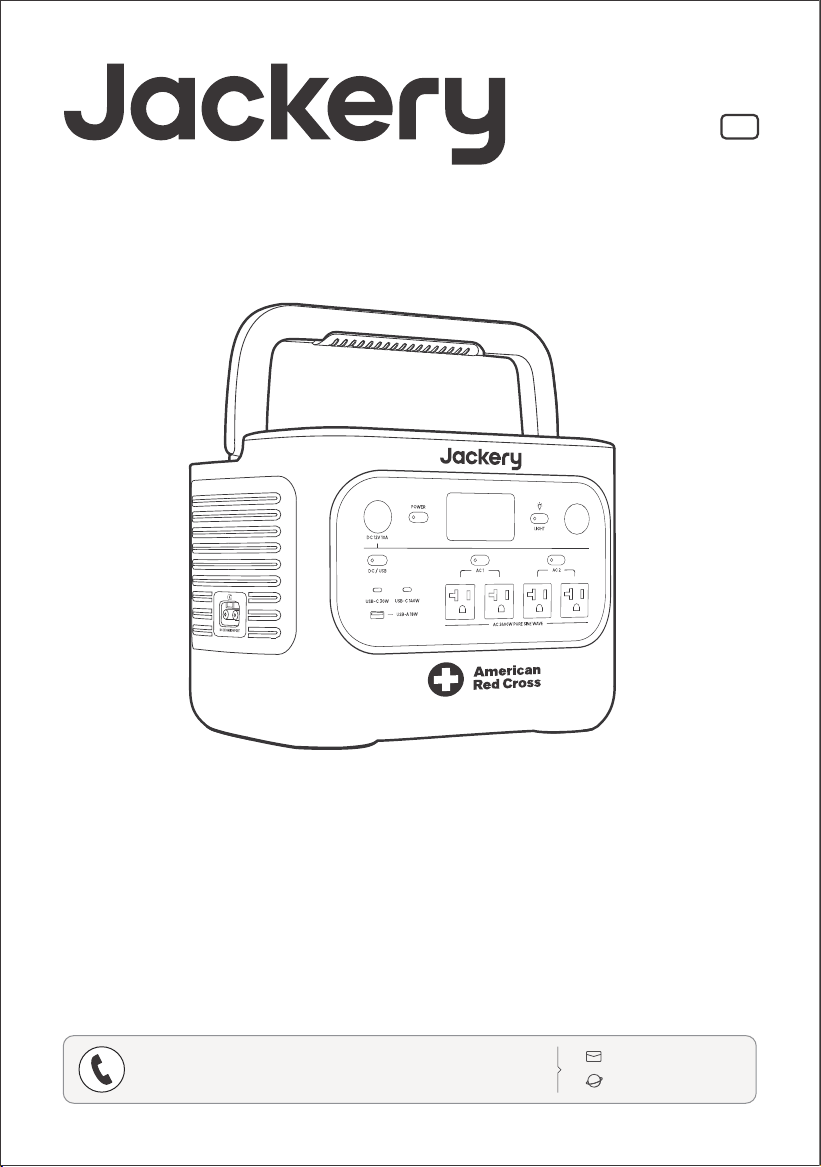
Model: JHP-2000A-RC
www.jackery.com
USER MANUAL
Jackery HomePower 2000 Plus
1-888-502-2236 (US)
CONTACT US:
V2

Congratulations on your new Jackery HomePower 2000 Plus (hereinafter referred to as
HP2000Plus). Please read this manual carefully before using the product, particularly the
relevant precautions to ensure proper use. Keep this manual in an accessible place for future
reference.
In compliance with laws and regulations, the right of final interpretation of this document
and all related documents of this product resides with the Company. Although every effort
has been made to ensure the accuracy of this manual, Jackery Inc. assumes no responsibility
for any errors that may appear.
Please note that no further notifications will be given in case of any update, revision, or
termination. For the latest version of the product manuals, visit support.jackery.com.
* The images are for reference purposes only. Please refer to the actual product.
* The American Red Cross name and logo are registered trademarks owned by the American
National Red Cross.
Felicitaciones por su nuevo Jackery HomePower 2000 Plus (en lo sucesivo denominado
HP2000Plus). Antes de utilizar el producto, lea cuidadosamente este manual, especialmente
las precauciones relevantes para asegurar un uso adecuado. Mantenga este manual en un
lugar accesible para futuras consultas.
De acuerdo con las leyes y regulaciones, el derecho de interpretación final de este documen-
to y todos los documentos relacionados con este producto corresponde a la Empresa.
Aunque se ha hecho todo lo posible para garantizar la exactitud de este manual, Jackery Inc.
no asume ninguna responsabilidad por los errores que puedan aparecer.
Tenga en cuenta que no se emitirán notificaciones adicionales en caso de actualizaciones,
revisiones o terminación. Para obtener la última versión de los manuales del producto, visite
support.jackery.com.
* Las cifras son sólo de referencia. Consulte el producto real.
* El nombre y el logotipo de la Cruz Roja Americana son marcas registradas propiedad de la
American National Red Cross.
IMPORTANT
IMPORTANTE
US
ES

TABLE OF CONTENTS
IMPORTANT SAFETY INFORMATION ............... 01
MEANING OF SYMBOLS .................................... 02
WHAT'S IN THE BOX .......................................... 03
PRODUCT OVERVIEW ....................................... 04
LCD DISPLAY ....................................................... 05
OPERATIONS ....................................................... 08
UNINTERRUPTIBLE POWER SUPPLY (UPS) .....1 2
CONNECT TO BATTERY PACK(S) .................... 13
CHARGING ........................................................... 14
STORAGE .............................................................. 16
TROUBLESHOOTING .......................................... 16
SPECIFICATIONS ..................................................17
WARRANTY ........................................................... 18
APP SETUP ............................................................ 19
INFORMACIÓN IMPORTANTE DE SEGURIDAD
...21
SIGNIFICADO DE LOS SÍMBOLOS ...................22
CONTENIDO DE LA CAJA ..................................23
DESCRIPCIÓN GENERAL DEL PRODUCTO ....24
PANTALLA LCD ....................................................25
OPERACIONES .....................................................28
FUENTE DE ALIMENTACIÓN ININTERRUMPIDA (UPS)
...32
CONECTAR AL/LOS PAQUETE(S) DE BATERÍAS ..33
CARGANDO .........................................................34
ALMACENAMIENTO ............................................36
RESOLUCIÓN DE PROBLEMAS .........................36
ESPECIFICACIONES ............................................37
GARANTÍA .............................................................38
CONFIGURACIÓN DE LA APLICACIÓN ..........39
US
English
01-20
ES
Español
21-40
OPERATING INSTRUCTIONS
INSTRUCTIONS PERTAINING TO RISK OF FIRE, ELECTRIC
SHOCK, OR INJURY TO PERSONS
Always follow these basic precautions when
using this product.
Read all the instructions before using the product.
Do not allow children to play on the product. Close
supervision of children is necessary when the
product is used near children.
Avoid placing hands or fingers inside the product.
Stop using the product immediately if it has been
physically damaged or modified. Improper use of
the product may cause unpredictable behavior,
leading to fire, explosion, or injury.
If any of the following are observed, including but
not limited to overheating, emits unusual odors or
smoking, leaks, or burns, stop using the product
immediately and contact the dealer or our
Customer Support.
Never attempt to open, repair, or modify the
product. Any tampering, reassembly, or
modification of the product can result in electric
shock, fire, or battery damage.
Stop using the product immediately if it shows signs
of damage. Discontinue use and contact customer
support for assistance.
Do not charge the battery in extremely hot or cold
environments and strictly adhere to the product's
specified operating temperature ranges:
-
Charging temperature: 14°F to 113°F (-10°C to 45°C )
-
Discharging temperature: 14°F to 113°F (-10°C to 45°C )
To ensure proper air circulation, keep the product
vents uncovered. The area where the product is used
must have adequate airflow in a cool, dry
environment to prevent overheating.
-
Charging in damp or poorly ventilated spaces may
cause safety hazards.
-
Water can cause short circuits or damage to the
charger, leading to safety risks.
Unplug the power cord from a power outlet during a
storm.
Immediately turn off the product by pressing the
power button if it has fallen, been dropped, or
exposed to vibrations.
Ensure the device(s) are powered off before
connecting them to the product.
Do not charge the product using a damaged or
broken charging cord or plug.
Be aware that liquid ejected from the product may
cause irritation or burns. Inappropriate or abusive use
may lead to battery leakage. Avoid direct contact
with leaking liquid. If the liquid contacts your eyes,
seek medical help immediately. If it contacts other
body parts, flush with running water and consult a
medical professional without delay.
Do not expose the product to fire or excessive
temperatures. Doing so may result in an explosion if
the temperature exceeds 130°C (265°F).
Any use of unrecommended or non-supplied
materials or parts with the product may result in a risk
of fire, electric shock, or personal injury.
Do not leave the battery charging unattended for
long periods. Always monitor the charging process to
ensure safe operation.
To reduce the risk of electric shock, unplug the
product from any power source before attempting
any technical service or troubleshooting.
Do not use the product to charge any device with a
damaged or broken cable or plug.
Always unplug the charging cord by pulling the plug,
not the cord, to reduce the risk of damage.
Ensure the product is properly secured when
transporting it in a moving vehicle.
DO NOT place the unit upside down or on its side
during use or storage.
DO NOT place the product on the floor or at a height
less than 18 inches (457 mm) above the floor during
operation in a workshop or repair facility.
DO NOT use the product's accessories with other
devices or equipment.
Solar charge time depends on weather conditions.
Place your solar panel where it will get as much direct
sunlight as possible.
GROUNDING INSTRUCTION-This product must be
grounded. If it should malfunction or breakdown,
grounding provides a path of least resistance for
electric current to reduce the risk of electric shock.
This product is equipped with a cord having an
equipment grounding conductor and a grounding
plug. The plug must be plugged into an outlet that is
properly installed and grounded in accordance with
all local codes and ordinances.
SAVE THESE INSTRUCTIONS
This device is intended for indoor use only (Please place this device in a similar
indoor environment when using it outdoors, e.g., Home, RVs, tents, cabins, etc.).
※ This device is not waterproof or dustproof. Keep away from rain and humid
environments during use.
DANGER
Improper connection of the equipment grounding conductor is able to result
in a risk of electric shock. Check with a qualified electrician if you are in doubt
as to whether the product is properly grounded. Do not modify the plug
provided with the product – if it will not fit the outlet, have a proper outlet
installed by a qualified electrician.
WARNING
USER MAINTENANCE INSTRUCTIONS
During the lifecycle of energy storage products, a certain degree of capacity and energy degradation is
expected. As the number of charge and discharge cycles increases and storage time extends, this degradation
will gradually intensify, which is a normal phenomenon consistent with the natural aging of battery cells.
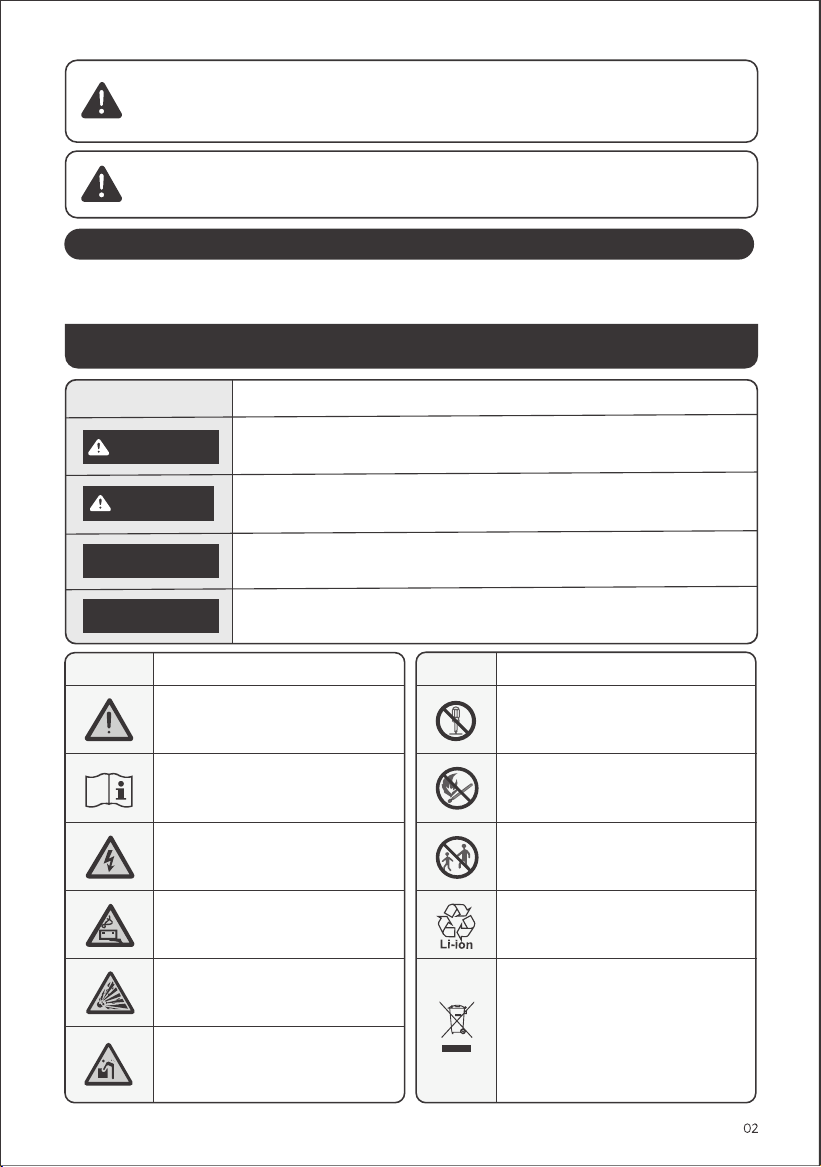
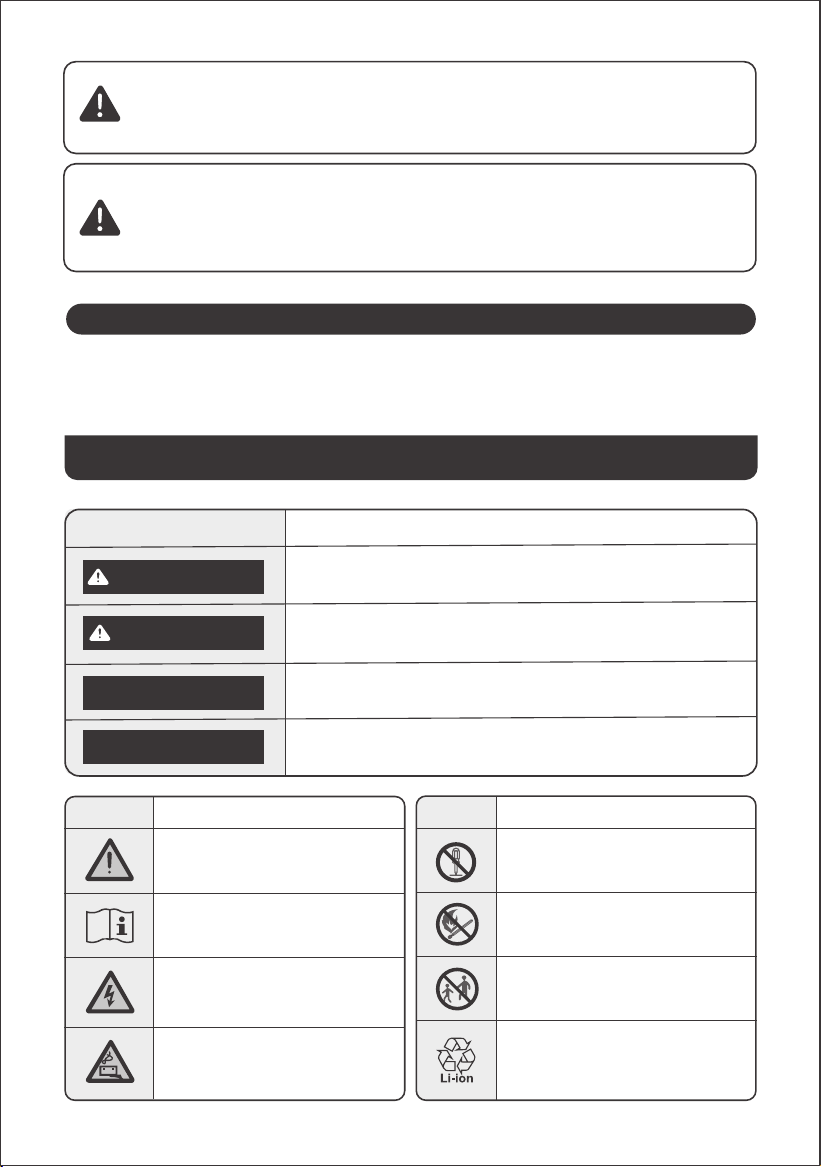
Symbol Meaning
Hazardous practices that may result in personal injury and/or property
damage.
CAUTION
Hazardous practices that may result in severe injury, death, and/or property
damage.
WARNING
Hazardous practices that may result in equipment damage, data loss,
performance deterioration, or unanticipated results.
NOTE
Supplements the important information or operation tips in the text.
TIP
MEANING OF SYMBOLS
Symbol Meaning
Alerts individuals to information that
must be read to avoid potential
hazards or risks.
Read the user manual before operation.
Do not dismantle the product.
Keep the product away from fire.
Symbol Meaning
Keep away from children.
This symbol indicates that a lithium-ion
(Li-ion) battery is inside the product and
should be disposed of or recycled properly.
This symbol indicates that the product
shall not be disposed of as household
waste, and should be delivered to a
designated collection facility for recycling.
Proper disposal and recycling can help
protect the environment. For more
information about the disposal and
recycling of this product, contact your local
community, disposal service, or dealer.
Risk of electric shock
Battery charging
Explosive material
Heavy object
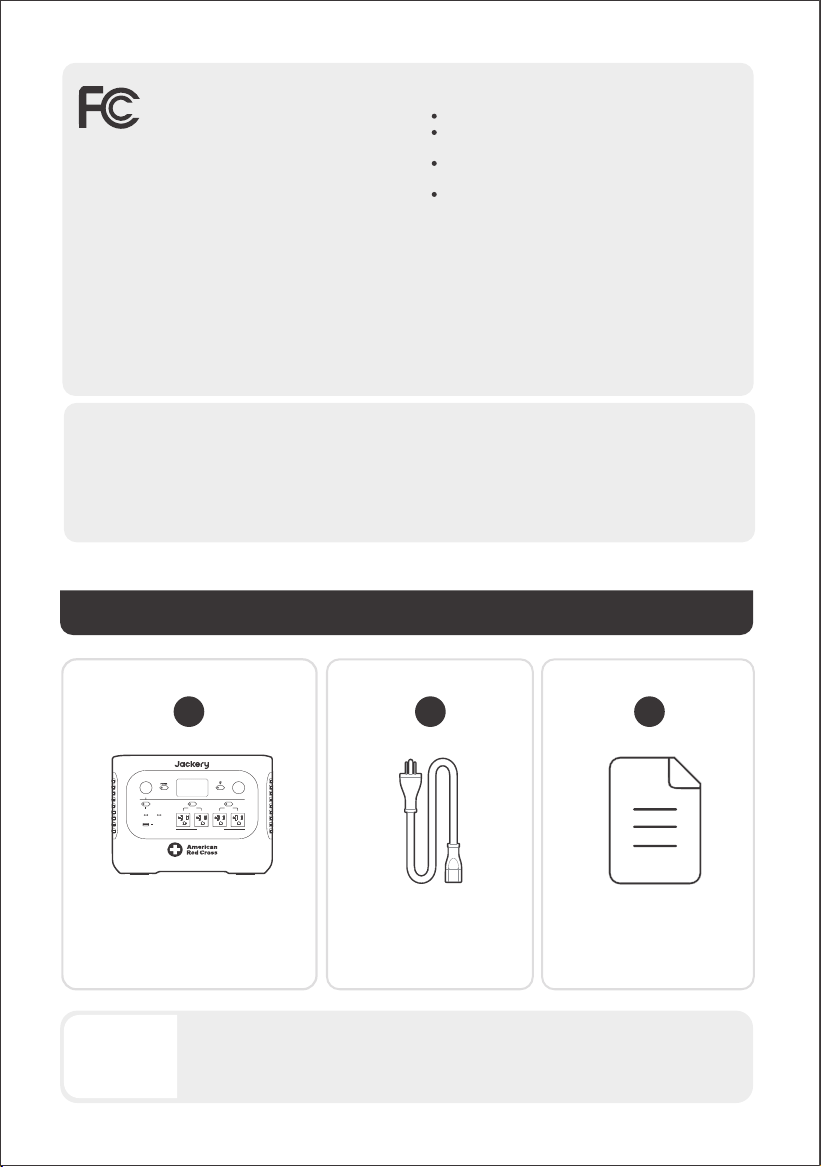
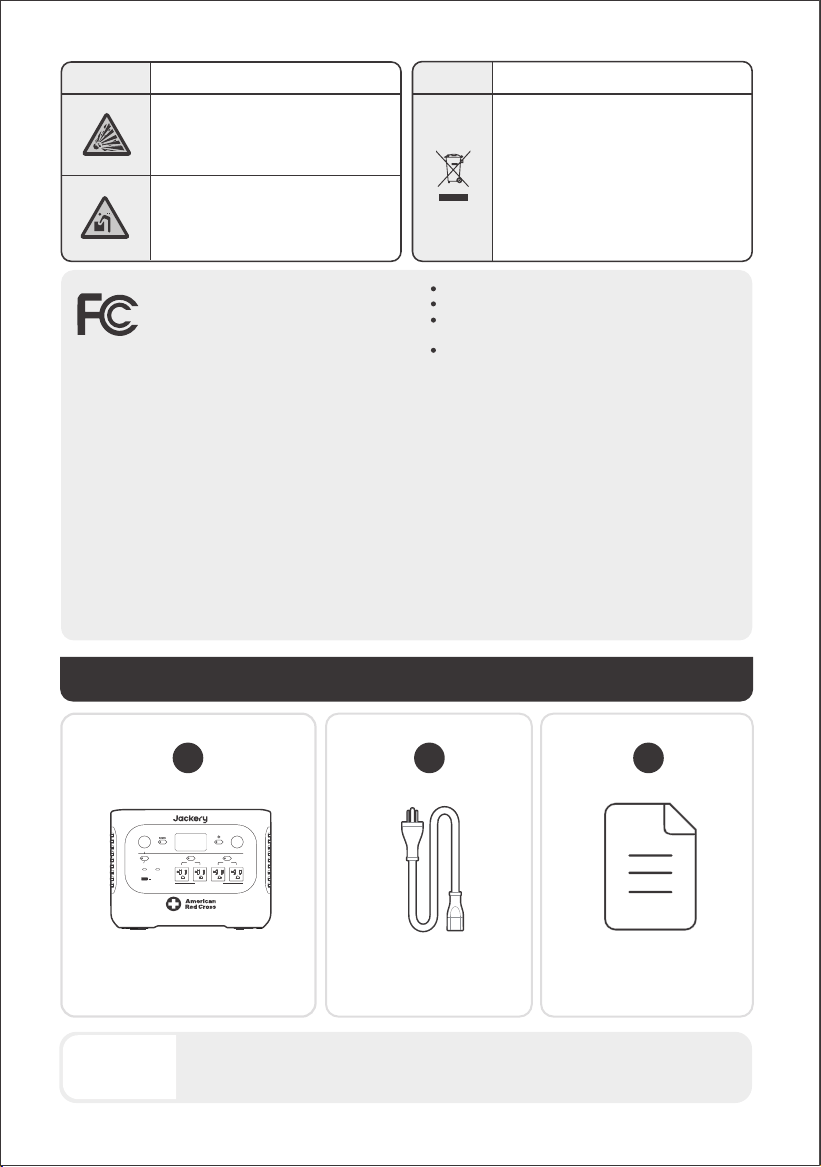
WHAT'S IN THE BOX
1
2
AC Charging CableJackery HomePower 2000 Plus
3
03
The car charging cable is not included but is available for purchase separately on our
website. For assistance, please contact Jackery customer service.
TIPS
LIGHT
DC 12V 10A
DC /
USB
USB-C 30W
AC 2400W PURE SINE WAVE
USB-C 140W
AC 1 AC 2
USB-A 18W
Documents
NOTE: This equipment has been tested and found to comply
with the limits for a Class B digital device, pursuant to part
15 of the FCC Rules.
This device complies with part 15 of the FCC
Rules. Operation is subject to the following two
conditions:
(1) This device may not cause harmful
interference, and
(2) This device must accept any interference received,
including interference that may cause undesired operation.
These limits are designed to provide reasonable protection
against harmful interference in a residential installation. This
equipment generates, uses, and can radiate radio frequency
energy and, if not installed and used in accordance with the
instructions, may cause harmful interference to communica-
tions. However, there is no guarantee that radio interference
will not occur in a particular installation.
If this equipment does cause harmful interference to radio or
television reception, which can be determined by turning the
equipment off and on, the user is encouraged to try to
• Reorient or relocate the receiving antenna.
• Increase the separation between the equipment and
receiver.
• Connect the equipment into an outlet on a circuit
different from that to which the receiver is connected.
• Consult the dealer or an experienced radio/TV
technician for help.
MODIFICATION: Any changes or modifications not
expressly approved by the grantee of this device could
void the user’s authority to operate the device.
RF exposure statement
This equipment complies with FCC radiation exposure
limits set forth for an uncontrolled environment.This
equipment should be installed and operated with
minimum distance 20cm between the radiator &your
body.
RF exposure statement
This equipment meets the exemption from the routine
evaluation limits in section 2.5 of RSS-102. It should be
installed and operated with a minimum distance of
20cm between the radiator and any part of your
body.
Development Canada's licence-exempt RSS(s).
Operation is subject to the following two conditions:
1. This device may not cause interference.
2.
This device must accept any interference, including
interference that may cause undesired operation of the device.
This Class B digital apparatus complies with Canadian
ICES-003.
CAN ICES(B) / NMB(B)
correct the interference by one or more of the following
measures:
04
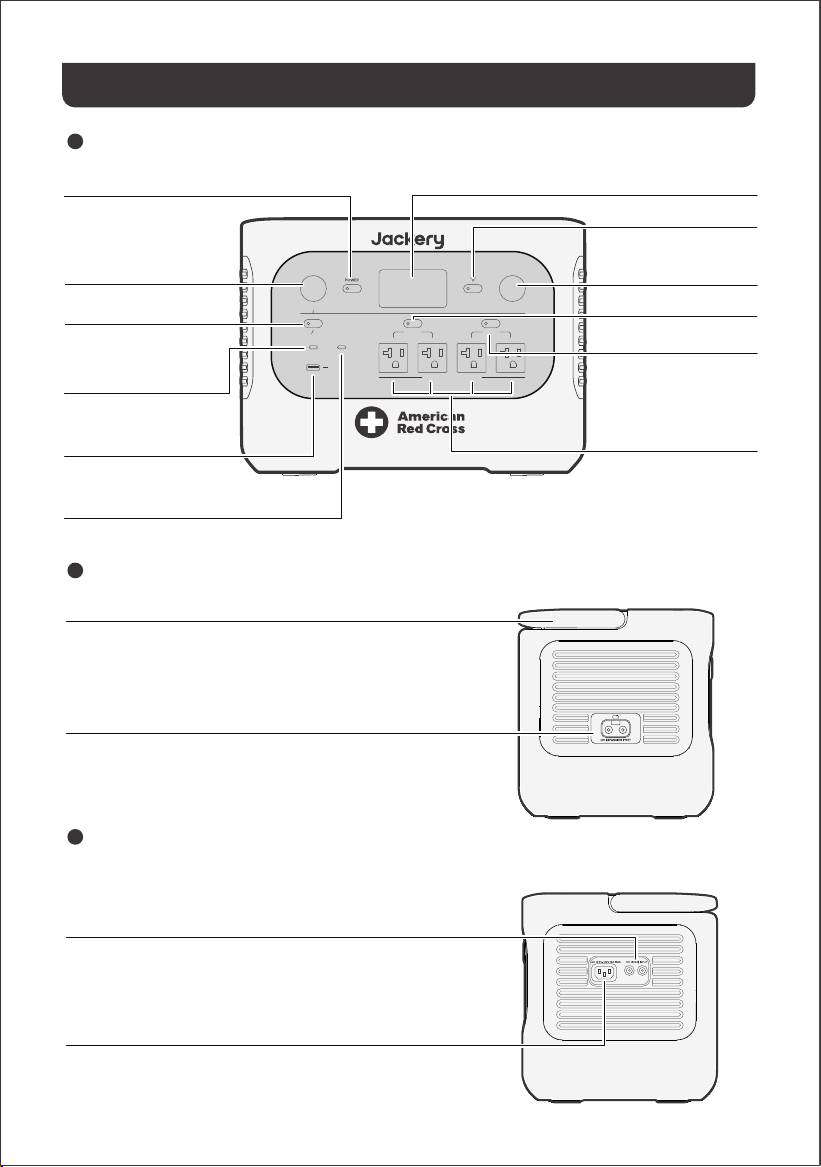
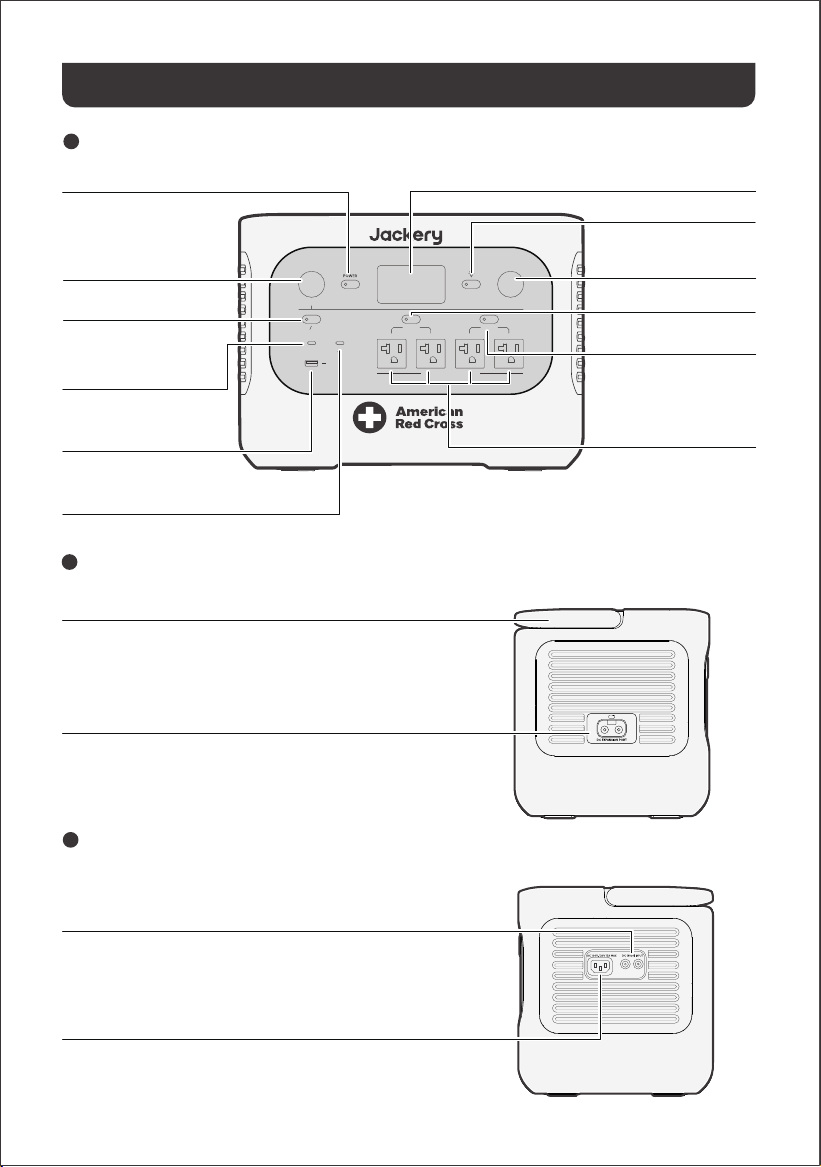
LEFT SIDE VIEW
RIGHT SIDE VIEW
FRONT VIEW
PRODUCT OVERVIEW
LCD
Main Power Button
DC 12V Port
12V⎓10A Max
LIGHT
DC 12V 10A
DC /
USB
USB-C 30W
AC 2400W PURE SINE WAVE
USB-C 140W
AC 1 AC 2
USB-A 18W
30W Max, 5V⎓3A, 9V⎓3A,
12V
⎓2.5A, 15V⎓2A, 20V⎓1.5A
18W Max, 5-6V⎓3A, 6-9V⎓2A,
9-12V⎓1.5A
AC Output
DC/USB Power Button
USB-C 30W Output
140W Max, 5V⎓3A, 9V⎓3A, 12V⎓3A, 15V⎓3A,
20V⎓5A, 28V⎓5A
USB-C 140W Output
USB-A 18W Output
LED Light Button
AC1 Power Button
LED Light
AC2 Power Button
120V~ 60Hz, 20A Max,
2400W Rated,
4800W Surge Peak
Connect to Battery Pack
DC Input (2×DC8020 Ports)
PV: 16-60V⎓12A Max, Double to 21A / 800W Max
Car: 11-16V⎓8A Max, Double to 8A Max
AC Input
100V-120V~ 60 Hz, 15A Max
DC Expansion Port
Handle
A
05
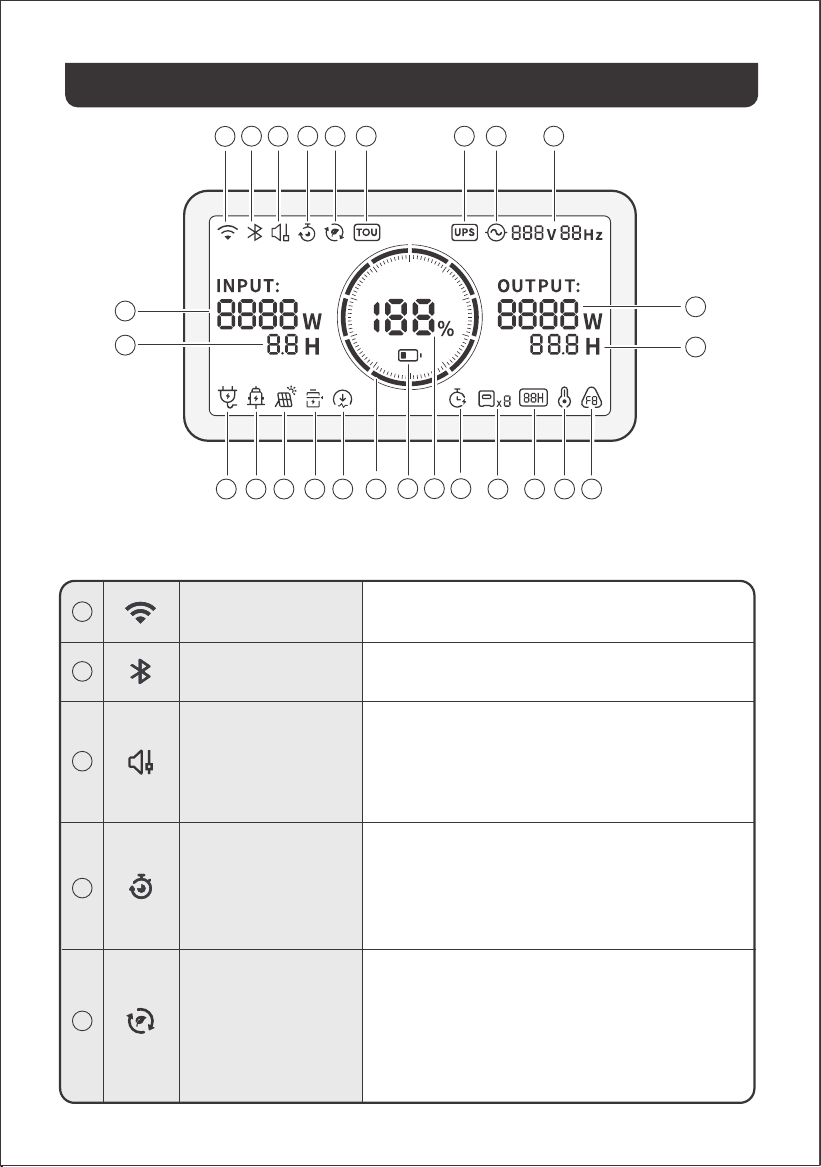
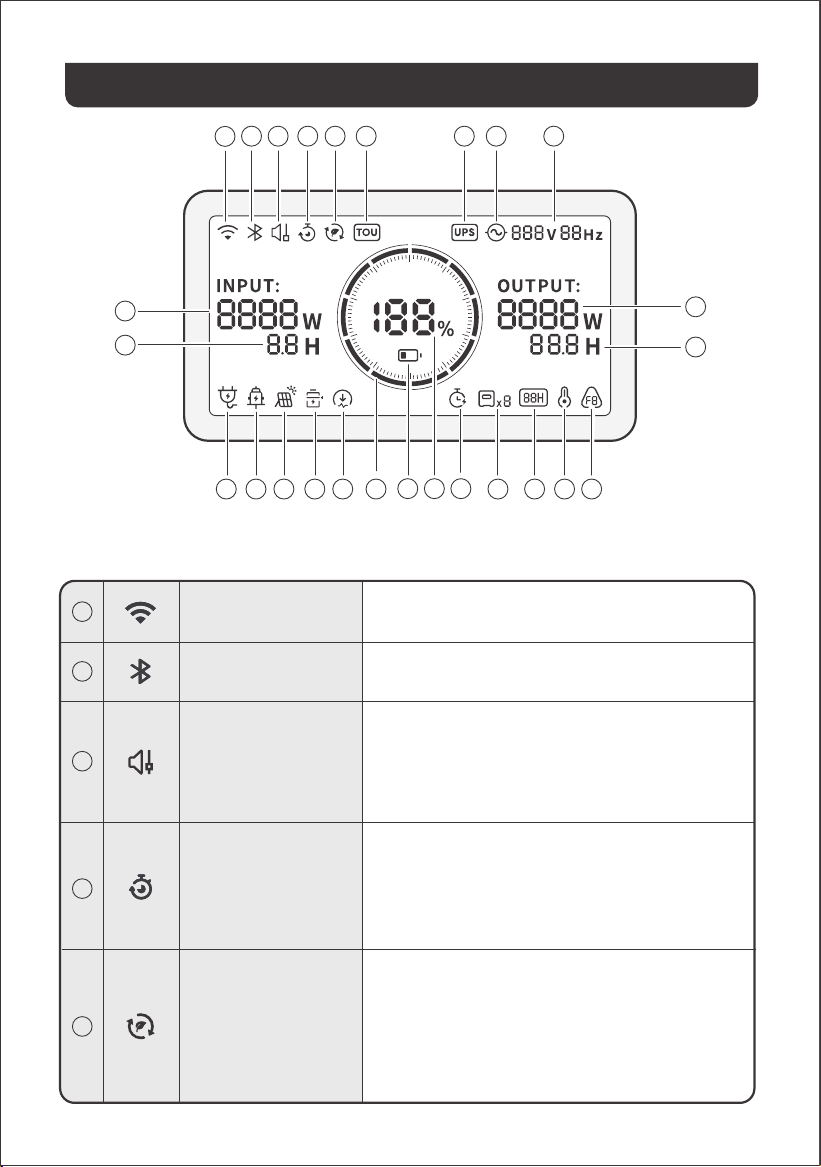
LCD DISPLAY
11
13 1412 15 16 17
18 19
21 22 23 24
26
25
20
1
2 3 4
10
5 6 97 8
1
2
3
4
5
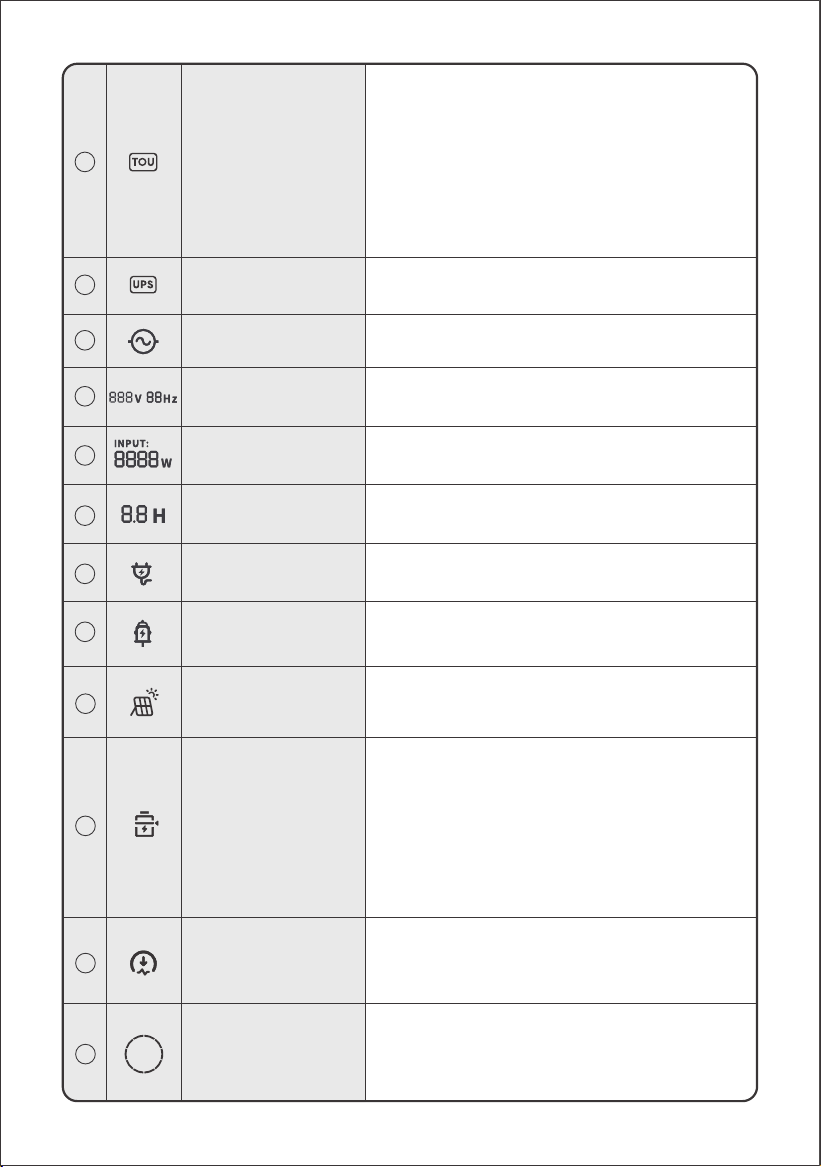
Charging Plan
Self-powered Mode
Wi-Fi
Bluetooth
Customizes the charging time of the HP2000Plus. Suitable
for situations with fluctuating electricity prices, it allows for
charging plans based on peak and off-peak electricity
times, reducing electricity costs.
Enable/disable this feature in the Jackery App. The setting
is retained when the device is powered off.
Maximizes the use of solar energy and reduces reliance on
grid electricity by prioritizing stored solar energy, reducing
electricity costs. The power station must be connected to
both solar panels and the grid simultaneously, with the load
power limited by bypass power.
Enable/disable this feature in the Jackery App. The setting
is retained when the device is powered off.
Quiet Charging Mode
On: The noise during charging is significantly minimized, while
the charging power is reduced, and the charging speed slows
down.
Off: Quiet Charging Mode is disabled.
Enable/disable this feature in the Jackery App. The setting is
retained when the device is powered off.
On: Wi-Fi connected.
Blink: Ready to connect to Wi-Fi.
Off: Wi-Fi disconnected.
On: Bluetooth Connected.
Blink: Ready to connect to Bluetooth.
Off: Bluetooth disconnected.
06
6
7
8
9
10
11
12
13
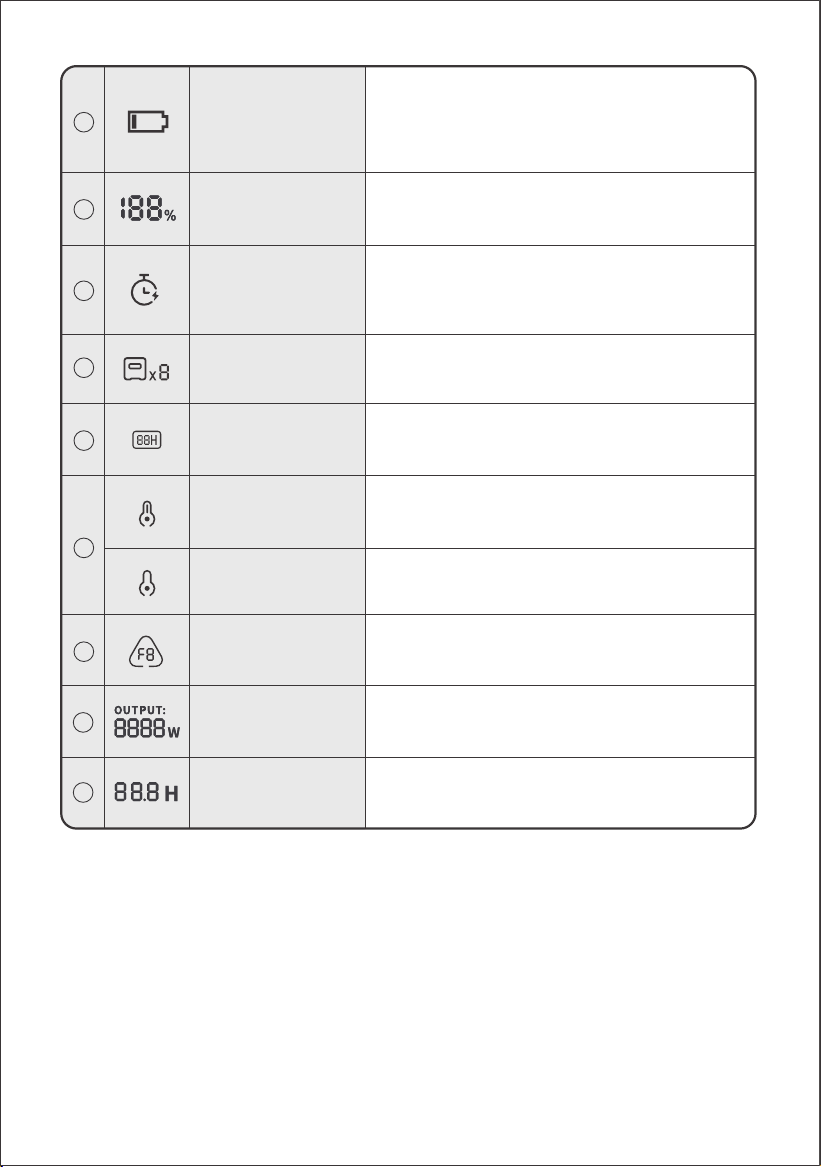
Input Power
AC Wall Charging
Indicator
Car Charging Indicator
Displays the input power in watts.
Remaining Charge Time
Displays the remaining charging time.
The product is charged via the AC Input using grid power.
The product is charged via the DC Input (DC8020) using DC
12V (car charging).
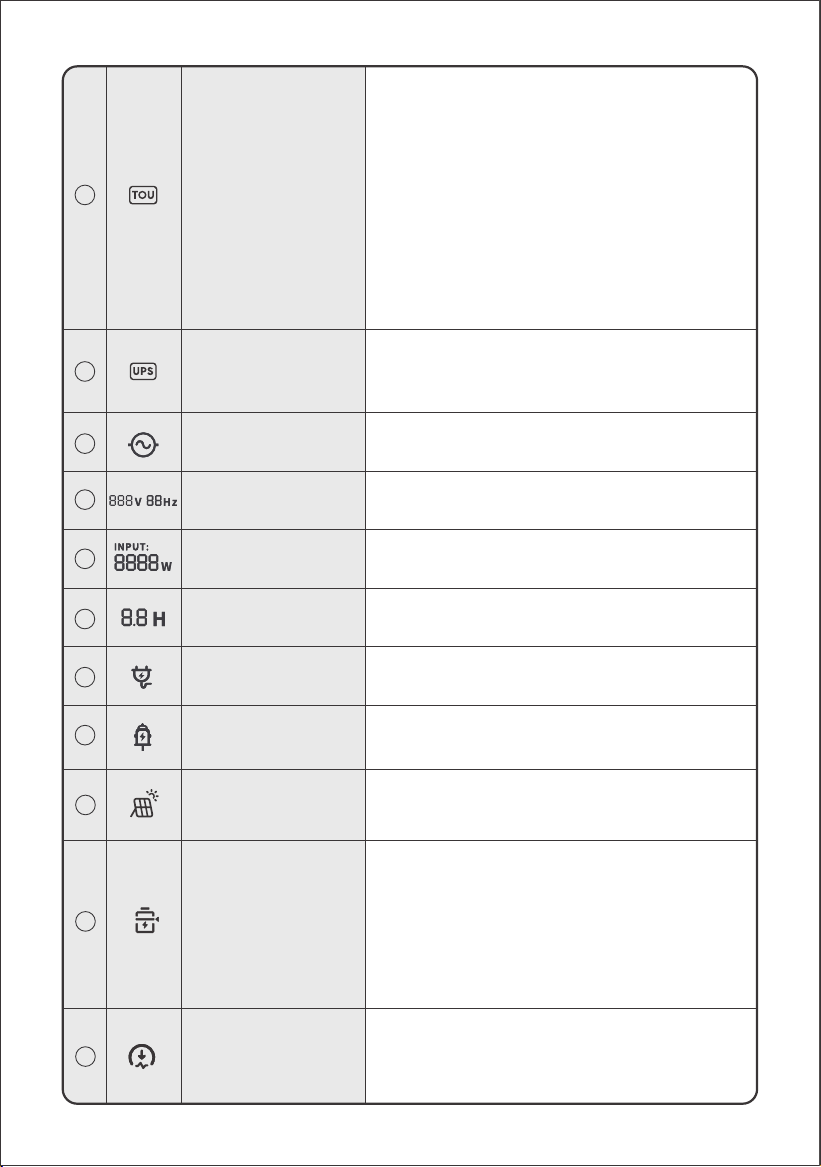
TOU Mode
UPS
On: TOU mode is enabled (default backup SOC: 60%).
During peak periods, the product prioritizes discharging the
battery to reduce peak electricity costs when the stored
energy exceeds the backup SOC. During off-peak periods,
the product charges the battery from the grid to achieve
peak-shaving and valley-filling.
Off: TOU mode is disabled. The product does not follow the
TOU (time-of-use) strategy and operates according to the
default power supply and charging logic.
Enable/disable this feature in the Jackery App. The setting
is retained when the device is powered off.
On: The product is in bypass mode, and the switchover time
from grid power to the internal battery is 10 ms.
Off: The product is not in bypass mode.
AC Power Indicator
The AC output (pure sine wave) is on.
Output Voltage and
Frequency
Displays the output voltage and frequency when the AC
output is turned on.
The product is charged via the DC Input (DC8020) using
solar panel(s).
Battery Power Indicator
When the product is being charged, the orange circle
around the battery percentage will light up in sequence.
When charging other devices, the orange circle will stay on.
Solar Charging
Indicator
Charging Power Limit
On: Charging Power limit is enabled in the Jackery App.
Off: Charging Power limit is disabled in the Jackery App.
The setting is retained when the device is powered off.
Battery Saving Mode
On: Limits the maximum usable battery capacity to extend
battery life.
Off: Battery Saving Mode is disabled.
Enable/disable this feature in the Jackery App. The setting
is retained when the device is powered off.
Note 1: This feature is not available when the product is
connected to battery pack(s).
Note 2: When this feature is enabled, the product
occasionally performs a full charge and discharge cycle to
calibrate the SOC.
14
15
16
17
07
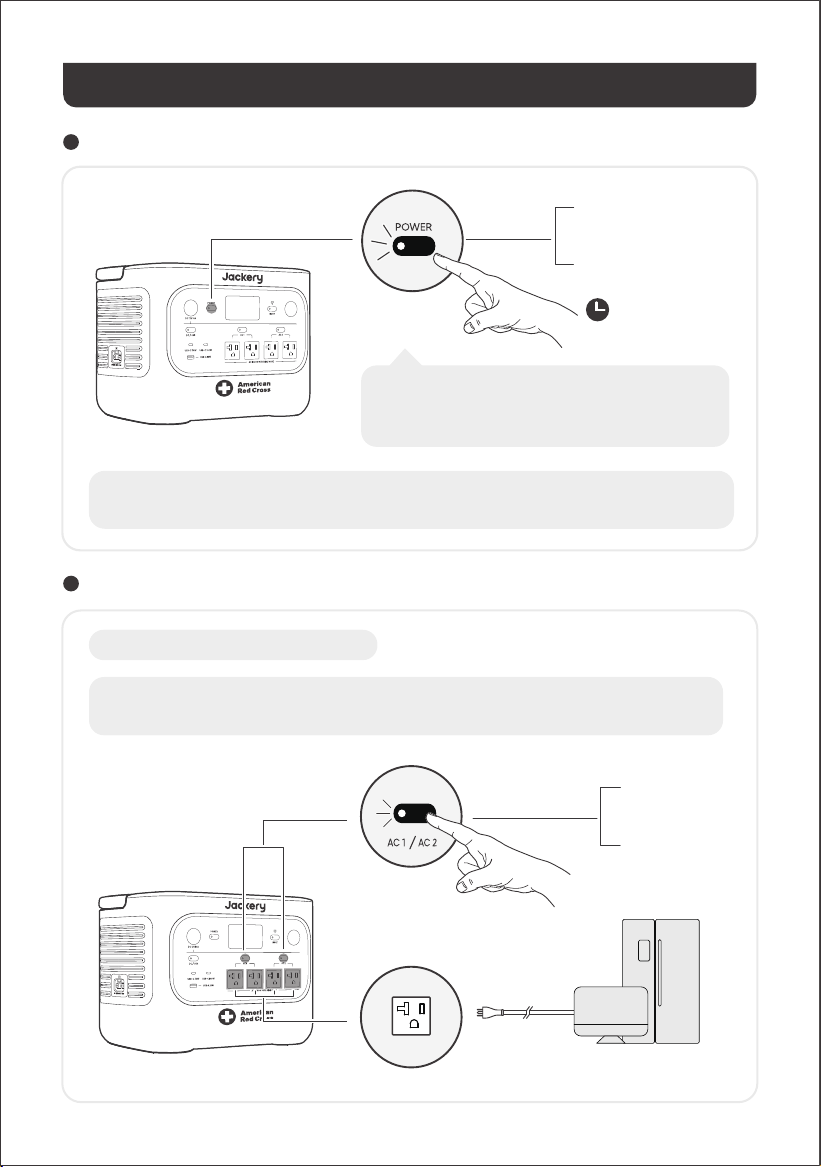
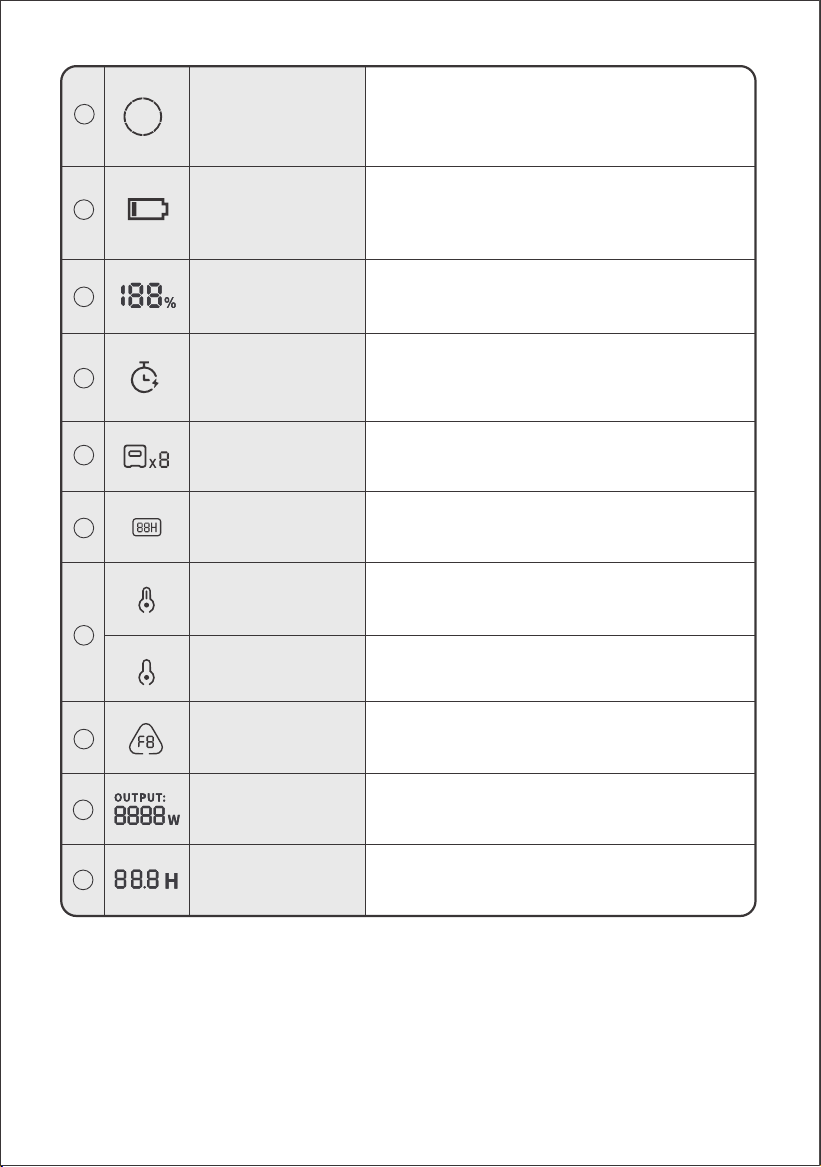
A product error has occurred. Please refer to the
Troubleshooting section for details.
High temperature protection is triggered. The product may
stop functioning until its temperature returns to the normal
operating range.
Low temperature protection is triggered. The product may
stop functioning until its temperature returns to the normal
operating range.
Fault code
High Temperature
Indicator
Low Temperature
Indicator
Low Battery Indicator
Discharge Timer
Connected Batteries
Energy Saving Mode
When the AC or DC output is turned on by pressing the
AC1/2 or DC/USB power button:
On: Energy Saving Mode is enabled.
Off: Energy Saving Mode is disabled.
Output Power
Remaining
Discharge Time
25
26
On: The battery level is below 20%.
Blink: The battery level is below 5%.
Off: The battery level is not below 20% or the product is
charging.
On: A discharge timer is set.
Off: No discharge timer is set.
Enable/disable this feature in the Jackery App. The setting
is not retained when the device is powered off.
Displays the quantity of battery packs if any are connected.
Displays the output power in watts.
Displays the remaining discharging time.
18
19
20
22
23
24
21
Displays the remaining battery percentage.
Remaining Battery
Percentage
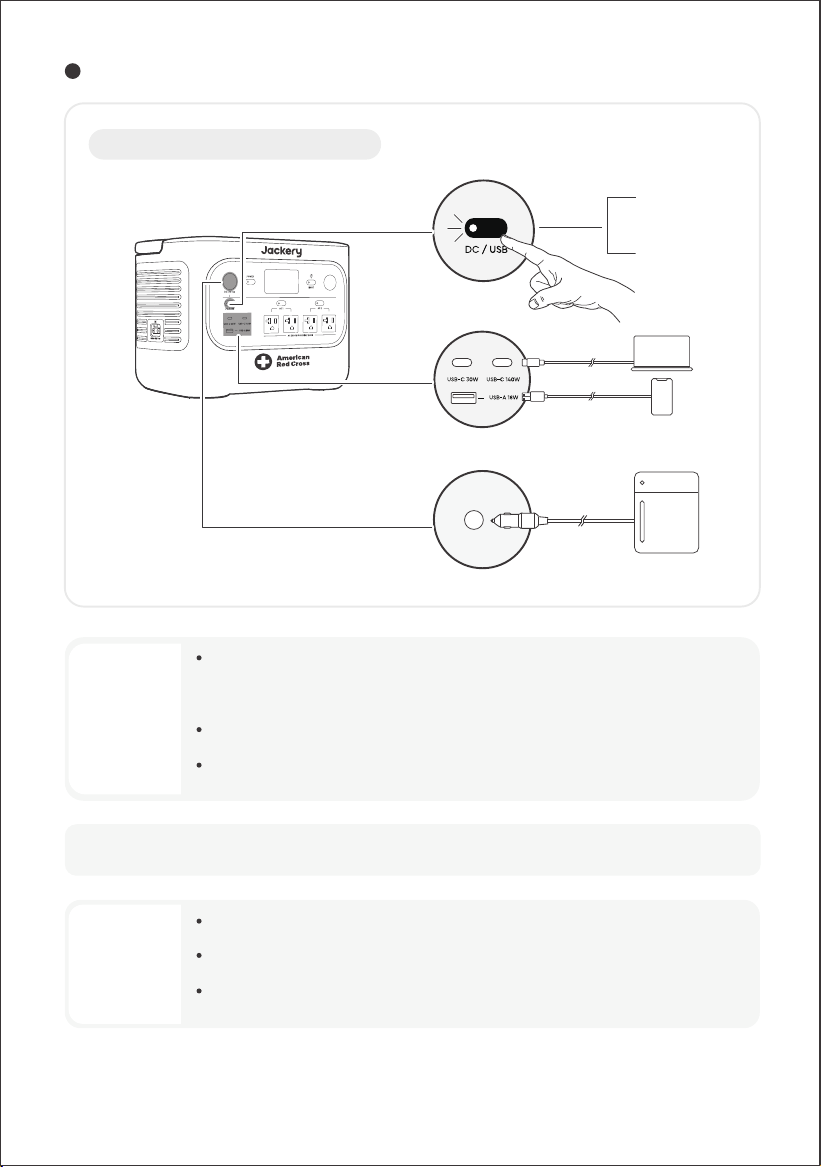
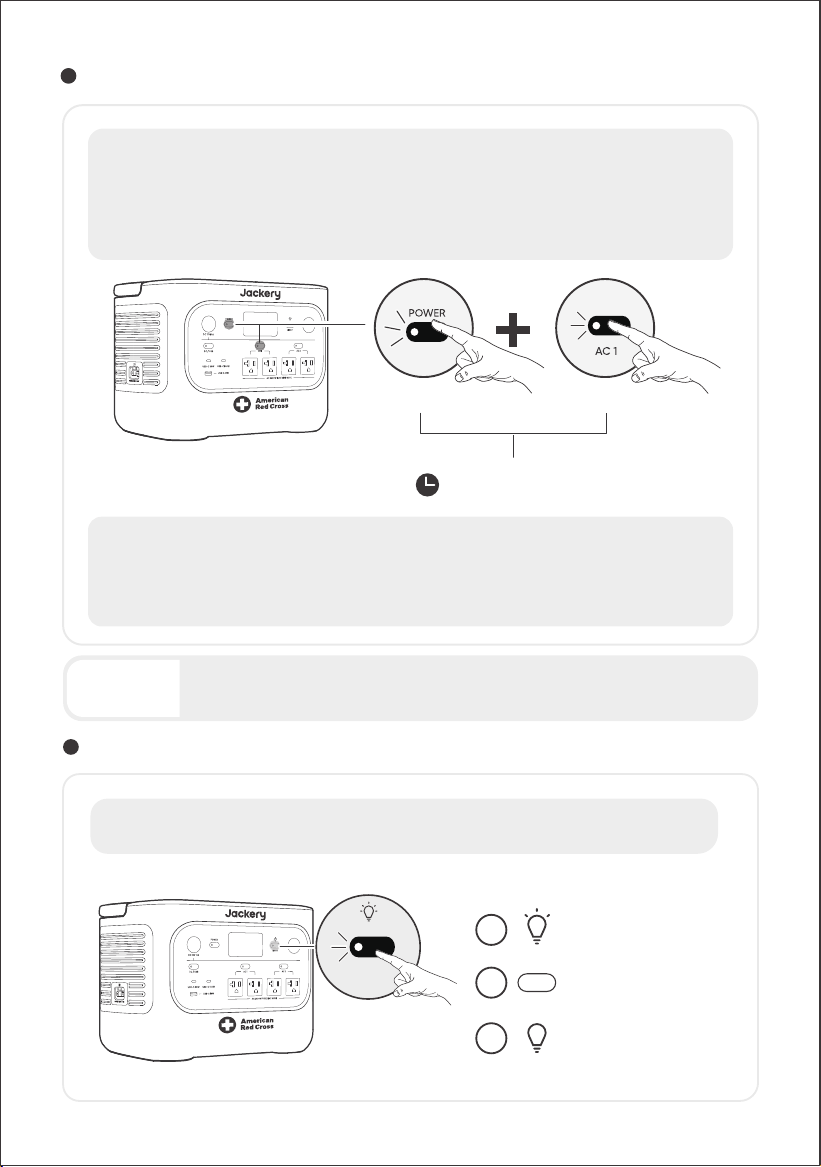
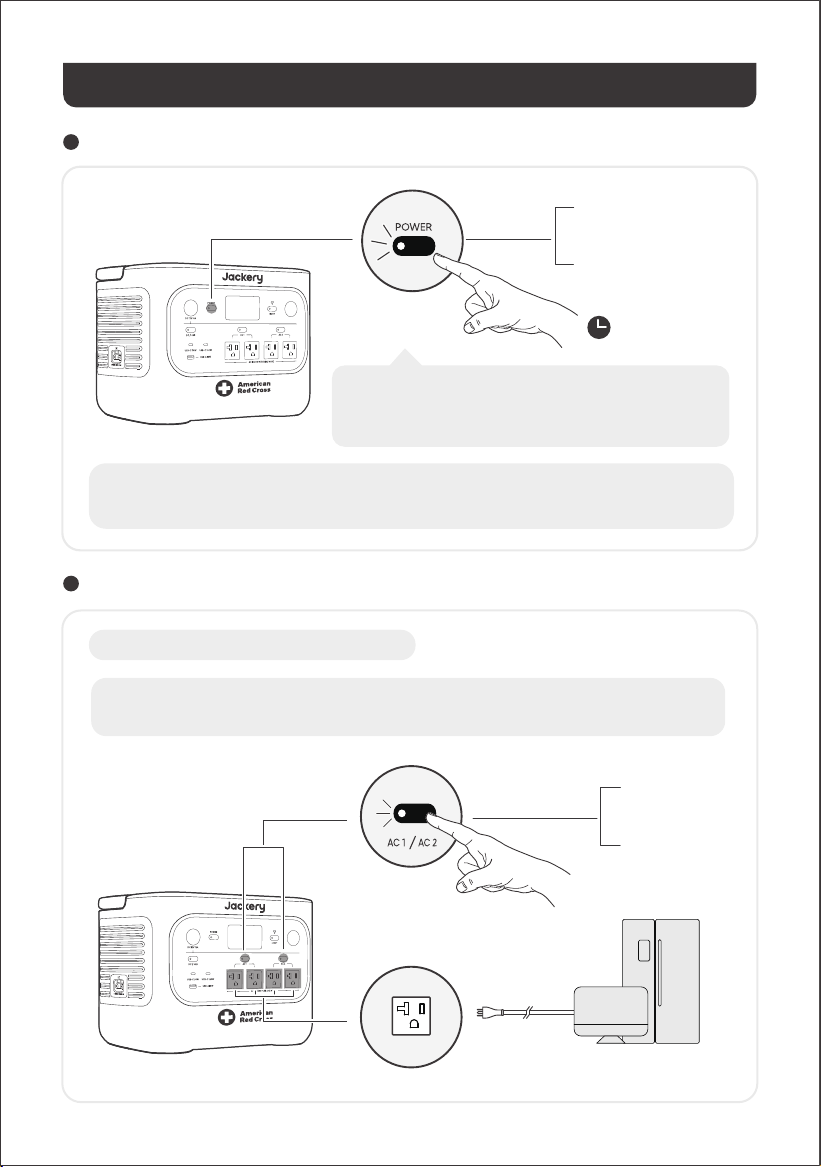
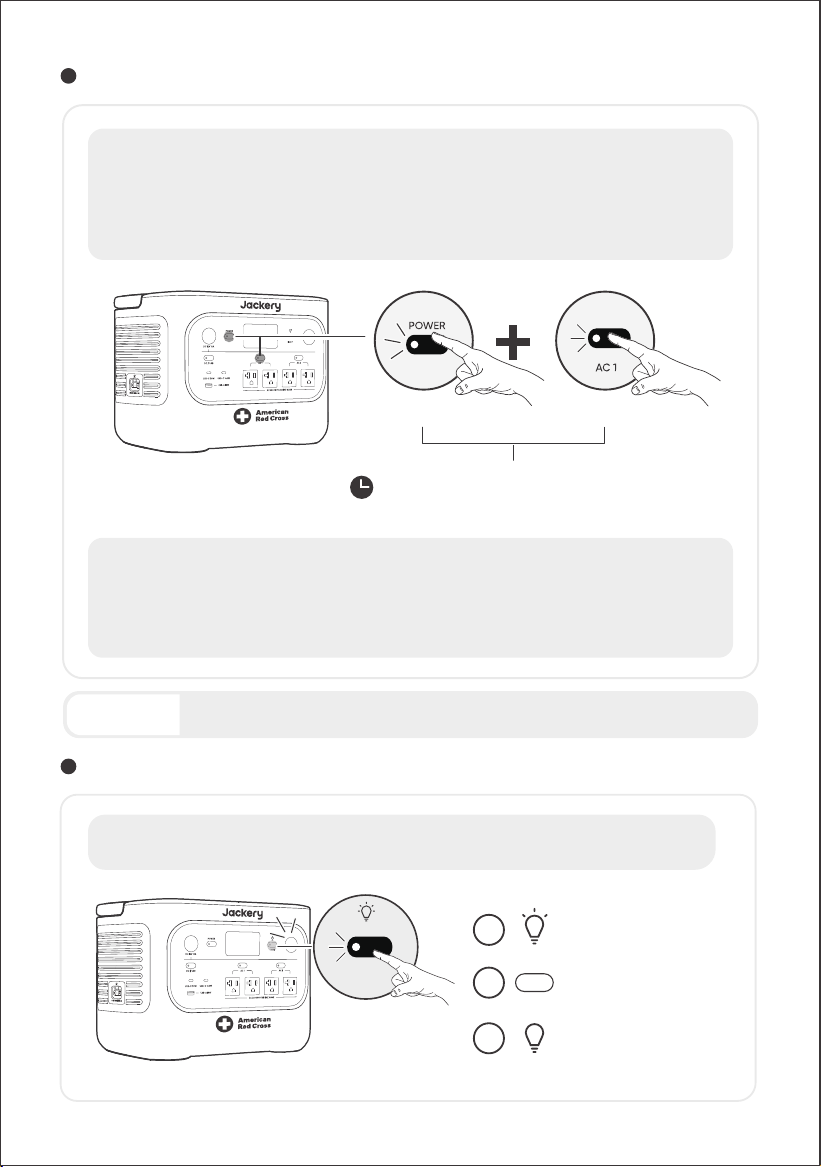
POWER ON/OFF
AC OUTPUT ON/OFF
3s
Default standby time: 2 hours
The product will automatically shut down after 2
hours of inactivity, with no charging or discharging.
*The standby time can be set in the Jackery App.
OPERATIONS
On
O
Press once
Press and hold for 3s
Prerequisite: The product is powered on.
On
O
Press once
Press once
08
When Energy Saving Mode is enabled, the product will automatically shut down after 12 hours if the
AC or USB power button is ON but the product is neither charging nor discharging.
AC1 and AC2 power buttons control two separate pairs of AC outlets. Pressing each button turns its
corresponding AC outlet pair on or o.
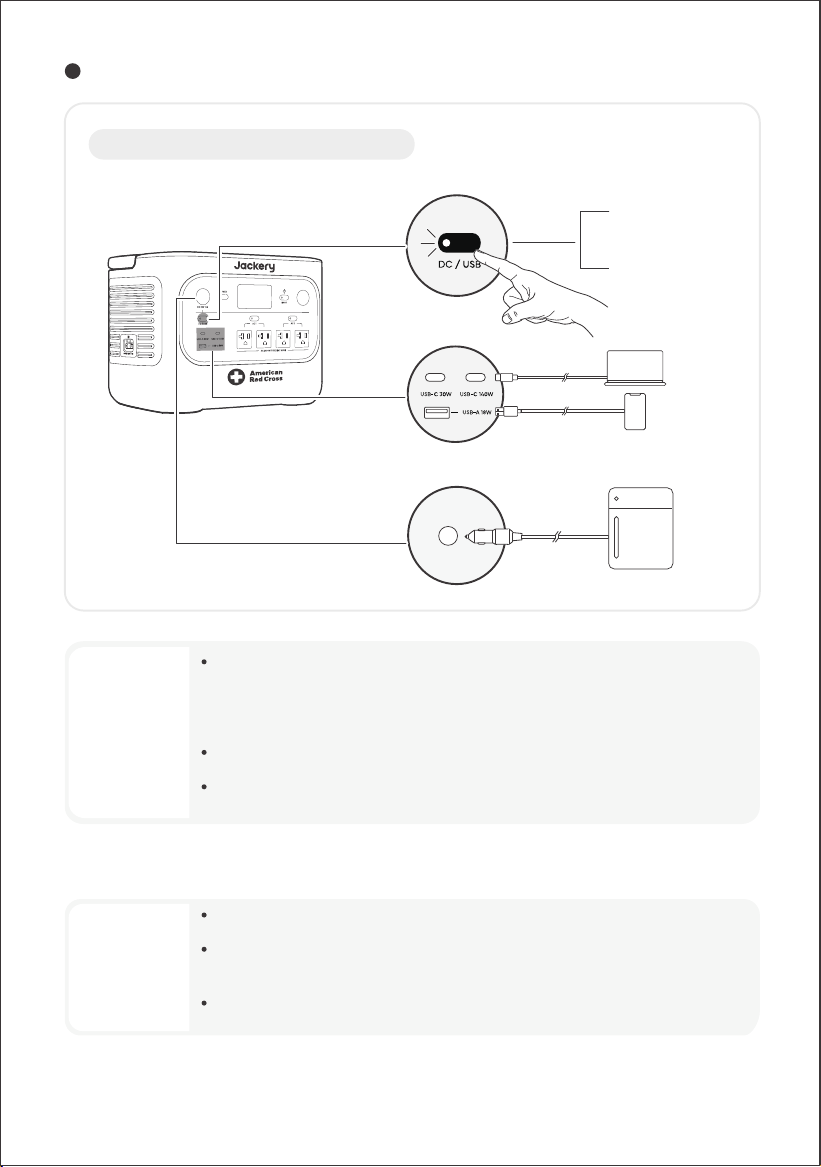
DC 12V/USB OUTPUT ON/OFF
Prerequisite: The product is powered on.
On
O
Press once
Press once
09
CAUTION
CAUTION
• USB-C 140W is a USB-PD Power Source 3 (PS3) high-power output port. If the
connected user device or accessory does not meet safety requirements, there may be
a fire risk. Before using these ports, ensure that the connected device or accessory has
fire safety protection.
• Only connect the HP2000Plus to devices or accessories that comply with clauses 6.3,
6.4, and 6.5 of IEC/EN/UL 62368-1 (or other equivalent standards).
• To obtain maximum output power, use the USB-C to USB-C 5A cable (20V DC/5A,
100W; 28V DC/5A, 140W).
• The DC 12V port is only compatible with 12V car batteries and not suitable for 24V
systems.
• Do not start the car while the product is charging the car battery through the 12V DC
output port, as this may damage the product.
• This feature is intended for emergency use only and cannot charge a dead or
damaged car battery.
The product can charge your car battery using the Jackery 12V automobile battery charging cable, which is
sold separately and available on our website.
10
3s
Press and hold for 3s
On/O
ENERGY SAVING MODE
Main power button AC1 power button
To prevent unnecessary battery consumption from forgetting to turn o the output, the product
enables Energy Saving Mode by default. When the AC or DC/USB output is turned on, the Energy
Saving Mode icon will be displayed on the LCD screen. If no device is connected or the connected
device's power consumption is below a certain threshold (25W AC output or 2W DC/USB output) for
12 hours, the product automatically turns o the outputs. Please set the Energy Saving Mode
duration in the Jackery App.
To disable the energy saving mode, press and hold both the AC1 power button and the main power
button for more than 3 seconds. Once Energy Saving Mode is disabled, the icon will no longer appear
on the LCD screen, and the product will not automatically turn o the AC or USB output.
When powering low-power devices (AC ≤ 25 W or DC/USB ≤ 2 W), disable Energy Saving Mode to
prevent the output from shutting down automatically during operation.
Energy Saving Mode resumes its previous state after powering on. Manual switching is
required for mode changes.
NOTE
The LED light has two modes: Light mode and SOS mode. In any mode, press and hold
the LED light button to turn o the light.
LED LIGHT ON/OFF
Press the LED Light button
once to turn on the light.
Press it again to switch to
SOS Mode.
Press it a third time to
turn o the light.
1
3
2
SOS
LIGHT
11
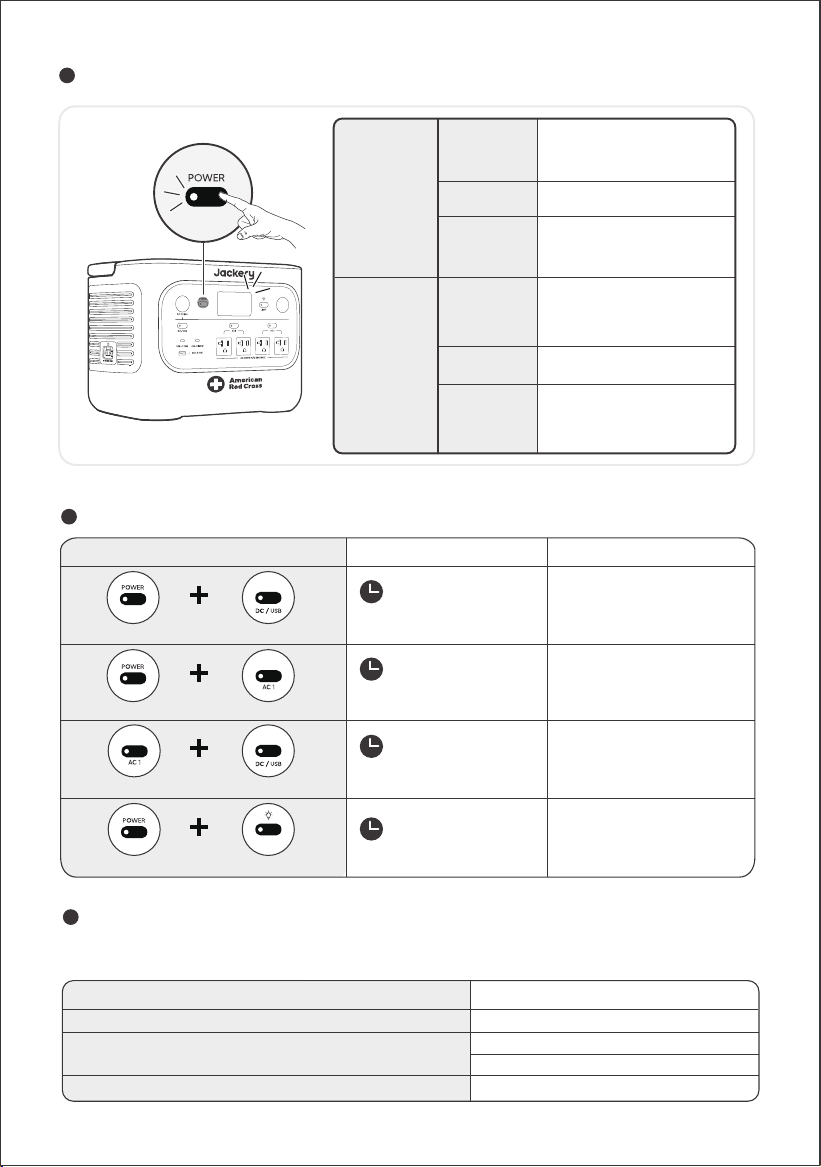
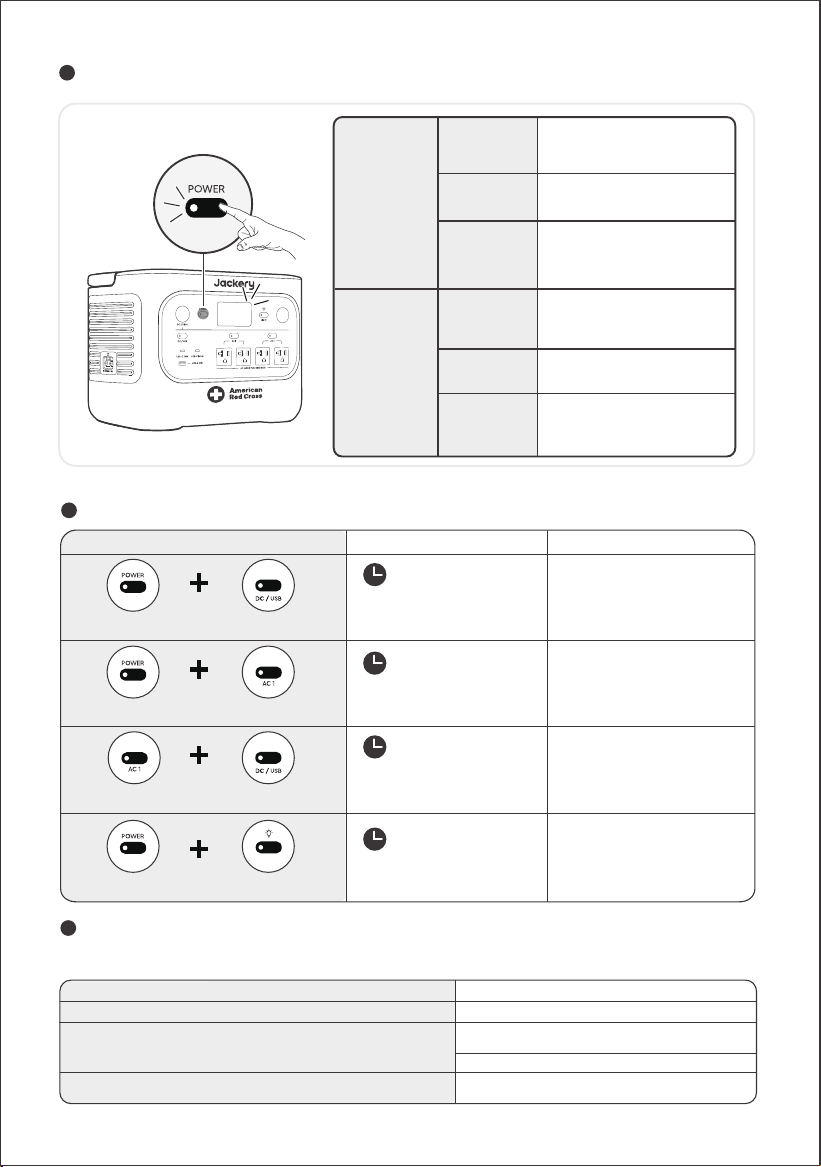
LCD SCREEN
AC AND DC OUTPUT RESUME FUNCTION
Shortly On
Steady On
(in charging
or
discharging
state)
Turn o
Auto-o
Turn o
Turn on
Auto-o
Press the Main Power Button or
when the product is charging.
Press the Main Power Button.
The LCD turns o automatically
and enters sleep mode after 2
minutes of inactivity.
Turn on
KEY COMBINATION
3s
3s
Main POWER button
Main POWER button AC1 power button
Press and hold both for 3s
Press and hold both for 3s
1s
Press and hold both for 1s
Reset Wi-Fi and Bluetooth
Turn on/off the
Energy Saving Mode
Turn on/off Wi-Fi and
Bluetooth
1s
Press and hold both for 1s
Turn on/off Emergency
Charging Mode
Buttons Operation
Function
DC/USB power button
DC/USB power buttonAC1 power button
Press the Main Power Button
twice when the product is
powered on.
Press the Main Power Button.
The LCD turns o
automatically after 2 hours of
inactivity.
You can also set the screen display mode in the Jackery App.
This function memorizes the output status and automatically resumes AC and DC outputs under
defined conditions.
LED Light buttonMain POWER button
LIGHT
Manual output o (button/App)Power-on/Restart after shutdown or restart
Energy Saving mode output o
Battery SOC ≥ discharge limit +10% after reaching limit
Auto Resume Conditions Not Auto Resume Conditions
Protection-triggered output o
Discharge timer-triggered output oOTA upgrade completed
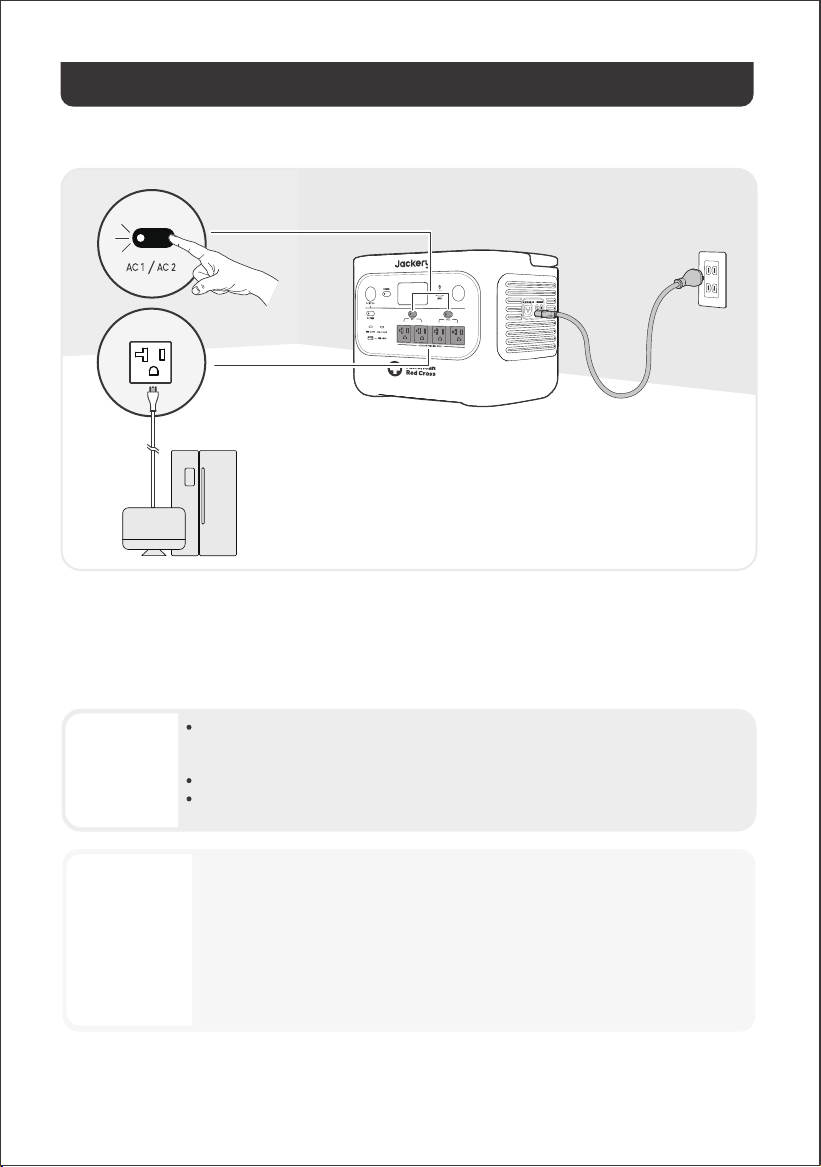
UNINTERRUPTIBLE POWER SUPPLY (UPS)
• This product does not support 0 ms switching. Do not connect it to equipment that
requires a 0 ms switching power supply, such as data servers or workstations.
• Before use, please test compatibility with your device multiple times.
• Do not connect loads exceeding the maximum output power of the product. Otherwise,
overload protection will be triggered.
12
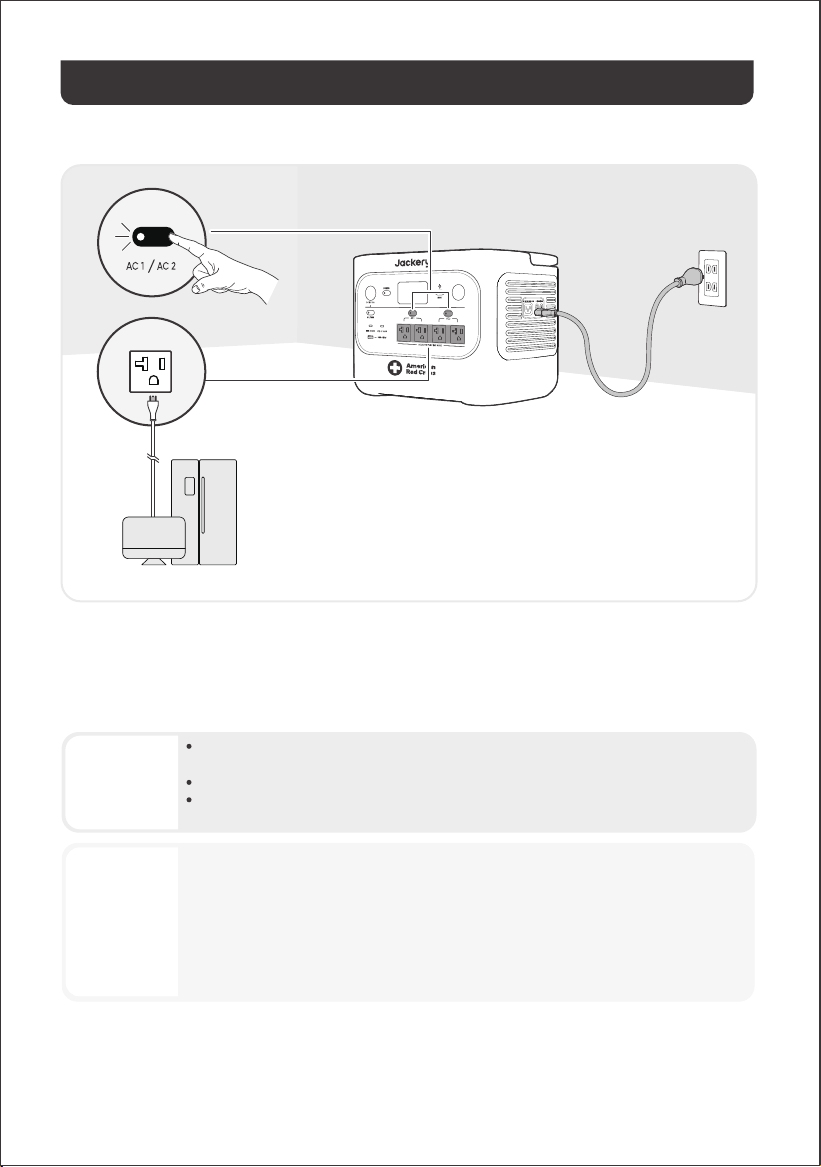
Connect the product to a wall outlet with the AC charging cable, then press the AC1/2 power button and power
your appliances at the same time.
When operating in UPS mode, the unit works in Bypass Mode under normal grid conditions and provides up to 15 A
(1800 W) of output. If the output current remains above 12 A for more than 3 hours, the output is reduced to 12 A
(1440 W). Because charging and discharging may occur simultaneously in Bypass Mode, the available output
power in this mode may be lower than the rated output power. During a power outage, the unit switches to
battery output and returns to its rated output power.
An uninterruptible power supply (UPS) is a continuous power system that
automatically supplies backup power to connected loads when grid power fails.
If grid power is suddenly lost, the HP2000Plus switches to stored power within 10
ms to keep your appliances running.
CAUTION
WARNING
Do not use this product for applications such as data servers or medical devices, where a
malfunction could endanger life or cause significant property damage.
For the following equipment, a loss of power supply during use could cause serious harm to
personal safety or property:
· Medical devices and other equipment closely related to life safety.
· Critical equipment such as social infrastructure and public services.
· Business-critical enterprise equipment, etc.
Individuals who wear a cardiac pacemaker (pacemaker implant recipients) must not use
this product.
13
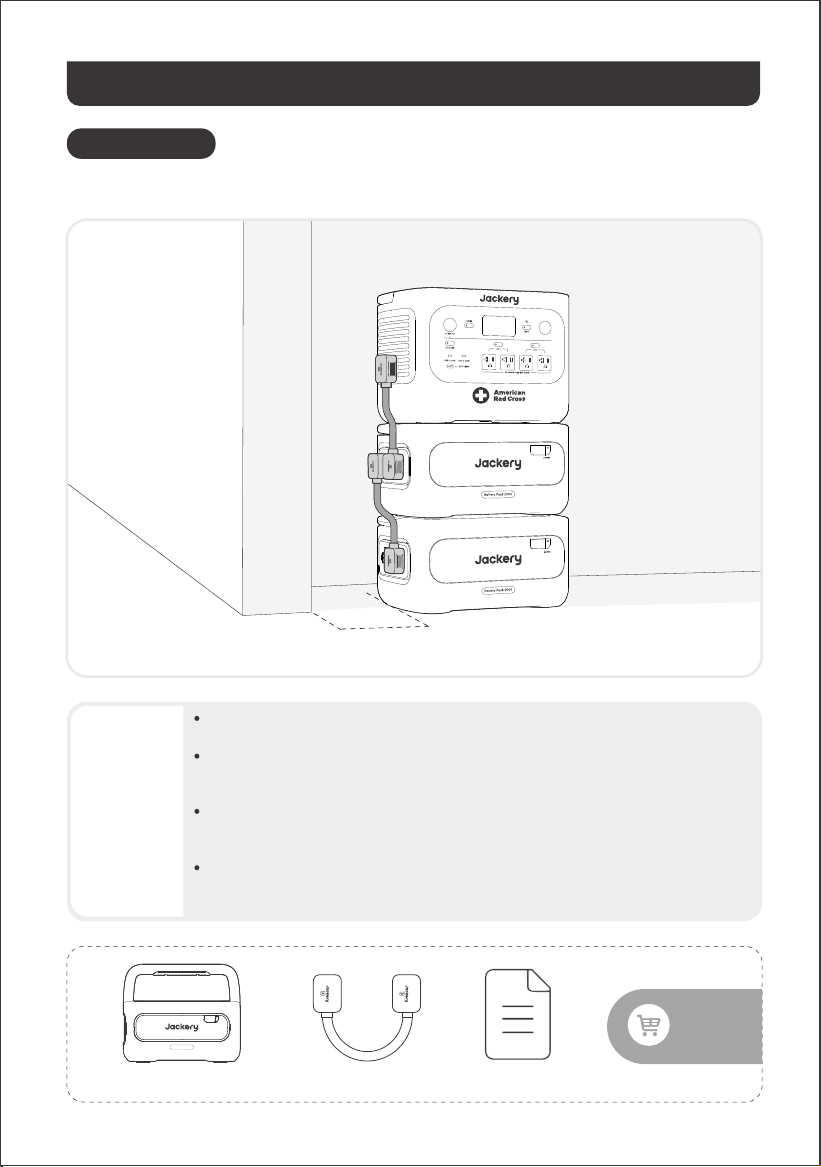
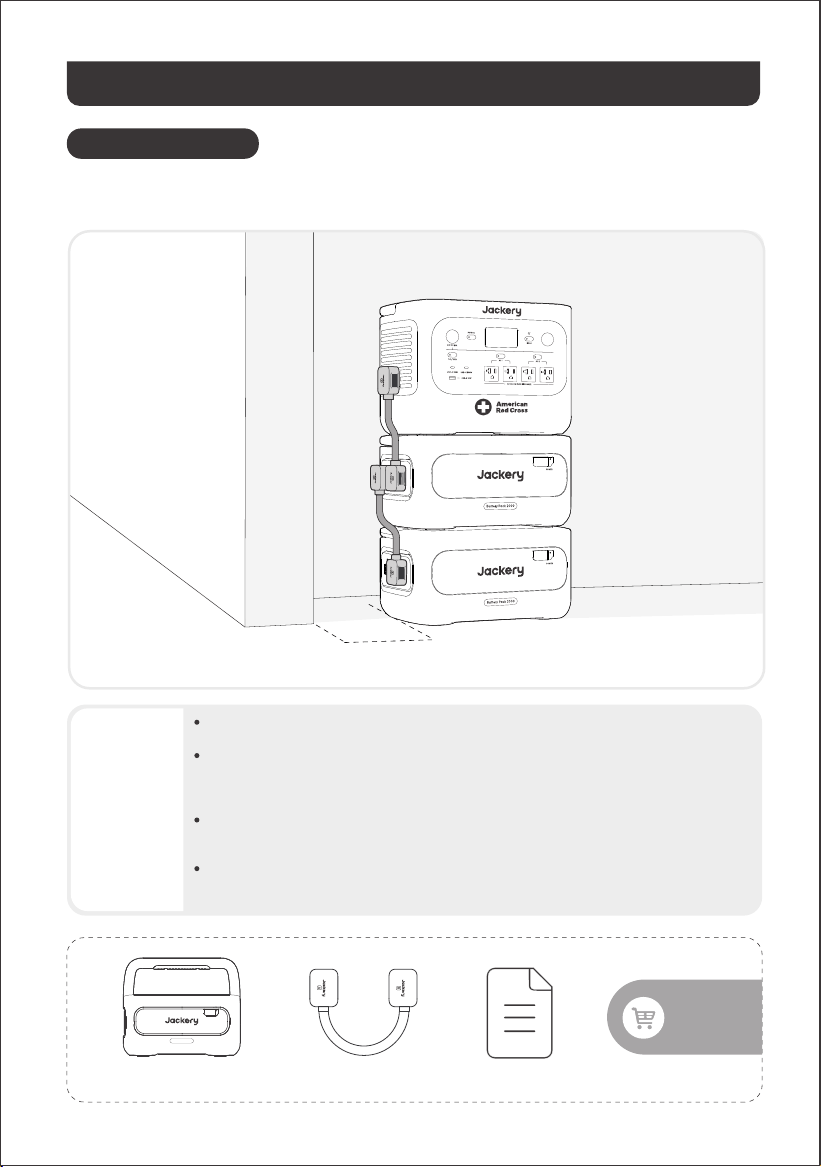
This product can support up to 5 battery packs to meet the need for large power capacity. For details on how to
use it, please refer to the Jackery Battery Pack 2000 User Manual.
CONNECT TO BATTERY PACK(S)
SOLD SEPARATELY
CAUTION
• Ensure all products are powered off before connecting the HP2000Plus to the Jackery
Battery Pack 2000.
• To ensure proper operation of the product, make sure the air intake and exhaust vents on
both sides are unobstructed. Leave at least 0.66 ft (≈200 mm) of space between the
vents and any objects to allow for proper heat dissipation.
• When the product is used with connected battery packs, the default maximum number
of stacked battery packs is 3, and the product must be placed on a flat, stable surface
with sufficient load-bearing capacity.
• If 4 or more battery packs need to be stacked, the product must be placed in a stable
area against a wall and protected from external impact, and the necessary anti-tip
securing measures must be taken.
Expansion CableJackery Battery Pack 2000 Documents
Sold
separately
POWER
Battery Pack 2000
≥ 20cm
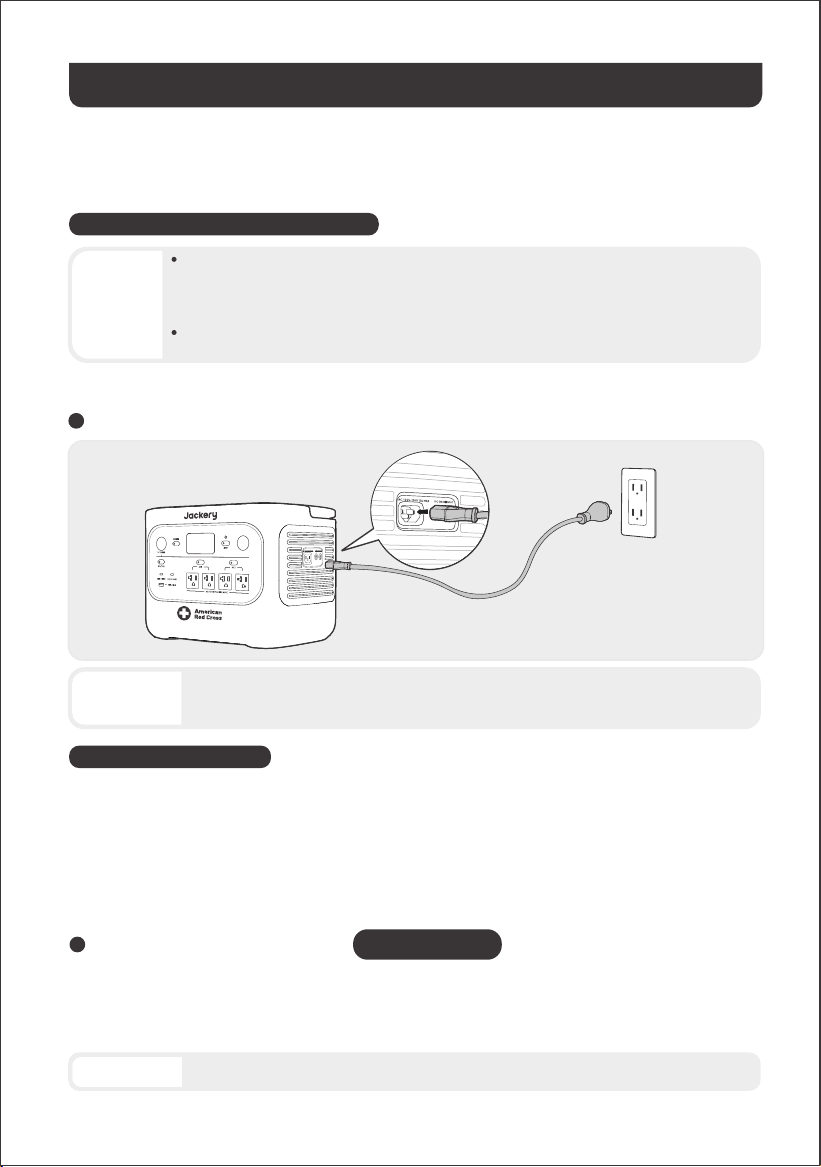
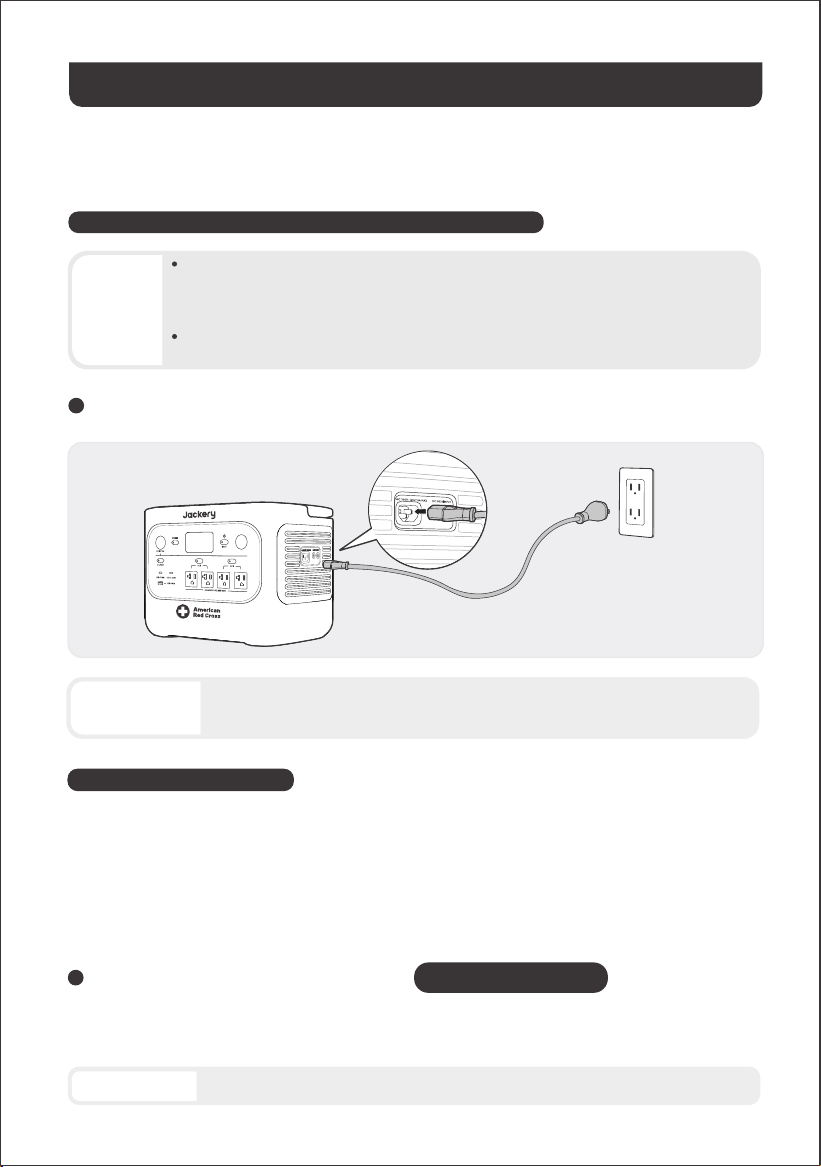
CHARGING VIA AC WALL OUTLET
Connect the AC charging cable to the AC
input port of the product and a wall outlet.
CHARGING
14
Fully charge the product before its first use.
Emergency Charging Mode
• The recommended charging temperature for the product ranges from 14°F to 113°F (-10°C to
45°C), and the discharging temperature ranges from 14°F to 113°F (-10°C to 45°C). Operating
the product beyond this temperature range may restrict its charging and discharging
capabilities, or even prevent it from charging or discharging.
• The charging power and battery capacity of the product may vary due to temperature
fluctuations.
NOTE
Make sure the AC charging cable is fully and securely plugged into the AC input port. An
incomplete connection may cause unstable current, overheating, poor contact, or device
malfunction.
Under this mode, you can rapidly power up the portable power station using the AC charging method. This
emergency charge function can be activated or deactivated through the Jackery App. When in emergency
charging mode, the circular light indicating the state of charge (SOC) will blink at an increased pace.
* To maximize battery life, it is best to charge at normal speed. Use emergency charging mode only when
necessary. It's not recommended for regular, long-term use.
CAUTION
Green energy first: We advocate using green energy first. This product supports two modes of charging at the same
time: solar charging and AC wall charging. When AC wall charging and solar charging are turned on at the same
time, the product will give priority to solar charging, and both methods will be used to charge the battery at the
maximum permissible power.
SOLD SEPARATELY
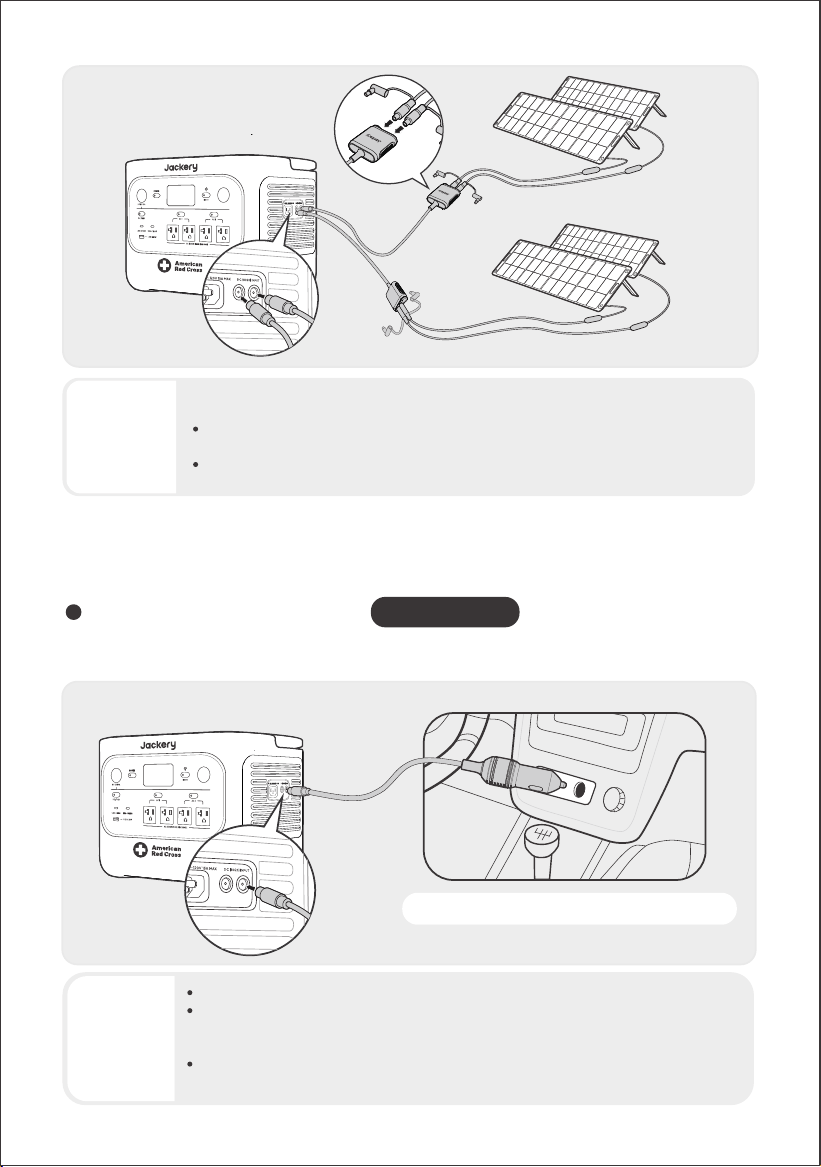
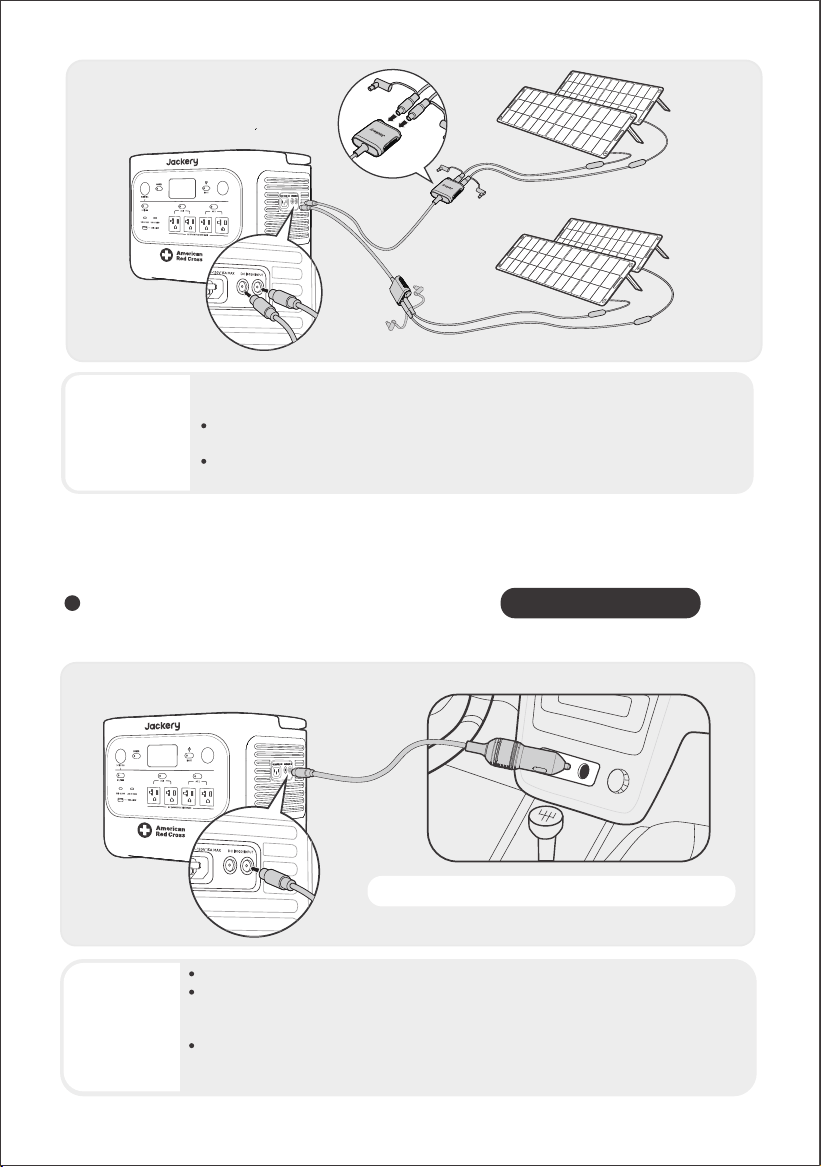
CHARGING VIA SOLAR PANELS
CAUTION
HP2000Plus has two DC8020 input ports and is compatible with the Jackery solar panels. If one DC8020 input port
needs to connect two solar panels simultaneously, please refer to the figure below for charging through the solar
panel connector (sold separately, not included as standard).
One DC8020 input port can be connected to at most two solar panels.
15
It is recommended to use the Jackery solar panel to charge the product. Ensure that the open-circuit voltage (V
)
of the solar panel is within the DC input range (16V-60V) of the HP2000Plus. Jackery is not responsible for any
damage or loss resulting from the use of third-party solar panels.
CAUTION
Ensure that the input voltage for both DC input ports is the same. Failure to do so may
damage the product. For example:
Use the same model of Jackery solar panels and the same number of panels when
connecting solar panels to both DC8020 Input ports.
Do not charge the product using both a car charger and a solar panel simultaneously.
Doing so may blow the car fuse or result in charging failure.
SOLD SEPARATELY
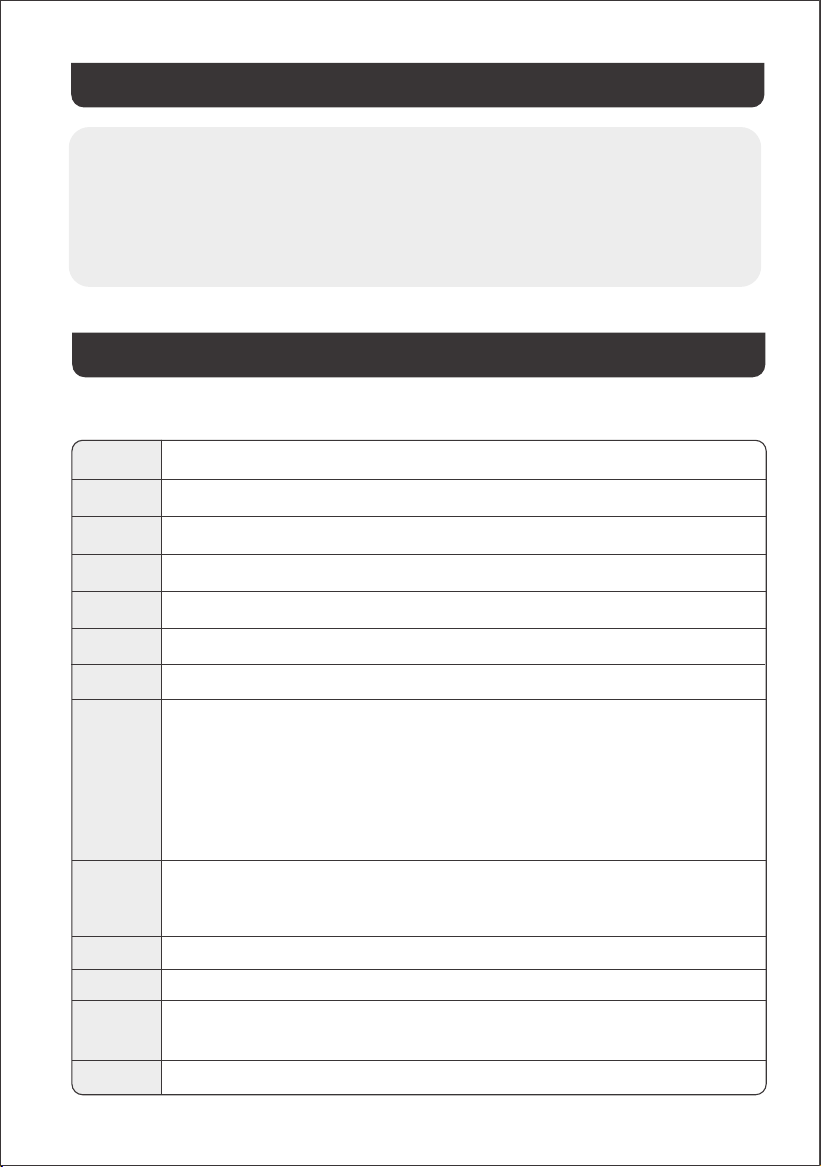
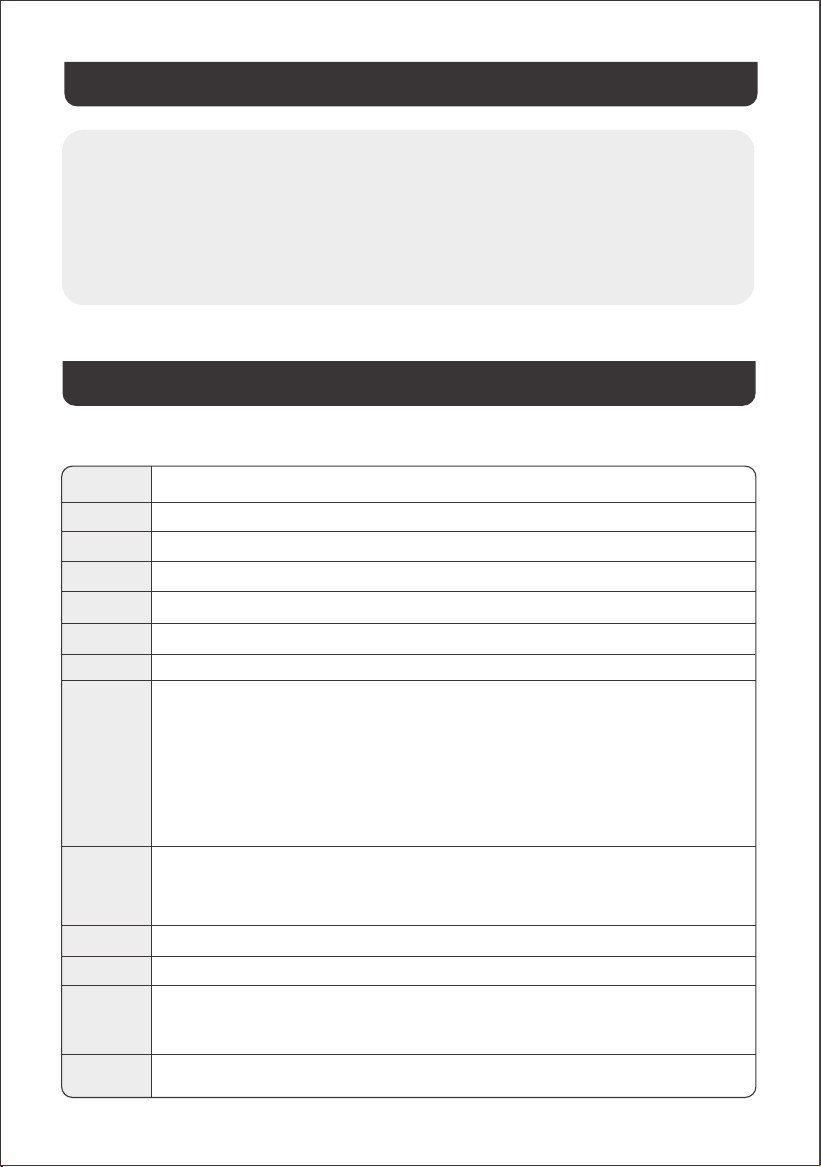
CHARGING VIA A CAR CHARGER
This product can be charged using a 12V car charger. Ensure that the car charger and the 12V car power outlet
(car cigarette lighter) provide a good connection.
Vehicle
*The car charging cable is sold separately.
CAUTION
• Please start the vehicle before charging your power station.
• If the vehicle is running on bumpy roads, it is forbidden to use the car charger in case it
causes non-standard operation. The Company will not be responsible for any loss caused
by non-standard operation.
• Vehicle charging is only applicable to vehicles with 12V DC, not 24V DC. Please do not
charge this product in a 24V vehicle to avoid personal injury and property loss.
SolarSaga 200 × 4
oc
16
Store the product in a dry, clean place with proper ventilation. Storage temperature and humidity:
• 1 month: -4°F to 113°F / -20°C to 45°C (0-60%RH)
• 3 months: 32°F to 113°F / 0°C to 45°C (0-60%RH)
• 12 months: 32°F to 77°F / 0°C to 25°C (0-60%RH)
If this product is stored for a long period of time (3 months - 6 months) with the power depleted, it may become
unchargeable. To prevent this and maintain battery health, it is recommended to check and recharge the
product every three months and perform a full charge and discharge cycle at least once every 6 to 12 months.
STORAGE
TROUBLESHOOTING
Error Code
Corrective Measures
FC
FE
F9
F8
F7
F6
F5
1. Restart the battery packs and the HP2000Plus, respectively.
2. If the fault persists, disconnect the battery pack from the HP2000Plus and connect them again.
Remove the load connected to the USB ports of the product. Wait until the fault disappears.
Contact Jackery Customer Support.
Contact Jackery Customer Support
Charge the product via solar panels or an AC wall outlet until the fault disappears.
F4
F0
Connect the product to loads to discharge its battery until the fault disappears.
Restart the product.
F1
Restart the product.
F2
Restart the product.
F3
Restart the product.
1. Wait for the grid to normalize before charging the product via an AC wall outlet.
2. Check whether the air intake and exhaust vents are blocked; ensure 0.66 ft (20 cm) clearance
on both sides of the product.
3. Place the product in a location that is not exposed to direct sunlight or high environmental
temperatures.
4. Disconnect all loads from the product. Keep the product idle and wait until the fault
disappears.
5. Restart the product.
1. Remove all DC inputs from the product.
2. Check the open-circuit voltage (V
) of the connected solar panels. The product allows a
maximum DC input voltage of 60V.
3. Restart the product and keep it idle. Wait until the fault disappears.
If any of the following fault codes appear, follow the listed corrective actions to resolve the issue. If the fault
persists, please contact Jackery Customer Support.
oc
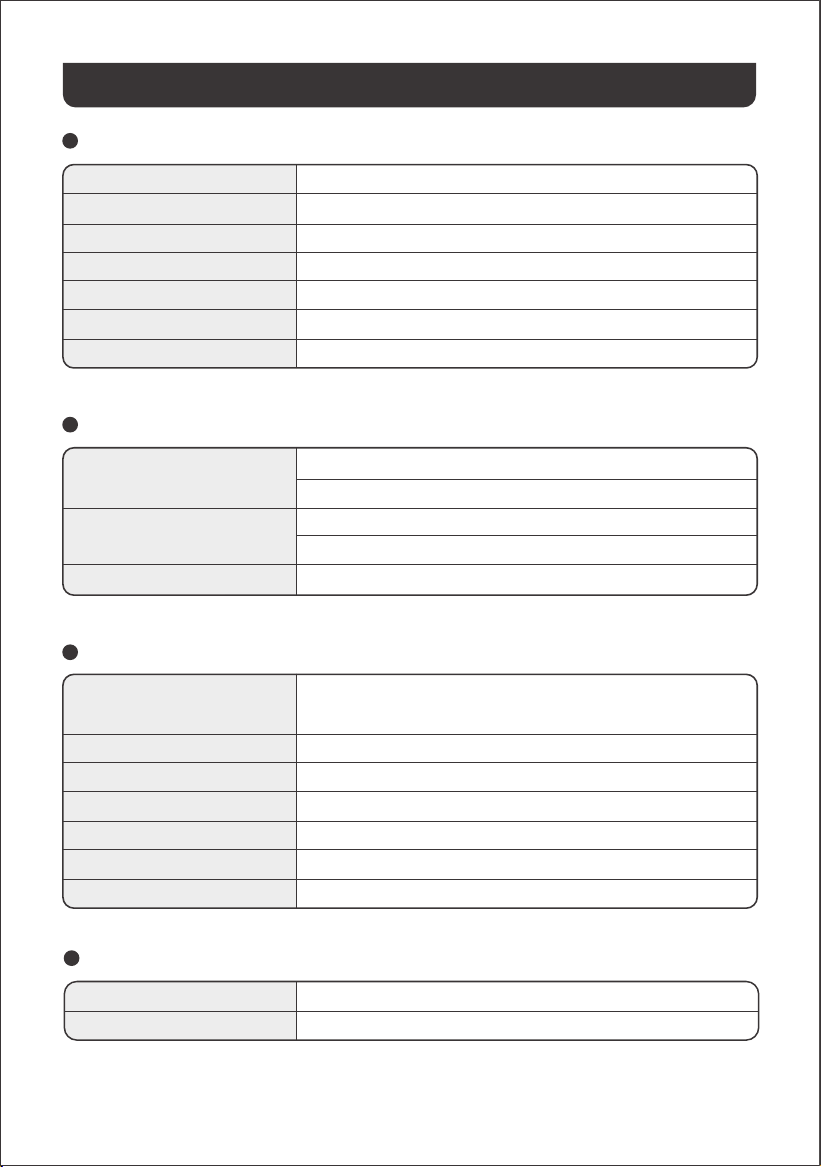
GENERAL INFO
Product Name
Model No.
Capacity
Cell Chemistry
Weight
Dimensions
Cycle Life
Jackery HomePower 2000 Plus
JHP-2000A-RC
2048 Wh (40Ah/51.2V DC)
LiFePO₄
About 41.45 lbs/18.8 kg
14.4 × 10.0 × 10.7 in / 36.6 × 25.5 × 27.2 cm
6000 cycles to 70%+ capacity
INPUT PORTS
1 × AC Input
2 × DC8020 Ports
1 × DC Expansion Port
Charge Mode: 100V-120V~ 60Hz, 15A Max
Bypass Mode
①
: 100V-120V~ 60Hz, 15A Max
16V-60V⎓12A Max, Double to 21A / 800W Max
11V-16V⎓8A Max, Double to 8A Max
36.8V-57.6V⎓75A Max
OUTPUT PORTS
4 × AC Output
AC Output in Bypass Mode
①
1 × USB-A Output
1 × USB-C 30W Output
1 × USB-C 140W Output
1 × DC 12V Port
1 × DC Expansion Port
120V~ 60Hz, 20A Max, 2400W Rated per port, 2400W in Total,
4800W Surge Peak
100V-120V~ 60Hz, 15A Max. (<3 hours when current exceeds 12A)
18W Max, 5-6V⎓3A, 6-9V⎓2A, 9-12V⎓1.5A
30W Max, 5V⎓3A, 9V⎓3A, 12V⎓2.5A, 15V⎓2A, 20V⎓1.5A
140W Max, 5V⎓3A, 9V⎓3A, 12V⎓3A, 15V⎓3A, 20V⎓5A, 28V⎓5A
12V⎓10A Max
36.8V-57.6V⎓55A Max
Charge Temperature
Discharge Temperature
ENVIRONMENTAL OPERATING TEMPERATURE
14°F to 113°F / -10°C to 45°C
14°F to 113°F / -10°C to 45°C
17
※ USB Type-C and USB-C are registered trademarks of USB Implementers Forum.
® ®
SPECIFICATIONS
① The product can charge the battery from the AC wall outlet while delivering power through the AC output ports.
To activate the Warranty Extension, you
must register your product online or
contact our customer service team at
hello@jackery.com to extend the
standard warranty runtime.
*Warranty period and details may vary according to local laws, regulations, and authorized dealers.
Jackery will repair or replace (at Jackery's expense) any Jackery product that fails to operate during the
applicable warranty period due to a defect in workmanship or material. The repaired/replaced product
assumes the remaining warranty of the original date of purchase.
WARRANTY
Jackery Inc. warrants to the original consumer purchaser that the Jackery product will be free from defects
in workmanship and material under normal consumer use during the applicable warranty period identified in
the 'Warranty Period' section below, subject to the exclusions set forth below.
This warranty statement sets forth Jackery's total and exclusive warranty obligation. We will not assume, nor
authorize any person to assume for us, any other liability in connection with the sale of our products.
The standard warranty period for HP2000Plus is 36 months. In
each case, the warranty period is measured starting on the
date of purchase by the original consumer purchaser. The
sales receipt from the first consumer purchaser, or other
reasonable documentary proof, is required in order to
establish the start date of the warranty period.
Limited Warranty
Repair or replacement
The warranty on Jackery's product is limited to the original consumer purchaser and is not transferable to
any subsequent owner.
Limited to Original Consumer Buyer
Jackery's warranty does not apply to:
• Any product that has been misused, abused, modified, damaged by accident, or used for anything
other than normal consumer use as authorized in Jackery's current product literature.
• Attempted repair by anyone other than an authorized facility.
• Any product purchased through an online auction house.
• Jackery's warranty does not apply to the battery cell unless the battery cell is fully charged by you within
seven days after you purchase the product and at least once every 6 months thereafter.
Exclusions
Interpretation Rights
Warranty Period
Standard Warranty
YEARS
3
Extended Warranty
YEARS
2
Jackery reserves the right to the final interpretation of the above after-sales policy.
18
This warranty applies only to customers who purchase from the official Jackery website,
Jackery-branded third-party platforms, or local authorized dealers.
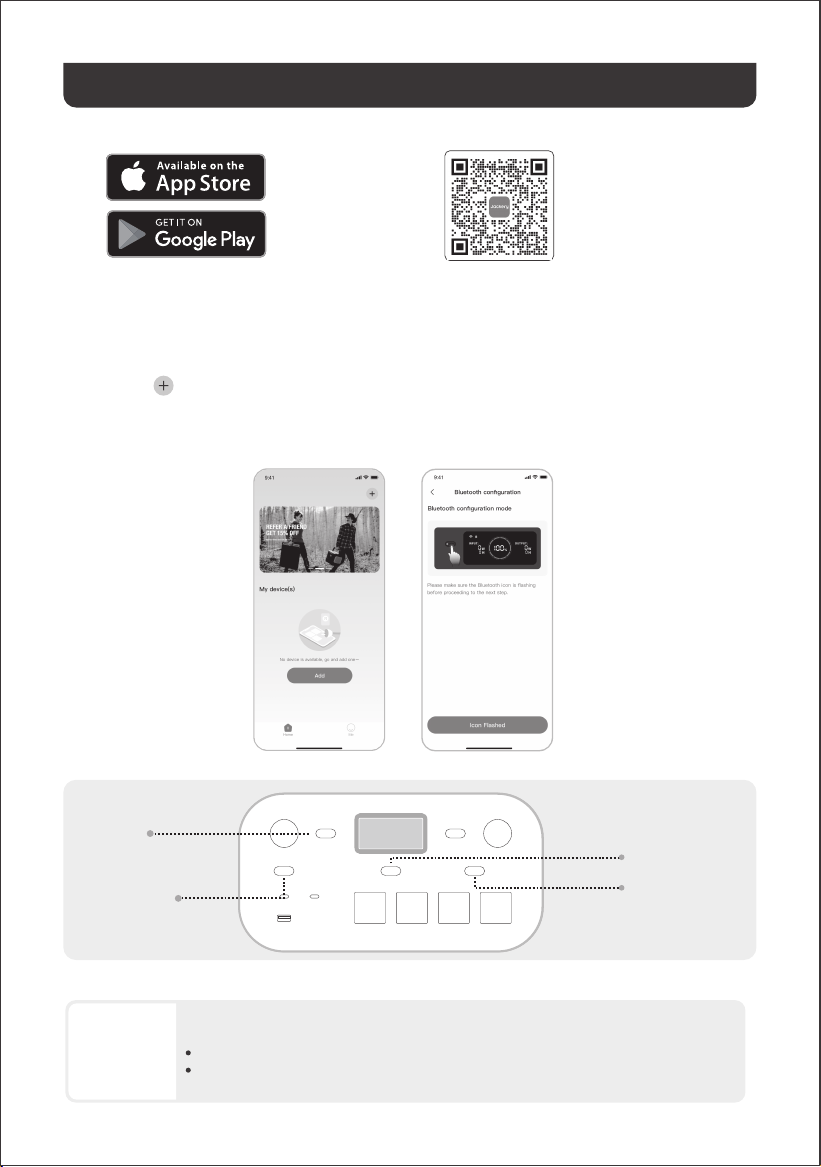
Search for "Jackery" in Google Play or
App Store to install the App. After that,
you can register and log in.
Alternatively, scan the QR
code below to download and
install the App.
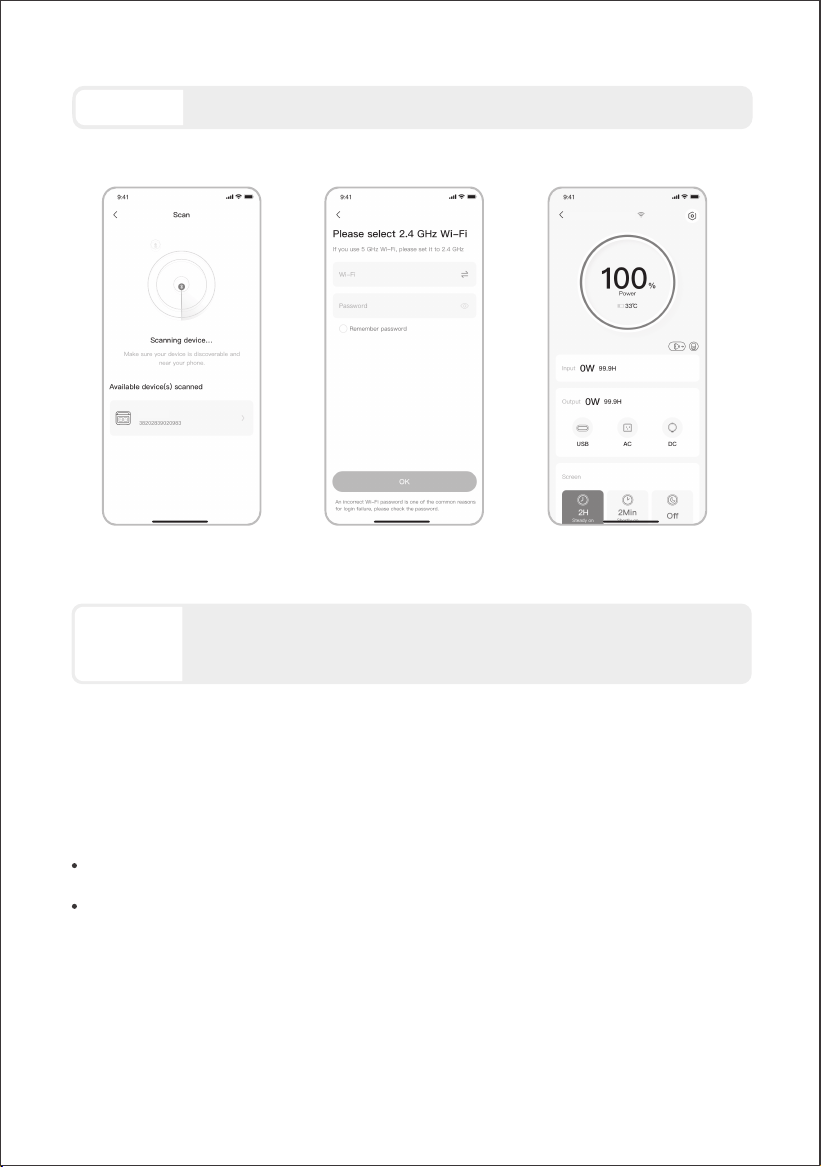
2.3 After tapping the searched device icon, the App automatically connects the device via Bluetooth.
• The device owner will share this device with other users through the App.
• Press and hold the POWER button and DC/USB power button for 3 seconds to reset the
device's Wi-Fi and Bluetooth, and then re-bind the device.
2. Add device
2.2 Press the POWER button on the device to turn on, the Wi-Fi and Bluetooth icons on the device
flash to indicate that the device has entered the network configuration mode, tap the "Icon Flashed"
button, and allow the App to connect to nearby devices and open Bluetooth permissions.
1. Download the App and log in
2.1 Click the button to add your device;
2.1
2.2
APP SETUP
19
If "the device has been bound" is prompted during the binding process, the following two
ways can be used for connection:
NOTE
Main Power
Button
AC2 Power Button
AC1 Power Button
DC/USB Power
Button
• Wi-Fi and Bluetooth are automatically turned on after the device is on, and the Wi-Fi and
Bluetooth icons on the screen light up.
• Hold the DC/USB power button and the AC1 power button at the same time until the Wi-Fi and
Bluetooth icons on the screen light up.
3. Unbind the device
Click the Settings icon in the upper right corner of the main interface of the device to enter the
settings page, and click the Unbind button at the bottom of the page to unbind the device.
4. Notes
4.1 To turn on Wi-Fi & Bluetooth:
Hold the DC/USB power button and the AC1 power button at the same time until the Wi-Fi and
Bluetooth icons on the screen are o.
4.2 To turn o Wi-Fi & Bluetooth:
Hold the POWER button and DC/USB power button at the same time for 3 seconds to reset Wi-Fi
and Bluetooth to factory settings. The connected App account will be unbound.
4.3 To reset Wi-Fi & Bluetooth:
2.4 After the device is successfully connected, enter your Wi-Fi password and tap the OK button.
2.5 After the device is successfully added to the App, the Wi-Fi icon on the device will always be on.
The above screenshots are for reference only.
2.52.3 2.4
20
Please select a Wi-Fi network in 2.4 GHz band. The device does not support a Wi-Fi
network in the 5 GHz band.
The Jackery App can connect to only one power station via Bluetooth at a time. Returning
to the device list automatically disconnects Bluetooth. Tap the power station in the list
again to reconnect automatically.
CAUTION
NOTE
2000 Plus
HomePower 2000 Plus
• Lee todas las instrucciones antes de usar el producto.
• No permitas que los niños jueguen sobre del
producto. Se requiere la supervisión cercana de
adultos cuando se use cerca de niños.
• Evita colocar las manos o los dedos dentro del
producto.
• Deja de usar el producto de inmediato si ha sufrido
daños físicos o modificaciones. El uso inadecuado
puede causar un comportamiento impredecible,
provocando incendio, explosión o lesiones.
• Si se observan los siguientes síntomas —(incluyendo
sobrecalentamiento, olores extraños o humo, fugas o
quemaduras)— deja de usar el producto de
inmediato y contacta al distribuidor o a nuestro
servicio al cliente.
• Nunca intentes abrir, reparar o modificar el producto.
Cualquier manipulación, re ensamblaje o
modificación puede resultar en descarga eléctrica,
incendio o daños a la batería.
• Ten en cuenta que el líquido expulsado del producto
puede causar irritación o quemaduras. El uso
inapropiado o abusivo puede causar fugas en la
batería. Evita el contacto directo con líquidos que se
filtren. Si el líquido entra en contacto con los ojos,
busca atención médica de inmediato. Si entra en
contacto con otras partes del cuerpo, enjuaga con
agua corriente y consulta a un médico de inmediato.
• No expongas el producto al fuego o a temperaturas
extremas. Hacerlo puede provocar una explosión si la
temperatura supera los 130 °C (265 °F).
• El uso de materiales o piezas no recomendadas o no
suministradas puede implicar riesgo de incendio,
descarga eléctrica o lesiones personales.
• No dejes la batería cargando sin supervisión durante
periodos prolongados. Supervisa siempre el proceso
de carga para garantizar un funcionamiento seguro.
• Para reducir el riesgo de descarga eléctrica,
desconecta el producto de cualquier fuente de
energía antes de realizar servicio técnico o resolución
de problemas.
• Deja de usar el producto de inmediato si muestra signos
de daño. Suspende el uso y contacta al servicio al cliente
para recibir asistencia.
• No cargues la batería en ambientes extremadamente
calientes o fríos y cumple estrictamente con los rangos de
temperatura especificados por el producto:
-Temperatura de carga:
14 °F a 113 °F (-10 °C a 45 °C);
-Temperatura de descarga:
14 °F a 113 °F (-10 °C a 45 °C)
.
• Para garantizar una circulación de aire adecuada, no
cubras las rejillas de ventilación del producto. El área
donde se use el producto debe tener un flujo de aire
adecuado en un entorno fresco y seco para evitar el
sobrecalentamiento.
-Cargar en espacios húmedos o mal ventilados puede
representar riesgos para la seguridad.
El agua puede provocar cortocircuitos o dañar el
cargador, generando riesgos de seguridad.
• Desconecta el cable de alimentación de la toma de
corriente durante tormentas eléctricas.
• Apaga el producto de inmediato presionando el botón de
encendido si se ha caído, golpeado o expuesto a
vibraciones.
• Asegúrate de que los dispositivos estén apagados antes
de conectarlos al producto.
• No cargues el producto con un cable o enchufe dañado o
roto.
• No uses el producto para cargar dispositivos con cable o
enchufe dañado o roto.
• Siempre desconecta el cable de carga tirando del
enchufe, no del cable, para evitar daños.
• Asegúrate de que el producto esté bien asegurado al
transportarlo en un vehículo en movimiento.
• NO coloques la unidad boca abajo ni de lado durante el
uso o almacenamiento.
• NO coloques el producto en el suelo o a una altura
menor de 18 pulgadas (457 mm) sobre el suelo durante el
funcionamiento en un taller o centro de reparación.
• NO uses los accesorios del producto con otros
dispositivos o equipos.
• El tiempo de carga solar depende de las condiciones
meteorológicas. Coloque su panel solar donde reciba la
mayor cantidad posible de luz solar directa.
• INSTRUCCIONES PARA LA CONEXIÓN A TIERRA-Este
producto debe estar conectado a tierra. Si presenta mal
funcionamiento o fallas, la conexión a tierra proporciona
una ruta de menor resistencia para la corriente eléctrica
y reduce el riesgo de shock eléctrico. Este producto está
equipado con un cable que tiene un conductor de
conexión a tierra y un enchufe con polo a tierra. El
enchufe debe conectarse a un tomacorriente que esté
instalado y conectado a tierra correctamente, de
acuerdo con todos los códigos y ordenanzas locales.
INSTRUCCIONES RELATIVAS AL RIESGO DE INCENDIO,
DESCARGA ELÉCTRICA O LESIONES PERSONALES
GUARDE ESTAS INSTRUCCIONES
ADVERTENCIA
Sigue siempre estas precauciones básicas al usar
este producto.
INSTRUCCIONES DE USO
INFORMACIÓN IMPORTANTE DE SEGURIDAD
21
INSTRUCCIONES DE MANTENIMIENTO PARA EL USUARIO
Durante el ciclo de vida de los productos de almacenamiento de energía, se producirá cierto grado de
degradación de capacidad y energía. A medida que aumenta el número de ciclos de uso y se extiende el
tiempo de almacenamiento, esta degradación se intensificará gradualmente, lo cual es un fenómeno normal
acorde con el patrón de envejecimiento natural de las celdas de la batería.
Símbolo Significados
Prácticas peligrosas que pueden resultar en lesiones personales y/o
daños a la propiedad.
Prácticas peligrosas que pueden resultar en daño al equipo, pérdida
de datos, deterioro del rendimiento o resultados inesperados.
Complementa la información importante o consejos de operación
en el texto.
PRECAUCIÓN
NOTA
CONSEJOS
Prácticas peligrosas que pueden resultar en lesiones graves, muerte
y/o daños a la propiedad.
ADVERTENCIA
Este dispositivo está diseñado únicamente para uso en interiores
(coloque este dispositivo en un ambiente similar a interiores cuando lo
use en exteriores, ej. autocaravanas, tiendas de campaña, cabañas,
etc.).
※ Este dispositivo no es resistente al agua ni al polvo.Manténgalo
alejado de la lluvia y ambientes húmedos durante su uso.
PELIGRO:
Una conexión incorrecta del conductor de conexión a tierra del equipo
puede provocar riesgo de shock eléctrico. Consulte con un electricista
cualificado si tiene dudas sobre si el producto está conectado a tierra
correctamente. No modifique el enchufe proporcionado con el
producto; si no se ajusta al tomacorriente, haga que un electricista
cualificado instale un tomacorriente adecuado.
ADVERTENCIA
SIGNIFICADO DE LOS SÍMBOLOS
22
Símbolo Significados
Precaución! El incumplimiento de los
mensajes de advertencia puede
provocar lesiones.
Lea el manual del operador
No desarme el producto.
No fumar ni hacer llamas abiertas
Símbolo Significados
No se permiten niños
Este símbolo indica que el producto
contiene una batería de iones de litio
(Li-ion), la cual debe desecharse o
reciclarse de forma adecuada.
Riesgo de descarga eléctrica
Carga de batería
Jackery HomePower 2000 Plus
CONTENIDO DE LA CAJA
23
1 2
Cable de carga de CA
3
Documentos
El cable de carga para automóvil no está incluido, pero está disponible para su
compra por separado en nuestro sitio web. Para obtener asistencia, comunícate con
el servicio al cliente de Jackery.
*
CONSEJOS
Símbolo Significados
Símbolo Significados
Este símbolo indica que el producto no
debe desecharse con los residuos
domésticos. En su lugar, debe llevarse a un
punto de recogida designado para su
correcto reciclaje.
El desecho y reciclaje adecuados ayudan
a proteger el medioambiente. Para más
información, póngase en contacto con su
autoridad local, el servicio de gestión de
residuos o el distribuidor del producto.
Material explosivo
Objeto pesado
LIGHT
DC 12V 10A
DC /
USB
USB-C 30W
AC 2400W PURE SINE WAVE
USB-C 140W
AC 1 AC 2
USB-A 18W
NOTA : Este equipo ha sido probado y cumple con los límites
para un dispositivo digital de Clase B, según la parte 15 de
las Reglas de la FCC.
Este dispositivo cumple con la parte 15 de
las Reglas de la FCC. El funcionamiento está
sujeto a las siguientes dos condiciones :
(1) Este dispositivo no debe causar
interferencias dañinas, y
(2) Este dispositivo debe aceptar cualquier interferencia
recibida, incluidas las interferencias que puedan causar un
funcionamiento no deseado.
Estos límites están diseñados para proporcionar una
protección razonable contra las interferencias perjudiciales
en una instalación residencial. Este equipo genera, utiliza y
puede emitir energía de radiofrecuencia y, si no se instala y
utiliza de acuerdo con las instrucciones, puede causar
interferencias perjudiciales en las comunicaciones. Sin
embargo, no hay garantía de que no se produzcan
interferencias en una instalación particular. Si este equipo
causa interferencias perjudiciales en la recepción de radio o
televisión, lo que puede determinarse encendiendo y
apagando el equipo, se recomienda al usuario intentar
corregir las interferencias mediante una o más de las
siguientes medidas :
• Reorientar o reubicar la antena de recepción.
• Aumentar la separación entre el equipo y el receptor.
• Conectar el equipo a una toma de corriente en un
circuito diferente al que está conectado el receptor.
• Consultar al distribuidor o a un técnico experimenta-
do en radio/TV para obtener ayuda.
MODIFICACIÓN : Cualquier cambio o modificación no
expresamente aprobada por la parte responsable de
la conformidad podría anular la autorización del
usuario para operar el dispositivo.
Declaración de exposición a RF
Este equipo cumple con los límites de exposición a la
radiación de la FCC (Federal Communications
Commission) establecidos para un entorno no
controlado. Este equipo debe instalarse y operarse
con una distancia mínima de 20 cm entre el radiador
y su cuerpo.
VISTA FRONTAL
DESCRIPCIÓN GENERAL DEL PRODUCTO
24
VISTA LATERAL IZQUIERDA
VISTA LATERAL DERECHA
LCD
Botón de encendido principal
Puerto DC 12V
12 V⎓10 A Máx
LIGHT
DC 12V 10A
DC /
USB
USB-C 30W
AC 2400W PURE SINE WAVE
USB-C 140W
AC 1 AC 2
USB-A 18W
30W Máx, 5 V⎓3 A, 9 V⎓3 A,
12 V
⎓2,5 A, 15 V⎓2 A, 20 V⎓1,5 A
18 W Máx, 5-6 V⎓3 A,
6-9 V
⎓2 A, 9-12 V⎓1,5 A
Salidas de CA
Botón de energía
CC/USB
Salida USB-C 30W
140 W Máx, 5 V⎓3 A, 9 V⎓3 A, 12 V⎓3 A, 15 V⎓3 A,
20 V
⎓5 A, 28 V⎓5 A
Salida USB-C 140W
Salida USB-A
Botón de luz LED
Botón de energía CA1
Luz LED
Botón de energía CA2
120 V~ 60 Hz, 20 A Máx,
2400 W nominales,
4800 W pico de sobretensión
Conectar al paquete de baterías
Entrada de CC (2 x Puertos DC8020)
PV: 16-60 V⎓12 A Máx, Doble a 21 A Máx / 800 W Máx
Auto: 11-16 V
⎓8 A Máx, Doble a 8A Máx
Entrada de CA
100 V-120 V~ 60 Hz, 15 A Máx
A
Puerto de expansión CC
Asa
25
PANTALLA LCD
11
13 1412 15 16 17
18 19
21 22 23 24
26
25
20
1
2 3 4
10
5 6 97 8
1
2
3
4
5
Plan de Carga
Modo Autónomo
Wi-Fi
Bluetooth
Personaliza el tiempo de carga del HP2000Plus. Adecuado
para situaciones con tarifas eléctricas variables, permite
establecer planes de carga según las horas pico y valle,
reduciendo así los costos de electricidad.
Por favor, configure esta función en la aplicación Jackery.
Cuando el dispositivo se apaga, se retiene la configuración.
Maximiza el uso de la energía solar y reduce la dependen-
cia de la electricidad de la red al priorizar la energía solar
almacenada, reduciendo los costos eléctricos. La estación
de energía debe estar conectada simultáneamente a los
paneles solares y a la red, con la potencia de carga
limitada por la potencia de derivación.
Por favor, active/desactive esta función en la aplicación.
Cuando el dispositivo se apaga, se retiene la configuración.
Modo de Carga
Silenciosa
Encendido: el ruido durante la carga se minimiza
significativamente, mientras que la potencia de carga se
reduce y la velocidad de carga disminuye.
Apagado: El modo de carga silenciosa está desactivado.
Activar/desactivar esta función en la App Jackery. Cuando
el dispositivo se apaga, se retiene la configuración.
Encendido: Wi-Fi conectado.
Parpadeo: listo para conectarse al Wi-Fi.
Apagado: Wi-Fi desconectado.
Encendido: Bluetooth conectado.
Parpadeo: listo para conectarse al Bluetooth.
Apagado: Bluetooth desconectado.
6
7
8
9
10
11
12
13
Potencia de Entrada
Indicador de Carga
desde Toma de
Corriente CA
Indicador de Carga
desde Coche
Muestra la potencia de entrada en vatios.
Tiempo de Carga
Restante
Muestra el tiempo de carga restante.
El producto se carga a través de la entrada CA utilizando
energía de la red eléctrica.
El producto se carga a través de la entrada CC (DC8020)
utilizando CC 12V (carga desde el coche).
Modo TOU
UPS
Activado: el modo TOU está habilitado (SOC de respaldo
predeterminado: 60 %). Durante las horas pico, el producto
prioriza la descarga de la batería para reducir los costos de
la electricidad en momentos de alta demanda, cuando la
energía almacenada supera el SOC de respaldo. Durante
las horas valle, el sistema carga la batería desde la red
para lograr recortar los picos y llenar los valles.
Desactivado: el modo TOU está deshabilitado. El dispositivo
no sigue la estrategia TOU (tarifa por periodo de uso) y
opera según la lógica predeterminada de suministro de
energía y carga.
Por favor, active/desactive esta función en la aplicación.
Cuando el dispositivo se apaga, se retiene la configuración.
Encendido: El producto está en modo bypass, en el cual el
tiempo de cambio de la energía de la red a la batería
interna es de 10 ms.
Apagado: El producto no está en modo bypass.
Indicador de
Energía de CA
La salida CA (onda sinusoidal pura) está activada.
Voltaje y frecuencia de
salida
Muestra el voltaje y la frecuencia de salida cuando la
salida de CA está encendida.
El producto se carga a través de la entrada CC (DC8020)
utilizando paneles solares.
Indicador de Carga
Solar
Límite de potencia de
carga
Encendido: El límite de potencia de carga está activado en
la aplicación Jackery.
Apagado: El límite de potencia de carga está desactivado
en la aplicación Jackery.
Cuando el dispositivo se apaga, se retiene la configuración.
Modo de Ahorro de
Batería
Encendido: limita la capacidad máxima utilizable de la
batería para prolongar su vida útil.
Apagado: el modo de ahorro de batería está desactivado.
Activar/desactivar esta función en la App Jackery. Cuando
el dispositivo se apaga, se retiene la configuración.
Esta función no está disponible cuando el producto está
conectado a paquetes de baterías.
Cuando esta función está habilitada, el producto
ocasionalmente realiza un ciclo completo de carga-des-
carga para calibrar el SOC.
14
15
16
26
27
Se ha producido un error en el producto. Por favor, consulte
la sección de solución de problemas para más detalles.
Se activó la protección por alta temperatura. El producto
puede dejar de funcionar hasta que su temperatura vuelva
al rango normal de operación.
Se activó la protección por baja temperatura. El producto
puede dejar de funcionar hasta que su temperatura vuelva
al rango normal de operación.
Código de fallo
Indicador de Alta
Temperatura
Indicador de Baja
Temperatura
Porcentaje de
Batería Restante
Temporizador de
descarga
Baterías conectadas
Modo de Ahorro de
Energía
Cuando las salidas CA o CC se encienden presionando los
botones de encendido CA1/2 o CC/USB:
Encendido: Modo de ahorro de energía activado.
Apagado: Modo de ahorro de energía desactivado.
Potencia de Salida
Tiempo de
Descarga Restante
25
26
Muestra el porcentaje de batería restante.
Indica que el producto está conectado al número
especificado de baterías adicionales 2000.
Muestra la potencia de salida en vatios.
Muestra el tiempo de descarga restante.
18
19
20
22
23
24
21
Encendido: el nivel de la batería está por debajo del 20 %.
Parpadeo: el nivel de la batería está por debajo del 5 %.
Apagado: el nivel de la batería no está por debajo del 20 %
o el producto se está cargando.
Indicador de Batería
Baja
Indicador de Potencia
de la Batería
Cuando el producto se está cargando, el círculo naranja
alrededor del porcentaje de batería se ilumina secuencial-
mente. Cuando está cargando otros dispositivos, el círculo
naranja permanece encendido.
17
Activado: se ha configurado un temporizador de descarga.
Desactivado: no se ha configurado un temporizador de
descarga.
Activar/desactivar esta función en la App Jackery. Cuando
el dispositivo se apaga, no se retiene la configuración.
ENCENDIDO/APAGADO
ENCENDER/APAGAR SALIDA CA
Tiempo de espera predeterminado: 2 horas
El producto se apagará automáticamente después de 2 horas
de inactividad, sin carga ni descarga.
*El tiempo en espera puede configurarse en la App de Jackery.
OPERACIONES
Requisito previo: el producto está encendido.
28
Cuando el modo de ahorro de energía está activado, el producto se apagará automáticamente
después de 12 horas si el botón de energía CA1 o CC/USB está encendido, pero el producto no está
cargando ni descargando.
3s
Encendido
Apagado
Presione una vez
Mantén presionado
durante 3 segundos
Encendido
Apagado
Presione una vez
Presione una vez
Los botones de encendido CA1 y CA2 controlan dos pares separados de tomas de corriente CA. Al
presionar cada botón se enciende o apaga su par correspondiente de tomas de corriente CA.
ENCENDER/APAGAR SALIDA CC 12V/USB
Requisito previo: el producto está encendido.
29
PRECAUCIÓN
PRECAUCIÓN
• El puerto USB-C de 140 W es una salida de alta potencia de tipo Fuente de
Alimentación 3 (PS3) según USB-PD. Si el dispositivo del usuario o accesorio
conectado no cumple con los requisitos de seguridad, puede existir riesgo de
incendio. Antes de usar estos puertos, asegúrese de que el dispositivo o accesorio
conectado tenga protección contra incendios.
• Solo conecte el HP2000Plus a dispositivos o accesorios que cumplan con las
cláusulas 6.3, 6.4 y 6.5 de IEC/EN/UL 62368-1 (u otros estándares equivalentes).
• Para obtener la potencia máxima de salida, utilice el cable USB-C a USB-C de 5 A
(20 V CC/5 A, 100W; 28 V CC/5 A, 140 W).
• El puerto del mechero para auto solo es compatible con baterías de automóvil de 12V
y no es adecuado para sistemas de 24V.
• No arranque el automóvil mientras el producto está cargando la batería del
automóvil a través del puerto de salida CC de 12V, ya que esto podría dañar el
producto.
• Esta función está diseñada únicamente para uso de emergencia y no puede cargar
una batería de automóvil descargada o dañada.
El producto puede cargar la batería de su automóvil utilizando el cable de carga de batería para automóvil
Jackery 12V, que se vende por separado y está disponible en nuestro sitio web.
Encendido
Apagado
Presione una vez
Presione una vez
Presione una vez el botón
de luz LED para encender
la luz.
Presiónelo nuevamente
para cambiar al modo SOS.
Presiónelo una tercera vez
para apagar la luz.
30
MODO DE AHORRO DE ENERGÍA
Para evitar el consumo innecesario de batería al olvidar apagar la salida, el producto activa por
defecto el Modo de Ahorro de Energía. Cuando la salida de CA1 o CC/USB está encendida, el ícono
del modo de Ahorro de Energía se mostrará en la pantalla LCD. Si no hay ningún dispositivo
conectado o si el consumo del dispositivo conectado está por debajo de un cierto umbral (salida de
CA de 25W o salida CC/USB de 2W) durante 12 horas, el dispositivo apagará automáticamente
todas las salidas. Configure la duración del modo de Ahorro de Energía en la aplicación Jackery.
Para desactivar el modo de ahorro de energía, presione y mantenga presionados el botón de
energía CA1 y el botón de encendido principal durante más de 3 segundos. Una vez desactivado el
modo de ahorro de energía, el icono dejará de mostrarse en la pantalla LCD y el producto no
apagará automáticamente la salida CA o CC.
Cuando alimente dispositivos de baja potencia (CA ≤ 25 W o CC/USB ≤ 2 W), desactive el modo de
ahorro de energía para evitar que la salida se apague automáticamente durante el funcionamiento.
El modo de ahorro de energía reanuda el estado anterior después de encender. Se
requiere un cambio manual para modificar el modo.
NOTA
La luz LED tiene dos modos: modo de luz y modo SOS. En cualquier modo, mantenga
presionado el botón de luz LED para apagarla.
ENCENDER/APAGAR LUZ LED
1
3
2
SOS
LIGHT
Botón principal de
encendido
Botón de energía
CA1
3s
Mantenga pulsados ambos botones
durante 3 segundos
Encendido/Apagado
31
PANTALLA LCD
En breve
Estable en
(durante el
estado de
carga o
descarga)
Apagar
Apagado
automático
Apagar
Encender
Apagado
automático
Presione el botón de
encendido principal o cuando
el producto se esté cargando.
Presione el botón de
encendido principal.
La pantalla LCD se apaga
automáticamente y entra en
modo de suspensión después
de 2 minutos de inactividad.
Encender
COMBINACIONES DE TECLAS
Botón de
encendido principal
Botón de
encendido principal
Botón de energía CA1
Botón de energía CA1
Botón de energía
CC/USB
Botón de energía
CC/USB
Presione dos veces el botón de
encendido principal cuando el
producto está encendido.
Presione el botón de energía
principal.
La pantalla LCD se apaga
automáticamente después de
2 horas de inactividad.
También puedes configurar el modo de visualización de la pantalla en la aplicación Jackery.
Botón de
encendido principal
Botón de luz LED
3s
3s
Mantenga pulsados ambos
botones durante 3 segundos
Mantenga pulsados ambos
botones durante 3 segundos
Mantenga pulsados ambos
botones durante 1 segundo
1s
Restablecer Wi-Fi y Bluetooth
Encender/apagar el modo
de ahorro de energía
Encender/apagar Wi-Fi y
Bluetooth
Mantenga pulsados ambos
botones durante 1 segundo
1s
Activar/desactivar el modo
de carga de emergencia
Botones Operation
Function
FUNCIÓN DE REANUDACIÓN DE SALIDA DE CA Y CC
Esta función memoriza el estado de la salida y reanuda automáticamente las salidas de CA y CC bajo
condiciones definidas.
Apagado manual de la salida (botón/App)Encendido/Reiniciar después de apagado o reinicio
Apagado de salida en modo de ahorro de
energía
SOC de la batería ≥ límite de descarga +10 % después de
alcanzar el límite
Condiciones de reanudación automática Condiciones sin reanudación automática
Apagado de salida activado por protección
Apagado de salida activado por temporizador
de descarga
Actualización OTA completada
LIGHT
32
FUENTE DE ALIMENTACIÓN ININTERRUMPIDA (UPS)
• Este producto no admite conmutación de 0 ms. No lo conecte a equipos que requieran
una fuente de alimentación ininterrumpida, como servidores de datos o estaciones de
trabajo.
• Antes de usar, pruebe la compatibilidad con su dispositivo varias veces.
• No conectes cargas que excedan la potencia máxima de salida del producto. De lo
contrario, se activará la protección contra sobrecarga.
Conecte el producto a una toma de corriente con el cable de carga de CA, luego presione el botón de energía
CA1/2 y cargue sus electrodomésticos al mismo tiempo.
Cuando funciona en modo UPS, la unidad opera en modo derivación en condiciones normales de la red y
proporciona una salida de hasta 15 A (1800 W). Si la corriente de salida se mantiene por encima de 12 A durante
más de 3 horas, la salida se reduce a 12 A (1440 W). Como la carga y la descarga pueden producirse
simultáneamente en el modo derivación, la potencia de salida disponible en este modo puede ser inferior a la
potencia nominal de salida. Durante un corte de energía, la unidad cambia a la salida de batería y vuelve a su
potencia nominal de salida.
Un sistema de alimentación ininterrumpida (UPS) es un sistema de alimentación
continua que suministra automáticamente energía de respaldo a las cargas
conectadas cuando falla la energía de la red.
En caso de una pérdida repentina de energía de la red, el HP2000Plus cambia
automáticamente a la energía almacenada en menos de 10 ms para mantener
sus electrodomésticos en funcionamiento.
PRECAUCIÓN
ADVERTENCIA
No utilice este producto en aplicaciones como servidores de datos o dispositivos médicos,
donde un fallo podría poner en peligro la vida o causar daños materiales significativos.
Para los siguientes equipos, una pérdida de suministro eléctrico durante el uso podría
causar graves daños a las personas o a la propiedad:
· Dispositivos médicos y otros equipos estrechamente relacionados con la seguridad de
las personas.
· Equipos críticos como infraestructuras sociales y servicios públicos.
· Equipos empresariales críticos para el negocio, etc.
Las personas que lleven un marcapasos cardíaco (portadores de marcapasos
implantado) no deben usar este producto.
33
Este producto puede soportar hasta 5 paquetes de baterías para satisfacer la necesidad de una gran capacidad
de energía. Para detalles sobre su uso, consulte el manual de usuario del Jackery Battery Pack 2000.
CONECTAR AL/LOS PAQUETE(S) DE BATERÍAS
SE VENDE POR SEPARADO
PRECAUCIÓN
• Asegúrese de que todos los productos estén apagados antes de conectar el
HP2000Plus al paquete de Jackery Battery Pack 2000.
• Para asegurar el funcionamiento adecuado del producto, asegúrese de que las rejillas
de entrada y salida de aire en ambos lados estén despejadas. Deje al menos 0,66 pies
(200 mm) de espacio entre las rejillas y cualquier objeto para permitir una disipación de
calor adecuada.
• Cuando el producto se utilice con baterías adicionales conectadas, el número máximo
predeterminado de baterías adicionales apiladas es de 3, y el producto debe colocarse
sobre una superficie plana, estable y con suficiente capacidad de carga.
• Si es necesario apilar 4 o más baterías adicionales, el producto debe colocarse en una
zona estable, apoyado contra una pared y protegida de impactos externos, y deben
adoptarse las medidas necesarias de fijación antivuelco.
Cable de expansiónJackery Battery Pack 2000 Documentos
Se vende por
separado
≥ 0,66 pies (200 mm)
POWER
Battery Pack 2000
Modo de carga de emergencia
Bajo este modo, puedes cargar rápidamente la estación de energía portátil utilizando el método de carga AC.
Esta función de carga de emergencia se puede activar o desactivar a través de la aplicación Jackery. Cuando
está en modo de carga de emergencia, la luz circular que indica el estado de carga (SOC) parpadeará más
rápido.
* Para maximizar la vida útil de la batería, es mejor cargar a la velocidad estándar. La carga de emergencia
debe reservarse para situaciones que requieren un aumento rápido de energía y no se recomienda para un uso
regular y prolongado.
Asegúrese de que el cable de carga de CA esté completamente y firmemente insertado
en el puerto de entrada de CA. Una conexión incompleta puede provocar corriente
inestable, sobrecalentamiento, mal contacto o fallos en el funcionamiento del producto.
PRECAUCIÓN
CARGA MEDIANTE UNA TOMA DE CORRIENTE DE PARED ALTERNA
CARGANDO
34
• La temperatura de carga recomendada para el producto está entre 14 °F y 113 °F (-10 °C a
45 °C), y la temperatura de descarga está entre 14 °F y 113 °F (-10 °C a 45 °C). Operar el
producto fuera de este rango de temperatura puede limitar sus capacidades de carga y
descarga, e incluso impedir la carga o descarga.
• La potencia de carga y la capacidad de la batería del producto pueden variar debido a
fluctuaciones de temperatura.
Nota
SE VENDE POR SEPARADO
CARGA MEDIANTE PANELES SOLARES
El HP2000Plus cuenta con dos puertos de entrada DC8020 y es compatible con los paneles solares de la Jackery.
Si se necesita conectar dos paneles solares a un solo puerto de entrada DC8020 al mismo tiempo, consulte la figura
a continuación para la carga mediante el conector de panel solar (se vende por separado, no incluido de serie).
Carga completamente el producto antes de usarlo por primera vez.
Energía renovable primero: Abogamos por utilizar primero energía renovable. Este producto admite dos modos de
carga al mismo tiempo: carga solar y carga de pared de CA.
Cuando la carga en la pared de CA y la carga solar están activadas al mismo tiempo, el producto dará prioridad
a la carga solar y se utilizarán ambos métodos para cargar la batería a la máxima potencia permitida.
PRECAUCIÓN
Un puerto de entrada DC8020 puede conectarse a un máximo de dos paneles solares.
Conecte el cable de carga de CA al puerto de entrada
de CA del producto y a una toma de corriente.
35
SE VENDE POR SEPARADO
CARGA CON UN CARGADOR DE EN EL VEHÍCULO
Este producto puede cargarse usando un cargador para auto de 12V. Asegúrese de que el cargador de coche y
el encendedor de coche ofrecen una buena conexión.
Se recomienda usar el panel solar Jackery para cargar el HP2000Plus. Asegúrese de que el voltaje en circuito
abierto (V
oc) del rango de entrada CC (16 V-60 V) del HP2000Plus. Jackery no se hace responsable de pérdidas
causadas por el uso de paneles solares de otras marcas.
PRECAUCIÓN
• Utilizar paneles solares Jackery del mismo modelo y la misma cantidad de paneles al
conectar paneles solares a ambos puertos de entrada DC8020.
• No cargue el producto utilizando simultáneamente un cargador de automóvil y un panel
solar. Hacerlo podría quemar el fusible del automóvil o resultar en un fallo de carga.
Asegúrese de que el voltaje de entrada para ambos puertos de entrada CC sea el
mismo. De lo contrario, podría dañar el producto. Por ejemplo:
Vehículo
PRECAUCIÓN
• Por favor, encienda el vehículo antes de cargar su estación de energía.
• Si el vehículo circula por caminos accidentados, está prohibido usar el cargador de
coche para evitar que se queme debido a una mala conexión. La empresa no se
responsabiliza por pérdidas causadas por un uso incorrecto.
• La carga en vehículo solo es aplicable a vehículos con 12 V CC, no a 24 V CC. Por favor,
no cargue este producto en vehículos de 24 V para evitar lesiones personales y daños
materiales.
※ El cable de carga para auto se vende por separado.
SolarSaga 200 × 4
RESOLUCIÓN DE PROBLEMAS
36
Código de
Error
Medidas correctivas
FE
FC
F9
F7
F8
F6
F5
1. Reinicie los paquetes de baterías y el HP2000Plus respectivamente.
2. Si la falla persiste, desconecte el paquete de baterías del HP2000Plus y reconéctelos.
Retire la carga conectada a los puertos USB del producto. Espere hasta que la falla desaparezca.
Contacte con atención al cliente de Jackery.
Contacte con atención al cliente de Jackery.
Cargue el producto mediante paneles solares o toma de corriente CA hasta que la falla desaparezca.
F4
Conecte el producto a cargas para descargar su batería hasta que la falla desaparezca.
Reiniciar el producto.
Reiniciar el producto.
Reiniciar el producto.
Reiniciar el producto.
1. Espere a que la red eléctrica se normalice antes de cargar el producto a través de una toma
de corriente CA.
2. Verifique si las rejillas de entrada y salida de aire están obstruidas; asegure un espacio libre
de 0,66 pies (20 cm) a ambos lados del producto.
3. Coloque el producto en un lugar que no esté expuesto a la luz solar directa o a altas
temperaturas ambientales.
4. Desconecte todas las cargas del producto. Mantenga el producto inactivo y espere hasta
que la falla desaparezca.
5. Reiniciar el producto.
1. Retire todas las entradas de CC del producto.
2. Si carga el producto mediante un panel solar, verifique el voltaje en circuito abierto (V ) del
panel solar conectado. El producto permite un voltaje máximo de entrada de CC de 60 V.
3. Reinicie el producto y déjelo en reposo. Espere hasta que la falla desaparezca.
Si aparece alguno de los siguientes códigos de falla, siga las acciones correctivas listadas para resolver el
problema.Si la falla persiste, por favor contacte con atención al cliente de Jackery.
Almacene el producto en un lugar seco y limpio con ventilación adecuada.Temperatura y humedad de
almacenamiento:
• 1 mes: -4°F a 113°F / -20 °C a 45 °C (0-60 % HR)
• 3 meses: 32°F a 113°F / 0 °C a 45 °C (0-60 % HR)
• 12 meses: 32°F a 77°F / 0 °C a 25 °C (0-60 % HR)
Si este producto se almacena durante un período prolongado (de 3 a 6 meses) con la batería descargada,
podría volverse imposible recargarlo. Para evitar esto y mantener la salud de la batería, se recomienda revisar
y recargar el producto cada tres meses, y realizar un ciclo completo de carga y descarga al menos una vez
cada 6 a 12 meses.
ALMACENAMIENTO
F0
F1
F2
F3
oc
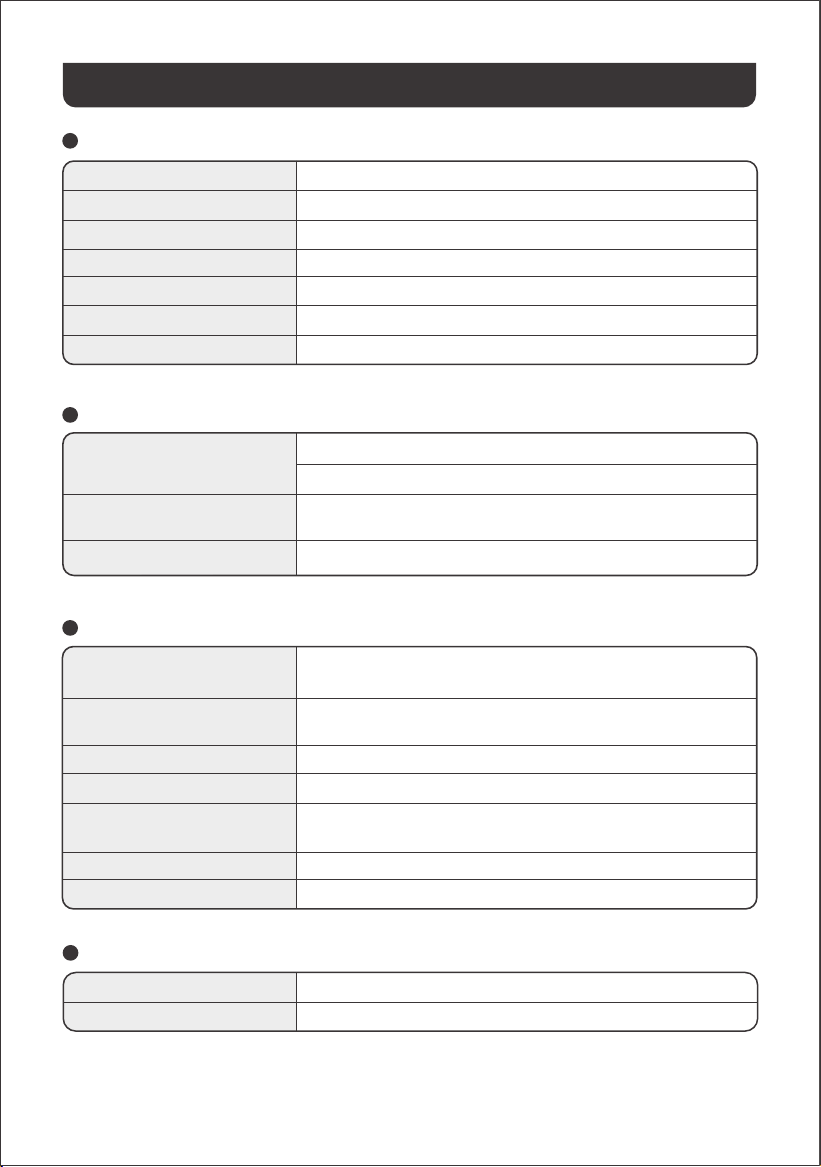
INFORMACIÓN GENERAL
Nombre del producto
N° de modelo
Capacidad
Química Celular
Peso
Dimensiones
Ciclo de vida
Jackery HomePower 2000 Plus
JHP-2000A-RC
2048Wh (40Ah/51,2V DC)
LiFePO₄
Aproximadamente 41,45 libras/18,8 kg
14,4 × 10,0 × 10,7 pulgadas / 36,6 × 25,5 × 27,2 cm
6000 ciclos de carga hasta 70 % + de capacidad
PUERTOS DE ENTRADA
1 × Entrada CA
2 × Puertos DC8020
1 × Puerto de expansión CC
Modo de carga: 100-120 V~ 60 Hz, 15 A Máx
Modo de derivación
①
: 100-120 V~ 60 Hz, 15 A Máx
11-16 V⎓8 A Máx, Doble a 8A Máx
16-60 V⎓12 A Máx, Doble a 21 A/800 W Máx
36,8 V-57,6 V⎓75 A Máx
PUERTOS DE SALIDA
37
ESPECIFICACIONES
※ USB Type-C y USB-C son marcas registradas de USB Implementers Forum.
® ®
Temperatura de carga
Temperatura de descarga
TEMPERATURA DE FUNCIONAMIENTO
14 °F a 113 °F / - 10 °C a 45 °C
14 °F a 113 °F / - 10 °C a 45 °C
①
El producto puede cargar la batería desde una toma de corriente CA mientras suministra energía a través de los puertos
de salida CA.
4 × Salidas CA
Salida de CA del Modo de derivación
①
1 × Salida USB-A
1 × Salida USB-C 30W
1 × Salida USB-C 140W
1 × Puerto DC 12V
1 × Puerto de expansión CC
120 V~ 60 Hz, 20 A Máx, 2400W nominales por puerto,
2400W en total, pico de sobretensión de 4800W
100 V-120 V~ 60 Hz, 15 A Máx.
(< 3 h cuando la corriente supera los 12 A)
18 W Máx, 5-6 V⎓3 A, 6-9 V⎓2 A, 9-12 V⎓1.5 A
30 W Máx, 5 V⎓3 A, 9 V⎓3 A, 12 V⎓2.5 A, 15 V⎓2 A, 20 V⎓1.5 A
140 W Máx, 5 V⎓3 A, 9 V⎓3 A, 12 V⎓3 A, 15 V⎓3 A, 20 V⎓5 A,
28 V⎓5 A
12 V⎓10 A Máx
36.8 V-57.6 V⎓55 A Máx
Para activar la extensión de
garantía,debe registrar su producto
en línea oponerse en contacto con
nuestro equipo de atención al cliente
en hello@jackery.com para ampliar
laduración de la garantia estándar.
*
El periodo de garantía y los detalles pueden variar según las leyes, regulaciones y distribuidores autorizados locales.
Jackery reparará o reemplazará (a cargo de Jackery) cualquier producto Jackery que no funcione
durante el periodo de garantía aplicable debido a defectos en la mano de obra o el material. El producto
reparado o reemplazado asumirá el periodo restante de la garantía desde la fecha original de compra.
GARANTÍA
Jackery Inc. garantiza al consumidor original que el producto Jackery estará libre de defectos relativos al
acabado y a los materiales en condiciones normales de uso por parte del consumidor durante el período de
garantía aplicable identificado en la sección "Período de garantía" que figura a continuación, sujeto a las
exclusiones que se establecen a continuación.
Esta declaración de garantía establece la obligación de garantía total y exclusiva de Jackery. No
asumiremos ni autorizaremos que ninguna persona asuma por nosotros ninguna otra responsabilidad en
relación con la venta de nuestros productos.
El periodo de garantía estándar de HP2000Plus es de 36 meses.
En cada caso, el período de garantía se mide a partir de la fecha
de compra por parte del comprador consumidor original. Para
establecer la fecha de inicio del período de garantía, se necesita
el recibo de venta de la primera compra del consumidor u otra
prueba documental razonable.
Garantía limitada
Reparación o reemplazo
La garantía del producto de Jackery se limita al consumidor original y no es transferible a ningún
propietario posterior.
Limitado al comprador consumidor original
La garantía de Jackery no se aplica a:
•
• Intento de reparación por cualquier persona que no sea un centro autorizado.
• Cualquier producto adquirido a través de una casa de subastas en línea.
• La garantía de Jackery no se aplica a la célula de la batería a menos que usted la cargue completa-
mente en los siete días siguientes a la compra del producto y, a partir de entonces, al menos una vez
cada 6 meses.
Exclusiones
Jackery se reserva el derecho a la interpretación final de la política posventa de los clientes anterior.
Derechos de interpretación
Período de garantía
Garantía Estándar
AÑOS
3
Garantía extendida
AÑOS
2
38
Esta garantía se aplica solo a los clientes que compren en el sitio web oficial de Jackery,
plataformas de terceros de marca Jackery o distribuidores autorizados locales.
Cualquier producto que haya sido mal utilizado, abusado, modificado, dañado por accidente, o usado
para cualquier cosa distinta del uso normal del consumidor según lo autorizado en la documentación
actual del producto de Jackery.
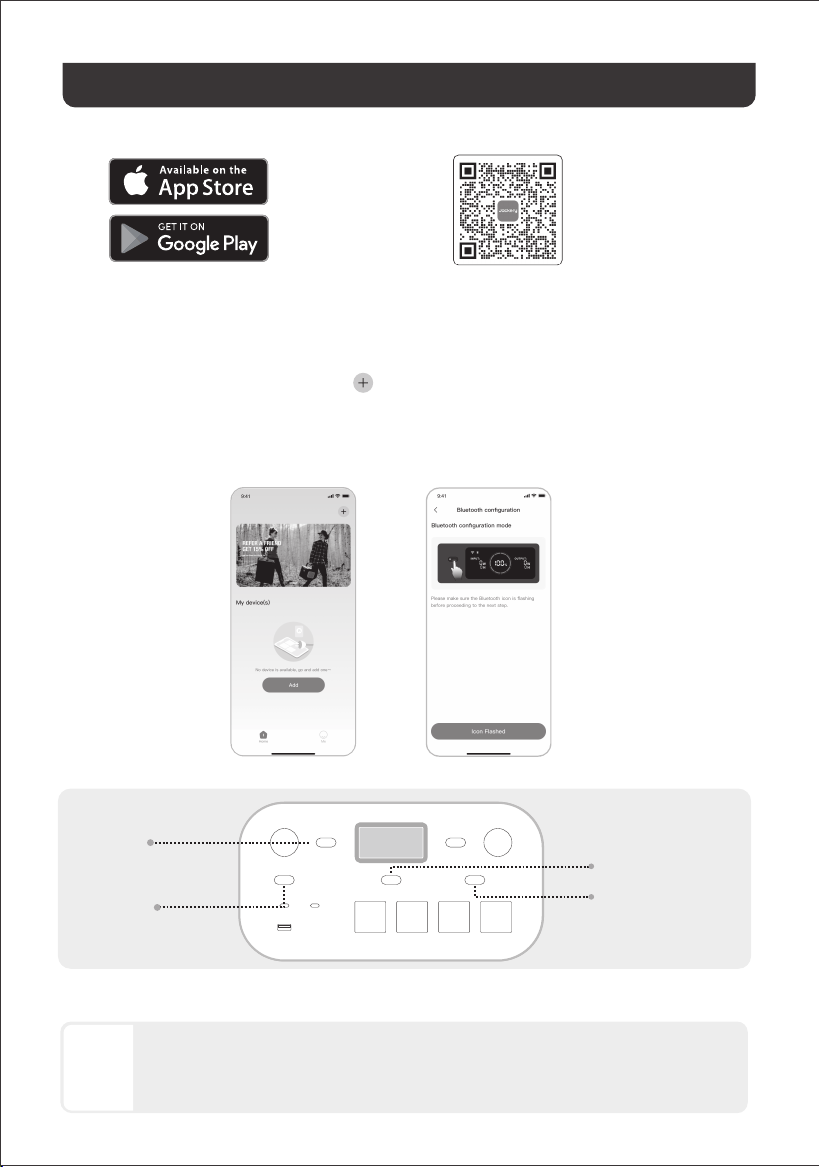
39
2.3 Tras hacer clic en el icono del dispositivo buscado, la aplicación conecta automáticamente el
dispositivo a través de Bluetooth.
Buscar "Jackery" en Google Play o en la App
Store para instalar la aplicación. Después,
podrá registrarte e iniciar sesión.
2. Añadir un dispositivo
2.2 Presione una vez el botón de encendido principal del dispositivo para encenderlo. Los iconos del
wifi y del Bluetooth del dispositivo parpadearán para indicar que el dispositivo ha entrado en el modo
de configuración de red. A continuación, pulse el botón "icono parpadeante" y permita que la
aplicación se conecte a los dispositivos cercanos y abra los permisos de Bluetooth.
1. Descargar la aplicación e iniciar sesión
2.1 Haga clic en el botón Añadir dispositivo .
2.1 2.2
CONFIGURACIÓN DE LA APLICACIÓN
Alternativamente, escanee el
código QR a continuación para
descargar e instalar la app.
• El propietario del dispositivo lo compartirá con otros usuarios a través de la App.
• Mantenga pulsados el botón de encendido principal y el botón de energía CC/USB durante 3
segundos para reiniciar el Wi-Fi y el Bluetooth del dispositivo y, a continuación, vuelva a vincularlo.
Si durante el proceso de vinculación se indica que "el dispositivo ha sido vinculado", se pueden
utilizar las dos formas siguientes para la conexión.
NOTA
Botón de
encendido
principal
Botón de energía CA2
Botón de energía CA1
Botón de
energía
CC/USB
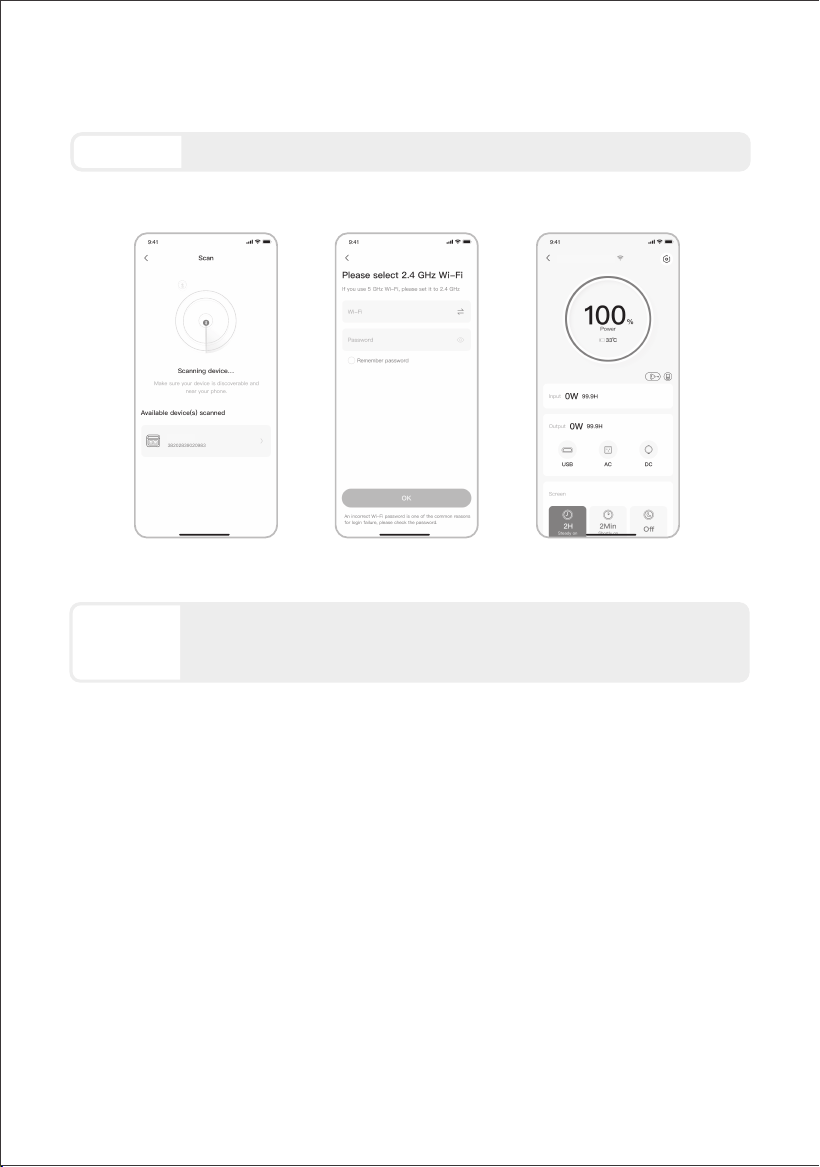
La aplicación Jackery solo puede conectarse a una estación de energía a la vez
mediante Bluetooth. Regresar a la lista de dispositivos desconecta automáticamente
Bluetooth. Toque la estación de energía en la lista nuevamente para reconectarse
automáticamente.
PRECAUCIÓN
Las capturas de pantalla anteriores sirven solo de referencia.
40
2.52.3 2.4
2000 Plus
• El wifi y el Bluetooth se encienden automáticamente al encender el dispositivo y se iluminan los iconos
de wifi y Bluetooth de la pantalla.
• Pulse el botón de energía CC/USB y el botón de energía CA1 al mismo tiempo hasta que se
enciendan los iconos de wifi y Bluetooth en la pantalla.
3. Desvincular el dispositivo
Haga clic en el botón «Configuración» situado en la esquina superior derecha de la interfaz principal
del dispositivo para entrar en la página de configuración. Después, haga clic en el botón «Desvincular»
situado en la parte inferior de la página para desvincular el dispositivo.
4. Notas
4.1 Para activar Wi-Fi y Bluetooth:
Pulse el botón de energía CC/USB y el botón de energía CA1 al mismo tiempo hasta que se apaguen
los iconos de wifi y Bluetooth en la pantalla.
4.2 Para desactivar Wi-Fi y Bluetooth:
Pulsa el botón de encendido principal y el botón de energía CC/USB al mismo tiempo durante 3
segundos para restablecer los ajustes de fábrica de Wi-Fi y Bluetooth. Se desvinculará la cuenta de la
aplicación conectada.
4.3 Para restablecer Wi-Fi y Bluetooth:
2.4 Una vez que el dispositivo se haya conectado correctamente, es necesario introducir el nombre y la
contraseña de la red Wi-Fi a la que se conectará el dispositivo. Una vez introducidos, el dispositivo se
conectará automáticamente a la red Wi-Fi.
2.5. Después de agregar exitosamente el dispositivo en la App, el icono del Wi-Fi en el dispositivo
permanecerá siempre encendido.
Selecciona una red Wi-Fi en la banda de 2,4 GHz. El dispositivo no admite una red Wi-Fi
en la banda de 5 GHz.
NOTA
HomePower 2000 Plus

JACKERY INC.
www.jackery.com
1-888-502-2236 (US)
5310 Bunche Dr., Fremont, CA 94538-8301