100160882_2000001229_Rev G
is manual must only be used
by a qualied heating installer /
service technician. Read all
instructions, including this manual,
the Installation and Operation
Manual, and the Service Manual,
before installing. Perform steps in
the order given. Failure to comply
could result in severe personal
injury, death, or substantial property
damage.
⚠ WARNING
Save this manual for future reference.
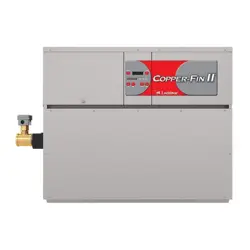
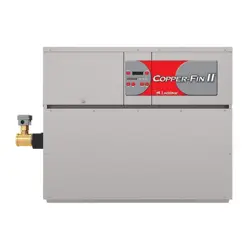
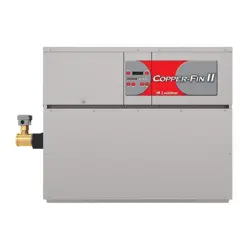
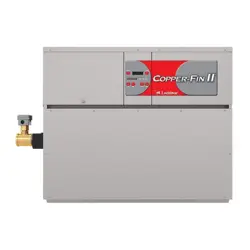
Copper-fin II/IIE
Boiler, Water Heater
and Pool Heater
ModBus and BACnet
Communication
Instructions
Models: 402 - 2072
(Boiler & Water Heater)
Models: 502 - 2072
(Pool Heater)

Contents
1. INTRODUCTION
Denitions .................................................................... 2
Minimum System Requirements .................................. 2
2. MODBUS CONFIGURATION
Addressing ................................................................... 3
Timing Specications ................................................... 4
Parity ............................................................................ 4
Data Transmission Mode ............................................. 4
ModBus Board Diagnostics ......................................... 4
Internal Faults ......................................................... 4
ModBus Function Set ............................................. 5
ModBus Exception Codes ........................................... 6
3. MODBUS MEMORY MAP
Primary Data Tables .................................................... . 7
Copper-n II/IIE Memory Map ..................................... 7-8
4. BACNET CONFIGURATION
Addressing ................................................................... 9
Timing Specications ................................................... 10
Board Diagnostics ....................................................... 10
Internal Faults ......................................................... 10
5. BACNET MEMORY MAP
Primary Data Tables .................................................... .11
Copper-n II/IIE Memory Map.................................11-12
Input Registers ....................................................... .12
Holding Registers ................................................... .12
6. WIRING REQUIREMENTS
ModBus Mounting/Wiring Instructions......................13-14
Physical Wiring............................................................. 15
Typical Boiler System Wiring .................................. 16-19
7. UNIT OPERATION
Unit Operation with ModBus Communications ...... 20-23
8. TROUBLESHOOTING ........................................... 24-25
9. DIAGRAMS
Ladder Diagram ..................................................... 26-27
Connection Diagram ................................................28-28
Revision Notes ................................................... Back Cover
1 Introduction
e information contained in this manual provides general guidelines for the implementation of ModBus communication with
the Lochinvar Copper-n II/IIE.
All ModBus networks are implemented utilizing a master-slave arrangement where all Copper-ns are slaves and the master is
a building automation system capable of communicating over a RS-485 serial connection. BACnet networks are implemented
using a token passing process where multiple masters and slaves share a common RS-485 bus. e Lochinvar BACnet interface
is a master only.
Abbreviation or Acronym Meaning
ASCII American Standard Code for Information Interchange
BACnet A data communication protocol for Building Automation and Control Networks
BAS Building Automation System
Baud (Baud Rate) Number of data bits transmitted per second (bps)
EMS Energy Management System
FDX Full-Duplex
HDX Half-Duplex
Hex Hexadecimal Number (0 - 9, A - F)
I/O Box Input/Output (I/O)
LSB Least Signicant Byte
ModBus® A serial, half-duplex data transmission protocol developed by AEG Modicon
MSB Most Signicant Byte
RS232
A standard for serial, full-duplex (FDX) transmission of data based on the RS232
Standard
RS485 A standard for serial transmission of data based on the RS-485 Standard
RTU Remote Terminal Unit
Denitions
Minimum System Requirements
• BAS system or computer with a serial or USB port with a converter to RS-485.
• Copper-n II/IIE equipped with ModBus communication board.
• Shielded twisted pair communication cable.
3
2 ModBus Conguration
Addressing
e ModBus addressing space is comprised of 256 dierent
addresses.
• 0 is reserved for broadcast messages from the master
device
• 1 - 247 are free to use for each unique device
• 248 - 255 are reserved
To set the ModBus address the dip switches can be set in
either the 0 position or the 1 position. For switches set to
the 1 position their value will be added together to determine
the address.
Each switch set to the 1 position has the following value:
Dip switch 1 = 1
Dip switch 2 = 2
Dip switch 3 = 4
Dip switch 4 = 8
Dip switch 5 = 16
Dip switch 6 = 32
Dip switch 7 = 64
Dip switch 8 = 128
Any dip switch set to 0 has a value equal to 0.
Example:
To set the address of the ModBus board to 50, dip switches 2, 5,
and 6 have to be set to the 1 position. e address is determined
by adding the values of all the dip switches together.
Address = Value of Dip switch 1 + Value of Dip switch 2 +
Value of Dip switch 3 + Value of Dip switch 4 + Value of Dip
switch 5 + Value of Dip switch 6 + Value of Dip switch 7 +
Value of Dip switch 8
In this example:
Address = 0 + 2 + 0 + 0 + 16 + 32 + 0 + 0 = 50
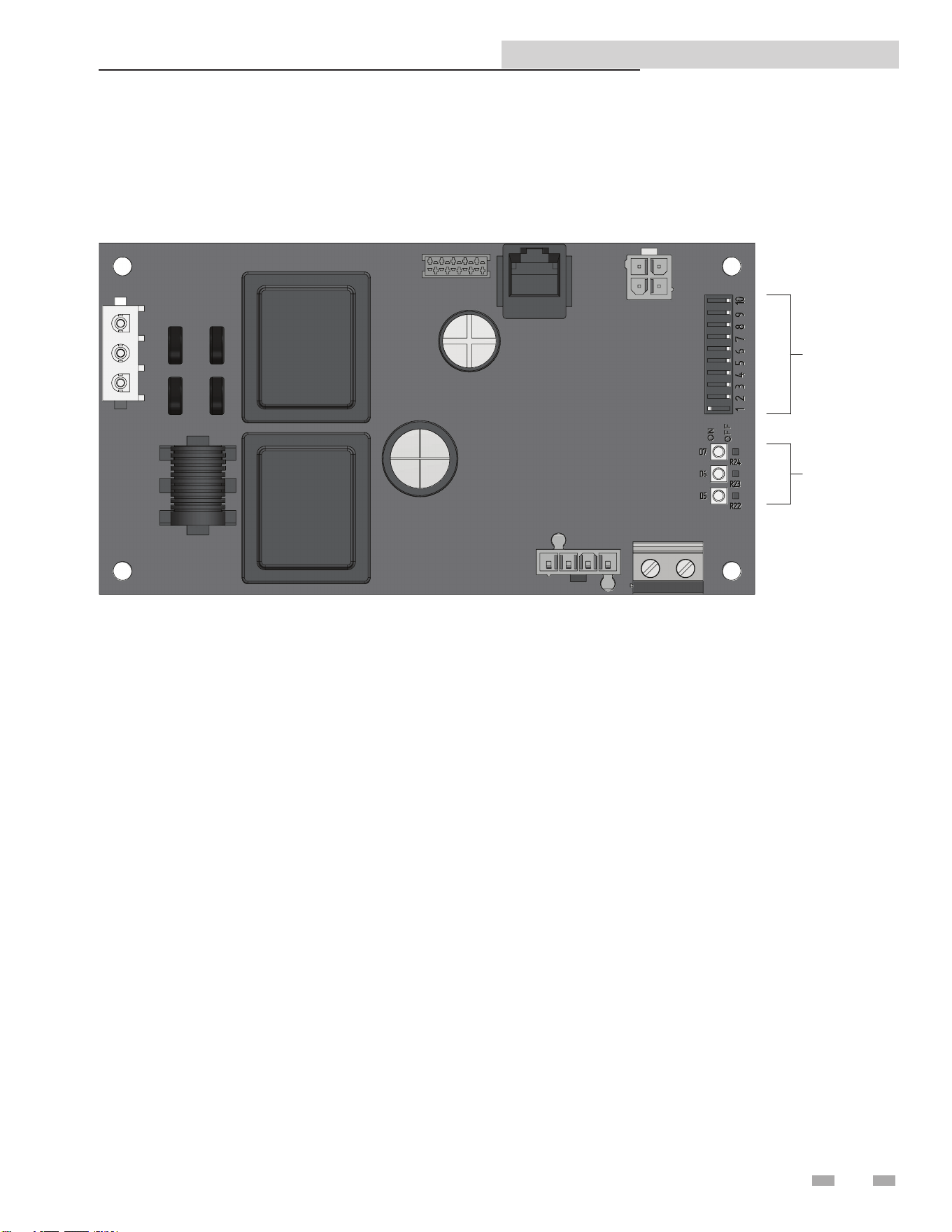
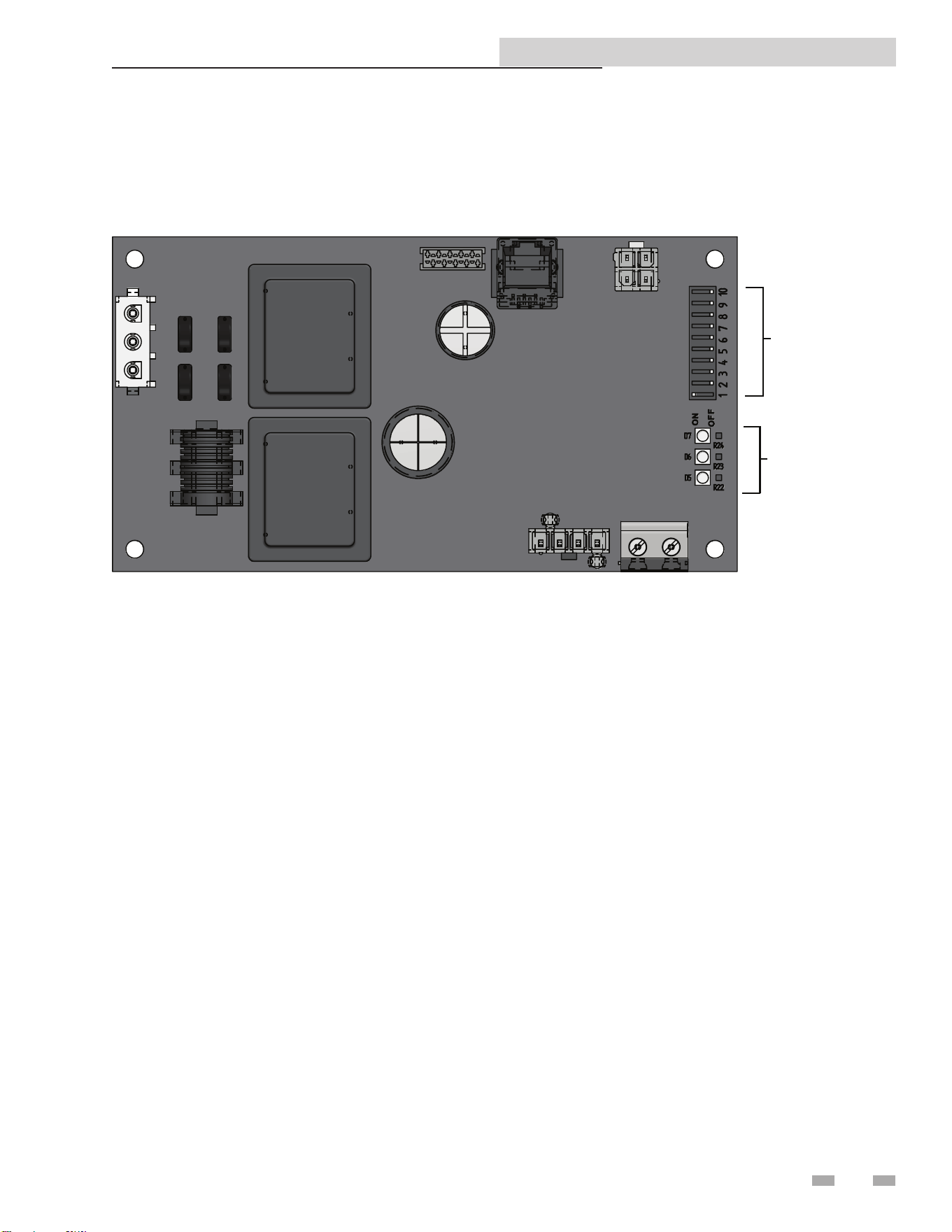
e ModBus communication board is equipped with a set of ten dip switches that are used to set the board conguration
(address, baud rate, and parity settings). e rst eight are used to set the address of each board. e ninth is baud rate. e
tenth is parity.
DIP
SWITCH
ES
LED'S
Figure 2-1_ModBus Communication Board
Copper-n II/IIE ModBus and BACnet Manual

4
2 ModBus Conguration
Timing Specications
e baud rate for the ModBus board is selectable with dip
switch #9.
1 = 19200 bps
0 = 9600 bps
Each message is started by at least 3.5 character times of
silence. e maximum delay between frames is 1.5 character
times.
When the system temperature, tank temperature, and/or
0-10V BMS voltage is provided by the BAS to the boiler, it is
critical that the values be updated every few seconds. If the
boiler does not receive updated values within a timeout period
(installer adjustable), the control will revert to using its own
readings (if connected). e timeout is programmable by
accessing parameter H7 (see the Copper-n Service Manual
for the procedure on how to set parameters). e timeout is
adjustable between 1 and 255 seconds. e default timeout
is 10 seconds.
When the BAS is not providing any of these values, but
is still controlling the boiler (such as providing an enable
command), the BAS must refresh these commands at least
every 4 minutes. If the commands are not refreshed, the
boiler will revert to operating based on its own inputs.
Parity
Parity is set by the position of Dip switch #10.
0 = No Parity
1 = Even Parity
If No Parity is selected there will be two stop bits, otherwise
there will be one.
Data Transmission Mode
Many ModBus bus master devices can be congured to
transmit data in either ModBus RTU or ModBus ASCII modes.
Since RTU messages can be formatted to use fewer data bits and
are therefore more ecient, RTU has been chosen to be used
with all Lochinvar ModBus communication. Please ensure that
the master device is transmitting ModBus RTU.
ModBus Board Diagnostics
e ModBus board is equipped with three LED’s for visual
diagnostics: Two yellow LED’s and one green. One yellow LED
(D5) is used to indicate transmission of data. e other yellow
LED (D6) is used to indicate reception of data. e green LED
(D7) is used to show internal faults.
Internal Faults:
Normal Operation = 1 second bright, 1 second dim
Controller Fault = Continuously on
No Burner Control Communication = 0.5 seconds on, 1.5
seconds o
No ModBus Communication = 1.5 seconds on, 0.5 seconds
o
ModBus Communication
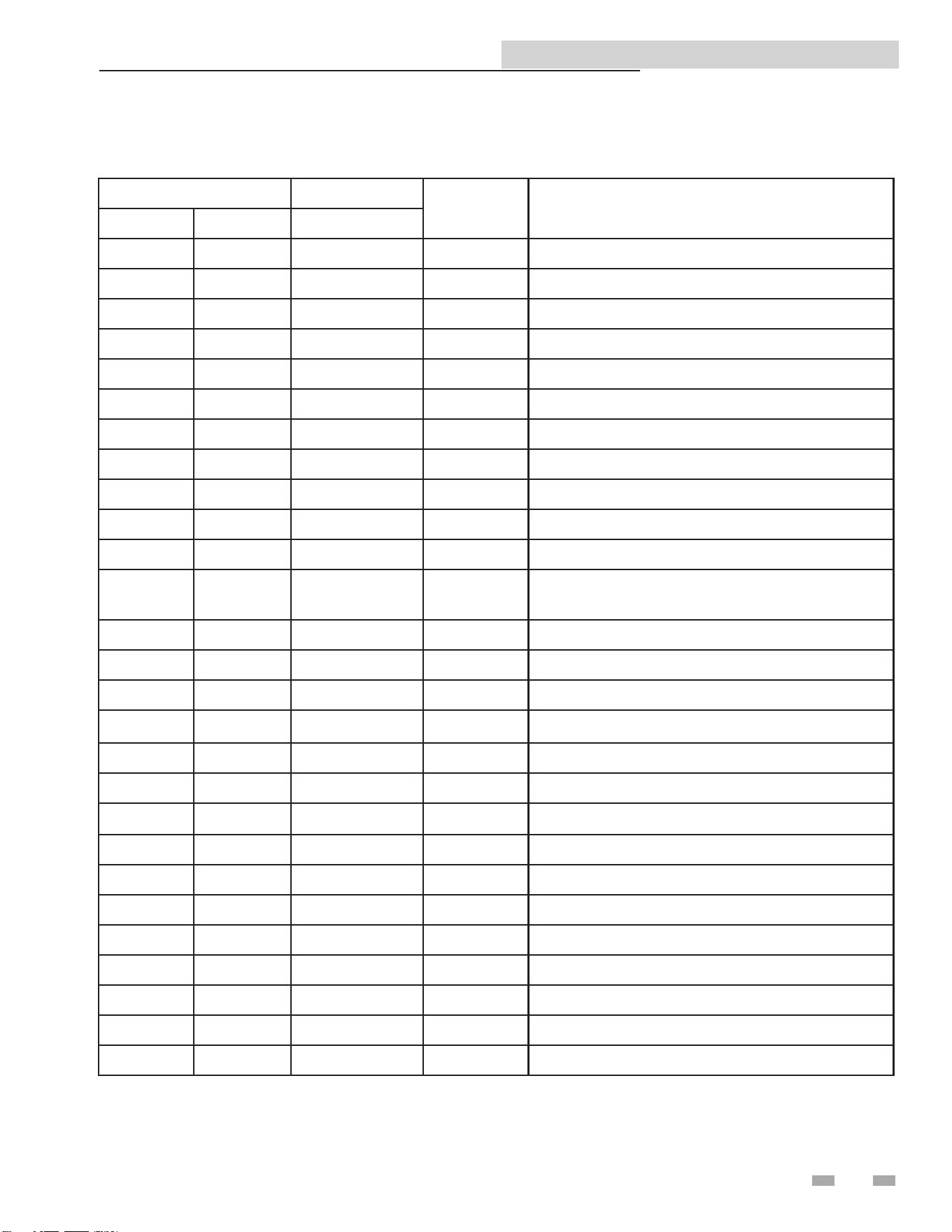
e ModBus communication commands and exception codes
that are supported by the ModBus communication board can
be found on pages 5 and 6 of this manual.
Copper-n II/IIE ModBus and BACnet Manual
5
2 ModBus Conguration (continued)
Function Sub Function
HEX Description
Dec HEX Dec
1 01 Read Coil Status
2 02 Read Input Status
3 03 Read Holding Registers
4 04 Read Input Registers
5 05 Force Single Coil
6 06 Preset Single Register
7 07 Read Exception Status
8 08 0 00 Diagnostic - Return Query Data
1 01 Diagnostic - Restart Communication
2 02 Diagnostic - Return Diagnostic Register
4 04 Diagnostic - Force Listen Mode
10 0A
Diagnostic - Clear Counters and Diagnostic
Registers
11 0B Diagnostic - Return Bus Message Count
12 0C Diagnostic - Bus Communication Error Count
13 0D Diagnostic - Bus Exception Error Count
14 0E Diagnostic - Return Slave Message Count
15 0F Diagnostic - Return Communication Error Count
16 10 Diagnostic - Return Slave NAK Count
17 11 Diagnostic - Return Slave Busy Count
18 12 Diagnostic - Return Bus Character Overrun Count
20 14 Diagnostic - Clear Overrun Counter and Flag
11 0B Get Communication Event Counter
12 0C Get Communication Event Log
15 0F Write Multiple Coils
16 10 Write Multiple Registers
17 11 Report Slave ID
23 17 Read / Write Multiple Registers
ModBus Function Set
Copper-n II/IIE ModBus and BACnet Manual

6
2 ModBus Conguration
ModBus Exception Codes
Code Name Meaning
01 ILLEGAL FUNCTION
The function code received in the query is not an allowable action for the server
(or slave). This may be because the function code is only applicable to newer
devices, and was not implemented in the unit selected. It could also indicate that
the server (or slave) is in the wrong state to process a request of this type, for
example because it is uncongured and is being asked to return register values.
02 ILLEGAL DATA ADDRESS
The data address received in the query is not an allowable address for the
server (or slave). More specically, the combination of reference number and
transfer length is invalid. For a controller with 100 registers, the PDU addresses
the rst register as 0, and the last one as 99. If a request is submitted with a
starting register address of 96 and a quantity of registers of 4, then this request
will successfully operate (address-wise at least) on registers 96, 97, 98, 99. If
a request is submitted with a starting register address of 96 and a quantity of
registers of 5, then this request will fail with Exception Code 0x02 “Illegal Data
Address” since it attempts to operate on registers 96, 97, 98, 99 and 100, and
there is no register with address 100.
03 ILLEGAL DATA VALUE
A value contained in the query data eld is not an allowable value for server
(or slave). This indicates a fault in the structure of the remainder of a complex
request, such as that the implied length is incorrect. It specically does NOT
mean that a data item submitted for storage in a register has a value outside the
expectation of the application program, since the ModBus protocol is unaware of
the signicance of any particular value of any particular register.
04 SLAVE DEVICE FAILURE
An unrecoverable error occurred while the server (or slave) was attempting to
perform the requested action.
05 ACKNOWLEDGE
Specialized use in conjunction with programming commands. The server (or
slave) has accepted the request and is processing it, but a long duration of time
will be required to do so. This response is returned to prevent a timeout error from
occurring in the client (or master). The client (or master) can next issue a Poll
Program Complete message to determine if processing is completed.
06 SLAVE DEVICE BUSY
Specialized use in conjunction with programming commands. The server (or
slave) is engaged in processing a long -- duration program command. The client
(or master) should re-transmit the message later when the server (or slave) is free.
08 MEMORY PARITY ERROR
Specialized use in conjunction with function codes 20 and 21 and reference type
6, to indicate that the extended le area failed to pass a consistency check. The
server (or slave) attempted to read record le, but detected a parity error in the
memory. The client (or master) can retry the request, but service may be required
on the server (or slave) device.
0A GATEWAY PATH UNAVAILABLE
Specialized use in conjunction with gateways, indicates that the gateway was
unable to allocate an internal communication path from the input port to the
output port for processing as the request. Usually means that the gateway is
miscongured or overloaded.
0B
GATEWAY TARGET DEVICE
FAILED TO RESPOND
Specialized use in conjunction with gateways, indicates that no response was
obtained from the target device. Usually means that the device is not present on
the network.
ModBus Exception Codes
Copper-n II/IIE ModBus and BACnet Manual
7
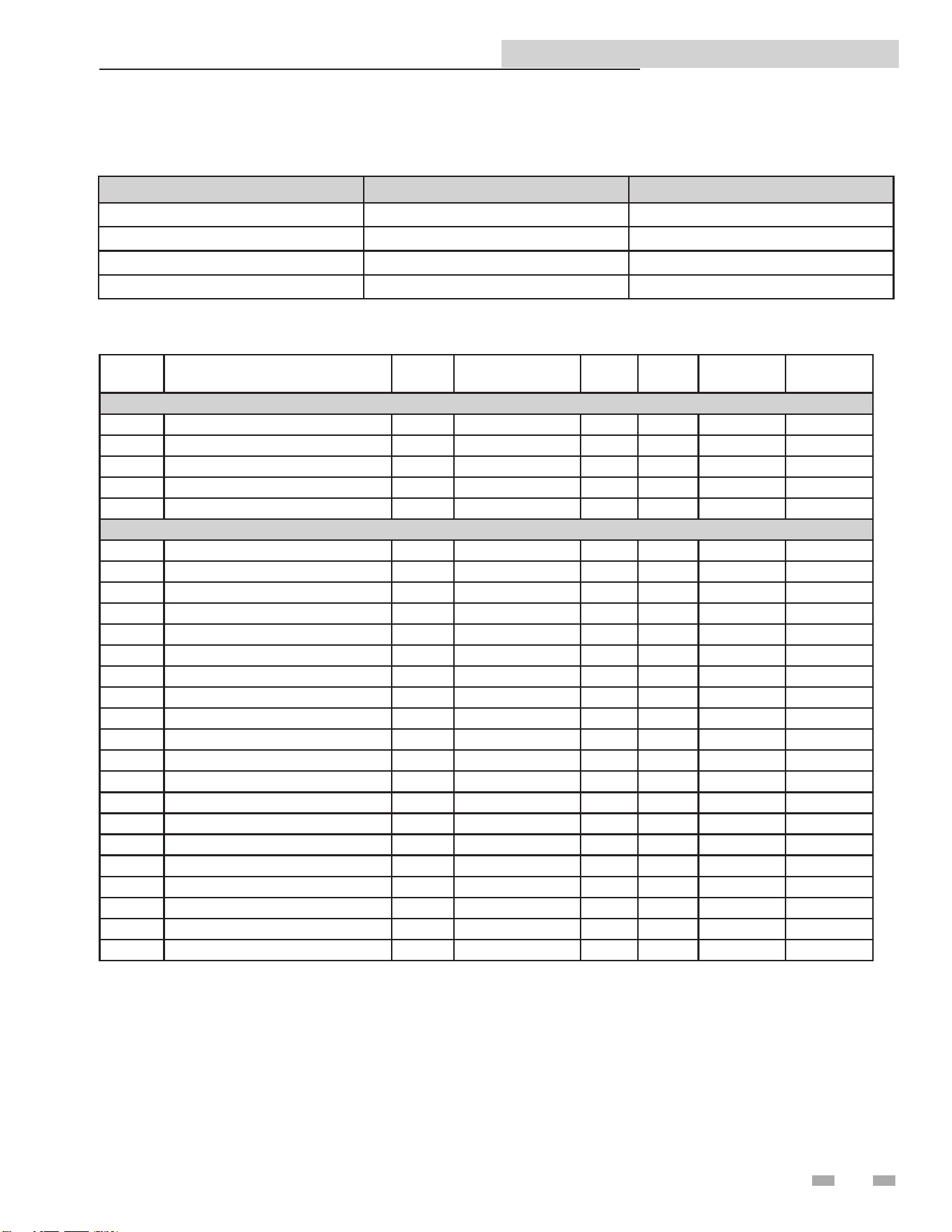
Primary Data Tables
Table Data Type Read / Write
Discrete Inputs Single Bit Read Only
Coils Single Bit Read / Write
Input Registers 16-Bit Word Read Only
Holding Registers 16 Bit Word Read / Write
Copper-n II/IIE Memory Map
3 ModBus Memory Map
Address Description Default Unit Min. Max. Resolution
Calculation
Factor
Coils
00001 Stage 1 Enable 0 1=ON / 0=OFF 0 1 1 1
00002 Stage 2 Enable 0 1=ON / 0=OFF 0 1 1 1
00003 Stage 3 Enable 0 1=ON / 0=OFF 0 1 1 1
00004 Stage 4 Enable 0 1=ON / 0=OFF 0 1 1 1
00005 Tank Thermostat 0 1=ON / 0=OFF 0 1 1 1
Discrete Inputs
10001 High Limits 0 1=ON / 0=OFF 0 1 1 1
10002 Flow Switch 0 1=ON / 0=OFF 0 1 1 1
10003 Gas Pressure Switch 0 1=ON / 0=OFF 0 1 1 1
10004 Louver Proving Switch 0 1=ON / 0=OFF 0 1 1 1
10005 Air Pressure Switch 0 1=ON / 0=OFF 0 1 1 1
10008 Flame 1 0 1=ON / 0=OFF 0 1 1 1
10009 Stage 1 On 0 1=ON / 0=OFF 0 1 1 1
10010 Tank Thermostat 0 1=ON / 0=OFF 0 1 1 1
10011 Stage 2 On 0 1=ON / 0=OFF 0 1 1 1
10012 Stage 3 On 0 1=ON / 0=OFF 0 1 1 1
10013 Stage 4 On 0 1=ON / 0=OFF 0 1 1 1
10023 Flame 2 0 1=ON / 0=OFF 0 1 1 1
10024 Enable 2 0 1=ON / 0=OFF 0 1 1 1
10033 Runtime Contacts 0 1=ON / 0=OFF 0 1 1 1
10034 Alarm Contacts 0 1=ON / 0=OFF 0 1 1 1
10035 HTR Pump 0 1=ON / 0=OFF 0 1 1 1
10036 DHW Pump 0 1=ON / 0=OFF 0 1 1 1
10037 Louver Relay 0 1=ON / 0=OFF 0 1 1 1
10038 Gas Valve 1 0 1=ON / 0=OFF 0 1 1 1
10039 System Pump 0 1=ON / 0=OFF 0 1 1 1
Copper-n II/IIE ModBus and BACnet Manual
8
Copper-n II/IIE Memory Map
3 ModBus Memory Map
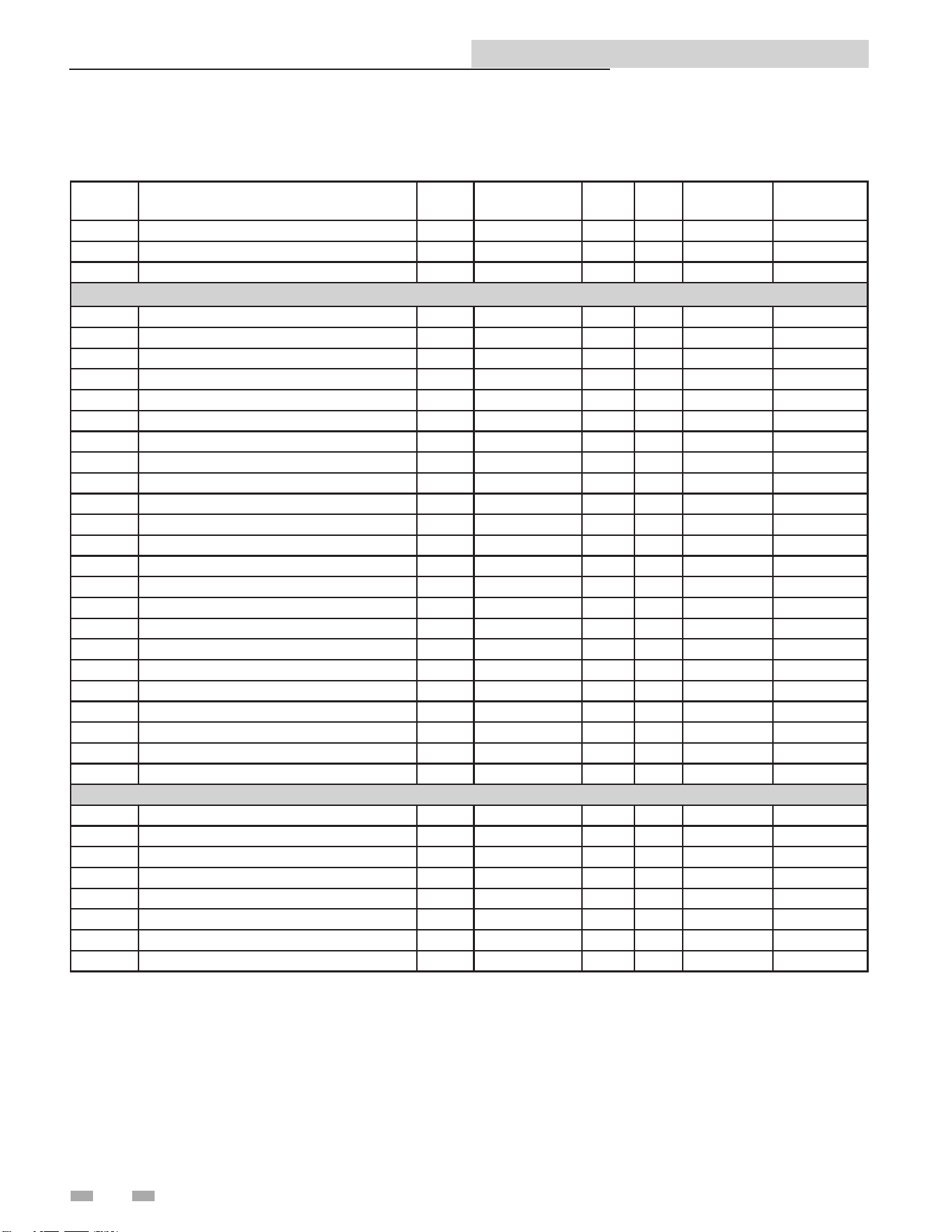
Conguration Bits
Address 40001 contains conguration bits sent from the BAS to the boiler. ese bits tell the boiler to use its own internal inputs,
or inputs from the BAS. When a bit is set to 1, the boiler will ignore the corresponding value contained internally, and expect
the BAS to write that value into the Holding Registers. e conguration bits are as follows:
Bit 4: System Supply Temperature
Bit 5: Outdoor Temperature
Bit 6: Tank Temperature
Bit 7: System Return Temperature
Bit 8 - 15: Not Used (Default = 0)
Bit 0 (LSB): Boiler Enable
Bit 1: Tank ermostat
Bit 2: Rate Command / 10 - 10V Input / Set point Command
Bit 3: Tank Set point
Address Description Default Unit Min. Max. Resolution
Calculation
Factor
10046 Gas Valve 2 0 1=ON / 0=OFF 0 1 1 1
10047 Gas Valve 3 0 1=ON / 0=OFF 0 1 1 1
10048 Gas Valve 4 0 1=ON / 0=OFF 0 1 1 1
Input Registers
30001 Discrete Inputs 1 - 16 0 N/A 0 65535 1 1
30002 Discrete Inputs 17 - 32 0 N/A 0 65535 1 1
30003 Discrete Inputs 33 - 48 0 N/A 0 65535 1 1
30004 System / Cascade Set point 0 °C 0 130 0,5 0,5
30005 System Pump Speed 0 % 0 100 1 1
30006 Cascade Total Power 0 % 100 800 1 1
30007 Cascade Current Power 0 % 0 800 1 1
30008 Outlet Set point 0 °C 0 130 0,5 0,5
30009 Outlet Temperature 0 °C 0 130 0,1 0,1
30010 Inlet Temperature 0 °C -20 130 0,1 0,1
30011 Pool Temperature 0 °C -20 130 0,1 0,1
30012 Firing Rate 0 % 0 100 1 1
30014 Status Code 0 N/A 0 65535 1 1
30015 Blocking Code 0 N/A 0 65535 1 1
30016 Lockout Code 0 N/A 0 65535 1 1
30027 Lockout Code Leader 0 N/A 0 65535 1 1
30028 Lockout Code Member 1 0 N/A 0 65535 1 1
30029 Lockout Code Member 2 0 N/A 0 65535 1 1
30030 Lockout Code Member 3 0 N/A 0 65535 1 1
30031 Lockout Code Member 4 0 N/A 0 65535 1 1
30032 Lockout Code Member 5 0 N/A 0 65535 1 1
30033 Lockout Code Member 6 0 N/A 0 65535 1 1
30034 Lockout Code Member 7 0 N/A 0 65535 1 1
Holding Registers
40001 Conguration 0 N/A 0 65535 1 1
40002 Coils 0 N/A 0 65535 1 1
40003 0 - 10V Inp. / Rate Cmd / Setp. Cmd 0 % 0 100 1 1
40004 Pool Set point 0 °C 0 87,5 0,5 0,5
40005 Tank Temperature 0 °C -20 130 0,1 0,1
40006 Outdoor Temperature 0 °C -40 60 0,1 0,1
40007 System Supply Temperature 0 °C -20 130 0,1 0,1
40008 System Return Temperature 0 °C -20 130 0,1 0,1
Copper-n II/IIE ModBus and BACnet Manual
9
4 BACnet Conguration
Copper-n II/IIE ModBus and BACnet Manual
Address = Value of Dip switch 1 + Value of Dip switch 2 +
Value of Dip switch 3 + Value of Dip switch 4 + Value of Dip
switch 5 + Value of Dip switch 6 + Value of Dip switch 7 +
Value of Dip switch 8
In this example:
Address = 0 + 2 + 0 + 0 + 16 + 32 + 0 + 0 = 50
e BACnet Device Instance is calculated by adding the
BACnet local address to 620000. Using the above example, the
Device Instance will be:
Device Instance = 620000 + 50 = 620050
e base address (620000 in this example) is model dependant
and can be changed by the integrator. It can be set to any value
between 0 and 4194048. e resulting device instance will be
this value + the local address, as before. Once the base address
is changed, it can be reset back to the default base address
(620000 in this example) using the following procedure:
1. Turn OFF power to the interface board.
2. Set Dip switches 1 - 8 to the 1 position.
3. Turn ON power to the interface board.
4. Aer a few seconds, turn OFF power to the interface board.
5. Set Dip switches 1 - 7 to the desired local address. Set Dip
switch 8 to the 0 position.
6. Turn ON power to the interface board.
Device Name
e default device name is “MTR-01 BACnet.” is can be
changed by the integrator as desired.
e BACnet communication board is equipped with a set of ten dip switches that are used to set the board conguration (address
and baud rate). e rst eight are used to set the address of each board. e ninth and tenth are baud rate.
LED’S
DIP SWITCHE
S
Figure 4-1_Communication Board
Addressing
e BACnet local addressing space is comprised of 256
dierent addresses.
• Maximum address of 127.
Since the BACnet communication board is a BACnet master,
address 127 is the highest address that can be used.
To set the BACnet local address, the dip switches can be set
in either the 0 position or the 1 position. For switches set to
the 1 position their value will be added together to determine
the address.
Each switch set to the 1 position has the following value:
Dip switch 1 = 1
Dip switch 2 = 2
Dip switch 3 = 4
Dip switch 4 = 8
Dip switch 5 = 16
Dip switch 6 = 32
Dip switch 7 = 64
Any dip switch set to 0 has a value equal to 0.
Accomplish the dierent selections with Dip switch #8 on
the board. e OFF position displays Celsius while the ON
position is Fahrenheit.
Example:
To set the address of the BACnet board to 50, dip switches
2, 5, and 6 have to be set to the 1 position. e address
is determined by adding the values of all the dip switches
together.
10
10
4 BACnet Conguration
Copper-n II/IIE ModBus and BACnet Manual
Timing Specications
e baud rate for the BACnet board is selectable with Dip
switches #9 and #10.
Communication Board Diagnostics
e Communication board is equipped with three LED’s for
visual diagnostics: Two yellow LED’s and one green. One
yellow LED (D5) is used to indicate transmission of data. e
other yellow LED (D6) is used to indicate reception of data.
e green LED (D7) is used to show internal faults.
Internal Faults:
Normal Operation = 1 second bright, 1 second dim
Controller Fault = Continuously on
No Burner Control Communication = 0.5 seconds on, 1.5
seconds o
No BACnet Communication = 1.5 seconds on, 0.5 seconds
o.
Switch #9 Switch#10 Baud Rate
OFF OFF 9600
ON OFF 19200
OFF ON 38400
ON ON 76800
When the system temperature, tank temperature, and/or
0-10V BMS voltage is provided by the BAS to the boiler, it
is critical that the values be updated every few seconds. If
the boiler does not receive updated values within a timeout
period (installer adjustable), the control will revert to using its
own readings (if connected). e timeout is programmable
by accessing parameter H7 (see the Copper-n Service
Manual for the procedure on how to set parameters). e
timeout is adjustable between 1 and 255 seconds. e default
timeout is 10 seconds.
When the BAS is not providing any of these values, but
is still controlling the boiler (such as providing an enable
command), the BAS must refresh these commands at least
every 4 minutes. If the commands are not refreshed, the
boiler will revert to operating based on its own inputs.
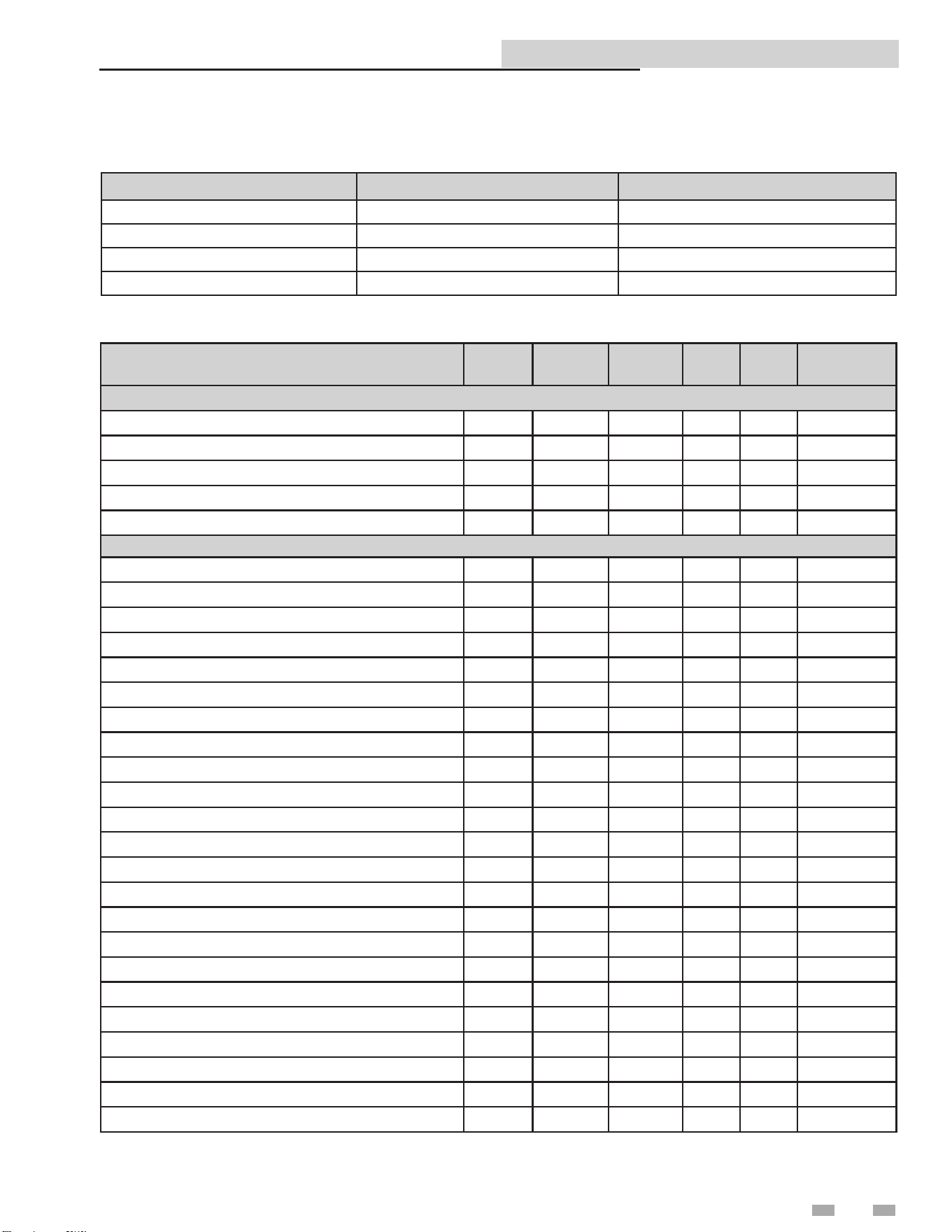
Object Name
Object
Type
Object
Instance
Units Min Max Resolution
Binary Values
Stage 1 Enable BV 0 none 0 1 1
Stage 2 Enable BV 1 none 0 1 1
Stage 3 Enable BV 2 none 0 1 1
Stage 4 Enable BV 3 none 0 1 1
Tank Thermostat BV 4 none 0 1 1
Binary Inputs
High Limits BI 0 none 0 1 1
Flow Switch BI 1 none 0 1 1
Gas Pressure Switch BI 2 none 0 1 1
Louver Proving Switch BI 3 none 0 1 1
Air Pressure Switch BI 4 none 0 1 1
Flame 1 BI 7 none 0 1 1
Stage 1 On BI 8 none 0 1 1
Tank Thermostat BI 9 none 0 1 1
Stage 2 On BI 10 none 0 1 1
Stage 3 On BI 11 none 0 1 1
Stage 4 On BI 12 none 0 1 1
Flame 2 BI 22 none 0 1 1
Enable 2 BI 23 none 0 1 1
Runtime Contacts BI 32 none 0 1 1
Alarm Contacts BI 33 none 0 1 1
HTR Pump BI 34 none 0 1 1
DHW Pump BI 35 none 0 1 1
Louver Relay BI 36 none 0 1 1
Gas Valve 1 BI 37 none 0 1 1
System Pump BI 38 none 0 1 1
Gas Valve 2 BI 45 none 0 1 1
Gas Valve 3 BI 46 none 0 1 1
Gas Valve 4 BI 47 none 0 1 1
11
Copper-n II/IIE ModBus and BACnet Manual
5 BACnet Memory Map
Primary Data Tables
Object Type Data Type Read / Write
Binary Input (BI) Single Bit Read Only
Binary Value (BV) Single Bit Read / Write
Analog Input (AI) 16-Bit Word Read Only
Analog Value (AV) 16 Bit Word Read / Write
Memory Map
12
Copper-n II/IIE ModBus and BACnet Manual
4 Wiring Requirements (continued)5 BACnet Memory Map
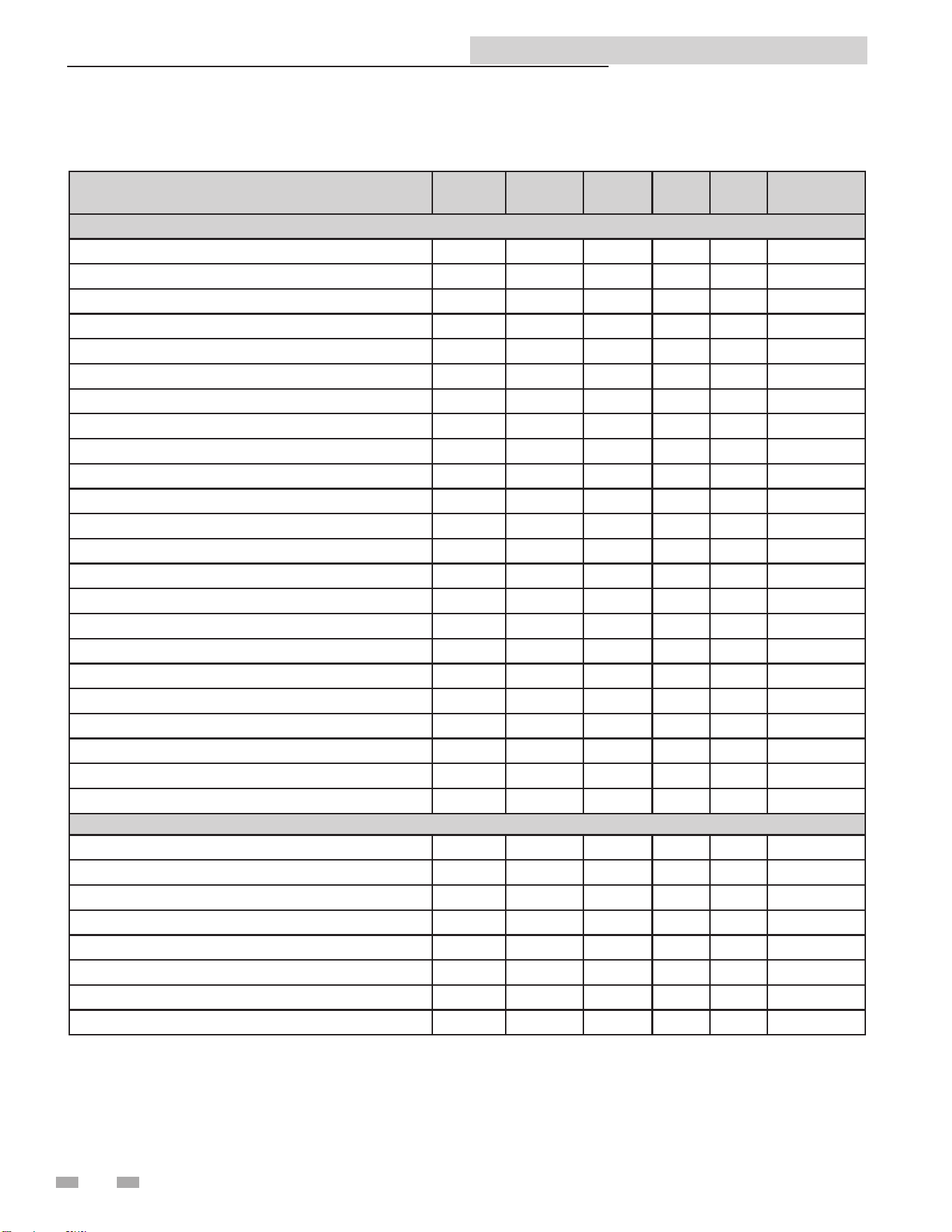
Object Name
Object
Type
Object
Instance
Units Min Max Resolution
Analog Inputs
Binary Inputs 0 - 15 AI 0 none 0 65535 1
Binary Inputs 16 - 31 AI 1 none 0 65535 1
Discrete Inputs 32 - 47 AI 2 none 0 65535 1
System / Cascade Set point AI 3 Deg C 0 130 0.5
System Pump Speed AI 4 Percent 0 100 1
Cascade Total Power AI 5 Percent 100 800 1
Cascade Current Power AI 6 Percent 0 800 1
Outlet Set point AI 7 Deg C 0 130 0.5
Outlet Temperature AI 8 Deg C 0 130 0.1
Inlet Temperature AI 9 Deg C -20 130 0.1
Pool Temperature AI 10 Deg C -20 130 0.1
Firing Rate AI 11 Percent 0 100 1
Status Code AI 13 none 0 65535 1
Blocking Code AI 14 none 0 65535 1
Lockout Code AI 15 none 0 65535 1
Lockout Error Leader AI 26 none 0 65535 1
Lockout Error Member 1 AI 27 none 0 65535 1
Lockout Error Member 2 AI 28 none 0 65535 1
Lockout Error Member 3 AI 29 none 0 65535 1
Lockout Error Member 4 AI 30 none 0 65535 1
Lockout Error Member 5 AI 31 none 0 65535 1
Lockout Error Member 6 AI 32 none 0 65535 1
Lockout Error Member 7 AI 33 none 0 65535 1
Analog Values
Conguration AV 0 none 0 65535 1
Binary Values 0 - 4 AV 1 none 0 65535 1
0 - 10V Inp. / Rate Cmd / Setp. Cmd AV 2 Percent 0 100 1
Tank / Pool Set point AV 3 Deg C 0 87,5 0.5
Tank Temperature AV 4 Deg C -20 130 0.1
Outdoor Temperature AV 5 Deg C -40 60 0.1
System Supply Temperature AV 6 Deg C -20 130 0.1
Pool /System Return Temperature AV 7 Deg. C -20 130 0.1
Memory Map (continued)
13
Copper-n II/IIE ModBus and BACnet Manual
6 Wiring Requirements
Mounting/Wiring Instructions
1. Turn OFF power at the source.
2. Remove the le and right access panels to access
the inside of the unit.
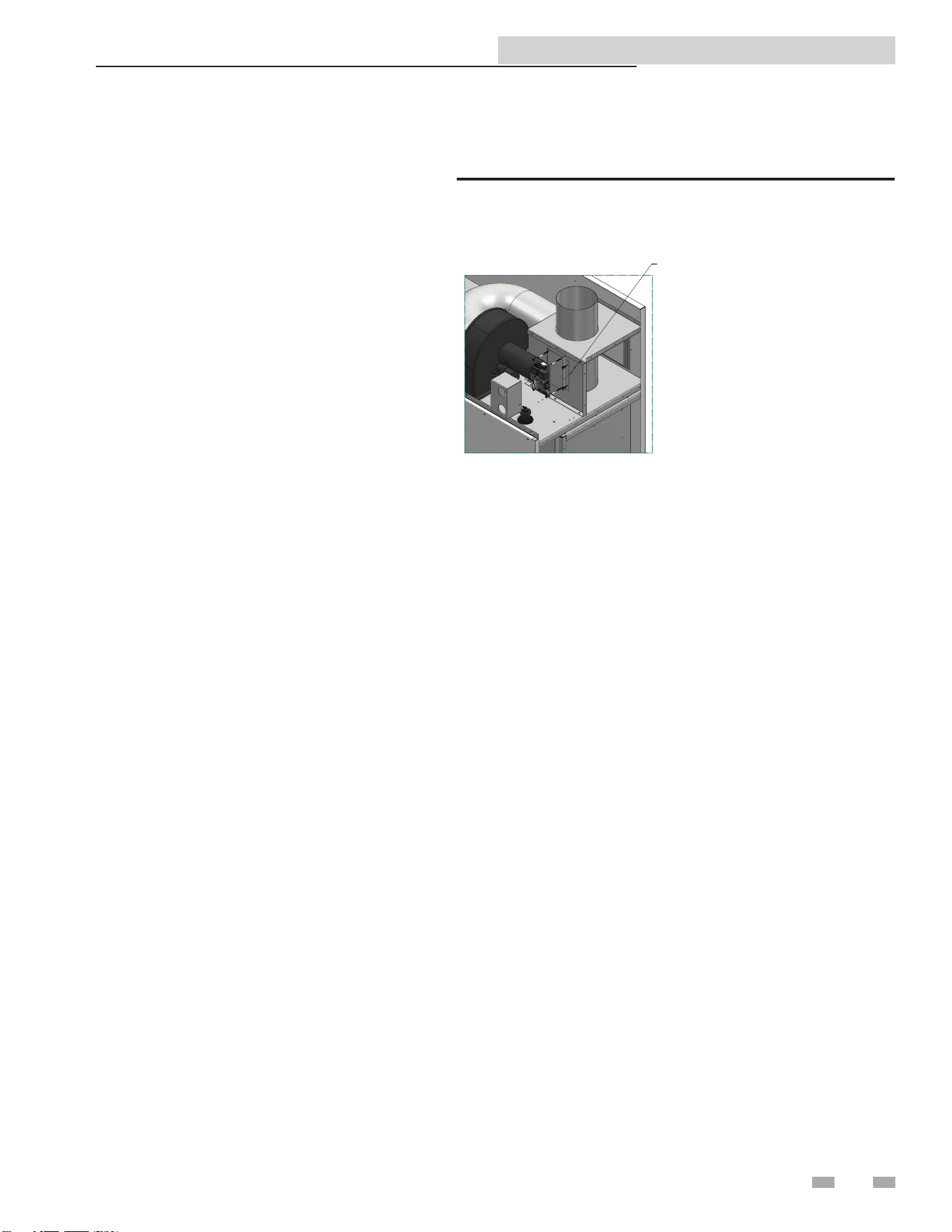
3. Mount the communication board as shown in
FIG. 6-1.
- Set dip switch settings (reference Section 2 -
Conguration) and make the necessary ground
connections.
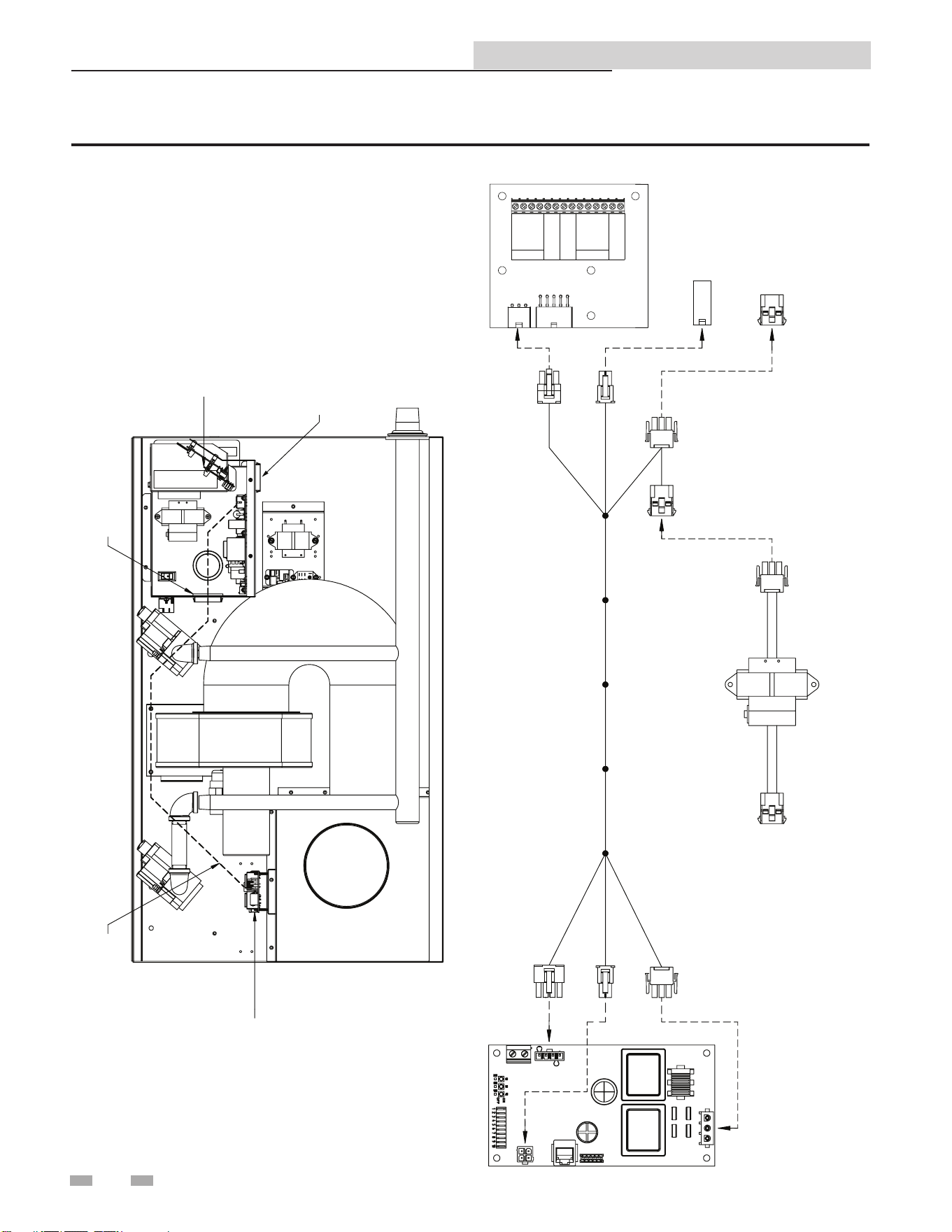
4 Locate the control panel (see FIG. 6-2 on page 10).
Locate the bushing on the right-hand side of the
control panel (FIG. 6-2).
5. Route the communication board harness
(100172877) A1, A2, A3, and A4 housing through
the bushing on the right-hand side of the control
panel.
6. Locate and disconnect the controller transformer
from the line voltage harness (FIG. 6-2).
7. Plug the board harness A1 into the line voltage
harness connection (FIG. 6-2).
8. Plug the board harness A1 into the line voltage
harness connection (FIG. 6-2).
9. Locate the digital harness connector (FIG. 6-2).
Plug the board harness A3 into the digital harness
connector.
10. Route 100172877 along the front edge of the unit.
Note: Take care not to run the wiring over any
sharp edges.
11. Locate the communication board cover. Run
power A5 through the top bushing of the
communication board cover.
12. Run the board harness A6 and A7 through the
lower bushing of the communication board cover.
13. Wire the communication board as follows
(FIG. 6-2):
• Connect A5 to communication board X1
• Connect A6 to communication board X4
• Connect A7 to communication board X6
14. If it is desired to ground the communication cable
shield at the heater, install a jumper wire between
pins 1 and 3 of X5.
15. Replace the cover. Secure the cover using the two
(2) screws provided with the communication
board.
16. Test the unit before replacing the access panels.
17. Replace the le and right access panels and turn
ON power at the source. Resume operation.
INSTALLATION: LOCATE BRACKET
ON DV PANEL AND SECURE WITH
SELF DRILLING SCREWS. ADD
ALUMINUM SPACERS TO BRACKET
STUDS. ADD COMMUNICATION
BOARD AND SECURE WITH MOUNTING
NUTS. ADD BOARD COVER AND SECURE
WITH SHEET METAL SCREWS.
REPLACEMENT: REMOVE SHEET METAL
SCREWS AND COMMUNICATION BOARD
COVER. REMOVE MOUNTING NUTS AND
COMMUNICATION BOARD. REPLACE BOARD
AND SECURE WITH MOUNTING NUTS.
ADD BOARD COVER AND SECURE WITH
SHEET METAL SCREWS.
Figure 6-1_Mounting the Communication Board
14
Copper-n II/IIE ModBus and BACnet Manual
6 Wiring Requirements
CASCADE
MODBUS
CN1
CN6
CN2
TANK
SENSOR
SHIELD
A
B
SHIELD
+ 0-10V
- BMS IN
+ 0-10V
- RATE OUT
SHIELD
A
B
SHIELD
35
34
33
32
31
30
29
28
27
26
25
24
23
22
A3
A1 A2
A4
A5
A6
A7
CONNECTION
BOARD
DIGITAL
HARNESS
LINE VOLTAGE
HARNESS
COMMUNICATION HARNESS
WRE20129
CONTROLLER TRANSFORMER
COMMUNICATION
BOARD
RECOMMENDED HARNESS
ROUTING
COMMUNICATION
BOARD
CONTROL
PANEL
BUSHING
WRE20129
CONNECTION
BOARD
Figure 6-2_Schematic / Wire Connections
15
Copper-n II/IIE ModBus and BACnet Manual
6 Wiring Requirements (continued)
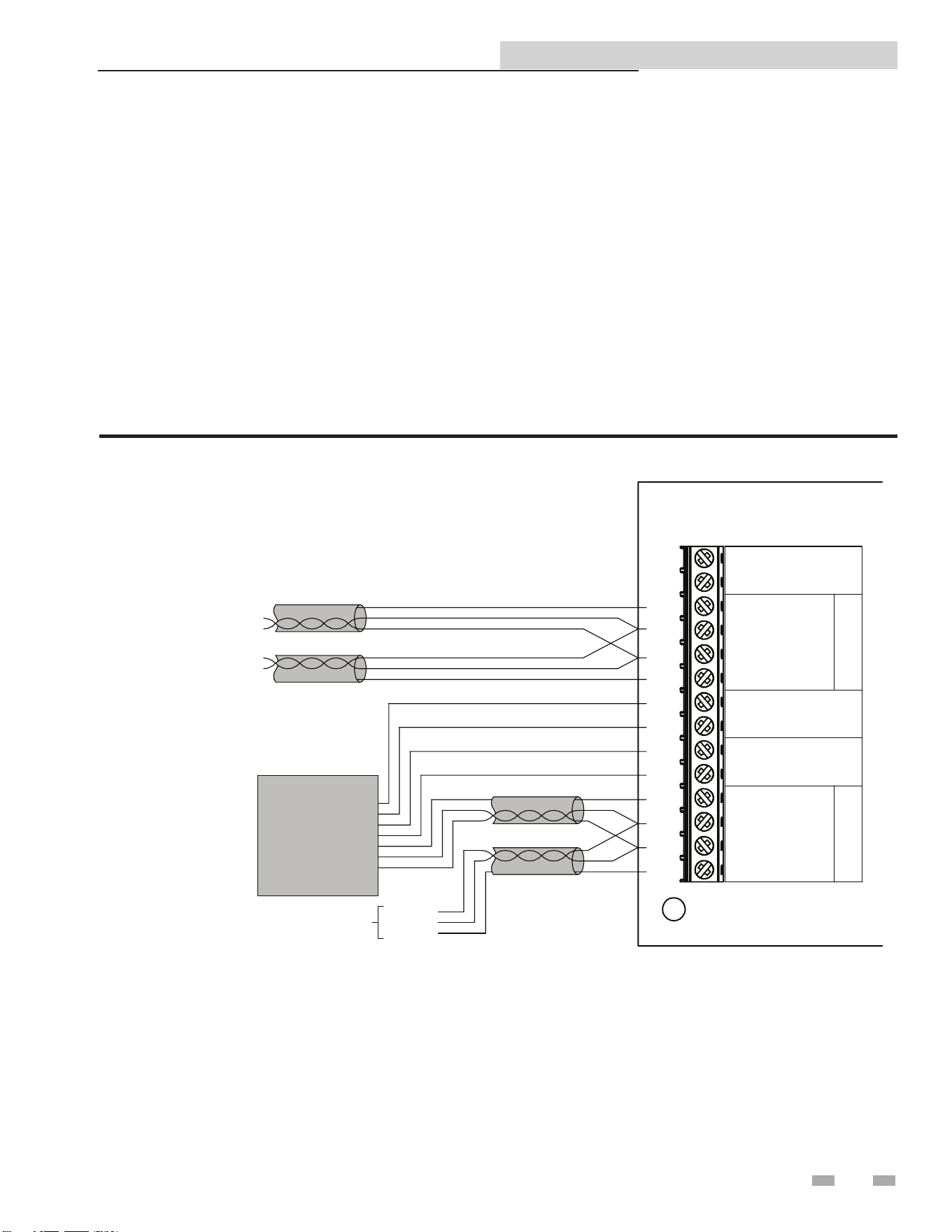
RS-485 Communication Bus
• Maximum Length = 4000 feet
• Cable Specication = 24 AWG / A,B (twisted pair) and GND Shielded, with characteristic Impedance = 120 ohm
• Maximum Load = 32 units (32 nodes)
NOTE: Cable must be terminated with 120 ohm impedance matching resistor on each end.
A + (positive)
B - (negative)
Note that when the System Supply Temperature and/or the Tank Temperature are provided by the BAS, they need to be
refreshed every few seconds. is is required in order to prevent unwanted uctuations in these temperatures. If these values are
not provided every few seconds (timeout is programmable), the boiler will revert to its own internal control. If neither of these
temperatures is provided by the BAS, but any of the other control signals are being provided, the BAS will still need to refresh
these inputs at least every 4 minutes.
Physical Wiring
Figure 6-3_Terminal Strip Connections
B
A
B
A
FROM
PREVIOUS
HEATER
TO NEXT
HEATER
(if used)
EXTERNAL
SEQUENCER/
BUILDING
AUTOMATIC
CONTROL
MODBUS / BACNET
MODBUS / BACNET
A
SHIELD
B
A
SHIELD
B
TO NEXT BOILER
C
A
S
C
A
D
E
M
O
D
B
U
S
CN2
TANK
SENSOR
SHIELD
A
B
SHIELD
+ 0-10V
- BMS IN
+ 0-10V
- RATE OUT
SHIELD
A
B
SHIELD
35
34
33
32
31
30
29
28
27
26
25
24
23
22
16
Copper-n II/IIE ModBus and BACnet Manual
6 Wiring Requirements
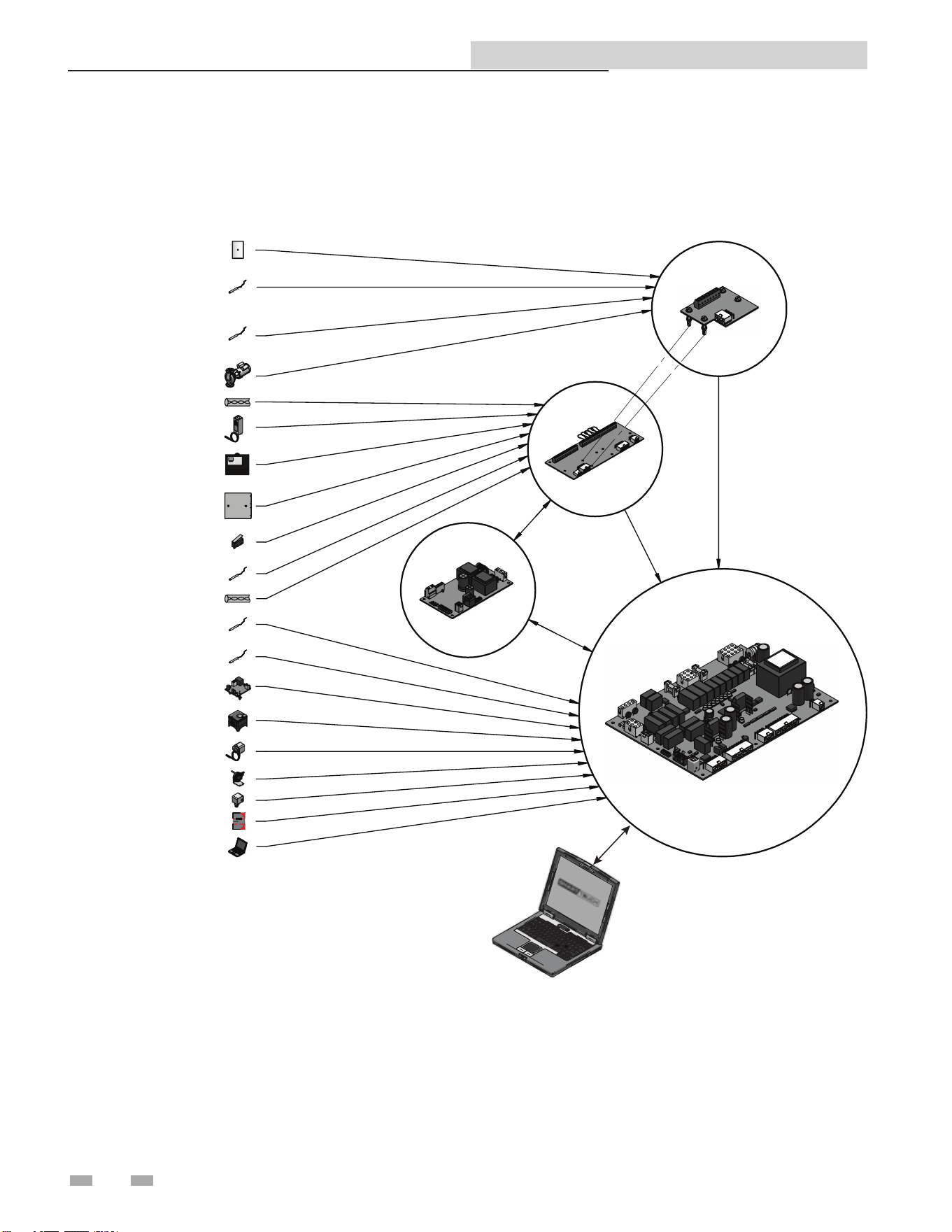
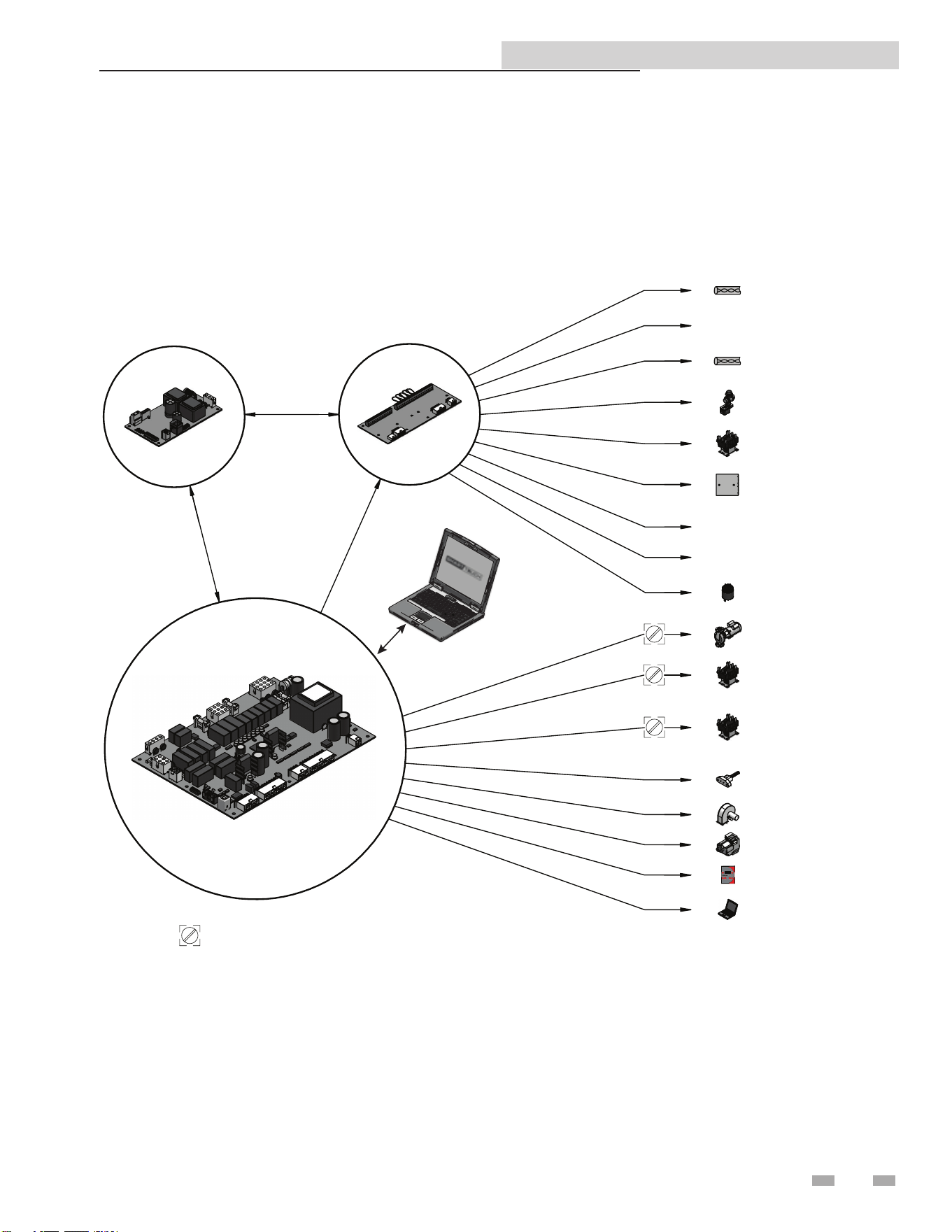
Figure 6-4_Control Inputs
SMART
SYSTEM
CONTROL
BOARD
LOW
VOLTAGE
CONNECTION
BOARD
DH
W THERMOSTAT
(O
PTIONAL)
ROOM
THERMOSTAT/
ZONE CONT
ROL
(OPTIO
NAL)
SY
STEM SUPPLY/
EN
ABLE SENSOR
(OPTIO
NAL)
SY
STEM RETURN/
PO
OL SENSOR
(O
PTIONAL ON BOILER)
(STD ON PO
OL HEATER)
SE
QUENCER BUILDING
MANA
GEMENT SYSTEM
(FIE
LD PROVIDED)
OU
TDOOR SENSOR
(O
PTIONAL)
LOUVER PROVING SW
ITCH
(FIE
LD PROVIDED)
IN
LET TEMPERATURE
SENS
OR
OU
TLET TEMPERATURE/
LIMIT SENS
OR
LO
W WATER CUTOFF
(OPTIO
NAL)
GAS
PRESSURE SWITCH
(OPTIO
NAL)
MANU
AL RESET HIGH
LIMIT (O
PTIONAL)
AIR
PRESSURE SWITCH
FLOW
SWITCH
DI
SPLAY PANEL
PC
INTERFACE
(OPTIO
NAL)
TA
NK SENSOR
(O
PTIONAL)
SY
STEM PUMP SPEED
(OPTIO
NAL)
CA
SCADE
COMMUNICATION
BOARD
(OPTIONAL)
SENSOR
CONNECTION
BOARD
(BOILER AND
POOL HEATER
ONLY)
MO
DBUS
PC INTERFACE
17
Copper-n II/IIE ModBus and BACnet Manual
6 Wiring Requirements (continued)
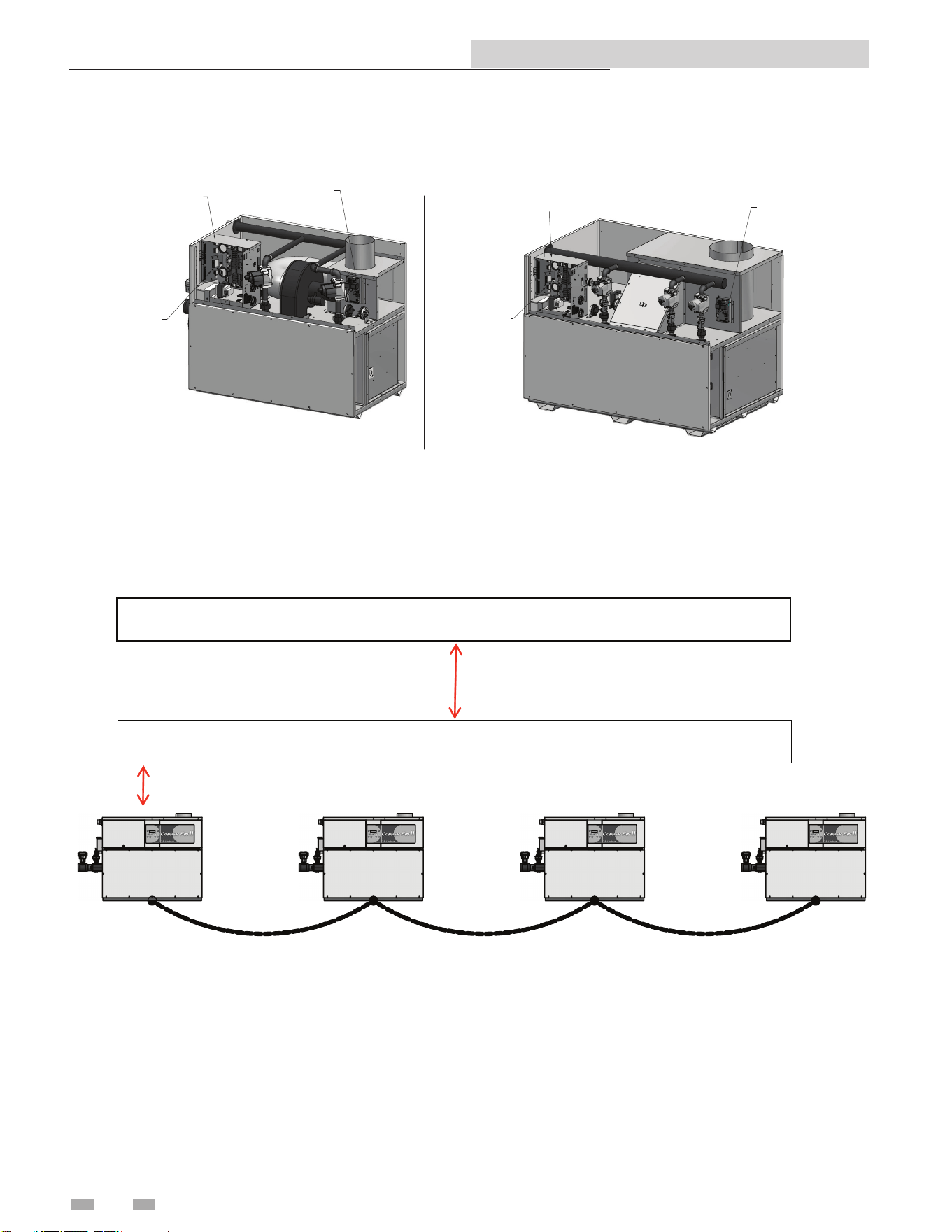
Figure 6-5_Control Outputs
SMART
SYSTEM
CONTROL
BOARD
LOW
VOLTAGE
CONNECTION
BOARD
THREE WAY VALV
E
(OPTIONAL ON BOILER
)
(STD ON POOL HEATER
)
LOUVER RELA
Y
BUILDING
MANAGEMENT
SY
STEM
RUN TIME CONTAC
TS
ALARM CONTAC
TS
ALAR
M
(OPTIONA
L)
HEATER PU
MP
(BOILER ONLY
)
SYSTEM PU
MP
RELA
Y
DHW PUMP RELA
Y
(BOILER)
DHW
PUMP
(WATER HEATER
)
HOT SURFAC
E
IGNITE
R
BLOW
ER
GAS VA
LVES
DISPLAY PANE
L
PC INTERFAC
E
(OPTIONA
L)
CASCAD
E
INDICATES CONNECTIONS MADE TO THE LINE VOLTAGE TERMINAL STRIP LOCATED IN THE CONTROL PANEL AREA
COMMUNICATION
BOARD
(OPTIONAL)
0-10V
RATE
MODB
US
PC INTERFACE
18
Copper-n II/IIE ModBus and BACnet Manual
6 Wiring Requirements
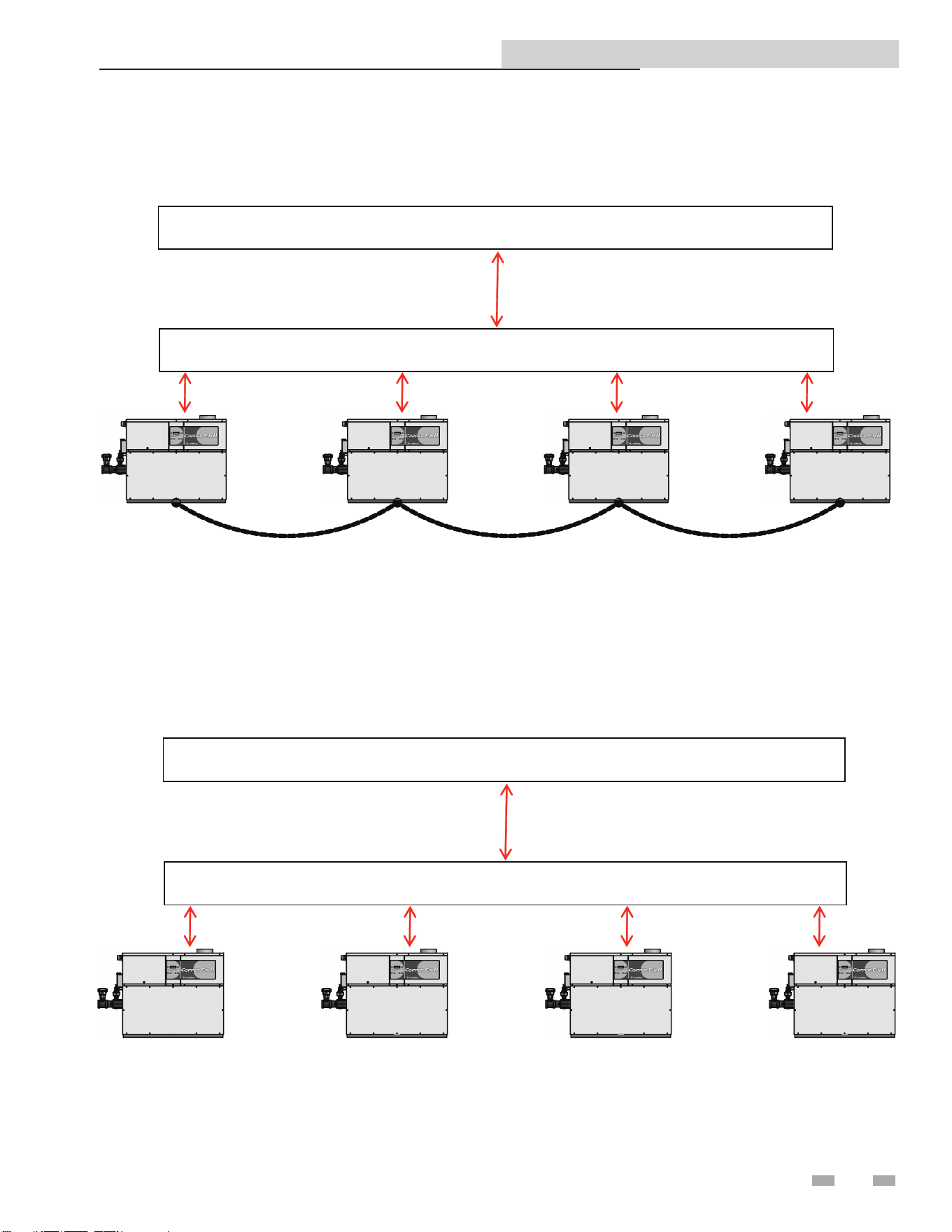
Figure 4-6_Control Location
COMMUNICATION
BOARD
CONTROL
PANEL
Models 402 - 752
COMMUNICATION
BOARD
CONTROL PANEL
Models 992 - 2072
CONNECTION
BOARD
CONNECTION
BOARD
Typical Boiler System Wiring
BACnet or ModBus RS485 Communication Bus
BACnet or ModBus RS485 Port on Gateway or Building System
Physical Configuration: Cascade without Individual Monitoring
Cascade Daisy Chain Connection
19
Copper-n II/IIE ModBus and BACnet Manual
6 Wiring Requirements (continued)
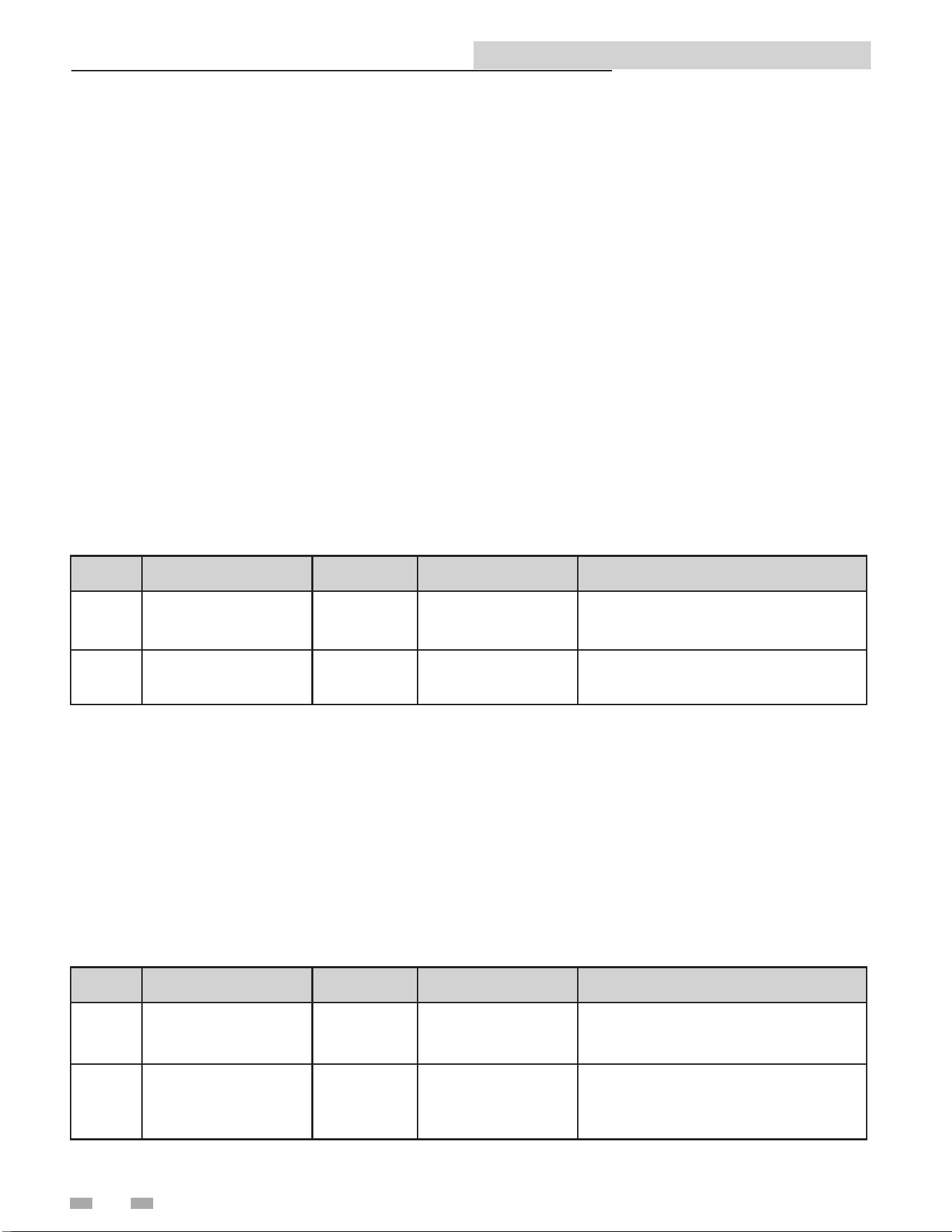
BACnet or ModBus RS485 Communication Bus
Physical Configuration: Direct Control
BACnet or ModBus RS485 Port on Building System
BACnet or ModBus RS485 Communication Bus
BACnet or ModBus RS485 Port on Gateway or Building System
Physical Configuration: Cascade with individual Monitoring
Cascade Daisy Chain Connection
20
Copper-n II/IIE ModBus and BACnet Manual
7 Unit Operation
Unit Operation with ModBus / BACnet Communications
A Building Automation System (BAS) can monitor the Copper-n II/IIE without the need to change the default conguration
of the SMART SYSTEM control. When the BAS is to provide commands or values to the control, parameter H6 ModBus must
be set to Active (reference the Copper-n II/IIE Service Manual for the procedure on how to set parameters).
e SMART SYSTEM control is equipped with two (2) ModBus communication timers. e rst is used whenever the control
receives the system temperature and/or the tank temperature through ModBus. ese values need to be updated on a regular
basis to prevent unwanted temperature variations. is timer is programmable from 1 to 255 seconds. It is Lochinvar’s
recommendation that this timer be set as short as possible. is timeout can be adjusted by accessing parameter H7 ModBus
Time. e timer is reset with the ModBus Time setting every time the temperatures are updated. e second timer is used for
all other commands and values provided through ModBus. It has a xed timeout of four (4) minutes. If either of these timers
expire before the next update, the SMART SYSTEM control will revert to using its local inputs.
When a BAS is to control a Copper-n II/IIE, the installer must congure the SMART SYSTEM control to receive commands
and data through ModBus or BACnet. ere are several dierent control methods available, as described in this section. ese
methods are determined by the settings in four (4) dierent parameters.
Control Mode 1
In this conguration the heater is enabled and disabled through ModBus or BACnet. e heater uses its own local set points.
All sensors and limiting devices should be connected directly to the terminal strip(s) inside the Copper-n II/IIE control
compartment. e Enable 1 and/or Tank ermostat signals will be sent to the heater through ModBus or BACnet.
NOTE: To ensure proper operation, re-send the conguration bits to holding register 40001 or Object AV0 prior to issuing
commands.
Control Mode 2
In this conguration, each stage is enabled directly (boiler only).
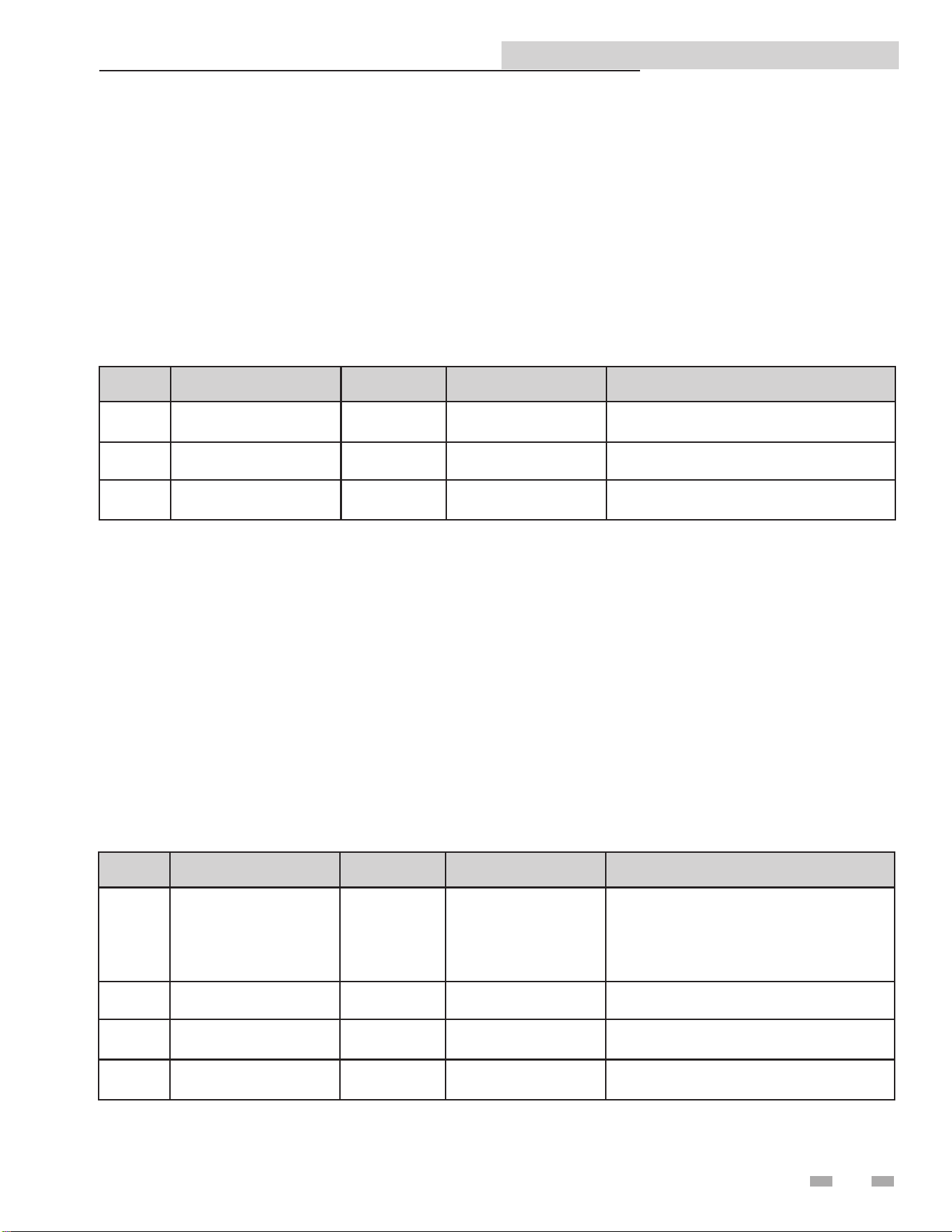
Control Mode 2 - Setup (Conguration Parameters)
To control each stage separately, access parameters H5 Sequencer, and set it to Active (reference the Copper-n II/IIE Service
Manual for the procedure on how to set the parameters).
Control Mode 2 - Setup (Command Parameters)
e holding register will need to be set as follows:
NOTE: To ensure proper operation, re-send the conguration bits to holding register 40001 or Object AV0 prior to issuing
commands.
Object Holding Registers Denition Bit Value (HEX) Action
AV0 40001 Conguration
00 01
00 02
00 03
Read Enable 1 status
Read Tank ermostat status
Read Enable 1 and Tank ermostat status
AV1 40002 Coils
00 01
00 02
00 03
Enable 1 only active
Tank ermostat only active
Enable 1 and Tank ermostat active
Object Holding Registers Denition Bit Value (HEX) Action
AV0 40001 Conguration
01 01
03 01
07 01
Read Enable 1 and 2 (2-stage heaters)
Read Enable 1, 2, and 3 (3-stage heaters)
Read Enable 1, 2, 3, and 4 (4-stage heaters)
AV1 40002 Coils
00 01
00 03
00 07
00 0F
Enable Stage 1
Enable Stages 1 and 2
Enable Stages 1, 2, and 3
Enable Stages 1, 2, 3, and 4
21
Copper-n II/IIE ModBus and BACnet Manual
7 Unit Operation (continued)
Control Mode 3
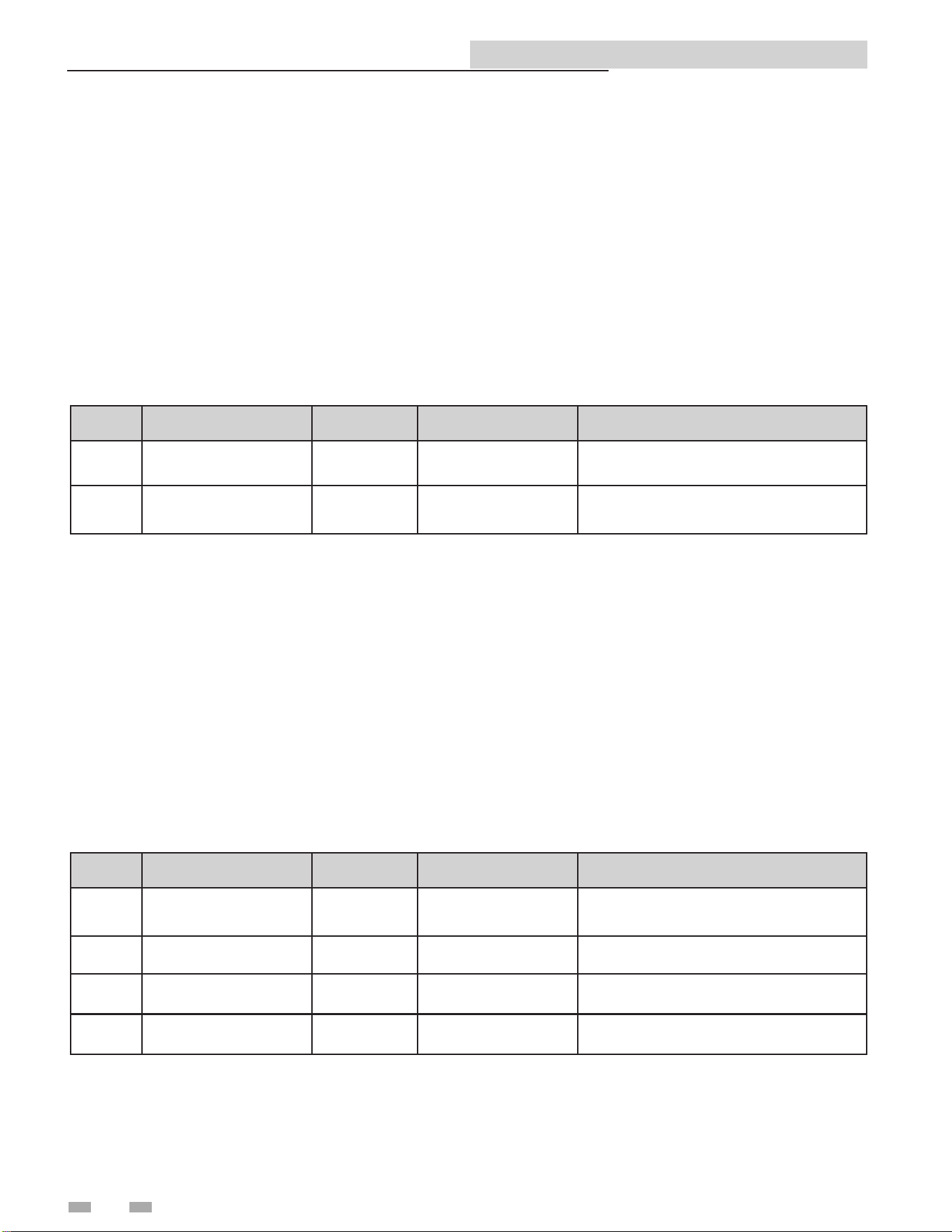
In this conguration, the heater receives its enable signal and a rate command through ModBus or BACnet. All sensors and
limiting devices should be connected directly to the terminal strip(s) inside the Copper-n II/IIE control compartment.
Control Mode 3 - Setup (Conguration Parameters)
To send a rate signal to the SMART SYSTEM control, access parameter H3 BMS input and set it to Active (reference the Copper-
n II/IIE Service Manual for the procedure on how to set parameters).
Control Mode 3 - Setup (Command Parameters)
e holding register will need to be set as follows:
NOTE: To ensure proper operation, re-send the conguration bits to holding register 40001 or Object AV0 prior to issuing
commands. See the Rate and Temperature Conversions Section on page 19 for instructions on how to send the % rate.
Control Mode 4
In this conguration, the heater receives its enable signal and set points through ModBus or BACnet. All sensors and limiting
devices should be connected directly to the terminal strip(s) inside the Copper-n II/IIE control compartment.
Control Mode 4 - Setup (Conguration Parameters)
To send a Space Heating set point to the SMART SYSTEM control, access parameter H3 BMS input and set it to Active. Also,
access parameter J1 BMS Type and set it to Set point (reference the Copper-n II/IIE Service Manual for the procedure on how
to set parameters). e space heating set point will be derived from the 0-10V input value, based on the BMS settings in the
control. Reference the Copper-n II/IIE Service Manual for details of these parameters.
Control Mode 4 - Setup (Command Parameters)
e holding register will need to be set as follows:
NOTE: To ensure proper operation re-send the conguration bits to holding register 40001 or Object AV0 prior to issuing
commands. See the Rate and Temperature Conversions Section on page 19 for instructions on how to send the Tank/Pool set
point.
Object Holding Registers Denition Bit Value (HEX) Action
AV0 40001 Conguration 00 05 Read Enable 1 and 0-10V input
AV1 40002 Coils 00 01 Enable 1 Active
AV2 40003 0-10V Input 00 ## Sets % rate
Object Holding Registers Denition Bit Value (HEX) Action
AV0 40001 Conguration
00 05
00 08
00 09
00 0D
Read Enable 1 and 0-10V input
Read Tank/Pool Set point
Read Enable 1 and Pool Set point
Read Enable 1, 0-10V input, and Tank Set
point
AV1 40002 Coils 00 01 Enable 1 active
AV2 40003 0-10V Input 00 ## Sets space heating set point
AV3 40004
Tank/Pool Set
point
00 ## Sets Tank or Pool set point
22
Copper-n II/IIE ModBus and BACnet Manual
7 Unit Operation
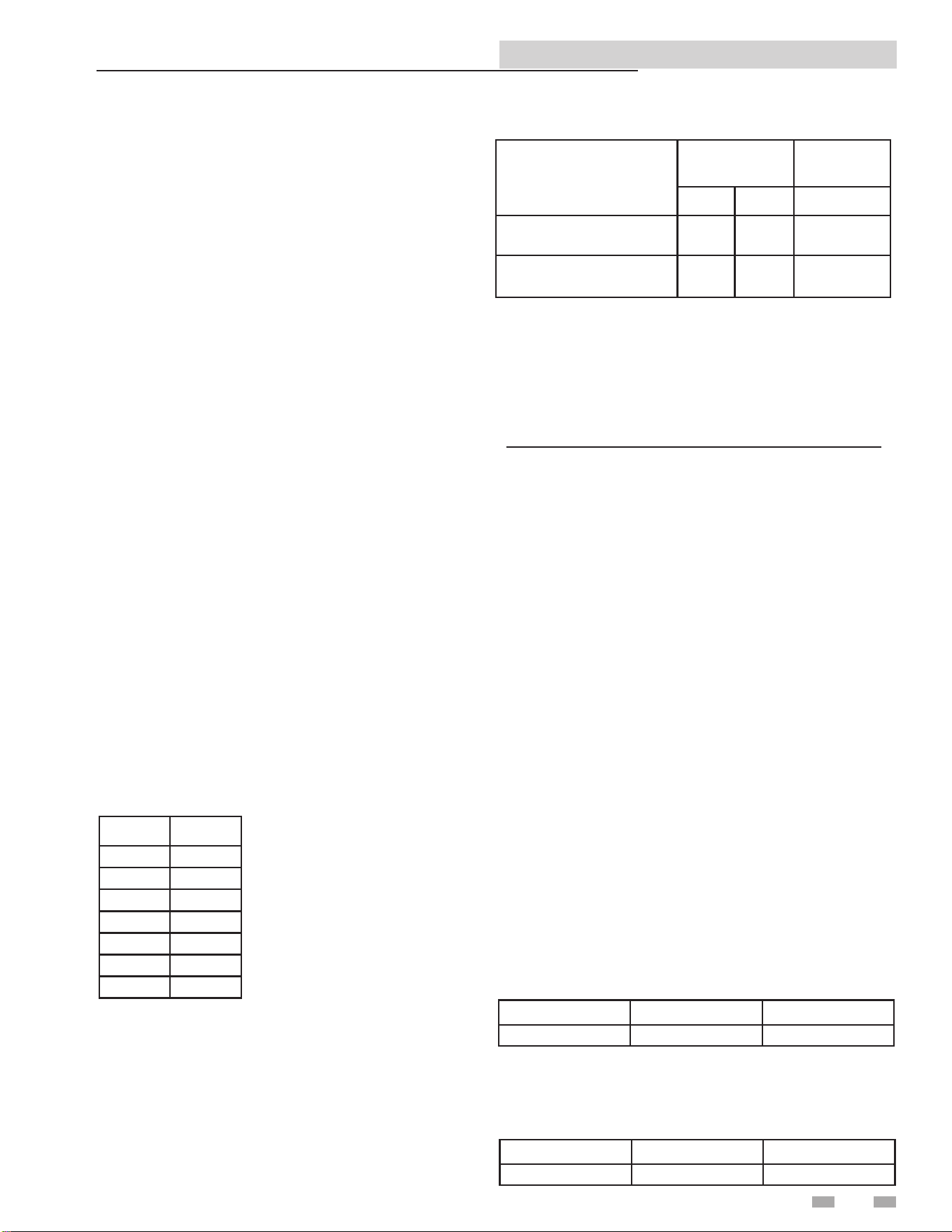
DHW with remote control:
is installation may or may not have the hot water generator in close proximity to the boiler. Its sensors and thermostat values
are only available through the ModBus or BACnet communication bus.
To ensure that the Copper-n II/IIE can properly respond to a call for hot water generation the following holding registers must
be set in addition to other commands:
For proper hexadecimal conversion of rate percentage, please refer to the Rate and Temperature Conversion section on page 19
of this manual.
NOTE: To ensure proper operation re-send the conguration bits to holding register 40001 or Object AV0 prior to issuing
commands.
Control Mode 5
In this conguration, the heater receives its enable and its rate or set point using the 0-10V input through ModBus or BACnet.
All sensors and limiting devices should be connected directly to the terminal strip(s) inside the Copper-n II/IIE control
compartment.
Control Mode 5 - Setup (Conguration Parameters)
To use the 0-10V input as an enable, access parameter H2 Enable input in the SMART SYSTEM control, and set this parameter
to Inactive. Also, access parameter H3 BMS input and set it to Active. If you wish to control the set point, access parameter J1
BMS Type and set it to Set point. e enable function and the space heating set point will be derived from the 0-10V input value,
based on the BMS settings in the control. Reference the Copper-n II/IIE Service Manual for the details of these parameters.
Control Mode 5 - Setup (Command Parameters)
e holding register will need to be set as follows:
NOTE: To ensure proper operation, re-send the conguration bits to holding register 40001 or Object AV0 prior to issuing
commands. See the Rate and Temperature Conversions Section on page 19 for instructions on how to send the rate.
Hot Water Generation
Hot water generation can be accomplished with one of two methods when a Copper-n II/IIE is connected to a BAS system,
DHW with direct control, and DHW with remote control.
DHW with direct control:
is is the typical installation with a hot water generator in close proximity to the boiler with the tank thermostat, or tank
temperature sensor, wired to the terminal strip of the unit.
Object Holding Registers Denition Bit Value (HEX) Action
AV0 40001 Conguration 00 04 Read 0-10V input
AV2 40003 0-10V Input 00 ## Sets space heating rate or set point
Object Holding Registers Denition Bit Value (HEX) Action
AV0 40001 Conguration 00 4A Set Conguration to read 40002, 4 & 5
AV1 40002 Coils 00 08 Enables Tank Tstat (00 00 disables unit)
AV3 40004 Tank Set point 0# ## Sets Set point
AV4 40005
Tank
Temperature
0# ## Passes tank temp from remote sensor
Copper-n II/IIE ModBus and BACnet Manual
Cascade
In order to operate the Copper-n II/IIE in Cascade with
ModBus or BACnet communications, congure the leader
boiler per the demand congurations in this manual. Connect
the remaining boilers in the cascade through the normal
cascade communications wiring. Cascade control can then
be accomplished automatically through the leader boiler.
Please note that with ModBus or BACnet communication
connected to only the leader boiler, total Cascade information
can be seen through the communications link. If you wish to
see all the individual temperatures of each unit in the Cascade,
each unit will have to have a ModBus communication board.
However, each unit can be monitored without the need to
control each one individually.
Monitoring Only
Any Copper-n II/IIE can be equipped with the ModBus
communication board and then be set up to operate with its
own internal controls. If necessary, ModBus or BACnet can
be congured as a monitoring device by selecting demand
congurations 1 - 3, and polling the communication board
for the read only variables.
Temperature
e Copper-n II/IIE passes temperature data in degrees
Celsius. Also, to accommodate decimal places the decimal
value must be divided by 10.
Here are the conversions to and from Celsius:
T
c
= (5/9) * (T
f
-32) T
f
= (9/5) * T
c
+32
Example:
Outdoor temperature from remote sensor on BAS System = 80°F
80°F = 26.7°C
Data that needs to be transmitted is 26.7 * 10 = 267
Decimal Binary HEX
267 100001011 10B
Outlet temperature from unit sensor = 155°F
155°F = 68.3°C
Data transmitted from unit in HEX = 2AB = 683
683 ÷ 10 = 68.3 (°C)
Decimal Binary HEX
683 1010101011 2AB
Rate and Temperature Conversions:
Rate
When issuing a rate command the rate can be communicated
as percent modulation or a desired set point, depending on
the setting of the BMS Type in the BMS Setup Menu.
e proper data format for the modulation percentage is the
direct conversion to hexadecimal. is conversion can be
accomplished through online number based converters or
some scientic calculators.
For Example:
To send a desired set point, the hexadecimal value must be
determined through linear interpolation of programmable
parameters on the BMS Setup Menu:
- BMS temperature set-point at low analog input
- BMS temperature set-point at high analog input
ese variables set the temperature values corresponding to
the minimum and maximum voltage settings of the 0-10 volt
signal. e defaults are as follows:
Rate % HEX
0 00
20 14
45 2D
60 3C
80 50
95 5F
100 64
PARAMETER
DEFAULT
VALUES
DEFAULT
Deg C Deg F Voltages
BMS temperature set point at
low analog input
21 69.8 2
BMS temperature set point at
high analog input
82 179.6 10
For Example:
Send a set point of 110°F.
e formula to use for the interpolation is:
Rate Command =
(Desired Set point – BMS Temp at Low Analog Input) (High
Voltage-Low Voltage) + Low Voltage
(BMS Temp at High Analog Input – BMS Temp at Low
Analog Input)
From the default values:
Desired Set point = 110
BMS Temp at Low Analog Input =68
BMS Temp at High Analog=158
High Voltage =10
Low Voltage = 2
[(110-69.8)(10-2)/(179.6-69.8)] + 2 = 4.92 Volts
(4.92/10) x 100 = 49.2
49 = 31 Hexadecimal
A value of [00][31] in hexadecimal would be written to Holding
register 40003 to issue a command for a 110°F set point.
7 Unit Operation (continued)
23

24
Copper-n II/IIE ModBus and BACnet Manual
8 Troubleshooting
Should you encounter problems communicating over
ModBus, the following items should be checked in this order:
1. Physical Layer
2. Communications Conguration and Port Settings
3. ModBus Error Codes
4. Unit Status / Blocking / Lockout Codes
Physical Layer
1. Check that all components have power (Boiler, Gateway,
BAS Master)
2. Check all wire lengths. Are any drops too long?
3. Check proper shield grounding
4. Check A, B terminal connections
5. Check for Terminating Resistors (120 ohms)
6. Check for broken wires
Communications
1. Check Dip Switch Conguration of MTR-01 Board
2. Check Baud Rate (9600, 19200)
3. Check Parity
4. Check Slave ID
5. Check Port Setting on Master, Gateway, and Computers
ModBus Error Codes
1. Check ModBus communication for error codes (see page
6 for ModBus Exception Codes)
2. Check ModBus PDU
3. Check Slave ID
4. Check ModBus Command
5. Check Conguration bits for Holding Register 40001
6. Check Commands and data for Holding Registers
40002 - 40007
Unit Status Codes
See Codes in this section
Boiler Status
e Copper-n II/IIE displays a boiler state code on the
Building Screen to help aid in troubleshooting. e boiler
state indicates what the boiler is actually doing. is state
should be compared to the command issued and what is
expected. If the boiler state does not agree with the command
issued, check communication and conguration.
Status Codes (Input Registers 30014 and 30023)
2 = Heat Demand blocked due to high absolute outlet
temperature
3 = Heat Demand blocked due to high absolute ue
temperature
4 = Heat Demand blocked due to high absolute Delta T
(Outlet - Inlet)
8 = Heat Demand blocked due to Low 24 VAC
9 = Outdoor shutdown
10 = Block due to switch OFF boiler (ON/OFF of Display)
12 = Block due to no correct communication Cascade
16 = Service function
19 = DHW function Storage Tank
21 = SH function Heat demand from Room ermostat
22 = SH function Heat demand from Boiler Management
System
23 = SH function Heat demand from Cascade
30 = Heat demand activated by Freeze Protection
32 = DHW Pump Delay
33 = SH Pump Delay
34 = No heat function (aer pump delay)
40 = Lockout
32764 = Busy with updating status
32765 = DHW blocked due to no present tank sensor
32766 = Burner control(s) manually shut down
32767 = Code not present
Blocking Codes (Input Registers 30015 and 30024)
0 = No blocking _> is divided into sub blockings
1 = SH blocking
2 = Blocking Due to Low 24 VAC Supply
3 = Blocking due to General block
4 = Blocking MRHL is open
5 = Blocking due to Switched OFF boiler (Display ENTER
switch)
6 = Blocking due to wrong communication of Cascade
7 = Blocking due to High Delta
8 = Blocking due to High Flue Temperature
9 = Blocking due to High Outlet Temperature
10 = Service blocking
12 = DHW blocking high outlet temperature (DHW congured
as storage tank)
13 = Blocking anti-cycling time
14 = Storage Tank demand Blocked due to Fan problems
15 = No system sensor connected and leader control present
16 = Limit fan speed due to high outlet temperature
17 = Fan min decreased due to low ame current
18 = Limit max fan speed due to high Delta T
19 = Limit max fan speed due to high ue temp
32767 = Code not present
25
Copper-n II/IIE ModBus and BACnet Manual
8 Troubleshooting (continued)
Lockout Codes (Input Register 30016)
6 = Louver closed
7 = Air SW Fail closed
8 = Air SW Fail open
9 = Gas Pressure SW
10 = Flow Switch/LWCO
11 = Gas Valve Fail 1
12 = Gas Valve Fail 2
13 = Gas Valve Fail 3
14 = Gas Valve Fail 4
15 = Flame Sequence A
16 = Flame Sequence B
17 = Flame Fail IGN A
19 = Flame Fail Run A
29 = Memory Error
51 = Sensor 1 Shorted
52 = Sensor 1 Open
53 = Sensor 2 Shorted
54 = Sensor 2 Open
63 = Outlet Temp MRHL
64 = Outlet Temp ARHL
65 = Outlet Temp ARHL
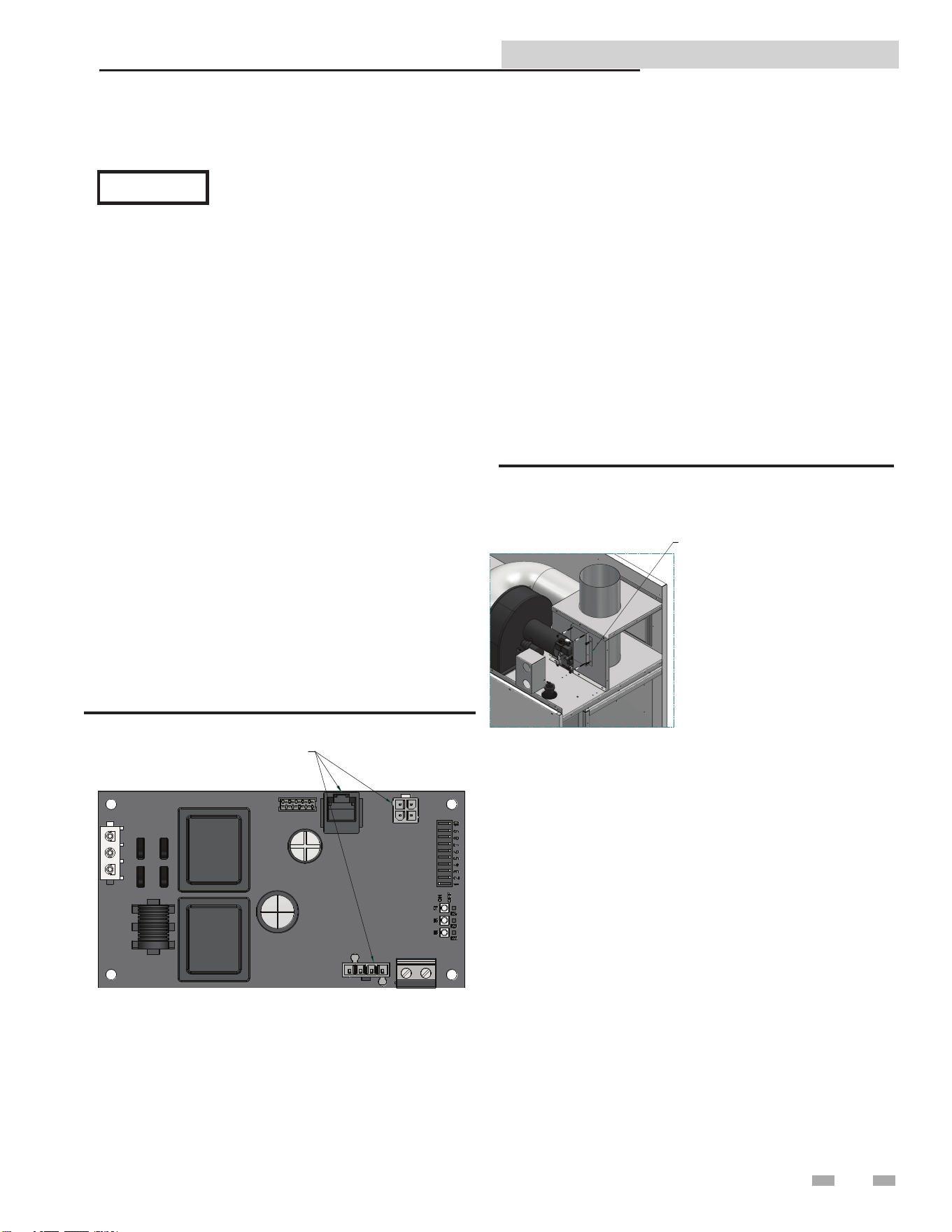
Installation / Replacement Procedure
UNPLUG THREE (3) WIRE HARNESSES
Figure 8-1_MTR01 Control Board
1. Turn OFF the main electrical power to the appliance.
2. Turn OFF the main manual gas shuto to the appliance.
3. Unplug the three (3) wire harnesses on the MTR01 control
board (see FIG. 8-1).
4. Unscrew the four (4) mounting nuts on the MTR01 control
board and set aside. Remove the MTR01 control board (see
FIG. 8-2).
5. Replace / install the new MTR01 control board.
6. Replace the four (4) mounting nuts removed in Step 4.
7. Reconnect all three (3) wire harnesses unplugged in Step 3.
8. Turn on the main electrical power and the main manual gas
shuto to the appliance.
9. Congure the MTR01 control board and unit controls per
this manual and resume operation.
INSTALLATION: LOCATE MODBUS BRACKET
ON DV PANEL AND SECURE WITH
SELF DRILLING SCREWS. ADD
ALUMINUM SPACERS TO BRACKET
STUDS. ADD MODBUS CONTROL
BOARD (MTR01) AND SECURE WITH
MOUNTING NUTS. ADD MODBUS
COVER AND SECURE WITH SHEET
METAL SCREWS.
REPLACEMENT:
REMOVE SHEET METAL SCREWS
AND MODBUS COVER. REMOVE
MOUNTING NUTS AND MODBUS
CONTROL BOARD (MTR01). REPLACE
BOARD AND SECURE WITH MOUNTING
NUTS. ADD MODBUS COVER AND
SECURE WITH SHEET METAL SCREWS.
Figure 8-2_Control Panel w/MTR01 Control Board
e lockout code (Input Register 30016)
is constantly changing during operation
and should not be used for lockout
notication until the status code (Input
Register 30014) indicates a code of 40.
NOTICE
26
Copper-n II/IIE ModBus and BACnet Manual
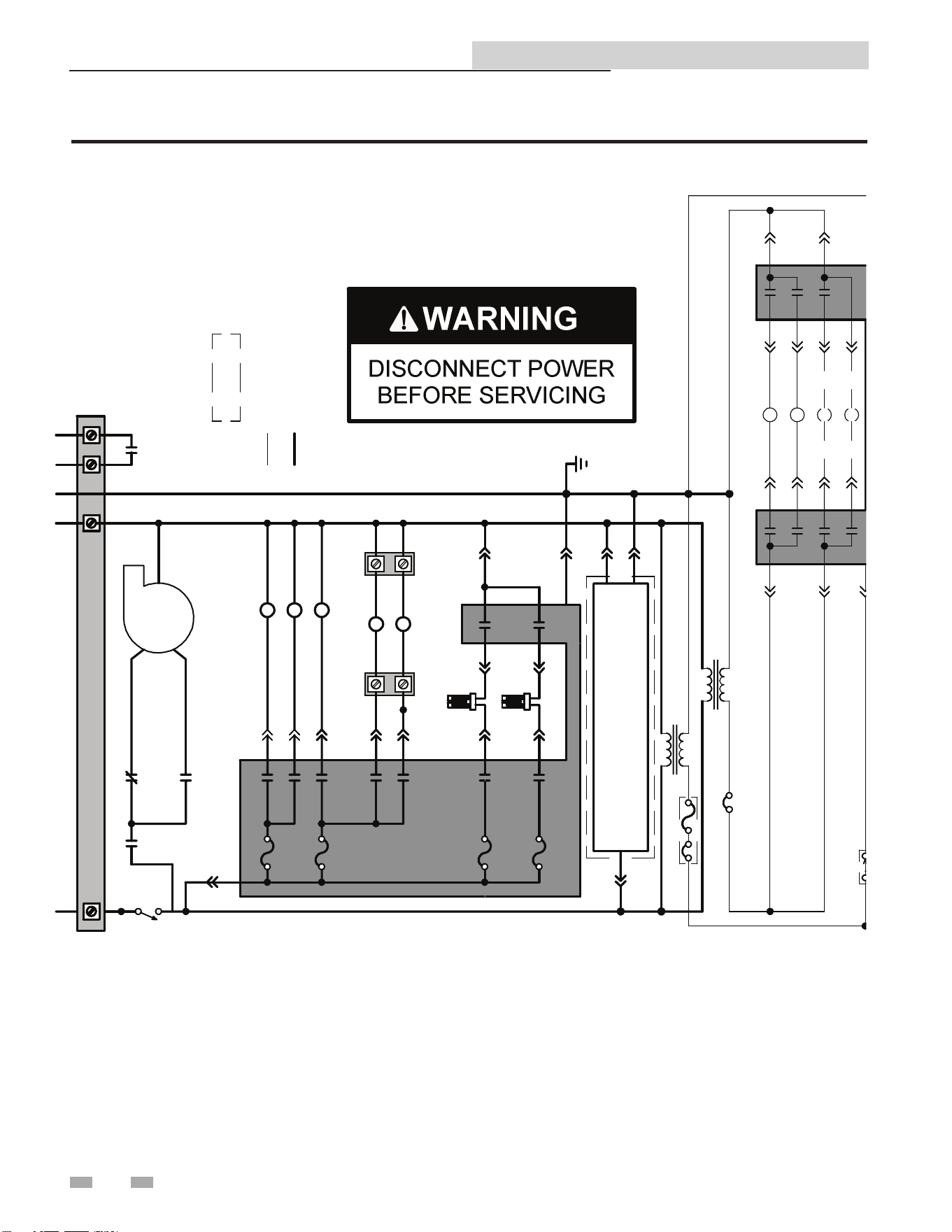
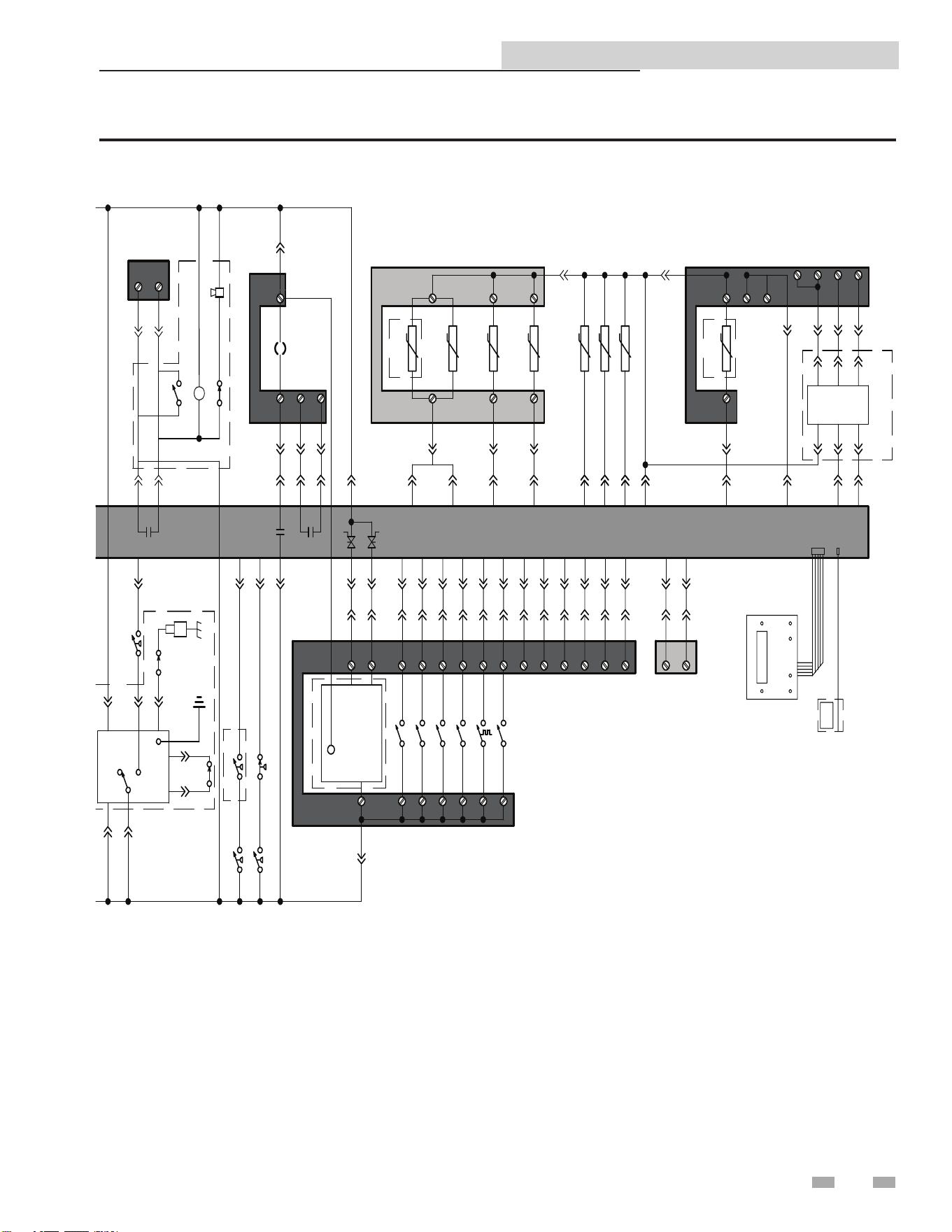
9 Diagrams
Figure 9-1 Ladder Diagram
BLOWER
N
ON/OFF
SWITCH
F2
3.15A
BOX DEPICTS
OPTIONAL ITEMS
120 VAC
LOW VOLTAGE
TERMINAL
STRIP
BLOWER
RELAY
HI/LO SPEED
RELAY
HI/LO SPEED
RELAY
HIGH
SPEED
LOW
SPEED
GL
N
UNIT PUMP
RELAY
X1
-6
F4
5A
BLOWER RELAY
X1-8X1-8X1-8
HI/LO SPEED RELAY
X2-4
X1-2
UNIT PUMP RELAY
X1-1
X1-4
TERMINAL
STRIP
TERMINAL
STRIP
SYSTEM /
RECIRC
PUMP RELAY
DHW PUMP
RELAY
(BOILER)
CHASSIS
X1-7
X2-1
X1-10
X2-2
X1-3
F5
5A
F6
5A
STAGE 1 HSI
STAGE 3 HSI
X1-12
X1-2
X1-3
X1-1
MODBUS INTERFACE BOARD
CIRCUIT BREAKER OR FUSE
CN5-11X6-1 X6-13 CN5-5
LOUVER RELAY
CN4-5X3-1
CN4-6X3-2
CONNECTION BOARD 1
X6-7CN5-1
RUNTIME
CONTACTS
X6-16CN5-7
X6-2CN5-8
X13-1CN5-9
X6-6CN5-3
X6-15CN5-10
X6-11CN5-12
X6-14CN5-4
X8-5CN6-4
X6-10
X8-15CN6-9
X7-8CN6-5
X7-4CN6-10
X8-7CN6-7
X8-17CN6-3
X8-6CN1-7
3 WAY VALVE
CONNECTION BOARD 1
STAGE 1 / ENABLE
STAGE 2
STAGE 3
STAGE 4
TANK TSTAT
LOUVER PROVING
OPEN
24V COM
CLOSE
+
-
+
-
A
B
0-10V
RATE
OUTPUT
CASCADE
0-10V
BMS
INPUT
CN5-6
X8-19
CN1-5X8-14
CN1-6X8-13
CN1-2
OUTDOOR
SENSOR S5
2ND POOL
SUPPLY
SENSOR S8
SYSTEM / POOL
SUPPLY
SENSOR S6
SYSTEM / POOL
RETURN
SENSOR S7
CONNECTION BOARD 2
X8-3
X4-3
X4-1X8-10
X4-2
X8-20
CN1-1
X6-3
CN1-3X6-1
CN1-2
X6-2
X8-11
BOILER
POOL
A
B
SHIELD
MODBUS
RTU
MODBUS
INTERFACE
BOARD
DISPLAY BOARD
COMPUTER
X4
X11
CN4-1
CN4-4
CONNECTION
BOARD 1
1
2
TRANSFORMER
INTERGRATED CONTROL BOARD
X10-1
X12-1
X10-2
X10-3
X12-2
X12-3
STAGE 1 GAS VALVE
STAGE 2 GAS VALVE
STAGE 3 GAS VALVE
STAGE 4 GAS VALVE
X10-5
X10-6
X12-5
X10-4
X12-4
MANUAL RESET
HIGH LIMIT
X6-4
X12-6
CIRCUIT BREAKER
INTERGRATED
CONTROL
BOARD
TRANSFORMER
PROBE
(
(
(
(
(
J3-6
J3-5
TEST
RESET
J2
-1
J2
-2
LOW WATER
CUTOFF
AIR PRESSURE
LOW GAS PRESS
HIGH GAS
PRESS SWITCH
J3-2
J3-4
J3-3
X6-3
X6-12
X6-5
X3-3
X3-4
SILENCE
ALARM
ALARM RELAY
INLET SENSOR S2
X8-2
OUTLET SENSOR S1
X8-8
2ND OUTLET SENSOR S9
X8-1
X8-16CN1-8
+
-
SYSTEM PUMP
SPEED INPUT
CN1
-1
TANK
SENSOR S4
X8-12 CN6-6
CASCADE
SHIELD
CN6
-1
CONNECTION BOARD 1
CONNECTION BOARD 2
ALARM
CONTACTS
BLOCKED FLUE
FLOW SWITCH
X8-18 CN6-8
J2-3
24V
10K
20K
LBL20083 REV B
WHERE POSSIBLE, SWITCHES ARE SHOWN WITHOUT UTILITIES (GAS,
WATER OR ELECTRICITY) CONNECTED TO THE UNIT. AS SUCH, ACTUAL
SWITCH STATES MAY VARY FROM THOSE SHOWN ON DIAGRAMS
DEPENDING UPON WHETHER UTILITIES ARE CONNECTED OR A FAULT
CONDITION IS PRESENT. SEE WIRING DIAGRAM FOR ADDITIONAL NOTES.
27
Copper-n II/IIE ModBus and BACnet Manual
9 Diagrams (continued)
Figure 9-1 Ladder Diagram cont’d
BLOWER
N
ON/OFF
SWITCH
F2
3.15A
BOX DEPICTS
OPTIONAL ITEMS
120 VAC
LOW VOLTAGE
TERMINAL
STRIP
BLOWER
RELAY
HI/LO SPEED
RELAY
HI/LO SPEED
RELAY
HIGH
SPEED
LOW
SPEED
GL
N
UNIT PUMP
RELAY
X1
-6
F4
5A
BLOWER RELAY
X1-8X1-8X1-8
HI/LO SPEED RELAY
X2-4
X1-2
UNIT PUMP RELAY
X1-1
X1-4
TERMINAL
STRIP
TERMINAL
STRIP
SYSTEM /
RECIRC
PUMP RELAY
DHW PUMP
RELAY
(BOILER)
CHASSIS
X1-7
X2-1
X1-10
X2-2
X1-3
F5
5A
F6
5A
STAGE 1 HSI
STAGE 3 HSI
X1-12
X1-2
X1-3
X1-1
MODBUS INTERFACE BOARD
CIRCUIT BREAKER OR FUSE
CN5-11X6-1 X6-13 CN5-5
LOUVER RELAY
CN4-5X3-1
CN4-6X3-2
CONNECTION BOARD 1
X6-7CN5-1
RUNTIME
CONTACTS
X6-16CN5-7
X6-2CN5-8
X13-1CN5-9
X6-6CN5-3
X6-15CN5-10
X6-11CN5-12
X6-14CN5-4
X8-5CN6-4
X6-10
X8-15CN6-9
X7-8CN6-5
X7-4CN6-10
X8-7CN6-7
X8-17CN6-3
X8-6CN1-7
3 WAY VALVE
CONNECTION BOARD 1
STAGE 1 / ENABLE
STAGE 2
STAGE 3
STAGE 4
TANK TSTAT
LOUVER PROVING
OPEN
24V COM
CLOSE
+
-
+
-
A
B
0-10V
RATE
OUTPUT
CASCADE
0-10V
BMS
INPUT
CN5-6
X8-19
CN1-5X8-14
CN1-6X8-13
CN1-2
OUTDOOR
SENSOR S5
2ND POOL
SUPPLY
SENSOR S8
SYSTEM / POOL
SUPPLY
SENSOR S6
SYSTEM / POOL
RETURN
SENSOR S7
CONNECTION BOARD 2
X8-3
X4-3
X4-1X8-10
X4-2
X8-20
CN1-1
X6-3
CN1-3X6-1
CN1-2
X6-2
X8-11
BOILER
POOL
A
B
SHIELD
MODBUS
RTU
MODBUS
INTERFACE
BOARD
DISPLAY BOARD
COMPUTER
X4
X11
CN4-1
CN4-4
CONNECTION
BOARD 1
1
2
TRANSFORMER
INTERGRATED CONTROL BOARD
X10-1
X12-1
X10-2
X10-3
X12-2
X12-3
STAGE 1 GAS VALVE
STAGE 2 GAS VALVE
STAGE 3 GAS VALVE
STAGE 4 GAS VALVE
X10-5
X10-6
X12-5
X10-4
X12-4
MANUAL RESET
HIGH LIMIT
X6-4
X12-6
CIRCUIT BREAKER
INTERGRATED
CONTROL
BOARD
TRANSFORMER
PROBE
(
(
(
(
(
J3-6
J3-5
TEST
RESET
J2
-1
J2
-2
LOW WATER
CUTOFF
AIR PRESSURE
LOW GAS PRESS
HIGH GAS
PRESS SWITCH
J3-2
J3-4
J3-3
X6-3
X6-12
X6-5
X3-3
X3-4
SILENCE
ALARM
ALARM RELAY
INLET SENSOR S2
X8-2
OUTLET SENSOR S1
X8-8
2ND OUTLET SENSOR S9
X8-1
X8-16CN1-8
+
-
SYSTEM PUMP
SPEED INPUT
CN1
-1
TANK
SENSOR S4
X8-12 CN6-6
CASCADE
SHIELD
CN6
-1
CONNECTION BOARD 1
CONNECTION BOARD 2
ALARM
CONTACTS
BLOCKED FLUE
FLOW SWITCH
X8-18 CN6-8
J2-3
24V
10K
20K
LBL20083 REV B
WHERE POSSIBLE, SWITCHES ARE SHOWN WITHOUT UTILITIES (GAS,
WATER OR ELECTRICITY) CONNECTED TO THE UNIT. AS SUCH, ACTUAL
SWITCH STATES MAY VARY FROM THOSE SHOWN ON DIAGRAMS
DEPENDING UPON WHETHER UTILITIES ARE CONNECTED OR A FAULT
CONDITION IS PRESENT. SEE WIRING DIAGRAM FOR ADDITIONAL NOTES.
Copper-n II/IIE ModBus and BACnet Manual
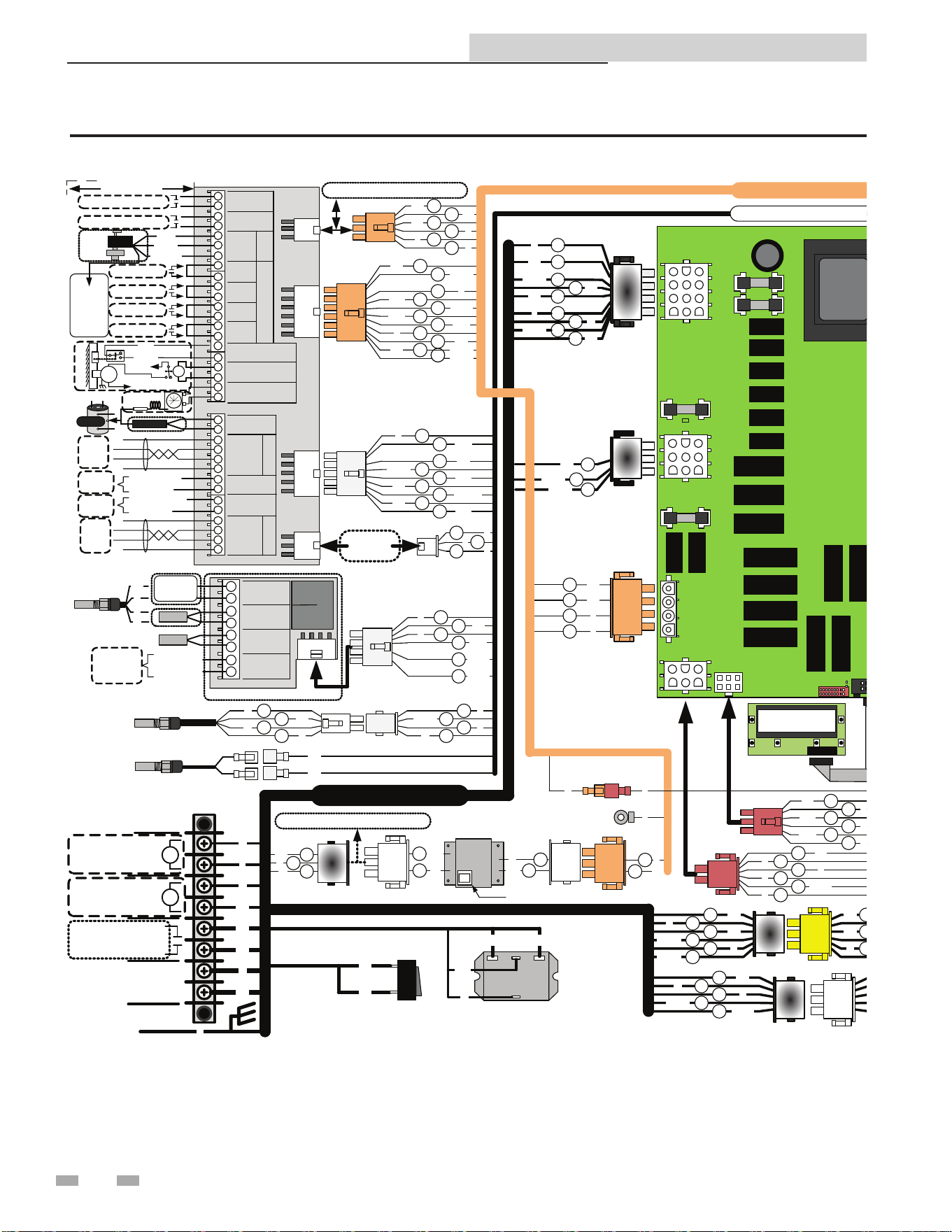
9 Diagrams
Figure 9-2 Connection Diagram
NOTE: NUMBER OF GAS VALVES VARIES BY MODEL
GROUND
+
+
+
+
+
+
+
+
OUTDOOR
SENSOR
SYS RETURN
SENSOR
SYS SUPPLY
SENSOR
0-10V SYS
-PUMP IN
CN2
1
2
3
4
5
6
7
8
FIELD
SUPPLIED
WIRING
+
+
+
+
+
+
+
+
+
+
+
+
+
+
+
+
+
+
+
+
+
+
+
+
+
+
+
+
+
+
+
+
+
+
+
ALARM
CONTACTS
OPEN
CLOSE
COM
RUNTIME
CONTACTS
3- WAY
VALVE
STAGING
S1
S1
S2
S2
S3
S3
S4
S4
LOUVER PROVING
SWITCH
LOUVER RELAY
COIL
TANK
AQUASTAT
2
3
4
5
6
7
8
9
10
11
12
13
14
15
16
17
18
19
20
21
22
23
24
25
26
27
28
29
30
31
32
33
34
35
CN3
CN2
CN1
CN6
CN4
CN5
TANK
SENSOR
+0-10V
-BMS IN
+0-10V
-RATE OUT
SHIELD
A
B
SHIELD
SHIELD
A
B
SHIELD
CA SCADEMO DB US
X1
X2
X10
X12
X11
X4
X9
X5
X6
X7
X8
X13
F2
F4
F5
F6
1
8
3
4
5
6
7
9
10
Y
R/W
BR
BR/W
Y/G
BL
BL/BK
PR
O/R
MAIN UNIT
1
1
6
2
3
4
5
PR
PR
BL
P
Y
P
GY/W
BK
1
6
3
7
2
4
8
PR
BR/W
W
P
BK
GY
BK/W
10
GY
12
G
1
9
3
4
5
6
7
8
10
11
12
12
BR
BR/W
R
R/O
R/BK
T/W
R/W
Y
GY
BL
W/BK
1
18
2
3
5
6
20
19
17
16
12
7
15
14
Y
T
W
GY
BL
Y/G
BR/W
BL
BK/R
R/BK
BL/BK
BR
BK
1
R/BK
4
8
O/R
PR
1
12
2
3
4
5
6
10
11
13
14
12
7
15
16
BL
Y
R
W/BK
O/BK
T
R
GY
O/R
T/W
R/O
R/W
BR
BR/W
COMMON
0-10V DC IN
COMMON
0-10V DC OUT
COMMON
0-10V DC IN
FROM
BMS
TO
BMS
FROM
PUMP
OUTPUT
LOUVERS
UNITS
MOD
BUS
BMS
1
6
2
3
4
5
BL
R/O
R/W
6
1
5
4
3
2
Y
Y
Y
NEUTRAL
UNIT
PUMP
SYSTEM PUMP
RELAY COIL
IND-DHW PUMP
RELAY COIL
LINE
GROUND
1
3
5
2
4
BK
W
G
BK/W
BK/R
1
3
5
2
4
BK
W
G
BK/W
BK/R
CO
NTROLLER
DISPLAY
IDENTIFICATION PLUG
MODEL SPECIFIC
CONSULT
FACTORY
T= TAN
Y=YELLOW
BR=BROWN
G=GREEN
GY=GRAY
W = WHITE
BK = BLACK
PR=PURPLE
BL=BLUE
P=PINK
O=ORANGE
FACTORY
OPTIONS
Y/G = YELLOW WITH GREEN STRIPE
R= RED
INLET
SENSOR
BR
BR
SAFETY
OUTLET
SENSOR
ON/OFF
SWITCH
BK
BK
BR
BR
CHASSIS
GROUND
W
P
W
PR
X3
1
2
3
4
P
P
PR
PR
8
12
13
12
W/BK
W/R
R/W
10
11
R
W
1
2
3
4
R
W
BK
G
1
2
3
4
W
Y
W/BK
Y
1
7
2
5
6
8
Y
BK
P
W/R
R/BK
BK/R
FIELD WIRING
W
BK
G
3
1
BK
W
2G
3
2
Y
BL
60VA
3
1
BK
W
3
2
Y
BL
CONTROLLER
XFMR
DIGITAL HARNES
S
PUMP RELAY
AC
120VAC COIL
BR/
W
W
BR BR
GAS VALVE XFMR
FLOW
SWITCH
O
O/BK
1
2
3
4
BL
Y
1
2
4
BL
Y
O
1
2
1
2
O
O/BK
IGNITER
Y
Y
Y
R/BK
R
BL
S1
1
21
3
R Y
R
S2
3
2
1
3
R/BKY R/BK
S3
5
2
1
3
R/O Y R/O
S4
6
2
1
3
R/W Y R/W
S3
4
21
3
R/O Y R/O
S1
2
21
3
R
Y R
4
1
3
5
2
6
GY
G
GY
GY/W
G
GY/W
4
1
3
5
2
6
GY
G
GY
GY/W
G
GY/W
FLOW SWITCH
LWCO
BK
W
BL
Y
LOW GAS
SWITCH
O
O/
BK
BL
Y
BK
W
LO -GAS
BL
AUXILLIARY
HI-LIMIT
C NONC
C
2
1
GROUNDHSI
G
STAGE #1 STAGE #2STAGE #1 STAGE #3 STAGE #4STAGE #3
S1/S2
S3/S4
GY
GY
#1
GY/W
GY/W
CHASSIS
GROUND
1
2
3
PR
5
2
4
1
6
3
LWCO
24VAC
RESET
PR
~~~~
~~~~
LWCO
PROBE
TEST
~~~~
T
T
AIR PROVE
SWTICH
BLOCK
FLUE
SWITCH
BLOWER RELAY
120VAC COIL
BK/
W
BK
BK/
W
HI/LO SPEED RELAY
120VAC COIL
W
BK/
R
BK/
W
R
BK
NO
COM
NC
COM
O/BK
HSI#2
GY/W
W
Y
24V
GROUND
G
24V COM
BL
R
BL
1
3
Y
R
HI
O
O/BK
BL
BL
BL
CIRCUIT
BREAKER
LO
MAIN UNIT HARNESS
OPT. ALARM HARNESS
Notes:
1. All wiring must be installed in accordance with : local, state, provincial and national code requirements per either
N.E.C. in USA or C.S.A. in Canada.
2. If any original equipment wire as supplied with the appliance must be replaced, it must be replaced with wire
having same wire gauge (AWG) and rated for a minimumof 105°C
3. Actual connector block locations may vary from those shown on diagrams . Refer to actual components for
proper connector block locations when using diagrams to trouble shoot unit.
TO PREVENT ELECTRICAL SHOCK
THIS HEATER MAY BE CONNECTED TO MORE THAN ONE BRANCH
CIRCUIT. MORE THAN ONE DISCONNECT SWITCH MAY BE
REQUIRED TO DE-ENERGIZE THE EQUIPMENT FOR SERVICING.
DANGER
!
LBL20082 REV A
R
R
1HP
MAX
120V
120V
120V/60Hz
SUPPLY
G
BURNER
BURNER
R
OPEN
COMMON
CLOSE
24V
TO MONITORING DEVICE
TO MONITORING DEVICE
NEU
LINE
STAGE #1
STAGE #2
STAGE #3
STAGE #4
TANK
SENSOR
AQUASTAT
M
COM
PROVE
4
3
2
1
G
W
R
BK
2-SPD BLOWER
50VA
60VA
75VA
100VA
HI
LO
NEU
GND
HI-GAS
++
3
2
1
3
W
BK
1
3
1
GBK
SILENCING
SWITCH
ALARM
BELL
1
6
4
5
PR
Y
1
6
23
45
BL
BLY
ALARM RELAY
120VAC COIL
R
P
P
OPT. ALARM
LOW
VOLTAGE
HARNESS
CONNECTION
BOARD
LOW VOLT HARNE
SS
MAIN POWER HARNESS
OPT. MODBUS HARNESS
CKT. BREAKER
LOW VOLT HARNESS
2
4
1
4
3
2
1
G
W
R
BK
HI
LO
NEU
GND
BOILER/POOL HEATER
2
T
GROUNDING
OPTION
JUMPER
DIGITAL
HARNESS
R
BL
G
3 1
2
TO
CONNECTION
BOARD
TO
PWR
TO
XFMR
MODBUS ADAPTER
G
120V
120V
120V
120V
24V
120V
120V
12 0V
24V
T
P
BL
R
R
BL
PR
2
W
OUT
DOOR
AIR
POOL/BOILER
BK
G
R
W
CN1
10K
10K
10K
10K
POOL
SAFETY
SUPPLY
10K
10K
10K/20K
10K
10K/20K
FIELD
OPTIONS
WIRE COLOR REFERENCE
1
2
BL
O/R
O
O/BK
1
2
1
2
1
2
O
1 2
O
O/BK
O/BK
Y
O/BK
O
1
2
O
1
2
O/BK
1
2
MODBUS
MODULE
CONNEC TIONS
G
O
GY
3
1
2
20K
10K
POOL SUP
SENSOR
3-WAY
VALVE
CONNECT
TO
TERMINAL
#19
(L OUVER
RELAY)
28
Copper-n II/IIE ModBus and BACnet Manual
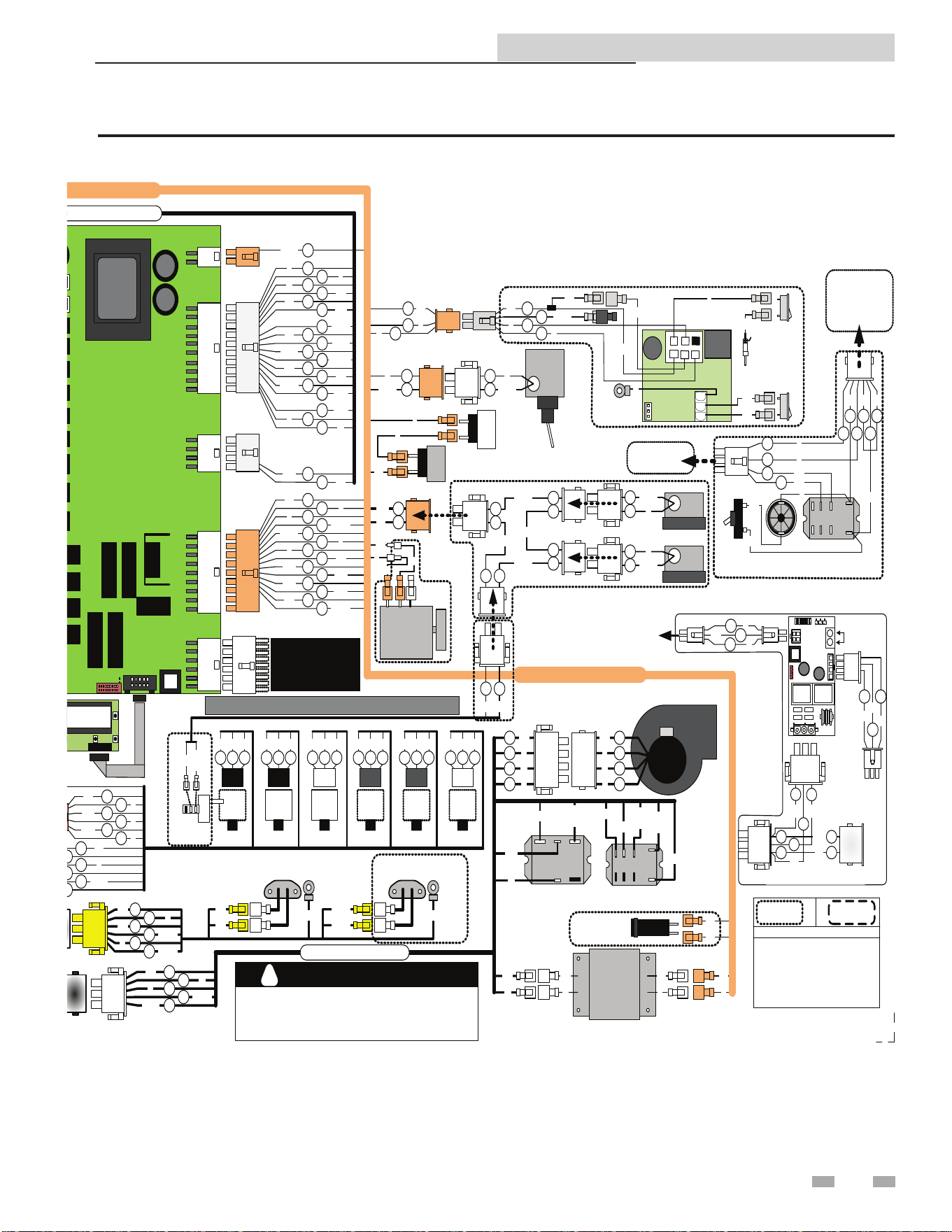
9 Diagrams (continued)
Figure 9-2 Connection Diagram cont’d
NOTE: NUMBER OF GAS VALVES VARIES BY MODEL
GROUND
+
+
+
+
+
+
+
+
OUTDOOR
SENSOR
SYS RETURN
SENSOR
SYS SUPPLY
SENSOR
0-10V SYS
-PUMP IN
CN2
1
2
3
4
5
6
7
8
FIELD
SUPPLIED
WIRING
+
+
+
+
+
+
+
+
+
+
+
+
+
+
+
+
+
+
+
+
+
+
+
+
+
+
+
+
+
+
+
+
+
+
+
ALARM
CONTACTS
OPEN
CLOSE
COM
RUNTIME
CONTACTS
3- WAY
VALVE
STAGING
S1
S1
S2
S2
S3
S3
S4
S4
LOUVER PROVING
SWITCH
LOUVER RELAY
COIL
TANK
AQUASTAT
2
3
4
5
6
7
8
9
10
11
12
13
14
15
16
17
18
19
20
21
22
23
24
25
26
27
28
29
30
31
32
33
34
35
CN3
CN2
CN1
CN6
CN4
CN5
TANK
SENSOR
+0-10V
-BMS IN
+0-10V
-RATE OUT
SHIELD
A
B
SHIELD
SHIELD
A
B
SHIELD
CA SCADEMO DB US
X1
X2
X10
X12
X11
X4
X9
X5
X6
X7
X8
X13
F2
F4
F5
F6
1
8
3
4
5
6
7
9
10
Y
R/W
BR
BR/W
Y/G
BL
BL/BK
PR
O/R
MAIN UNIT
1
1
6
2
3
4
5
PR
PR
BL
P
Y
P
GY/W
BK
1
6
3
7
2
4
8
PR
BR/W
W
P
BK
GY
BK/W
10
GY
12
G
1
9
3
4
5
6
7
8
10
11
12
12
BR
BR/W
R
R/O
R/BK
T/W
R/W
Y
GY
BL
W/BK
1
18
2
3
5
6
20
19
17
16
12
7
15
14
Y
T
W
GY
BL
Y/G
BR/W
BL
BK/R
R/BK
BL/BK
BR
BK
1
R/BK
4
8
O/R
PR
1
12
2
3
4
5
6
10
11
13
14
12
7
15
16
BL
Y
R
W/BK
O/BK
T
R
GY
O/R
T/W
R/O
R/W
BR
BR/W
COMMON
0-10V DC IN
COMMON
0-10V DC OUT
COMMON
0-10V DC IN
FROM
BMS
TO
BMS
FROM
PUMP
OUTPUT
LOUVERS
UNITS
MOD
BUS
BMS
1
6
2
3
4
5
BL
R/O
R/W
6
1
5
4
3
2
Y
Y
Y
NEUTRAL
UNIT
PUMP
SYSTEM PUMP
RELAY COIL
IND-DHW PUMP
RELAY COIL
LINE
GROUND
1
3
5
2
4
BK
W
G
BK/W
BK/R
1
3
5
2
4
BK
W
G
BK/W
BK/R
CONTROLLER
DISPLAY
IDENTIFICATION PLUG
MODEL SPECIFIC
CONSULT
FACTORY
T= TAN
Y=YELLOW
BR=BROWN
G=GREEN
GY=GRAY
W = WHITE
BK = BLACK
PR=PURPLE
BL=BLUE
P=PINK
O=ORANGE
FACTORY
OPTIONS
Y/G = YELLOW WITH GREEN STRIPE
R= RED
INLET
SENSOR
BR
BR
SAFETY
OUTLET
SENSOR
ON/OFF
SWITCH
BK
BK
BR
BR
CHASSIS
GROUND
W
P
W
PR
X3
1
2
3
4
P
P
PR
PR
8
12
13
12
W/BK
W/R
R/W
10
11
R
W
1
2
3
4
R
W
BK
G
1
2
3
4
W
Y
W/BK
Y
1
7
2
5
6
8
Y
BK
P
W/R
R/BK
BK/R
FIELD WIRING
W
BK
G
3
1
BK
W
2G
3
2
Y
BL
60VA
3
1
BK
W
3
2
Y
BL
CONTROLLER
XFMR
DIGITAL HARNESS
PUMP RELAY
AC
120VAC COIL
BR/
W
W
BR BR
GAS VALVE XFMR
FLOW
SWITCH
O
O/BK
1
2
3
4
BL
Y
1
2
4
BL
Y
O
1
2
1
2
O
O/BK
IGNITER
Y
Y
Y
R/BK
R
BL
S1
1
21
3
R Y
R
S2
3
2
1
3
R/BKY R/BK
S3
5
2
1
3
R/O Y R/O
S4
6
2
1
3
R/W Y R/W
S3
4
21
3
R/O Y R/O
S1
2
21
3
R
Y R
4
1
3
5
2
6
GY
G
GY
GY/W
G
GY/W
4
1
3
5
2
6
GY
G
GY
GY/W
G
GY/W
FLOW SWITCH
LWCO
BK
W
BL
Y
LOW GAS
SWITCH
O
O/
BK
BL
Y
BK
W
LO -GAS
BL
AUXILLIARY
HI-LIMIT
C NONC
C
2
1
GROUNDHSI
G
STAGE #1 STAGE #2STAGE #1 STAGE #3 STAGE #4STAGE #3
S1/S2
S3/S4
GY
GY
#1
GY/W
GY/W
CHASSIS
GROUND
1
2
3
PR
5
2
4
1
6
3
LWCO
24VAC
RESET
PR
~~~~
~~~~
LWCO
PROBE
TEST
~~~~
T
T
AIR PROVE
SWTICH
BLOCK
FLUE
SWITCH
BLOWER RELAY
120VAC COIL
BK/
W
BK
BK/
W
HI/LO SPEED RELAY
120VAC COIL
W
BK/
R
BK/
W
R
BK
NO
COM
NC
COM
O/BK
HSI#2
GY/W
W
Y
24V
GROUND
G
24V COM
BL
R
BL
1
3
Y
R
HI
O
O/BK
BL
BL
BL
CIRCUIT
BREAKER
LO
MAIN UNIT HARNESS
OPT. ALARM HARNESS
Notes:
1. All wiring must be installed in accordance with : local, state, provincial and national code requirements per either
N.E.C. in USA or C.S.A. in Canada.
2. If any original equipment wire as supplied with the appliance must be replaced, it must be replaced with wire
having same wire gauge (AWG) and rated for a minimumof 105°C
3. Actual connector block locations may vary from those shown on diagrams . Refer to actual components for
proper connector block locations when using diagrams to trouble shoot unit.
TO PREVENT ELECTRICAL SHOCK
THIS HEATER MAY BE CONNECTED TO MORE THAN ONE BRANCH
CIRCUIT. MORE THAN ONE DISCONNECT SWITCH MAY BE
REQUIRED TO DE-ENERGIZE THE EQUIPMENT FOR SERVICING.
DANGER
!
LBL20082 REV A
R
R
1HP
MAX
120V
120V
120V/60Hz
SUPPLY
G
BURNER
BURNER
R
OPEN
COMMON
CLOSE
24V
TO MONITORING DEVICE
TO MONITORING DEVICE
NEU
LINE
STAGE #1
STAGE #2
STAGE #3
STAGE #4
TANK
SENSOR
AQUASTAT
M
COM
PROVE
4
3
2
1
G
W
R
BK
2-SPD BLOWER
50VA
60VA
75VA
100VA
HI
LO
NEU
GND
HI-GAS
++
3
2
1
3
W
BK
1
3
1
GBK
SILENCING
SWITCH
ALARM
BELL
1
6
4
5
PR
Y
1
6
23
45
BL
BLY
ALARM RELAY
120VAC COIL
R
P
P
OPT. ALARM
LOW
VOLTAGE
HARNESS
CONNECTION
BOARD
LOW VOLT HARNESS
MAIN POWER HARNESS
OPT. MODBUS HARNESS
CKT. BREAKER
LOW VOLT HARNESS
2
4
1
4
3
2
1
G
W
R
BK
HI
LO
NEU
GND
BOILER/POOL HEATER
2
T
GROUNDING
OPTION
JUMPER
DIGITAL
HARNESS
R
BL
G
3 1
2
TO
CONNECTION
BOARD
TO
PWR
TO
XFMR
MODBUS ADAPTER
G
120V
120V
120V
120V
24V
120V
120V
12 0V
24V
T
P
BL
R
R
BL
PR
2
W
OUT
DOOR
AIR
POOL/BOILER
BK
G
R
W
CN1
10K
10K
10K
10K
POOL
SAFETY
SUPPLY
10K
10K
10K/20K
10K
10K/20K
FIELD
OPTIONS
WIRE COLOR REFERENCE
1
2
BL
O/R
O
O/BK
1
2
1
2
1
2
O
1 2
O
O/BK
O/BK
Y
O/BK
O
1
2
O
1
2
O/BK
1
2
MODBUS
MODULE
CONNEC TIONS
G
O
GY
3
1
2
20K
10K
POOL SUP
SENSOR
3-WAY
VALVE
CONNECT
TO
TERMINAL
#19
(L OUVER
RELAY)
29

30
Copper-n II/IIE ModBus and BACnet Manual
Notes

31
Copper-n II/IIE ModBus and BACnet Manual
Notes

Revision Notes: Revision A (ECO #C08638) initial release.
Revision B (ECO C11616) reects the addition of the lockout code
notice on page 21 (R05772).
Revision C (PCP# 3000002377 / CN# 500002607) reects the addition
of BACnet information and images, edits made to wording of Timing
Specications on pages 4 and 10, and edits made to Memory Map
tables on pages 8 and 12.
Revision D (PCP# 3000007541 / CN# 500007580) reects the addition
of references to A+ and B- on page 15.
Revision E (PCP# 3000008406 / CN# 500008361) reects an update to
the addressing information of BACnet conguration on page 9.
Revision F (PCP #3000045243 / CN #500032780) reects Fahrenheit
and Celsius enhancement additions.
Revision G (PCP #3000069837 / CN #500055279) reects updated
lockout codes on page 25.
100160882_2000001229_Rev G
01/26