OPERATING INSTRUCTIONS
Tumble dryer
EN
TD86
T311HCXLW.AU
Carefully read the instructions for use before using the dryer.

3Introduction ................................................
4Safety precautions .....................................
12
Before using the appliance for the first
time ..............................................................
12Packaging ....................................................
12Transport protection ....................................
13Cleaning .......................................................
14Installation and connection ......................
14Selecting the room .......................................
14Dryer placement ..........................................
16Adjusting the dryer feet ...............................
17Installation under the counter ......................
18Stacking on top of a washing machine ........
21Built-in ..........................................................
23Changing the door opening direction ..........
24Opening the Door ........................................
24Draining the condensate .............................
26Connecting to the power mains ...................
27ASKO Laundry Care - Hidden helpers .......
28Dryer description .......................................
28Control unit ...................................................
29Initial settings before use ..........................
30
Connecting the appliance to the ConnectLife
application ...................................................
33Advices before drying ...............................
33Laundry sorting ............................................
33Clothing ........................................................
34
Materials (fabrics) suitable for drying in a
tumble dryer .................................................
34
Materials (fabrics) that may not be dried in a
tumble dryer .................................................
34
Materials that are not suitable for drying in a
tumble dryer .................................................
35Laundry symbols .........................................
36Drying process, step by step (1–7) ..........
36STEP 1: Sort the fabrics ...............................
36STEP 2: Turn on the main switch .................
36
STEP 3: Open the dryer door and insert the
laundry. ........................................................
38Drying in a basket ........................................
39STEP 4: Choose the drying program. ..........
40STEP 5: Choosing the program settings ......
43
STEP 6: Close the door and start the drying
process. .......................................................
44STEP 7: End of program ..............................
45Appliance settings .....................................
45System settings ............................................
49Cleaning and maintenance .......................
49Cleaning the appliance exterior ...................
49Additional information regarding cleaning ...
50Cleaning the lint filter ...................................
51Cleaning the second lint filter ......................
53Emptying the condense tank .......................
54Errors: what to do? ....................................
55Failure display ..............................................
57Sounds .........................................................
58Service ........................................................
58Before calling a service technician ..............
60Technical information ................................
60Typeface License Notice .............................
63Declaration of conformity .............................
64Table of consumption values ...................
65DISPOSAL ...................................................
Contents
Dear customer,
We thank you for purchasing this quality ASKO product.
We hope it meets all your expectations. Scandinavian design combines pure lines, everyday
functionality, and high quality. These are the key characteristics of all our products, and the reason
why they are highly appreciated across the globe.
We kindly recommend you to read these instructions before using the tumble dryer for the first time.
The instruction manual also includes information on how you can help protect the environment.
The following symbols are used throughout the manual and they have the following meanings:
INFORMATION!
Information, advice, tip, or recommendation
WARNING!
Warning – general danger
ELECTRIC SHOCK!
Warning – danger of electric shock
HOT SURFACE!
Warning – danger of hot surface
DANGER OF FIRE!
Warning – Risk of fire / Flammable materials
Original instructions
SAVE THESE INSTRUCTIONS FOR FUTURE REFERENCE!
3
Introduction

General
Please read the instruction manual and save it for
future reference.
• Please do not use the tumble dryer if you have not read
and understood these instructions or use first.
• This appliance is not intended for use by persons (including
children) with reduced physical, sensory or mental
capabilities, or lack of experience and knowledge, unless
they have been given supervision or instruction concerning
use of the appliance by a person responsible for their safety.
• Failure to observe the instructions for use or
inappropriate use of the dryer may result in damage to the
laundry or the appliance, or injury to the user. Keep the
instruction manual handy, near the dryer.
• Instructions for use are available on our website at
www.asko.com.
• Your dryer is intended solely for household use.
• Before connecting the dryer to the power mains, please
read carefully the instructions for use that describe the dryer
and its correct and safe use. The instructions apply to
several appliance types or models; thus, settings or
equipment may be described herein which is not available
in your dryer.
• The warranty does not cover consumables, minor
deviations in colour, increased noise that results from
appliance age and which does not affect the functionality
of the dryer, and aesthetic defects on components, which
do not affect the dryer's functionality and safety.
• The maximum mass of dry textile material in kilograms to
be used in the appliance.
4
Safety precautions
Child safety
WARNING!
Do not let children younger than three years to come
near the appliance, unless they are under constant
supervision.
Children should be supervised to ensure that they do
not play with the appliance.
• Before closing the dryer door and running the program,
make sure there is nothing except laundry in the drum (e.g.
if a child climbed into the dryer drum and closed the door
from the inside).
• Prevent your children and pets to enter the dryer drum.
• Activate Lock (Lock). See chapter: Lock
• The dryer is made in compliance with all relevant safety
standards.
• This appliance can be used by children aged from 8 years
and above and persons with reduced physical, sensory or
mental capabilities or lack of experience and knowledge if
they have been given supervision or instruction concerning
use of the appliance in a safe way and understand the
hazards involved.
• Children should be supervised to ensure that they do not
play with the appliance.
• Cleaning and user maintenance shall not be made by
children without supervision.
Danger of hot surface
HOT SURFACE!
WARNING! The back of the dryer may get very hot during
operation. Wait for the dryer to cool down completely
before touching its back side. (Observe the instructions
in the chapter Installation and connection)
5
Safety precautions
HOT SURFACE!
Never stop the drying process before it is completed; if you
do interrupt the cycle for any reason, be careful when
removing the laundry from the drum as it is very hot. Quickly
remove the laundry from the drum and spread it to allow it
to cool down as quickly as possible.
Connection and installation safety
ELECTRIC SHOCK!
If the supply cord is damaged, it must be replaced by the
manufacturer, its service agent or similarly qualified persons
in order to avoid a hazard.
ELECTRIC SHOCK!
The door lock is under electrical voltage. The door must be
replaced by the manufacturer or their service technician or
similarly qualified persons in order to avoid any hazards.
WARNING!
The appliance must not be supplied through an external
switching device, such as a timer, or connected to a circuit
that is regularly switched on and off by a utility.
• Leave any repairs and similar tasks on the dryer to an
expert. Unprofessional repair may result in an accident or
major malfunction.
• The tumble dryer shall be disconnected from the power
source during servicing and replacement of parts. Removal
of the plug has to be such, that an operator can check, from
any of the points to which he has access that the plug
remains removed.
6
Safety precautions

• After installation, wait for 24 hours without moving the
appliance before using it for the first time. If the dryer has
to be laid down on one of the sides during transport or
servicing, place it with its left side, viewing from the
appliance front, downwards.
• Install the dryer in a room with adequate ventilation and a
temperature between 15°C and 25°C.
• After installation, the dryer should stand still for two hours
before it is connected to the power mains.
• The tumble dryer may not be in contact with a wall or
adjacent furniture.
• Place the dryer on a level and stable solid (concrete) base.
• Do not place the dryer behind lockable or sliding door, or
door with a hinge on the opposite side of the dryer door
hinge. Install the dryer in such way that the door can always
be freely opened.
• At least two persons are required to install the tumble dryer
on top of a washing machine.
• The air in the room where the dryer is installed may not
contain dust particles.
• Adequate ventilation has to be provided to avoid the back
flow of gases into the room from appliances burning other
fuels, including open fires.
• Never block the air exhaust (evacuation opening).
• For appliances with ventilation openings in the base, a
carpet must not obstruct the openings.
• Make sure that lint does not accumulate around the dryer.
• The dryer shall not be connected to the power mains using
an extension cord.
• Do not connect the tumble dryer to an electrical outlet
intended for an electric shaver or hair dryer.
• Always use the hoses supplied with the dryer.
7
Safety precautions
• In case of incorrect dryer connection, incorrect use, or
servicing by an unauthorized person, the user shall bear
the cost of any damage as such damage shall not be
covered by warranty.
• In case of a defect, only use approved spare parts by
authorized manufacturers.
DANGER OF FIRE!
The refrigerant R290 in this appliance is environmentally
friendly yet combustible and may ignite if it comes into
contact with open flames or ignition sources. Keep naked
flames and ignition sources away from the appliance.
• Do not damage the refrigerant circuit.
Safe use
DANGER OF FIRE!
Only use the dryer to dry laundry that was washed with
water. Do not dry any laundry that was washed or cleaned
with flammable cleaners or substances (such as gasoline,
trichloroethylene etc.) as this may result in an explosion.
DANGER OF FIRE!
Remove all objects such as lighters and matches from the
pockets.
• Do not dry unwashed laundry in the dryer.
• If you have cleaned your clothes with industrial cleaners or
chemical substances, do not dry them in the dryer.
• Items that have been soiled with substances such as
cooking oil, acetone, alcohol, petrol, kerosene, spot
removers, turpentine, waxes and wax removers should be
washed in hot water with an extra amount of detergent
before being dried in the tumble dryer.
8
Safety precautions

• Items such as foam rubber (latex foam), shower caps,
waterproof textiles, rubber backed articles and clothes or
pillows fitted with foam rubber pads should not be dried in
the tumble dryer.
• Oil-aff ected items can ignite spontaneously, especially
when exposed to heat sources such as in a tumble dryer.
The items become warm, causing an oxidation reaction in
the oil. Oxidation creates heat. If the heat cannot escape,
the items can become hot enough to catch fi re. Piling,
stacking or storing oil-aff ected items can prevent heat from
escaping and so create a fire hazard.
• If it is unavoidable that fabrics that contain vegetable or
cooking oil or have been contaminated by hair care
products shall be placed in a tumble dryer they should fi
rst be washed in hot water with extra detergent - this will
reduce, but not eliminate, the hazard.
• The system consists of a compressor and a heat
exchanger. When the dryer is started, compressor operation
(the sound of flowing liquid) or flow of refrigerant may be
louder as long as the compressor operates. This is not a
sign of malfunction and it will not affect useful life of the
dryer. In time and with use of the dryer this noise will
become quieter.
• The dryer uses a heat pump system to heat the air.
• The lint filter has to be cleaned frequently.
Clean the dryer filters after each drying cycle. If you have
removed the filters, replace them before the next drying
cycle.
• Use laundry conditioners or similar products in compliance
with manufacturer's instructions.
• Do not use any solvents or cleaning agents that could
damage the dryer (please observe the recommendations
and warnings provided by the manufacturers of the cleaning
agents).
9
Safety precautions

• Do not use any solvents, abrasive cleaners, glass cleaners,
or all-purpose cleaners.
• Never add chemicals or fragrances into the condensate
tank (see chapter Dryer description and Emptying the
condense tank).
• Fabric softeners, or similar products, should be used as
specified by the fabric softener instructions.
• Fill steam generators only with liquids specified by the
manufacturer.
• A float will switch off the appliance if the condensed water
pipe is clogged or if there is a risk of overflowing of the
condensed water accumulated in the condensed water tank
with a heat pump.
• If the condensate tube is blocked or clogged, then tumble
dryer operation is stopped (see chapter Emptying the
condense tank).
• After the drying process, unplug the dryer power cord
from the power outlet.
Storage during the winter
Before moving the dryer or before storing it in a non-heated
room during the winter, the condensate tank has to be
emptied.
R290 WARNINGS
INFORMATION!
Appliances with 0.117kg R290 flammable refrigerant amount
in its sealed system. The following must be observed for
your safety!
R290 Refrigerant Warning
• This appliance contains a small quantity of R290 refrigerant
which is environmentally friendly, but flammable. It does
10
Safety precautions

not damage the ozone layer, nor does it increase the
greenhouse effect.
• During transportation and installation, ensure that the tubing
of the refrigerant circuit is not damaged.
• Leaking refrigerant can ignite and may damage the eyes.
• In the event any damage does occur, avoid exposure to
open fires and any device which creates a spark.
Disconnect the appliance from the mains power.
• Thoroughly ventilate the room in which the appliance is
located for several minutes.
• Notify Customer Service for necessary action and advice.
• The room for installing the appliance must be at least 1
cubic metre per 8 grams of refrigerant. The refrigerant
quantity contained in this appliance is listed above in grams;
it is also noted on the Rating Plate of the appliance.
It is hazardous for anyone other than an Authorised Service
Person to carry out servicing or repairs to this appliance. In
Queensland the authorized person must hold a Gas Work
Authorisation for hydrocarbon refrigerants, before carrying out
servicing or repairs which involve the removal of covers.
The environment and personal safety must be considered
when disposing of this appliance. Please ensure the appliance
is taken to a recycle center for safe recycling. DO NOT dispose
of the appliance in land fill as the insulation and refrigerant
gas contained in these appliances are flammable.
11
Safety precautions
INFORMATION!
When you run the dryer for the first time, or if the dryer has been out of use for a long time, slight
hitting noise may appear. This is normal and it will disappear after a few drying cycles.
Packaging
Remove all packaging. When removing the packaging, make sure not to damage the dryer with a
sharp object.
Please sort the materials in compliance with local waste management recommendations (see chapter
DISPOSAL).
Transport protection
Before using the appliance, remove the transport protection designed to secure the appliance during
transport.
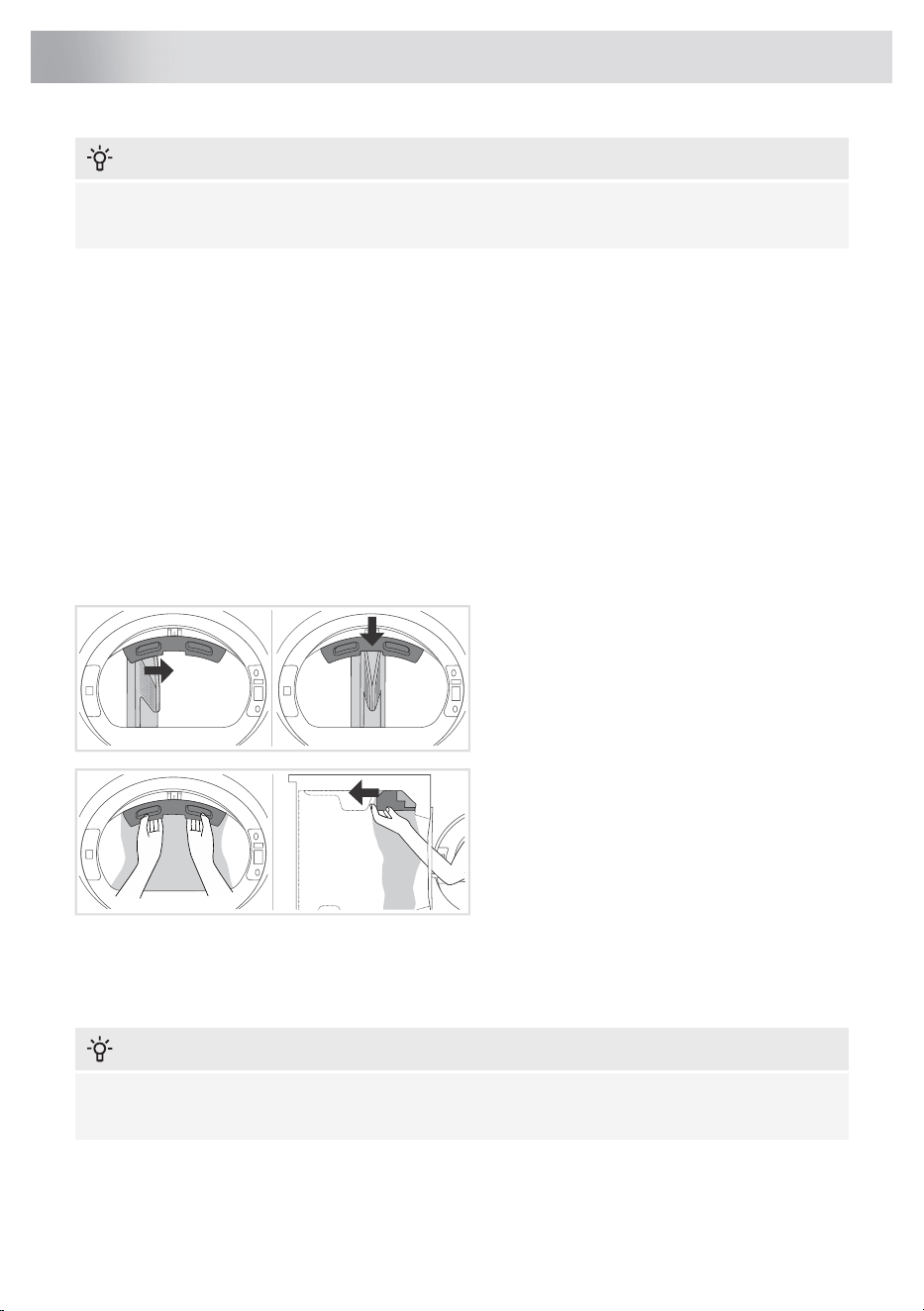
The transport protection is placed inside the drum of the dryer and secured at the top in a protective
bag.
1 Open the dryer door.
2 With one hand hold the transport protection,
and with the other hand one of the drum ribs.
Turn the rib toward the center of the transport
protection where the cutout (alignment recess)
is located.
3 Firmly hold the transport protection with
both hands to avoid damaging it during
removal.
4 With even pressure, push it straight into the
machine to remove it completely.
If you need to transport the appliance, reinstall the transport protection to prevent damage caused
by shaking during transit. When reinstalling the transport protection, slightly lift the drum from the
inside and press the protection firmly between the drum and the door frame on the inside, ensuring
that the drum is properly aligned.
INFORMATION!
In case the transport protection is lost, the appliance may be damaged during transportation,
and such damage will not be covered by the warranty.
12
Before using the appliance for the first time
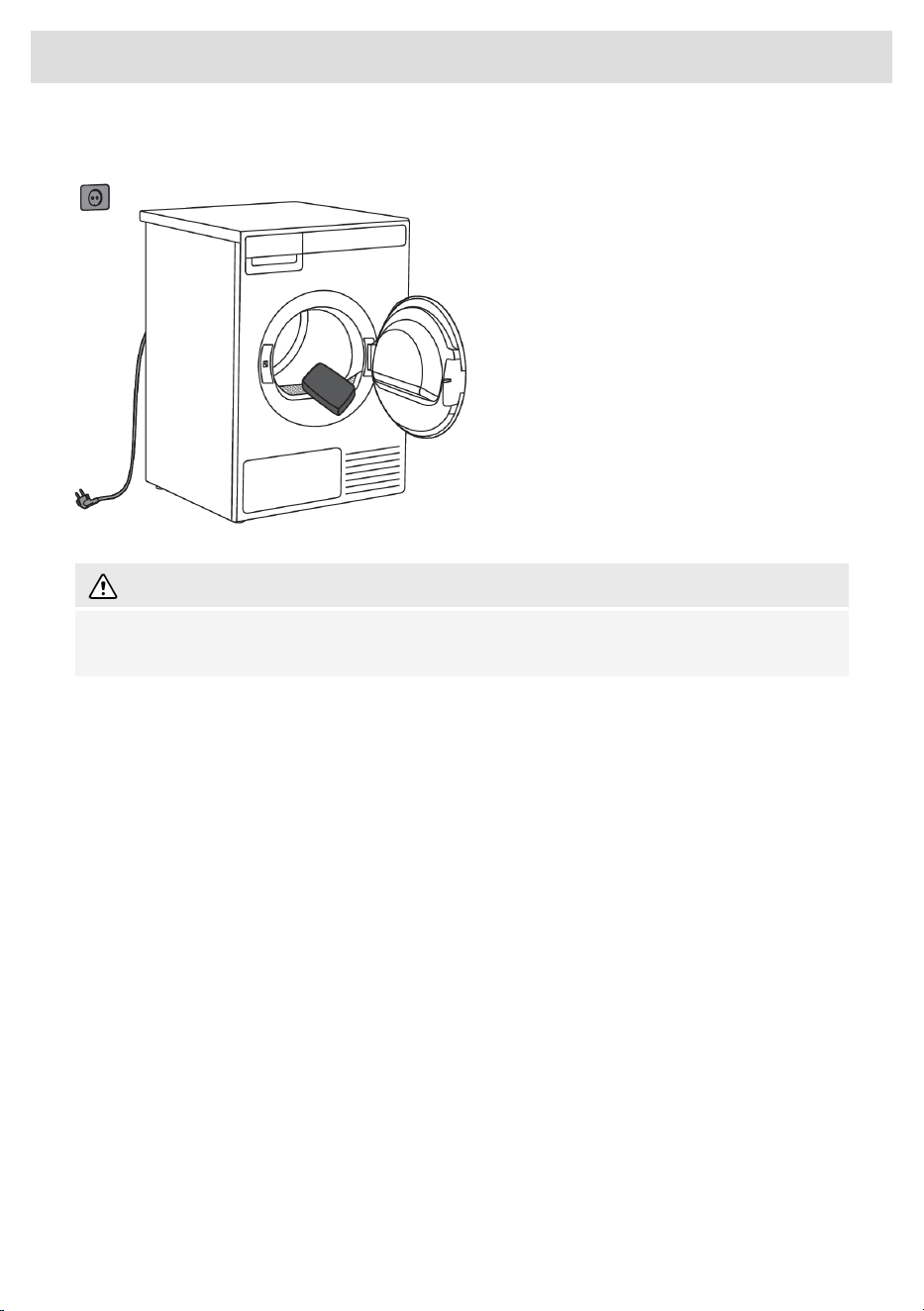
Cleaning
Make sure the dryer is disconnected from the
power supply, then open the door by pulling
it towards you.
Before using the dryer for the first time, clean
the dryer drum using a soft damp cotton cloth
and water.
WARNING!
Do not use any solvents or cleaning agents that could damage the dryer (please observe the
recommendations and warnings provided by the manufacturers of the cleaning agents).
13
Before using the appliance for the first time
INFORMATION!
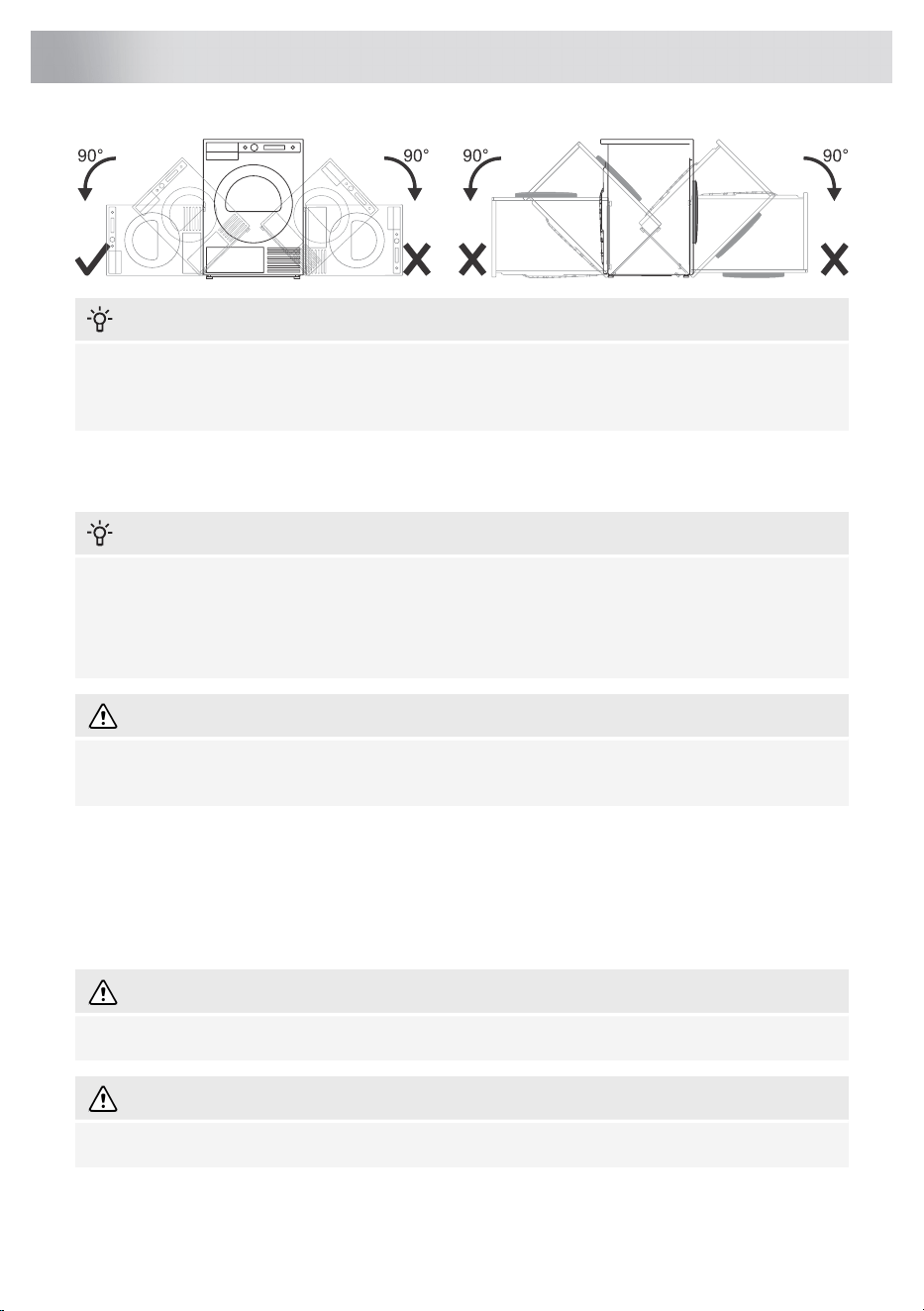
After installation, wait for 24 hours without moving the appliance before using it for the first time.
If the dryer has to be laid down on one of the sides during transport or servicing, place it with its
left side, viewing from the appliance front, downwards.
Selecting the room
INFORMATION!
Do not place the dryer in a room where temperature can drop below 0 °C, as the machine may
not operate correctly at such low temperatures or freeze with damages as consequences.
For optimum dryer operation install it in a room with adequate ventilation and a temperature
between 15 °C and 25 °C.
WARNING!
Do not place the dryer behind lockable or sliding door, or door with a hinge on the opposite side
of the dryer door hinge. Install the dryer in such way that the door can always be freely opened.
Dryer placement
The dryer can be either free standing or installed on top of a washing machine.
The dryer emits heat. Therefore, do not place it in a very small room, as the drying process may be
longer due to limited amount of ambient air.
WARNING!
Do not place the dryer on a carpet with long fibres as this may impede air circulation.
WARNING!
Never block the air vents.
14
Installation and connection
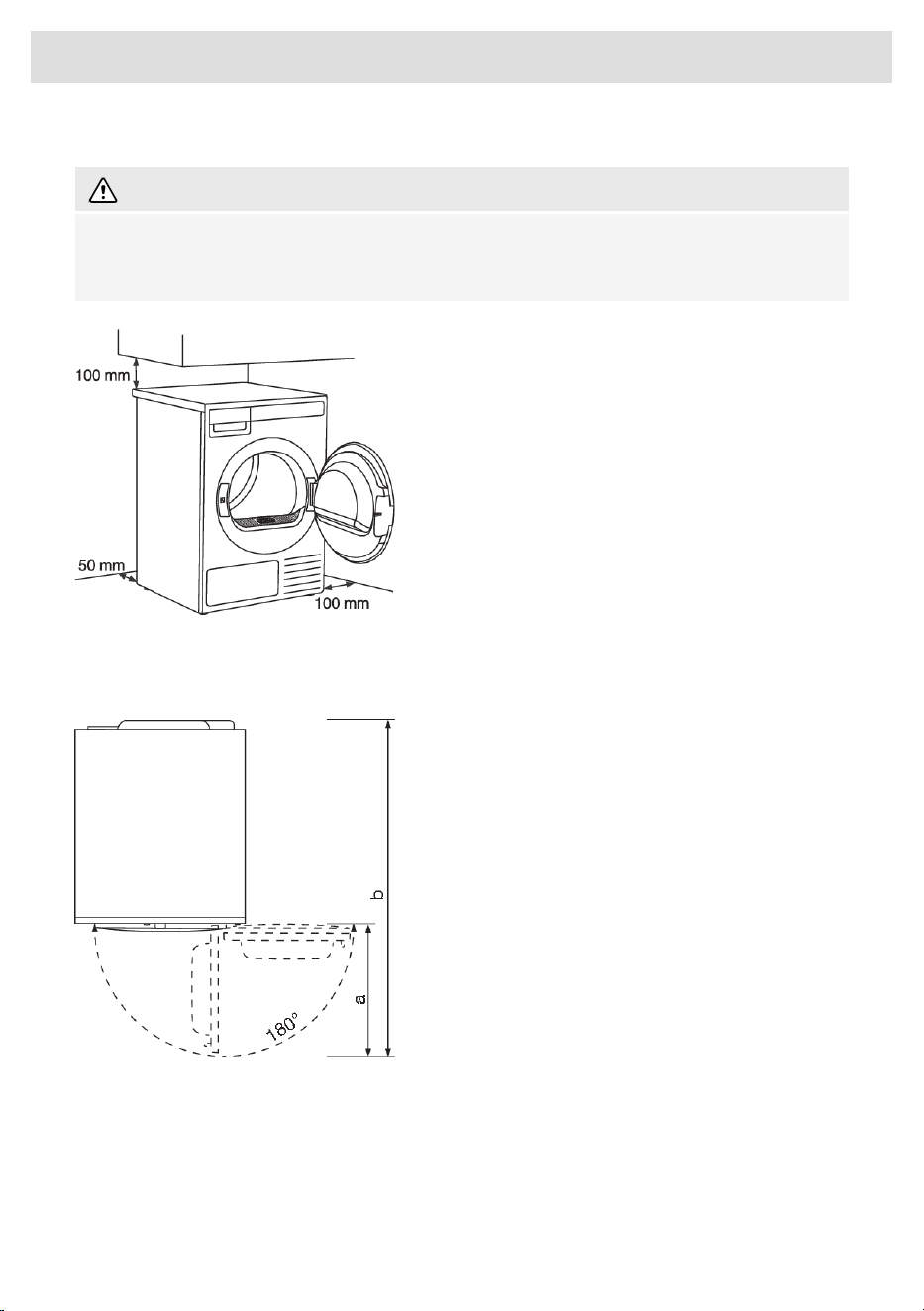
Clearance around the dryer for optimum operation
WARNING!
The dryer may not be in contact with a wall or adjacent furniture. For optimum dryer operation,
we recommend observing the clearance from the walls as indicated in the figure. In case of failure
to heed the required minimum clearance, the dryer may overheat.
For safety reasons, the minimum distance
between the back of the appliance and the
wall must be at least 25 mm, and the distance
between the appliance and any furniture above
it must be at least 40 mm.
For installing the dryer into the cabinet, please
refer to the special installation requirements in
section Built-in.
Opening the door of the dryer (top view).
The dryer door width (a) is 503 mm.
The dryer depth with door open (b) is 1248,2
mm.
The dryer door can be opened up to the angle
of 180°.
15
Installation and connection
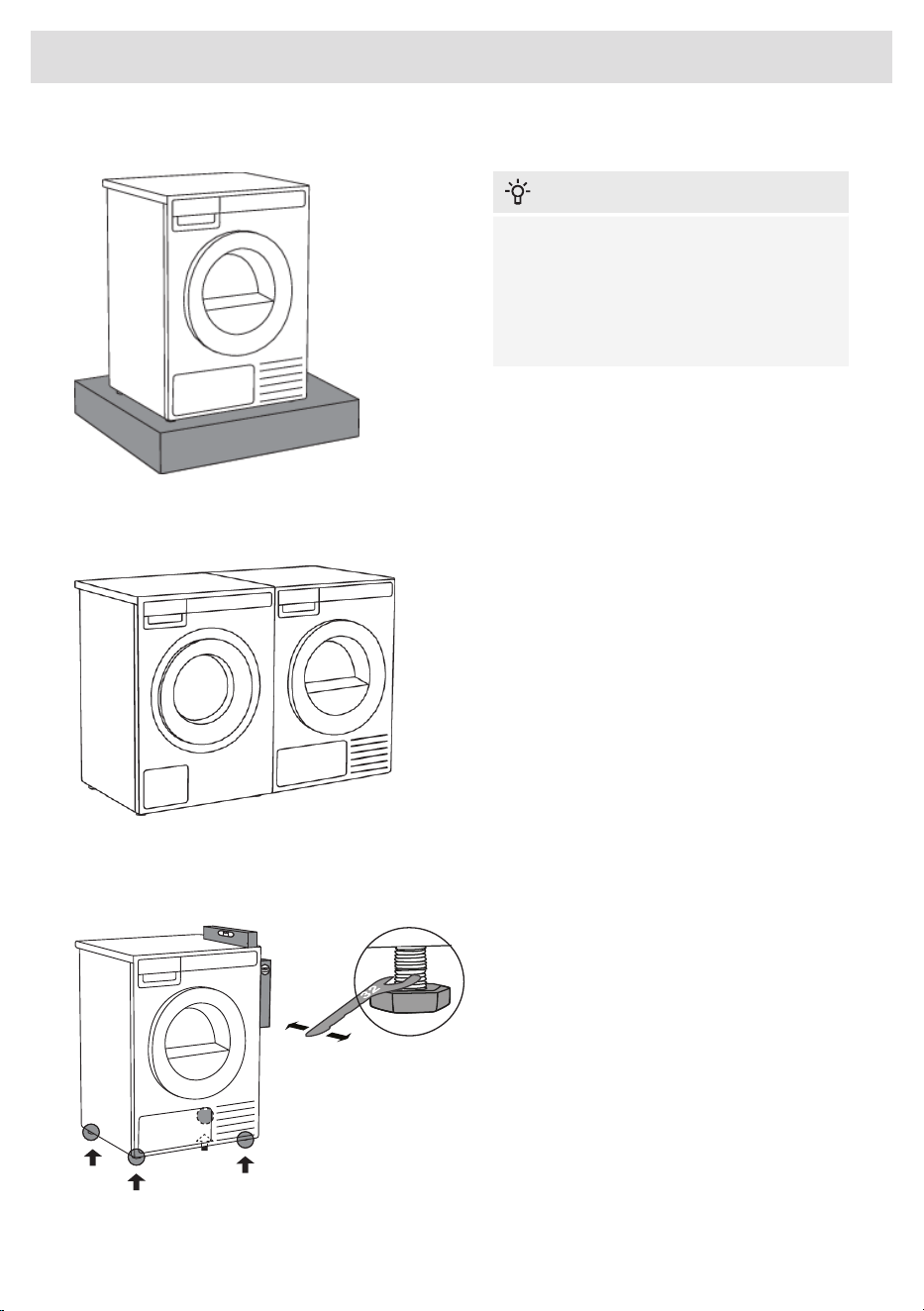
Placement on a pedestal
INFORMATION!
If the appliance is installed on a plinth or a
similar structure, then the appliance must
be fixed to it, to avoid the risk of falling.
ASKO original accessories are available
for this purpose, complete with fixing
instructions.
Free-standing appliance
The dryer may be placed adjacent to a
washing machine.
If there is insufficient friction between the dryer
feet and the floor, the dryer may slide during
operation.
To prevent any sliding, use a non-slide mat.
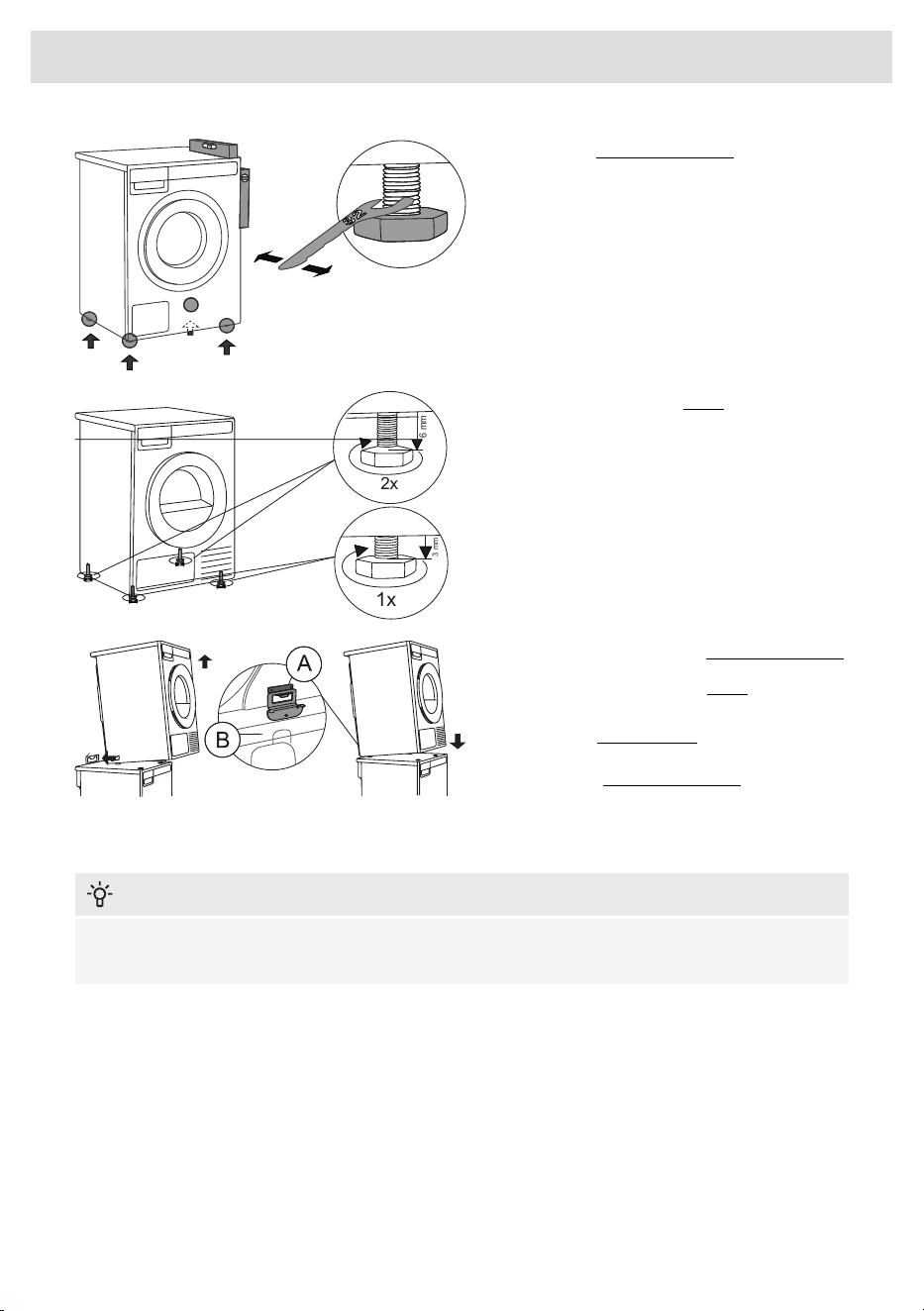
Adjusting the dryer feet
Place the dryer so that it is stable.
Use a spirit level to level the dryer in
longitudinal and traverse direction by rotating
the adjustable feet using a No. 32 spanner
(max. 15 mm).
16
Installation and connection
INFORMATION!
Incorrect levelling of the dryer with the adjustable legs may cause vibration, appliance sliding
across the room, and loud operation. Incorrect levelling of the dryer shall not be subject to
warranty.
INFORMATION!
Sometimes, unusual or louder noise may appear during appliance operation; these are mostly
the result of improper installation.
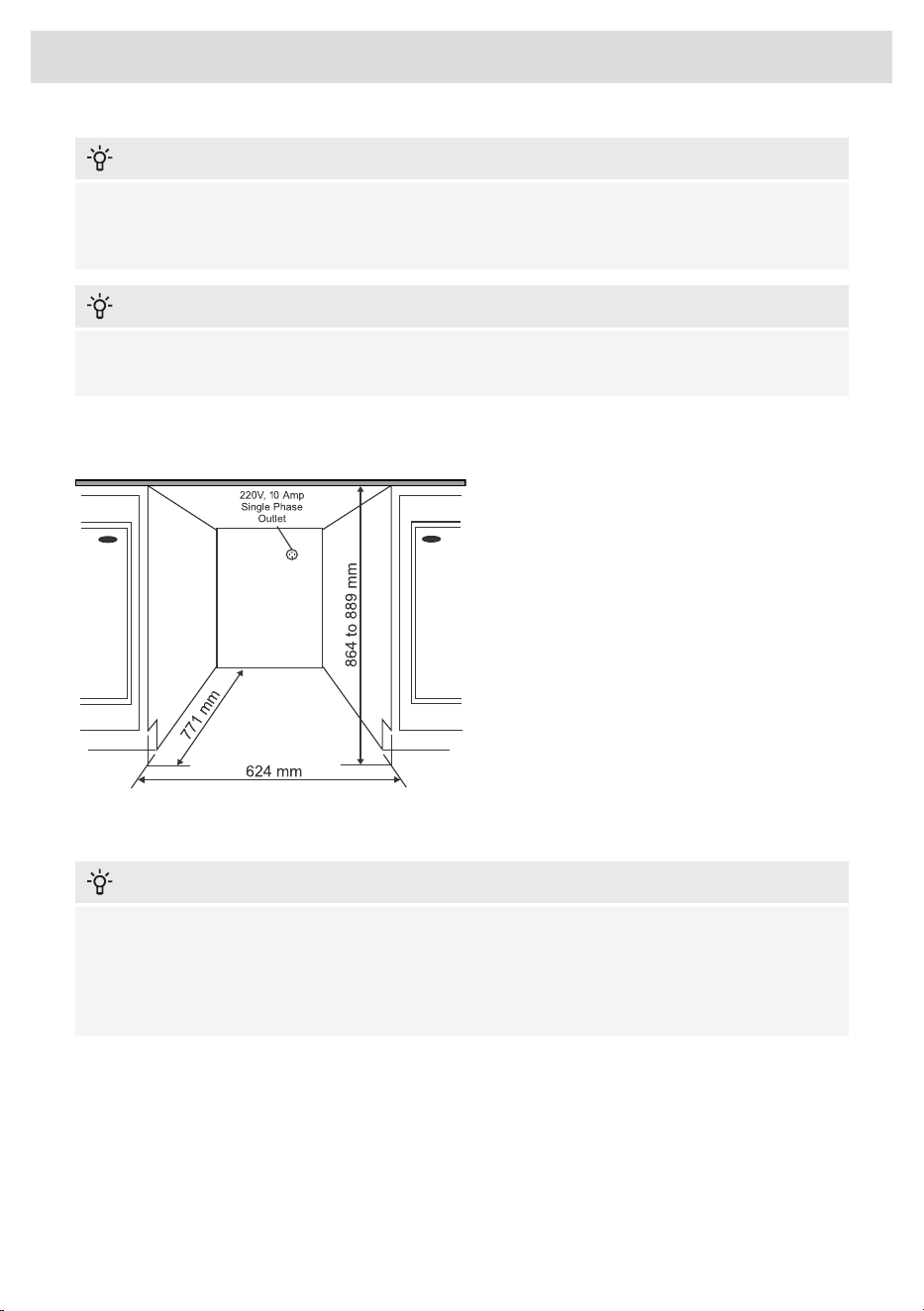
Installation under the counter
ASKO dryers can be installed under a furniture
unit or worktop which is at a height of at least
864 mm (measured from the floor to the bottom
surface of the counter). On all sides of the
appliance, there must be at least 12 mm of
room. Between the rear edge of the top panel
of the appliance and the wall behind the
appliance, the clearance must be at least
25 mm. The width of the opening in which you
want to insert the appliance must be at least
624 mm (measured between the sides that
limit the opening). The condenser models work
best when there is sufficient air circulation.
Install the dryer so the condensed water will continuously flow into a drain or sink, you will need a
drain outlet behind the unit. The maximum drain height is 1000 mm.
INFORMATION!
The height adjustment for the dryer is between 850 mm to 876 mm. Do not raise the appliance
higher than 876 mm.
It is very important to avoid a buildup of heat.
The warm air which is expelled from the rear of the dryer must be able to dissipate.
Warm air which cannot dissipate could cause a fault.
A buildup of heat could be avoided by:
• Creating a gap for the dryer in the kitchen furniture plinth facing.
• Creating ventilation gaps in the kitchen unit.
When build under, drying times may be longer.
17
Installation and connection
INFORMATION!
The dryer should not be installed next to a refrigeration appliance. The warm air expelled from
the rear of the dryer would increase the temperature around the refrigeration appliance heat
exchanger causing the compressor to run continuously. If it is not possible to install the dryer
anywhere else, then the refrigeration appliance must be sealed off from the dryer.
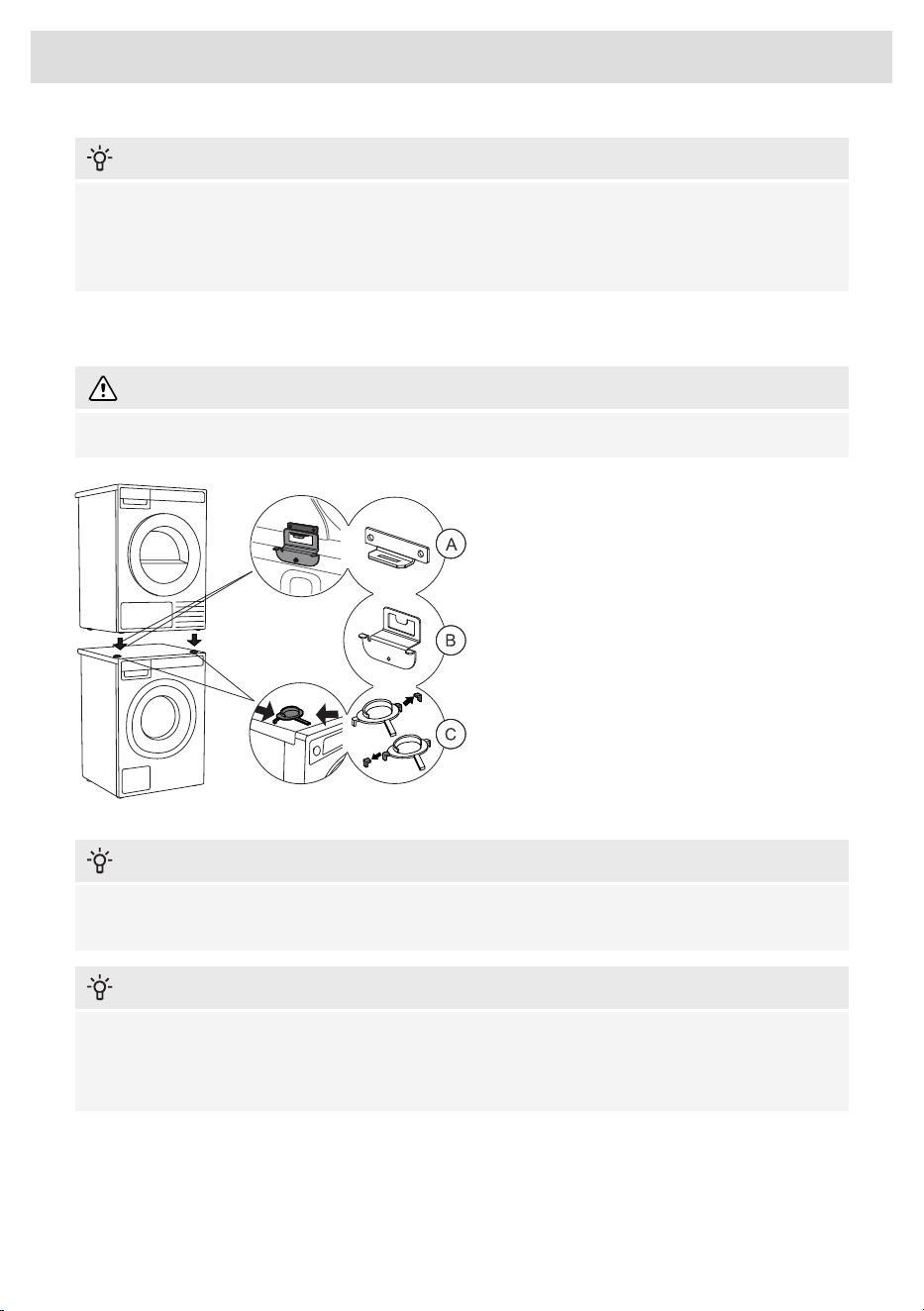
Stacking on top of a washing machine
WARNING!
At least two persons are required to install the tumble dryer on top of a washing machine.
To stack the dryer on top of a washing
machine, use the front feet (plastic footrests
(C)) and the tipping guard (A+B), supplied in
the dryer drum (see chapter How to stack a
dryer onto the washing machine (ASKO)).
If the washing machine and dryer are not of
the same dimensions, or if you have installed
an intermediate compartment between the
washing machine and dryer (ang.: Hidden
Helper), you can purchase a connecting plate
intended for the WM86-TD76 combination from
your dealer or at the repair shop.
INFORMATION!
The tipping guard (B) corresponds to ASKO washing machines and cannot be installed on
washing machines of other brands.
INFORMATION!
Washing machine on which you wish to install the dryer must be able to bear the weight of the
dryer (see washing machine’s rating plate or technical information).
All ASKO washing machines can bear the weight of the ASKO dryer.
18
Installation and connection
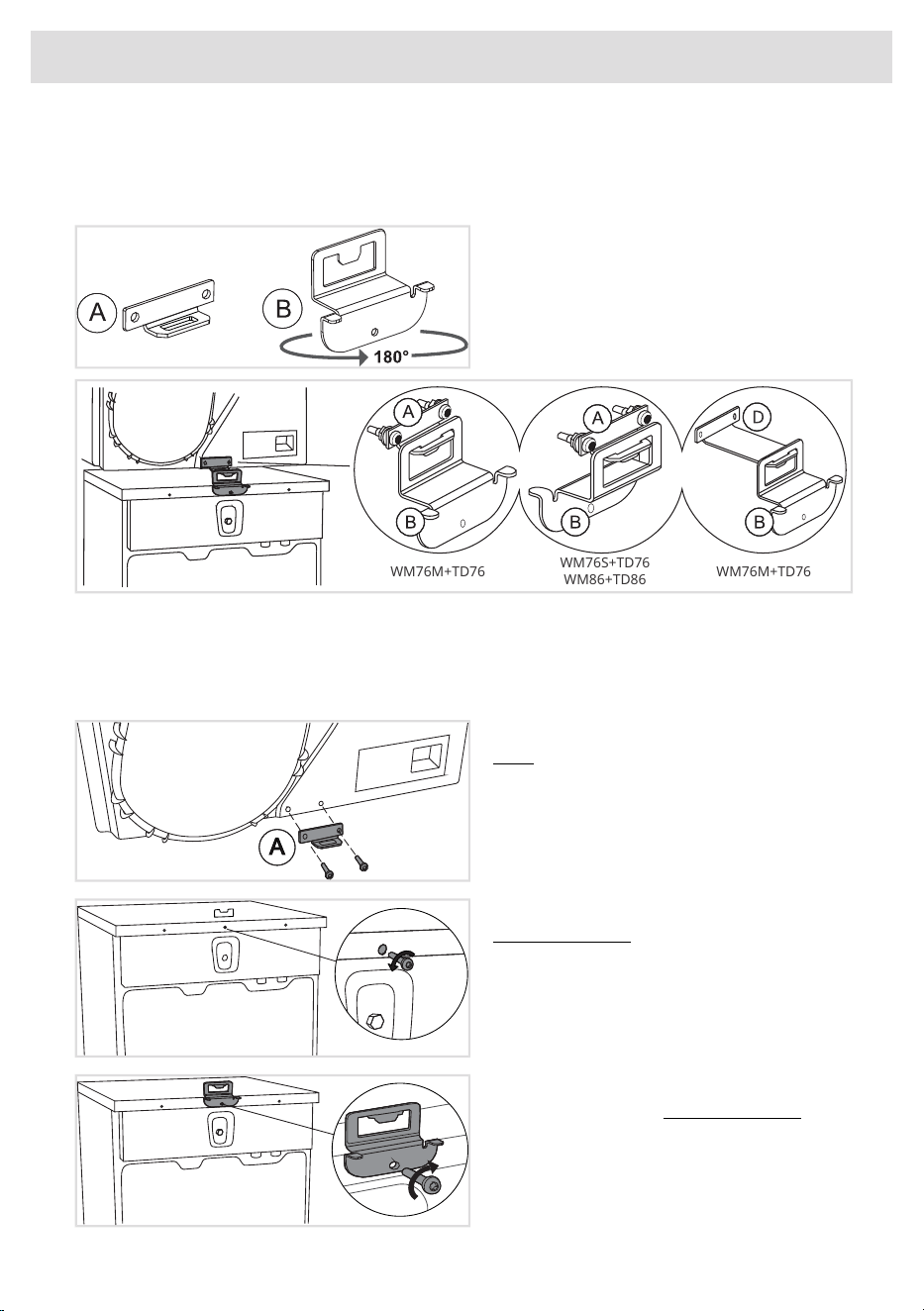
How to stack a dryer onto the washing machine (ASKO)
There is additional packaging in the dryer drum, which contains tipping guards (A, B), plastic footrests
(C) and screws.
1 The tipping guard consists of two metal
parts (A + B).
Part (B) can be rotated by 180°. Turn it
according to the depth of the washing machine
and dryer.
WM76M+TD76
WM76S+TD76
WM86+TD86
WM76M+TD76
Select the correct combination according to the type of washing machine and dryer, as indicated
on the rating plate located on the inner side of each appliance’s door (see chapter Service).
If your dryer has a smaller depth than the washing machine, you can purchase a suitable longer
guard (D) from the service center (ART. No.: 924231 OVERTURNING PROTEC.TD-76/WM-86).
2 Attach part (A) to the rear bottom of the
dryer using the two screws, washers, and nuts
included in the package.
3 Undo the screw on the back side of the
washing machine.
4 Use the screw to attach the tipping guard
(B) to the back of the washing machine.
Turn the part (B) according to the depth of
your dryer and washing machine (see point
1).
19
Installation and connection
5 Install the washing machine so that it is
stable.
1. Level the washing machine in longitudinal
and traverse direction by rotating the
adjustable feet using a No. 32 spanner.
The feet allow levelling up to +/- 1 cm.
6 Adjust the feet of the dryer.
3 mm
1x
6 mm
2x
1. First, tighten all 4 feet completely
(clockwise).
2. Unscrew the front 2 feet by exactly 1 turn
(3 mm) anticlockwise.
3. Then unscrew the last 2 feet by exactly 2
turns (6 mm) anticlockwise.
7 Place the dryer onto the washing machine.
1. Lift the front part of the dryer by 5 to 10
cm.
2. Push the tumble dryer into the tipping
guard (part B into part A) and install it on
top of the washing machine (see also
figure in chapter Stacking on top of a
washing machine).
INFORMATION!
Make sure that both parts of the tipping guard (A + B) are locked. The front sides of the washing
machine and dryer must be aligned!
20
Installation and connection
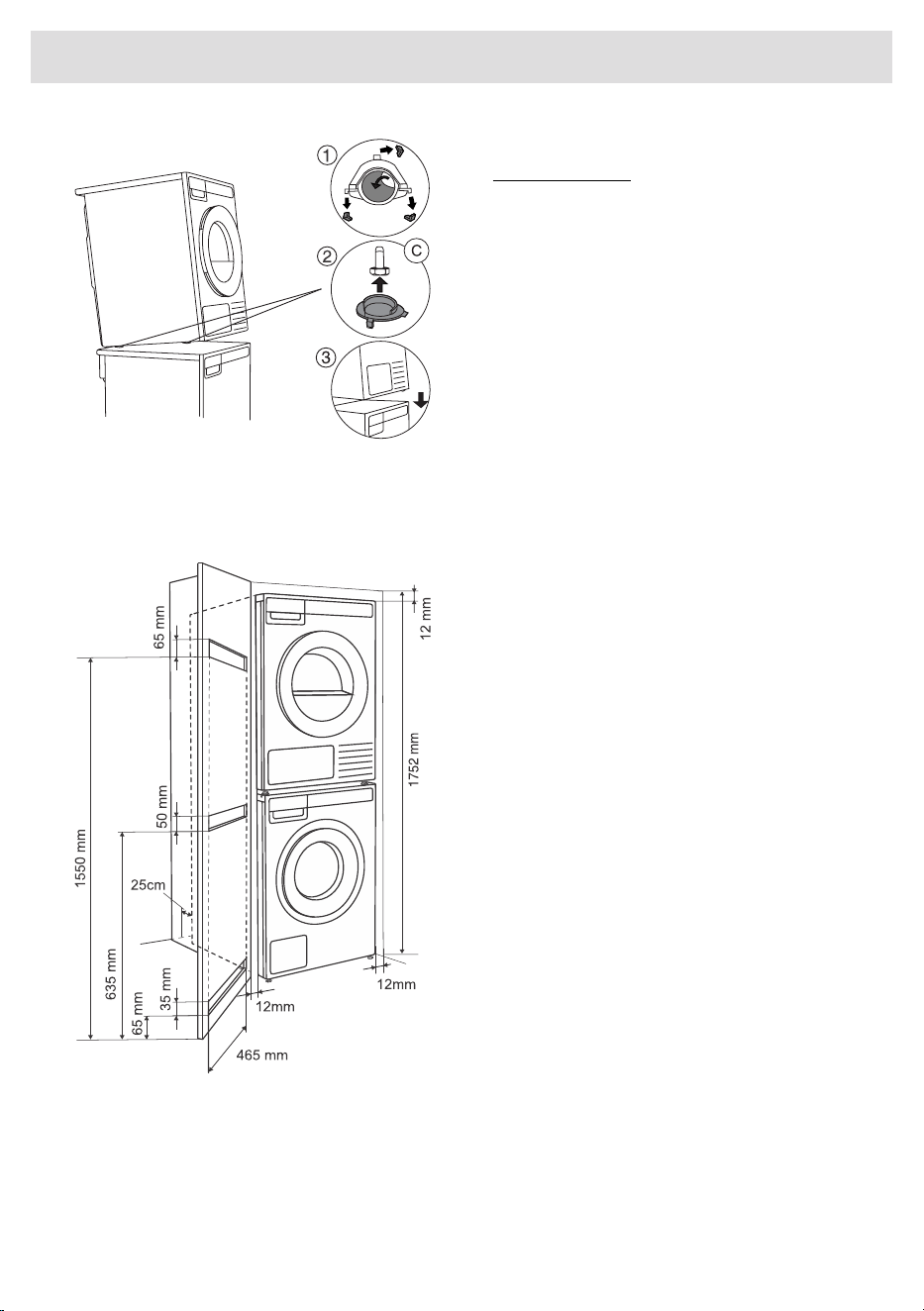
8 Stick the plastic foot attachments onto the
washing machine.
1. Break off the plastic positioners and peel
off the adhesive film from the plastic plugs.
2. Lift the front part of the dryer and adjust
and hold the plastic plugs on the front feet
of the dryer (make sure that the plugs are
correctly positioned on the right and left
feet, respectively, in relation to the
broken-off particle). Also make sure that
the feet fit properly in the plug.
3. Now lower and position the dryer onto the
washing machine, with the C-plugs
automatically sticking to the surface of the
washing machine.
Built-in
Installation in a cabinet
ASKO's front panel controls make it possible
to install the washers and dryers in a cabinet
or closet.
The distance between the left or right side of
the appliance and the surface of the side of
the cabinet or the surface of the wall of the
recess in which the appliance is installed must
be at least 12 mm. The distance between the
back of the appliance (note the deepest point
of the appliance) and the surface of the back
of the cabinet or the wall of the recess must
be at least 25 mm. See figure.
21
Installation and connection
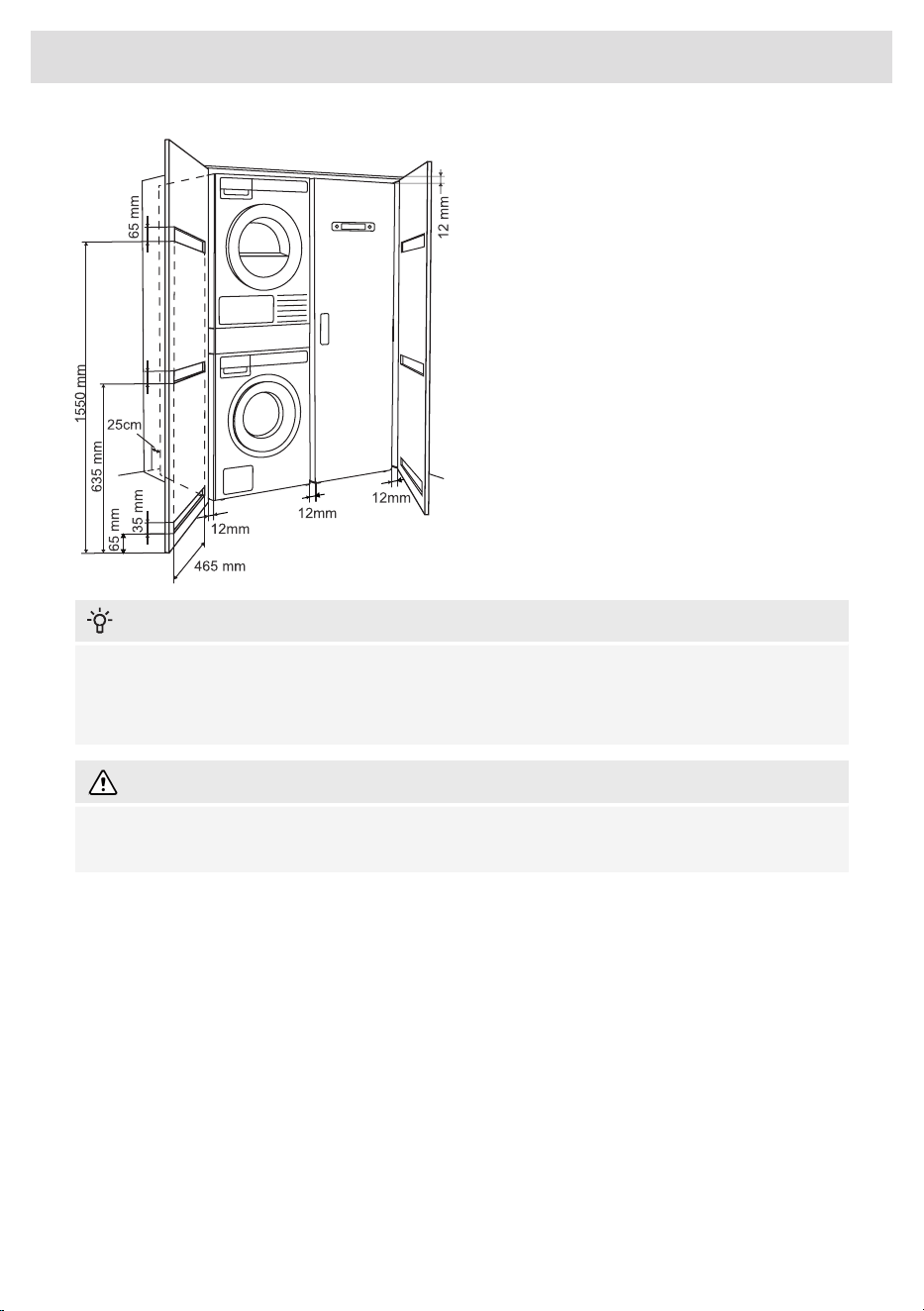
Ventilation Requirements of ASKO
laundry concept or closet installation
Make sure there is clearance between
appliances and cabinet or wall and 25 mm
minimum clearance between the rear edge of
the appliance top panel and the cabinet or
wall.
When closet or cabinet is closed by the door,
we recommend louvered doors, to ensure
proper ventilation.
Otherwise, the door must be fitted with
ventilation gaps. See figure for dimensions of
ventilation openings.
INFORMATION!
Ensure the dryer door can be opened without hindrance after installation.
The cool air intake panel at the front of the dryer must not be blocked or covered. Doing so could
cause a fault.
WARNING!
Disregarding of instructions influences on appliance performance and may also result in failure
of the appliance.
22
Installation and connection
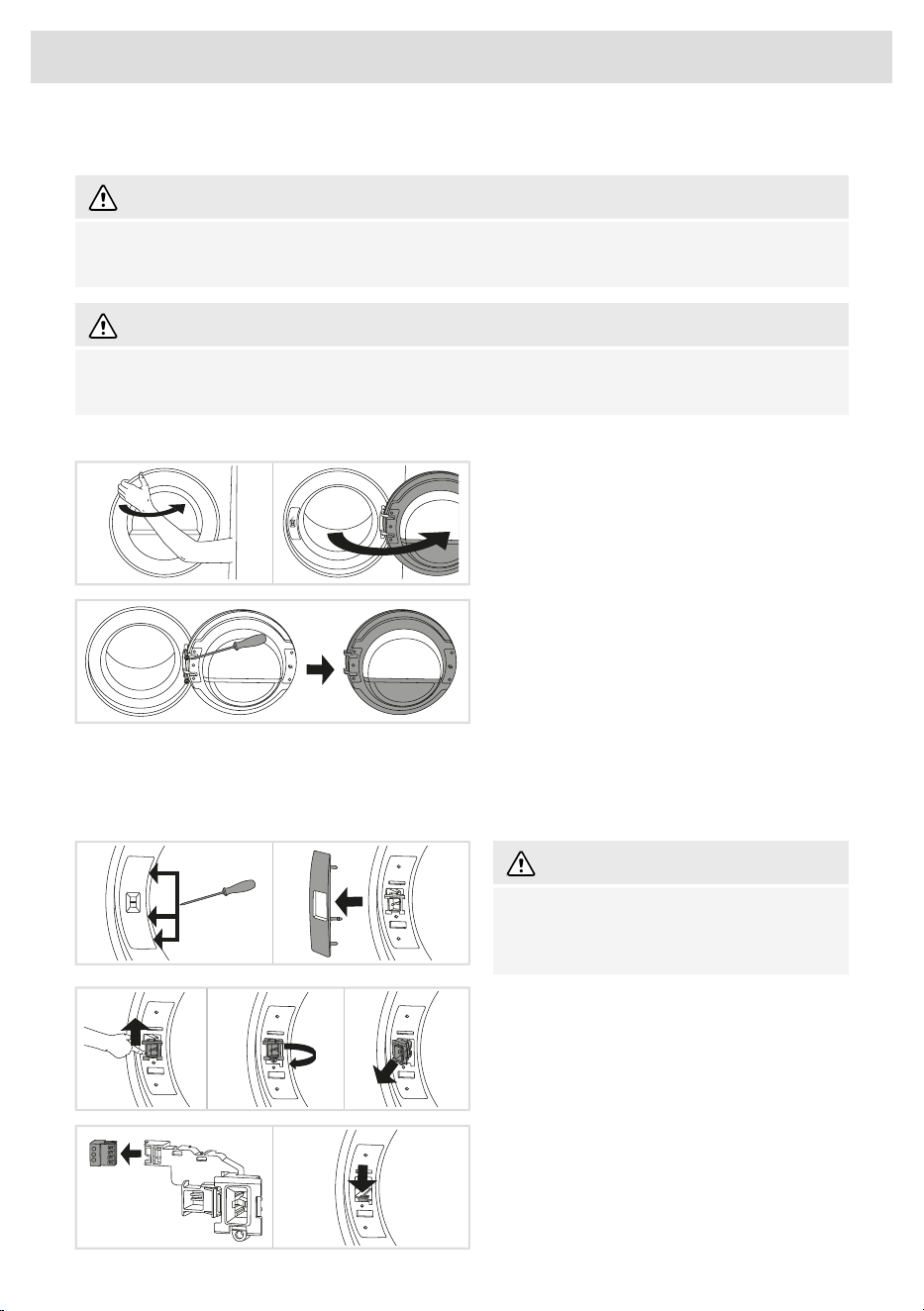
Changing the door opening direction
WARNING!
Before changing the door opening direction, the appliance must be disconnected from the power
supply! See chapter Safety precautions.
WARNING!
The door opening direction must be replaced by the manufacturer or their service technician or
similarly qualified persons in order to avoid any hazards.
To change the direction of door opening, proceed as follows:
1 Open the door fully.
2 Undo the screws and remove the door.
3 Carefully remove the door lock cover with
a narrow, blunt object.
Release the latches on the door lock cover in
the indicated order.
WARNING!
When removing, make sure not to bend the
cover or its latches, as they may get
damaged.
4 Push the door lock up, slide it to the left and
remove it from the appliance in a rotating
motion.
5 Remove the connector from the lock.
Insert the connector into the rib of the plastic
housing to prevent the appliance from rattling
when the connector is not plugged in.
23
Installation and connection
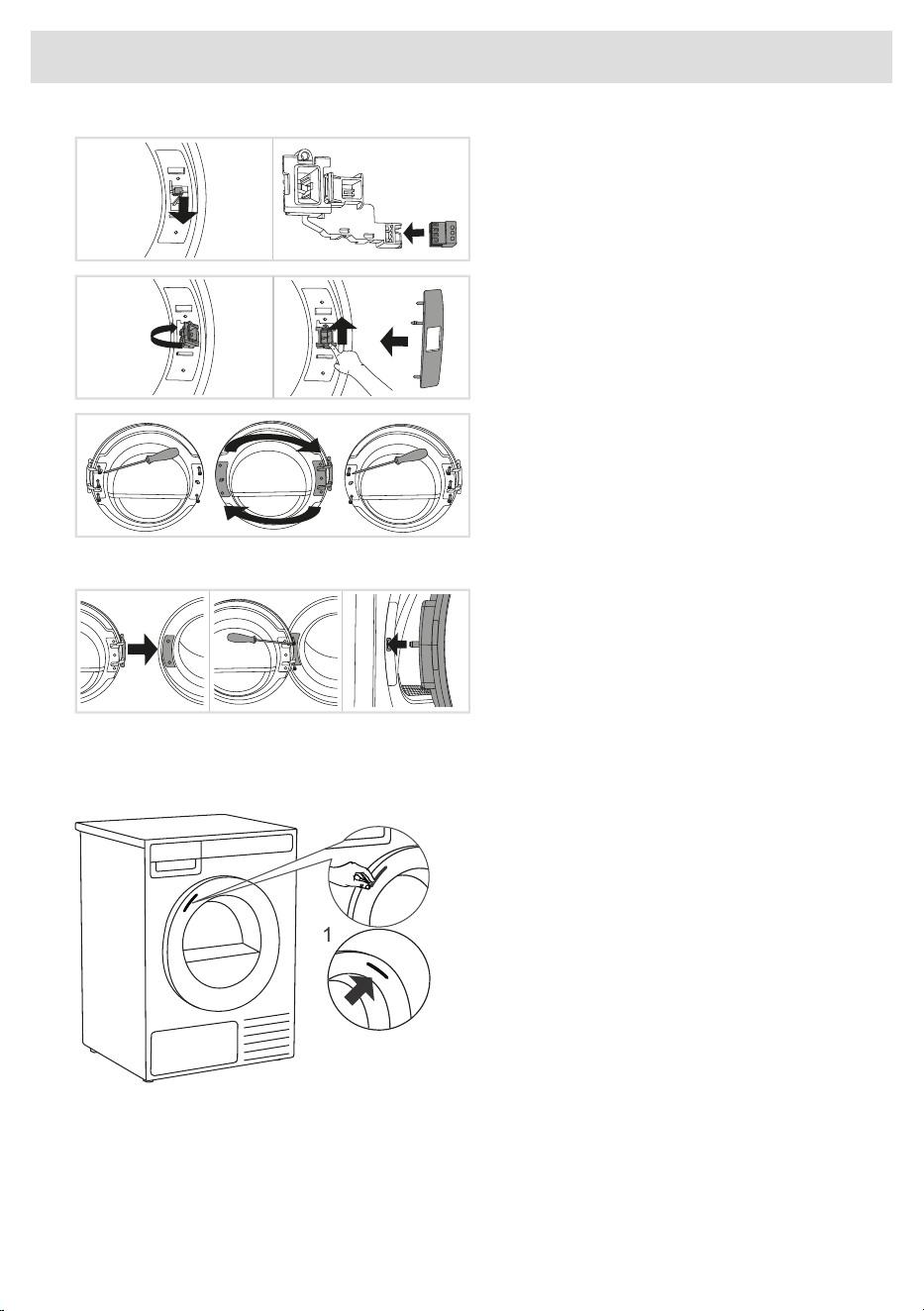
6 On the opposite side where the door has
come off, remove the connector from the rib,
pull it out of the appliance and connect it to
the door lock.
7 Place the door lock in the appliance in the
reverse order of its removal from the appliance.
Remount the door lock cover.
8 Undo the door hinge assembly (left) and
the door latch assembly (right), switch their
positions, and replace the screws (door hinge
assembly to the right-hand side, door latch
assembly to the left-hand side).
Use a screwdriver to remove the plastic part
more easily.
9 Install the door on the front wall and screw
it in.
Install the door in a fully open position and
do not lift it while screwing. It is correctly
installed only if the door latch is aligned
with the center of the door catch or slightly
above it!
Opening the Door
The tumble dryer door is designed to open on
the left side, with a visual indicator in the form
of a sticker placed on the front of the door,
clearly marking the spot for gripping and
opening.
1 In case of changing the door opening
direction, you can move the sticker to the
opposite side. Carefully remove the sticker
and attach it to the right side of the door,
ensuring it is positioned at the same height.
1
24
Installation and connection
Draining the condensate
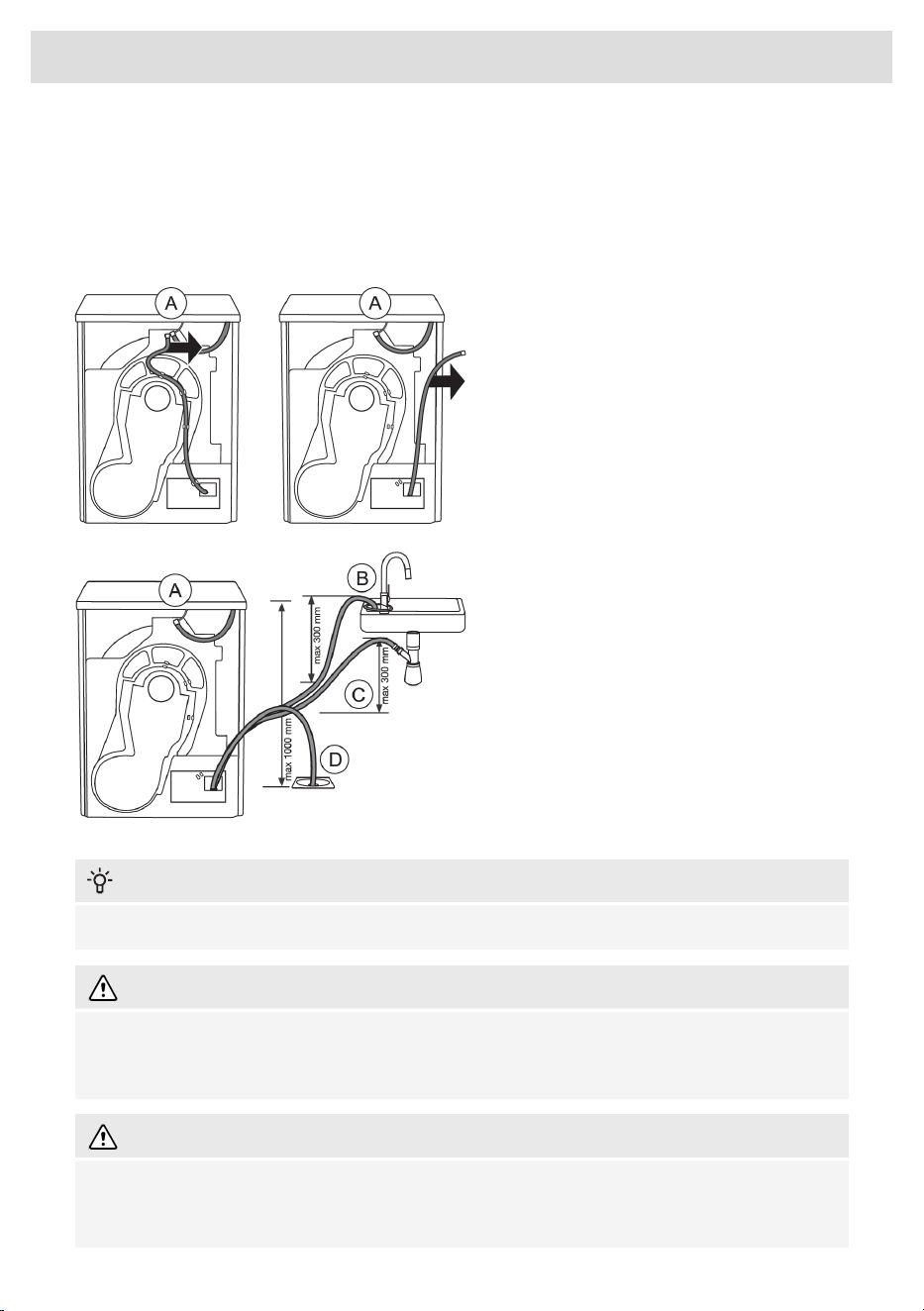
The moisture from the laundry is extracted in the condenser unit and accumulated in the condensate
tank. The condensate tank has to be emptied regularly (see chapter Emptying the condense tank).
To avoid emptying and interruption of the drying cycle due to full condensate tank, run the condensate
drain pipe located at the back of the appliance directly into a drain (see chapter System settings).
1 Remove the long ribbed hose from the
attachment (A). Disconnect the hose from the
hose attachment and in all places at the rear
wall.
Always use hoses that are supplied with the
appliance.
2 Run the condensate drain hose into a drain.
Tie the hose onto a tap (B) so that it cannot
slip during use.
The drain hose can also be fed into the
washbasin siphon (C) or directly into the floor
drain (D).
Then, the water is pumped directly into a
washbasin, a siphon, or a floor drain.
INFORMATION!
Do not pull the drain hose, and make sure it is not under tension, clamped, or bent.
WARNING!
If you decide to run the condensate drain hose into a drain, siphon, or washbasin, make sure the
hose is securely fastened. This will prevent any water spillage that could result in unexpected
damage.
WARNING!
If the dryer is connected to an air exhaust system already used for another appliance, a non-return
valve must be installed. Return flow into the dryer could damage the appliance and the non-return
valve prevents such flow.
25
Installation and connection
Connecting to the power mains
ELECTRIC SHOCK!
After installation, the dryer should stand still for two hours before it is connected to the power
mains.
Connect the appliance to an earthed power outlet. After installation, the wall outlet should be freely
accessible. The outlet should be fitted with an earth contact (in compliance with the relevant
regulations).
Connection upon delivery
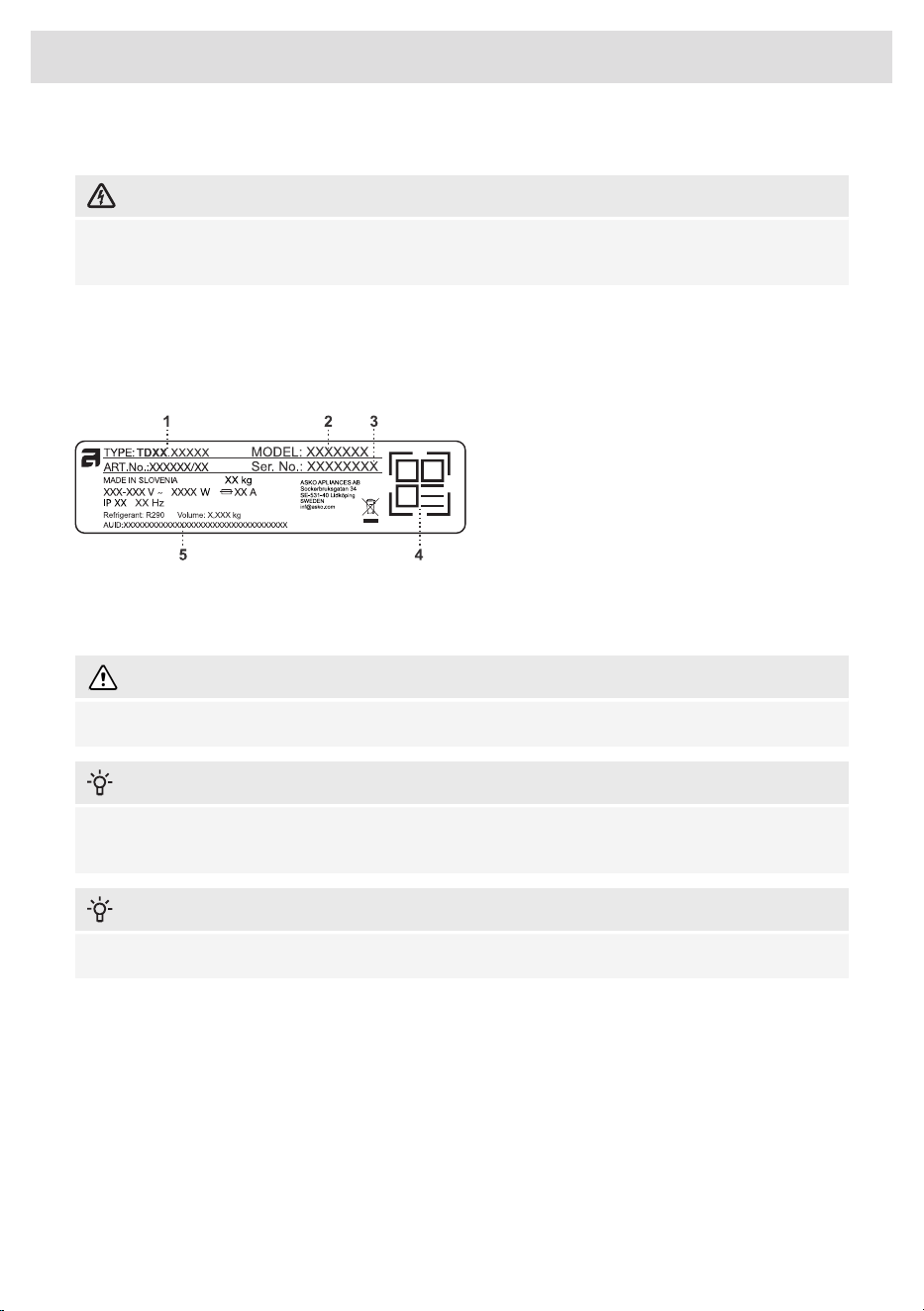
1 - Model type
2 - Model
3 - Serial number
4 - QR code
5 - AUID code
Information about your dryer is indicated on the rating (type) plate.
Use the type A differential current protection switch.
WARNING!
The dryer shall not be connected to the power mains using an extension cord.
INFORMATION!
Do not connect the tumble dryer to an electrical outlet intended for an electric shaver or hair
dryer.
INFORMATION!
Repairs and maintenance must be carried out by a qualified professional.
26
Installation and connection
ASKO Laundry Care - Hidden helpers
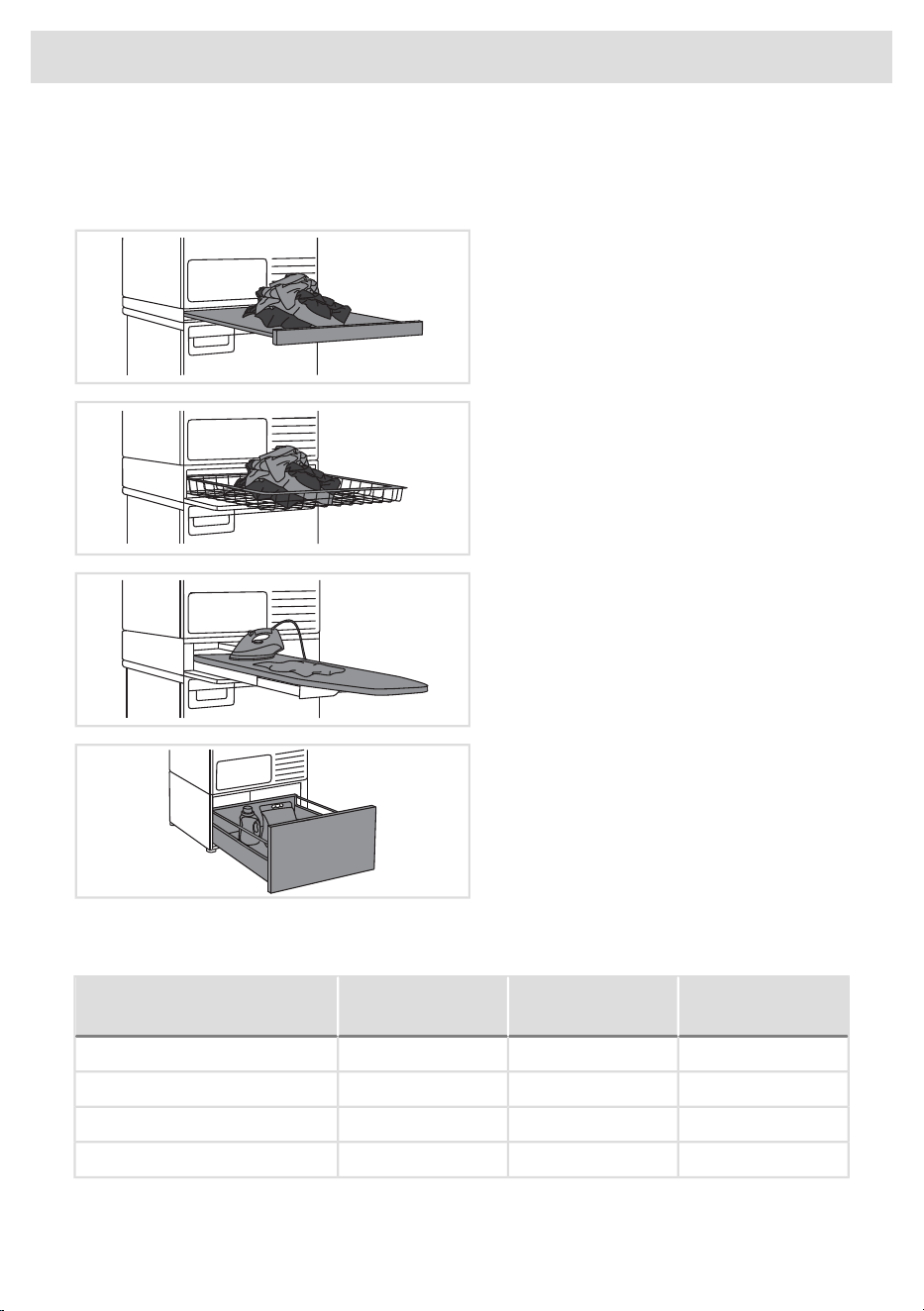
The Hidden Helper (single shelf, basket, or ironing board) can be installed between the washing
machine and the dryer, or on top of either appliance.
SLIM - Single Shelf
Pull-out shelf. It can be used as an additional
surface when folding clothes and sorting socks
or for storage. It also makes loading and
unloading your laundry much easier. It can be
installed between your washer and dryer.
BASKET
A large pull-out basket that is easily accessible
via a push-pull door opening. Useful for
removing laundry and carrying it to the
wardrobe or workbench for ironing and folding.
IRONING BOARD
The ironing board is a clever solution. It is
always handy when you need to iron your
clothes, and it can be easily, safely and
invisibly stored away when not in use.
A PEDESTAL DRAWER
A useful storage drawer with a height of 30
cm. Ideal for storing your detergent, softener,
coat hangers, pegs, user manuals and other
useful items in the laundry area.
The pedestal drawer is installed under the washing machine or the dryer.
Availability depending on market
Graphite black
ART. No.
Titanium
ART. No.
White
ART. No.
DENOMINATION
HS60G - 746297HS60T - 746296HS60W - 746295SLIM
HB150G - 746300HB150T - 746299HB150W - 746298BASKET
HI150G - 746314HI150T - 746312HI150W - 746311IRONING BOARD
HP320G - 746317HP320T - 746316HP320W - 746315A PEDESTAL DRAWER
27
Installation and connection
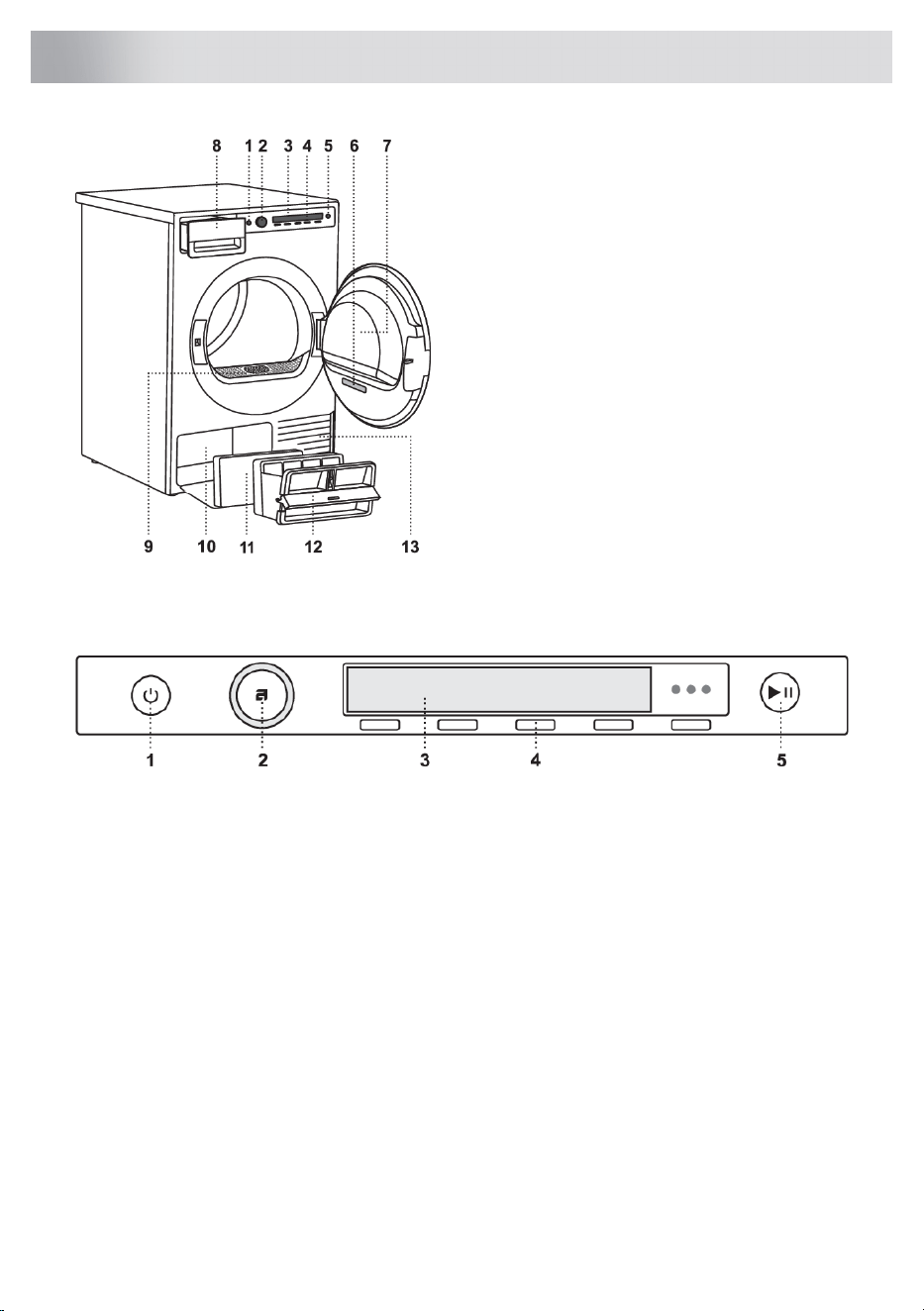
1. Main switch for turning On/Off
2. Program selector knob
3. Display unit
4. Program selector buttons
5. Start/Pause button
6. Rating plate with information about the
dryer (on the inside of the dryer door) and
QR and AUID code (on the inside of the
dryer door)
7. Dryer door
8. Condense water tank
9. Lint filter
10. Heat pump
11. Additional foam filter
12. Second lint filter
13. Air vents
Control unit
1. Main switch for turning On/Off
2. Program selector knob
3. Display unit
4. Program selector buttons
5. Start/Pause button
28
Dryer description
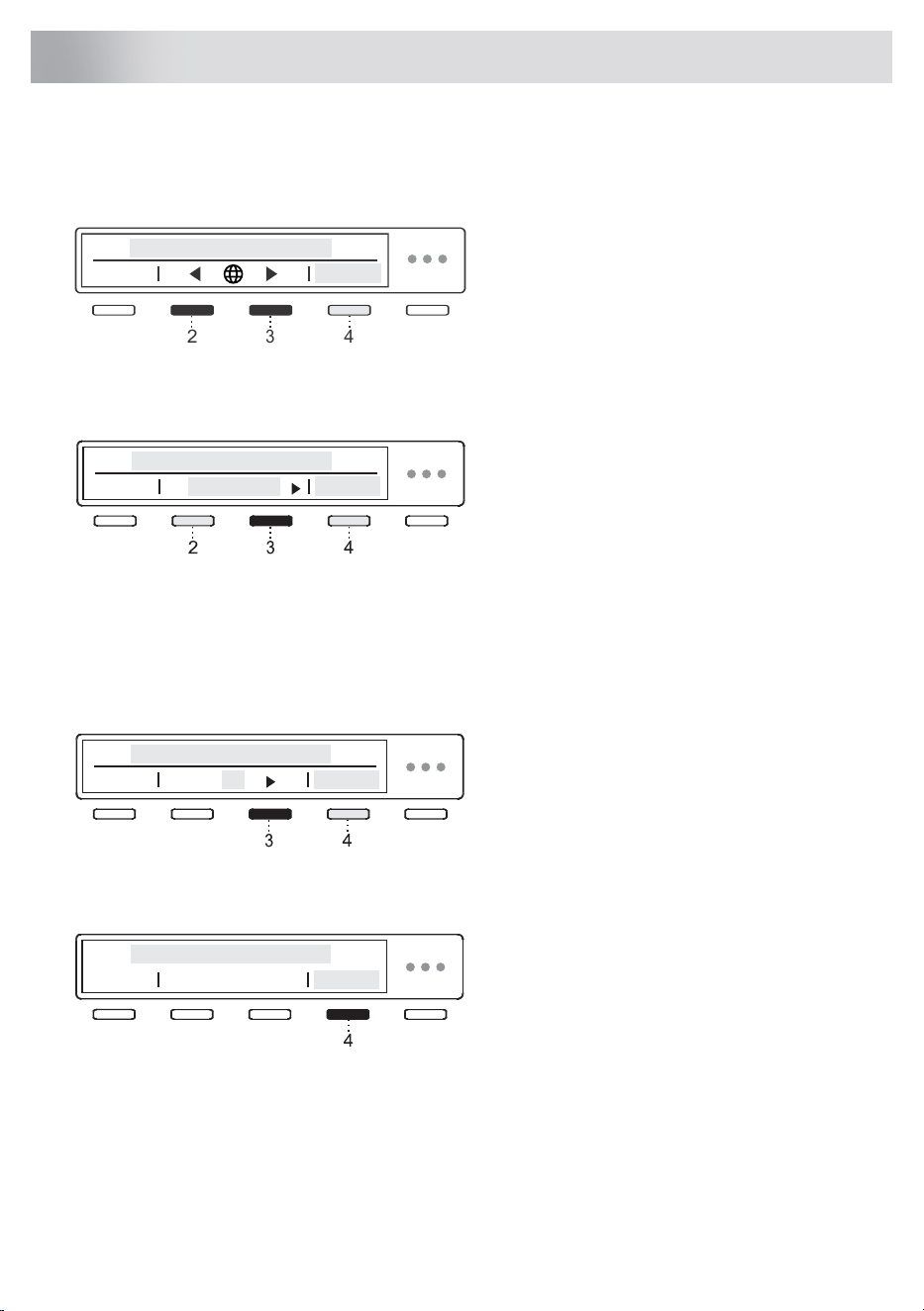
When the appliance is connected and switched on for the first time (see chapter Installation and
connection), first perform the following settings:
1. Choose language (Language)
Use the buttons 2 and 3 to navigate the list of
languages and select the desired language.
Confirm your selection by pressing 4 Save.
2
3
4
After you have selected the language, rotate the button clockwise and select the setting to drain the
condensed water.
2. Condense water
Use the buttons 2 and 3 to choose between
the two methods to drain condensate,
namely into:
• the condense water tank (Tank) or
• directly into the drain (Drain).
Confirm your selection by pressing 4 Save .
If you opted for Drain, it is necessary to observe the proper installation of the drain hose (see chapter
Draining the condensate).
After you have selected the drainage mode, rotate the button clockwise and select the Wi-Fi settings.
3. Wi-Fi settings
You can turn on the Wi-Fi connection by
pressing 3 and confirm your selection by
pressing 4 Save.
If you do not want to set the Wi-Fi connection
at this time, use the programme selector knob
to move forward.
If you have enabled the Wi-Fi connection, see setup procedure in chapter How to enable remote
start of the appliance?.
To save your settings, rotate the programme
selector knob all the way down and press
4 Ok.
Your dryer is now set up and ready to use.
29
Initial settings before use
Connecting the appliance to the ConnectLife application
ConnectLife is an advanced smart home platform that enables seamless connectivity between
people, devices, and services. With the ConnectLife app you can easily monitor and manage your
smart devices, receive notifications directly to your smart device and update software (available
functions depend on your appliance and region).
To connect your smart device to the ConnectLife platform, you need a home Wi-Fi network (2,4 GHz
networks are supported) and a smart device with the ConnectLife app.
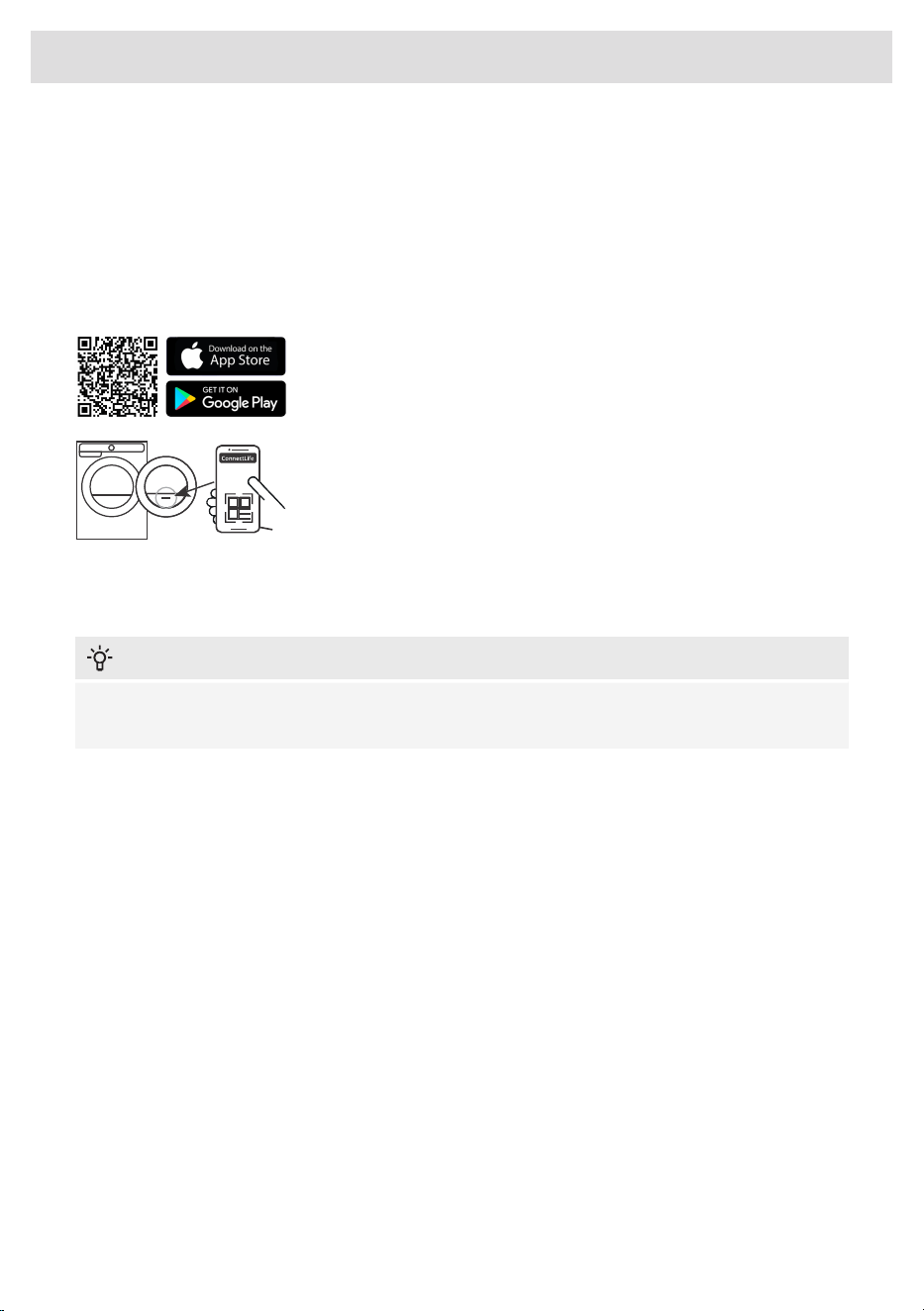
STEP 1: Download the ConnectLife app by scanning the included QR
code or searching for it in your favorite app store.
STEP 2: Install the ConnectLife app and create an account.
STEP 3: In the ConnectLife app, go to the »Add device« menu and
select the appropriate type of device. Then scan the QR code (it can
be found on the rating plate of the appliance; you can also enter the
AUID/SN number manually).
STEP 4: The application then guides you through the entire process of
connecting the appliance to your smart device.
After a successful connection, the appliance can be operated remotely via the application.
Useful tips for your smart device
INFORMATION!
The QR code of the device required by the app during the installation process can be found on
the rating plate of the appliance (see chapter Service).
How to enable Wi-Fi on the device?
1. Turn on the appliance. In the main menu, use the programme selector knob to select System
settings. Confirm your selection by pressing (4) Enter.
2. Rotate the programme selection knob to the right and select Wi-Fi settings. Confirm your selection
by pressing (4) Enter.
3. If the Wi-Fi system is not switched on, turn it on by pressing (3).
4. Use the programme selector knob to select Connection setup, and press (3) Enter. Press (4) Next.
5. If you do not yet have the ConnectLife app installed on your smartphone (or any other smart
device), install it now (scan the QR code on the screen), create your user account and login.
• In the ConnectLife app, open the add device menu.
• Follow the instructions in ConnectLife.
- Select the type of appliance.
- Scan the QR code (it can be found on the rating plate of the appliance).
• On the appliance, press (4) Next.
- The 5 minute countdown will begin. During this time, connect the app to the appliance.
• In the ConnectLife app, instructions will guide you through the process of entering the
appropriate data for your appliance to connect to your home network.
30
Initial settings before use
How to enable remote start of the appliance?
In the main menu, rotate the programme selector knob left to select Remote start . To activate, press
the Start/Pause button (the door must be closed). The display will show (Remote start/Activated).
The appliance is now ready for remote control through ConnectLife app.
INFORMATION!
Remote start will remain active for the next 24 hours unless cancelled. During this time, the
appliance can enter standby mode and switch off the display. If this happens, the logo will remain
lit, which means that Remote start is still active.
How to add another user or multiple users?
See chapter How to enable Wi-Fi on the device? and observe points 1 and 2.
Use the programme selector knob to select Add device , and press (3) Enter . As a new user, if you
do not yet have the ConnectLife app installed, install it on your smart device.
• In the ConnectLife app, go to the Add device menu and follow the instructions.
• On the appliance, press (4) Next.
- The 3 minute countdown will begin. During this time, connect the app to the appliance.
• Complete and confirm the setting in the app.
How to remove the users?
How to remove a user (Remove device)?
See chapter How to enable Wi-Fi on the device? and observe points 1 and 2.
Use the programme selector knob to select Remove device, and press (3) Enter. Press (4) Ok. Follow
the instructions on the appliance screen.
INFORMATION!
This step will remove all active users of the appliance. If you want to operate the appliance
remotely again you will need to repeat the process of adding a user.
Which Wi-Fi router can be used?
Only 2,4 GHz networks are supported. If the ConnectLife app cannot find your local network during
the connection set-up process, check the following:
• your router is operating at the frequency of 2.4 GHz,
• your network is hidden, and
• your signal is strong enough.
Do you have more questions?
31
Initial settings before use

Remotely upgrading the software
When you receive a software update notification, you can choose to update your software from the
app menu in your settings. Upon confirmation, the update is performed, the appliance must be in
standby mode during this time (more on standby mode in chapter Table of consumption values).
Check the software update options in the ConnectLife app.
32
Initial settings before use
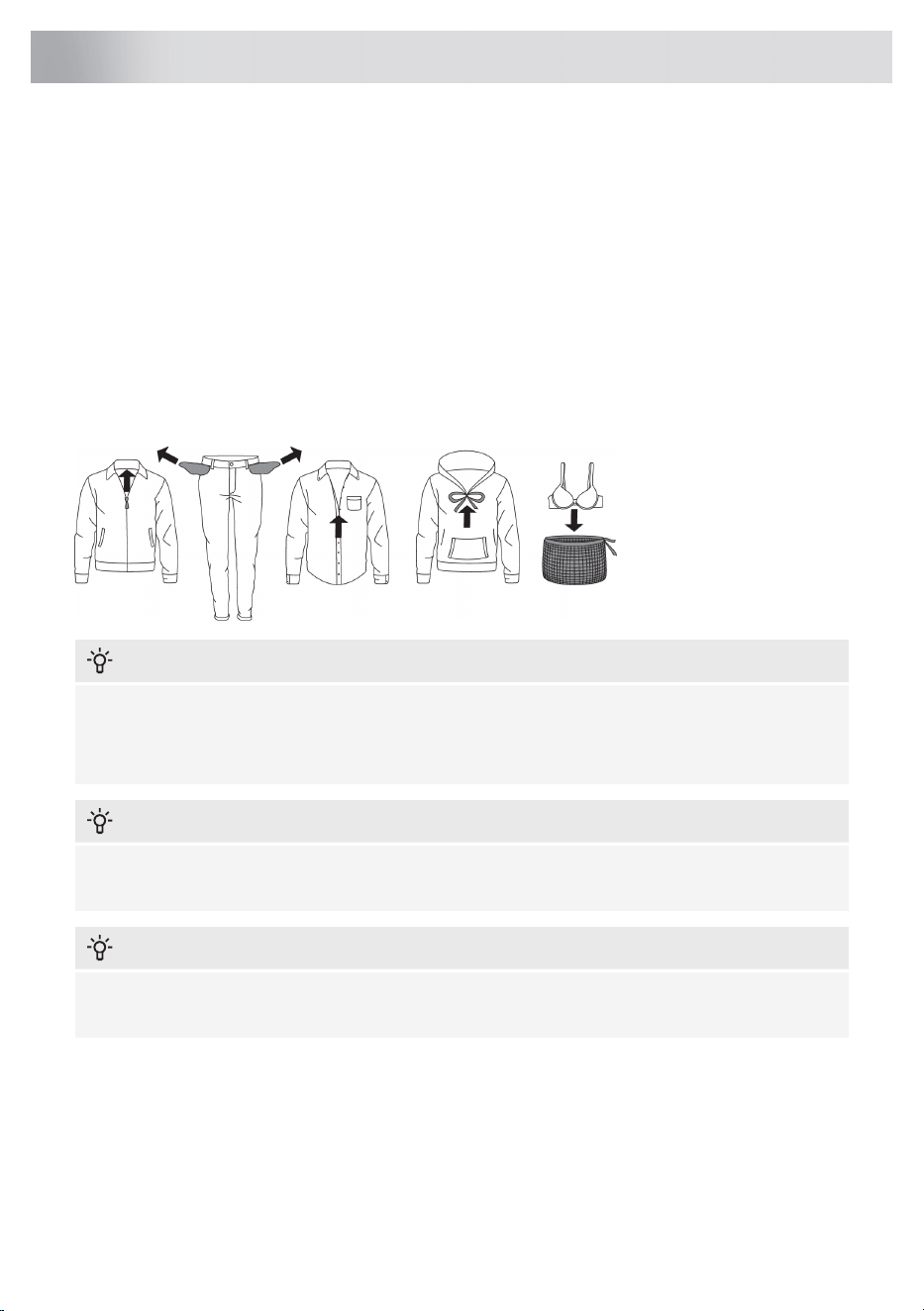
This chapter includes several advices on how to prepare the laundry from drying.
Laundry sorting
Sort the laundry according to the type and thickness of the fabric.
For the most even drying, make sure the laundry is made of a similar material.
Clothing
1. Sort the laundry by type and thickness of the fabric (see Program chart).
2. Close the buttons and zippers, tie any ribbons, and turn the pockets inside out; remove any
metal clips that could damage the laundry and tumble dryer interior.
3. Place very sensitive clothes and small items in a special-purpose laundry washing bag.
INFORMATION!
Do not insert laundry into the dryer if it has not been wrung or spun (recommended minimum
spinning cycle: 800 rpm).
Higher spinning speeds will save energy and cut drying time.
INFORMATION!
If you decide to dry only one large item, we recommend drying it separately from smaller items
of laundry.
INFORMATION!
Turn printed garments inside out before drying. To reduce the risk of heat damage to the prints,
use the Delicate drying mode.
33
Advices before drying
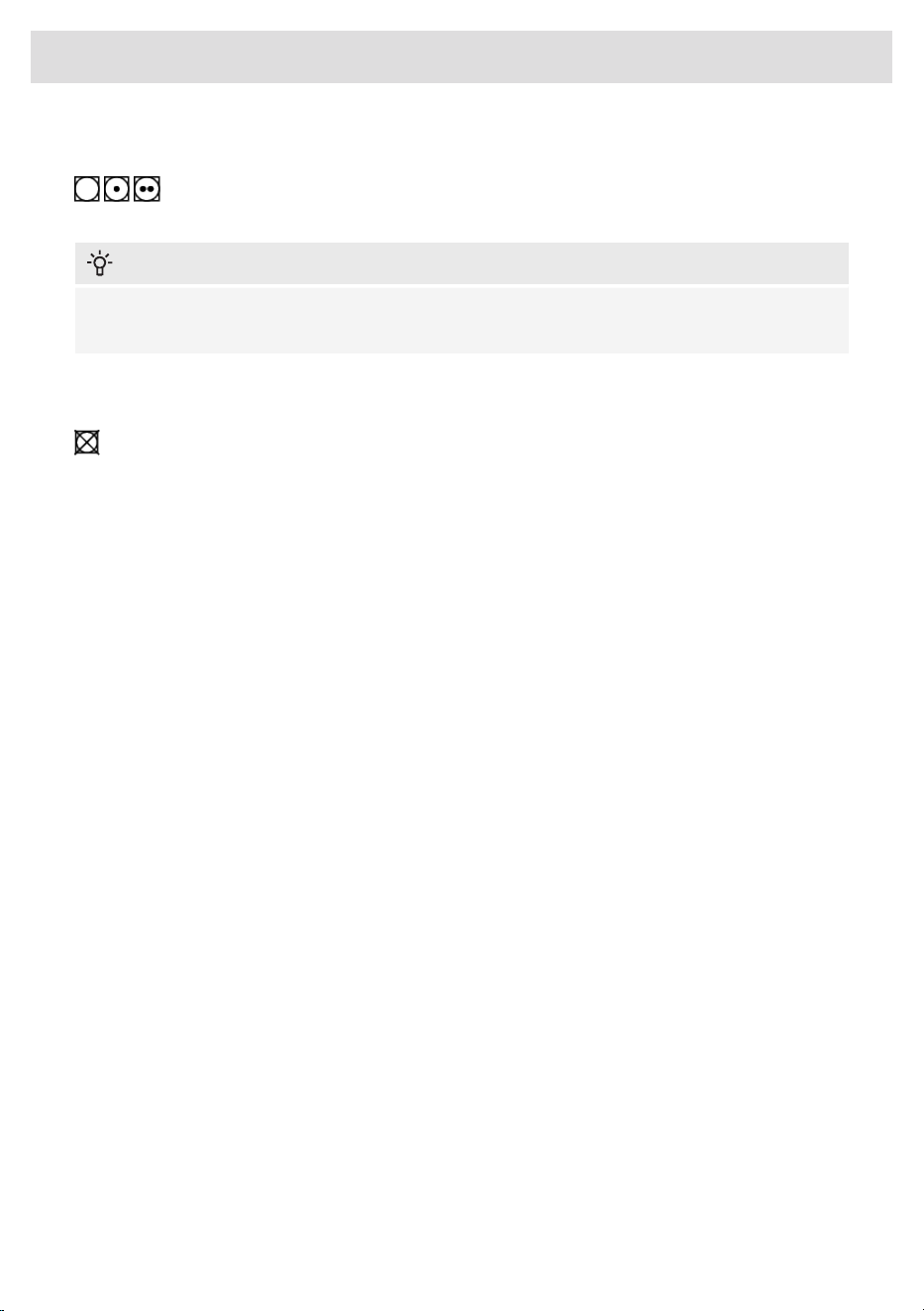
Materials (fabrics) suitable for drying in a tumble dryer
Material is suitable for tumble drying. Clothes dried in a tumble dryer will be softer and
lighter than air-dried clothes.
INFORMATION!
The dryer does not cause any considerable wear of the fabric. The lint collected in the lint filter
consists of dust and fabric fragments collected during the use of the laundry.
Materials (fabrics) that may not be dried in a tumble dryer
This symbol means that the material is not suitable for drying in a tumble dryer.
Never tumble dry the following:
• clothing that was chemically cleaned (or dry-cleaned) at home,
• foam,
• glass fibres.
Materials that are not suitable for drying in a tumble dryer
Drying laundry made of particularly delicate fabrics that may be deformed is not recommended.
The following types of laundry may not be dried in the dryer as this may cause your garments to
deform:
• leather garments and other leather products,
• garments that are waxed or treated in any other way,
• garments with major wooden, plastic, or metal parts;
• garments with spangles;
• garments with metal parts subject to rusting.
34
Advices before drying
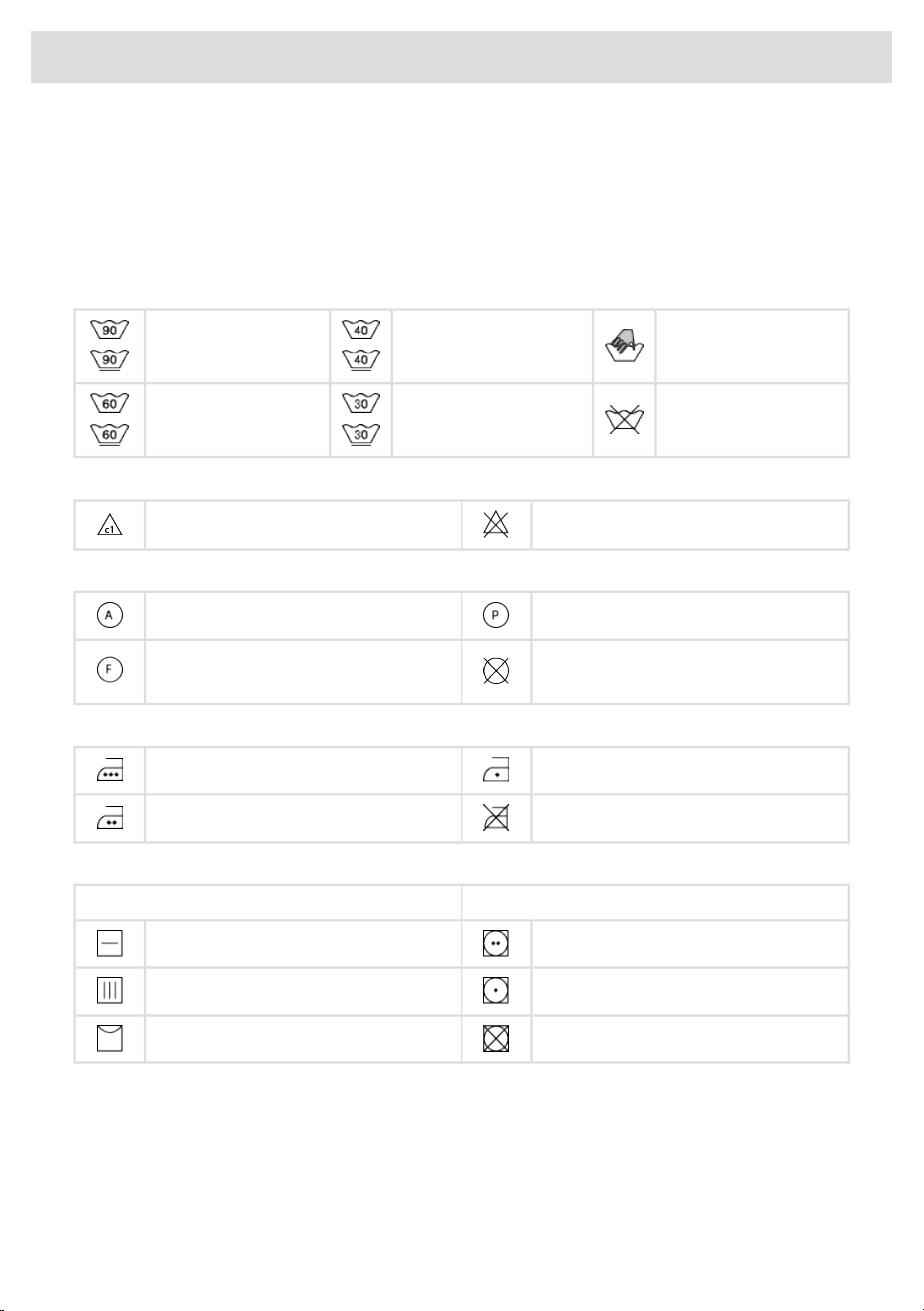
Laundry symbols
Always follow the garment manufacturer's recommendations before drying in the dryer.
Textile maintenance symbols:
Normal wash;
Sensitive laundry
Hand wash only
Max. washing temp.
40°C
Max. washing temp.
cold - 90°C
Do not wash
Max. washing temp.
30°C
Max. washing temp.
60°C
Bleaching
Bleaching not allowedBleaching in cool water
Dry cleaning
Perchloroethylene R11, R113, petroleumDry cleaning with all agents
Dry cleaning not allowed
Dry cleaning in kerosene, pure alcohol,
and R113
Ironing
Hot ironing, max. 110°CHot ironing, max. 200°C
Ironing not allowedHot ironing, max. 150°C
Drying
Tumble dryingNatural drying
Drying at high temperaturesDrying on a flat surface
Drying at low temperaturesDrying without prior spinning
Tumble drying not allowedDrying on a clothes line or a hanger
35
Advices before drying
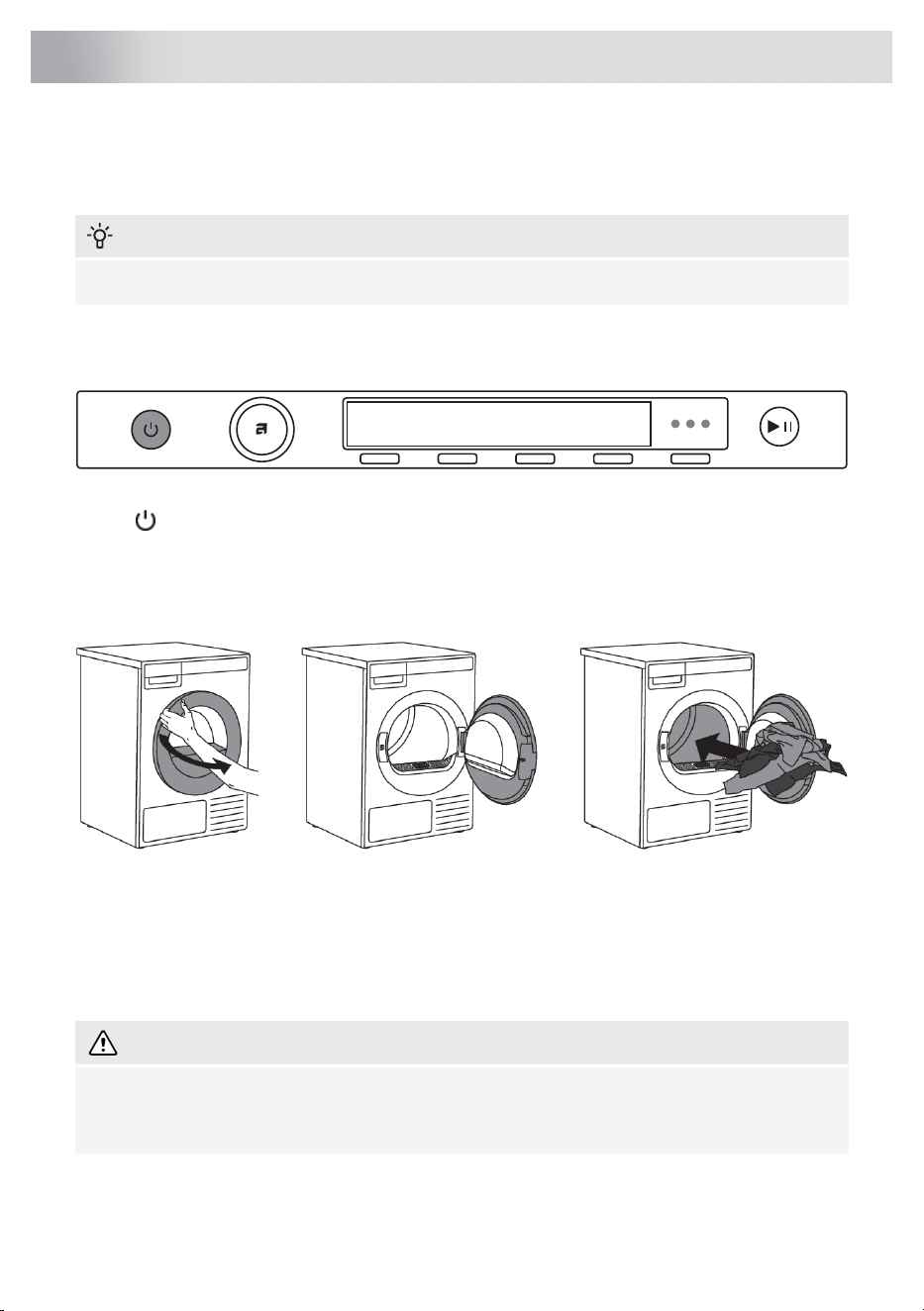
STEP 1: Sort the fabrics
See chapter Advices before drying.
INFORMATION!
Empty the pockets. Coins, nails etc. could damage the machine and the fabric.
STEP 2: Turn on the main switch
On / Off
Press the On/Off button.
STEP 3: Open the dryer door and insert the laundry.
Open the dryer door towards you.
Place the laundry into the empty dryer drum. Make sure there aren't any other objects among the
laundry, such as a detergent ball. Such objects could melt and cause damage to the dryer or your
laundry.
Do not overload the drum! (See program table and observe your nominal load as indicated on the
rating plate.) If the dryer drum is overloaded, the laundry will be more wrinkled and perhaps unevenly
dried.
WARNING!
Before inserting or removing fabrics, we recommend that the lint filter is always placed in its
designated opening. This is the only way to prevent a piece of clothing or other fabric from falling
into the open space.
36
Drying process, step by step (1–7)

INFORMATION!
There is an LED light inside the dryer drum.
The light in the dryer drum is not suitable for any other use.
The light in the dryer drum may only be replaced by the manufacturer, a service technician or
an authorized person.
37
Drying process, step by step (1–7)
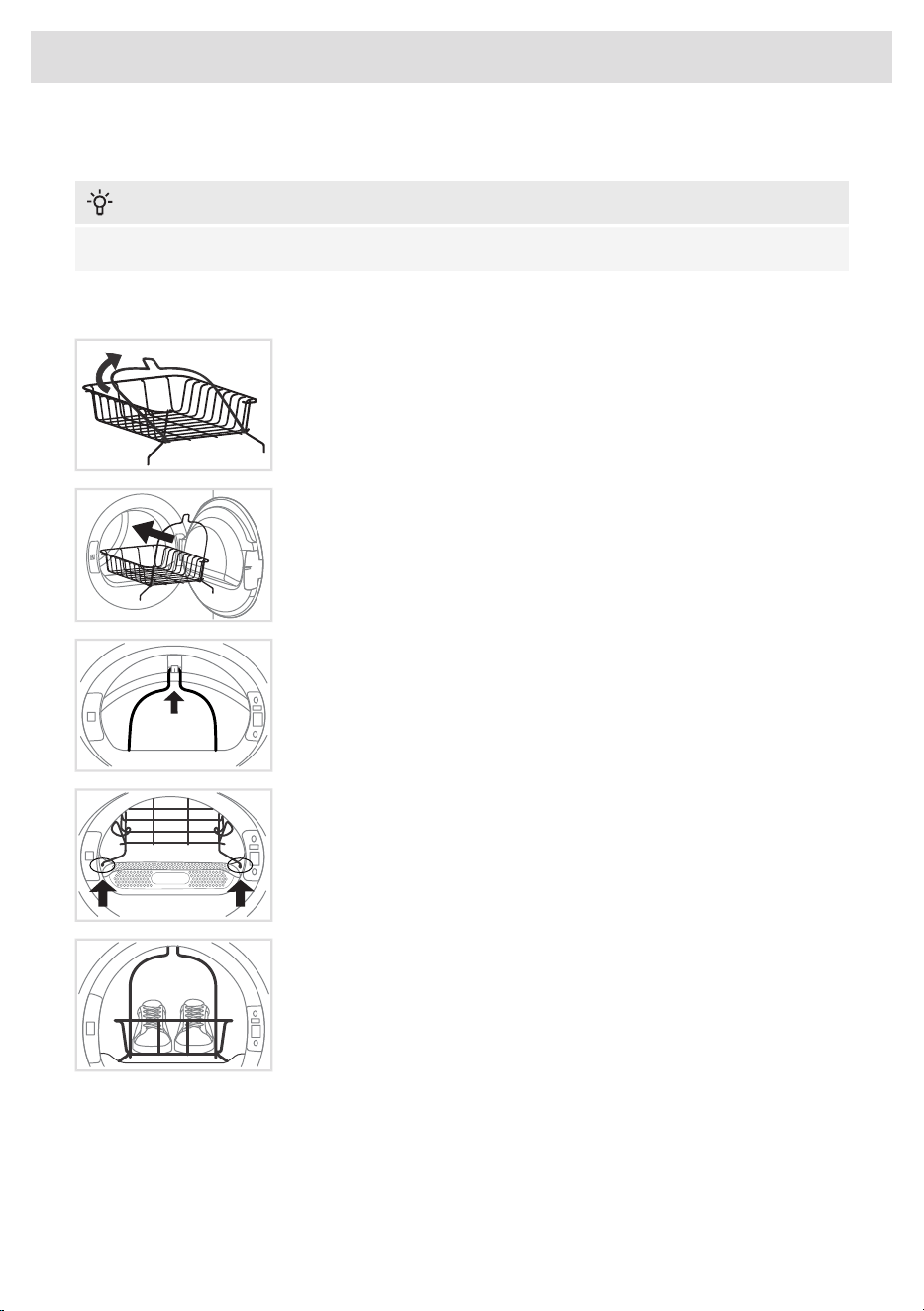
Drying in a basket
INFORMATION!
Before the first drying cycle, remove the basket and all packaging from the drum.
Laundry may only be dried in the basket when using Time program. The basket is available for
purchase as an optional accessory at the service centre (ART. No.: 914908).
The drying basket consists of two connected parts; before installation,
it must be unfolded into its final shape.
1 Open the dryer door and insert the drying basket. If you attempt to
insert the basket straight in, it will not fit properly into the dryer.
For easier installation, we recommend removing the lint filter beforehand.
Simply pull the lint filter upward to remove it. See chapter Cleaning the
lint filter.
2 Once the drying basket is inside the dryer, first attach it to the
designated holder on the upper part of the rim, located inside the dryer,
as shown in the figure.
3 After securing the basket at the top, position the lower part by pulling
the left and right sides into place until the basket locks into the
designated openings near the lint filter.
If you have removed the lint filter, reinsert it now.
Once the basket is correctly installed, check that it is securely and firmly
attached.
4 The basket can be used to dry sports shoes, slippers, or items that
you do not want to be tumbled inside the dryer drum (max. load: 4 kg).
After the drying process, remove the drying basket and close the dryer door.
Only dry clean sports shoes or slippers that have been sufficiently wrung out after washing to prevent
water from dripping. The basket remains stationary while the drum rotates, so ensure that the items
being dried do not touch the drum to avoid potential damage to both the items and the dryer.
38
Drying process, step by step (1–7)
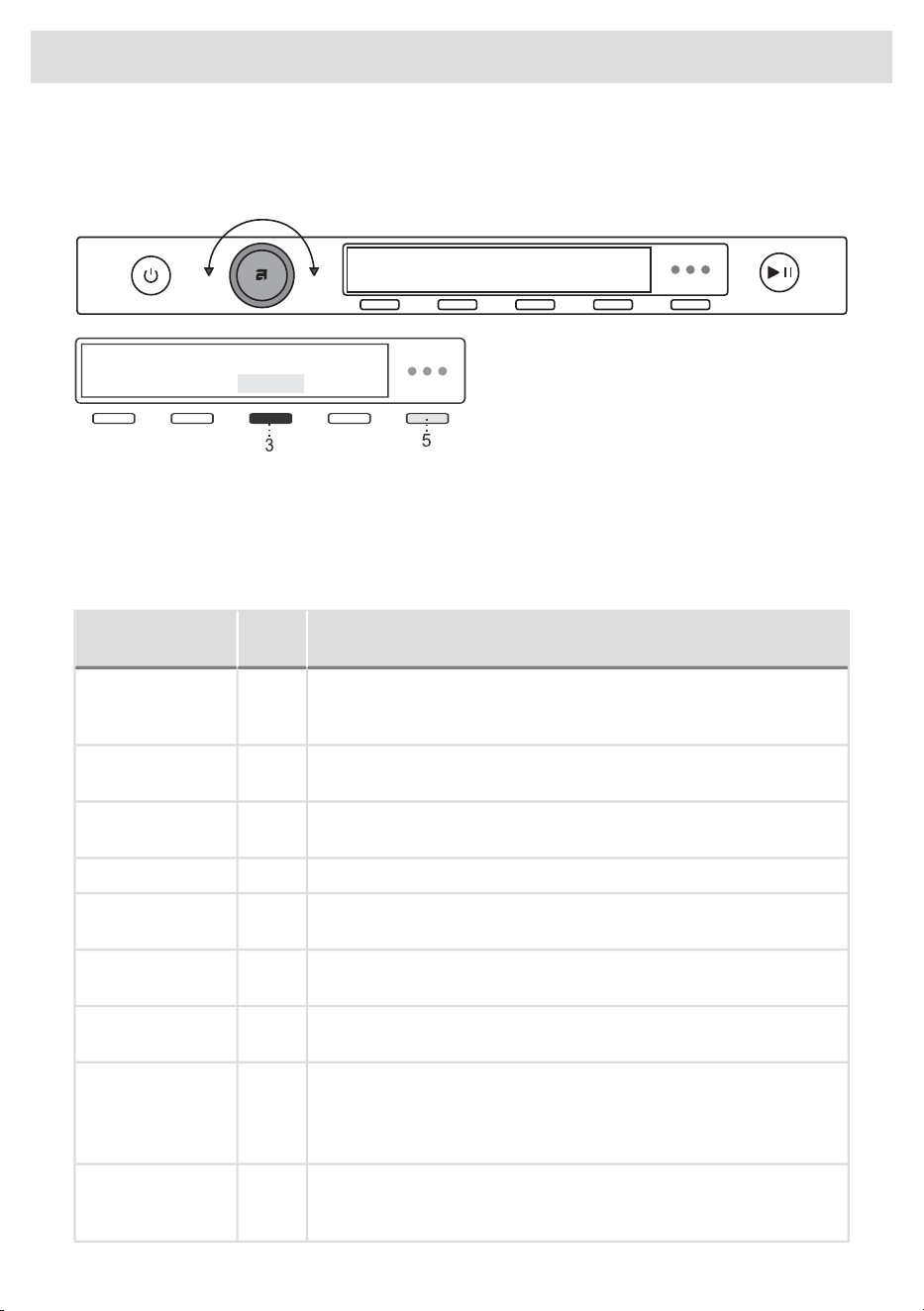
STEP 4: Choose the drying program.
Choose the program by rotating the Program selector knob in either direction.
With the selected program, you can press key
5 and then key 3 Information to display a brief
description of the program.
Select the programme based on the type and remaining moisture of the laundry you wish to dry.
Anticipated programme duration is indicated on the display.
Extra program settings can also be selected for each program. See STEP 5.
Choose between the following programs:
Program chart
Description
Max.
kg*Program
Use this program for thicker multi-layered non-sensitive cotton laundry.
After drying, it will be completely dry and ready to be stored in the
cupboard.
11Normal Cotton
Use this program for thicker, non-sensitive cotton laundry, which will
be completely dry after drying.
11Storage dry cotton
Use this program for non-sensitive cotton laundry. After drying, it will
be ready for ironing.
11lron dry cotton
The program is used for drying synthetic and blended textiles.4Synthetics
Use this programme to dry delicate laundry, which may be slightly
moist after drying. We recommend using a dedicated laundry bag.
1Delicates
This programme is used to dry wool and clothing according to the
manufacturer's instructions specified on the label.
2Wool
The program is used for drying cotton and synthetic laundry at the
same time.
4Mixed laundry
Use this programme for larger items. When the programme is
complete, they will be completely dry.
5Bedding/ Towels
Dry fitted sheets separately or together with similar large items. Shake
them out before drying.
Use this program to dry textiles stuffed or padded with down (pillows,
duvets, jackets etc.). Dry large items separately and use the extra
dry function or the time program if necessary.
2Down/ Bulky items
39
Drying process, step by step (1–7)
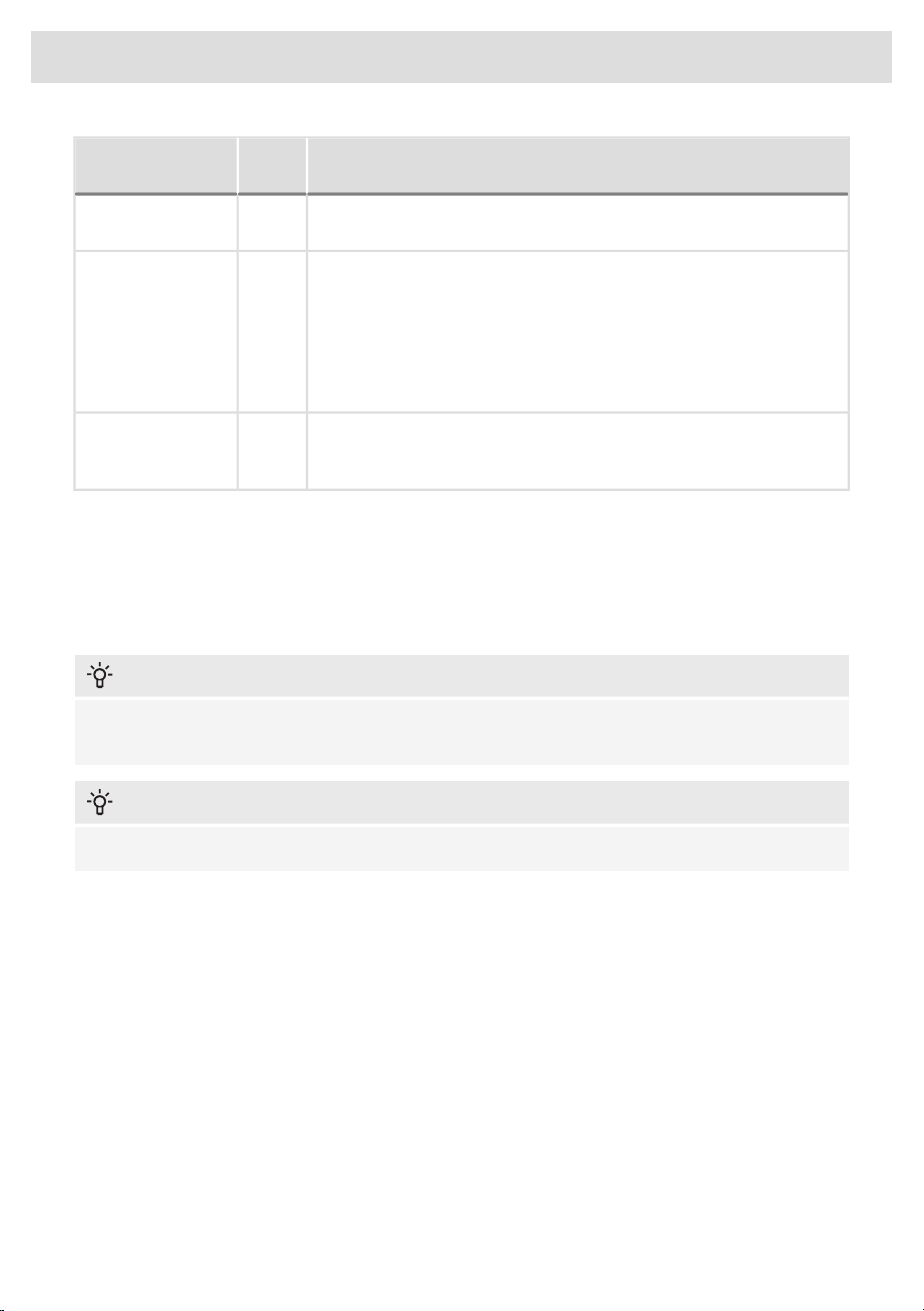
Description
Max.
kg*Program
The program is suitable for smaller amounts of laundry that you wish
to dry quickly and efficiently.
4Quick Pro
Use this program for non-sensitive laundry that is still slightly moist
and has to be thoroughly dried. In the time program, remaining
moisture is not detected automatically. If the laundry is still damp
after the program is complete, repeat the program; if it is too dry and
therefore creased and rough to touch, the drying time you selected
was too long. Program duration can be adjusted from 30 minutes to
4 hours (in 15-minute steps).
4Time program
This program does not use a heater. Use it to refresh your clothes.
Program duration can be adjusted from 15 minutes to 4 hours (in
15-minute steps).
2Airing
You can save energy by filling up the household tumble dryer to the maximum capacity specified
for each programme.
"Normal Cotton" Program is recommended for normal load at the machines rated capacity and is
the most effective program in terms of energy consumption.
INFORMATION!
If your laundry is not dried to the desired dryness level, use extra program settings or use a more
suitable program.
INFORMATION!
No program can be started while the door is open.
STEP 5: Choosing the program settings
Using the program settings, the drying programs can be further adjusted to your wishes.
Some program settings may not be available for your selected program.
Selected program settings will remain stored after the end of the drying cycle and may be changed
subsequently (except for delayed start which is not stored after the drying is complete).
40
Drying process, step by step (1–7)
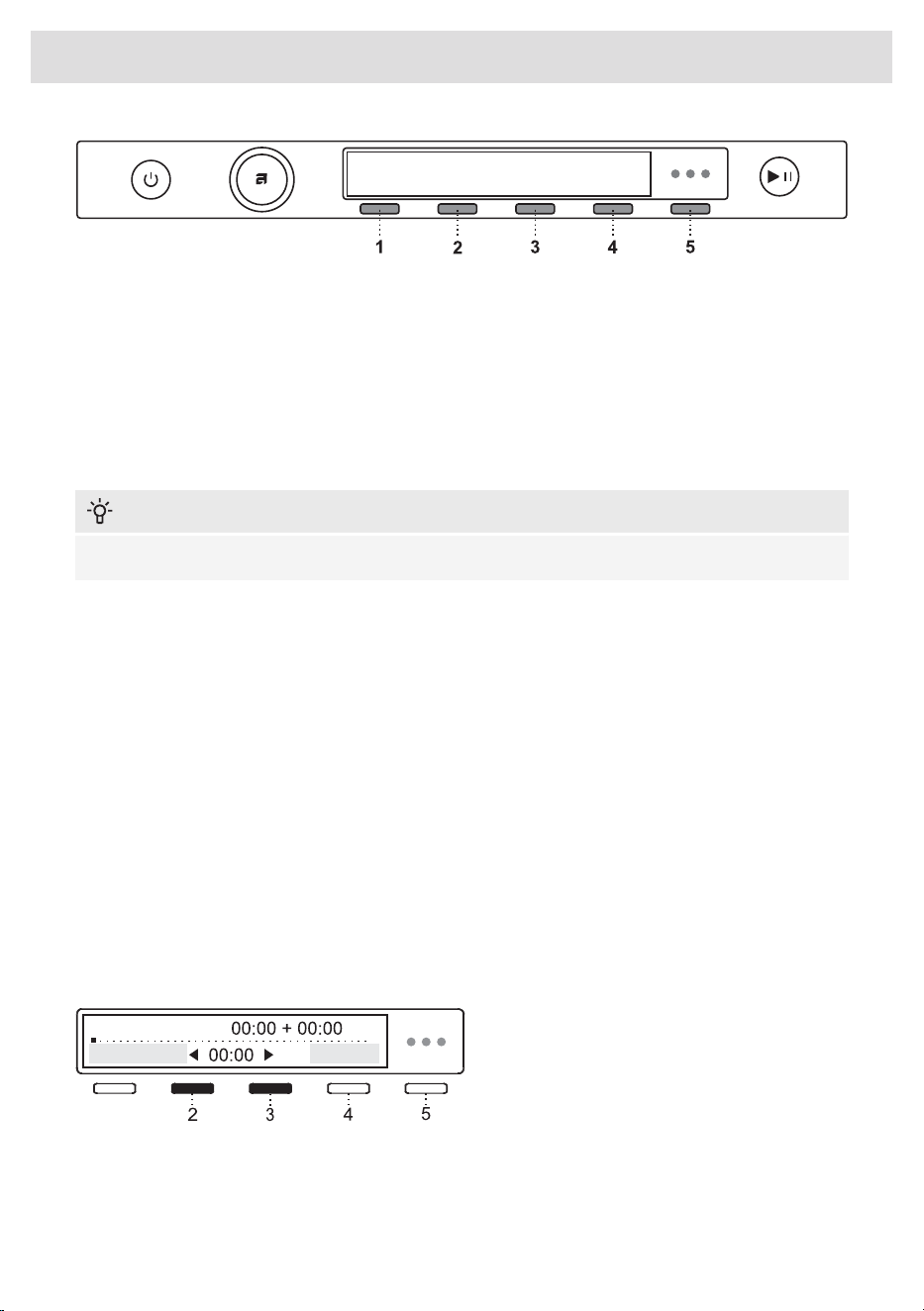
1. Drying modes (Mode)
2. Dryness level/Extra dry
3. Load
4. Delay start
5. Extra functions
Choose the program settings before pressing the Start/Pause button.
When the drying program is in progress, program settings cannot be changed.
INFORMATION!
By pressing 5 Information you can display the information about the programme setting.
Following are the programme settings that may be selected using the buttons 1 to 4:
1. Drying modes (Mode)
You can choose between additional drying modes: Default or Low temperature (Delicate).
The final level of laundry dryness and drying time will be changed.
2. Dryness level/Extra dry
You can choose between the following laundry dryness levels (+, ++, +++).
The final level of laundry dryness and drying time will be changed.
3. Load
By pressing (3) you can choose between three dryer loads (Full, Medium and Low).
Selection of actual load affects the initially displayed anticipated drying time.
4. Delay start
Select delayed start by pressing (4) when you wish the drying programme to start after a certain
period of time.
Use the programme selector knob or buttons
(2) and (3) to move from 30 minutes to 6 hours
in 30-minute steps, and then from 6 hours to
24 hours in 1-hour steps.
By pressing (4) Ok you confirm your selection.
Press Start to start the operation. When the countdown reaches zero, the selected drying programme
will start automatically.
41
Drying process, step by step (1–7)
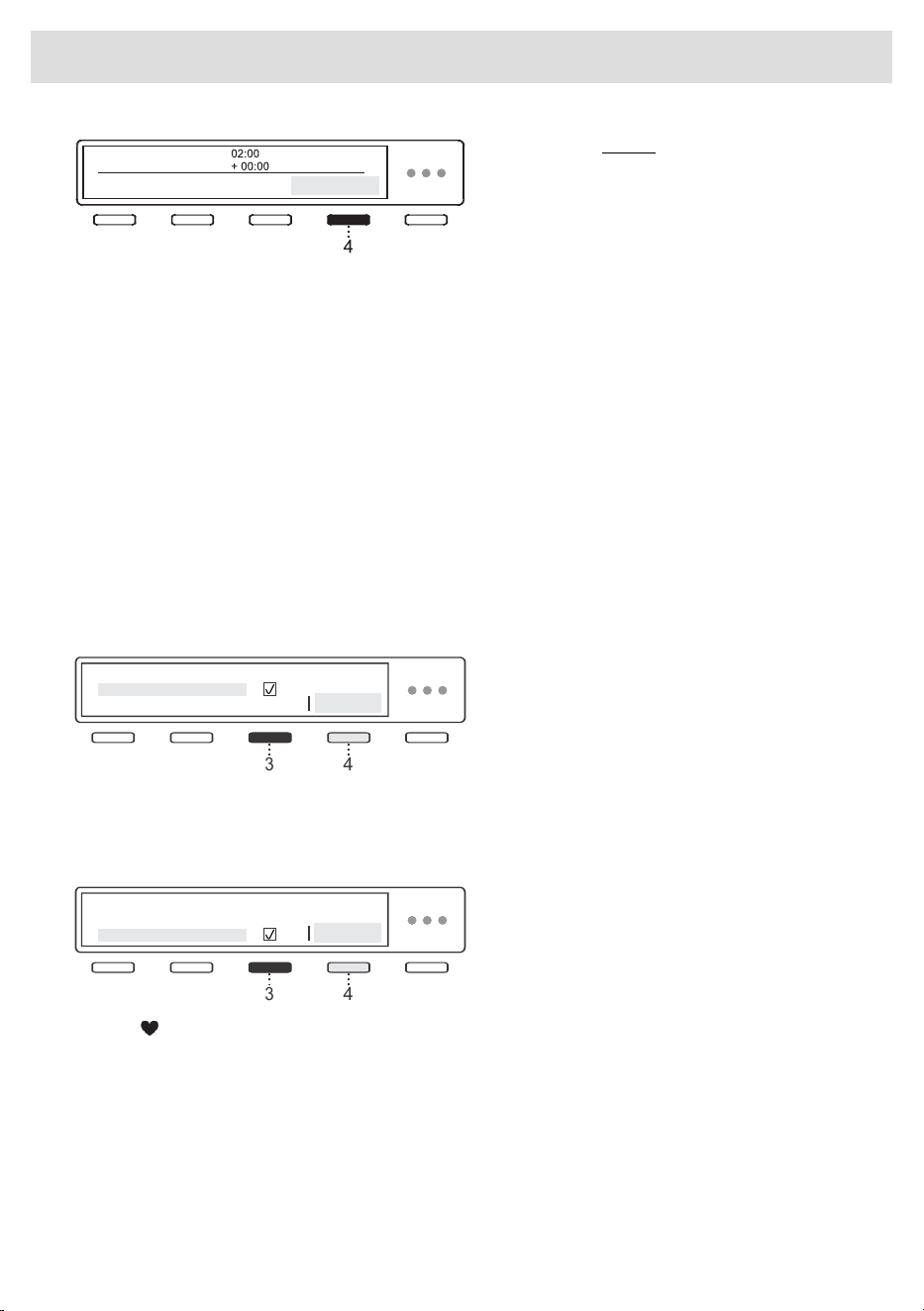
If you want to cancel the delay and start the
drying process immediately, press the button
(4). Use the programme selector knob or
buttons (2) and (3) to switch to 00:00 and
confirm your selection by pressing (4) Ok.
Press the Start button to start drying.
When the Delayed start is already set, it can be cancelled by pressing the Start/Pause button for 3
seconds to return to initial selection.
If you do not take any action for 5 minutes, the display will switch to standby mode (Standby).
Press the On/Off button to reactivate it. The display will show the countdown to the start of the drying
cycle.
If the dryer is in the standby mode, the display will switch on 1 minute before the start of the drying
cycle.
After the countdown, drying time will be indicated on the display unit.
To access extra program settings within the selected program, press button (5) and then button (1),
marked with the option More Options.
Choose between:
Anti crease
To prevent creasing, select the Anti-crease
function (gentle tumbling). This function is
recommended for delicate laundry.
4
3
Confirm the selection by pressing 3. Confirm the selection by pressing 4 OK.
You may choose the duration of the anti-crease program from 0 hours to 4 hours, in 1-hour steps.
Add to favourite
You can add programs to Favorites. Press
button (3) to add the program to favorites.
Confirm your selection by pressing button
(4) OK.
4
3
An icon will be added to the main menu for the selected program. The program will be saved.
Press button (4) Ok to return to the previous menu.
You can store up to 6 favourite programmes.
• Removing a favourite programme
When all 6 slots are taken, it is not possible to set a new programme.
To add a new favourite programme, you need to delete an existing one beforehand.
To remove a favourite programme, select the programme you want to remove. Select the setting
Add to favourite and confirm the removal of the favourite program by touching (4)Yes. The
programme will be removed.
42
Drying process, step by step (1–7)
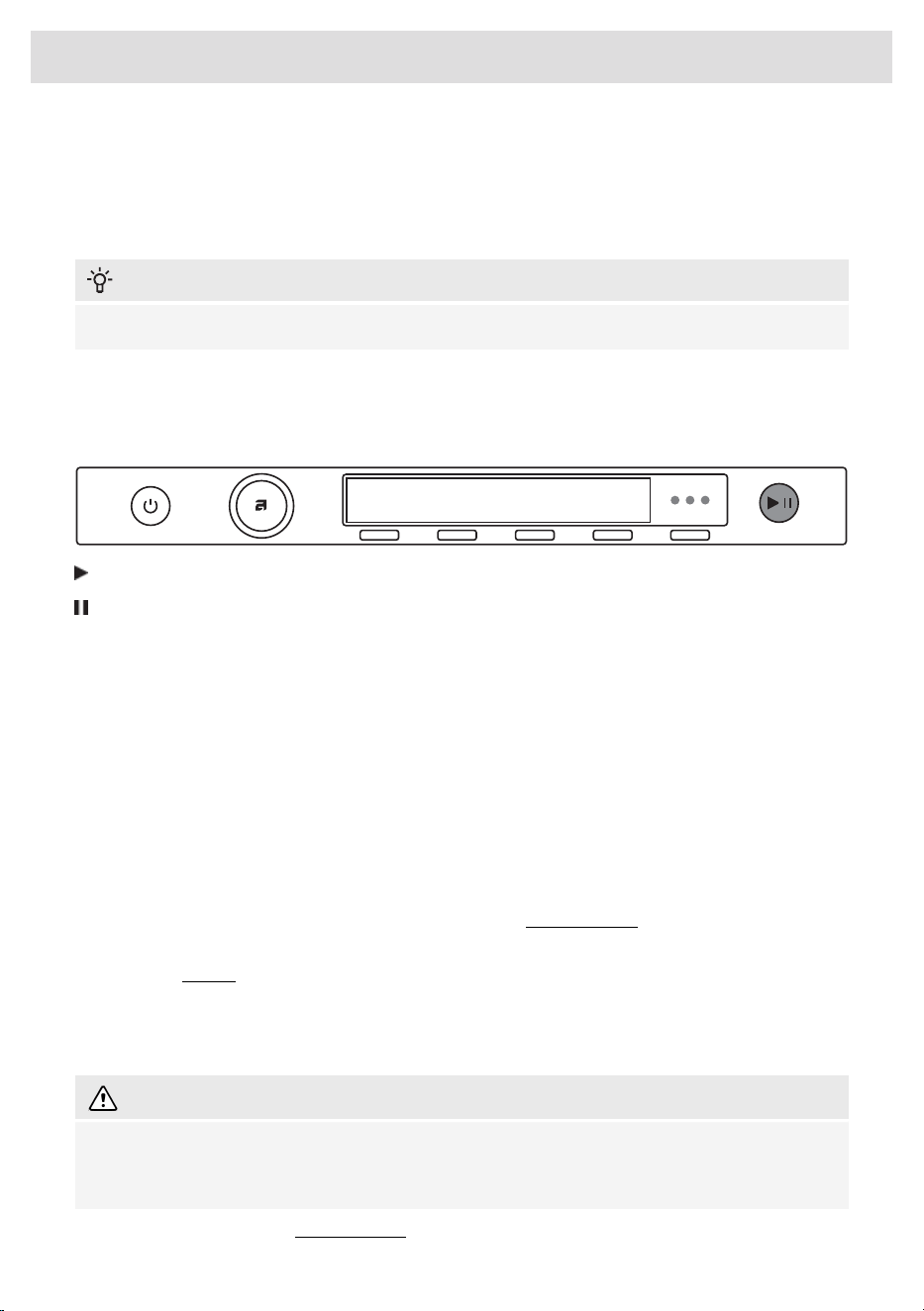
To select System settings, rotate the program selector knob all the way to the right and confirm the
selection by pressing 4 Enter.
If you do not take any action for 5 minutes, the display will switch to standby mode.
You activate it by pressing the On/Off button or by opening the dryer door.
INFORMATION!
Some settings may not be available on drying programmes.
STEP 6: Close the door and start the drying process.
Close the dryer door and press the Start/Pause button.
Start (pressed briefly – start/resume)
Pause (short press of the button - pause)
Cancel (press and hold the button for 3 seconds)
Time remaining
Depending on the selected program and load, anticipated drying time will be displayed in hours
and minutes.
Actual drying time will depend on the selected program, load, type of laundry, spinning rate etc.
Actual drying time may be longer or shorter than initially displayed.
Pausing, stopping or changing the program
To pause the programme, briefly press the Start/Pause button.
To resume a programme, press again the Start/Pause.
You can also temporarily interrupt the drying programme be interrupted opening the door.
To resume the programme, simply close the door and press Start/Pause.
If you want to cancel the drying programme, press the Start/Pause button and hold it for 3 seconds.
The selected programme will be stopped and the cooling stage will begin. Cooling time will depend
on the selected programme and the temperature in the drum.
Only after the cooling is complete, can you select a new programme and press Start/Pause.
WARNING!
The final drying cycle includes a cooling down stage without heater operation. It makes sure the
laundry is of suitable temperature at the end of the program and that it can be taken from the
dryer without risk of touch hot clothes.
The drying programme can be interrupted by pressing the On/Off button.
43
Drying process, step by step (1–7)
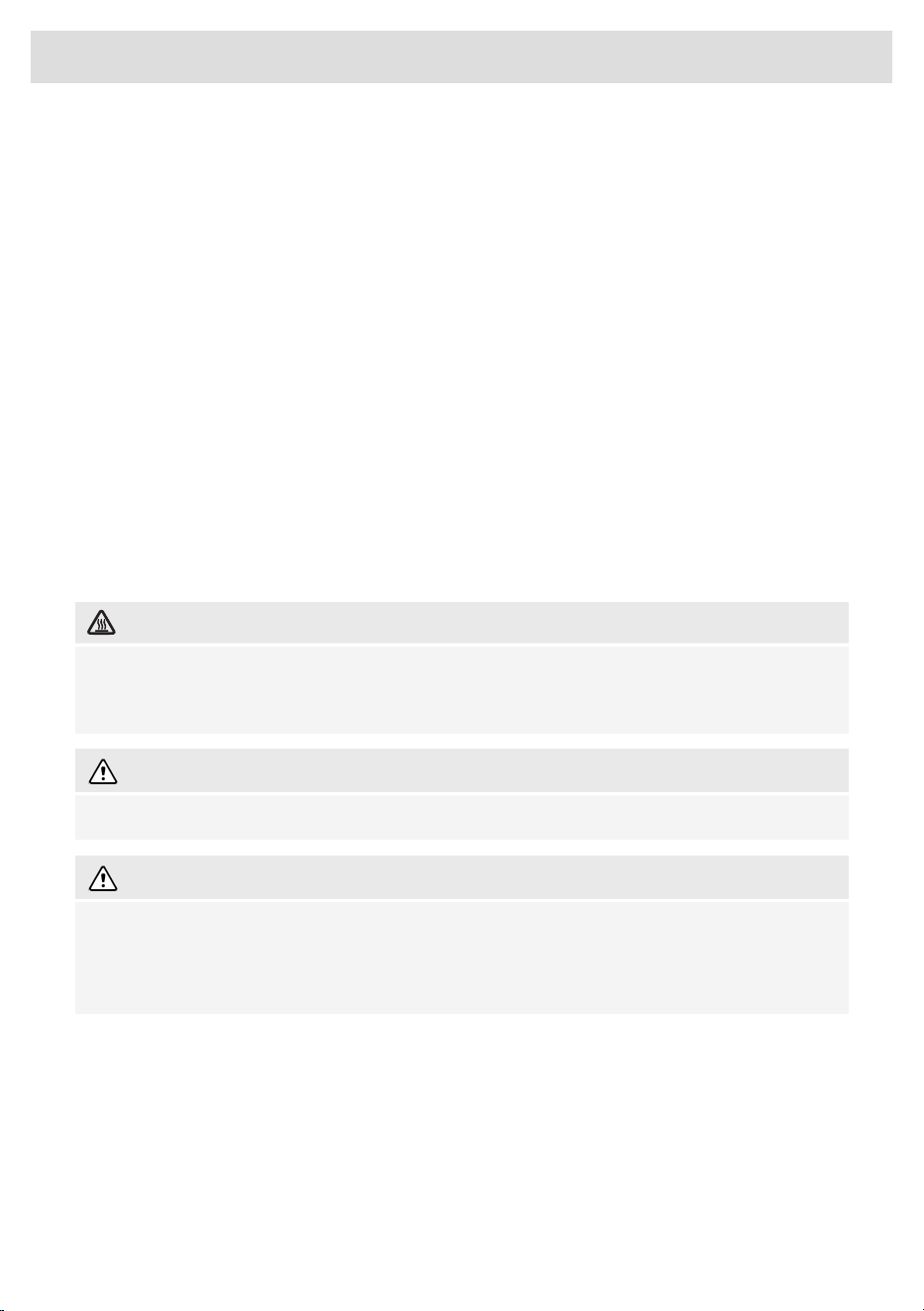
The dryer will switch off. After the dryer is switched on, press the Start/Pause button to resume the
program.
STEP 7: End of program
After the drying program is completed, the display will show that the program has finished
successfully.
If you have selected the setting Anti-crease , the dryer will continue to operate after the end of the
drying cycle for the amount of time specified upon selection of this programme setting.
After the end of the drying cycle, you have the possibility to save the programme as a favourite
programme (see chapter STEP 5: Choosing the program settings).
Open the door towards you and remove the laundry from the dryer.
Clean the lint filter in the door (see chapter Cleaning and maintenance).
Make sure the dryer drum is empty, then close the door.
5 minutes after the end of the program or last activation, the display will switch off to standby mode
in order to save power.
The display will light up again if you press the On/Off button or open the dryer door.
HOT SURFACE!
If the lint filter or second lint filter is clogged, the compressor can be turned off preventively when
the appliance overheats, which prolongs the drying time. If you notice extended drying time,
clean the filters, wait for the appliance to cool down, and restart it.
WARNING!
After the drying process, unplug the dryer power cord from the power outlet.
WARNING!
When the door is opened, notifications will appear on the display:
• to empty the condensation tank and
• to clean the filters.
44
Drying process, step by step (1–7)
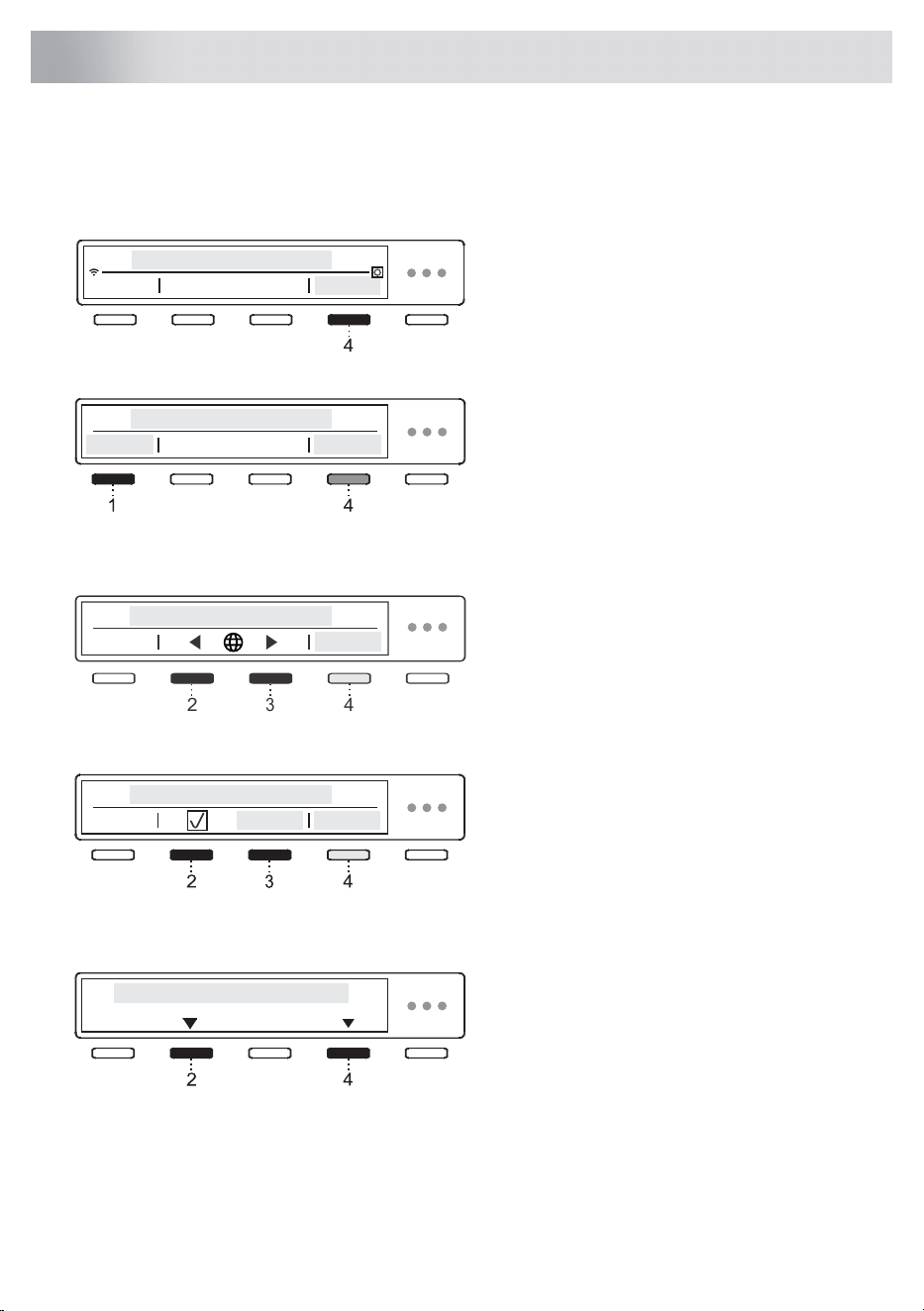
System settings
Enter the System settings by rotating the programme selector knob in the main menu all the way to
the right.
Confirm your selection by pressing (4) Enter .
Press the (1) Exit in any setting to return to the main menu.
Certain settings allow a short description to be
displayed by pressing (4) Information.
Then, use the program selector knob to scroll the list of settings that can be changed.
Choose Language
By pressing 2 or 3 you can navigate the list of
languages.
Confirm your selection by pressing 4 Save.
2
3
4
Lock
Use the setting to disable the on-screen
buttons so that children may not inadvertently
trigger or change the cycle.
You can Lock the appliance by pressing 2 or
3. For further information, press 4 Information.
Choose between turning on or turning off the lock.
By pressing 4 Information brief information about the setting will appear on the display unit.
When this option is on, you can activate and
deactivate it by pressing 2 and 4 and hold
them for 3 seconds.
When the lock is activated, no other function can be selected.
After 1 minute of inactivity on the appliance, the lock will be activated automatically.
45
Appliance settings
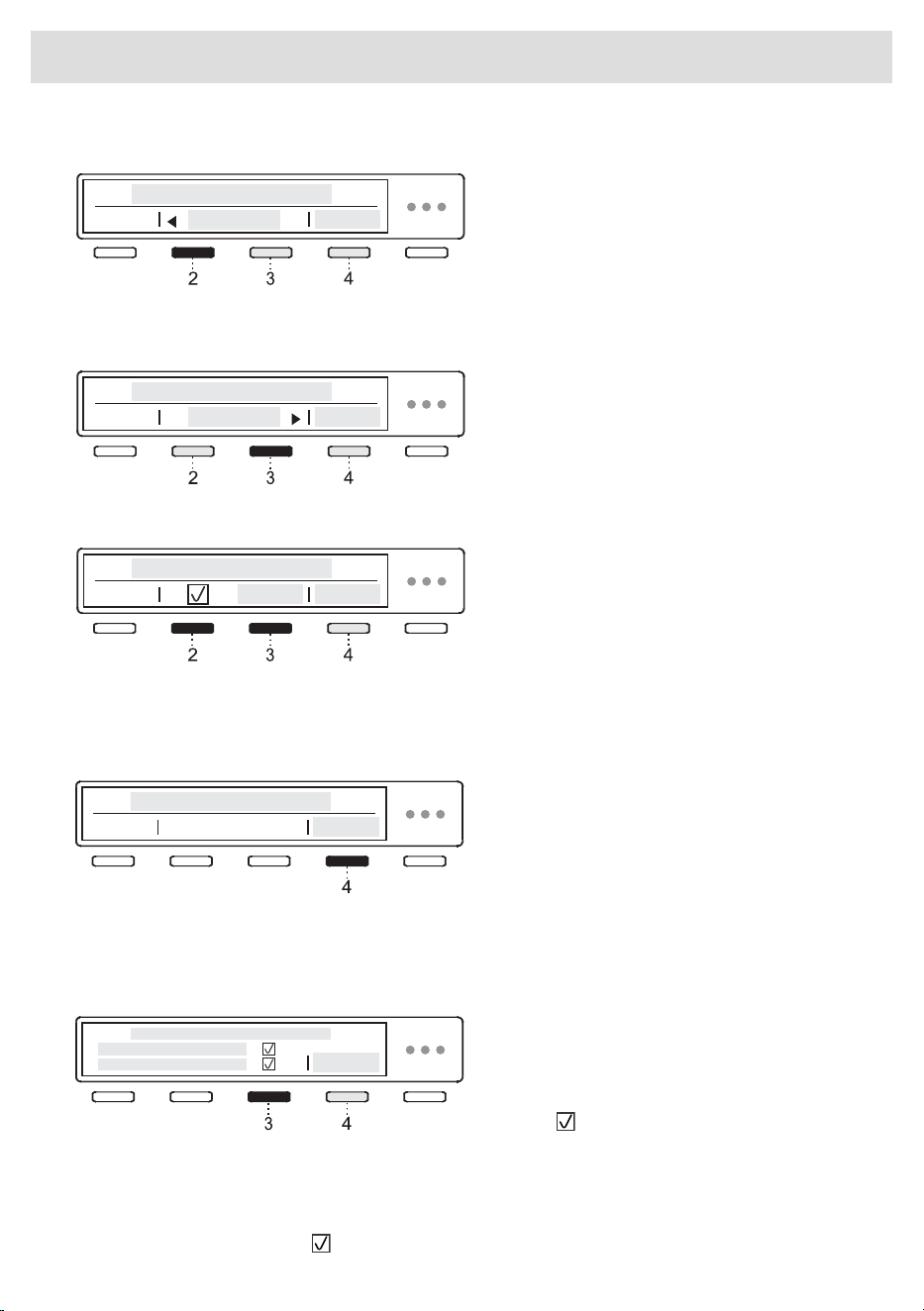
Condense water
You can choose between draining condensed
water into:
• a tank for condensed water or
• directly into the drain.
Choose the option by rotating the programme
selector knob or by pressing 2 or 3.
For further information, press (4) Information.
If you opted for (Drain), it is necessary to
observe the proper installation of the drain
hose (see chapter Draining the condensate).
Confirm your selection by pressing (4) Save.
Bundling sensor
By pressing button 2 or 3, you can choose
between On or Off Bundling detection.
For proper operation always clean all filters before drying.
For further information, press (4) Information.
Program management
The Main menu includes the entire set of
programs that you can choose using the
Program selector knob. Press the button 3 to
select or deselect programs you do not want
to appear in the main menu.
This setting allows only the selected programs
to be displayed in the main menu. Once you
have selected all the programs, press button
4 to return to the previous menu.
Press (4) Enterto display a set of programmes.
Use the program selector knob to choose
between programs. Confirm your selection by
pressing 3. This is how you define the display
of the program in the main menu.
Symbol will appear next to the selected
program.
When you have a set of programmes selected, confirm the change by pressing 4 Save.
If you have not made any changes, press 4 Exit.
Only programs indicated with will appear on the display unit.
46
Appliance settings
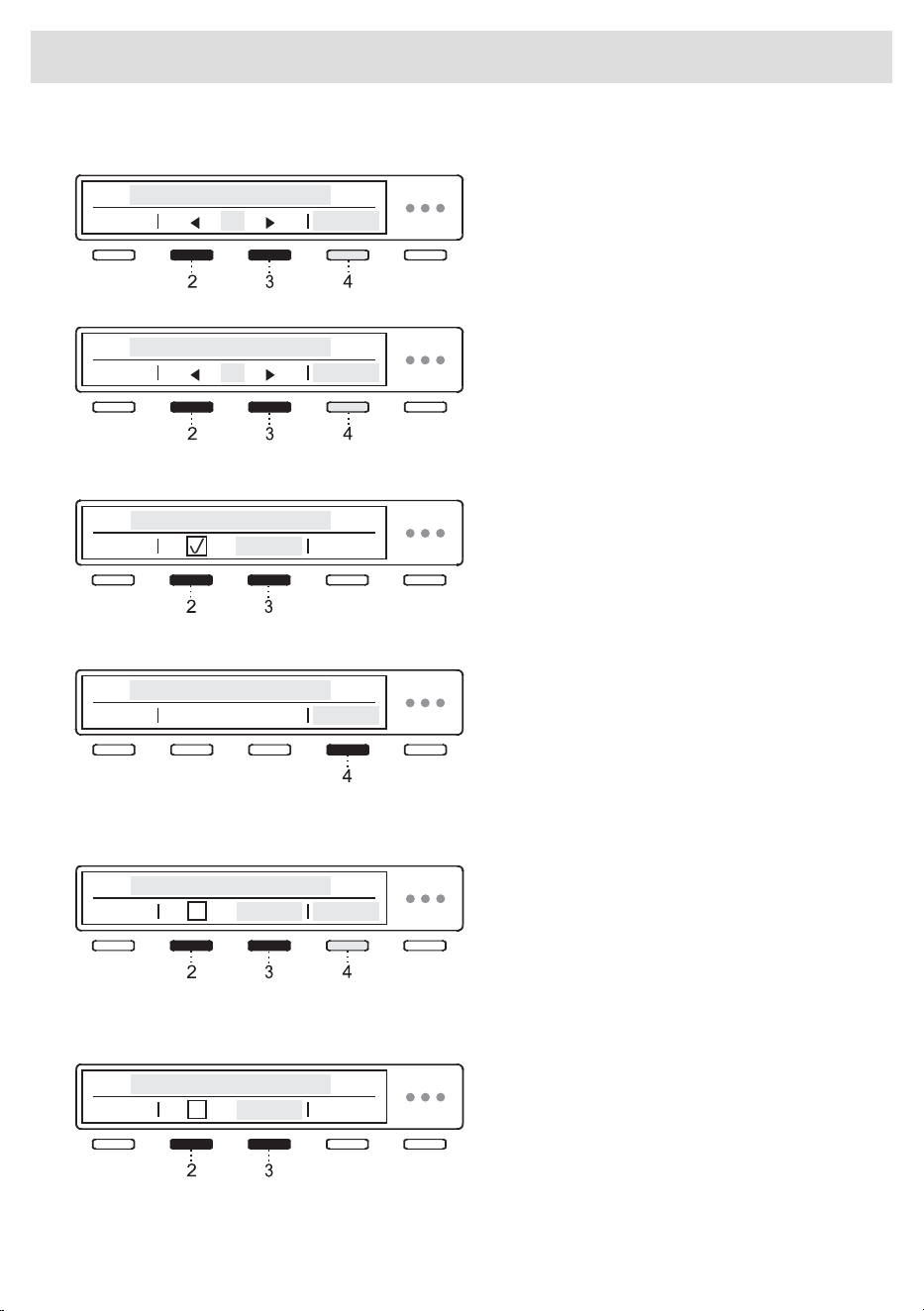
Display brightness
You can set the Brightness of the display.
By pressing 2 or 3 you can choose the
brightness of the display from 1 to 5.
Confirm your selection by pressing 4 Save.
Sound volume
By pressing 2 or 3 you may choose the
acoustic signal volume.
During selection, the acoustic signal will be
played with the currently highlighted volume.
Confirm your selection by pressing 4 Save.
Display logotype
By pressing 2 or 3 or you can choose between
switching the logo On/Off.
On = display the logo at switch-on
Off = do not display the logo at switch-on
Wi-Fi settings
For settings, press 4 Enter.
Refer to the setting procedure in the chapter
"Initial setting before use": "How to enable Wi-Fi
on the device?".
To return to "System settings" press 4 Exit.
Shop mode
The appliance simulates the display and
operation of the normal cycle for silent visual
display. Only for stores.
By pressing 2 or 3 you can choose between
turning on or turning off.
For further information, press 4 Information.
Cleaning reminder
By pressing the button 2 or 3, you can choose
between turning On or Off .
47
Appliance settings
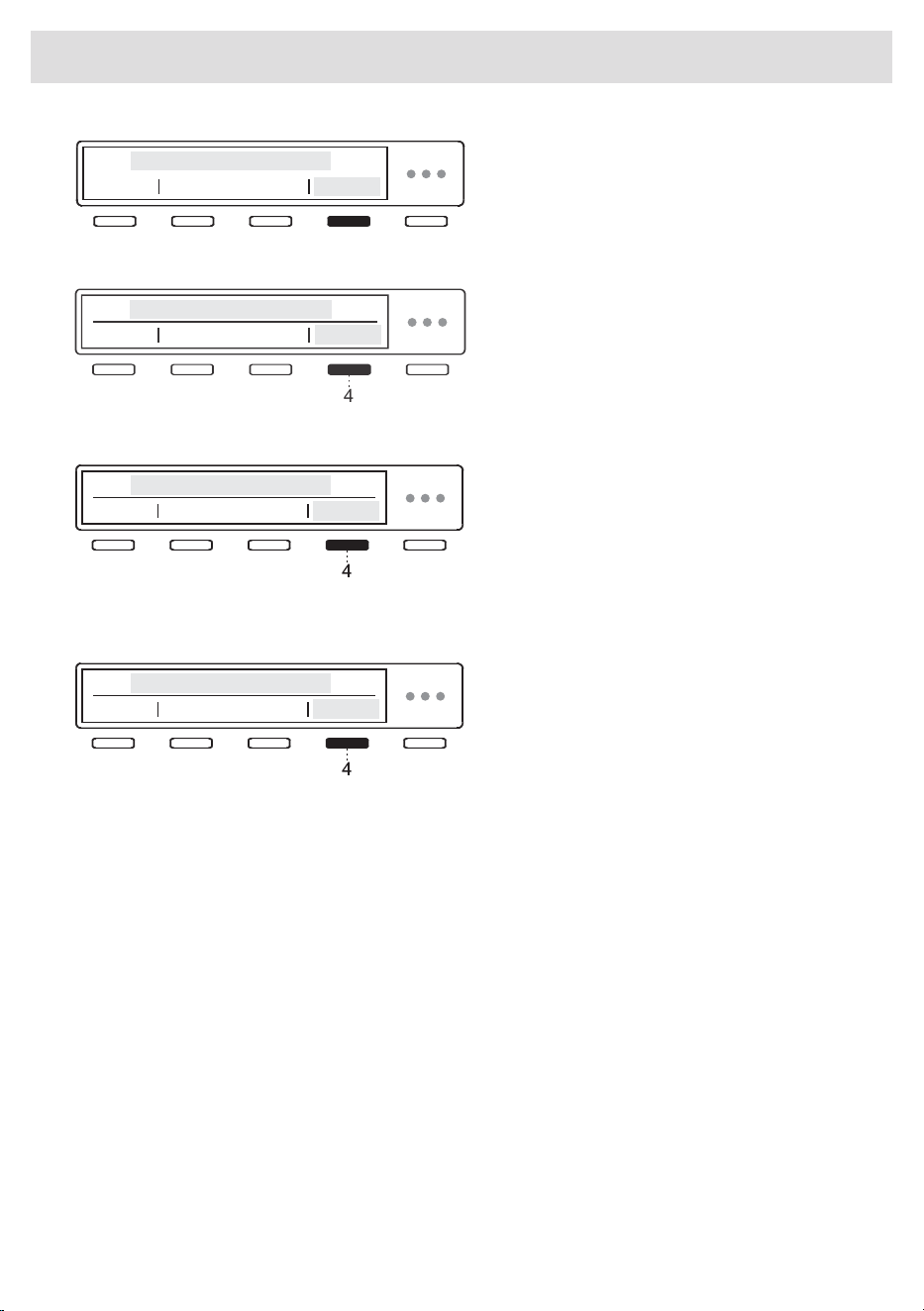
For best performance, the filters must be
cleaned and the condensation tray emptied.
The selection must be confirmed by
pressing (4) OK.
Error (Failure read out)
The last three errors displayed to the user are
displayed in the failure read-out menu.
4
Reset program list
By pressing 4 Enter you enter the Reset
program list (Reset program list), which means
that all favourite programmes will be deleted.
Other settings will not be affected.
Confirm the reset by pressing 4 OK.
Factory reset
By pressing 4 Enter you enter Factory settings,
which means that the settings will return to the
original settings (your own settings and all
favourite programs will be deleted).
Confirm the reset by pressing 4 OK.
48
Appliance settings
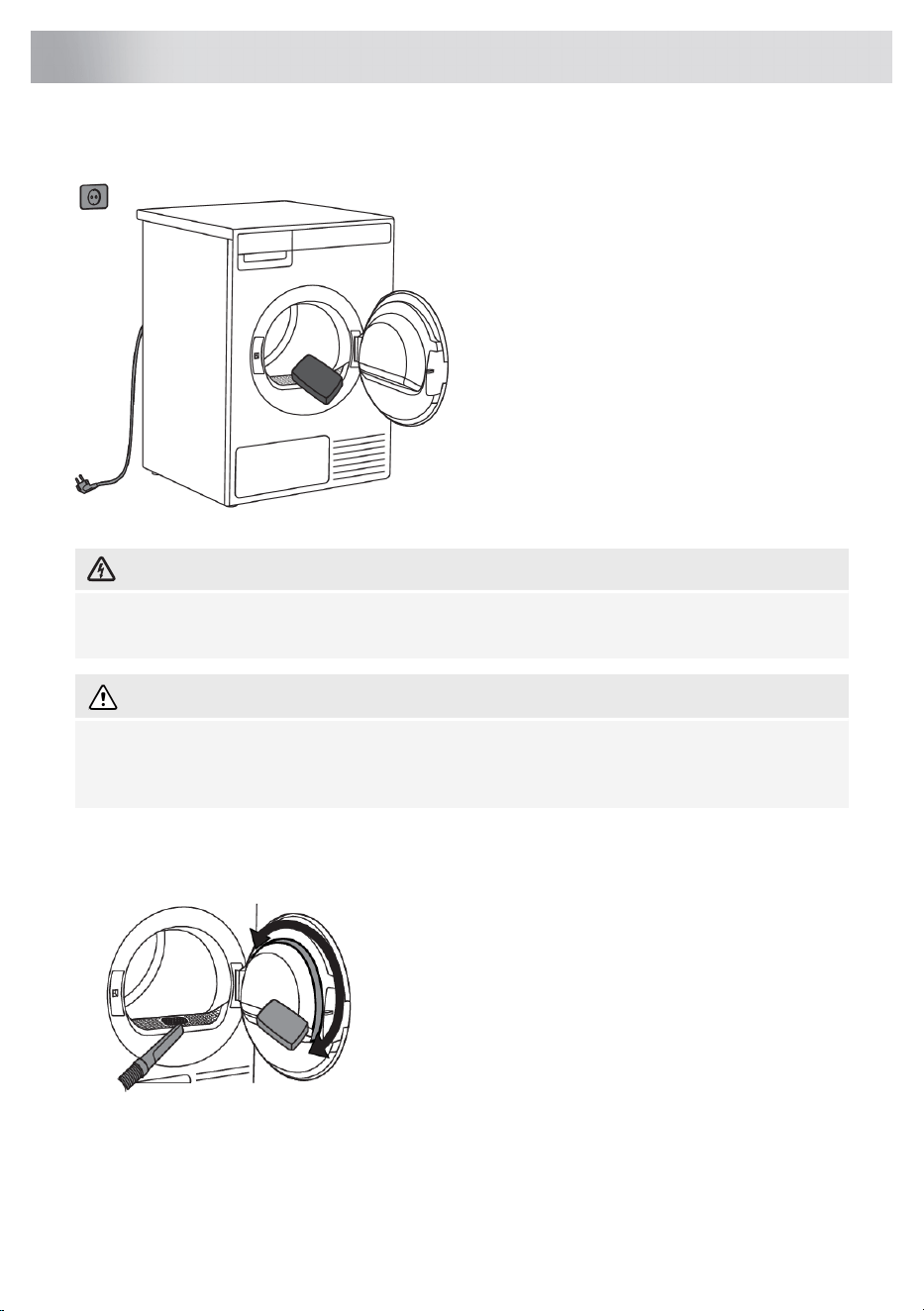
Cleaning the appliance exterior
Wipe all parts of the dryer with a soft cloth until
dry.
Keep the area around the dryer clean and
cool. Dust, heat, and humidity will extend the
drying time.
ELECTRIC SHOCK!
Before cleaning, make sure to switch off the dryer and disconnect it from the power mains
(unplug the power cord from the outlet).
WARNING!
Clean the appliance exterior and the display unit using a soft damp cotton cloth and water. Do
not use solvents or abrasive cleaners that could damage the appliance (please observe the
recommendations and warnings provided by the manufacturers of the cleaning agents).
Additional information regarding cleaning
If necessary, the lint filter housing and the opening into
which the lint filter is inserted must be cleaned.
If necessary, clean the door gasket as well.
49
Cleaning and maintenance
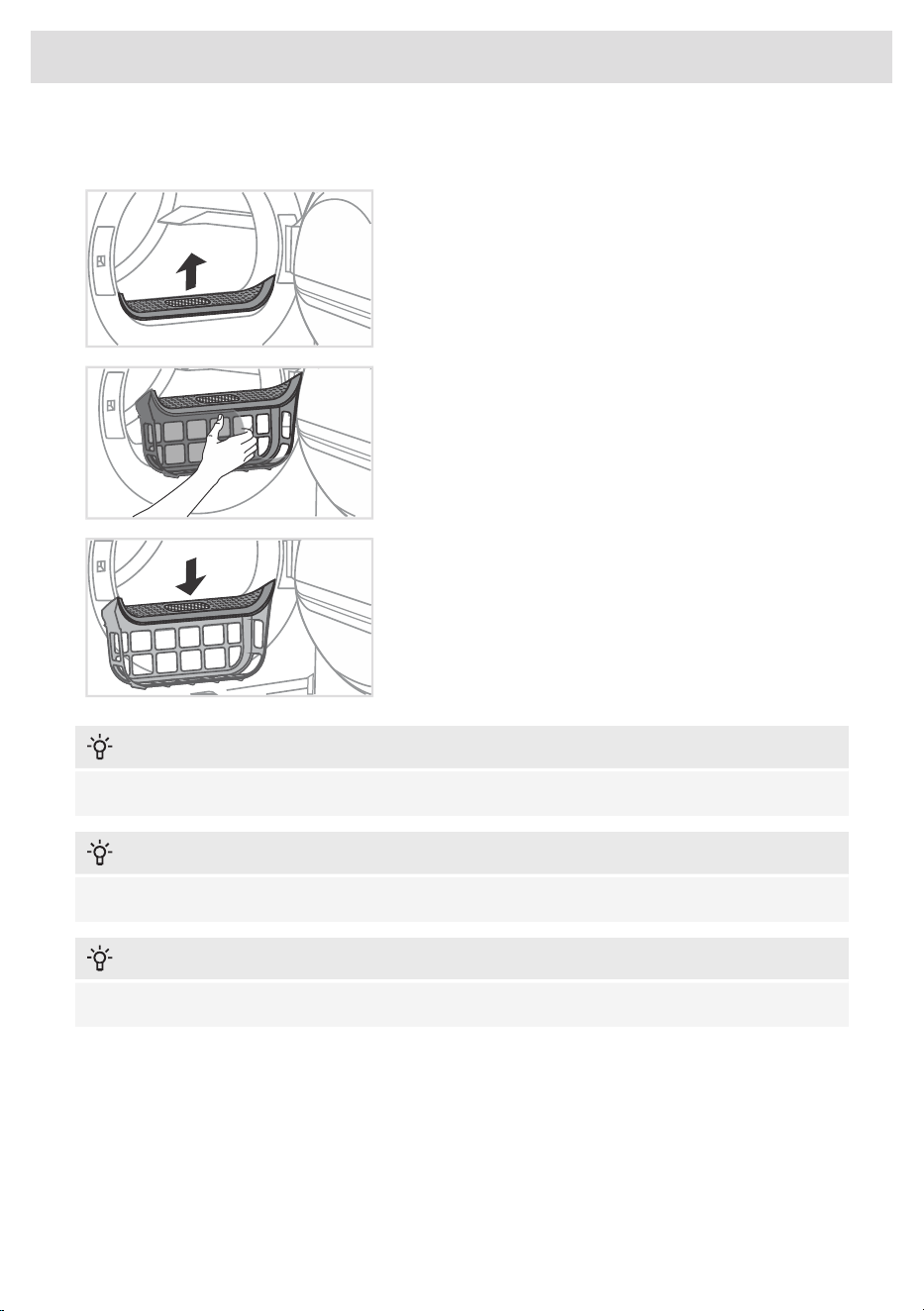
Cleaning the lint filter
1 Pull out the net filter.
2 Carefully remove fibers and threads from the lint filter
using your hand or a vacuum cleaner.
3 Reinstall the net filter.
INFORMATION!
Make sure the lint filter is correctly inserted.
INFORMATION!
Clean the lint filter after each drying cycle.
INFORMATION!
Never operate the dryer without a lint filter or if the lint filter is damaged.
50
Cleaning and maintenance
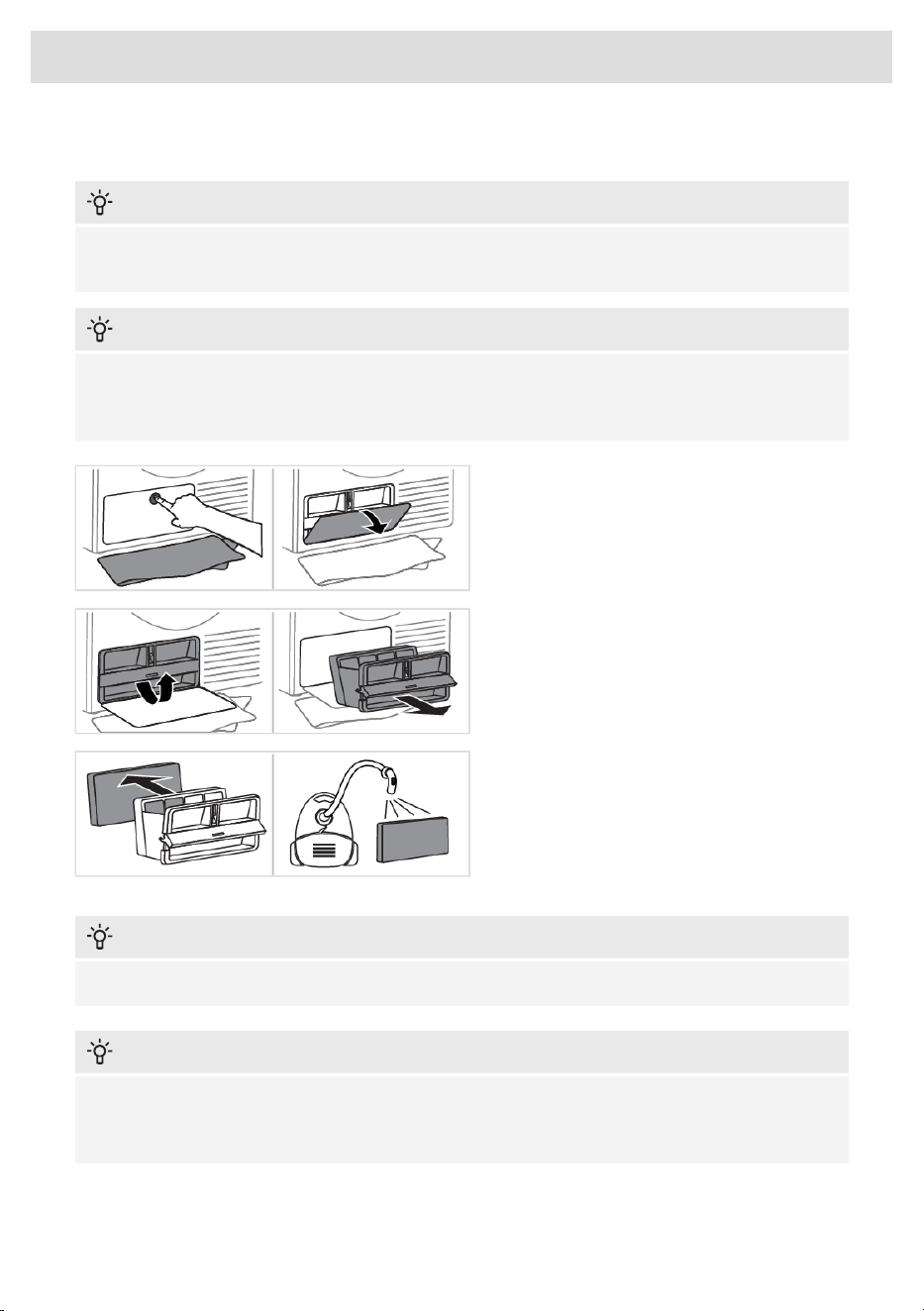
Cleaning the second lint filter
INFORMATION!
Do not touch the inner metal parts of the heat exchanger with your bare hands. You might injure
yourself on sharp parts. Use appropriate protection gloves when cleaning the heat exchanger.
INFORMATION!
Incorrect cleaning of the metal fins of the heat exchanger can permanently damage the tumble
dryer. Do not press on the metal fins with hard objects like for example the plastic tube of a
vacuum cleaner.
1 During cleaning, some water may be
spilled. It is therefore recommended to place
an absorbent cloth on the floor.
Press inward in the center of the lid to open
the outer cover.
2 Hold the handle of the bottom lint filter
housing and rotate it upwards.
Use the handle to pull out the second lint filter.
For easier removal, the second lint filter must
be pulled towards you and tilted slightly.
3 Pull the foam part of the second lint filter
from the housing. It can be cleaned with a
vacuum cleaner and a soft brush attachment.
If the foam filter is damp, leave to dry before
using a vacuum cleaner.
INFORMATION!
Do not rinse the foam filter under water to avoid micro-plastic effluent into the groundwater!
INFORMATION!
Clean the second lint filter, foam filter and mesh housing at least after every 10 drying cycles or
whenever necessary. If the appliance is being used with a selfcleaning system, perform cleaning
after every 30 cycles or whenever necessary.
51
Cleaning and maintenance
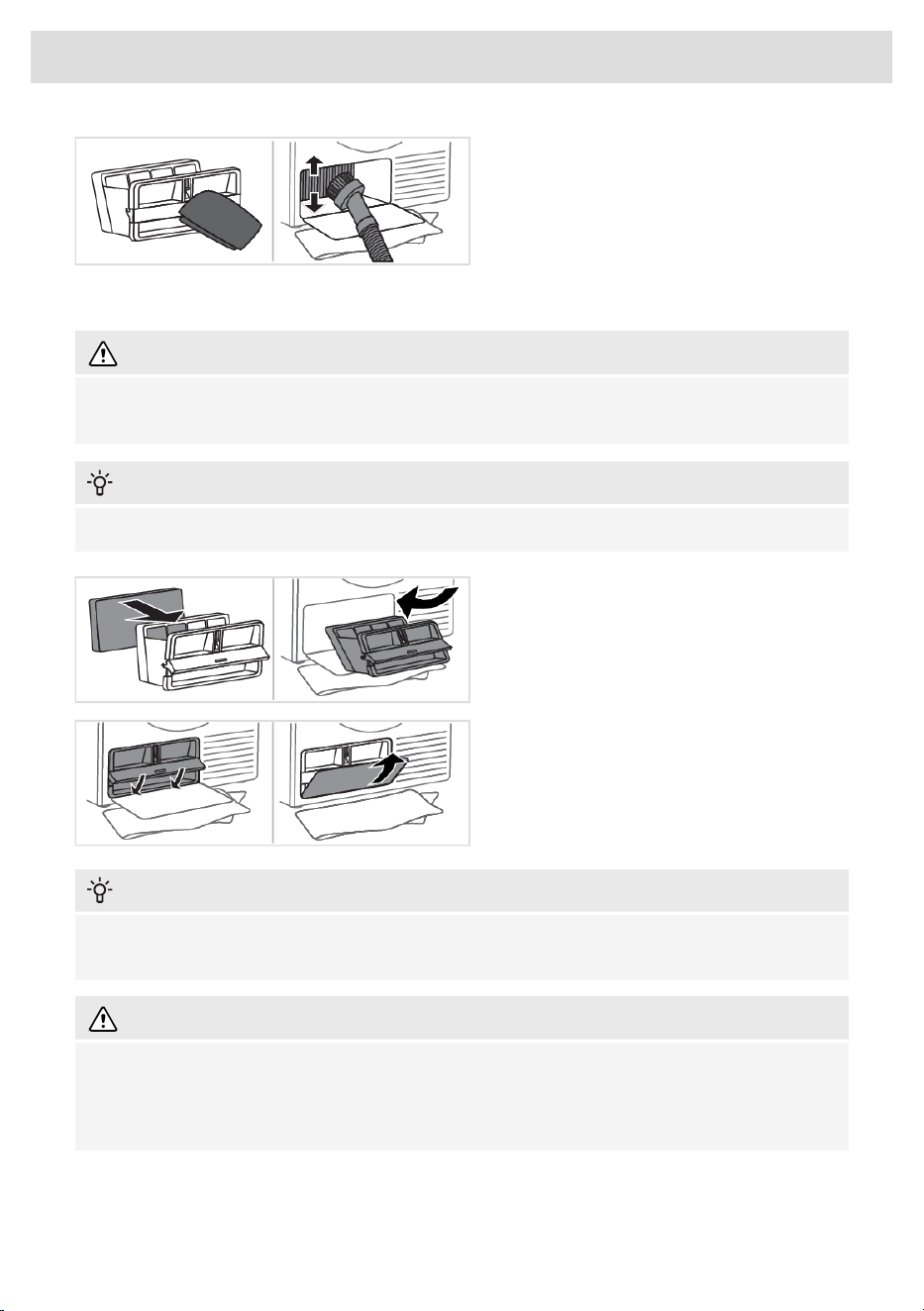
4 Carefully detach the lining of fibres and
threads from the lint filter, and also clean the
second lint filter housing with a soft cloth.
If the heat exchanger fins are covered with dust and dirt, you can clean them using a vacuum cleaner
with a soft brush attachment.
WARNING!
Without pressing, gently move the brush attachment only in the direction of the metal fins from
top to bottom. Too much pressure can damage or bend the metal fins of the heat exchanger.
INFORMATION!
Second part of the hosing contains a lint and a filter foam which shall be cleaned thoroughly.
5 Reassemble the foam filter and the second
lint filter housing.
The second lint filter must be tilted and
inserted back into the dryer at a slight incline
with the handle open.
6 Close the handle and close the outer cover.
INFORMATION!
The heat pump filter has to be correctly placed into its slot. Otherwise, the heat exchanger installed
inside the dryer may be clogged.
WARNING!
Insufficient cleaning of the filters in the dryer can lead to reduced drying efficiency, increased
energy consumption, overheating of the appliance, and a higher risk of fire and mechanical
damage. Regular cleaning of the filters will ensure optimal appliance performance, shorter drying
times, and minimal energy consumption.
52
Cleaning and maintenance
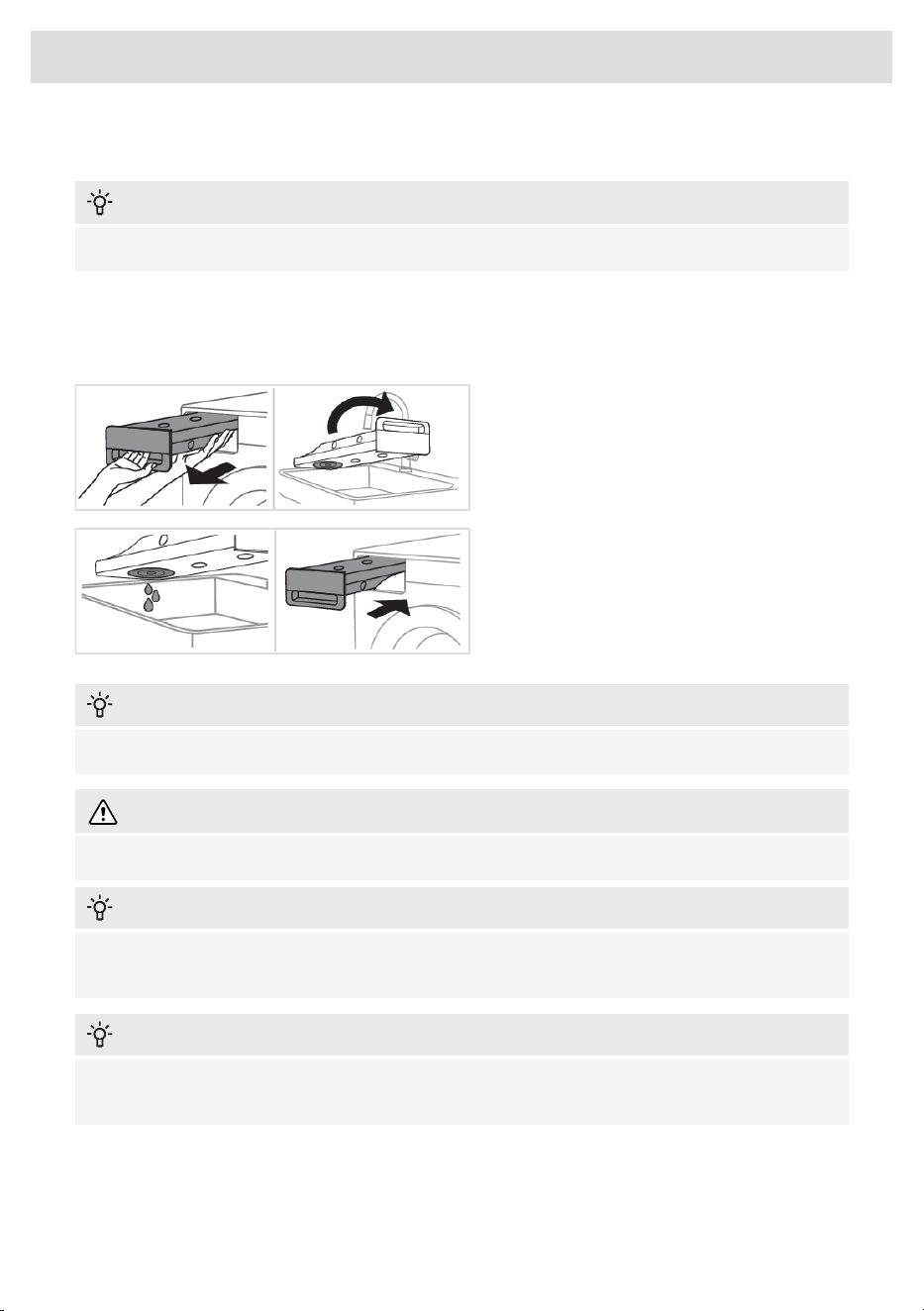
Emptying the condense tank
INFORMATION!
After each drying cycle, empty the condense tank.
If the condense tank is overflowing the drying program will be paused automatically.
A warning will appear on the display that the condense tank has to be emptied.
If the setting for draining condensed water to the drain is enabled, this warning will not be displayed.
1 Pull out the condense tank from the dryer
(using both hands as shown in the figure), then
slowly turn it upside down over a washbasin,
sink, or any suitable vessel.
2 Discharge the water through the condense
drain opening.
Replace the condense tank into the dryer
housing.
INFORMATION!
Water from the condense tank is not drinkable. If thoroughly filtered, it can be used for ironing.
WARNING!
Never add chemicals or fragrances into the condense tank.
INFORMATION!
Condense tank does not require draining if the drain hose is connected directly to a washbasin
or a bathroom floor drain (see chapter Installation and connection).
INFORMATION!
Before moving the dryer or before storing it in a non-heated room during the winter, the condensate
tank has to be emptied.
53
Cleaning and maintenance
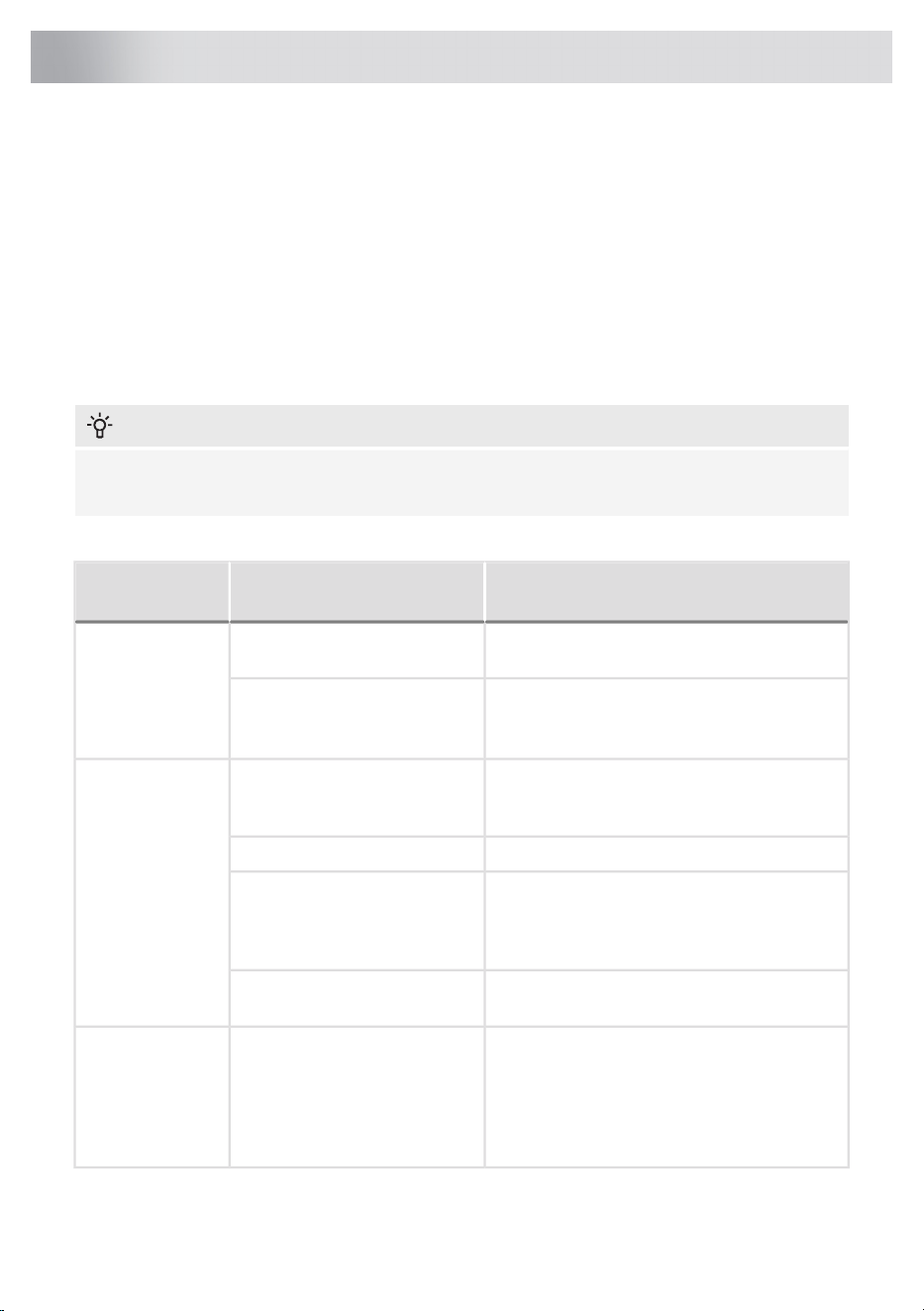
Disturbances from the environment (e.g. the power grid) may result in various error reports (see
Troubleshooting table). In such case:
• Switch off the appliance, wait for 1 minute, switch the appliance back on, and repeat the drying
program.
• If the error persists, call an authorized service center.
• You will be able to solve most of the problems in appliance operation by yourself (see
Troubleshooting table).
• Repairs may only be carried out by an adequately trained person.
• Repair or any warranty claim resulting from incorrect connection or use of the dryer shall not be
covered by the warranty. In such cases, the costs of repair shall be charged to the user.
INFORMATION!
The warranty does not cover the errors or failures resulting from disturbances from the environment
(lightning strike, power grid failures, natural disasters etc.).
The following lists all the errors that the user can see on the user interface.
What to do?CauseProblem/
Error
Check whether the main switch is on.The main switch is not switched
on.
The machine will
not start.
Check the fuse.There is no voltage in the power
outlet.
Check if the power cord plug is correctly
inserted into the power outlet.
Re-read the instructions for use again.Program was not started in
accordance with the
instructions.
There is voltage
in the outlet, but
the drum does
not spin ...
Check if the door is closed properly.Door might be open.
The dryer does
not work.
Empty the condense tank (see chapter
Cleaning and maintenance) (only applies to
condenser dryers and dryers with a heat pump
(HP)).
The condense tank is full (only
applies to condensation dryer
and the dryer with a heat pump
(HP).
To cancel the Delayed start option, press the
Skip button .
Delayed start might be
activated.
Clean the lint filter (see chapter Cleaning and
maintenance).
The door net filter may be
clogged. As a result, the
temperature in the dryer rises,
which in turn causes
overheating, and the dryer
switches off.
The machine
stops operating
completely
during a program.
Wait for the machine to cool down, and try
running it again. If the dryer still fails to start,
call service centre.
54
Errors: what to do?
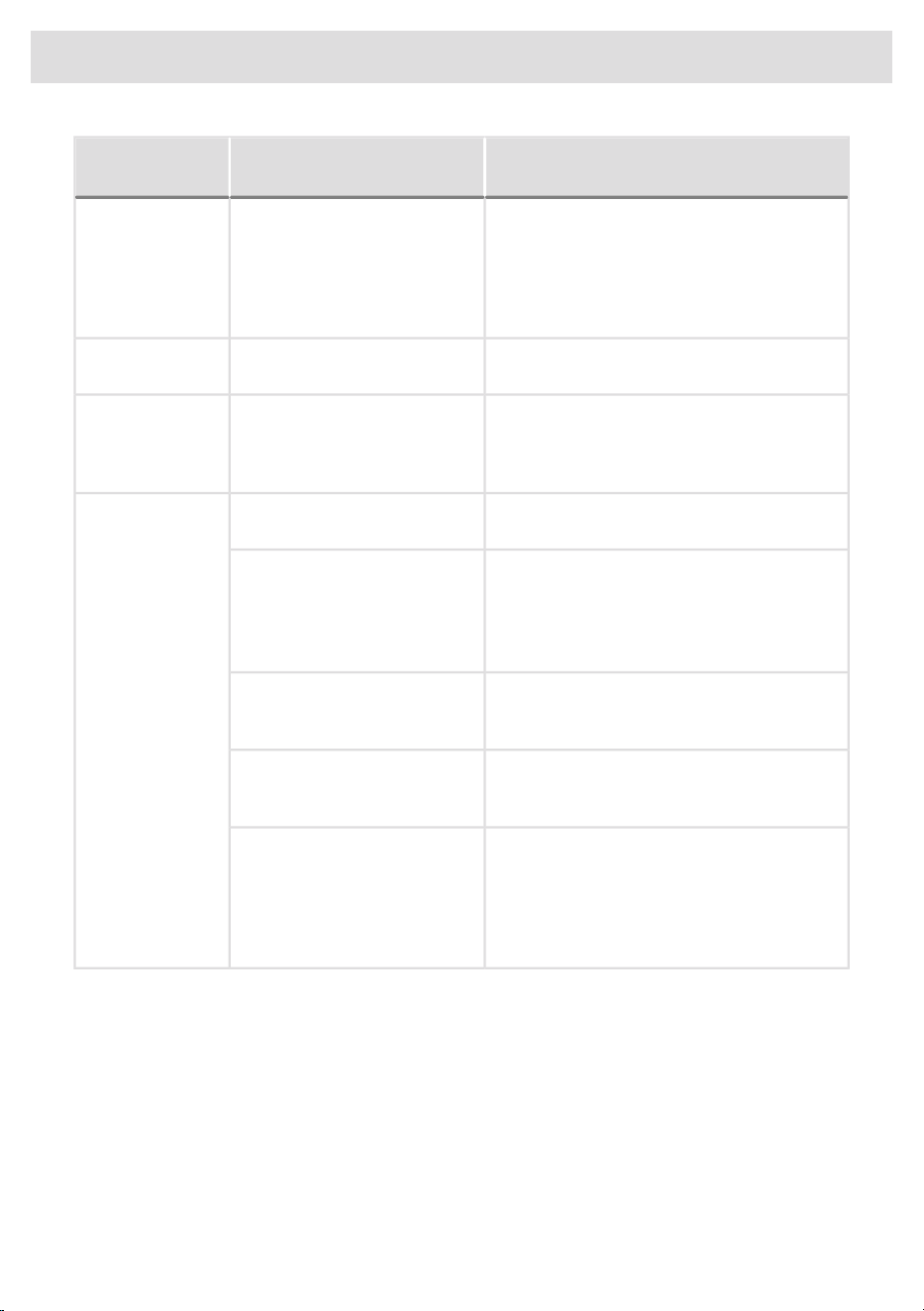
What to do?CauseProblem/
Error
The noise will subside without any intervention.If the dryer is out of use for a
long period of time, the same
points of load-bearing elements
or components are under stress
for a long time, causing
temporary deformation.
A slight hitting
noise appears.
Reduce the amount of laundry.Excessive load on the door (too
much laundry in the drum).
The door opens
during drying.
Make sure you have sorted the laundry by
type and thickness, whether you have added
a suitable amount of laundry to the drum, and
whether you have selected a suitable program.
Laundry of varying types and
thickness, and excessive
amount of laundry.
Unevenly dried
laundry.
Clean the filters (see chapter Cleaning and
maintenance).
Filters are not clean.Laundry not dried
or drying takes
too long.
Make sure there is adequate supply of fresh
air to the dryer; for example, open the door
and/or window.
Dryer is placed in a closed
room; room that is too cold; or
room that is too small and the
air overheats as a result.
Check if the temperature in the room where
the dryer is installed is too high or too low.
If the load is still wet after completed drying
cycle, an appropriate drying program should
be run again (after cleaning filters).
Laundry was not sufficiently
wrung or spun.
Use a suitable program or extra functions.Amount of laundry dried in the
appliance is too large or
insufficient.
Close the buttons or zippers on the laundry
before drying. Select a suitable programme
(e.g. the Bed linen programme).After the
drying process, loosen the laundry and select
an additional drying programme(e.g. Timed
drying).
Laundry (such as bedding) gets
tangled into large balls.
Failure display
In case of a failure while a programme is underway, Error (Error) X is indicated on the display unit.
Press and hold the INFO button (4) to display the error description on the display unit. Switch off the
dryer and turn it back on.
55
Errors: what to do?
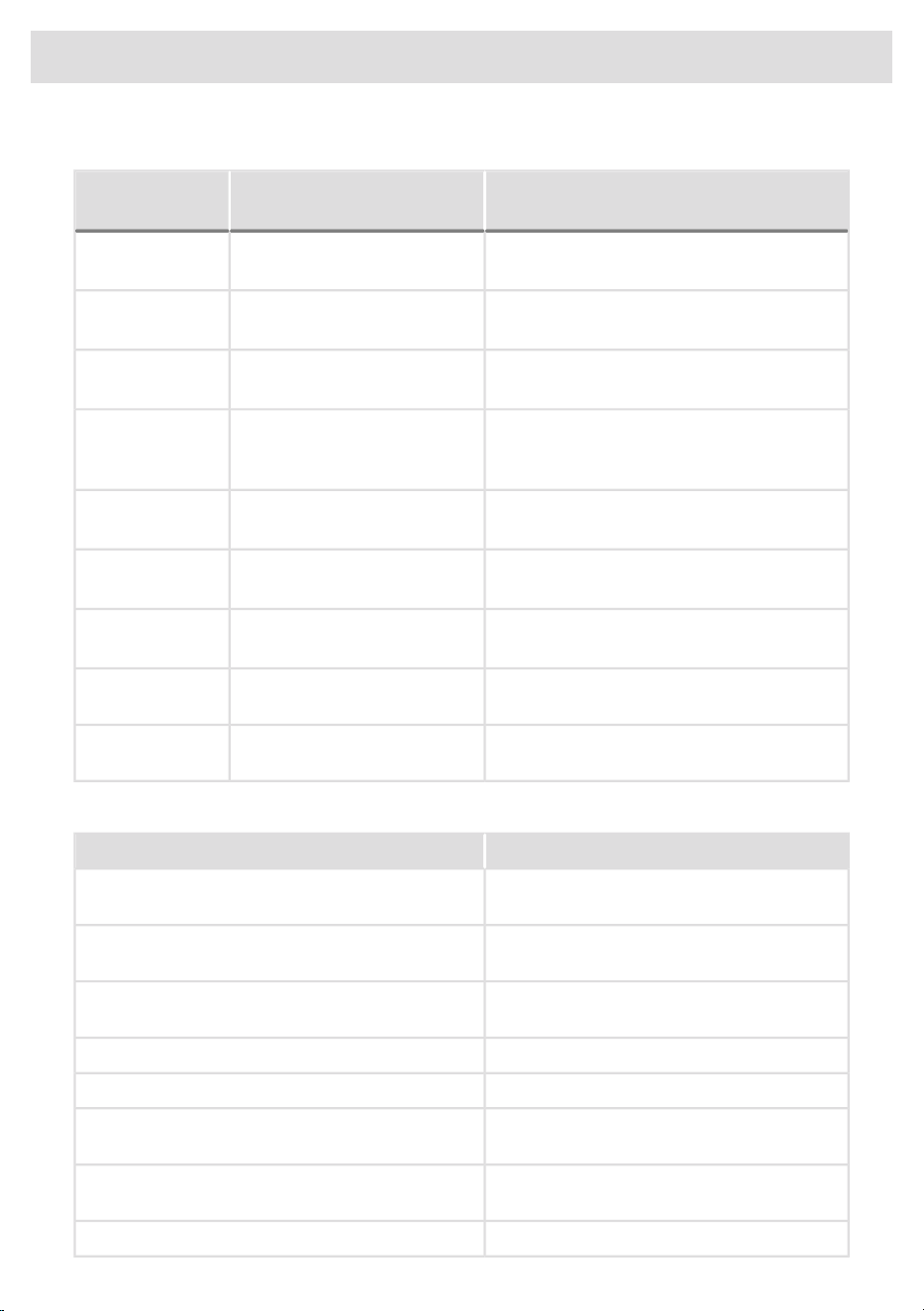
Errors indicated on the display unit (depending on the model) may include the following:
What to do?Error indication on the displayProblem/
Error
Control unit failure.Control unit failure.E0
Call service centre.
Temperature sensor failure.Thermistor error.E1.1, E1.2, E1.3
Call service centre.
Communication error.Communication error.E2
Call service centre.
Failure on the pump for pumping the
condense into the condense tank
Pump error.E3
Call service centre.
Control unit failure.Relay failure.E6
Call service centre.
Control unit failure.Door failure.E7
Call service centre.
Control unit failure.Button failure.E8
Call service centre.
Call service centre.PB/UI software versions are not
compatible.
E9
Call service centre.Error in BLDC motor
communication.
E11
INFORMATION before, during, and after the end of the programme (depending on the model):
What to do?Error indication on the display
Close the dryer door before starting or
resuming the program.
Please close the door before pressing start.
Press Start/Pause button to resume the cycle.Cycle was interrupted by power failure. Please
resume.
See chapter Cleaning and maintenance.Please empty the condensation tank before
resuming a cycle.
See chapter Cleaning and maintenance.Clean the lint filter.
See chapter Cleaning and maintenance.Clean the second lint filter.
See chapter Cleaning and maintenance.Please empty the condensation tank and clean the
lint filter.
See chapter System settings.Lock is on. Press the (2) and (4) buttons for 3
seconds to unlock.
Start Drum cleaning. The drum must be empty.It is necessary to clean the drum.
56
Errors: what to do?

Sounds
INFORMATION!
In the initial stage of drying or during drying, the compressor and the pump may cause noise
which, however, does not affect the dryer operation.
Humming sound: compressor noise; the noise level depends on the programme and the drying
stage.
Buzzing sound: the compressor is occasionally ventilated.
Pumping or liquid flowing sound: the pump is pumping the condense into the condense tank.
Clicking sound: clicking noise is caused by automatic cleaning of the heat exchanger (compressor).
Rustling water sound: can be heard during automatic cleaning.
Rattling sound: can be heard during drying if laundry has any hard parts (buttons, zippers etc.)
57
Errors: what to do?
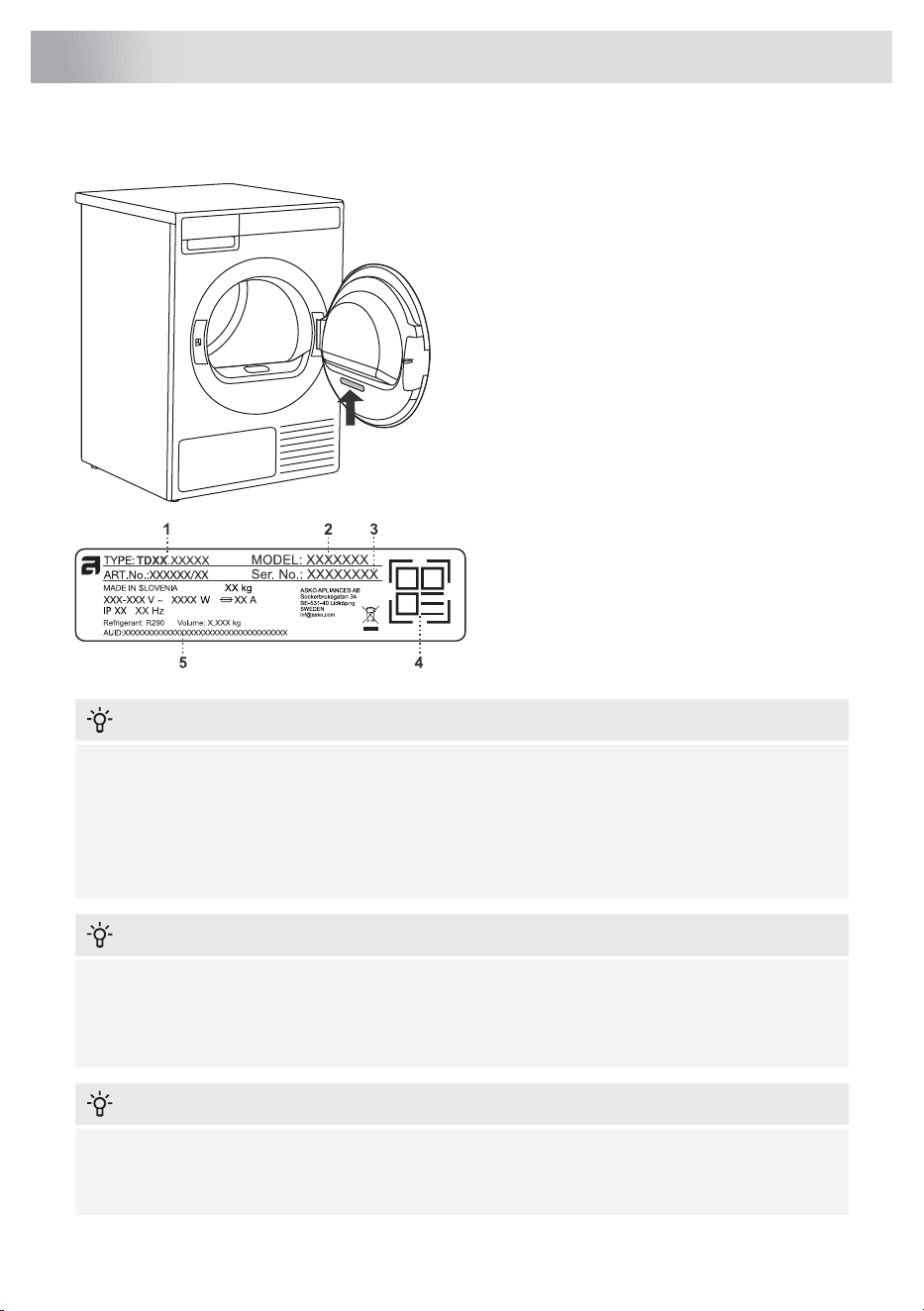
Before calling a service technician
See the chapters Errors: what to do? and
Cleaning and maintenance and see if you can
resolve the problem yourself.
When you contact a service centre, please
state the model (2), type (1), and serial number
(3) of your dryer.
Model, type, and serial number are indicated
on the rating (type) plate located on the interior
side of the dryer door.
The QR and AUID codes are also located on
the rating plate.
1 - Model type
2 - Model
3 - Serial number
4 - QR code
5 - AUID code
INFORMATION!
Functional spare parts for the ASKO dryer you purchased will be available for 15 years. During
this time, original spare parts will be available to ensure the correct operation of your appliance.
A list of spare parts and repair tips in accordance with the current Ecodesign Directive can be
found by scanning the QR code located on the inside of the door of the dryer.
Or on the following link: https://auid.connectlife.io
INFORMATION!
Report any malfunction to your local call centre or web address; all information can be found in
the enclosed warranty statement. Contact details of your authorised service centre are available
in the warranty statement supplied with the appliance and on the website by scanning the QR
code on the rating plate (see chapter Service).
INFORMATION!
Some simple faults described in the chapter Errors: what to do? can be fixed by the user himself
by taking into account the instructions without risk to their own safety and without affecting the
warranty conditions.
58
Service

WARNING!
In case of a failure, only use approved spare parts by authorized manufacturers.
WARNING!
Repair or any warranty claim resulting from incorrect connection or use of the dryer shall not be
covered by the warranty. In such cases, the costs of repair shall be charged to the user.
59
Service
Technical data
850 mmHeight
595 mmWidth
746 mmDepth
145 lDrum volume
11 kgMaximum drying load
See rating plateRated power
Stainless steelDrum material
Hot-dip galvanized and powder coated sheet metal, or stainless steel sheet.Housing material
R290Type of refrigerant
Typeface License Notice
This product includes the Noto Sans font, which is licensed under the SIL Open Font License, Version
1.1.
The full text of the license is available at: https://openfontlicense.org
Noto Sans is an open-source typeface developed by Google, and it may be used, modified, and
redistributed under the terms of the SIL Open Font License.
60
Technical information
Standard tests
For the standard test the machine’s condensed water hose must be connected to a drain.
Australia
AS/NZS 2442.1:1996. Auto normal dry, 11 kg cotton,
temperature Normal.
Drying performance
AS/NZS 2442.2:2000. Auto normal dry, 11 kg cotton,
temperature Normal.
Energy declaration
IEC 60 704-2-6.Test method for noise measurement
INSTRUCTIONS FOR LOADING FOR ENERGY PERFORMANCE TESTING ACCORDING TO
AS/NZS2442
Instructions for the preparation of standard laundry. Test load mass: 11 kg. Bone Dry mass required:
10,19 kg
Method of preparation
Layout
directionLoad item
Hold in the middleBath towels1.
Hold in the middlePillow cases2.
Hold in the middlePillow cases3.
Hold for collar of shirts and 1x foldedShirts4.
WhereverUndershorts5.
Hold the short side and fold slightly into as many layers as
possible, then fold in the shape of the Z and put it in the drum
ZSheets6.
Hold in the middleT - shirts7.
Hold in the middleT - shirts8.
Hold in the middleTablecloths9.
WhereverUndershorts10.
Hold in the middleBath towels11.
Hold in the middlePillow cases12.
Hold in the middlePillow cases13.
Hold for collar of shirts and 1x foldedShirts14.
WhereverUndershorts15.
Hold the short side and fold slightly into as many layers as
possible, then fold in the shape of the Z and put it in the drum
ZSheets16.
Hold in the middleBath towels17.
Hold in the middleBath towels18.
Hold in the middleTablecloths19.
Hold for collar of shirts and 1x foldedShirts20.
WhereverUndershorts21.
Hold in the middleTablecloths22.
Hold in the middleT - shirts23.
Hold in the middleT - shirts24.
61
Technical information
Method of preparation
Layout
directionLoad item
WhereverAll Handkerchiefs25.
Hold the short side and fold slightly into as many layers as
possible, then fold in the shape of the Z and put it in the drum
ZSheets26.
WhereverUndershorts27.
Hold for collar of shirts and 1x foldedShirts28.
Hold in the middlePillow cases29.
Hold in the middleBath towels30.
Hold in the middleTablecloths31.
Hold in the middleBath towels32.
Hold in the middleShirts33.
Hold in the middleT - shirts34.
WhereverUndershorts35.
Hold the short side and fold slightly into as many layers as
possible, then fold in the shape of the Z and put it in the drum
ZSheets36.
Hold in the middleBath towels37.
WhereverUndershorts38.
Hold in the middlePillow cases39.
Hold in the middlePillow cases40.
Hold in the middleBath towels41.
WhereverAll Wash cloths42.
Illustration of loaded Drum for standard test.
42
41
40
39
62
Technical information
Radio equipment type
HL3215STG(depending on the model)
HLW3215-TG
HLW3215-TG01
Wi-Fi
2.4000 GHz – 2.4835 GHzOperating frequency range
≤10 dBm/MHz (EIRP) (Antenna gain <10 dBi)Maximum output power
Gain: 0 dBiMaximum antenna gain
Bluetooth
2.400 GHz – 2.4835 GHzOperating frequency range
6 dBm (≤ 10 dBm)Carrier output
F1DEmission type
Declaration of conformity
The company declares that the device with the function ConnectLife complies with the essential
requirements and other relevant provisions of Directive 2014/53/EU. The detailed Declaration of
Conformity can be found at the web address https://auid.connectlife.io on the page of your device
among the additional documents.
63
Technical information
The table lists the values for drying time and power consumption for drying of a test batch of laundry
with various spinning rpm in the washing machine.
The following requirements apply to the consumption values specified below.
room temperatureInlet air temperature
50–60%Inlet air humidity
NormalDrying temperature
Acoustic airborne noise
emission
(dB)
Electric energy
consumption
(kWh/cycle)
Programme duration
(h:min)
Final moisture content
(%)
Rated capacity
(kg)
Program
61
3,0104:42< 611Normal Cotton
2,0003:06
-2
11
Storage dry cotton 1,3502:258
1,0001:535,5
1,4102:20
12 ± 4
11
lron dry cotton 0,8101:308
0,6201:135,5
0,4800:582 ± 34Synthetics
0,3400:4601Delicates
0,8701:40-24Mixed laundry
All values in the table are provided per drying cycle.
INFORMATION!
You can save energy by filling up the household tumble dryer to the maximum capacity specified
for each programme.
INFORMATION!
Due to deviations in terms of type and amount of laundry, power supply oscillation, and
environment temperature and humidity, the values measured at the end user may differ from the
one stated in the table.
64
Table of consumption values

Packaging is made of environmentally friendly materials that can be recycled, disposed
of, or destroyed without any hazard to the environment. To this end, packaging materials
are labelled appropriately.
The symbol on the product or its packaging indicates that the product should not be treated as
normal household waste. Take the product to an authorized collection centre for waste electric and
electronic equipment processing.
When disposing of the appliance at the end of its useful life, remove all power cords, and destroy
the door latch and switch to prevent the door from locking or latching (child safety).
Correct disposal of the product will help prevent any negative effects on the environment and
health of people, which could occur in case of incorrect product removal. For detailed information
on removal and processing of the product, please contact the relevant municipal body in charge
of waste management, your waste disposal service, or the store where you bought the product.
65
DISPOSAL
950559
www.asko.com
We reserve the right to make changes.
-a2