
Model: H1370
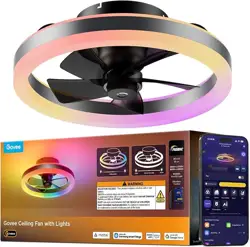
Govee Ceiling Fan with Lights
User Manual
01
IMPORTANT SAFETY INSTRUCTIONS When using products, basic precautions
should always be practiced including the following:
All safety messages will alert you of what the potential hazard is, tell you how to
reduce the chance of injury, and let you know what can happen if the instructions
are not followed.
READ AND FOLLOW ALL SAFETY INSTRUCTIONS.
IMPORTANT SAFETY INSTRUCTIONS
WARNING: To Reduce The Risk Of Fire, Electric Shock, Or Personal Injury, Mount
Directly To A Structural Framing Member Or To An Outlet Box Marked Acceptable
for Fan Support of 15.9 kg (35 lbs). For Outlet Box Mounting. Use Mounting Screws
Provided With The Outlet Box.
To avoid possible electrical shock, before installing or servicing your fan, discon-
nect the power by turning o the circuit breakers to the outlet box and associated
wall switch location. If you cannot lock the circuit breakers in the o position,
securely fasten a prominent warning device, such as a tag, to the service panel.
To reduce the risk of electric shock, this fan must be installed with an isolating wall
control/switch.
WARNING:To reduce the risk of personal injury, do not bend the blade brackets
when installing the blade brackets, balancing the blades, or cleaning the fan. Do not
insert foreign objects in between rotating fan blades.
Chemical burn hazard. Keep batteries away from children. This remote contains a
lithium button cell battery. If a new or used lithium button/coin cell battery is
swallowed or enters the body, it can cause severe internal burns and can lead to
death in as little as 2 hours. Always completely secure the battery compartment. If
the battery compartment does not close securely, stop using the product, remove
the batteries, and keep it away from children. If you think batteries might have
been swallowed or placed inside any part of the body, seek immediate medical
attention. Dispose of cells properly and keep away trom children. Even used cells
may cause injury.
Non-rechargeable batteries are not to be recharged. Exhausted batteries are to be
removed from the product.
This appliance can be used by children aged from 8 years and above and persons
with reduced physical, sensory or mental capabilities or lack of experience and
English

02
knowledge if they have been given supervision or instruction concerning use of the
appliance in a safe way and understand the hazards involved. Children shall not
play with the appliance. Cleaning and user maintenance shall not be made by
children without supervision. It is recommended that children be supervised to
ensure that they are not using the appliance improperly.
WARNING: To reduce the risk of fire or electric shock or injury to persons. do not
use replacement parts that have not been recommended by the manufacturer (e.g.
parts made at home using a 3D printer).
Read all instructions and safety information before installing your new fan. Review
the accompanying assembly diagrams.
Make sure all electrical connections comply with local law and the national electri-
cal code. Please hire a qualified electrician or consult a do-it -yourself wiring
handbook if you are unfamiliar with installing electrical wiring.
Make sure the installation site is roomy enough to allow fan blades to rotate. There
is at least seven feet from the floor to fan blades' tips.
If you are mounting the fan on a ceiling outlet box, please use a metal outlet box.
Secure the box directly to the building structure. The outlet box and its support
must be able to support the rotating fan (at least 35 lbs).Do not use a plastic outlet
box. Attach the mounting bracket using the ceiling outlet box's hardware.
After installing the fan, make sure all the connections are secured so that the fan
won't fall.
Do not insert anything between fan blades while the fan is operating.
Turn the fan o and wait for it to stop before reversing fan's rotating direction.
WARNING: To Reduce The Risk Of Fire Or Electric Shock, Do Not Use This Fan
With Any Solid-StateSpeed Control Device. You must install the outlet box using
the two steel screws and lock washers coming with the fan.
The splices after being made should be turned upward and pushed carefully up
into the outlet box.
Instructions for supply connections: the white conductor of a fan identified as
grounded conductor to be connected to a grounded conductor of power supply,
the black conductor fan identified as ungrounded conductor to be connected to an
ungrounded conductor of power supply, the green conductor of fan identified for
equipment grounding to be connected to an equipment-grounding conductor.
The total weight of the fan install to outlet box is 6.9 kg, check that the outlet box
is securely installed in place such that it is able to support at least the fan weight.
When mounted directly to the building structure, appliance installation shall not
expose combustible material and do not install the appliance to a ceiling with
combustible finish. The installation of the appliance cannot leave the wood of the
rafters or any thermal insulation exposed to the interior of the room.

To Reduce The Risk Of Electric Shock, Disconnect The Electrical Supply Circuit To
The Fan Before Installing Light Kit.
This appliance is not intended for use by persons (including children) with reduced
physical, sensory or mental capabilities, or lack of experience and knowledge,
unless they have been given supervision or instruction concerning use of the
appliance by a person responsible for their safety.
If the supply cord is damaged, it must be replaced by the manufacturer, its service
agent or similarly qualified persons in order to avoid a hazard.
WARNING: If unusual oscillating movement is observed, immediately stop using
the ceiling fan and contact the manufacturer, its service agent or suitably qualified
persons.
WARNING:TO REDUCE THE RISK OF FIRE, ELECTRIC SHOCK, OR INJURY TO
PERSONS,OBSERVE THE FOLLOWING:
Use this unit only in the manner intended by the manufacturer. If you have ques-
tions, contact themanufacturer.
Before servicing or cleaning unit, switch power o at service panel and lock the
servicedisconnecting means to prevent power from being switched on accidental-
ly. When the servicedisconnecting means cannot be locked, securely fasten a
prominent warning device, such as a tag,to the service panel.
Installation work and electrical wiring must be done by qualified person(s) in
accordance with allapplicable codes and standards, including fire-rated construc-
tion.
When cutting or drilling into wall or ceiling, do not damage electrical wiring and
other hiddenutilities.
If this unit is to be installed over a tub or shower, it must be marked as appropriate
for theapplication and be connected to a GFCI (Ground Fault Circuit Interrupter) –
protected branchcircuit.
Never touch uninsulated cables, especially AC cables, with bare hands.
SAVE THESE INSTRUCTIONS
Thanks for choosing Govee Ceiling Fan! This product has been thoroughly tested
and is suitable for oering ambiance to your living rooms, bedrooms, etc. The device
can be controlled via the app and voice assistant. With Govee Home App, you can
adjust the brightness, color temperature, change the color, and set multiple timers. A
variety of scenes and music modes are preset in the app for you. Additionally, you
can bring your creativity to the lights with DIY Mode!
Introduction
03
a.
b.
c.
d.
e.
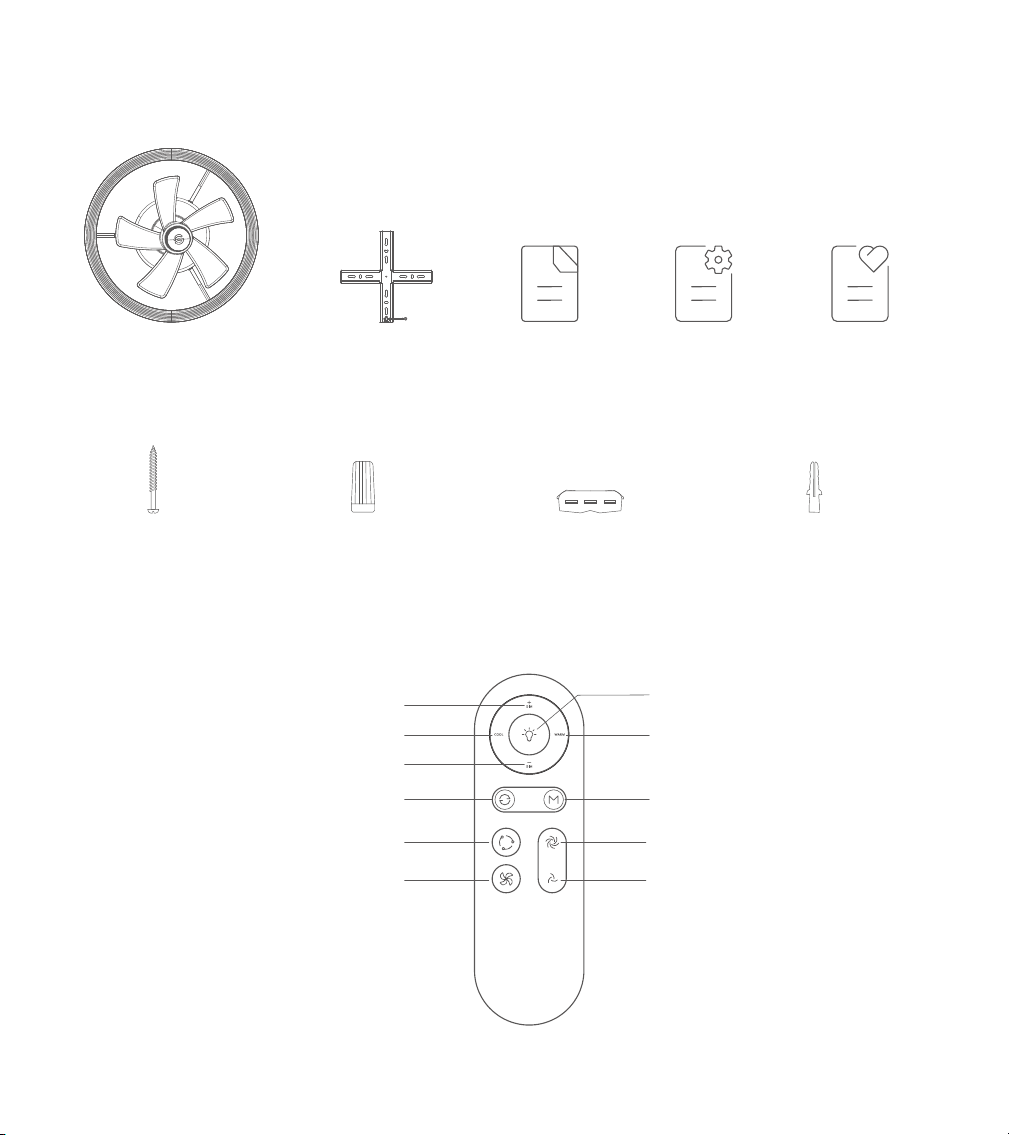
What You Get
Control Panel
04
Brightness+ Button
Brightness- Button
Airflow Direction Button
Speed+ Button
Warm Button
Light Mode Button
Light Power Button
Speed- Button
Oscillation Button
Fan Power Button
Cool Button
Service Card
x1
Ceiling Fan
x 1
Ceiling Bracket
User Manual
x 1
Quick Start
Guide
x 1
x 1
Wire Nut (Optional)
x 4
WoodScrew
x 4
1 to 1 Wire Connector
x 4
Plastic Screw Anchor
x 4
05
Pairing Your Light with Govee Home App
Installing Your Device
What You Need:
A Wi-Fi router supporting the 2.4GHz and 802.11b/g/n bands. 5GHz is not supported.
Assemble this ceiling light by following the Quick Start Guide.
Download Govee Home App from the App Store (iOS) or Google Play (Android).
Login withyour account. New users need to create an account.
1.
2.
Turn on the Bluetooth on your smartphone.
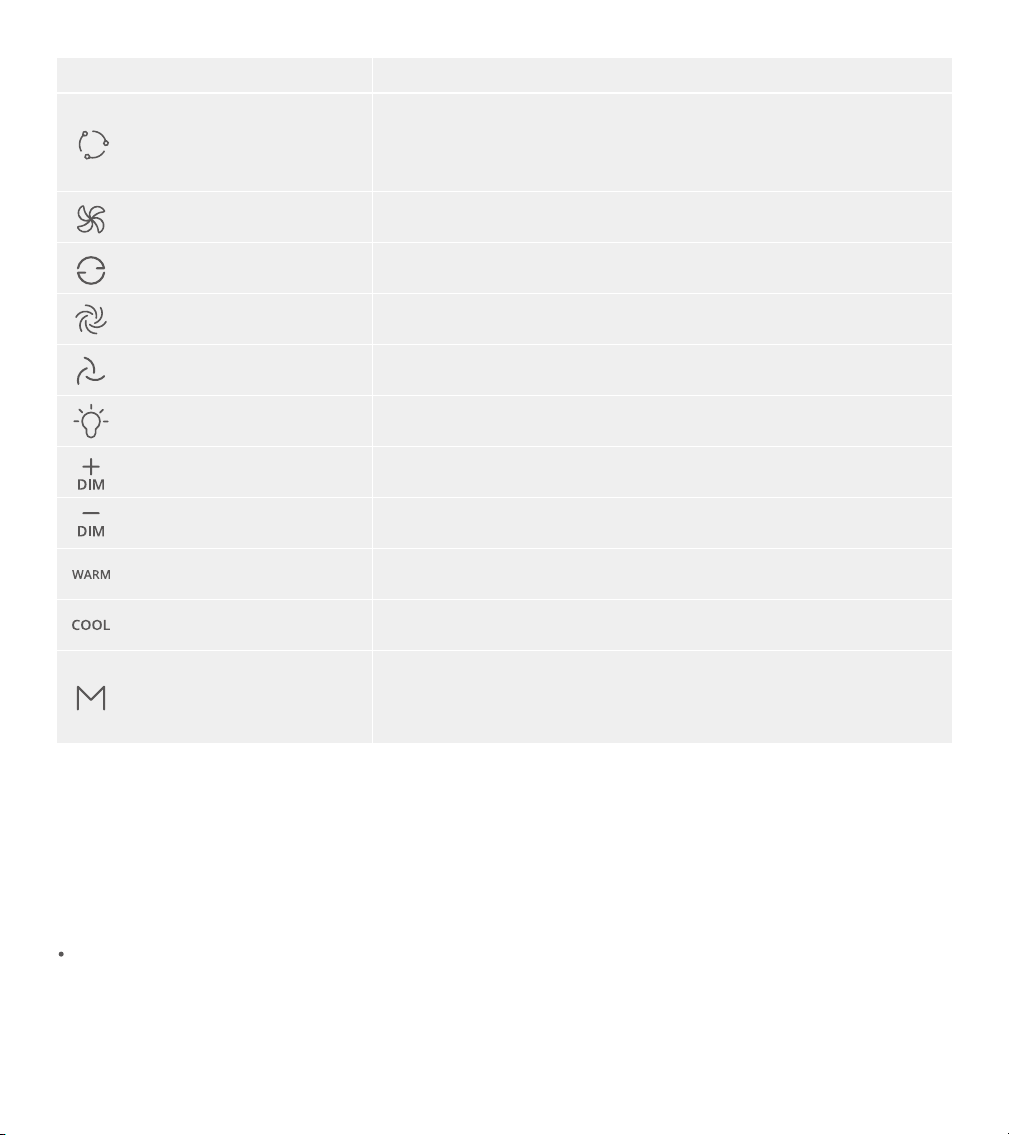
Airflow Direction Button
Speed+ Button
Brightness+ Button
Brightness- Button
Speed- Button
Light Power Button
Buttons Instructions
Fan Power Button
Oscillation Button
Press to turn the fan on/o.
Note: Long press the power button and the speed button for
10 seconds to restore the fan to factory settings and discon-
nect Wi-Fi and Bluetooth.
Press to turn the fan blade oscillation function on/o.
Press to change the airflow firection(Upward/Downward).
Press to increase the speed of the fan.
Press to decrease the speed of the fan.
Press to power the Light on/o.
Press to increase the brightness of the lamp.
Press to decrease the brightness of the lamp.
Warm Button Press to make colors warmer.
Press to make colors cooler.
Tips: Enter the Device Settings page in Govee Home App.
Tap “Preset Features” to manage the colors.
Press to change Color/Scene.
Cool Button
Light Mode Button
Govee Home
Google Play is a trademark of Google LLC.
4.
3.
Open the app, tapthe “+” icon in the top right corner and search for “H1370”.
Tap the device icon and follow the on-screen instructions to complete pairing.
The Apple logo is a trademark of Apple Inc., registered in the U.S. and other
countries and regions.
Apple Store is a service mark of Apple Inc., registered in the U.S. and other countries
and regions.
Matter User Guide
Step 1:
Step 2:
Step 3:
Step 4:
Find the Matter QR code or device number on the product or on the "Device
Settings" page in Govee Home App.
Turn on the Bluetooth on your smartphone and keep it on.
Download and open an app that supports Matter such as Amazon
Alexa/Google Home/Apple HomeKit, etc.
Use the device number or QR code on the device in the app to complete the
network connection with Matter for the device.
How to use Matter
1.
You will need to complete the network connection of apps that support Matter (e.g.
Amazon Alexa/Google Home/Apple HomeKit etc.) within 15 minutes after the
product is powered on when using Matter for the first time.
An IPv6 network is required.
Changing the network may cause Matter to malfunction.
If the device cannot be connected to Matter's ecosystem app network, please tap
Network Reset in the Device Settings page to restore the device to factory settings
before trying to reconnect to the network.
Important:
2.
06

Model
Rated Power
Main Light Displaying Technology
Back Light Displaying Technology
Color Temperature
Control Methods
Working Temperature
Remote Control Battery
H1370
69W
RGBICWW
RGBICWW
3100lm@2700K
3300lm@6500K
2700-6500K
Govee Home, Voice Control, Remote
-10°C - 40°C / 14°F - 104°F
CR2025 3V
AC 120V 50/60Hz
Lumens
Specifications
If you need to change the network when using Matter, close Govee Home App and
power o the device. Then, power back on and complete the network connection of
apps that support Matter (e.g. Amazon Alexa/Google Home/Apple HomeKit etc.)
within 15 minutes.
Open the app, then tap the device icon to enter the details page.
1.
2.
3.
Tap the settings icon in the top right corner.
Select “User Guide” and follow the on-screen instructions to control the device
using your voice.
Controlling the Light with Your Voice
Troubleshooting
07
Check if the light has been powered on.
Check if your smartphone’s Bluetooth has been turned on or try connecting the
light to another smartphone.
Ensure that your smartphone is near the light when connecting for the first time.
If the problem persists, go to the "Device" page to delete the device and follow the
previous instructionsto reconnect.
Cannot connect to Govee Home App.
1.
a.
b.
c.
d.
Power Input
08
Check if the light has been powered on.
Do not skip the Wi-Fi connection steps during the pairing process.
Ensure that your Wi-Fi router is 2.4GHz capable. 5GHz is not supported.
Ensure that you entered the correct Wi-Fi password during the Wi-Fi connection
process.
Shorten the distance between the device and the Wi-Fi router to less than 50ft (15m),
then try reconnecting.
Use another smartphone to pair with the device to check if your Wi-Fi network is
working.
Cannot connect to Wi-Fi.
2.
a.
b.
c.
d.
e.
f.
Ensure that the Wi-Fi connection is stable.
Go to the app's "Settings" page and follow the instructions under "User Guide" to
pair the device again.
Cannot pair or connect with Alexa or Google Assistant.
3.
a.
b.
Please contact the Govee support team for a rapid product replacement.
The light does not display the selected color fully or some LED beads do not light up.
4.
Customer Service
Warranty: 18-Month Limited Warranty
Support: Lifetime Technical Support
@GOVEE
@goveeocial
@GOVEE
@govee.ocial
@GoveeOcial
Email: support@govee.com
Ocial Website: www.govee.com
For FAQs and more information,
please visit: www.govee.com
Govee Home App