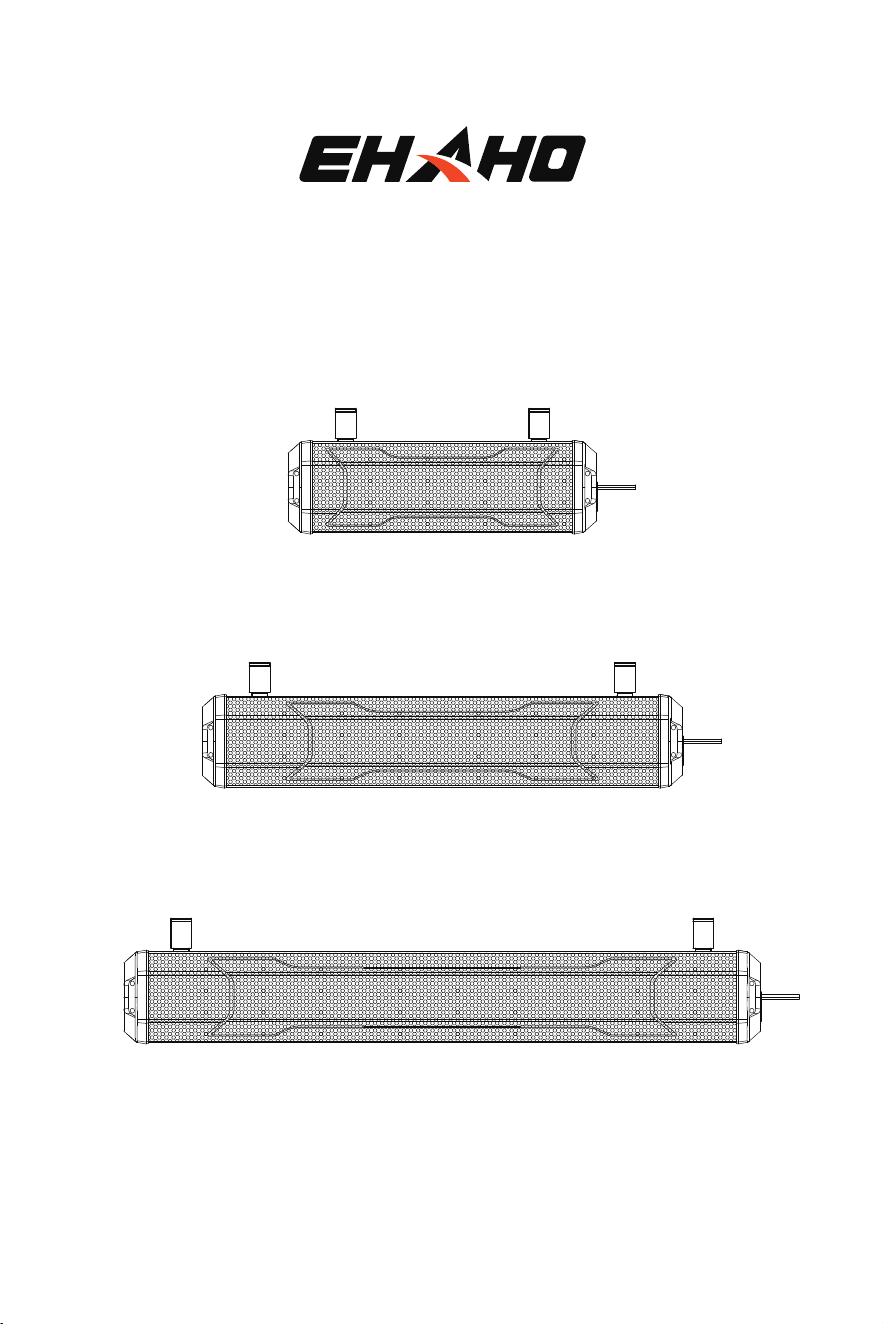
ATV / UTV SOUND BAR PRO
User Manual
EH2001
EH2002
EH2003
Excitement on Every Mile

INDEX
Thank you for purchasing ATV/UTV Sound Bar.
Please read through these instructions carefully so you will know how to operate your
model properly.
After you have finished reading the instructions, keep this document in a safe place for
future reference.
Information to the User ..............................................................................................................................................
Before You Start ............................................................................................................................................................
Getting to Know Your Sound Bar ............................................................................................................................
Specifications .................................................................................................................................................................
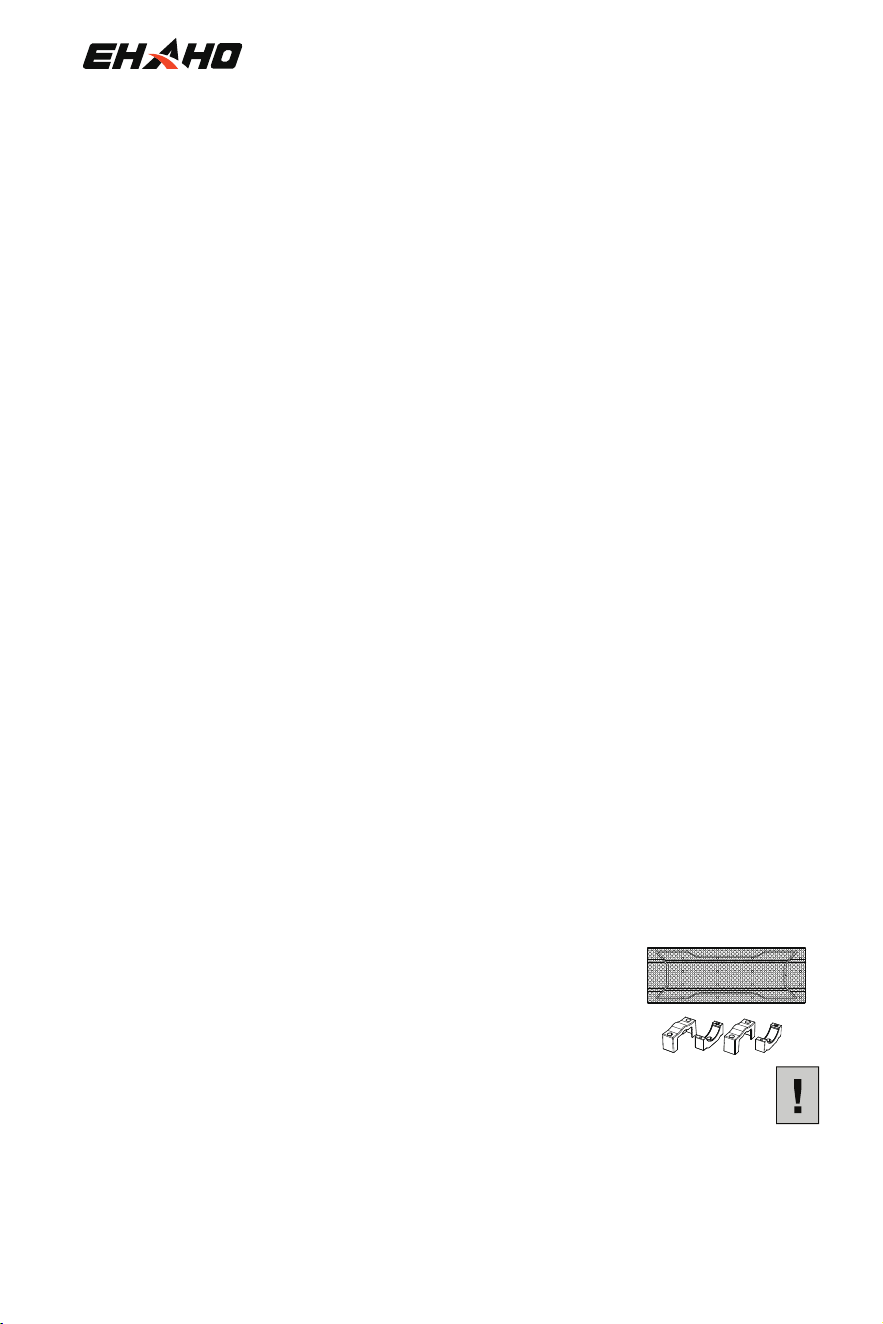
Mounting Kit Contains ................................................................................................................................................
Installation .......................................................................................................................................................................
Power ON/OFF ...............................................................................................................................................................
Bluetooth Operation ....................................................................................................................................................
Auracast Operation ......................................................................................................................................................
AUX Input .........................................................................................................................................................................
Remote Control Operation .........................................................................................................................................
Troubleshooting ............................................................................................................................................................
Dimensions .....................................................................................................................................................................
1
2
3
4
7
8
10
10
12
13
14
18
19
(1) SOUND BAR All-Terrain Speaker System ..........................................................
(2) Mounting Kit .....................................................................................................................
(3)User Manual ......................................................................................................................................................
THIS PACKAGE CONTAINS:
1
BEFORE YOU START
• Do not operate mobile equipment while driving a motorized vehicle. Safe driving and safety
consideration of others should always be your highest priority.
• In the event you should notice smoke, strange noises or odor from this product, or any other
in permanent damage to the system.
• Set your volume control at a low setting, then slowly increase the sound until you can hear it
comfortably without distortion or ear discomfort.
• Do not turn up the volume too loud that you can't hear what's around you.
• Use caution or temporarily discontinue use in potentially hazardous situations.
• Servicing of this product by persons without professional training and experience in electronic
equipment and motorized vehicle accessories may be dangerous and could expose you to the
risk of electric shock, injury or other hazards.
• Contact customer service for any installation, service questions or requests.
• The SOUND BAR has a weather resistant design. It should not be submerged in or under
water under any circumstances.
• Use only the installation parts provided with the SOUND BAR .
• Wash with a mild soap or detergent and lukewarm water using a clean sponge or a soft cl
oth.
Rinse well with clean water.
• DON'T clean in hot sun or on very hot days. don't be in damp or wet conditions.
• DON'T use abrasive or highly alkaline cleaners on the main body.
• DON'T scrape the main body with razor blades, or other sharp instruments.
• DON'T ever use, gasoline, acetone or carbon tetrachloride.
CAUTION: Using other mounting methods may void this warranty.
IMPORTANT SAFETY PRECAUTIONS
BE SURE TO OBSERVE THE FOLLOWING GUIDELINES:
INSTALLATION PRECAUTIONS
VERY IMPORTANT
2
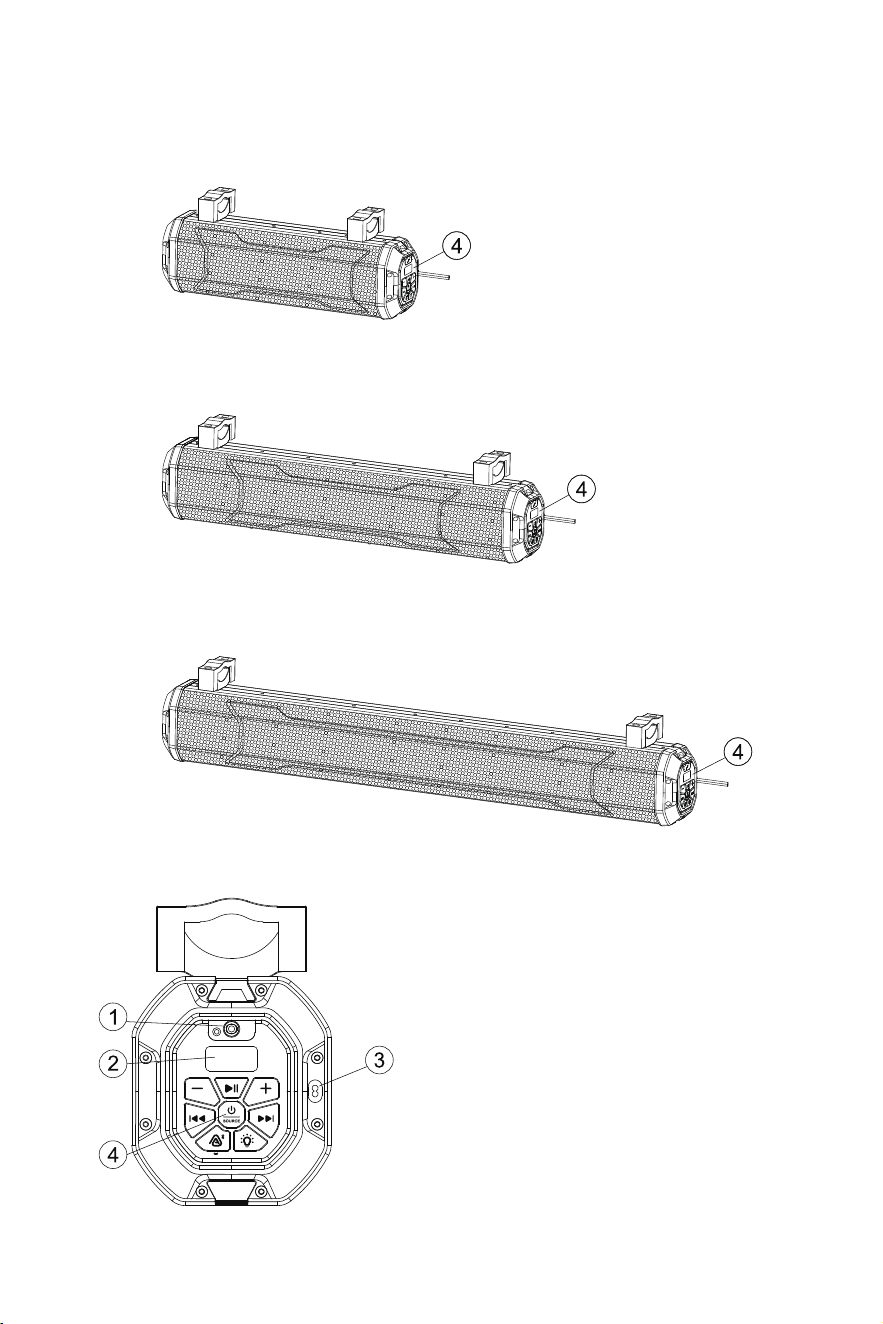
1 AUX-IN
2 Segment LED display
3 Power cord interface
4 Control Panel
GETTING TO KNOW YOUR ATV/UTV SOUND BAR
EH2001
EH2002
EH2003
3
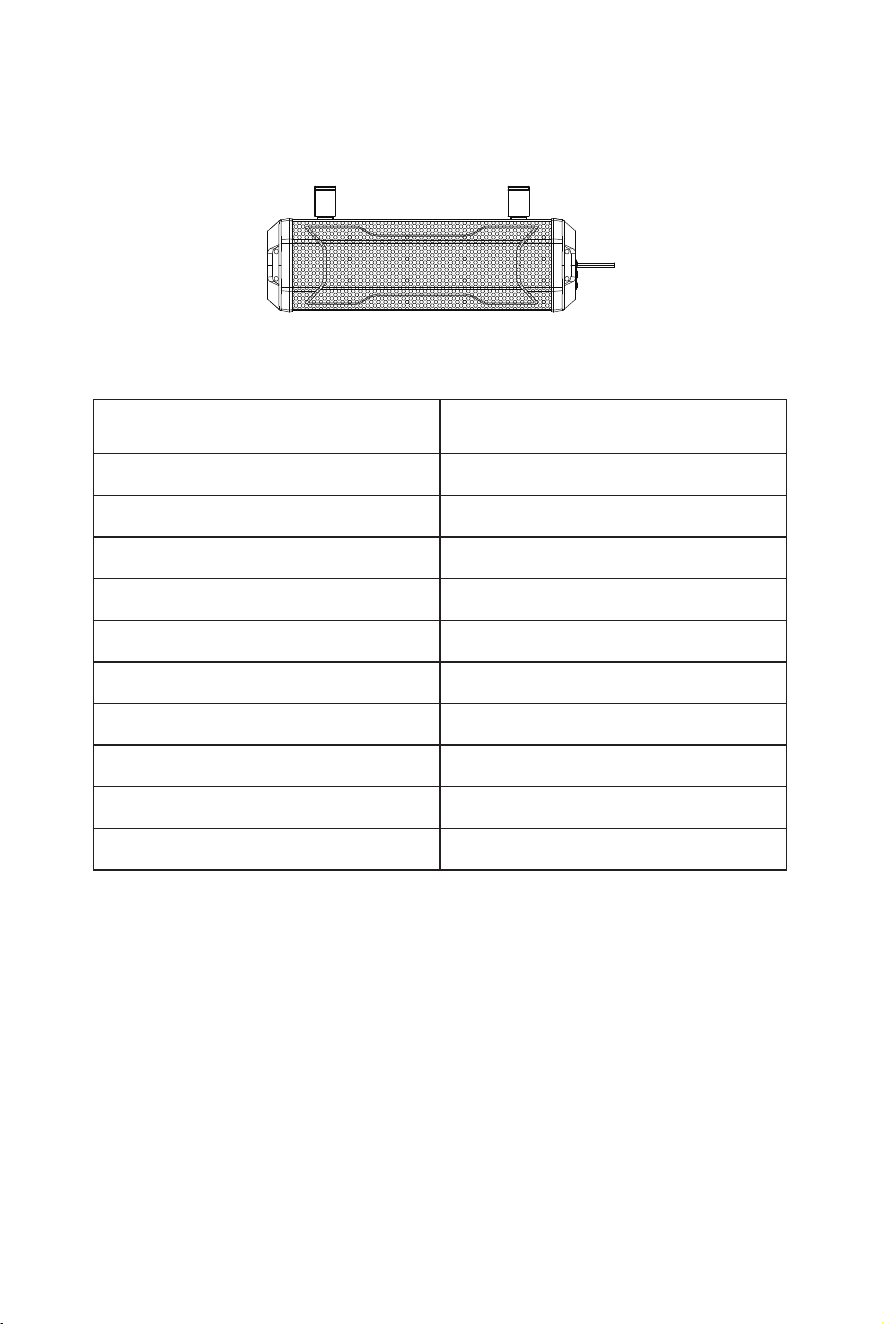
SPECIFICATIONS
Model EH2001
Bluetooth Protocol
Bluetooth Range
Frequency Response
Operating Voltage
Maximum Operating Current
Tweeters
Woofer
Wireless Remote Distance
Operating Temperature
Dust / Waterproof Rating
V6.0
20m
70HZ-20KHZ
12V
≤ 10A
1.5" (x2)
4" (x2)
≥ 33ft / 10m
-20°C to 50°C
IP66
4
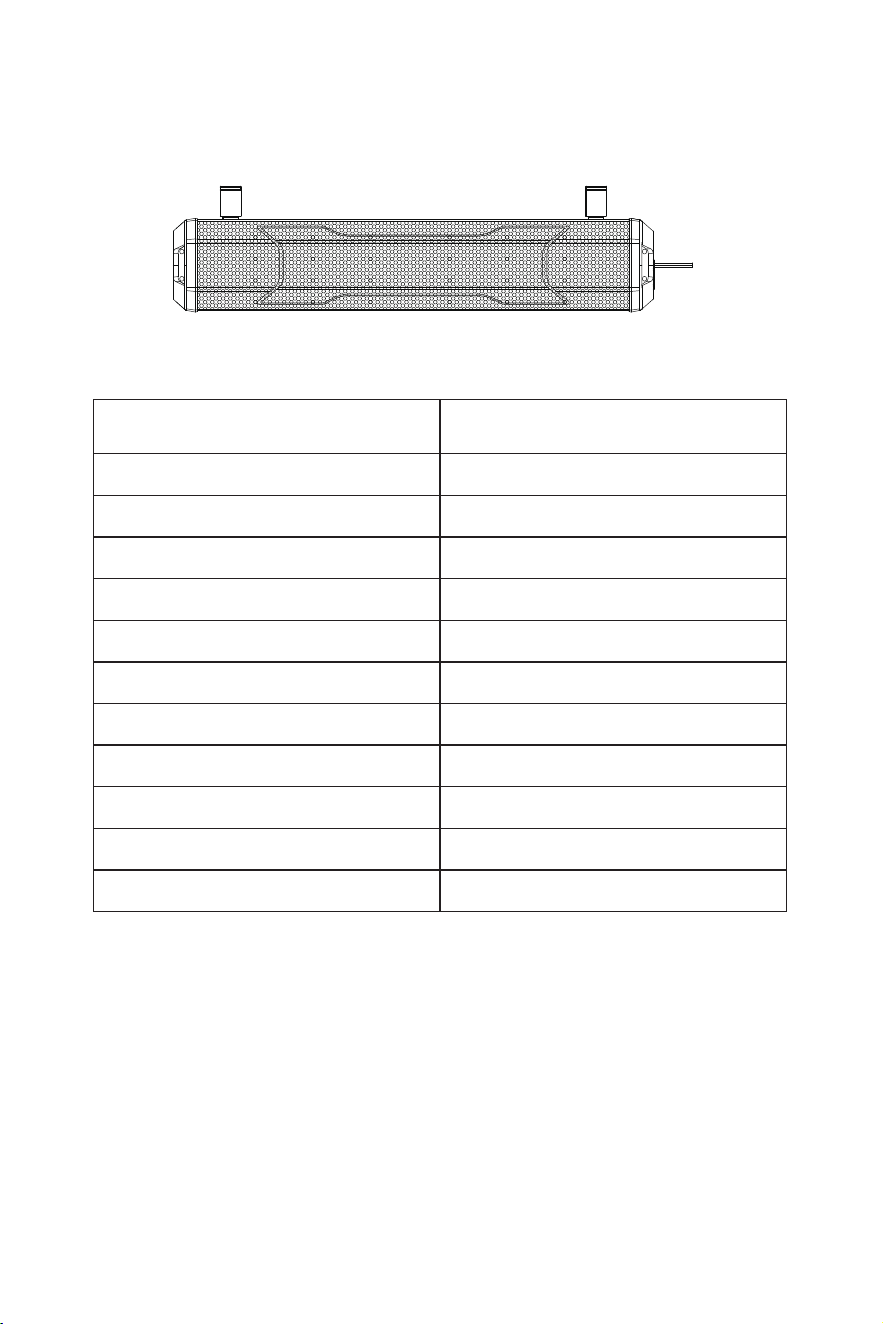
SPECIFICATIONS
Model EH2002
Bluetooth Protocol
Bluetooth Range
Frequency Response
Operating Voltage
Maximum Operating Current
Tweeters
Woofer
Low Frequency Radiator
Wireless Remote Distance
Operating Temperature
Dust / Waterproof Rating
V6.0
20m
60HZ-20KHZ
12V
≤ 10A
1.5" (x2)
4" (x2)
4" (x2)
≥ 33ft / 10m
-20°C to 50°C
IP66
5
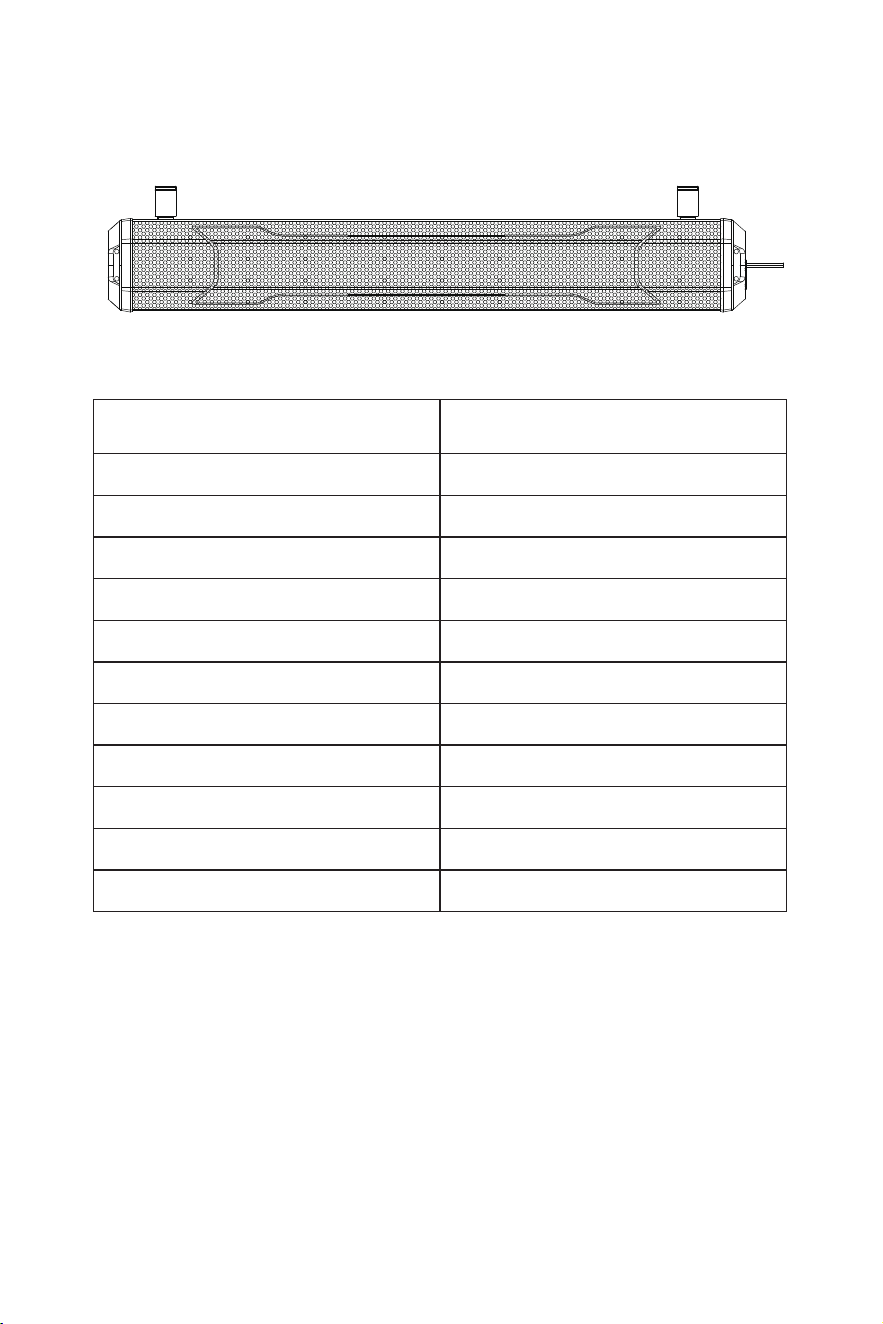
SPECIFICATIONS
Model EH2003
Bluetooth Protocol
Bluetooth Range
Frequency Response
Operating Voltage
Maximum Operating Current
Tweeters
Woofer
Low Frequency Radiator
Wireless Remote Distance
Operating Temperature
Dust / Waterproof Rating
V6.0
20m
50HZ-20KHZ
12V
≤ 10A
1.5" (x2)
4" (x4)
4" (x2)
≥ 33ft / 10m
-20°C to 50°C
IP66
6
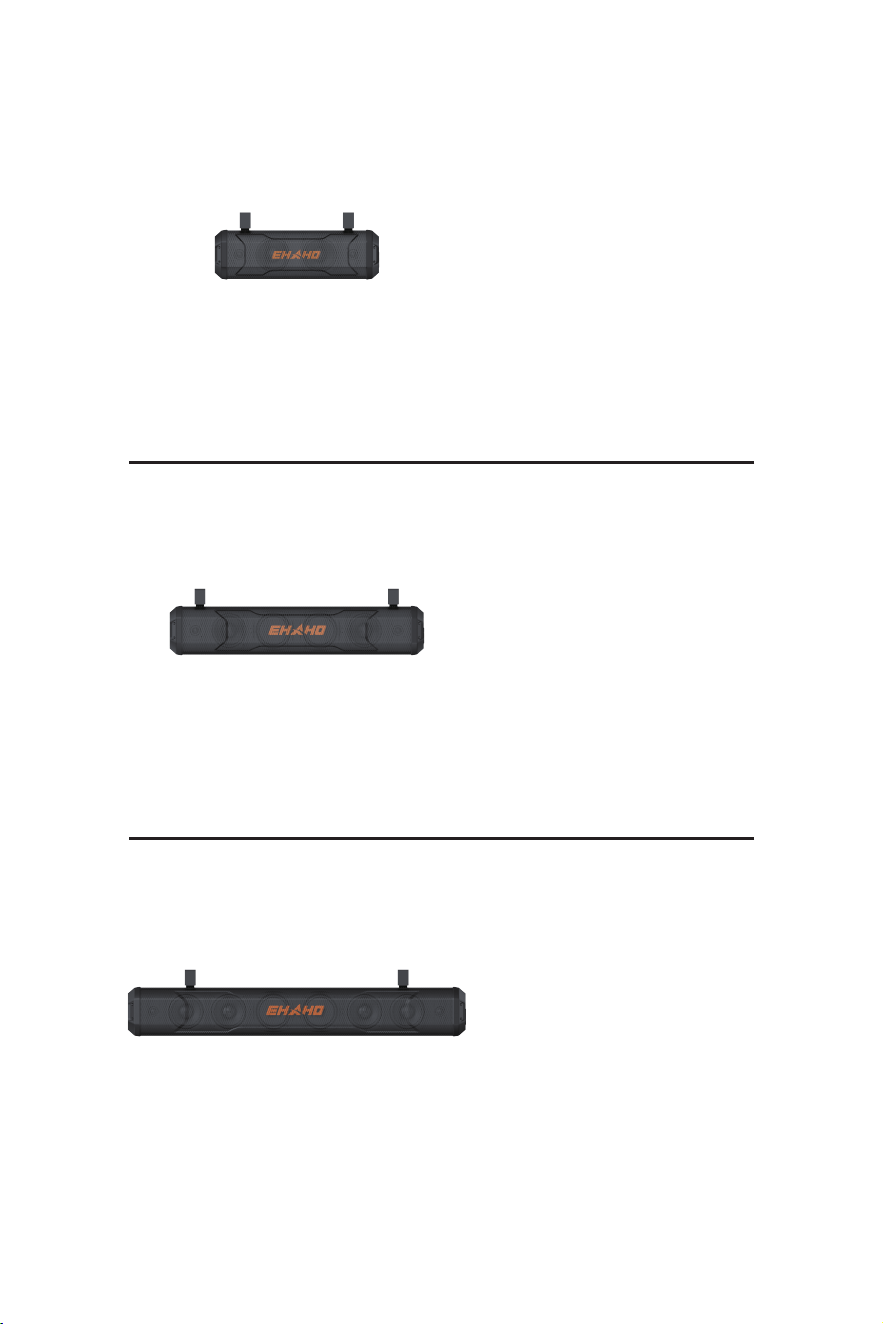
EH2001
EH2003
EH2002
Power cord (4m) × 1
( Fixed on the device )
3.5mm Aux cable (2m) × 1
Zipper Tie × 10
Remote Control × 1
Bracket × 2
Mounting Kit × 1
User Manual × 1
Power cord (4m) × 1
( Fixed on the device )
3.5mm Aux cable (2m) × 1
Zipper Tie × 10
Remote Control × 1
Bracket × 2
Mounting Kit × 1
User Manual × 1
MOUNTING KIT CONTAINS
Power cord (4m) × 1
( Fixed on the device )
3.5mm Aux cable (2m) × 1
Zipper Tie × 10
Remote Control × 1
Bracket × 2
Mounting Kit × 1
User Manual × 1
7
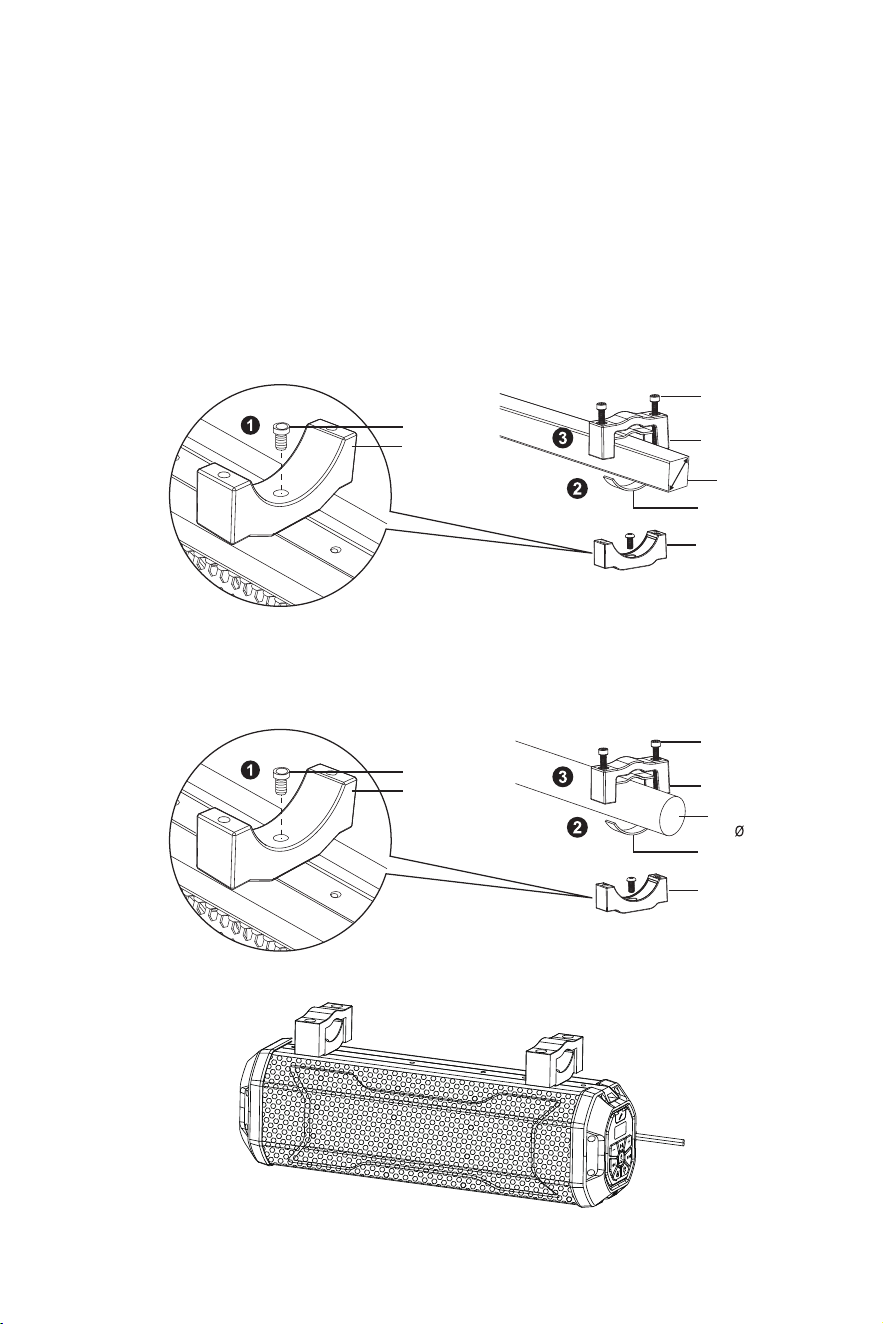
• USE THE SUPPLIED ADJUSTABLE BRACKET TO SECURE TO RAILS.
• ALWAYS RECHECK BRACKET BEFORE EVERY RIDE.
a.Square Tube
b.Round Roll Bar
1 Adjust the installation bracket to the slot above the host and tighten it with a hex screw.
2 Attach the supplied rubber pads for secure clamping and abrasion prevention.
3 Tighten the upper clamp to the lower clamp with a hex wrench. Make sure the supplied spring
washers are used to provide more stable bolt tightening against vibration.
4 Repeat the steps above to secure the sound bar with the other clamp.
INSTALLATION
Lower clamp
Rubber strip
Rubber strip
Ring
Upper clamp
Lower clamp
Ring
Upper clamp
Ring
Lower clamp
Ring
Lower clamp
8
Mounting bar
( 1”-2” )
( 1”-2” )
Mounting bar
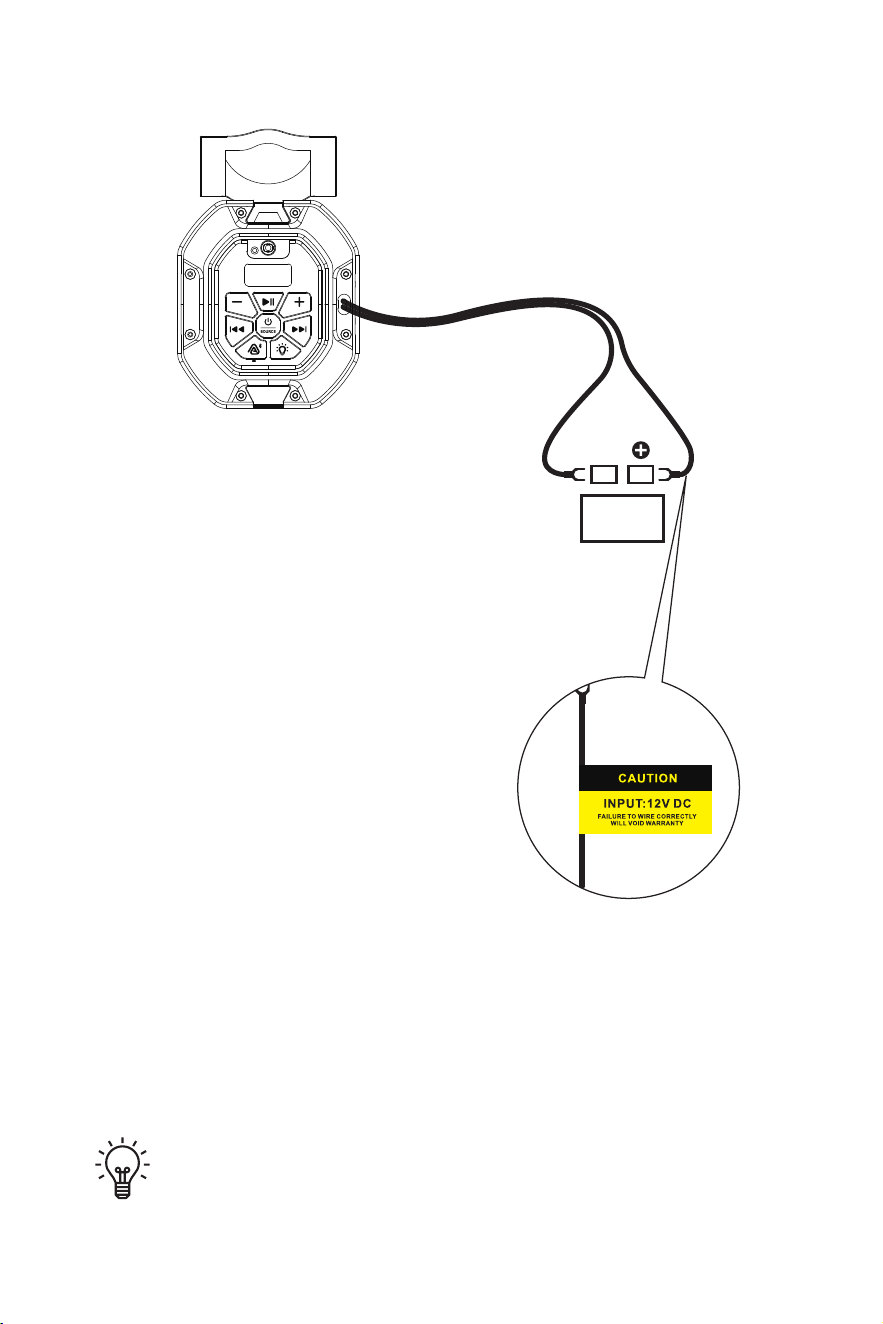
Important Reminder: To prevent battery exhaustion, periodically run
the vehicle's engine while using this product. Prolonged use without
running the engine may drain the battery.
Plug the power cord into the corresponding interface on the vehicle
Battery
12 V
BLACK RED
INSTALLATION
9
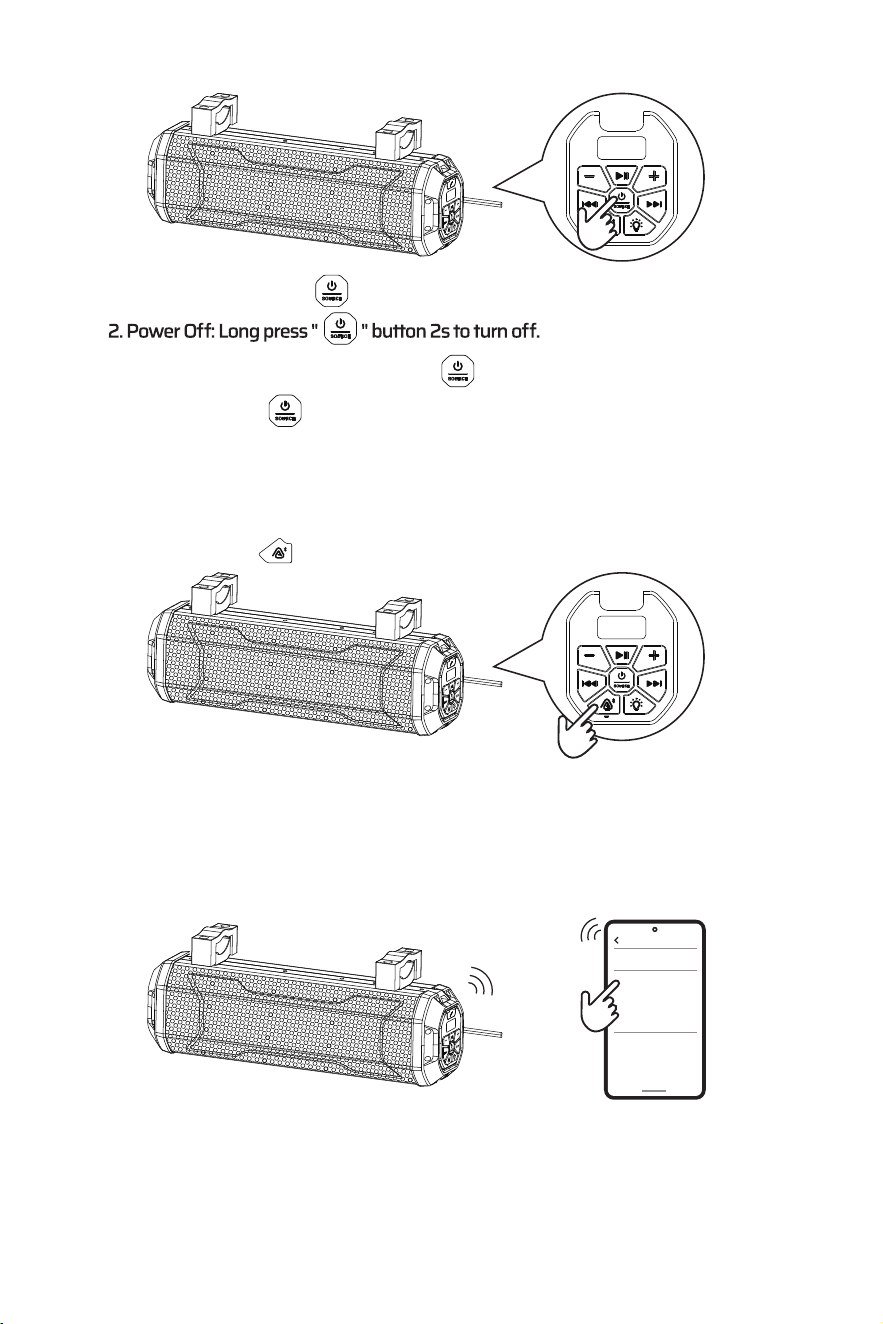
1. Power On: Long press " " button 2s to turn on.
3. In the power on state, short press the " " button to switch between BT, AUX modes.
4. Double click the " " button to Reconfigure the EQ mode.
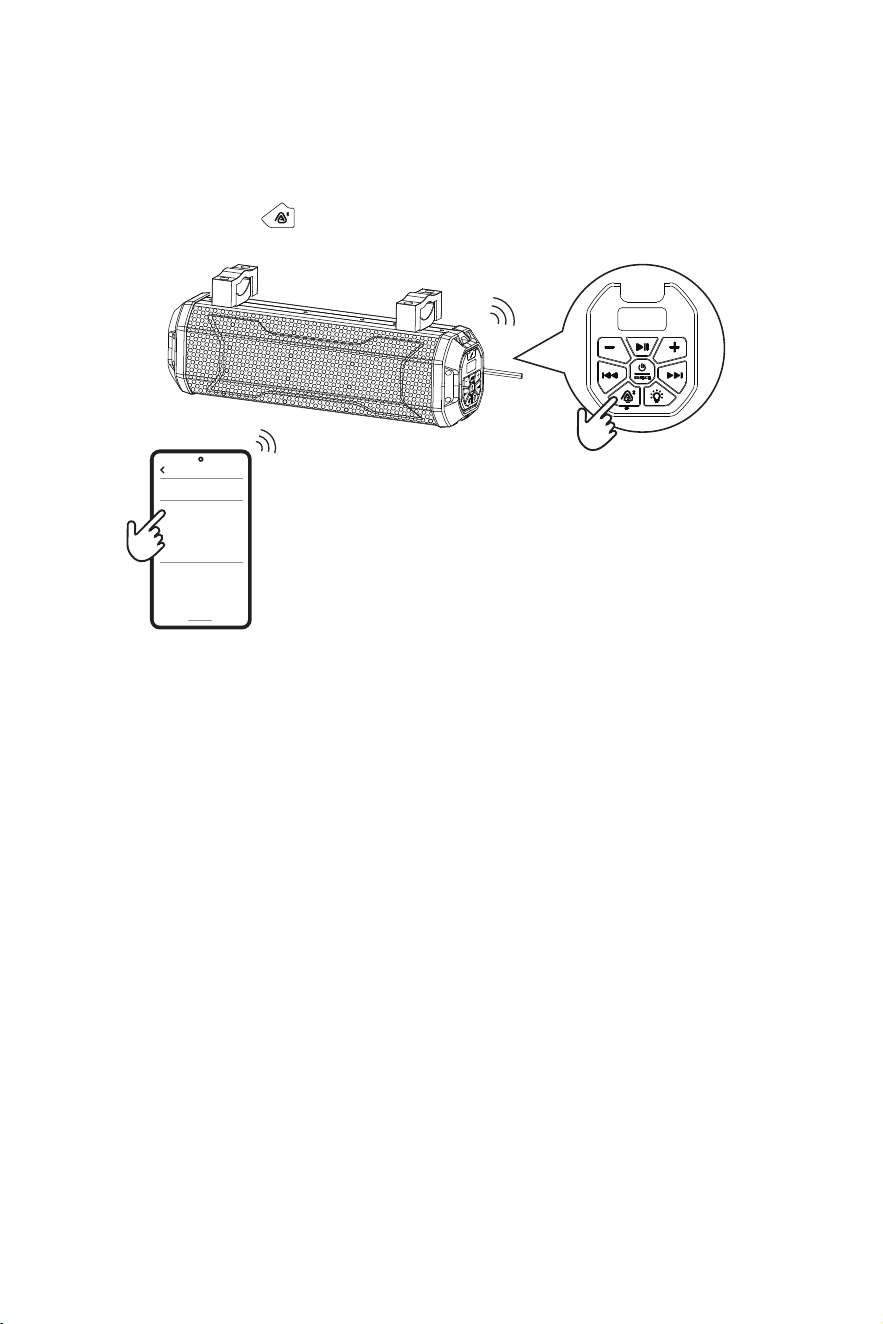
1. Long press the " " button 2s . The SOUND BAR will automatically go in to pairing
mode.
PAIRING / DISCOVERING A NEW BT CONNECTION
POWER ON/OFF
BLUETOOTH OPERATION
10
2. If EHAHO EH2001 / EHAHO EH2002 / EHAHO EH2003 is not seen, repeat the
above steps to refresh the Device List
3. When the connection is successful, you are now ready to stream music from your
favorite media player to the SOUND BAR.
You have 2 minutes before you must restart this procedure over again.
MOBILE OPERATION
NOTE:
a. Go into the Settings Menu of your device
b. Enter the BT Menu
c. TURN ON BT and press SCAN
d. EHAHO EH2001 / EHAHO EH2002 / EHAHO EH2003 will now be displayed under
AVAILABLE DEVICES
Bluetooth
Devices connected
Available devices
EHAHO EH2001 /
EHAHO EH2002 /
EHAHO EH2003
SOUND BAR2
BLUETOOTH OPERATION
11
Bluetooth
Devices connected
Available devices
EHAHO EH2001 /
EHAHO EH2002 /
EHAHO EH2003
SOUND BAR2
1. Power on the SOUND BAR and your last paired BT device.
2. Long Press the " " button 2s. The unit will now automatically reconnect.
RECONNECTION
3. If your device was previously paired with the SOUND BAR ,
but it wasn't the last paired device:
a. Ensure no other devices are currently paired
b. Enter the on your device being paired
c. EHAHO EH2001 / EHAHO EH2002 / EHAHO EH2003
will display under AVAILABLE DEVICES
d. Choose the SOUND BAR to reconnect
4. If the device is out of range from the SOUND BAR , it will disconnect automatically:
a. The SOUND BAR will automatically reconnect to the device once back in range.
5. BT function can only be connected to a SOUND BAR , does not support multiple
SOUND BAR connection at the same time.
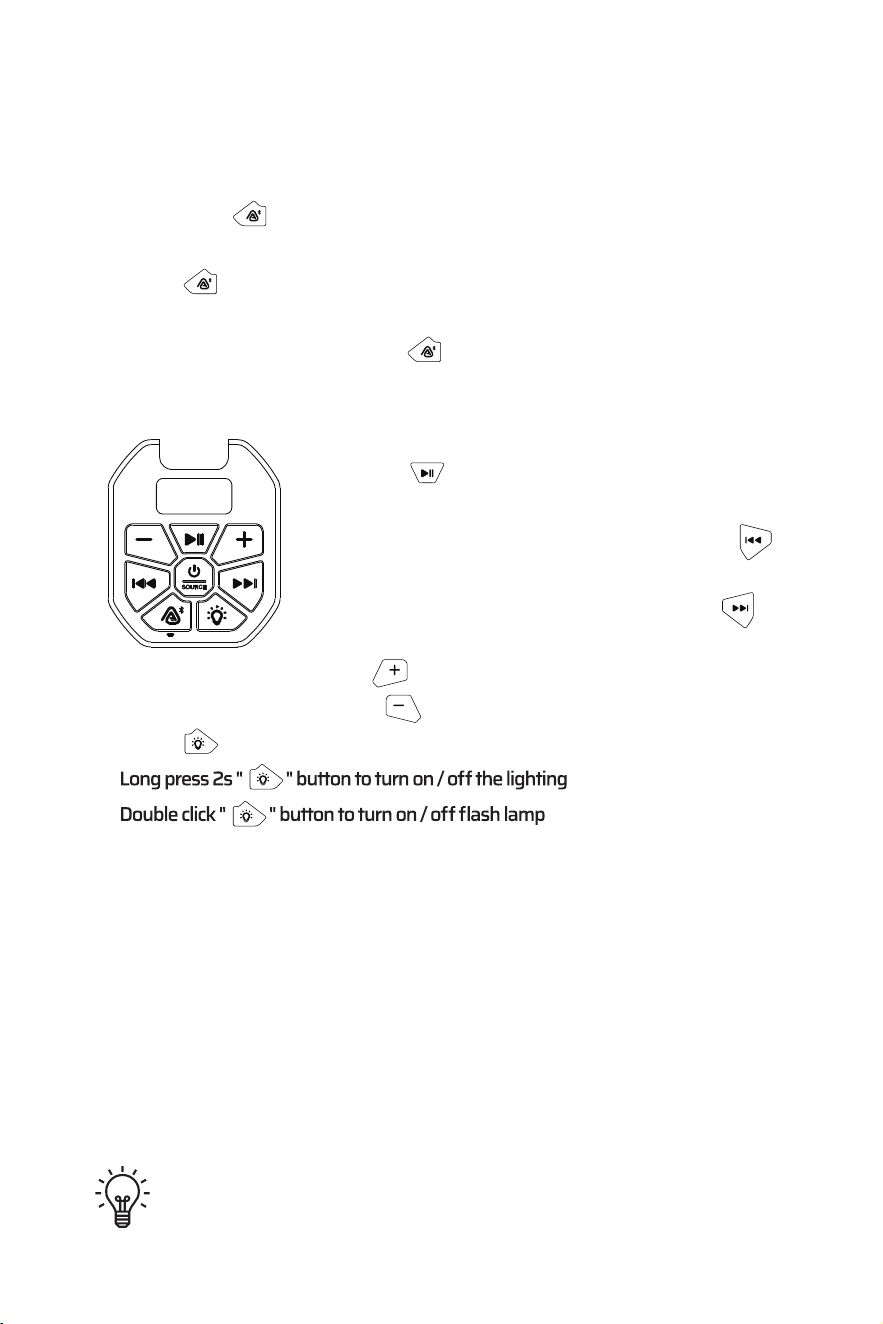
1. The unit A has connected your BT Device via Bluetooth mode (Solid Blue LED on unit A)
2. Short press " " Button on the unit A to enter Auracast pairing status, When unit A
enter Auracast searching mode, please set unit B to Bluetooth Pairing mode and short
press " " Button on unit B to enter recieve mode
3. The indicator LED for unit B ( RX )will be solid White when Auracast connected
4. TO DISCONNECT: Short press the " " button
PAIRING / CONNECTED / DISCONNECTED
AURACAST OPERATION
1. Press the " " button once to start playing music or
pause the music.
2. In BT source to select the previous song, press the " "
button or use your device's controls.
3. In BT source to skip songs or advance, press the " "
button or use your device's controls.
4. To raise the volume, press the " " button or use your device's controls.
5. To lower the volume, press the " " button or use your device's controls.
6. Press "
" button to select lighting mode
BUTTON OPERATION
TIPS: For maximum audio performance, ensure your device BT volume is set
to a minimum 75% level before stowing.
12
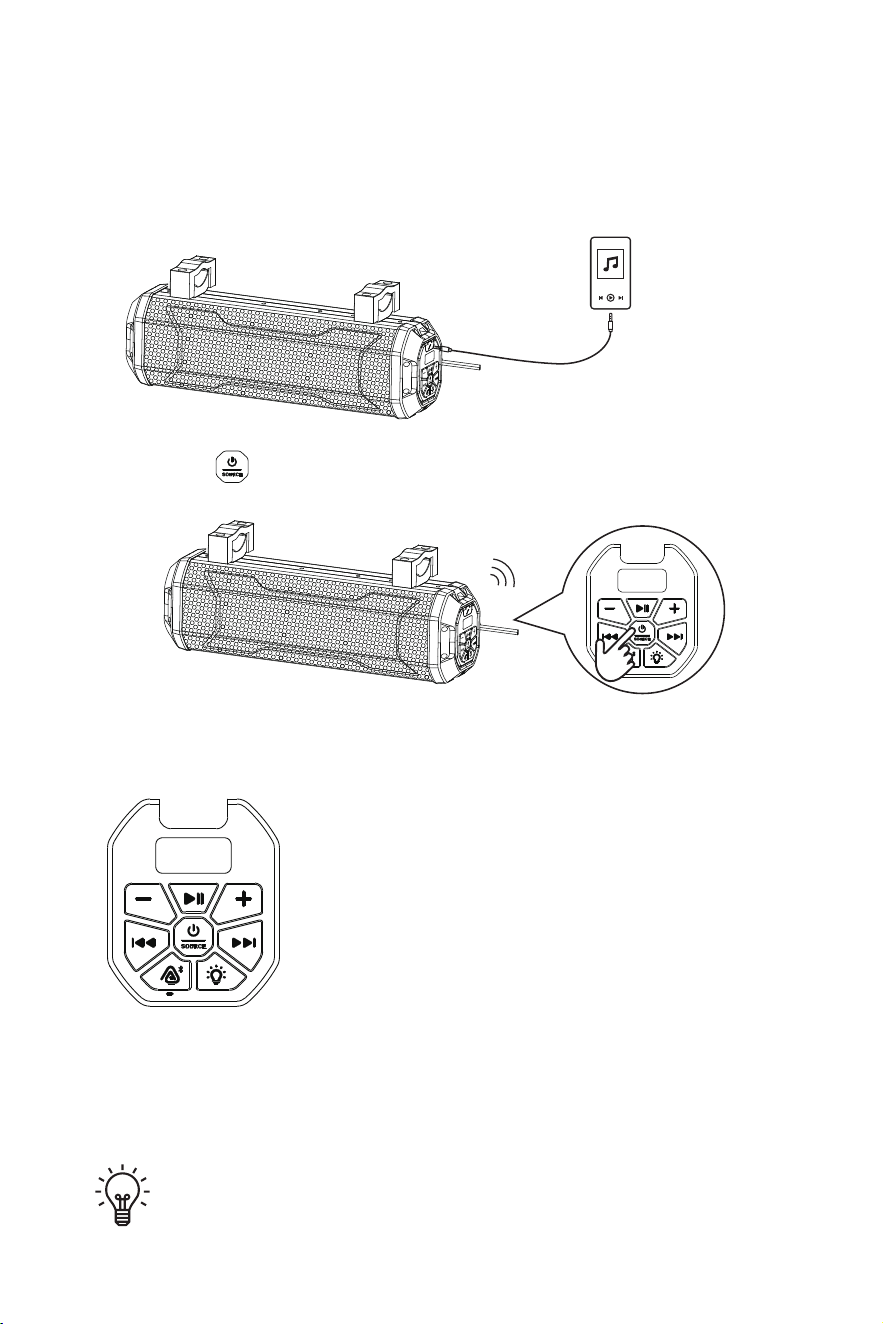
1. Connect the 3.5mm AUX audio cable to the device's AUX-IN jack.
2. Press the " " button. Switch SOUND BAR to AUX mode.
1. To raise the volume, press the VOLUME UP button.
2. To lower the volume, press the VOLUME DOWN button.
player with 3.5mm
audio jack output
AUX INPUT
AUX-IN Operation
BUTTON OPERATION
TIPS: Sound bar can play audio from any device that has a 3.5mm
headphone audio jack.
13
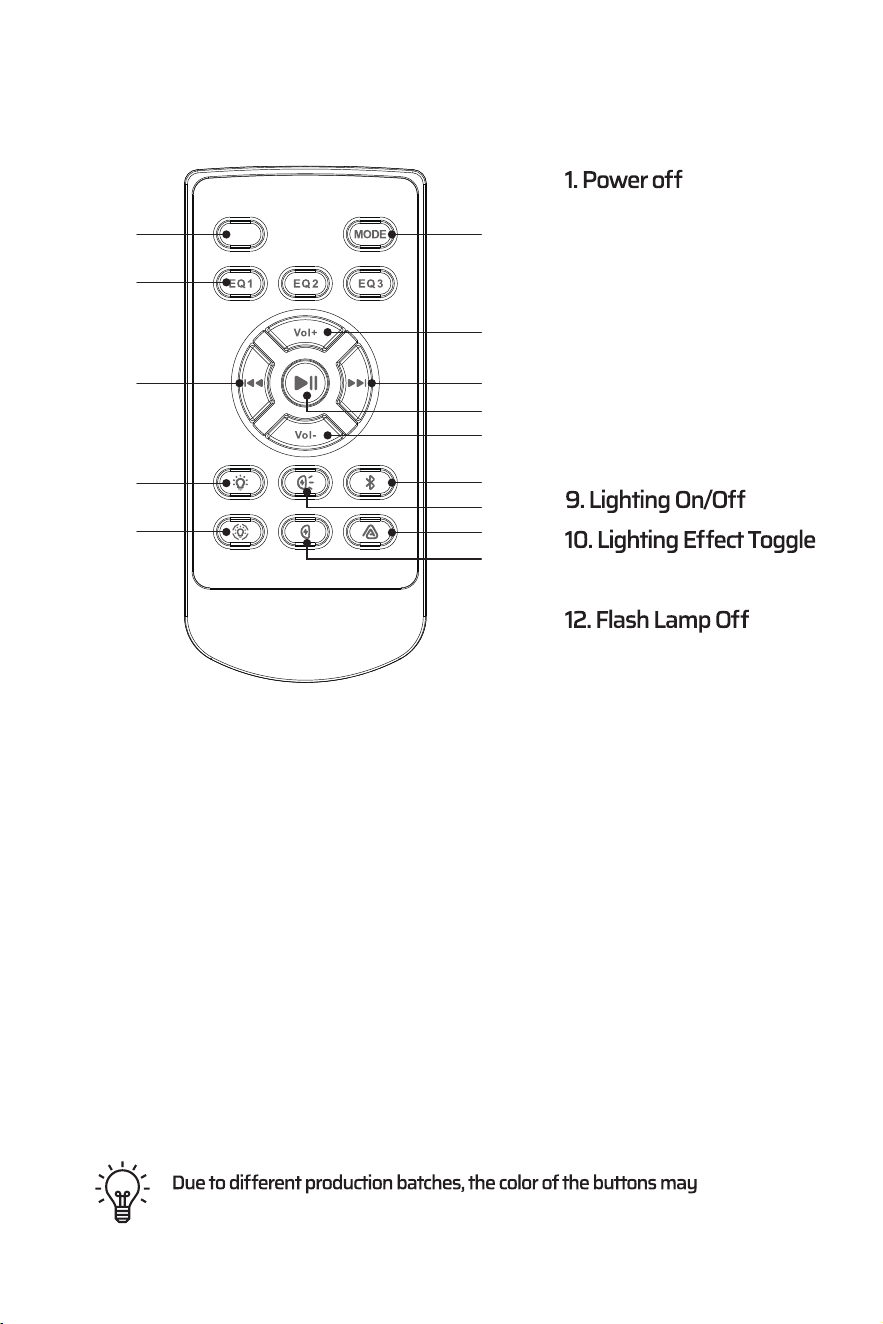
REMOTE CONTROL OPERATION
2. MODE
3. EQ1-EQ3
4. Volume Up
5. Volume Down
6. Previous Song
7. Next Song
8. Play/Pause
11. Flash Lamp On
13. Bluetooth
14. Auracast
1
vary, but the function is the same.
3
9
10
6
2
14
13
7
8
11
12
4
5
14
Please note: The device and remote control are pre-paired. If the
remote control and device cannot be paired, please turn on the device
and simultaneously press and hold the power button and play/pause
button on the remote control within 30 seconds to re-pair.
OFF
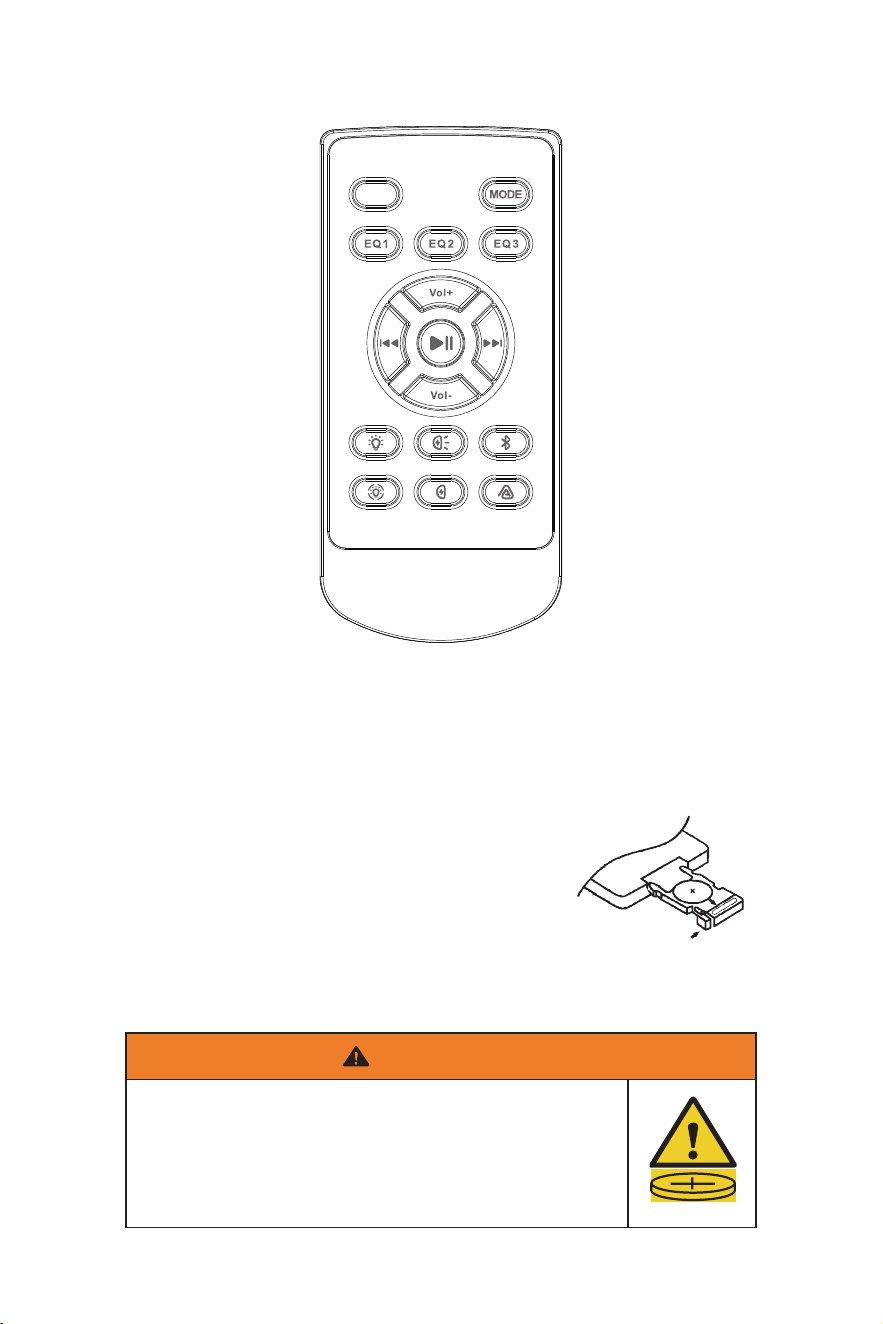
CAUTIONS
REMOTE CONTROL OPERATION
1) RF controller range: Up to 33ft (LoS)
2) Do not obstruct the RF remote with metal
3) Do not store in direct sunlight
Replacement Battery-CR2025
15
INGESTION HAZARD: This product contains a button cell or coin battery.
DEATH or serious injury can occur if ingested.
A swallowed button cell or coin battery can cause Internal Chemical
Burns in as little as 2 hours.
KEEP new and used batteries OUT OF REACH of CHILDREN
Seek immediate medical attention if a battery is suspected to be
swallowed or inserted inside any part of the body
●
●
●
●
●
WARNING
OFF
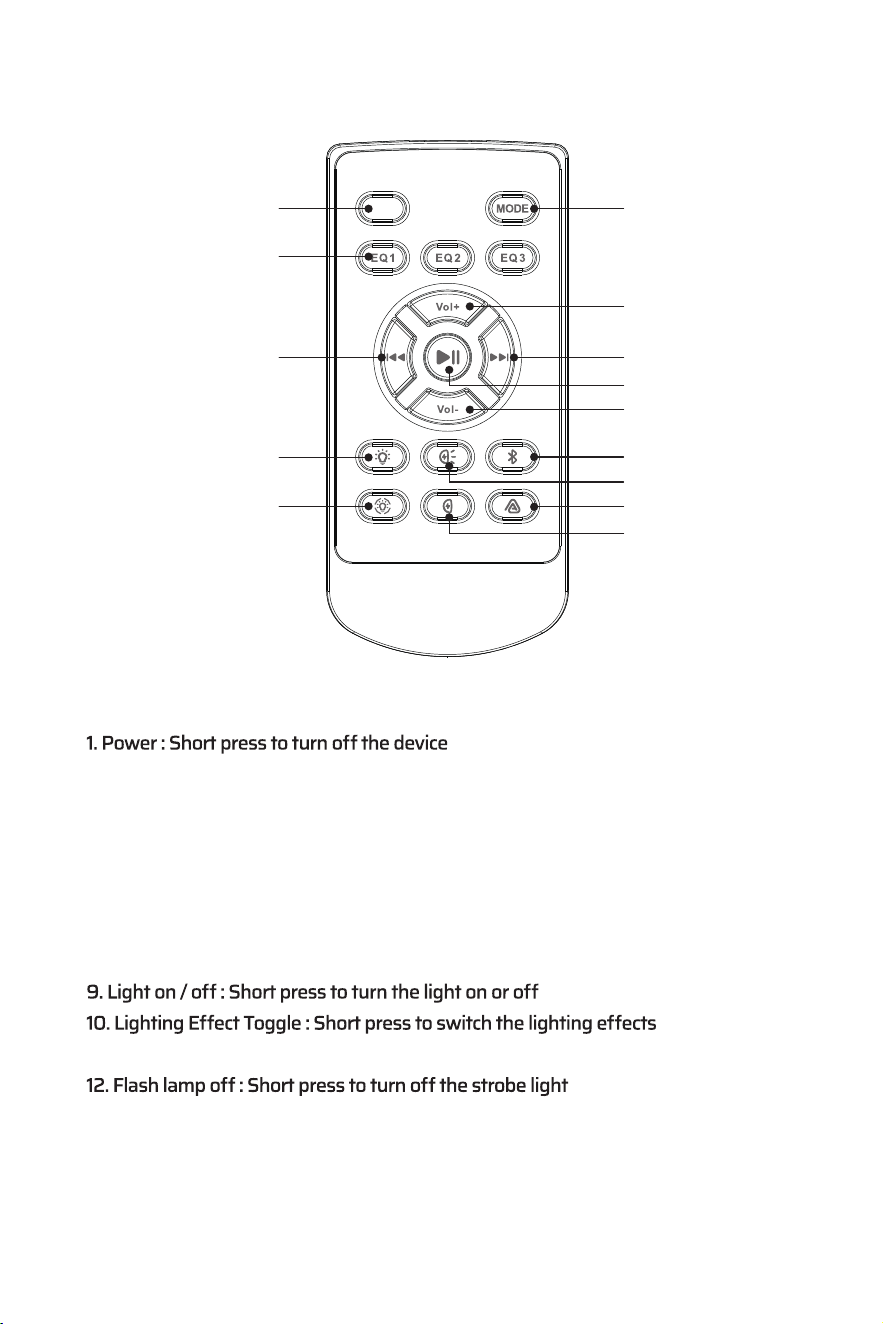
REMOTE CONTROL OPERATION
2. Mode : Short press to switch between Bluetooth and AUX
3. EQ1-EQ3 : Short press to switch between EQ modes
4. Volume Up : Short press the "Volume +" button to increase the volume
5. Volume down : Short press the "Volume -" button to decrease the volume
6. Previous song : Short press to jump to the previous song
7. Next song : Short press to jump to the next song
8. Play / Pause : Short press to pause or resume playing music
11. Flash lamp on : Short press to turn on the strobe light
13. Bluetooth : Long press 2 seconds to enter the Bluetooth pairing mode or disconnect
the Bluetooth
14. Auracast : Short press to enter or exit Auracast mode
Function Introduction
16
1
3
9
10
6
2
14
13
7
8
11
12
4
5
OFF
17
1) The statement “Remove and immediately recycle or dispose of used batteries
according to local regulations and keep away from children. Do NOT dispose
of batteries in household trash or incinerate.”
2) The statement “Even used batteries may cause severe injury or death.”
3) The statement “Call a local poison control center for treatment information.”
4) A statement indicating the compatible battery type (CR2025).
5) A statement indicating the nominal battery voltage (3V).
6) The statement “Non-rechargeable batteries are not to be recharged.”
7) The statement “Do not force discharge, recharge, disassemble, heat above
(manufacturer’s specified temperature rating) or incinerate. Doing so may
result in injury due to venting, leakage or explosion resulting in chemical
burns.”
8) The statement “Ensure the batteries are installed correctly according to polarity
(+ and -).”
batteries, such as alkaline, carbon-zinc, or rechargeable batteries."
10) The statement "Remove and immediately recycle or dispose of batteries from
equipment not used for an extended period of time according to local regula-
tions."
11) The statement "Always completely secure the battery compartment. If the
battery compartment does not close securely, stop using the product, remove the
batteries, and keep them away from children."
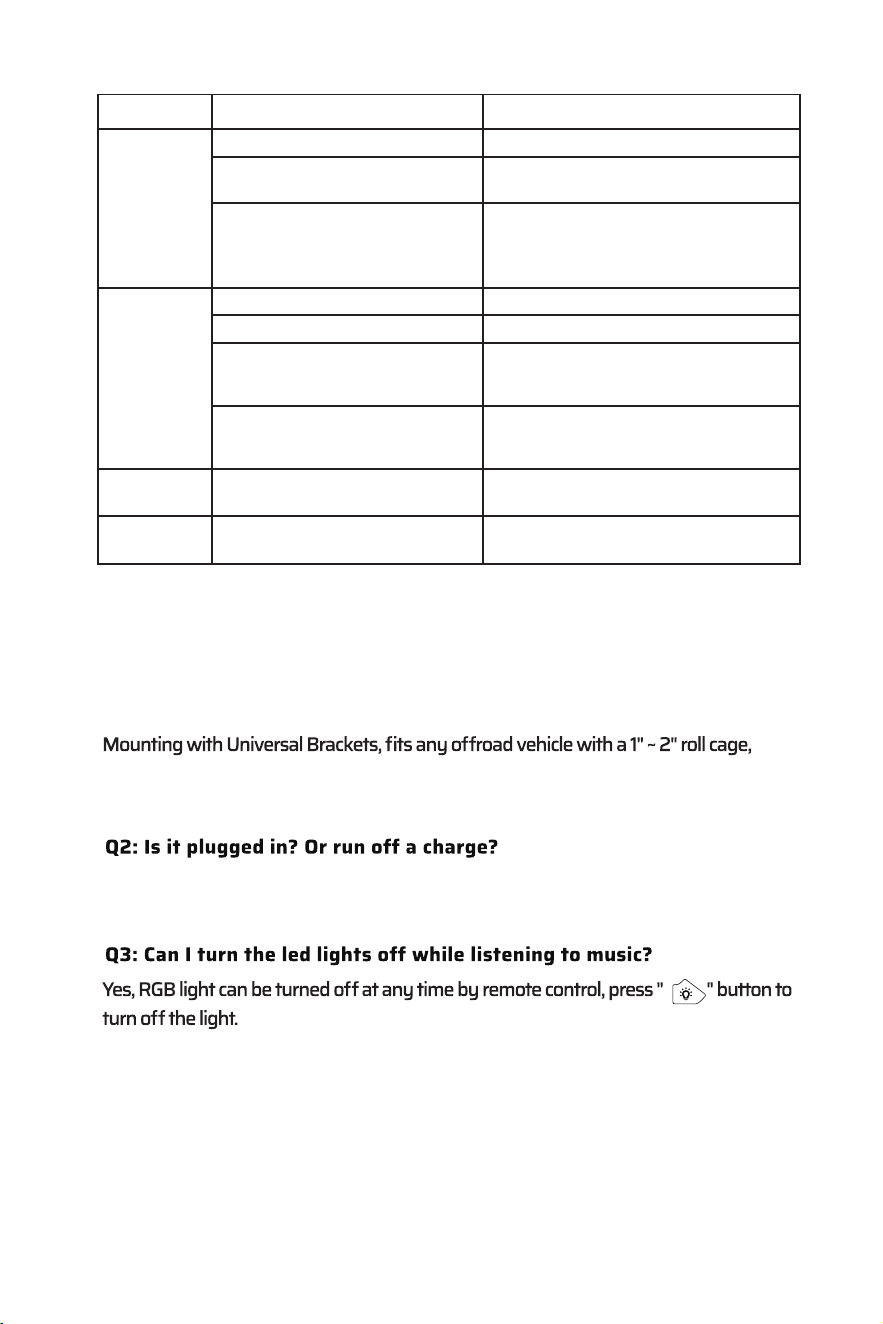
TROUBLE SHOOTING
FREQUENTLY ASKED QUESTIONS
including UTV, ATV, golf cart, Marine, Boat, Polaris RZR, Ranger, Can-Am, Defender,
Maverick, etc.
The fuse is blown
Operating voltage not applicable
Incorrect operating voltage
Soundbar volume is low muted
Power failure or interference
BT/AUX are not connected
properly
The BT function of the device is not
enabled
Device will
not turn on
No sound is
heard
Cannot pair
BT
Device not
responding
Vehicle didn't start Main acc switch
not engaged
The volume of the device inputting
music to the Soundbar is too low
muted.
Starting the vehicle/ Turn switch to on
position
The soundbar operates on 12V DC.
The soundbar does not work properly
when the voltage is below 8V DC or
above 18V DC.
Check if the soundbar control panel is
successfully connected to the device (BT,
AUX IN)
Check the operating voltage, DC 12V
Refer to the user manual of the device
for how to enable the BT function
Press power and vol+ button simultane-
ously to force shutdown
Turn up the volume on your device
Turn up the volume of the input device
Check / replace the fuse
Q1: Will this sound bar fit my vehicle?
TROUBLE CAUSE SOLUTION
This soundbar is NOT rechargeable. It needs to be hardwired straight to the battery via
the 12V DC converter (included in the package).
18
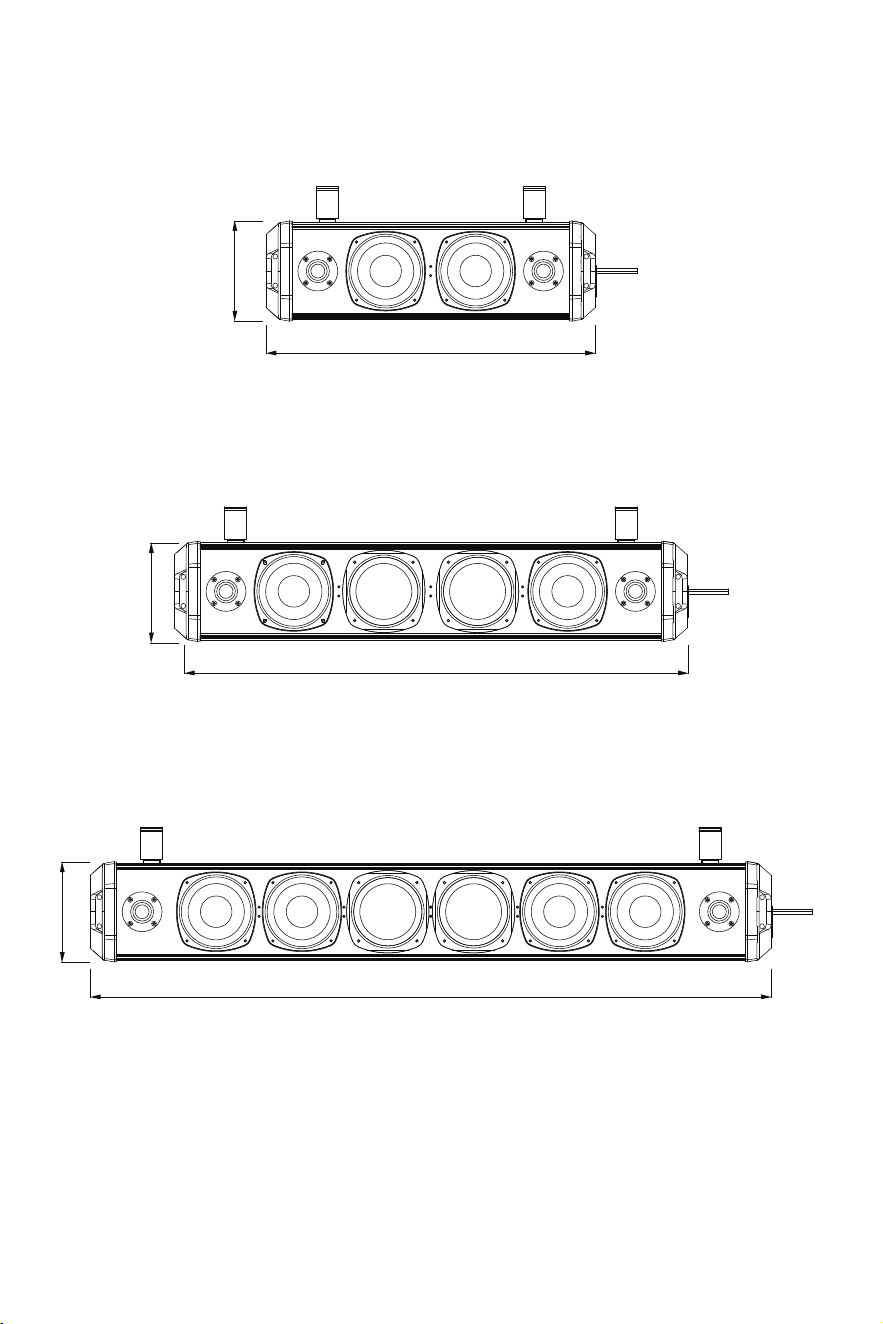
SPECIFICATIONS SUBJECT TO CHANGE WITHOUT NOTICE
DIMENSIONS
17”
5”
5”
5”
26”
35”
19
The Bluetooth
®
word mark and logos are registered trademark owned by
Bluetooth SlG, inc.
Other trademarks and trade names are those of their respective owners.
FCC Warning Statement
This device complies with Part 15 of the FCC Rules. Operation is subject to the
following two conditions:
(1) This device may not cause harmful interference, and (2) this device must
accept any interference received, including interference that may cause
undesired operation.
NOTE 1: This equipment has been tested and found to comply with the limits
for a Class B digital device, pursuant to part 15 of the FCC Rules. These limits
are designed to provide reasonable protection against harmful interference in
a residential installation. This equipment generates uses and can radiate radio
frequency energy and, if not installed and used in accordance with the instruc-
tions, may cause harmful interference to radio communications. However,
there is no guarantee that interference will not occur in a particular installa-
tion. If this equipment does cause harmful interference to radio or television
user is encouraged to try to correct the interference by one or more of the
following measures:
- Reorient or relocate the receiving antenna.
- Increase the separation between the equipment and receiver.
the receiver is connected.
-Consult the dealer or an experienced radio/TV technician for help.
NOTE 2: Any changes or modifications to this unit not expressly approved by
the party responsible for compliance could void the user's authority to operate
the equipment.
RF Exposure Statement
To maintain compliance with FCC's RF Exposure guidelines, This equipment
should be installed and operated with minimum distance of 20cm the radiator
your body. This device and its antenna(s)must not be co-located or operation
in conjunction with any other antenna or transmitter.
IC WARNING
This device contains licence-exempt transmitter(s) that comply with Innova-
tion, Science and Economic Development Canada’s licence-exempt RSS(s).
Operation is subject to the following two conditions:
(1) This device may not cause interference.
The Bluetooth
®
word mark and logos are registered trademark owned by
Bluetooth SlG, inc.
Other trademarks and trade names are those of their respective owners.
FCC Warning Statement
This device complies with Part 15 of the FCC Rules. Operation is subject to the
following two conditions:
(1) This device may not cause harmful interference, and (2) this device must
accept any interference received, including interference that may cause
undesired operation.
NOTE 1: This equipment has been tested and found to comply with the limits
for a Class B digital device, pursuant to part 15 of the FCC Rules. These limits
are designed to provide reasonable protection against harmful interference in
a residential installation. This equipment generates uses and can radiate radio
frequency energy and, if not installed and used in accordance with the instruc-
tions, may cause harmful interference to radio communications. However,
there is no guarantee that interference will not occur in a particular installa-
tion. If this equipment does cause harmful interference to radio or television
user is encouraged to try to correct the interference by one or more of the
following measures:
- Reorient or relocate the receiving antenna.
- Increase the separation between the equipment and receiver.
the receiver is connected.
-Consult the dealer or an experienced radio/TV technician for help.
NOTE 2: Any changes or modifications to this unit not expressly approved by
the party responsible for compliance could void the user's authority to operate
the equipment.
RF Exposure Statement
To maintain compliance with FCC's RF Exposure guidelines, This equipment
should be installed and operated with minimum distance of 20cm the radiator
your body. This device and its antenna(s)must not be co-located or operation
in conjunction with any other antenna or transmitter.
IC WARNING
This device contains licence-exempt transmitter(s) that comply with Innova-
tion, Science and Economic Development Canada’s licence-exempt RSS(s).
Operation is subject to the following two conditions:
(1) This device may not cause interference.
(2) This device must accept any interference, including interference that may
cause undesired operation of the device.
L’émetteur/récepteur exempt de licence contenu dans le présent appareil est
conforme aux CNR d’Innovation, Sciences et Développement économique
Canada applicables aux appareils radio exempts de licence. L’exploitation est
autorisée aux deux conditions suivantes:
1. L’appareil ne doit pas produire de brouillage;
2. L’appareil doit accepter tout brouillage radioélectrique subi, même si le
brouillage est susceptible d’en compromettre le fonctionnement.
Warm Tips
Regarding voltage compatibility, we provide solutions for vehicles that do not use
After-Sales Service and Warranty
We provide a warranty from the date of purchase. We will repair or replace any
defective products free of charge. For any questions or assistance, you can
contact our customer service team via below methods for help:
Email: [email protected]
Website: https://www.ehaho.com
How to Make a Warranty Claim
Contact Us: Reach out to our customer service team at [email protected].
Provide Information: Be prepared to provide proof of purchase and a detailed
description of the issue including relevant pictures or videos.
Our team will respond to your issues within 24 hours on weekdays. Please check
your email, including the spam folder, for our replies. Note that response times
may be delayed during weekends or holidays.
Terms and Conditions
This warranty is non-transferable and applies only to the original purchaser.
Thank you for choosing Ehaho. We appreciate your business and are here to
support you with any questions or concerns.
(2) This device must accept any interference, including interference that may
cause undesired operation of the device.
L’émetteur/récepteur exempt de licence contenu dans le présent appareil est
conforme aux CNR d’Innovation, Sciences et Développement économique
Canada applicables aux appareils radio exempts de licence. L’exploitation est
autorisée aux deux conditions suivantes:
1. L’appareil ne doit pas produire de brouillage;
2. L’appareil doit accepter tout brouillage radioélectrique subi, même si le
brouillage est susceptible d’en compromettre le fonctionnement.
Thank you for choosing Ehaho. lf you have any questions or
need assistance, please contact our customer service team at: