In case you might need to return this product, please keep all the packaging materials and
return only in its original packaging and in excellent condition.
INSTRUCTION MANUAL
Read these instructions carefully before using your appliance, and keep it carefully. If you follow
the instructions, your appliance will provide you with many years of good service
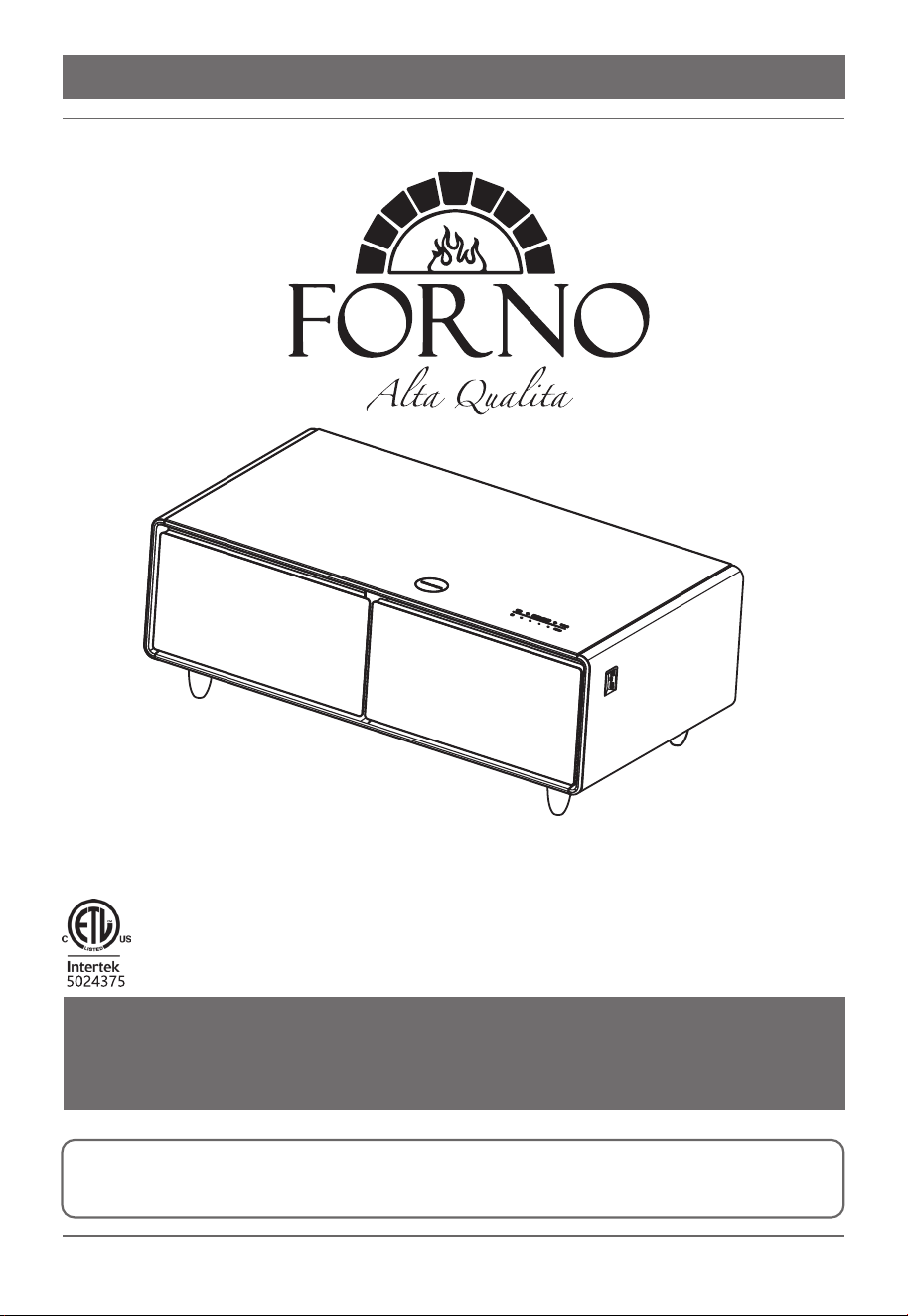
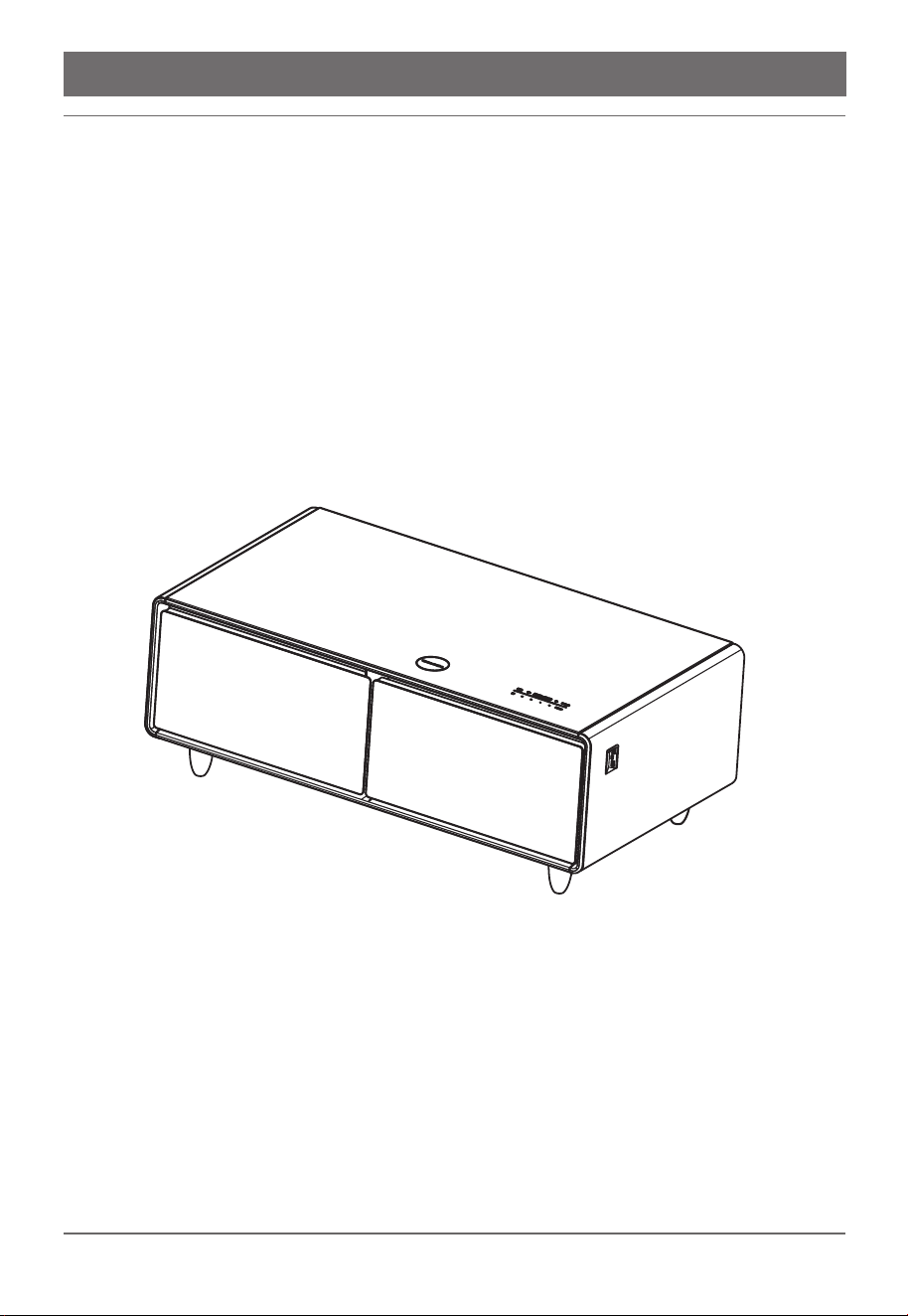
SMART COFFEE TABLE REFRIGERATOR
FCTFR7006
®
Services in Canada and Untied States
Keep the instruction manual handy to answer your questions. You can also find all the information you need online at
www.forno.ca.
If you don’t understand something or need more assistance, please visit our website or email: [email protected]
If there is a problem, please contact FORNO customer service. Please note that troubleshooting with a customer service
representative will be needed before being able to send a service provider. All warranty work needs to be authorized by
FORNO customer service. All our authorized service providers are carefully selected and rigorously trained by us.
Product Information Service Information
Model Number : _________________________________________
Serial Number : __________________________________________
Date of Purchase :________________________________________
Purchase Address And Phone : _____________________________
_______________________________________________________
_______________________________________________________
Customer Care
“Need some quick help? Simply scan the qr code and get accessto our fast
support form. We’re always here to assist you with any questions or concerns
you may have. So, don’t hesitate to reach out!”
Thank you for purchasing a Frono product. Please read the entire instruction manual before operating your new
appliance for the first time. Whether you are an occasional user or an expert, it will be beneficial to familiarize yourself
with the safety practices, features, operation and care recommendations of your appliance.
Both the model and serial number are listed inside the product. For warranty purposes, you will also need the date of
purchase.
Use these numbers in any
correspondence or services calls
concerning your product.
If you received a damaged product,
immediately contact Forno.
To save time and money, before
you call for serviced, check the
troubleshooting guide. It listed the
causes of minor operation problems
that you can correct yourself
SMART COFFEE TABLE REFRIGERATOR
FCTFR7006
Parts & features
Specifications
Packing list
Precaution before use - unpacking
Notice
Installing the power cord
Functions and features
User guide
Daily maintenance
Delivery and outage
Non-failure
Trouble shooting
01
02
02
03
04
06
07
09
14
16
17
18
01 / 18
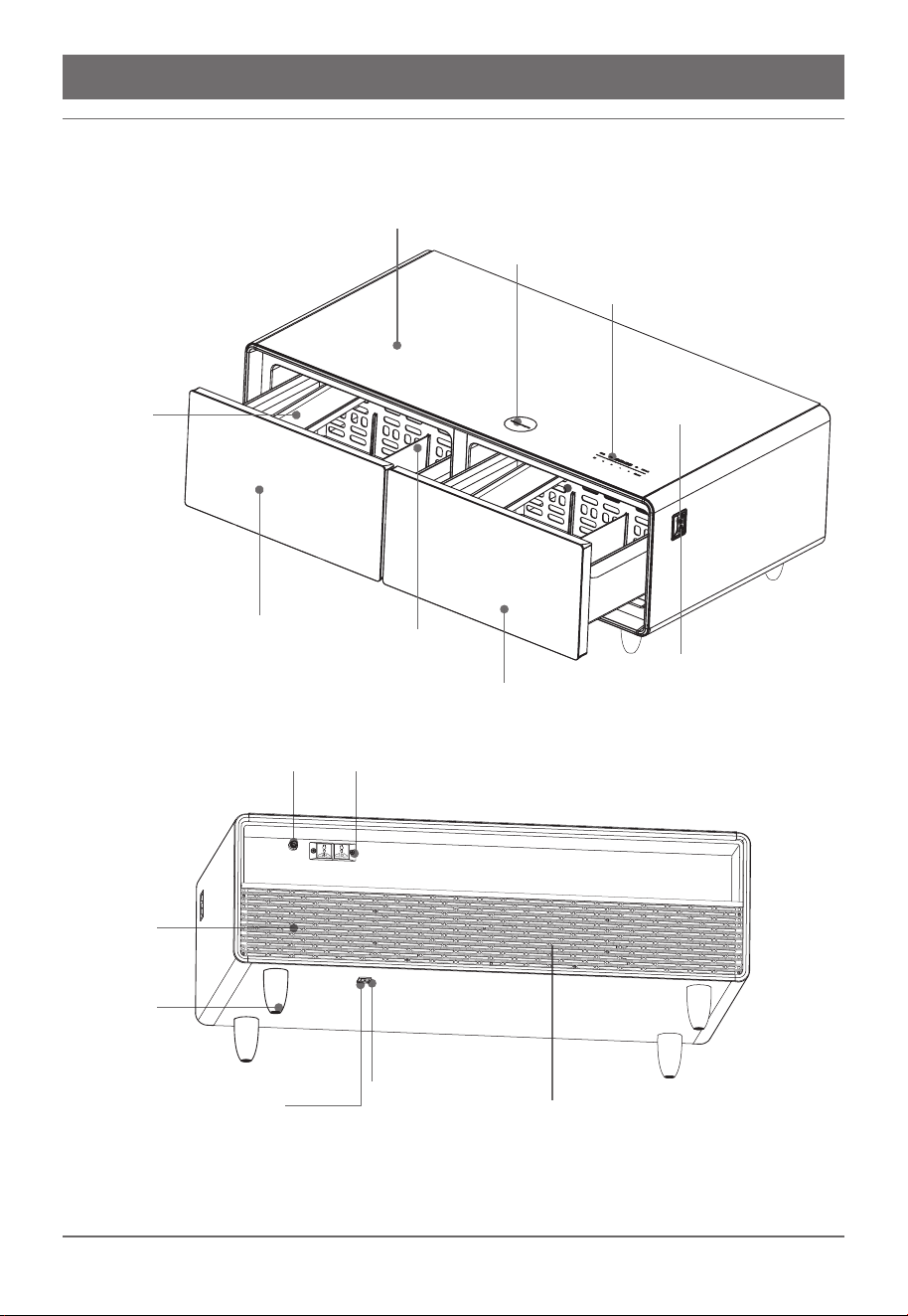
PARTS & FEATURES
Tempered Glass Top
Wireless Charger
Control Panel
TYPE-C
PET Tray
Left Refrigerator Drawer
Right Refrigerator Drawer
Partition
USB
Water Inlet
110V Socket
Feet
Speaker
Power Overload Protection
Power Interface
Back Board
02 / 18
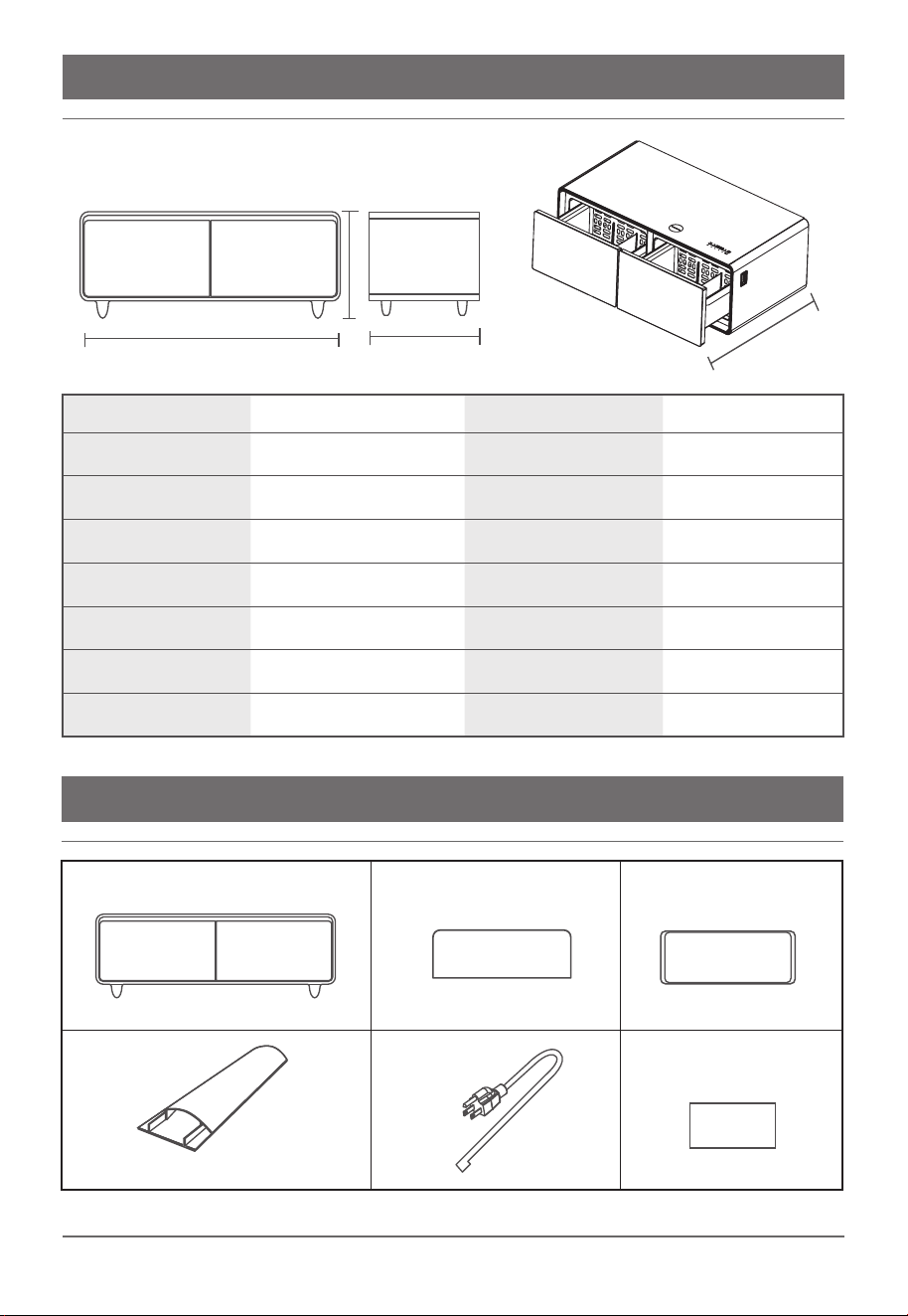
SPECIFICATIONS
Consumption
Noise Level
Voltage
Net Weight
Controlling
Product Dimensions
Wireless Charger
Main Body*1
Partition*4
PET Tray*2
Cable Cover*1 Power Cord*1 User Manual*1
160kWh/year
36db
110V-120V/60HZ
134.5 lbs
Electronic Control
54.21"x30.43"x19.88"
15W
Temp Control
Refrigeration Mode
Refrige rant/Wt
Volume
Left Drawer Temp Range
Right Drawer Temp Range
USB USB/Tpye-c
Speaker Watts
Electronic Control
Compressor
R600a/25g
70L+65L
37°F~46°F//3-8℃
43°F~54°F/6-12℃
5V/1.5A
20W*2
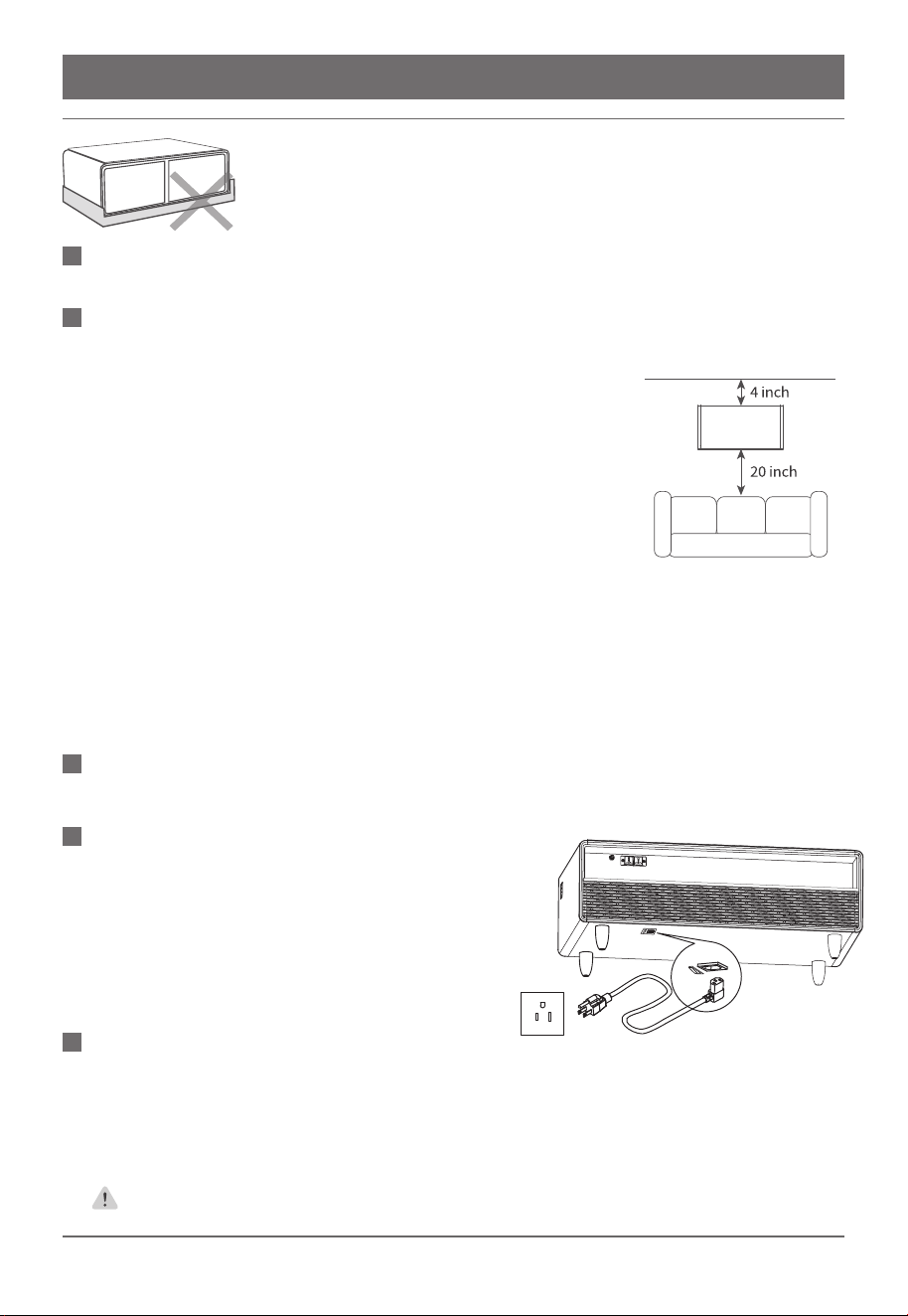
PACKING LIST
39 inch
51 inch
18 inch
28 inch
03/ 18
PRECAUTION BEFORE USE - UNPACKING
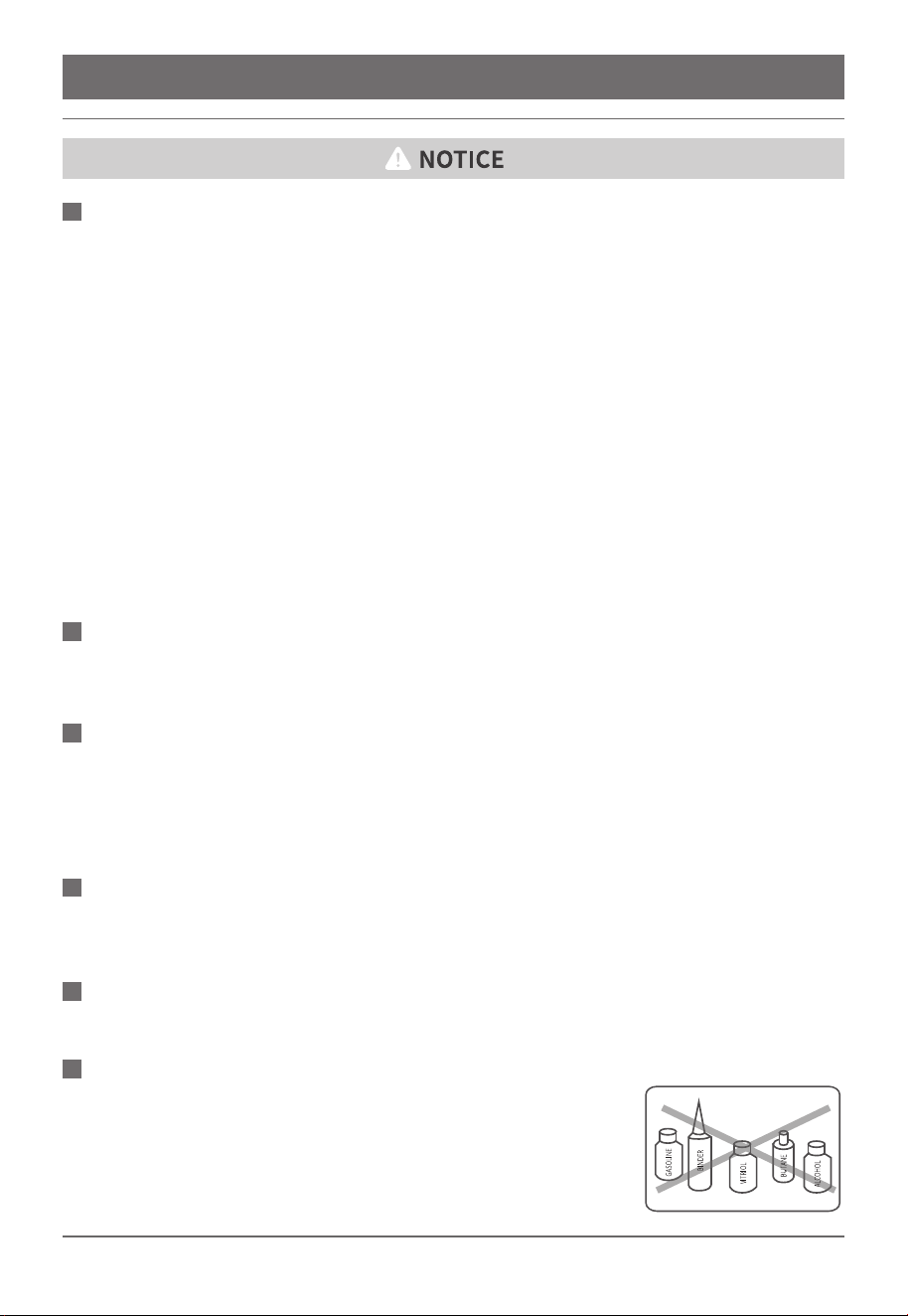
For better heat dissipation, remove the foam base, peel off the
adhesive tape and the transparent film from the surface of the table.
Fail to do so may result in personal injury or property damage.
Please refer to page 14 for daily maintenance and repair.
1.Please use the cable cover to protect the power cord if your floor is
not installed with power socket and carpet.
2.Avoid high humidity, super cold environment and directly sunlight
places.
3.Make sure that there are enough space on all sides around the
Smart Coffee Table to ensure adequate ventilation for the refrigerator
(see attached picture). Do not place the back of the Smart Coffee
Table against a wall as this may result in overheating.
4.The table should be put on flat and solid ground. After determining
the position and placing it smoothly, it is necessary to step on the
brake device of the brake wheel and fix the position of the table to
prevent random sliding.
5.Universal wheel:change the direction of travel at will, and pass
easily on complex roads.Brake wheel:one tap and stop. Steering
wheels double fixed
ENSURE ALL ACCESSORIES ARE INCLUDED ACCORDING TO THE PACKING
LIST IN PAGE 2.
TABLE PLACEMENT CONDITIONS
PLEASE CLEAN THE TABLE BEFORE USING
After leveling and cleaning the table, do not power on
at once. Before connecting the appliance to an
electrical power supply, let the smart coffee table
unplugged for about 2 hours in its final location, This
will reduce the possibility of a malfunction in the cooling
system due to mishandling or jostling in transport.
RESTING
After unplug for 2 hours, carefully check if there is any water or foreign object around the power
socket and USB ports, then connect the power cable under the bottom of the table, see picture
above. Please make sure the cable is safely installed and can come in handy, to minimize daily
wear and tear of the power cord and avoid users being accidentally tripped over.
The maximum power draw on the smart coffee table is 960 watts for all the
outlets combined. Please do not connect to a multipurpose power outlet.
POWER ON
04/ 18
NOTICE
1.After powering on the unit, please install the cable cover to prevent any damage of the cable.
Do not step on the cable, otherwise it will raise the risk for electric leakage.
2.The power cord should be kept in firm contact with the power source. Fair to do so may result
in property damage, personal injury or fire.
3.To avoid damage to the cable, please do not step on the cable. Do not roll over the cable when
moving the table.
4.When removing the power plug from the wall outlet, always pull directly on the plug, never pull
the cord. Before cleaning, repairing or replacing any parts, unplug the table to avoid electric
shock.
5.Do not use if the power cord is damaged or the plug is worn. Please make sure to go to the
manufacturer’s designated repair center or online authorized dealer for replacement.
6.For this R600a refrigerator, please ensure that maintenance is carried out by professionally
trained technicians. If the equipment is damaged, please send it to a nearby service center for
inspection, repair or adjustment.
ELECTRIC WARNINGS
This table should be powered by AC110V. If the voltage fluctuation is out of range, it may cause
unit failure, property damage or personal injury.
POWER SUPPLY WARNING
Use a dedicated socket and ground the device properly. The power cord is equipped with a
three-wire (grounding) plug and should be used with a standard three-wire (grounding) socket.
Under no circumstances should the third prong (grounding) of the power cord be cut off or
removed.
GROUND POWER WARNING
This table should not be used to store any products that are inflammable, explosive or danger-
ous, as well as any chemicals. Blood or other biological products is prohibited to be stored in it.
STORAGE WARNING
Keep liquids away from USB ports. Do not use wet cloth to clean the ports.
USB
1.Keep liquids away from socket. Do not use wet cloth to clean.
2.The rated power of connecting this electric appliance cannot
exceed 960W. Overloading will lead to over heating and will cause
fire. Even will cause property damage or personal injury.
3.Please do not connect to a multipurpose power outlet
110 POWER PORT
05 / 18
1.If the device is equipped with a thick protective shell or a metal protective shell, the charging
efficiency may be affected. Remove the shell and try again.
2.The wireless charger may generate heat when charging. If the battery overheats, the software
may limit the charging. It will begin to charge once the temperature drops.
3.Wireless charging and the USB charging should not be used in the same time.
WIRELESS CHARGER
This product should by all means avoid any contact with water, moist, heat, or devices that may
generate magnetic and/or electric field. In case of a malfunction of the said devices, please cut
off the power first, then relocate the devices and turn them back on.
Please place this product on a flat, level floor, with ample space (>10cm or 3" in) on all sides
around the table to ensure adequate ventilation.
SPEAKER
It is strictly prohibited to disassemble or modify the table and damage the refrigeration pipeline
by yourself. Maintenance of the table must be carried out by professional personnel.
REPAIR
1.Smart Coffee table should be placed far away from any heat source and do not expose to
direct sunlight.
2.Smart Coffee table should be placed in a well ventilated area, please refer to TABLE PLACE-
MENT CONDITIONS.
3.Do not place the smart coffee table in damp areas or where the equipment may come into
contact with water. Do not place power sockets, voltage stabilizers, or small appliances on the
refrigerator coffee table.
4.Do not put unstable objects on the smart coffee table to avoid damage to the table top.
5.Be cautious when placing objects with liquid on table. Spilling liquid can result in property
damage, personal injury or electric shock.
6.Do not store gas or any other flammable materials in or near the smart coffee table to avoid
possible fire hazard.
7.If there is any gas or other flammable material leak around the unit, close the gas valve and
open all doors and windows immediately. DO NOT PULL OR TOUCH THE SMART COFFEE
TABLE ELECTRIC PART.
PLACEMENT ENVIRONMENT
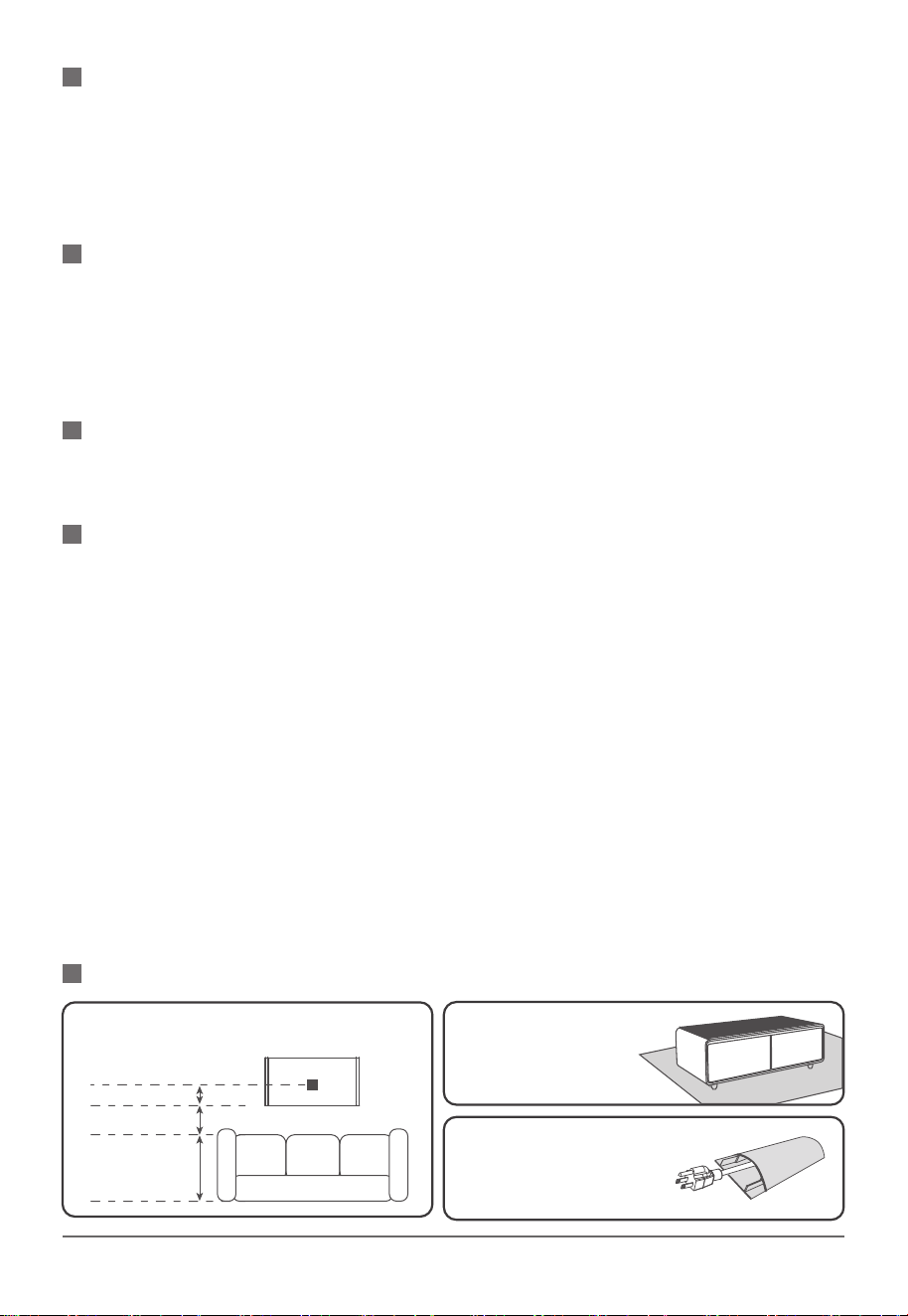
PLACEMENT OF POWER CORD
SUG 2.You can buy a
carpet to hide the ground
power cord.
SUG 3. You can also use the
attached cable cover to hide the
power cord to avoid any tripping.
SUG 1. Please leave enough place for ground plug
if your house is under decoration orrenovation.
Ground Plug set suggestion:
20″
4″
06 / 18
INSTALLING THE POWER CORD
This appliance must be plugged into a grounded socket. The power cord that is supplied with the
appliance contains the appropriate grounding conductor and grounding plug.
The plug must be inserted into a outlet that has been grounded in accordance with the existing
local codes and ordinances. The required nominal voltage and frequency are indicated on the
rating label. Consult a qualified electrician for other concerns.
GROUNDING INSTRUCTIONS
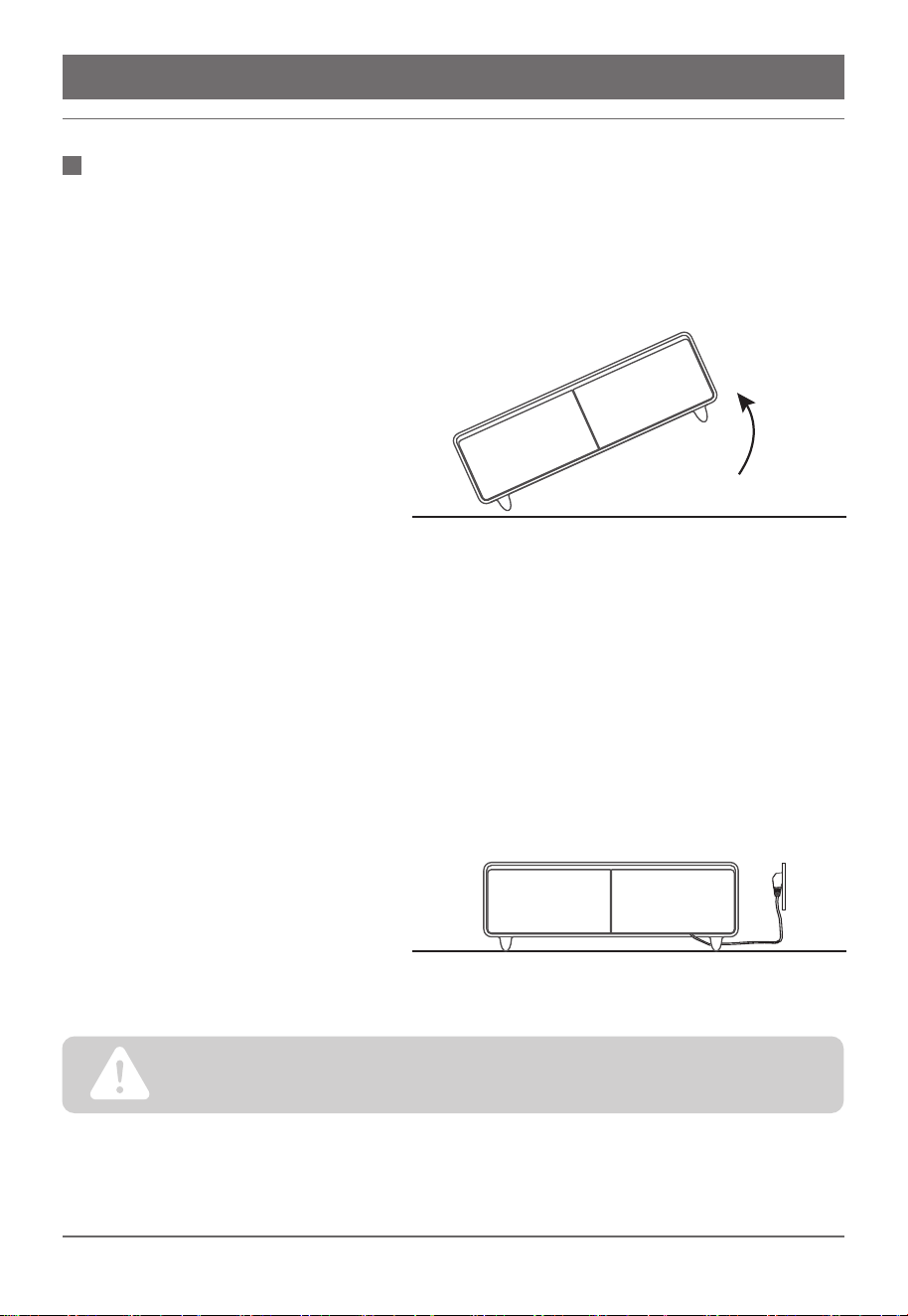
1.Have one partner lift the right side
of the Smart Coffee Table table off the
ground. Rest the opposing side on a
foam insert or cushion for protection.
2.The power socket is located on the underside of the Smart Coffee Table towards the back
right corner. Locate the socket and unwrap the power cord before attaching.Plug in the adaptor
end of the cord to the socket in the indicated location below.
3.After installing the power cord or
moving the Smart Coffee Table, you
must let the refrigerator coolant settle
for a minimum of 2 hours before
plugging in the Smart Coffee Table.
Use proper lifting technique!
Exercise caution! If you have a history of back pain or injury do not attempt to lift table.ARTISAN wil not
accept responsibility for any injury that may occur during set up process.
07 / 18
FUNCTION AND FEATURES
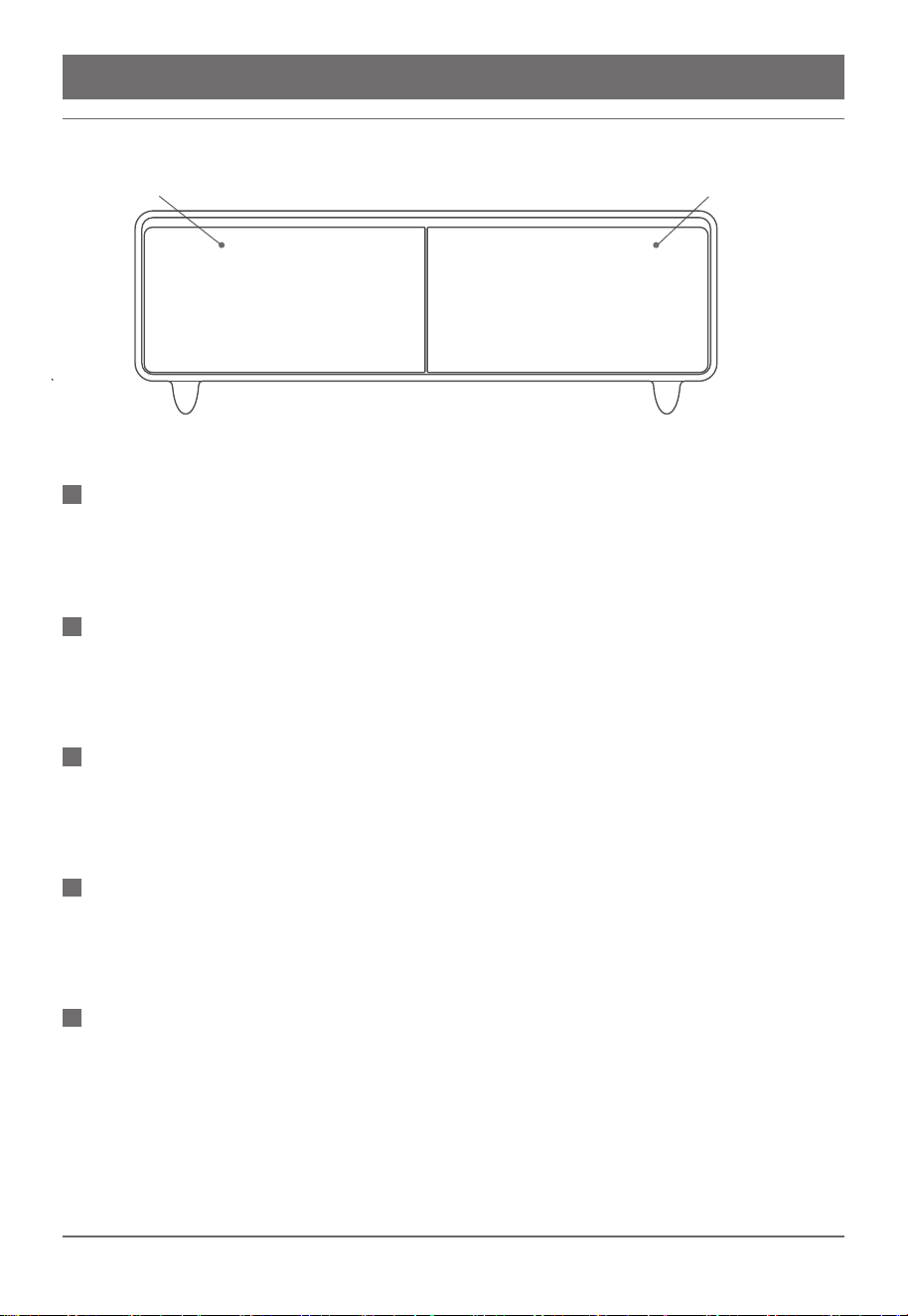
The Smart Coffee table is designed with two drawers that can be independently controlled for
the temperatures. Each refrigerator drawer comes with two partitions and one tray to organize all
your favorite beverages and snacks.
REFRIGERATOR DRAWERS
This smart coffee table with built-in refrigerator is designed with a water inlet, enabling users to
either have access to cool, soothing filtered water, or enjoy the convenience of automatic water
feeding & boiling for daily tea making.
WATER INLET
There are 3 types of chargers, one is 15W wireless charger located on the top, second is USB
chargers and the third is TYPE-C chargers located on the right side, which can provide electric
power to your phone anytime.
CHARGERS
The smart coffee table is equipped with 110V power sockets, to supply power to other devices.
The power sockets have a separate safety switch to detect high input or overload. If the safety
switch detects either, it will cut off power automatically to avoid any dangerousness.
110V POWER SOCKETS
The smart coffee table is equipped with a high efficiency compressor to keep your unit working
at optimum performance.lt can automatically adjust the ON/OFF time according to the changes
in temperature inside and outside the refrigeration compartment, as well as the amount of stored
food. It has powerful refrigeration capability and it is environmentally friendly and energy-saving,
and operates quietly.
HIGH EFFICIENCY COMPRESSOR
Left Refrigerator Drawer 37°F~46°F/3-8℃ Right Refrigerator Drawer 42°F~53°F /6-12℃
08 / 18
To make better use of the storage space, there are two partitions and a tray in the refrigerator
drawer; which facilitate the classification and storage of food.
PARTITION STORAGE
The removable door seal will ensure the long-term sealing of the Smart Coffee Table, making it
easy for daily cleaning and maintenance, and reducing energy consumption.
REMOVABLE DOOR SEAL
The RGB light can both create atmosphere and provide illumination for the room, which is
colorful and mild. It can perform dynamic changes as well.
RGB ATMOSPHERE LIGHT
Equipped with Bluetooth v5.0 technology, the transmission distance is 10 meters. It can easily
connect to cell phones, computers, laptops or your TV.
BLUETOOTH SPEAKER V5.0
TYPE-C CHARGER
The Smart Coffee Table equip with type-c charger, which can satisfy users multiple charging
demands.
09/ 18
USER GUIDE
1.Fill this refrigerator only with fresh food.
2.Do not store food that requires the refrigerator to outperform its designed temperature
range.
3.Do not store food while it is hot. This would drive up the drawer temperature, thus affecting
all other items inside.
4.Do not open the drawers all too often, nor leave it open for a long time. This would also
destabilize the inside temperature.
5.Do not store food that is about to expire. Keep food properly sealed to avoid odor build-up.
REFRIGERATOR DRAWER
NOTE
1.The food should be washed and clean thoroughly before putting into the refrigerator.
2.The bottles should be closely placed to prevent tilting and falling when the door is opened.
3.Food placed in the drawer should not exceed a certain height, otherwise it may prevent the
drawer from closing properly.
4.The partition can help organize different types of food, and can be adjusted according to
your needs.
5.The sliding tray can be used for storing the washed fruits, (such as grapes and strawber-
ries) without the need for a fruit plate.
6.Adjust the refrigerator temperature according to the food characteristics.
Storage Suggestion
10 / 18
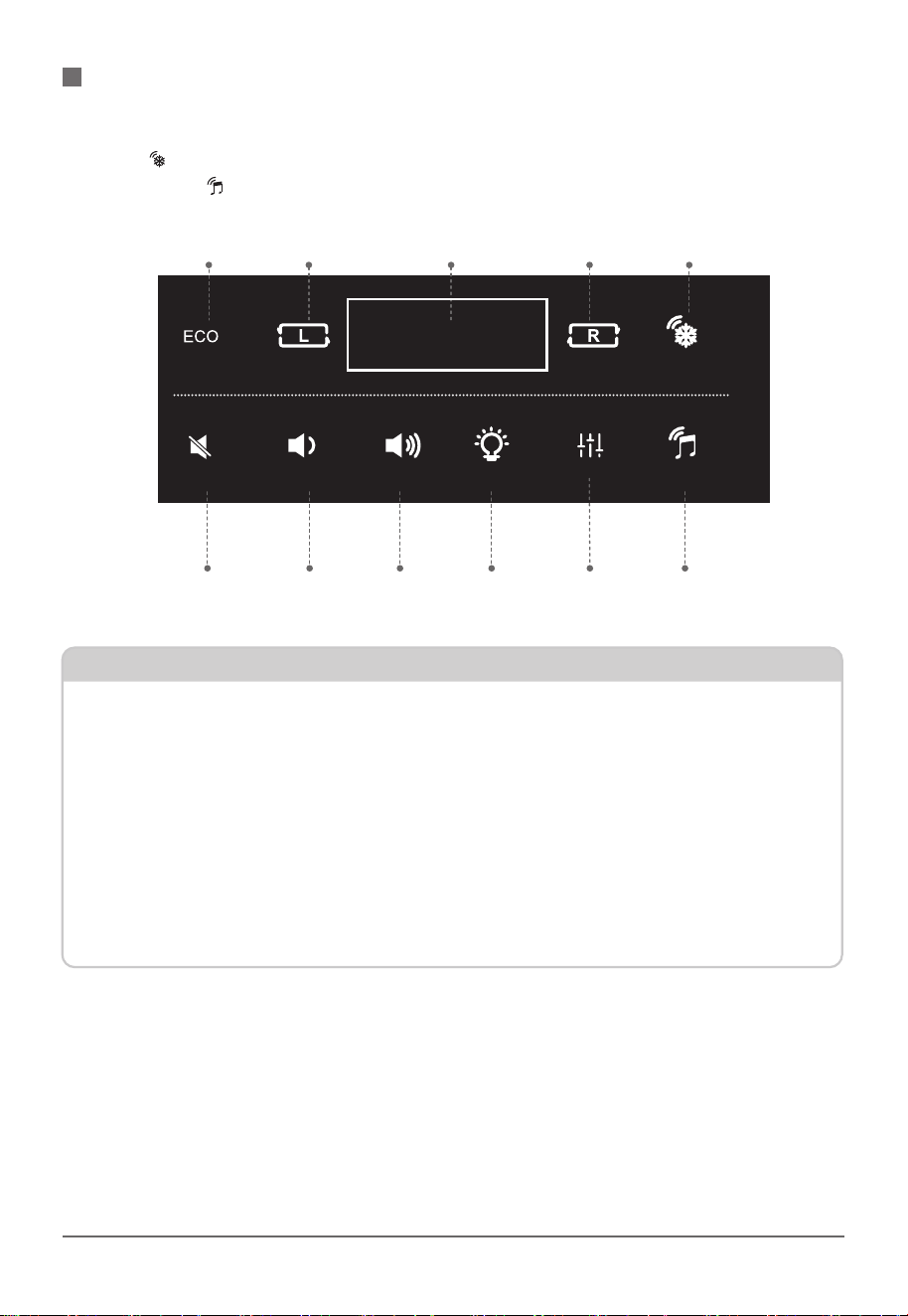
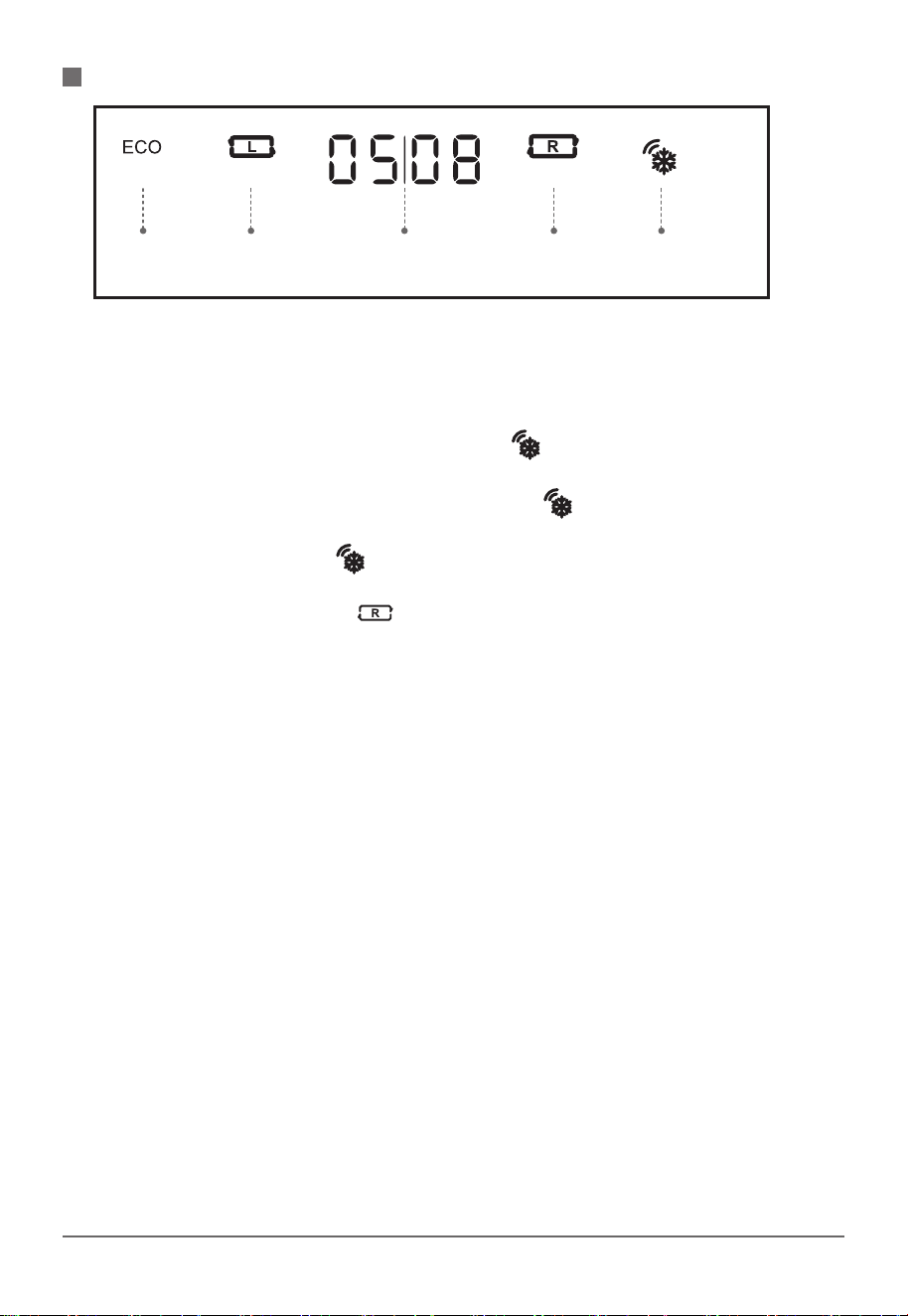
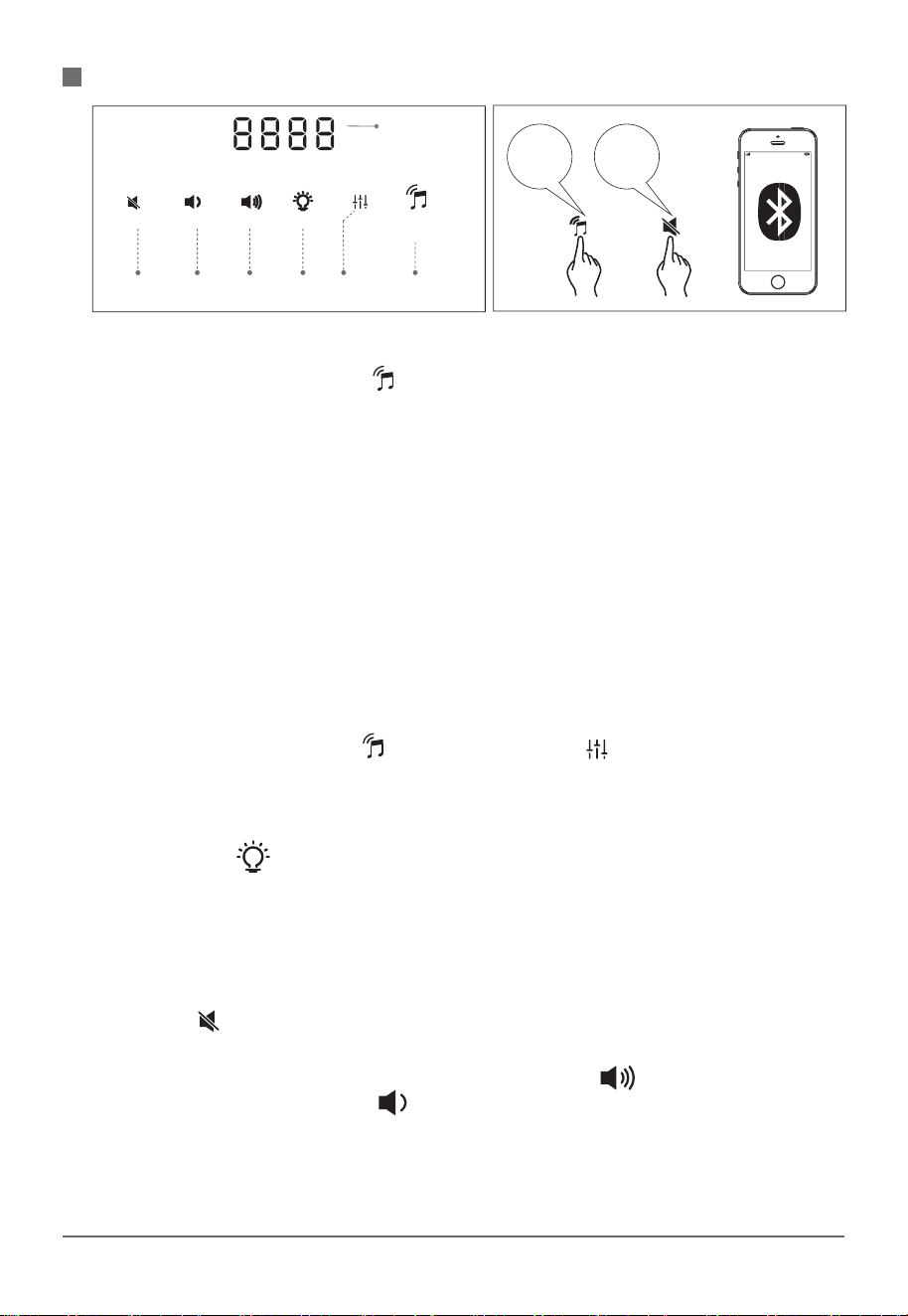
The display area is divided into two parts. The refrigerator control area is above the horizontal
line, the speaker operation area is below the horizontal line. Double-click the "Refri Unlock"
button on the refrigerator, allowing you to use other fridge buttons. Double-click the speaker
unlock button then you can use other speaker functions.
CONTROL PANEL INSTRUCTION
ECO Mode
Music Mute Switch
Volume Down Volume UP
Light Switch Sound Effects Speaker Unlock
Left Door Temp
Display Right Door Temp
Refri Unlock
Refrigerator
Control Area
Speaker
Control Area
1.The refrigerator and speaker share the same controlling board. The controlling buttons for
the refrigerator are above the line, the ones for the speaker are below.
2.When the temperature of the refrigerator has been adjusted and the speaker is set
separately, the digital board will show the current operation of the speaker.
3.When the speaker mode is on, you can also operate the refrigerator by double-clicking the
Unlock button to initiate the refrigerator.
The operation of the speaker and refrigerator does not affect each other. And the speaker can
be turned on and off independently.
NOTE
11/ 18
REFRIGERATOR OPERATION
After the initial power-up, the refrigerator automatically enters unlock mode. If there is no
operation in 10 s, the buttons will be locked
REFRIGERATOR UNLOCK BUTTON
If there is no operation in 10s, the whole board will lock and all digital lights will turn off. All
buttons except the UNLOCK button will stop working.
In lock mode, press the refri. double click lock button “ ” the refrigerator's buttons can be
operated.
When the interval of double clicking on the unlock button “ ” is longer than 15s, it will be
regarded as an operation error, leading to no response from the display panel. For normal use,
double-click the unlock button “ ” again.
RIGHT REFRIGERATOR
Once unlocked, touch the button “ ” and the current fridge temperature will flash to indicate
that the right refrigerator is being operated. Each time the button is pressed, the right refrigerator
temperature increases, cycling between 43 to 54 ("OF” means the right refrigerator is switched
off). If the button is not pressed for more than 3 seconds, the setting is confirmed by default and
takes effect.
LEFT REFRIGERATOR
Left refrigerator setting is the same as the right one. The temp range from 37°F~46°F.
The left display area shows the current temperature of the left refrigerator; and the same goes
for the right display area.
ECO MOD
When the refrigerator module is active, press the ECO button, the digital board will display
"ECO" and the most energy-saving temperature of the right and left refrigerator drawer in the
current environment If no button operation is pressed for more than 2 seconds, the default
setting will take effect.
DOOR OPENING ALARM FUNCTION
When you open the drawer, the display screen will show the current temperature of the opened
cabinet. If the door opens for a long time or is not closed properly, the alarm will go off to remind
you to close it in time.
POWER OFF MEMORY FUNCTION
When the smart table is powered off; the last working state will be memorized and applied to the
refrigerator when the power is turned on.
CLOSED STATE
Open the door of the drawer; the display screen can display the set temperature of the cabinet.
Eco Mode
Left Door
Temp.Adjust
Display Area
Temp./Mode Display
Right Door
Temp.Adjust
Refri.Unlock
12 / 18
SPEAKER INSTRUCTION
SPEAKER
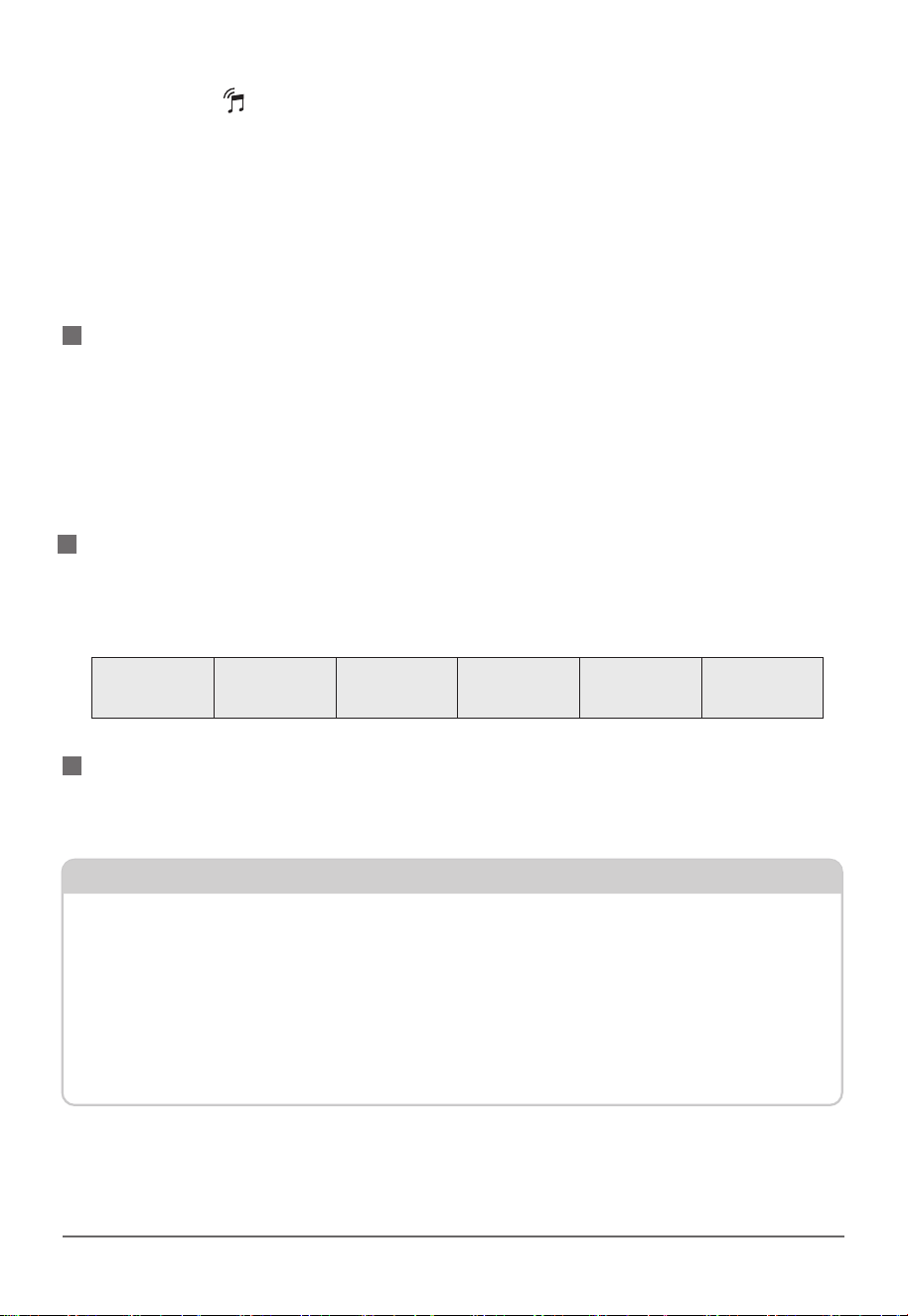
In off mode, click the unlock button“ ”, and the buzzer rings and the white aperture will be on,
which means the speaker is switched on. At this time, all buttons of the speaker are activated.
MUSIC PLAY
In Bluetooth mode, where the display area shows BL, broadcast saying "Bluetooth mode” will be
played. You can turn on your mobile phone and search for blue tooth device “T-bar”, and select
and connect it with the unit. If your phone need “paring mode”, please enter“0000”( It is no
need to enter a password if the phone system version is advanced). When the connecting is
successful, the speaker will be used as a external speaker for your phone. A voice will be played
when the Bluetooth data transmission is disconnected. 5 minutes later, the B luetooth
connecting will be cleared and reset. When the Bluetooth transmission is interrupted, it will
broadcast that the Bluetooth is disconnected. When it is more than 5 minutes, the Bluetooth
connection will be cleared and reset. When your mobile phone is back in the connection range, it
will be connected automatically.
SOUND EFFECT
Double click the Speaker Unlock “ ” button, and then click “ ” button until desired preset
sound effect option is displayed on the screen, the broadcast will also announce the select
mode. The sound effect include: AUTO / POP / JAZZ / ROCK/ FILM.
ATMOSPHERE LIGHT ON/OFF
Touch the button “ ” to turn on the atmosphere light, touch it again, the atmosphere light
turns off.
PAUSE OF MUSIC
There are 2 ways to pause music when playing music:
1.Directly control the pause and playback of sound through the equipment connected with
external sound source.
2.Touch the “ ” button to mute the music.
MODULATION
The total number of levels of volume is 16. Each time you press “ ” the volume increases by
one level, and each time you press “ ” the volume decreases by one level.
Note: when the volume setting is completed, 2 seconds later, the nixie tube returns to display the
current sound mode.
Music Mute
Switch
Volume
Down
Volume
Up
Lamp
Switch
Speaker Unlock
Start
Speaker
Mute
Switch
Sound
Effects
Display
13 / 18
SPEAKER OFF
Press and hold “ ” for 6s, during which,the nixie tube will display OFF for 1 sand the circle will
light up in 3s.The aperture nixie
tube and the speaker will turn off,and there will be a prompt note when the speaker turn off.
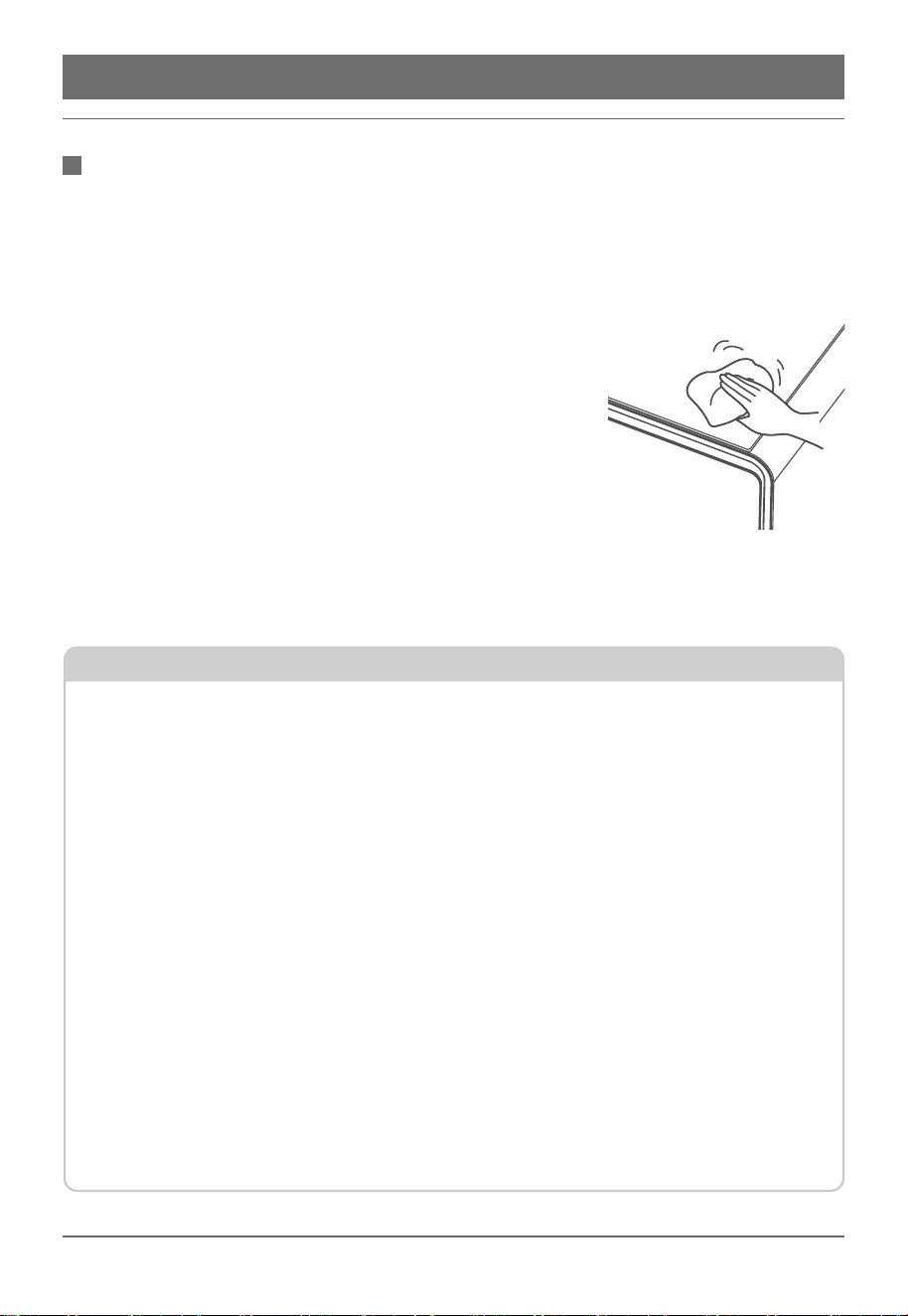
This table is equipped with two power ports, with a required rated current of 10A and a rated
power of 960W.It can accommodate the use of both two-prong and three-prong electrical
appliances.
MULTI PROTECTIONS / SLUtP:
Wireless charger only works for devices that are equipped with wireless charging and meet the
Ql standard.
SPEAKER LOCKING
If there is no operation for 10s, the audio module will automatically lock down. After locking. Its
aperture will go out, but the nixie tube will always display the current audio mode. When locked,
mute mode, sound effect, volume adjustment, atmosphere light and pause / play keys cannot be
operated.
110V POWER
WIRELESS CHARGING
1.Wireless charging is enabled once the table has been plugged in.
2.Please put the device to the center of the wireless charging area.
3.Make sure there is no metal barrier between the charger and the phone to avoid overheat-
ing.
4.lf the charging surface is overheated, please remove it and stop charging.
5.The wireless charger and USB charger should not be used at the same time, otherwise the
USB charger won’t be able to work.
NOTE
CAUTION: DO NOT DROP WATER OR LIQUID IN ANY OF THE POWER OPENINGS.
Please do not connect to appliances that fails to match the required nominal voltage and
frequency on the rating label. Please do not connect to a multipurpose power outlet.
Overload
Protection
5000 times of
plugging test
Shell with 750°C
flame retardant
Double acting
safety door
Hidden
warning light
New national
standard sockets
There are two USB-A and one TYPE C chargers that can connect devices to the speaker and
charge device.
USB-A AND TYPE CCHARGING
14 / 18
DAILY MAINTENANCE
Clean the Smart Coffee Table regularly to avoid dust accumula-
tion. Wipe the surface of the table with the microfiber cloth. Do not
store expired food in the drawers.
1.Before cleaning the Smart Coffee Table, please make sure to
turn off the power and remove the plug.
2.Please do not forcefully disassemble this table, as it may cause
damage.
3.Clean the unit with a soft cloth and neutral detergent. Dry the
unit with a clean and soft cloth.
4.Clean the shell gently to avoid deformation or short circuit
caused by the water flowing into the device through the mesh.
5.lnspect the unit after cleaning. Do not use if any damage is
found.
6.Make sure the table is completely dry before powering on.
NOTE: Be sure to clean the door seal thoroughly to ensure a long
lasting period and preserve power consumption.
CLEANING
In order to prevent leakage accident, do not spray water to wash the table. Please use dry
cloth to clean the power socket, knob, plug and USB socket.
In order to prevent damage to the unit, please do not use following material to clean the table:
1.Acidic or slightly alkaline kitchen cleaners.
2.Similar powdered detergent products.
3.Chemicals such as benzene, sodium bicarbonate, alcohol, carious acids, petroleum.
4.Hard brush, abrasive sponge brush.
5.Hot water.
Due to the substantial weight of this table, please be cautious and avoid any scratch or
damage to your floor when attempting to move the table for either cleaning or maintenance.
Always keep the tempered glass top upright while doing so.
Please do not use hot water to clean the inside of the drawers including the glass shelves,
partition panels or PET trays. Drastic temperature differences might cause fracture, breakage
or explosion of the above, resulting in personal injury and property loss.
Please do not touch the inside of the drawers with wet hands while cleaning. Do not reach
your hands underneath the bottom of the table, as the metal components might accidently
cause scratch or cut.
NOTE
15 / 18
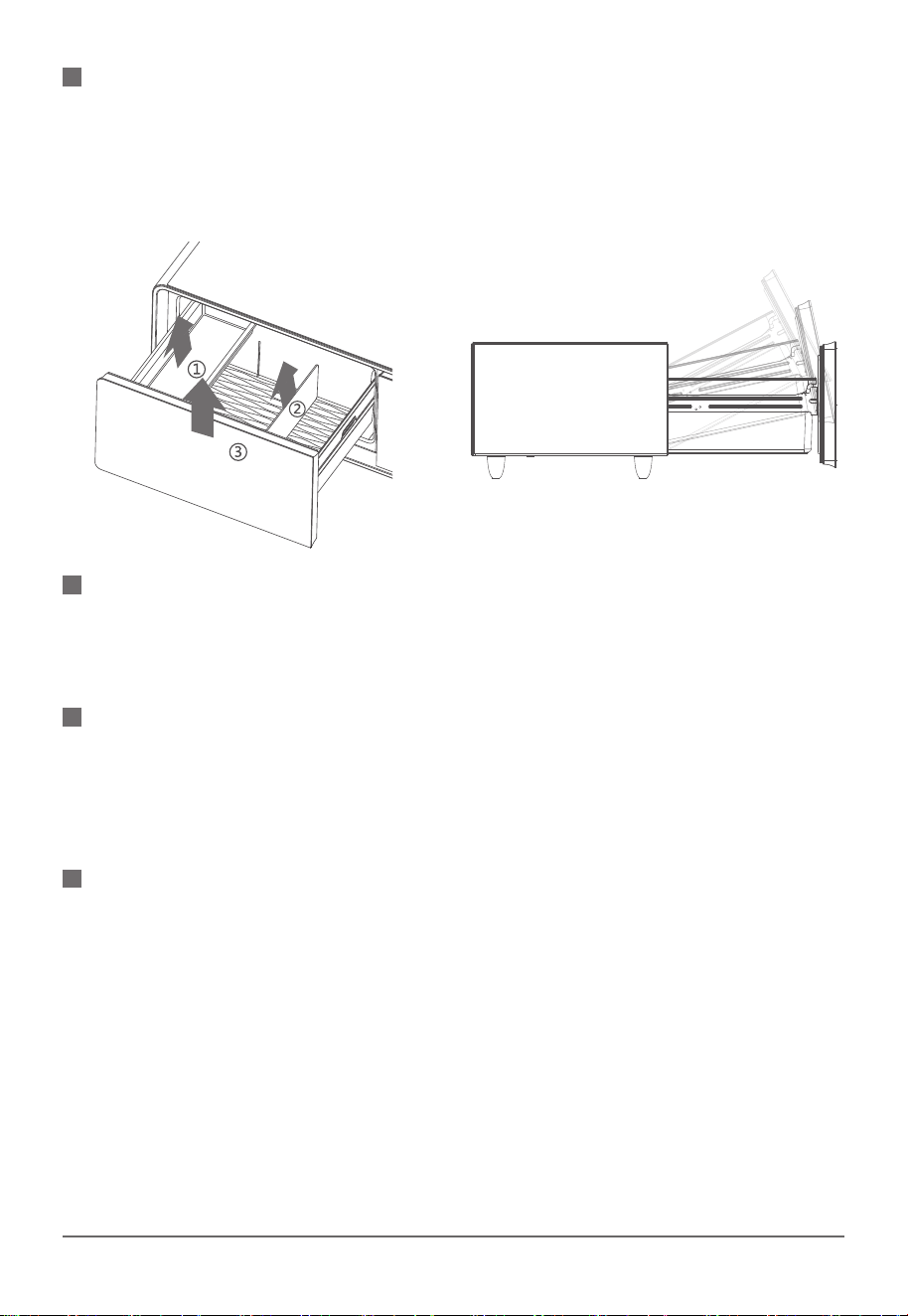
Before dismantling the refrigerator drawer, please take out the PET tray, drawer partition and all
items inside from the refrigerator. Fully pull the door and the drawer, lift up the whole drawer and
pull out the sets.
You can use water to wash the drawer, PET tray, partition, and then use soft cloth to dry them.
DISASSEMBLY AND CLEANING OF THE REFRIGERATOR DRAWER
The refrigerator can defrost automatically, The defrosting water flows out to the water tray at the
back of the table through the bottom back of the water tank. The water will be evaporated
naturally by the heat of the compressor.
DEFROSTING
The doors and door seals of smart coffee table can become dirty and easily lead to aging and
damage. This can cause the door to not close properly and result in air leakage, so it is
important to keep them clean. When cleaning the door seals, it is necessary to use clean water
and wipe them dry with a dry cloth.
DOOR SEAL CLEANING
1.Please check if the power plug is completely inserted into the socket.
2.Please check if the power cable has scratches.
3.Please check if the power plug has abnormal heating condition.
4.Please check if the power base and USB has foreign object or liquid left.
SAFETY INSPECTION AFTER CLEANING
16/ 18
DELIVERY AND OUTAGE
1.Unplug the product.
2.Take out all the items inside the Smart Coffee Table.
3.Use adhesive tape to secure the partition and PET tray inside the Smart Coffee Table.
4.Close the drawer and use adhesive tape to secure it.
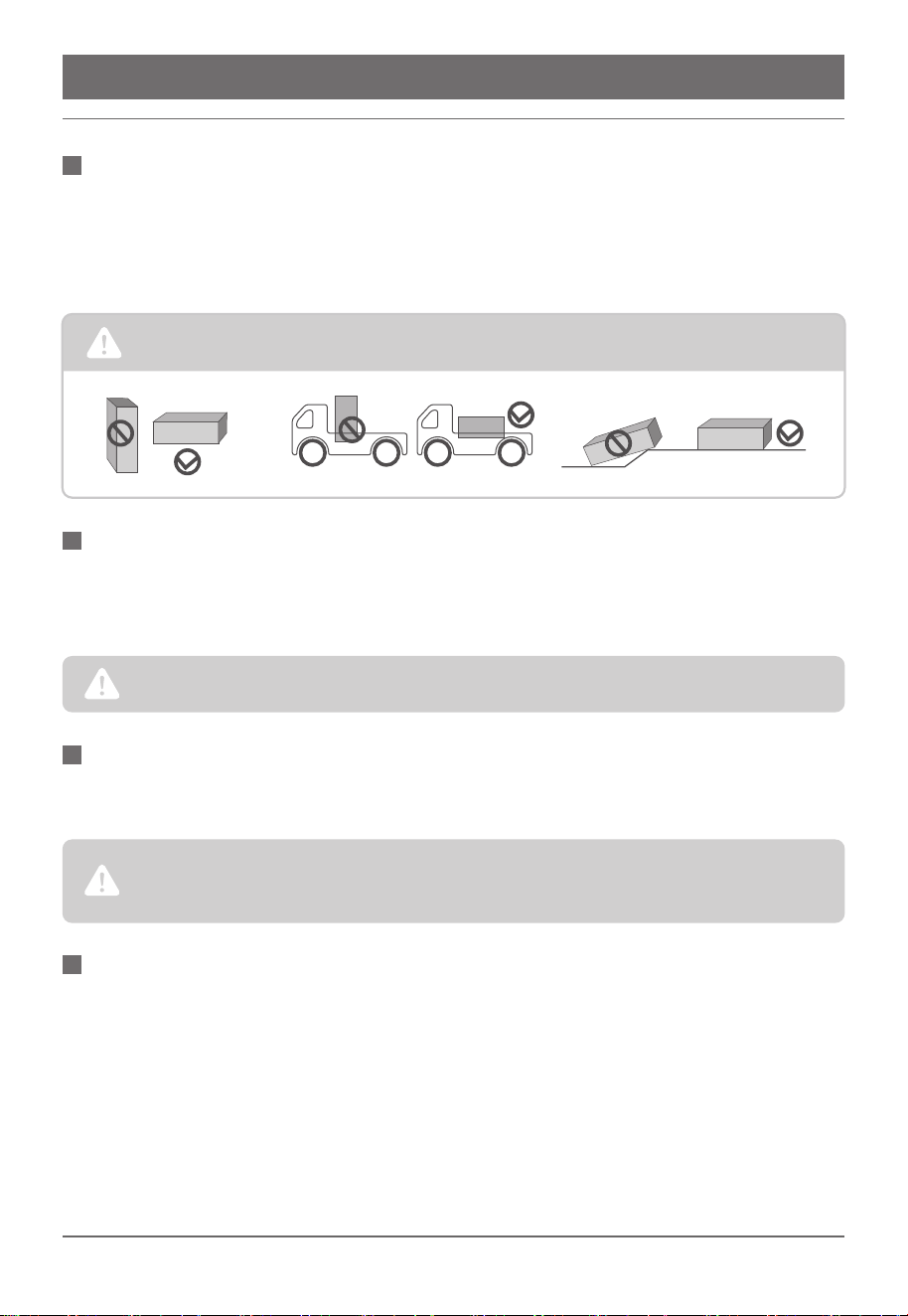
TRANSPORTATION
Do not lay down the refrigerator at any time.
To avoid affecting the refrigerate system, The maximum inclination angle should be less than 45° during delivery.
Even in summer, the temperature in the refrigerator can keep 1-2 hours after power outage.
Please do not put more food into the unit and do not open the door when power off. You can put
some ice with a container in the drawer if you had known about the outage.
POWER OUTAGE
An increase in the temperature of the refrigerator due to power outages or other failures can shorten the shelf life of
food and affect its quality.
lf the refrigerator will not be used for a long period of time, please unplug and cut off the power,
and clean the unit. Please keep the door open to avoid any bad odor created by the food debris.
POWER OFF
After unplugging the power cord, please wait for at least five minutes before plugging it back on. To extend the
lifespan of the product, avoid opening and closing the drawers too frequently.
If you want to dispose of this item, please properly disposed of or handed over to professionals for disposal. Do not
dispose of it casually to avoid harm to the environment or other hazards.
1.Cut off the power
2.Take out all the food inside the unit.
3.Clean the unit properly.
GO OUT FOR HOLIDAY
17/ 18
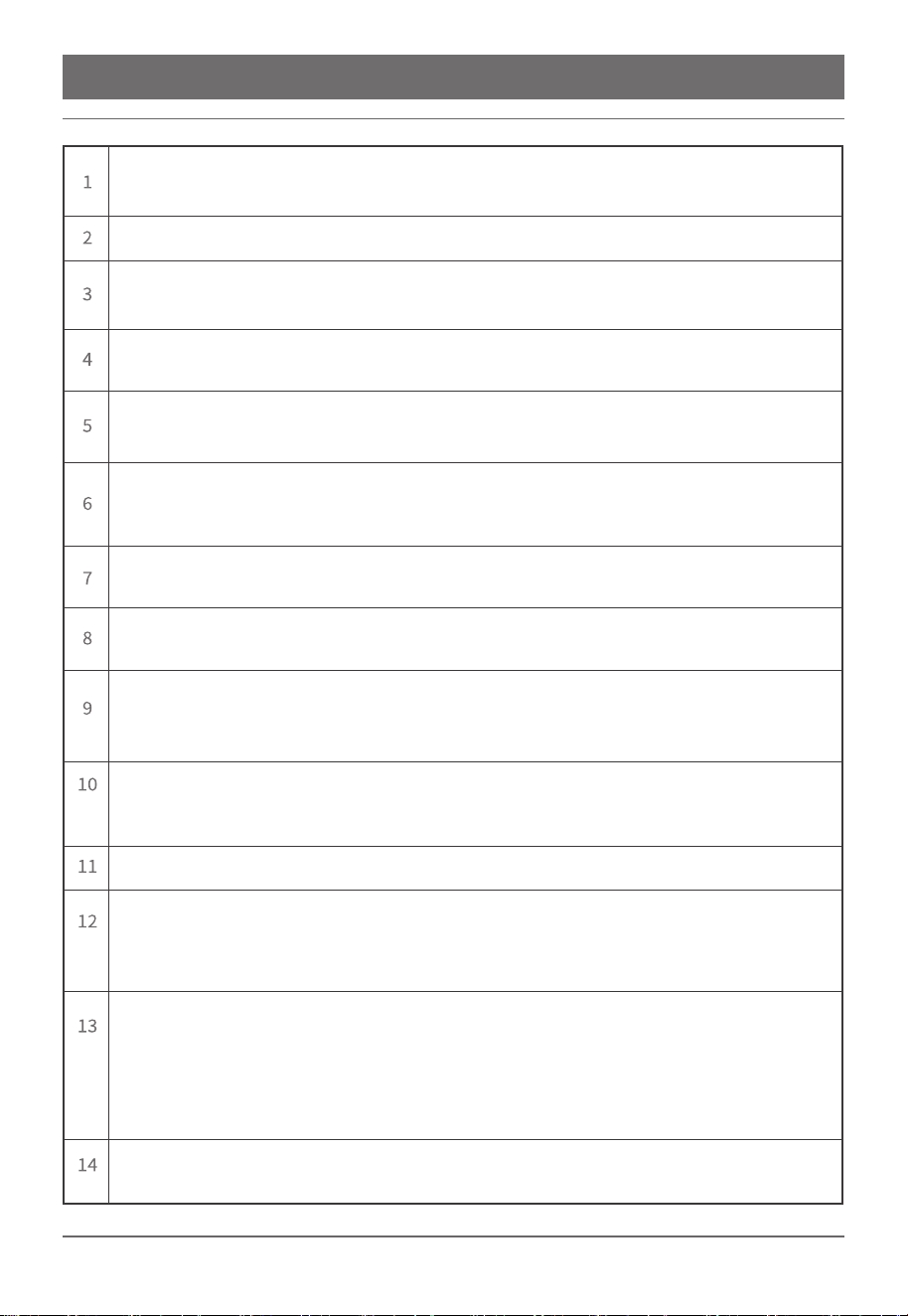
NON-FAILURE
Foggy condensation on the surface: In rainy season with high humidity, condensation may occur on
the surface of the refrigerator, which is not a malfunction, please dry it with a clean cloth.
“hissing”sound occur:This is the flow water sound of the refrigerate, which is normal phenomenon.
Compressor can not be started: The voltage is too low, please stop powering on the refrigerator and
wait the voltage to get back to normal.
Long boot time: In summer, it is normal to start the device for a long time due to the indoor high
temperature.
“Papa”sound: It is caused by thermal expansion and contraction of the inner tank and refrigeration
pipe.
"humming" sound: When the refrigerator is working, the compressor wiU produce "humming11
sound. If the device is not placed on a flat surface., vibration and noise will occur, just adjust the feet
of the device according to the manual.
Wireless charger can not work: The charger of mobile phone can not meet the standard. Please
make sure the phone charger meet the QI standard.
Delay charging of the wireless charger: Please check the phone to make sure it places on the right
area and remove the shell of the phone.
110 V plug can not work: Please make sure there is no water or foreign object in the socket. Check the
refrigerator whether is connected properly and whether the switch on the right socket is turning on or
not. If still doesn't work, please contact the after-sales service.
USB can no longer work: Check the refrigerator whether is connected properly and whether the switch
on the right socket is turning on or not. If still doesn't work, please contact the after-sales service.
Refrigerator bottom is wet: Please check if the outlet hole is blocked.
The compressor runs continuously for a long time: Please check if the setting temperature is too low,
the door of refrigerator is left opening for a longtime, hot food has put inside, the refrigerator is
exposed to direct sunlight or there is too much food in it to influence the air circulation.
Bluetooth connection failure: Please refer to the specifications or user manual of your audio source
device (phone or computer) to confirm whether the device supports A2DP. If so, please turn on
A2DP mode. The table, by default, would stay connected to the first successfully paired device. If
you wish to pair with a new device, you need to disconnect the Bluetooth mode of the first device
before connecting to a new one.
Speaker doesn't work: Check both the volume of the audio input device and the volume of the
speaker to see if they need to be turned up.
18 / 18
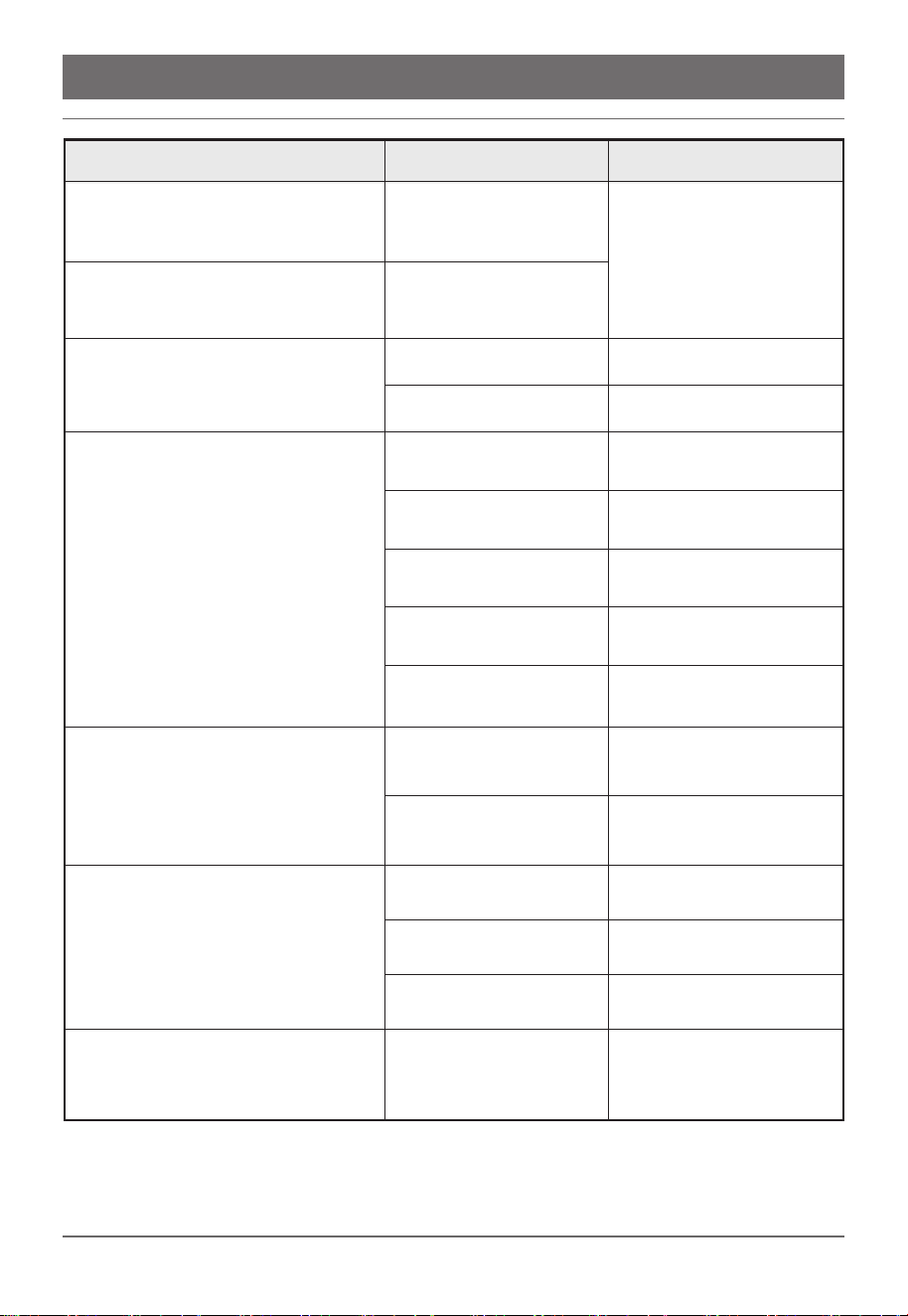
TROUBLE SHOOTING
Fault
Causes Solutions
Power Voltage is lower
than 90V.
Power voltage is higher
than120V
Leak
Blockage
Too much frost on
evaporator.
Opening the drawers
for a longtime.
Drawers are filled with
too many items.
Bad heat dissipation
of condenser
Bad heat dissipation
of condenser
Fuse is blown and the
power light is off.
Input controlling circuit has
fault and the
power light is off.
Machine places uneven.
Inner fastener is loose.
Collision between pipes.
Induced electricity
is leaking.
Stop powering on the
refrigerator and wait the
voltage to get
back to normal.
Professional inspection
is required.
Professional inspection
is required.
Defrost.
Do not open
drawers frequently.
Remove some of
the items inside.
Move to a ventilated area.
Professional inspection
is required.
Replace fuse.
Professional inspection
is required.
Adjust the feet of
the refrigerator.
Secure the fastener.
Separate the pipes.
Check the
earthing conductor.
Power light is on, compressor is
working but making
"humming" sound.
Compressor starts but stops after
about one minute, and then
starts and stops ongoing.
Compressor runs for a longtime,
but evaporator surface is frost free.
There is frost on the
surface but the
compressor is keep working.
The refrigerator doesn't
work and refrigerated.
Excessive noise
It can refrigerate but when touch the
surface, there is a slightly hemp and
the electroprobe test with a light bright.