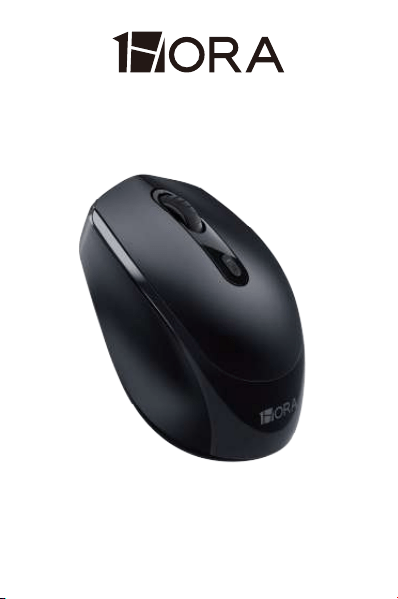
User Manual
MODEL:RAT001
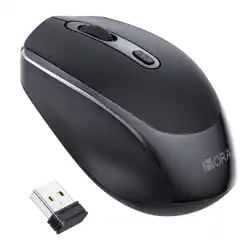
2.4GHz Mouse Wireless
※When the product is not used for a long time, it is necessary to
disconnect all power supplies of the product.
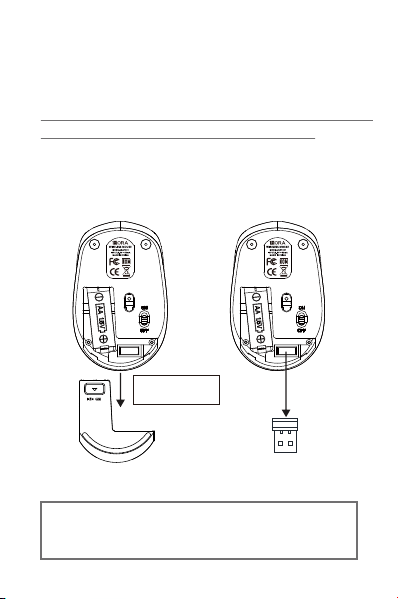
Remove the USB receiver from
the bottom of the mouse !
1.
2.
3.
Remove the USB receiver from the bottom of the mouse
and insert it into a USB port on your computer.
Operating Instructions:
Open the battery compartmen. Pull out the insulation
sticker and insert a 1.5V AA battery, ensuring correct
orientation.
Switch the power button on the bottom of the mouse to
the "ON" position to use (no pairing code required, plug
and play).
Press and hold
to open the lid.
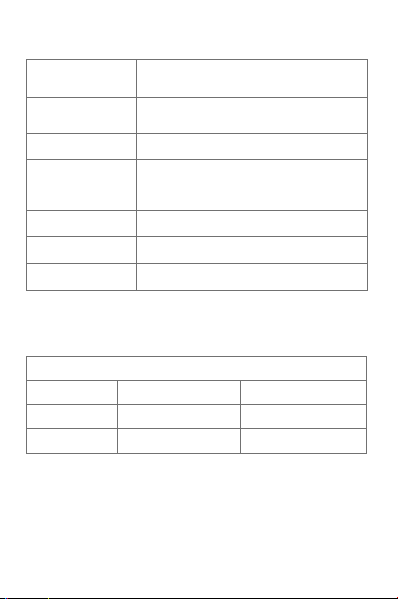
Technical Specifications
Model RAT001
REF RAT001
Dimensions 99.1×62.7×37.6mm
Weight About 54.1g (including receiver)
Number of Buttons 4 buttons
DPI Levels
800/1200 (predetermined) /1600
Input 1.5V⎓50mA
Transmission Distance 10 meters(No obstruction)
Compatible Systems
Windows 7, Windows 8, Windows 10,
Windows 11, Mac OS
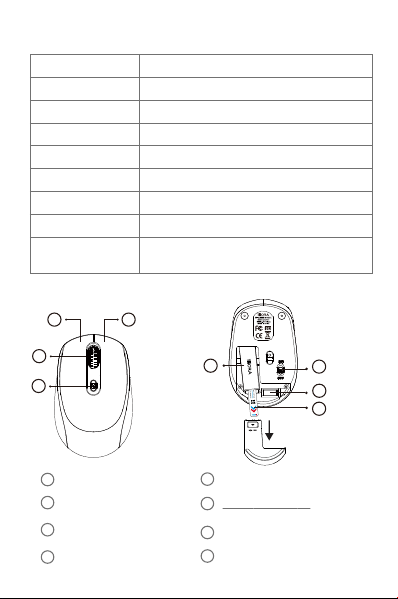
Mouse Component
Left Button
Scroll Wheel /
Middle Button
Right Button
DPI Switch
Battery Compartment
Power Switch
Pull out the insulation sticker
USB Receiver (Take it out)
1
3
2
4
5
7
8
6
1 2
3
4
5
7
6
8
+
-
Low Voltage Alarm
1x1.5 V AA battery required (included)
Scroll Wheel
DPI Switch
Power Switch
Battery Compartment
Receiver Compartment
Right Button
Left Button
Browse web and documents.
Adjusts the mouse pointer movement speed.
(When adjusting the DPI, please do not touch other buttons
on the display at the same time.)
Used for storing batteries.
Stores the receiver.
Turn on or off the power of the mouse.
The corresponding menu will pop up to help us execute
functions quickly after the right mouse button is pressed.
Single-click the left key, generally used to select an operation
object. Double-click the left key to start the application.
When the mouse stops working, it's recommended
to replace the battery.
Power Saving Mode (Sleep)
Level 1 Sleep
Level 2 Sleep
Power Saving Mode
Power Saving Mode & Wake Up
After the mouse stops
using for 3 second
After the mouse stops using
for 10+1 minutes
Move the mouse, press any
key, or scroll the wheel
Press any key,
or scroll the wheel
Enter Power
Saving Mode
Wake Up Method

Attention
1.Do not attempt to repair the device yourself.
2.Do not attempt to disassemble, open, repair, or
modify hardware devices or power supplies to avoid
electric motors or other dangers.
4.Clean with lint-free cloth only.
3.Do not look directly at the light beam at the bottom of
the mouse to avoid damage to eyesight.
5.Keep the product out of the reach of kids or pets.
6.We are not responsible for any safety accidents or
hidden dangers caused by improper use of batteries
and mice.

WARRANTY INFORMATION
TERMS
Jinxuan Electronics (Shenzhen) Co., Ltd.
A901, Building A, Galaxy WORLD, Bantian Avenue, Longgang District,
Shenzhen, China
Product: Brand: 1Hora
Date of purchase:
Reseller Name:
Reseller address: Phone:
Buyer address: Phone:
THIS WARRANTY IS NOT VALID UNDER THE
FOLLOWING CIRCUMSTANCES:
The warranty covers only the original parts of the equipment (original equipment
configuration) and the replacement and labor generated in the preparation
process.
1Hora is committed to providing quality products. Our reliability does not end with the
sales. 1Hora warrants this product against defects in material or workmanship. For 12
months from the original date of purchase.
1. - The warranty card is valid only if it is properly filled out and presented with a
proof of purchase consisting of an original invoice or sales note indicating the
date of purchase, the dealer's name, model number and serial number.
2. - The company undertakes to repair or replace the products and their defective
parts at no additional charge to the buyer.
A)The damage is due to causes beyond con
trol like lightning, abnormal voltage
acts of God, or while in transit.
B)The product has not been used according to the instructions provided in the
instruction manual.
C)The product has been installed or repaired by persons/agencies other than
authorized by the company. Jinxuan Electronics (Shenzhen) Co., Ltd.
Jinxuan Electronics (Shenzhen) Co., Ltd. shall not be liable for any loss, cost,
expense, inconvenience or damage that may result from misuse or inability to
use the product.