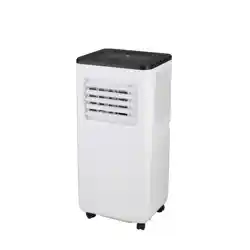
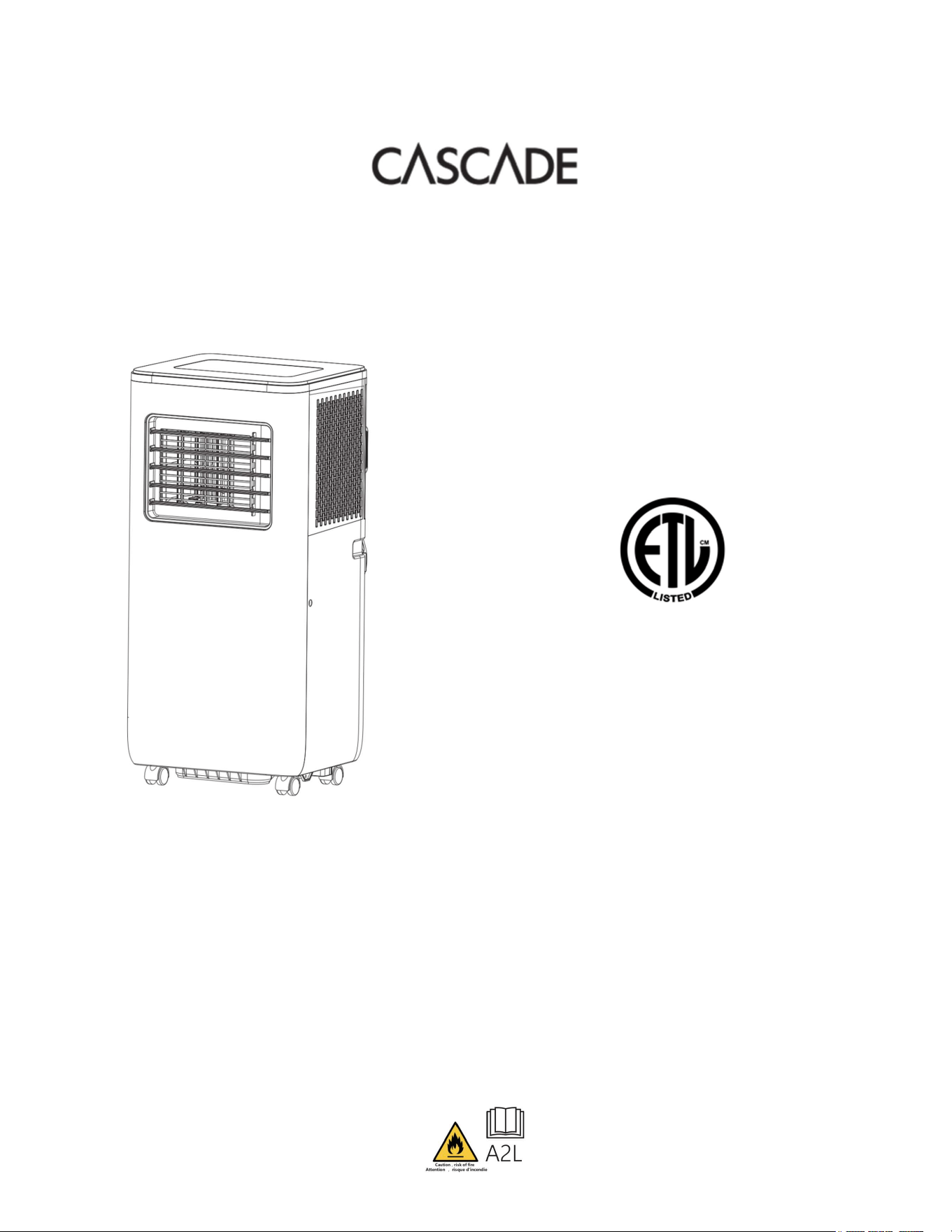
3-in-1 Portable Air Conditioner
5,000 BTU SACC / 8,000 BTU ASHRAE
Instruction Manual
Model: PCAC-25
IMPORTANT,
RETAIN
FOR
FUTURE
REFERENCE:
READ
CAREFULLY
|
FOR
HOUSEHOLD
USE
ONLY
Chesapeake International, Inc. and other trademarks are the property of the respective
owners. All other brand names and logos are registered trademarks of their respective
owners. Specifications are subject to change without notice.
Distributed by:
Chesapeake International, Inc
Fort Worth, TX
customerservice@chesapeakeinternationalinc.com
1-888-525-7969
MADE IN CHINA
880W
115V / 60Hz
Refrigerant: R32

CONTENTS
Safety Information..............................................................................................1-3
Identification of Parts..........................................................................................3-4
Control panel.........................................................................................................4
Operation............................................................................................................5-6
Remote Control...................................................................................................6-7
Installation & Setup............................................................................................8-10
Water Tank ...........................................................................................................11
Maintenance..........................................................................................................12
Troubleshooting................................................................................................13-14
Customer Service...................................................................................................15
1
Electrical Specifications
1. All wiring must comply with local and national electrical codes and be installed by a qualified electrician. If you have any questions
regarding the following instructions, contact a qualified electrician.
2.Check available power supply and resolve any wiring problems before installation and operation of this unit.
3. For your safety and protection, this unit is grounded through the power cord plug when plugged into a matching wall outlet. If you are
not sure whether the wall outlets in your home are properly grounded, please consult an electrician. If supply cord is damaged, it must be
replaced by the manufacturer, its service agent, or similarly qualified people to avoid a hazard.
Important Safety Instructions
WARNING
To reduce the risk of fire, electrical shock or injury when using your air conditioner, follow these basic precautions:
Plug into a grounded 3 prong outlet. This product must be used with a properly grounded wall receptacle.
Do not remove ground prong from the plug.
Do not use an adapter to operate the unit in a non-grounded outlet.
Always ensure effective grounding. Incorrect grounding may cause electric shock.
Do not use an extension cord, power strip, or outlet extender to operate the product.
Unplug air conditioner before servicing.
Use two or more people to move and install air conditioner.
Children should not play with the appliance. Cleaning and user maintenance shall not be done by children without supervision.
If the supply cord is damaged, it must be replaced by the manufacturer, its service agent or similarly qualified people in order to avoid a hazard.
The appliance shall be installed in accordance with national and local wiring regulations.
This appliance is not intended for use by people with reduced physical, sensory or mental capabilities, or lack of experience and knowledge, unless
they have been given supervision or instruction concerning use of the appliance by a person responsible for their safety.
Keep away from children.
Do not direct airflow straight into persons to avoid possible health hazard.
Do not aim airflow directly at people.
Do not attempt to operate the product, perform maintenance, or plug/unplug the product with wet hands.
Do not modify the product.
Do not use means to accelerate the defrosting process or to clean, other than those recommended by the manufacturer.
The appliance shall be stored in a room without continuously operating ignition sources, for example: open flames, an operating gas appliance or an
operating electric heater.
Be aware that refrigerants may not contain an odor. Do not pierce or burn product.
If the product malfunctions, do not repair it yourself. Please contact a professional organization or a professional trained maintenance personnel or a
service organization recommended by the supplier for repair.
–
the maximum refrigerant charge amount: 190g/6.7oz
Do not allow water to come into contact with the product.
DO NO OPERATE NEAR FLAMMABLE GAS OR COMBUSTIBLES
Do not attempt to take the product apart.
Do not operate the product if it is damaged.
Do no attempt to open the product while it is operating.
Always unplug unit when not in use, when moving from one location to another and before cleaning.
To disconnect, grasp the plug and pull it from the wall outlet.
DO NOT unplug by pulling on cord.
!

2
The use of attachments is not recommended nor sold by the manufacturer and may cause hazards.
Avoid contact with moving parts.
DO NOT operate any product with a damaged cord or plug, after a malfunction, or if dropped or damaged in any manner.
DO NOT operate the product in the presence of explosive and/ or flammable fumes.
DO NOT place the product or any parts near an open flame, cooking or other heating appliances.
Extreme caution is necessary when product is used by or near children and whenever the product is left operating and unattended.
This product is intended for household use only and not for commercial or industrial use.
DO NOT use outdoors.
Do not drink the water that is produced by the dehumidify function.
Always use on a dry, level surface.
Do not run cord under carpeting. Do not cover cord with throw rugs, runners, or similar coverings. Do not route cords under furniture or appliances.
Arrange cords away from traffic area and where it will not be tripped over
The appliance shall be stored in a room without a continuously operating ignition source (for example, open flames or an operating gas appliance) or
an ignition source (for example, an operating electric heater) close to the appliance. The appliance shall also be stored in a room without ignition
sources.
Discontinue use of this product if it emits unusual sounds or smells.
Thoroughly ventilate the room in which this product will operate prior to use if there is a gas leakage from another appliance.
Never obstruct the ventilation openings.
Do not speed up the defrosting process, and do not use any cleaning methods the manufacturer doesn’t recommend.
Flammable refrigerant R32 is used within air conditioner. Please follow the instructions carefully to handle, install, clean, and service the air
conditioner to avoid damage or hazard. Do not dispose of air conditioner in regular trash. Contact qualified agency for proper disposal.
FCC
STATEMENT
OF
COMPLIANCE
LCDI power supply cord and plug
This air conditioner is equipped with an LCDI (Leakage Current Detection and Interruption) power cord and plug that is required by UL. This
power supply cord contains state-of-the-art electronics that sense leakage current. If the cord is damaged and leakage occurs, power will be
disconnected from the unit.
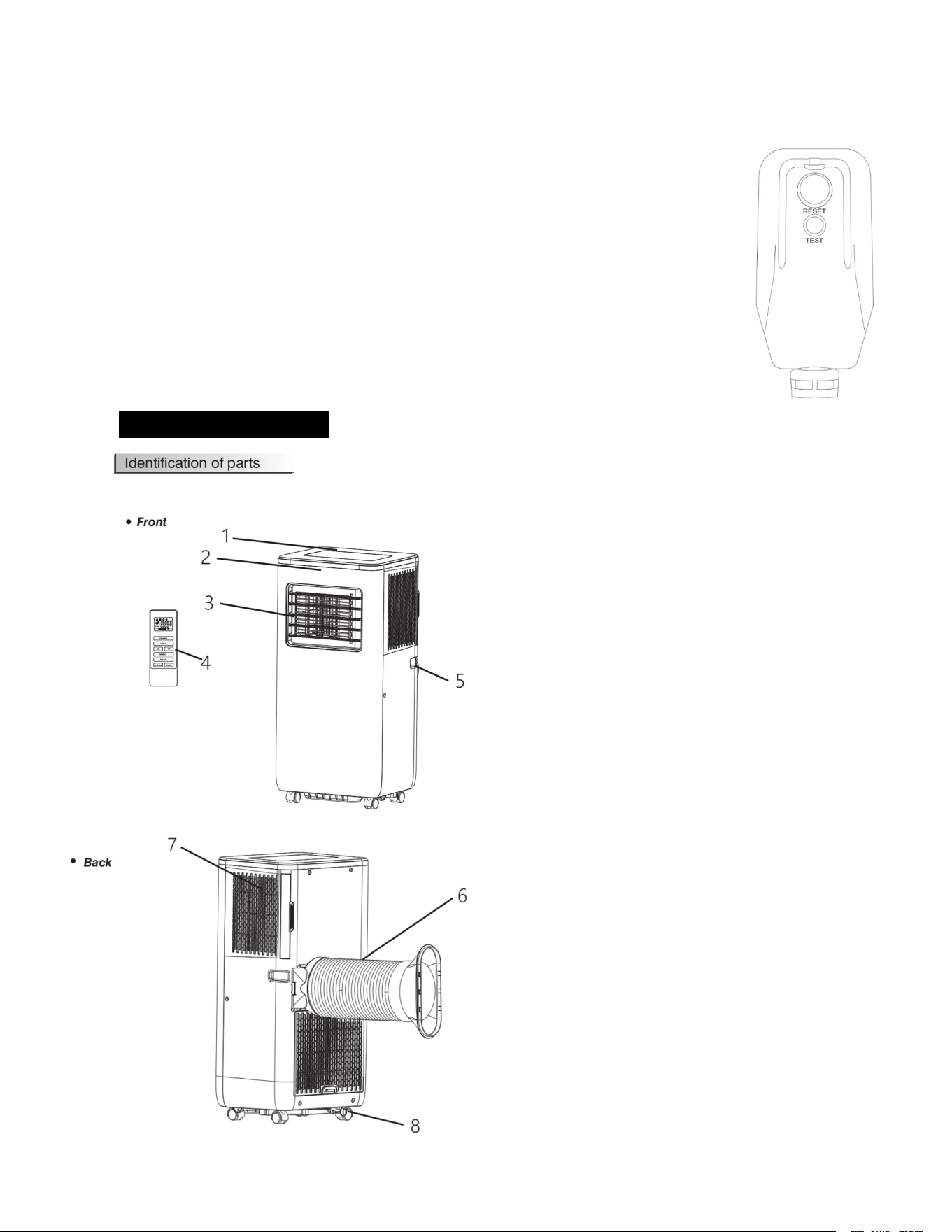
The test and reset buttons on the LCDI plug are used to check if the plug is functioning properly.
WARNING:
Test LCDI before each use.
To test the plug:
1. Plug power cord into a grounded 3-prong outlet.
2. Press RESET (on some units a green light will turn on).
3. Press the TEST button, the circuit should trip and cut all power to the air conditioner (on some units, a green light may turn on).
This
device complies with
part
15 of the
FCC
Rules.
Operation
is subject
to the following two conditions:
(1) this device
may
not cause
interference, and
(2) this device
must
accept
any
interference,
including
interference that
may cause
undesired
operation
.
Note: This equipment
has
been tested
and found to
comply
with the
limits for a Class
B digital
device,
pursuant to
Part
15 of the
FCC
rules
and
Industry
Canada
ICES-003. These
limits are designed to
provide
reasonable
protection against
harmful
interference when the equipment
is operated
in a
residential
installation. This equipment generates
uses
and can
radiate
radio frequency energy and,
if
not
installed and
used
in
accordance
with the
instructions,
may cause
harmful
interference to
radio
communications.
However, there
is
no
guarantee
that interference will
not occur in a particular installation. If
this equipment does cause
harmful
interference to
radio or
television
reception, which can
be determined
by turning the
equipment
off
and on, the
user
is encouraged to try to
correct
the
interference
by one
or
more of the following
measures:
• Reorient or relocate the receiving antenna.
• Increase the
separation
between the
equipment
and
receiver.
• Connect the equipment into an outlet on a circuit differ
ent
from that to which the
receiver
is connected.
• Consult the
dealer
or
an
experienced
radio/TV technician
for
help.
Note: This
device complies with
part
15 of the
FCC
rules
and
Industry
Canada
ICES-003. Operation
is subject to the following
two conditions:
(1)
This device
may
not cause
harmful
interfer
ence,
and
(2) this
device
must
accept
any
interference
received,
including
interference that
may cause
undesired operation.
3
4. Press the RESET button for use. You will hear a click, and the A/C is ready for use.
5. The power supply cord must be replaced if it fails to trip when the TEST button is pressed and the unit fails to reset.
NOTE:
Do not use this device to turn the unit on or off.
Always make sure the reset button is pushed in for correct operation.
WARNING:
If the LCDI fails to reset when the test button is pushed, discontinue use of the product.
If power supply cord is damaged, it cannot be repaired.
WARNING - RISK OF FIRE
It is important that the plug fits tightly into the wall outlet.
If the plug does not fit securely and appears loose, it should not be used.
Have a licensed electrician replace the receptacle if the wall outlet is damaged or loose.
Identification of Parts:
1. Control Panel
2. Signal Receptor
3. Cold air outlet
4. Remote Controller
5. Carry handle
6. Exhaust duct
7. Evaporator inlet
8. Drain
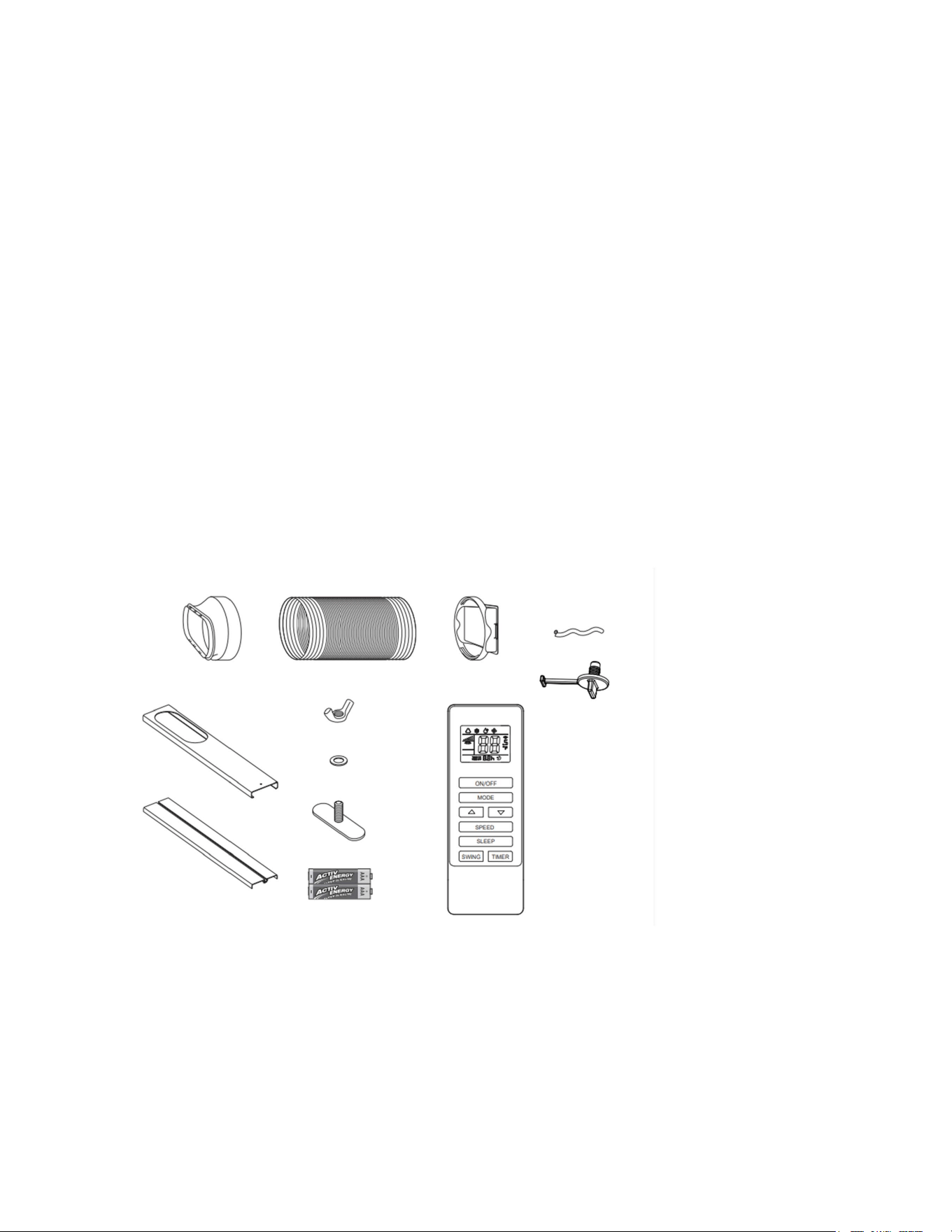
4
9. Window exhaust hose
connector
10. Exhaust hose
11. Unit exhaust hose
connector
12. Drain hose
13. Drain plug
14. Window kit front
panel
15. Window kit back
panel
16. Lock nut
17. Washer
9
10
11
12
13
14
15
16
17
18
19
5
OPERATION:
WARNING: The venting system must be installed before operating the product. See installation and
setup on pages 8-10.
1.Turn the product ON
- Plug the product into a wall outlet. The product will beep after being plugged in and receiving commands from the remote
control or the control panel buttons.
-
Press the "
" power button to turn the product ON.
* The LED display will show the room temperature, and the product will begin to operate in Automatic Mode.
2. Select operating mode
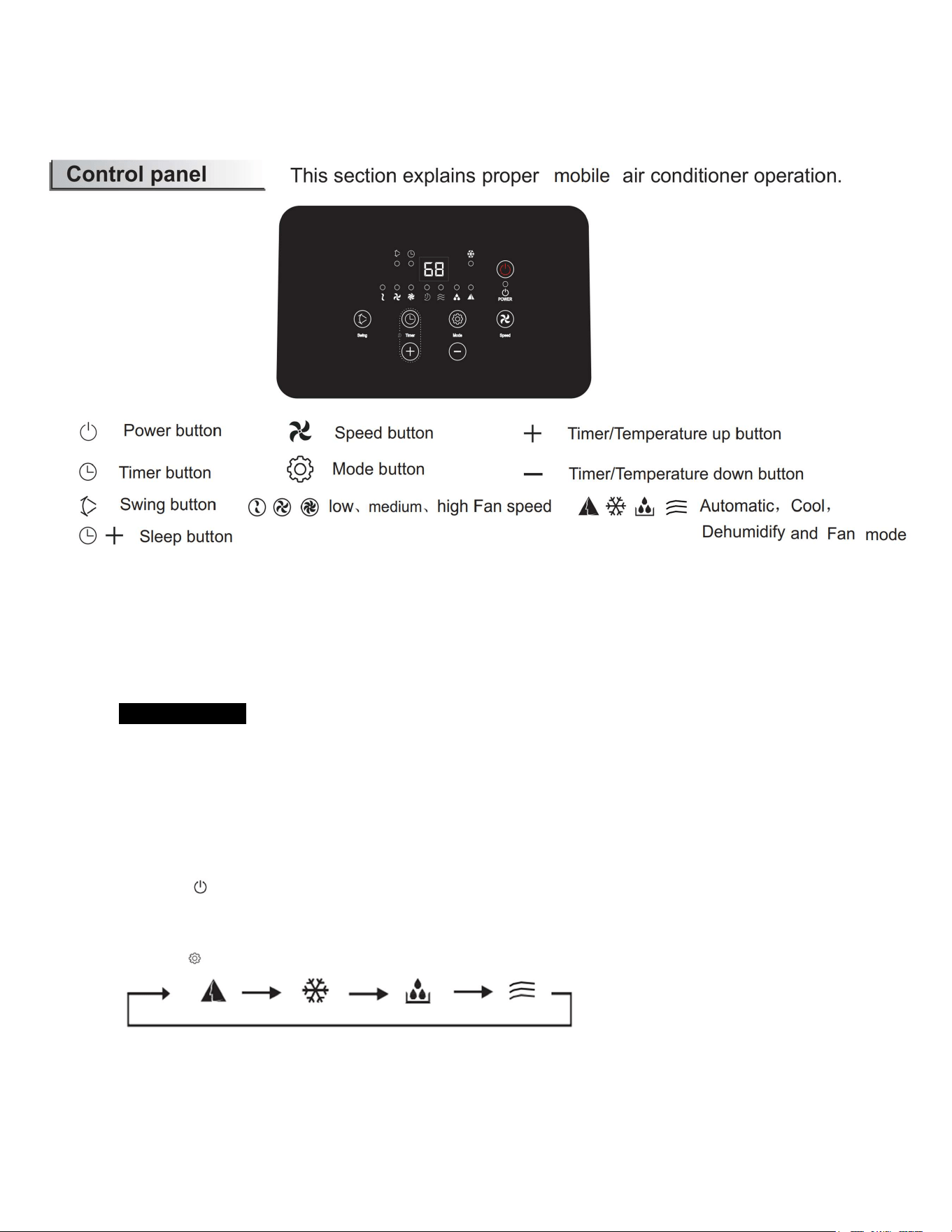
Press the " " button to select the desired mode:
3. Adjust Temperature – Cooling Mode Only
Press the “+” button or “–” button on the control panel or remote control to select the desired
room temperature. Adjustment range: 59-88 °F (15-31 °C).
* The LED display will show the target temperature for 5 seconds and then display the ambient room temperature.
6
4. Adjust Fan Speed
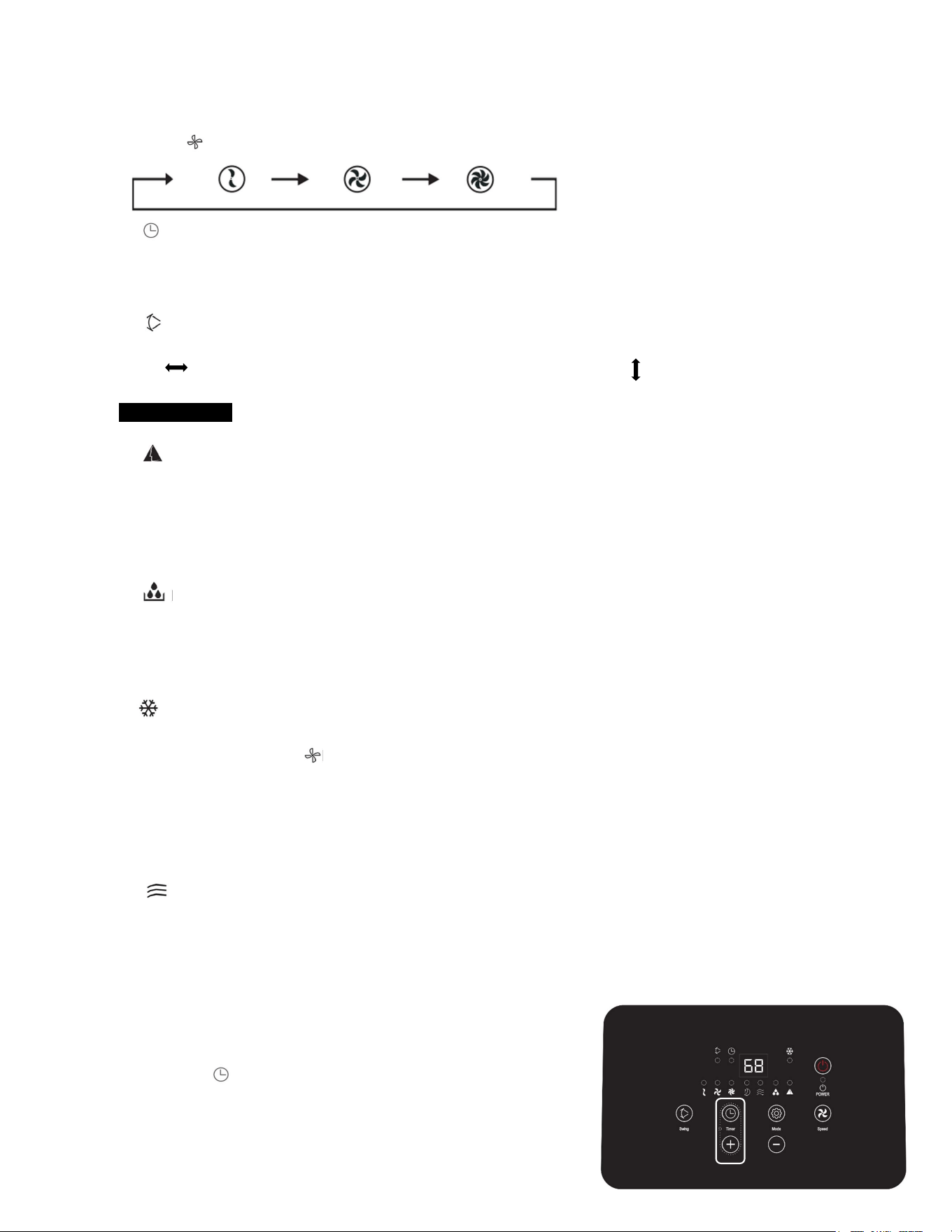
Press the " " button to select a desired fan speed shown below:
5. Timer
Press this button to set a timed shut off.
Press the “+” button or “–” button to select a timer (1-24 hours).
Press the “+” button or “–” button to “0” to cancel the timer.
6. Swing
Press this button to turn on the automatic vertical louvers behind the front air vents to gradually direct the air flow from side
to side . The front air vents can be manually adjusted to direct airflow up and down.
MODE GUIDE
7. Auto Mode
1) Once the auto mode is selected, the indoor temperature sensor operates automatically to select the desired
operation mode with “COOL” or “FAN” Mode.
2) When the ambient room temperature
≥
75.2
℉
(24
℃
), the product operates in COOL Mode.
3) When the ambient room temperature
<
75.2
℉
(24
℃
), the product operates in FAN Mode.
8. Dehumidifying Mode
1) When the Dehumidifying Mode is selected, the fan will only operate at low speed.
2) The compressor and the fan will stop after running for 8 mins, then run again after 6mins. This cycle will
continue until a new mode is selected, the unit is powered off, or the water tank is full.
9. Cooling Mode
1) Once Cooling Mode is selected, use the +/- buttons to select the desired temperature. Then, select the
desired fan speed using the button.
2) When the ambient room temperature is higher than set temperature, the cooling compressor will turn on.
3) When the room temperature is lower than set temperature, the cooling compressor will turn off, and the fan
will operate at original set speed. The cooling compressor will automatically turn on/off to maintain the set
temperature.
10. Fan Mode
1) The fan will run at the set speed – the cooling compressor does not turn on when the product is operating
in fan mode.
2) The adjustable temperature hold setting will not work while the product is in fan mode.
11. Sleep Mode
1) The sleep mode can only be used together with the cooling mode.
2) To activate the sleep mode on the control panel, press and hold the
timer button and the + button at the same time for 3 seconds. To
activate the sleep mode on the remote control, press the “sleep” button
Low
Medium
High
7
The sleep mode indicator will light up.
The set temperature will increase by 2
℉
after one hour.
The set temperature will increase another 2
℉
after two hours.
The product will stop operating after 6 hours.
NOTICE:
This product’s main control board has a memory function. When the product is turned off after it has been
running, the main control board will remember the last working mode. When you turn the unit on again, it will
resume operating under the previous mode.
(This condition is not available when the unit is in automatic “ ” mode)
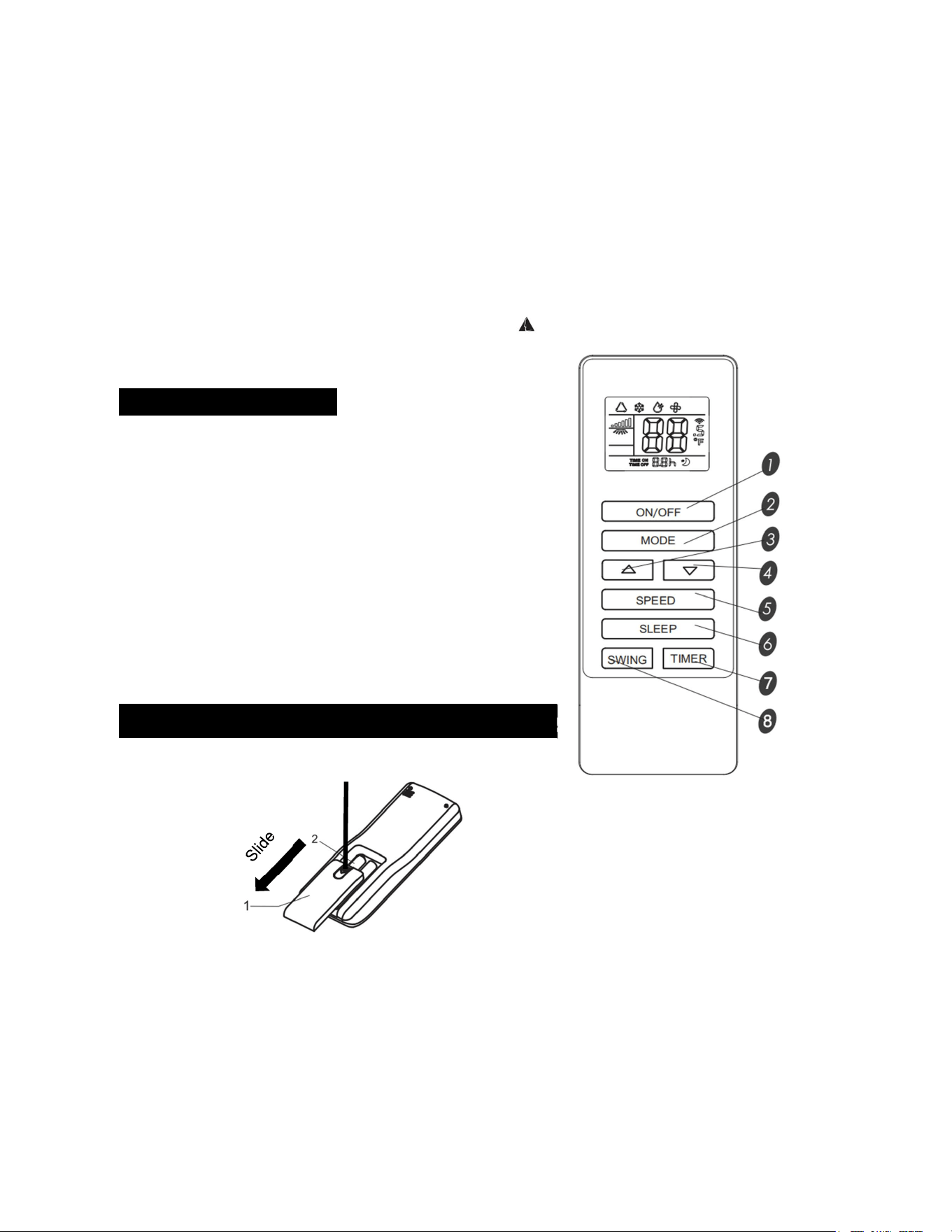
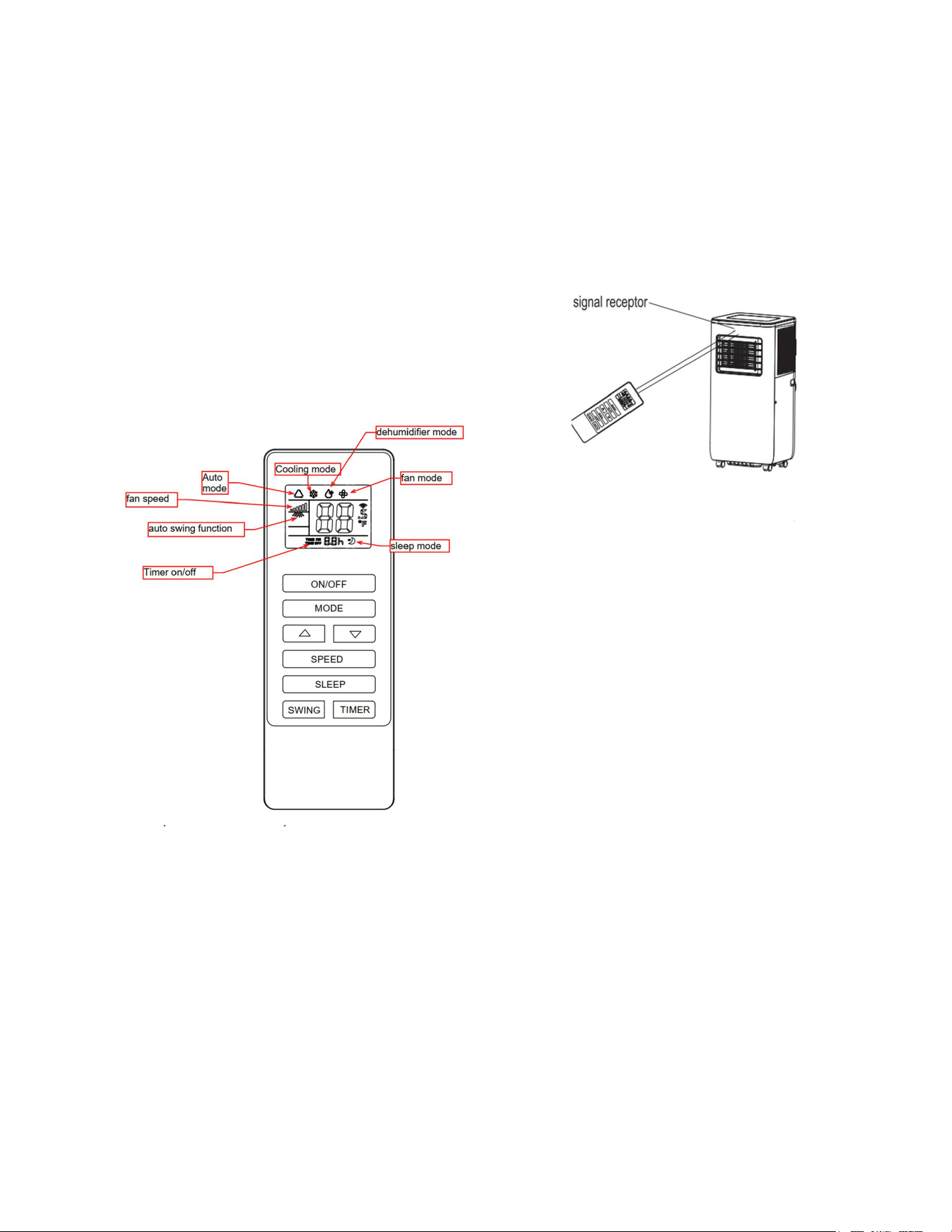
Remote Control Guide:
1. Power button: Press to turn on/off the device
2. Mode button: Press to select the operation mode
¾ - Increase/Decrease buttons: Press to adjust room
temperature and the timer
5. Speed button: Used to select fan speed
6. Sleep button: Press to set or cancel sleep mode
7. Timer button: Press to set automatic on or off
8. Swing button: Used for automatic side to side air disbursement
How to install batteries in the remote control:
Inserting batteries
1. Open the battery compartment door by pressing down on the top of the battery compartment door and
sliding the door towards the bottom of the remote.
2. Install the 2 AAA batteries according to the correct polarity.
3. Replace the battery compartment door.
Notices:
Press
8
1. Ensure the batteries are installed correctly according to polarity: + / -
2. Do not mix old and new batteries, different brands or types of batteries such as alkaline, carbon-zinc, or
rechargeable batteries.
3. If the remote control will not be used for an extended period, remove the batteries from the remote.
4. Batteries should be recycled or disposed of as per state and local guidelines.
How to operate the product using the remote control:
To operate the air conditioner, aim the remote controller at
the signal receptor. The remote controller will operate the
air conditioner at distance of up to 16.4 feet when pointing
at signal receptor of the air conditioner
Installation and Set Up:
Notices:
》
The product should be placed on a firm and smooth surface to minimize noise and vibration.
》
Use the castors to aid placement. Do not roll the product over other objects, and protect wooden
floors to avoid damage.
》
The product must be placed within the reach of a properly rated and grounded outlet.
》
Make sure the side air inlet , rear air inlet, front air outlet and rear air outlet are not blocked.
》
Keep the product away from walls, furniture and curtains with a clearance of at least 12 inches
(30 cm) on all sides.
》
The window kit is designed to fit most standard vertical and horizontal sliding sash windows.
》
Make sure that the drain plug is fully inserted into the water drain before beginning operation
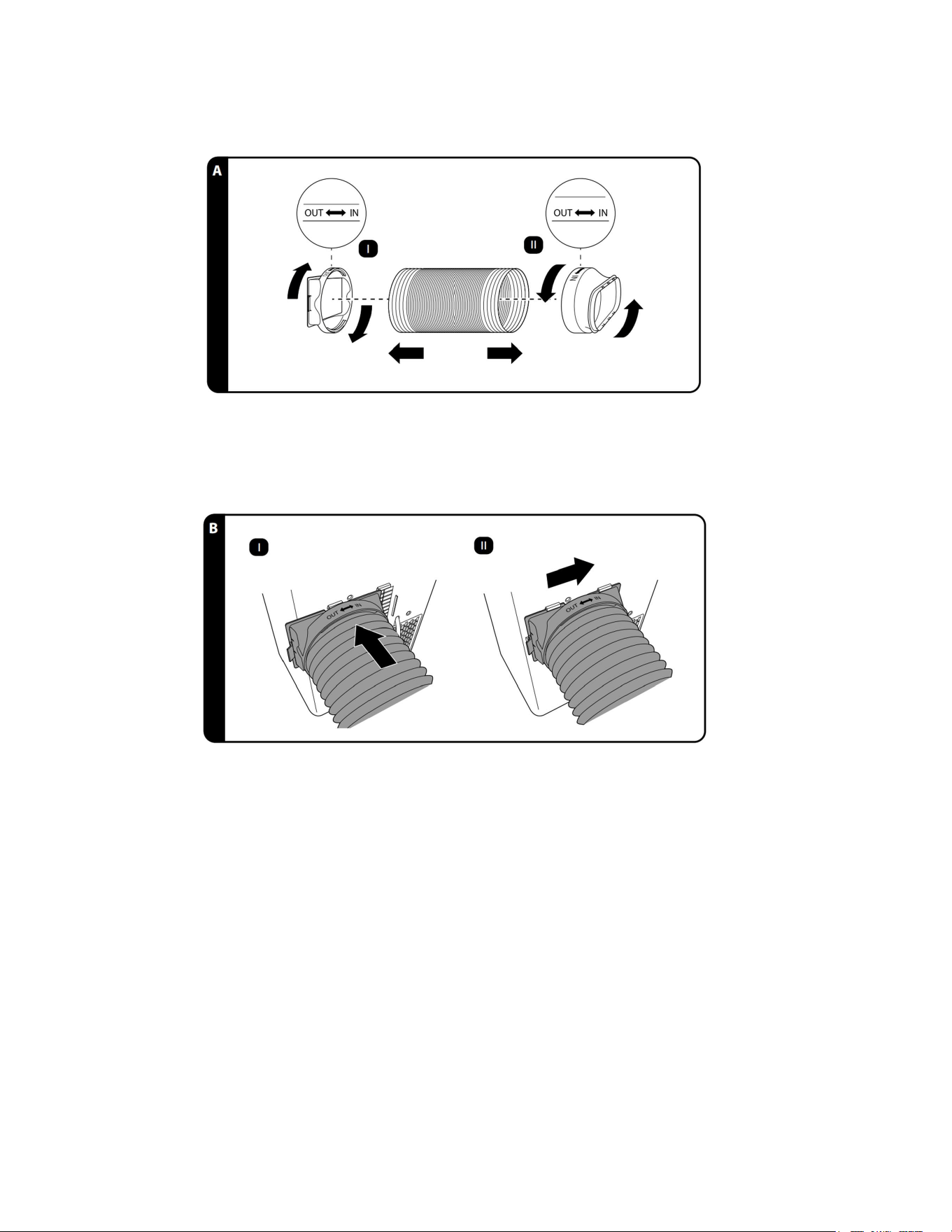
1. Attach the unit connector to the exhaust hose. To do so, gently pull out and extend one end of the exhaust hose.
Place the extended exhaust hose into the unit connector. Rotate the unit connector counterclockwise, in the same
direction as the “IN” arrow, to screw the unit connector onto the end of the exhaust hose (see step I in Fig. A).
9
2. Repeat the above step with the window connector to attach it to the other end of the exhaust hose (see step II in Fig.
A).
3. Attach the unit connector to the rear air outlet. To do so, align the notches at the top and bottom of the unit connector
with the left brackets of the rear air outlet (see step I in Fig. B). Then slide the unit connector into the right brackets of the
rear air outlet (see step II in Fig. B). A click sound will be heard when the tab on the left side of the unit connector locks
into place.
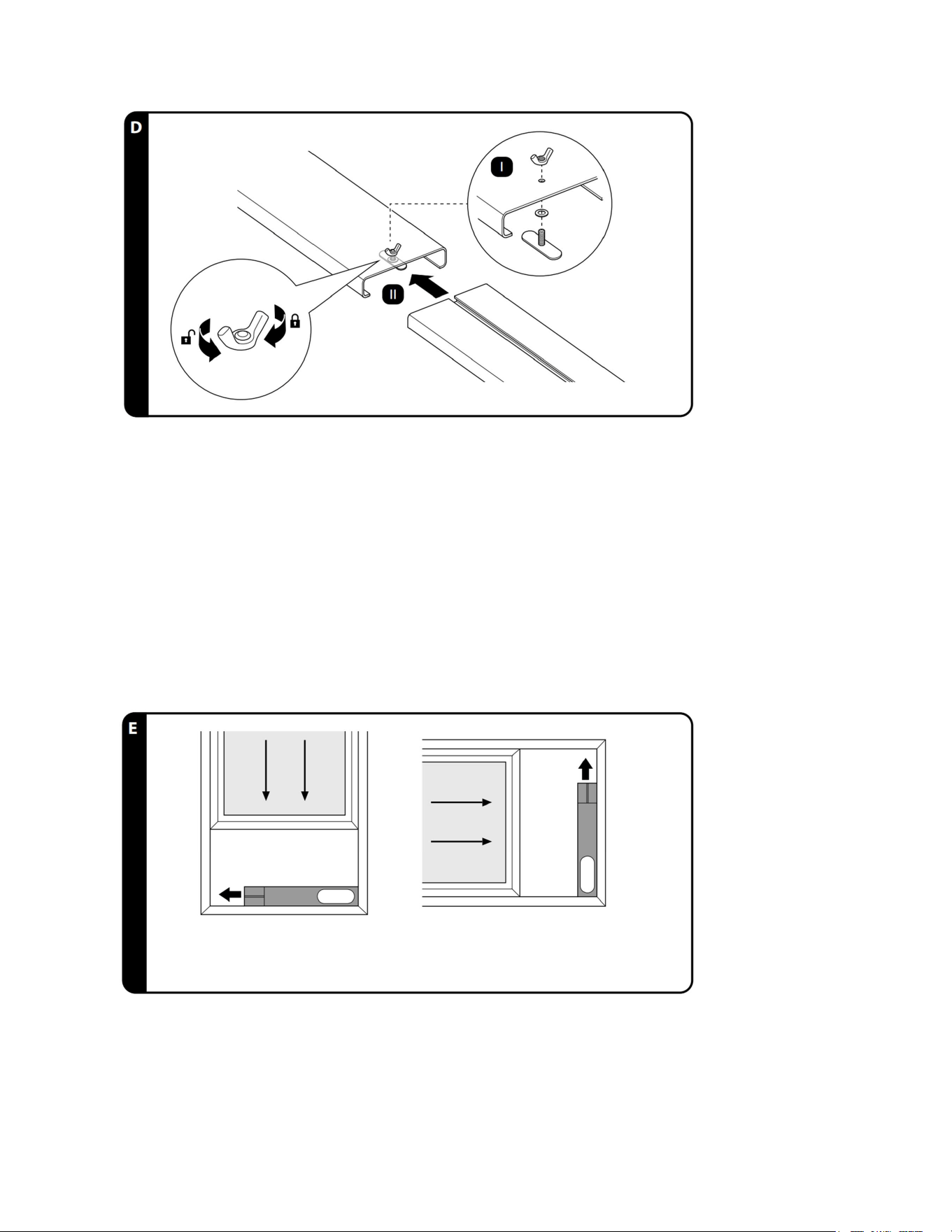
4. Feed the bolt of the slider through the washer and then through the underside of the window kit front panel. Loosely
tighten the locking nut to the bolt (see step I in Fig. D).
5. Align the slider with the track on the window kit back panel, then slide the 2 panels of the window kit together (see step
II in Fig. D).
10
Fully tightening the locking nut clockwise locks the 2 panels of the window kit to fix them in place.
Turning the locking nut counterclockwise unlocks the 2 panels.
6. Open the window that will be used for venting. Place the window kit on the windowsill. Slide the window kit front panel
and the window kit back panel apart or together to fit the width or height of the window frame (see Fig. E). Adjustment
range of the window kit: 24.4 - 47.2 inches (62–120 cm). If the opening of the window is smaller than 24.4” inches, the
venting panels can be cut to the desired length – do not cut off the venting outlet.
7. After fitting the window kit to the window frame, lock the 2 panels of the window kit in place by tightening the locking
nut clockwise.
8. Close the window on the window kit to securely fix the window kit in place (see Fig. E).
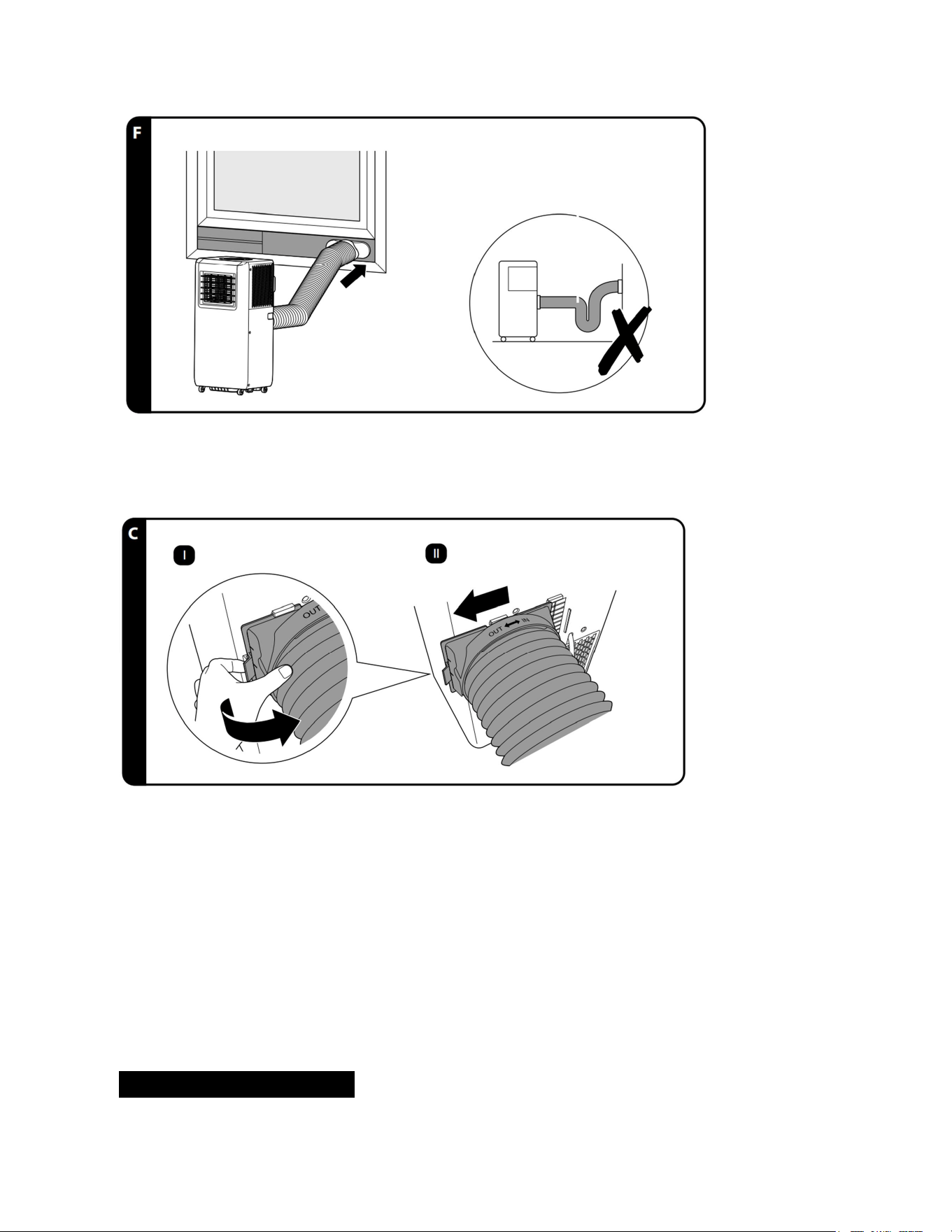
9. Push the window connector into the opening of the window kit front panel to connect them together (see Fig. F). For
proper function, do not arrange the exhaust hose into an “U” bend as this will obstruct the air flow (see Fig. F).
Installation is complete.
11
10. To remove the unit connector from the rear air outlet, lift the tab on the left side of the unit connector to unlock it, and
then slide the unit connector to the left side until it comes off (see step I and II in Fig. C)
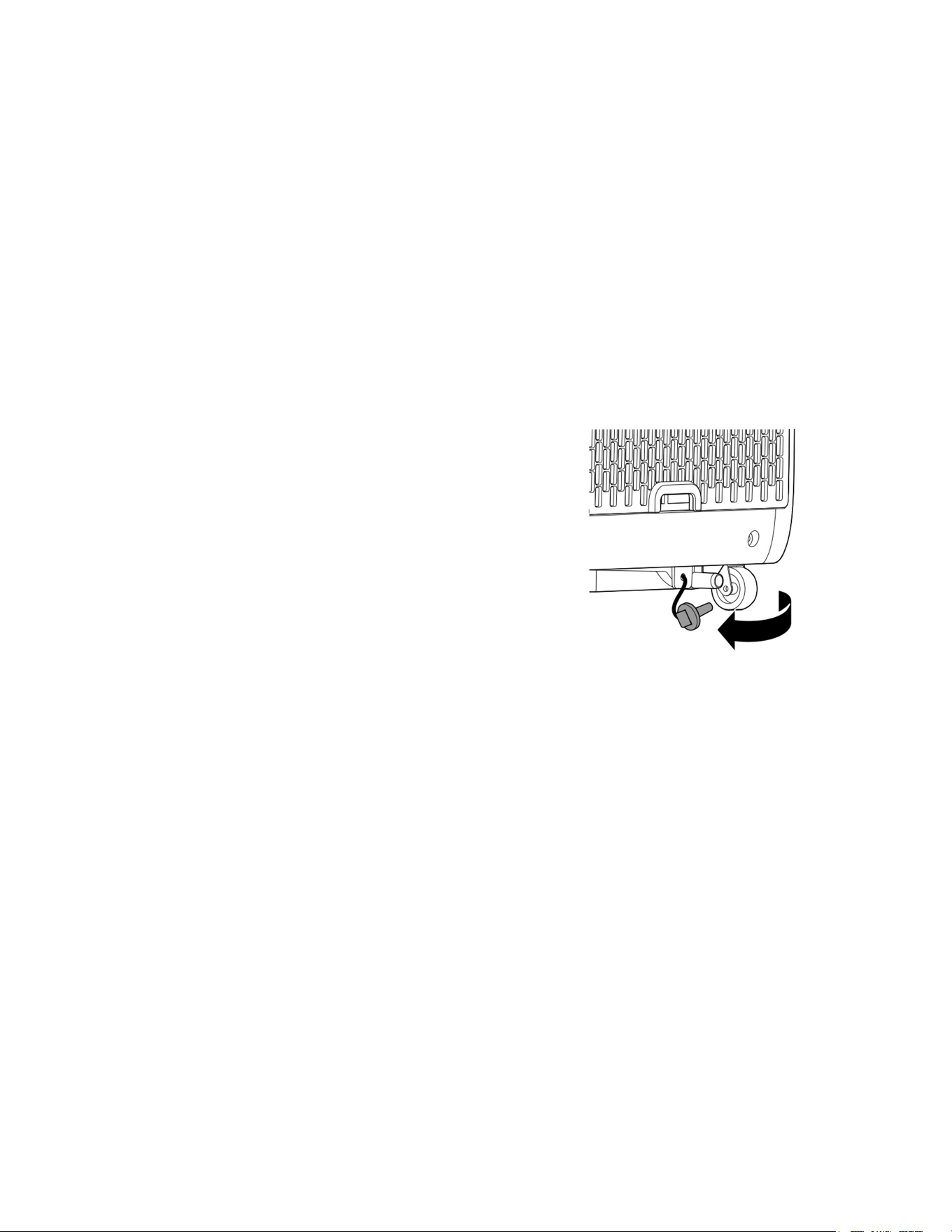
Draining the Water Tank:
12
* Draining the internal water tank
During cooling mode and dehumidifying mode, water from condensation collects in the internal water tank.
Under ideal operating conditions, this water is evaporated and removed via the exhaust hose. However, the
internal water tank may become full in one of the situations below:
1) When the room temperature is low and the indoor humidity is high, the product may not be able to
evaporate some of the moisture fast enough. When this happens, the water will accumulate in the internal
water tank.
2) When the product is used in the dehumidifying mode to dehumidify the air in the room, the extracted water
will accumulate in the internal water tank.
When the internal water tank is full, the error code “E4” will light up in the control panel display, and the
product will stop operation. Proceed as follows to drain the water tank:
1. Turn the product off and unplug the power cord.
2. Remove the unit connector from the rear air outlet to
detach the exhaust hose from the product.
3. Move the product to a location where water can be
allowed to drain onto the ground or down a floor drain.
4. Remove the drain plug at the rear of the product. Let the
water flow out until there is no more water.
5. Properly replace the drain plug. The product will resume normal operation after reconnecting the power
cord and exhaust hose.
13
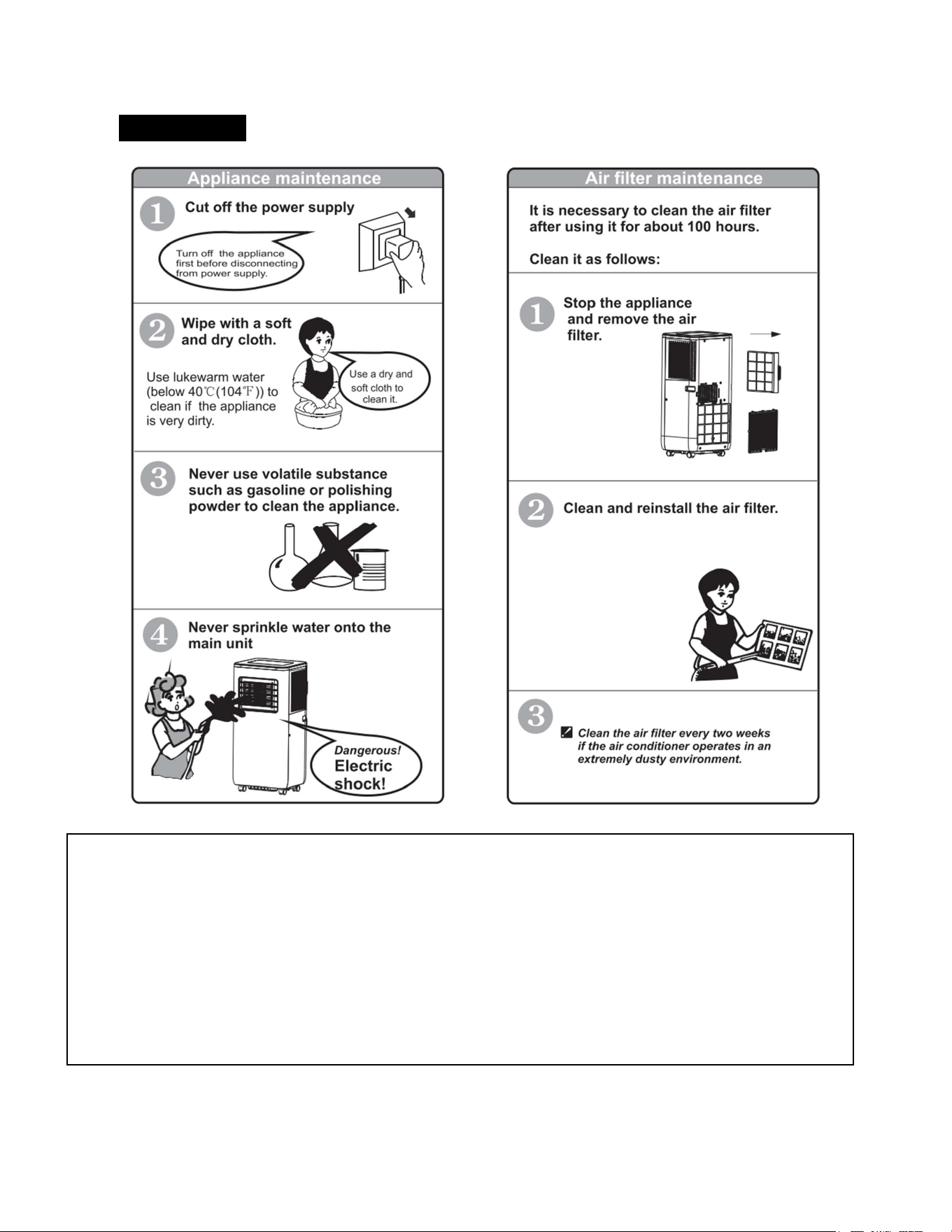
Maintenance:
Clean the air filter by
vacuuming it or gently
washing it with water. Allow
the air filter to fully dry
before reinstalling it in the
product.
Storing the product:
If the product will not be used for an extended period, be sure to drain the water tank and
allow the tank to fully dry. Do not reinstall the drain plug in the water outlet until the tank has
full dried. Do not operate the cool or dehumidifier functions when the water tank is drying.
Operate the product on the fan only setting for a few hours to help dry the product before
storing.
When fully dried, turn the product off and remove the plug from the wall outlet.
Remove the batteries from the remote control.
Disconnect the exhaust hose from the product and the window, collapse the hose and store.

14
Troubleshooting Guide:
Problem
Possible
Cause
Solutions
Product will not turn on
Power supply failure:
Not plugged properly
LCDI wall plug trip
Plug or socket damaged
1.
Make sure that the wall plug is fully
inserted into the wall outlet
2.
Reset the LCDI wall plug
3.
If the unit still does not turn on,
try operating the unit using a
different wall outlet. If the LCDI
wall plug continues to trip. Do
not use the product and contact
customer service.
Product suddenly turns off
Timer function activated and
turned off after set time expired.
Set temperature reached
Restart the unit if the timer expires. If
the set temperature was achieved
wait
for auto setting to turn the cooling
feature back on once the ambient
temperature rises above the set
temperature.
No cold air when COOLING
mode is turned on.
1.
Room temperature is lower
than set temperature.
2.
Product has entered anti-
frost protection.
1. This is normal; the product will
auto-switch off while the room
temperature is higher than the set
temperature.
2. The product will auto switch on
after anti-frost protection is
finished.
LED displays failure code
“E4”
Water tank full warning.
Drain the water tank and resume
operation.
LED displays failure code “E0”
Room temperature sensor fails or
damaged.
Contact customer service for assistance.

15
Servicing of this product should be completed by a qualified technician. If service is required, the
following safety instructions should be followed.
Safety Instructions during Servicing
1. This manual contains specific information about the required qualification of the working personnel for maintenance, service and repair operations. Every
working procedure that affects safety means shall only be carried out by competent persons.
2. Prior to beginning work on systems containing FLAMMABLE REFRIGERANTS, safety checks are necessary to ensure that the risk of ignition is minimized.
3. Work shall be undertaken under a controlled procedure to minimize the risk of flammable gas or vapor being present while the work is being performed.
4. All maintenance staff and others working in the local area shall be instructed on the nature of work being carried out. Work in confined spaces shall be
avoided.
5. The area shall be checked with an appropriate refrigerant detector prior to and during work, to ensure the technician is aware of potentially toxic or
flammable atmospheres. Ensure that the leak detection equipment being used is suitable for use with all applicable refrigerants, i.e. non-sparking, adequately
sealed or intrinsically safe.
6. If any hot work is to be conducted on the refrigerating equipment or any associated parts, appropriate fire extinguishing equipment shall be available to hand.
Have a dry powder or CO2 fire extinguisher adjacent to the charging area.
7. No person carrying out work in relation to a REFRIGERATING SYSTEM which involves exposing any pipe work shall use any sources of ignition in such a
manner that it may lead to the risk of fire or explosion. All possible ignition sources, including cigarette smoking, should be kept sufficiently far away from the site
of installation, repairing, removing and disposal, during which refrigerant can possibly be released to the surrounding space. Prior to work taking place, the area
around the equipment is to be surveyed to make sure that there are no flammable hazards or ignition risks. “No Smoking” signs shall be displayed.
8. Ensure that the area is in the open or that it is adequately ventilated before breaking into the system or conducting any hot work. A degree of ventilation shall
continue during the period that the work is carried out. The ventilation should safely disperse any released refrigerant and preferably expel it externally into the
atmosphere.
9. Repair and maintenance to electrical components shall include initial safety checks and component inspection procedures. If a fault exists that could
compromise safety, then no electrical supply shall be connected to the circuit until it is satisfactorily dealt with. If the fault cannot be corrected immediately but it is
necessary to continue operation, an adequate temporary solution shall be used. This shall be reported to the owner of the equipment so all parties are advised
Initial safety checks should include:
- that capacitors are discharged: this shall be done in a safe manner to avoid possibility of sparking.
- that no live electrical components and wiring are exposed while charging, recovering or purging the system.
- that the unit is placed on an even surface
10. During repairs to sealed components, all electrical supplies shall be disconnected from equipment being worked upon prior to any removal of sealed covers,
etc. If it is absolutely necessary to have an electrical supply to equipment during service, then a permanently operating form of leak detection shall be located at
the most critical point to warn of a potentially hazardous situation.
11. Particular attention shall be paid to the following to ensure that by working on electrical components the casing is not altered in such a way that the level of
protection is affected. This shall include damage to cables, excessive number of connections, terminals not made to original specification, damage to seals,
incorrect fitting of glands, etc. Ensure that the apparatus is mounted securely. Ensure that seals or sealing materials have not degraded to the point that they no
longer serve the purpose of preventing the ingress of flammable atmospheres. Replacement parts shall be in accordance with the manufacturer’s specifications.
12. Do not apply any permanent inductive or capacitance loads to the circuit without ensuring that will not exceed the permissible voltage and current permitted
for the equipment in use.
13. Intrinsically safe components are the only types that can be worked on while live in the prese of a flammable atmosphere. The test apparatus shall be at the
correct rating.
14. Replace components only with parts specified by the manufacturer. Other parts may result in the ignition of refrigerant in the atmosphere from a leak.
15. Check that cabling will not be subject to wear, corrosion, excessive pressure, vibration, sharp edges or any other adverse environmental effects. The check
shall also take into account the effects of aging or continual vibration from sources such as compressors or fans.
16. Under no circumstances shall potential sources of ignition be used in the search for or detection of refrigerant leaks. A halide torch (or any other detector
using a naked flame) shall not be used.

16
HAVE A PROBLEM? PLEASE CONTACT CUSTOMER SERVICE.
Should you have any questions or comments please contact us at:
customerservice@chesapeakeinternationalinc.com
or by phone at
1-888-525-7969
WARRANTY:
This product
includes
a two
(2) year warranty, which covers
manufacturer
defects
and
workmanship
under
normal
use.
Warranty
is offered only to the original
purchaser.
Proof of
purchase
is
required.
Proof
of
purchase
constitutes
a
dated
sale
receipt. This warranty
is void
if the product has
been subject to
abuse such
as:
being
dropped
which
could
result
in
damage
to the cabinet,
motors, controls, etc.
immersion
in
or
exposure
to
water,
exposure
to
excessive
heat,
outdoor
usage,
any
use other than
household
use,
disassembly,
repair or
alteration
by
anyone other than
an
authorized
service
provider,
use
on
improper voltage or current, or
any
use contrary to
the
user
instructions.
Batteries
and
battery
life
are
not
covered
in
this
warranty. DO
NOT attempt to
repair any
electrical
or
mechanical functions
of
this
product;
doing
so
will
void
this
warranty
and
could lead to injury.