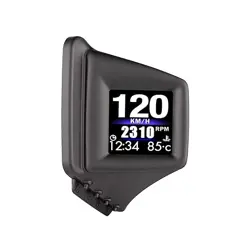
Car Smart Digital Meter
(Model: P8)
Thanks for purchasing our car smart digital meter. This product connects car OBD2 interface by OBD
cable, and display the driving dates, e.g. vehicle speed, engine RPM, water temperature, fuel
consumption,voltage etc. It can keep the driver’s eyes always on road to avoid the dangerous of
lowering down head to read the dashboard. This product won’t change any car ECU dates.
Kindly Attention:
(1)OBD2 mode working voltage: 11V~18VDC (12vdc/200mA), when voltage is higher than 24v,
please use a USB cable for GPS mode.
(2)This product is a dual system: After power on, select the language and system you are familiar
with, press the ‘>’ key to select OBD or GPS system, and automatically enter the last selected
system after 5 seconds of inactivity
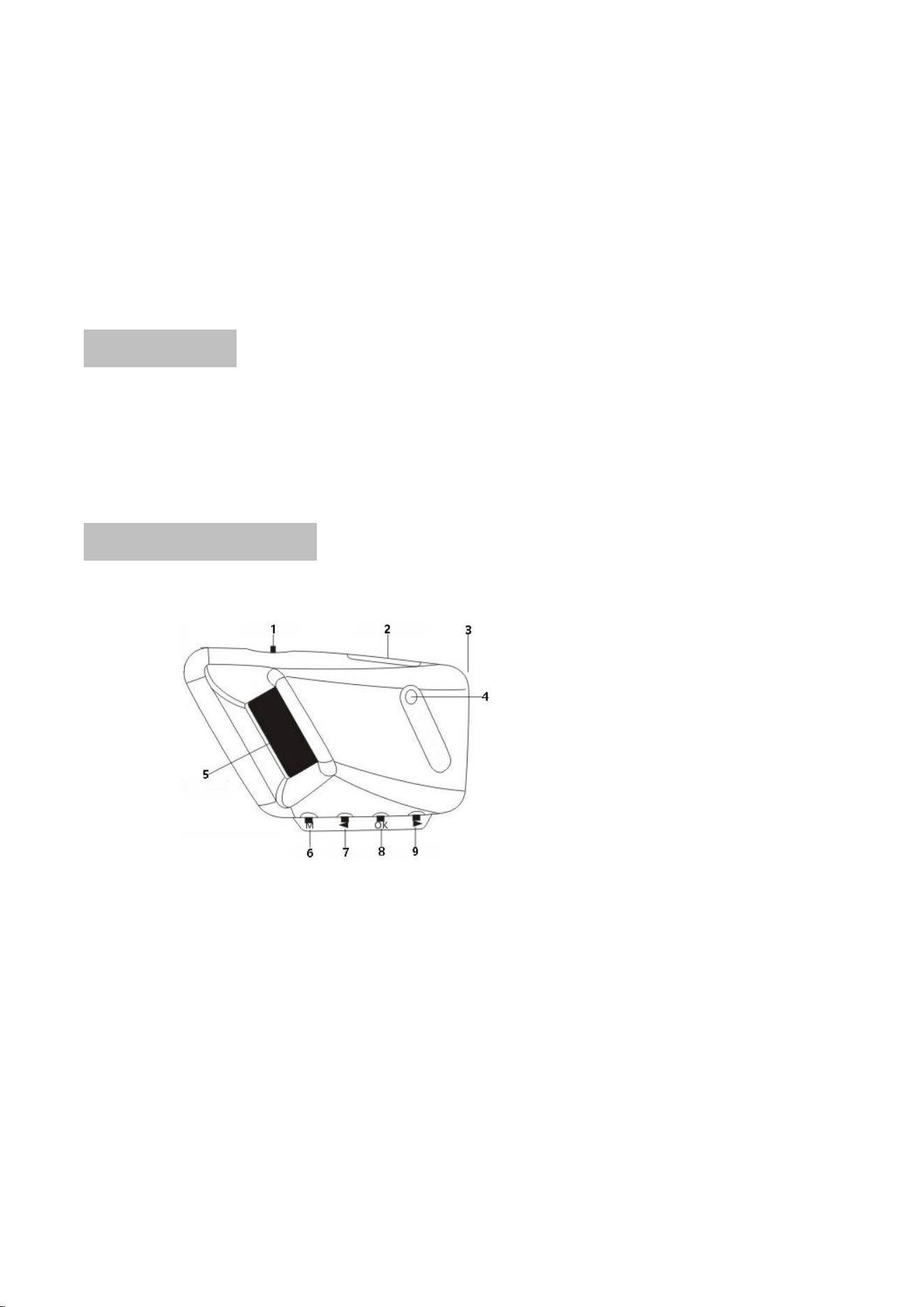
Button and port functions
Short press: press once to release
Long press: press for 2 seconds, then release after the display screen changes
1. Power switch
2.OBD line and USB line interface
3. A-pillar tie port
4. Photosensitive components: sense the intensity of external light and automatically adjust the
brightness to adapt to the environment
5. LCD screen
6. Short press ‘M’ button: enter the setting menu, short press again to exit the setting
7. Short press ‘<’ button: (1) Switch language and system when first used
(2) Switch function display after normal display
(3) Decrease the menu or parameter value after entering the setting
8. Short press ‘OK’ button: (1) Select function
(2) After normal display, switch the display screen,
Long press ‘OK’ button: (1) Enter settings
(2) After adjustment, press again for 2 seconds to save and exit
9. Short press of the ‘>’ key: (1) Switch language and system when first used
(2) Switch the left function display after normal display
(3) After entering the setting, increase the menu or parameter value
Functions Abbreviations:
ECT - Engine Coolant Temperature
VLT - Voltage
FUE - Fuel Consumption
RPM - Revolutions Per Minute
TIM - Local time
MIN-Driving time
DIS - Driving Distance
MAP - Intake Pressure
OIT - Oil Temperature
A/F - Air-fuel Ratio
TCP - Turbine Pressure
PSI - Turbine Pressure
RTC - Real-Time Clock
ALS - Altitude
GPS - GPS satellite numbers
DIR-driving direction
Setting Mode(Menu mode)
Long press 'OK' button for 2 seconds to enter the setting item, press the'>' button to increase the
menu option, short press the ’M‘button again to enter the parameter value, short press the'>' or'<'
button to adjust the parameter value, short press 'OK' button Confirm and return to the menu,
press and hold 'OK' button for 2 seconds to save and exit
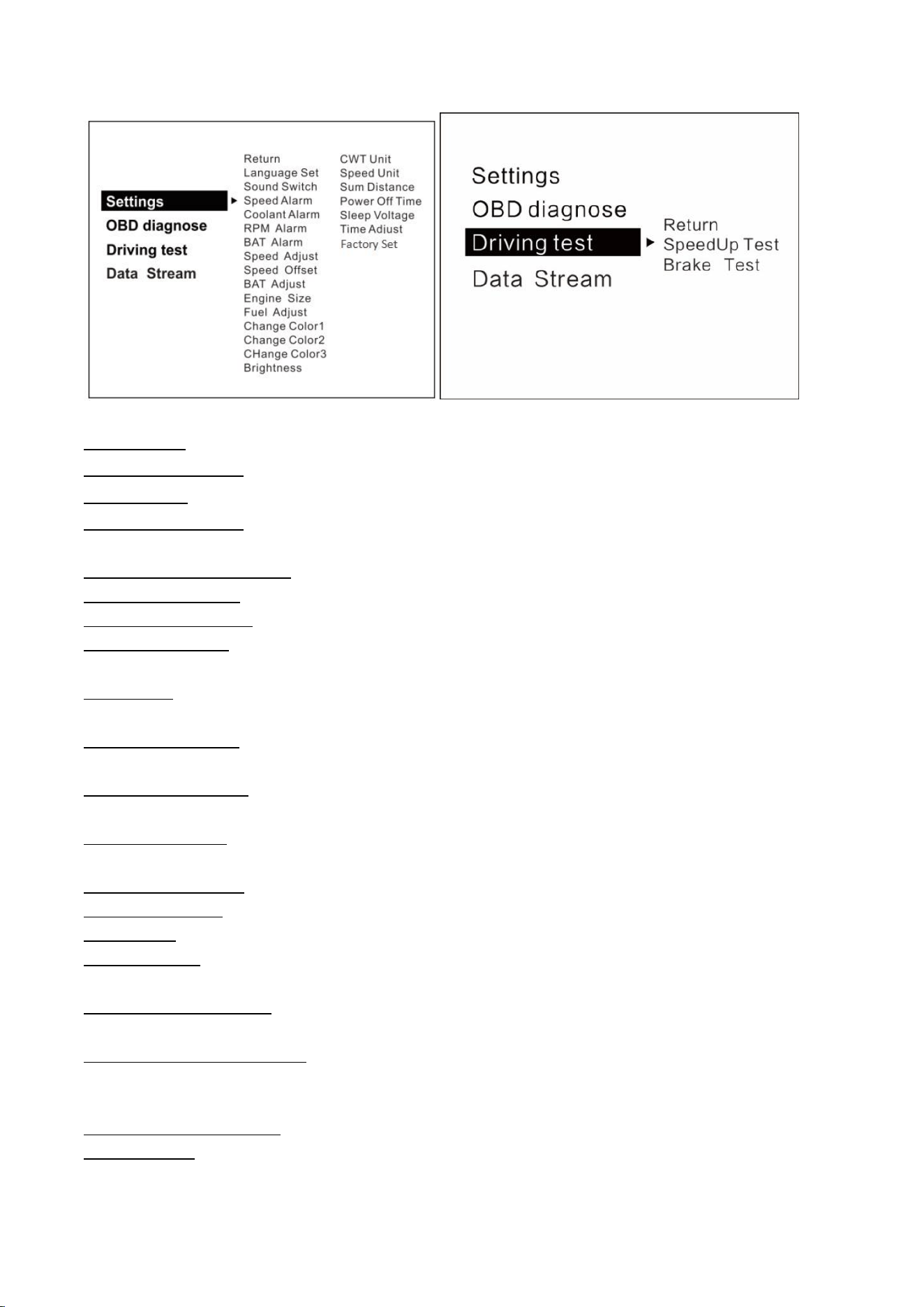
Language Set: ( EN-English / CN - Simplified Chinese/ TW - Traditional Chinese)
Screen angle setting: four-segment screen rotation 0-90-180-270
Sound Switch: turn on/off the buzzer
Speeding reminder: alarm when the vehicle speed reaches the set default value of 150KM/h, the
setting range is 5-200km/h
Engine temperature alarm:its default value 120 degrees C,range 50-200
Engine speed alarm:its default value of 6000r/min,range 1000-8000
Voltage alarm setting:its default value of 10.5v,range 10.0-15.0v
Speed adjustment:the operation is required only there is an error(e.g. instrument display 100 Km/h
HUD shows 105Km/h,use default value 107-5=102)
Speed zero:the vehicle speed does not return to 0 after the car stops
(E.g. speed display 5Km/h,please adjust HUD to 6Km/h)
Voltage adjustment: Fine-tuning when voltage is wrong with instrument panel voltage
(If the device shows 0.2V above the meter voltage, the device is adjusted to 98%)
Engine displacement: please adjust if there is too much deviation on the fuel consumption
(E.g. make parameter value to 3.6L,if your car displacement is 3.6L)
Fuel consumption:making a fine-tuning if there is an error
(If the device shows 0.2L above the meter voltage, the device is adjusted to 98%)
Backlight brightness: Auto automatic light sensitive, 1 for the darkest, 8 for the brightest
Temperature unit: °C-Celsius °F-Fahrenheit
Speed unit: Km/h: km, MPH: Miles
Count mileage: total mileage synchronization(Keep it as same as dashboard,ex:odometer shows
30010km, adjust the parameter value to 30010km)
Shutdown delay setting: the default is 10 seconds to shut down, when it is turned off while driving,
it can be adjusted to more than 180 seconds
Shutdown voltage setting: adjust to 13.2V or 13.6 voltage shutdown mode when unable to
shutdown RPM is the default speed for shutdown, COM is the automatic start-stop mode and
special mode for hybrid electric vehicles
System time adjustment: it can be adjusted to local time, the default time is China time (GMT+8)
Factory reset: the system restores to the factory preset values. After selecting this operation, press
the ’M‘button to confirm

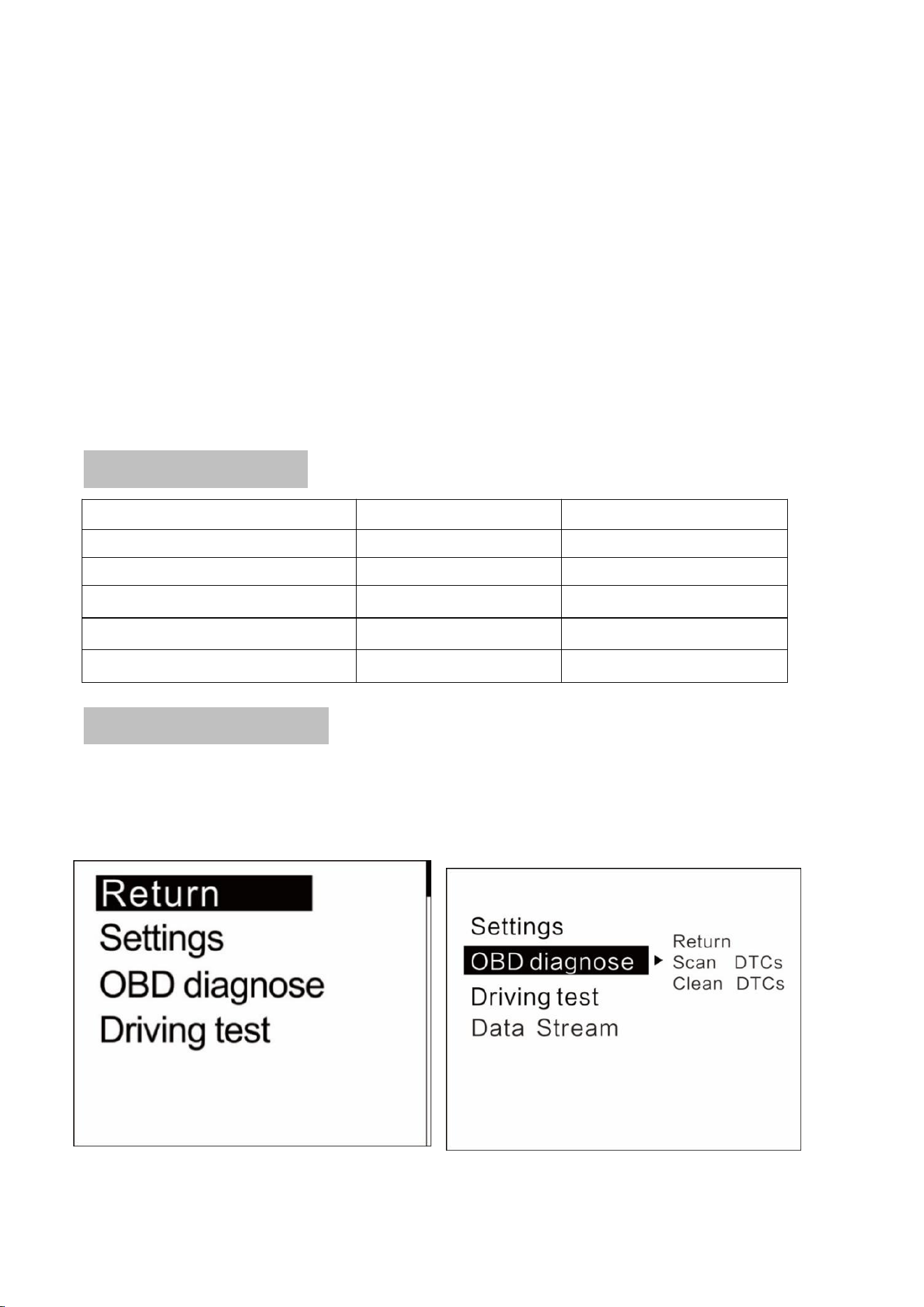
Driving test
Acceleration test: kilometers acceleration refers to the seconds 0 to 100km/h,is a test of car power
Brake test: the time and distance taken of a brake after the speed >100 , is a test of brake
performance
Troubleshooting settings
Scan fault code: Scanning the car for fault codes
Clear fault code:Short press ‘OK’ to clear the fault code when the car has fault code
Read the data stream: Show all the data in the car engine
Please note
It is recommended to unplug the device if your car doesn’t been used for more than one week.
OBD2 FAQ:
1.No function is displayed,no power
Check whether the OBD cable is tight connection,pull down repeatedly to confirm,please try it on
another car if still not workable,analysis if it is an error from OBD diagnostic interface,if yes,please
repair it and connect the device again.
2.Only the car voltage displays and be automatic power off after 30 second
This product is only applicable to OBDII and EOBD in OBD2 mode
Automobile production year (OBDII and EOBD were only used in other regions after 2003 and 2007
in other regions)
The OBD2 mode of this product does not support OBD I and JOBD
Please switch to the GPS system and use the USB cable to display, short press the ‘>’ button within 5
seconds of powering on to select the GPS system.
3.The vehicle speed on HUD is not as same as speedometer’s
(1) Please check that the unit is correct KM/mile MPH, (speed unit switch please refer to the
settings)
(2)After booting up and displaying normally, press and hold 'OK' button vertically for 2 seconds to
enter the system settings, press'>' to switch to the system settings, select the speed error
adjustment for fine adjustment (e.g. meter displays 100 Km/h,device shows 105Km/h,use default
value 107-5=102 ).
4. There is an error on fuel consumption
(1) Checking your car displacement and make sure that the engine displacement of the device is as
same as your car’s(e.g. car is 2.0L,please set parameter value to 2.0L)
(2) if the displacement is the same, you can also do a fine-tuning settings(e.g. equipment fuel is
higher than 0.2L,please set the parameter to 98%) Recommended: fine-tuning is optional since it is
a real data from car computer
5.The device can not auto power off
Adjust the sleep voltage to 13.2V or 13.6V, then HUD will power off in 3 minutes.

6.Auto start- stop cars
The shutdown voltage setting in the system settings is adjusted to the COM mode, the automatic
start-stop and the special mode for gasoline-electric hybrid vehicles
7. Automatic start-up will auto off when step the brake and same situation on Hybrid car in the
traffic.
(1) Setting to COM mode(in the menu of shutdown voltage)
(2) Setting shutdown delay to 300 seconds,so that it can turn off after 5 minutes
(3) Please switch to the GPS system(Short press the ‘>’ button within 5 seconds to select GPS
system)
8.Wrong operation lead to crashes
(1)Does the OBD2 interface use other OBD equipment (position, tire pressure monitoring, drop lock,
lift window folding, ELM27)
(2)Modified and retrofitted (central control navigation electronic throttle accelerator fixed speed
cruise brushed computer system
(3)One-button start, button-less entry, remote start) will cause crashes, unplug other OBD devices
and use the product directly, to restore factory settings (see the setting table for details)
(4)Long press ‘OK’ to enter the setup menu, short press ‘>’ to switch to system settings, short press
‘OK’ to enter system settings, short press ‘>’ to switch to factory settings, and short press ‘OK’ to
confirm
(5)If you haven't solved it, please switch to GPS system and use USB cable for display., Press the ‘>’
button within 5 seconds to select GPS system
GPS FAQ;
1.The screen without any display,and no power
Start the car engine;check if the cable line is tight;or connect the USB to the computer to check
2.Without car Speed
After HUD power-on, the GPS will start to find the satellite. Please drive the car to the road. It will
work once gets more than 5 satellite signals.
3. Cannot be turned on automatically or repeatedly extinguished during driving
Please use the USB cable to insert the cigarette lighter
If you use the OBD cable, change the sleep voltage to 13.0V or 12.8V
If use the USB cable, make the sleep voltage off.
4.Inaccurate time
Enter the setting items: system time adjustment, Press ‘>’ to adjust the time zone time, after
adjustment, long press ‘OK’ to save and exit
5.Speed is not correct
(1) If the unit is correct,km KM/mile MPH, (speed unit switch reference settings item)
(2) The car factory had increased speed(5-7%)than real for drivers’ safety,satellite data is strictly
follow the international standards
(3) Fine-tuning the vehicle speed, e.g. meter display 100 Km/h, machine display 105Km/h,default
value 107-5=102

6.Driving direction display error
After the vehicle speed exceeds 5KM/H, the direction can be displayed normally.
7.Speed is still on display after the car stops
Satellite drift will be caused in underground parking,tunnel,overpass or blockers,please drive your
car on open road,then this situation can be solved after the satellite numbers >5
8.HUD cannot be automatically shut down after car stopped
(1) HUD can be shut down in 3 minutes(in OBD mode)
(2) If not in 5 minutes,set item shutdown voltage to 13.5V or use the USB cable